pi-web-ui 0.80.2 → 0.81.0
This diff represents the content of publicly available package versions that have been released to one of the supported registries. The information contained in this diff is provided for informational purposes only and reflects changes between package versions as they appear in their respective public registries.
- package/CHANGELOG.md +44 -0
- package/README.md +111 -96
- package/README.zh-CN.md +85 -65
- package/dist/server/mcp-bridge.js +45 -7
- package/dist/server/plugins.js +23 -2
- package/package.json +4 -2
- package/plugins/catalog.json +9 -0
- package/web/dist/assets/{TerminalPanel-CeruoZjh.js → TerminalPanel-GQZf9XvH.js} +1 -1
- package/web/dist/assets/index-72bjWuR-.css +10 -0
- package/web/dist/assets/{index-DtBJSe33.js → index-CiRSpf3e.js} +42 -42
- package/web/dist/index.html +2 -2
- package/web/dist/assets/index-BduNm7_u.css +0 -10
package/README.zh-CN.md
CHANGED
|
@@ -98,7 +98,7 @@
|
|
|
98
98
|
- 首次配置引导 —— 没装 pi CLI 时可直接一键安装(失败有详情、可重试/跳过),然后选服务商 + 填密钥就能开用。
|
|
99
99
|
- 设置面板:
|
|
100
100
|
- **系统提示词** —— 11 个来源(soul / tools / guidelines / pi 文档 / append / persona / terminal / markers / context / skills / cwd)拼成的 `{{token}}` 组合模板,点 token 芯片即可追加;每个来源可单独覆盖(`auto` 徽标、「以默认为底改写」、单独恢复默认,环境类来源保持只读);另有两个查看器分别展示**实际生效的完整提示词**与**真正发给模型的工具 schema**。
|
|
101
|
-
- **输入历史与快捷短语** —— 历史有上限(1–500 条,可选单条字数上限,两步确认清空),用 `↑`/`↓`
|
|
101
|
+
- **输入历史与快捷短语** —— 历史有上限(1–500 条,可选单条字数上限,两步确认清空),用 `↑`/`↓` 在光标位于草稿首/末**视觉行**时翻(自动折行的行也算);输入框上方的快捷短语可逐条编辑/上下移/删除/恢复默认。
|
|
102
102
|
- **技能** —— 逐个启停,另有「全文」芯片把整个 `SKILL.md` 注入提示词(单文件 8KB、总量 32KB)。
|
|
103
103
|
- **扩展** —— 逐个启停,`npm:` 装的可在可见终端里一键卸载(`pi remove npm:<包名>`)。
|
|
104
104
|
- **界面插件 / 目标审查 / 视觉桥 / 子代理模板** 各有自己的页,见 [界面插件](#界面插件)。
|
|
@@ -195,42 +195,42 @@
|
|
|
195
195
|
|
|
196
196
|
## 快捷键
|
|
197
197
|
|
|
198
|
-
| 按键
|
|
199
|
-
|
|
|
200
|
-
| `Enter`
|
|
201
|
-
| `Shift+Enter`
|
|
202
|
-
| `↑` / `↓`
|
|
203
|
-
| `Ctrl/Cmd+K`
|
|
204
|
-
| `Ctrl/Cmd+F`
|
|
205
|
-
| `/`
|
|
206
|
-
| `Ctrl/Cmd+S`
|
|
207
|
-
| `Ctrl/Cmd+A`
|
|
208
|
-
| `Ctrl/Cmd+Enter`
|
|
209
|
-
| `Ctrl/Cmd+C` / `Ctrl/Cmd+V` | 终端里:有选中则复制(无选中时 `^C` 仍发给 shell)/ 原生粘贴。
|
|
210
|
-
| `Esc`
|
|
211
|
-
| 拖放
|
|
198
|
+
| 按键 | 作用 |
|
|
199
|
+
| --------------------------- | -------------------------------------------------------------------------------------------------------------------------------------- |
|
|
200
|
+
| `Enter` | 发送。触屏设备上 `Enter` 改为换行,`Ctrl/Cmd+Enter` 才发送(Windows 触屏笔记本当作桌面)。 |
|
|
201
|
+
| `Shift+Enter` | 输入框内换行。 |
|
|
202
|
+
| `↑` / `↓` | 光标在首/末**视觉行**时翻全局输入历史(跨对话持久化;自动折行的行也算,一段长草稿按 `↑` 是逐行上移光标而不是切历史);`Esc` 回到草稿。 |
|
|
203
|
+
| `Ctrl/Cmd+K` | 全局搜索(对话 / 项目 / 工作区文件名)。 |
|
|
204
|
+
| `Ctrl/Cmd+F` | 搜当前对话 —— `Enter` 下一个命中,`Shift+Enter` 上一个,`Esc` 关闭。 |
|
|
205
|
+
| `/` | 打开斜杠命令选择器(`↑`/`↓` 选择、`Tab` 或 `Enter` 补全、`Esc` 关闭;输入空格则自动关闭)。 |
|
|
206
|
+
| `Ctrl/Cmd+S` | 预览里编辑文件时保存。 |
|
|
207
|
+
| `Ctrl/Cmd+A` | 预览里全选行(光标不在文本框时)。 |
|
|
208
|
+
| `Ctrl/Cmd+Enter` | 提交「编辑重问」编辑器。 |
|
|
209
|
+
| `Ctrl/Cmd+C` / `Ctrl/Cmd+V` | 终端里:有选中则复制(无选中时 `^C` 仍发给 shell)/ 原生粘贴。 |
|
|
210
|
+
| `Esc` | 关闭预览、对话框、命令选择器、问卷或扩展请求面板(预览有未保存改动时会先问)。 |
|
|
211
|
+
| 拖放 | 窗口任意位置拖入文件 = 附件到对话;拖到文件树 = 上传到那一个目录;不支持拖文件夹(展开后选文件)。 |
|
|
212
212
|
|
|
213
213
|
## 界面截图
|
|
214
214
|
|
|
215
215
|
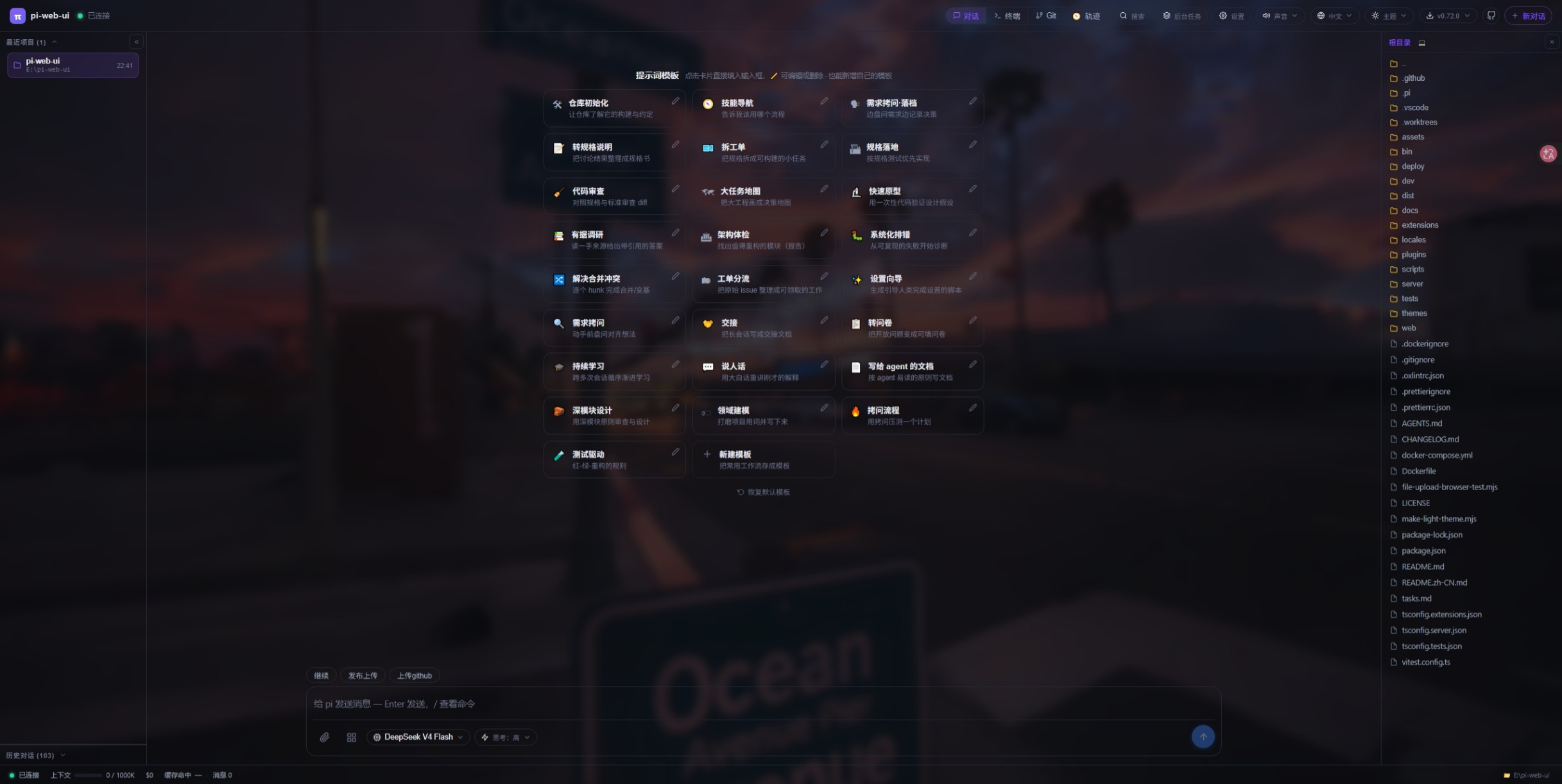
|
|
216
216
|
|
|
217
|
-
|
|
217
|
+
_对话 + 提示词模板_
|
|
218
218
|
|
|
219
219
|
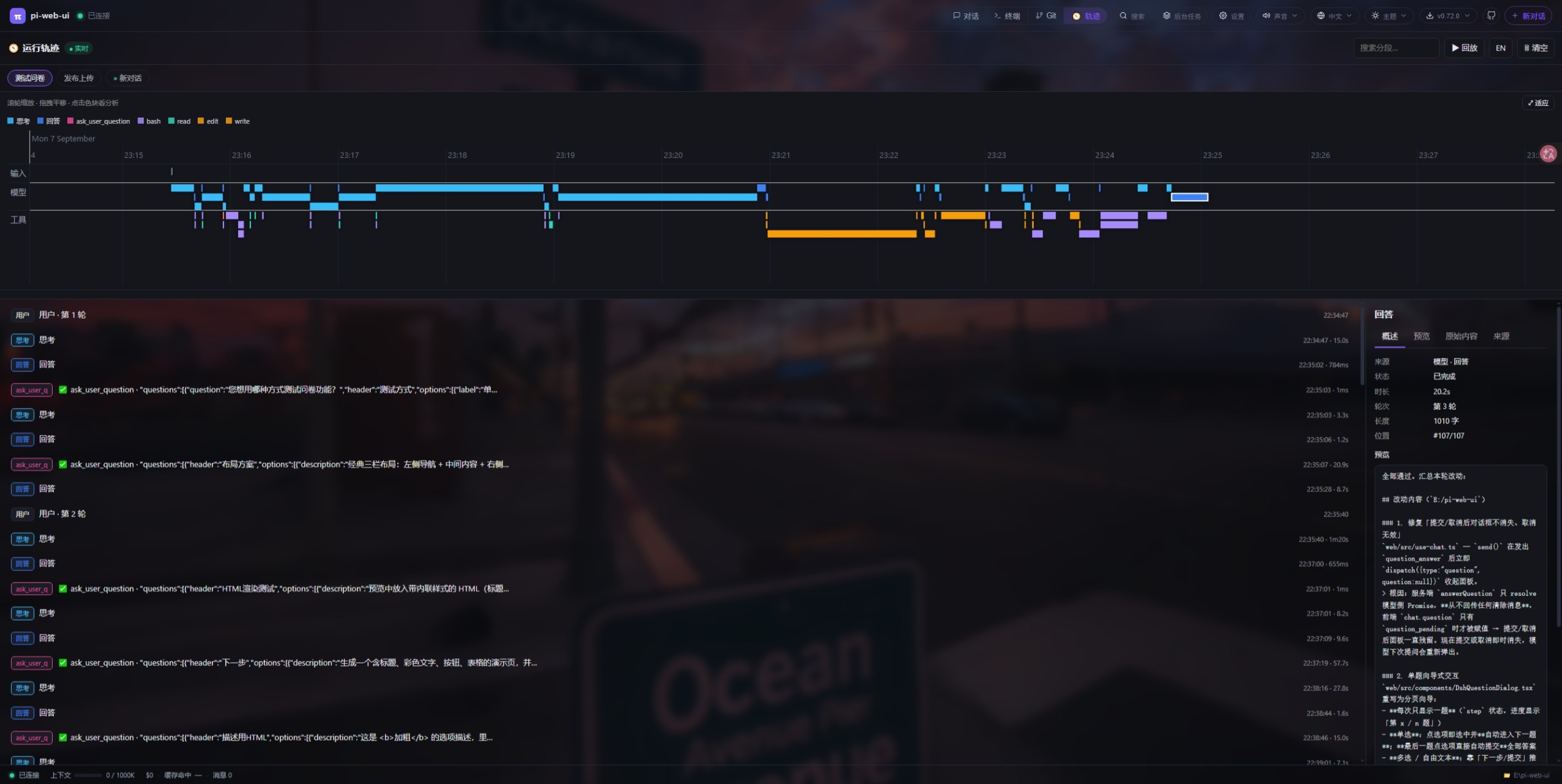
|
|
220
220
|
|
|
221
|
-
|
|
221
|
+
_运行轨迹时间线(run-trace 插件)_
|
|
222
222
|
|
|
223
223
|
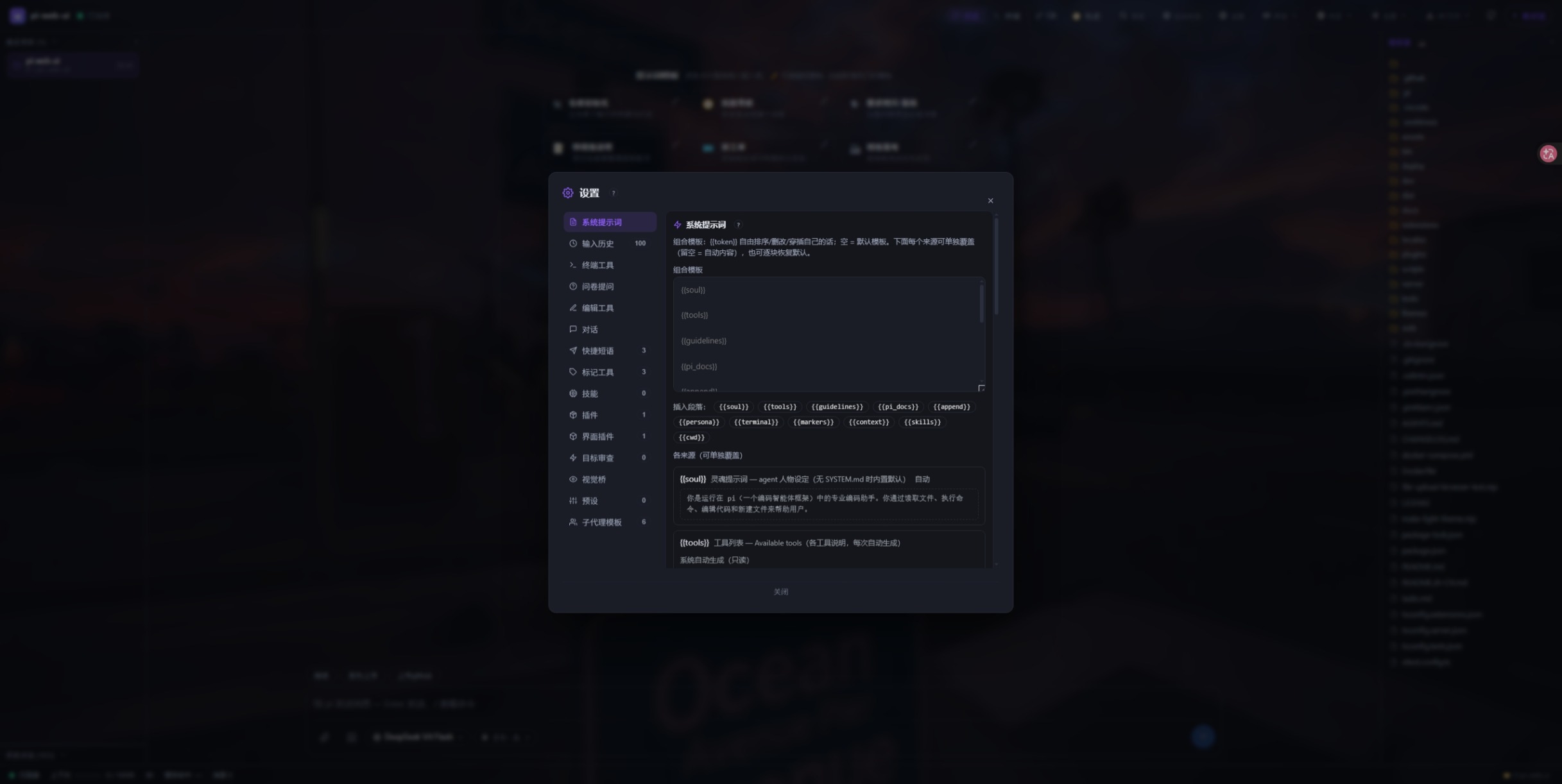
|
|
224
224
|
|
|
225
|
-
|
|
225
|
+
_设置面板_
|
|
226
226
|
|
|
227
227
|
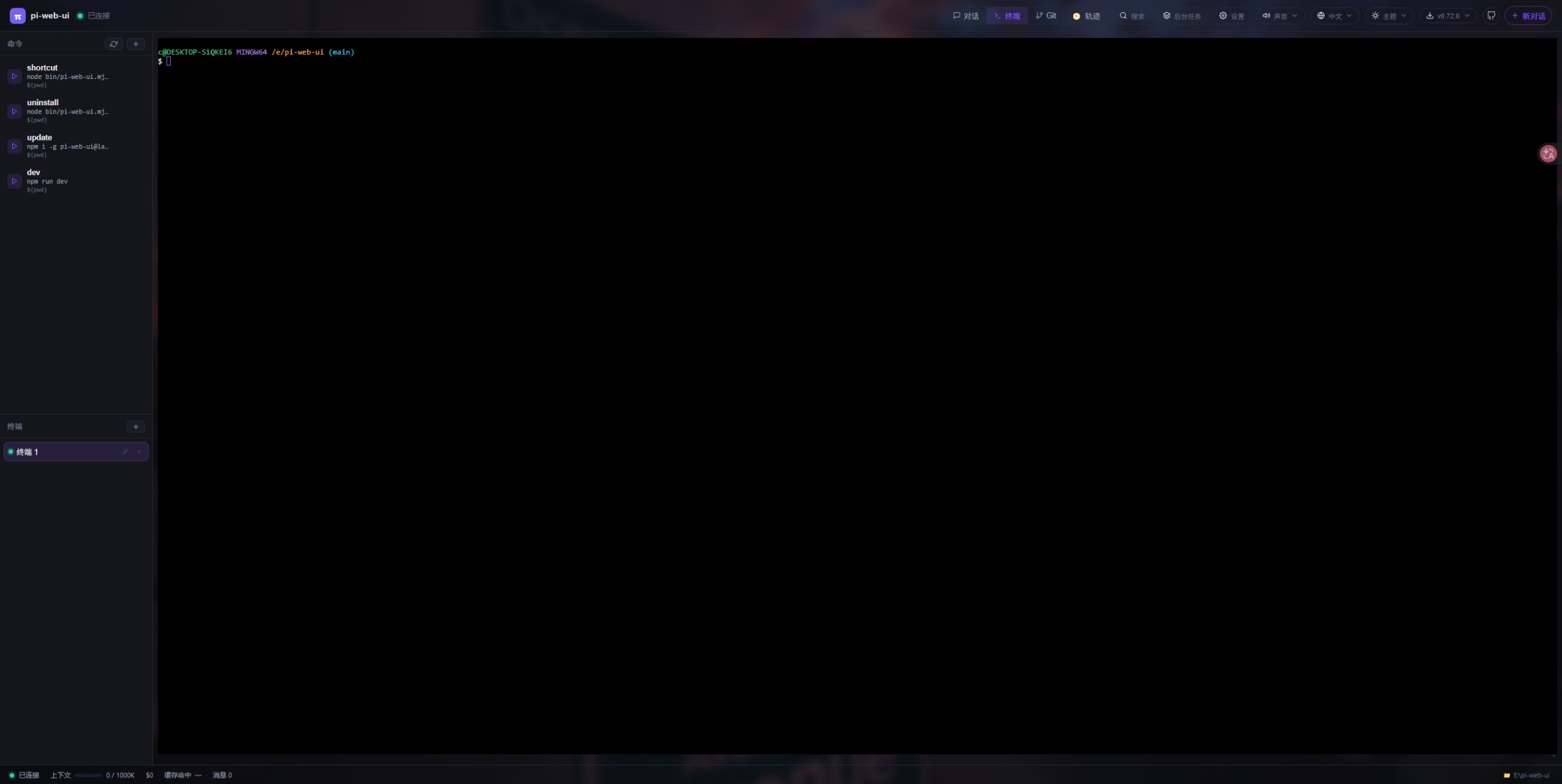
|
|
228
228
|
|
|
229
|
-
|
|
229
|
+
_内置终端_
|
|
230
230
|
|
|
231
231
|
|
|
232
232
|
|
|
233
|
-
|
|
233
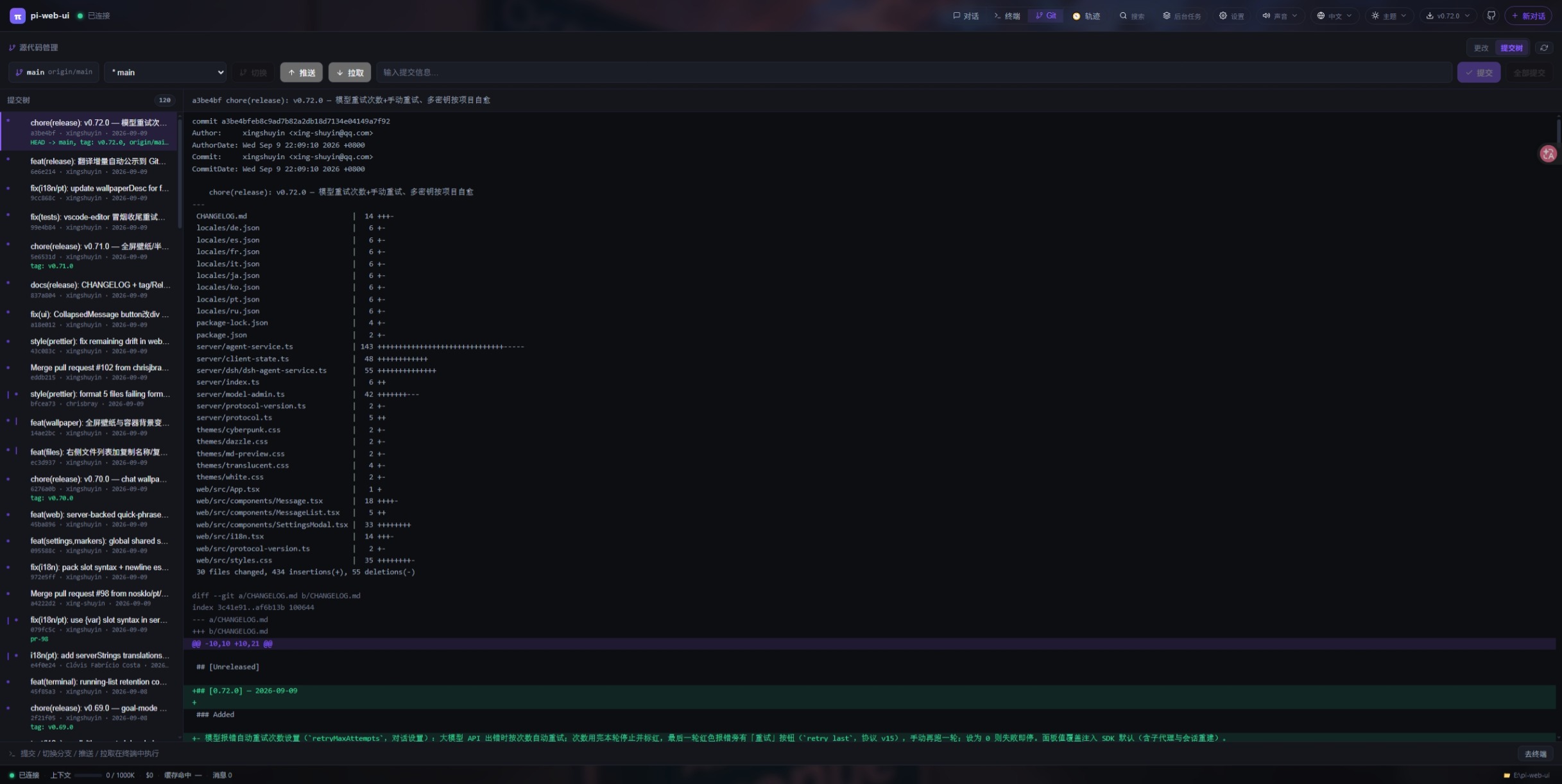
|
+
_Git 源代码管理面板_
|
|
234
234
|
|
|
235
235
|
## 安装
|
|
236
236
|
|
|
@@ -297,17 +297,17 @@ pi-web-ui # 前台,http://localhost:
|
|
|
297
297
|
**启动参数 & 环境变量** —— 每个设置既能用命令行的 `--flag` 传,也能用环境变量设(flag 优先)。
|
|
298
298
|
二者任选一种即可:
|
|
299
299
|
|
|
300
|
-
| 参数
|
|
301
|
-
|
|
|
302
|
-
| `--port <n>`
|
|
303
|
-
| `--cwd <dir>`
|
|
304
|
-
| `--data-dir <dir>`
|
|
305
|
-
| `--engine <pi\|dsh>` | `PI_WEB_ENGINE`
|
|
306
|
-
| `--host <addr>`
|
|
307
|
-
| `--agent-dir <dir>`
|
|
308
|
-
| `--no-browser`
|
|
309
|
-
| _仅环境变量_
|
|
310
|
-
| _仅环境变量_
|
|
300
|
+
| 参数 | 环境变量 | 默认 | 作用 |
|
|
301
|
+
| -------------------- | --------------------- | ------------- | ------------------------------------------------- |
|
|
302
|
+
| `--port <n>` | `PI_WEB_PORT` | `8787` | HTTP 端口 |
|
|
303
|
+
| `--cwd <dir>` | `PI_WEB_CWD` | 当前目录 | 工作区根(读/写/终端) |
|
|
304
|
+
| `--data-dir <dir>` | `PI_WEB_DATA_DIR` | `~/.pi-web` | 数据目录(界面状态/插件/上传/主题/语言包) |
|
|
305
|
+
| `--engine <pi\|dsh>` | `PI_WEB_ENGINE` | `pi` | 智能体引擎;`--engine dsh` = DeepSeek Harness |
|
|
306
|
+
| `--host <addr>` | `PI_WEB_HOST` | `127.0.0.1` | 监听地址(`0.0.0.0` 供局域网/Docker) |
|
|
307
|
+
| `--agent-dir <dir>` | `PI_CODING_AGENT_DIR` | `~/.pi/agent` | pi 配置目录(auth.json、models.json、会话、技能) |
|
|
308
|
+
| `--no-browser` | — | 关 | 启动但不自动打开浏览器 |
|
|
309
|
+
| _仅环境变量_ | `PI_WEB_TOKEN` | 空 | 可选共享鉴权口令 |
|
|
310
|
+
| _仅环境变量_ | `PI_WEB_DSH_*` | — | dsh 运行时、补丁与调试设置 |
|
|
311
311
|
|
|
312
312
|
两者等价 —— 任选其一:
|
|
313
313
|
|
|
@@ -408,14 +408,14 @@ volumes:
|
|
|
408
408
|
|
|
409
409
|
以下插件随本仓库发布(`plugins/<id>/`),可直接从 GitHub 安装:
|
|
410
410
|
|
|
411
|
-
| 插件
|
|
412
|
-
|
|
|
413
|
-
| 📬 [网页邮箱 webmail](https://github.com/xing-shuyin/pi-web-ui/tree/main/plugins/webmail)
|
|
414
|
-
| 🗄️ [数据库 db-client](https://github.com/xing-shuyin/pi-web-ui/tree/main/plugins/db-client)
|
|
415
|
-
| 📝 [编辑器 + SSH vscode-editor](https://github.com/xing-shuyin/pi-web-ui/tree/main/plugins/vscode-editor) | 类 VSCode 工作台:多根文件树(本地 + SSH 主机)、CodeMirror 多标签编辑器、Remote-SSH 远程文件浏览/编辑、可拖拽多终端面板(xterm.js)、SFTP 同步与下载到电脑。自动安装 `ssh2`。
|
|
416
|
-
| 📊 [图表 mermaid](https://github.com/xing-shuyin/pi-web-ui/tree/main/plugins/mermaid)
|
|
417
|
-
| 🧭 [运行轨迹 run-trace](https://github.com/xing-shuyin/pi-web-ui/tree/main/plugins/run-trace)
|
|
418
|
-
| 📖 [阅读 legado-web](https://github.com/xing-shuyin/pi-web-ui/tree/main/plugins/legado-web)
|
|
411
|
+
| 插件 | 功能 |
|
|
412
|
+
| --------------------------------------------------------------------------------------------------------- | ------------------------------------------------------------------------------------------------------------------------------------------------------------------------------------------------------------------------------------------------------------------------------------------------------------------ |
|
|
413
|
+
| 📬 [网页邮箱 webmail](https://github.com/xing-shuyin/pi-web-ui/tree/main/plugins/webmail) | IMAP 收件箱浏览/搜索/阅读/标记/删除 + SMTP 发信、新邮件通知,可选「允许 AI 管理邮箱」(六个 `mail_*` AI 工具)。首次激活自动补装 npm 依赖。 |
|
|
414
|
+
| 🗄️ [数据库 db-client](https://github.com/xing-shuyin/pi-web-ui/tree/main/plugins/db-client) | 数据库工作台:MySQL / PostgreSQL / SQLite / SQL Server / MongoDB / Redis 连接管理 + 库表树 —— 表结构、分页排序、SQL 编辑器、行编辑。驱动首次使用自动安装。 |
|
|
415
|
+
| 📝 [编辑器 + SSH vscode-editor](https://github.com/xing-shuyin/pi-web-ui/tree/main/plugins/vscode-editor) | 类 VSCode 工作台:多根文件树(本地 + SSH 主机)、CodeMirror 多标签编辑器、Remote-SSH 远程文件浏览/编辑、可拖拽多终端面板(xterm.js)、SFTP 同步与下载到电脑。自动安装 `ssh2`。 |
|
|
416
|
+
| 📊 [图表 mermaid](https://github.com/xing-shuyin/pi-web-ui/tree/main/plugins/mermaid) | 把对话里的 ` ```mermaid ` 围栏渲染成 SVG 图表(fenced-code 渲染插件,本地引擎离线优先)。 |
|
|
417
|
+
| 🧭 [运行轨迹 run-trace](https://github.com/xing-shuyin/pi-web-ui/tree/main/plugins/run-trace) | 运行轨迹:任务 → 思考 → 工具 → 文件改动 → 结果的时间线聚合视图,支持回放与节点详情。 |
|
|
418
|
+
| 📖 [阅读 legado-web](https://github.com/xing-shuyin/pi-web-ui/tree/main/plugins/legado-web) | Legado 阅读(文本源):基于兼容安卓书源的搜书 / 发现 / 详情 / 目录 / 正文阅读,支持书源导入、检测与删废源,并提供四个修源 AI 工具(`legado_rules`、`legado_book_sources`、`legado_source_probe`、`legado_run_rule`)与「🤖 AI 修复源」按钮(带失败现场直接开新对话)。书源/书架/进度存在 `<dataDir>/legado-web/`。 |
|
|
419
419
|
|
|
420
420
|
`plugins/demo-mailbox` 作为最小插件模板保留在仓库里(服务端入口 + 客户端视图 + 双向消息协议),兼作测试夹具——想自己写插件从这里入手。
|
|
421
421
|
|
|
@@ -484,6 +484,27 @@ pi-web-ui uninstall <id> # 卸载插件
|
|
|
484
484
|
- `uninstall` 会删除插件目录;刷新浏览器后 tab 即消失。写在插件目录内的配置文件也会一并删除——
|
|
485
485
|
如需保留请先备份 `<dataDir>/plugins/<id>/config.json`。
|
|
486
486
|
|
|
487
|
+
## 浏览器扩展
|
|
488
|
+
|
|
489
|
+
### 🎯 网页元素拾取(page-picker)
|
|
490
|
+
|
|
491
|
+
在**开发中的网页**上点选元素,把它整理成 AI 能直接动手的上下文,一键注入 pi-web-ui 的对话输入框
|
|
492
|
+
(`Alt+Shift+P` 或点扩展图标 → hover 高亮 → 点击拾取 → `Shift`+点击多选 → 写备注 → 「添加到对话」)。
|
|
493
|
+
|
|
494
|
+
它不是 pi-web-ui 的服务端插件,而是一个**浏览器扩展**(所以不走 `pi-web-ui install`):
|
|
495
|
+
|
|
496
|
+
**下载装**(不需要 Node):[`page-picker-extension.zip`](https://github.com/xing-shuyin/pi-web-ui/releases/latest/download/page-picker-extension.zip) →
|
|
497
|
+
解压 → `chrome://extensions` 打开「开发者模式」→「加载已解压的扩展程序」→ 选解压出的目录 →
|
|
498
|
+
点扩展的「扩展程序选项」填 pi-web-ui 地址(远程地址先点「授权该地址」)。
|
|
499
|
+
|
|
500
|
+
详细说明(交互、采集了什么、远程部署、已知限制)见
|
|
501
|
+
[`plugins/page-picker/README.md`](https://github.com/xing-shuyin/pi-web-ui/tree/main/plugins/page-picker)。
|
|
502
|
+
|
|
503
|
+
采集的不是截图,而是**能让 AI 一次改对**的东西:React fiber 里的组件源码位置(`Card.tsx:18:5` +
|
|
504
|
+
调用链)、Vue SFC 文件、命中的 CSS 规则**源文件与行号**(Vite dev 下精确反推)、
|
|
505
|
+
只保留「与默认值不同」的计算样式子集、短且唯一的定位串、HTML 骨架与折叠文本;
|
|
506
|
+
可选元素截图会走对话附件。
|
|
507
|
+
|
|
487
508
|
## 主题
|
|
488
509
|
|
|
489
510
|
每个主题是**一份纯 `:root` 调色板覆盖** —— 只写 CSS 变量的声明文件(变量全集见 `web/src/styles.css` 的 `:root`:`--bg/--accent/--term-*` 基础色,加 `--tooltip-bg/--code-bg/--notice-*` 等派生色)。布局只存在于打包的 `web/src/styles.css` 里,选主题只是覆盖变量,因此任何主题都能在所有版本上工作,改布局也不需要碰主题文件。内置主题由 `node make-light-theme.mjs` 生成。
|
|
@@ -526,29 +547,28 @@ pi-web-ui uninstall <id> # 卸载插件
|
|
|
526
547
|
|
|
527
548
|
合并主题的规则:必须是单一 CSS 文件、设置 `--term-*` 变量保证终端可读、浅色主题覆盖 `.hljs` 语法高亮色以保证代码可读。
|
|
528
549
|
|
|
529
|
-
|
|
530
550
|
## 环境变量调优
|
|
531
551
|
|
|
532
552
|
以下全部可选——默认值就是开发时一直在用的配置。完整参考:[`docs/env-vars.md`](docs/env-vars.md)。
|
|
533
553
|
|
|
534
|
-
| 变量
|
|
535
|
-
|
|
|
536
|
-
| `PI_WEB_TOOL_TIMEOUT_MS`
|
|
537
|
-
| `PI_WEB_STALL_NOTIFY_MS`
|
|
538
|
-
| `PI_WEB_TERMINAL_IDLE_MS`
|
|
539
|
-
| `PI_WEB_TERMINAL_IDLE_LINES`
|
|
540
|
-
| `PI_WEB_INLINE_FILE_MAX`
|
|
541
|
-
| `PI_WEB_VISION_TIMEOUT_MS`
|
|
542
|
-
| `PI_WEB_UPLOAD_RETENTION_DAYS` | `14`
|
|
543
|
-
| `PI_WEB_SHELL`
|
|
544
|
-
| `PI_WEB_TABS`
|
|
545
|
-
| `PI_WEB_MANAGED`
|
|
546
|
-
| `PI_WEB_ALLOW_HOSTS`
|
|
547
|
-
| `PI_WEB_LOCALE`
|
|
548
|
-
| `PI_WEB_LOCALE_BASE_URL`
|
|
549
|
-
| `PI_WEB_PKG_ROOT`
|
|
550
|
-
| `PI_CODING_AGENT_SESSION_DIR`
|
|
551
|
-
| `DSH_*`
|
|
554
|
+
| 变量 | 默认 | 作用 |
|
|
555
|
+
| ------------------------------ | ------------------ | -------------------------------------------------------------------------------------------------------------------------------------------------------------------------------------------------------------- |
|
|
556
|
+
| `PI_WEB_TOOL_TIMEOUT_MS` | `1200000`(20 分) | 单工具调用看门狗;超时自动中止(`ask_user_question` 豁免)。 |
|
|
557
|
+
| `PI_WEB_STALL_NOTIFY_MS` | `180000`(3 分) | 流式运行完全没事件时给警告(不中止);`0` = 关。 |
|
|
558
|
+
| `PI_WEB_TERMINAL_IDLE_MS` | `15000` | AI 开过的终端静默这么久就催它去看一眼;`0` = 关。 |
|
|
559
|
+
| `PI_WEB_TERMINAL_IDLE_LINES` | `10` | 该催命消息回送的终端尾部行数(1–500)。 |
|
|
560
|
+
| `PI_WEB_INLINE_FILE_MAX` | `12288`(12KB) | 小于它且无工作区归属的上传文件被内联而不是只给路径。 |
|
|
561
|
+
| `PI_WEB_VISION_TIMEOUT_MS` | `90000` | 视觉桥整批转写的超时。 |
|
|
562
|
+
| `PI_WEB_UPLOAD_RETENTION_DAYS` | `14` | `<dataDir>/uploads/` 保留天数;`0` = 不清理。 |
|
|
563
|
+
| `PI_WEB_SHELL` | 自动 | 仅 Windows:node-pty 用哪个 shell(自动顺序:`PI_WEB_SHELL` → `$SHELL` → Git Bash → 随包 busybox → `%COMSPEC%` → PowerShell)。 |
|
|
564
|
+
| `PI_WEB_TABS` | 全部标签页 | 逗号分隔的标签页白名单(`chat,terminal,git,search,tasks,settings,plugins`);未列入的在服务端也被拒绝,`chat` 不可关。 |
|
|
565
|
+
| `PI_WEB_MANAGED` | 关 | `1`/`true` 声明实例由外部部署管理:自更新、装 pi CLI、装插件都被拒绝并说明原因,前端也隐藏入口。 |
|
|
566
|
+
| `PI_WEB_ALLOW_HOSTS` | 空 | 严格的主机名白名单(叠加在始终生效的同权威校验之上)。 |
|
|
567
|
+
| `PI_WEB_LOCALE` | 空 | 首访回退语言(显式选择与浏览器语言优先级更高)。 |
|
|
568
|
+
| `PI_WEB_LOCALE_BASE_URL` | GitHub raw | 语言包下载根 —— 指向镜像即可做离线/内网安装。 |
|
|
569
|
+
| `PI_WEB_PKG_ROOT` | 自动 | 显式指定包根目录(非标准安装位置时用)。 |
|
|
570
|
+
| `PI_CODING_AGENT_SESSION_DIR` | 空 | 让 pi 把转录扁平写入该目录(而非 `<agentDir>/sessions/--<cwd>--/`,会改变历史列表读到的内容)。 |
|
|
571
|
+
| `DSH_*` | — | DSH 运行时旋钮:`PI_WEB_DSH_RUNTIME`、`PI_WEB_DSH_DATA_DIR`、`PI_WEB_DSH_PATCH_DIR`、`PI_WEB_DSH_QUESTION_TIMEOUT_MS`、`PI_WEB_DSH_TOOL_TIMEOUT_MS`、`PI_WEB_DSH_SESSION_RETENTION_DAYS`、`PI_WEB_DSH_DEBUG`。 |
|
|
552
572
|
|
|
553
573
|
## 安全
|
|
554
574
|
|
|
@@ -626,13 +646,13 @@ server {
|
|
|
626
646
|
|
|
627
647
|
pi-web-ui 是一个小型开源项目 —— **你的贡献就是它成长的力量**。代码、插件、主题、文档、翻译、想法,统统欢迎;每一个合并的 PR 都会随下一次 `npm publish` 送达所有用户。❤️
|
|
628
648
|
|
|
629
|
-
| 贡献方式
|
|
630
|
-
|
|
|
631
|
-
| 🧩 **写插件**
|
|
632
|
-
| 🎨 **贡献主题**
|
|
633
|
-
| 💻 **修 bug / 加功能** | 在 [Issues](https://github.com/xing-shuyin/pi-web-ui/issues) 里挑一个,或提出新想法。Fork → 分支 → PR。代码约定见 `AGENTS.md`(Tab 缩进、i18n 双语 key、协议改动只动 `server/protocol.ts`)。
|
|
634
|
-
| 📖 **文档与翻译**
|
|
635
|
-
| 💡 **想法与反馈**
|
|
649
|
+
| 贡献方式 | 如何开始 |
|
|
650
|
+
| ---------------------- | ----------------------------------------------------------------------------------------------------------------------------------------------------------------------------------------------------------- |
|
|
651
|
+
| 🧩 **写插件** | 打造你自己的界面 tab + AI 工具。以 `plugins/demo-mailbox` 为最小模板(它兼作测试夹具),本地开发后既可开 PR 收录进[插件目录](#插件目录),也可独立发布。 |
|
|
652
|
+
| 🎨 **贡献主题** | 以 `themes/white.css`(浅色)或 `themes/cyberpunk.css`(深色)为纯调色板模板,调整 `:root` 配色 + `--term-*` + `.hljs`,用 `npm run dev` 验证后开 PR —— 完整步骤见[向仓库贡献主题](#向仓库贡献主题github)。 |
|
|
653
|
+
| 💻 **修 bug / 加功能** | 在 [Issues](https://github.com/xing-shuyin/pi-web-ui/issues) 里挑一个,或提出新想法。Fork → 分支 → PR。代码约定见 `AGENTS.md`(Tab 缩进、i18n 双语 key、协议改动只动 `server/protocol.ts`)。 |
|
|
654
|
+
| 📖 **文档与翻译** | 完善 README、补插件文档、改错别字,或帮忙把界面/文档翻译成更多语言。 |
|
|
655
|
+
| 💡 **想法与反馈** | 在 [Issues](https://github.com/xing-shuyin/pi-web-ui/issues) 或 [Discussions](https://github.com/xing-shuyin/pi-web-ui/discussions) 里开帖 —— 功能建议、bug 报告、界面优化点子、部署经验分享都欢迎。 |
|
|
636
656
|
|
|
637
657
|
**开 PR 前**,快速自检能让维护者更省心:
|
|
638
658
|
|
|
@@ -80,7 +80,10 @@ export class McpClient {
|
|
|
80
80
|
getTools() {
|
|
81
81
|
return this.tools.map((t) => ({ ...t }));
|
|
82
82
|
}
|
|
83
|
-
/**
|
|
83
|
+
/**
|
|
84
|
+
* 调用一个工具,返回其结果。
|
|
85
|
+
* 纯文本块拼接成字符串(老形状,向后兼容);出现非文本块(image/resource/audio 等)时按序透传或退化提示,不再静默丢弃。
|
|
86
|
+
*/
|
|
84
87
|
async call(name, args, timeoutMs = 60000) {
|
|
85
88
|
const res = (await this.request("tools/call", { name, arguments: args }, timeoutMs));
|
|
86
89
|
if (res?.isError) {
|
|
@@ -90,14 +93,49 @@ export class McpClient {
|
|
|
90
93
|
.trim() || "MCP 工具错误";
|
|
91
94
|
throw new Error(msg);
|
|
92
95
|
}
|
|
93
|
-
//
|
|
96
|
+
// 结构化结果优先,其次内容块。
|
|
94
97
|
if (res?.structuredContent !== undefined)
|
|
95
98
|
return res.structuredContent;
|
|
96
|
-
const
|
|
97
|
-
|
|
98
|
-
|
|
99
|
-
.
|
|
100
|
-
|
|
99
|
+
const blocks = [];
|
|
100
|
+
let hasNonText = false;
|
|
101
|
+
for (const c of res.content ?? []) {
|
|
102
|
+
if (c.type === "image" && typeof c.data === "string" && c.data) {
|
|
103
|
+
// MCP image 块字段(type/data/mimeType)与 SDK 的 ImageContent 完全一致,原样透传;
|
|
104
|
+
// 超大图由 SDK 的 normalizeToolResultImages 统一缩放(afterToolCall 钩子,默认 autoResize)。
|
|
105
|
+
blocks.push({ type: "image", data: c.data, mimeType: c.mimeType?.trim() || "image/png" });
|
|
106
|
+
hasNonText = true;
|
|
107
|
+
continue;
|
|
108
|
+
}
|
|
109
|
+
if (c.type && c.type !== "text") {
|
|
110
|
+
const r = typeof c.resource === "object" && c.resource !== null ? c.resource : {};
|
|
111
|
+
// MCP 的 EmbeddedResource 有两种承载:TextResourceContents(resource.text)与
|
|
112
|
+
// BlobResourceContents(resource.blob)。文本型带真实正文(filesystem 类 MCP 的
|
|
113
|
+
// read_text_file 就走这条),当文本透传 —— 退化成「已跳过」等于把文件内容吞掉。
|
|
114
|
+
if (typeof r.text === "string" && r.text) {
|
|
115
|
+
blocks.push({ type: "text", text: r.text });
|
|
116
|
+
continue;
|
|
117
|
+
}
|
|
118
|
+
// resource(blob)/audio 等块在 SDK 内容联合里没有载体(只有 text|image|thinking|toolCall),
|
|
119
|
+
// 退化为文本提示,让模型至少知道工具返回了什么,而不是看到一个空串。
|
|
120
|
+
const mime = (c.mimeType ?? r.mimeType ?? "").trim();
|
|
121
|
+
const blob = typeof r.blob === "string" && r.blob ? r.blob : c.data;
|
|
122
|
+
const size = typeof blob === "string" && blob ? `,约 ${Math.max(1, Math.round((blob.length * 3) / 4))} 字节` : "";
|
|
123
|
+
blocks.push({
|
|
124
|
+
type: "text",
|
|
125
|
+
text: `[MCP 工具返回了非文本内容块(${mime || c.type || "未知类型"}${size}),当前会话无法内联,已跳过。]`,
|
|
126
|
+
});
|
|
127
|
+
hasNonText = true;
|
|
128
|
+
continue;
|
|
129
|
+
}
|
|
130
|
+
const text = c.text ?? "";
|
|
131
|
+
if (text)
|
|
132
|
+
blocks.push({ type: "text", text });
|
|
133
|
+
}
|
|
134
|
+
if (!hasNonText) {
|
|
135
|
+
// 纯文本结果保持旧形状(拼接字符串),不破坏既有调用方。
|
|
136
|
+
return { content: blocks.map((b) => (b.type === "text" ? b.text : "")).join("\n"), isError: !!res.isError };
|
|
137
|
+
}
|
|
138
|
+
return { content: blocks, isError: !!res.isError };
|
|
101
139
|
}
|
|
102
140
|
/** 关闭:kill 子进程,拒绝所有在途请求。 */
|
|
103
141
|
close() {
|
package/dist/server/plugins.js
CHANGED
|
@@ -402,7 +402,17 @@ export class PluginManager {
|
|
|
402
402
|
return;
|
|
403
403
|
}
|
|
404
404
|
try {
|
|
405
|
-
handler(req, res)
|
|
405
|
+
// 异步 handler(`async (req, res) => …`)的 rejection 不会被这里的 try 接住,
|
|
406
|
+
// 会变成 unhandledRejection 直接杀掉整个服务(插件读文件失败、host.fs 越界
|
|
407
|
+
// 拒绝、上游超时…都会走到这条路上)——用 Promise.resolve().catch 兜住,
|
|
408
|
+
// 与同步抛错同样转 500。
|
|
409
|
+
void Promise.resolve(handler(req, res)).catch((err) => {
|
|
410
|
+
console.error(`[plugin:${pluginId}] http ${method} ${path} failed:`, err);
|
|
411
|
+
if (!res.headersSent)
|
|
412
|
+
res.status(500).end("internal error");
|
|
413
|
+
else
|
|
414
|
+
res.end();
|
|
415
|
+
});
|
|
406
416
|
}
|
|
407
417
|
catch (err) {
|
|
408
418
|
console.error(`[plugin:${pluginId}] http ${method} ${path} failed:`, err);
|
|
@@ -646,7 +656,13 @@ export class PluginManager {
|
|
|
646
656
|
}
|
|
647
657
|
return found.map((f) => this.loaded.get(f.id)?.info ?? f);
|
|
648
658
|
}
|
|
649
|
-
/** 反激活单个插件:deactivate + 注销 AI 工具 + 清缓存。
|
|
659
|
+
/** 反激活单个插件:deactivate + 注销 AI 工具 + 清缓存。
|
|
660
|
+
*
|
|
661
|
+
* 注意这里必须把 id 从 attempted 里摘掉:目录一时不在(`pi-web-ui install --force`
|
|
662
|
+
* 先 rm 再 cp,扫描正好撞上窗口期)只是「暂时看成卸载」,目录回来后还要能重新激活;
|
|
663
|
+
* 留在 attempted 里 = 本进程内永远不再激活,插件的 HTTP 路由 / AI 工具全没了,
|
|
664
|
+
* 前端只会看到「代理请求失败 404 <url>」(插件的 /proxy 路由不存在),且 CLI 承诺的
|
|
665
|
+
* 「刷新浏览器即可加载」失效,必须重启服务才能恢复。 */
|
|
650
666
|
deactivateEntry(id, p) {
|
|
651
667
|
try {
|
|
652
668
|
p.deactivate?.();
|
|
@@ -665,6 +681,11 @@ export class PluginManager {
|
|
|
665
681
|
}
|
|
666
682
|
this.loaded.delete(id);
|
|
667
683
|
this.messageHandlers.delete(id);
|
|
684
|
+
this.attempted.delete(id);
|
|
685
|
+
// 重新激活时会 import 磁盘上的 index.mjs:Node 的 ESM 缓存按 URL(含 ?e=)
|
|
686
|
+
// 命中,epoch 不变就会拿到旧模块(更新插件后还是旧代码)——所以这里也 +1,
|
|
687
|
+
// 顺带让浏览器端 ?e= 变化、重拉插件的 client bundle。
|
|
688
|
+
this.epochCounter += 1;
|
|
668
689
|
console.log(`[plugin:${id}] removed`);
|
|
669
690
|
}
|
|
670
691
|
/** 关机时反激活全部插件。 */
|
package/package.json
CHANGED
|
@@ -1,6 +1,6 @@
|
|
|
1
1
|
{
|
|
2
2
|
"name": "pi-web-ui",
|
|
3
|
-
"version": "0.
|
|
3
|
+
"version": "0.81.0",
|
|
4
4
|
"description": "Web chat interface for the pi coding agent, powered by the pi SDK (@earendil-works/pi-coding-agent) — one-command run, Docker/systemd/launchd deployable",
|
|
5
5
|
"license": "MIT",
|
|
6
6
|
"author": {
|
|
@@ -59,8 +59,10 @@
|
|
|
59
59
|
"build:server": "tsc -p tsconfig.server.json",
|
|
60
60
|
"build:dsh-runtime": "node scripts/copy-dsh-runtime.mjs",
|
|
61
61
|
"build:mermaid-vendor": "node scripts/build-mermaid-vendor.mjs",
|
|
62
|
+
"build:extension": "node plugins/page-picker/extension/build.mjs",
|
|
63
|
+
"pack:extension": "node plugins/page-picker/extension/pack.mjs",
|
|
62
64
|
"build:runtrace-vendor": "node scripts/build-runtrace-vendor.mjs",
|
|
63
|
-
"typecheck": "tsc -p tsconfig.server.json --noEmit && tsc -p web/tsconfig.json --noEmit && tsc -p tsconfig.tests.json --noEmit && tsc -p desktop/tsconfig.json --noEmit",
|
|
65
|
+
"typecheck": "tsc -p tsconfig.server.json --noEmit && tsc -p web/tsconfig.json --noEmit && tsc -p tsconfig.tests.json --noEmit && tsc -p desktop/tsconfig.json --noEmit && tsc -p plugins/page-picker/extension/tsconfig.json --noEmit",
|
|
64
66
|
"test": "vitest run",
|
|
65
67
|
"test:unit": "vitest run",
|
|
66
68
|
"test:smoke": "node tests/run-smoke.mjs",
|
package/plugins/catalog.json
CHANGED
|
@@ -52,5 +52,14 @@
|
|
|
52
52
|
"descriptionEn": "Legado reader (text book sources): search / explore / info / TOC / content with Android-compatible book source JSON, plus source import and health checking. Ships its own CORS+GBK proxy, local store, and AI tools to diagnose and repair book sources.",
|
|
53
53
|
"source": "xing-shuyin/pi-web-ui/plugins/legado-web",
|
|
54
54
|
"homepage": "https://github.com/xing-shuyin/pi-web-ui/tree/main/plugins/legado-web"
|
|
55
|
+
},
|
|
56
|
+
{
|
|
57
|
+
"id": "image-toolkit",
|
|
58
|
+
"name": "image-toolkit",
|
|
59
|
+
"icon": "🖼",
|
|
60
|
+
"description": "图片处理工作台:压缩(可按目标体积二分逼近)、裁剪、缩放、旋转/翻转、格式转换(PNG/JPEG/WebP/AVIF)、批量导出 ZIP、水印、滤镜调色、图片信息与 EXIF,可直接读写工作区图片;另给 AI 配了 4 个工具,让 agent 自己压缩/裁剪/缩放/加水印工作区里的图。",
|
|
61
|
+
"descriptionEn": "Image workbench: compress (with target-size binary search), crop, resize, rotate/flip, format conversion (PNG/JPEG/WebP/AVIF), batch ZIP export, watermark, filters, image info + EXIF, and direct workspace read/write. Ships 4 AI tools so the agent can compress/crop/resize/watermark workspace images itself.",
|
|
62
|
+
"source": "xing-shuyin/pi-web-ui/plugins/image-toolkit",
|
|
63
|
+
"homepage": "https://github.com/xing-shuyin/pi-web-ui/tree/main/plugins/image-toolkit"
|
|
55
64
|
}
|
|
56
65
|
]
|
|
@@ -1,4 +1,4 @@
|
|
|
1
|
-
import{a as l,j as n}from"./markdown-D3PKeHAZ.js";import{u as P,b as O,T as M,a as p,c as W,F as Y,d as z,e as Z,f as H,g as ee,h as ne,i as te,j as se,r as ae}from"./index-
|
|
1
|
+
import{a as l,j as n}from"./markdown-D3PKeHAZ.js";import{u as P,b as O,T as M,a as p,c as W,F as Y,d as z,e as Z,f as H,g as ee,h as ne,i as te,j as se,r as ae}from"./index-CiRSpf3e.js";import{D as re,o as ie}from"./xterm-B96xOxS9.js";import"./react-w24rH0km.js";function le(t){let c=null;return{clean:t.replace(/\r?\n?\[pi-term-exit:(-?\d+)\]\r?\n?/g,(h,u)=>(c=Number(u),`\r
|
|
2
2
|
`)).replace(/\r?\n?\x1b\[90m\[(?:进程已退出,退出码 |Process exited with code )-?\d+\]\x1b\[0m\r?\n?/g,`\r
|
|
3
3
|
`),exitCode:c}}function ce({conversationId:t,terminalId:c,command:s,cwd:h,title:u,active:w,running:f,exitCode:k,register:g}){const C=l.useRef(null),j=l.useRef(null),{locale:o}=P(),y=l.useRef(o);y.current=o;const E=s?JSON.stringify(s):"";l.useEffect(()=>{const m=C.current;if(!m)return;const r=new re({theme:O(),fontFamily:'"SF Mono", "JetBrains Mono", ui-monospace, Menlo, Consolas, monospace',fontSize:13,cursorBlink:!0,scrollback:8e3}),v=new ie;r.loadAddon(v),r.open(m),j.current={term:r,fit:v},w&&r.focus();const b=()=>{r.options.theme=O()};window.addEventListener(M,b),r.attachCustomKeyEventHandler(d=>{if(d.type!=="keydown")return!0;const S=d.key?.toLowerCase();if((d.ctrlKey||d.metaKey)&&S==="v")return!1;if(d.ctrlKey&&!d.shiftKey&&!d.altKey&&S==="c"&&r.hasSelection()){const D=r.textarea;return D&&(D.value=r.getSelection(),D.select()),!1}return!0});const _=g(t,c,{write:d=>r.write(le(d).clean),dispose:()=>r.dispose()}),$=()=>{try{v.fit(),p({type:"terminal_resize",terminalId:c,conversationId:t,cols:r.cols,rows:r.rows})}catch{}},B=requestAnimationFrame(()=>{try{v.fit()}catch{}s?p({type:"run_command",terminalId:c,conversationId:t,command:s,cols:r.cols,rows:r.rows}):p({type:"terminal_create",terminalId:c,title:u,locale:y.current,conversationId:t,cwd:h,cols:r.cols,rows:r.rows})}),R=r.onData(d=>{p({type:"terminal_input",terminalId:c,conversationId:t,data:d})});let T=null;return typeof ResizeObserver<"u"&&(T=new ResizeObserver(()=>{m.offsetWidth>0&&m.offsetHeight>0&&$()}),T.observe(m)),()=>{cancelAnimationFrame(B),R.dispose(),window.removeEventListener(M,b),T?.disconnect(),_(),r.dispose(),j.current=null}},[t,c,E,g]),l.useEffect(()=>{if(!w)return;const m=requestAnimationFrame(()=>{const r=j.current;if(r){try{r.fit.fit(),p({type:"terminal_resize",terminalId:c,conversationId:t,cols:r.term.cols,rows:r.term.rows})}catch{}r.term.focus()}});return()=>cancelAnimationFrame(m)},[w]);const{t:F}=P(),x=l.useRef(void 0);return l.useEffect(()=>{if(f===x.current||(x.current=f,f!==!1))return;const m=j.current;m&&m.term.write(`\r
|
|
4
4
|
\x1B[90m${F("exitBanner",{code:k??""})}\x1B[0m\r
|