pi-web-ui 0.80.2 → 0.81.0
This diff represents the content of publicly available package versions that have been released to one of the supported registries. The information contained in this diff is provided for informational purposes only and reflects changes between package versions as they appear in their respective public registries.
- package/CHANGELOG.md +44 -0
- package/README.md +111 -96
- package/README.zh-CN.md +85 -65
- package/dist/server/mcp-bridge.js +45 -7
- package/dist/server/plugins.js +23 -2
- package/package.json +4 -2
- package/plugins/catalog.json +9 -0
- package/web/dist/assets/{TerminalPanel-CeruoZjh.js → TerminalPanel-GQZf9XvH.js} +1 -1
- package/web/dist/assets/index-72bjWuR-.css +10 -0
- package/web/dist/assets/{index-DtBJSe33.js → index-CiRSpf3e.js} +42 -42
- package/web/dist/index.html +2 -2
- package/web/dist/assets/index-BduNm7_u.css +0 -10
package/CHANGELOG.md
CHANGED
|
@@ -12,6 +12,33 @@
|
|
|
12
12
|
|
|
13
13
|
暂无未发布内容。
|
|
14
14
|
|
|
15
|
+
## [0.81.0] — 2026-09-12
|
|
16
|
+
|
|
17
|
+
### Added
|
|
18
|
+
|
|
19
|
+
- **宿主动作桥新增 `compose()`:把内容放进输入框草稿(宿主 API v1 → v2)**——`startChat()` 是「新建对话并把一段话直接发出去」(脚本化,`prompt` 立刻发),但「元素拾取」这类场景需要的是**人在环中**:内容先落进输入框,用户补一句「这三处间距不一致」再自己发。现在 `window.__piWebUiHost.compose({ text?, attachments? })` 干这件事,与 `startChat` 的差别是**不要求连接就绪**(草稿是本地状态,断线也能先攒着)且输入框没挂载时明确拒收(返回 false,不静默丢)。合并语义复用「撤回消息放回输入框」的同一个纯函数(空则填入、非空追加、**绝不覆盖用户正在打的内容**);附件按 path+mode+行区间去重,与手动 attach 的口径一致。定义见 `web/src/plugin-host.ts` + `web/src/composer-bridge.ts`(草稿在 ChatInput、附件在 App,两处各自注册自己那一半)。
|
|
20
|
+
- **浏览器扩展「网页元素拾取」(`plugins/page-picker`)**:在开发中的网页上点选元素,整理成 AI 能直接动手的上下文,一键注入 pi-web-ui 输入框(`Alt+Shift+P` / 扩展图标 → hover 高亮 → 点击拾取,`Shift`+点击多选,`Esc` 退出,`Ctrl+Enter` 直接发送)。采集的不是截图而是**能让 AI 一次改对**的东西:React fiber 里的组件源码位置(`Card.tsx:18:5` + 调用链)、Vue SFC 文件、命中的 CSS 规则**源文件与行号**(Vite dev 的 `<style data-vite-dev-id>` 的 textContent 与源文件逐字对应,行号可精确反推)、计算样式里**只保留与默认值/继承值不同的项**(现场造同 tag 空元素当探针比对,一个真实卡片通常只剩 3~5 行而不是 300 个属性)、短且唯一的定位串(`#card` > `section.card` > 兜底全 `:nth-of-type`,兄弟冲突会在父级内补 `:nth-of-type` 收窄)、HTML 骨架、可选元素截图(走对话附件,不是把 base64 塞进正文)。详细度三档(精简/标准/完整)在**采集层**就生效。失败一律有兜底:没开 pi-web-ui 页面 / 版本过旧 / 输入框未就绪 / 截屏失败,都会把 Markdown 复制到剪贴板并说明原因,**绝不出现「点了添加什么都没发生」**。
|
|
21
|
+
- 装法:下载 [`page-picker-extension.zip`](https://github.com/xing-shuyin/pi-web-ui/releases/latest/download/page-picker-extension.zip)(打 tag 由 `.github/workflows/extension-release.yml` 自动出包,含 CRC 自校验;zip 打包器是自写的零依赖实现,Windows 上也能出同样的包)→ 解压 → `chrome://extensions` 开发者模式「加载已解压的扩展程序」。也可以从源码 `npm run build:extension` 后加载 `plugins/page-picker/extension/`。远程/局域网部署只需在选项页多点一下「授权该地址」。
|
|
22
|
+
- **`pi-web-ui` 命令行/插件市场不适用于浏览器扩展**:那条通道装的是**服务端插件**(`<dataDir>/plugins/<id>/`),装不了浏览器扩展 —— 这一点在根 README 与插件 README 里都写明了,免得有人对着 `pi-web-ui install` 找半天。
|
|
23
|
+
|
|
24
|
+
- **legado-web 插件:阅读页章末导航(读到底就能翻章)**——阅读页原来只有顶部工具栏有「上一章 / 下一章」,正文读到页面底部什么也没有,这一章看完想接着读必须滚回顶部。现在正文末尾多一条「← 上一章 / 目录 / 下一章 →」(跟在正文下面,带《书名》· 第 n/总 章),换章后自动回到页面顶部;第一章「上一章」、最后一章「下一章」置灰并写明「已是最后一章」(顶栏同名按钮同规则,不再点了没反应),章末「目录」展开目录并回到顶部。回归:`tests/unit/legado-chapnav.test.ts`(禁用态与文案边界:首章/中间章/末章/单章/空目录)+ `tests/legado-web-reader-test.mjs`(真浏览器 + 3 章假书源,钉住导航条长在正文末尾、换章回顶、末章置灰、目录展开)。
|
|
25
|
+
|
|
26
|
+
### Fixed
|
|
27
|
+
|
|
28
|
+
- **输入框里自动折行的长草稿,按 `↑` 会误触历史回溯、打断正在进行的编辑**(issue #127)——历史回溯的边界判定原先只看**逻辑行**(value 里有没有 `\n`),可输入框是按宽度自动折行的:一段没有换行符的长草稿在界面上明明是多行,却被当成「只有一行」,光标停在第三行按 `↑` 也直接切到上一条历史(`↓` 能切回来、草稿没丢,但编辑被打断,想改上一行只能动鼠标)。现在改按**视觉行**判定:新增 `web/src/caret-visual-line.ts`,把与折行相关的样式(字体 / 行高 / 字距 / `white-space` / `overflow-wrap`)拷到一个隐藏镜像 div 上,塞入「光标前的文本 + 一个零宽标记」,量标记的 `offsetTop` —— 与 textarea 自身的折行规则一致(`pre-wrap` + `break-word`),于是「光标上方 / 下方还有没有可见行」直接比像素:首视觉行 ⇔ 标记贴顶,末视觉行 ⇔ 与文末标记同高。拿不到布局的宿主(SSR / jsdom / 未挂载 / `display:none`)回落到旧的逻辑行判定,宁可少一次精确判定也不误判成「可以翻历史」;有选区、输入法组合中一律不碰历史。功能本身没退化:光标真的走到首 / 末视觉行后照旧翻历史,`Esc` / `↓` 仍能回到草稿。回归:`tests/unit/caret-visual-line.test.ts`(像素折算 + 无布局回落 + 选区 / 空输入框边界)+ `tests/composer-history-test.mjs`(真浏览器:折成 4 行的无换行草稿要按满 4 次 `↑` 才切历史、前 3 次逐行上移且内容不变、`↓` 切回草稿、换行草稿与单行草稿的老边界行为不变、测量节点不残留草稿正文)。
|
|
29
|
+
|
|
30
|
+
- **MCP 桥把非文本内容块静默丢掉:截图 / 图像生成 / 图表类工具一律返回空串**——`server/mcp-bridge.ts` 的 `McpClient.call()` 以前只拼 `type === "text"` 的块,`image` 与 `resource` 块被直接丢弃,模型既不报错也拿不到任何东西,工具形同虚设(同一 `browser_screenshot` 调用:桥内得到 `""`,桥外直连 stdio 是 22840 字符的 `image/png`)。现在按块类型保序映射:`image` 原样透传成 SDK 的 `ImageContent`(`{type,data,mimeType}`,进会话后由 SDK 的 `normalizeToolResultImages` 统一缩放,超大图不会再让 provider 整段报错);**文本型 `resource`(`resource.text`)当文本透传**——MCP 的 `EmbeddedResource` 分 TextResourceContents 与 BlobResourceContents 两种,前者是真实正文(filesystem 类 MCP 的 read_text_file 就走这条),退化成「已跳过」等于把文件内容吞掉;PDF 这类 blob 与 audio 退化为「mimeType + 约 N 字节,无法内联」的提示(SDK 内容联合只有 text/image/thinking/toolCall,没有 blob 载体);纯文本结果仍返回拼接字符串(老形状不变,不破坏既有调用方)。回归:`tests/unit/mcp-bridge.test.ts`(image 逐字保真 / 文本资源不丢正文 / blob 退化提示 / 混合保序)+ `tests/mcp-bridge-test.mjs`(e2e 握手 8 tools)。限定:Web UI 的工具卡按既有行为只渲染文本(工具结果里的图片在序列化时是 `[image result]`),图片会进**模型上下文**但不在 tool 卡里显示。
|
|
31
|
+
|
|
32
|
+
- **命令行 `pi-web-ui install <插件> --force` 之后插件一直「不存在」**:CLI 装插件是先整目录删掉再拷新的(`install --force` 的 rm→cp 窗口),撞上这个窗口期的一次插件扫描会把插件当成「已卸载」反激活;而反激活时没把插件从 `attempted` 集合里摘掉,目录回来后永远不会再激活——插件的 HTTP 路由(如 legado-web 的 `/plugins-api/legado-web/proxy`)与 AI 工具在本进程内彻底消失,前端只报「代理请求失败 404 <url>」,CLI 承诺的「服务运行中刷新浏览器即可加载」失效,必须重启服务才恢复。现在反激活会摘掉 `attempted` 并推进 epoch(重新 `import` 拿到磁盘上的新代码、浏览器也重拉插件 client bundle),刷新浏览器即自愈。回归:`tests/unit/plugin-manager.test.ts`(目录消失→回来必须重新激活且用新代码)+ `tests/plugin-test.mjs`(真实 HTTP 路由的 rm→cp 窗口自愈)。
|
|
33
|
+
|
|
34
|
+
<!-- auto-i18n:start -->
|
|
35
|
+
|
|
36
|
+
### i18n
|
|
37
|
+
|
|
38
|
+
- 本版无文案增量(相对 v0.80.2,已核查)。
|
|
39
|
+
|
|
40
|
+
<!-- auto-i18n:end -->
|
|
41
|
+
|
|
15
42
|
## [0.80.2] — 2026-09-12
|
|
16
43
|
|
|
17
44
|
### Added
|
|
@@ -31,9 +58,11 @@
|
|
|
31
58
|
- nginx 子路径示例配置删掉 `favicon-streaming.svg` 的那条 `location`:该图标早已不存在,留着只会让人以为得额外补一个文件。
|
|
32
59
|
|
|
33
60
|
<!-- auto-i18n:start -->
|
|
61
|
+
|
|
34
62
|
### i18n
|
|
35
63
|
|
|
36
64
|
- 本版无文案增量(相对 v0.80.1,已核查)。
|
|
65
|
+
|
|
37
66
|
<!-- auto-i18n:end -->
|
|
38
67
|
|
|
39
68
|
## [0.80.1] — 2026-09-12
|
|
@@ -47,10 +76,12 @@
|
|
|
47
76
|
- **终端接管 bash 修复:没有尾部管道的命令不再报 `Cannot read properties of null (reading 'segment')`(issue #121)**:`date`、`ls | head -5` 这类命令没有「尾部限输出管道」,`detectTrailingLimiter()` 返回 `null`,而 #91 v2 的取值重构把原本的可选链写成了非空断言 `limiter!.segment` —— 结果几乎每条一次性 bash 命令都在取值处直接 TypeError(只有以 `| tail` / `| less` / `| more` / `| cat` 结尾的命令能跑)。现已改回可选链(这几个值只在真的拆掉管道时才被取用)。回归:`tests/unit/terminal-bash-limiter.test.ts`(桩终端钉住取值路径,CI 必跑);`tests/terminal-bash-test.mjs` 同步恢复可跑(动态导入走 `pathToFileURL`,Windows 上也跑得起来;提示文案断言钉死中文;一次性终端退出改为轮询而非固定等待)。
|
|
48
77
|
|
|
49
78
|
<!-- auto-i18n:start -->
|
|
79
|
+
|
|
50
80
|
### i18n
|
|
51
81
|
|
|
52
82
|
- 前端新增 key(3):`restartService`、`restartingService`、`restartServiceTip`
|
|
53
83
|
- 服务端新增 key(2):`terminals.headtail.omitted.below`、`terminals.headtail.omitted.above`
|
|
84
|
+
|
|
54
85
|
<!-- auto-i18n:end -->
|
|
55
86
|
|
|
56
87
|
## [0.80.0] — 2026-09-12
|
|
@@ -79,9 +110,11 @@
|
|
|
79
110
|
- `db-client` 插件跟随亮色主题:同上,文件树/主区/表头/弹窗输入框底色引用的 `--bg-elev0/1` 改走 `--bg/--bg-elev`(该插件无自绘深色组件,一次变量映射即完整跟随)。
|
|
80
111
|
|
|
81
112
|
<!-- auto-i18n:start -->
|
|
113
|
+
|
|
82
114
|
### i18n
|
|
83
115
|
|
|
84
116
|
- 前端新增 key(1):`queueRecallTip`
|
|
117
|
+
|
|
85
118
|
<!-- auto-i18n:end -->
|
|
86
119
|
|
|
87
120
|
## [0.78.0] — 2026-09-11
|
|
@@ -104,9 +137,11 @@
|
|
|
104
137
|
- `docs/architecture-attachments.md` 的文件预览协议补一节「HTML 渲染走目录映射的 HTTP」(沙箱策略与相对引用语义)。
|
|
105
138
|
|
|
106
139
|
<!-- auto-i18n:start -->
|
|
140
|
+
|
|
107
141
|
### i18n
|
|
108
142
|
|
|
109
143
|
- 前端新增 key(8):`showHtmlSource`、`showHtmlPreview`、`htmlJsOff`、`htmlJsOffTip`、`htmlJsOn`、`htmlJsOnTip`、`htmlEnableJs`、`htmlDisableJs`
|
|
144
|
+
|
|
110
145
|
<!-- auto-i18n:end -->
|
|
111
146
|
|
|
112
147
|
## [0.77.0] — 2026-09-11
|
|
@@ -134,10 +169,12 @@
|
|
|
134
169
|
- 问卷(`ask_user_question`)不再被工具挂死看门狗剁掉:以前它跟普通工具一样被算作「一个工具跑了 20 分钟」(`PI_WEB_TOOL_TIMEOUT_MS`),到点就 abort 整轮对话并弹「工具执行超过…已自动终止」——把还在思考的用户连对话一起终止。现在按工具名豁免:问卷等的是人类回答,不是挂死的工具,收场只走用户回答/取消与会话 dispose,**不限时**。同理,问卷挂着也不再算「失联」(stall 告警默认 180s 无 SDK 事件,对该对话跳过)。同时补上「刷新/重连后问卷对话框不再消失」:`question_pending` 是即时通道,只推给提问那一刻在线的连接,刷新页面/新标签页都拿不到那条历史消息,而服务端还在阻塞等人回答;现在待答问卷同时挂在快照(`UiState.pendingQuestion`,标准引擎只带当前对话的那张,切回原对话会重推快照)上,两个引擎(标准 pi / DSH)重连后都会把面板恢复出来,由快照恢复的面板也能被快照收起(另一标签页答完/服务端取消),但即时通道弹出的面板不会被在途旧快照闪掉,已答过的问卷也不会被在途旧快照重新弹出。回归 `tests/question-bridge-test.mjs`(零 token,本地假模型驱动整条链路)+ `tests/unit/pending-question.test.ts`。
|
|
135
170
|
|
|
136
171
|
<!-- auto-i18n:start -->
|
|
172
|
+
|
|
137
173
|
### i18n
|
|
138
174
|
|
|
139
175
|
- 前端新增 key(28):`placeholderStreamingQueued`、`steerTip`、`settingsTools`、`toolsSectionTerminal`、`toolsSectionSubagent`、`toolsSectionOther`、`toolsSubagentDepHint`、`delegateTaskEnabledDesc`、`delegateTaskOffHint`、`todoListEnabledDesc`、`todoListOffHint`、`toolDescSubagentSpawn`、`toolDescSubagentGetResult`、`toolDescSubagentSteer`、`toolDescSubagentList`、`toolDescSubagentStop`、`toolDescSubagentWaitAll`、`toolDescSubagentTemplates`、`skillFullTextLabel`、`skillFullTextDesc`、`skillFullTextShort`、`delegateOpenSubagent`、`delegateSecTask`、`delegateSecExpected`、`delegateSecTools`、`delegateSecMustDo`、`delegateSecMustNotDo`、`delegateSecContext`
|
|
140
176
|
- 服务端新增 key(3):`delegate.validate.agent`、`delegate.validate.short`、`delegate.started`
|
|
177
|
+
|
|
141
178
|
<!-- auto-i18n:end -->
|
|
142
179
|
|
|
143
180
|
## [0.76.0] — 2026-09-11
|
|
@@ -153,11 +190,13 @@
|
|
|
153
190
|
- 修掉「只有第一次弹、之后怎么都不弹」:通知带固定 `tag` 时,Windows 把同 tag 的新通知当成**替掉旧条目**,而且是静默的 —— 没有横幅、没有提示音,只要系统通知中心里还躺着一条 pi-web-ui 通知,后续每一条都会被无声替换(页面上看 `showNotification` 明明成功了)。现在干脆不用 tag(也不依赖 `renotify` —— 实测它在 Windows toast 这层不起作用),每条都是全新 toast;代价是通知中心里会累积几条。
|
|
154
191
|
|
|
155
192
|
<!-- auto-i18n:start -->
|
|
193
|
+
|
|
156
194
|
### i18n
|
|
157
195
|
|
|
158
196
|
- 前端新增 key(9):`notifyTest`、`notifyTestBody`、`notifyTestSent`、`notifyTestFailed`、`notifyTestState`、`notifyTestHeld`、`notifyTestDropped`、`notifyTestGateSuppressed`、`notifyTestGateOpen`
|
|
159
197
|
- 前端中文变更(1):`notifyEnableDesc`
|
|
160
198
|
- 前端英文变更(1):`notifyEnableDesc`
|
|
199
|
+
|
|
161
200
|
<!-- auto-i18n:end -->
|
|
162
201
|
|
|
163
202
|
## [0.75.0] — 2026-09-11
|
|
@@ -186,11 +225,13 @@
|
|
|
186
225
|
- 提示词模板选择器与编辑弹窗改为「头尾固定、中段滚动」:模板多、字段区高时标题与操作按钮不再被滚走。
|
|
187
226
|
|
|
188
227
|
<!-- auto-i18n:start -->
|
|
228
|
+
|
|
189
229
|
### i18n
|
|
190
230
|
|
|
191
231
|
- 前端新增 key(2):`notifyInsecure`、`notifyWindowsHint`
|
|
192
232
|
- 前端中文变更(2):`notifyEnableDesc`、`notifyDenied`
|
|
193
233
|
- 前端英文变更(2):`notifyEnableDesc`、`notifyDenied`
|
|
234
|
+
|
|
194
235
|
<!-- auto-i18n:end -->
|
|
195
236
|
|
|
196
237
|
## [0.74.0] — 2026-09-10
|
|
@@ -233,6 +274,7 @@
|
|
|
233
274
|
- 对话框内边距与粘性头(sticky)偏移微调。
|
|
234
275
|
|
|
235
276
|
<!-- auto-i18n:start -->
|
|
277
|
+
|
|
236
278
|
### i18n
|
|
237
279
|
|
|
238
280
|
- 前端新增 key(13):`dismissFinishedSubagents`、`dismissFinishedSubagentsScoped`、`dismissConversationWithSubagents`、`dismissConversationWithSubagentsMixed`、`dismissStreamingConfirm`、`dismissFinishedOnly`、`dismissForceAll`、`forceDismissTitle`、`forceDismissConversation`、`forceDismissConfirm`、`noFinishedSubagents`、`reloadModelsConfig`、`reloadModelsHint`
|
|
@@ -254,11 +296,13 @@
|
|
|
254
296
|
- 设置「消息显示」改名「对话」(中英 + 8 语言包同步)。
|
|
255
297
|
|
|
256
298
|
<!-- auto-i18n:start -->
|
|
299
|
+
|
|
257
300
|
### i18n
|
|
258
301
|
|
|
259
302
|
- 前端新增 key(4):`modelRetryAttempts`、`modelRetryHint`、`retryNow`、`retryLastTip`
|
|
260
303
|
- 前端中文变更(1):`settingsMessageDisplay`
|
|
261
304
|
- 前端英文变更(1):`settingsMessageDisplay`
|
|
305
|
+
|
|
262
306
|
<!-- auto-i18n:end -->
|
|
263
307
|
|
|
264
308
|
## [0.71.0] — 2026-09-09
|
package/README.md
CHANGED
|
@@ -4,7 +4,7 @@
|
|
|
4
4
|
|
|
5
5
|
**English** | [简体中文](https://github.com/xing-shuyin/pi-web-ui/blob/main/README.zh-CN.md)
|
|
6
6
|
|
|
7
|
-
|
|
7
|
+
_The polished browser cockpit for the [pi coding agent](https://pi.dev)._
|
|
8
8
|
|
|
9
9
|
<p>
|
|
10
10
|
<a href="https://www.npmjs.com/package/pi-web-ui"><img src="https://img.shields.io/npm/v/pi-web-ui?color=cb3837&logo=npm&label=pi-web-ui" alt="npm version"></a>
|
|
@@ -37,8 +37,8 @@ theme switching, and a full settings panel — tuned for daily development.
|
|
|
37
37
|
|
|
38
38
|
## ✨ Highlights
|
|
39
39
|
|
|
40
|
-
| 💬 **Chat that works like you do**
|
|
41
|
-
|
|
|
40
|
+
| 💬 **Chat that works like you do** | 🖼️ **Files & images** | 🧩 **Extensible by design** | 🔒 **Private by default** |
|
|
41
|
+
| ----------------------------------------------------------------------------------------------------------------- | --------------------------------------------------------------------------------------------------- | ------------------------------------------------------------------------------------------------------------- | -------------------------------------------------------------------------------- |
|
|
42
42
|
| Streaming replies, steer & follow-up queueing, slash commands, multiple conversations per project, edit-&-re-ask. | Attach files, paste images, ask about pictures (vision bridge), preview anything with GBK fallback. | Drop-in UI **plugins** (extra top-bar tabs + agent tools) and standalone **themes** — no rebuild, no restart. | Loopback-only, credential-safe: provider keys & headers never reach the browser. |
|
|
43
43
|
|
|
44
44
|
## 📚 Table of Contents
|
|
@@ -89,7 +89,7 @@ theme switching, and a full settings panel — tuned for daily development.
|
|
|
89
89
|
- **Running list** — grouped by project (the current one first), with subagent children indented under their parent, badges for subagent / error (the tooltip carries the reason) / streaming, inline rename (✎) and a scoped ✕ that offers “dismiss finished subagents only” or “force-dismiss everything” (a second confirmation while a run is streaming). Right-clicking a row scopes the menu to that conversation's subtree.
|
|
90
90
|
- **History** — sessions are read from `<agentDir>/sessions/--<cwd>--/`, i.e. the same transcripts the pi CLI/TUI writes, so the browser and a terminal `pi` session share one list per project. Rename (✎ — the same `session_info` entry pi's `/name` writes) and two-step delete.
|
|
91
91
|
- **Recent projects** — stored per browser, merged with every directory that has transcripts, minus the ones you removed (tombstones) and the ones that no longer exist, sorted by last use (20 shown, 30 stored).
|
|
92
|
-
- **Coming back** — reconnecting restores the last workspace the browser used (with a notice), the tab title can show the project folder, and each project remembers its own model + active provider key for
|
|
92
|
+
- **Coming back** — reconnecting restores the last workspace the browser used (with a notice), the tab title can show the project folder, and each project remembers its own model + active provider key for _new_ chats (a chat that already has messages keeps its own model).
|
|
93
93
|
- If the server was shut down mid-answer, the next attach reports it once (“last run was interrupted”) instead of leaving a silent gap in the history.
|
|
94
94
|
|
|
95
95
|
### 🔎 Search & navigation
|
|
@@ -113,8 +113,8 @@ theme switching, and a full settings panel — tuned for daily development.
|
|
|
113
113
|
- Live file tree — the server watches the listed directory (`fs.watch`) and re-lists on change; oversized directories show a truncation warning.
|
|
114
114
|
- **Browse anywhere** — the tree climbs past the workspace root to a 💻 “This computer” level that lists every mounted drive (`/` on POSIX), the breadcrumb jumps straight to any level, `..` goes up, and a listing that vanished or lost its permissions degrades into an empty list plus a warning instead of an error page.
|
|
115
115
|
- **Row actions** — hover a file for download / attach inline (+) / attach as reference (🔗) / copy name / copy path; folders offer reference-attach, copy name and copy path (copying falls back to a hidden textarea on plain-HTTP origins where the clipboard API is unavailable).
|
|
116
|
-
- **Upload from the tree** — right-click a **folder row** → **Upload files to this folder** (that folder's menu also offers **Open as project**), or right-click a file row / the panel body → **Upload files to current directory** (the directory you are browsing). Dragging OS files onto a folder row uploads into exactly that folder (the row highlights), dropping them on the panel uploads into the browsed directory, and dragging a
|
|
117
|
-
- **Listings that stay honest** — on Windows/macOS a recursive watcher on the workspace root refreshes the tree for changes in
|
|
116
|
+
- **Upload from the tree** — right-click a **folder row** → **Upload files to this folder** (that folder's menu also offers **Open as project**), or right-click a file row / the panel body → **Upload files to current directory** (the directory you are browsing). Dragging OS files onto a folder row uploads into exactly that folder (the row highlights), dropping them on the panel uploads into the browsed directory, and dragging a _folder_ warns that folders aren't supported instead of doing nothing. Uploads accept one file up to 100 MB, refuse empty files, strip the name to a basename with Windows-illegal characters replaced (200-char clamp), create the target directory if needed, and refresh the listing afterwards even if you are browsing somewhere else.
|
|
117
|
+
- **Listings that stay honest** — on Windows/macOS a recursive watcher on the workspace root refreshes the tree for changes in _any_ subdirectory (400 ms debounce), with a 10 s polling fallback — announced once per workspace — on network drives where watching isn't supported; POSIX hides build noise (`node_modules`, `.git`, `dist`, `.venv`, …) and caps at 500 entries, Windows hides only dependency/VCS/data directories and caps at 2000, and both say when they truncated.
|
|
118
118
|
- **The preview is an editor too** — text files can be edited in place and saved with Ctrl/Cmd+S (2 MB cap, dirty-guarded; closing with unsaved changes asks first), Markdown toggles between rendered and source, HTML renders in a sandboxed iframe through a directory-mapped URL so relative CSS/images resolve (with a per-file “enable scripts” opt-in that never grants same-origin), images and videos stream over HTTP Range, binaries get a hex dump, and text gets line numbers, selection by click/drag/Shift (add to chat as `lines`), zoom 50–200 %, a word-wrap toggle and fullscreen.
|
|
119
119
|
- **Download without Safe Browsing fights** — downloads fetch the bytes and use the browser's save picker where available (falling back to a blob link, and to native streaming above 200 MB), sanitize Windows-illegal file names and report a cancelled dialog as “not an error”.
|
|
120
120
|
|
|
@@ -133,16 +133,16 @@ theme switching, and a full settings panel — tuned for daily development.
|
|
|
133
133
|
- Model management — edit `models.json` in the UI and set per-provider API keys (keys/headers never leave the server).
|
|
134
134
|
- **Model picker** — searchable by name/provider/id, with a provider sidebar once you have several providers; models you pick often float to the top with a “used N×” badge plus reasoning/vision badges, opening it scrolls to the active model, and the footer keeps **Refresh models** and **Manage models**.
|
|
135
135
|
- **Several keys per provider** — built-in providers can store multiple named keys (`<agentDir>/provider-keys.json`): add a second key without losing the first, activate another by name, remove one (dropping the active key promotes the next). The picker lists each key separately, so picking a model under a key switches to it — and only nicknames reach the browser.
|
|
136
|
-
- **Custom providers** — add/edit/delete a provider (API type, `baseUrl`, key, optional auth header) with per-model metadata (context window, max output, text/text-image, reasoning); **Fetch models** probes `/models`
|
|
136
|
+
- **Custom providers** — add/edit/delete a provider (API type, `baseUrl`, key, optional auth header) with per-model metadata (context window, max output, text/text-image, reasoning); **Fetch models** probes `/models` _server-side_ (so a LAN/loopback endpoint works despite CORS) and merges what it advertises, and an existing provider can be re-probed in place. Hand-edited `models.json` is picked up with **Reload models.json** (comments allowed, like the SDK).
|
|
137
137
|
- Thinking level per model — seven levels, but the ones the current model doesn't support are shown disabled rather than silently snapped to another.
|
|
138
138
|
- First-run setup wizard — installs the pi CLI for you when it's missing (with failure detail, Retry and Skip) and then takes a provider + API key so you can start immediately.
|
|
139
139
|
- Settings panel:
|
|
140
140
|
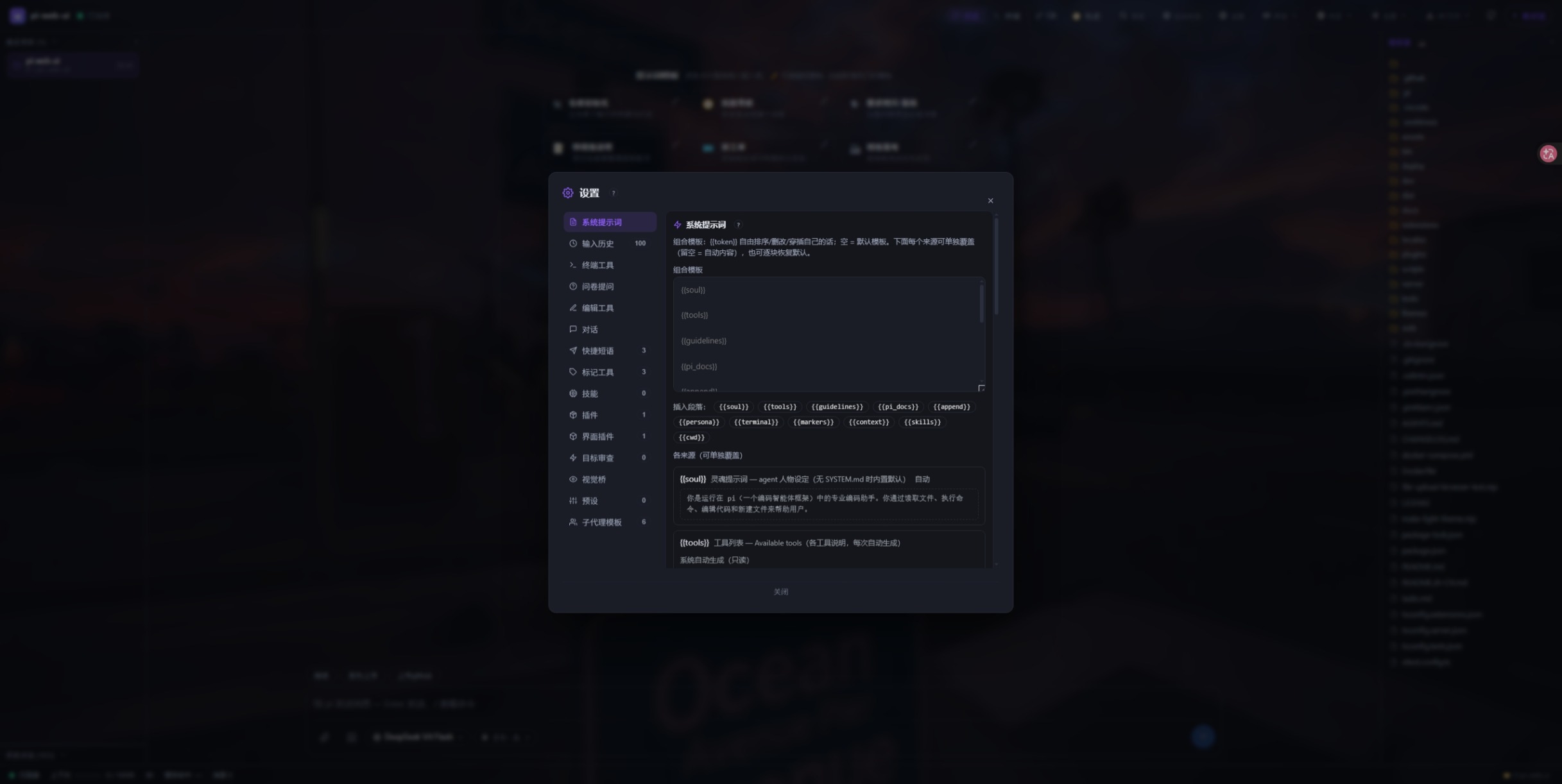
- **System prompt** — a `{{token}}` compose template over 11 sources (soul / tools / guidelines / pi docs / append / persona / terminal / markers / context / skills / cwd) with click-to-append token chips, per-source overrides (an `auto` badge, “seed from default”, per-source reset; environment-derived sources stay read-only), and two viewers showing the prompt actually in effect and the tool schema actually sent to the model.
|
|
141
|
-
- **Input history & quick phrases** — a bounded history (1–500 entries, optional per-entry character cap, two-step clear) that ↑/↓ walks through, and the chips above the composer (edit / reorder / delete / reset to defaults).
|
|
141
|
+
- **Input history & quick phrases** — a bounded history (1–500 entries, optional per-entry character cap, two-step clear) that ↑/↓ walks through when the caret sits on the first/last **visual** line of the draft (auto-wrapped lines count), and the chips above the composer (edit / reorder / delete / reset to defaults).
|
|
142
142
|
- **Skills** — per-skill switches plus a **Full** chip that injects a whole `SKILL.md` into the prompt instead of its catalog line (8 KB per file, 32 KB total).
|
|
143
143
|
- **Extensions** — per-extension switches, and one-click uninstall for `npm:`-installed ones (runs `pi remove npm:<pkg>` in a reusable terminal tab).
|
|
144
144
|
- **UI plugins**, **goal review**, **vision bridge** and **subagent templates** have their own pages — see [Plugins](#plugins).
|
|
145
|
-
- **Presets** — save the current combination (prompt template/mode/overrides, skill & extension switches, tool switches, terminal-bash settings, retry count, reviewer prompt, skill full-text list) under a name and re-apply or delete it; deliberately
|
|
145
|
+
- **Presets** — save the current combination (prompt template/mode/overrides, skill & extension switches, tool switches, terminal-bash settings, retry count, reviewer prompt, skill full-text list) under a name and re-apply or delete it; deliberately _not_ captured (questionnaire, goal mode, display prefs, vision bridge, default subagent model, quick phrases) stay as they are.
|
|
146
146
|
- **Apply timing** — tool switches, retry count, display preferences, markers and the skill full-text list apply immediately; the prompt template/overrides and skill/extension switches need a session reload, and a change made mid-answer is deferred with a “takes effect after this reply” notice.
|
|
147
147
|
- **Display preferences** — thinking blocks expanded or collapsed by default, tool cards expanded by default, wide chat column (drops the 860 px cap on very wide viewports), project name in the browser tab title, and a chat wallpaper (image URL or upload, with dim and blur sliders).
|
|
148
148
|
|
|
@@ -214,9 +214,9 @@ theme switching, and a full settings panel — tuned for daily development.
|
|
|
214
214
|
|
|
215
215
|
- Loopback-only by default; set `PI_WEB_HOST=0.0.0.0` for LAN / containers.
|
|
216
216
|
- **Token auth** — `PI_WEB_TOKEN` accepts any of `Authorization: Bearer …`, `X-PI-Token: …`, `?token=…` or the `pi_web_token` cookie. A `?token=` link logs you in once, strips the token from the address bar and stores the cookie; every authorised request refreshes it and a stale cookie is expired on the 401 response, so after changing the password one correct `?token=` visit recovers permanently. `/api/health` stays open for probes.
|
|
217
|
-
- WebSocket Origin/Host same-authority check — cross-origin pages are rejected (403), `Origin: null` (a `file://` page) is rejected outright, and when a token is configured a bad credential is refused
|
|
217
|
+
- WebSocket Origin/Host same-authority check — cross-origin pages are rejected (403), `Origin: null` (a `file://` page) is rejected outright, and when a token is configured a bad credential is refused _before_ the upgrade; `PI_WEB_ALLOW_ORIGINS` whitelist for reverse proxies.
|
|
218
218
|
- **Host allow-list** — `PI_WEB_ALLOW_HOSTS=host1,host2` adds a strict hostname allow-list on top of the always-on same-authority check.
|
|
219
|
-
- **Instance scoping** — `PI_WEB_TABS=chat,terminal,git` exposes only those tabs: hidden tabs are also refused
|
|
219
|
+
- **Instance scoping** — `PI_WEB_TABS=chat,terminal,git` exposes only those tabs: hidden tabs are also refused _server-side_ (their messages answer with an explanation), and `chat` can never be switched off. `PI_WEB_MANAGED=1` declares the instance as deployed from outside: the server refuses self-update, pi-CLI installs and marketplace installs with a reason, and the UI hides those entry points (the version chip becomes a plain label saying the deployment owns updates).
|
|
220
220
|
- **File boundaries** — workspace-relative reads/writes reject `..` escapes (a path outside the workspace is only reachable through explicit absolute / machine browsing); inline `/api/file` streaming is limited to images, video and HTML, so a binary can never be smuggled through an `<img>` tag — anything else needs `?download=1` (attachment disposition). The HTML preview route is always served sandboxed.
|
|
221
221
|
- Quiesce drain mode via a local control socket (`server status|quiesce|unquiesce`) — refuses new prompts/forks/resumes (and, on the DSH engine, brand-new client connections) while in-flight runs finish.
|
|
222
222
|
- Credentials stay server-side — provider headers (which may carry `Authorization`) are never sent to the browser, and provider API keys reach it only as nicknames.
|
|
@@ -227,51 +227,49 @@ theme switching, and a full settings panel — tuned for daily development.
|
|
|
227
227
|
### 🚢 Deploy & update
|
|
228
228
|
|
|
229
229
|
- Foreground, global npm install, Docker (see [Docker](#docker)), macOS launchd, Linux systemd, Windows autostart (a per-user `Run` key with a console-free launcher and a crash watchdog), and a desktop shortcut (`server shortcut`).
|
|
230
|
-
- `server install --print` prints the launchd plist / systemd unit / Windows launcher it
|
|
231
|
-
- **Update panel** — the version chip shows an amber dot when a newer web UI exists and a badge with how many
|
|
230
|
+
- `server install --print` prints the launchd plist / systemd unit / Windows launcher it _would_ write and exits, so you can review it before installing.
|
|
231
|
+
- **Update panel** — the version chip shows an amber dot when a newer web UI exists and a badge with how many _other_ components have updates. “Check all updates” compares the web UI, the globally installed pi core and the direct packages declared in `<agentDir>/npm/package.json`; each row has its own Update, plus “Update all” and “Re-check all”, and the commands run in a visible terminal (`pi update npm:<name>` for pi extensions — the only command that updates the copy pi actually loads — and `npm i -g <name>@latest` for the rest). A “just published (<30 min)” warning tells you npm's cached metadata may be stale. On an instance owned by launchd/systemd/the Windows watchdog there is also a **Restart service** button; on a foreground instance there isn't, because nothing would bring it back.
|
|
232
232
|
- **Plugin updates from the CLI** — `pi-web-ui plugins --check-updates` compares each installed plugin's recorded commit with the remote HEAD and prints the exact update command; every `install --force` snapshots the outgoing version into `<dataDir>/plugin-backups/` (newest 3 kept, and it auto-rolls back if the copy fails), so `pi-web-ui plugins --rollback <id>` can undo an upgrade.
|
|
233
233
|
- In the pi CLI there is also `/webui` (from the bundled `extensions/webui.ts`): `/webui` starts a server on the first free port from 8787, and `/webui --port 9000`, `--cwd <path>`, `--no-browser`, `status` and `stop` manage it — one subprocess per pi session, killed when the session shuts down so no orphan servers linger.
|
|
234
234
|
|
|
235
|
-
|
|
236
235
|
## Keyboard shortcuts
|
|
237
236
|
|
|
238
|
-
| Keys
|
|
239
|
-
|
|
|
240
|
-
| `Enter`
|
|
241
|
-
| `Shift+Enter`
|
|
242
|
-
| `↑` / `↓`
|
|
243
|
-
| `Ctrl/Cmd+K`
|
|
244
|
-
| `Ctrl/Cmd+F`
|
|
245
|
-
| `/`
|
|
246
|
-
| `Ctrl/Cmd+S`
|
|
247
|
-
| `Ctrl/Cmd+A`
|
|
248
|
-
| `Ctrl/Cmd+Enter`
|
|
249
|
-
| `Ctrl/Cmd+C` / `Ctrl/Cmd+V` | In the terminal: copy the current selection (no selection = `^C` goes to the shell) / paste natively.
|
|
250
|
-
| `Esc`
|
|
251
|
-
| Drag & drop
|
|
237
|
+
| Keys | What it does |
|
|
238
|
+
| --------------------------- | ----------------------------------------------------------------------------------------------------------------------------------------------------------------------------------------------------------------------------------------------------------------------------- |
|
|
239
|
+
| `Enter` | Send. On touch-first devices `Enter` inserts a newline instead and `Ctrl/Cmd+Enter` sends (Windows touch laptops are treated as desktops). |
|
|
240
|
+
| `Shift+Enter` | Newline in the composer. |
|
|
241
|
+
| `↑` / `↓` | Walk the global prompt history (persisted across conversations) when the caret is on the first/last **visual** line — auto-wrapped lines count, so `↑` inside a long one-paragraph draft moves the caret up a line instead of switching history; `Esc` returns to your draft. |
|
|
242
|
+
| `Ctrl/Cmd+K` | Global search over conversations, projects and workspace file names. |
|
|
243
|
+
| `Ctrl/Cmd+F` | Search inside the open conversation — `Enter` next hit, `Shift+Enter` previous, `Esc` closes. |
|
|
244
|
+
| `/` | Open the slash-command picker (`↑`/`↓` to move, `Tab` or `Enter` to complete, `Esc` to dismiss; typing a space closes it). |
|
|
245
|
+
| `Ctrl/Cmd+S` | Save while editing a file in the preview. |
|
|
246
|
+
| `Ctrl/Cmd+A` | Select all lines in the preview (when the caret isn't in a text field). |
|
|
247
|
+
| `Ctrl/Cmd+Enter` | Submit the edit-&-re-ask editor. |
|
|
248
|
+
| `Ctrl/Cmd+C` / `Ctrl/Cmd+V` | In the terminal: copy the current selection (no selection = `^C` goes to the shell) / paste natively. |
|
|
249
|
+
| `Esc` | Close the preview, a dialog, the command picker, a questionnaire or an extension request panel — with unsaved preview edits it asks first. |
|
|
250
|
+
| Drag & drop | Dropping files anywhere in the window attaches them to the chat; over the file tree it uploads into the folder you dropped on; folders can't be dropped (expand and pick files). |
|
|
252
251
|
|
|
253
252
|
## Screenshots
|
|
254
253
|
|
|
255
254
|
|
|
256
255
|
|
|
257
|
-
|
|
256
|
+
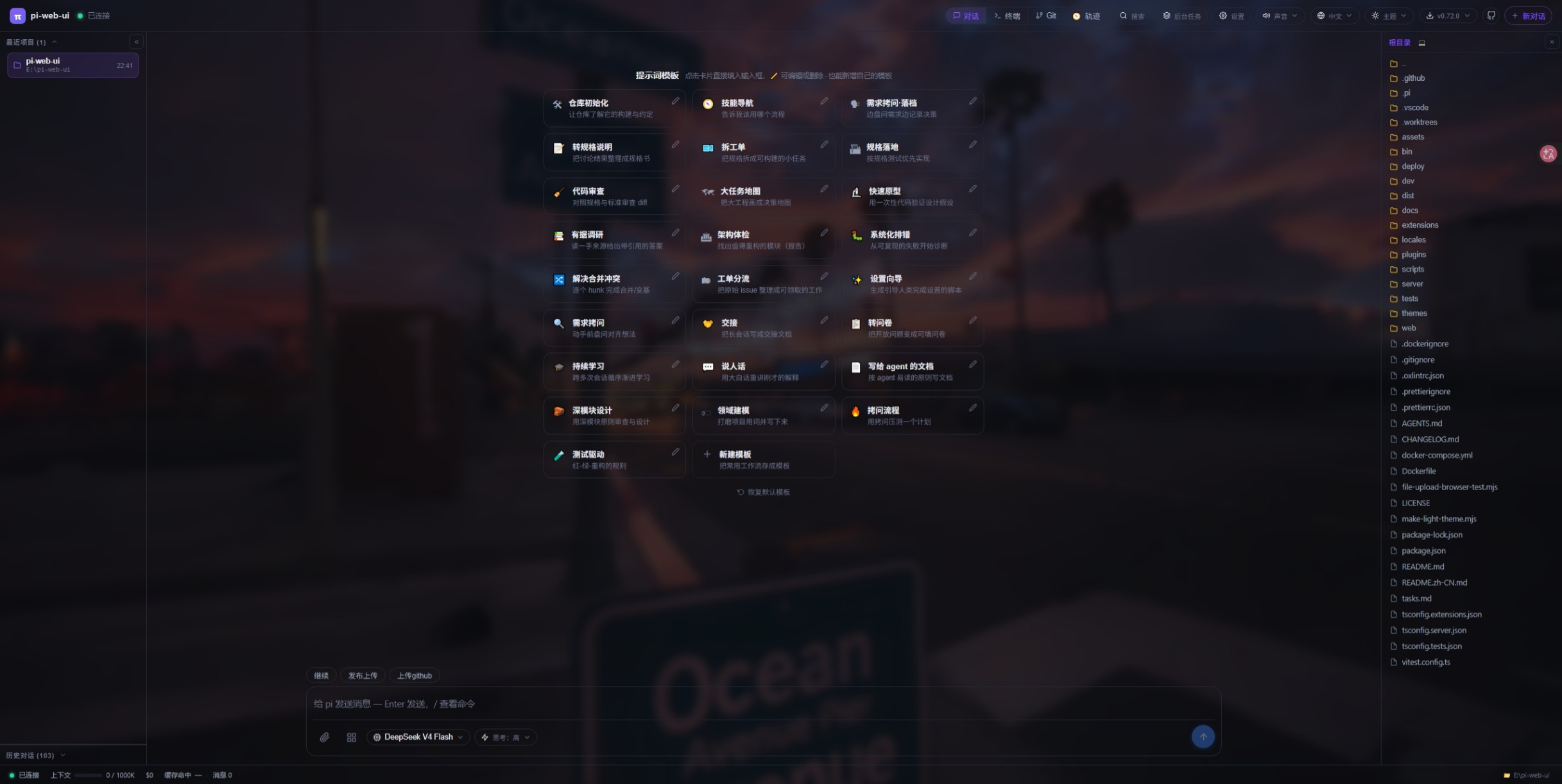
_Chat with prompt templates_
|
|
258
257
|
|
|
259
258
|
|
|
260
259
|
|
|
261
|
-
|
|
260
|
+
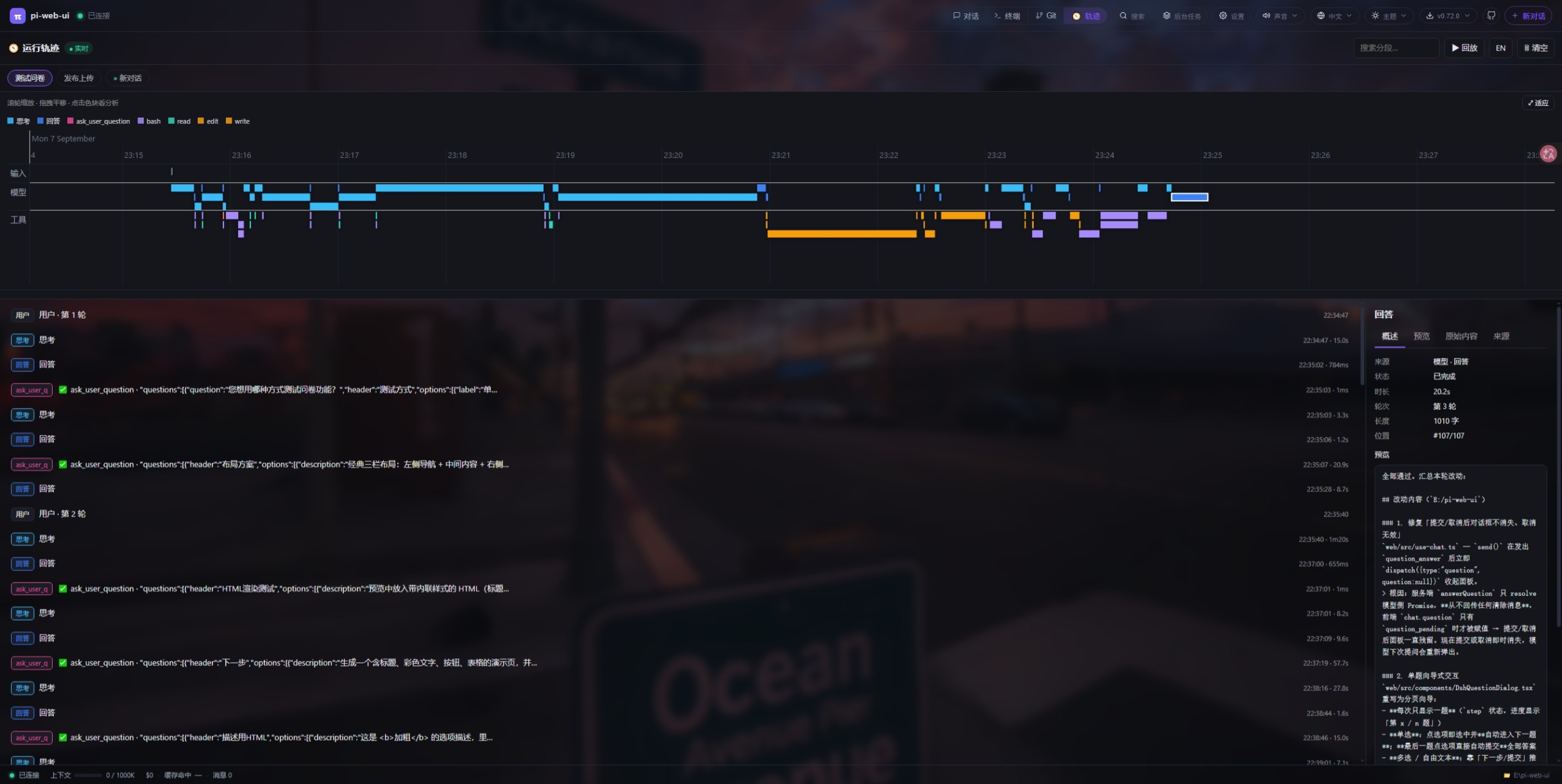
_Run trajectory timeline (run-trace plugin)_
|
|
262
261
|
|
|
263
262
|
|
|
264
263
|
|
|
265
|
-
|
|
264
|
+
_Settings panel_
|
|
266
265
|
|
|
267
266
|
|
|
268
267
|
|
|
269
|
-
|
|
268
|
+
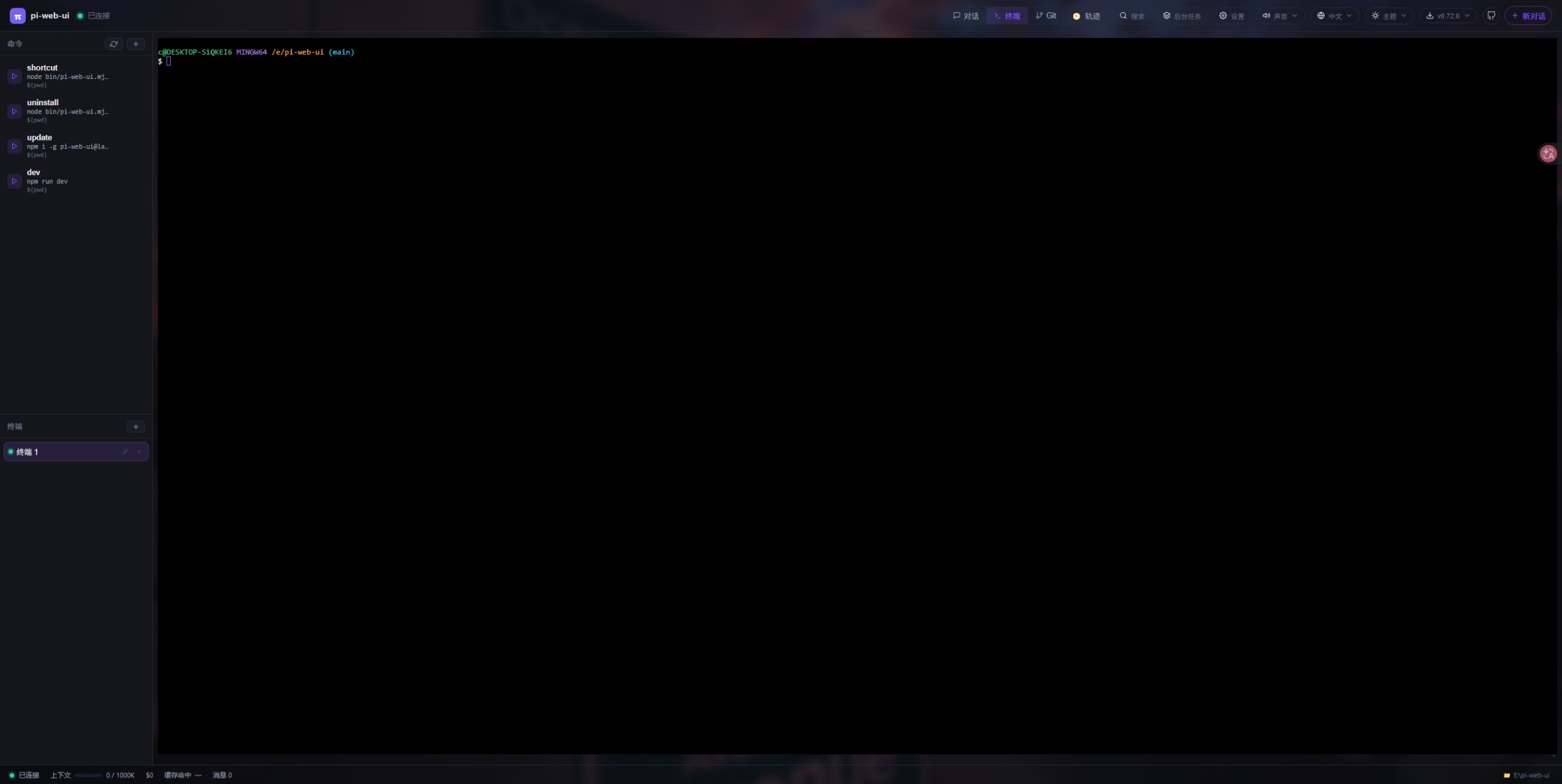
_Built-in terminal_
|
|
270
269
|
|
|
271
270
|
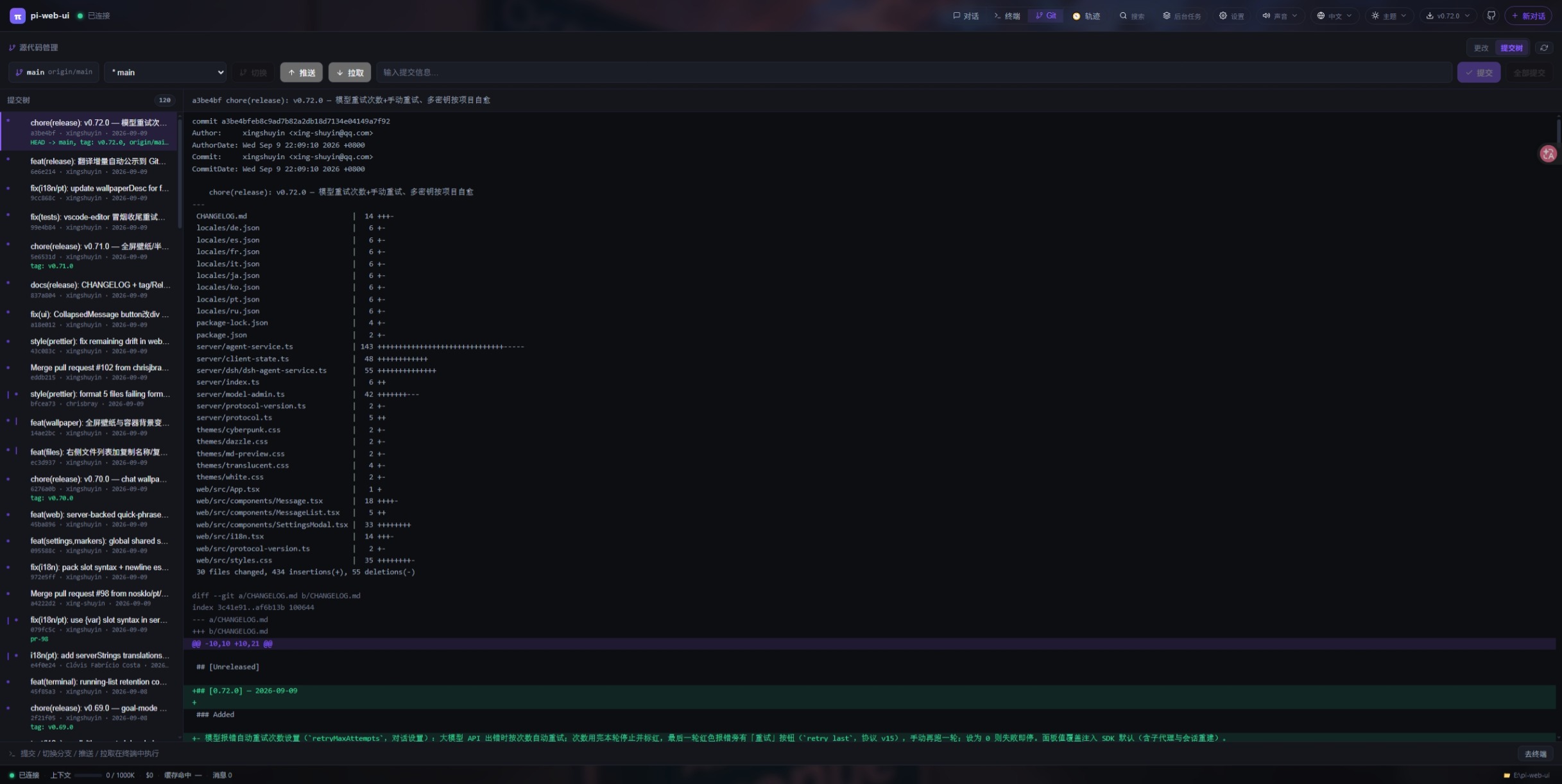
|
|
272
271
|
|
|
273
|
-
|
|
274
|
-
|
|
272
|
+
_Git source control panel_
|
|
275
273
|
|
|
276
274
|
## Install
|
|
277
275
|
|
|
@@ -364,17 +362,17 @@ pi-web-ui # foreground, http://localho
|
|
|
364
362
|
**Start flags & environment variables** — every setting can be passed as a `--flag` on the command
|
|
365
363
|
line **or** set as an environment variable (flag wins). Pick whichever you prefer:
|
|
366
364
|
|
|
367
|
-
| Flag
|
|
368
|
-
|
|
|
369
|
-
| `--port <n>`
|
|
370
|
-
| `--cwd <dir>`
|
|
371
|
-
| `--data-dir <dir>`
|
|
372
|
-
| `--engine <pi\|dsh>` | `PI_WEB_ENGINE`
|
|
373
|
-
| `--host <addr>`
|
|
374
|
-
| `--agent-dir <dir>`
|
|
375
|
-
| `--no-browser`
|
|
376
|
-
| _env only_
|
|
377
|
-
| _env only_
|
|
365
|
+
| Flag | Env var | Default | Purpose |
|
|
366
|
+
| -------------------- | --------------------- | ------------- | -------------------------------------------------------- |
|
|
367
|
+
| `--port <n>` | `PI_WEB_PORT` | `8787` | HTTP port |
|
|
368
|
+
| `--cwd <dir>` | `PI_WEB_CWD` | current dir | workspace root (read/write/terminal) |
|
|
369
|
+
| `--data-dir <dir>` | `PI_WEB_DATA_DIR` | `~/.pi-web` | data dir (UI state, plugins, uploads, themes, locales) |
|
|
370
|
+
| `--engine <pi\|dsh>` | `PI_WEB_ENGINE` | `pi` | agent engine; `--engine dsh` = DeepSeek Harness |
|
|
371
|
+
| `--host <addr>` | `PI_WEB_HOST` | `127.0.0.1` | listen address (`0.0.0.0` for LAN/Docker) |
|
|
372
|
+
| `--agent-dir <dir>` | `PI_CODING_AGENT_DIR` | `~/.pi/agent` | pi config dir (auth.json, models.json, sessions, skills) |
|
|
373
|
+
| `--no-browser` | — | off | start without auto-opening the browser |
|
|
374
|
+
| _env only_ | `PI_WEB_TOKEN` | empty | optional shared auth token |
|
|
375
|
+
| _env only_ | `PI_WEB_DSH_*` | — | dsh runtime, patches & debug settings |
|
|
378
376
|
|
|
379
377
|
The two are equivalent — pick one:
|
|
380
378
|
|
|
@@ -406,7 +404,6 @@ npm uninstall -g pi-web-ui
|
|
|
406
404
|
|
|
407
405
|
Uninstalling does **not** delete your chats: the transcripts you see in the history panel live in `<agentDir>/sessions/` (default `~/.pi/agent/sessions/`, per project), and the rest of your state — UI settings, recent projects, plugins, uploads, themes, language packs — lives in `<dataDir>` (default `~/.pi-web/`). Both survive uninstall, upgrade and reinstall; rerunning `pi-web-ui server install` afterward picks them up again (and if you plan to delete them, back up `sessions/` and `plugins/` first — an uninstall never touches either).
|
|
408
406
|
|
|
409
|
-
|
|
410
407
|
## System service
|
|
411
408
|
|
|
412
409
|
```bash
|
|
@@ -440,7 +437,6 @@ by hand. See the [start flags table](#quick-start) above.
|
|
|
440
437
|
pi-web-ui server install --engine dsh --port 9000 --cwd /path/to/project
|
|
441
438
|
```
|
|
442
439
|
|
|
443
|
-
|
|
444
440
|
## Docker
|
|
445
441
|
|
|
446
442
|
The image builds the frontend and the server, keeps the compiler toolchain `node-pty` needs, pre-installs the DSH runtime (so `PI_WEB_ENGINE=dsh` works without extra steps), runs as the non-root `node` user and declares `/app/.pi-web` as a volume:
|
|
@@ -482,14 +478,14 @@ up in the UI.
|
|
|
482
478
|
These plugins ship in this repository (`plugins/<id>/`) and can be installed
|
|
483
479
|
straight from GitHub:
|
|
484
480
|
|
|
485
|
-
| Plugin
|
|
486
|
-
|
|
|
487
|
-
| 📬 [webmail](https://github.com/xing-shuyin/pi-web-ui/tree/main/plugins/webmail)
|
|
488
|
-
| 🗄️ [db-client](https://github.com/xing-shuyin/pi-web-ui/tree/main/plugins/db-client)
|
|
489
|
-
| 📝 [vscode-editor](https://github.com/xing-shuyin/pi-web-ui/tree/main/plugins/vscode-editor) | VS Code-like workbench: multi-root file tree (local + SSH hosts), CodeMirror multi-tab editor, Remote-SSH remote file browsing/editing, draggable multi-terminal panel (xterm.js), SFTP sync & upload/download to your computer. Auto-installs `ssh2`.
|
|
490
|
-
| 📊 [mermaid](https://github.com/xing-shuyin/pi-web-ui/tree/main/plugins/mermaid)
|
|
491
|
-
| 🧭 [run-trace](https://github.com/xing-shuyin/pi-web-ui/tree/main/plugins/run-trace)
|
|
492
|
-
| 📖 [legado-web](https://github.com/xing-shuyin/pi-web-ui/tree/main/plugins/legado-web)
|
|
481
|
+
| Plugin | What it does |
|
|
482
|
+
| -------------------------------------------------------------------------------------------- | ------------------------------------------------------------------------------------------------------------------------------------------------------------------------------------------------------------------------------------------------------------------------------------------------------------------------------------------------------------------------------------------------------------------------------------------------------------ |
|
|
483
|
+
| 📬 [webmail](https://github.com/xing-shuyin/pi-web-ui/tree/main/plugins/webmail) | IMAP inbox browsing / search / read / mark / delete + SMTP sending, new-mail notifications, and an optional "allow AI to manage my mailbox" switch (six `mail_*` agent tools). Auto-installs its npm deps on first activation. |
|
|
484
|
+
| 🗄️ [db-client](https://github.com/xing-shuyin/pi-web-ui/tree/main/plugins/db-client) | Database workbench: connection manager + schema tree for MySQL / PostgreSQL / SQLite / SQL Server / MongoDB / Redis — table structure, paginated data with sorting, SQL editor, and row editing. Drivers auto-install on first use. |
|
|
485
|
+
| 📝 [vscode-editor](https://github.com/xing-shuyin/pi-web-ui/tree/main/plugins/vscode-editor) | VS Code-like workbench: multi-root file tree (local + SSH hosts), CodeMirror multi-tab editor, Remote-SSH remote file browsing/editing, draggable multi-terminal panel (xterm.js), SFTP sync & upload/download to your computer. Auto-installs `ssh2`. |
|
|
486
|
+
| 📊 [mermaid](https://github.com/xing-shuyin/pi-web-ui/tree/main/plugins/mermaid) | Renders ` ```mermaid ` fences in chat messages as SVG diagrams (fenced-code renderer plugin, offline-first local engine). |
|
|
487
|
+
| 🧭 [run-trace](https://github.com/xing-shuyin/pi-web-ui/tree/main/plugins/run-trace) | Run trajectory: task → thinking → tools → file changes → result timeline with replay and node details. |
|
|
488
|
+
| 📖 [legado-web](https://github.com/xing-shuyin/pi-web-ui/tree/main/plugins/legado-web) | Legado book reader (📖 阅读): search / discovery / book info / TOC / chapter reading on top of Android-compatible **book sources**, with source import, health checking and dead-source cleanup, and four agent tools (`legado_rules`, `legado_book_sources`, `legado_source_probe`, `legado_run_rule`) plus an “🤖 AI fix this source” button that opens a new chat with the failure context. Sources/shelf/progress persist under `<dataDir>/legado-web/`. |
|
|
493
489
|
|
|
494
490
|
`plugins/demo-mailbox` stays in the repo as the minimal plugin template (server entry + client view + two-way message protocol) and test fixture — start there if you want to write your own.
|
|
495
491
|
|
|
@@ -573,6 +569,29 @@ pi-web-ui uninstall <id> # remove a plugin
|
|
|
573
569
|
disappears. Plugin configuration written inside the plugin dir is removed
|
|
574
570
|
too — back up `<dataDir>/plugins/<id>/config.json` first if you need it.
|
|
575
571
|
|
|
572
|
+
## Browser extension
|
|
573
|
+
|
|
574
|
+
### 🎯 Web element picker (page-picker)
|
|
575
|
+
|
|
576
|
+
Pick elements on the site you are developing and turn them into context an AI can act on, then drop it
|
|
577
|
+
straight into the pi-web-ui composer (`Alt+Shift+P` or the toolbar icon → hover highlight → click to pick
|
|
578
|
+
→ `Shift`+click for multi-select → add a note → "Add to chat").
|
|
579
|
+
|
|
580
|
+
It is a **browser extension**, not a pi-web-ui server plugin (so `pi-web-ui install` does not apply):
|
|
581
|
+
|
|
582
|
+
**Download & install** (no Node required): [`page-picker-extension.zip`](https://github.com/xing-shuyin/pi-web-ui/releases/latest/download/page-picker-extension.zip) → unzip →
|
|
583
|
+
open `chrome://extensions`, enable "Developer mode", choose "Load unpacked" and select the unzipped
|
|
584
|
+
folder → open the extension options and set your pi-web-ui address (click "Authorize this address"
|
|
585
|
+
first for remote/LAN addresses).
|
|
586
|
+
|
|
587
|
+
See [`plugins/page-picker/README.md`](https://github.com/xing-shuyin/pi-web-ui/tree/main/plugins/page-picker) for the interaction details,
|
|
588
|
+
what gets captured, remote/LAN setups and known limitations.
|
|
589
|
+
|
|
590
|
+
It captures what actually lets an AI fix the code in one shot — not a screenshot: the React component
|
|
591
|
+
source location from the fiber (`Card.tsx:18:5` plus the component chain), the Vue SFC file, the
|
|
592
|
+
**source file and line** of the CSS rules that matched (reverse-computed in Vite dev), a computed-style
|
|
593
|
+
subset limited to values that differ from the defaults, a short unique selector, an HTML skeleton and
|
|
594
|
+
truncated text. An optional element screenshot rides along as a chat attachment.
|
|
576
595
|
|
|
577
596
|
## Themes
|
|
578
597
|
|
|
@@ -616,29 +635,28 @@ Want your theme shipped to everyone? Open a pull request at [github.com/xing-shu
|
|
|
616
635
|
|
|
617
636
|
Rules for merged themes: the file must be a single CSS file, set the `--term-*` variables for a readable terminal, and override `.hljs` syntax colors for readable code on light themes.
|
|
618
637
|
|
|
619
|
-
|
|
620
638
|
## Tuning & advanced environment variables
|
|
621
639
|
|
|
622
640
|
All optional — the defaults are what the app is developed against. Full reference: [`docs/env-vars.md`](docs/env-vars.md).
|
|
623
641
|
|
|
624
|
-
| Variable
|
|
625
|
-
|
|
|
626
|
-
| `PI_WEB_TOOL_TIMEOUT_MS`
|
|
627
|
-
| `PI_WEB_STALL_NOTIFY_MS`
|
|
628
|
-
| `PI_WEB_TERMINAL_IDLE_MS`
|
|
629
|
-
| `PI_WEB_TERMINAL_IDLE_LINES`
|
|
630
|
-
| `PI_WEB_INLINE_FILE_MAX`
|
|
631
|
-
| `PI_WEB_VISION_TIMEOUT_MS`
|
|
632
|
-
| `PI_WEB_UPLOAD_RETENTION_DAYS` | `14`
|
|
633
|
-
| `PI_WEB_SHELL`
|
|
634
|
-
| `PI_WEB_TABS`
|
|
635
|
-
| `PI_WEB_MANAGED`
|
|
636
|
-
| `PI_WEB_ALLOW_HOSTS`
|
|
637
|
-
| `PI_WEB_LOCALE`
|
|
638
|
-
| `PI_WEB_LOCALE_BASE_URL`
|
|
639
|
-
| `PI_WEB_PKG_ROOT`
|
|
640
|
-
| `PI_CODING_AGENT_SESSION_DIR`
|
|
641
|
-
| `DSH_*`
|
|
642
|
+
| Variable | Default | What it changes |
|
|
643
|
+
| ------------------------------ | ------------------ | ---------------------------------------------------------------------------------------------------------------------------------------------------------------------------------------------------------------- |
|
|
644
|
+
| `PI_WEB_TOOL_TIMEOUT_MS` | `1200000` (20 min) | Per-tool-call watchdog; a tool still running is aborted (`ask_user_question` is exempt). |
|
|
645
|
+
| `PI_WEB_STALL_NOTIFY_MS` | `180000` (3 min) | Warn — without aborting — when a streaming run produces no event at all; `0` disables. |
|
|
646
|
+
| `PI_WEB_TERMINAL_IDLE_MS` | `15000` | Nudge the AI when a terminal it opened goes silent for this long; `0` disables. |
|
|
647
|
+
| `PI_WEB_TERMINAL_IDLE_LINES` | `10` | How many trailing terminal lines that nudge quotes back (1–500). |
|
|
648
|
+
| `PI_WEB_INLINE_FILE_MAX` | `12288` (12 KB) | Size under which a path-less uploaded file is inlined instead of referenced. |
|
|
649
|
+
| `PI_WEB_VISION_TIMEOUT_MS` | `90000` | Timeout for one whole vision-bridge transcription batch. |
|
|
650
|
+
| `PI_WEB_UPLOAD_RETENTION_DAYS` | `14` | Retention for `<dataDir>/uploads/`; `0` never sweeps. |
|
|
651
|
+
| `PI_WEB_SHELL` | auto | Windows only: which shell node-pty spawns (auto: `PI_WEB_SHELL` → `$SHELL` → Git Bash → bundled busybox → `%COMSPEC%` → PowerShell). |
|
|
652
|
+
| `PI_WEB_TABS` | all tabs | Comma-separated tab allow-list (`chat,terminal,git,search,tasks,settings,plugins`); hidden tabs are refused server-side, `chat` can't be turned off. |
|
|
653
|
+
| `PI_WEB_MANAGED` | off | `1`/`true` declares the instance externally deployed: self-update, pi-CLI install and plugin installs are refused with a reason and hidden in the UI. |
|
|
654
|
+
| `PI_WEB_ALLOW_HOSTS` | empty | Strict hostname allow-list for the HTTP/WS `Host` header, on top of the always-on same-authority check. |
|
|
655
|
+
| `PI_WEB_LOCALE` | empty | Fallback UI language for first-time visitors (an explicit choice and the browser's languages win over it). |
|
|
656
|
+
| `PI_WEB_LOCALE_BASE_URL` | GitHub raw | Where language packs are downloaded from — point it at a mirror for offline/intranet installs. |
|
|
657
|
+
| `PI_WEB_PKG_ROOT` | auto | Overrides where the server looks for `package.json`, `themes/`, `plugins/catalog.json` and `web/dist` (non-standard install layouts). |
|
|
658
|
+
| `PI_CODING_AGENT_SESSION_DIR` | empty | Flat session layout for pi instead of `<agentDir>/sessions/--<cwd>--/` (changes what the history list reads). |
|
|
659
|
+
| `DSH_*` | — | DSH runtime knobs: `PI_WEB_DSH_RUNTIME`, `PI_WEB_DSH_DATA_DIR`, `PI_WEB_DSH_PATCH_DIR`, `PI_WEB_DSH_QUESTION_TIMEOUT_MS`, `PI_WEB_DSH_TOOL_TIMEOUT_MS`, `PI_WEB_DSH_SESSION_RETENTION_DAYS`, `PI_WEB_DSH_DEBUG`. |
|
|
642
660
|
|
|
643
661
|
## Security
|
|
644
662
|
|
|
@@ -657,7 +675,6 @@ All optional — the defaults are what the app is developed against. Full refere
|
|
|
657
675
|
`Authorization` / API keys) are never sent to the browser; the model
|
|
658
676
|
management UI edits everything else and the server preserves the headers.
|
|
659
677
|
|
|
660
|
-
|
|
661
678
|
## 🪪 Code signing policy
|
|
662
679
|
|
|
663
680
|
Free code signing provided by [SignPath.io](https://signpath.io), certificate by
|
|
@@ -672,11 +689,11 @@ build of the source code at that tag.
|
|
|
672
689
|
|
|
673
690
|
### Team roles
|
|
674
691
|
|
|
675
|
-
| Role
|
|
676
|
-
|
|
|
677
|
-
| **Authors / committers** (may push to `main`)
|
|
692
|
+
| Role | Who |
|
|
693
|
+
| --------------------------------------------------------------------------------------- | ------------------------------------------------------------------------------------------------------------------------------------------------------------------------------- |
|
|
694
|
+
| **Authors / committers** (may push to `main`) | [@xing-shuyin](https://github.com/xing-shuyin) |
|
|
678
695
|
| **Reviewers** (every non-committer change arrives as a PR and is reviewed before merge) | [@xing-shuyin](https://github.com/xing-shuyin) — community contributions are credited in the [contributors graph](https://github.com/xing-shuyin/pi-web-ui/graphs/contributors) |
|
|
679
|
-
| **Approvers** (must approve each signing request)
|
|
696
|
+
| **Approvers** (must approve each signing request) | [@xing-shuyin](https://github.com/xing-shuyin) |
|
|
680
697
|
|
|
681
698
|
All team members use multi-factor authentication for both GitHub and SignPath.
|
|
682
699
|
Our release artifacts contain no binaries we did not build ourselves, except
|
|
@@ -697,13 +714,13 @@ server binds loopback unless you explicitly expose it.
|
|
|
697
714
|
|
|
698
715
|
Network requests happen only in these cases:
|
|
699
716
|
|
|
700
|
-
| When
|
|
701
|
-
|
|
|
702
|
-
| You send a message, or the agent calls a model
|
|
703
|
-
| Model catalog refresh (startup, then every 4 h)
|
|
704
|
-
| You install or update a plugin, theme or language pack
|
|
705
|
-
| You check for or install an update
|
|
706
|
-
| Terminals on Windows, when neither Git Bash nor a `bash` on `PATH` exists | `frippery.org`
|
|
717
|
+
| When | To | What leaves your machine |
|
|
718
|
+
| ------------------------------------------------------------------------- | -------------------------------------------------------------------------------------------------- | ----------------------------------------------------------------------------------------- |
|
|
719
|
+
| You send a message, or the agent calls a model | the model providers **you** configure (e.g. `api.openai.com`, `api.opencode.ai`, a local endpoint) | your prompt, the attached file contents and the conversation context |
|
|
720
|
+
| Model catalog refresh (startup, then every 4 h) | `pi.dev` | nothing but the request itself |
|
|
721
|
+
| You install or update a plugin, theme or language pack | `github.com` / `raw.githubusercontent.com` | nothing but the request itself |
|
|
722
|
+
| You check for or install an update | `registry.npmjs.org` | nothing but the request itself |
|
|
723
|
+
| Terminals on Windows, when neither Git Bash nor a `bash` on `PATH` exists | `frippery.org` | one download of `busybox64u.exe` into `~/.pi-web/bin/bash.exe`, reused offline afterwards |
|
|
707
724
|
|
|
708
725
|
Reverse-proxy setups, the optional `PI_WEB_TOKEN` password and Docker port
|
|
709
726
|
mappings are under your control — see [Security](#security).
|
|
@@ -773,18 +790,17 @@ Key points:
|
|
|
773
790
|
|
|
774
791
|
Full working example (with an frp tunnel): `deploy/nginx-subpath.conf`.
|
|
775
792
|
|
|
776
|
-
|
|
777
793
|
## Contribute
|
|
778
794
|
|
|
779
795
|
pi-web-ui is a small open-source project — **your contributions are what make it grow**. Code, plugins, themes, docs, translations, ideas: everything is welcome, and every merged PR ships to all users with the next `npm publish`. ❤️
|
|
780
796
|
|
|
781
|
-
| Way to contribute
|
|
782
|
-
|
|
|
783
|
-
| 🧩 **Write a plugin**
|
|
784
|
-
| 🎨 **Contribute a theme**
|
|
785
|
-
| 💻 **Fix a bug / add a feature** | Look for [open issues](https://github.com/xing-shuyin/pi-web-ui/issues) or propose something new. Fork → branch → PR. Keep the code conventions in `AGENTS.md` (tabs, i18n keys in both languages, protocol changes in `server/protocol.ts`).
|
|
786
|
-
| 📖 **Docs & translations**
|
|
787
|
-
| 💡 **Ideas & feedback**
|
|
797
|
+
| Way to contribute | How to get started |
|
|
798
|
+
| -------------------------------- | ------------------------------------------------------------------------------------------------------------------------------------------------------------------------------------------------------------------------------------------------------------------------------------------------------ |
|
|
799
|
+
| 🧩 **Write a plugin** | Build your own UI tab + agent tools. Copy `plugins/demo-mailbox` as the minimal template (it doubles as the test fixture), develop locally, then either open a PR to ship it in the [catalog](#plugin-catalog) or [publish it standalone](https://github.com/xing-shuyin/pi-web-ui/tree/main/plugins). |
|
|
800
|
+
| 🎨 **Contribute a theme** | Copy `themes/white.css` (light) or `themes/cyberpunk.css` (dark) as a pure-palette template, tweak the `:root` palette + `--term-*` + `.hljs`, verify with `npm run dev`, then open a PR — full walkthrough in [Contributing a theme](#contributing-a-theme-to-the-repository-github). |
|
|
801
|
+
| 💻 **Fix a bug / add a feature** | Look for [open issues](https://github.com/xing-shuyin/pi-web-ui/issues) or propose something new. Fork → branch → PR. Keep the code conventions in `AGENTS.md` (tabs, i18n keys in both languages, protocol changes in `server/protocol.ts`). |
|
|
802
|
+
| 📖 **Docs & translations** | Improve the READMEs, write plugin docs, fix typos, or help translate the UI / docs into more languages. |
|
|
803
|
+
| 💡 **Ideas & feedback** | Open an [issue](https://github.com/xing-shuyin/pi-web-ui/issues) or start a [discussion](https://github.com/xing-shuyin/pi-web-ui/discussions) — feature requests, bug reports, UI polish ideas, deployment experience reports. |
|
|
788
804
|
|
|
789
805
|
**Before opening a PR**, a quick sanity pass keeps reviewers happy:
|
|
790
806
|
|
|
@@ -799,7 +815,6 @@ pi-web-ui is a small open-source project — **your contributions are what make
|
|
|
799
815
|
> built something cool on top (plugin, theme, deployment recipe), tell us — we
|
|
800
816
|
> love showcasing community work.
|
|
801
817
|
|
|
802
|
-
|
|
803
818
|
## License
|
|
804
819
|
|
|
805
|
-
[MIT](LICENSE)
|
|
820
|
+
[MIT](LICENSE)
|