nodeplayer-addon 0.3.0 → 0.3.1
This diff represents the content of publicly available package versions that have been released to one of the supported registries. The information contained in this diff is provided for informational purposes only and reflects changes between package versions as they appear in their respective public registries.
- package/docs/introduction.md +26 -0
- package/docs/quick-start.md +265 -0
- package/docs/react-frontend.md +328 -0
- package/docs/vue-frontend.md +330 -0
- package/package.json +7 -6
- package/SKILL.md +0 -684
|
@@ -0,0 +1,330 @@
|
|
|
1
|
+
在快速集成中,我们使用官方推荐的Electron Forge创建程序。可以用来开发react但是需要很多配置,我们在这个例子中换一个更简单的脚手架: [create-electron](https://www.npmjs.com/package/%40quick-start/create-electron)
|
|
2
|
+
|
|
3
|
+
## 1.创建项目
|
|
4
|
+
```bash
|
|
5
|
+
npm create @quick-start/electron
|
|
6
|
+
```
|
|
7
|
+
|
|
8
|
+
```bash
|
|
9
|
+
> npx
|
|
10
|
+
> "create-electron"
|
|
11
|
+
|
|
12
|
+
✔ Project name: … electron-app-vue
|
|
13
|
+
✔ Select a framework: › vue
|
|
14
|
+
✔ Add TypeScript? … No / Yes
|
|
15
|
+
✔ Add Electron updater plugin? … No / Yes
|
|
16
|
+
✔ Enable Electron download mirror proxy? … No / Yes
|
|
17
|
+
|
|
18
|
+
Scaffolding project in /Users/aliang/electron-app-vue...
|
|
19
|
+
|
|
20
|
+
Done. Now run:
|
|
21
|
+
|
|
22
|
+
cd electron-app-vue
|
|
23
|
+
npm install
|
|
24
|
+
npm run dev
|
|
25
|
+
```
|
|
26
|
+
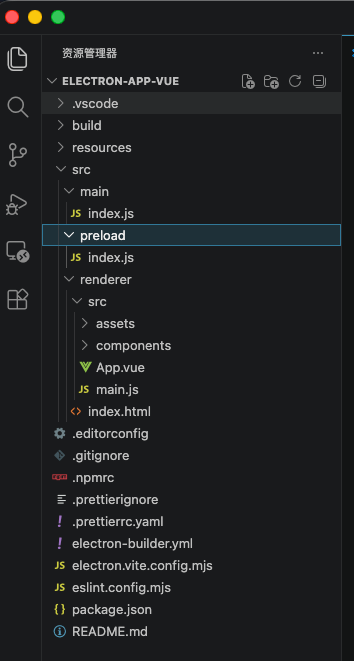
编辑器打开项目,可以看到目录结构如下
|
|
27
|
+
|
|
28
|
+
|
|
29
|
+
## 2.安装扩展
|
|
30
|
+
执行命令
|
|
31
|
+
```bash
|
|
32
|
+
npm i nodeplayer-addon
|
|
33
|
+
```
|
|
34
|
+
|
|
35
|
+
## 3.编辑 src/main/index.js 文件
|
|
36
|
+
```js
|
|
37
|
+
import { app, shell, BrowserWindow, ipcMain } from 'electron'
|
|
38
|
+
import { join } from 'path'
|
|
39
|
+
import { electronApp, optimizer, is } from '@electron-toolkit/utils'
|
|
40
|
+
import icon from '../../resources/icon.png?asset'
|
|
41
|
+
import NodePlayer from 'nodeplayer-addon'
|
|
42
|
+
|
|
43
|
+
let mainWindow = null
|
|
44
|
+
|
|
45
|
+
function createWindow() {
|
|
46
|
+
mainWindow = new BrowserWindow({
|
|
47
|
+
width: 1024,
|
|
48
|
+
height: 768,
|
|
49
|
+
show: false,
|
|
50
|
+
autoHideMenuBar: true,
|
|
51
|
+
...(process.platform === 'linux' ? { icon } : {}),
|
|
52
|
+
webPreferences: {
|
|
53
|
+
preload: join(__dirname, '../preload/index.js'),
|
|
54
|
+
sandbox: false
|
|
55
|
+
}
|
|
56
|
+
})
|
|
57
|
+
|
|
58
|
+
mainWindow.on('ready-to-show', () => {
|
|
59
|
+
mainWindow.show()
|
|
60
|
+
})
|
|
61
|
+
|
|
62
|
+
mainWindow.webContents.setWindowOpenHandler((details) => {
|
|
63
|
+
shell.openExternal(details.url)
|
|
64
|
+
return { action: 'deny' }
|
|
65
|
+
})
|
|
66
|
+
|
|
67
|
+
if (is.dev && process.env['ELECTRON_RENDERER_URL']) {
|
|
68
|
+
mainWindow.loadURL(process.env['ELECTRON_RENDERER_URL'])
|
|
69
|
+
} else {
|
|
70
|
+
mainWindow.loadFile(join(__dirname, '../renderer/index.html'))
|
|
71
|
+
}
|
|
72
|
+
}
|
|
73
|
+
|
|
74
|
+
app.whenReady().then(() => {
|
|
75
|
+
electronApp.setAppUserModelId('com.electron')
|
|
76
|
+
|
|
77
|
+
app.on('browser-window-created', (_, window) => {
|
|
78
|
+
optimizer.watchWindowShortcuts(window)
|
|
79
|
+
})
|
|
80
|
+
|
|
81
|
+
createWindow()
|
|
82
|
+
|
|
83
|
+
NodePlayer.registerIpc(ipcMain, {
|
|
84
|
+
getWindow: () => mainWindow,
|
|
85
|
+
licensePath: app.isPackaged
|
|
86
|
+
? join(process.resourcesPath, 'license.dat')
|
|
87
|
+
: join(__dirname, '../../license.dat')
|
|
88
|
+
})
|
|
89
|
+
|
|
90
|
+
app.on('activate', function () {
|
|
91
|
+
if (BrowserWindow.getAllWindows().length === 0) createWindow()
|
|
92
|
+
})
|
|
93
|
+
})
|
|
94
|
+
|
|
95
|
+
app.on('window-all-closed', () => {
|
|
96
|
+
if (process.platform !== 'darwin') {
|
|
97
|
+
app.quit()
|
|
98
|
+
}
|
|
99
|
+
})
|
|
100
|
+
|
|
101
|
+
```
|
|
102
|
+
|
|
103
|
+
## 4. 编辑src/preload/index.js
|
|
104
|
+
```js
|
|
105
|
+
import { contextBridge, ipcRenderer } from 'electron'
|
|
106
|
+
import { electronAPI } from '@electron-toolkit/preload'
|
|
107
|
+
|
|
108
|
+
const playerAPI = {
|
|
109
|
+
createPlayer: (id) => ipcRenderer.invoke('player:create', id),
|
|
110
|
+
startPlayer: (id, url) => ipcRenderer.invoke('player:start', id, url),
|
|
111
|
+
stopPlayer: (id) => ipcRenderer.invoke('player:stop', id),
|
|
112
|
+
destroyPlayer: (id) => ipcRenderer.invoke('player:destroy', id),
|
|
113
|
+
startRecord: (id, filePath) => ipcRenderer.invoke('player:startRecord', id, filePath),
|
|
114
|
+
stopRecord: (id) => ipcRenderer.invoke('player:stopRecord', id),
|
|
115
|
+
// 截图:将渲染进程生成的 JPG base64 数据保存到指定路径(默认由主进程自动生成)
|
|
116
|
+
saveScreenshot: (id, outputPath, base64Data) => ipcRenderer.invoke('player:screenshot', id, outputPath, base64Data),
|
|
117
|
+
// 预探测:在创建播放器前分析 URL(连接性 / 编码 / 分辨率 / 首帧截图)
|
|
118
|
+
getMediaInfo: (url) => ipcRenderer.invoke('player:getMediaInfo', url),
|
|
119
|
+
|
|
120
|
+
onEvent: (id, callback) => {
|
|
121
|
+
const channel = `player:event:${id}`
|
|
122
|
+
const handler = (_event, data) => callback(data)
|
|
123
|
+
ipcRenderer.on(channel, handler)
|
|
124
|
+
return () => ipcRenderer.removeListener(channel, handler)
|
|
125
|
+
},
|
|
126
|
+
|
|
127
|
+
onInfo: (id, callback) => {
|
|
128
|
+
const channel = `player:info:${id}`
|
|
129
|
+
const handler = (_event, info) => callback(info)
|
|
130
|
+
ipcRenderer.on(channel, handler)
|
|
131
|
+
return () => ipcRenderer.removeListener(channel, handler)
|
|
132
|
+
},
|
|
133
|
+
|
|
134
|
+
onData: (id, callback) => {
|
|
135
|
+
const channel = `player:data:${id}`
|
|
136
|
+
const handler = (_event, data) => callback(data)
|
|
137
|
+
ipcRenderer.on(channel, handler)
|
|
138
|
+
return () => ipcRenderer.removeListener(channel, handler)
|
|
139
|
+
}
|
|
140
|
+
}
|
|
141
|
+
|
|
142
|
+
if (process.contextIsolated) {
|
|
143
|
+
try {
|
|
144
|
+
contextBridge.exposeInMainWorld('electron', electronAPI)
|
|
145
|
+
contextBridge.exposeInMainWorld('electronAPI', playerAPI)
|
|
146
|
+
} catch (error) {
|
|
147
|
+
console.error(error)
|
|
148
|
+
}
|
|
149
|
+
} else {
|
|
150
|
+
window.electron = electronAPI
|
|
151
|
+
window.electronAPI = playerAPI
|
|
152
|
+
}
|
|
153
|
+
|
|
154
|
+
```
|
|
155
|
+
|
|
156
|
+
## 5.创建播放组件src/renderer/src/components/VideoPlayerView.vue
|
|
157
|
+
```vue
|
|
158
|
+
<script setup>
|
|
159
|
+
import { ref, shallowRef } from 'vue'
|
|
160
|
+
import VideoPlayer from 'nodeplayer-addon/video-player'
|
|
161
|
+
|
|
162
|
+
const url = ref('rtsp://')
|
|
163
|
+
const status = ref('')
|
|
164
|
+
const playing = ref(false)
|
|
165
|
+
|
|
166
|
+
const videoRef = ref(null)
|
|
167
|
+
const playerRef = shallowRef(null)
|
|
168
|
+
|
|
169
|
+
async function handlePlay() {
|
|
170
|
+
if (!url.value.trim()) return
|
|
171
|
+
|
|
172
|
+
const video = videoRef.value
|
|
173
|
+
if (!video) return
|
|
174
|
+
|
|
175
|
+
const player = new VideoPlayer(video, 'player-1')
|
|
176
|
+
|
|
177
|
+
const EVENT_STATUS = {
|
|
178
|
+
1000: 'Connecting...', 1001: 'Connected', 1002: 'Connection failed',
|
|
179
|
+
1003: 'Reconnecting...', 1004: 'Disconnected', 1005: 'Network error',
|
|
180
|
+
1006: 'Connection timeout', 3001: 'Recording...',
|
|
181
|
+
}
|
|
182
|
+
|
|
183
|
+
player.on('event', (code, msg) => {
|
|
184
|
+
if (code in EVENT_STATUS) status.value = msg ? `${EVENT_STATUS[code]}: ${msg}` : EVENT_STATUS[code]
|
|
185
|
+
})
|
|
186
|
+
player.on('error', (err) => { status.value = err.message })
|
|
187
|
+
|
|
188
|
+
playerRef.value = player
|
|
189
|
+
playing.value = true
|
|
190
|
+
await player.start(url.value.trim())
|
|
191
|
+
}
|
|
192
|
+
|
|
193
|
+
async function handleStop() {
|
|
194
|
+
const player = playerRef.value
|
|
195
|
+
if (player) {
|
|
196
|
+
await player.stop()
|
|
197
|
+
playerRef.value = null
|
|
198
|
+
}
|
|
199
|
+
playing.value = false
|
|
200
|
+
status.value = ''
|
|
201
|
+
}
|
|
202
|
+
|
|
203
|
+
async function handleScreenshot() {
|
|
204
|
+
const player = playerRef.value
|
|
205
|
+
if (!player) return
|
|
206
|
+
const r = await player.saveScreenshot()
|
|
207
|
+
status.value = r.success ? '截图已保存:' + r.path : (r.error || '截图失败')
|
|
208
|
+
}
|
|
209
|
+
|
|
210
|
+
function onKeydown(e) {
|
|
211
|
+
if (e.key === 'Enter' && !playing.value) handlePlay()
|
|
212
|
+
}
|
|
213
|
+
</script>
|
|
214
|
+
|
|
215
|
+
<template>
|
|
216
|
+
<div class="player-container">
|
|
217
|
+
<div class="player-toolbar">
|
|
218
|
+
<input
|
|
219
|
+
type="text"
|
|
220
|
+
class="url-input"
|
|
221
|
+
:value="url"
|
|
222
|
+
:disabled="playing"
|
|
223
|
+
placeholder="rtsp:// or rtmp://"
|
|
224
|
+
@input="url = $event.target.value"
|
|
225
|
+
@keydown="onKeydown"
|
|
226
|
+
/>
|
|
227
|
+
<button v-if="!playing" class="btn btn-play" :disabled="!url.trim()" @click="handlePlay">
|
|
228
|
+
▶ Play
|
|
229
|
+
</button>
|
|
230
|
+
<button v-else class="btn btn-stop" @click="handleStop">■ Stop</button>
|
|
231
|
+
<button v-if="playing" class="btn btn-screenshot" @click="handleScreenshot">截图</button>
|
|
232
|
+
</div>
|
|
233
|
+
|
|
234
|
+
<div class="player-video-wrapper">
|
|
235
|
+
<video ref="videoRef" class="player-video" autoplay muted playsinline />
|
|
236
|
+
<div v-if="status" class="player-status">{{ status }}</div>
|
|
237
|
+
</div>
|
|
238
|
+
</div>
|
|
239
|
+
</template>
|
|
240
|
+
```
|
|
241
|
+
|
|
242
|
+
## 6.加载组件 src/renderer/src/App.vue
|
|
243
|
+
```vue
|
|
244
|
+
<script setup>
|
|
245
|
+
import Versions from './components/Versions.vue'
|
|
246
|
+
import VideoPlayerView from './components/VideoPlayerView.vue'
|
|
247
|
+
</script>
|
|
248
|
+
|
|
249
|
+
<template>
|
|
250
|
+
<div class="app">
|
|
251
|
+
<header class="app-header">
|
|
252
|
+
<h1>NodePlayer</h1>
|
|
253
|
+
</header>
|
|
254
|
+
<main class="app-main">
|
|
255
|
+
<VideoPlayerView />
|
|
256
|
+
</main>
|
|
257
|
+
<footer class="app-footer">
|
|
258
|
+
<Versions />
|
|
259
|
+
</footer>
|
|
260
|
+
</div>
|
|
261
|
+
</template>
|
|
262
|
+
```
|
|
263
|
+
|
|
264
|
+
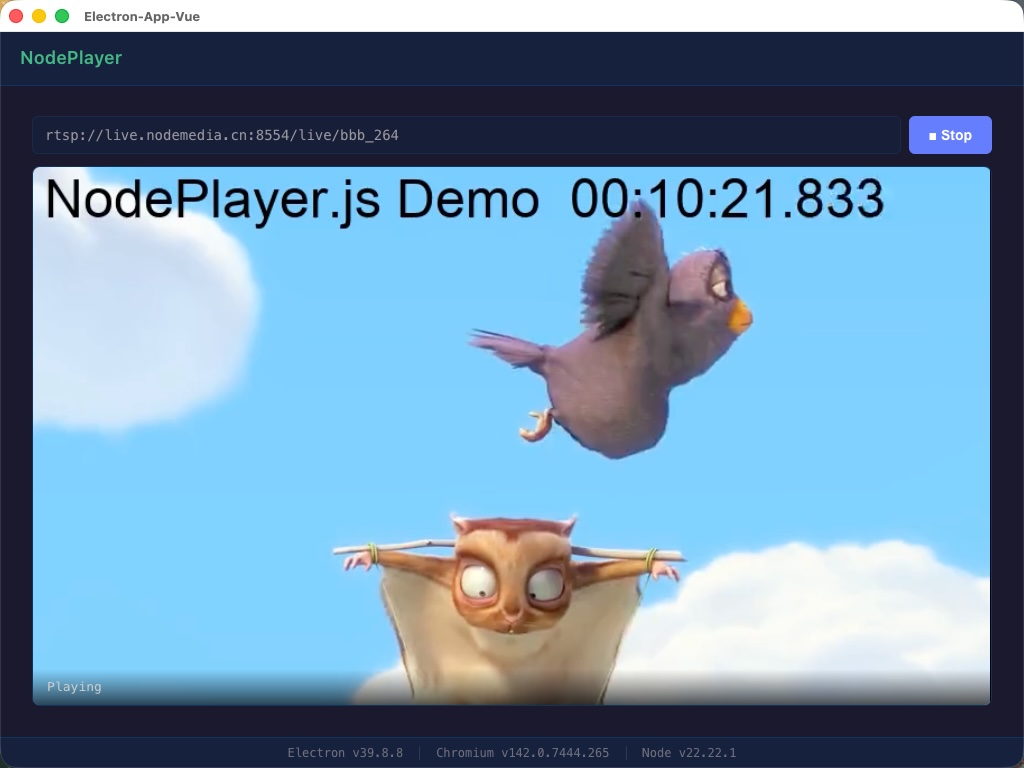
## 运行效果
|
|
265
|
+
|
|
266
|
+
|
|
267
|
+
## 7. 更多功能
|
|
268
|
+
|
|
269
|
+
上面的示例只演示了「播放 / 停止 / 截图」。`registerIpc` 实际在主进程注册了更多能力,下面按需选用。
|
|
270
|
+
|
|
271
|
+
### 事件码参考
|
|
272
|
+
|
|
273
|
+
播放器通过 `player.on('event', (code, msg) => {})` 推送事件,常用码如下:
|
|
274
|
+
|
|
275
|
+
| 范围 | code | 含义 |
|
|
276
|
+
|------|------|------|
|
|
277
|
+
| 连接 | 1000 | 正在连接 |
|
|
278
|
+
| | 1001 | 已连接 |
|
|
279
|
+
| | 1002 | 连接失败 |
|
|
280
|
+
| | 1003 | 重连中 |
|
|
281
|
+
| | 1004 | 已断开 |
|
|
282
|
+
| | 1005 | 网络错误 |
|
|
283
|
+
| | 1006 | 连接超时 |
|
|
284
|
+
| 录像 | 3001 | 录像开始 |
|
|
285
|
+
| | 3002 | 录像停止 |
|
|
286
|
+
| | 3003 | 录像错误 |
|
|
287
|
+
|
|
288
|
+
> 流的编码、分辨率、采样率等参数通过 `player.on('info', (info) => {})` 单独推送,不走 `event`。
|
|
289
|
+
|
|
290
|
+
### 流预探测(getMediaInfo)
|
|
291
|
+
|
|
292
|
+
在加入播放列表前,可先探测地址是否可达、获取音视频参数并截取首帧预览图,整个过程不依赖任何播放器实例:
|
|
293
|
+
|
|
294
|
+
```js
|
|
295
|
+
// preload.js 已暴露:window.electronAPI.getMediaInfo(url)
|
|
296
|
+
const info = await window.electronAPI.getMediaInfo('rtsp://...')
|
|
297
|
+
|
|
298
|
+
if (!info.success) {
|
|
299
|
+
console.warn('探测失败:', info.error)
|
|
300
|
+
} else {
|
|
301
|
+
const { video, audio, screenshot } = info.info
|
|
302
|
+
console.log(`视频:${video.width}x${video.height}(codecId=${video.codecId})`)
|
|
303
|
+
console.log(`音频:采样率=${audio.sampleRate},声道=${audio.channels}`)
|
|
304
|
+
if (screenshot) {
|
|
305
|
+
// screenshot 为 MJPEG 二进制 Buffer(base64 后可直接作为 <img> src)
|
|
306
|
+
previewImg.src = 'data:image/jpeg;base64,' + screenshot
|
|
307
|
+
}
|
|
308
|
+
}
|
|
309
|
+
```
|
|
310
|
+
|
|
311
|
+
### 截图
|
|
312
|
+
|
|
313
|
+
`VideoPlayer` 提供两种截图方式,均在**流就绪后**调用:
|
|
314
|
+
|
|
315
|
+
- `player.captureScreenshot(quality?)` → 返回 `data:image/jpeg;base64,...` 字符串(仅在内存中,不落盘)
|
|
316
|
+
- `player.saveScreenshot(outputPath?, quality?)` → 通过 IPC 将 JPG 写入磁盘,返回 `{ success, path }`,路径省略时由主进程自动生成
|
|
317
|
+
|
|
318
|
+
```js
|
|
319
|
+
// 直接预览(不落盘)
|
|
320
|
+
const dataUrl = player.captureScreenshot(0.9)
|
|
321
|
+
if (dataUrl) snapshotImg.src = dataUrl
|
|
322
|
+
|
|
323
|
+
// 保存到文件
|
|
324
|
+
const r = await player.saveScreenshot()
|
|
325
|
+
if (r.success) console.log('已保存:', r.path)
|
|
326
|
+
```
|
|
327
|
+
|
|
328
|
+
## 联系客服索取demo源码
|
|
329
|
+
- QQ: 281269007
|
|
330
|
+
- Email: service@nodemedia.cn
|
package/package.json
CHANGED
|
@@ -1,6 +1,6 @@
|
|
|
1
1
|
{
|
|
2
2
|
"name": "nodeplayer-addon",
|
|
3
|
-
"version": "0.3.
|
|
3
|
+
"version": "0.3.1",
|
|
4
4
|
"description": "An Electron native player addon, support RTSP and RTMP",
|
|
5
5
|
"main": "dist/index.cjs",
|
|
6
6
|
"module": "dist/index.mjs",
|
|
@@ -18,15 +18,16 @@
|
|
|
18
18
|
},
|
|
19
19
|
"files": [
|
|
20
20
|
"dist",
|
|
21
|
+
"docs",
|
|
21
22
|
"prebuilds",
|
|
22
|
-
"
|
|
23
|
+
"README.md"
|
|
23
24
|
],
|
|
24
25
|
"scripts": {
|
|
25
|
-
"test": "
|
|
26
|
+
"test": "exit 0"
|
|
26
27
|
},
|
|
27
28
|
"repository": {
|
|
28
29
|
"type": "git",
|
|
29
|
-
"url": "git+https://github.com/
|
|
30
|
+
"url": "git+https://github.com/NodeMedia/nodeplayer-addon.git"
|
|
30
31
|
},
|
|
31
32
|
"keywords": [
|
|
32
33
|
"electron",
|
|
@@ -40,7 +41,7 @@
|
|
|
40
41
|
"license": "",
|
|
41
42
|
"type": "commonjs",
|
|
42
43
|
"bugs": {
|
|
43
|
-
"url": "https://github.com/
|
|
44
|
+
"url": "https://github.com/NodeMedia/nodeplayer-addon/issues"
|
|
44
45
|
},
|
|
45
|
-
"homepage": "https://github.com/
|
|
46
|
+
"homepage": "https://github.com/NodeMedia/nodeplayer-addon#readme"
|
|
46
47
|
}
|