nodeplayer-addon 0.3.0 → 0.3.1
This diff represents the content of publicly available package versions that have been released to one of the supported registries. The information contained in this diff is provided for informational purposes only and reflects changes between package versions as they appear in their respective public registries.
- package/docs/introduction.md +26 -0
- package/docs/quick-start.md +265 -0
- package/docs/react-frontend.md +328 -0
- package/docs/vue-frontend.md +330 -0
- package/package.json +7 -6
- package/SKILL.md +0 -684
|
@@ -0,0 +1,26 @@
|
|
|
1
|
+
NodePlayerAddon 是一款专为 Electron 开发的播放器插件,基于 NAPI C++ 构建,能够轻松播放 RTSP、RTMP、KMP 等 Electron 原生环境无法直接支持的网络视频协议。该插件全面支持 Windows、Linux 和 macOS 操作系统,并兼容 x64、ARM64 及 Loong64 等多种硬件架构。无论您是在桌面应用中集成实时监控、直播流,还是其他视频能力,NodePlayerAddon 都将成为您开发 Electron 桌面应用的得力助手。
|
|
2
|
+
|
|
3
|
+
## 功能特色
|
|
4
|
+
- 支持系统:Windows,Linux,MacOS
|
|
5
|
+
- 支持架构:amd64,arm64,loong64, riscv64
|
|
6
|
+
- 支持协议:RTSP,RTMP,KMP,HTTP-FLV
|
|
7
|
+
- 支持编码:H.264/H.265/G.711/G.726/MP2/AAC
|
|
8
|
+
- 播放中截图,录像
|
|
9
|
+
- 多画面,全屏播放
|
|
10
|
+
- 硬件解码加速
|
|
11
|
+
|
|
12
|
+
## 快速路由
|
|
13
|
+
|
|
14
|
+
| File | Description | Priority |
|
|
15
|
+
|------|-------------|----------|
|
|
16
|
+
| [quick-start.md](./quick-start.md) | Minimal Electron integration (Electron Forge + HTML/UMD) | start here |
|
|
17
|
+
| [react-frontend.md](./react-frontend.md) | React frontend with create-electron scaffold | on demand |
|
|
18
|
+
| [vue-frontend.md](./vue-frontend.md) | Vue frontend with create-electron scaffold | on demand |
|
|
19
|
+
|
|
20
|
+
## 应用案例
|
|
21
|
+
|
|
22
|
+
## 商务服务
|
|
23
|
+
产品使用需商用授权,请联系客服
|
|
24
|
+
QQ:281269007
|
|
25
|
+
Email : service@nodemedia.cn
|
|
26
|
+
|
|
@@ -0,0 +1,265 @@
|
|
|
1
|
+
## 创建您的第一个应用程序
|
|
2
|
+
我们将采用官方推荐的[Electron Forge](http://https://www.electronforge.io/ "Electron Forge")创建应用程序
|
|
3
|
+
>Electron Forge 是一套集成的工具,用于打包和分发 Electron 应用程序。它合并了许多单用途包,形成一个完整的构建流程,从安装开始即可使用,包含代码签名、安装程序以及工件发布功能。对于更高级的工作流程,可以通过 Forge 的生命周期中的插件 API添加自定义构建逻辑。定制构建和存储目标则可以通过创建自己的 Makers 和 Publishers 来实现。
|
|
4
|
+
|
|
5
|
+
```bash
|
|
6
|
+
npx create-electron-app@latest my-app
|
|
7
|
+
```
|
|
8
|
+
>所有选项都使用默认
|
|
9
|
+
|
|
10
|
+
打开项目,目录结构如下,可以进行 init commit
|
|
11
|
+
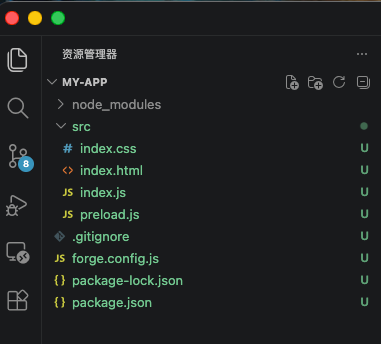
|
|
12
|
+
|
|
13
|
+
`npm start` 运行项目, 正常可以看到
|
|
14
|
+
|
|
15
|
+
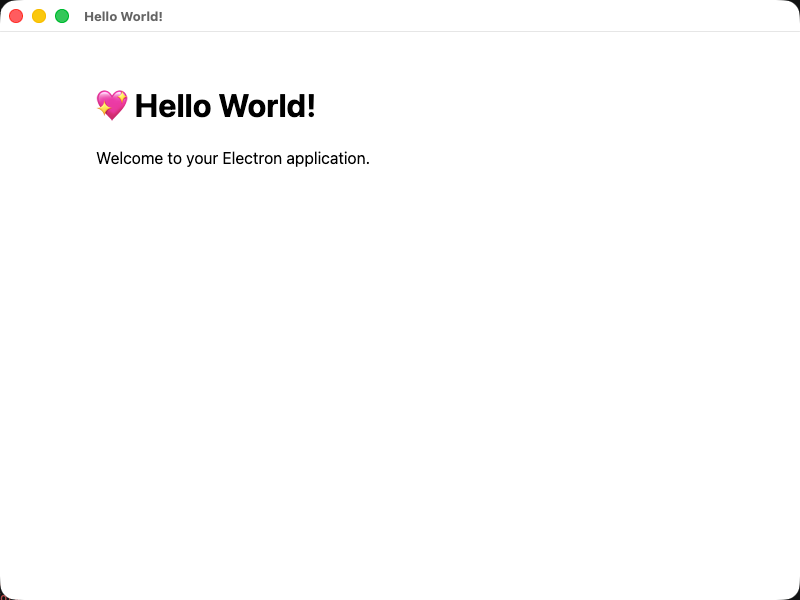
|
|
16
|
+
|
|
17
|
+
## 1. 安装扩展
|
|
18
|
+
执行命令
|
|
19
|
+
``` bash
|
|
20
|
+
npm i nodeplayer-addon
|
|
21
|
+
```
|
|
22
|
+
|
|
23
|
+
## 2.编辑index.js (根据项目的不同,也可以是main.js)
|
|
24
|
+
```js
|
|
25
|
+
const { app, BrowserWindow, ipcMain } = require('electron');
|
|
26
|
+
const path = require('node:path');
|
|
27
|
+
const NodePlayerAddon = require('nodeplayer-addon'); //导入播放器扩展
|
|
28
|
+
|
|
29
|
+
// Handle creating/removing shortcuts on Windows when installing/uninstalling.
|
|
30
|
+
if (require('electron-squirrel-startup')) {
|
|
31
|
+
app.quit();
|
|
32
|
+
}
|
|
33
|
+
|
|
34
|
+
const createWindow = () => {
|
|
35
|
+
// Create the browser window.
|
|
36
|
+
const mainWindow = new BrowserWindow({
|
|
37
|
+
width: 800,
|
|
38
|
+
height: 600,
|
|
39
|
+
webPreferences: {
|
|
40
|
+
preload: path.join(__dirname, 'preload.js'),
|
|
41
|
+
},
|
|
42
|
+
});
|
|
43
|
+
|
|
44
|
+
// and load the index.html of the app.
|
|
45
|
+
mainWindow.loadFile(path.join(__dirname, 'index.html'));
|
|
46
|
+
|
|
47
|
+
// Open the DevTools.
|
|
48
|
+
// mainWindow.webContents.openDevTools();
|
|
49
|
+
|
|
50
|
+
mainWindow.on('closed', () => {
|
|
51
|
+
NodePlayerAddon.unregisterIpc(ipcMain)
|
|
52
|
+
});
|
|
53
|
+
|
|
54
|
+
NodePlayerAddon.registerIpc(ipcMain, {
|
|
55
|
+
getWindow: () => mainWindow,
|
|
56
|
+
licensePath: app.isPackaged
|
|
57
|
+
? path.join(process.resourcesPath, 'license.dat')
|
|
58
|
+
: path.join(__dirname, 'license.dat'),
|
|
59
|
+
});
|
|
60
|
+
};
|
|
61
|
+
|
|
62
|
+
// This method will be called when Electron has finished
|
|
63
|
+
// initialization and is ready to create browser windows.
|
|
64
|
+
// Some APIs can only be used after this event occurs.
|
|
65
|
+
app.whenReady().then(() => {
|
|
66
|
+
createWindow();
|
|
67
|
+
|
|
68
|
+
// On OS X it's common to re-create a window in the app when the
|
|
69
|
+
// dock icon is clicked and there are no other windows open.
|
|
70
|
+
app.on('activate', () => {
|
|
71
|
+
if (BrowserWindow.getAllWindows().length === 0) {
|
|
72
|
+
createWindow();
|
|
73
|
+
}
|
|
74
|
+
});
|
|
75
|
+
});
|
|
76
|
+
|
|
77
|
+
// Quit when all windows are closed, except on macOS. There, it's common
|
|
78
|
+
// for applications and their menu bar to stay active until the user quits
|
|
79
|
+
// explicitly with Cmd + Q.
|
|
80
|
+
app.on('window-all-closed', () => {
|
|
81
|
+
if (process.platform !== 'darwin') {
|
|
82
|
+
app.quit();
|
|
83
|
+
}
|
|
84
|
+
});
|
|
85
|
+
|
|
86
|
+
// In this file you can include the rest of your app's specific main process
|
|
87
|
+
// code. You can also put them in separate files and import them here.
|
|
88
|
+
|
|
89
|
+
```
|
|
90
|
+
|
|
91
|
+
## 3.编辑preload.js
|
|
92
|
+
```js
|
|
93
|
+
const { contextBridge, ipcRenderer } = require('electron')
|
|
94
|
+
|
|
95
|
+
contextBridge.exposeInMainWorld('electronAPI', {
|
|
96
|
+
createPlayer: (id) => ipcRenderer.invoke('player:create', id),
|
|
97
|
+
startPlayer: (id, url) => ipcRenderer.invoke('player:start', id, url),
|
|
98
|
+
stopPlayer: (id) => ipcRenderer.invoke('player:stop', id),
|
|
99
|
+
destroyPlayer: (id) => ipcRenderer.invoke('player:destroy', id),
|
|
100
|
+
startRecord: (id, filePath) => ipcRenderer.invoke('player:startRecord', id, filePath),
|
|
101
|
+
stopRecord: (id) => ipcRenderer.invoke('player:stopRecord', id),
|
|
102
|
+
// 截图:将渲染进程生成的 JPG base64 数据保存到指定路径(默认由主进程自动生成)
|
|
103
|
+
saveScreenshot: (id, outputPath, base64Data) => ipcRenderer.invoke('player:screenshot', id, outputPath, base64Data),
|
|
104
|
+
// 预探测:在创建播放器前分析 URL(连接性 / 编码 / 分辨率 / 首帧截图)
|
|
105
|
+
getMediaInfo: (url) => ipcRenderer.invoke('player:getMediaInfo', url),
|
|
106
|
+
|
|
107
|
+
onEvent: (id, callback) => {
|
|
108
|
+
const channel = `player:event:${id}`
|
|
109
|
+
const handler = (event, data) => callback(data)
|
|
110
|
+
ipcRenderer.on(channel, handler)
|
|
111
|
+
return () => ipcRenderer.removeListener(channel, handler)
|
|
112
|
+
},
|
|
113
|
+
|
|
114
|
+
onInfo: (id, callback) => {
|
|
115
|
+
const channel = `player:info:${id}`
|
|
116
|
+
const handler = (event, info) => callback(info)
|
|
117
|
+
ipcRenderer.on(channel, handler)
|
|
118
|
+
return () => ipcRenderer.removeListener(channel, handler)
|
|
119
|
+
},
|
|
120
|
+
|
|
121
|
+
onData: (id, callback) => {
|
|
122
|
+
const channel = `player:data:${id}`
|
|
123
|
+
const handler = (event, data) => callback(data)
|
|
124
|
+
ipcRenderer.on(channel, handler)
|
|
125
|
+
return () => ipcRenderer.removeListener(channel, handler)
|
|
126
|
+
},
|
|
127
|
+
})
|
|
128
|
+
```
|
|
129
|
+
|
|
130
|
+
## 4.编辑index.html
|
|
131
|
+
```
|
|
132
|
+
<!DOCTYPE html>
|
|
133
|
+
<html>
|
|
134
|
+
<head>
|
|
135
|
+
<meta charset="UTF-8">
|
|
136
|
+
<title>NodePlayer Demo</title>
|
|
137
|
+
<style>
|
|
138
|
+
body { margin: 0; background: #000; display: flex; justify-content: center; align-items: center; height: 100vh; }
|
|
139
|
+
video { width: 100%; max-width: 960px; background: #000; }
|
|
140
|
+
.controls { position: fixed; bottom: 20px; display: flex; gap: 10px; }
|
|
141
|
+
.controls input { width: 400px; padding: 6px; }
|
|
142
|
+
.controls button { padding: 6px 16px; cursor: pointer; }
|
|
143
|
+
.status { position: fixed; top: 10px; left: 10px; color: #0f0; font-family: monospace; font-size: 14px; }
|
|
144
|
+
</style>
|
|
145
|
+
</head>
|
|
146
|
+
<body>
|
|
147
|
+
<div class="status" id="status"></div>
|
|
148
|
+
<video id="video" autoplay muted playsinline></video>
|
|
149
|
+
<div class="controls">
|
|
150
|
+
<input id="url" type="text" placeholder="rtsp://..." value="rtsp://">
|
|
151
|
+
<button id="btn-start">播放</button>
|
|
152
|
+
<button id="btn-stop">停止</button>
|
|
153
|
+
<button id="btn-record">录像</button>
|
|
154
|
+
<button id="btn-screenshot">截图</button>
|
|
155
|
+
</div>
|
|
156
|
+
|
|
157
|
+
<!-- 在 preload.js 中已通过 contextBridge 暴露 window.electronAPI -->
|
|
158
|
+
<script src="https://cdn.jsdelivr.net/npm/nodeplayer-addon/dist/video-player.umd.js"></script>
|
|
159
|
+
<script>
|
|
160
|
+
const videoEl = document.getElementById('video')
|
|
161
|
+
const statusEl = document.getElementById('status')
|
|
162
|
+
const urlInput = document.getElementById('url')
|
|
163
|
+
|
|
164
|
+
const player = new VideoPlayer(videoEl, 'demo')
|
|
165
|
+
|
|
166
|
+
const EVENT_STATUS = {
|
|
167
|
+
1000: 'Connecting...', 1001: 'Connected', 1002: 'Connection failed',
|
|
168
|
+
1003: 'Reconnecting...', 1004: 'Disconnected', 1005: 'Network error',
|
|
169
|
+
1006: 'Connection timeout',
|
|
170
|
+
}
|
|
171
|
+
|
|
172
|
+
player.on('event', (code, msg) => {
|
|
173
|
+
if (code in EVENT_STATUS) statusEl.textContent = msg ? `${EVENT_STATUS[code]}: ${msg}` : EVENT_STATUS[code]
|
|
174
|
+
if (code === 3001) document.getElementById('btn-record').textContent = '停止录像'
|
|
175
|
+
if (code === 3002 || code === 3003) document.getElementById('btn-record').textContent = '录像'
|
|
176
|
+
})
|
|
177
|
+
player.on('error', (err) => { statusEl.textContent = 'Error: ' + err.message })
|
|
178
|
+
|
|
179
|
+
document.getElementById('btn-start').onclick = () => player.start(urlInput.value)
|
|
180
|
+
document.getElementById('btn-stop').onclick = () => player.stop()
|
|
181
|
+
document.getElementById('btn-record').onclick = () => {
|
|
182
|
+
player.isRecording ? player.stopRecord() : player.startRecord()
|
|
183
|
+
}
|
|
184
|
+
document.getElementById('btn-screenshot').onclick = async () => {
|
|
185
|
+
const r = await player.saveScreenshot()
|
|
186
|
+
if (r.success) statusEl.textContent = '截图已保存:' + r.path
|
|
187
|
+
}
|
|
188
|
+
</script>
|
|
189
|
+
</body>
|
|
190
|
+
</html>
|
|
191
|
+
```
|
|
192
|
+
本例子使用UMD模式加载播放前端,如果是离线部署,可以将 https://cdn.jsdelivr.net/npm/nodeplayer-addon/dist/video-player.umd.js 下载到本地进行加载。
|
|
193
|
+
|
|
194
|
+
## 5.再次运行 `npm start` 可以启动页面并输入播放地址 rtsp:// or rtmp://
|
|
195
|
+
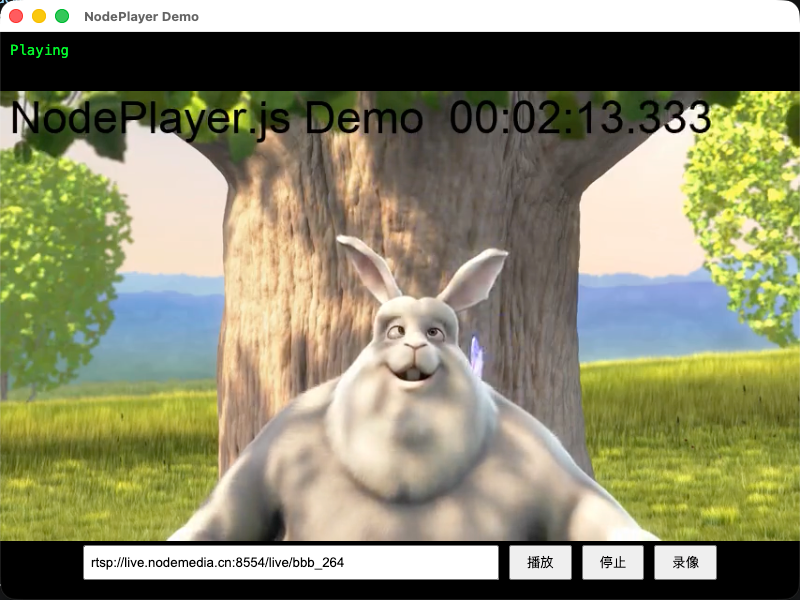
|
|
196
|
+
|
|
197
|
+
这样,一个基于NodePlayerAddon 开发的简单Electron播放例子就完成了。不依赖流媒体服务端,直连rtsp,rtmp播放。高性能,硬解码,低延迟。
|
|
198
|
+
|
|
199
|
+
## 6.加上样式
|
|
200
|
+
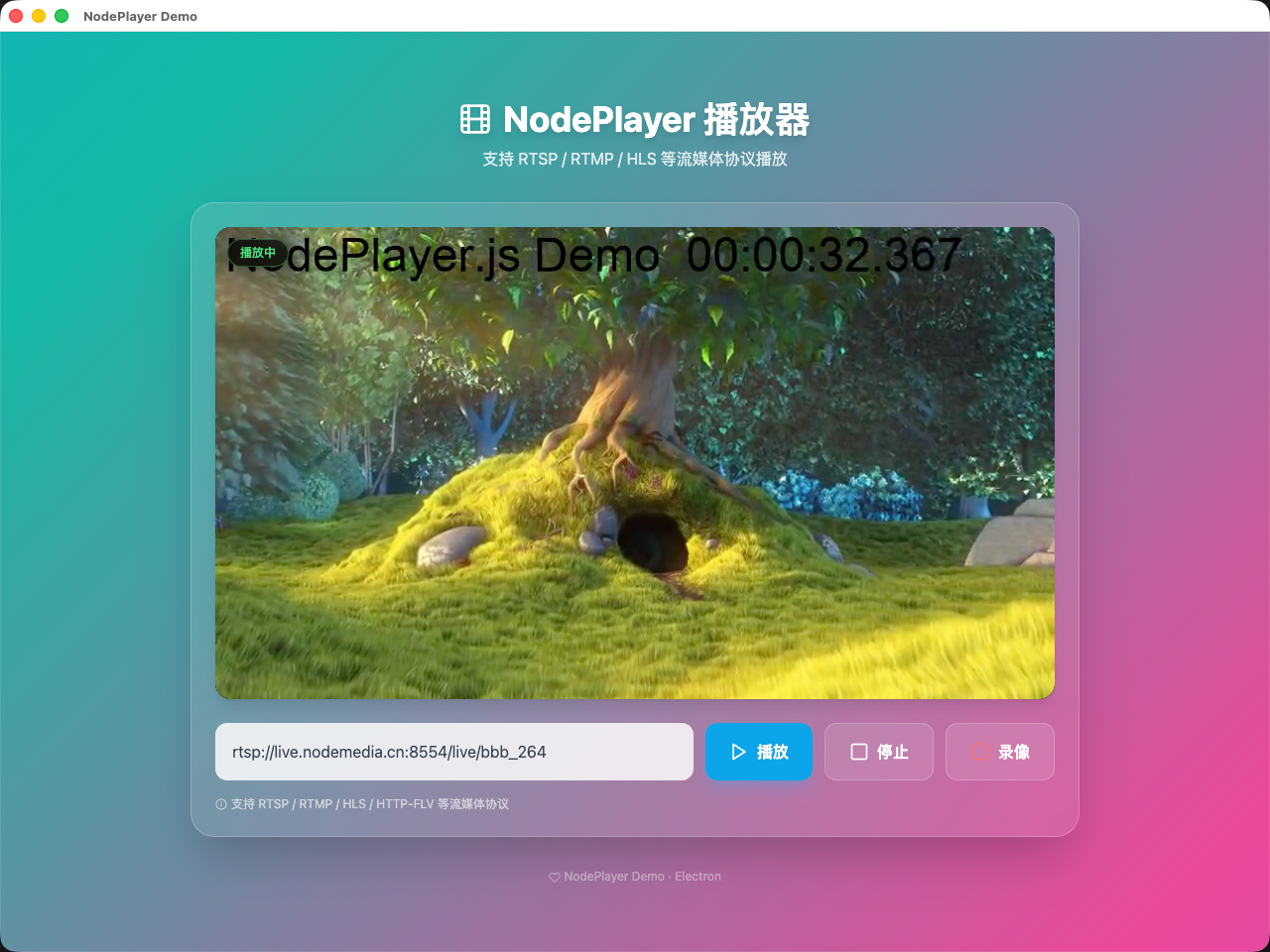
|
|
201
|
+
|
|
202
|
+
## 7. 更多功能
|
|
203
|
+
|
|
204
|
+
上面的最小示例只演示了「播放 / 停止 / 录像 / 截图」。`registerIpc` 实际在主进程注册了更多能力,下面按需选用。
|
|
205
|
+
|
|
206
|
+
### 事件码参考
|
|
207
|
+
|
|
208
|
+
播放器通过 `player.on('event', (code, msg) => {})` 推送事件,常用码如下:
|
|
209
|
+
|
|
210
|
+
| 范围 | code | 含义 |
|
|
211
|
+
|------|------|------|
|
|
212
|
+
| 连接 | 1000 | 正在连接 |
|
|
213
|
+
| | 1001 | 已连接 |
|
|
214
|
+
| | 1002 | 连接失败 |
|
|
215
|
+
| | 1003 | 重连中 |
|
|
216
|
+
| | 1004 | 已断开 |
|
|
217
|
+
| | 1005 | 网络错误 |
|
|
218
|
+
| | 1006 | 连接超时 |
|
|
219
|
+
| 录像 | 3001 | 录像开始 |
|
|
220
|
+
| | 3002 | 录像停止 |
|
|
221
|
+
| | 3003 | 录像错误 |
|
|
222
|
+
|
|
223
|
+
> 流的编码、分辨率、采样率等参数通过 `player.on('info', (info) => {})` 单独推送,不走 `event`。
|
|
224
|
+
|
|
225
|
+
### 流预探测(getMediaInfo)
|
|
226
|
+
|
|
227
|
+
在加入播放列表前,可先探测地址是否可达、获取音视频参数并截取首帧预览图,整个过程不依赖任何播放器实例:
|
|
228
|
+
|
|
229
|
+
```js
|
|
230
|
+
// preload.js 已暴露:window.electronAPI.getMediaInfo(url)
|
|
231
|
+
const info = await window.electronAPI.getMediaInfo('rtsp://...')
|
|
232
|
+
|
|
233
|
+
if (!info.success) {
|
|
234
|
+
console.warn('探测失败:', info.error)
|
|
235
|
+
} else {
|
|
236
|
+
const { video, audio, screenshot } = info.info
|
|
237
|
+
console.log(`视频:${video.width}x${video.height}(codecId=${video.codecId})`)
|
|
238
|
+
console.log(`音频:采样率=${audio.sampleRate},声道=${audio.channels}`)
|
|
239
|
+
if (screenshot) {
|
|
240
|
+
// screenshot 为 MJPEG 二进制 Buffer(base64 后可直接作为 <img> src)
|
|
241
|
+
previewImg.src = 'data:image/jpeg;base64,' + screenshot
|
|
242
|
+
}
|
|
243
|
+
}
|
|
244
|
+
```
|
|
245
|
+
|
|
246
|
+
### 截图
|
|
247
|
+
|
|
248
|
+
`VideoPlayer` 提供两种截图方式,均在**流就绪后**调用:
|
|
249
|
+
|
|
250
|
+
- `player.captureScreenshot(quality?)` → 返回 `data:image/jpeg;base64,...` 字符串(仅在内存中,不落盘)
|
|
251
|
+
- `player.saveScreenshot(outputPath?, quality?)` → 通过 IPC 将 JPG 写入磁盘,返回 `{ success, path }`,路径省略时由主进程自动生成
|
|
252
|
+
|
|
253
|
+
```js
|
|
254
|
+
// 直接预览(不落盘)
|
|
255
|
+
const dataUrl = player.captureScreenshot(0.9)
|
|
256
|
+
if (dataUrl) snapshotImg.src = dataUrl
|
|
257
|
+
|
|
258
|
+
// 保存到文件
|
|
259
|
+
const r = await player.saveScreenshot()
|
|
260
|
+
if (r.success) console.log('已保存:', r.path)
|
|
261
|
+
```
|
|
262
|
+
|
|
263
|
+
## 联系客服索取demo源码
|
|
264
|
+
- QQ: 281269007
|
|
265
|
+
- Email: service@nodemedia.cn
|
|
@@ -0,0 +1,328 @@
|
|
|
1
|
+
在快速集成中,我们使用官方推荐的Electron Forge创建程序。可以用来开发react但是需要很多配置,我们在这个例子中换一个更简单的脚手架: [create-electron](https://www.npmjs.com/package/%40quick-start/create-electron)
|
|
2
|
+
|
|
3
|
+
## 1.创建项目
|
|
4
|
+
```bash
|
|
5
|
+
npm create @quick-start/electron
|
|
6
|
+
```
|
|
7
|
+
|
|
8
|
+
```bash
|
|
9
|
+
> npx
|
|
10
|
+
> "create-electron"
|
|
11
|
+
|
|
12
|
+
✔ Project name: … electron-app-react
|
|
13
|
+
✔ Select a framework: › react
|
|
14
|
+
✔ Add TypeScript? … No / Yes
|
|
15
|
+
✔ Add Electron updater plugin? … No / Yes
|
|
16
|
+
✔ Enable Electron download mirror proxy? … No / Yes
|
|
17
|
+
|
|
18
|
+
Scaffolding project in electron-app-react...
|
|
19
|
+
|
|
20
|
+
Done. Now run:
|
|
21
|
+
|
|
22
|
+
cd electron-app-react
|
|
23
|
+
npm install
|
|
24
|
+
npm run dev
|
|
25
|
+
```
|
|
26
|
+
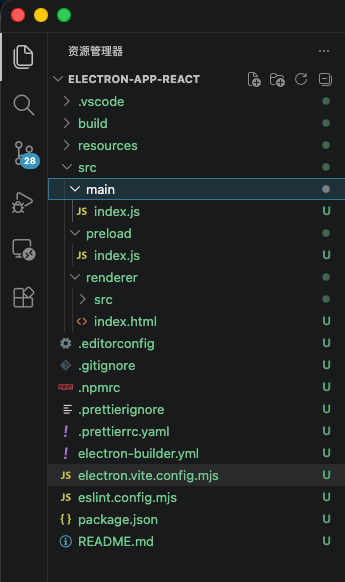
编辑器打开项目,可以看到目录结构如下
|
|
27
|
+
|
|
28
|
+
|
|
29
|
+
## 2.安装扩展
|
|
30
|
+
执行命令
|
|
31
|
+
```bash
|
|
32
|
+
npm i nodeplayer-addon
|
|
33
|
+
```
|
|
34
|
+
|
|
35
|
+
## 3.编辑 src/main/index.js 文件
|
|
36
|
+
```js
|
|
37
|
+
import { app, shell, BrowserWindow, ipcMain } from 'electron'
|
|
38
|
+
import { join } from 'path'
|
|
39
|
+
import { electronApp, optimizer, is } from '@electron-toolkit/utils'
|
|
40
|
+
import icon from '../../resources/icon.png?asset'
|
|
41
|
+
import NodePlayerAddon from 'nodeplayer-addon'
|
|
42
|
+
|
|
43
|
+
function createWindow() {
|
|
44
|
+
// Create the browser window.
|
|
45
|
+
const mainWindow = new BrowserWindow({
|
|
46
|
+
width: 900,
|
|
47
|
+
height: 670,
|
|
48
|
+
show: false,
|
|
49
|
+
autoHideMenuBar: true,
|
|
50
|
+
...(process.platform === 'linux' ? { icon } : {}),
|
|
51
|
+
webPreferences: {
|
|
52
|
+
preload: join(__dirname, '../preload/index.js'),
|
|
53
|
+
sandbox: false
|
|
54
|
+
}
|
|
55
|
+
})
|
|
56
|
+
|
|
57
|
+
mainWindow.on('ready-to-show', () => {
|
|
58
|
+
mainWindow.maximize();
|
|
59
|
+
mainWindow.show()
|
|
60
|
+
})
|
|
61
|
+
|
|
62
|
+
mainWindow.webContents.setWindowOpenHandler((details) => {
|
|
63
|
+
shell.openExternal(details.url)
|
|
64
|
+
return { action: 'deny' }
|
|
65
|
+
})
|
|
66
|
+
|
|
67
|
+
// HMR for renderer base on electron-vite cli.
|
|
68
|
+
// Load the remote URL for development or the local html file for production.
|
|
69
|
+
if (is.dev && process.env['ELECTRON_RENDERER_URL']) {
|
|
70
|
+
mainWindow.loadURL(process.env['ELECTRON_RENDERER_URL'])
|
|
71
|
+
} else {
|
|
72
|
+
mainWindow.loadFile(join(__dirname, '../renderer/index.html'))
|
|
73
|
+
}
|
|
74
|
+
|
|
75
|
+
mainWindow.on('closed', () => {
|
|
76
|
+
NodePlayerAddon.unregisterIpc(ipcMain)
|
|
77
|
+
})
|
|
78
|
+
NodePlayerAddon.registerIpc(ipcMain, {
|
|
79
|
+
getWindow: () => mainWindow,
|
|
80
|
+
licensePath: app.isPackaged
|
|
81
|
+
? join(process.resourcesPath, 'license.dat')
|
|
82
|
+
: join(__dirname, 'license.dat'),
|
|
83
|
+
})
|
|
84
|
+
}
|
|
85
|
+
|
|
86
|
+
// This method will be called when Electron has finished
|
|
87
|
+
// initialization and is ready to create browser windows.
|
|
88
|
+
// Some APIs can only be used after this event occurs.
|
|
89
|
+
app.whenReady().then(() => {
|
|
90
|
+
// Set app user model id for windows
|
|
91
|
+
electronApp.setAppUserModelId('com.electron')
|
|
92
|
+
|
|
93
|
+
// Default open or close DevTools by F12 in development
|
|
94
|
+
// and ignore CommandOrControl + R in production.
|
|
95
|
+
// see https://github.com/alex8088/electron-toolkit/tree/master/packages/utils
|
|
96
|
+
app.on('browser-window-created', (_, window) => {
|
|
97
|
+
optimizer.watchWindowShortcuts(window)
|
|
98
|
+
})
|
|
99
|
+
|
|
100
|
+
// IPC test
|
|
101
|
+
ipcMain.on('ping', () => console.log('pong'))
|
|
102
|
+
|
|
103
|
+
createWindow()
|
|
104
|
+
|
|
105
|
+
app.on('activate', function () {
|
|
106
|
+
// On macOS it's common to re-create a window in the app when the
|
|
107
|
+
// dock icon is clicked and there are no other windows open.
|
|
108
|
+
if (BrowserWindow.getAllWindows().length === 0) createWindow()
|
|
109
|
+
})
|
|
110
|
+
})
|
|
111
|
+
|
|
112
|
+
// Quit when all windows are closed, except on macOS. There, it's common
|
|
113
|
+
// for applications and their menu bar to stay active until the user quits
|
|
114
|
+
// explicitly with Cmd + Q.
|
|
115
|
+
app.on('window-all-closed', () => {
|
|
116
|
+
if (process.platform !== 'darwin') {
|
|
117
|
+
app.quit()
|
|
118
|
+
}
|
|
119
|
+
})
|
|
120
|
+
|
|
121
|
+
// In this file you can include the rest of your app's specific main process
|
|
122
|
+
// code. You can also put them in separate files and require them here.
|
|
123
|
+
|
|
124
|
+
```
|
|
125
|
+
|
|
126
|
+
## 4. 编辑src/preload/index.js
|
|
127
|
+
```js
|
|
128
|
+
import { contextBridge, ipcRenderer } from 'electron'
|
|
129
|
+
|
|
130
|
+
contextBridge.exposeInMainWorld('electronAPI', {
|
|
131
|
+
createPlayer: (id) => ipcRenderer.invoke('player:create', id),
|
|
132
|
+
startPlayer: (id, url) => ipcRenderer.invoke('player:start', id, url),
|
|
133
|
+
stopPlayer: (id) => ipcRenderer.invoke('player:stop', id),
|
|
134
|
+
destroyPlayer: (id) => ipcRenderer.invoke('player:destroy', id),
|
|
135
|
+
startRecord: (id, filePath) => ipcRenderer.invoke('player:startRecord', id, filePath),
|
|
136
|
+
stopRecord: (id) => ipcRenderer.invoke('player:stopRecord', id),
|
|
137
|
+
// 截图:将渲染进程生成的 JPG base64 数据保存到指定路径(默认由主进程自动生成)
|
|
138
|
+
saveScreenshot: (id, outputPath, base64Data) => ipcRenderer.invoke('player:screenshot', id, outputPath, base64Data),
|
|
139
|
+
// 预探测:在创建播放器前分析 URL(连接性 / 编码 / 分辨率 / 首帧截图)
|
|
140
|
+
getMediaInfo: (url) => ipcRenderer.invoke('player:getMediaInfo', url),
|
|
141
|
+
|
|
142
|
+
onEvent: (id, callback) => {
|
|
143
|
+
const channel = `player:event:${id}`
|
|
144
|
+
const handler = (event, data) => callback(data)
|
|
145
|
+
ipcRenderer.on(channel, handler)
|
|
146
|
+
return () => ipcRenderer.removeListener(channel, handler)
|
|
147
|
+
},
|
|
148
|
+
|
|
149
|
+
onInfo: (id, callback) => {
|
|
150
|
+
const channel = `player:info:${id}`
|
|
151
|
+
const handler = (event, info) => callback(info)
|
|
152
|
+
ipcRenderer.on(channel, handler)
|
|
153
|
+
return () => ipcRenderer.removeListener(channel, handler)
|
|
154
|
+
},
|
|
155
|
+
|
|
156
|
+
onData: (id, callback) => {
|
|
157
|
+
const channel = `player:data:${id}`
|
|
158
|
+
const handler = (event, data) => callback(data)
|
|
159
|
+
ipcRenderer.on(channel, handler)
|
|
160
|
+
return () => ipcRenderer.removeListener(channel, handler)
|
|
161
|
+
}
|
|
162
|
+
})
|
|
163
|
+
|
|
164
|
+
```
|
|
165
|
+
|
|
166
|
+
## 5.编辑src/renderer/src/App.jsx
|
|
167
|
+
```js
|
|
168
|
+
import { useRef, useEffect, useState, useCallback } from 'react'
|
|
169
|
+
import VideoPlayer from 'nodeplayer-addon/video-player'
|
|
170
|
+
|
|
171
|
+
function App() {
|
|
172
|
+
const videoRef = useRef(null)
|
|
173
|
+
const playerRef = useRef(null)
|
|
174
|
+
const [url, setUrl] = useState('')
|
|
175
|
+
const [status, setStatus] = useState('')
|
|
176
|
+
const [recording, setRecording] = useState(false)
|
|
177
|
+
|
|
178
|
+
useEffect(() => {
|
|
179
|
+
const player = new VideoPlayer(videoRef.current, `player-${Date.now()}`)
|
|
180
|
+
player.on('event', (code, msg) => {
|
|
181
|
+
if (code === 3001) setRecording(true)
|
|
182
|
+
if (code === 3002 || code === 3003) setRecording(false)
|
|
183
|
+
})
|
|
184
|
+
player.on('error', (err) => { setStatus(err.message) })
|
|
185
|
+
playerRef.current = player
|
|
186
|
+
|
|
187
|
+
return () => {
|
|
188
|
+
player.stop()
|
|
189
|
+
}
|
|
190
|
+
}, [])
|
|
191
|
+
|
|
192
|
+
const handleStart = useCallback(() => {
|
|
193
|
+
playerRef.current?.start(url)
|
|
194
|
+
}, [url])
|
|
195
|
+
|
|
196
|
+
const handleStop = useCallback(() => {
|
|
197
|
+
playerRef.current?.stop()
|
|
198
|
+
}, [])
|
|
199
|
+
|
|
200
|
+
const handleRecord = useCallback(() => {
|
|
201
|
+
const p = playerRef.current
|
|
202
|
+
if (!p) return
|
|
203
|
+
p.isRecording ? p.stopRecord() : p.startRecord()
|
|
204
|
+
}, [])
|
|
205
|
+
|
|
206
|
+
const handleScreenshot = useCallback(async () => {
|
|
207
|
+
const p = playerRef.current
|
|
208
|
+
if (!p) return
|
|
209
|
+
const r = await p.saveScreenshot()
|
|
210
|
+
setStatus(r.success ? '截图已保存:' + r.path : (r.error || '截图失败'))
|
|
211
|
+
}, [])
|
|
212
|
+
|
|
213
|
+
return (
|
|
214
|
+
<div style={{ maxWidth: 800, margin: '10px', fontFamily: 'sans-serif' }}>
|
|
215
|
+
<div style={{ position: 'relative', width: '100%', aspectRatio: '16 / 9', background: '#000' }}>
|
|
216
|
+
<video
|
|
217
|
+
ref={videoRef}
|
|
218
|
+
autoPlay
|
|
219
|
+
muted
|
|
220
|
+
playsInline
|
|
221
|
+
style={{ width: '100%', height: '100%', display: 'block', objectFit: 'contain' }}
|
|
222
|
+
/>
|
|
223
|
+
{status && (
|
|
224
|
+
<div
|
|
225
|
+
style={{
|
|
226
|
+
position: 'absolute',
|
|
227
|
+
top: 8,
|
|
228
|
+
left: 8,
|
|
229
|
+
color: '#0f0',
|
|
230
|
+
fontFamily: 'monospace',
|
|
231
|
+
fontSize: 12
|
|
232
|
+
}}
|
|
233
|
+
>
|
|
234
|
+
{status}
|
|
235
|
+
</div>
|
|
236
|
+
)}
|
|
237
|
+
</div>
|
|
238
|
+
<div style={{ display: 'flex', gap: 8, padding: '10px 0' }}>
|
|
239
|
+
<input
|
|
240
|
+
type="text"
|
|
241
|
+
value={url}
|
|
242
|
+
onChange={(e) => setUrl(e.target.value)}
|
|
243
|
+
placeholder="rtsp:// 或 http://"
|
|
244
|
+
style={{ flex: 1, padding: '6px 10px', fontSize: 14 }}
|
|
245
|
+
/>
|
|
246
|
+
<button onClick={handleStart}>播放</button>
|
|
247
|
+
<button onClick={handleStop}>停止</button>
|
|
248
|
+
<button onClick={handleRecord}>{recording ? '停止录像' : '录像'}</button>
|
|
249
|
+
<button onClick={handleScreenshot}>截图</button>
|
|
250
|
+
</div>
|
|
251
|
+
</div>
|
|
252
|
+
)
|
|
253
|
+
}
|
|
254
|
+
|
|
255
|
+
export default App
|
|
256
|
+
|
|
257
|
+
```
|
|
258
|
+
|
|
259
|
+
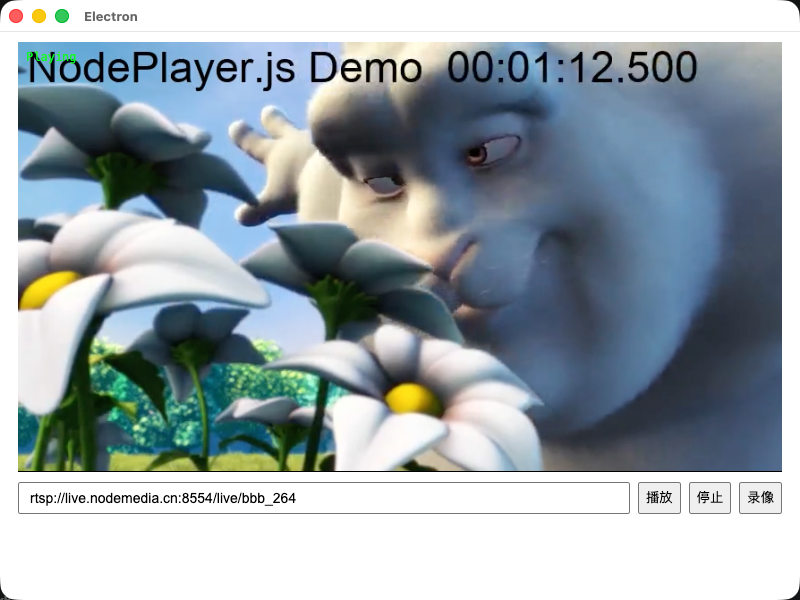
## 运行效果
|
|
260
|
+
|
|
261
|
+
|
|
262
|
+
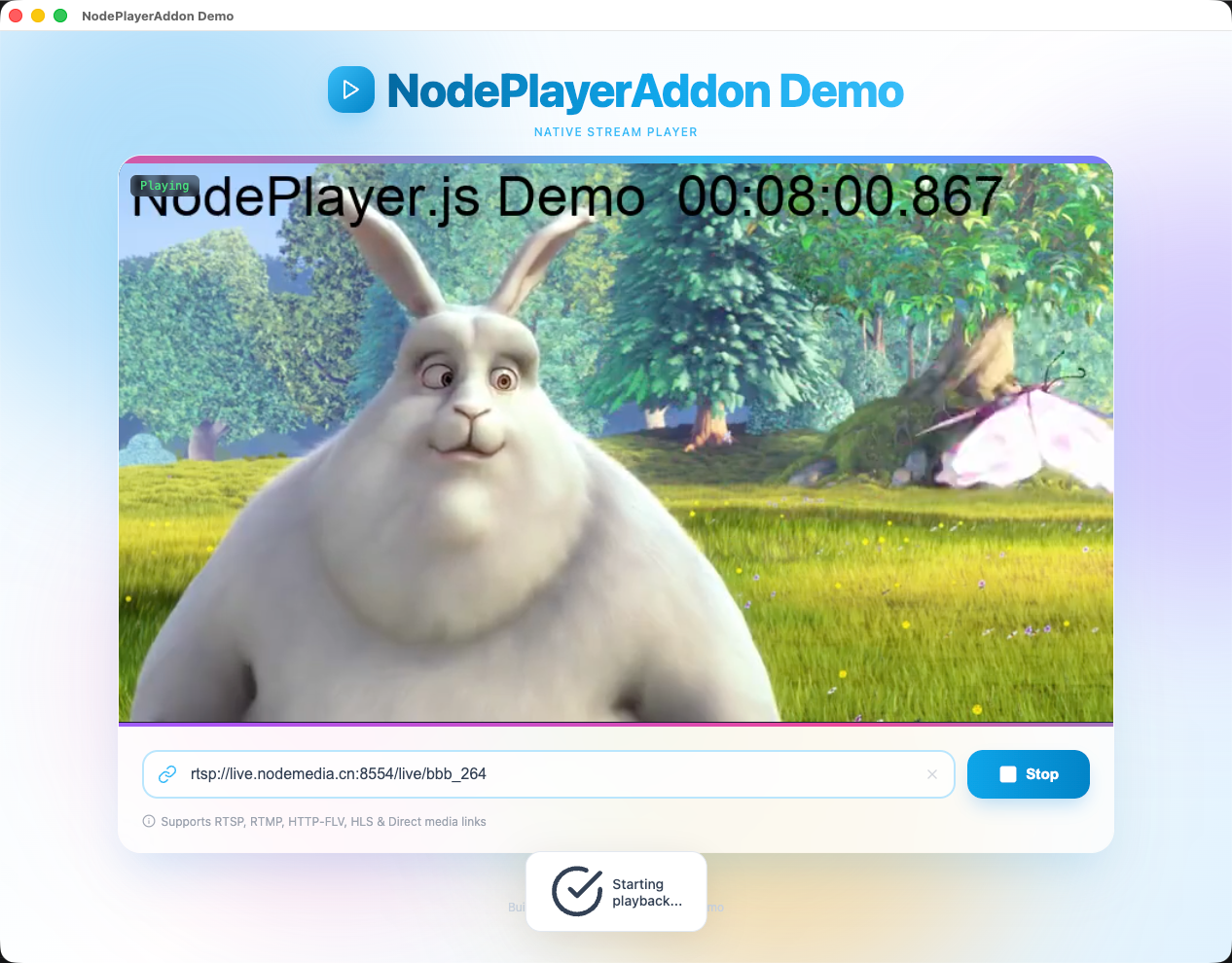
## 加上样式后的运行效果
|
|
263
|
+
|
|
264
|
+
|
|
265
|
+
## 6. 更多功能
|
|
266
|
+
|
|
267
|
+
上面的示例只演示了「播放 / 停止 / 录像 / 截图」。`registerIpc` 实际在主进程注册了更多能力,下面按需选用。
|
|
268
|
+
|
|
269
|
+
### 事件码参考
|
|
270
|
+
|
|
271
|
+
播放器通过 `player.on('event', (code, msg) => {})` 推送事件,常用码如下:
|
|
272
|
+
|
|
273
|
+
| 范围 | code | 含义 |
|
|
274
|
+
|------|------|------|
|
|
275
|
+
| 连接 | 1000 | 正在连接 |
|
|
276
|
+
| | 1001 | 已连接 |
|
|
277
|
+
| | 1002 | 连接失败 |
|
|
278
|
+
| | 1003 | 重连中 |
|
|
279
|
+
| | 1004 | 已断开 |
|
|
280
|
+
| | 1005 | 网络错误 |
|
|
281
|
+
| | 1006 | 连接超时 |
|
|
282
|
+
| 录像 | 3001 | 录像开始 |
|
|
283
|
+
| | 3002 | 录像停止 |
|
|
284
|
+
| | 3003 | 录像错误 |
|
|
285
|
+
|
|
286
|
+
> 流的编码、分辨率、采样率等参数通过 `player.on('info', (info) => {})` 单独推送,不走 `event`。
|
|
287
|
+
|
|
288
|
+
### 流预探测(getMediaInfo)
|
|
289
|
+
|
|
290
|
+
在加入播放列表前,可先探测地址是否可达、获取音视频参数并截取首帧预览图,整个过程不依赖任何播放器实例:
|
|
291
|
+
|
|
292
|
+
```js
|
|
293
|
+
// preload.js 已暴露:window.electronAPI.getMediaInfo(url)
|
|
294
|
+
const info = await window.electronAPI.getMediaInfo('rtsp://...')
|
|
295
|
+
|
|
296
|
+
if (!info.success) {
|
|
297
|
+
console.warn('探测失败:', info.error)
|
|
298
|
+
} else {
|
|
299
|
+
const { video, audio, screenshot } = info.info
|
|
300
|
+
console.log(`视频:${video.width}x${video.height}(codecId=${video.codecId})`)
|
|
301
|
+
console.log(`音频:采样率=${audio.sampleRate},声道=${audio.channels}`)
|
|
302
|
+
if (screenshot) {
|
|
303
|
+
// screenshot 为 MJPEG 二进制 Buffer(base64 后可直接作为 <img> src)
|
|
304
|
+
previewImg.src = 'data:image/jpeg;base64,' + screenshot
|
|
305
|
+
}
|
|
306
|
+
}
|
|
307
|
+
```
|
|
308
|
+
|
|
309
|
+
### 截图
|
|
310
|
+
|
|
311
|
+
`VideoPlayer` 提供两种截图方式,均在**流就绪后**调用:
|
|
312
|
+
|
|
313
|
+
- `player.captureScreenshot(quality?)` → 返回 `data:image/jpeg;base64,...` 字符串(仅在内存中,不落盘)
|
|
314
|
+
- `player.saveScreenshot(outputPath?, quality?)` → 通过 IPC 将 JPG 写入磁盘,返回 `{ success, path }`,路径省略时由主进程自动生成
|
|
315
|
+
|
|
316
|
+
```js
|
|
317
|
+
// 直接预览(不落盘)
|
|
318
|
+
const dataUrl = player.captureScreenshot(0.9)
|
|
319
|
+
if (dataUrl) snapshotImg.src = dataUrl
|
|
320
|
+
|
|
321
|
+
// 保存到文件
|
|
322
|
+
const r = await player.saveScreenshot()
|
|
323
|
+
if (r.success) console.log('已保存:', r.path)
|
|
324
|
+
```
|
|
325
|
+
|
|
326
|
+
## 联系客服索取demo源码
|
|
327
|
+
- QQ: 281269007
|
|
328
|
+
- Email: service@nodemedia.cn
|