mimo2codex 0.1.0 → 0.1.1
This diff represents the content of publicly available package versions that have been released to one of the supported registries. The information contained in this diff is provided for informational purposes only and reflects changes between package versions as they appear in their respective public registries.
- package/README.md +157 -412
- package/README.zh.md +146 -624
- package/dist/cli.js +12 -0
- package/dist/cli.js.map +1 -1
- package/dist/server.js +83 -2
- package/dist/server.js.map +1 -1
- package/dist/translate/reqToChat.js +23 -9
- package/dist/translate/reqToChat.js.map +1 -1
- package/dist/upstream/mimoClient.js +18 -2
- package/dist/upstream/mimoClient.js.map +1 -1
- package/package.json +4 -4
package/README.md
CHANGED
|
@@ -2,535 +2,280 @@
|
|
|
2
2
|
|
|
3
3
|
> English · [中文文档](./README.zh.md)
|
|
4
4
|
|
|
5
|
-
Local proxy that lets the **latest OpenAI Codex CLI
|
|
5
|
+
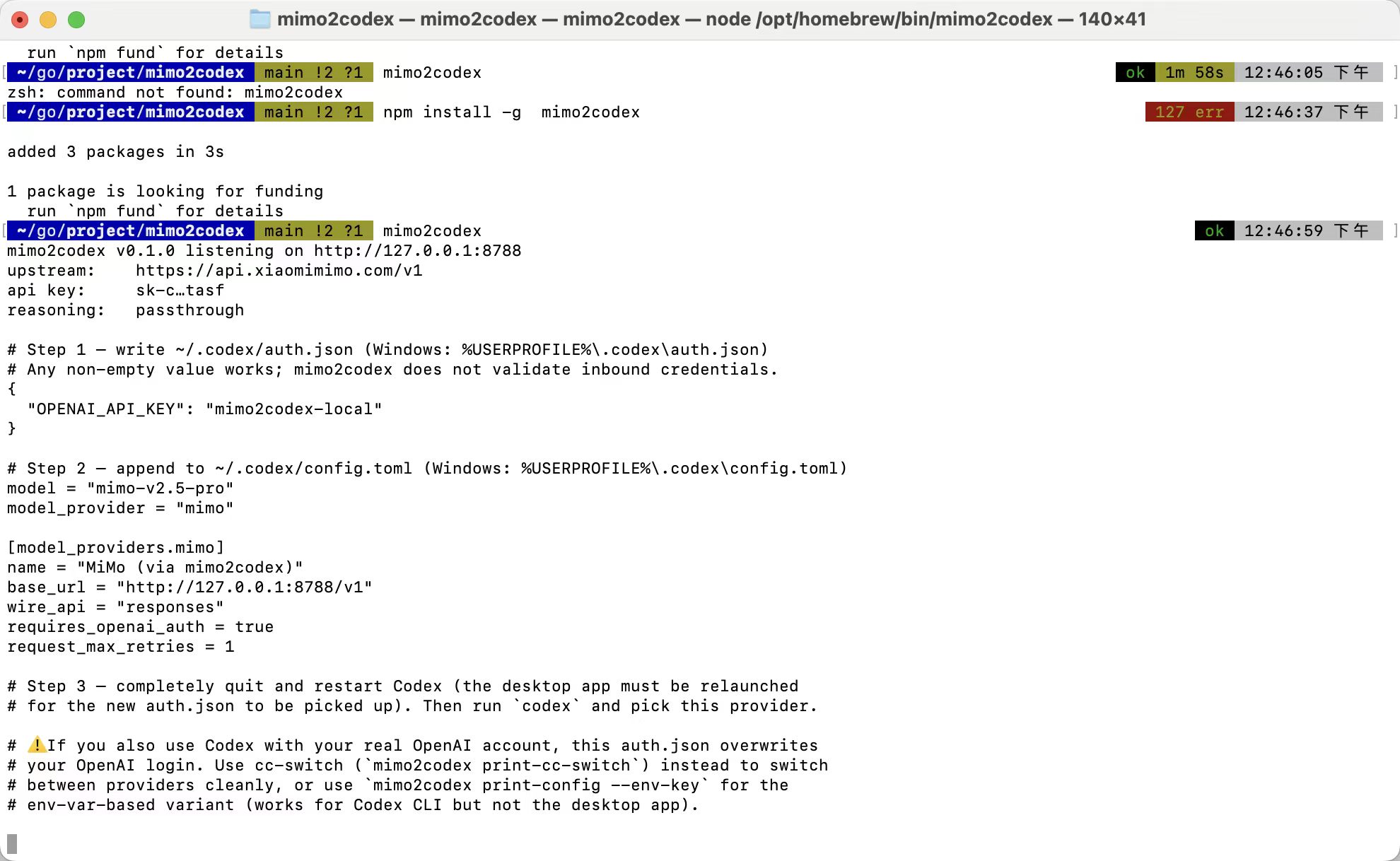
Local proxy that lets the **latest OpenAI Codex CLI / desktop** talk to **Xiaomi MiMo V2.5**, by translating Codex's Responses API ↔ MiMo's Chat Completions API on the fly. Stateless, no telemetry, runs on `127.0.0.1`.
|
|
6
6
|
|
|
7
|
-
|
|
8
|
-
>
|
|
9
|
-
> Conceptually similar to [openrouter](https://openrouter.ai), [claude-code-router](https://github.com/musistudio/claude-code-router) and [y-router](https://github.com/luohy15/y-router) — pure stateless protocol translation, no scheduling, no storage.
|
|
7
|
+
|
|
10
8
|
|
|
11
|
-
##
|
|
9
|
+
## Why
|
|
12
10
|
|
|
13
|
-
|
|
14
|
-
- ✅ Codex desktop app (macOS / Windows) — same `~/.codex/config.toml`
|
|
15
|
-
- ✅ Pet companion (status driven by SSE event lifecycle, no special handling needed)
|
|
16
|
-
- ✅ Tool calling — function tools, including parallel calls
|
|
17
|
-
- ✅ Multi-turn conversations with mixed tool calls + reasoning
|
|
18
|
-
- ✅ Streaming SSE with full Responses event schema (`response.created`, `output_item.added`, `output_text.delta`, `function_call_arguments.delta`, `reasoning_summary_text.delta`, `completed`, …)
|
|
19
|
-
- ✅ Thinking mode passthrough — MiMo's `reasoning_content` is shown in Codex's reasoning panel and re-injected on follow-up turns to keep multi-turn tool quality high (per MiMo's docs)
|
|
20
|
-
- ✅ 1M context — pass `mimo-v2.5-pro[1m]` as the model
|
|
21
|
-
- ✅ **cc-switch integration** — `mimo2codex print-cc-switch` outputs the auth.json + config.toml snippets you paste into cc-switch's "Add Provider → Codex → Custom" dialog
|
|
11
|
+
MiMo's [official Codex doc](https://platform.xiaomimimo.com/docs/zh-CN/integration/codex) only supports `wire_api = "chat"`, but newer Codex versions hard-error on it (the official workaround is to downgrade Codex, losing pets, the new desktop release and tool fixes). mimo2codex fixes this without touching either side: keep Codex on latest, run mimo2codex locally, Codex thinks it's talking to a native Responses backend.
|
|
22
12
|
|
|
23
|
-
|
|
13
|
+
Conceptually a sibling of [openrouter](https://openrouter.ai), [claude-code-router](https://github.com/musistudio/claude-code-router), [y-router](https://github.com/luohy15/y-router) — a thin protocol shim.
|
|
24
14
|
|
|
25
|
-
|
|
15
|
+
## What works
|
|
26
16
|
|
|
27
|
-
|
|
17
|
+
- ✅ Codex CLI `wire_api = "responses"` and Codex desktop app
|
|
18
|
+
- ✅ Tool calling — function tools, parallel calls, `local_shell`, `custom`, MCP `namespace`
|
|
19
|
+
- ✅ Web search — translated to MiMo's native `web_search` builtin (requires plugin activation)
|
|
20
|
+
- ✅ Vision — only `mimo-v2.5` and `mimo-v2-omni`; pro/flash auto-strip images with a placeholder
|
|
21
|
+
- ✅ 1M context — pass `mimo-v2.5-pro[1m]`
|
|
22
|
+
- ✅ Reasoning passthrough (with `--no-reasoning` to hide)
|
|
23
|
+
- ✅ cc-switch integration (`mimo2codex print-cc-switch` outputs paste-ready snippets)
|
|
24
|
+
- ⚠️ **`/hatch` custom pet generation** — pure MiMo can't do this. Codex's `/hatch` is hardcoded to call OpenAI's `image_gen` tool client-side, and we can't intercept that from the proxy layer. MiMo also has no image-generation endpoint. Workaround via `mimoskill/` (free, no OpenAI key required) — see below.
|
|
28
25
|
|
|
29
|
-
|
|
30
|
-
npm install -g mimo2codex
|
|
31
|
-
mimo2codex --version
|
|
32
|
-
```
|
|
26
|
+
## Install — pick one
|
|
33
27
|
|
|
34
|
-
|
|
28
|
+
### 🟢 npm (most users)
|
|
35
29
|
|
|
36
30
|
```bash
|
|
37
|
-
|
|
38
|
-
mimo2codex # start the proxy
|
|
39
|
-
mimo2codex print-config # print the ~/.codex/config.toml snippet
|
|
40
|
-
mimo2codex print-cc-switch # print the cc-switch config snippet
|
|
41
|
-
mimo2codex --port 9000 --verbose
|
|
31
|
+
npm install -g mimo2codex
|
|
42
32
|
```
|
|
43
33
|
|
|
44
|
-
|
|
45
|
-
|
|
46
|
-
If you only want to use it, Options 2 and 3 below are not needed — skip to [Get a MiMo API key](#get-a-mimo-api-key).
|
|
47
|
-
|
|
48
|
-
---
|
|
49
|
-
|
|
50
|
-
### 🛠 Option 2: clone + one-shot script (for contributors)
|
|
51
|
-
|
|
52
|
-
The repo ships [`scripts/install.sh`](./scripts/install.sh) (Linux / macOS / Git Bash / WSL) and [`scripts/install.ps1`](./scripts/install.ps1) (Windows PowerShell) that:
|
|
53
|
-
|
|
54
|
-
1. Verify git / Node.js ≥ 18 / npm — and tell you how to install each if missing
|
|
55
|
-
2. Clone the repo on first run; on subsequent runs `git pull --ff-only`
|
|
56
|
-
3. `npm install` → `npm run build` → `npm test`
|
|
57
|
-
4. Print exactly what to do next
|
|
58
|
-
|
|
59
|
-
**Linux / macOS / Git Bash / WSL:**
|
|
34
|
+
### 🟡 curl one-liner (no global install)
|
|
60
35
|
|
|
61
36
|
```bash
|
|
62
|
-
# Remote one-liner (replace with your actual raw URL)
|
|
63
37
|
curl -fsSL https://raw.githubusercontent.com/7as0nch/mimo2codex/main/scripts/install.sh | bash
|
|
64
|
-
|
|
65
|
-
# Or local: clone first, then run
|
|
66
|
-
git clone https://github.com/your-org/mimo2codex.git
|
|
67
|
-
cd mimo2codex
|
|
68
|
-
./scripts/install.sh
|
|
69
|
-
|
|
70
|
-
# Install + start the proxy in one go
|
|
71
|
-
MIMO_API_KEY=sk-xxx ./scripts/install.sh --start
|
|
72
38
|
```
|
|
73
39
|
|
|
74
|
-
|
|
40
|
+
PowerShell on Windows:
|
|
75
41
|
|
|
76
42
|
```powershell
|
|
77
|
-
# Remote one-liner
|
|
78
43
|
irm https://raw.githubusercontent.com/7as0nch/mimo2codex/main/scripts/install.ps1 | iex
|
|
79
|
-
|
|
80
|
-
# Or local
|
|
81
|
-
git clone https://github.com/your-org/mimo2codex.git
|
|
82
|
-
cd mimo2codex
|
|
83
|
-
.\scripts\install.ps1
|
|
84
|
-
|
|
85
|
-
# Install + start
|
|
86
|
-
$env:MIMO_API_KEY = "sk-xxx"
|
|
87
|
-
.\scripts\install.ps1 -Start
|
|
88
|
-
```
|
|
89
|
-
|
|
90
|
-
> If PowerShell complains "running scripts is disabled", run once:
|
|
91
|
-
> `Set-ExecutionPolicy -Scope CurrentUser -ExecutionPolicy RemoteSigned`
|
|
92
|
-
|
|
93
|
-
The scripts are **idempotent** — rerun anytime to pull, rebuild, retest. Use this to upgrade.
|
|
94
|
-
|
|
95
|
-
---
|
|
96
|
-
|
|
97
|
-
### 🔧 Option 3: manual setup (full control over each step)
|
|
98
|
-
|
|
99
|
-
Skip this section if Option 1 or 2 worked — it's only here for people who want to do each step by hand.
|
|
100
|
-
|
|
101
|
-
#### 0. Prerequisites
|
|
102
|
-
|
|
103
|
-
| Tool | Required | Check |
|
|
104
|
-
|---|---|---|
|
|
105
|
-
| Node.js | **≥ 18** | `node -v` |
|
|
106
|
-
| npm | bundled with Node | `npm -v` |
|
|
107
|
-
| git | any | `git --version` |
|
|
108
|
-
|
|
109
|
-
If `node -v` is missing or below 18, grab an LTS from [nodejs.org](https://nodejs.org). Windows users can also use [nvs](https://github.com/jasongin/nvs) or [nvm-windows](https://github.com/coreybutler/nvm-windows).
|
|
110
|
-
|
|
111
|
-
#### 1. Clone & install dependencies
|
|
112
|
-
|
|
113
|
-
```bash
|
|
114
|
-
git clone https://github.com/your-org/mimo2codex.git
|
|
115
|
-
cd mimo2codex
|
|
116
|
-
npm install
|
|
117
|
-
```
|
|
118
|
-
|
|
119
|
-
Installs ~87 packages (typescript, vitest, tsx, nanoid, eventsource-parser); takes 30–60s.
|
|
120
|
-
|
|
121
|
-
#### 2. Pick a run mode
|
|
122
|
-
|
|
123
|
-
#### Mode A — dev mode (no build, fastest to try)
|
|
124
|
-
|
|
125
|
-
Runs the TypeScript directly via `tsx`:
|
|
126
|
-
|
|
127
|
-
```bash
|
|
128
|
-
# Linux / macOS / Git Bash
|
|
129
|
-
export MIMO_API_KEY=sk-xxxxxxxxxxxxxxxx
|
|
130
|
-
npm run dev
|
|
131
|
-
|
|
132
|
-
# Windows PowerShell
|
|
133
|
-
$env:MIMO_API_KEY="sk-xxxxxxxxxxxxxxxx"
|
|
134
|
-
npm run dev
|
|
135
|
-
|
|
136
|
-
# Windows CMD
|
|
137
|
-
set MIMO_API_KEY=sk-xxxxxxxxxxxxxxxx
|
|
138
|
-
npm run dev
|
|
139
|
-
```
|
|
140
|
-
|
|
141
|
-
Pass extra flags after `--`:
|
|
142
|
-
|
|
143
|
-
```bash
|
|
144
|
-
npm run dev -- --port 9000
|
|
145
|
-
npm run dev -- --base-url https://token-plan-cn.xiaomimimo.com/v1
|
|
146
|
-
npm run dev -- print-cc-switch
|
|
147
|
-
```
|
|
148
|
-
|
|
149
|
-
#### Mode B — build then run (lowest runtime overhead)
|
|
150
|
-
|
|
151
|
-
Compiles to plain JS, runs with vanilla Node — startup < 100ms, no tsx in process:
|
|
152
|
-
|
|
153
|
-
```bash
|
|
154
|
-
npm run build # one-time
|
|
155
|
-
npm start # or: node dist/cli.js
|
|
156
|
-
npm start -- --port 9000
|
|
157
|
-
node dist/cli.js print-cc-switch
|
|
158
|
-
```
|
|
159
|
-
|
|
160
|
-
`dist/` is git-ignored. Re-run `npm run build` after editing source.
|
|
161
|
-
|
|
162
|
-
#### Mode C — register `mimo2codex` as a global command (no publish needed)
|
|
163
|
-
|
|
164
|
-
```bash
|
|
165
|
-
npm run build
|
|
166
|
-
npm link
|
|
167
|
-
```
|
|
168
|
-
|
|
169
|
-
Then from any directory:
|
|
170
|
-
|
|
171
|
-
```bash
|
|
172
|
-
mimo2codex --version
|
|
173
|
-
mimo2codex print-cc-switch
|
|
174
|
-
MIMO_API_KEY=sk-xxx mimo2codex
|
|
175
44
|
```
|
|
176
45
|
|
|
177
|
-
|
|
178
|
-
|
|
179
|
-
> Throughout the rest of this README, `mimo2codex …` means whichever invocation matches your mode: `npm run dev -- …` (A), `node dist/cli.js …` (B), or `mimo2codex …` (C).
|
|
180
|
-
|
|
181
|
-
#### 3. Run the tests (optional)
|
|
182
|
-
|
|
183
|
-
```bash
|
|
184
|
-
npm test
|
|
185
|
-
```
|
|
46
|
+
### Other paths
|
|
186
47
|
|
|
187
|
-
|
|
48
|
+
- **Git clone + manual** — `git clone https://github.com/7as0nch/mimo2codex && cd mimo2codex && npm install && npm run build`. Use this if you want to hack on the source.
|
|
49
|
+
- **`npm link`** — after a clone, `npm run build && npm link` registers `mimo2codex` globally without publishing.
|
|
188
50
|
|
|
189
|
-
|
|
190
|
-
|
|
191
|
-
#### macOS / Linux — systemd user unit
|
|
192
|
-
|
|
193
|
-
Create `~/.config/systemd/user/mimo2codex.service`:
|
|
194
|
-
|
|
195
|
-
```ini
|
|
196
|
-
[Unit]
|
|
197
|
-
Description=mimo2codex — Codex Responses → Xiaomi MiMo proxy
|
|
198
|
-
After=network.target
|
|
199
|
-
|
|
200
|
-
[Service]
|
|
201
|
-
Type=simple
|
|
202
|
-
WorkingDirectory=/absolute/path/to/mimo2codex
|
|
203
|
-
Environment="MIMO_API_KEY=sk-xxxxxxxxxxxxxxxx"
|
|
204
|
-
ExecStart=/usr/bin/node dist/cli.js
|
|
205
|
-
Restart=on-failure
|
|
206
|
-
|
|
207
|
-
[Install]
|
|
208
|
-
WantedBy=default.target
|
|
209
|
-
```
|
|
210
|
-
|
|
211
|
-
```bash
|
|
212
|
-
systemctl --user daemon-reload
|
|
213
|
-
systemctl --user enable --now mimo2codex
|
|
214
|
-
journalctl --user -u mimo2codex -f
|
|
215
|
-
```
|
|
216
|
-
|
|
217
|
-
#### Cross-platform — pm2
|
|
218
|
-
|
|
219
|
-
```bash
|
|
220
|
-
npm install -g pm2
|
|
221
|
-
cd mimo2codex && npm run build
|
|
222
|
-
MIMO_API_KEY=sk-xxx pm2 start dist/cli.js --name mimo2codex
|
|
223
|
-
pm2 save && pm2 startup
|
|
224
|
-
```
|
|
225
|
-
|
|
226
|
-
#### Windows — Task Scheduler
|
|
227
|
-
|
|
228
|
-
1. Task Scheduler → Create Basic Task
|
|
229
|
-
2. Trigger: At log on
|
|
230
|
-
3. Action: Start a program
|
|
231
|
-
- Program: `C:\Program Files\nodejs\node.exe`
|
|
232
|
-
- Arguments: `D:\path\to\mimo2codex\dist\cli.js`
|
|
233
|
-
- Start in: `D:\path\to\mimo2codex`
|
|
234
|
-
4. Set `MIMO_API_KEY` in the task's environment, or globally in System Properties → Environment Variables
|
|
235
|
-
|
|
236
|
-
#### 5. Updating
|
|
237
|
-
|
|
238
|
-
```bash
|
|
239
|
-
cd mimo2codex
|
|
240
|
-
git pull
|
|
241
|
-
npm install # only if dependencies changed
|
|
242
|
-
npm run build # required for Mode B/C
|
|
243
|
-
# restart your background process
|
|
244
|
-
```
|
|
245
|
-
|
|
246
|
-
---
|
|
247
|
-
|
|
248
|
-
## Get a MiMo API key
|
|
249
|
-
|
|
250
|
-
Sign up at [platform.xiaomimimo.com](https://platform.xiaomimimo.com), create a key in **Console → API Keys**. Either pay-as-you-go (`sk-xxx`) or token-plan (`tp-xxx`) works.
|
|
51
|
+
Requires Node.js ≥ 18.
|
|
251
52
|
|
|
252
53
|
## Use
|
|
253
54
|
|
|
254
|
-
### 1.
|
|
55
|
+
### 1. Get a MiMo API key
|
|
255
56
|
|
|
256
|
-
|
|
57
|
+
[platform.xiaomimimo.com](https://platform.xiaomimimo.com) → Console → API Keys. Either pay-as-you-go (`sk-xxx`) or token-plan (`tp-xxx`).
|
|
58
|
+
|
|
59
|
+
### 2. Start the proxy
|
|
257
60
|
|
|
258
61
|
```bash
|
|
259
62
|
export MIMO_API_KEY=sk-xxxxxxxxxxxxxxxx
|
|
260
|
-
|
|
63
|
+
mimo2codex
|
|
261
64
|
```
|
|
262
65
|
|
|
263
|
-
The startup banner prints the
|
|
66
|
+
The startup banner prints the exact `auth.json` + `config.toml` snippets to paste into `~/.codex/`. Default works for both Codex CLI and desktop without any env-var dance.
|
|
264
67
|
|
|
265
|
-
|
|
266
|
-
mimo2codex v0.1.0 listening on http://127.0.0.1:8788
|
|
267
|
-
upstream: https://api.xiaomimimo.com/v1
|
|
268
|
-
|
|
269
|
-
# Step 1 — write ~/.codex/auth.json
|
|
270
|
-
{
|
|
271
|
-
"OPENAI_API_KEY": "mimo2codex-local"
|
|
272
|
-
}
|
|
273
|
-
|
|
274
|
-
# Step 2 — append to ~/.codex/config.toml
|
|
275
|
-
model = "mimo-v2.5-pro"
|
|
276
|
-
model_provider = "mimo"
|
|
277
|
-
|
|
278
|
-
[model_providers.mimo]
|
|
279
|
-
name = "MiMo (via mimo2codex)"
|
|
280
|
-
base_url = "http://127.0.0.1:8788/v1"
|
|
281
|
-
wire_api = "responses"
|
|
282
|
-
requires_openai_auth = true
|
|
283
|
-
request_max_retries = 1
|
|
284
|
-
```
|
|
68
|
+
### 3. Configure Codex
|
|
285
69
|
|
|
286
|
-
|
|
70
|
+
Copy the printed snippets to:
|
|
287
71
|
|
|
288
|
-
|
|
|
72
|
+
| | macOS / Linux | Windows |
|
|
289
73
|
|---|---|---|
|
|
290
74
|
| auth.json | `~/.codex/auth.json` | `%USERPROFILE%\.codex\auth.json` |
|
|
291
75
|
| config.toml | `~/.codex/config.toml` | `%USERPROFILE%\.codex\config.toml` |
|
|
292
76
|
|
|
293
|
-
|
|
294
|
-
|
|
295
|
-
> ⚠️ If you also use Codex with your real OpenAI account, this overwrites your OpenAI login. Use cc-switch (next section) to manage multiple providers cleanly.
|
|
296
|
-
|
|
297
|
-
### 3. Restart Codex (desktop app: required)
|
|
298
|
-
|
|
299
|
-
If you use the **Codex desktop app**: fully quit it (system tray / menu bar → Quit, not just close the window) and relaunch — otherwise it won't pick up the new auth.json.
|
|
300
|
-
|
|
301
|
-
If you use the **Codex CLI**: just run it:
|
|
77
|
+
### 4. Run Codex
|
|
302
78
|
|
|
303
79
|
```bash
|
|
304
80
|
codex
|
|
305
81
|
> Write a Python fibonacci function and save it to fib.py
|
|
306
82
|
```
|
|
307
83
|
|
|
308
|
-
|
|
84
|
+
Pet, tool calls, reasoning, multi-turn — all just work. Pass `--no-reasoning` if you want to hide thinking from the terminal.
|
|
309
85
|
|
|
310
|
-
>
|
|
86
|
+
> If Codex desktop ignores the new `auth.json`, **fully quit it** (system tray → Quit) and relaunch.
|
|
311
87
|
|
|
312
88
|
## Use with cc-switch
|
|
313
89
|
|
|
314
|
-
[cc-switch](https://github.com/farion1231/cc-switch) is a desktop app
|
|
315
|
-
|
|
316
|
-
> ⚠️ **Two parts must run side-by-side**: the **mimo2codex proxy** (a long-running HTTP server you keep alive) and the **cc-switch GUI** (which holds your provider configs). `print-cc-switch` only prints config text to copy — it doesn't start anything.
|
|
317
|
-
|
|
318
|
-
1. **Keep mimo2codex running** in a terminal (don't close it):
|
|
319
|
-
|
|
320
|
-
```bash
|
|
321
|
-
cd /path/to/mimo2codex
|
|
322
|
-
export MIMO_API_KEY=sk-xxxxxxxxxxxxxxxx
|
|
323
|
-
npm run dev # or node dist/cli.js, see "Run from source" above
|
|
324
|
-
```
|
|
90
|
+
[cc-switch](https://github.com/farion1231/cc-switch) is a desktop app for switching between Claude Code / Codex / OpenCode providers in one click. Its built-in Codex preset list doesn't include MiMo, but mimo2codex slots in as a custom provider:
|
|
325
91
|
|
|
326
|
-
|
|
92
|
+
1. Keep mimo2codex running (`MIMO_API_KEY=... mimo2codex`)
|
|
93
|
+
2. `mimo2codex print-cc-switch` — outputs `auth.json` + `config.toml` text blocks
|
|
94
|
+
3. cc-switch GUI → **Codex** tab → **+** → **Custom** → paste both blocks → name it `MiMo (via mimo2codex)` → **Add**
|
|
95
|
+
4. Click the new provider to activate it; cc-switch writes Codex's config files for you. Switch back to OpenAI / Azure / OpenRouter anytime — mimo2codex keeps running and only gets traffic when its provider is active.
|
|
327
96
|
|
|
328
|
-
|
|
329
|
-
|
|
330
|
-
```bash
|
|
331
|
-
cd /path/to/mimo2codex
|
|
332
|
-
npm run dev -- print-cc-switch # or: node dist/cli.js print-cc-switch
|
|
333
|
-
```
|
|
334
|
-
|
|
335
|
-
It outputs two blocks: an `auth.json` block and a `config.toml` block.
|
|
336
|
-
|
|
337
|
-
3. In cc-switch GUI: switch to the **Codex** tab → click **+** → choose **App-specific Provider** → preset = **Custom**.
|
|
338
|
-
4. Paste the `auth.json` block into the auth.json textarea, paste the `config.toml` block into the config.toml textarea, set the name to `MiMo (via mimo2codex)`, click **Add**.
|
|
339
|
-
5. Click the new entry to make it active. cc-switch writes `~/.codex/auth.json` + `~/.codex/config.toml` for you.
|
|
340
|
-
6. Run `codex`. Switch back to OpenAI Official / Azure / OpenRouter / etc. anytime by clicking another entry in cc-switch — mimo2codex keeps running and only sees traffic when its provider is selected.
|
|
341
|
-
|
|
342
|
-
cc-switch's "Fetch Models" button on the provider form calls `/v1/models`, which mimo2codex implements — so the model dropdown will list `mimo-v2.5-pro`, `mimo-v2.5-pro[1m]`, and `mimo-v2-flash` automatically.
|
|
97
|
+
cc-switch's "Fetch Models" button calls `/v1/models`, which mimo2codex implements — the dropdown auto-lists `mimo-v2.5-pro`, `mimo-v2.5-pro[1m]`, `mimo-v2-flash`.
|
|
343
98
|
|
|
344
99
|
## CLI flags
|
|
345
100
|
|
|
346
101
|
| Flag | Env | Default | Notes |
|
|
347
102
|
|---|---|---|---|
|
|
348
103
|
| `--port`, `-p` | `MIMO2CODEX_PORT` | `8788` | listen port |
|
|
349
|
-
| `--host` | `MIMO2CODEX_HOST` | `127.0.0.1` | bind host
|
|
350
|
-
| `--base-url` | `MIMO_BASE_URL` | `https://api.xiaomimimo.com/v1` |
|
|
104
|
+
| `--host` | `MIMO2CODEX_HOST` | `127.0.0.1` | bind host |
|
|
105
|
+
| `--base-url` | `MIMO_BASE_URL` | `https://api.xiaomimimo.com/v1` | use `https://token-plan-cn.xiaomimimo.com/v1` for `tp-*` keys |
|
|
351
106
|
| `--api-key` | `MIMO_API_KEY` | _required_ | upstream MiMo key |
|
|
352
107
|
| `--no-reasoning` | `MIMO2CODEX_NO_REASONING=1` | off | hide reasoning from Codex (still preserved between turns) |
|
|
353
|
-
| `--verbose`, `-v` | `MIMO2CODEX_VERBOSE=1` | off | log every translated request |
|
|
108
|
+
| `--verbose`, `-v` | `MIMO2CODEX_VERBOSE=1` | off | log every translated request body |
|
|
354
109
|
|
|
355
|
-
|
|
110
|
+
### Built-in defaults (no flag needed)
|
|
356
111
|
|
|
357
|
-
|
|
358
|
-
mimo2codex print-config # write the ~/.codex/config.toml snippet to stdout
|
|
359
|
-
mimo2codex print-cc-switch # write the cc-switch auth.json + config.toml snippets
|
|
360
|
-
mimo2codex --port 9000 print-config # adjust port in the snippet
|
|
361
|
-
```
|
|
112
|
+
mimo2codex applies two behaviors automatically to make MiMo behave more like the OpenAI / Anthropic models Codex was designed for:
|
|
362
113
|
|
|
363
|
-
|
|
114
|
+
- **`parallel_tool_calls` forced on** — overrides Codex's default of `false`. Lets MiMo batch multiple tool calls per turn → fewer round-trips before the model commits to `apply_patch`.
|
|
115
|
+
- **Web search auto-forwarded with auto-fallback** — Codex's `web_search`/`web_search_preview` is translated to MiMo's `web_search` builtin. The model decides when to invoke it (no extra prompting required). If your account doesn't have the Web Search Plugin activated, the first request returns a 400; mimo2codex catches it, strips `web_search`, retries, and remembers — subsequent requests in the same process skip web_search proactively. **Zero config either way.**
|
|
364
116
|
|
|
365
|
-
|
|
366
|
-
|
|
367
|
-
|
|
368
|
-
|
|
369
|
-
|
|
370
|
-
|
|
117
|
+
> **Thinking mode is ON** — MiMo generates `reasoning_content` on every request and Codex shows it in the terminal. Pass `--no-reasoning` to hide thinking from the terminal (mimo2codex still re-injects it across turns for multi-turn tool quality, per [MiMo's official recommendation](https://platform.xiaomimimo.com/docs/zh-CN/quick-start/first-api-call)).
|
|
118
|
+
|
|
119
|
+
Subcommands:
|
|
120
|
+
|
|
121
|
+
```bash
|
|
122
|
+
mimo2codex print-config # ~/.codex/config.toml + auth.json snippets
|
|
123
|
+
mimo2codex print-config --env-key # legacy env-var variant (CLI only)
|
|
124
|
+
mimo2codex print-cc-switch # cc-switch paste blocks
|
|
371
125
|
```
|
|
372
126
|
|
|
373
|
-
|
|
127
|
+
## Troubleshooting
|
|
374
128
|
|
|
375
|
-
|
|
376
|
-
|
|
377
|
-
3. mimo2codex POSTs to MiMo's `/v1/chat/completions` (Bearer auth).
|
|
378
|
-
4. Streams back Chat SSE chunks; the state machine in `streamToSse.ts` rewrites them as Responses SSE events.
|
|
129
|
+
<details>
|
|
130
|
+
<summary><b>Missing environment variable: <code>MIMO2CODEX_KEY</code></b></summary>
|
|
379
131
|
|
|
380
|
-
|
|
132
|
+
Your `config.toml` has the legacy `env_key = "MIMO2CODEX_KEY"` line. Codex desktop doesn't inherit shell env vars. Switch to the auth.json variant: replace `env_key = "..."` with `requires_openai_auth = true` and write `~/.codex/auth.json` with `{"OPENAI_API_KEY": "mimo2codex-local"}`. Or just rerun `mimo2codex print-config` and paste the new default output.
|
|
381
133
|
|
|
382
|
-
|
|
134
|
+
</details>
|
|
383
135
|
|
|
384
|
-
|
|
136
|
+
<details>
|
|
137
|
+
<summary><b>MiMo returned 404: No endpoints found that support image input</b></summary>
|
|
385
138
|
|
|
386
|
-
|
|
139
|
+
You sent images on a model that doesn't support vision. Only `mimo-v2.5` and `mimo-v2-omni` accept images. Switch model in `config.toml` to one of those, or let mimo2codex auto-strip (it already does on `mimo-v2.5-pro`/`-flash` — placeholder text replaces the image).
|
|
387
140
|
|
|
388
|
-
|
|
141
|
+
</details>
|
|
389
142
|
|
|
390
|
-
|
|
391
|
-
|
|
392
|
-
env_key = "MIMO2CODEX_KEY"
|
|
393
|
-
```
|
|
394
|
-
with:
|
|
395
|
-
```toml
|
|
396
|
-
requires_openai_auth = true
|
|
397
|
-
```
|
|
398
|
-
2. Write `~/.codex/auth.json`:
|
|
399
|
-
```json
|
|
400
|
-
{ "OPENAI_API_KEY": "mimo2codex-local" }
|
|
401
|
-
```
|
|
402
|
-
3. **Fully quit and relaunch Codex** (system tray → Quit on desktop; not just close).
|
|
143
|
+
<details>
|
|
144
|
+
<summary><b>MiMo returned 400: Param Incorrect: <code>text</code> is not set</b></summary>
|
|
403
145
|
|
|
404
|
-
|
|
146
|
+
MiMo's image API requires every image-bearing message to include a `text` part. mimo2codex auto-injects a single space when missing — make sure you're on the latest version (`npm update -g mimo2codex` or `git pull && npm run build`).
|
|
405
147
|
|
|
406
|
-
|
|
148
|
+
</details>
|
|
407
149
|
|
|
408
|
-
|
|
150
|
+
<details>
|
|
151
|
+
<summary><b>Codex shows <code>image_gen tool not available</code> when generating a pet</b></summary>
|
|
409
152
|
|
|
410
|
-
|
|
153
|
+
That's Codex's `/hatch` trying to call OpenAI's image API. MiMo doesn't have image generation. Use [`mimoskill/scripts/generate_pet.py`](./mimoskill/scripts/generate_pet.py) instead — defaults to free Pollinations.ai, no extra key needed. See [mimoskill/SKILL.md](./mimoskill/SKILL.md).
|
|
411
154
|
|
|
412
|
-
|
|
413
|
-
1. The mimo2codex terminal still shows `listening on http://127.0.0.1:8788`
|
|
414
|
-
2. `curl http://127.0.0.1:8788/healthz` returns `{"ok":true,...}`
|
|
415
|
-
3. config.toml `base_url` ends with `/v1`: `http://127.0.0.1:8788/v1`
|
|
416
|
-
4. Port not in use? Switch with `npm run dev -- --port 9999` and update `base_url` accordingly
|
|
155
|
+
</details>
|
|
417
156
|
|
|
418
|
-
|
|
157
|
+
<details>
|
|
158
|
+
<summary><b>Stream disconnected before completion</b></summary>
|
|
419
159
|
|
|
420
|
-
|
|
160
|
+
Old version bug — make sure you're on >= 0.1.0. Each SSE event must have <code>type</code> in its data payload; older builds were missing it.
|
|
421
161
|
|
|
422
|
-
|
|
162
|
+
</details>
|
|
423
163
|
|
|
424
|
-
|
|
164
|
+
<details>
|
|
165
|
+
<summary><b>Logs spammed with <code>dropping unsupported tool type</code></b></summary>
|
|
425
166
|
|
|
426
|
-
|
|
167
|
+
Already fixed — known server-side tools (`code_interpreter`, `image_generation`, `computer_use`, etc.) are silently dropped at debug level. Unknown types warn once per session, not per request.
|
|
427
168
|
|
|
428
|
-
|
|
169
|
+
</details>
|
|
429
170
|
|
|
430
|
-
|
|
171
|
+
<details>
|
|
172
|
+
<summary><b>MiMo returned 400: web search tool found in the request body, but webSearchEnabled is false</b></summary>
|
|
431
173
|
|
|
432
|
-
|
|
433
|
-
|---|---|
|
|
434
|
-
| `mimo-v2.5` / `mimo-v2.5[1m]` | ✅ |
|
|
435
|
-
| `mimo-v2-omni` / `mimo-v2-omni[1m]` | ✅ |
|
|
436
|
-
| `mimo-v2.5-pro` / `mimo-v2.5-pro[1m]` | ❌ (images stripped + placeholder text inserted) |
|
|
437
|
-
| `mimo-v2-flash` | ❌ |
|
|
174
|
+
You're on an old build. Newer mimo2codex catches this 400 automatically: it strips `web_search` and retries, then skips it for the rest of the session. Update with `npm update -g mimo2codex` (or `git pull && npm run build`) and the error stops appearing.
|
|
438
175
|
|
|
439
|
-
|
|
176
|
+
If you actually want web search to work upstream, activate the Web Search Plugin at [MiMo console → Plugin Management](https://platform.xiaomimimo.com/#/console/plugin) (separately billed), then restart mimo2codex.
|
|
440
177
|
|
|
441
|
-
|
|
178
|
+
</details>
|
|
442
179
|
|
|
443
|
-
|
|
180
|
+
<details>
|
|
181
|
+
<summary><b>Codex says "I'll do X" then ends the turn without calling any tool</b></summary>
|
|
444
182
|
|
|
445
|
-
MiMo's
|
|
183
|
+
MiMo's known weakness on multi-step agentic coding — the model spends tokens narrating instead of calling tools. mimo2codex defaults `parallel_tool_calls: true` (lets MiMo batch tool calls per turn), which usually mitigates it.
|
|
446
184
|
|
|
447
|
-
|
|
185
|
+
If you still hit it, the highest-leverage fix is **a more directive prompt** — replace "继续" with something like:
|
|
448
186
|
|
|
449
|
-
|
|
187
|
+
> 不要解释,直接调 apply_patch 写完整文件内容
|
|
450
188
|
|
|
451
|
-
|
|
189
|
+
This pattern (concrete instruction + explicit tool name + "don't explain") is much more reliable than "continue" with MiMo.
|
|
452
190
|
|
|
453
|
-
|
|
191
|
+
</details>
|
|
454
192
|
|
|
455
|
-
|
|
456
|
-
|---|---|---|
|
|
457
|
-
| `function` | ✅ pass through | standard |
|
|
458
|
-
| `local_shell` | ✅ rewritten as `shell` function tool | Codex routes both names to the same handler |
|
|
459
|
-
| `custom` | ✅ rewritten as a function tool | grammar enforcement is lost but the model can still call it |
|
|
460
|
-
| `namespace` | ✅ recursed into, nested tools flattened | MCP servers, grouped tools |
|
|
461
|
-
| **`web_search` / `web_search_preview`** | ✅ **translated to MiMo's native `web_search` builtin** | see below |
|
|
462
|
-
| `code_interpreter` | ❌ silently dropped (debug log) | OpenAI/Azure server-side; no MiMo equivalent |
|
|
463
|
-
| `file_search` / `image_generation` | ❌ silently dropped | server-side |
|
|
464
|
-
| `computer_use_preview` / `computer_use` | ❌ silently dropped | server-side |
|
|
465
|
-
| anything else | ❌ dropped, **WARN on first occurrence per type** | open an issue if you hit this |
|
|
193
|
+
## mimoskill — fill MiMo's gaps
|
|
466
194
|
|
|
467
|
-
|
|
195
|
+
[mimoskill/](./mimoskill/) is a bundle of helper scripts + reference docs at the project root. It exists because some things MiMo just doesn't do natively (mainly: image generation), and Codex hardcodes a few capability assumptions on the client side that the proxy can't override.
|
|
468
196
|
|
|
469
|
-
|
|
197
|
+
### Why it exists
|
|
470
198
|
|
|
471
|
-
|
|
199
|
+
| Problem | Why mimo2codex alone can't fix it |
|
|
200
|
+
|---|---|
|
|
201
|
+
| `/hatch` custom pet generation | Codex calls OpenAI's `image_gen` tool **client-side**. MiMo has no image-gen endpoint, and we can't fake one in the proxy because Codex won't ship the request through us — it tries to talk to OpenAI directly with the auth.json key. |
|
|
202
|
+
| In-Codex image generation in general | Same reason. |
|
|
203
|
+
| Direct MiMo calls outside Codex | mimo2codex is a proxy, not an SDK — bare scripts are easier than spinning up the proxy for one-off calls. |
|
|
204
|
+
| Quirks like image+text pairing, `max_completion_tokens`, `reasoning_content` re-injection | Repeating these every time you write a script wastes your time; the helper scripts encode them already. |
|
|
472
205
|
|
|
473
|
-
|
|
206
|
+
### What's in it
|
|
474
207
|
|
|
475
|
-
|
|
476
|
-
|
|
477
|
-
|
|
478
|
-
|
|
208
|
+
| File | Purpose |
|
|
209
|
+
|---|---|
|
|
210
|
+
| `SKILL.md` | Skill manifest read by Claude / Codex agents — describes when to invoke each script |
|
|
211
|
+
| `scripts/mimo_chat.py` | Direct chat / vision / web-search call to MiMo, **stdlib-only** (no `pip install openai`) |
|
|
212
|
+
| `scripts/generate_pet.py` | Image generation: `auto` mode picks free Pollinations when no OpenAI key, else `gpt-image-1`. Also supports Replicate / local SD. |
|
|
213
|
+
| `scripts/install_pet.sh` | Install the generated PNG into Codex's pet directory (probes macOS/Linux/Windows paths) |
|
|
214
|
+
| `references/models.md` | MiMo capability matrix + field quirks |
|
|
215
|
+
| `references/pet_workflow.md` | Pet generation walkthrough (single image vs animated bundle) |
|
|
216
|
+
| `assets/pet_prompt_template.md` | Tuned chibi-sticker prompt templates |
|
|
479
217
|
|
|
480
|
-
|
|
218
|
+
### Three ways to use it
|
|
481
219
|
|
|
482
|
-
1.
|
|
483
|
-
2. Be aware: a single search round may invoke multiple concurrent keyword searches — each is billed. Use `max_keyword` to cap.
|
|
220
|
+
**1. Direct invocation (any user, no setup)**
|
|
484
221
|
|
|
485
|
-
|
|
222
|
+
```bash
|
|
223
|
+
python3 mimoskill/scripts/mimo_chat.py "tell me a joke"
|
|
224
|
+
python3 mimoskill/scripts/mimo_chat.py --image src.jpg "describe this"
|
|
225
|
+
python3 mimoskill/scripts/generate_pet.py --description "chibi shiba dev" --out pet.png
|
|
226
|
+
bash mimoskill/scripts/install_pet.sh pet.png shiba
|
|
227
|
+
```
|
|
486
228
|
|
|
487
|
-
|
|
229
|
+
**2. As a Claude Code skill** — symlink the directory into `~/.claude/skills/`:
|
|
488
230
|
|
|
489
|
-
|
|
231
|
+
```bash
|
|
232
|
+
ln -s "$(pwd)/mimoskill" ~/.claude/skills/mimoskill
|
|
233
|
+
```
|
|
490
234
|
|
|
491
|
-
|
|
492
|
-
Yes — pets are a desktop UI overlay driven by Codex's internal status (working / waiting-input / done / error). That status is computed from the Responses SSE event lifecycle (`response.created`, `response.in_progress`, `response.output_item.added`, `response.completed`, `response.failed`). The proxy emits exactly those events, so pets behave normally.
|
|
235
|
+
Claude reads `SKILL.md` and routes relevant requests (e.g. "generate a pet from this image") to the right scripts automatically.
|
|
493
236
|
|
|
494
|
-
**
|
|
495
|
-
Yes. Codex's local shell, file edit, web fetch, and any custom tools all flow through unchanged — the proxy translates `function_call` Responses items ↔ `tool_calls` Chat fields, including arguments-delta streaming for parallel calls.
|
|
237
|
+
**3. As a Codex agent guide** — already wired via [AGENTS.md](./AGENTS.md). Codex reads it on each session and routes image-gen / pet tasks to mimoskill scripts instead of trying to `pip install openai`.
|
|
496
238
|
|
|
497
|
-
|
|
498
|
-
The proxy passes `input_image` parts through as `image_url` parts. Note: MiMo's chat API only accepts images on the `mimo-v2-omni` model; on `mimo-v2.5-pro` they will be silently dropped by upstream. `input_file` is dropped with a warning (MiMo chat API doesn't support it).
|
|
239
|
+
### Generating a `/hatch` replacement pet
|
|
499
240
|
|
|
500
|
-
|
|
501
|
-
|
|
241
|
+
```bash
|
|
242
|
+
# Generate (free — defaults to Pollinations.ai when no OpenAI key is set)
|
|
243
|
+
python3 mimoskill/scripts/generate_pet.py --description "chibi shiba coder" --out pet.png
|
|
502
244
|
|
|
503
|
-
|
|
504
|
-
|
|
245
|
+
# Install
|
|
246
|
+
bash mimoskill/scripts/install_pet.sh pet.png shiba
|
|
505
247
|
|
|
506
|
-
|
|
507
|
-
|
|
248
|
+
# Fully quit + relaunch Codex, pick the new pet from the picker
|
|
249
|
+
```
|
|
508
250
|
|
|
509
|
-
|
|
510
|
-
Start with `--verbose` (or `MIMO2CODEX_VERBOSE=1`). Each upstream POST is logged to stderr with model, message count, tool count, stream flag, and a redacted key. No request bodies are logged.
|
|
251
|
+
For higher quality, set `PET_OPENAI_API_KEY=sk-real-openai-key` (separate from `MIMO_API_KEY` — used only for the image gen call) and `auto` mode switches to `gpt-image-1`. Animated multi-state bundles via `--bundle DIR/`. Full guide: [mimoskill/SKILL.md](./mimoskill/SKILL.md).
|
|
511
252
|
|
|
512
253
|
## Project layout
|
|
513
254
|
|
|
255
|
+
|
|
256
|
+
|
|
514
257
|
```
|
|
515
|
-
|
|
516
|
-
|
|
517
|
-
|
|
518
|
-
|
|
519
|
-
|
|
520
|
-
|
|
521
|
-
|
|
522
|
-
│ │ └── chatStream.ts # upstream Chat SSE → ChatStreamChunk async iterator
|
|
523
|
-
│ ├── translate/
|
|
524
|
-
│ │ ├── types.ts # Responses + ChatCompletions types
|
|
525
|
-
│ │ ├── reqToChat.ts # request-direction translator
|
|
526
|
-
│ │ ├── respToResponses.ts # non-stream response translator
|
|
527
|
-
│ │ └── streamToSse.ts # streaming state machine
|
|
528
|
-
│ └── util/{ids,sse,log}.ts
|
|
529
|
-
├── test/ # 25 vitest tests
|
|
530
|
-
├── dist/ # tsc output (generated)
|
|
531
|
-
├── package.json / tsconfig.json / vitest.config.ts
|
|
258
|
+
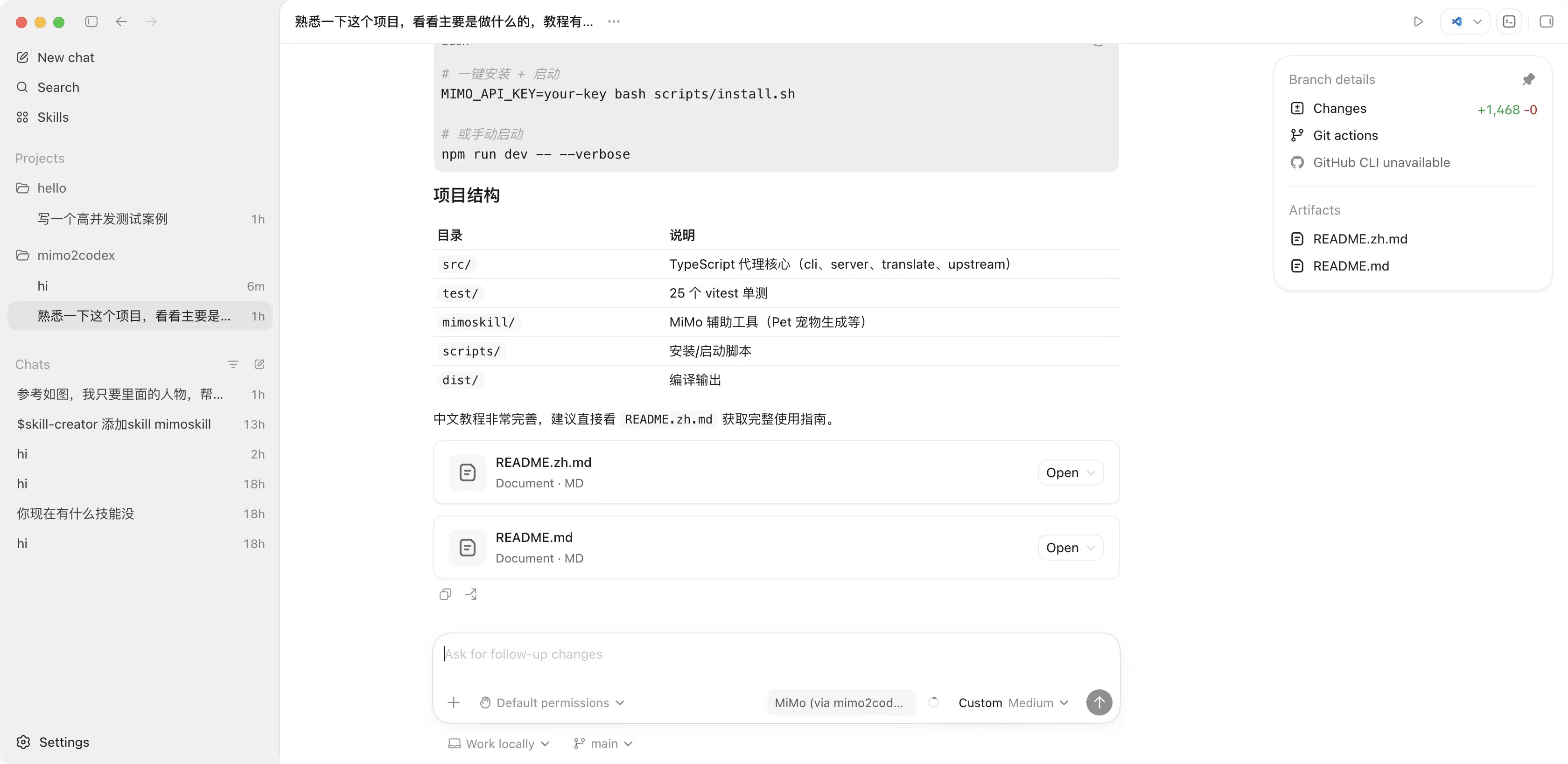
src/ # TypeScript source (cli, server, translate, upstream, util)
|
|
259
|
+
test/ # 46 vitest tests
|
|
260
|
+
mimoskill/ # MiMo helpers + pet generation workaround
|
|
261
|
+
scripts/install.{sh,ps1} # one-liner bootstrap
|
|
262
|
+
dist/ # tsc output (generated)
|
|
263
|
+
AGENTS.md # Codex-agent instructions (don't import openai, use mimoskill)
|
|
264
|
+
PUBLISHING.md # maintainer release runbook
|
|
532
265
|
```
|
|
533
266
|
|
|
267
|
+
## Develop
|
|
268
|
+
|
|
269
|
+
```bash
|
|
270
|
+
git clone https://github.com/7as0nch/mimo2codex && cd mimo2codex
|
|
271
|
+
npm install
|
|
272
|
+
npm run dev # tsx, no build step
|
|
273
|
+
npm test # 46 vitest cases
|
|
274
|
+
npm run build # produces dist/
|
|
275
|
+
```
|
|
276
|
+
|
|
277
|
+
To register `mimo2codex` globally from your local checkout: `npm run build && npm link`.
|
|
278
|
+
|
|
534
279
|
## License
|
|
535
280
|
|
|
536
|
-
MIT
|
|
281
|
+
MIT — see [LICENSE](./LICENSE).
|