lacy 1.8.11 → 1.8.13
This diff represents the content of publicly available package versions that have been released to one of the supported registries. The information contained in this diff is provided for informational purposes only and reflects changes between package versions as they appear in their respective public registries.
- package/.claude/settings.local.json +26 -0
- package/.github/FUNDING.yml +3 -0
- package/.github/ISSUE_TEMPLATE/bug_report.yml +49 -0
- package/.github/ISSUE_TEMPLATE/config.yml +5 -0
- package/.github/ISSUE_TEMPLATE/feature_request.yml +28 -0
- package/.github/PULL_REQUEST_TEMPLATE.md +17 -0
- package/.github/SECURITY.md +32 -0
- package/.github/assets/logo-horizontal-dark.png +0 -0
- package/.github/assets/logo-horizontal-dark.svg +17 -0
- package/.github/assets/logo-horizontal.png +0 -0
- package/.github/assets/logo-horizontal.svg +17 -0
- package/.github/assets/logo.png +0 -0
- package/.github/assets/logo.svg +12 -0
- package/.github/assets/social-preview.png +0 -0
- package/.github/assets/social-preview.svg +50 -0
- package/.github/dependabot.yml +21 -0
- package/.github/workflows/ci.yml +80 -0
- package/.github/workflows/dependabot-auto-merge.yml +32 -0
- package/CHANGELOG.md +366 -0
- package/CLAUDE.md +340 -0
- package/CONTRIBUTING.md +141 -0
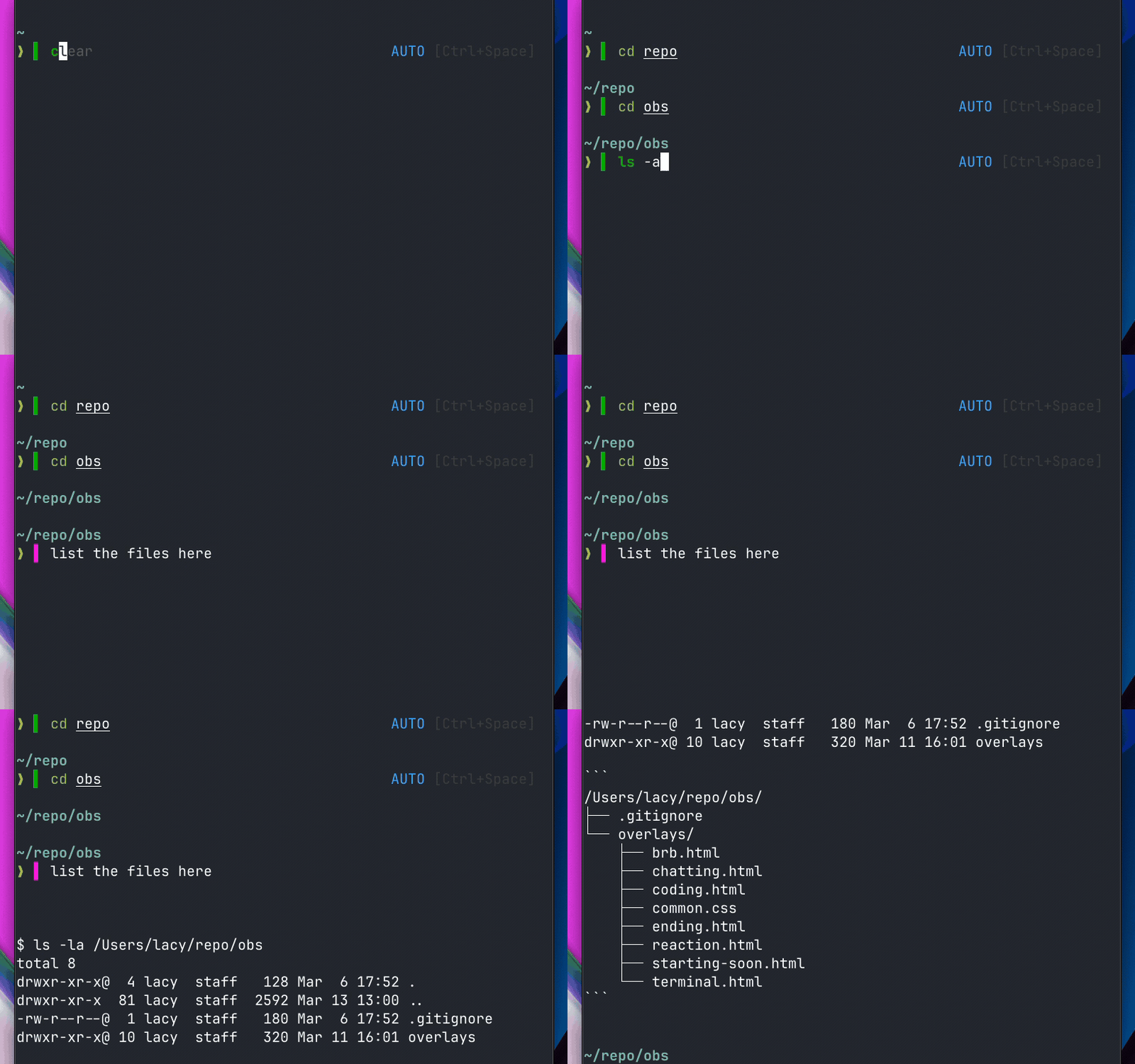
- package/LICENSE +110 -0
- package/README.md +201 -31
- package/RELEASING.md +148 -0
- package/STYLE.md +202 -0
- package/assets/hero.jpeg +0 -0
- package/assets/mode-indicators.jpeg +0 -0
- package/assets/real-time-indicator.jpeg +0 -0
- package/assets/supported-tools.jpeg +0 -0
- package/bin/lacy +1028 -0
- package/docs/ADDING-BACKENDS.md +124 -0
- package/docs/DEVTO-ARTICLE.md +94 -0
- package/docs/DOCS.md +68 -0
- package/docs/GROWTH-STRATEGY.md +119 -0
- package/docs/HN-RESPONSES.md +122 -0
- package/docs/LAUNCH-COPY-FINAL.md +105 -0
- package/docs/MARKETING.md +411 -0
- package/docs/NATURAL_LANGUAGE_DETECTION.md +204 -0
- package/docs/UGC_VIDEO_SCRIPT.md +114 -0
- package/docs/articles/devto-how-i-made-my-terminal-understand-english.md +117 -0
- package/docs/demo-color-transition.gif +0 -0
- package/docs/demo-full.gif +0 -0
- package/docs/demo-indicator.gif +0 -0
- package/docs/launch-thread-may6.sh +158 -0
- package/docs/videos/README.md +189 -0
- package/docs/videos/generate_frames.py +510 -0
- package/docs/videos/generate_frames_v2.py +729 -0
- package/docs/videos/generate_short.py +328 -0
- package/docs/videos/generate_short_v2.py +526 -0
- package/docs/videos/lacy-shell-demo-v2.mp4 +0 -0
- package/docs/videos/lacy-shell-demo.mp4 +0 -0
- package/docs/videos/lacy-shell-short-v2.mp4 +0 -0
- package/docs/videos/lacy-shell-short.mp4 +0 -0
- package/install.sh +1009 -0
- package/lacy.plugin.bash +75 -0
- package/lacy.plugin.fish +43 -0
- package/lacy.plugin.zsh +65 -0
- package/lib/animations.zsh +3 -0
- package/lib/bash/completions.bash +40 -0
- package/lib/bash/execute.bash +233 -0
- package/lib/bash/init.bash +40 -0
- package/lib/bash/keybindings.bash +134 -0
- package/lib/bash/prompt.bash +85 -0
- package/lib/commands/info.sh +25 -0
- package/lib/config.zsh +3 -0
- package/lib/constants.zsh +3 -0
- package/lib/core/animations.sh +271 -0
- package/lib/core/commands.sh +297 -0
- package/lib/core/config.sh +340 -0
- package/lib/core/constants.sh +366 -0
- package/lib/core/context.sh +260 -0
- package/lib/core/detection.sh +417 -0
- package/lib/core/mcp.sh +741 -0
- package/lib/core/modes.sh +123 -0
- package/lib/core/preheat.sh +496 -0
- package/lib/core/spinner.sh +174 -0
- package/lib/core/telemetry.sh +99 -0
- package/lib/detection.zsh +3 -0
- package/lib/execute.zsh +3 -0
- package/lib/fish/config.fish +66 -0
- package/lib/fish/detection.fish +90 -0
- package/lib/fish/execute.fish +105 -0
- package/lib/fish/keybindings.fish +42 -0
- package/lib/fish/prompt.fish +30 -0
- package/lib/keybindings.zsh +3 -0
- package/lib/mcp.zsh +3 -0
- package/lib/modes.zsh +3 -0
- package/lib/preheat.zsh +3 -0
- package/lib/prompt.zsh +3 -0
- package/lib/spinner.zsh +3 -0
- package/lib/zsh/completions.zsh +60 -0
- package/lib/zsh/execute.zsh +294 -0
- package/lib/zsh/init.zsh +26 -0
- package/lib/zsh/keybindings.zsh +551 -0
- package/lib/zsh/prompt.zsh +90 -0
- package/package.json +42 -27
- package/packages/lacy/README.md +61 -0
- package/packages/lacy/commands/info.sh +25 -0
- package/{index.mjs → packages/lacy/index.mjs} +247 -20
- package/packages/lacy/package-lock.json +71 -0
- package/packages/lacy/package.json +42 -0
- package/script/release.ts +487 -0
- package/squirrel.toml +36 -0
- package/tests/test_bash.bash +163 -0
- package/tests/test_core.sh +607 -0
- package/tests/test_gemini.sh +119 -0
- package/tests/test_gemini_mcp.sh +126 -0
- package/tests/test_preheat_server.zsh +446 -0
- package/uninstall.sh +52 -0
|
@@ -0,0 +1,114 @@
|
|
|
1
|
+
# UGC Video Script — Lacy Shell
|
|
2
|
+
|
|
3
|
+
**Format:** Vertical (9:16), 45-60 seconds
|
|
4
|
+
**Platform:** TikTok, Instagram Reels, YouTube Shorts
|
|
5
|
+
**Style:** Developer at desk, talking to camera + screen recording overlay
|
|
6
|
+
**Tone:** Genuine discovery, casual excitement — not polished ad
|
|
7
|
+
|
|
8
|
+
---
|
|
9
|
+
|
|
10
|
+
## Script A: "The Hook" (45 seconds)
|
|
11
|
+
|
|
12
|
+
### Shot List
|
|
13
|
+
|
|
14
|
+
| Time | Visual | Audio / Voiceover |
|
|
15
|
+
|------|--------|-------------------|
|
|
16
|
+
| 0-3s | Face to camera, mid-sentence energy | "Okay so I just found this shell plugin and it's kind of insane." |
|
|
17
|
+
| 3-8s | Screen: terminal open, type `git status` — green indicator appears | "You type a normal command — green bar means it runs in your shell like normal." |
|
|
18
|
+
| 8-13s | Screen: clear line, type `why is the build failing` — magenta indicator | "But then you type a question — it turns purple and goes straight to your AI agent." |
|
|
19
|
+
| 13-17s | Screen: hit enter, AI response starts streaming | "No slash commands. No switching apps. It just... figures it out." |
|
|
20
|
+
| 17-22s | Face to camera | "It works with Claude Code, Codex, Gemini — whatever you already use. It's not replacing anything." |
|
|
21
|
+
| 22-28s | Screen: type `npm install`, green indicator. Backspace. Type `install the auth package`, magenta | "Watch — 'npm install' is green, shell command. But 'install the auth package' is purple — same word, different intent." |
|
|
22
|
+
| 28-33s | Screen: type `make sure the tests pass`, shell tries `make`, fails, silently reroutes to AI | "And this is wild — if you accidentally run something that looks like a command but isn't, it catches the error and sends it to AI automatically." |
|
|
23
|
+
| 33-38s | Face to camera, genuine | "The install is literally one line. Curl, npx, or brew. Thirty seconds." |
|
|
24
|
+
| 38-42s | Screen: `curl -fsSL https://lacy.sh/install | bash` | (screen speaks for itself, maybe light background music) |
|
|
25
|
+
| 42-45s | Face to camera | "lacy dot sh. Link in bio." |
|
|
26
|
+
|
|
27
|
+
### Key Beats
|
|
28
|
+
- **Hook (0-3s):** Mid-sentence, high energy, "I just found this"
|
|
29
|
+
- **Demo (3-33s):** Three distinct wow moments (indicator, same-word routing, auto-reroute)
|
|
30
|
+
- **CTA (33-45s):** Install simplicity + URL
|
|
31
|
+
|
|
32
|
+
---
|
|
33
|
+
|
|
34
|
+
## Script B: "The Problem" (50 seconds)
|
|
35
|
+
|
|
36
|
+
### Shot List
|
|
37
|
+
|
|
38
|
+
| Time | Visual | Audio / Voiceover |
|
|
39
|
+
|------|--------|-------------------|
|
|
40
|
+
| 0-4s | Face to camera, frustrated energy | "Why do I have to leave my terminal to talk to AI? Every. Single. Time." |
|
|
41
|
+
| 4-8s | Screen: show typical flow — run command, copy output, switch to AI chat, paste, wait | (sped up) "Copy output, switch to Claude, paste, wait, copy the answer, switch back..." |
|
|
42
|
+
| 8-11s | Face to camera | "I found something that fixes this. It's called Lacy." |
|
|
43
|
+
| 11-18s | Screen: terminal with Lacy. Type `ls -la` (green), then type `what does the src folder contain` (magenta) | "You just type. Commands go to your shell. Questions go to your AI. No prefix, no mode switching." |
|
|
44
|
+
| 18-24s | Screen: hit enter on the question, AI responds in-terminal | "The AI responds right there. Same terminal. Same session." |
|
|
45
|
+
| 24-30s | Screen: Ctrl+Space to toggle mode, badge changes | "Ctrl+Space toggles between shell mode, agent mode, and auto mode. Auto figures it out for you." |
|
|
46
|
+
| 30-37s | Screen: type `fix the failing test in auth.test.ts` — magenta indicator, enter, AI starts working | "Just tell it what to do. It routes to whatever AI tool you have — Claude, Codex, Gemini, whatever." |
|
|
47
|
+
| 37-42s | Face to camera | "Open source. Free. Works with ZSH and Bash." |
|
|
48
|
+
| 42-46s | Screen: install command running | "One line to install." |
|
|
49
|
+
| 46-50s | Face to camera, smile | "lacy dot sh." |
|
|
50
|
+
|
|
51
|
+
### Key Beats
|
|
52
|
+
- **Hook (0-4s):** Relatable frustration — the copy-paste loop
|
|
53
|
+
- **Solution (8-37s):** Show don't tell — actual terminal usage
|
|
54
|
+
- **CTA (37-50s):** Open source credibility + URL
|
|
55
|
+
|
|
56
|
+
---
|
|
57
|
+
|
|
58
|
+
## Script C: "The Speed Run" (30 seconds)
|
|
59
|
+
|
|
60
|
+
For maximum shareability — shortest format.
|
|
61
|
+
|
|
62
|
+
| Time | Visual | Audio / Voiceover |
|
|
63
|
+
|------|--------|-------------------|
|
|
64
|
+
| 0-3s | Face to camera, fast | "One plugin. Your terminal now speaks English." |
|
|
65
|
+
| 3-7s | Screen: type `git diff` — green indicator | "Commands stay commands." |
|
|
66
|
+
| 7-12s | Screen: type `explain what changed in the last commit` — magenta | "English goes to AI." |
|
|
67
|
+
| 12-16s | Screen: enter, AI responds | "No setup. No prefixes. It just knows." |
|
|
68
|
+
| 16-22s | Screen: rapid montage — `npm test` (green), `why did the test fail` (magenta), `docker ps` (green), `find the memory leak` (magenta) | (fast cuts, maybe trending audio) |
|
|
69
|
+
| 22-26s | Screen: install command | "One line install." |
|
|
70
|
+
| 26-30s | Face to camera | "lacy dot sh. Free. Open source." |
|
|
71
|
+
|
|
72
|
+
---
|
|
73
|
+
|
|
74
|
+
## Recording Guidelines
|
|
75
|
+
|
|
76
|
+
### Setup
|
|
77
|
+
- Clean desk, natural lighting, developer environment visible (second monitor, mechanical keyboard — authentic)
|
|
78
|
+
- Terminal should use a dark theme where green/magenta indicators pop
|
|
79
|
+
- Font size 16-18pt minimum so text is readable on mobile
|
|
80
|
+
- Real project directory (not empty folder) — viewers notice
|
|
81
|
+
|
|
82
|
+
### Performance Tips
|
|
83
|
+
- Type at 60% your normal speed — viewers need to read the commands
|
|
84
|
+
- Pause 0.5s after each indicator color change so it registers visually
|
|
85
|
+
- Don't rehearse too much — slight stumbles feel authentic for UGC
|
|
86
|
+
- Look directly at camera for face shots
|
|
87
|
+
- Use natural hand gestures when excited about features
|
|
88
|
+
|
|
89
|
+
### Technical Setup
|
|
90
|
+
- Record terminal separately at 1080p or higher, composite in edit
|
|
91
|
+
- Or use Screen Studio / OBS for picture-in-picture
|
|
92
|
+
- Trending audio optional — works without it for dev audience
|
|
93
|
+
- Add subtle captions (auto-caption tools work fine)
|
|
94
|
+
|
|
95
|
+
### Variants to A/B Test
|
|
96
|
+
1. **With face** vs **screen-only** (talking over screen recording)
|
|
97
|
+
2. **Problem-first hook** (Script B) vs **discovery hook** (Script A)
|
|
98
|
+
3. **With trending audio** vs **voice only**
|
|
99
|
+
4. **30s version** (Script C) vs **45s version** (Script A)
|
|
100
|
+
|
|
101
|
+
---
|
|
102
|
+
|
|
103
|
+
## Hashtags
|
|
104
|
+
|
|
105
|
+
```
|
|
106
|
+
#developer #coding #terminal #ai #devtools #programming #tech #opensource #productivity #webdev #softwareengineer #claudeai #shell #zsh
|
|
107
|
+
```
|
|
108
|
+
|
|
109
|
+
## Posting Strategy
|
|
110
|
+
|
|
111
|
+
- Post 2-3 variants across platforms over 1 week
|
|
112
|
+
- Best times: Tue-Thu, 9-11am or 7-9pm (dev audience)
|
|
113
|
+
- Cross-post to Twitter/X with the screen recording portion as a native video
|
|
114
|
+
- Pin the best-performing version
|
|
@@ -0,0 +1,117 @@
|
|
|
1
|
+
---
|
|
2
|
+
title: How I Made My Terminal Understand English
|
|
3
|
+
published: false
|
|
4
|
+
tags: terminal, ai, devtools, opensource
|
|
5
|
+
canonical_url: https://lacy.sh
|
|
6
|
+
cover_image: https://raw.githubusercontent.com/lacymorrow/lacy/main/docs/demo-full.gif
|
|
7
|
+
---
|
|
8
|
+
|
|
9
|
+
Every time I need AI help while coding, I do the same thing:
|
|
10
|
+
|
|
11
|
+
1. Copy terminal output
|
|
12
|
+
2. Switch to Claude or ChatGPT
|
|
13
|
+
3. Paste and ask my question
|
|
14
|
+
4. Wait for the response
|
|
15
|
+
5. Copy the answer
|
|
16
|
+
6. Switch back to terminal
|
|
17
|
+
7. Paste and run
|
|
18
|
+
|
|
19
|
+
That loop happens 20+ times a day.
|
|
20
|
+
|
|
21
|
+
AI coding tools like Claude Code and Gemini CLI already live in the terminal. But you still switch into them, type `claude`, ask your thing, then switch back to your regular shell. Two workflows, one terminal.
|
|
22
|
+
|
|
23
|
+
I built [Lacy Shell](https://lacy.sh) to fix that. It's a ZSH/Bash plugin that figures out whether you're typing a command or a question and routes it to the right place. Commands run in your shell. Questions go to your AI agent. You just type.
|
|
24
|
+
|
|
25
|
+
|
|
26
|
+
|
|
27
|
+
## The color indicator
|
|
28
|
+
|
|
29
|
+
The thing that made it click for me was the color indicator. As you type, a dot next to your prompt changes color:
|
|
30
|
+
|
|
31
|
+
- Green = shell command
|
|
32
|
+
- Magenta = AI agent
|
|
33
|
+
|
|
34
|
+
The first word gets syntax-highlighted too. Both update on every keystroke, so you know what's going to happen before you press Enter.
|
|
35
|
+
|
|
36
|
+
ZSH also gets a mode badge in the right prompt: `SHELL`, `AGENT`, or `AUTO`. `Ctrl+Space` toggles between them.
|
|
37
|
+
|
|
38
|
+
## How detection works
|
|
39
|
+
|
|
40
|
+
The part that surprised me: you don't need AI to classify input. Lacy uses lexical analysis — no network call, no API key. Under a millisecond.
|
|
41
|
+
|
|
42
|
+
The rules, in priority order:
|
|
43
|
+
|
|
44
|
+
First, about 150 conversational words ("explain", "why", "thanks", "perfect") always route to AI. `explain this error` has no ambiguity. It's a lookup table, not a model.
|
|
45
|
+
|
|
46
|
+
Second, shell reserved words. This one tripped me up for a while. Words like `do`, `then`, `in`, and `select` pass `command -v` (they're valid shell syntax), but nobody types `do` and means a `do` loop. "Do we have a way to deploy?" is a question. "In the codebase, where is auth?" is a question. I maintain a list of these and route them straight to AI.
|
|
47
|
+
|
|
48
|
+
Third, if the first word is a valid command, shell gets it. `git status`, `ls -la`, `docker ps` — straightforward.
|
|
49
|
+
|
|
50
|
+
Fourth, single non-command words go to shell too. If you type `gti` (a typo for `git`), you probably want to see the shell's error, not have AI interpret it.
|
|
51
|
+
|
|
52
|
+
Fifth, multiple words where the first isn't a command go to AI. "Fix the bug in auth" starts with "fix" — not a command on most systems. Multiple words, first word isn't a command. That's natural language.
|
|
53
|
+
|
|
54
|
+
The last rule is my favorite. Sometimes a valid command gets natural language arguments: `kill the process on localhost:3000`. `kill` is a real command, so Lacy sends it to the shell. It fails. Lacy then checks: did the error match a known pattern ("No such process")? Did the input have natural language markers (articles, pronouns, 3+ bare words)? If both, it silently reroutes to the AI agent. You never see the failed attempt.
|
|
55
|
+
|
|
56
|
+
## Routing table
|
|
57
|
+
|
|
58
|
+
In practice:
|
|
59
|
+
|
|
60
|
+
| You type | Routes to | Why |
|
|
61
|
+
|----------|-----------|-----|
|
|
62
|
+
| `ls -la` | Shell | Valid command |
|
|
63
|
+
| `what files are here` | AI | Agent word "what" |
|
|
64
|
+
| `git status` | Shell | Valid command |
|
|
65
|
+
| `do we have auth?` | AI | Reserved word "do" |
|
|
66
|
+
| `cd..` | Shell | Single word (typo) |
|
|
67
|
+
| `fix the bug` | AI | Multi-word, not a command |
|
|
68
|
+
| `kill the process on 3000` | Shell, then AI | Valid command fails with NL patterns |
|
|
69
|
+
| `make sure the tests pass` | Shell, then AI | "sure" is an NL marker, make fails |
|
|
70
|
+
|
|
71
|
+
## It's a routing layer, not another AI tool
|
|
72
|
+
|
|
73
|
+
Lacy calls whatever CLI you already have installed:
|
|
74
|
+
|
|
75
|
+
| Tool | How Lacy calls it |
|
|
76
|
+
|------|------------------|
|
|
77
|
+
| Claude Code | `claude -p "query"` |
|
|
78
|
+
| Gemini CLI | `gemini --resume -p "query"` |
|
|
79
|
+
| OpenCode | `opencode run -c "query"` |
|
|
80
|
+
| Codex | `codex exec resume --last "query"` |
|
|
81
|
+
| Lash | `lash run -c "query"` |
|
|
82
|
+
|
|
83
|
+
It auto-detects what's on your system, or you can point it at a custom command.
|
|
84
|
+
|
|
85
|
+
## What I didn't expect
|
|
86
|
+
|
|
87
|
+
I built this to stop context-switching. The thing that actually changed my workflow was different — I started asking my terminal stuff I'd never have bothered looking up.
|
|
88
|
+
|
|
89
|
+
What's the flag for recursive grep again? How do I find processes on port 8080? What's the git command to undo the last commit without losing changes?
|
|
90
|
+
|
|
91
|
+
Before, I'd Google these or fumble through `man` pages. Now I just type the question where I'm already working. The friction was low enough that it changed the habit.
|
|
92
|
+
|
|
93
|
+
## Install
|
|
94
|
+
|
|
95
|
+
One line:
|
|
96
|
+
|
|
97
|
+
```bash
|
|
98
|
+
curl -fsSL https://lacy.sh/install | bash
|
|
99
|
+
```
|
|
100
|
+
|
|
101
|
+
Or Homebrew:
|
|
102
|
+
|
|
103
|
+
```bash
|
|
104
|
+
brew install lacymorrow/tap/lacy
|
|
105
|
+
```
|
|
106
|
+
|
|
107
|
+
Or npx:
|
|
108
|
+
|
|
109
|
+
```bash
|
|
110
|
+
npx lacy
|
|
111
|
+
```
|
|
112
|
+
|
|
113
|
+
macOS, Linux, WSL. ZSH and Bash 4+. MIT licensed.
|
|
114
|
+
|
|
115
|
+
[GitHub](https://github.com/lacymorrow/lacy) / [lacy.sh](https://lacy.sh)
|
|
116
|
+
|
|
117
|
+
If you try it, I want to hear about the edge cases. The boundary between "command" and "question" is fuzzy by nature, and real usage is how I tune it. File an issue or just yell at me on Twitter.
|
|
Binary file
|
|
Binary file
|
|
Binary file
|
|
@@ -0,0 +1,158 @@
|
|
|
1
|
+
#!/usr/bin/env bash
|
|
2
|
+
# LAC-423: Coordinated Twitter launch thread
|
|
3
|
+
# Schedule: May 6, 2026 at 11am ET (15:00 UTC)
|
|
4
|
+
# Account: @lacybuilds via xurl
|
|
5
|
+
# Prerequisite: Show HN posted at 9am ET (LAC-37)
|
|
6
|
+
|
|
7
|
+
set -euo pipefail
|
|
8
|
+
|
|
9
|
+
XURL="xurl --app agents -u lacybuilds --auth oauth2"
|
|
10
|
+
GIF_URL="https://raw.githubusercontent.com/lacymorrow/lacy/main/docs/demo-full.gif"
|
|
11
|
+
GIF_PATH="/tmp/lacy-demo-full.gif"
|
|
12
|
+
|
|
13
|
+
echo "=== LAC-423: Posting Twitter launch thread ==="
|
|
14
|
+
|
|
15
|
+
# Pre-flight: verify xurl auth
|
|
16
|
+
echo "Checking @lacybuilds auth..."
|
|
17
|
+
AUTH_CHECK=$($XURL whoami 2>&1)
|
|
18
|
+
if echo "$AUTH_CHECK" | grep -q "Unauthorized"; then
|
|
19
|
+
echo "FATAL: @lacybuilds OAuth2 token expired."
|
|
20
|
+
echo "Fix: run 'xurl auth oauth2 --app agents' and complete browser flow for lacybuilds."
|
|
21
|
+
exit 1
|
|
22
|
+
fi
|
|
23
|
+
echo "Auth OK: $(echo "$AUTH_CHECK" | python3 -c "import sys,json; print(json.load(sys.stdin).get('data',{}).get('username','unknown'))" 2>/dev/null || echo 'verified')"
|
|
24
|
+
|
|
25
|
+
# Step 1: Find the Show HN link
|
|
26
|
+
echo "Searching for Show HN post..."
|
|
27
|
+
HN_LINK=""
|
|
28
|
+
# Search HN for the post (posted ~2 hours earlier)
|
|
29
|
+
HN_SEARCH=$(curl -s "https://hn.algolia.com/api/v1/search_by_date?query=Lacy+Shell&tags=show_hn&hitsPerPage=5" 2>/dev/null || true)
|
|
30
|
+
if [ -n "$HN_SEARCH" ]; then
|
|
31
|
+
HN_ID=$(echo "$HN_SEARCH" | python3 -c "import sys,json; hits=json.load(sys.stdin).get('hits',[]); print(hits[0]['objectID'] if hits else '')" 2>/dev/null || true)
|
|
32
|
+
if [ -n "$HN_ID" ]; then
|
|
33
|
+
HN_LINK="https://news.ycombinator.com/item?id=${HN_ID}"
|
|
34
|
+
echo "Found HN link: $HN_LINK"
|
|
35
|
+
fi
|
|
36
|
+
fi
|
|
37
|
+
|
|
38
|
+
if [ -z "$HN_LINK" ]; then
|
|
39
|
+
echo "WARNING: Could not find Show HN link. Posting without it."
|
|
40
|
+
HN_LINK=""
|
|
41
|
+
fi
|
|
42
|
+
|
|
43
|
+
# Step 2: Download and upload demo GIF
|
|
44
|
+
echo "Downloading demo GIF..."
|
|
45
|
+
curl -fsSL "$GIF_URL" -o "$GIF_PATH"
|
|
46
|
+
|
|
47
|
+
echo "Uploading media..."
|
|
48
|
+
MEDIA_RESULT=$($XURL media upload "$GIF_PATH" 2>&1)
|
|
49
|
+
MEDIA_ID=$(echo "$MEDIA_RESULT" | grep -oE '[0-9]{15,}' | head -1)
|
|
50
|
+
|
|
51
|
+
if [ -z "$MEDIA_ID" ]; then
|
|
52
|
+
echo "WARNING: Media upload failed. Posting without GIF."
|
|
53
|
+
echo "Upload output: $MEDIA_RESULT"
|
|
54
|
+
fi
|
|
55
|
+
|
|
56
|
+
# Step 3: Post Tweet 1 (Hook) with GIF
|
|
57
|
+
echo "Posting Tweet 1 (Hook)..."
|
|
58
|
+
TWEET1_TEXT='I made my terminal understand English.
|
|
59
|
+
|
|
60
|
+
Type a command → it runs in your shell.
|
|
61
|
+
Type a question → it goes to your AI agent.
|
|
62
|
+
|
|
63
|
+
No prefix. No hotkey. Just type.
|
|
64
|
+
|
|
65
|
+
It'"'"'s called Lacy Shell. Free and open source.'
|
|
66
|
+
|
|
67
|
+
if [ -n "$MEDIA_ID" ]; then
|
|
68
|
+
TWEET1_RESULT=$($XURL post "$TWEET1_TEXT" --media-id "$MEDIA_ID" 2>&1)
|
|
69
|
+
else
|
|
70
|
+
TWEET1_RESULT=$($XURL post "$TWEET1_TEXT" 2>&1)
|
|
71
|
+
fi
|
|
72
|
+
TWEET1_ID=$(echo "$TWEET1_RESULT" | grep -oE '[0-9]{15,}' | head -1)
|
|
73
|
+
echo "Tweet 1 posted: $TWEET1_ID"
|
|
74
|
+
sleep 3
|
|
75
|
+
|
|
76
|
+
# Step 4: Post Tweet 2 (Problem) as reply
|
|
77
|
+
echo "Posting Tweet 2 (Problem)..."
|
|
78
|
+
TWEET2_TEXT='The problem: every time you need AI help, you leave your terminal.
|
|
79
|
+
|
|
80
|
+
Copy output. Switch to Claude/ChatGPT. Paste. Wait. Copy answer. Switch back. Paste.
|
|
81
|
+
|
|
82
|
+
I was doing that 20+ times a day. So I fixed it.'
|
|
83
|
+
|
|
84
|
+
TWEET2_RESULT=$($XURL reply "$TWEET1_ID" "$TWEET2_TEXT" 2>&1)
|
|
85
|
+
TWEET2_ID=$(echo "$TWEET2_RESULT" | grep -oE '[0-9]{15,}' | head -1)
|
|
86
|
+
echo "Tweet 2 posted: $TWEET2_ID"
|
|
87
|
+
sleep 3
|
|
88
|
+
|
|
89
|
+
# Step 5: Post Tweet 3 (How it works) as reply
|
|
90
|
+
echo "Posting Tweet 3 (How it works)..."
|
|
91
|
+
TWEET3_TEXT='How it works:
|
|
92
|
+
|
|
93
|
+
A color indicator next to your prompt changes as you type:
|
|
94
|
+
|
|
95
|
+
🟢 Green = runs in your shell
|
|
96
|
+
🟣 Magenta = goes to AI
|
|
97
|
+
|
|
98
|
+
No AI call to classify your input. Pure lexical analysis. Sub-millisecond.
|
|
99
|
+
|
|
100
|
+
Command fails with NL patterns? Silently reroutes to AI.'
|
|
101
|
+
|
|
102
|
+
TWEET3_RESULT=$($XURL reply "$TWEET2_ID" "$TWEET3_TEXT" 2>&1)
|
|
103
|
+
TWEET3_ID=$(echo "$TWEET3_RESULT" | grep -oE '[0-9]{15,}' | head -1)
|
|
104
|
+
echo "Tweet 3 posted: $TWEET3_ID"
|
|
105
|
+
sleep 3
|
|
106
|
+
|
|
107
|
+
# Step 6: Post Tweet 4 (Tool agnostic) as reply
|
|
108
|
+
echo "Posting Tweet 4 (Tool agnostic)..."
|
|
109
|
+
TWEET4_TEXT='Lacy works with whatever AI tool you already use.
|
|
110
|
+
|
|
111
|
+
- Claude Code
|
|
112
|
+
- Gemini CLI
|
|
113
|
+
- OpenCode
|
|
114
|
+
- Codex CLI
|
|
115
|
+
- Lash
|
|
116
|
+
- Any custom command
|
|
117
|
+
|
|
118
|
+
Auto-detects what'"'"'s installed. Zero config.'
|
|
119
|
+
|
|
120
|
+
TWEET4_RESULT=$($XURL reply "$TWEET3_ID" "$TWEET4_TEXT" 2>&1)
|
|
121
|
+
TWEET4_ID=$(echo "$TWEET4_RESULT" | grep -oE '[0-9]{15,}' | head -1)
|
|
122
|
+
echo "Tweet 4 posted: $TWEET4_ID"
|
|
123
|
+
sleep 3
|
|
124
|
+
|
|
125
|
+
# Step 7: Post Tweet 5 (CTA) as reply
|
|
126
|
+
echo "Posting Tweet 5 (CTA)..."
|
|
127
|
+
TWEET5_TEXT="One line to install:
|
|
128
|
+
|
|
129
|
+
curl -fsSL https://lacy.sh/install | bash
|
|
130
|
+
|
|
131
|
+
Or: brew install lacymorrow/tap/lacy
|
|
132
|
+
|
|
133
|
+
ZSH + Bash 4+. macOS, Linux, WSL.
|
|
134
|
+
|
|
135
|
+
github.com/lacymorrow/lacy"
|
|
136
|
+
|
|
137
|
+
# Append HN link if found
|
|
138
|
+
if [ -n "$HN_LINK" ]; then
|
|
139
|
+
TWEET5_TEXT="${TWEET5_TEXT}
|
|
140
|
+
|
|
141
|
+
Live on HN: ${HN_LINK}"
|
|
142
|
+
fi
|
|
143
|
+
|
|
144
|
+
TWEET5_TEXT="${TWEET5_TEXT}
|
|
145
|
+
|
|
146
|
+
cc @AnthropicAI @GoogleDeepMind"
|
|
147
|
+
|
|
148
|
+
TWEET5_RESULT=$($XURL reply "$TWEET4_ID" "$TWEET5_TEXT" 2>&1)
|
|
149
|
+
TWEET5_ID=$(echo "$TWEET5_RESULT" | grep -oE '[0-9]{15,}' | head -1)
|
|
150
|
+
echo "Tweet 5 posted: $TWEET5_ID"
|
|
151
|
+
|
|
152
|
+
# Done
|
|
153
|
+
echo ""
|
|
154
|
+
echo "=== Thread posted successfully ==="
|
|
155
|
+
echo "Thread URL: https://x.com/lacybuilds/status/$TWEET1_ID"
|
|
156
|
+
|
|
157
|
+
# Cleanup
|
|
158
|
+
rm -f "$GIF_PATH"
|
|
@@ -0,0 +1,189 @@
|
|
|
1
|
+
# UGC Video Generation
|
|
2
|
+
|
|
3
|
+
Programmatically generated UGC (User-Generated Content) demo videos for Lacy Shell marketing.
|
|
4
|
+
|
|
5
|
+
## Videos
|
|
6
|
+
|
|
7
|
+
### V2 (current — enhanced production value)
|
|
8
|
+
|
|
9
|
+
| File | Duration | Format | Description |
|
|
10
|
+
|------|----------|--------|-------------|
|
|
11
|
+
| `lacy-shell-demo-v2.mp4` | 28s | 1080x1920 **60fps** H.264 | Full demo — 6 scenes, gradient BG, glow effects, drop shadows |
|
|
12
|
+
| `lacy-shell-short-v2.mp4` | 15s | 1080x1920 **60fps** H.264 | Short — hook + demo + CTA, same V2 enhancements |
|
|
13
|
+
|
|
14
|
+
### V1 (archived)
|
|
15
|
+
|
|
16
|
+
| File | Duration | Format | Description |
|
|
17
|
+
|------|----------|--------|-------------|
|
|
18
|
+
| `lacy-shell-demo.mp4` | 27.5s | 1080x1920 30fps H.264 | Full demo — 6 scenes covering all key features |
|
|
19
|
+
| `lacy-shell-short.mp4` | 15s | 1080x1920 30fps H.264 | Short version — hook + demo + CTA for TikTok/Reels |
|
|
20
|
+
|
|
21
|
+
Both formats are vertical (9:16), optimized for TikTok, Instagram Reels, and YouTube Shorts.
|
|
22
|
+
|
|
23
|
+
## How It Works
|
|
24
|
+
|
|
25
|
+
Videos are rendered frame-by-frame using Python (Pillow for image generation) and assembled into MP4 with ffmpeg. No external services or accounts needed.
|
|
26
|
+
|
|
27
|
+
**Pipeline:**
|
|
28
|
+
1. Python script generates individual PNG frames with animations (typing, fades, easing, glow compositing)
|
|
29
|
+
2. ffmpeg encodes frames into H.264 MP4
|
|
30
|
+
|
|
31
|
+
## V2 Visual Enhancements
|
|
32
|
+
|
|
33
|
+
| Feature | Detail |
|
|
34
|
+
|---------|--------|
|
|
35
|
+
| **60fps** | Doubled frame rate for premium smoothness |
|
|
36
|
+
| **Gradient background** | Deep purple-black gradient instead of flat black |
|
|
37
|
+
| **Glow/bloom on indicators** | GaussianBlur compositing creates soft halo on green/magenta dots |
|
|
38
|
+
| **Drop shadows** | Blurred shadow beneath every terminal window |
|
|
39
|
+
| **CRT scan-lines** | Subtle 3px scan-line overlay for retro terminal feel |
|
|
40
|
+
| **Variable typing speed** | Eased typing with natural acceleration |
|
|
41
|
+
| **Scene fade transitions** | 0.3s fade-in/out at each scene boundary |
|
|
42
|
+
| **Progress bar** | Thin colored bar tracks overall video progress |
|
|
43
|
+
| **Accessibility captions** | Semi-transparent caption pills explain each scene |
|
|
44
|
+
| **Floating particles** | Faint code snippets drift upward in background |
|
|
45
|
+
| **Elastic spring animations** | Key text reveals use overshoot easing for punch |
|
|
46
|
+
| **Thumbnail export** | Best CTA frame auto-saved as PNG for social previews |
|
|
47
|
+
|
|
48
|
+
## Prerequisites
|
|
49
|
+
|
|
50
|
+
```bash
|
|
51
|
+
# Python 3.10+ with Pillow
|
|
52
|
+
python3 -m venv .venv
|
|
53
|
+
.venv/bin/pip install Pillow
|
|
54
|
+
|
|
55
|
+
# ffmpeg
|
|
56
|
+
brew install ffmpeg # macOS
|
|
57
|
+
```
|
|
58
|
+
|
|
59
|
+
## Generating Videos
|
|
60
|
+
|
|
61
|
+
### V2 Full Demo (28s, 60fps)
|
|
62
|
+
|
|
63
|
+
```bash
|
|
64
|
+
# Generate frames
|
|
65
|
+
.venv/bin/python3 docs/videos/generate_frames_v2.py
|
|
66
|
+
|
|
67
|
+
# Assemble into MP4
|
|
68
|
+
ffmpeg -framerate 60 -i /tmp/ugc-video/frames-v2/frame_%05d.png \
|
|
69
|
+
-c:v libx264 -pix_fmt yuv420p -crf 18 \
|
|
70
|
+
-y docs/videos/lacy-shell-demo-v2.mp4
|
|
71
|
+
```
|
|
72
|
+
|
|
73
|
+
### V2 Short (15s, 60fps)
|
|
74
|
+
|
|
75
|
+
```bash
|
|
76
|
+
# Generate frames
|
|
77
|
+
.venv/bin/python3 docs/videos/generate_short_v2.py
|
|
78
|
+
|
|
79
|
+
# Assemble into MP4
|
|
80
|
+
ffmpeg -framerate 60 -i /tmp/ugc-video/frames-short-v2/frame_%05d.png \
|
|
81
|
+
-c:v libx264 -pix_fmt yuv420p -crf 18 \
|
|
82
|
+
-y docs/videos/lacy-shell-short-v2.mp4
|
|
83
|
+
```
|
|
84
|
+
|
|
85
|
+
### Platform-specific exports
|
|
86
|
+
|
|
87
|
+
```bash
|
|
88
|
+
# TikTok/Reels/Shorts — 9:16 native, no extra crop needed
|
|
89
|
+
# Use lacy-shell-short-v2.mp4 directly
|
|
90
|
+
|
|
91
|
+
# Twitter/X — square crop
|
|
92
|
+
ffmpeg -i docs/videos/lacy-shell-demo-v2.mp4 \
|
|
93
|
+
-vf 'crop=1080:1080:0:420' \
|
|
94
|
+
-c:v libx264 -pix_fmt yuv420p -crf 20 \
|
|
95
|
+
-y docs/videos/lacy-shell-demo-v2-square.mp4
|
|
96
|
+
|
|
97
|
+
# Instagram square (short)
|
|
98
|
+
ffmpeg -i docs/videos/lacy-shell-short-v2.mp4 \
|
|
99
|
+
-vf 'crop=1080:1080:0:420' \
|
|
100
|
+
-c:v libx264 -pix_fmt yuv420p -crf 20 \
|
|
101
|
+
-y docs/videos/lacy-shell-short-v2-square.mp4
|
|
102
|
+
```
|
|
103
|
+
|
|
104
|
+
### V1 (legacy — 30fps, flat black BG)
|
|
105
|
+
|
|
106
|
+
```bash
|
|
107
|
+
# Full demo (v1)
|
|
108
|
+
.venv/bin/python3 docs/videos/generate_frames.py
|
|
109
|
+
ffmpeg -framerate 30 -i /tmp/ugc-video/frames/frame_%05d.png \
|
|
110
|
+
-c:v libx264 -pix_fmt yuv420p -crf 18 \
|
|
111
|
+
-y docs/videos/lacy-shell-demo.mp4
|
|
112
|
+
|
|
113
|
+
# Short (v1)
|
|
114
|
+
.venv/bin/python3 docs/videos/generate_short.py
|
|
115
|
+
ffmpeg -framerate 30 -i /tmp/ugc-video/frames-short/frame_%05d.png \
|
|
116
|
+
-c:v libx264 -pix_fmt yuv420p -crf 18 \
|
|
117
|
+
-y docs/videos/lacy-shell-short.mp4
|
|
118
|
+
```
|
|
119
|
+
|
|
120
|
+
## Scene Breakdown
|
|
121
|
+
|
|
122
|
+
### Full Demo (`generate_frames.py`)
|
|
123
|
+
|
|
124
|
+
| Scene | Duration | Description |
|
|
125
|
+
|-------|----------|-------------|
|
|
126
|
+
| Hook | 3.5s | "What if your shell understood you?" — word-by-word fade-in |
|
|
127
|
+
| Shell Command | 4.5s | `ls -la` with green indicator, file listing output |
|
|
128
|
+
| NL Query | 5.5s | "what files are in this project" with magenta indicator, AI response |
|
|
129
|
+
| Split Comparison | 5s | "Same word. Different intent." — `install nodejs` (shell) vs `install a way to monitor logs` (agent) |
|
|
130
|
+
| Auto-Reroute | 5.5s | "fix the failing tests" — fails in shell, auto-routes to AI |
|
|
131
|
+
| CTA | 3.5s | lacy.sh branding, install command, platform features |
|
|
132
|
+
|
|
133
|
+
### Short Version (`generate_short.py`)
|
|
134
|
+
|
|
135
|
+
| Scene | Duration | Description |
|
|
136
|
+
|-------|----------|-------------|
|
|
137
|
+
| Hook | 2s | "Stop copy-pasting into ChatGPT." |
|
|
138
|
+
| Demo | 8s | `git status` (green/shell) then "explain what changed and why" (magenta/agent) |
|
|
139
|
+
| CTA | 5s | lacy.sh + install command + features |
|
|
140
|
+
|
|
141
|
+
## Customizing
|
|
142
|
+
|
|
143
|
+
### Changing text/commands
|
|
144
|
+
|
|
145
|
+
Edit the scene definitions in the V2 generator scripts. Key areas:
|
|
146
|
+
|
|
147
|
+
- **`generate_frames_v2.py`**: Each `TerminalTypingScene()` takes `command`, `response_lines`, `label`, `indicator_color`, and `caption`
|
|
148
|
+
- **`generate_short_v2.py`**: Scene functions (`scene_hook`, `scene_demo`, `scene_cta`) contain the text inline
|
|
149
|
+
|
|
150
|
+
### Changing colors
|
|
151
|
+
|
|
152
|
+
Color constants are at the top of each script:
|
|
153
|
+
|
|
154
|
+
```python
|
|
155
|
+
GREEN = (52, 211, 153) # Shell indicator
|
|
156
|
+
MAGENTA = (216, 100, 240) # Agent indicator
|
|
157
|
+
BLUE = (96, 165, 250) # Auto mode badge
|
|
158
|
+
```
|
|
159
|
+
|
|
160
|
+
### Changing duration
|
|
161
|
+
|
|
162
|
+
Adjust `duration_sec` on each scene (full demo) or the duration tuple (short version). Frame count = duration * FPS.
|
|
163
|
+
|
|
164
|
+
### Changing resolution
|
|
165
|
+
|
|
166
|
+
Modify `W, H` at the top. Current: `1080, 1920` (9:16 vertical). For landscape: `1920, 1080`.
|
|
167
|
+
|
|
168
|
+
### Font
|
|
169
|
+
|
|
170
|
+
Scripts use Menlo (macOS default monospace). Falls back to SF NS Mono or system default. To use a different font, update the `load_font()` function paths.
|
|
171
|
+
|
|
172
|
+
## Output
|
|
173
|
+
|
|
174
|
+
| Path | Contents |
|
|
175
|
+
|------|----------|
|
|
176
|
+
| `/tmp/ugc-video/frames-v2/` | V2 full demo PNG frames |
|
|
177
|
+
| `/tmp/ugc-video/frames-short-v2/` | V2 short PNG frames |
|
|
178
|
+
| `/tmp/ugc-video/lacy-shell-thumbnail.png` | Full demo CTA thumbnail |
|
|
179
|
+
| `/tmp/ugc-video/lacy-shell-short-thumbnail.png` | Short CTA thumbnail |
|
|
180
|
+
| `/tmp/ugc-video/frames/` | V1 full demo frames (legacy) |
|
|
181
|
+
| `/tmp/ugc-video/frames-short/` | V1 short frames (legacy) |
|
|
182
|
+
|
|
183
|
+
Final MP4s go to `docs/videos/`.
|
|
184
|
+
|
|
185
|
+
## Quality Settings
|
|
186
|
+
|
|
187
|
+
- **CRF 18**: High quality. Lower = better quality, bigger file. Range: 0-51.
|
|
188
|
+
- **60fps (V2)**: Premium smoothness for easing animations and glow effects. Use 30fps to halve file size.
|
|
189
|
+
- **H.264 + yuv420p**: Maximum compatibility across all platforms and devices.
|