lacy 1.8.11 → 1.8.13
This diff represents the content of publicly available package versions that have been released to one of the supported registries. The information contained in this diff is provided for informational purposes only and reflects changes between package versions as they appear in their respective public registries.
- package/.claude/settings.local.json +26 -0
- package/.github/FUNDING.yml +3 -0
- package/.github/ISSUE_TEMPLATE/bug_report.yml +49 -0
- package/.github/ISSUE_TEMPLATE/config.yml +5 -0
- package/.github/ISSUE_TEMPLATE/feature_request.yml +28 -0
- package/.github/PULL_REQUEST_TEMPLATE.md +17 -0
- package/.github/SECURITY.md +32 -0
- package/.github/assets/logo-horizontal-dark.png +0 -0
- package/.github/assets/logo-horizontal-dark.svg +17 -0
- package/.github/assets/logo-horizontal.png +0 -0
- package/.github/assets/logo-horizontal.svg +17 -0
- package/.github/assets/logo.png +0 -0
- package/.github/assets/logo.svg +12 -0
- package/.github/assets/social-preview.png +0 -0
- package/.github/assets/social-preview.svg +50 -0
- package/.github/dependabot.yml +21 -0
- package/.github/workflows/ci.yml +80 -0
- package/.github/workflows/dependabot-auto-merge.yml +32 -0
- package/CHANGELOG.md +366 -0
- package/CLAUDE.md +340 -0
- package/CONTRIBUTING.md +141 -0
- package/LICENSE +110 -0
- package/README.md +201 -31
- package/RELEASING.md +148 -0
- package/STYLE.md +202 -0
- package/assets/hero.jpeg +0 -0
- package/assets/mode-indicators.jpeg +0 -0
- package/assets/real-time-indicator.jpeg +0 -0
- package/assets/supported-tools.jpeg +0 -0
- package/bin/lacy +1028 -0
- package/docs/ADDING-BACKENDS.md +124 -0
- package/docs/DEVTO-ARTICLE.md +94 -0
- package/docs/DOCS.md +68 -0
- package/docs/GROWTH-STRATEGY.md +119 -0
- package/docs/HN-RESPONSES.md +122 -0
- package/docs/LAUNCH-COPY-FINAL.md +105 -0
- package/docs/MARKETING.md +411 -0
- package/docs/NATURAL_LANGUAGE_DETECTION.md +204 -0
- package/docs/UGC_VIDEO_SCRIPT.md +114 -0
- package/docs/articles/devto-how-i-made-my-terminal-understand-english.md +117 -0
- package/docs/demo-color-transition.gif +0 -0
- package/docs/demo-full.gif +0 -0
- package/docs/demo-indicator.gif +0 -0
- package/docs/launch-thread-may6.sh +158 -0
- package/docs/videos/README.md +189 -0
- package/docs/videos/generate_frames.py +510 -0
- package/docs/videos/generate_frames_v2.py +729 -0
- package/docs/videos/generate_short.py +328 -0
- package/docs/videos/generate_short_v2.py +526 -0
- package/docs/videos/lacy-shell-demo-v2.mp4 +0 -0
- package/docs/videos/lacy-shell-demo.mp4 +0 -0
- package/docs/videos/lacy-shell-short-v2.mp4 +0 -0
- package/docs/videos/lacy-shell-short.mp4 +0 -0
- package/install.sh +1009 -0
- package/lacy.plugin.bash +75 -0
- package/lacy.plugin.fish +43 -0
- package/lacy.plugin.zsh +65 -0
- package/lib/animations.zsh +3 -0
- package/lib/bash/completions.bash +40 -0
- package/lib/bash/execute.bash +233 -0
- package/lib/bash/init.bash +40 -0
- package/lib/bash/keybindings.bash +134 -0
- package/lib/bash/prompt.bash +85 -0
- package/lib/commands/info.sh +25 -0
- package/lib/config.zsh +3 -0
- package/lib/constants.zsh +3 -0
- package/lib/core/animations.sh +271 -0
- package/lib/core/commands.sh +297 -0
- package/lib/core/config.sh +340 -0
- package/lib/core/constants.sh +366 -0
- package/lib/core/context.sh +260 -0
- package/lib/core/detection.sh +417 -0
- package/lib/core/mcp.sh +741 -0
- package/lib/core/modes.sh +123 -0
- package/lib/core/preheat.sh +496 -0
- package/lib/core/spinner.sh +174 -0
- package/lib/core/telemetry.sh +99 -0
- package/lib/detection.zsh +3 -0
- package/lib/execute.zsh +3 -0
- package/lib/fish/config.fish +66 -0
- package/lib/fish/detection.fish +90 -0
- package/lib/fish/execute.fish +105 -0
- package/lib/fish/keybindings.fish +42 -0
- package/lib/fish/prompt.fish +30 -0
- package/lib/keybindings.zsh +3 -0
- package/lib/mcp.zsh +3 -0
- package/lib/modes.zsh +3 -0
- package/lib/preheat.zsh +3 -0
- package/lib/prompt.zsh +3 -0
- package/lib/spinner.zsh +3 -0
- package/lib/zsh/completions.zsh +60 -0
- package/lib/zsh/execute.zsh +294 -0
- package/lib/zsh/init.zsh +26 -0
- package/lib/zsh/keybindings.zsh +551 -0
- package/lib/zsh/prompt.zsh +90 -0
- package/package.json +42 -27
- package/packages/lacy/README.md +61 -0
- package/packages/lacy/commands/info.sh +25 -0
- package/{index.mjs → packages/lacy/index.mjs} +247 -20
- package/packages/lacy/package-lock.json +71 -0
- package/packages/lacy/package.json +42 -0
- package/script/release.ts +487 -0
- package/squirrel.toml +36 -0
- package/tests/test_bash.bash +163 -0
- package/tests/test_core.sh +607 -0
- package/tests/test_gemini.sh +119 -0
- package/tests/test_gemini_mcp.sh +126 -0
- package/tests/test_preheat_server.zsh +446 -0
- package/uninstall.sh +52 -0
|
@@ -0,0 +1,124 @@
|
|
|
1
|
+
# Adding a New AI Backend to Lacy Shell
|
|
2
|
+
|
|
3
|
+
This guide documents how to add a new AI CLI tool as a supported backend. The hermes integration (PR #40) serves as the reference implementation.
|
|
4
|
+
|
|
5
|
+
## Prerequisites
|
|
6
|
+
|
|
7
|
+
Before starting, verify the CLI tool supports:
|
|
8
|
+
|
|
9
|
+
1. **Single-shot query mode** -- a flag that accepts a prompt string and exits after responding (e.g. `-p`, `-c`, `-q`)
|
|
10
|
+
2. **Stdout output** -- response text goes to stdout, not a TUI
|
|
11
|
+
3. **Session resume** (optional) -- a flag to continue a previous conversation
|
|
12
|
+
|
|
13
|
+
## Integration Checklist
|
|
14
|
+
|
|
15
|
+
### 1. Tool registry (`lib/core/mcp.sh`)
|
|
16
|
+
|
|
17
|
+
Add two entries:
|
|
18
|
+
|
|
19
|
+
```bash
|
|
20
|
+
# lacy_tool_cmd() -- single-shot command
|
|
21
|
+
your_tool) echo "your-tool query-flag" ;;
|
|
22
|
+
|
|
23
|
+
# lacy_resume_cmd() -- session resume (or omit if unsupported)
|
|
24
|
+
your_tool) echo "your-tool --resume-flag" ;;
|
|
25
|
+
```
|
|
26
|
+
|
|
27
|
+
The command string returned by `lacy_tool_cmd()` is split on whitespace and the user's query is appended as the final argument. So `"hermes chat -q"` becomes `hermes chat -q "user's query"`.
|
|
28
|
+
|
|
29
|
+
Also add install hints to both the interactive prompt section and the non-interactive fallback section in `lacy_shell_query_agent()`.
|
|
30
|
+
|
|
31
|
+
### 2. Tool list (`lib/core/constants.sh`)
|
|
32
|
+
|
|
33
|
+
Append your tool to the `LACY_TOOL_LIST` array:
|
|
34
|
+
|
|
35
|
+
```bash
|
|
36
|
+
LACY_TOOL_LIST=(lash claude opencode gemini codex your_tool)
|
|
37
|
+
```
|
|
38
|
+
|
|
39
|
+
This controls auto-detection order and the `tool` command display.
|
|
40
|
+
|
|
41
|
+
### 3. Session management (`lib/core/preheat.sh`)
|
|
42
|
+
|
|
43
|
+
Add a session reuse block following the existing pattern:
|
|
44
|
+
|
|
45
|
+
```bash
|
|
46
|
+
LACY_YOURTOOL_SESSION_ID=""
|
|
47
|
+
LACY_YOURTOOL_SESSION_ID_FILE="$LACY_SHELL_HOME/.yourtool_session_id_$$"
|
|
48
|
+
|
|
49
|
+
lacy_preheat_yourtool_restore_session() { ... }
|
|
50
|
+
lacy_preheat_yourtool_build_cmd() { ... }
|
|
51
|
+
lacy_preheat_yourtool_capture_session() { ... }
|
|
52
|
+
lacy_preheat_yourtool_extract_result() { ... }
|
|
53
|
+
lacy_preheat_yourtool_reset_session() { ... }
|
|
54
|
+
```
|
|
55
|
+
|
|
56
|
+
Then wire it into:
|
|
57
|
+
|
|
58
|
+
- `_lacy_get_current_tool()` -- add to the detection loop
|
|
59
|
+
- `_lacy_save_last_session()` -- add case for session ID
|
|
60
|
+
- `lacy_session_new()` -- call reset function
|
|
61
|
+
- `lacy_session_resume()` -- add case to restore session
|
|
62
|
+
- `lacy_preheat_cleanup()` -- delete session file
|
|
63
|
+
|
|
64
|
+
If the tool uses `-p` for its prompt flag, `_lacy_session_build_cmd()` works as-is. For other flags (like hermes `chat -q`), add a conditional in that function.
|
|
65
|
+
|
|
66
|
+
### 4. Help text (`lib/core/commands.sh`)
|
|
67
|
+
|
|
68
|
+
Add your tool name to the options list in three places (search for `Options:`):
|
|
69
|
+
|
|
70
|
+
```
|
|
71
|
+
Options: lash, claude, opencode, gemini, codex, your_tool, custom, auto
|
|
72
|
+
```
|
|
73
|
+
|
|
74
|
+
### 5. Node installer (`packages/lacy/index.mjs`)
|
|
75
|
+
|
|
76
|
+
Update these locations:
|
|
77
|
+
|
|
78
|
+
- **TOOLS array** -- add selection entry with label and hint
|
|
79
|
+
- **Detection loops** -- all `for (const tool of [...])` loops (3 locations)
|
|
80
|
+
- **Install prompt** -- add a block after the lash install prompt if your tool has a simple install command
|
|
81
|
+
|
|
82
|
+
For beta tools, use a label like `"your_tool (beta)"` to signal maturity.
|
|
83
|
+
|
|
84
|
+
### 6. Docs
|
|
85
|
+
|
|
86
|
+
- **`CLAUDE.md`** -- add row to the Supported AI CLI Tools table
|
|
87
|
+
- **This file** -- reference your PR as an additional example if it introduces new patterns
|
|
88
|
+
|
|
89
|
+
## Execution Paths
|
|
90
|
+
|
|
91
|
+
Lacy has three execution paths in `lacy_shell_query_agent()`. Choose the right one:
|
|
92
|
+
|
|
93
|
+
| Path | Used by | When to use |
|
|
94
|
+
|------|---------|-------------|
|
|
95
|
+
| **Server** (background `serve` + REST API) | lash, opencode | Tool has a `serve` command for persistent background process |
|
|
96
|
+
| **JSON** (single-shot with JSON output parsing) | claude | Tool outputs structured JSON with session IDs |
|
|
97
|
+
| **Generic** (streaming stdout) | codex, hermes, custom | Tool streams plain text to stdout |
|
|
98
|
+
|
|
99
|
+
Most new tools use the **generic path** -- no special handling needed. The tool command runs, stdout streams to the terminal, and the spinner is killed on first output line.
|
|
100
|
+
|
|
101
|
+
## Beta Integrations
|
|
102
|
+
|
|
103
|
+
For tools that are new, experimental, or have unverified behavior:
|
|
104
|
+
|
|
105
|
+
1. Add `(beta)` to the label in the TOOLS array: `label: "your_tool (beta)"`
|
|
106
|
+
2. Note any known limitations in the PR description
|
|
107
|
+
3. Open questions to verify with the tool installed:
|
|
108
|
+
- Does single-shot mode output cleanly to stdout (no TUI artifacts)?
|
|
109
|
+
- Are exit codes non-zero on errors?
|
|
110
|
+
- What is cold-start latency?
|
|
111
|
+
- Does session resume work as documented?
|
|
112
|
+
|
|
113
|
+
## Reference: Hermes Integration (PR #40)
|
|
114
|
+
|
|
115
|
+
The hermes backend added in PR #40 is a minimal example touching 6 files with ~90 lines changed:
|
|
116
|
+
|
|
117
|
+
| File | Change |
|
|
118
|
+
|------|--------|
|
|
119
|
+
| `lib/core/constants.sh` | Added `hermes` to `LACY_TOOL_LIST` |
|
|
120
|
+
| `lib/core/mcp.sh` | `hermes chat -q` in tool registry, `hermes --continue` for resume, install hints |
|
|
121
|
+
| `lib/core/preheat.sh` | Session state, build cmd with `chat -q` flag, cleanup |
|
|
122
|
+
| `lib/core/commands.sh` | Help text |
|
|
123
|
+
| `packages/lacy/index.mjs` | Detection, selection with `(beta)` label, install prompt |
|
|
124
|
+
| `CLAUDE.md` | Supported tools table |
|
|
@@ -0,0 +1,94 @@
|
|
|
1
|
+
---
|
|
2
|
+
title: How I Made My Terminal Understand English
|
|
3
|
+
published: false
|
|
4
|
+
tags: terminal, ai, devtools, opensource
|
|
5
|
+
cover_image: https://raw.githubusercontent.com/lacymorrow/lacy/main/docs/demo-full.gif
|
|
6
|
+
---
|
|
7
|
+
|
|
8
|
+
Every time I need AI help while coding, I do the same thing:
|
|
9
|
+
|
|
10
|
+
1. Copy terminal output
|
|
11
|
+
2. Switch to Claude/ChatGPT
|
|
12
|
+
3. Paste and ask my question
|
|
13
|
+
4. Wait for the response
|
|
14
|
+
5. Copy the answer
|
|
15
|
+
6. Switch back to terminal
|
|
16
|
+
7. Paste and run
|
|
17
|
+
|
|
18
|
+
That loop happens 20+ times a day. It's death by a thousand context switches.
|
|
19
|
+
|
|
20
|
+
So I built [Lacy Shell](https://lacy.sh), a ZSH/Bash plugin that detects whether you're typing a command or natural language, then routes accordingly. Commands execute in your shell. Questions go to your AI agent. No prefix, no hotkey, no new terminal.
|
|
21
|
+
|
|
22
|
+
## The real-time indicator
|
|
23
|
+
|
|
24
|
+
As you type, a colored indicator shows what will happen when you press enter:
|
|
25
|
+
|
|
26
|
+
- **Green** = shell command (will execute normally)
|
|
27
|
+
- **Magenta** = natural language (will go to AI agent)
|
|
28
|
+
|
|
29
|
+
The first word also gets syntax-highlighted in real-time. It updates on every keystroke.
|
|
30
|
+
|
|
31
|
+
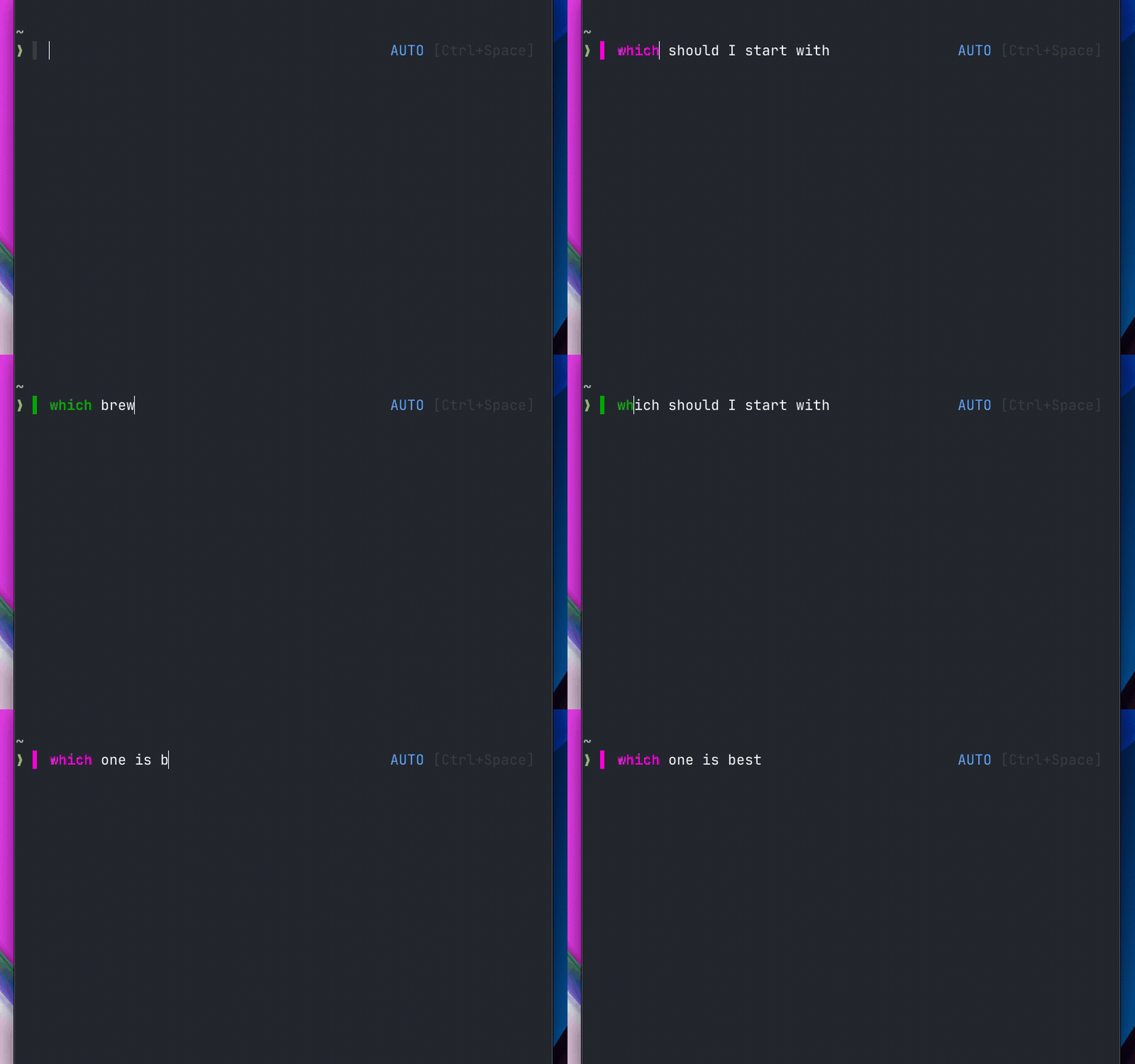
|
|
32
|
+
|
|
33
|
+
## How detection works
|
|
34
|
+
|
|
35
|
+
Here's the part I found most interesting to build. Lacy doesn't use AI to classify your input. It's pure lexical analysis:
|
|
36
|
+
|
|
37
|
+
1. **Agent words** (~150 common conversational words like "explain", "why", "thanks", "perfect") always route to AI
|
|
38
|
+
2. **Shell reserved words** (`do`, `then`, `in`, `fi`) pass `command -v` but are never standalone commands. "Do we have auth?" is natural language, not a `do` loop.
|
|
39
|
+
3. **Command validity** (if the first word is a valid command, it goes to shell)
|
|
40
|
+
4. **Word count heuristic** (single non-command words go to shell because they're probably typos. Multiple words starting with a non-command go to AI.)
|
|
41
|
+
5. **Post-execution reroute** (if a valid command fails with natural language patterns like 3+ bare words or articles/pronouns, it silently reroutes to AI)
|
|
42
|
+
|
|
43
|
+
This makes it sub-millisecond. No network call, no API key needed for classification.
|
|
44
|
+
|
|
45
|
+
## Tool agnostic
|
|
46
|
+
|
|
47
|
+
Lacy doesn't replace your AI tool. It makes it accessible:
|
|
48
|
+
|
|
49
|
+
| Tool | How Lacy calls it |
|
|
50
|
+
|------|------------------|
|
|
51
|
+
| Claude Code | `claude -p "query"` |
|
|
52
|
+
| Gemini CLI | `gemini --resume -p "query"` |
|
|
53
|
+
| OpenCode | `opencode run -c "query"` |
|
|
54
|
+
| Codex | `codex exec resume --last "query"` |
|
|
55
|
+
| Lash | `lash run -c "query"` |
|
|
56
|
+
|
|
57
|
+
It auto-detects whatever you have installed. Or set a custom command.
|
|
58
|
+
|
|
59
|
+
## Examples
|
|
60
|
+
|
|
61
|
+
| You type | Routes to | Why |
|
|
62
|
+
|----------|-----------|-----|
|
|
63
|
+
| `ls -la` | Shell | Valid command |
|
|
64
|
+
| `what files are here` | AI | Natural language |
|
|
65
|
+
| `git status` | Shell | Valid command |
|
|
66
|
+
| `do we have auth?` | AI | Reserved word "do" |
|
|
67
|
+
| `fix the bug` | AI | Multi-word, not a command |
|
|
68
|
+
| `kill the process on 3000` | Shell, then AI | Valid command fails with NL patterns |
|
|
69
|
+
|
|
70
|
+
## The trickiest part: coexisting with zsh-autosuggestions
|
|
71
|
+
|
|
72
|
+
Both Lacy and zsh-autosuggestions write to `POSTDISPLAY` and `region_highlight`. Getting them to share nicely took more time than the actual detection logic.
|
|
73
|
+
|
|
74
|
+
The solution: Lacy tags all its highlight entries with `memo=lacy` (a ZSH 5.8+ feature) so it can remove only its own entries on each redraw. For `POSTDISPLAY`, Lacy calls `_zsh_autosuggest_clear` before writing its ghost text, and autosuggestions picks back up once you start typing.
|
|
75
|
+
|
|
76
|
+
Small detail, but if you've ever had two ZSH plugins fighting over the same resources, you know how annoying it is.
|
|
77
|
+
|
|
78
|
+
## Install
|
|
79
|
+
|
|
80
|
+
One line:
|
|
81
|
+
|
|
82
|
+
```bash
|
|
83
|
+
curl -fsSL https://lacy.sh/install | bash
|
|
84
|
+
```
|
|
85
|
+
|
|
86
|
+
Also: `brew install lacymorrow/tap/lacy` or `npx lacy`
|
|
87
|
+
|
|
88
|
+
Works on macOS, Linux, WSL. ZSH and Bash 4+. MIT licensed. Currently on v1.8.11.
|
|
89
|
+
|
|
90
|
+
[GitHub](https://github.com/lacymorrow/lacy) | [Website](https://lacy.sh)
|
|
91
|
+
|
|
92
|
+
---
|
|
93
|
+
|
|
94
|
+
If you have questions or want to see something specific, the [GitHub Discussions](https://github.com/lacymorrow/lacy/discussions) are open. I read everything.
|
package/docs/DOCS.md
ADDED
|
@@ -0,0 +1,68 @@
|
|
|
1
|
+
# Lacy Shell - Technical Documentation
|
|
2
|
+
|
|
3
|
+
Supplement to [CLAUDE.md](../CLAUDE.md) (canonical reference) and [README.md](../README.md) (user-facing docs). This file covers hooks, safety, and shell-specific details not in those files.
|
|
4
|
+
|
|
5
|
+
---
|
|
6
|
+
|
|
7
|
+
## Supported Shells
|
|
8
|
+
|
|
9
|
+
| Shell | Version | Real-time indicator | First-word highlight | Mode badge |
|
|
10
|
+
|-------|---------|--------------------|--------------------|------------|
|
|
11
|
+
| ZSH | any | Yes (per-keystroke) | Yes (`region_highlight`) | RPS1 (right prompt) |
|
|
12
|
+
| Bash | 4+ | No (per-prompt only) | No | PS1 badge |
|
|
13
|
+
|
|
14
|
+
**Not yet supported:** Fish (no adapter exists)
|
|
15
|
+
|
|
16
|
+
---
|
|
17
|
+
|
|
18
|
+
## Hooks & Keybindings
|
|
19
|
+
|
|
20
|
+
| Binding | Action |
|
|
21
|
+
| ------------- | ---------------------------------- |
|
|
22
|
+
| `Ctrl+Space` | Toggle mode |
|
|
23
|
+
| `Ctrl+D` | Delete char or quit (empty buffer) |
|
|
24
|
+
| `Ctrl+C` (2x) | Emergency quit |
|
|
25
|
+
|
|
26
|
+
### ZSH Hooks
|
|
27
|
+
|
|
28
|
+
- `accept-line` — Routes input based on mode; flags NL reroute candidates; records shell commands for terminal context
|
|
29
|
+
- `zle-line-pre-redraw` — Updates indicator color and first-word syntax highlighting
|
|
30
|
+
- `precmd` — Captures `$?` for terminal context, checks reroute candidates, dispatches deferred agent queries, updates prompt
|
|
31
|
+
|
|
32
|
+
### Bash Hooks
|
|
33
|
+
|
|
34
|
+
- `\C-m` macro — `\C-x\C-l` (classification via `bind -x`) then `\C-j` (accept-line)
|
|
35
|
+
- `PROMPT_COMMAND` — Captures `$?` for terminal context, checks reroute candidates, dispatches deferred agent queries, updates PS1
|
|
36
|
+
- `trap INT` — Double Ctrl+C detection
|
|
37
|
+
|
|
38
|
+
---
|
|
39
|
+
|
|
40
|
+
## Terminal Context
|
|
41
|
+
|
|
42
|
+
Agent queries include delta-based terminal context (cwd, git branch, exit code, recent commands). Only changed state is sent — zero overhead when nothing changed between queries.
|
|
43
|
+
|
|
44
|
+
| Context | Included when |
|
|
45
|
+
|---------|--------------|
|
|
46
|
+
| `[cwd: /path]` | Directory changed since last query |
|
|
47
|
+
| `[git: branch]` | Git branch changed since last query |
|
|
48
|
+
| `[exit: N]` | Last command exited non-zero AND a command ran since last query |
|
|
49
|
+
| `[recent: cmd1 \| cmd2]` | Shell commands were run between queries (max 10, truncated at 80 chars) |
|
|
50
|
+
| `[terminal-output]...[/terminal-output]` | Terminal screen capture (tmux, screen, iTerm2, Terminal.app, max 50 lines, ANSI stripped) |
|
|
51
|
+
|
|
52
|
+
Recent commands use an explicit buffer (not shell history) to avoid agent queries appearing in the context. Terminal output is captured lazily at query time via multiplexer or terminal emulator APIs (no execution overhead). tmux and screen are detected first since terminal emulator APIs return wrong content inside multiplexers. On macOS, iTerm2 and Terminal.app are supported via AppleScript. Counters reset after each agent query. `/new` resets all context state.
|
|
53
|
+
|
|
54
|
+
Configure via `~/.lacy/config.yaml`:
|
|
55
|
+
```yaml
|
|
56
|
+
context:
|
|
57
|
+
output: true # Enable terminal screen capture (default: true)
|
|
58
|
+
output_lines: 50 # Max lines to include (default: 50)
|
|
59
|
+
```
|
|
60
|
+
|
|
61
|
+
---
|
|
62
|
+
|
|
63
|
+
## Safety Features
|
|
64
|
+
|
|
65
|
+
- **Dangerous command detection**: Warns for `rm -rf`, `sudo rm`, `mkfs`, `dd if=`
|
|
66
|
+
- **Prefix bypass**: `!command` forces shell execution
|
|
67
|
+
- **Double Ctrl+C quit**: Prevents accidental exits
|
|
68
|
+
- **Signal-aware rerouting**: Only reroutes on exit codes < 128 (not signal-killed processes)
|
|
@@ -0,0 +1,119 @@
|
|
|
1
|
+
# Lacy Shell — Growth strategy
|
|
2
|
+
|
|
3
|
+
Last updated: 2026-04-17
|
|
4
|
+
|
|
5
|
+
## Current state
|
|
6
|
+
|
|
7
|
+
- Pre-launch prep complete (demo GIFs, README, analytics, videos, all copy)
|
|
8
|
+
- Dev.to article drafted and polished
|
|
9
|
+
- 5 SEO comparison pages on lacy.sh (vs Warp, ShellGPT, GitHub Copilot CLI, AI Shell, Amazon Q)
|
|
10
|
+
- Launch copy ready for HN, Twitter/X, Reddit, Dev.to
|
|
11
|
+
- No launch date set yet
|
|
12
|
+
|
|
13
|
+
## Phase 1: Launch week
|
|
14
|
+
|
|
15
|
+
**Goal:** First 500 GitHub stars, establish presence on HN and Twitter.
|
|
16
|
+
|
|
17
|
+
### Day 1 (Tuesday or Wednesday)
|
|
18
|
+
- 9am ET: Post Show HN (copy in MARKETING.md)
|
|
19
|
+
- 10:30am ET: Post Twitter thread (after HN settles)
|
|
20
|
+
- Monitor and respond to every HN comment within 30 min
|
|
21
|
+
- Monitor Twitter replies
|
|
22
|
+
|
|
23
|
+
### Day 2
|
|
24
|
+
- Post r/commandline
|
|
25
|
+
- Post r/zsh
|
|
26
|
+
- Respond to all Day 1 engagement
|
|
27
|
+
|
|
28
|
+
### Day 3-4
|
|
29
|
+
- Publish Dev.to article (docs/articles/)
|
|
30
|
+
- Cross-post to Hashnode
|
|
31
|
+
- Submit first awesome-list PR (awesome-zsh-plugins)
|
|
32
|
+
|
|
33
|
+
### Day 5-7
|
|
34
|
+
- Submit remaining awesome-list PRs (awesome-cli-apps, awesome-shell, awesome-ai-tools, terminals-are-sexy)
|
|
35
|
+
- Compile engagement data and iterate messaging
|
|
36
|
+
|
|
37
|
+
## Phase 2: SEO and content (weeks 2-4)
|
|
38
|
+
|
|
39
|
+
**Goal:** Rank for comparison and category search terms.
|
|
40
|
+
|
|
41
|
+
### Comparison pages (done)
|
|
42
|
+
- lacy.sh/vs/warp
|
|
43
|
+
- lacy.sh/vs/shell-gpt
|
|
44
|
+
- lacy.sh/vs/github-copilot-cli
|
|
45
|
+
- lacy.sh/vs/ai-shell
|
|
46
|
+
- lacy.sh/vs/amazon-q
|
|
47
|
+
|
|
48
|
+
### Additional comparison pages to create
|
|
49
|
+
- lacy.sh/vs/aider (popular AI coding tool, different category but high search volume)
|
|
50
|
+
- lacy.sh/vs/cursor (IDE-based AI — Lacy is terminal-native, different workflow)
|
|
51
|
+
|
|
52
|
+
### Category pages to create
|
|
53
|
+
- lacy.sh/best-ai-terminal-tools (roundup — position Lacy in the space, link to comparison pages)
|
|
54
|
+
- lacy.sh/how-it-works (deep technical explainer for the detection algorithm)
|
|
55
|
+
|
|
56
|
+
### Blog posts for lacy.sh
|
|
57
|
+
- "Why I didn't use AI to classify AI input" — technical post about the lexical approach
|
|
58
|
+
- "Shell reserved words are trickier than they look" — deep dive on the `do`/`then`/`in` problem
|
|
59
|
+
- "The post-execution reroute pattern" — how Lacy catches failed commands with NL arguments
|
|
60
|
+
|
|
61
|
+
## Phase 3: Community and developer advocacy (weeks 4-8)
|
|
62
|
+
|
|
63
|
+
**Goal:** Build a contributor community and get organic mentions.
|
|
64
|
+
|
|
65
|
+
### Actions
|
|
66
|
+
- Open "good first issue" labels on GitHub for easy contributions
|
|
67
|
+
- Create a CONTRIBUTING.md with clear guidelines
|
|
68
|
+
- Respond to every GitHub issue within 24 hours
|
|
69
|
+
- Share interesting edge cases on Twitter (the detection boundary is inherently interesting)
|
|
70
|
+
- Write about Lacy in the context of other projects (shell scripting tips, ZSH plugin development)
|
|
71
|
+
- Engage in r/commandline, r/zsh, r/neovim discussions where Lacy is relevant (don't spam — only when genuinely useful)
|
|
72
|
+
|
|
73
|
+
### Conference and meetup talks
|
|
74
|
+
- Submit CFP to terminal/DevTools meetups (ShellCon, local DevTools meetups)
|
|
75
|
+
- Record a 5-minute lightning talk version for async submission
|
|
76
|
+
|
|
77
|
+
## Phase 4: Product Hunt and broader press (weeks 8-12)
|
|
78
|
+
|
|
79
|
+
**Goal:** Product Hunt launch, dev newsletter features.
|
|
80
|
+
|
|
81
|
+
### Product Hunt prep
|
|
82
|
+
- Maker profile with backstory
|
|
83
|
+
- 4-5 screenshots/GIFs showing the indicator, detection, reroute
|
|
84
|
+
- Short tagline: "Talk to your shell. Commands run, questions go to AI."
|
|
85
|
+
- Hunter outreach: find a hunter with DevTools audience (2-3 weeks before launch)
|
|
86
|
+
- Schedule for Tuesday, midnight PT
|
|
87
|
+
|
|
88
|
+
### Newsletter and press outreach
|
|
89
|
+
- Changelog (changelog.com) — submit
|
|
90
|
+
- Console.dev — submit
|
|
91
|
+
- TLDR Newsletter — submit
|
|
92
|
+
- Hacker Newsletter — submit (if HN post does well, this may happen automatically)
|
|
93
|
+
- Dev.to trending — aim for front page with the article
|
|
94
|
+
|
|
95
|
+
## Metrics to track
|
|
96
|
+
|
|
97
|
+
| Metric | Tool | Target (90 days) |
|
|
98
|
+
|--------|------|-------------------|
|
|
99
|
+
| GitHub stars | GitHub | 1,000+ |
|
|
100
|
+
| npm weekly downloads | npm | 500+ |
|
|
101
|
+
| Homebrew installs | brew analytics | 200+ |
|
|
102
|
+
| lacy.sh monthly visitors | Plausible/Umami | 5,000+ |
|
|
103
|
+
| Comparison page organic traffic | Plausible/Umami | 1,000+ visits/month |
|
|
104
|
+
| Twitter followers (project account) | Twitter | 500+ |
|
|
105
|
+
| GitHub issues (engagement proxy) | GitHub | 50+ |
|
|
106
|
+
|
|
107
|
+
## Ongoing cadence
|
|
108
|
+
|
|
109
|
+
- Weekly: Share one interesting edge case or detection improvement on Twitter
|
|
110
|
+
- Biweekly: Publish a blog post or technical writeup
|
|
111
|
+
- Monthly: Review analytics, adjust comparison page copy for ranking
|
|
112
|
+
- Per release: Tweet the changelog with a short "what's new" summary
|
|
113
|
+
|
|
114
|
+
## Content pillars
|
|
115
|
+
|
|
116
|
+
1. **The detection problem** — the boundary between command and question is fascinating. Lean into it. Share edge cases, tricky inputs, surprising classifications.
|
|
117
|
+
2. **Tool-agnostic philosophy** — Lacy doesn't compete with Claude Code or Gemini. It makes them better. This is the positioning.
|
|
118
|
+
3. **Terminal culture** — engage with the shell/terminal community genuinely. Lacy is a shell plugin first. The AI routing is the feature, but the audience is terminal users.
|
|
119
|
+
4. **Open source transparency** — share the decision-making, the tradeoffs, the bugs. Devs trust projects that show their work.
|
|
@@ -0,0 +1,122 @@
|
|
|
1
|
+
# Show HN Response Templates
|
|
2
|
+
|
|
3
|
+
Prepared responses for common HN questions. Adapt to match the specific comment. Keep responses concise, technical, and honest.
|
|
4
|
+
|
|
5
|
+
---
|
|
6
|
+
|
|
7
|
+
## 1. "How does detection work without AI?"
|
|
8
|
+
|
|
9
|
+
It's pure lexical analysis against your local PATH. The core function (`lacy_shell_classify_input`) does this:
|
|
10
|
+
|
|
11
|
+
1. Checks if the first word is a shell reserved word (`do`, `then`, `in`, `fi`, etc.) -- these pass `command -v` but nobody types `do` as a standalone command. Routes to AI.
|
|
12
|
+
2. Checks against ~150 common English words (`what`, `why`, `explain`, `thanks`) -- routes to AI.
|
|
13
|
+
3. Runs `command -v` on the first word. If it resolves, routes to shell.
|
|
14
|
+
4. Single word, no command match -- shell (probably a typo, let it error naturally).
|
|
15
|
+
5. Multiple words, first word not a command -- AI.
|
|
16
|
+
|
|
17
|
+
There's a one-entry cache on `command -v` so repeated checks on the same word during typing are free. The entire classification is a few string comparisons and one PATH lookup. No network, no model, no parsing beyond word splitting.
|
|
18
|
+
|
|
19
|
+
---
|
|
20
|
+
|
|
21
|
+
## 2. "What about false positives?"
|
|
22
|
+
|
|
23
|
+
Three escape hatches:
|
|
24
|
+
|
|
25
|
+
- `!` prefix forces shell. `!rm -rf /tmp` always runs in the shell, no questions asked.
|
|
26
|
+
- `@` prefix forces AI.
|
|
27
|
+
- Ctrl+Space toggles between shell/agent/auto modes.
|
|
28
|
+
|
|
29
|
+
The color indicator shows you where it's going before you hit enter, so you catch misroutes before anything executes. In practice the heuristic gets it right the vast majority of the time, but the visual feedback is the real safety net. You just look left.
|
|
30
|
+
|
|
31
|
+
For the "valid command + NL args" case (like `kill the process on port 3000`), the command runs first. It only reroutes to AI if the command fails with a recognized error pattern AND the args contain NL markers like articles and pronouns. So a working command is never intercepted.
|
|
32
|
+
|
|
33
|
+
---
|
|
34
|
+
|
|
35
|
+
## 3. "Why not just use a prefix like `?` or `!`?"
|
|
36
|
+
|
|
37
|
+
Yeah, you can. Lacy has `@` for exactly that. I just got tired of it. I was reaching for the AI 20+ times a day and the prefix started to feel like busywork. The indicator already shows you where it's going, so the prefix is redundant information.
|
|
38
|
+
|
|
39
|
+
The other thing you lose with a prefix: post-execution reroute. When you type `make sure the tests pass` and `make` fails because there's no Makefile target called "sure", Lacy catches the NL pattern and reroutes to AI. With a prefix you'd have to know ahead of time that the command was going to fail.
|
|
40
|
+
|
|
41
|
+
---
|
|
42
|
+
|
|
43
|
+
## 4. "Privacy/security -- what data is sent where?"
|
|
44
|
+
|
|
45
|
+
Lacy itself sends nothing anywhere. Classification is local string comparisons. When something routes to AI, it shells out to whatever CLI tool you have configured (Claude Code, Gemini CLI, etc.) as a subprocess. Those tools handle their own auth and network stuff. Lacy never sees API keys or responses.
|
|
46
|
+
|
|
47
|
+
The install script (`curl | bash`) pulls from GitHub and copies files to `~/.lacy`. You can also `brew install` or `npx` if you want to audit the package first.
|
|
48
|
+
|
|
49
|
+
---
|
|
50
|
+
|
|
51
|
+
## 5. "Does it work with fish/nushell/PowerShell?"
|
|
52
|
+
|
|
53
|
+
ZSH and Bash 4+ only right now. Fish and nushell could work in theory but they'd need their own adapters. The real-time indicator relies on ZLE hooks (ZSH) and readline bindings (Bash), and those don't have equivalents in other shells. Would happily merge a PR if someone wants to take a crack at it.
|
|
54
|
+
|
|
55
|
+
Bash 4+ specifically because of associative arrays and `read -ra`. macOS still ships Bash 3.2, so you'd need `brew install bash`.
|
|
56
|
+
|
|
57
|
+
---
|
|
58
|
+
|
|
59
|
+
## 6. "How is this different from Warp/ShellGPT/GitHub Copilot CLI?"
|
|
60
|
+
|
|
61
|
+
Warp is a whole terminal. Lacy is a plugin for your existing shell. No new app, no account, no cloud dependency for the routing part.
|
|
62
|
+
|
|
63
|
+
ShellGPT and Copilot CLI require you to explicitly call them (`sgpt "query"` or `gh copilot suggest`). Lacy skips that step. You just type and it figures it out.
|
|
64
|
+
|
|
65
|
+
The classification works differently too. ShellGPT/Copilot send your input to the LLM to figure out what you meant. Lacy does it locally with string matching, so it's sub-millisecond and doesn't burn an API call just to decide where your input goes.
|
|
66
|
+
|
|
67
|
+
---
|
|
68
|
+
|
|
69
|
+
## 7. "Sub-millisecond -- how?"
|
|
70
|
+
|
|
71
|
+
The hot path is: trim whitespace, check first character for `!`/`@`, do one array lookup in ~15 reserved words, one array lookup in ~150 agent words, one `command -v` (cached). All string ops, no forks, no subshells. In ZSH it runs on `zle-line-pre-redraw` which fires on every keystroke, so it has to be fast.
|
|
72
|
+
|
|
73
|
+
The `command -v` result is cached with a single-entry cache (last word checked). Since the indicator updates as you type and you're usually editing the end of the line, the first word stays cached.
|
|
74
|
+
|
|
75
|
+
---
|
|
76
|
+
|
|
77
|
+
## 8. "Why not just use Claude Code directly?"
|
|
78
|
+
|
|
79
|
+
You should! Lacy doesn't replace Claude Code. It's just a faster way to get to it. Instead of stopping to think "ok now I need to switch to Claude," you just type what you're thinking and it ends up in the right place.
|
|
80
|
+
|
|
81
|
+
I kept catching myself doing the mental context switch dozens of times a day. This removes it.
|
|
82
|
+
|
|
83
|
+
---
|
|
84
|
+
|
|
85
|
+
## 9. "The `curl | bash` install concern"
|
|
86
|
+
|
|
87
|
+
Yeah, fair. Three alternatives:
|
|
88
|
+
|
|
89
|
+
- `brew install lacymorrow/tap/lacy`
|
|
90
|
+
- `npx lacy`
|
|
91
|
+
- Clone the repo and read `install.sh` before running it
|
|
92
|
+
|
|
93
|
+
The script is ~300 lines, nothing obfuscated. It copies shell files to `~/.lacy` and adds a source line to your rc file. Happy to walk through it.
|
|
94
|
+
|
|
95
|
+
---
|
|
96
|
+
|
|
97
|
+
## 10. "How does the reroute work when a command fails?"
|
|
98
|
+
|
|
99
|
+
When you type something like `go ahead and fix the tests`, Lacy sees `go` is a valid command and lets the shell run it. `go` fails with something like `go ahead: unknown command`. Before showing the error, Lacy checks two things:
|
|
100
|
+
|
|
101
|
+
1. The error output matches a known shell error pattern (like "unknown command", "not found", "No rule to make target")
|
|
102
|
+
2. The arguments contain NL markers (articles, pronouns, prepositions -- like "ahead", "and", "the")
|
|
103
|
+
|
|
104
|
+
Both must match. If they do, the original input silently reroutes to the AI agent. If either check fails, you just see the normal shell error.
|
|
105
|
+
|
|
106
|
+
This only activates in auto mode, and only for non-signal exit codes (< 128). A segfault or interrupt is never rerouted.
|
|
107
|
+
|
|
108
|
+
---
|
|
109
|
+
|
|
110
|
+
## 11. "What AI tools does it support?"
|
|
111
|
+
|
|
112
|
+
Anything that takes a text prompt: Claude Code, Gemini CLI, OpenCode, Codex CLI, Lash (my OpenCode fork). Or set a custom command if yours isn't in the list. On first run it checks what's installed and asks you to pick.
|
|
113
|
+
|
|
114
|
+
The AI tool handles its own auth and conversation state. Lacy just hands it the query string.
|
|
115
|
+
|
|
116
|
+
---
|
|
117
|
+
|
|
118
|
+
## 12. "What happens with commands like `test` or `time` that are both real commands and English words?"
|
|
119
|
+
|
|
120
|
+
`test` and `time` are in `command -v` but NOT in the agent-words list, so they route to shell by default. If you type `test the login flow`, `test` runs and fails, then the post-execution reroute catches it because "the" and "login" are NL markers.
|
|
121
|
+
|
|
122
|
+
Agent words like `yes`, `nice`, `cancel` are real commands too, but they're almost never typed standalone in a terminal. When they ARE used as commands (like `yes | apt install`), the shell operator `|` triggers shell routing.
|
|
@@ -0,0 +1,105 @@
|
|
|
1
|
+
# Launch Copy - Final (Humanized, ready to submit)
|
|
2
|
+
|
|
3
|
+
## Show HN
|
|
4
|
+
|
|
5
|
+
**Title:** Show HN: Lacy Shell - Talk to your terminal. Commands run, questions go to AI
|
|
6
|
+
|
|
7
|
+
**Body:**
|
|
8
|
+
|
|
9
|
+
Hi HN,
|
|
10
|
+
|
|
11
|
+
I built Lacy, a ZSH/Bash plugin that figures out whether you're typing a command or asking a question, then sends it to the right place. Commands run in your shell. Questions go to your AI agent. No prefix, no hotkey. You just type.
|
|
12
|
+
|
|
13
|
+
A color indicator next to your prompt changes as you type. Green means it'll run in the shell, magenta means it's going to AI. First word gets syntax-highlighted too. Updates every keystroke.
|
|
14
|
+
|
|
15
|
+
How it decides:
|
|
16
|
+
|
|
17
|
+
- `ls -la` -> Shell (valid command, green)
|
|
18
|
+
- `what files are here` -> AI (natural language, magenta)
|
|
19
|
+
- `do we have auth?` -> AI (shell reserved words like "do", "in", "then" are never standalone commands)
|
|
20
|
+
- `kill the process on 3000` -> Shell first, then AI (valid command fails with NL patterns, silent reroute)
|
|
21
|
+
|
|
22
|
+
No AI call to classify your input. Pure lexical analysis: checks command validity, word counts, article/pronoun markers, known error patterns. Sub-millisecond.
|
|
23
|
+
|
|
24
|
+
Works with whatever AI CLI you already have: Claude Code, Gemini CLI, OpenCode, Codex, or Lash (my OpenCode fork). Lacy doesn't replace any of them, it just makes them easier to reach.
|
|
25
|
+
|
|
26
|
+
Install:
|
|
27
|
+
|
|
28
|
+
curl -fsSL https://lacy.sh/install | bash
|
|
29
|
+
|
|
30
|
+
Or: `brew install lacymorrow/tap/lacy` | `npx lacy`
|
|
31
|
+
|
|
32
|
+
macOS, Linux, WSL. ZSH and Bash 4+.
|
|
33
|
+
|
|
34
|
+
Site: https://lacy.sh
|
|
35
|
+
Source: https://github.com/lacymorrow/lacy
|
|
36
|
+
|
|
37
|
+
---
|
|
38
|
+
|
|
39
|
+
## Twitter Thread (5 tweets)
|
|
40
|
+
|
|
41
|
+
**Tweet 1:**
|
|
42
|
+
I made my terminal understand English.
|
|
43
|
+
|
|
44
|
+
Type a command, it runs in your shell.
|
|
45
|
+
Type a question, it goes to your AI agent.
|
|
46
|
+
|
|
47
|
+
No prefix. No hotkey. Just type.
|
|
48
|
+
|
|
49
|
+
It's called Lacy Shell. Free and open source.
|
|
50
|
+
|
|
51
|
+
[attach demo-full.gif]
|
|
52
|
+
|
|
53
|
+
**Tweet 2:**
|
|
54
|
+
The problem: every time you need AI help, you leave your terminal.
|
|
55
|
+
|
|
56
|
+
Copy output. Switch to Claude/ChatGPT. Paste. Wait. Copy answer. Switch back. Paste.
|
|
57
|
+
|
|
58
|
+
I was doing that 20+ times a day. So I fixed it.
|
|
59
|
+
|
|
60
|
+
**Tweet 3:**
|
|
61
|
+
How it works:
|
|
62
|
+
|
|
63
|
+
A color indicator next to your prompt updates as you type:
|
|
64
|
+
|
|
65
|
+
Green = shell command (runs normally)
|
|
66
|
+
Magenta = natural language (goes to AI)
|
|
67
|
+
|
|
68
|
+
No AI call to classify. Pure lexical analysis. Sub-millisecond.
|
|
69
|
+
|
|
70
|
+
If a command fails with NL patterns, it silently reroutes to AI.
|
|
71
|
+
|
|
72
|
+
**Tweet 4:**
|
|
73
|
+
Lacy works with whatever AI tool you already have.
|
|
74
|
+
|
|
75
|
+
- Claude Code
|
|
76
|
+
- Gemini CLI
|
|
77
|
+
- OpenCode
|
|
78
|
+
- Codex CLI
|
|
79
|
+
- Lash
|
|
80
|
+
- Any custom command
|
|
81
|
+
|
|
82
|
+
It auto-detects what's installed. You don't configure anything.
|
|
83
|
+
|
|
84
|
+
**Tweet 5:**
|
|
85
|
+
One line to install:
|
|
86
|
+
|
|
87
|
+
curl -fsSL https://lacy.sh/install | bash
|
|
88
|
+
|
|
89
|
+
Also: brew install lacymorrow/tap/lacy
|
|
90
|
+
|
|
91
|
+
ZSH + Bash 4+. macOS, Linux, WSL.
|
|
92
|
+
|
|
93
|
+
github.com/lacymorrow/lacy
|
|
94
|
+
lacy.sh
|
|
95
|
+
|
|
96
|
+
Tags: @AnthropicAI @GoogleDeepMind
|
|
97
|
+
|
|
98
|
+
---
|
|
99
|
+
|
|
100
|
+
## Schedule
|
|
101
|
+
|
|
102
|
+
- Tue May 12 or Wed May 13, 9:00am ET: Post Show HN
|
|
103
|
+
- Same day, 10:30am ET: Post Twitter thread
|
|
104
|
+
- Next day: Post r/commandline + r/zsh
|
|
105
|
+
- Day after: Publish Dev.to article
|