football-docs 0.6.2 → 0.6.3
This diff represents the content of publicly available package versions that have been released to one of the supported registries. The information contained in this diff is provided for informational purposes only and reflects changes between package versions as they appear in their respective public registries.
- package/README.md +3 -2
- package/data/docs.db +0 -0
- package/dist/crawl.js +59 -1
- package/docs/_reference/skillcorner-crunch-help/getting-started-api-access-dynamic-events.md +134 -0
- package/docs/_reference/skillcorner-crunch-help/getting-started-api-access-our-tracking-data.md +160 -0
- package/docs/_reference/skillcorner-crunch-help/getting-started-best-practice-analysis-guidance.md +16 -0
- package/docs/_reference/skillcorner-crunch-help/getting-started-dynamic-events-check.md +33 -0
- package/docs/_reference/skillcorner-crunch-help/getting-started-explore-game-intelligence-data-1.md +37 -0
- package/docs/_reference/skillcorner-crunch-help/getting-started-explore-game-intelligence-data.md +29 -0
- package/docs/_reference/skillcorner-crunch-help/getting-started-first-requests.md +99 -0
- package/docs/_reference/skillcorner-crunch-help/getting-started-generate-visual-reports.md +90 -0
- package/docs/_reference/skillcorner-crunch-help/getting-started-make-your-first-queries.md +92 -0
- package/docs/_reference/skillcorner-crunch-help/getting-started-off-ball-run-sportscode-xml.md +32 -0
- package/docs/_reference/skillcorner-crunch-help/getting-started-on-ball-engagement-video-definitio.md +15 -0
- package/docs/_reference/skillcorner-crunch-help/getting-started-python-retrieve-dynamic-events-fil.md +102 -0
- package/docs/_reference/skillcorner-crunch-help/getting-started-python-retrieve-game-intelligence-.md +158 -0
- package/docs/_reference/skillcorner-crunch-help/getting-started-python-sync-your-database-with-ski.md +192 -0
- package/docs/_reference/skillcorner-crunch-help/getting-started-run-detection-and-classification.md +131 -0
- package/docs/_reference/skillcorner-crunch-help/getting-started-skill-corner-tracking-data.md +82 -0
- package/docs/_reference/skillcorner-crunch-help/getting-started-skillcorner-python-client.md +70 -0
- package/docs/_reference/skillcorner-crunch-help/getting-started-using-skillcorner-api.md +146 -0
- package/docs/_reference/skillcorner-crunch-help/getting-started.md +43 -0
- package/docs/_reference/skillcorner-crunch-help/glossaries-coordinates-distance-speeds-and-directi.md +149 -0
- package/docs/_reference/skillcorner-crunch-help/glossaries-dynamic-events-csv-specifications.md +15 -0
- package/docs/_reference/skillcorner-crunch-help/glossaries-forward-momentum.md +13 -0
- package/docs/_reference/skillcorner-crunch-help/glossaries-game-intelligence-v2-metrics.md +17 -0
- package/docs/_reference/skillcorner-crunch-help/glossaries-in-possession-package-content.md +19 -0
- package/docs/_reference/skillcorner-crunch-help/glossaries-line-breaking-passes.md +103 -0
- package/docs/_reference/skillcorner-crunch-help/glossaries-off-ball-run-dynamic-events.md +197 -0
- package/docs/_reference/skillcorner-crunch-help/glossaries-overcoming-pressure.md +105 -0
- package/docs/_reference/skillcorner-crunch-help/glossaries-passing-metrics-1.md +144 -0
- package/docs/_reference/skillcorner-crunch-help/glossaries-passing-moment-frame-selection.md +19 -0
- package/docs/_reference/skillcorner-crunch-help/glossaries-peak-sprint-velocity.md +26 -0
- package/docs/_reference/skillcorner-crunch-help/glossaries-phases-of-play-video-definitions.md +15 -0
- package/docs/_reference/skillcorner-crunch-help/glossaries-physical-data-glossary.md +127 -0
- package/docs/_reference/skillcorner-crunch-help/glossaries-running-off-ball-metrics-1.md +135 -0
- package/docs/_reference/skillcorner-crunch-help/glossaries.md +43 -0
- package/docs/_reference/skillcorner-crunch-help/index.md +33 -0
- package/docs/_reference/skillcorner-crunch-help/models-general-concepts-pass-completion-probabilit.md +15 -0
- package/docs/_reference/skillcorner-crunch-help/models-general-concepts-passing-option.md +30 -0
- package/docs/_reference/skillcorner-crunch-help/models-general-concepts-physical-load-prediction-m.md +63 -0
- package/docs/_reference/skillcorner-crunch-help/models-general-concepts-pressure-detection.md +46 -0
- package/docs/_reference/skillcorner-crunch-help/models-general-concepts-pressure-intensity.md +80 -0
- package/docs/_reference/skillcorner-crunch-help/models-general-concepts-threat.md +40 -0
- package/docs/_reference/skillcorner-crunch-help/models-general-concepts.md +37 -0
- package/docs/_reference/skillcorner-crunch-help/product-updates-1-changelog-2025.md +57 -0
- package/docs/_reference/skillcorner-crunch-help/product-updates-1-game-intelligence-v2-migration.md +64 -0
- package/docs/_reference/skillcorner-crunch-help/product-updates-1-product-updates.md +200 -0
- package/docs/_reference/skillcorner-crunch-help/product-updates-1.md +25 -0
- package/docs/_reference/skillcorner-crunch-help/tool-box-api-data-version.md +255 -0
- package/docs/_reference/skillcorner-crunch-help/tool-box-data-availability.md +55 -0
- package/docs/_reference/skillcorner-crunch-help/tool-box-python-event-tracking-synchronization-1.md +442 -0
- package/docs/_reference/skillcorner-crunch-help/tool-box-python-event-tracking-synchronization.md +276 -0
- package/docs/_reference/skillcorner-crunch-help/tool-box-python-off-ball-runs-radar-plots.md +69 -0
- package/docs/_reference/skillcorner-crunch-help/tool-box-rule-based-event-synchronisation.md +44 -0
- package/docs/_reference/skillcorner-crunch-help/tool-box.md +35 -0
- package/docs/_reference/skillcorner-crunch-help/working-with-the-data-averaging-per-match-per-even.md +179 -0
- package/docs/_reference/skillcorner-crunch-help/working-with-the-data-benchmarking-normalisation.md +27 -0
- package/docs/_reference/skillcorner-crunch-help/working-with-the-data-data-quality-standards.md +45 -0
- package/docs/_reference/skillcorner-crunch-help/working-with-the-data-physical-data-glossary-1-1.md +54 -0
- package/docs/_reference/skillcorner-crunch-help/working-with-the-data-physical-data-glossary-1.md +25 -0
- package/docs/_reference/skillcorner-crunch-help/working-with-the-data-pitch-modelisation.md +27 -0
- package/docs/_reference/skillcorner-crunch-help/working-with-the-data-playing-time-info.md +133 -0
- package/docs/_reference/skillcorner-crunch-help/working-with-the-data.md +43 -0
- package/docs/floodlight/compendium-0-compendium.md +21 -0
- package/docs/floodlight/compendium-1-data.md +54 -0
- package/docs/floodlight/compendium-2-design.md +49 -0
- package/docs/floodlight/compendium-3-time.md +57 -0
- package/docs/floodlight/compendium-4-space.md +137 -0
- package/docs/floodlight/compendium-5-identifier.md +63 -0
- package/docs/floodlight/core-code.md +85 -0
- package/docs/floodlight/core-core.md +39 -0
- package/docs/floodlight/core-definitions.md +128 -0
- package/docs/floodlight/core-events.md +177 -0
- package/docs/floodlight/core-pitch.md +87 -0
- package/docs/floodlight/core-property.md +107 -0
- package/docs/floodlight/core-teamsheet.md +86 -0
- package/docs/floodlight/core-xy.md +192 -0
- package/docs/floodlight/guides-contrib-manual.md +462 -0
- package/docs/floodlight/guides-getting-started.md +194 -0
- package/docs/floodlight/guides-tutorial-analysis.md +245 -0
- package/docs/floodlight/guides-tutorial-matchsheets.md +439 -0
- package/docs/floodlight/index.md +17 -0
- package/docs/floodlight/io-datasets.md +365 -0
- package/docs/floodlight/io-dfl.md +107 -0
- package/docs/floodlight/io-io.md +131 -0
- package/docs/floodlight/io-kinexon.md +119 -0
- package/docs/floodlight/io-opta.md +49 -0
- package/docs/floodlight/io-secondspectrum.md +121 -0
- package/docs/floodlight/io-skillcorner.md +40 -0
- package/docs/floodlight/io-sportradar.md +35 -0
- package/docs/floodlight/io-statsbomb.md +61 -0
- package/docs/floodlight/io-statsperform.md +239 -0
- package/docs/floodlight/io-tracab.md +78 -0
- package/docs/floodlight/io-utils.md +59 -0
- package/docs/floodlight/metrics-entropy.md +36 -0
- package/docs/floodlight/metrics-metrics.md +15 -0
- package/docs/floodlight/metrics-trajectory-clustering.md +51 -0
- package/docs/floodlight/metrics-zone-aggregation.md +116 -0
- package/docs/floodlight/models-geometry.md +411 -0
- package/docs/floodlight/models-kinematics.md +251 -0
- package/docs/floodlight/models-kinetics.md +137 -0
- package/docs/floodlight/models-models.md +89 -0
- package/docs/floodlight/models-space.md +202 -0
- package/docs/floodlight/transforms-filter.md +412 -0
- package/docs/floodlight/transforms-interpolation.md +230 -0
- package/docs/floodlight/transforms-permutation.md +36 -0
- package/docs/floodlight/transforms-spatial.md +54 -0
- package/docs/floodlight/transforms-temporal.md +42 -0
- package/docs/floodlight/transforms-transforms.md +57 -0
- package/docs/floodlight/utils-types.md +13 -0
- package/docs/floodlight/utils-utils.md +17 -0
- package/docs/floodlight/vis-pitches.md +111 -0
- package/docs/floodlight/vis-positions.md +129 -0
- package/docs/floodlight/vis-vis.md +19 -0
- package/package.json +1 -1
- package/providers.json +1 -1
|
@@ -0,0 +1,90 @@
|
|
|
1
|
+
---
|
|
2
|
+
source_url: https://skillcorner.crunch.help/en/getting-started/generate-visual-reports
|
|
3
|
+
source_type: crunch_help_kb
|
|
4
|
+
upstream_version:
|
|
5
|
+
crawled_at: 2026-07-13T14:07:00.803Z
|
|
6
|
+
---
|
|
7
|
+
The aim of this page is to present our tool that will help you compare player performances with a visual approach. In fact, the Physical Benchmark Generator allows you to compare the physical output of targeted players to other players of interest and/or to the average output of players playing at a given position(s), in any competition you have access to.
|
|
8
|
+
|
|
9
|
+
## Accessing the Physical Benchmark Generator
|
|
10
|
+
|
|
11
|
+
You can access the Physical Benchmark Generator through the dedicated button in the [SkillCorner Web Application header](https://skillcorner.com/app/login) or by directly clicking [here](https://skillcorner.com/app/report).
|
|
12
|
+
|
|
13
|
+
## Using the Physical Benchmark Generator
|
|
14
|
+
|
|
15
|
+
**Recommended reading
|
|
16
|
+
**Before diving into this section, we advise you to have a look to:
|
|
17
|
+
|
|
18
|
+
\- The [definitions](https://skillcorner.crunch.help/en/glossaries/physical-data-glossary) of our Physical metrics
|
|
19
|
+
|
|
20
|
+
To use the Physical Benchmark Generator, you need to:
|
|
21
|
+
|
|
22
|
+
1. Complete the form to determine which parameters should be included in the report
|
|
23
|
+
2. Click on the “Generate PowerPoint” Button
|
|
24
|
+
3. Wait about **2 minutes** for the reports to be generated
|
|
25
|
+
4. Click on the “Download Report” button to download the PowerPoint Presentation on your computer.
|
|
26
|
+
|
|
27
|
+
Here is what this will look like from you end, followed by more context regarding the different fields and the end result:
|
|
28
|
+
|
|
29
|
+
###
|
|
30
|
+
Completing the form
|
|
31
|
+
|
|
32
|
+
**Fields** (\* stands for required)
|
|
33
|
+
|
|
34
|
+
**Description**
|
|
35
|
+
|
|
36
|
+
**Seasons\***
|
|
37
|
+
|
|
38
|
+
These are the seasons you are interested in including data.
|
|
39
|
+
|
|
40
|
+
**Target players\***
|
|
41
|
+
|
|
42
|
+
The players you are interested in.
|
|
43
|
+
|
|
44
|
+
**Comparison players**
|
|
45
|
+
|
|
46
|
+
Other players of interest you want to compare with your target players.
|
|
47
|
+
|
|
48
|
+
**Benchmark competition editions\***
|
|
49
|
+
|
|
50
|
+
Performances from players in this competition edition will be used to compute averages so that you can compare your target players’ outputs to these averages.
|
|
51
|
+
|
|
52
|
+
**Background competition editions\***
|
|
53
|
+
|
|
54
|
+
Performances from players in these competitions editions will be used for scatter plots to help you visualize the range of possible value for any physical metrics.
|
|
55
|
+
|
|
56
|
+
**Position Group\***
|
|
57
|
+
|
|
58
|
+
The reports only take into account the players' matches when they played in the selected position groups.
|
|
59
|
+
|
|
60
|
+
It applies for the target players, the comparison players but also the benchmark competition edition and the background competition editions.
|
|
61
|
+
|
|
62
|
+
**Split By\***
|
|
63
|
+
|
|
64
|
+
Check the team checkbox if (i) there is at least one player in the target and/or comparison players that played in more than one clubs during the seasons you selected and (ii) you want to distinguish his performance in each club.
|
|
65
|
+
|
|
66
|
+
**Thresholds**
|
|
67
|
+
|
|
68
|
+
We recommend only generating reports for players that played more than 10 games with a playing time of 60 minutes.
|
|
69
|
+
|
|
70
|
+
**Player labels**
|
|
71
|
+
|
|
72
|
+
You can change the label of the player that will appear in the PowerPoint presentation. It can be useful for players with very long names.
|
|
73
|
+
|
|
74
|
+
### Benchmark report content
|
|
75
|
+
|
|
76
|
+
The benchmark reports consist of 18 PowerPoint slides including:
|
|
77
|
+
|
|
78
|
+
- An overview of the data included in the report
|
|
79
|
+
- A glossary
|
|
80
|
+
- 13 plots - 7 scatter plots, 5 bar plots and 1 violin plot - to compare players based on their physical outputs (volume, intensity, speed, etc)
|
|
81
|
+
|
|
82
|
+
Here are some examples of what the end result will look like:
|
|
83
|
+
|
|
84
|
+
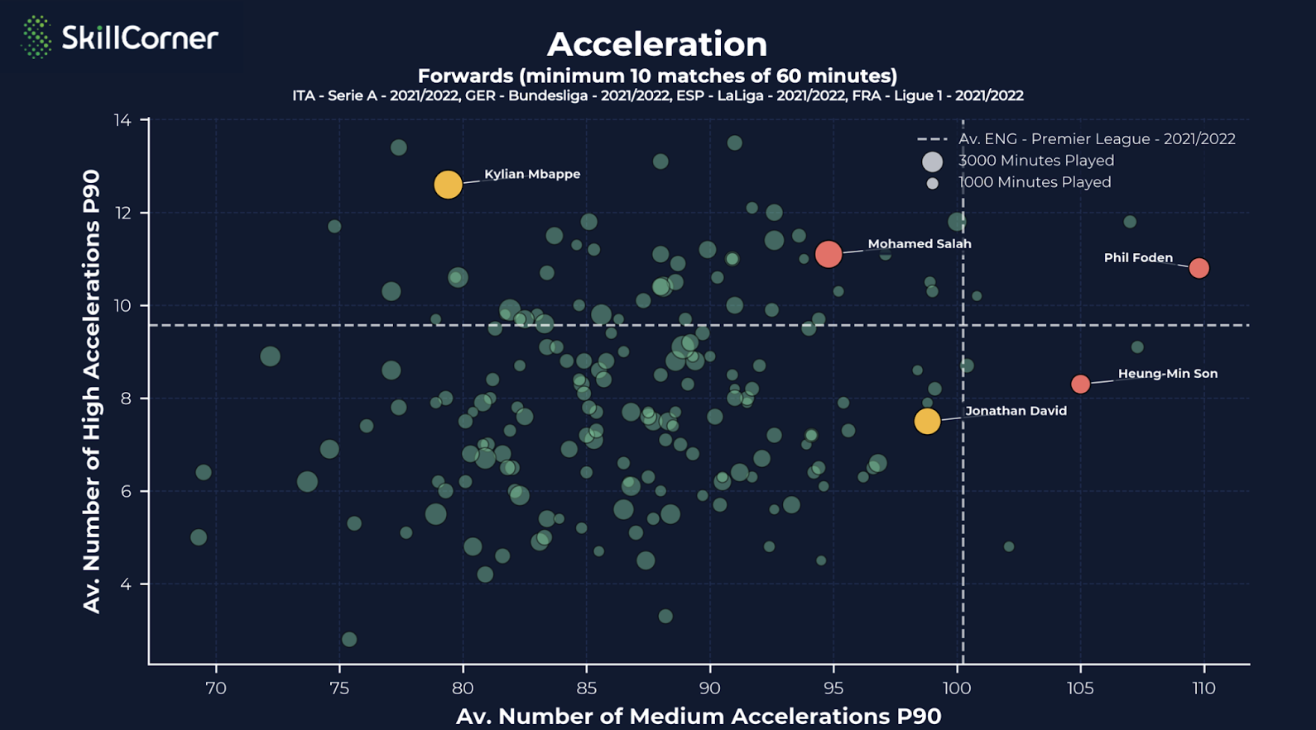_Scatter plot representing the number of accelerations of different players_
|
|
85
|
+
|
|
86
|
+
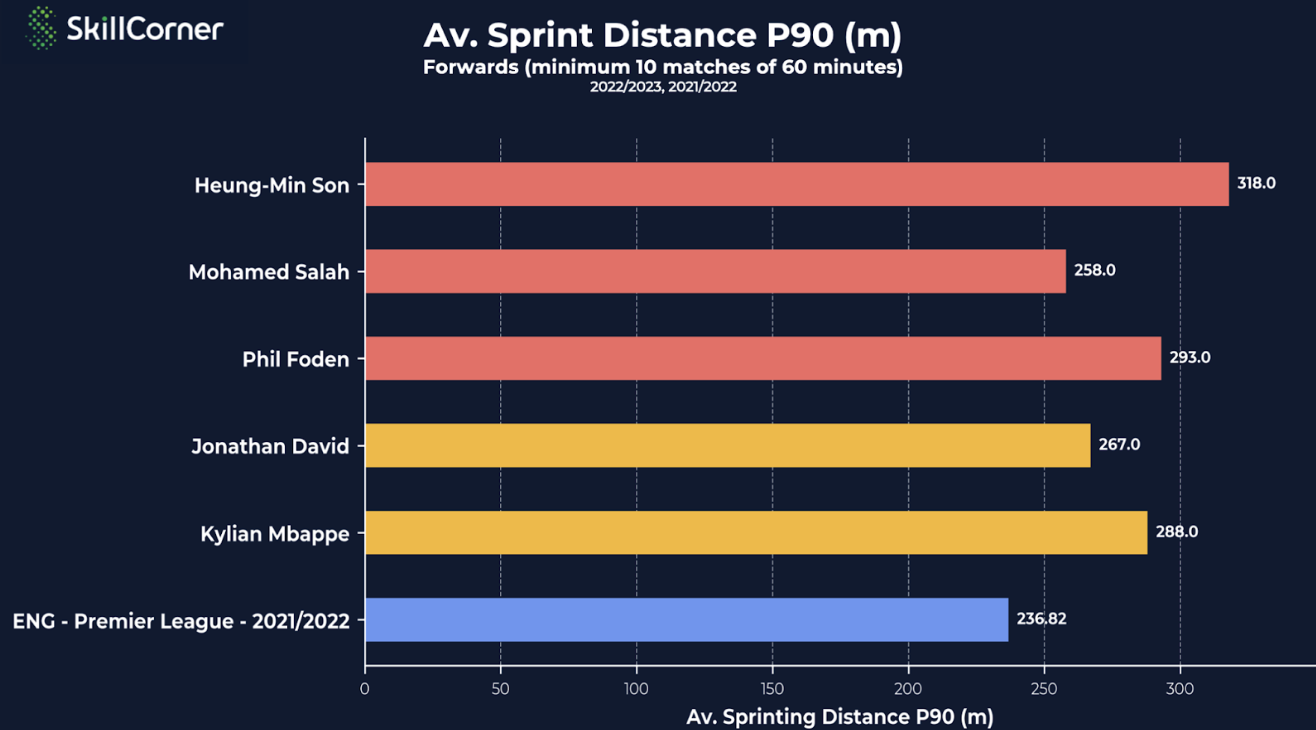_Bar plot representing the average sprinting distance of different players_
|
|
87
|
+
|
|
88
|
+
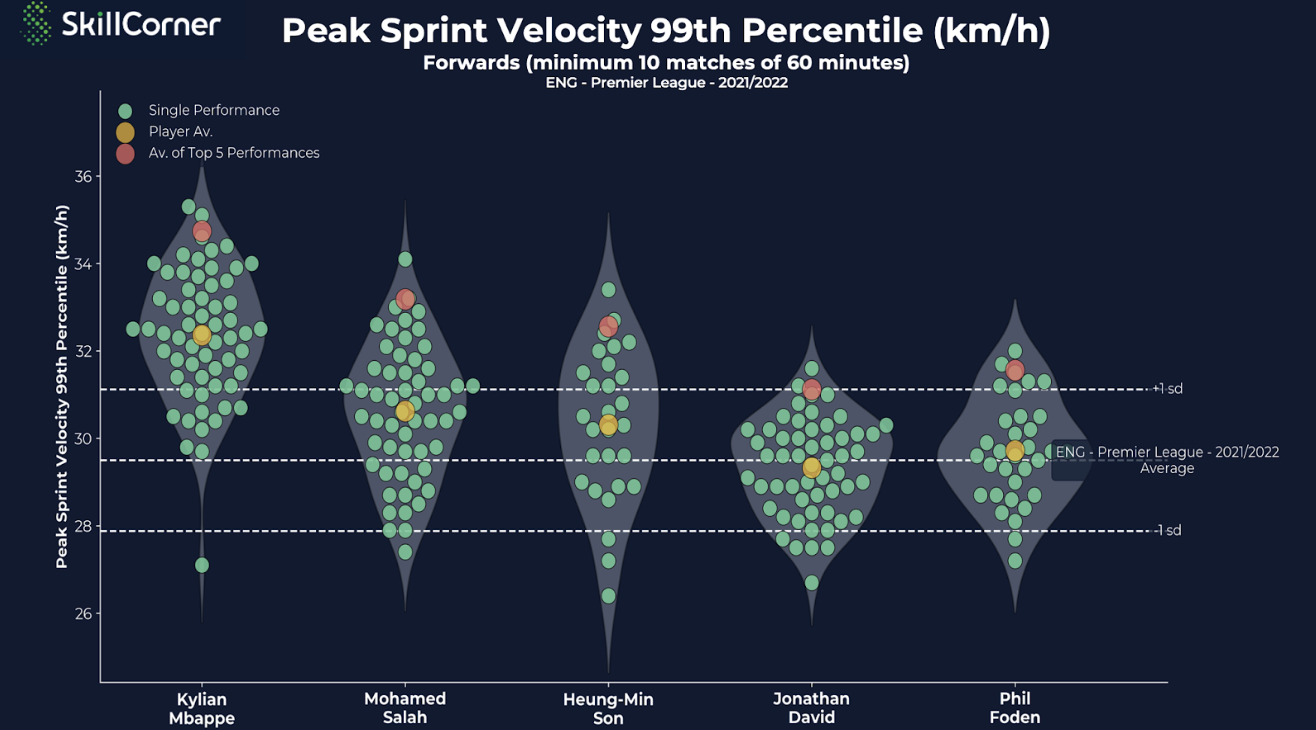Violin plot representing the PSV-99 of different players
|
|
89
|
+
|
|
90
|
+
If you have any questions and/or feedbacks regarding this feature, do not hesitate to [send us an email](mailto:support@skillcorner.com).
|
|
@@ -0,0 +1,92 @@
|
|
|
1
|
+
---
|
|
2
|
+
source_url: https://skillcorner.crunch.help/en/getting-started/make-your-first-queries
|
|
3
|
+
source_type: crunch_help_kb
|
|
4
|
+
upstream_version:
|
|
5
|
+
crawled_at: 2026-07-13T14:06:52.784Z
|
|
6
|
+
---
|
|
7
|
+
The aim of this page is to give you an overview of the requests available and guide you through your first steps.
|
|
8
|
+
|
|
9
|
+
The SkillCorner [Web app](https://skillcorner.com/app/login) provides users with an interface to query the data which is stored in our database.
|
|
10
|
+
Using the tool, you can then extract CSV format data based on specific selections, filters and reports.
|
|
11
|
+
|
|
12
|
+
## Web App Organization
|
|
13
|
+
|
|
14
|
+
We currently offer two data packages that you will find in separate sections:
|
|
15
|
+
|
|
16
|
+
- Physical metrics ([learn more here](https://skillcorner.crunch.help/en/glossaries#physical)).
|
|
17
|
+
- In-possession data; focusing on off-ball runs, passes and on-ball pressure aggregates ([more details here](https://skillcorner.crunch.help/en/glossaries#in-possession-1)).
|
|
18
|
+
|
|
19
|
+
Once signed in, here is what you will have access to:
|
|
20
|
+
|
|
21
|
+
## Start comparing Physical players outputs
|
|
22
|
+
|
|
23
|
+
A good way to start is by requesting data for players from your own team.
|
|
24
|
+
|
|
25
|
+
As an example, we will therefore access Physical data from the French team Stade Lavallois, that played in Ligue 2 for the 2022/23 season.
|
|
26
|
+
|
|
27
|
+
**Permission management
|
|
28
|
+
**Depending on your current subscription, you will only be able to obtain data for specific competitions, matches and packages.
|
|
29
|
+
|
|
30
|
+
If you have questions regarding permissions, you can [send us an email](mailto:support@skillcorner.com).
|
|
31
|
+
|
|
32
|
+
Let see what our selection would look like for players from Stade Lavallois, with a breakdown by season average:
|
|
33
|
+
|
|
34
|
+
## Add more advanced filters
|
|
35
|
+
|
|
36
|
+
Now that we have requested data for our club, we can have a look at the teams within our championship.
|
|
37
|
+
|
|
38
|
+
While using the web app, you will have to deal with three primary elements (selection, filters, reports) which are summarized in turn:
|
|
39
|
+
|
|
40
|
+
**Selection Criteria**
|
|
41
|
+
|
|
42
|
+
In this first section, each selection box is dynamic. If you select a given competition or team, the match and player selection will only show relevant matches and players relevant to the selected league or team.
|
|
43
|
+
|
|
44
|
+
**Match & age filters**
|
|
45
|
+
|
|
46
|
+
By default, the filters in this section include all types of results/venues and the date, age range and minutes played filters are inactive. Consequently, the filters will only be applied if you wish to modify them.
|
|
47
|
+
|
|
48
|
+
**Report section**
|
|
49
|
+
|
|
50
|
+
In this last section, the options relate to how you want the data to be displayed. This will have an impact on the output once you generate a report. Here are the key elements:
|
|
51
|
+
|
|
52
|
+
- Periods: 1st/2nd half breakdown
|
|
53
|
+
|
|
54
|
+
- Possession: Breakdown of Time in Possession (TIP) and Opponent Time in Possession (OTIP)
|
|
55
|
+
You can learn more about this topic [here.](https://skillcorner.crunch.help/en/working-with-the-data/physical-data-glossary-1)
|
|
56
|
+
- Output:
|
|
57
|
+
- Player level (to see the metrics by player) or Position Group Benchmark (to see the metrics by position group – central defender, full back, midfield, winger and forward)
|
|
58
|
+
- Match-by-Match or Average
|
|
59
|
+
|
|
60
|
+
**Thresholds
|
|
61
|
+
**We usually recommend that your request is focused on players that played more than 10 games of 60 minutes to get a sample size that is relevant enough.
|
|
62
|
+
|
|
63
|
+
Let see what our selection would look like for Forwards in Ligue 2, for the 2021/22 and 2022/23 seasons and a breakdown by club:
|
|
64
|
+
|
|
65
|
+
## Explore results and adjust display
|
|
66
|
+
|
|
67
|
+
Once you have generated a report, you can start customizing the report output:
|
|
68
|
+
|
|
69
|
+
- The "General" tab allows you to adjust the first part of the table:
|
|
70
|
+
\- The player ID column is the internal SkillCorner identification.
|
|
71
|
+
\- Regarding performances, here is more context regarding our **Physical Quality Check** (PQC): it indicates if the quality of the data regarding a performance is high enough to be delivered. In some cases (issues with camera angles, jersey numbers readability, etc...) the quality check is _failed_ and no data is provided.
|
|
72
|
+
- The "Metrics" tab is useful to shape the table according to your preferences. The hidden columns will not appear when you make an export.
|
|
73
|
+
- The "P90" toggle allows you to normalise the data, by converting physical data outputs to per 90 minute equivalent values.
|
|
74
|
+
- If you previously selected period (1st/2nd half) or possession (TIP/OTIP) breakdown, numerous additional columns will be introduced and the processing time will increase slightly.
|
|
75
|
+
- Once you are done shaping the table, you can download it to your computer by hitting "Export CSV".
|
|
76
|
+
|
|
77
|
+
This is what the result will look like on your end:
|
|
78
|
+
|
|
79
|
+
## Settings
|
|
80
|
+
|
|
81
|
+
Finally, the settings icon at the top of the page allows you to switch speed measurement units.
|
|
82
|
+
|
|
83
|
+
You will also get a chance to adjust the column separators in the csv downloaded file, which allows the data to be automatically formatted within MS Excel (the selection can differ in different countries).
|
|
84
|
+
Decimal separators can also be selected based on different country preferences.
|
|
85
|
+
|
|
86
|
+
Then, you can select whether you want to see the player performance information for matches where the SkillCorner physical data check has failed.
|
|
87
|
+
|
|
88
|
+
If this option is selected, the players’ performances that do not pass physical quality thresholds will also appear in the search results, although no physical data will be displayed, just the minutes played during matches:
|
|
89
|
+
|
|
90
|
+
## In-possession data
|
|
91
|
+
|
|
92
|
+
In order to get started with our second package, go to this [article](https://skillcorner.crunch.help/en/getting-started/explore-game-intelligence-data).
|
package/docs/_reference/skillcorner-crunch-help/getting-started-off-ball-run-sportscode-xml.md
ADDED
|
@@ -0,0 +1,32 @@
|
|
|
1
|
+
---
|
|
2
|
+
source_url: https://skillcorner.crunch.help/en/getting-started/off-ball-run-sportscode-xml
|
|
3
|
+
source_type: crunch_help_kb
|
|
4
|
+
upstream_version:
|
|
5
|
+
crawled_at: 2026-07-13T14:07:00.053Z
|
|
6
|
+
---
|
|
7
|
+
SkillCorner Provide an XML file compatible with Sportscode, SBG Focus and SBG MatchTracker.
|
|
8
|
+
|
|
9
|
+
## Prerequisites
|
|
10
|
+
|
|
11
|
+
You need to have
|
|
12
|
+
|
|
13
|
+
- A video of the match you want to visualise the run for
|
|
14
|
+
- The Sportscode XML of the Off-ball Runs. You can retrieve it from our WebApp (see after) or download it from our API (more details [here](https://skillcorner.crunch.help/en/getting-started/api-access-dynamic-events)).
|
|
15
|
+
- Access to Video Analysis tool like Sportscode, SBG Focus or SBG MatchTracker that accepts Sportscode XML
|
|
16
|
+
|
|
17
|
+
## \[Non Technical Users\] Access Dynamic Events XML via SkillCorner Webapp
|
|
18
|
+
|
|
19
|
+
## Using the XML in Sportscode
|
|
20
|
+
|
|
21
|
+
The XML file contains
|
|
22
|
+
|
|
23
|
+
- The Off-ball Runs captured during the match with the following characteristics:
|
|
24
|
+
- The identity of the runner
|
|
25
|
+
- The run type
|
|
26
|
+
- Where the run starts
|
|
27
|
+
- Whether it leads to a shot or a goal
|
|
28
|
+
- Whether the player receives the ball
|
|
29
|
+
- The identity of the player in possession
|
|
30
|
+
- The period start of each period to help sync the events with the video
|
|
31
|
+
|
|
32
|
+
This short video explicit how you can use this XML file with Sportscode.
|
|
@@ -0,0 +1,15 @@
|
|
|
1
|
+
---
|
|
2
|
+
source_url: https://skillcorner.crunch.help/en/getting-started/on-ball-engagement-video-definitions
|
|
3
|
+
source_type: crunch_help_kb
|
|
4
|
+
upstream_version:
|
|
5
|
+
crawled_at: 2026-07-13T14:06:57.687Z
|
|
6
|
+
---
|
|
7
|
+
SkillCorner Pressing, Pressure, Force Backwards, ... definitions on video
|
|
8
|
+
|
|
9
|
+
YE
|
|
10
|
+
|
|
11
|
+
Written by Yacine Elliq
|
|
12
|
+
|
|
13
|
+
Updated 1 month ago
|
|
14
|
+
|
|
15
|
+
Did this answer your question?
|
|
@@ -0,0 +1,102 @@
|
|
|
1
|
+
---
|
|
2
|
+
source_url: https://skillcorner.crunch.help/en/getting-started/python-retrieve-dynamic-events-files
|
|
3
|
+
source_type: crunch_help_kb
|
|
4
|
+
upstream_version:
|
|
5
|
+
crawled_at: 2026-07-13T14:06:42.572Z
|
|
6
|
+
---
|
|
7
|
+
## Prerequisites
|
|
8
|
+
|
|
9
|
+
- Python 3.8 or above installed.
|
|
10
|
+
- SkillCorner Python Client. If you don't have it, refer to [this article](https://skillcorner.crunch.help/en/getting-started/skillcorner-python-client).
|
|
11
|
+
|
|
12
|
+
## Code Snippet
|
|
13
|
+
|
|
14
|
+
The first step consists in listing the match IDs for which we want to retrieve the Dynamic Events.
|
|
15
|
+
|
|
16
|
+
Here we assume we want to retrieve the Dynamic Events for a given competition editions (ID 555 = ITA - Serie A - 2023/2024):
|
|
17
|
+
|
|
18
|
+
```
|
|
19
|
+
# Import SkillcornerClient from the skillcorner package
|
|
20
|
+
from skillcorner.client import SkillcornerClient
|
|
21
|
+
|
|
22
|
+
# Initialize the SkillcornerClient
|
|
23
|
+
client = SkillcornerClient(username='USERNAME',password='PASSWORD')
|
|
24
|
+
|
|
25
|
+
# Define the competition edition ID
|
|
26
|
+
ce_id = 555 # Example competition edition ID
|
|
27
|
+
|
|
28
|
+
# Retrieve the list of matches in the competition edition
|
|
29
|
+
matches = client.get_matches(params={'competition_edition': ce_id})
|
|
30
|
+
```
|
|
31
|
+
|
|
32
|
+
We don't deliver dynamic events for every match.
|
|
33
|
+
|
|
34
|
+
We just deliver it when dynamic\_events\_check value is true.
|
|
35
|
+
|
|
36
|
+
You can retrieve the dynamic\_events\_check value for a give match via the data collection endpoint.
|
|
37
|
+
|
|
38
|
+
```
|
|
39
|
+
# Retrieve the data collections for each match
|
|
40
|
+
data_collections = [client.get_match_data_collection(m['id']) for m in matches]
|
|
41
|
+
```
|
|
42
|
+
|
|
43
|
+
Now we can retrieve the Dynamic Events files for the matches of interest.
|
|
44
|
+
|
|
45
|
+
- We first define in which folder we want to store the files. If the folder does not exist, we create it.
|
|
46
|
+
- Then, we loop through the match ID for which dynamic\_events\_check is true and retrieve the files (on the below snippet we just go through the first 10 matches):
|
|
47
|
+
|
|
48
|
+
```
|
|
49
|
+
import os
|
|
50
|
+
|
|
51
|
+
# Define the folder where files will be saved
|
|
52
|
+
folder = "NameOfYourFolder"
|
|
53
|
+
if not os.path.exists(folder):
|
|
54
|
+
os.makedirs(folder)
|
|
55
|
+
|
|
56
|
+
# Define the file format and extension
|
|
57
|
+
file_format = 'csv' # Accepted values: ['csv', 'sportscode-xml']
|
|
58
|
+
extension = 'csv' # Accepted values: ['csv', 'xml']
|
|
59
|
+
|
|
60
|
+
# Loop through the data collections and save the dynamic events CSV files
|
|
61
|
+
for counter, dc in enumerate(data_collections[:10], start=1): # Remove the [:10] when you are ready to do it for a complete competition edition
|
|
62
|
+
match_id = dc['match_id']
|
|
63
|
+
print(f"Processing match_id {match_id}: {counter}/{len(data_collections)}")
|
|
64
|
+
|
|
65
|
+
if dc["dynamic_events_check"]: # We retrieve the file only when dynamic_events_check value is true
|
|
66
|
+
filepath = f"{folder}/{match_id}_dynamic_events.{extension}"
|
|
67
|
+
try:
|
|
68
|
+
client.save_dynamic_events(match_id=dc["match_id"], filepath=filepath, params={'file_format': file_format})
|
|
69
|
+
except Exception as err:
|
|
70
|
+
print(f"Error occurred for match_id {match_id}: {err}")
|
|
71
|
+
```
|
|
72
|
+
|
|
73
|
+
**Need some Help?**
|
|
74
|
+
Send us an email at _support@skillcorner.com_.
|
|
75
|
+
|
|
76
|
+
## Regular Sync
|
|
77
|
+
|
|
78
|
+
**Don't query all the files again and again!**
|
|
79
|
+
|
|
80
|
+
Once you have stored once the Dynamic Events files,
|
|
81
|
+
Next time you want to retrieve the new/updated Dynamic Events files you **SHOULD NOT** query all the files.
|
|
82
|
+
|
|
83
|
+
You **SHOULD** just retrieve the new files or the ones that have been updated since your last synchronisation.
|
|
84
|
+
|
|
85
|
+
To do so, you just have to do one slight modification to the code snippets shared above to use the dynamic\_events\_last\_modified\_\_gte parameter from the [get\_matches()](https://skillcorner.readthedocs.io/en/latest/skillcorner_client.html#skillcorner.client.SkillcornerClient.get_matches) method.
|
|
86
|
+
|
|
87
|
+
Let's say last time your queried the data was July 14, 2024.
|
|
88
|
+
You can use the code snippet shared above but you need to replace this line:
|
|
89
|
+
|
|
90
|
+
```
|
|
91
|
+
matches = client.get_matches(params={'competition_edition': ce_id})
|
|
92
|
+
```
|
|
93
|
+
|
|
94
|
+
by this line:
|
|
95
|
+
|
|
96
|
+
```
|
|
97
|
+
matches = client.get_matches(params={'competition_edition': ce_id, 'dynamic_events_last_modified__gte':'2024-07-14'})
|
|
98
|
+
```
|
|
99
|
+
|
|
100
|
+
**Explanation**
|
|
101
|
+
|
|
102
|
+
- By using the dynamic\_events\_last\_modified\_\_gte set to '2024-07-14' you will only retrieve the data for the matches that have been updated since the July 14, 2024.
|
|
@@ -0,0 +1,158 @@
|
|
|
1
|
+
---
|
|
2
|
+
source_url: https://skillcorner.crunch.help/en/getting-started/python-retrieve-game-intelligence-data
|
|
3
|
+
source_type: crunch_help_kb
|
|
4
|
+
upstream_version:
|
|
5
|
+
crawled_at: 2026-07-13T14:06:40.084Z
|
|
6
|
+
---
|
|
7
|
+
## Prerequisites
|
|
8
|
+
|
|
9
|
+
- You have installed the [SkillCorner Python Client](https://skillcorner.crunch.help/en/getting-started/skillcorner-python-client).
|
|
10
|
+
- You have read our article on how to [Use SkillCorner API](https://skillcorner.crunch.help/en/getting-started/using-skillcorner-api).
|
|
11
|
+
|
|
12
|
+
## Instantiate the Python Client
|
|
13
|
+
|
|
14
|
+
```
|
|
15
|
+
from skillcorner.client import SkillcornerClient
|
|
16
|
+
|
|
17
|
+
username = "YOUR USERNAME"
|
|
18
|
+
password = "YOUR PASSWORD"
|
|
19
|
+
client = SkillcornerClient(username=username, password=password)
|
|
20
|
+
```
|
|
21
|
+
|
|
22
|
+
## Access Off-Ball Run aggregates
|
|
23
|
+
|
|
24
|
+
Let's say you have access to match ID 129588 (if not, just use another match ID) and you have check that the data collection status is "postmatch".
|
|
25
|
+
|
|
26
|
+
The most basic request to get access to the this match off-ball runs aggregate consist in:
|
|
27
|
+
|
|
28
|
+
```
|
|
29
|
+
match_id = 129588
|
|
30
|
+
|
|
31
|
+
## Basic Request
|
|
32
|
+
off_ball_runs_agg = client.get_in_possession_off_ball_runs(params={
|
|
33
|
+
'match': match_id
|
|
34
|
+
})
|
|
35
|
+
```
|
|
36
|
+
|
|
37
|
+
You can filter these aggregates by third and channel:
|
|
38
|
+
|
|
39
|
+
```
|
|
40
|
+
## Filter by third and/or channel. You can only select on thrid at a time and one channel at a time.
|
|
41
|
+
# Third values available: 'all', 'defending', 'middle', 'attacking'
|
|
42
|
+
# channel values available: 'all', 'wide_left', 'wide_right', 'left_half_space', 'right_half_space', 'central'
|
|
43
|
+
|
|
44
|
+
match_id = 129588
|
|
45
|
+
|
|
46
|
+
third = 'attacking'
|
|
47
|
+
channel = 'central'
|
|
48
|
+
|
|
49
|
+
on_ball_pressure_agg = client.get_in_possession_off_ball_runs(params={
|
|
50
|
+
'match': match_id,
|
|
51
|
+
'third': third,
|
|
52
|
+
'channel': channel
|
|
53
|
+
})
|
|
54
|
+
```
|
|
55
|
+
|
|
56
|
+
You can also break these aggregates by run types:
|
|
57
|
+
|
|
58
|
+
```
|
|
59
|
+
## Breakdown per run types
|
|
60
|
+
# Run type values available: 'all', 'run_in_behind', 'run_ahead_of_the_ball', 'support_run', 'pulling_wide_run', 'coming_short_run', 'underlap_run', 'overlap_run', 'dropping_off_run', 'pulling_half_space_run', 'cross_receiver_run'.
|
|
61
|
+
# You can combine them but we don't support python list, your list should be a string
|
|
62
|
+
|
|
63
|
+
match_id = 129588
|
|
64
|
+
third = 'attacking'
|
|
65
|
+
channel = 'central'
|
|
66
|
+
|
|
67
|
+
run_type = 'run_in_behind,run_ahead_of_the_ball'
|
|
68
|
+
|
|
69
|
+
on_ball_pressure_agg = client.get_in_possession_off_ball_runs(params={
|
|
70
|
+
'match': match_id,
|
|
71
|
+
'third': third,
|
|
72
|
+
'channel': channel,
|
|
73
|
+
'run_type':run_type
|
|
74
|
+
})
|
|
75
|
+
```
|
|
76
|
+
|
|
77
|
+
Let's imagine that, it is not a particular match but the average number of off-ball runs performed by a player per match on a whole competition edition (e.g. FRA - Ligue 1 2021/2022 which ID is 242) that interests you.
|
|
78
|
+
|
|
79
|
+
```
|
|
80
|
+
competition_edition_id = 242
|
|
81
|
+
|
|
82
|
+
## Basic Request
|
|
83
|
+
off_ball_runs_agg = client.get_in_possession_off_ball_runs(params={
|
|
84
|
+
'competition_edition': competition_edition_id,
|
|
85
|
+
'average_per': 'match',
|
|
86
|
+
'group_by': 'player'
|
|
87
|
+
})
|
|
88
|
+
```
|
|
89
|
+
|
|
90
|
+
## Access Passe aggregates
|
|
91
|
+
|
|
92
|
+
Same logic as for Off-ball runs but instead of client.get\_in\_possession\_off\_ball\_runs(), use client.get\_in\_possession\_passes().
|
|
93
|
+
|
|
94
|
+
## Access Pressure aggregates
|
|
95
|
+
|
|
96
|
+
The most basic request consist in:
|
|
97
|
+
|
|
98
|
+
```
|
|
99
|
+
match_id = 129588
|
|
100
|
+
|
|
101
|
+
## Basic Request
|
|
102
|
+
on_ball_pressure_agg = client.get_in_possession_on_ball_pressures(params={
|
|
103
|
+
'match': match_id
|
|
104
|
+
})
|
|
105
|
+
```
|
|
106
|
+
|
|
107
|
+
You can filter these aggregates by third and channels:
|
|
108
|
+
|
|
109
|
+
```
|
|
110
|
+
## Filter by third and/or channel. You can only select on thrid at a time and one channel at a time.
|
|
111
|
+
# third values available: 'all', 'defending', 'middle', 'attacking'
|
|
112
|
+
# channel values available: 'all', 'wide_left', 'wide_right', 'left_half_space', 'right_half_space', 'central'
|
|
113
|
+
|
|
114
|
+
match_id = 129588
|
|
115
|
+
|
|
116
|
+
third = 'attacking'
|
|
117
|
+
channel = 'central'
|
|
118
|
+
|
|
119
|
+
on_ball_pressure_agg = client.get_in_possession_on_ball_pressures(params={
|
|
120
|
+
'match': match_id,
|
|
121
|
+
'third': third,
|
|
122
|
+
'channel': channel
|
|
123
|
+
})
|
|
124
|
+
```
|
|
125
|
+
|
|
126
|
+
You can also break these aggregates by pressure intensity:
|
|
127
|
+
|
|
128
|
+
```
|
|
129
|
+
## Breakdown per pressure intensity
|
|
130
|
+
# Pressure intensites values available: 'all', 'high', 'medium', 'low'.
|
|
131
|
+
# You can combine them but we don't support python list, your list should be a string
|
|
132
|
+
|
|
133
|
+
match_id = 129588
|
|
134
|
+
third = 'attacking'
|
|
135
|
+
channel = 'central'
|
|
136
|
+
|
|
137
|
+
pressure_intensity = 'all,high,medium,low'
|
|
138
|
+
|
|
139
|
+
on_ball_pressure_agg = client.get_in_possession_on_ball_pressures(params={
|
|
140
|
+
'match': match_id,
|
|
141
|
+
'third': third,
|
|
142
|
+
'channel': channel,
|
|
143
|
+
'pressure_intensity':pressure_intensity
|
|
144
|
+
})
|
|
145
|
+
```
|
|
146
|
+
|
|
147
|
+
Let's imagine that, it is not a particular match but the average number of pressures received by a player per match on a whole competition edition (e.g. FRA - Ligue 1 2021/2022 which ID is 242) that interests you.
|
|
148
|
+
|
|
149
|
+
```
|
|
150
|
+
competition_edition_id = 242
|
|
151
|
+
|
|
152
|
+
## Basic Request
|
|
153
|
+
on_ball_pressure_agg = client.get_in_possession_on_ball_pressures(params={
|
|
154
|
+
'competition_edition': competition_edition_id,
|
|
155
|
+
'average_per': 'match',
|
|
156
|
+
'group_by': 'player'
|
|
157
|
+
})
|
|
158
|
+
```
|