football-docs 0.6.2 → 0.6.3
This diff represents the content of publicly available package versions that have been released to one of the supported registries. The information contained in this diff is provided for informational purposes only and reflects changes between package versions as they appear in their respective public registries.
- package/README.md +3 -2
- package/data/docs.db +0 -0
- package/dist/crawl.js +59 -1
- package/docs/_reference/skillcorner-crunch-help/getting-started-api-access-dynamic-events.md +134 -0
- package/docs/_reference/skillcorner-crunch-help/getting-started-api-access-our-tracking-data.md +160 -0
- package/docs/_reference/skillcorner-crunch-help/getting-started-best-practice-analysis-guidance.md +16 -0
- package/docs/_reference/skillcorner-crunch-help/getting-started-dynamic-events-check.md +33 -0
- package/docs/_reference/skillcorner-crunch-help/getting-started-explore-game-intelligence-data-1.md +37 -0
- package/docs/_reference/skillcorner-crunch-help/getting-started-explore-game-intelligence-data.md +29 -0
- package/docs/_reference/skillcorner-crunch-help/getting-started-first-requests.md +99 -0
- package/docs/_reference/skillcorner-crunch-help/getting-started-generate-visual-reports.md +90 -0
- package/docs/_reference/skillcorner-crunch-help/getting-started-make-your-first-queries.md +92 -0
- package/docs/_reference/skillcorner-crunch-help/getting-started-off-ball-run-sportscode-xml.md +32 -0
- package/docs/_reference/skillcorner-crunch-help/getting-started-on-ball-engagement-video-definitio.md +15 -0
- package/docs/_reference/skillcorner-crunch-help/getting-started-python-retrieve-dynamic-events-fil.md +102 -0
- package/docs/_reference/skillcorner-crunch-help/getting-started-python-retrieve-game-intelligence-.md +158 -0
- package/docs/_reference/skillcorner-crunch-help/getting-started-python-sync-your-database-with-ski.md +192 -0
- package/docs/_reference/skillcorner-crunch-help/getting-started-run-detection-and-classification.md +131 -0
- package/docs/_reference/skillcorner-crunch-help/getting-started-skill-corner-tracking-data.md +82 -0
- package/docs/_reference/skillcorner-crunch-help/getting-started-skillcorner-python-client.md +70 -0
- package/docs/_reference/skillcorner-crunch-help/getting-started-using-skillcorner-api.md +146 -0
- package/docs/_reference/skillcorner-crunch-help/getting-started.md +43 -0
- package/docs/_reference/skillcorner-crunch-help/glossaries-coordinates-distance-speeds-and-directi.md +149 -0
- package/docs/_reference/skillcorner-crunch-help/glossaries-dynamic-events-csv-specifications.md +15 -0
- package/docs/_reference/skillcorner-crunch-help/glossaries-forward-momentum.md +13 -0
- package/docs/_reference/skillcorner-crunch-help/glossaries-game-intelligence-v2-metrics.md +17 -0
- package/docs/_reference/skillcorner-crunch-help/glossaries-in-possession-package-content.md +19 -0
- package/docs/_reference/skillcorner-crunch-help/glossaries-line-breaking-passes.md +103 -0
- package/docs/_reference/skillcorner-crunch-help/glossaries-off-ball-run-dynamic-events.md +197 -0
- package/docs/_reference/skillcorner-crunch-help/glossaries-overcoming-pressure.md +105 -0
- package/docs/_reference/skillcorner-crunch-help/glossaries-passing-metrics-1.md +144 -0
- package/docs/_reference/skillcorner-crunch-help/glossaries-passing-moment-frame-selection.md +19 -0
- package/docs/_reference/skillcorner-crunch-help/glossaries-peak-sprint-velocity.md +26 -0
- package/docs/_reference/skillcorner-crunch-help/glossaries-phases-of-play-video-definitions.md +15 -0
- package/docs/_reference/skillcorner-crunch-help/glossaries-physical-data-glossary.md +127 -0
- package/docs/_reference/skillcorner-crunch-help/glossaries-running-off-ball-metrics-1.md +135 -0
- package/docs/_reference/skillcorner-crunch-help/glossaries.md +43 -0
- package/docs/_reference/skillcorner-crunch-help/index.md +33 -0
- package/docs/_reference/skillcorner-crunch-help/models-general-concepts-pass-completion-probabilit.md +15 -0
- package/docs/_reference/skillcorner-crunch-help/models-general-concepts-passing-option.md +30 -0
- package/docs/_reference/skillcorner-crunch-help/models-general-concepts-physical-load-prediction-m.md +63 -0
- package/docs/_reference/skillcorner-crunch-help/models-general-concepts-pressure-detection.md +46 -0
- package/docs/_reference/skillcorner-crunch-help/models-general-concepts-pressure-intensity.md +80 -0
- package/docs/_reference/skillcorner-crunch-help/models-general-concepts-threat.md +40 -0
- package/docs/_reference/skillcorner-crunch-help/models-general-concepts.md +37 -0
- package/docs/_reference/skillcorner-crunch-help/product-updates-1-changelog-2025.md +57 -0
- package/docs/_reference/skillcorner-crunch-help/product-updates-1-game-intelligence-v2-migration.md +64 -0
- package/docs/_reference/skillcorner-crunch-help/product-updates-1-product-updates.md +200 -0
- package/docs/_reference/skillcorner-crunch-help/product-updates-1.md +25 -0
- package/docs/_reference/skillcorner-crunch-help/tool-box-api-data-version.md +255 -0
- package/docs/_reference/skillcorner-crunch-help/tool-box-data-availability.md +55 -0
- package/docs/_reference/skillcorner-crunch-help/tool-box-python-event-tracking-synchronization-1.md +442 -0
- package/docs/_reference/skillcorner-crunch-help/tool-box-python-event-tracking-synchronization.md +276 -0
- package/docs/_reference/skillcorner-crunch-help/tool-box-python-off-ball-runs-radar-plots.md +69 -0
- package/docs/_reference/skillcorner-crunch-help/tool-box-rule-based-event-synchronisation.md +44 -0
- package/docs/_reference/skillcorner-crunch-help/tool-box.md +35 -0
- package/docs/_reference/skillcorner-crunch-help/working-with-the-data-averaging-per-match-per-even.md +179 -0
- package/docs/_reference/skillcorner-crunch-help/working-with-the-data-benchmarking-normalisation.md +27 -0
- package/docs/_reference/skillcorner-crunch-help/working-with-the-data-data-quality-standards.md +45 -0
- package/docs/_reference/skillcorner-crunch-help/working-with-the-data-physical-data-glossary-1-1.md +54 -0
- package/docs/_reference/skillcorner-crunch-help/working-with-the-data-physical-data-glossary-1.md +25 -0
- package/docs/_reference/skillcorner-crunch-help/working-with-the-data-pitch-modelisation.md +27 -0
- package/docs/_reference/skillcorner-crunch-help/working-with-the-data-playing-time-info.md +133 -0
- package/docs/_reference/skillcorner-crunch-help/working-with-the-data.md +43 -0
- package/docs/floodlight/compendium-0-compendium.md +21 -0
- package/docs/floodlight/compendium-1-data.md +54 -0
- package/docs/floodlight/compendium-2-design.md +49 -0
- package/docs/floodlight/compendium-3-time.md +57 -0
- package/docs/floodlight/compendium-4-space.md +137 -0
- package/docs/floodlight/compendium-5-identifier.md +63 -0
- package/docs/floodlight/core-code.md +85 -0
- package/docs/floodlight/core-core.md +39 -0
- package/docs/floodlight/core-definitions.md +128 -0
- package/docs/floodlight/core-events.md +177 -0
- package/docs/floodlight/core-pitch.md +87 -0
- package/docs/floodlight/core-property.md +107 -0
- package/docs/floodlight/core-teamsheet.md +86 -0
- package/docs/floodlight/core-xy.md +192 -0
- package/docs/floodlight/guides-contrib-manual.md +462 -0
- package/docs/floodlight/guides-getting-started.md +194 -0
- package/docs/floodlight/guides-tutorial-analysis.md +245 -0
- package/docs/floodlight/guides-tutorial-matchsheets.md +439 -0
- package/docs/floodlight/index.md +17 -0
- package/docs/floodlight/io-datasets.md +365 -0
- package/docs/floodlight/io-dfl.md +107 -0
- package/docs/floodlight/io-io.md +131 -0
- package/docs/floodlight/io-kinexon.md +119 -0
- package/docs/floodlight/io-opta.md +49 -0
- package/docs/floodlight/io-secondspectrum.md +121 -0
- package/docs/floodlight/io-skillcorner.md +40 -0
- package/docs/floodlight/io-sportradar.md +35 -0
- package/docs/floodlight/io-statsbomb.md +61 -0
- package/docs/floodlight/io-statsperform.md +239 -0
- package/docs/floodlight/io-tracab.md +78 -0
- package/docs/floodlight/io-utils.md +59 -0
- package/docs/floodlight/metrics-entropy.md +36 -0
- package/docs/floodlight/metrics-metrics.md +15 -0
- package/docs/floodlight/metrics-trajectory-clustering.md +51 -0
- package/docs/floodlight/metrics-zone-aggregation.md +116 -0
- package/docs/floodlight/models-geometry.md +411 -0
- package/docs/floodlight/models-kinematics.md +251 -0
- package/docs/floodlight/models-kinetics.md +137 -0
- package/docs/floodlight/models-models.md +89 -0
- package/docs/floodlight/models-space.md +202 -0
- package/docs/floodlight/transforms-filter.md +412 -0
- package/docs/floodlight/transforms-interpolation.md +230 -0
- package/docs/floodlight/transforms-permutation.md +36 -0
- package/docs/floodlight/transforms-spatial.md +54 -0
- package/docs/floodlight/transforms-temporal.md +42 -0
- package/docs/floodlight/transforms-transforms.md +57 -0
- package/docs/floodlight/utils-types.md +13 -0
- package/docs/floodlight/utils-utils.md +17 -0
- package/docs/floodlight/vis-pitches.md +111 -0
- package/docs/floodlight/vis-positions.md +129 -0
- package/docs/floodlight/vis-vis.md +19 -0
- package/package.json +1 -1
- package/providers.json +1 -1
package/README.md
CHANGED
|
@@ -4,7 +4,7 @@ Searchable football data provider and tooling documentation for AI coding agents
|
|
|
4
4
|
|
|
5
5
|
**Who it's for:** Developers and analysts who use AI coding tools (Claude Code, Cursor, VS Code Copilot) to work with football data. Works with any tool that supports MCP.
|
|
6
6
|
|
|
7
|
-
**What it does:** Gives your AI agent a searchable index of documentation for
|
|
7
|
+
**What it does:** Gives your AI agent a searchable index of documentation for 20 football data providers and tools — event types, qualifier IDs, coordinate systems, API endpoints, data models, identity surfaces, and cross-provider comparisons for the data providers (StatsBomb, Opta, Wyscout, Impect, SkillCorner, Sportradar, TheSportsDB, FMDB Pro, TransferRoom, and more), plus the open-source libraries people build with (kloppy, mplsoccer, socceraction, soccerdata, floodlight, and more). Your agent looks up the real docs instead of guessing from training data.
|
|
8
8
|
|
|
9
9
|
**Why not just let the AI figure it out?** LLMs get football data specifics wrong constantly — Opta qualifier IDs, StatsBomb coordinate ranges, API endpoint URLs, library method signatures. These are mutable facts that change across versions. football-docs gives the agent verified, sourced documentation with provenance tracking so you know where every answer came from.
|
|
10
10
|
|
|
@@ -111,6 +111,7 @@ Provider filters use the indexed provider keys shown by `list_providers`, but co
|
|
|
111
111
|
| StatsBomb | 237 | event-types, data-model, coordinate-system, api-access, api-endpoints, charting-lineups, xg-model, iq-metrics, player/team stats, player-mapping, identity-surfaces |
|
|
112
112
|
| Wyscout | 164 | event-types, data-model, coordinate-system, api-access, api-endpoints, charting-analysis-metrics, glossary, identity-surfaces |
|
|
113
113
|
| kloppy | 126 | data-model, usage, provider-mapping, tracking-rendering, event-derived-metrics |
|
|
114
|
+
| floodlight | 145 | core data objects, io parsers (Tracab, DFL, Kinexon, Opta, SkillCorner, StatsBomb, StatsPerform, Second Spectrum), transforms, metrics, models, visualisation, guides |
|
|
114
115
|
| SportMonks | 85 | event-types, data-model, api-access, charting-season-stories, identity-surfaces |
|
|
115
116
|
| databallpy | 63 | data-model, overview, usage |
|
|
116
117
|
| mplsoccer | 64 | overview, pitch-types, visualizations |
|
|
@@ -128,7 +129,7 @@ Provider filters use the indexed provider keys shown by `list_providers`, but co
|
|
|
128
129
|
| Soccerdonna | 7 | identity-surfaces |
|
|
129
130
|
| Transfermarkt | 8 | identity-surfaces |
|
|
130
131
|
|
|
131
|
-
**1,
|
|
132
|
+
**1,346 searchable chunks** across 20 providers and tools.
|
|
132
133
|
|
|
133
134
|
## Contributing
|
|
134
135
|
|
package/data/docs.db
CHANGED
|
Binary file
|
package/dist/crawl.js
CHANGED
|
@@ -30,6 +30,58 @@ const turndown = new TurndownService({
|
|
|
30
30
|
codeBlockStyle: "fenced",
|
|
31
31
|
bulletListMarker: "-",
|
|
32
32
|
});
|
|
33
|
+
// Sphinx (and other Pygments-based renderers) mark up code blocks as bare
|
|
34
|
+
// <pre> containing syntax-highlighting <span>s, not <pre><code>. Turndown's
|
|
35
|
+
// built-in fenced-code rule only matches <pre><code>, so these fall through
|
|
36
|
+
// to plain-text handling where markdown-escaping mangles identifiers (e.g.
|
|
37
|
+
// `read_position_data_json` becomes `read\_position\_data\_json`). Read
|
|
38
|
+
// textContent directly to bypass that escaping.
|
|
39
|
+
turndown.addRule("preBlock", {
|
|
40
|
+
filter: "pre",
|
|
41
|
+
replacement: (_content, node) => {
|
|
42
|
+
const code = node.textContent?.replace(/\n+$/, "") ?? "";
|
|
43
|
+
if (!code.trim())
|
|
44
|
+
return "";
|
|
45
|
+
const parentClass = node.parentElement?.getAttribute?.("class") ?? "";
|
|
46
|
+
const langMatch = parentClass.match(/highlight-(\w+)/);
|
|
47
|
+
const lang = langMatch && langMatch[1] !== "default" ? langMatch[1] : "";
|
|
48
|
+
return `\n\n\`\`\`${lang}\n${code}\n\`\`\`\n\n`;
|
|
49
|
+
},
|
|
50
|
+
});
|
|
51
|
+
// Sphinx marks up identifiers/parameter names/default values in signatures
|
|
52
|
+
// with <span class="pre"> (a "don't word-wrap" hint, not semantic <code>).
|
|
53
|
+
// Same escaping problem as above — render as inline code instead.
|
|
54
|
+
turndown.addRule("sphinxPreSpan", {
|
|
55
|
+
filter: (node) => node.nodeName === "SPAN" &&
|
|
56
|
+
(node.getAttribute?.("class") ?? "")
|
|
57
|
+
.split(/\s+/)
|
|
58
|
+
.includes("pre"),
|
|
59
|
+
replacement: (_content, node) => `\`${node.textContent ?? ""}\``,
|
|
60
|
+
});
|
|
61
|
+
// Turndown escapes every underscore in plain text nodes by default (guarding
|
|
62
|
+
// against accidental markdown emphasis), including identifiers that carry no
|
|
63
|
+
// code markup at all — e.g. Sphinx renders parameter/return names in
|
|
64
|
+
// "Variables:" lists as plain `<strong>essential_missing</strong>`, no <code>
|
|
65
|
+
// or .pre span in sight. Since this corpus exists for full-text search rather
|
|
66
|
+
// than pixel-perfect rendering, an escaped underscore that breaks substring
|
|
67
|
+
// matches on the real identifier is worse than the rare accidental italics.
|
|
68
|
+
const defaultEscape = turndown.escape.bind(turndown);
|
|
69
|
+
turndown.escape = (text) => defaultEscape(text).replace(/\\_/g, "_");
|
|
70
|
+
// Turndown's built-in image rule escapes alt text via a private module-level
|
|
71
|
+
// helper, not the overridable `escape` method above, so alt text (often just
|
|
72
|
+
// the image's own filename, e.g. "pitch_positive.png") still comes out with
|
|
73
|
+
// escaped underscores. Same fix, applied to this one rule directly.
|
|
74
|
+
turndown.addRule("unescapedImageAlt", {
|
|
75
|
+
filter: "img",
|
|
76
|
+
replacement: (_content, node) => {
|
|
77
|
+
const el = node;
|
|
78
|
+
const alt = el.getAttribute?.("alt") ?? "";
|
|
79
|
+
const src = el.getAttribute?.("src") ?? "";
|
|
80
|
+
const title = el.getAttribute?.("title");
|
|
81
|
+
const titlePart = title ? ` "${title.replace(/"/g, '\\"')}"` : "";
|
|
82
|
+
return src ? `` : "";
|
|
83
|
+
},
|
|
84
|
+
});
|
|
33
85
|
// ── HTML → Markdown ──────────────────────────────────────────────────
|
|
34
86
|
/**
|
|
35
87
|
* Extract main content from an HTML page and convert to markdown.
|
|
@@ -43,7 +95,13 @@ export function htmlToMarkdown(html, url) {
|
|
|
43
95
|
? html
|
|
44
96
|
: html.replace(/(<head[^>]*>)/i, `$1<base href="${url}">`);
|
|
45
97
|
const { document } = parseHTML(htmlWithBase);
|
|
46
|
-
|
|
98
|
+
// classesToPreserve keeps class="pre" (Sphinx's no-wrap marker for inline
|
|
99
|
+
// literals) alive through Readability's cleanup, so the sphinxPreSpan
|
|
100
|
+
// Turndown rule above can still detect and unescape it.
|
|
101
|
+
const reader = new Readability(document, {
|
|
102
|
+
charThreshold: 100,
|
|
103
|
+
classesToPreserve: ["pre"],
|
|
104
|
+
});
|
|
47
105
|
const article = reader.parse();
|
|
48
106
|
if (!article?.content)
|
|
49
107
|
return null;
|
|
@@ -0,0 +1,134 @@
|
|
|
1
|
+
---
|
|
2
|
+
source_url: https://skillcorner.crunch.help/en/getting-started/api-access-dynamic-events
|
|
3
|
+
source_type: crunch_help_kb
|
|
4
|
+
upstream_version:
|
|
5
|
+
crawled_at: 2026-07-13T14:06:38.861Z
|
|
6
|
+
---
|
|
7
|
+
The aim of this page is to guide you when accessing SkillCorner Dynamic Events via SkillCorner API.
|
|
8
|
+
|
|
9
|
+
The last part of the article provides a code snippet for Python users.
|
|
10
|
+
|
|
11
|
+
If you have not already, you can start by reading
|
|
12
|
+
|
|
13
|
+
- The glossary section dedicated to [Dynamic Events](https://skillcorner.crunch.help/en/glossaries#dynamic-events).
|
|
14
|
+
- [Our article](https://skillcorner.crunch.help/en/getting-started/first-requests) about the global overview of the SkillCorner API.
|
|
15
|
+
|
|
16
|
+
## Dynamic Events CSV and Sportscode XML
|
|
17
|
+
|
|
18
|
+
SkillCorner delivers two data formats.
|
|
19
|
+
|
|
20
|
+
- CSV files that contains either one type of Dynamic Events or all Dynamic Events that occurs during a match. You can access the specifications [here](https://skillcorner.crunch.help/en/glossaries/off-ball-runs-csv-specifications).
|
|
21
|
+
- Video Analysis XML (Sportscode XML format) files that can be used to track visualise Dynamic Events in video clips in combination with Sportscode, SBG Focus or SBG MatchTracker.
|
|
22
|
+
|
|
23
|
+
## Using the API
|
|
24
|
+
|
|
25
|
+
Dynamic events are available through SkillCorner API.
|
|
26
|
+
|
|
27
|
+
The API documentation is available [here](https://skillcorner.com/api/docs/#/match/match_dynamic_events_off_ball_runs_list). You can use this page to test the API.
|
|
28
|
+
|
|
29
|
+
The endpoint are
|
|
30
|
+
|
|
31
|
+
- https://skillcorner.com/api/match/{match\_id}/dynamic\_events
|
|
32
|
+
- https://skillcorner.com/api/match/{match\_id}/dynamic\_events/player\_possessions
|
|
33
|
+
- https://skillcorner.com/api/match/{match\_id}/dynamic\_events/passing\_options
|
|
34
|
+
- https://skillcorner.com/api/match/{match\_id}/dynamic\_events/off\_ball\_runs
|
|
35
|
+
|
|
36
|
+
Where {match\_id} should be replaced with the id of the match you want to access events for.
|
|
37
|
+
|
|
38
|
+
Example: _https://skillcorner.com/api/match/911858/dynamic\_events_
|
|
39
|
+
|
|
40
|
+
By default the endpoint returns a CSV file containing the Dynamic Events associated with the match\_id you specified assuming
|
|
41
|
+
|
|
42
|
+
- The match was processed
|
|
43
|
+
|
|
44
|
+
- The Dynamic Events Check is passed (see more [here](https://skillcorner.crunch.help/en/getting-started/dynamic-events-check))
|
|
45
|
+
|
|
46
|
+
- There was no error during the generation of the dynamic events.
|
|
47
|
+
|
|
48
|
+
|
|
49
|
+
In order to access the Video Analysis XML, you need to specify the query parameter file\_format with the value “sportscode-xml”.
|
|
50
|
+
|
|
51
|
+
Example: _https://skillcorner.com/api/match/911858/dynamic\_events/off\_ball\_runs?file\_format=sportscode-xml_
|
|
52
|
+
|
|
53
|
+
The file should be available within a couple of seconds.
|
|
54
|
+
|
|
55
|
+
## Manage updates of the Dynamic Events
|
|
56
|
+
|
|
57
|
+
Via the data\_collection endpoint, you can determine when the dynamic events were last generated.
|
|
58
|
+
|
|
59
|
+
1. Send a call to the data\_collection endpoint https://skillcorner.com/api/match/{march\_id}/data\_collection where {match\_id} should be replaced with the id of the match you want to access events for.
|
|
60
|
+
2. Look for dynamic\_events\_last\_modified in the response.
|
|
61
|
+
3. The date corresponds to the last time we generated the dynamic events for the specific match ID.
|
|
62
|
+
|
|
63
|
+
## Using Python
|
|
64
|
+
|
|
65
|
+
You can use the SkillCorner Python client to access csv and xml files.
|
|
66
|
+
|
|
67
|
+
- If you have not installed the package yet go [here](https://skillcorner.crunch.help/en/getting-started/skillcorner-python-client).
|
|
68
|
+
- Otherwise make sure you upgrade it using the following command
|
|
69
|
+
`pip install -U skillcorner`
|
|
70
|
+
|
|
71
|
+
The Python Client documentation is available [here](https://skillcorner.readthedocs.io/en/latest/getting_started.html).
|
|
72
|
+
|
|
73
|
+
### Saving a file
|
|
74
|
+
|
|
75
|
+
Here is a snippet you can use to save the data for a given match ID
|
|
76
|
+
|
|
77
|
+
- Replace "your\_username", "your\_password", and "your\_match\_id".
|
|
78
|
+
- \[optional\] Modify the filepath within the save\_dynamic\_events method if you want to save the files elsewhere
|
|
79
|
+
- \[optional\] Change the format of the file to "sportscode-xml" and the filepath accordingly to retrieve the xml rather than the csv file.
|
|
80
|
+
|
|
81
|
+
```
|
|
82
|
+
from skillcorner.client import SkillcornerClient
|
|
83
|
+
|
|
84
|
+
# Instantiate the client
|
|
85
|
+
username = "your_username"
|
|
86
|
+
password = "your_password"
|
|
87
|
+
client = SkillcornerClient(username=username, password=password)
|
|
88
|
+
|
|
89
|
+
# Retrieve the data for a given match ID
|
|
90
|
+
match_id = your_match_id
|
|
91
|
+
|
|
92
|
+
data_collection = client.get_match_data_collection(match_id)
|
|
93
|
+
|
|
94
|
+
# The data is available if the "dynamic_events_check" value is True
|
|
95
|
+
if data_collection['dynamic_events_check']:
|
|
96
|
+
filepath = f"{match_id}.csv"
|
|
97
|
+
client.save_dynamic_events(match_id, params=
|
|
98
|
+
{
|
|
99
|
+
'file_format': 'csv'
|
|
100
|
+
},
|
|
101
|
+
filepath=filepath)
|
|
102
|
+
else:
|
|
103
|
+
print(f"Match {match_id} does not have Dynamic Events data available")
|
|
104
|
+
|
|
105
|
+
```
|
|
106
|
+
|
|
107
|
+
**Opening the CSV**
|
|
108
|
+
|
|
109
|
+
Here is a snippet you can use to open a csv for a given match ID
|
|
110
|
+
|
|
111
|
+
- Replace "your\_username", "your\_password", and "your\_match\_id".
|
|
112
|
+
|
|
113
|
+
```
|
|
114
|
+
from skillcorner.client import SkillcornerClient
|
|
115
|
+
import pandas as pd
|
|
116
|
+
|
|
117
|
+
# Instantiate the client
|
|
118
|
+
username = "your_username"
|
|
119
|
+
password = "your_password"
|
|
120
|
+
client = SkillcornerClient(username=username, password=password)
|
|
121
|
+
|
|
122
|
+
# Retrieve the data for a given match ID
|
|
123
|
+
match_id = your_match_id
|
|
124
|
+
|
|
125
|
+
data_collection = client.get_match_data_collection(match_id)
|
|
126
|
+
|
|
127
|
+
# The data is available if the "dynamic_events_check" value is True
|
|
128
|
+
if data_collection['dynamic_events_check']:
|
|
129
|
+
file = client.get_dynamic_events(match_id)
|
|
130
|
+
dynamic_events_df = pd.read_csv(file)
|
|
131
|
+
else:
|
|
132
|
+
print(f"Match {match_id} does not have Dynamic Events data available")
|
|
133
|
+
|
|
134
|
+
```
|
package/docs/_reference/skillcorner-crunch-help/getting-started-api-access-our-tracking-data.md
ADDED
|
@@ -0,0 +1,160 @@
|
|
|
1
|
+
---
|
|
2
|
+
source_url: https://skillcorner.crunch.help/en/getting-started/api-access-our-tracking-data
|
|
3
|
+
source_type: crunch_help_kb
|
|
4
|
+
upstream_version:
|
|
5
|
+
crawled_at: 2026-07-13T14:06:48.096Z
|
|
6
|
+
---
|
|
7
|
+
This article is about **SkillCorner Tracking v3**.
|
|
8
|
+
|
|
9
|
+
### X,Y Coordinate Data
|
|
10
|
+
|
|
11
|
+
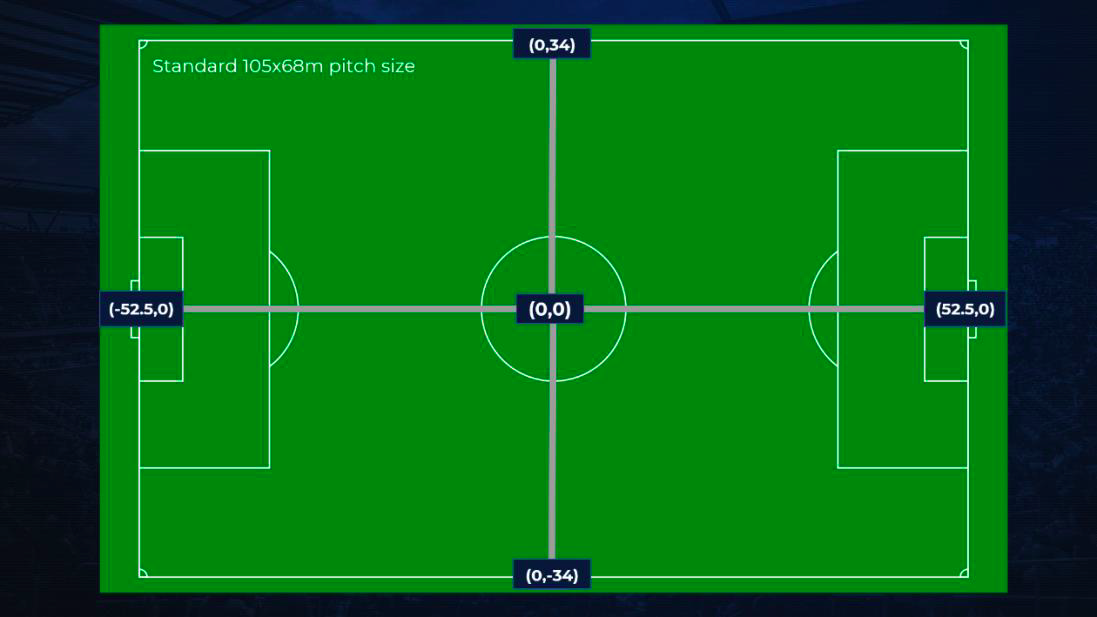
The SkillCorner AI platform automatically generates XY tracking data with the origin (0,0) coordinate existing in the exact centre of the pitch as per the XY coordinate pitch map below.
|
|
12
|
+
|
|
13
|
+
- The pitch dimension can be retrieved from GET `/api/match` endpoint. ‘pitch\_length’ is the long side of the field while ‘pitch\_width’ is the short side.
|
|
14
|
+
- The unit of the modelization is the meter, the center of the coordinates is at the center of the pitch.
|
|
15
|
+
- The x axis is the long side and the y axis is the short side.
|
|
16
|
+
|
|
17
|
+
|
|
18
|
+
|
|
19
|
+
### X,Y file format
|
|
20
|
+
|
|
21
|
+
The X,Y data can be downloaded with the `/api/match/{match_id}/tracking?data_version=3` endpoint which return the full continuous 22 player extrapolated tracking data.
|
|
22
|
+
|
|
23
|
+
There are two different formats available for the X,Y tracking data:
|
|
24
|
+
|
|
25
|
+
**1\. jsonlines file**
|
|
26
|
+
|
|
27
|
+
[Jsonlines](https://jsonlines.org/) is a file format where each line is a valid json.
|
|
28
|
+
|
|
29
|
+
In our case, each line is a frame of tracking data represented by a json:
|
|
30
|
+
|
|
31
|
+
```
|
|
32
|
+
{
|
|
33
|
+
"frame": 6890,
|
|
34
|
+
"timestamp": "00:00:00.00",
|
|
35
|
+
"period": 1,
|
|
36
|
+
"ball_data": {
|
|
37
|
+
"x": -1.24,
|
|
38
|
+
"y": -0.83,
|
|
39
|
+
"z": 0.44,
|
|
40
|
+
"is_detected": true
|
|
41
|
+
},
|
|
42
|
+
"possession": {
|
|
43
|
+
"player_id": null,
|
|
44
|
+
"group": "away team"
|
|
45
|
+
},
|
|
46
|
+
"image_corners_projection": {
|
|
47
|
+
"x_top_left": -45.35,
|
|
48
|
+
"y_top_left": 39.0,
|
|
49
|
+
"x_bottom_left": -13.66,
|
|
50
|
+
"y_bottom_left": -34.29,
|
|
51
|
+
"x_bottom_right": 13.41,
|
|
52
|
+
"y_bottom_right": -34.17,
|
|
53
|
+
"x_top_right": 44.04,
|
|
54
|
+
"y_top_right": 39.0
|
|
55
|
+
},
|
|
56
|
+
"player_data": [
|
|
57
|
+
{
|
|
58
|
+
"x": -39.75,
|
|
59
|
+
"y": -0.75,
|
|
60
|
+
"player_id": 12543,
|
|
61
|
+
"is_detected": false
|
|
62
|
+
},
|
|
63
|
+
{
|
|
64
|
+
"x": -19.52,
|
|
65
|
+
"y": -8.15,
|
|
66
|
+
"player_id": 1733,
|
|
67
|
+
"is_detected": true
|
|
68
|
+
},
|
|
69
|
+
...
|
|
70
|
+
{
|
|
71
|
+
"x": -11.75,
|
|
72
|
+
"y": -2.99,
|
|
73
|
+
"player_id": 12190,
|
|
74
|
+
"is_detected": false
|
|
75
|
+
},
|
|
76
|
+
{
|
|
77
|
+
"x": 0.13,
|
|
78
|
+
"y": -31.8,
|
|
79
|
+
"player_id": 6028,
|
|
80
|
+
"is_detected": true
|
|
81
|
+
}
|
|
82
|
+
]
|
|
83
|
+
}
|
|
84
|
+
|
|
85
|
+
```
|
|
86
|
+
|
|
87
|
+
The keys are:
|
|
88
|
+
|
|
89
|
+
**Keys**
|
|
90
|
+
|
|
91
|
+
**Description**
|
|
92
|
+
|
|
93
|
+
**frame**
|
|
94
|
+
|
|
95
|
+
ID of the frame
|
|
96
|
+
|
|
97
|
+
**timestamp**
|
|
98
|
+
|
|
99
|
+
Match timestamp, null if outside of the playing time
|
|
100
|
+
|
|
101
|
+
**period**
|
|
102
|
+
|
|
103
|
+
Period of the match (1: first half, 2: second half, 3: first OT half, 4: second OT half)
|
|
104
|
+
|
|
105
|
+
**ball\_data**
|
|
106
|
+
|
|
107
|
+
• Ball Coordinates (x,y,z)
|
|
108
|
+
|
|
109
|
+
• Define if the ball is detected (is\_detected\=TRUE) or purely extrapolated (is\_detected\=FALSE)
|
|
110
|
+
|
|
111
|
+
**possession**
|
|
112
|
+
|
|
113
|
+
Contains the player and the team
|
|
114
|
+
|
|
115
|
+
• Player ID of the player in possession : player
|
|
116
|
+
|
|
117
|
+
• Team in possession : group, equal to "home", "away" or empty if ball is out of play
|
|
118
|
+
|
|
119
|
+
**image\_corners\_projection**
|
|
120
|
+
|
|
121
|
+
Coordinates of the 4 corners of the polygon from the projection of the camera field onto the ground (white circles on the image below).
|
|
122
|
+
|
|
123
|
+
****
|
|
124
|
+
|
|
125
|
+
**player\_data**
|
|
126
|
+
|
|
127
|
+
Provides for each player on the pitch
|
|
128
|
+
|
|
129
|
+
• Player ID : player\_id
|
|
130
|
+
|
|
131
|
+
• Player Coordinates : x,y
|
|
132
|
+
|
|
133
|
+
• Whether the player is detected (is\_detected\=TRUE) or purely extrapolated (is\_detected\=FALSE)
|
|
134
|
+
|
|
135
|
+
The match data coming from endpoint `/api/match/{match_id}` also includes a home\_team\_side key which give the direction of attack of the home team for each period. It’s a list of size equal to the number of period (2 on a regular match and 4 if there was extra time). The value is left\_to\_right if the home team attack on the right side, right\_to\_left otherwise.
|
|
136
|
+
|
|
137
|
+
**2\. Plain text file (built according to FIFA’s Electronic Performance and Tracking Systems (EPTS)).**
|
|
138
|
+
|
|
139
|
+
The FIFA EPTS format is composed of two files. One file is a xml specifying general information on the match, and the format of the txt file. The other file is the data file with all the tracking data.
|
|
140
|
+
|
|
141
|
+
The xml file includes general information:
|
|
142
|
+
|
|
143
|
+
- start and end frame of each period
|
|
144
|
+
- pitch dimension
|
|
145
|
+
- the direction of attack of each team
|
|
146
|
+
- the identifier for each player
|
|
147
|
+
|
|
148
|
+
The file also includes the specification of each column in the data file which is in the key DataFormatSpecifications.
|
|
149
|
+
|
|
150
|
+
There are multiple specifications in a match. Each time a player is red carded or substituted, there is a new specification.
|
|
151
|
+
|
|
152
|
+
Each specification indicates the start frame and the end frame in the data file. For each specification, you have the list of the column in the data file and which separator is used. Note that the data file is not a regular csv and is using different separator that are documented in the xml file.
|
|
153
|
+
|
|
154
|
+
### Quality Index
|
|
155
|
+
|
|
156
|
+
The quality index is a proxy for the accuracy of our continuous 22 player extrapolated tracking data.
|
|
157
|
+
|
|
158
|
+
For each match, there are two quality indexes, one measuring the ball tracking quality and one measuring the player tracking quality. When we want a general quality index, we generally take the minimum of these two values.
|
|
159
|
+
|
|
160
|
+
These values can be found in the data collection endpoint `/api/match/{match_id}/data_collection`.
|
package/docs/_reference/skillcorner-crunch-help/getting-started-best-practice-analysis-guidance.md
ADDED
|
@@ -0,0 +1,16 @@
|
|
|
1
|
+
---
|
|
2
|
+
source_url: https://skillcorner.crunch.help/en/getting-started/best-practice-analysis-guidance
|
|
3
|
+
source_type: crunch_help_kb
|
|
4
|
+
upstream_version:
|
|
5
|
+
crawled_at: 2026-07-13T14:06:54.189Z
|
|
6
|
+
---
|
|
7
|
+
The SkillCorner delivery tools provide the user with total flexibility on how they wish to analyse and report the data. However, given the constraints of broadcast tracking and the extrapolation models we would recommend the following:
|
|
8
|
+
|
|
9
|
+
- For benchmarking by competition/league/position/age group, you should filter performances over 60 or 70 mins duration – this will ensure the benchmarks have very good validity.
|
|
10
|
+
|
|
11
|
+
- For analyzing individual performance, we do not recommend including performances less than 30 mins duration, and would normally suggest 45 mins as an absolute minimum to ensure good results.
|
|
12
|
+
|
|
13
|
+
- For calculating player averages, we would generally suggest using 10 matches as a minimum – calculating the standard error of the mean can be used to measure the accuracy with which a sample distribution represents a population.
|
|
14
|
+
|
|
15
|
+
|
|
16
|
+
To learn more about the constrains of broadcast tracking and our approach to delivering reliable data, go to [this article](https://skillcorner.crunch.help/en/working-with-the-data/data-quality-standards).
|
|
@@ -0,0 +1,33 @@
|
|
|
1
|
+
---
|
|
2
|
+
source_url: https://skillcorner.crunch.help/en/getting-started/dynamic-events-check
|
|
3
|
+
source_type: crunch_help_kb
|
|
4
|
+
upstream_version:
|
|
5
|
+
crawled_at: 2026-07-13T14:06:51.074Z
|
|
6
|
+
---
|
|
7
|
+
## Definition
|
|
8
|
+
|
|
9
|
+
In order to ensure you work only with trustworthy data we have put in place a quality check named Dynamic Events Check.
|
|
10
|
+
|
|
11
|
+
The Dynamic Events Check can have three values
|
|
12
|
+
|
|
13
|
+
- _True_ when the match has been processed and the Dynamic Events are of good quality
|
|
14
|
+
|
|
15
|
+
- _False_ when the match has been processed and the Dynamic Events may not be trustworthy
|
|
16
|
+
|
|
17
|
+
- _None_ when the match has not been processed either because of an error or because we miss input to process it
|
|
18
|
+
|
|
19
|
+
|
|
20
|
+
**We deliver Dynamic Events when the Dynamic Events Check is True.** Otherwise we don’t as we want to make sure our users are not misled by erroneous data.
|
|
21
|
+
|
|
22
|
+
Defined at match level the Dynamic Events Check takes into account
|
|
23
|
+
|
|
24
|
+
- The quality of the SkillCorner Tracking Data for that match (the quality index of the tracking and the ball need to be at least equal to 4)
|
|
25
|
+
- The percentage of Wyscout events we are able to match with our own tracking.
|
|
26
|
+
|
|
27
|
+
## Access the Dynamic Events Check value
|
|
28
|
+
|
|
29
|
+
The value of the Dynamic Events Check is available via the data collection endpoint https://skillcorner.com/api/match/{match\_id}/data\_collection where {match\_id} should be replaced with the id of the match you want to access events for.
|
|
30
|
+
|
|
31
|
+
Look for the _dynamic\_events\_check_ key in the json response.
|
|
32
|
+
|
|
33
|
+
If you are using Python, you can use [get\_match\_data\_collection()](https://skillcorner.readthedocs.io/en/latest/skillcorner_client.html#skillcorner.client.SkillcornerClient.get_match_data_collection) method form SkillCorner Python client.
|
package/docs/_reference/skillcorner-crunch-help/getting-started-explore-game-intelligence-data-1.md
ADDED
|
@@ -0,0 +1,37 @@
|
|
|
1
|
+
---
|
|
2
|
+
source_url: https://skillcorner.crunch.help/en/getting-started/explore-game-intelligence-data-1
|
|
3
|
+
source_type: crunch_help_kb
|
|
4
|
+
upstream_version:
|
|
5
|
+
crawled_at: 2026-07-13T14:06:46.947Z
|
|
6
|
+
---
|
|
7
|
+
The aim of this page is to guide you when accessing our In-possession data.
|
|
8
|
+
|
|
9
|
+
If you have not already, you can start by reading [our article](https://skillcorner.crunch.help/en/getting-started/first-requests) about the global overview of the SkillCorner API.
|
|
10
|
+
|
|
11
|
+
## Look for insights regarding Off-Ball runs
|
|
12
|
+
|
|
13
|
+
A good way to start is by requesting data for players from your own team.
|
|
14
|
+
|
|
15
|
+
As an example, we will therefore access data from the French team Stade Lavallois, that played in Ligue 2 for the 2022/23 season and evaluate their off-ball runs abilities when a team-mate is in possession.
|
|
16
|
+
|
|
17
|
+
To do so, we will need to start by requesting the [/competitions/](https://skillcorner.com/api/docs/#/competitions/competitions_list), [/competitions/{competition\_id}/editions/](https://skillcorner.com/api/docs/#/competitions/competitions_editions_list) and [/teams/](https://skillcorner.com/api/docs/#/teams/teams_list) endpoints to find the relevant IDs.
|
|
18
|
+
|
|
19
|
+
As you can see in the video below, here are the corresponding IDs:
|
|
20
|
+
|
|
21
|
+
- French Ligue 2: 12
|
|
22
|
+
- Ligue 2 2022/23 season: 393
|
|
23
|
+
- Stade Lavallois: 735
|
|
24
|
+
|
|
25
|
+
The next step is to request the [/in\_possession/off\_ball\_runs/](https://skillcorner.com/api/docs/#/in_possession/in_possession_off_ball_runs_list) endpoint to access the data of interest.
|
|
26
|
+
|
|
27
|
+
**Recommended readings
|
|
28
|
+
**Before going further, we advise you to have a look to:
|
|
29
|
+
|
|
30
|
+
\- The [definitions](https://skillcorner.crunch.help/en/glossaries/running-off-ball-metrics-1) of our off-ball running metrics
|
|
31
|
+
\- The [run types](https://skillcorner.crunch.help/en/glossaries/run-detection-and-classification) we detect
|
|
32
|
+
\- Our [modelisation](https://skillcorner.crunch.help/en/glossaries/pitch-modelisation) of the pitch
|
|
33
|
+
\- The [methodology](https://skillcorner.crunch.help/en/glossaries/averaging-per-match-per-events-or-per-min) regarding metrics averages
|
|
34
|
+
|
|
35
|
+
This will give you a good overview of the concepts behind the run\_type, channel and average\_per parameters.
|
|
36
|
+
|
|
37
|
+
Let see the results for Stade Lavallois, by focusing on Runs in behind in the attacking third:
|
package/docs/_reference/skillcorner-crunch-help/getting-started-explore-game-intelligence-data.md
ADDED
|
@@ -0,0 +1,29 @@
|
|
|
1
|
+
---
|
|
2
|
+
source_url: https://skillcorner.crunch.help/en/getting-started/explore-game-intelligence-data
|
|
3
|
+
source_type: crunch_help_kb
|
|
4
|
+
upstream_version:
|
|
5
|
+
crawled_at: 2026-07-13T14:06:39.464Z
|
|
6
|
+
---
|
|
7
|
+
The aim of this page is to guide you when accessing our In-possession data.
|
|
8
|
+
|
|
9
|
+
If you have not already, you can start by reading [our article](https://skillcorner.crunch.help/en/getting-started/make-your-first-queries) about the global overview of the SkillCorner Web App.
|
|
10
|
+
|
|
11
|
+
## Look for insights regarding Off-Ball runs
|
|
12
|
+
|
|
13
|
+
A good way to start is by requesting data for players from your own team.
|
|
14
|
+
|
|
15
|
+
As an example, we will therefore access data from the French team Stade Lavallois, that played in Ligue 2 for the 2022/23 season and evaluate their off-ball runs abilities when a team-mate is in possession.
|
|
16
|
+
|
|
17
|
+
To do so, we will need to select the Running Off-Ball tab from the main menu.
|
|
18
|
+
The set up of the request will be similar to a one regarding Physical metrics.
|
|
19
|
+
|
|
20
|
+
**Recommended readings
|
|
21
|
+
**Before diving into this section, we advise you to have a look to:
|
|
22
|
+
|
|
23
|
+
\- The [definitions](https://skillcorner.crunch.help/en/glossaries/running-off-ball-metrics-1) of our off-ball running metrics
|
|
24
|
+
\- The [run types](https://skillcorner.crunch.help/en/glossaries/run-detection-and-classification) we detect
|
|
25
|
+
\- Our [modelisation](https://skillcorner.crunch.help/en/working-with-the-data/pitch-modelisation) of the pitch
|
|
26
|
+
\- The [methodology](https://skillcorner.crunch.help/en/working-with-the-data/averaging-per-match-per-events-or-per-min) regarding metrics averages
|
|
27
|
+
|
|
28
|
+
This will give you a good overview of the concepts behind the _Run types_, _Pitch zone_ and _Average metrics per_ filters.
|
|
29
|
+
Let see the results by focusing on Runs in behind in the attacking third:
|
|
@@ -0,0 +1,99 @@
|
|
|
1
|
+
---
|
|
2
|
+
source_url: https://skillcorner.crunch.help/en/getting-started/first-requests
|
|
3
|
+
source_type: crunch_help_kb
|
|
4
|
+
upstream_version:
|
|
5
|
+
crawled_at: 2026-07-13T14:06:41.936Z
|
|
6
|
+
---
|
|
7
|
+
The aim of this page is to give you an overview of the requests available and guide you through your first steps.
|
|
8
|
+
|
|
9
|
+
You can start by accessing the detailed documentation of the SkillCorner API: [https://skillcorner.com/api/docs/](https://skillcorner.com/api/docs/)
|
|
10
|
+
|
|
11
|
+
Since it enables you to send API queries, we recommend using the documentation for debugging purposes and testing API calls before implementation.
|
|
12
|
+
|
|
13
|
+
## Python client
|
|
14
|
+
|
|
15
|
+
In order to use the SkillCorner API, we also provide a Python client to help you set up more easily.
|
|
16
|
+
You will find the relevant articles [here](https://skillcorner.crunch.help/en/getting-started/skillcorner-python-client).
|
|
17
|
+
|
|
18
|
+
## Authentication
|
|
19
|
+
|
|
20
|
+
The API supports two types of authentication:
|
|
21
|
+
|
|
22
|
+
- **Recommended**
|
|
23
|
+
The basic Authentication allows you to sign in using the same username and password that you might already use to access
|
|
24
|
+
the [Web App](https://skillcorner.com/app/login).
|
|
25
|
+
|
|
26
|
+
- Using an API Key, based on a token provided by SkillCorner upon request. Once authorized, the token is passed as a parameter within queries.
|
|
27
|
+
|
|
28
|
+
If you have questions regarding authentication, you can [send us an email](mailto:support@skillcorner.com).
|
|
29
|
+
|
|
30
|
+
## API Organization
|
|
31
|
+
|
|
32
|
+
When accessing the API, a series of endpoints is available, including the relevant parameters and response formats.
|
|
33
|
+
|
|
34
|
+
The API is currently organised as follows:
|
|
35
|
+
|
|
36
|
+
- Competition editions: to list the competition editions (e.g. AUT Bundesliga 21/22) you can access.
|
|
37
|
+
|
|
38
|
+
- In Possession package: to access our In-possession data, focusing on off-ball runs, passes and on-ball pressure aggregates ([more details here](https://skillcorner.crunch.help/en/glossaries#in-possession-1)).
|
|
39
|
+
- Match: to access match data.
|
|
40
|
+
- Matches: to list the matches available.
|
|
41
|
+
- Physical: to access our Physical data ([more details here](https://skillcorner.crunch.help/en/glossaries#physical)).
|
|
42
|
+
- Players: to list the players available in our database.
|
|
43
|
+
- Roles: to list the SkillCorner roles and positions ([more details here](https://skillcorner.crunch.help/en/working-with-the-data/physical-data-glossary-1-1)).
|
|
44
|
+
- Seasons: to list the seasons ids (e.g. 2021/22).
|
|
45
|
+
- Teams: to list the teams available in our database.
|
|
46
|
+
|
|
47
|
+
## Accessing the available competitions
|
|
48
|
+
|
|
49
|
+
As an example, let say that my goal is to access the physical data of players from French side OGC Nice and their opponents, on the last gameweek of the 2021/2022 season.
|
|
50
|
+
|
|
51
|
+
**Permission management
|
|
52
|
+
**Depending on your current subscription, you will only be able to obtain data for specific competitions, matches and packages.
|
|
53
|
+
|
|
54
|
+
In our case, we will need to start by requesting the /competitions/ endpoint and list all competitions. This will allow us to find the ID corresponding to the French Ligue 1.
|
|
55
|
+
|
|
56
|
+
Given our request, no specific parameter is needed and we can launch it by hitting "Try it out", then "Execute".
|
|
57
|
+
|
|
58
|
+
**API rate limit
|
|
59
|
+
**Please note that our API allows you to make up to **15 requests** per **second**.
|
|
60
|
+
|
|
61
|
+
For the French Ligue 1, we notice that the corresponding ID is **3**:
|
|
62
|
+
|
|
63
|
+
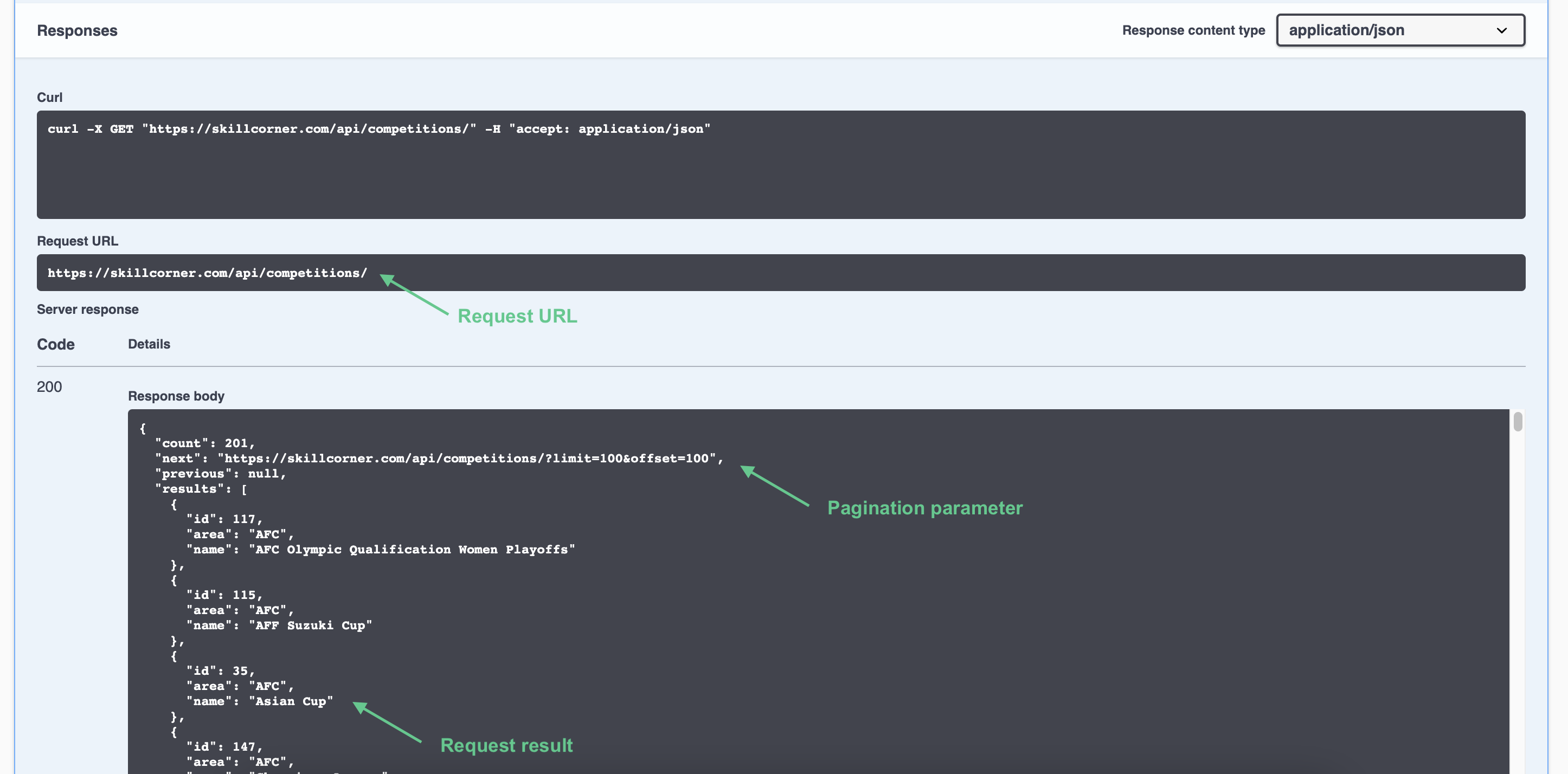
If we focus on the response, we find three elements of interest:
|
|
64
|
+
|
|
65
|
+
|
|
66
|
+
|
|
67
|
+
- The request URL
|
|
68
|
+
|
|
69
|
+
- The request results
|
|
70
|
+
- Pagination elements (as per default, one can only retrieve batches of up to 100 elements per request).
|
|
71
|
+
|
|
72
|
+
## Retrieving matches from a specific competition edition
|
|
73
|
+
|
|
74
|
+
Now that we have the ID corresponding to the FR Ligue 1 (3), we will then be able to:
|
|
75
|
+
|
|
76
|
+
- Find the ID of the competition edition we are looking for (Ligue 1 - 2021/22) from the /competitions/{competition\_id}/editions/ endpoint.
|
|
77
|
+
- We notice that the corresponding ID is **242:**
|
|
78
|
+
|
|
79
|
+
- The next step is to list all the matches of this competition edition (242), from the /matches/ endpoint
|
|
80
|
+
- Then find the match ID that we are looking for
|
|
81
|
+
|
|
82
|
+
For the last game of the season for OGC Nice, we notice that the corresponding ID is **129597:**
|
|
83
|
+
|
|
84
|
+
## Accessing the physical data of a specific match
|
|
85
|
+
|
|
86
|
+
The last step of our example is to request the physical data from the /physical/ endpoint, using the match ID 129597:
|
|
87
|
+
|
|
88
|
+
Here, we can add specific parameters to focus on different aspects of the game such as the number of minutes played, time in possession/out of possession or the period.
|
|
89
|
+
|
|
90
|
+
You can find more details about physical metrics [here](https://skillcorner.crunch.help/en/glossaries/physical-data-glossary).
|
|
91
|
+
|
|
92
|
+
From the documentation interface, you also have the opportunity to download the request response if needed:
|
|
93
|
+
|
|
94
|
+
## Accessing the physical data at the player level
|
|
95
|
+
|
|
96
|
+
As a second and final example, we will focus on players rather than teams.
|
|
97
|
+
Our goal will be to retrieve data averages per player, in Ligue 1, for the 2021/2022 season.
|
|
98
|
+
|
|
99
|
+
Using the /physical/ endpoint, and by setting the average parameter at true after filling in the competition\_edition value (242 for the Ligue 1 21/22), we will retrieve the following results:
|