flashduty-knowledge-base 1.3.6 → 1.3.7
This diff represents the content of publicly available package versions that have been released to one of the supported registries. The information contained in this diff is provided for informational purposes only and reflects changes between package versions as they appear in their respective public registries.
- package/dist/en.d.ts +5 -0
- package/dist/esm/en.js +650 -40
- package/dist/esm/zh.js +672 -64
- package/dist/iife/en.js +630 -20
- package/dist/iife/zh.js +639 -31
- package/dist/zh.d.ts +5 -0
- package/package.json +1 -1
package/dist/esm/en.js
CHANGED
|
@@ -77,7 +77,7 @@ Field|Required|Type|Description
|
|
|
77
77
|
|
|
78
78
|
Field|Required|Type|Description
|
|
79
79
|
:-:|:-:|:-:|:---
|
|
80
|
-
| title_rule | Yes | string | Alert title, no more than \`512\` characters, will be truncated if exceeded.<br><br>Supports dynamic title generation based on alert content, see [Customizing Incidents](https://docs.flashcat.cloud/en/
|
|
80
|
+
| title_rule | Yes | string | Alert title, no more than \`512\` characters, will be truncated if exceeded.<br><br>Supports dynamic title generation based on alert content, see [Customizing Incidents](https://docs.flashcat.cloud/en/on-call/integration/alert-integration/alert-pipelines) for generation rules.
|
|
81
81
|
| event_status | Yes | string | Alert status.<br><br>Enumerated values (case-sensitive): *Critical*, *Warning*, *Info*, *Ok*.<br><br>When specified as Ok, it means automatic recovery of the alert.
|
|
82
82
|
| alert_key | No | string | Alert identifier, used to update or automatically recover existing alerts.<br><br>You can customize this value, but it cannot exceed \`255\` characters. You can also rely on system auto-generation, this value will be returned in the response.<br><br>If you're reporting a recovery event, this value must exist.
|
|
83
83
|
| description | No | string | Alert description, no more than \`2048\` characters, will be truncated if exceeded.
|
|
@@ -218,7 +218,7 @@ Failed Response:
|
|
|
218
218
|
3. The new event might be discarded due to matching exclusion, discard, suppression, or silence rules.
|
|
219
219
|
4. When a new event triggers a new alert, the system enters the second layer of noise reduction check, determining if the new alert can be merged into an active incident. If possible, it will only merge into the existing incident without generating a new one.
|
|
220
220
|
|
|
221
|
-
For more information, please refer to [Alert Noise Reduction](https://docs.flashcat.cloud/en/
|
|
221
|
+
For more information, please refer to [Alert Noise Reduction](https://docs.flashcat.cloud/en/on-call/channel/noise-reduction).
|
|
222
222
|
</details> `,t=`---
|
|
223
223
|
title: "Email Integration"
|
|
224
224
|
description: "Generate a unique email address in Flashduty to synchronize alert triggers and recoveries through email"
|
|
@@ -318,7 +318,8 @@ attachment_stripped = true
|
|
|
318
318
|
## Severity Mapping
|
|
319
319
|
---
|
|
320
320
|
|
|
321
|
-
Currently, all alerts pushed to Flashduty through the email integration are set to Warning severity. However, you can customize the severity using the [alert pipeline](https://docs.flashcat.cloud/en/
|
|
321
|
+
Currently, all alerts pushed to Flashduty through the email integration are set to Warning severity. However, you can customize the severity using the [alert pipeline](https://docs.flashcat.cloud/en/on-call/integration/alert-integration/alert-pipelines).
|
|
322
|
+
|
|
322
323
|
`,a=`---
|
|
323
324
|
title: "Nightingale/Flashcat Integration"
|
|
324
325
|
description: "Push alert events from Nightingale (n9e) or Flashcat to Flashduty via webhook. When an alert is triggered, send a trigger event to Flashduty; when an alert recovers, send a recovery event to Flashduty"
|
|
@@ -2776,7 +2777,7 @@ OCP Alert Notification - Single Alert
|
|
|
2776
2777
|
|OceanBase|Flashduty|Status|
|
|
2777
2778
|
|---|---|---|
|
|
2778
2779
|
|Down|Critical|Critical|
|
|
2779
|
-
|Critical|
|
|
2780
|
+
|Critical|Critical|Critical|
|
|
2780
2781
|
|Warning|Warning|Warning|
|
|
2781
2782
|
|Caution|Info|Info|
|
|
2782
2783
|
|Notice|Info|Info|
|
|
@@ -4100,7 +4101,7 @@ Choose this method when you need to route alerts to different channels based on
|
|
|
4100
4101
|
|Notice|Info|Info|
|
|
4101
4102
|
|
|
4102
4103
|
</div>
|
|
4103
|
-
`,
|
|
4104
|
+
`,N=`---
|
|
4104
4105
|
title: "Volcengine Log Service (TLS) Alert Events"
|
|
4105
4106
|
description: "Sync Volcengine Log Service (TLS) alert events to Flashduty via webhook for automated alert noise reduction"
|
|
4106
4107
|
date: "2024-07-05T10:00:00+08:00"
|
|
@@ -4237,7 +4238,7 @@ Choose this method when you need to route alerts to different channels based on
|
|
|
4237
4238
|
</div>
|
|
4238
4239
|
|
|
4239
4240
|
</div>
|
|
4240
|
-
`,
|
|
4241
|
+
`,D=`---
|
|
4241
4242
|
title: "OpManager Alert Events"
|
|
4242
4243
|
description: "Sync OpManager alert events to Flashduty via webhook for automated alert noise reduction"
|
|
4243
4244
|
date: "2024-07-05T10:00:00+08:00"
|
|
@@ -4452,7 +4453,7 @@ url: "https://docs.flashcat.cloud/en/flashduty/statecloud-integration-guide"
|
|
|
4452
4453
|
|
|
4453
4454
|
Sync StateCloud monitoring alert events to Flashduty via webhook for automated alert noise reduction.
|
|
4454
4455
|
|
|
4455
|
-
For resource monitoring events from StateCloud [secondary nodes](#secondary-nodes), please use Huawei Cloud integration. Refer to [Huawei Cloud Alert Integration Guide](https://docs.flashcat.cloud/en/
|
|
4456
|
+
For resource monitoring events from StateCloud [secondary nodes](#secondary-nodes), please use Huawei Cloud integration. Refer to [Huawei Cloud Alert Integration Guide](https://docs.flashcat.cloud/en/on-call/integration/alert-integration/alert-sources/huawei-ces).
|
|
4456
4457
|
|
|
4457
4458
|
|
|
4458
4459
|
<div class="hide">
|
|
@@ -4794,7 +4795,7 @@ When you need to route alerts to different channels based on alert payload infor
|
|
|
4794
4795
|
|
|
4795
4796
|
</div>
|
|
4796
4797
|
|
|
4797
|
-
|
|
4798
|
+
`,$=`---
|
|
4798
4799
|
title: "zstack integration"
|
|
4799
4800
|
description: "Push ZStack alerts to Flashduty via webhook, to achieve automatic alert noise reduction."
|
|
4800
4801
|
date: "2024-07-05T10:00:00+08:00"
|
|
@@ -4882,7 +4883,7 @@ Choose this method when you need to route alerts to different channels based on
|
|
|
4882
4883
|
|
|
4883
4884
|
</div>
|
|
4884
4885
|
|
|
4885
|
-
|
|
4886
|
+
`,H=`---
|
|
4886
4887
|
title: "Keep Alert Integration Guide"
|
|
4887
4888
|
description: "Push alert events to Flashduty through Keep's Provider to achieve automated alert noise reduction."
|
|
4888
4889
|
date: "2025-05-19T10:00:00+08:00"
|
|
@@ -4963,7 +4964,7 @@ Field|Required|Type|Definition
|
|
|
4963
4964
|
|
|
4964
4965
|
<img alt="drawing" width="600" src="https://download.flashcat.cloud/flashduty/doc/en/fd/keep-2.png" />
|
|
4965
4966
|
|
|
4966
|
-
`,
|
|
4967
|
+
`,j=`---
|
|
4967
4968
|
title: "ElastAlert2 Alert Integration Guide"
|
|
4968
4969
|
description: "Push alert events to Flashduty through ElastAlert2's Provider to achieve automated alert noise reduction."
|
|
4969
4970
|
date: "2025-05-19T10:00:00+08:00"
|
|
@@ -5084,7 +5085,7 @@ flashduty_env: "dev"
|
|
|
5084
5085
|
# ------- Flashduty ----------------
|
|
5085
5086
|
\`\`\`
|
|
5086
5087
|
|
|
5087
|
-
5. Restart ElastAlert and wait for the alert to trigger.`,
|
|
5088
|
+
5. Restart ElastAlert and wait for the alert to trigger.`,Y=`---
|
|
5088
5089
|
title: "Dingtalk Alert Integration"
|
|
5089
5090
|
description: "Generate a unique Dingtalk robot address in Flashduty, and synchronize the occurrence and recovery of alerts through Dingtalk"
|
|
5090
5091
|
date: "2025-05-19T10:00:00+08:00"
|
|
@@ -5165,7 +5166,7 @@ By default, the system always creates new alerts for each message, but you can s
|
|
|
5165
5166
|
## Severity Mapping
|
|
5166
5167
|
---
|
|
5167
5168
|
|
|
5168
|
-
Currently, all alerts pushed to Flashduty through the Dingtalk integration are set to Warning severity. However, you can customize the severity using the [alert pipeline](https://docs.flashcat.cloud/en/
|
|
5169
|
+
Currently, all alerts pushed to Flashduty through the Dingtalk integration are set to Warning severity. However, you can customize the severity using the [alert pipeline](https://docs.flashcat.cloud/en/on-call/integration/alert-integration/alert-pipelines).
|
|
5169
5170
|
`,z=`---
|
|
5170
5171
|
title: "Feishu Alert Integration"
|
|
5171
5172
|
description: "Generate a unique Feishu robot address in Flashduty, and synchronize the occurrence and recovery of alerts through Feishu"
|
|
@@ -5247,7 +5248,7 @@ By default, the system always creates new alerts for each message, but you can s
|
|
|
5247
5248
|
## Severity Mapping
|
|
5248
5249
|
---
|
|
5249
5250
|
|
|
5250
|
-
Currently, all alerts pushed to Flashduty through the Feishu(lark) integration are set to Warning severity. However, you can customize the severity using the [alert pipeline](https://docs.flashcat.cloud/en/
|
|
5251
|
+
Currently, all alerts pushed to Flashduty through the Feishu(lark) integration are set to Warning severity. However, you can customize the severity using the [alert pipeline](https://docs.flashcat.cloud/en/on-call/integration/alert-integration/alert-pipelines).
|
|
5251
5252
|
`,B=`---
|
|
5252
5253
|
title: "Volcengine Cloud-Detect Alert Events"
|
|
5253
5254
|
description: "Sync Volcengine Cloud-Detect alert events to Flashduty via webhook for automated alert noise reduction"
|
|
@@ -5437,7 +5438,7 @@ After configuring the Webhook channel, you can use it in notification policies.
|
|
|
5437
5438
|
|
|
5438
5439
|
<div class="md-block">
|
|
5439
5440
|
|
|
5440
|
-
Currently, all alerts pushed to Flashduty through the Cloudflare integration are set to Warning severity. However, you can customize the severity using the [alert pipeline](https://docs.flashcat.cloud/en/
|
|
5441
|
+
Currently, all alerts pushed to Flashduty through the Cloudflare integration are set to Warning severity. However, you can customize the severity using the [alert pipeline](https://docs.flashcat.cloud/en/on-call/integration/alert-integration/alert-pipelines).
|
|
5441
5442
|
|
|
5442
5443
|
</div>
|
|
5443
5444
|
|
|
@@ -5516,12 +5517,12 @@ By default, the system always creates new alerts for each message, but you can s
|
|
|
5516
5517
|
|
|
5517
5518
|
### Notes
|
|
5518
5519
|
- Wecom alert integration URL only supports Text and Markdown message types; other message types cannot be received
|
|
5519
|
-
- Flashduty will generate a default alert title: "Wecom robot Alert , If you need to change the title, you can customize it using the [alert pipeline](https://docs.flashcat.cloud/en/
|
|
5520
|
+
- Flashduty will generate a default alert title: "Wecom robot Alert , If you need to change the title, you can customize it using the [alert pipeline](https://docs.flashcat.cloud/en/on-call/integration/alert-integration/alert-pipelines)"
|
|
5520
5521
|
|
|
5521
5522
|
## Severity Mapping
|
|
5522
5523
|
---
|
|
5523
5524
|
|
|
5524
|
-
Currently, all alerts pushed to Flashduty through the Wecom integration are set to Warning severity. However, you can customize the severity using the [alert pipeline](https://docs.flashcat.cloud/en/
|
|
5525
|
+
Currently, all alerts pushed to Flashduty through the Wecom integration are set to Warning severity. However, you can customize the severity using the [alert pipeline](https://docs.flashcat.cloud/en/on-call/integration/alert-integration/alert-pipelines).
|
|
5525
5526
|
|
|
5526
5527
|
---
|
|
5527
5528
|
title: "Wecom Alert Integration"
|
|
@@ -5598,12 +5599,12 @@ By default, the system always creates new alerts for each message, but you can s
|
|
|
5598
5599
|
|
|
5599
5600
|
### Notes
|
|
5600
5601
|
- Wecom alert integration URL only supports Text and Markdown message types; other message types cannot be received
|
|
5601
|
-
- Flashduty will generate a default alert title: "Wecom robot Alert , If you need to change the title, you can customize it using the [alert pipeline](https://docs.flashcat.cloud/en/
|
|
5602
|
+
- Flashduty will generate a default alert title: "Wecom robot Alert , If you need to change the title, you can customize it using the [alert pipeline](https://docs.flashcat.cloud/en/on-call/integration/alert-integration/alert-pipelines)"
|
|
5602
5603
|
|
|
5603
5604
|
## Severity Mapping
|
|
5604
5605
|
---
|
|
5605
5606
|
|
|
5606
|
-
Currently, all alerts pushed to Flashduty through the Wecom integration are set to Warning severity. However, you can customize the severity using the [alert pipeline](https://docs.flashcat.cloud/en/
|
|
5607
|
+
Currently, all alerts pushed to Flashduty through the Wecom integration are set to Warning severity. However, you can customize the severity using the [alert pipeline](https://docs.flashcat.cloud/en/on-call/integration/alert-integration/alert-pipelines).`,Q=`---
|
|
5607
5608
|
title: "Harbor Alert Events"
|
|
5608
5609
|
description: "Sync Harbor alert events to Flashduty via webhook for automated alert noise reduction"
|
|
5609
5610
|
date: "2024-07-05T10:00:00+08:00"
|
|
@@ -5665,9 +5666,598 @@ Choose this method when you need to route alerts to different channels based on
|
|
|
5665
5666
|
## Severity Mapping
|
|
5666
5667
|
---
|
|
5667
5668
|
|
|
5668
|
-
Currently, all alerts pushed to Flashduty through the Harbor integration are set to Warning severity. However, you can customize the severity using the [alert pipeline](https://docs.flashcat.cloud/en/
|
|
5669
|
+
Currently, all alerts pushed to Flashduty through the Harbor integration are set to Warning severity. However, you can customize the severity using the [alert pipeline](https://docs.flashcat.cloud/en/on-call/integration/alert-integration/alert-pipelines).
|
|
5669
5670
|
|
|
5670
5671
|
`,X=`---
|
|
5672
|
+
title: "Volcengine RTC Alert Events"
|
|
5673
|
+
description: "Sync Volcengine RTC alert events to Flashduty via webhook for automated alert noise reduction"
|
|
5674
|
+
date: "2024-07-05T10:00:00+08:00"
|
|
5675
|
+
url: "https://docs.flashcat.cloud/en/flashduty/volcengine-rtc-integration-guide"
|
|
5676
|
+
---
|
|
5677
|
+
|
|
5678
|
+
Sync Volcengine RTC alert events to Flashduty via webhook for automated alert noise reduction.
|
|
5679
|
+
|
|
5680
|
+
<div class="hide">
|
|
5681
|
+
|
|
5682
|
+
## In Flashduty
|
|
5683
|
+
---
|
|
5684
|
+
You can obtain an integration push URL through either of these two methods:
|
|
5685
|
+
|
|
5686
|
+
### Using Private Integration
|
|
5687
|
+
|
|
5688
|
+
Choose this method when you don't need to route alert events to different channels - it's simpler.
|
|
5689
|
+
|
|
5690
|
+
<details>
|
|
5691
|
+
<summary>Expand</summary>
|
|
5692
|
+
|
|
5693
|
+
1. Go to the Flashduty console, select **Channel**, and enter a channel's details page
|
|
5694
|
+
2. Select the **Integrations** tab, click **Add Integration** to enter the integration page
|
|
5695
|
+
3. Choose **Volcengine RTC** integration and click **Save** to generate a card
|
|
5696
|
+
4. Click the generated card to view the **Push URL**, copy it for later use, and you're done
|
|
5697
|
+
|
|
5698
|
+
</details>
|
|
5699
|
+
|
|
5700
|
+
### Using Shared Integration
|
|
5701
|
+
|
|
5702
|
+
Choose this method when you need to route alerts to different channels based on the alert event payload.
|
|
5703
|
+
|
|
5704
|
+
<details>
|
|
5705
|
+
<summary>Expand</summary>
|
|
5706
|
+
|
|
5707
|
+
1. Go to the Flashduty console, select **Integration Center=>Alert Events** to enter the integration selection page
|
|
5708
|
+
2. Select **Volcengine RTC** integration:
|
|
5709
|
+
- **Integration Name**: Define a name for this integration
|
|
5710
|
+
3. Configure the default route and select the corresponding channel (after the integration is created, you can go to \`Route\` to configure more routing rules)
|
|
5711
|
+
4. Click **Save** and copy the newly generated **push URL** for later use
|
|
5712
|
+
5. Done
|
|
5713
|
+
|
|
5714
|
+
</details>
|
|
5715
|
+
</div>
|
|
5716
|
+
|
|
5717
|
+
## In Volcengine
|
|
5718
|
+
---
|
|
5719
|
+
|
|
5720
|
+
### Configure Alert Rules
|
|
5721
|
+
|
|
5722
|
+
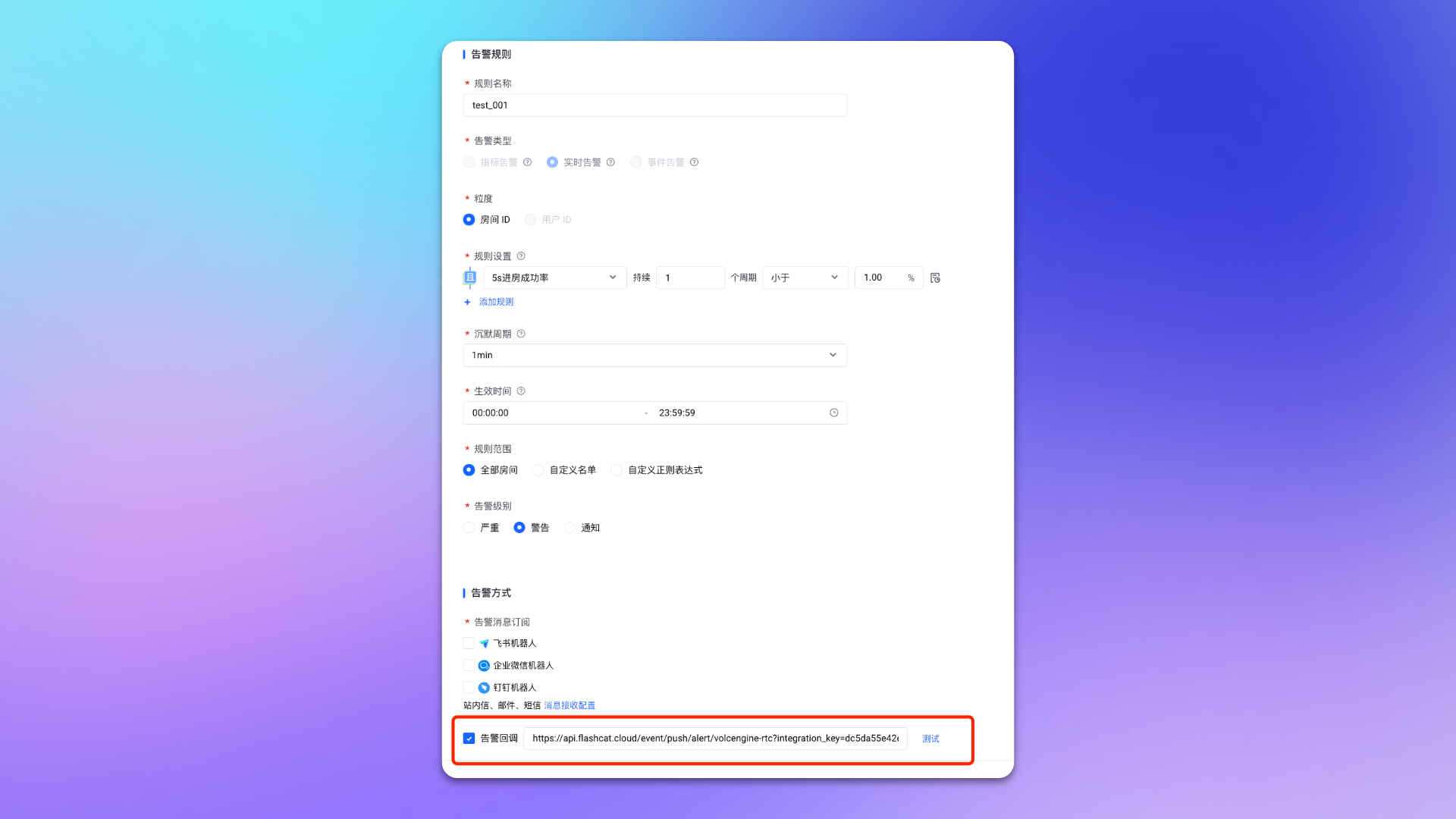
1. Login to your \`Volcengine\` console, find \`RTC\`, and enter the corresponding product console.
|
|
5723
|
+
2. In the left menu, select \`Monitor->Alert Notifications\`, and go to the \`Alert Rules\` page.
|
|
5724
|
+
3. Create or edit an alert rule, check \`Alert Callback\` on the rule page and fill in the <span class='integration_url'>push URL</span> for the alert integration.
|
|
5725
|
+
4. Configure other options as needed.
|
|
5726
|
+
5. Click \`Confirm\` to complete the configuration.
|
|
5727
|
+
|
|
5728
|
+
|
|
5729
|
+
|
|
5730
|
+
## Status Mapping
|
|
5731
|
+
|
|
5732
|
+
|Volcengine RTC|Flashduty|Status|
|
|
5733
|
+
|---|---|---|
|
|
5734
|
+
|Critical|Critical|Critical|
|
|
5735
|
+
|Warning|Warning|Warning|
|
|
5736
|
+
|Notice|Info|Info|
|
|
5737
|
+
|
|
5738
|
+
|
|
5739
|
+
You can customize the severity through [Alert Processing Pipeline](https://docs.flashcat.cloud/en/on-call/integration/alert-integration/alert-pipelines).`,ee=`---
|
|
5740
|
+
title: "Ucloud CloudWatch Alert Events"
|
|
5741
|
+
description: "Sync Ucloud CloudWatch alert events to Flashduty via webhook for automated alert noise reduction"
|
|
5742
|
+
date: "2024-07-05T10:00:00+08:00"
|
|
5743
|
+
url: "https://docs.flashcat.cloud/en/flashduty/ucloud-cloudwatch-integration-guide"
|
|
5744
|
+
---
|
|
5745
|
+
|
|
5746
|
+
Sync Ucloud CloudWatch alert events to Flashduty via webhook for automated alert noise reduction.
|
|
5747
|
+
|
|
5748
|
+
<div class="hide">
|
|
5749
|
+
|
|
5750
|
+
## In Flashduty
|
|
5751
|
+
---
|
|
5752
|
+
You can obtain an integration push URL through either of these two methods:
|
|
5753
|
+
|
|
5754
|
+
### Using Private Integration
|
|
5755
|
+
|
|
5756
|
+
Choose this method when you don't need to route alert events to different channels - it's simpler.
|
|
5757
|
+
|
|
5758
|
+
<details>
|
|
5759
|
+
<summary>Expand</summary>
|
|
5760
|
+
|
|
5761
|
+
1. Go to the Flashduty console, select **Channel**, and enter a channel's details page
|
|
5762
|
+
2. Select the **Integrations** tab, click **Add Integration** to enter the integration page
|
|
5763
|
+
3. Choose **Ucloud CloudWatch** integration and click **Save** to generate a card
|
|
5764
|
+
4. Click the generated card to view the **Push URL**, copy it for later use, and you're done
|
|
5765
|
+
|
|
5766
|
+
</details>
|
|
5767
|
+
|
|
5768
|
+
### Using Shared Integration
|
|
5769
|
+
|
|
5770
|
+
Choose this method when you need to route alerts to different channels based on the alert event payload.
|
|
5771
|
+
|
|
5772
|
+
<details>
|
|
5773
|
+
<summary>Expand</summary>
|
|
5774
|
+
|
|
5775
|
+
1. Go to the Flashduty console, select **Integration Center=>Alert Events** to enter the integration selection page
|
|
5776
|
+
2. Select **Ucloud CloudWatch** integration:
|
|
5777
|
+
- **Integration Name**: Define a name for this integration
|
|
5778
|
+
3. Configure the default route and select the corresponding channel (after the integration is created, you can go to \`Route\` to configure more routing rules)
|
|
5779
|
+
4. Click **Save** and copy the newly generated **push URL** for later use
|
|
5780
|
+
5. Done
|
|
5781
|
+
|
|
5782
|
+
</details>
|
|
5783
|
+
</div>
|
|
5784
|
+
|
|
5785
|
+
## In Ucloud
|
|
5786
|
+
---
|
|
5787
|
+
|
|
5788
|
+
### Step 1: Configure Notice Template
|
|
5789
|
+
|
|
5790
|
+
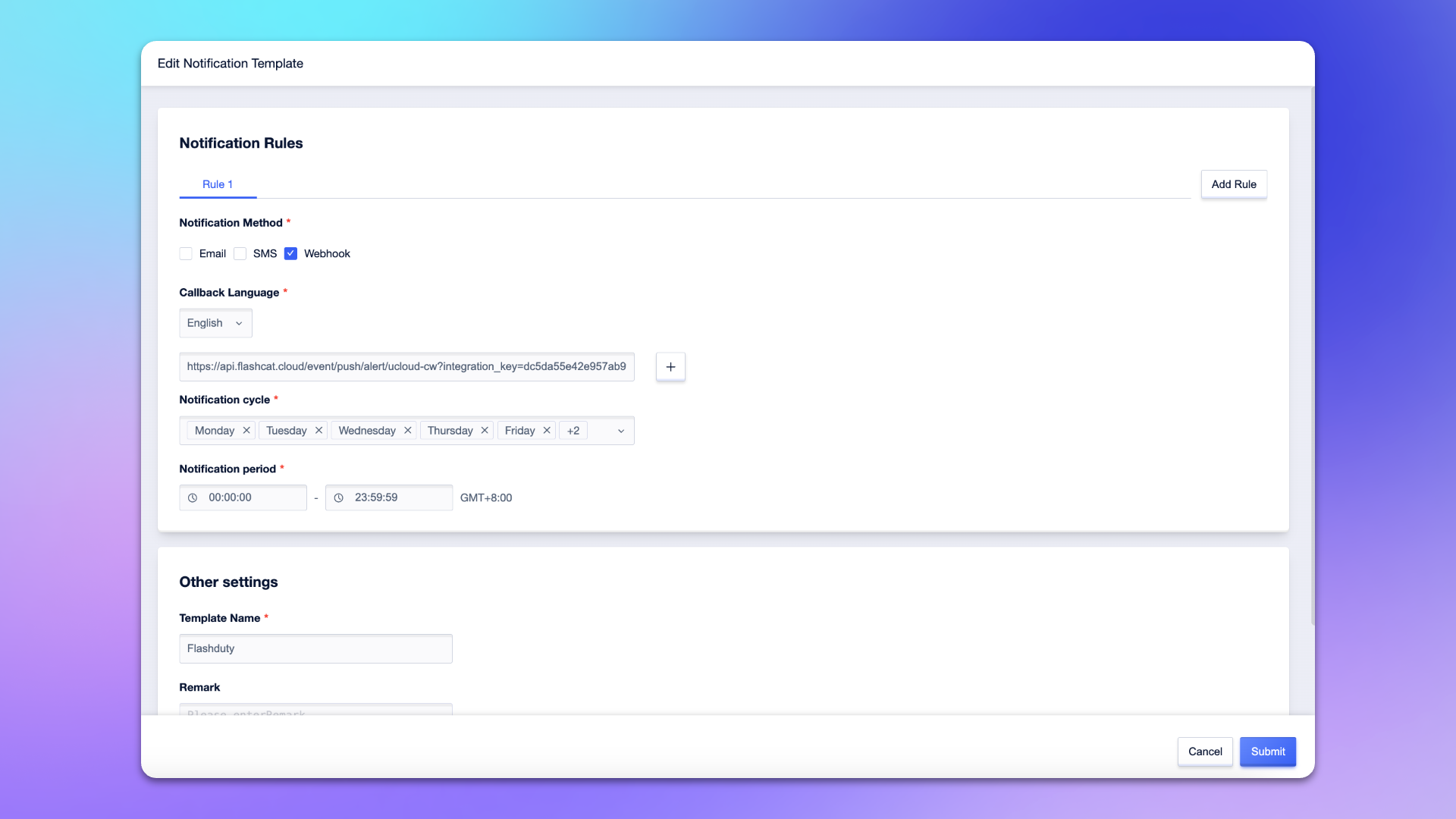
1. Login to your Ucloud console, search for \`CloudWatch\` product, and enter the corresponding product console.
|
|
5791
|
+
2. In the menu, select \`Notice Management\`, and go to the \`Contact Template\` page.
|
|
5792
|
+
3. Create or edit a notification template, check \`Webhook\` on the template page.
|
|
5793
|
+
4. Select \`English\` for **Callback Language**, and enter the <span class='integration_url'>push URL</span> for the alert integration in the input box.
|
|
5794
|
+
5. Enter \`Flashduty\` or another name for the template name.
|
|
5795
|
+
6. Configure other options as needed.
|
|
5796
|
+
7. Click \`Submit\` to complete the configuration.
|
|
5797
|
+
|
|
5798
|
+
|
|
5799
|
+
|
|
5800
|
+
### Step 2: Configure Alert Policy
|
|
5801
|
+
1. Login to your Ucloud console, search for \`CloudWatch\` product, and enter the corresponding product console.
|
|
5802
|
+
2. In the menu, select \`Alarm Management\`, and go to the \`Alarm Policy\` page.
|
|
5803
|
+
3. Create or edit an alert policy, find the **Notification Settings** on the policy configuration page, and select the notification template created in **Step 1**.
|
|
5804
|
+
4. Configure other options as needed.
|
|
5805
|
+
5. Click \`Submit\` to complete the configuration.
|
|
5806
|
+
|
|
5807
|
+
|
|
5808
|
+
## Severity Mapping
|
|
5809
|
+
---
|
|
5810
|
+
Currently, all Ucloud CloudWatch alert events pushed to Flashduty have a severity of Warning. You can customize the severity through [Alert Processing Pipeline](https://docs.flashcat.cloud/en/on-call/integration/alert-integration/alert-pipelines).`,ne=`---
|
|
5811
|
+
title: "Nagios Integration"
|
|
5812
|
+
description: "Synchronize Nagios alert events to Flashduty via script to achieve automated alert noise reduction"
|
|
5813
|
+
date: "2025-05-19T10:00:00+08:00"
|
|
5814
|
+
url: "https://docs.flashcat.cloud/en/flashduty/nagios-integration-guide"
|
|
5815
|
+
---
|
|
5816
|
+
|
|
5817
|
+
Sync Nagios alert events to Flashduty via script to achieve automated alert noise reduction.
|
|
5818
|
+
|
|
5819
|
+
<div class="hide">
|
|
5820
|
+
|
|
5821
|
+
## In Flashduty
|
|
5822
|
+
---
|
|
5823
|
+
You can obtain an integration push URL through either of these two methods:
|
|
5824
|
+
|
|
5825
|
+
### Using Private Integration
|
|
5826
|
+
|
|
5827
|
+
Choose this method when you don't need to route alert events to different channels - it's simpler.
|
|
5828
|
+
|
|
5829
|
+
<details>
|
|
5830
|
+
<summary>Expand</summary>
|
|
5831
|
+
|
|
5832
|
+
1. Go to the Flashduty console, select **Channel**, and enter a channel's details page
|
|
5833
|
+
2. Select the **Integrations** tab, click **Add Integration** to enter the integration page
|
|
5834
|
+
3. Choose **Nagios** integration and click **Save** to generate a card
|
|
5835
|
+
4. Click the generated card to view the **Push URL**, copy it for later use, and you're done
|
|
5836
|
+
|
|
5837
|
+
</details>
|
|
5838
|
+
|
|
5839
|
+
### Using Shared Integration
|
|
5840
|
+
|
|
5841
|
+
Choose this method when you need to route alerts to different channels based on the alert event payload.
|
|
5842
|
+
|
|
5843
|
+
<details>
|
|
5844
|
+
<summary>Expand</summary>
|
|
5845
|
+
|
|
5846
|
+
1. Go to the Flashduty console, select **Integration Center=>Alert Events** to enter the integration selection page
|
|
5847
|
+
2. Select **Nagios** integration:
|
|
5848
|
+
- **Integration Name**: Define a name for this integration
|
|
5849
|
+
3. Configure the default route and select the corresponding channel (after the integration is created, you can go to \`Route\` to configure more routing rules)
|
|
5850
|
+
4. Click **Save** and copy the newly generated **push URL** for later use
|
|
5851
|
+
5. Done
|
|
5852
|
+
|
|
5853
|
+
</details>
|
|
5854
|
+
</div>
|
|
5855
|
+
|
|
5856
|
+
|
|
5857
|
+
## In Nagios
|
|
5858
|
+
|
|
5859
|
+
---
|
|
5860
|
+
|
|
5861
|
+
Nagios installation paths may vary depending on the system and installation method. Please adjust the paths in the following configuration according to your actual environment.
|
|
5862
|
+
|
|
5863
|
+
### Step 1: Download Notification Script
|
|
5864
|
+
|
|
5865
|
+
<div class="md-block">
|
|
5866
|
+
|
|
5867
|
+
Log in to the Nagios Server host and download the notification script to the Nagios plugin directory:
|
|
5868
|
+
|
|
5869
|
+
- **Debian/Ubuntu systems** (typically \`/usr/lib/nagios/plugins/\`):
|
|
5870
|
+
|
|
5871
|
+
\`\`\`bash
|
|
5872
|
+
cd /usr/lib/nagios/plugins/
|
|
5873
|
+
wget --header="Referer: https://console.flashcat.cloud" https://download.flashcat.cloud/flashduty/integration/nagios/send_to_flashduty.sh
|
|
5874
|
+
chmod +x send_to_flashduty.sh
|
|
5875
|
+
\`\`\`
|
|
5876
|
+
|
|
5877
|
+
- **RHEL/CentOS systems** (typically \`/usr/lib64/nagios/plugins/\`):
|
|
5878
|
+
|
|
5879
|
+
\`\`\`bash
|
|
5880
|
+
cd /usr/lib64/nagios/plugins/
|
|
5881
|
+
wget --header="Referer: https://console.flashcat.cloud" https://download.flashcat.cloud/flashduty/integration/nagios/send_to_flashduty.sh
|
|
5882
|
+
chmod +x send_to_flashduty.sh
|
|
5883
|
+
\`\`\`
|
|
5884
|
+
|
|
5885
|
+
- **Source installation** (typically \`/usr/local/nagios/libexec/\`):
|
|
5886
|
+
|
|
5887
|
+
\`\`\`bash
|
|
5888
|
+
cd /usr/local/nagios/libexec/
|
|
5889
|
+
wget --header="Referer: https://console.flashcat.cloud" https://download.flashcat.cloud/flashduty/integration/nagios/send_to_flashduty.sh
|
|
5890
|
+
chmod +x send_to_flashduty.sh
|
|
5891
|
+
\`\`\`
|
|
5892
|
+
|
|
5893
|
+
#### Note: The script uses the \`curl\` command. Please ensure curl is installed on your Nagios Server.
|
|
5894
|
+
|
|
5895
|
+
</div>
|
|
5896
|
+
|
|
5897
|
+
### Step 2: Create Flashduty Configuration File
|
|
5898
|
+
|
|
5899
|
+
<div class="md-block">
|
|
5900
|
+
|
|
5901
|
+
Download the Flashduty configuration file to the Nagios configuration directory:
|
|
5902
|
+
|
|
5903
|
+
- **Debian/Ubuntu systems** (typically \`/etc/nagios3/conf.d/\`):
|
|
5904
|
+
|
|
5905
|
+
\`\`\`bash
|
|
5906
|
+
cd /etc/nagios3/conf.d/
|
|
5907
|
+
wget --header="Referer: https://console.flashcat.cloud" https://download.flashcat.cloud/flashduty/integration/nagios/flashduty.cfg
|
|
5908
|
+
\`\`\`
|
|
5909
|
+
|
|
5910
|
+
- **RHEL/CentOS systems** (typically \`/etc/nagios/objects/\`):
|
|
5911
|
+
|
|
5912
|
+
\`\`\`bash
|
|
5913
|
+
cd /etc/nagios/objects/
|
|
5914
|
+
wget --header="Referer: https://console.flashcat.cloud" https://download.flashcat.cloud/flashduty/integration/nagios/flashduty.cfg
|
|
5915
|
+
\`\`\`
|
|
5916
|
+
|
|
5917
|
+
- **Source installation** (typically \`/usr/local/nagios/etc/objects/\`):
|
|
5918
|
+
|
|
5919
|
+
\`\`\`bash
|
|
5920
|
+
cd /usr/local/nagios/etc/objects/
|
|
5921
|
+
wget --header="Referer: https://console.flashcat.cloud" https://download.flashcat.cloud/flashduty/integration/nagios/flashduty.cfg
|
|
5922
|
+
\`\`\`
|
|
5923
|
+
|
|
5924
|
+
</div>
|
|
5925
|
+
|
|
5926
|
+
### Step 3: Modify Configuration File
|
|
5927
|
+
|
|
5928
|
+
<div class="md-block">
|
|
5929
|
+
|
|
5930
|
+
Edit the downloaded \`flashduty.cfg\` file and modify the following:
|
|
5931
|
+
|
|
5932
|
+
1. Replace the \`pager\` field value with the integration push URL obtained from the Flashduty console
|
|
5933
|
+
2. Modify the script path in \`command_line\` according to your Nagios installation path
|
|
5934
|
+
|
|
5935
|
+
Configuration file example:
|
|
5936
|
+
|
|
5937
|
+
\`\`\`
|
|
5938
|
+
define contact {
|
|
5939
|
+
contact_name Flashduty
|
|
5940
|
+
alias Flashduty Alert Receiver
|
|
5941
|
+
service_notification_commands notify-service-by-Flashduty
|
|
5942
|
+
host_notification_commands notify-host-by-Flashduty
|
|
5943
|
+
service_notification_options w,u,c,r
|
|
5944
|
+
host_notification_options d,u,r
|
|
5945
|
+
service_notification_period 24x7
|
|
5946
|
+
host_notification_period 24x7
|
|
5947
|
+
pager <YOUR_FLASHDUTY_PUSH_URL>
|
|
5948
|
+
}
|
|
5949
|
+
|
|
5950
|
+
|
|
5951
|
+
define command {
|
|
5952
|
+
command_name notify-host-by-Flashduty
|
|
5953
|
+
command_line <NAGIOS_PLUGIN_PATH>/send_to_flashduty.sh type=HOST WEBHOOK_URL="$CONTACTPAGER$" hostname="$HOSTNAME$" state="$HOSTSTATE$" output="$HOSTOUTPUT$" notification_type="$NOTIFICATIONTYPE$" time="$LONGDATETIME$" host_address="$HOSTADDRESS$" host_alias="$HOSTALIAS$" check_command="$HOSTCHECKCOMMAND$"
|
|
5954
|
+
}
|
|
5955
|
+
|
|
5956
|
+
define command {
|
|
5957
|
+
command_name notify-service-by-Flashduty
|
|
5958
|
+
command_line <NAGIOS_PLUGIN_PATH>/send_to_flashduty.sh type=SERVICE WEBHOOK_URL="$CONTACTPAGER$" hostname="$HOSTNAME$" state="$SERVICESTATE$" output="$SERVICEOUTPUT$" notification_type="$NOTIFICATIONTYPE$" time="$LONGDATETIME$" host_address="$HOSTADDRESS$" service_desc="$SERVICEDESC$" host_alias="$HOSTALIAS$" max_attempts="$MAXSERVICEATTEMPTS$"
|
|
5959
|
+
}
|
|
5960
|
+
\`\`\`
|
|
5961
|
+
|
|
5962
|
+
Parameter descriptions:
|
|
5963
|
+
- \`pager\`: Flashduty push URL, the integration push URL obtained from the Flashduty console
|
|
5964
|
+
- \`<NAGIOS_PLUGIN_PATH>\`: Replace with the actual script path, such as \`/usr/local/nagios/libexec\`
|
|
5965
|
+
- \`service_notification_options\`: Service alert notification options, w=warning, u=unknown, c=critical, r=recovery
|
|
5966
|
+
- \`host_notification_options\`: Host alert notification options, d=down, u=unreachable, r=recovery
|
|
5967
|
+
|
|
5968
|
+
**To include additional information in alerts, you can append parameters in \`key=value\` format at the end of \`command_line\`, for example: \`environment="production" region="$_HOSTREGION$"\`. These parameters will be pushed to Flashduty as labels.**
|
|
5969
|
+
|
|
5970
|
+
</div>
|
|
5971
|
+
|
|
5972
|
+
### Step 4: Include Configuration File
|
|
5973
|
+
|
|
5974
|
+
<div class="md-block">
|
|
5975
|
+
|
|
5976
|
+
If you are using **RHEL/CentOS systems** or **source installation**, you need to include the Flashduty configuration file in the Nagios main configuration file.
|
|
5977
|
+
|
|
5978
|
+
- **RHEL/CentOS systems**: Edit \`/etc/nagios/nagios.cfg\` and add:
|
|
5979
|
+
|
|
5980
|
+
\`\`\`
|
|
5981
|
+
cfg_file=/etc/nagios/objects/flashduty.cfg
|
|
5982
|
+
\`\`\`
|
|
5983
|
+
|
|
5984
|
+
- **Source installation**: Edit \`/usr/local/nagios/etc/nagios.cfg\` and add:
|
|
5985
|
+
|
|
5986
|
+
\`\`\`
|
|
5987
|
+
cfg_file=/usr/local/nagios/etc/objects/flashduty.cfg
|
|
5988
|
+
\`\`\`
|
|
5989
|
+
|
|
5990
|
+
:::tips
|
|
5991
|
+
Debian/Ubuntu systems typically auto-load all configuration files in the \`/etc/nagios3/conf.d/\` directory, so manual inclusion is not required.
|
|
5992
|
+
:::
|
|
5993
|
+
|
|
5994
|
+
</div>
|
|
5995
|
+
|
|
5996
|
+
### Step 5: Add Flashduty to Contact Group
|
|
5997
|
+
|
|
5998
|
+
<div class="md-block">
|
|
5999
|
+
|
|
6000
|
+
Edit the contacts configuration file to add the Flashduty contact to the \`admins\` contact group (or another contact group you use):
|
|
6001
|
+
|
|
6002
|
+
- **Debian/Ubuntu systems**: Edit \`/etc/nagios3/conf.d/contacts_nagios2.cfg\`
|
|
6003
|
+
- **RHEL/CentOS systems**: Edit \`/etc/nagios/objects/contacts.cfg\`
|
|
6004
|
+
- **Source installation**: Edit \`/usr/local/nagios/etc/objects/contacts.cfg\`
|
|
6005
|
+
|
|
6006
|
+
Find the contact group definition and add Flashduty to the members list:
|
|
6007
|
+
|
|
6008
|
+
\`\`\`
|
|
6009
|
+
define contactgroup {
|
|
6010
|
+
contactgroup_name admins
|
|
6011
|
+
alias Nagios Administrators
|
|
6012
|
+
members nagiosadmin,Flashduty
|
|
6013
|
+
}
|
|
6014
|
+
\`\`\`
|
|
6015
|
+
|
|
6016
|
+
</div>
|
|
6017
|
+
|
|
6018
|
+
### Step 6: Verify Configuration and Restart Service
|
|
6019
|
+
|
|
6020
|
+
<div class="md-block">
|
|
6021
|
+
|
|
6022
|
+
1. Verify the Nagios configuration file:
|
|
6023
|
+
|
|
6024
|
+
- **Debian/Ubuntu systems**:
|
|
6025
|
+
|
|
6026
|
+
\`\`\`bash
|
|
6027
|
+
/usr/sbin/nagios3 -v /etc/nagios3/nagios.cfg
|
|
6028
|
+
\`\`\`
|
|
6029
|
+
|
|
6030
|
+
- **RHEL/CentOS systems**:
|
|
6031
|
+
|
|
6032
|
+
\`\`\`bash
|
|
6033
|
+
/usr/sbin/nagios -v /etc/nagios/nagios.cfg
|
|
6034
|
+
\`\`\`
|
|
6035
|
+
|
|
6036
|
+
- **Source installation**:
|
|
6037
|
+
|
|
6038
|
+
\`\`\`bash
|
|
6039
|
+
/usr/local/nagios/bin/nagios -v /usr/local/nagios/etc/nagios.cfg
|
|
6040
|
+
\`\`\`
|
|
6041
|
+
|
|
6042
|
+
2. If verification passes, restart the Nagios service:
|
|
6043
|
+
|
|
6044
|
+
\`\`\`bash
|
|
6045
|
+
# Debian/Ubuntu
|
|
6046
|
+
systemctl restart nagios3
|
|
6047
|
+
# or
|
|
6048
|
+
service nagios3 restart
|
|
6049
|
+
|
|
6050
|
+
# RHEL/CentOS/Source installation
|
|
6051
|
+
systemctl restart nagios
|
|
6052
|
+
# or
|
|
6053
|
+
service nagios restart
|
|
6054
|
+
\`\`\`
|
|
6055
|
+
|
|
6056
|
+
3. After configuration is complete, Nagios will automatically push alerts to Flashduty when detected
|
|
6057
|
+
|
|
6058
|
+
</div>
|
|
6059
|
+
|
|
6060
|
+
## Status Mapping
|
|
6061
|
+
|
|
6062
|
+
---
|
|
6063
|
+
|
|
6064
|
+
<div class="md-block">
|
|
6065
|
+
|
|
6066
|
+
Nagios to Flashduty alert severity mapping:
|
|
6067
|
+
|
|
6068
|
+
| Nagios | Flashduty | Status |
|
|
6069
|
+
| --------------- | --------- | -------- |
|
|
6070
|
+
| CRITICAL | Critical | Critical |
|
|
6071
|
+
| DOWN | Critical | Critical |
|
|
6072
|
+
| UNREACHABLE | Critical | Critical |
|
|
6073
|
+
| WARNING | Warning | Warning |
|
|
6074
|
+
| OK | Ok | Recovered |
|
|
6075
|
+
| UP | Ok | Recovered |
|
|
6076
|
+
| UNKNOWN | Info | Info |
|
|
6077
|
+
|
|
6078
|
+
</div>
|
|
6079
|
+
`,te=`---
|
|
6080
|
+
title: "JD Cloud Monitoring Alert Events"
|
|
6081
|
+
description: "Sync JD Cloud monitoring alert events to Flashduty via webhook for automated alert noise reduction"
|
|
6082
|
+
date: "2025-05-19T10:00:00+08:00"
|
|
6083
|
+
url: "https://docs.flashcat.cloud/en/flashduty/jdcloud-integration-guide"
|
|
6084
|
+
---
|
|
6085
|
+
|
|
6086
|
+
Sync JD Cloud monitoring alert events to Flashduty via webhook for automated alert noise reduction.
|
|
6087
|
+
|
|
6088
|
+
<div class="hide">
|
|
6089
|
+
|
|
6090
|
+
## In Flashduty
|
|
6091
|
+
---
|
|
6092
|
+
You can obtain an integration push URL through either of these two methods:
|
|
6093
|
+
|
|
6094
|
+
### Using Private Integration
|
|
6095
|
+
|
|
6096
|
+
Choose this method when you don't need to route alert events to different channels - it's simpler.
|
|
6097
|
+
|
|
6098
|
+
<details>
|
|
6099
|
+
<summary>Expand</summary>
|
|
6100
|
+
|
|
6101
|
+
1. Go to the Flashduty console, select **Channel**, and enter a channel's details page
|
|
6102
|
+
2. Select the **Integrations** tab, click **Add Integration** to enter the integration page
|
|
6103
|
+
3. Choose **JD Cloud Monitoring** integration and click **Save** to generate a card
|
|
6104
|
+
4. Click the generated card to view the **Push URL**, copy it for later use, and you're done
|
|
6105
|
+
|
|
6106
|
+
</details>
|
|
6107
|
+
|
|
6108
|
+
### Using Shared Integration
|
|
6109
|
+
|
|
6110
|
+
Choose this method when you need to route alerts to different channels based on the alert event payload.
|
|
6111
|
+
|
|
6112
|
+
<details>
|
|
6113
|
+
<summary>Expand</summary>
|
|
6114
|
+
|
|
6115
|
+
1. Go to the Flashduty console, select **Integration Center=>Alert Events** to enter the integration selection page
|
|
6116
|
+
2. Select **JD Cloud Monitoring** integration:
|
|
6117
|
+
- **Integration Name**: Define a name for this integration
|
|
6118
|
+
3. Configure the default route and select the corresponding channel (after the integration is created, you can go to \`Route\` to configure more routing rules)
|
|
6119
|
+
4. Click **Save** and copy the newly generated **push URL** for later use
|
|
6120
|
+
5. Done
|
|
6121
|
+
|
|
6122
|
+
</details>
|
|
6123
|
+
|
|
6124
|
+
</div>
|
|
6125
|
+
|
|
6126
|
+
## In JD Cloud
|
|
6127
|
+
---
|
|
6128
|
+
|
|
6129
|
+
### Step 1: Create Notification Template
|
|
6130
|
+
1. Login to your JD Cloud console, search for \`Monitoring\` product, and enter the corresponding product console.
|
|
6131
|
+
2. In the left menu, select \`Alarm Management->Notice Templates\`, and create or edit a notification template.
|
|
6132
|
+
3. Check \`Alert Callback\` on the template page, and enter the <span class='integration_url'>push URL</span> for the alert integration in the \`URL\` field.
|
|
6133
|
+
4. Enter the following template content in the \`POST\` input box.
|
|
6134
|
+
\`\`\`
|
|
6135
|
+
{
|
|
6136
|
+
"resource_id": "\${resourceId}",
|
|
6137
|
+
"request_id": "\${requestId}",
|
|
6138
|
+
"metric": "\${metric}",
|
|
6139
|
+
"current_value": "\${currentValue}",
|
|
6140
|
+
"times": "\${times}",
|
|
6141
|
+
"tags": "\${tags}",
|
|
6142
|
+
"alert_time": "\${alertTime}",
|
|
6143
|
+
"region": "\${region}",
|
|
6144
|
+
"threshold": "\${threshold}",
|
|
6145
|
+
"service_code": "\${serviceCode}",
|
|
6146
|
+
"as_group_id": "\${asGroupId}",
|
|
6147
|
+
"unhealthy_instance": "\${unhealthyInstance}",
|
|
6148
|
+
"rule_policy_id": "\${rulePolicyId}",
|
|
6149
|
+
"service_code_en": "\${serviceCodeEN}",
|
|
6150
|
+
"service_code_cn": "\${serviceCodeCN}",
|
|
6151
|
+
"level": "\${level}",
|
|
6152
|
+
"resource_name": "\${resourceName}",
|
|
6153
|
+
"ip_address": "\${ipAddress}",
|
|
6154
|
+
"status": "\${status}"
|
|
6155
|
+
}
|
|
6156
|
+
|
|
6157
|
+
\`\`\`
|
|
6158
|
+
5. Configure other options as needed.
|
|
6159
|
+
6. Click \`Save\` to complete the configuration.
|
|
6160
|
+
|
|
6161
|
+
### Step 2: Configure Alert Rules
|
|
6162
|
+
1. Login to your JD Cloud console, search for \`Monitoring\` product, and enter the corresponding product console.
|
|
6163
|
+
2. In the left menu, select \`Alarm Management->Alarm Rules\`, and create or edit an alert rule.
|
|
6164
|
+
3. In the **Notification Policy** section of the rule configuration page, select \`Use Template\` and choose the template created in **Step 1**.
|
|
6165
|
+
4. Configure other options as needed.
|
|
6166
|
+
5. Click \`Save\` to complete the configuration.
|
|
6167
|
+
|
|
6168
|
+
## Severity Mapping
|
|
6169
|
+
---
|
|
6170
|
+
<div class="md-block">
|
|
6171
|
+
|
|
6172
|
+
JD Cloud Monitoring to Flashduty severity mapping:
|
|
6173
|
+
|
|
6174
|
+
| JD Cloud Monitoring | Flashduty | Status |
|
|
6175
|
+
| ------------------- | --------- | -------- |
|
|
6176
|
+
| Critical | Critical | Critical |
|
|
6177
|
+
| Major | Warning | Warning |
|
|
6178
|
+
| General | Info | Info |
|
|
6179
|
+
|
|
6180
|
+
</div>
|
|
6181
|
+
`,ae=`---
|
|
6182
|
+
title: "Alibaba Cloud Monitor Prometheus"
|
|
6183
|
+
description: "Sync Alibaba Cloud Monitor Prometheus alert events to Flashduty via webhook for automated alert noise reduction"
|
|
6184
|
+
date: "2025-05-19T10:00:00+08:00"
|
|
6185
|
+
url: "https://docs.flashcat.cloud/en/flashduty/aliyun-prometheus-integration-guide"
|
|
6186
|
+
---
|
|
6187
|
+
|
|
6188
|
+
Sync Alibaba Cloud Monitor Prometheus alert events to Flashduty via webhook for automated alert noise reduction.
|
|
6189
|
+
|
|
6190
|
+
<div class="hide">
|
|
6191
|
+
|
|
6192
|
+
## In Flashduty
|
|
6193
|
+
---
|
|
6194
|
+
You can obtain an integration push URL through either of these two methods:
|
|
6195
|
+
|
|
6196
|
+
### Using Private Integration
|
|
6197
|
+
|
|
6198
|
+
Choose this method when you don't need to route alert events to different channels - it's simpler.
|
|
6199
|
+
|
|
6200
|
+
<details>
|
|
6201
|
+
<summary>Expand</summary>
|
|
6202
|
+
|
|
6203
|
+
1. Go to the Flashduty console, select **Channel**, and enter a channel's details page
|
|
6204
|
+
2. Select the **Integrations** tab, click **Add Integration** to enter the integration page
|
|
6205
|
+
3. Choose **Alibaba Cloud Monitor Prometheus** integration and click **Save** to generate a card
|
|
6206
|
+
4. Click the generated card to view the **Push URL**, copy it for later use, and you're done
|
|
6207
|
+
|
|
6208
|
+
</details>
|
|
6209
|
+
|
|
6210
|
+
### Using Shared Integration
|
|
6211
|
+
|
|
6212
|
+
Choose this method when you need to route alerts to different channels based on the alert event payload.
|
|
6213
|
+
|
|
6214
|
+
<details>
|
|
6215
|
+
<summary>Expand</summary>
|
|
6216
|
+
|
|
6217
|
+
1. Go to the Flashduty console, select **Integration Center=>Alert Events** to enter the integration selection page
|
|
6218
|
+
2. Select **Alibaba Cloud Monitor Prometheus** integration:
|
|
6219
|
+
- **Integration Name**: Define a name for this integration
|
|
6220
|
+
3. Configure the default route and select the corresponding channel (after the integration is created, you can go to \`Route\` to configure more routing rules)
|
|
6221
|
+
4. Click **Save** and copy the newly generated **push URL** for later use
|
|
6222
|
+
5. Done
|
|
6223
|
+
|
|
6224
|
+
</details>
|
|
6225
|
+
|
|
6226
|
+
</div>
|
|
6227
|
+
|
|
6228
|
+
## In Alibaba Cloud
|
|
6229
|
+
---
|
|
6230
|
+
|
|
6231
|
+
### Step 1: Create a Custom Webhook
|
|
6232
|
+
1. Login to your Alibaba Cloud console, search for \`Cloud Monitor\` product, and enter the corresponding product console.
|
|
6233
|
+
2. In the left menu, select \`Prometheus Monitoring->Notification Objects\`, and create or edit a \`Custom Webhook\`.
|
|
6234
|
+
3. On the edit page, enter \`Flashduty\` for both the name and identifier, and enter the <span class='integration_url'>push URL</span> for the alert integration in the \`URL\` field.
|
|
6235
|
+
4. In the \`Headers\` section, set **Header Key** to **Content-Type** and **Header Value** to **application/json**.
|
|
6236
|
+
5. Select **POST** for \`Method\` and **JSON** for \`Data Format\`.
|
|
6237
|
+
6. Click \`OK\` to complete the configuration.
|
|
6238
|
+
|
|
6239
|
+
### Step 2: Configure Alert Rules
|
|
6240
|
+
1. Login to your Alibaba Cloud console, search for \`Cloud Monitor\` product, and enter the corresponding product console.
|
|
6241
|
+
2. In the left menu, select \`Prometheus Monitoring->Alert Rules\`, and create or edit an alert rule.
|
|
6242
|
+
3. In the **Notification Mode** section of the rule configuration page, select \`Simple Mode\`.
|
|
6243
|
+
4. For \`Notification Object\`, select the custom webhook created in **Step 1**.
|
|
6244
|
+
5. Click \`OK\` to complete the configuration.
|
|
6245
|
+
|
|
6246
|
+
## Severity Mapping
|
|
6247
|
+
---
|
|
6248
|
+
<div class="md-block">
|
|
6249
|
+
|
|
6250
|
+
Alibaba Cloud Prometheus to Flashduty severity mapping:
|
|
6251
|
+
|
|
6252
|
+
| Alibaba Cloud Monitor | Flashduty | Status |
|
|
6253
|
+
| --------------------- | --------- | -------- |
|
|
6254
|
+
| Critical | Critical | Critical |
|
|
6255
|
+
| Error | Critical | Critical |
|
|
6256
|
+
| Warning | Warning | Warning |
|
|
6257
|
+
| Normal | Info | Info |
|
|
6258
|
+
|
|
6259
|
+
</div>
|
|
6260
|
+
`,oe=`---
|
|
5671
6261
|
title: "Custom Change Event Integration Guide"
|
|
5672
6262
|
description: "Push change events from your own systems to Flashduty using standard protocols. Most incidents are caused by changes, and the correlation between changes and alerts helps quickly identify incident causes."
|
|
5673
6263
|
date: "2025-05-19T10:00:00+08:00"
|
|
@@ -5724,7 +6314,7 @@ Labels are descriptions of events. You should enrich label content as much as po
|
|
|
5724
6314
|
|
|
5725
6315
|
</details>
|
|
5726
6316
|
|
|
5727
|
-
`,
|
|
6317
|
+
`,ie=`---
|
|
5728
6318
|
title: "Jira Issue Events"
|
|
5729
6319
|
description: "Sync Jira Issue events to Flashduty via webhooks to collect change events."
|
|
5730
6320
|
date: "2025-05-19T10:00:00+08:00"
|
|
@@ -5798,7 +6388,7 @@ Flashduty extracts the status.name information from the webhook payload by defau
|
|
|
5798
6388
|
Please contact Flashduty if you wish to modify this mapping.
|
|
5799
6389
|
|
|
5800
6390
|
</div>
|
|
5801
|
-
`,
|
|
6391
|
+
`,se=`---
|
|
5802
6392
|
title: "Feishu/Lark Integration"
|
|
5803
6393
|
description: "By integrating a custom Feishu/Lark application, you can receive and respond to alerts within Feishu/Lark."
|
|
5804
6394
|
date: "2025-05-19T10:00:00+08:00"
|
|
@@ -5881,7 +6471,8 @@ Go to the **Permission Management** page and apply for the following permissions
|
|
|
5881
6471
|
|
|
5882
6472
|
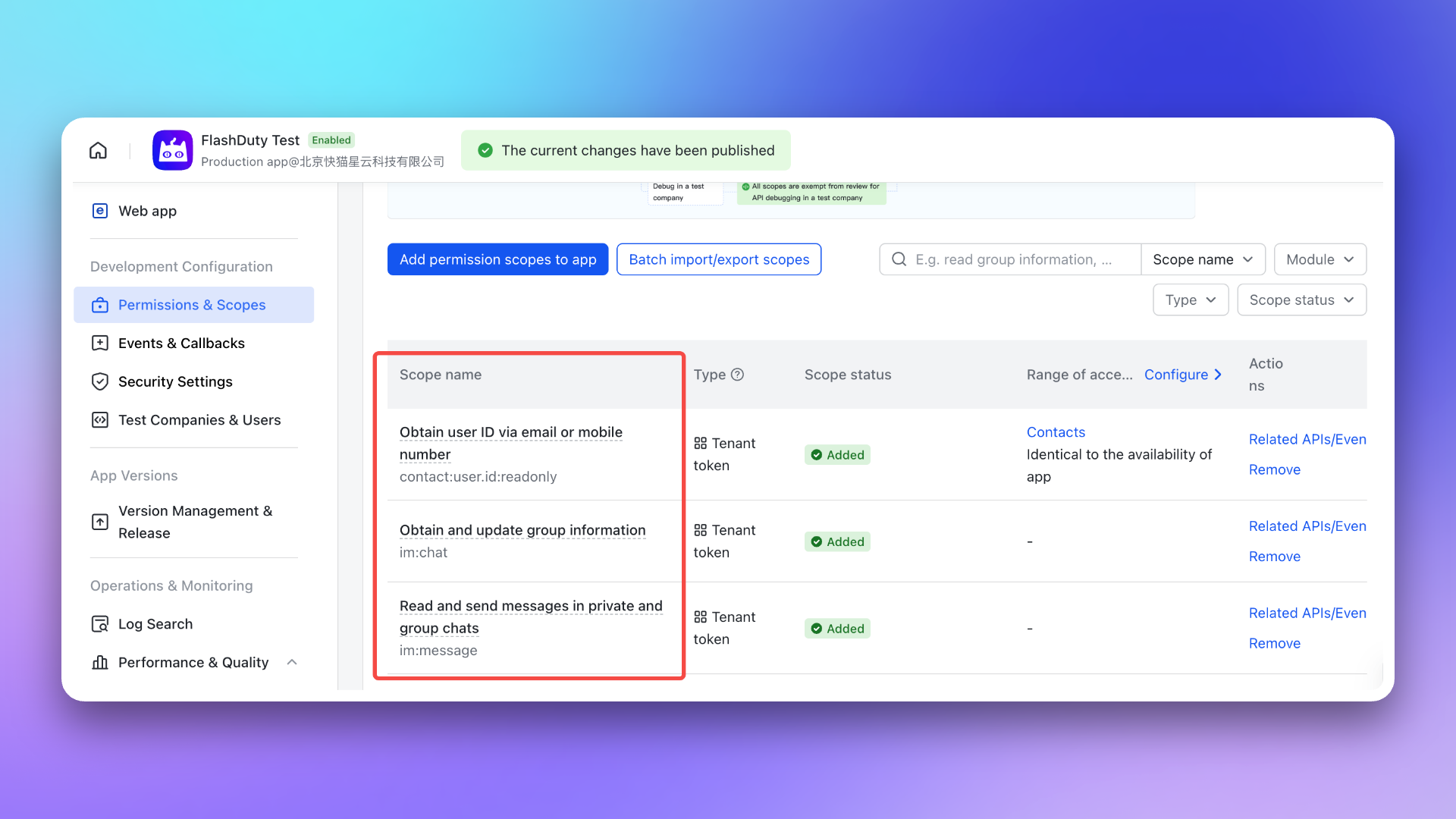
- \`im:chat\`: Get and update group information
|
|
5883
6473
|
- \`im:message\`: Get and send single chat and group messages
|
|
5884
|
-
- \`contact:user.id:readonly\`: Get user ID by phone number or email
|
|
6474
|
+
- \`contact:user.id:readonly\`: Get user ID by phone number or email
|
|
6475
|
+
- \`im:message.group_msg\`: Read group chat history (required for AI-generated post-mortem to access war room conversations) <span id="war-room-scope"></span>
|
|
5885
6476
|
|
|
5886
6477
|
|
|
5887
6478
|
|
|
@@ -5944,7 +6535,8 @@ After completing the previous steps, in the **Enhanced Features** module of the
|
|
|
5944
6535
|
> After exceeding API call limits, the Feishu/Lark application will not be able to push messages normally. It is recommended to use notification channels reasonably. See [Feishu/Lark official documentation](https://open.feishu.cn/document/uAjLw4CM/ugTN1YjL4UTN24CO1UjN/platform-updates-/custom-app-api-call-limit) for details.
|
|
5945
6536
|
5. **Why is the war room feature not working as expected?**
|
|
5946
6537
|
- Please check again whether you have configured the [required permissions](#war-room-scope) for the war room feature.
|
|
5947
|
-
- Please refer to the **FAQ** section of the Flashduty [War Room Introduction](https://docs.flashcat.cloud/en/flashduty/war-room?nav=01JCQ7A4N4WRWNXW8EWEHXCMF5)
|
|
6538
|
+
- Please refer to the **FAQ** section of the Flashduty [War Room Introduction](https://docs.flashcat.cloud/en/flashduty/war-room?nav=01JCQ7A4N4WRWNXW8EWEHXCMF5).
|
|
6539
|
+
`,re=`---
|
|
5948
6540
|
title: "Dingtalk Integration"
|
|
5949
6541
|
description: "By integrating a custom Dingtalk application, you can receive and respond to alerts within Dingtalk."
|
|
5950
6542
|
date: "2025-05-19T10:00:00+08:00"
|
|
@@ -6167,7 +6759,7 @@ After the application is published, you can access it via the **mobile client**
|
|
|
6167
6759
|
| Professional | 500,000 | 40 | 1st of each month |
|
|
6168
6760
|
| Exclusive | 5,500,000 | 60 | 1st of each month |
|
|
6169
6761
|
|
|
6170
|
-
> After exceeding the API call limit, the Dingtalk application will not be able to push messages normally. It is recommended to use notification channels reasonably. For details, see the [official Dingtalk documentation](https://open.dingtalk.com/document/orgapp/descriptions-about-adjusting-limit-and-frequency-of-api-calls?spm=ding_open_doc.document.0.0.6f6b21d9WtkxJI).`,
|
|
6762
|
+
> After exceeding the API call limit, the Dingtalk application will not be able to push messages normally. It is recommended to use notification channels reasonably. For details, see the [official Dingtalk documentation](https://open.dingtalk.com/document/orgapp/descriptions-about-adjusting-limit-and-frequency-of-api-calls?spm=ding_open_doc.document.0.0.6f6b21d9WtkxJI).`,le=`---
|
|
6171
6763
|
title: "WeCom Integration"
|
|
6172
6764
|
description: "By integrating a WeCom application, you can receive and respond to alerts within WeCom."
|
|
6173
6765
|
date: "2025-05-19T10:00:00+08:00"
|
|
@@ -6309,7 +6901,7 @@ After completing the previous steps, in the **Enhanced Features** module of the
|
|
|
6309
6901
|
8. **Why is the war room feature not working as expected?**
|
|
6310
6902
|
- Please refer to the **FAQ** section of the Flashduty [War Room Introduction](https://docs.flashcat.cloud/en/flashduty/war-room?nav=01JCQ7A4N4WRWNXW8EWEHXCMF5).
|
|
6311
6903
|
9. **Why does it prompt "redirect_uri needs to use the application's trusted domain" when opening the app in the WeCom workspace?**
|
|
6312
|
-
- Please confirm whether the domain in the \`redirect_uri\` parameter of the **App Homepage** URL has completed the domain ownership verification required by WeCom. For details, see the WeCom official documentation ['Enterprise Internal Development Domain Configuration Guide'](https://open.work.weixin.qq.com/wwopen/common/readDocument/40754).`,
|
|
6904
|
+
- Please confirm whether the domain in the \`redirect_uri\` parameter of the **App Homepage** URL has completed the domain ownership verification required by WeCom. For details, see the WeCom official documentation ['Enterprise Internal Development Domain Configuration Guide'](https://open.work.weixin.qq.com/wwopen/common/readDocument/40754).`,de=`---
|
|
6313
6905
|
title: "Slack Integration"
|
|
6314
6906
|
description: "By integrating the Slack third-party application, you can receive and respond to alerts within Slack."
|
|
6315
6907
|
date: "2025-05-19T10:00:00+08:00"
|
|
@@ -6333,6 +6925,8 @@ By integrating the Slack third-party application, you can receive and respond to
|
|
|
6333
6925
|
|
|
6334
6926
|
After completing the previous steps, in the **Enhanced Features** module of the Flashduty integration configuration page, check **Enable War Room** to enable this feature without additional configuration.
|
|
6335
6927
|
|
|
6928
|
+
To enable AI-generated post-mortem with war room chat history, the app requires additional \`channels:history\` permission. For existing Slack integrations, you need to manually re-authorize to grant this permission.
|
|
6929
|
+
|
|
6336
6930
|
## 3. FAQ
|
|
6337
6931
|
|
|
6338
6932
|
---
|
|
@@ -6363,7 +6957,8 @@ After completing the previous steps, in the **Enhanced Features** module of the
|
|
|
6363
6957
|
- If the error persists after retrying, please contact customer service to record and resolve new issues.
|
|
6364
6958
|
9. **Why is the war room feature not working as expected?**
|
|
6365
6959
|
- For previously authorized Slack IM integrations, you need to manually reauthorize Slack in the Flashduty integration configuration page to grant the application the additional permissions required for the war room feature.
|
|
6366
|
-
- Please refer to the **FAQ** section of the Flashduty [War Room Introduction](https://docs.flashcat.cloud/en/flashduty/war-room?nav=01JCQ7A4N4WRWNXW8EWEHXCMF5)
|
|
6960
|
+
- Please refer to the **FAQ** section of the Flashduty [War Room Introduction](https://docs.flashcat.cloud/en/flashduty/war-room?nav=01JCQ7A4N4WRWNXW8EWEHXCMF5).
|
|
6961
|
+
`,ce=`---
|
|
6367
6962
|
title: "Microsoft Teams Integration"
|
|
6368
6963
|
description: "By integrating the Microsoft Teams third-party application, you can receive and respond to alerts within Microsoft Teams."
|
|
6369
6964
|
date: "2025-05-19T10:00:00+08:00"
|
|
@@ -6478,7 +7073,7 @@ Copy and send the command \`linkUser {}\` to the chat, then click **Link Now**.
|
|
|
6478
7073
|
2. **How to view linked teams and users?**
|
|
6479
7074
|
- Please go to Integration Center → IM → **Microsoft Teams** to view in **Linked Teams** and **Linked Users**.
|
|
6480
7075
|
3. **How to cancel linked teams and users?**
|
|
6481
|
-
- This feature is not currently supported.`,
|
|
7076
|
+
- This feature is not currently supported.`,ue=`Configure alert webhooks to receive HTTP callbacks at your specified URL when alerts have specific actions (such as triggering or closing). The callback content includes the latest key information about the alert, allowing integration with your custom tools.
|
|
6482
7077
|
|
|
6483
7078
|
<span id="EventTypes"></span>
|
|
6484
7079
|
|
|
@@ -6632,7 +7227,7 @@ curl -X POST 'https://example.com/alert/webhook?a=a' \\
|
|
|
6632
7227
|
|
|
6633
7228
|
2. **Will failed pushes continue to be pushed?**
|
|
6634
7229
|
|
|
6635
|
-
For specific network errors, retries will be attempted up to a maximum of
|
|
7230
|
+
For specific network errors, retries will be attempted up to a maximum of 1 times:
|
|
6636
7231
|
- context deadline exceeded (excluding cases involving "awaiting headers")
|
|
6637
7232
|
- i/o timeout
|
|
6638
7233
|
- eof
|
|
@@ -6645,7 +7240,7 @@ curl -X POST 'https://example.com/alert/webhook?a=a' \\
|
|
|
6645
7240
|
4. **Trusted IP whitelist for push sources?**
|
|
6646
7241
|
- {ip_whitelist}
|
|
6647
7242
|
- May be updated in the future, please check periodically
|
|
6648
|
-
`,
|
|
7243
|
+
`,he=`Configure incident webhooks to receive HTTP callbacks at your specified URL when incidents have specific actions (such as triggering or closing). The callback content includes the latest key information about the incident, allowing integration with your custom tools.
|
|
6649
7244
|
|
|
6650
7245
|
<span id="EventTypes"></span>
|
|
6651
7246
|
|
|
@@ -6843,7 +7438,7 @@ curl -X POST 'https://example.com/incident/webhook?a=a' \\
|
|
|
6843
7438
|
|
|
6844
7439
|
2. **Will failed pushes continue to be pushed?**
|
|
6845
7440
|
|
|
6846
|
-
For specific network errors, retries will be attempted up to a maximum of
|
|
7441
|
+
For specific network errors, retries will be attempted up to a maximum of 1 times:
|
|
6847
7442
|
- context deadline exceeded (excluding cases involving "awaiting headers")
|
|
6848
7443
|
- i/o timeout
|
|
6849
7444
|
- eof
|
|
@@ -6855,7 +7450,7 @@ curl -X POST 'https://example.com/incident/webhook?a=a' \\
|
|
|
6855
7450
|
|
|
6856
7451
|
4. **Trusted IP whitelist for push sources?**
|
|
6857
7452
|
- {ip_whitelist}
|
|
6858
|
-
- May be updated in the future, please check periodically`,
|
|
7453
|
+
- May be updated in the future, please check periodically`,ge=`Custom incident actions allow you to quickly invoke external interfaces during incident troubleshooting for incident self-healing, information enrichment, and other custom operations.
|
|
6859
7454
|
|
|
6860
7455
|
## I. Creating Actions
|
|
6861
7456
|
|
|
@@ -7095,7 +7690,7 @@ When an incident occurs and is confirmed to be caused by a change, directly trig
|
|
|
7095
7690
|
|
|
7096
7691
|
### Update Status Page
|
|
7097
7692
|
|
|
7098
|
-
When an incident is confirmed to affect online services, trigger external status page updates to prompt`,
|
|
7693
|
+
When an incident is confirmed to affect online services, trigger external status page updates to prompt`,pe=`---
|
|
7099
7694
|
title: "Jira Sync"
|
|
7100
7695
|
description: "Sync incidents with Jira issues through Jira Sync Webhook."
|
|
7101
7696
|
date: "2025-05-19T10:00:00+08:00"
|
|
@@ -7177,7 +7772,7 @@ In the Integration Center, select **Webhook**, choose **Jira Sync** integration,
|
|
|
7177
7772
|
|
|
7178
7773
|
- Flashduty syncs information according to default field mappings and your custom field configurations. If your Jira issue type has required fields without mapping relationships, Jira issue creation may fail.
|
|
7179
7774
|
- Jira issue details are accessed using project KEY + number format. If you modify the project KEY, saved issue URLs in Flashduty may become inaccessible, so please modify project KEYs with caution.
|
|
7180
|
-
`,
|
|
7775
|
+
`,me=`---
|
|
7181
7776
|
title: "ServiceNow Sync"
|
|
7182
7777
|
description: "Sync incidents with ServiceNow Incidents through ServiceNow sync webhook."
|
|
7183
7778
|
date: "2025-05-19T10:00:00+08:00"
|
|
@@ -7493,7 +8088,7 @@ Only when ServiceNow's Urgency value changes will it affect Flashduty's Severity
|
|
|
7493
8088
|
<details>
|
|
7494
8089
|
<summary>Getting 401 error when configuring integration</summary>
|
|
7495
8090
|
A 401 error is generally caused by an incorrect password. Please check if the password is correct, or reset a new password (when setting the password, do not check the "Password needs reset" option).
|
|
7496
|
-
</details>`,
|
|
8091
|
+
</details>`,fe=`---
|
|
7497
8092
|
title: "ServiceDesk Plus Sync"
|
|
7498
8093
|
description: "Sync incidents with ServiceDesk Plus requests through ServiceDesk Plus sync webhook."
|
|
7499
8094
|
date: "2025-05-19T10:00:00+08:00"
|
|
@@ -7663,7 +8258,7 @@ To achieve synchronization of ServiceDesk Plus requests to Flashduty, please ref
|
|
|
7663
8258
|
<summary> Can the Scope be changed</summary>
|
|
7664
8259
|
No, the Scope currently used is already the smallest unit. Flashduty needs to perform get/create/update operations when syncing requests with ServiceDesk Plus, and needs to obtain priority/custom field lists when configuring integration, so corresponding permission support is required.
|
|
7665
8260
|
</details>
|
|
7666
|
-
`,
|
|
8261
|
+
`,ye=`---
|
|
7667
8262
|
title: "Configure Notification Templates"
|
|
7668
8263
|
description: "Customize notification content through template configuration"
|
|
7669
8264
|
date: "2024-05-10T10:00:00+08:00"
|
|
@@ -8220,7 +8815,8 @@ If you want to display only key label information, you can refer to the code seg
|
|
|
8220
8815
|
\`\`\`
|
|
8221
8816
|
</div>
|
|
8222
8817
|
|
|
8223
|
-
<div class="
|
|
8818
|
+
<div class="feishu hide">
|
|
8819
|
+
|
|
8224
8820
|
|
|
8225
8821
|
## Feishu/Lark Bot
|
|
8226
8822
|
---
|
|
@@ -8490,6 +9086,7 @@ Description:{{toHtml .Description}}{{end}}{{if gt (len .Responders) 0}}
|
|
|
8490
9086
|
Responders:{{range .Responders}}@{{.PersonName}} {{end}}{{end}}
|
|
8491
9087
|
<br>Details:{{.DetailUrl}}
|
|
8492
9088
|
\`\`\`
|
|
9089
|
+
|
|
8493
9090
|
</div>
|
|
8494
9091
|
|
|
8495
9092
|
<div class="dingtalk hide">
|
|
@@ -8734,6 +9331,19 @@ You have a pending incident: {{toHtml .Title}}, Channel: {{.ChannelName}}, Sever
|
|
|
8734
9331
|
\`\`\`
|
|
8735
9332
|
</div>
|
|
8736
9333
|
|
|
9334
|
+
|
|
9335
|
+
<div class="voice hide">
|
|
9336
|
+
|
|
9337
|
+
## Voice
|
|
9338
|
+
---
|
|
9339
|
+
If no custom content is set, the system default template will be used for notifications:
|
|
9340
|
+
|
|
9341
|
+
\`\`\`go
|
|
9342
|
+
You have a pending incident: {{toHtml .Title}}, Channel: {{.ChannelName}}, Severity: {{.IncidentSeverity}}{{if gt .AlertCnt 1}}, Grouped {{.AlertCnt}} alerts{{end}}
|
|
9343
|
+
\`\`\`
|
|
9344
|
+
</div>
|
|
9345
|
+
|
|
9346
|
+
|
|
8737
9347
|
<div class="email hide">
|
|
8738
9348
|
|
|
8739
9349
|
## Email
|
|
@@ -9068,7 +9678,7 @@ As shown in the image below:
|
|
|
9068
9678
|
|
|
9069
9679
|
<img src="https://download.flashcat.cloud/flashduty/changelog/20230720/email_render.png" alt="drawing" style="display: block; margin: 0 auto;" width="500"/>
|
|
9070
9680
|
|
|
9071
|
-
</div>`,
|
|
9681
|
+
</div>`,be=`---
|
|
9072
9682
|
title: "Link Integration"
|
|
9073
9683
|
description: "Through Link integration, you can quickly access external links by obtaining key parameters from incident attributes, labels, and other information"
|
|
9074
9684
|
date: "2025-05-19T10:00:00+08:00"
|
|
@@ -9125,7 +9735,7 @@ https://cmdb.com/vm?sn=VM123456
|
|
|
9125
9735
|
1. When referenced content does not exist, Link integration will still generate the corresponding link but will not be able to retrieve the value
|
|
9126
9736
|
2. Each channel can bind up to three Link integrations
|
|
9127
9737
|
3. Pay attention to reference syntax; improper variable reference formatting will result in failure to retrieve corresponding values
|
|
9128
|
-
`,
|
|
9738
|
+
`,ve=`Configure Label Mapping API to automatically call your external API when alert events arrive, enabling dynamic enrichment and correlation of alert information. With this feature, you can automatically attach information from external data sources such as CMDB, HR systems, and more to your alerts.
|
|
9129
9739
|
|
|
9130
9740
|
## I. Overview
|
|
9131
9741
|
|
|
@@ -9302,7 +9912,7 @@ To prevent security bypasses, request smuggling, IP spoofing, and cache poisonin
|
|
|
9302
9912
|
### Header Best Practices
|
|
9303
9913
|
|
|
9304
9914
|
1. **Allowlist Mode**: It is recommended to only allow custom Headers prefixed with \`X-Custom-\` or \`X-Enrich-\`
|
|
9305
|
-
2. **Length Limits**: The Key
|
|
9915
|
+
2. **Length Limits**: The Key length of a single Header should not exceed 1024 bytes, the Value length of a single Header should not exceed 4096 bytes
|
|
9306
9916
|
3. **Format Validation**: Header Values must not contain line breaks (\`\\r\`, \`\\n\`) to prevent Header injection attacks
|
|
9307
9917
|
|
|
9308
9918
|
## V. Best Practices
|
|
@@ -9329,4 +9939,4 @@ To prevent security bypasses, request smuggling, IP spoofing, and cache poisonin
|
|
|
9329
9939
|
3. **Can result_label_keys be changed dynamically?**
|
|
9330
9940
|
|
|
9331
9941
|
- Yes, you can modify the list of expected labels in Flashduty at any time without modifying the API code
|
|
9332
|
-
`,
|
|
9942
|
+
`,we={CustomAlert:n,Email:t,N9e:a,Prometheus:o,Grafana:i,Zabbix:s,UptimeKuma:r,AliyunARMS:l,AliyunCmEvent:d,AliyunCm:c,AliyunSLS:e,AWSCW:e,AzureMonitor:u,BaiDuBCM:h,HuaWeiCES:g,InfluxDB:p,OpenFalcon:m,PagerDuty:f,TencentBK:y,TencentCLS:b,TencentCm:v,TencentEb:w,OceanBase:C,Graylog:k,Skywalking:I,Sentry:S,Jiankongbao:A,AWSEventBridge:x,Dynatrace:F,HuaweiyunLTS:_,GoogleCM:R,Zilliz:G,Splunk:L,AppDynamics:T,SolarWinds:U,VolcEngineMetric:E,VolcEngineEvent:P,VolcEngineTLS:N,OpManager:D,Meraki:M,StateCloud:W,Guance:q,CustomChange:oe,Jira:ie,Lark:se,Dingtalk:re,Wecom:le,Slack:de,MicrosoftTeams:ce,AlertWebhook:ue,IncidentWebhook:he,CustomAction:ge,Templates:ye,HuaweiyunAPM:O,JiraSync:pe,ZStack:$,Keep:H,ElastAlert2:j,DingtalkAlert:Y,FeishuAlert:z,VolcEngineDetect:B,Link:be,ServiceNowSync:me,Monit:V,Rum:K,Cloudflare:J,WecomAlert:Z,ServiceDeskPlusSync:fe,Harbor:Q,LabelMappingAPI:ve,VolcEngineRTC:X,UcloudCloudWatch:ee,Nagios:ne,JDCloudMonitor:te,AliyunPrometheus:ae};module.exports=we;
|