flashduty-knowledge-base 1.3.4 → 1.3.5
This diff represents the content of publicly available package versions that have been released to one of the supported registries. The information contained in this diff is provided for informational purposes only and reflects changes between package versions as they appear in their respective public registries.
- package/README.md +14 -2
- package/dist/en.d.ts +2 -0
- package/dist/esm/en.js +362 -50
- package/dist/esm/zh.js +372 -61
- package/dist/iife/en.js +347 -35
- package/dist/iife/zh.js +357 -46
- package/dist/zh.d.ts +2 -0
- package/package.json +1 -1
package/dist/iife/en.js
CHANGED
|
@@ -310,7 +310,7 @@ attachment_stripped = true
|
|
|
310
310
|
---
|
|
311
311
|
|
|
312
312
|
Currently, all alerts pushed to Flashduty through the email integration are set to Warning severity. However, you can customize the severity using the [alert pipeline](https://docs.flashcat.cloud/en/flashduty/alert-pipelines).
|
|
313
|
-
`,
|
|
313
|
+
`,i=`---
|
|
314
314
|
title: "Nightingale/Flashcat Integration"
|
|
315
315
|
description: "Push alert events from Nightingale (n9e) or Flashcat to Flashduty via webhook. When an alert is triggered, send a trigger event to Flashduty; when an alert recovers, send a recovery event to Flashduty"
|
|
316
316
|
date: "2025-05-19T10:00:00+08:00"
|
|
@@ -506,7 +506,7 @@ Nightingale/Flashcat to Flashduty alert severity mapping:
|
|
|
506
506
|
|
|
507
507
|
</details>
|
|
508
508
|
|
|
509
|
-
`,
|
|
509
|
+
`,o=`---
|
|
510
510
|
title: "Prometheus Integration Guide"
|
|
511
511
|
description: "Push Prometheus alert events to Flashduty through AlertManager using webhooks. When an alert is triggered, it sends a trigger event to Flashduty, and when the alert recovers, it sends a recovery event."
|
|
512
512
|
date: "2025-05-19T10:00:00+08:00"
|
|
@@ -1369,7 +1369,7 @@ Alibaba Cloud Monitor event alert to Flashduty severity level mapping:
|
|
|
1369
1369
|
| WARNING | Warning | Warning |
|
|
1370
1370
|
| INFO | Info | Info |
|
|
1371
1371
|
|
|
1372
|
-
</div>`,
|
|
1372
|
+
</div>`,u=`---
|
|
1373
1373
|
title: "Alibaba Cloud Monitor CM Metrics Integration"
|
|
1374
1374
|
description: "Sync Alibaba Cloud Monitor alert events to Flashduty via webhook for automated alert noise reduction"
|
|
1375
1375
|
date: "2025-05-19T10:00:00+08:00"
|
|
@@ -1594,7 +1594,7 @@ Alibaba Cloud SLS monitoring to Flashduty alert severity mapping:
|
|
|
1594
1594
|
| 2 | Info | Info |
|
|
1595
1595
|
|
|
1596
1596
|
</div>
|
|
1597
|
-
`,
|
|
1597
|
+
`,h={CustomAlert:t,Email:a,N9e:i,Prometheus:o,Grafana:s,Zabbix:r,UptimeKuma:l,AliyunARMS:d,AliyunCmEvent:c,AliyunCm:u,AliyunSLS:e,AWSCW:e,AzureMonitor:`---
|
|
1598
1598
|
title: "AWS CloudWatch Integration"
|
|
1599
1599
|
description: "Sync AWS CloudWatch alert events to Flashduty via webhook to achieve automated alert noise reduction"
|
|
1600
1600
|
date: "2025-05-19T10:00:00+08:00"
|
|
@@ -4865,12 +4865,19 @@ For details, see the Feishu/Lark development documentation [Configure applicatio
|
|
|
4865
4865
|
|
|
4866
4866
|
|
|
4867
4867
|
|
|
4868
|
-
3. Go to Event Callbacks → **
|
|
4868
|
+
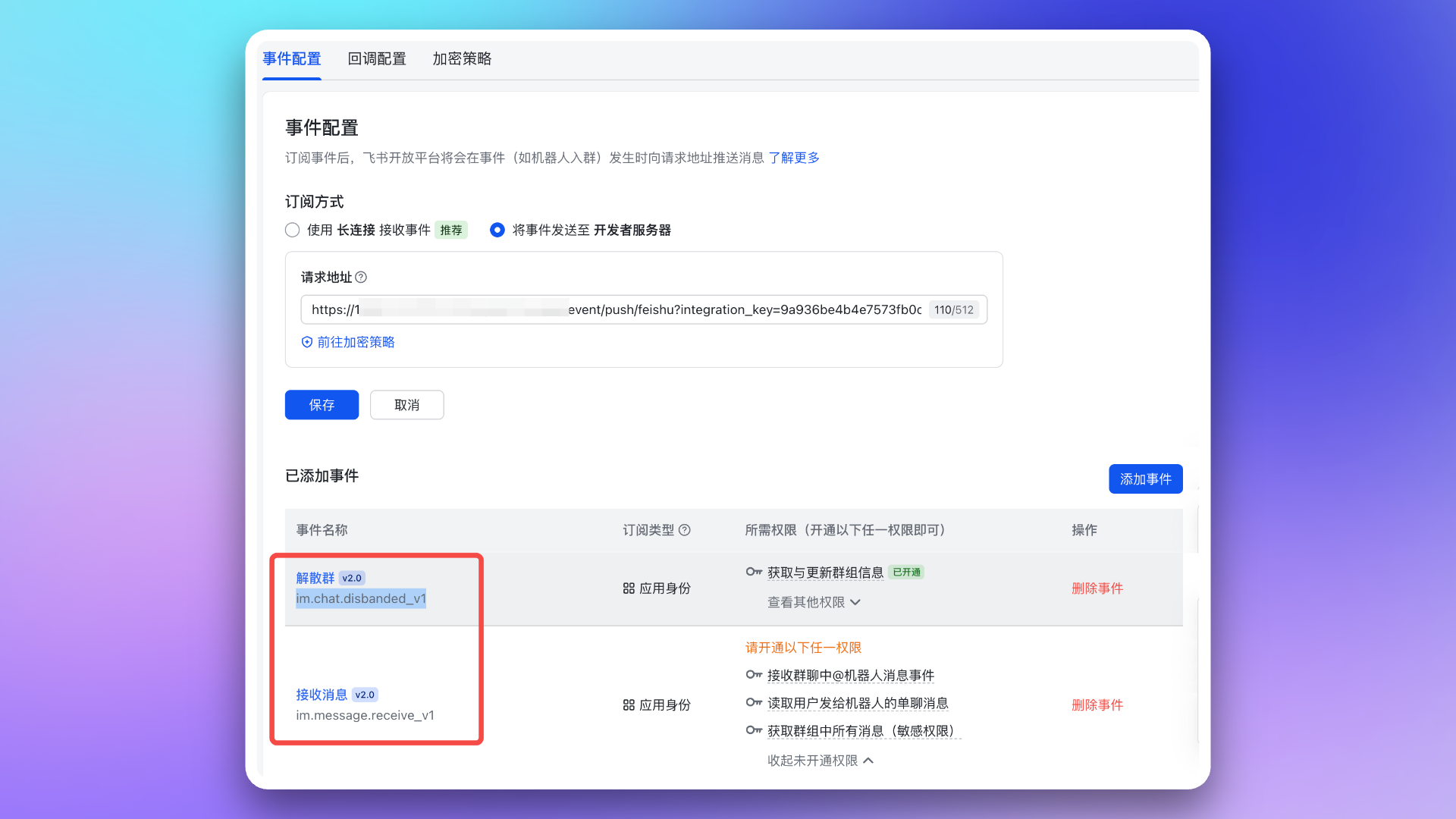
3. Go to Event Callbacks → **Event Configuration** page, configure the \`Request URL\` (using the **Message Card Request URL** from the integration details). Then, add the following two events:
|
|
4869
4869
|
|
|
4870
|
-
- \`im.message.receive_v1\`
|
|
4871
4870
|
- \`im.chat.disbanded_v1\`
|
|
4871
|
+
- \`im.message.receive_v1\`
|
|
4872
|
+
|
|
4873
|
+
|
|
4874
|
+
|
|
4875
|
+
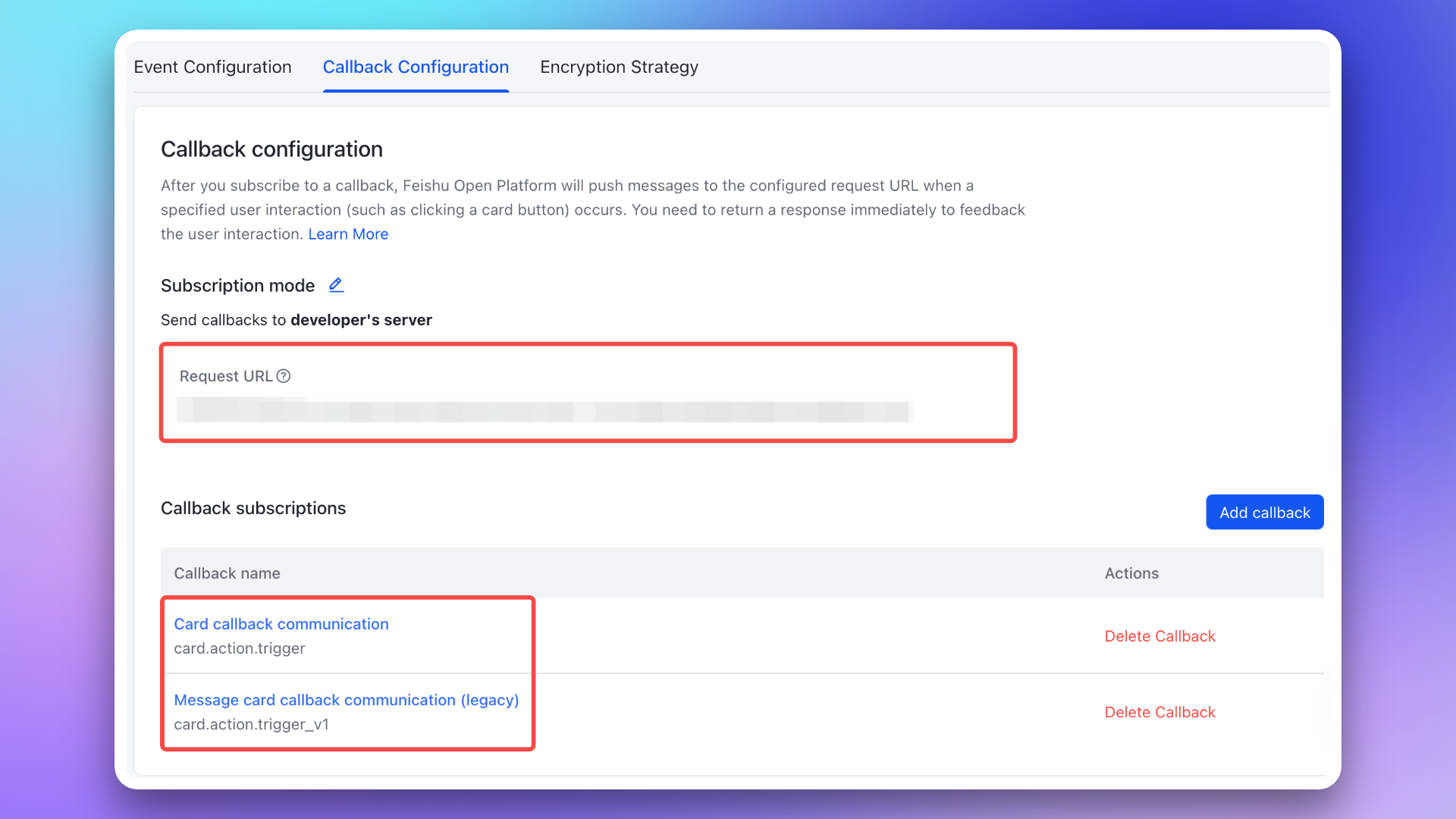
4. Go to Event Callbacks → **Callback Configuration** page, configure the \`Request URL\` (using the **Message Card Request URL** from the integration details). Then, subscribe to the following two callbacks:
|
|
4872
4876
|
|
|
4873
|
-
|
|
4877
|
+
- \`card.action.trigger\`
|
|
4878
|
+
- \`card.action.trigger_v1\`
|
|
4879
|
+
|
|
4880
|
+
|
|
4874
4881
|
|
|
4875
4882
|
### 2. Add redirect URL to Feishu/Lark application
|
|
4876
4883
|
|
|
@@ -4886,7 +4893,7 @@ Go to the **Permission Management** page and apply for the following permissions
|
|
|
4886
4893
|
|
|
4887
4894
|
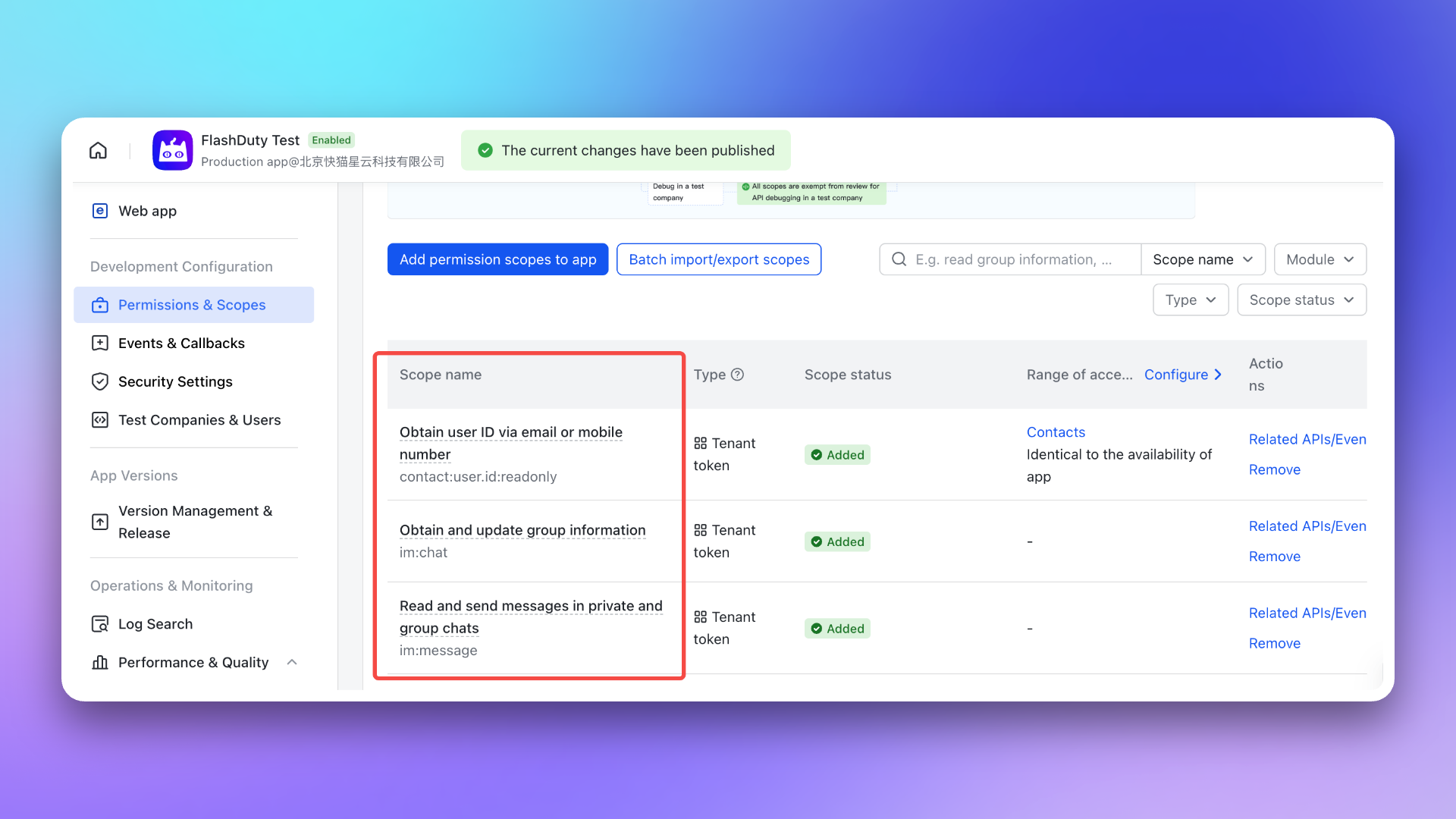
- \`im:chat\`: Get and update group information
|
|
4888
4895
|
- \`im:message\`: Get and send single chat and group messages
|
|
4889
|
-
- \`contact:user.id:readonly\`: Get user ID by phone number or email
|
|
4896
|
+
- \`contact:user.id:readonly\`: Get user ID by phone number or email <span id="war-room-scope"></span>
|
|
4890
4897
|
|
|
4891
4898
|
|
|
4892
4899
|
|
|
@@ -5258,6 +5265,10 @@ This document supports both [integrating third-party applications](#third-party)
|
|
|
5258
5265
|
|
|
5259
5266
|
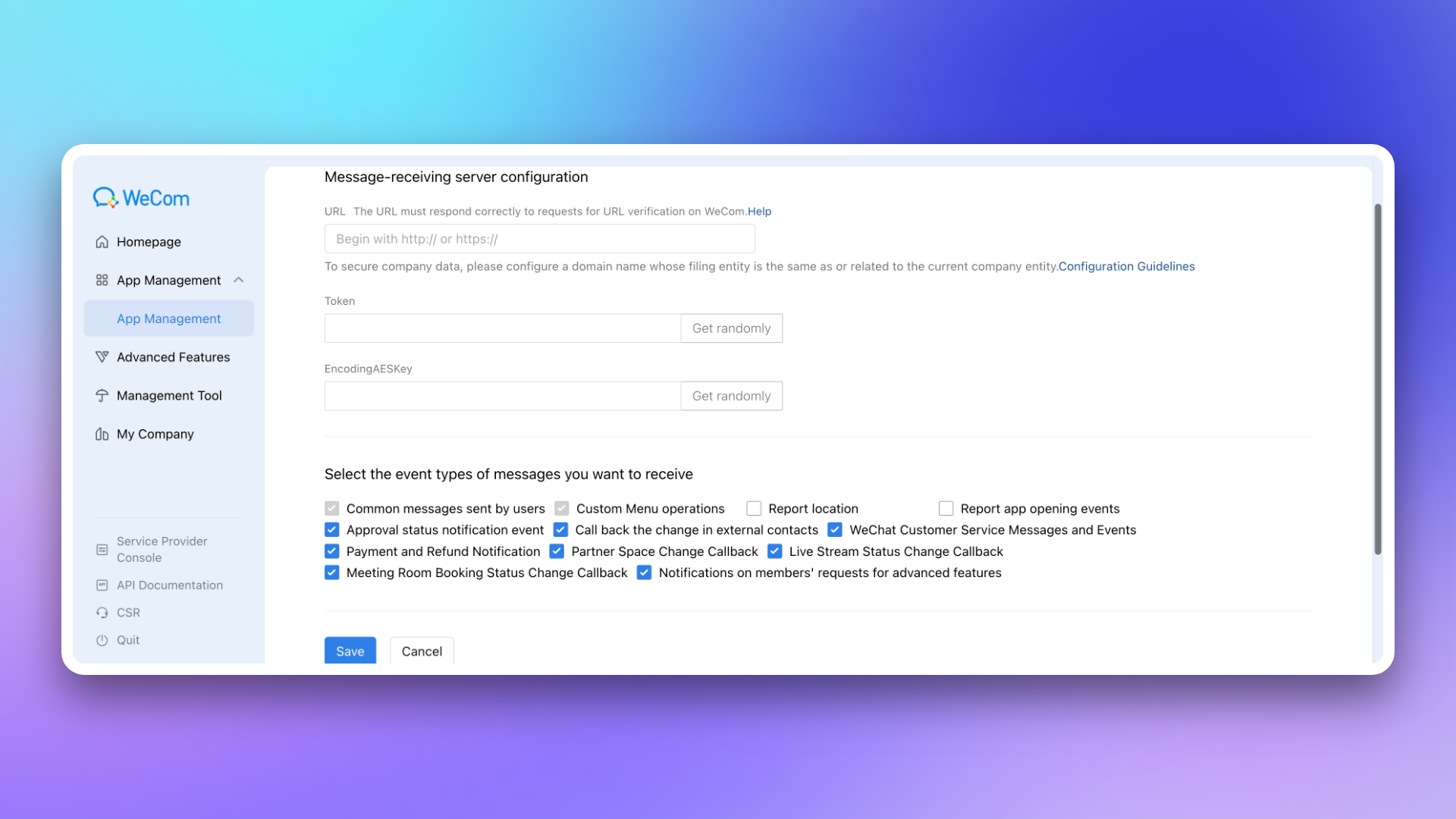
|
|
5260
5267
|
|
|
5268
|
+
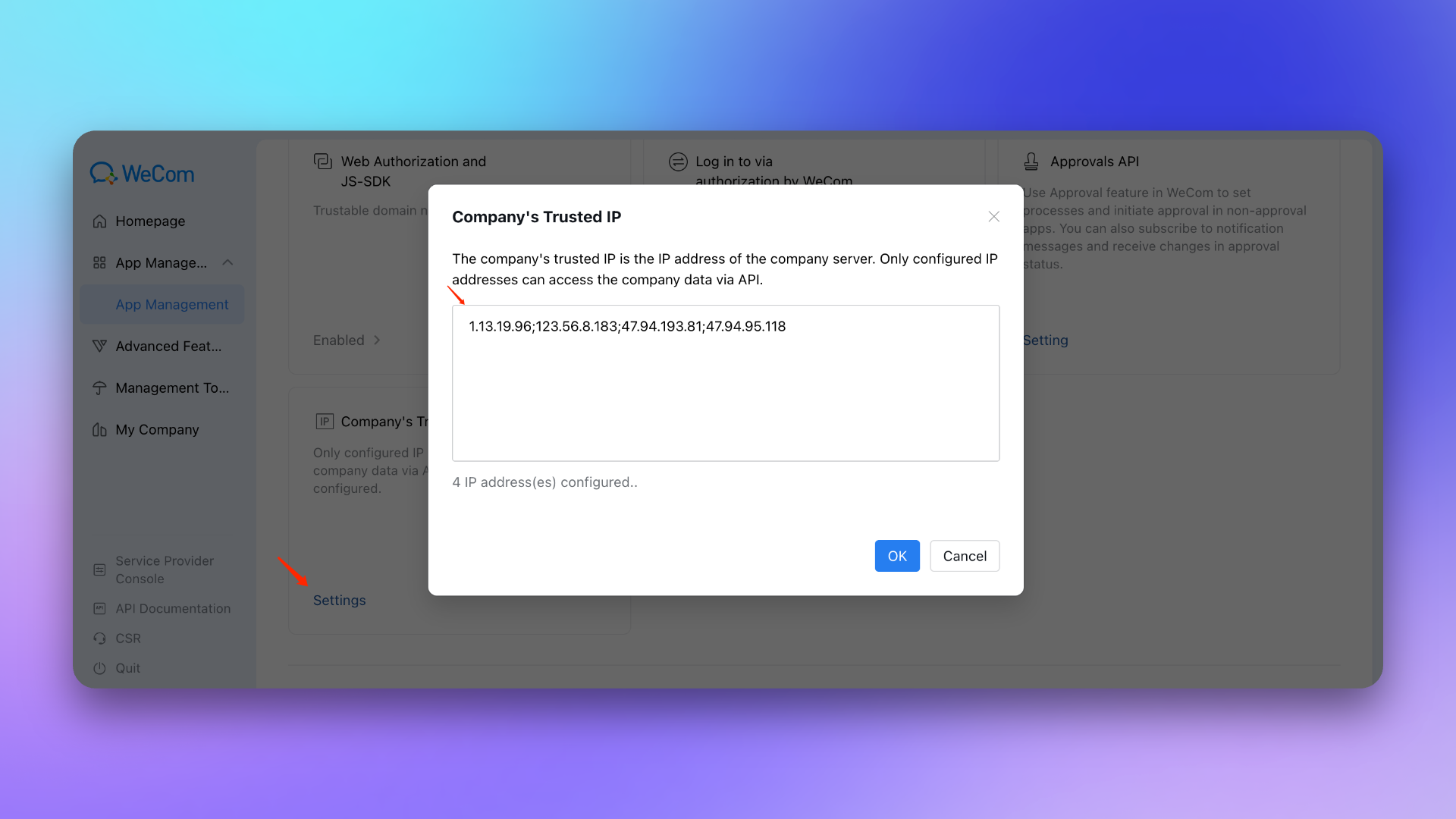
10. Company's Trusted IP : 47.94.95.118; 123.56.8.183; 47.94.193.81; 1.13.19.96
|
|
5269
|
+
|
|
5270
|
+
|
|
5271
|
+
|
|
5261
5272
|
## 3. Configure war room
|
|
5262
5273
|
|
|
5263
5274
|
---
|
|
@@ -5388,7 +5399,7 @@ If the application status is "Blocked", please wait a moment and refresh the pag
|
|
|
5388
5399
|
#### Check if successfully added
|
|
5389
5400
|
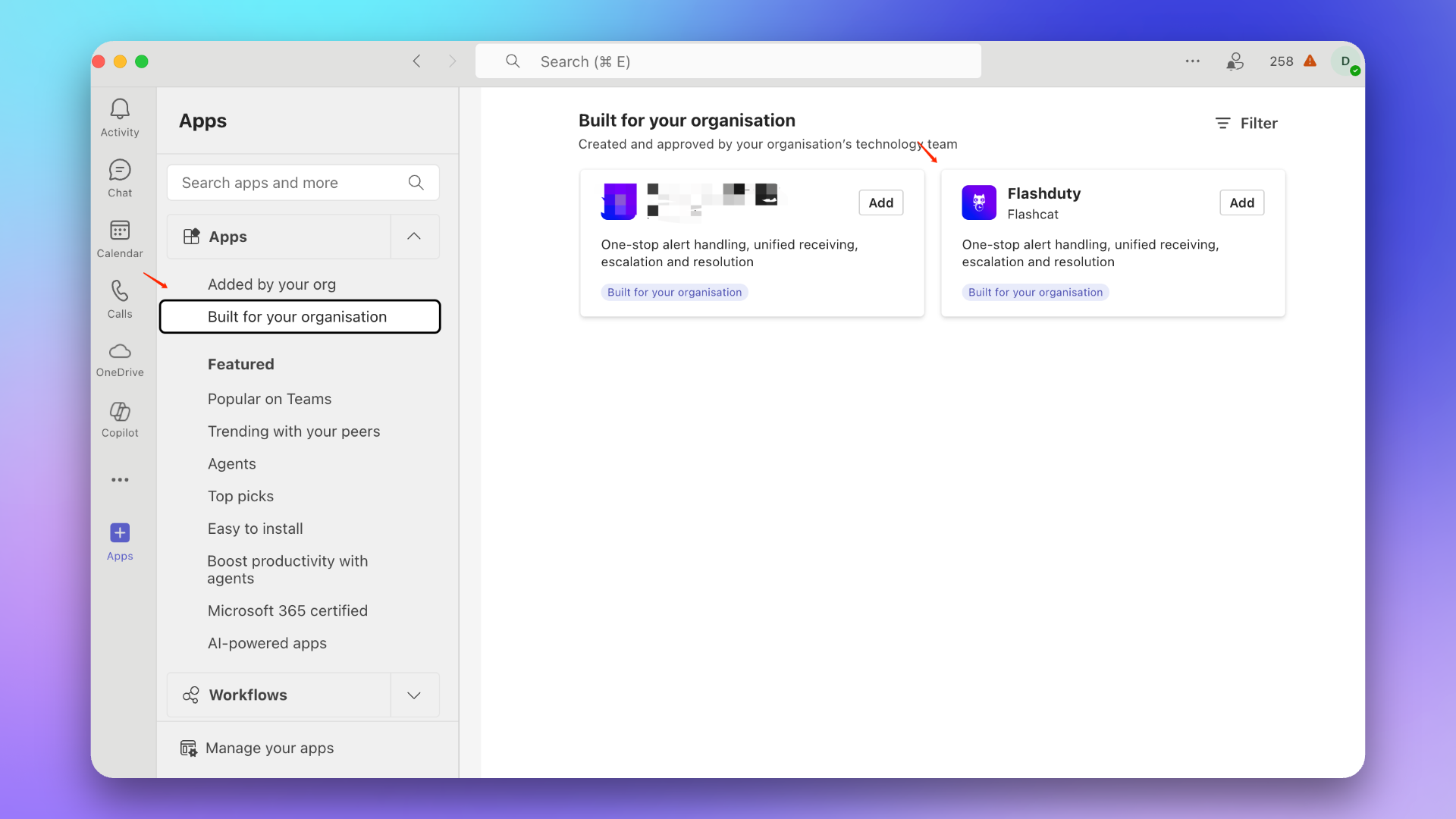
After waiting a few minutes, organization members can find this application in +Apps → **Built for your org**.
|
|
5390
5401
|
|
|
5391
|
-
|
|
5392
5403
|
|
|
5393
5404
|
### 3. Update application
|
|
5394
5405
|
::: caution
|
|
@@ -5410,14 +5421,14 @@ If your installed application version is lower than 1.0.3, please follow this pr
|
|
|
5410
5421
|
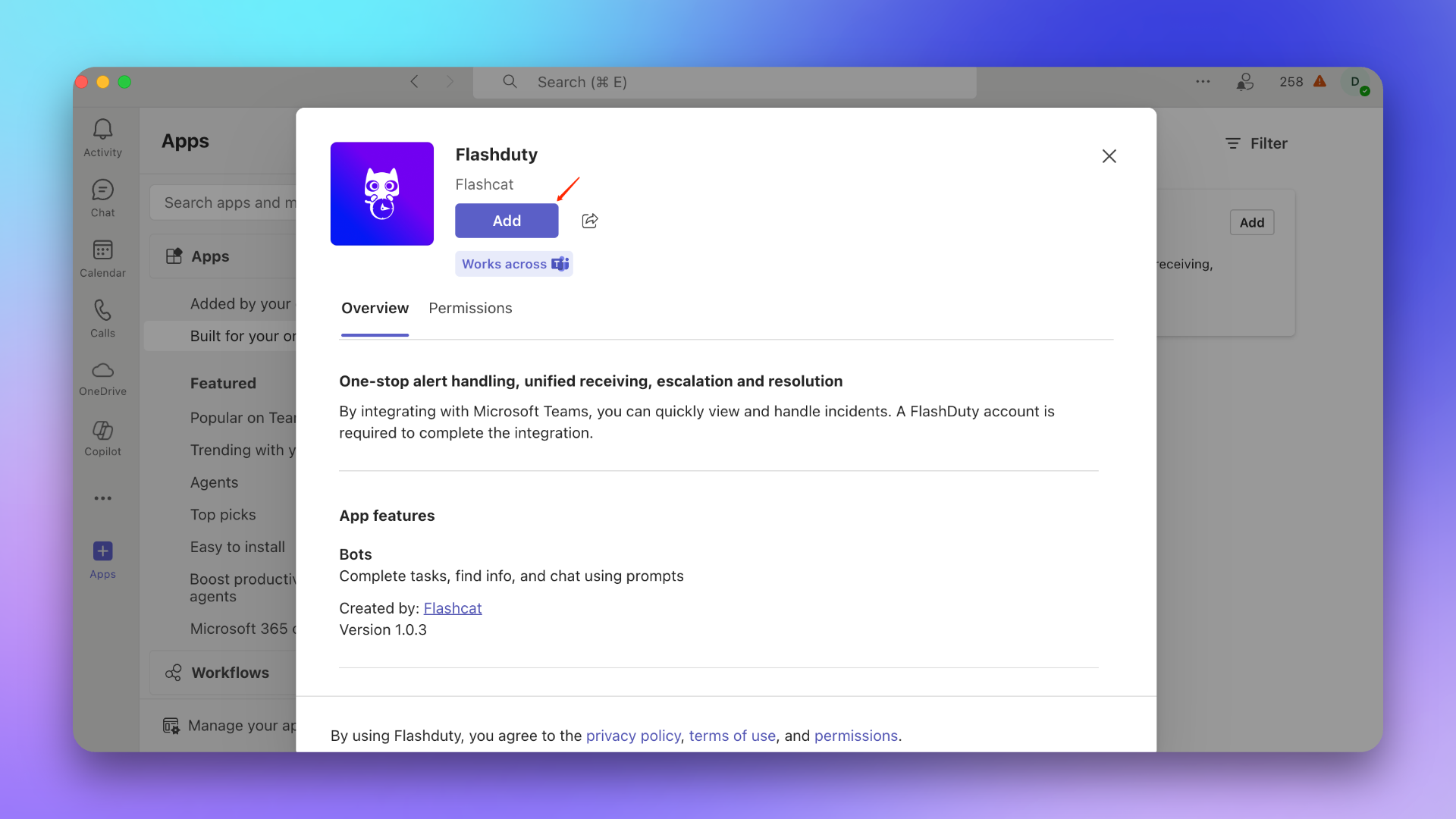
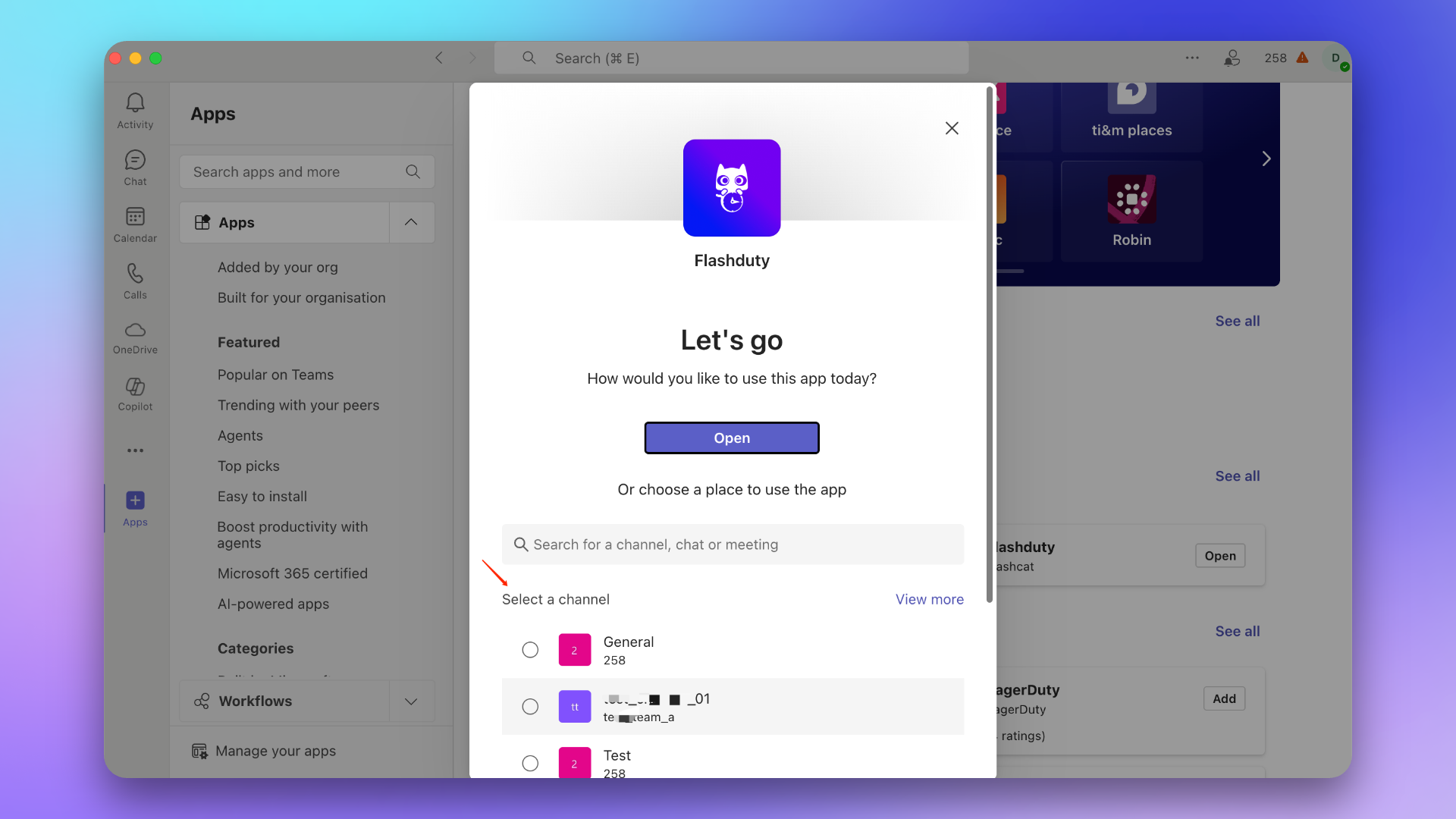
1. Find the Flashduty application in the app marketplace.
|
|
5411
5422
|
> If there is no application, please contact your Microsoft Teams organization administrator.
|
|
5412
5423
|
|
|
5413
|
-
|
|
5414
5425
|
|
|
5415
5426
|
2. Add the application to the target Team.
|
|
5416
5427
|
::: caution
|
|
5417
5428
|
This step must select the General Channel of the target Team, otherwise incidents cannot be sent to the Team.
|
|
5418
5429
|
:::
|
|
5419
5430
|
|
|
5420
|
-
|
|
5421
5432
|
|
|
5422
5433
|
### 2. Send link command
|
|
5423
5434
|
In the Team, @Flashduty and send the command \`linkTeam {ID}\`, then click **Link Now**.
|
|
@@ -5430,11 +5441,11 @@ In the Team, @Flashduty and send the command \`linkTeam {ID}\`, then click **Lin
|
|
|
5430
5441
|
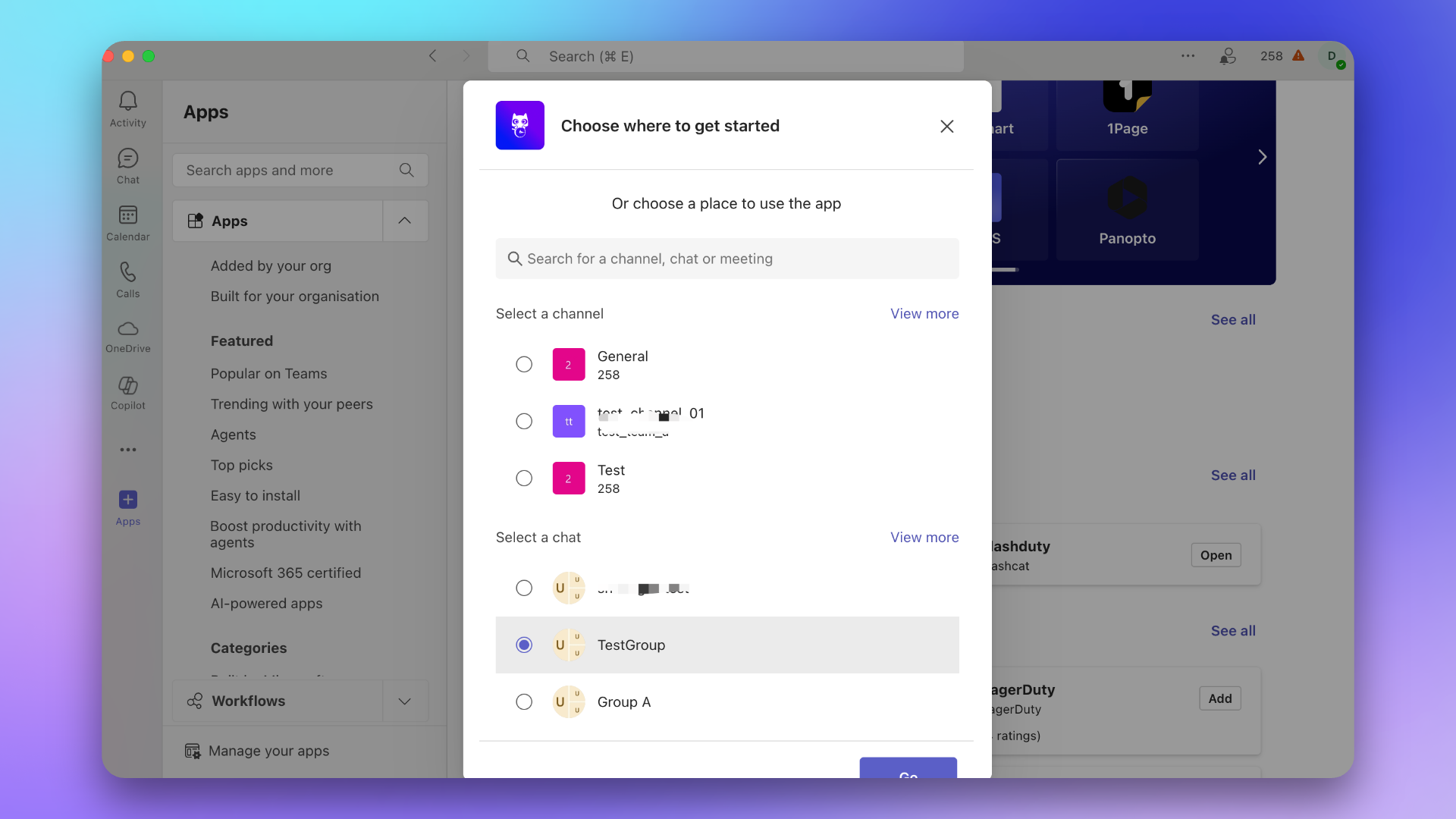
1. Find the Flashduty application in the app marketplace.
|
|
5431
5442
|
> If there is no application, please contact your Microsoft Teams organization administrator.
|
|
5432
5443
|
|
|
5433
|
-

|
|
5434
5445
|
|
|
5435
5446
|
2. Add the application to the target Chat.
|
|
5436
5447
|
|
|
5437
|
-
|
|
5438
5449
|
|
|
5439
5450
|
### 2. Send link command
|
|
5440
5451
|
In the Chat, @Flashduty and send the command \`linkChat {ID} {ChatName}\`, then click **Link Now**.
|
|
@@ -5447,7 +5458,7 @@ In the Chat, @Flashduty and send the command \`linkChat {ID} {ChatName}\`, then
|
|
|
5447
5458
|
1. Find the Flashduty application in the app marketplace.
|
|
5448
5459
|
> If there is no application, please contact your Microsoft Teams organization administrator.
|
|
5449
5460
|
|
|
5450
|
-

|
|
5451
5462
|
|
|
5452
5463
|
2. Click **Open Application**.
|
|
5453
5464
|
|
|
@@ -8049,6 +8060,7 @@ Through ServiceNow sync webhook, Flashduty incidents are associated and synchron
|
|
|
8049
8060
|
## In ServiceNow
|
|
8050
8061
|
|
|
8051
8062
|
### Create User
|
|
8063
|
+
Create a user to connect to the ServiceNow instance for Incident sync and updates. Skip this step if you already have an available user.
|
|
8052
8064
|
|
|
8053
8065
|
1. Log in to the ServiceNow instance console, select \`ALL\`, enter \`USERS\` and select \`Organization\`-\`Users\`.
|
|
8054
8066
|
2. Click \`New\` to create a new user.
|
|
@@ -8060,14 +8072,20 @@ Through ServiceNow sync webhook, Flashduty incidents are associated and synchron
|
|
|
8060
8072
|
|
|
8061
8073
|
### Configure User
|
|
8062
8074
|
|
|
8063
|
-
|
|
8075
|
+
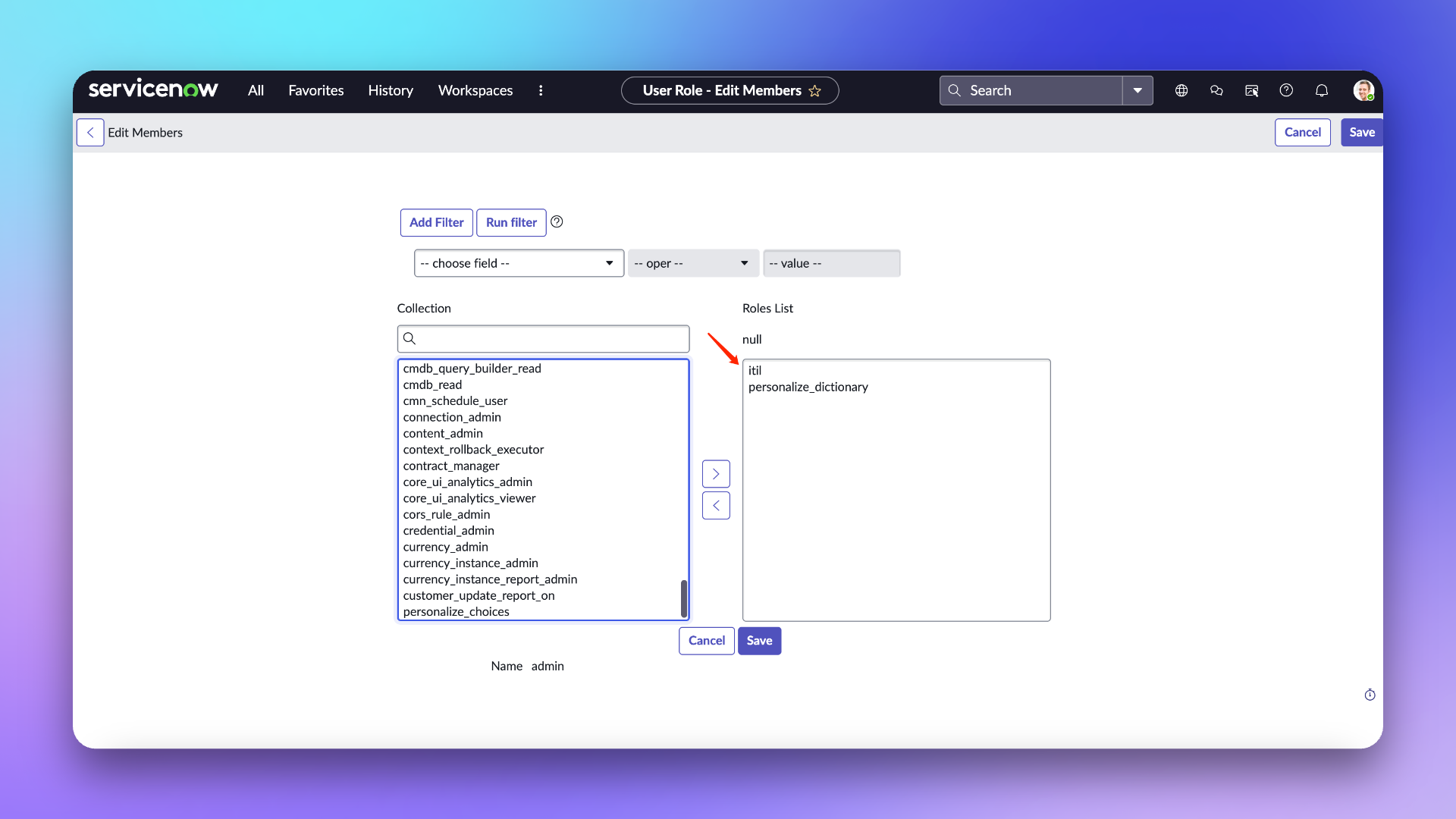
> **User Role Description**
|
|
8076
|
+
> **itil:** The main usage scope of this role in Flashduty is limited to field retrieval in ServiceNow Incident Table and does not involve any other operations.
|
|
8077
|
+
>
|
|
8078
|
+
> **personalize_dictionary:** This role in Flashduty is primarily used only for field retrieval from ServiceNow Incident Tables, and does not involve any other operations.
|
|
8079
|
+
>
|
|
8080
|
+
> For more information about the permission scope of these two roles, please refer to the ServiceNow [official documentation](https://www.servicenow.com/docs/bundle/washingtondc-platform-administration/page/administer/roles/reference/r_BaseSystemRoles.html#d130465e3182)
|
|
8064
8081
|
|
|
8065
8082
|
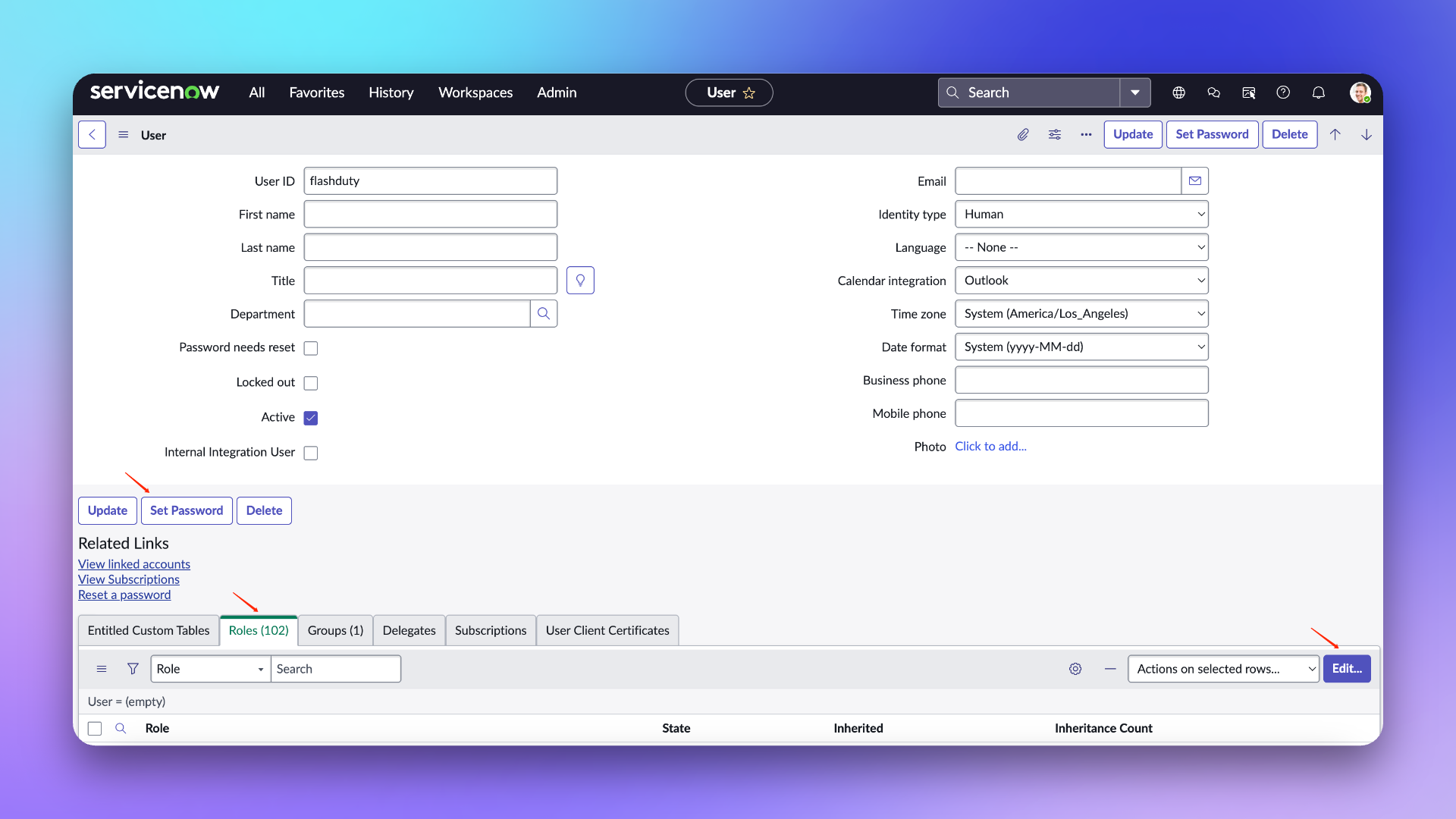
1. On the user list page, find the newly created \`flashduty\` user and go to the configuration page.
|
|
8066
8083
|
2. In the edit page, click \`Set Password\` to set a password.
|
|
8067
8084
|
3. Click \`Roles\` to add **personalize_dictionary and itil** roles (If custom field mapping configuration is not required, the personalize_dictionary permission does not need to be retained).
|
|
8068
8085
|
4. Click \`Update\` to update the configuration.
|
|
8069
8086
|
|
|
8070
|
-
|
|
8087
|
+
|
|
8088
|
+
|
|
8071
8089
|
|
|
8072
8090
|
## In Flashduty
|
|
8073
8091
|
|
|
@@ -8079,14 +8097,27 @@ Enter the username/password and instance name configured above into the integrat
|
|
|
8079
8097
|
- **Management Team:** When a management team is selected, only team members and tenant administrators can edit this integration.
|
|
8080
8098
|
- **Channel:** Select the channel where this integration takes effect.
|
|
8081
8099
|
- **Sync Direction:**
|
|
8100
|
+
|
|
8082
8101
|
- To_ServiceNow: Sync Flashduty incidents to ServiceNow.
|
|
8083
8102
|
- From_ServiceNow: Sync ServiceNow Incidents to Flashduty.
|
|
8084
8103
|
- Two-way: Bidirectional sync between Flashduty and ServiceNow.
|
|
8085
|
-
|
|
8104
|
+
|
|
8105
|
+
- **Trigger Mode:**
|
|
8106
|
+
|
|
8086
8107
|
- Auto Trigger: Requires configuration of corresponding conditions, Flashduty will automatically sync incidents that meet the conditions to ServiceNow.
|
|
8087
8108
|
- Manual Trigger: Requires manual triggering of ServiceNow sync in the More Actions section of the incident details page (the integration configuration name is the trigger name).
|
|
8088
|
-
|
|
8089
|
-
- **
|
|
8109
|
+
|
|
8110
|
+
- **Severity Mapping:**
|
|
8111
|
+
- ServiceNow's Priority is determined by the combined values of Impact and Urgency, so you can refer to ServiceNow's \`Priority Lookup Rules\` for configuration.
|
|
8112
|
+
- Only when the Urgency of a ServiceNow Incident changes will it trigger an update to the Flashduty incident severity.
|
|
8113
|
+
- Since Flashduty cannot obtain ServiceNow's Impact and Urgency lists while following the principle of least privilege, only default values are provided. If you need to customize the mapping relationship, please contact technical support.
|
|
8114
|
+
|
|
8115
|
+
- **Custom Field Mapping:** You can map tags or custom fields from incidents to corresponding text fields in ServiceNow tickets, enabling automatic information filling. This feature supports synchronizing common contextual information (such as service name, instance address, metric name, etc.) to ServiceNow for easier subsequent troubleshooting and tracking.
|
|
8116
|
+
|
|
8117
|
+
- Only supports target fields of single-line text or multi-line text types.
|
|
8118
|
+
- Supports extracting values from incident tags (such as service, instance) or custom attributes.
|
|
8119
|
+
- If the source field is empty, the target field will also remain empty and will not overwrite existing content.
|
|
8120
|
+
- Mapping configurations are managed centrally in integration settings, eliminating the need for manual entry each time.
|
|
8090
8121
|
|
|
8091
8122
|
## In ServiceNow
|
|
8092
8123
|
|
|
@@ -8294,23 +8325,23 @@ Note: The body configures default receiving fields. If you have custom fields th
|
|
|
8294
8325
|
|
|
8295
8326
|
| ServiceNow | Flashduty | Notes |
|
|
8296
8327
|
| ------------------- | ------------- | ----- |
|
|
8297
|
-
| Short_description | Title |
|
|
8298
|
-
| Description | Description |
|
|
8299
|
-
| Additional comments | Comments |
|
|
8300
|
-
| State | Progress |
|
|
8301
|
-
| Urgency | Severity |
|
|
8302
|
-
| Others | Custom Fields |
|
|
8328
|
+
| Short_description | Title | Title |
|
|
8329
|
+
| Description | Description | Description |
|
|
8330
|
+
| Additional comments | Comments | Comments |
|
|
8331
|
+
| State | Progress | Progress |
|
|
8332
|
+
| Urgency | Severity | Severity |
|
|
8333
|
+
| Others | Custom Fields | Custom Fields |
|
|
8303
8334
|
|
|
8304
8335
|
### Status Mapping
|
|
8305
8336
|
|
|
8306
8337
|
| ServiceNow | Flashduty | Notes |
|
|
8307
8338
|
| ----------- | ---------- | ---------------------- |
|
|
8308
|
-
| New | Trigger |
|
|
8309
|
-
| In Progress | Processing |
|
|
8339
|
+
| New | Trigger | Trigger |
|
|
8340
|
+
| In Progress | Processing | Processing |
|
|
8310
8341
|
| On Hold | Snoozed | Default snooze 2 hours |
|
|
8311
|
-
| Resolved | CLosed |
|
|
8312
|
-
| Closed | CLosed |
|
|
8313
|
-
| Canceled | CLosed |
|
|
8342
|
+
| Resolved | CLosed | CLosed |
|
|
8343
|
+
| Closed | CLosed | CLosed |
|
|
8344
|
+
| Canceled | CLosed | CLosed |
|
|
8314
8345
|
|
|
8315
8346
|
### Priority Mapping
|
|
8316
8347
|
|
|
@@ -8318,10 +8349,22 @@ Only when ServiceNow's Urgency value changes will it affect Flashduty's Severity
|
|
|
8318
8349
|
|
|
8319
8350
|
| ServiceNow | Flashduty | Notes |
|
|
8320
8351
|
| ---------- | --------- | ----- |
|
|
8321
|
-
| Low | Info |
|
|
8322
|
-
| Medium | Warning |
|
|
8323
|
-
| High | Critical |
|
|
8324
|
-
|
|
8352
|
+
| Low | Info | Info |
|
|
8353
|
+
| Medium | Warning | Warning |
|
|
8354
|
+
| High | Critical | Critical |
|
|
8355
|
+
|
|
8356
|
+
|
|
8357
|
+
## QA
|
|
8358
|
+
|
|
8359
|
+
<details>
|
|
8360
|
+
<summary>Can the UserID be customized when creating a new ServiceNow user?</summary>
|
|
8361
|
+
Yes, it can be customized. The documentation uses "flashduty" as the UserID to better identify that this user is used for Incident synchronization.
|
|
8362
|
+
</details>
|
|
8363
|
+
|
|
8364
|
+
<details>
|
|
8365
|
+
<summary>Getting 401 error when configuring integration</summary>
|
|
8366
|
+
A 401 error is generally caused by an incorrect password. Please check if the password is correct, or reset a new password (when setting the password, do not check the "Password needs reset" option).
|
|
8367
|
+
</details>`,Monit:`---
|
|
8325
8368
|
title: "Monit Alert Integration"
|
|
8326
8369
|
description: "Flashduty Monit alert integration, Monit service reports alerts through this integration"
|
|
8327
8370
|
date: "2025-05-19T10:00:00+08:00"
|
|
@@ -8432,4 +8475,273 @@ Currently, all alerts pushed to Flashduty through the Cloudflare integration are
|
|
|
8432
8475
|
|
|
8433
8476
|
</div>
|
|
8434
8477
|
|
|
8435
|
-
|
|
8478
|
+
`,WecomAlert:`---
|
|
8479
|
+
title: "Wecom Alert Integration"
|
|
8480
|
+
description: "Generate a unique Wecom robot address in Flashduty, and synchronize the occurrence and recovery of alerts through Wecom"
|
|
8481
|
+
date: "2025-05-19T10:00:00+08:00"
|
|
8482
|
+
url: "https://docs.flashcat.cloud/en/flashduty/Wecom-alert-integration-guide"
|
|
8483
|
+
---
|
|
8484
|
+
|
|
8485
|
+
Generate a unique Wecom robot address in Flashduty, and synchronize the occurrence and recovery of alerts through Wecom.
|
|
8486
|
+
|
|
8487
|
+
<div class="hide">
|
|
8488
|
+
|
|
8489
|
+
## Operation Steps
|
|
8490
|
+
---
|
|
8491
|
+
|
|
8492
|
+
### Create Wecom Alert Integration
|
|
8493
|
+
|
|
8494
|
+
You can obtain a Wecom alert integration address through either of these two methods:
|
|
8495
|
+
|
|
8496
|
+
#### Using Dedicated Integration
|
|
8497
|
+
|
|
8498
|
+
Choose this method when you don't need to route alert events to different channels. It's simpler and recommended.
|
|
8499
|
+
|
|
8500
|
+
<details>
|
|
8501
|
+
<summary>Expand</summary>
|
|
8502
|
+
|
|
8503
|
+
1. Go to the Flashduty console, select **Channel**, and enter a specific channel's details page
|
|
8504
|
+
2. Select the **Integration** tab, click **Add Integration** to enter the integration page
|
|
8505
|
+
3. Choose **Wecom Alert** integration and click **Save** to generate a card
|
|
8506
|
+
4. Click the generated card to view the **Wecom Alert Integration URL**, copy it for later use, and you're done
|
|
8507
|
+
|
|
8508
|
+
</details>
|
|
8509
|
+
|
|
8510
|
+
#### Using Shared Integration
|
|
8511
|
+
|
|
8512
|
+
Choose this method when you need to route alerts to different channels based on the alert event's payload information.
|
|
8513
|
+
|
|
8514
|
+
<details>
|
|
8515
|
+
<summary>Expand</summary>
|
|
8516
|
+
|
|
8517
|
+
1. Go to the Flashduty console, select **Integration Center => Alert Events** to enter the integration selection page
|
|
8518
|
+
2. Select **Wecom Alert** integration:
|
|
8519
|
+
- **Integration Name**: Define a name for the current integration
|
|
8520
|
+
- **Message Type**: Select Wecom alert message type, currently only Text and Markdown are supported
|
|
8521
|
+
- **Push Mode**: Choose when to trigger or recover alerts for Wecom notifications
|
|
8522
|
+
3. Copy the **Wecom Alert Integration URL** for later use
|
|
8523
|
+
4. Configure the default route and select the corresponding channel (after integration creation, you can go to \`Routes\` to configure more routing rules)
|
|
8524
|
+
5. Done
|
|
8525
|
+
|
|
8526
|
+
</details>
|
|
8527
|
+
</div>
|
|
8528
|
+
|
|
8529
|
+
### Customize Wecom Alert Integration
|
|
8530
|
+
|
|
8531
|
+
#### Wecom Alert Integration URL
|
|
8532
|
+
|
|
8533
|
+
The system will generate a unique Wecom alert integration URL for you. This URL is compatible with Wecom robot message protocol. When platforms only support Wecom robot channels, you can use this URL to receive corresponding messages.
|
|
8534
|
+
|
|
8535
|
+
#### Push Mode
|
|
8536
|
+
|
|
8537
|
+
By default, the system always creates new alerts for each message, but you can switch to these modes:
|
|
8538
|
+
|
|
8539
|
+
**Trigger or Close Alert Based on Rules**: In this mode, when receiving a new message, the system matches messages according to your rules and triggers new alerts or closes existing alerts based on the matching results.
|
|
8540
|
+
|
|
8541
|
+
- You need to fill in at least one **trigger** rule
|
|
8542
|
+
- You must set up regex extraction rules for Alert Key. The system uses this field to find historical alerts for updates or closure. **If regex extraction fails, the system will use the random to generate an Alert Key** to ensure alerts won't be lost due to configuration errors
|
|
8543
|
+
- You can choose whether to discard messages when none of the rules match
|
|
8544
|
+
|
|
8545
|
+
Configuration example:
|
|
8546
|
+
|
|
8547
|
+
- Receive all messages, close the alert when the message content contains **RESOLVED**, otherwise trigger a new alert
|
|
8548
|
+
- Extract Alert Key from messages using the rule **/(.*)/**.
|
|
8549
|
+
|
|
8550
|
+
|
|
8551
|
+
### Notes
|
|
8552
|
+
- Wecom alert integration URL only supports Text and Markdown message types; other message types cannot be received
|
|
8553
|
+
- Flashduty will generate a default alert title: "Wecom robot Alert , If you need to change the title, you can customize it using the [alert pipeline](https://docs.flashcat.cloud/en/flashduty/alert-pipelines)"
|
|
8554
|
+
|
|
8555
|
+
## Severity Mapping
|
|
8556
|
+
---
|
|
8557
|
+
|
|
8558
|
+
Currently, all alerts pushed to Flashduty through the Wecom integration are set to Warning severity. However, you can customize the severity using the [alert pipeline](https://docs.flashcat.cloud/en/flashduty/alert-pipelines).`,ServiceDeskPlusSync:`---
|
|
8559
|
+
title: "ServiceDesk Plus Sync"
|
|
8560
|
+
description: "Sync incidents with ServiceDesk Plus requests through ServiceDesk Plus sync webhook."
|
|
8561
|
+
date: "2025-05-19T10:00:00+08:00"
|
|
8562
|
+
url: "https://docs.flashcat.cloud/en/flashduty/servicedesk-plus-sync"
|
|
8563
|
+
---
|
|
8564
|
+
|
|
8565
|
+
Through ServiceDesk Plus sync webhook, Flashduty incidents are associated and synchronized with ServiceDesk Plus requests to achieve integration between Flashduty and ServiceDesk Plus.
|
|
8566
|
+
|
|
8567
|
+
This integration is based on the official v3 API protocol provided by ServiceDesk Plus and is compatible with its interface specifications. If you are using an on-premises deployment version, please confirm whether its API supports the v3 version. Additionally, there are differences in authorization configuration between the cloud and on-premises of ServiceDesk Plus. Please refer to the relevant documentation for specific configurations.
|
|
8568
|
+
|
|
8569
|
+
- [Cloud](#cloud-version)
|
|
8570
|
+
- [On-premises](#on-premises)
|
|
8571
|
+
|
|
8572
|
+
When configuring this integration, if you choose the sync direction as From_ServiceDesk_Plus, you can skip the authorization-related configuration and directly refer to [Configure Sync](#configure-sync).
|
|
8573
|
+
|
|
8574
|
+
## Cloud <span id="cloud-version"></span>
|
|
8575
|
+
|
|
8576
|
+
### In ServiceDesk Plus
|
|
8577
|
+
#### Step 1 Create Authorization Application
|
|
8578
|
+
Please select the corresponding Developer Console address according to your ServiceDesk Plus service region: [Data Centres](https://www.manageengine.com/products/service-desk/sdpod-v3-api/getting-started/data-centers.html)
|
|
8579
|
+
|
|
8580
|
+
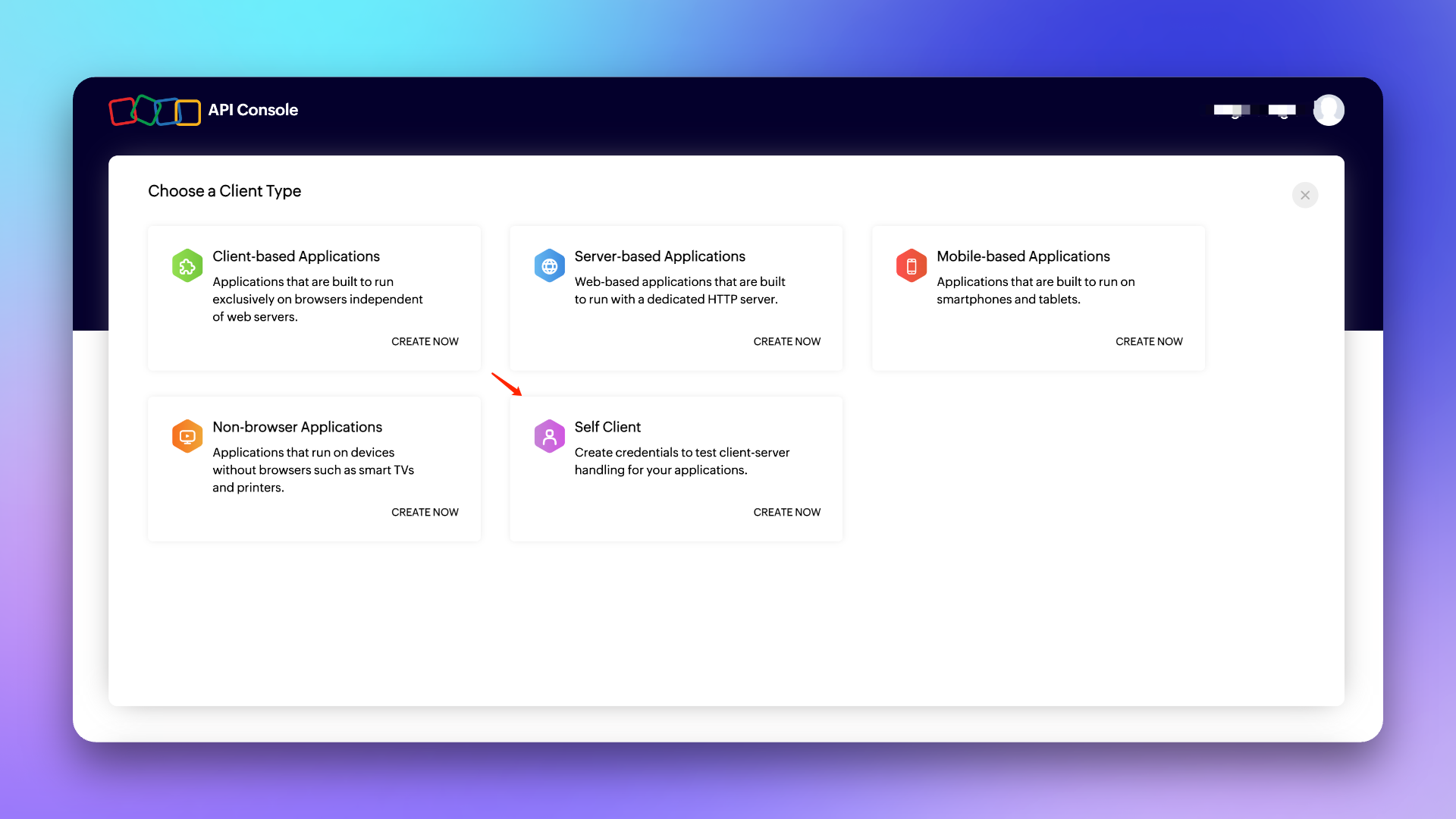
1. Log in to the Developer Console, select \`Self Client\` type Client and create it.
|
|
8581
|
+
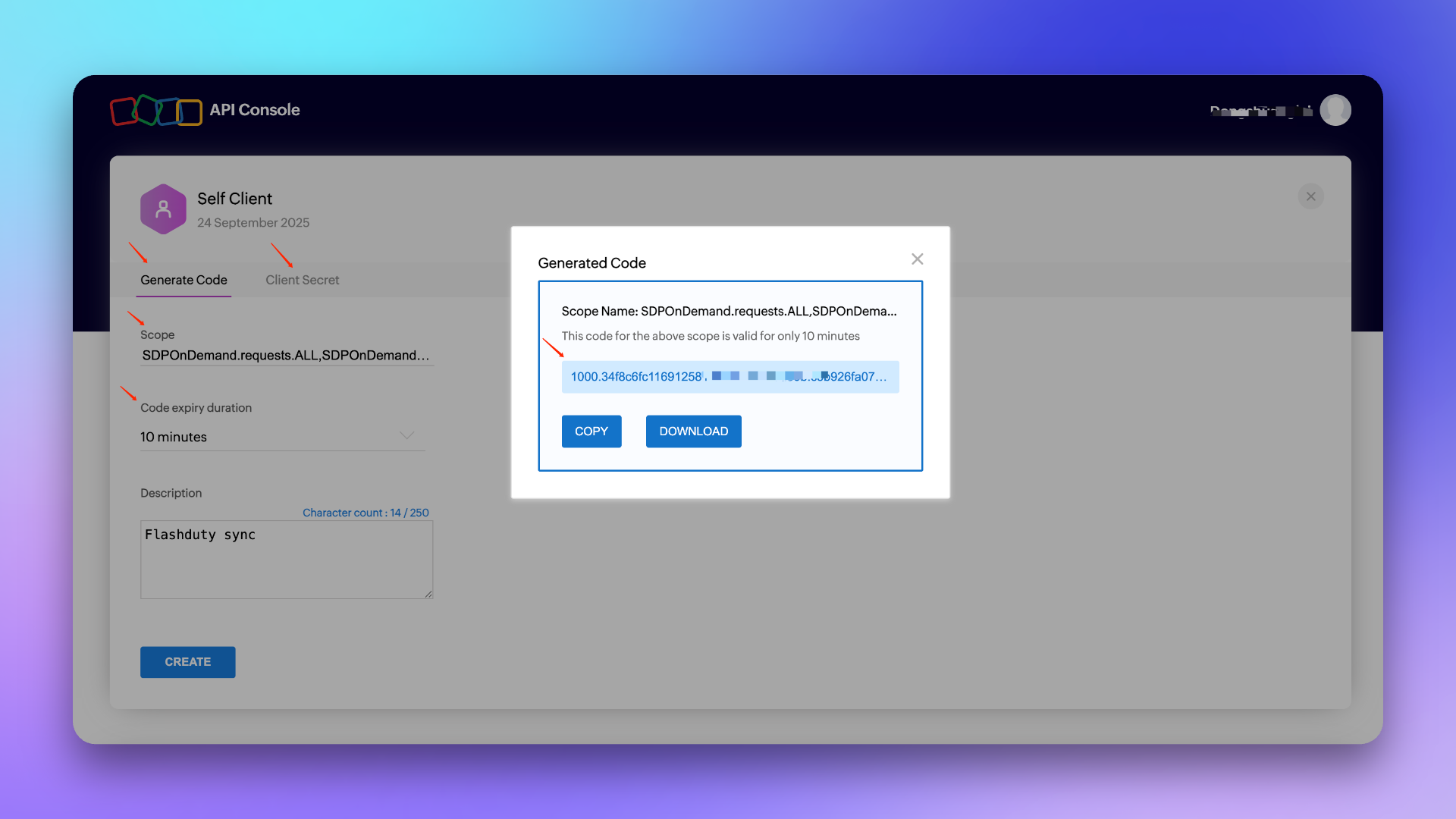
2. Click \`Generate Code\`, fill in the \`Scope\`: **SDPOnDemand.requests.ALL,SDPOnDemand.setup.READ,SDPOnDemand.custommodule.READ**. Refer to [official documentation](https://www.manageengine.com/products/service-desk/sdpod-v3-api/getting-started/oauth-2.0.html#scopes) for permission scope.
|
|
8582
|
+
|
|
8583
|
+
3. Select the maximum **10 minutes** for \`Time Duration\`, fill in the \`Scope Description\` as customizable, for example: For Flashduty sync use, and create.
|
|
8584
|
+
4. Copy the generated **Code**, **Client ID** and **Client Secret** for backup.
|
|
8585
|
+
|
|
8586
|
+
|
|
8587
|
+
|
|
8588
|
+
|
|
8589
|
+
###### Note: The Code is only valid for 10 minutes and can only be used once, so after obtaining the Code, please complete the [Integration Authorization](#integration-authorization) as soon as possible within the validity period.
|
|
8590
|
+
|
|
8591
|
+
### In Flashduty
|
|
8592
|
+
#### Step 2 Integration Authorization <span id="integration-authorization"></span>
|
|
8593
|
+
Please select the corresponding API Endpoint and Accounts Server URL according to your ServiceDesk Plus service region: [Data Centres](https://www.manageengine.com/products/service-desk/sdpod-v3-api/getting-started/data-centers.html)
|
|
8594
|
+
|
|
8595
|
+
1. Select **Cloud** for \`Platform Type\`, fill in \`API Endpoint\` and \`Accounts Server URL\`.
|
|
8596
|
+
2. Fill in the \`Code\`, \`Client ID\` and \`Client Secret\` generated in the **Create Authorization Application** step into the corresponding edit boxes and click Next to complete [Integration Configuration](#integration-configuration) (if an error occurs, please re-obtain the Code or contact technical support to troubleshoot the problem).
|
|
8597
|
+
|
|
8598
|
+
## On-premises <span id="on-premises"></span>
|
|
8599
|
+
### In ServiceDesk Plus
|
|
8600
|
+
#### Step 1 Generate API Key
|
|
8601
|
+
1. Log in to the ServiceDesk Plus console, click \`Generate API Key\` in the personal center.
|
|
8602
|
+
2. Select **Never Expires** for \`Token Expiration Time\`, copy the generated **Token** for backup, and complete [Integration Authorization](#on-premises-integration-authorization).
|
|
8603
|
+
|
|
8604
|
+
###### Note: The user who generates the API key needs to have relevant permissions, such as create/update requests, obtain template/priority/custom field lists and other permissions. If the permissions are insufficient, it will cause the integration configuration to fail. It is recommended to use an administrator role to generate.
|
|
8605
|
+
|
|
8606
|
+
### In Flashduty
|
|
8607
|
+
#### Step 2 Integration Authorization <span id="on-premises-integration-authorization"></span>
|
|
8608
|
+
1. Select **On-premises** for \`Platform Type\`, fill in \`API Endpoint\`.
|
|
8609
|
+
2. Fill in the generated **Token** into the corresponding edit box and click Next to complete [Integration Configuration](#integration-configuration).
|
|
8610
|
+
|
|
8611
|
+
|
|
8612
|
+
## General Configuration
|
|
8613
|
+
|
|
8614
|
+
### In Flashduty
|
|
8615
|
+
#### Step 1 Integration Configuration <span id="integration-configuration"></span>
|
|
8616
|
+
|
|
8617
|
+
1. **Integration Name:** Define a name for the current integration.
|
|
8618
|
+
2. **Management Team:** When a management team is selected, only team members and tenant administrators can edit this integration.
|
|
8619
|
+
3. **Sync Direction:**
|
|
8620
|
+
|
|
8621
|
+
- To_ServiceDesk_Plus: Sync Flashduty incidents to ServiceDesk Plus.
|
|
8622
|
+
- From_ServiceDesk_Plus: Sync ServiceDesk Plus requests to Flashduty.
|
|
8623
|
+
- Two-way: Bidirectional sync between Flashduty and ServiceDesk Plus.
|
|
8624
|
+
|
|
8625
|
+
4. **Trigger Mode**:
|
|
8626
|
+
- Auto Trigger: Requires configuration of corresponding conditions, Flashduty will automatically sync incidents that meet the conditions to ServiceDesk Plus.
|
|
8627
|
+
- Manual Trigger: Requires manual triggering of ServiceDesk Plus sync in the More Actions section of the incident details page (the integration configuration name is the trigger name).
|
|
8628
|
+
|
|
8629
|
+
5. **Channel:** Select the channel where this integration takes effect.
|
|
8630
|
+
6. **Request Template:** Select the template to use when creating requests.
|
|
8631
|
+
7. **Severity Mapping:** The mapping relationship between Flashduty severity and ServiceDesk Plus priority. For default mapping relationship, please refer to [Priority Mapping](#priority-mapping).
|
|
8632
|
+
8. **Custom Field Mapping:** You can map labels or custom fields in incidents to corresponding text fields in ServiceDesk Plus tickets to achieve automatic information filling. This feature supports syncing common context information (such as service name, instance address, metric name, etc.) to ServiceDesk Plus for subsequent troubleshooting and tracking.
|
|
8633
|
+
- Only supports target fields of single-line text or multi-line text type.
|
|
8634
|
+
- Supports extracting values from incident labels (such as service, instance) or custom attributes.
|
|
8635
|
+
- If the source field is empty, the target field will also remain empty and will not overwrite existing content.
|
|
8636
|
+
- Mapping configuration is managed uniformly in integration settings without manual filling each time.
|
|
8637
|
+
|
|
8638
|
+
9. **Assignee Mapping:** When Flashduty incidents are synced to ServiceDesk Plus and need to be automatically assigned to Technician or Group, you can get the value of Flashduty incident labels as the assignee (if the corresponding assignee does not exist, it will cause sync failure, please choose carefully).
|
|
8639
|
+
|
|
8640
|
+
10. Click \`Save\` to complete the configuration.
|
|
8641
|
+
|
|
8642
|
+
### In ServiceDesk Plus
|
|
8643
|
+
#### Step 2 Create Requester
|
|
8644
|
+
When Flashduty incidents are synced to ServiceDesk Plus, the Requester automatically set by the system
|
|
8645
|
+
|
|
8646
|
+
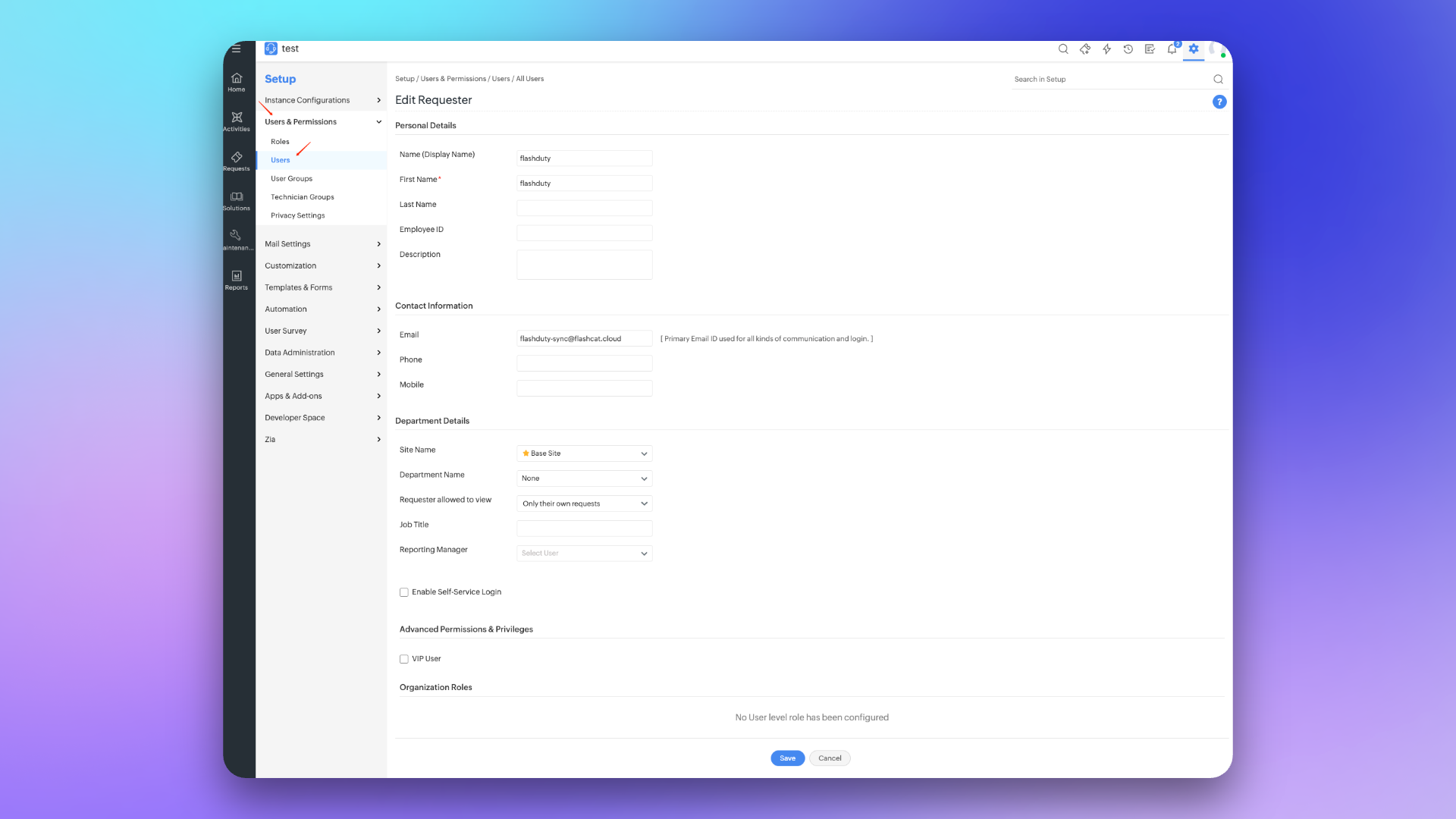
1. Log in to the ServiceDesk Plus console and find the \`Setup\` configuration page.
|
|
8647
|
+
2. Select \`Users & Permissions\`, then enter the \`Users\` creation page and select \`New Requester\`.
|
|
8648
|
+
3. Fill in **flashduty** for \`Name (Display Name)\` and \`First Name\`, fill in **flashduty-sync@flashcat.cloud** for \`Email\`.
|
|
8649
|
+
4. Other settings can be configured as needed, click \`Save\` to save the configuration.
|
|
8650
|
+
|
|
8651
|
+
|
|
8652
|
+
|
|
8653
|
+
#### Step 3 Configure Sync <span id="configure-sync"></span>
|
|
8654
|
+
To achieve synchronization of ServiceDesk Plus requests to Flashduty, please refer to this configuration item. **Note:** Different versions may have slightly different paths, but the configuration method is the same.
|
|
8655
|
+
##### Create Webhook
|
|
8656
|
+
1. Log in to the ServiceDesk Plus console and find the \`Setup\` configuration page.
|
|
8657
|
+
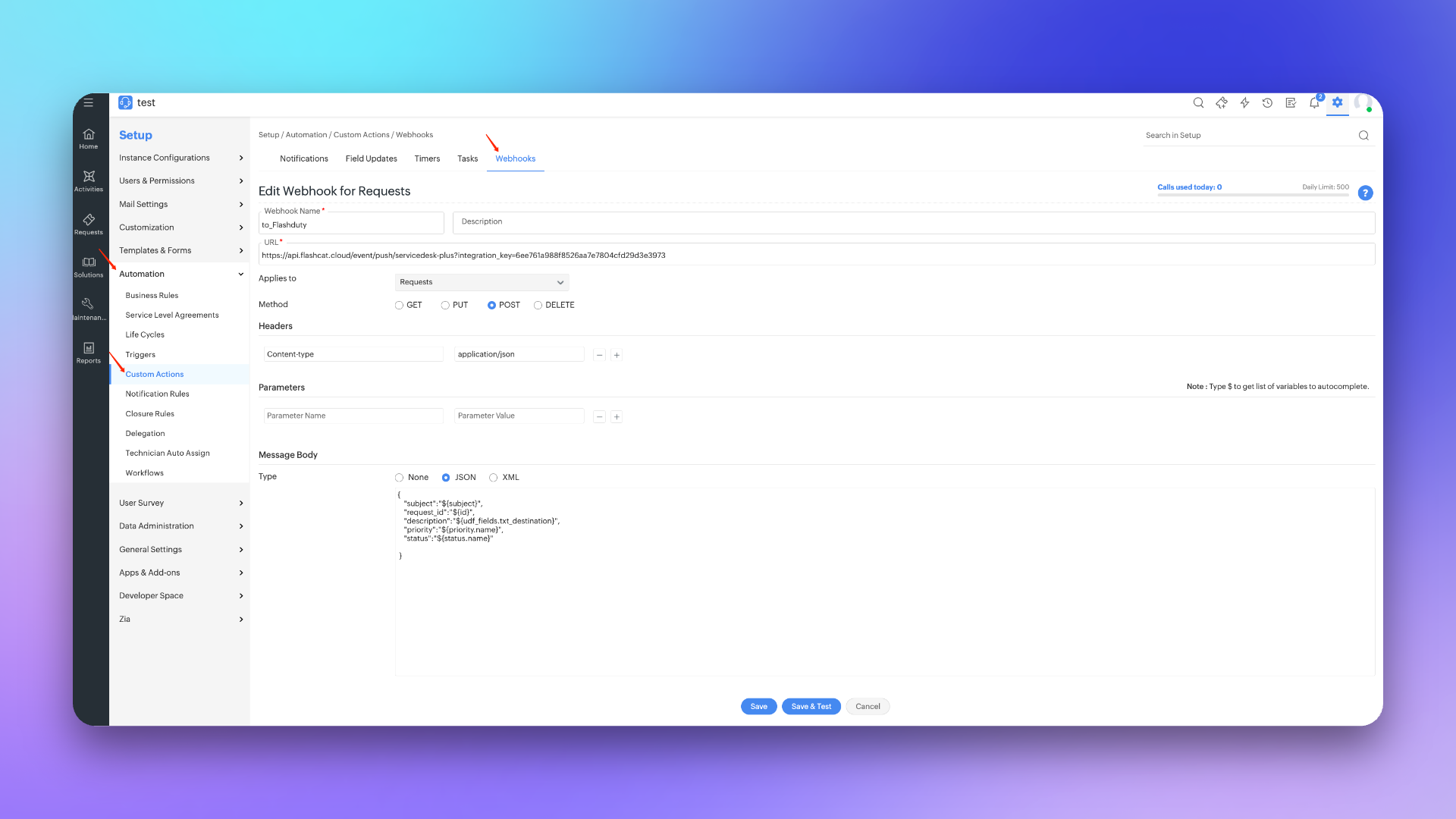
2. Select \`Automation\`, then enter the \`Custom Actions\` page and select \`Webhooks\`.
|
|
8658
|
+
3. Click \`New Webhook\`, fill in **to_Flashduty** for \`Webhook Name\` in the edit page.
|
|
8659
|
+
4. Fill in the integration's <span class='integration_url'>push URL</span> for \`URL\`.
|
|
8660
|
+
5. Select **Requests** for \`Applies to\`, select **POST** for \`Method\`, fill in **Content-Type application/json** in \`Headers\`.
|
|
8661
|
+
6. Select **JSON** for \`Message Body\` Type and fill in the following content:
|
|
8662
|
+
|
|
8663
|
+
\`\`\`
|
|
8664
|
+
# Cloud
|
|
8665
|
+
{
|
|
8666
|
+
"subject":"\${subject}",
|
|
8667
|
+
"request_id":"\${id}",
|
|
8668
|
+
"description":"\${udf_fields.txt_destination}",
|
|
8669
|
+
"priority":"\${priority.name}",
|
|
8670
|
+
"status":"\${status.name}",
|
|
8671
|
+
"txt_test_field":"\${udf_fields.txt_test_field}"
|
|
8672
|
+
|
|
8673
|
+
}
|
|
8674
|
+
\`\`\`
|
|
8675
|
+
|
|
8676
|
+
\`\`\`
|
|
8677
|
+
# On-premises
|
|
8678
|
+
{
|
|
8679
|
+
"suject":"\${{request.subject}}",
|
|
8680
|
+
"request_id":"\${{request.id}}",
|
|
8681
|
+
"description":"\${{request.description}}",
|
|
8682
|
+
"status":"\${{request.status.name}}",
|
|
8683
|
+
"priority":"\${{request.priority.name}}",
|
|
8684
|
+
"udf_sline_301":"\${{request.udf_fields.udf_sline_301}}"
|
|
8685
|
+
}
|
|
8686
|
+
|
|
8687
|
+
\`\`\`
|
|
8688
|
+
7. Click \`Save\` to complete the configuration.
|
|
8689
|
+
|
|
8690
|
+
|
|
8691
|
+
|
|
8692
|
+
##### Create Trigger
|
|
8693
|
+
1. Log in to the ServiceDesk Plus console and find the \`Setup\` configuration page.
|
|
8694
|
+
2. Select \`Automation\`, then enter the \`Triggers\` page and select \`Request\`.
|
|
8695
|
+
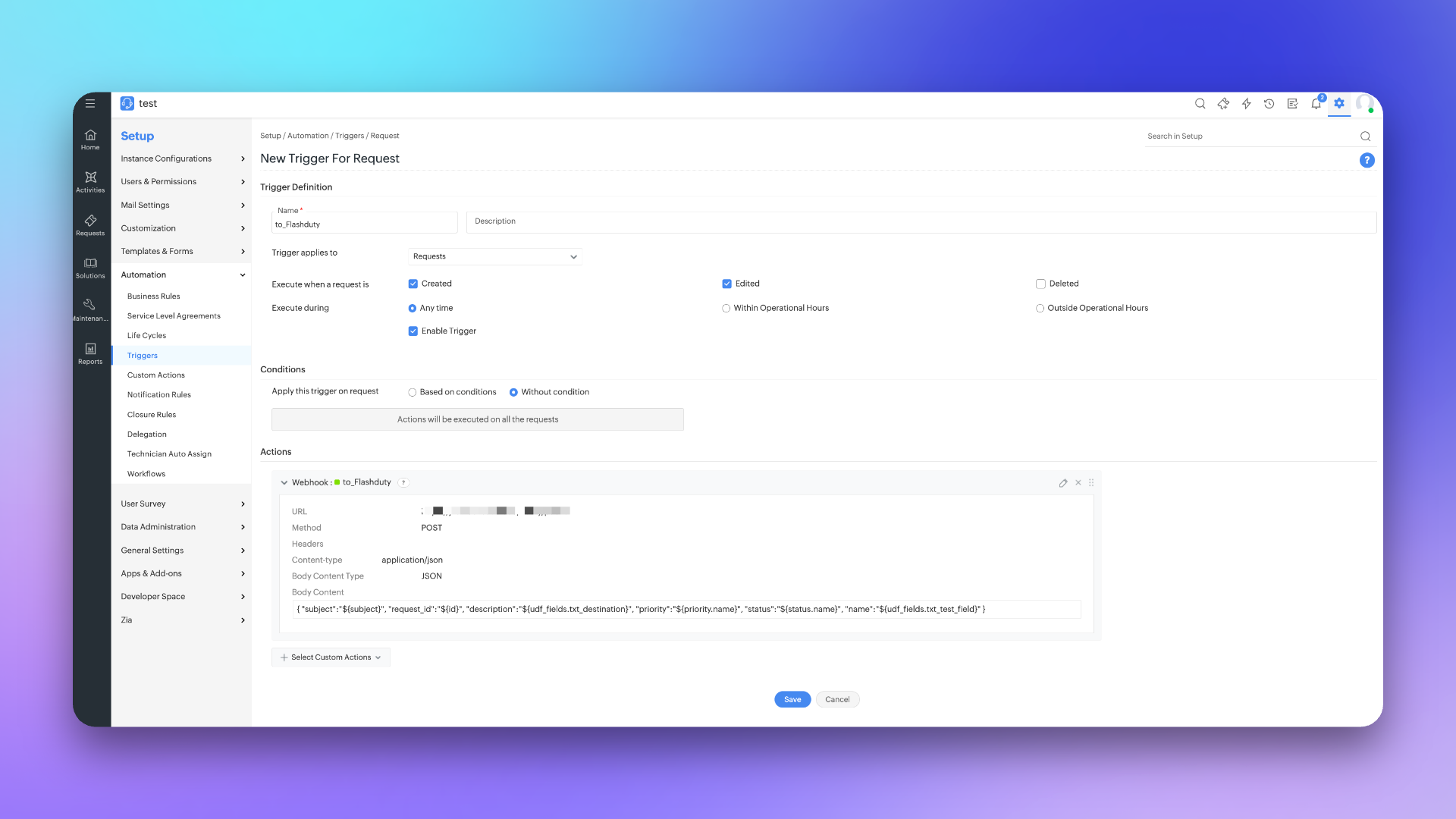
3. Click \`New Trigger\`, fill in **to_Flashduty** for \`Name\` in the edit page.
|
|
8696
|
+
4. Select **Request** for \`Trigger applies to\`, check **Create and Edited** for \`Execute when a request is\`.
|
|
8697
|
+
5. Select **Any time** for \`Execute during\` and check **Enable Trigger**.
|
|
8698
|
+
6. Select \`Without condition\` for \`Conditions\` or configure according to actual needs.
|
|
8699
|
+
7. Select **Webhook** in \`Actions\` and check **to_Flashduty** channel.
|
|
8700
|
+
8. Click \`Save\` to complete the configuration.
|
|
8701
|
+
|
|
8702
|
+
|
|
8703
|
+
|
|
8704
|
+
|
|
8705
|
+
## Sync Information
|
|
8706
|
+
|
|
8707
|
+
### Form Fields
|
|
8708
|
+
|
|
8709
|
+
| ServiceDesk Plus | Flashduty | Notes |
|
|
8710
|
+
| ------------------- | ------------- | ----- |
|
|
8711
|
+
| Subject | Title | |
|
|
8712
|
+
| Description | Description | |
|
|
8713
|
+
| Status | Progress | |
|
|
8714
|
+
| Priority | Severity | |
|
|
8715
|
+
| Others | Custom Fields | |
|
|
8716
|
+
|
|
8717
|
+
### Status Mapping
|
|
8718
|
+
|
|
8719
|
+
| ServiceDesk Plus | Flashduty | Notes |
|
|
8720
|
+
| ----------- | ---------- | ---------------------- |
|
|
8721
|
+
| Open | Trigger | |
|
|
8722
|
+
| In Progress | Processing | |
|
|
8723
|
+
| Assigned | Processing | |
|
|
8724
|
+
| Pending Verification | Processing | |
|
|
8725
|
+
| Staging | Processing | |
|
|
8726
|
+
| On Hold | Snoozed | Default snooze 2 hours |
|
|
8727
|
+
| Resolved | CLosed | |
|
|
8728
|
+
| Closed | CLosed | |
|
|
8729
|
+
| Canceled | CLosed | |
|
|
8730
|
+
| Rejected | CLosed | |
|
|
8731
|
+
|
|
8732
|
+
### Priority Mapping <span id="priority-mapping"></span>
|
|
8733
|
+
|
|
8734
|
+
| ServiceDesk Plus | Flashduty | Notes |
|
|
8735
|
+
| ---------- | --------- | ----- |
|
|
8736
|
+
| Low | Info | |
|
|
8737
|
+
| Medium | Warning | |
|
|
8738
|
+
| High | Critical | |
|
|
8739
|
+
|
|
8740
|
+
|
|
8741
|
+
## FAQ
|
|
8742
|
+
|
|
8743
|
+
<details>
|
|
8744
|
+
<summary> Can the Scope be changed</summary>
|
|
8745
|
+
No, the Scope currently used is already the smallest unit. Flashduty needs to perform get/create/update operations when syncing requests with ServiceDesk Plus, and needs to obtain priority/custom field lists when configuring integration, so corresponding permission support is required.
|
|
8746
|
+
</details>
|
|
8747
|
+
`};n.FlashDocsEn=h})(window);
|