flashduty-knowledge-base 1.3.4 → 1.3.5
This diff represents the content of publicly available package versions that have been released to one of the supported registries. The information contained in this diff is provided for informational purposes only and reflects changes between package versions as they appear in their respective public registries.
- package/README.md +14 -2
- package/dist/en.d.ts +2 -0
- package/dist/esm/en.js +362 -50
- package/dist/esm/zh.js +372 -61
- package/dist/iife/en.js +347 -35
- package/dist/iife/zh.js +357 -46
- package/dist/zh.d.ts +2 -0
- package/package.json +1 -1
package/dist/esm/en.js
CHANGED
|
@@ -506,7 +506,7 @@ Nightingale/Flashcat to Flashduty alert severity mapping:
|
|
|
506
506
|
|
|
507
507
|
</details>
|
|
508
508
|
|
|
509
|
-
`,
|
|
509
|
+
`,i=`---
|
|
510
510
|
title: "Prometheus Integration Guide"
|
|
511
511
|
description: "Push Prometheus alert events to Flashduty through AlertManager using webhooks. When an alert is triggered, it sends a trigger event to Flashduty, and when the alert recovers, it sends a recovery event."
|
|
512
512
|
date: "2025-05-19T10:00:00+08:00"
|
|
@@ -688,7 +688,7 @@ Prometheus to Flashduty severity mapping:
|
|
|
688
688
|
|
|
689
689
|
|
|
690
690
|
|
|
691
|
-
`,
|
|
691
|
+
`,o=`---
|
|
692
692
|
title: "Grafana Integration"
|
|
693
693
|
description: "Sync Grafana alert events to Flashduty via webhook to achieve automated alert noise reduction."
|
|
694
694
|
date: "2025-05-19T10:00:00+08:00"
|
|
@@ -3373,7 +3373,7 @@ Choose this option when you need to route alerts to different channels based on
|
|
|
3373
3373
|
|CUSTOM_ALERT|Info|info|
|
|
3374
3374
|
|
|
3375
3375
|
</div>
|
|
3376
|
-
`,
|
|
3376
|
+
`,L=`---
|
|
3377
3377
|
title: "Huawei Cloud LTS Alert Events"
|
|
3378
3378
|
description: "Sync Huawei Cloud Log Tank Service (LTS) alert events to Flashduty via webhook for automated alert noise reduction."
|
|
3379
3379
|
date: "2024-08-20T10:00:00+08:00"
|
|
@@ -3486,7 +3486,7 @@ Choose this option when you need to route alerts to different channels based on
|
|
|
3486
3486
|
|Info|Info|Info|
|
|
3487
3487
|
|
|
3488
3488
|
</div>
|
|
3489
|
-
`,
|
|
3489
|
+
`,_=`---
|
|
3490
3490
|
title: "Google Cloud Monitoring Alert Events"
|
|
3491
3491
|
description: "Sync Google Cloud Monitoring alert events to Flashduty via webhook for automated alert noise reduction"
|
|
3492
3492
|
date: "2024-07-05T10:00:00+08:00"
|
|
@@ -3812,7 +3812,7 @@ If you need to configure \`Custom Templating Variables\`, you can refer to the f
|
|
|
3812
3812
|
|INFO|Info|Info|
|
|
3813
3813
|
|
|
3814
3814
|
</div>
|
|
3815
|
-
`,
|
|
3815
|
+
`,D=`---
|
|
3816
3816
|
title: "SolarWinds Alert Events"
|
|
3817
3817
|
description: "Sync SolarWinds alert events to Flashduty via webhook for automated alert noise reduction"
|
|
3818
3818
|
date: "2024-08-20T10:00:00+08:00"
|
|
@@ -3915,7 +3915,7 @@ Choose this option when you need to route alerts to different channels based on
|
|
|
3915
3915
|
|Info|Info|Info|
|
|
3916
3916
|
|
|
3917
3917
|
</div>
|
|
3918
|
-
`,
|
|
3918
|
+
`,U=`---
|
|
3919
3919
|
title: "Volcengine Cloud Monitor Alert Events"
|
|
3920
3920
|
description: "Sync Volcengine Cloud Monitor alert events to Flashduty via webhook for automated alert noise reduction"
|
|
3921
3921
|
date: "2024-08-20T10:00:00+08:00"
|
|
@@ -4521,7 +4521,7 @@ Choose this option when you need to route alerts to different channels based on
|
|
|
4521
4521
|
| North | Beijing2/Changchun/Harbin/North China/Inner Mongolia3/Qingdao/Shenyang3/Shijiazhuang/Taiyuan/Tianjin/Zhengzhou |
|
|
4522
4522
|
|
|
4523
4523
|
</div>
|
|
4524
|
-
`,
|
|
4524
|
+
`,q=`---
|
|
4525
4525
|
title: "Guance Alert Events"
|
|
4526
4526
|
description: "Sync Guance alert events to Flashduty via webhook for automated alert noise reduction"
|
|
4527
4527
|
date: "2024-07-05T10:00:00+08:00"
|
|
@@ -4606,7 +4606,7 @@ Choose this option when you need to route alerts to different channels based on
|
|
|
4606
4606
|
| Data Missing | Info | Info |
|
|
4607
4607
|
|
|
4608
4608
|
</div>
|
|
4609
|
-
`,
|
|
4609
|
+
`,G=`---
|
|
4610
4610
|
title: "Zilliz Alert Events"
|
|
4611
4611
|
description: "Sync Zilliz alert events to Flashduty via webhook for automated alert noise reduction"
|
|
4612
4612
|
date: "2024-07-05T10:00:00+08:00"
|
|
@@ -5157,7 +5157,7 @@ By default, the system always creates new alerts for each message, but you can s
|
|
|
5157
5157
|
---
|
|
5158
5158
|
|
|
5159
5159
|
Currently, all alerts pushed to Flashduty through the Dingtalk integration are set to Warning severity. However, you can customize the severity using the [alert pipeline](https://docs.flashcat.cloud/en/flashduty/alert-pipelines).
|
|
5160
|
-
`,
|
|
5160
|
+
`,z=`---
|
|
5161
5161
|
title: "Feishu Alert Integration"
|
|
5162
5162
|
description: "Generate a unique Feishu robot address in Flashduty, and synchronize the occurrence and recovery of alerts through Feishu"
|
|
5163
5163
|
date: "2025-05-19T10:00:00+08:00"
|
|
@@ -5239,7 +5239,7 @@ By default, the system always creates new alerts for each message, but you can s
|
|
|
5239
5239
|
---
|
|
5240
5240
|
|
|
5241
5241
|
Currently, all alerts pushed to Flashduty through the Feishu(lark) integration are set to Warning severity. However, you can customize the severity using the [alert pipeline](https://docs.flashcat.cloud/en/flashduty/alert-pipelines).
|
|
5242
|
-
`,
|
|
5242
|
+
`,B=`---
|
|
5243
5243
|
title: "Volcengine Cloud-Detect Alert Events"
|
|
5244
5244
|
description: "Sync Volcengine Cloud-Detect alert events to Flashduty via webhook for automated alert noise reduction"
|
|
5245
5245
|
date: "2024-07-05T10:00:00+08:00"
|
|
@@ -5341,7 +5341,7 @@ Go to the \`Monit\` - \`Alert Rules\` - \`Rule Details\` page to configure monit
|
|
|
5341
5341
|
|
|
5342
5342
|
|
|
5343
5343
|
In some cases, you may want to route alerts generated by the same alert rule to different channels based on conditions. In this case, you can choose to deliver alerts directly to the integration rather than to the channels, and set routing rules under the current integration.
|
|
5344
|
-
`,
|
|
5344
|
+
`,K=`---
|
|
5345
5345
|
title: "RUM Alert Integration"
|
|
5346
5346
|
description: "Flashduty RUM alert integration, RUM service reports alerts through this integration"
|
|
5347
5347
|
date: "2025-05-19T10:00:00+08:00"
|
|
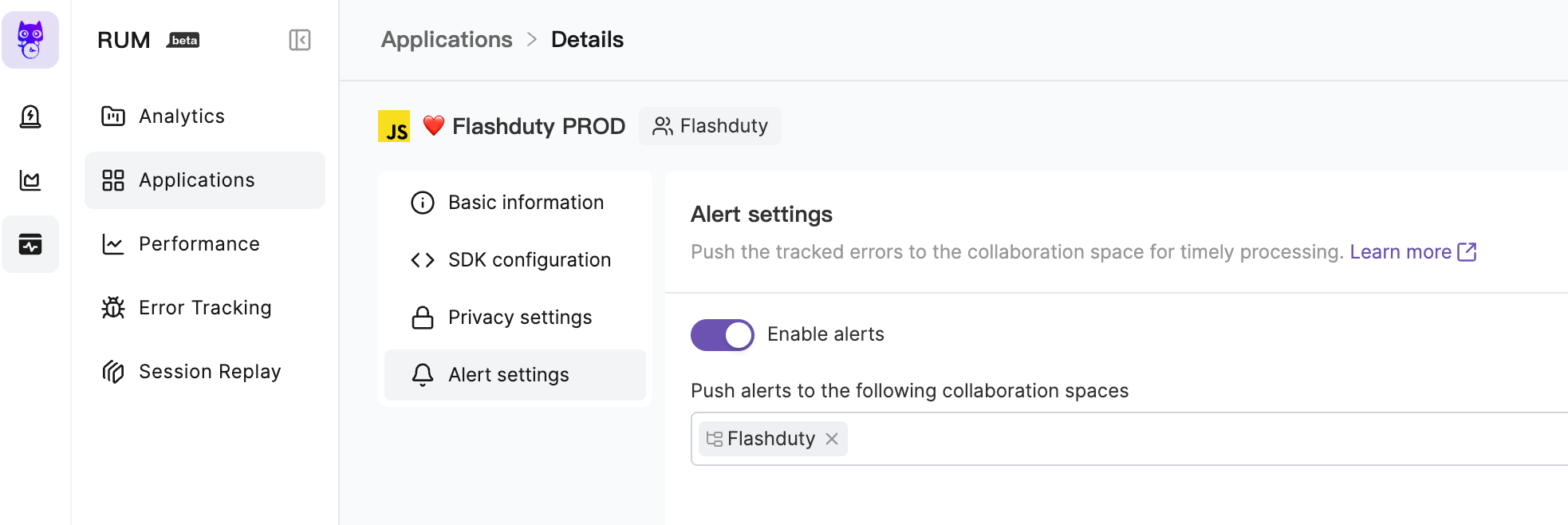
@@ -5361,7 +5361,7 @@ Go to the \`RUM\` - \`Application Details\` - \`Alert Settings\` page to enable
|
|
|
5361
5361
|
|
|
5362
5362
|
|
|
5363
5363
|
For more information, please refer to [RUM Issue Alerting](https://docs.flashcat.cloud/en/flashduty/rum/issue-alerting?nav=01JCQ7A4N4WRWNXW8EWEHXCMF5).
|
|
5364
|
-
`,
|
|
5364
|
+
`,J=`---
|
|
5365
5365
|
title: "Cloudflare Alert Events"
|
|
5366
5366
|
description: "Sync Cloudflaret alert events to Flashduty via webhook for automated alert noise reduction"
|
|
5367
5367
|
date: "2024-07-05T10:00:00+08:00"
|
|
@@ -5433,6 +5433,86 @@ Currently, all alerts pushed to Flashduty through the Cloudflare integration are
|
|
|
5433
5433
|
</div>
|
|
5434
5434
|
|
|
5435
5435
|
`,Z=`---
|
|
5436
|
+
title: "Wecom Alert Integration"
|
|
5437
|
+
description: "Generate a unique Wecom robot address in Flashduty, and synchronize the occurrence and recovery of alerts through Wecom"
|
|
5438
|
+
date: "2025-05-19T10:00:00+08:00"
|
|
5439
|
+
url: "https://docs.flashcat.cloud/en/flashduty/Wecom-alert-integration-guide"
|
|
5440
|
+
---
|
|
5441
|
+
|
|
5442
|
+
Generate a unique Wecom robot address in Flashduty, and synchronize the occurrence and recovery of alerts through Wecom.
|
|
5443
|
+
|
|
5444
|
+
<div class="hide">
|
|
5445
|
+
|
|
5446
|
+
## Operation Steps
|
|
5447
|
+
---
|
|
5448
|
+
|
|
5449
|
+
### Create Wecom Alert Integration
|
|
5450
|
+
|
|
5451
|
+
You can obtain a Wecom alert integration address through either of these two methods:
|
|
5452
|
+
|
|
5453
|
+
#### Using Dedicated Integration
|
|
5454
|
+
|
|
5455
|
+
Choose this method when you don't need to route alert events to different channels. It's simpler and recommended.
|
|
5456
|
+
|
|
5457
|
+
<details>
|
|
5458
|
+
<summary>Expand</summary>
|
|
5459
|
+
|
|
5460
|
+
1. Go to the Flashduty console, select **Channel**, and enter a specific channel's details page
|
|
5461
|
+
2. Select the **Integration** tab, click **Add Integration** to enter the integration page
|
|
5462
|
+
3. Choose **Wecom Alert** integration and click **Save** to generate a card
|
|
5463
|
+
4. Click the generated card to view the **Wecom Alert Integration URL**, copy it for later use, and you're done
|
|
5464
|
+
|
|
5465
|
+
</details>
|
|
5466
|
+
|
|
5467
|
+
#### Using Shared Integration
|
|
5468
|
+
|
|
5469
|
+
Choose this method when you need to route alerts to different channels based on the alert event's payload information.
|
|
5470
|
+
|
|
5471
|
+
<details>
|
|
5472
|
+
<summary>Expand</summary>
|
|
5473
|
+
|
|
5474
|
+
1. Go to the Flashduty console, select **Integration Center => Alert Events** to enter the integration selection page
|
|
5475
|
+
2. Select **Wecom Alert** integration:
|
|
5476
|
+
- **Integration Name**: Define a name for the current integration
|
|
5477
|
+
- **Message Type**: Select Wecom alert message type, currently only Text and Markdown are supported
|
|
5478
|
+
- **Push Mode**: Choose when to trigger or recover alerts for Wecom notifications
|
|
5479
|
+
3. Copy the **Wecom Alert Integration URL** for later use
|
|
5480
|
+
4. Configure the default route and select the corresponding channel (after integration creation, you can go to \`Routes\` to configure more routing rules)
|
|
5481
|
+
5. Done
|
|
5482
|
+
|
|
5483
|
+
</details>
|
|
5484
|
+
</div>
|
|
5485
|
+
|
|
5486
|
+
### Customize Wecom Alert Integration
|
|
5487
|
+
|
|
5488
|
+
#### Wecom Alert Integration URL
|
|
5489
|
+
|
|
5490
|
+
The system will generate a unique Wecom alert integration URL for you. This URL is compatible with Wecom robot message protocol. When platforms only support Wecom robot channels, you can use this URL to receive corresponding messages.
|
|
5491
|
+
|
|
5492
|
+
#### Push Mode
|
|
5493
|
+
|
|
5494
|
+
By default, the system always creates new alerts for each message, but you can switch to these modes:
|
|
5495
|
+
|
|
5496
|
+
**Trigger or Close Alert Based on Rules**: In this mode, when receiving a new message, the system matches messages according to your rules and triggers new alerts or closes existing alerts based on the matching results.
|
|
5497
|
+
|
|
5498
|
+
- You need to fill in at least one **trigger** rule
|
|
5499
|
+
- You must set up regex extraction rules for Alert Key. The system uses this field to find historical alerts for updates or closure. **If regex extraction fails, the system will use the random to generate an Alert Key** to ensure alerts won't be lost due to configuration errors
|
|
5500
|
+
- You can choose whether to discard messages when none of the rules match
|
|
5501
|
+
|
|
5502
|
+
Configuration example:
|
|
5503
|
+
|
|
5504
|
+
- Receive all messages, close the alert when the message content contains **RESOLVED**, otherwise trigger a new alert
|
|
5505
|
+
- Extract Alert Key from messages using the rule **/(.*)/**.
|
|
5506
|
+
|
|
5507
|
+
|
|
5508
|
+
### Notes
|
|
5509
|
+
- Wecom alert integration URL only supports Text and Markdown message types; other message types cannot be received
|
|
5510
|
+
- Flashduty will generate a default alert title: "Wecom robot Alert , If you need to change the title, you can customize it using the [alert pipeline](https://docs.flashcat.cloud/en/flashduty/alert-pipelines)"
|
|
5511
|
+
|
|
5512
|
+
## Severity Mapping
|
|
5513
|
+
---
|
|
5514
|
+
|
|
5515
|
+
Currently, all alerts pushed to Flashduty through the Wecom integration are set to Warning severity. However, you can customize the severity using the [alert pipeline](https://docs.flashcat.cloud/en/flashduty/alert-pipelines).`,Q=`---
|
|
5436
5516
|
title: "Custom Change Event Integration Guide"
|
|
5437
5517
|
description: "Push change events from your own systems to Flashduty using standard protocols. Most incidents are caused by changes, and the correlation between changes and alerts helps quickly identify incident causes."
|
|
5438
5518
|
date: "2025-05-19T10:00:00+08:00"
|
|
@@ -5489,7 +5569,7 @@ Labels are descriptions of events. You should enrich label content as much as po
|
|
|
5489
5569
|
|
|
5490
5570
|
</details>
|
|
5491
5571
|
|
|
5492
|
-
`,
|
|
5572
|
+
`,X=`---
|
|
5493
5573
|
title: "Jira Issue Events"
|
|
5494
5574
|
description: "Sync Jira Issue events to Flashduty via webhooks to collect change events."
|
|
5495
5575
|
date: "2025-05-19T10:00:00+08:00"
|
|
@@ -5563,7 +5643,7 @@ Flashduty extracts the status.name information from the webhook payload by defau
|
|
|
5563
5643
|
Please contact Flashduty if you wish to modify this mapping.
|
|
5564
5644
|
|
|
5565
5645
|
</div>
|
|
5566
|
-
`,
|
|
5646
|
+
`,ee=`---
|
|
5567
5647
|
title: "Feishu/Lark Integration"
|
|
5568
5648
|
description: "By integrating a custom Feishu/Lark application, you can receive and respond to alerts within Feishu/Lark."
|
|
5569
5649
|
date: "2025-05-19T10:00:00+08:00"
|
|
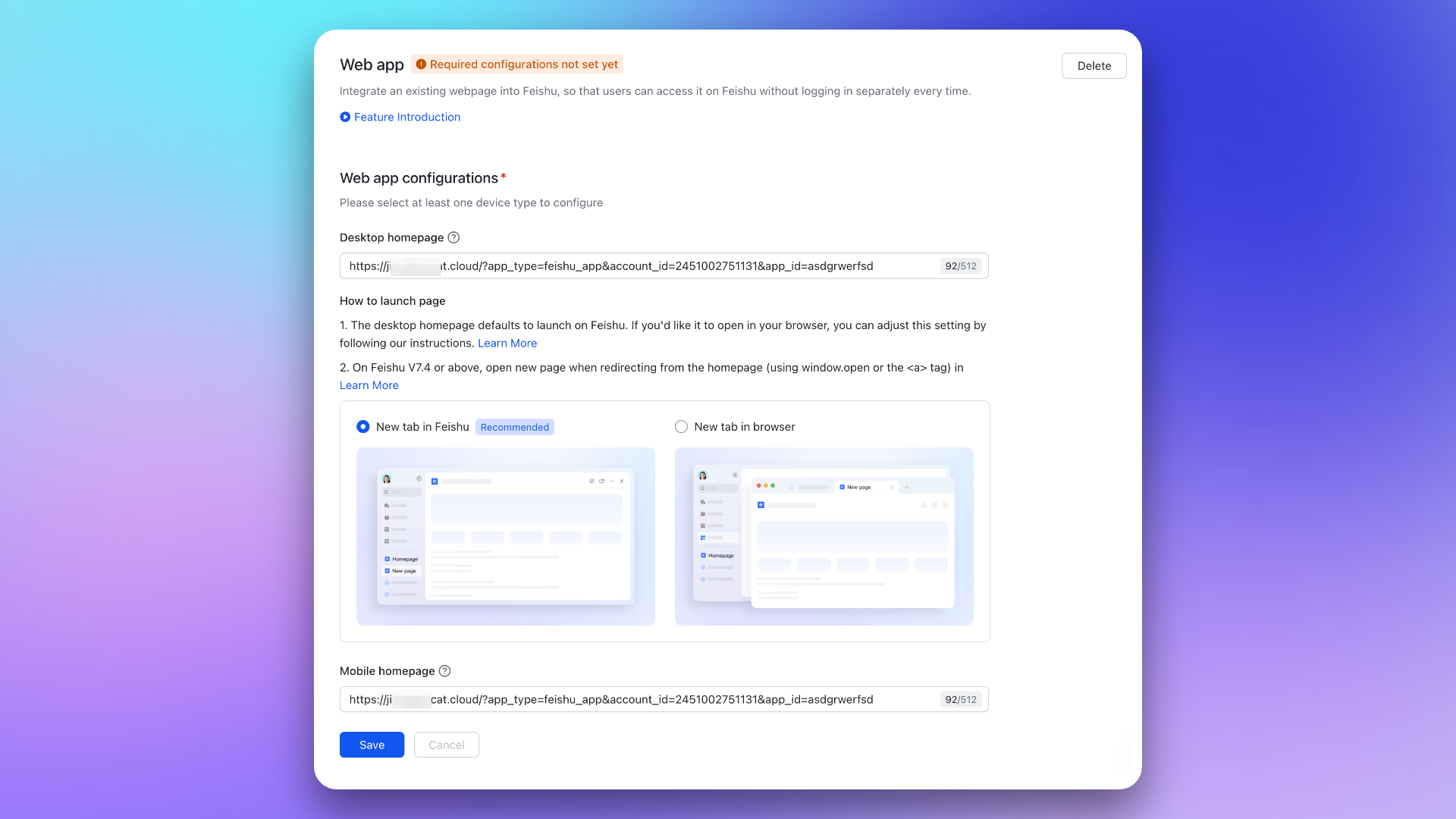
@@ -5618,12 +5698,19 @@ For details, see the Feishu/Lark development documentation [Configure applicatio
|
|
|
5618
5698
|
|
|
5619
5699
|
|
|
5620
5700
|
|
|
5621
|
-
3. Go to Event Callbacks → **
|
|
5701
|
+
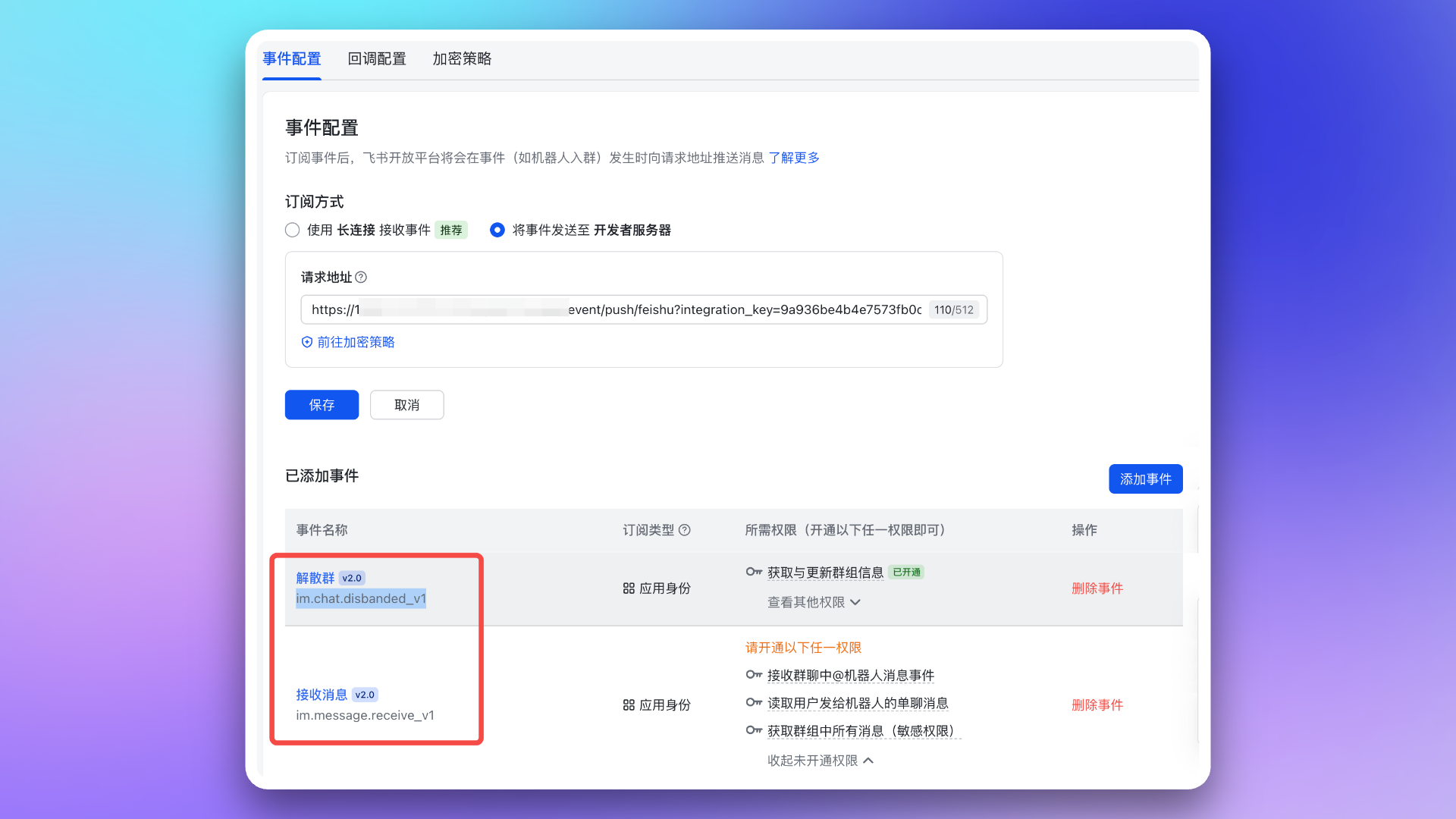
3. Go to Event Callbacks → **Event Configuration** page, configure the \`Request URL\` (using the **Message Card Request URL** from the integration details). Then, add the following two events:
|
|
5622
5702
|
|
|
5623
|
-
- \`im.message.receive_v1\`
|
|
5624
5703
|
- \`im.chat.disbanded_v1\`
|
|
5704
|
+
- \`im.message.receive_v1\`
|
|
5705
|
+
|
|
5706
|
+
|
|
5625
5707
|
|
|
5626
|
-
|
|
5708
|
+
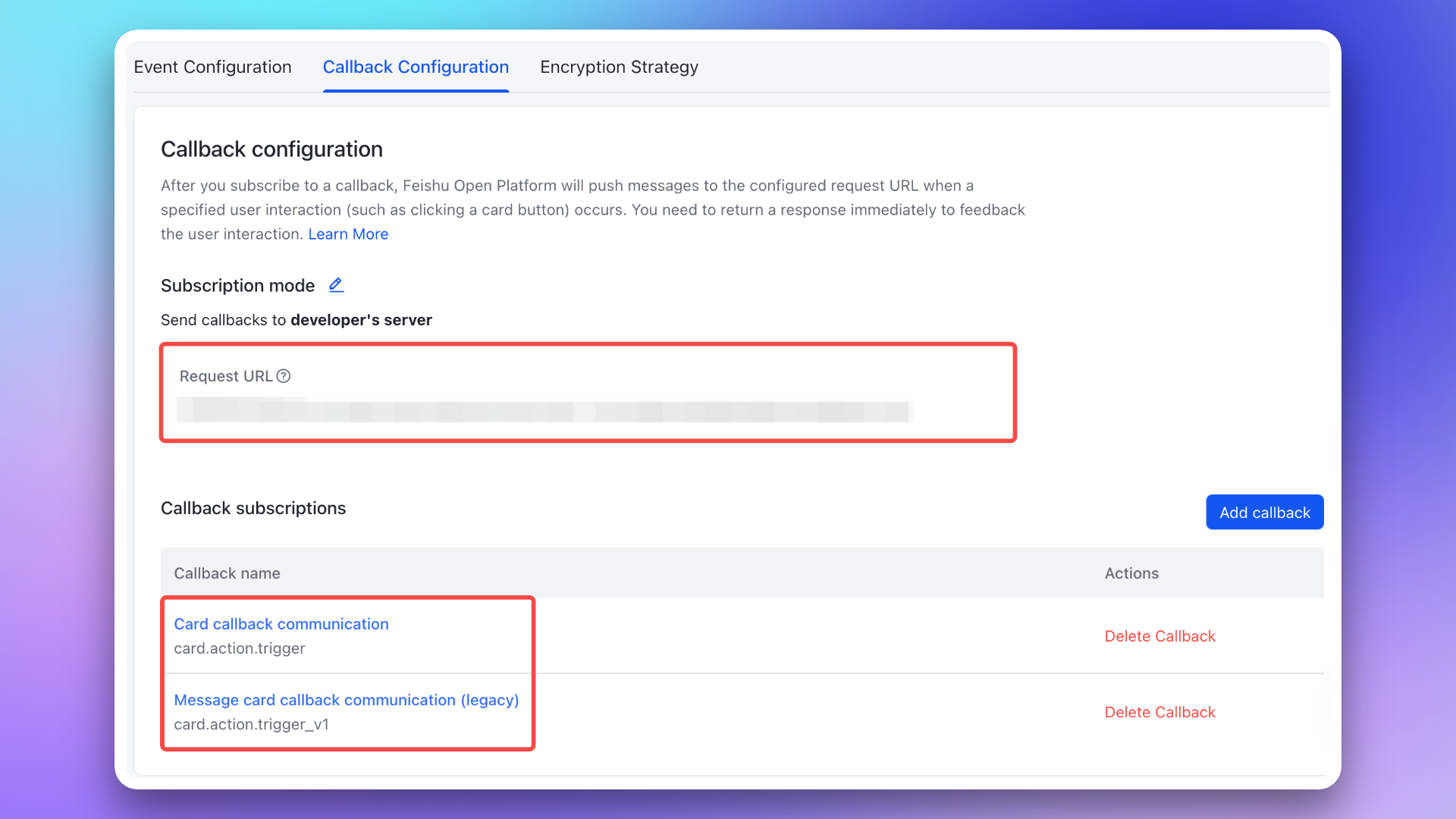
4. Go to Event Callbacks → **Callback Configuration** page, configure the \`Request URL\` (using the **Message Card Request URL** from the integration details). Then, subscribe to the following two callbacks:
|
|
5709
|
+
|
|
5710
|
+
- \`card.action.trigger\`
|
|
5711
|
+
- \`card.action.trigger_v1\`
|
|
5712
|
+
|
|
5713
|
+
|
|
5627
5714
|
|
|
5628
5715
|
### 2. Add redirect URL to Feishu/Lark application
|
|
5629
5716
|
|
|
@@ -5639,7 +5726,7 @@ Go to the **Permission Management** page and apply for the following permissions
|
|
|
5639
5726
|
|
|
5640
5727
|
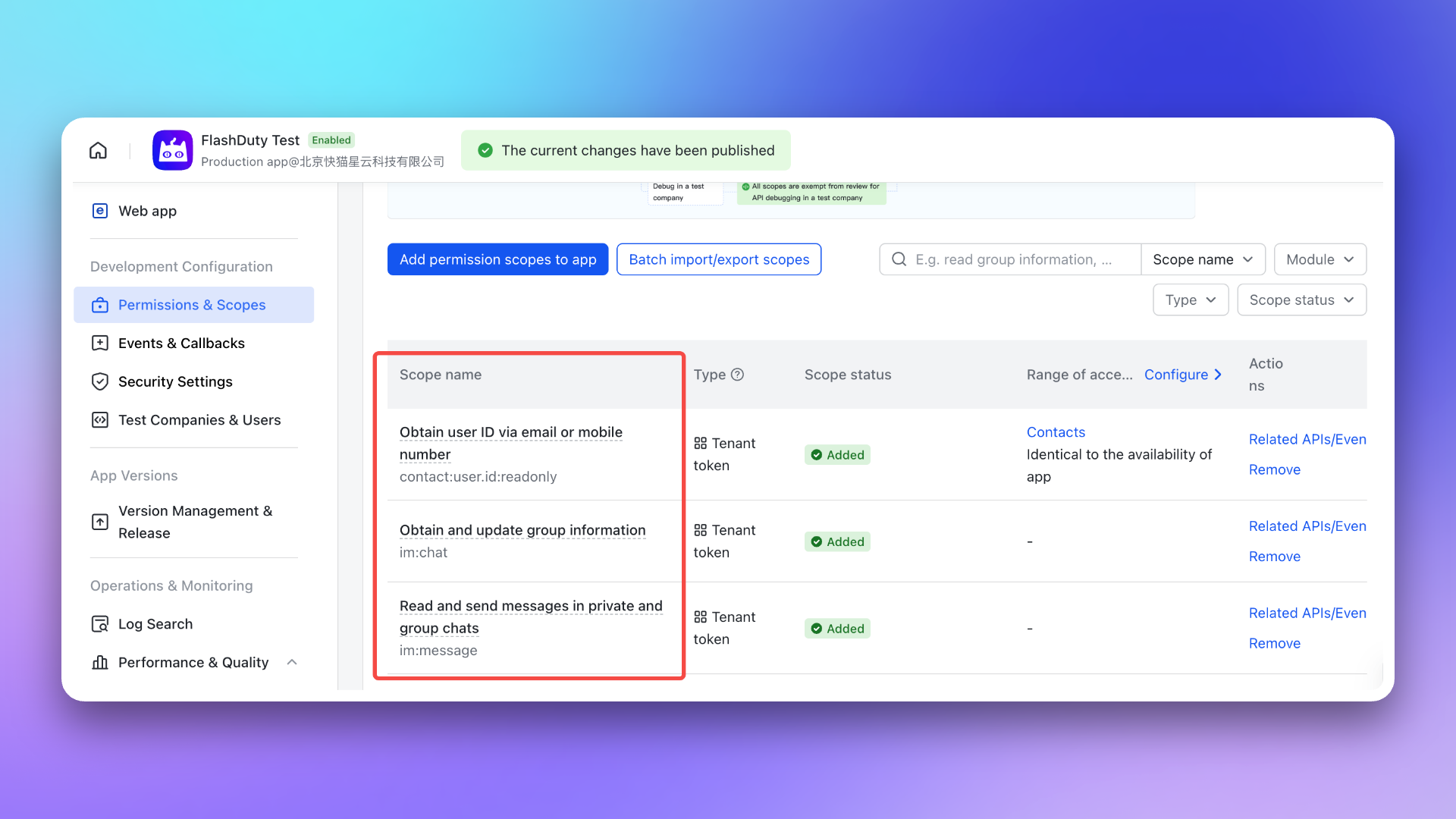
- \`im:chat\`: Get and update group information
|
|
5641
5728
|
- \`im:message\`: Get and send single chat and group messages
|
|
5642
|
-
- \`contact:user.id:readonly\`: Get user ID by phone number or email
|
|
5729
|
+
- \`contact:user.id:readonly\`: Get user ID by phone number or email <span id="war-room-scope"></span>
|
|
5643
5730
|
|
|
5644
5731
|
|
|
5645
5732
|
|
|
@@ -5702,7 +5789,7 @@ After completing the previous steps, in the **Enhanced Features** module of the
|
|
|
5702
5789
|
> After exceeding API call limits, the Feishu/Lark application will not be able to push messages normally. It is recommended to use notification channels reasonably. See [Feishu/Lark official documentation](https://open.feishu.cn/document/uAjLw4CM/ugTN1YjL4UTN24CO1UjN/platform-updates-/custom-app-api-call-limit) for details.
|
|
5703
5790
|
5. **Why is the war room feature not working as expected?**
|
|
5704
5791
|
- Please check again whether you have configured the [required permissions](#war-room-scope) for the war room feature.
|
|
5705
|
-
- Please refer to the **FAQ** section of the Flashduty [War Room Introduction](https://docs.flashcat.cloud/en/flashduty/war-room?nav=01JCQ7A4N4WRWNXW8EWEHXCMF5).`,
|
|
5792
|
+
- Please refer to the **FAQ** section of the Flashduty [War Room Introduction](https://docs.flashcat.cloud/en/flashduty/war-room?nav=01JCQ7A4N4WRWNXW8EWEHXCMF5).`,ne=`---
|
|
5706
5793
|
title: "Dingtalk Integration"
|
|
5707
5794
|
description: "By integrating a custom Dingtalk application, you can receive and respond to alerts within Dingtalk."
|
|
5708
5795
|
date: "2025-05-19T10:00:00+08:00"
|
|
@@ -5925,7 +6012,7 @@ After the application is published, you can access it via the **mobile client**
|
|
|
5925
6012
|
| Professional | 500,000 | 40 | 1st of each month |
|
|
5926
6013
|
| Exclusive | 5,500,000 | 60 | 1st of each month |
|
|
5927
6014
|
|
|
5928
|
-
> After exceeding the API call limit, the Dingtalk application will not be able to push messages normally. It is recommended to use notification channels reasonably. For details, see the [official Dingtalk documentation](https://open.dingtalk.com/document/orgapp/descriptions-about-adjusting-limit-and-frequency-of-api-calls?spm=ding_open_doc.document.0.0.6f6b21d9WtkxJI).`,
|
|
6015
|
+
> After exceeding the API call limit, the Dingtalk application will not be able to push messages normally. It is recommended to use notification channels reasonably. For details, see the [official Dingtalk documentation](https://open.dingtalk.com/document/orgapp/descriptions-about-adjusting-limit-and-frequency-of-api-calls?spm=ding_open_doc.document.0.0.6f6b21d9WtkxJI).`,te=`---
|
|
5929
6016
|
title: "WeCom Integration"
|
|
5930
6017
|
description: "By integrating a WeCom application, you can receive and respond to alerts within WeCom."
|
|
5931
6018
|
date: "2025-05-19T10:00:00+08:00"
|
|
@@ -6011,6 +6098,10 @@ This document supports both [integrating third-party applications](#third-party)
|
|
|
6011
6098
|
|
|
6012
6099
|
|
|
6013
6100
|
|
|
6101
|
+
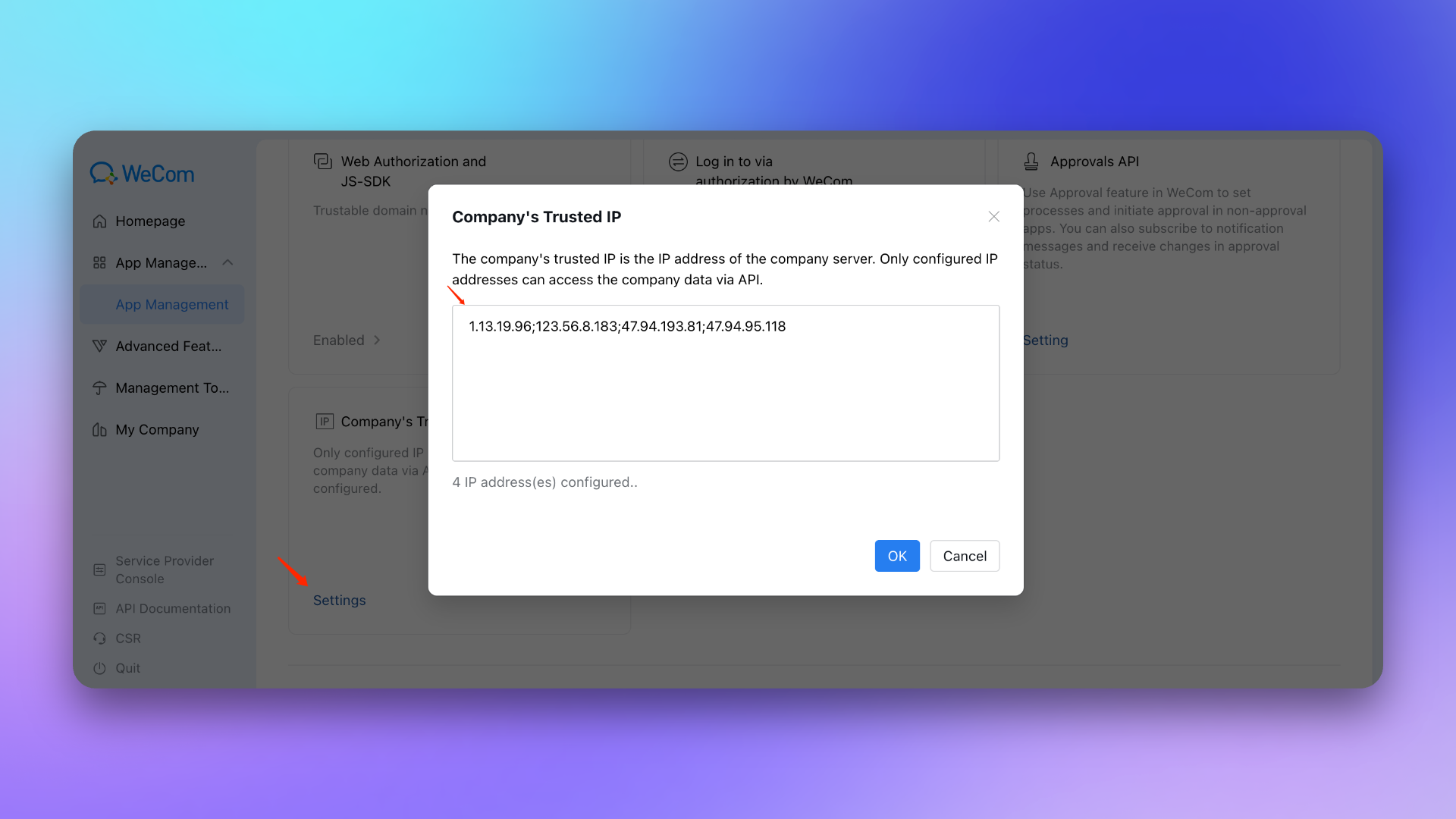
10. Company's Trusted IP : 47.94.95.118; 123.56.8.183; 47.94.193.81; 1.13.19.96
|
|
6102
|
+
|
|
6103
|
+
|
|
6104
|
+
|
|
6014
6105
|
## 3. Configure war room
|
|
6015
6106
|
|
|
6016
6107
|
---
|
|
@@ -6050,7 +6141,7 @@ After completing the previous steps, in the **Enhanced Features** module of the
|
|
|
6050
6141
|
7. **Incident notification failed with prompt \`WeCom license not activated\`?**
|
|
6051
6142
|
- Please contact Flashduty customer service or your dedicated technical support to purchase and activate the license for you.
|
|
6052
6143
|
8. **Why is the war room feature not working as expected?**
|
|
6053
|
-
- Please refer to the **FAQ** section of the Flashduty [War Room Introduction](https://docs.flashcat.cloud/en/flashduty/war-room?nav=01JCQ7A4N4WRWNXW8EWEHXCMF5).`,
|
|
6144
|
+
- Please refer to the **FAQ** section of the Flashduty [War Room Introduction](https://docs.flashcat.cloud/en/flashduty/war-room?nav=01JCQ7A4N4WRWNXW8EWEHXCMF5).`,ae=`---
|
|
6054
6145
|
title: "Slack Integration"
|
|
6055
6146
|
description: "By integrating the Slack third-party application, you can receive and respond to alerts within Slack."
|
|
6056
6147
|
date: "2025-05-19T10:00:00+08:00"
|
|
@@ -6104,7 +6195,7 @@ After completing the previous steps, in the **Enhanced Features** module of the
|
|
|
6104
6195
|
- If the error persists after retrying, please contact customer service to record and resolve new issues.
|
|
6105
6196
|
9. **Why is the war room feature not working as expected?**
|
|
6106
6197
|
- For previously authorized Slack IM integrations, you need to manually reauthorize Slack in the Flashduty integration configuration page to grant the application the additional permissions required for the war room feature.
|
|
6107
|
-
- Please refer to the **FAQ** section of the Flashduty [War Room Introduction](https://docs.flashcat.cloud/en/flashduty/war-room?nav=01JCQ7A4N4WRWNXW8EWEHXCMF5).`,
|
|
6198
|
+
- Please refer to the **FAQ** section of the Flashduty [War Room Introduction](https://docs.flashcat.cloud/en/flashduty/war-room?nav=01JCQ7A4N4WRWNXW8EWEHXCMF5).`,ie=`---
|
|
6108
6199
|
title: "Microsoft Teams Integration"
|
|
6109
6200
|
description: "By integrating the Microsoft Teams third-party application, you can receive and respond to alerts within Microsoft Teams."
|
|
6110
6201
|
date: "2025-05-19T10:00:00+08:00"
|
|
@@ -6141,7 +6232,7 @@ If the application status is "Blocked", please wait a moment and refresh the pag
|
|
|
6141
6232
|
#### Check if successfully added
|
|
6142
6233
|
After waiting a few minutes, organization members can find this application in +Apps → **Built for your org**.
|
|
6143
6234
|
|
|
6144
|
-
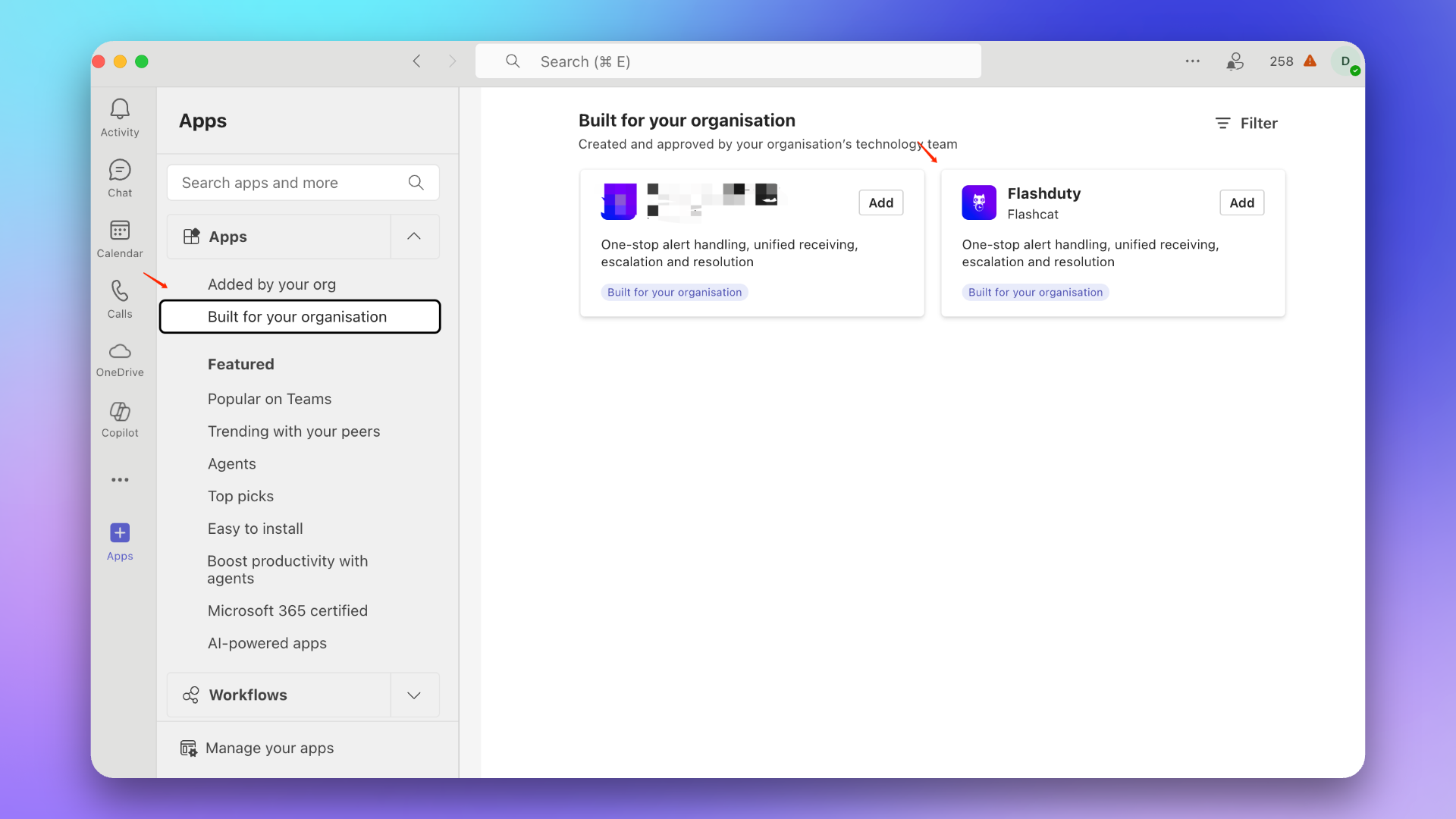
|
|
6145
6236
|
|
|
6146
6237
|
### 3. Update application
|
|
6147
6238
|
::: caution
|
|
@@ -6163,14 +6254,14 @@ If your installed application version is lower than 1.0.3, please follow this pr
|
|
|
6163
6254
|
1. Find the Flashduty application in the app marketplace.
|
|
6164
6255
|
> If there is no application, please contact your Microsoft Teams organization administrator.
|
|
6165
6256
|
|
|
6166
|
-
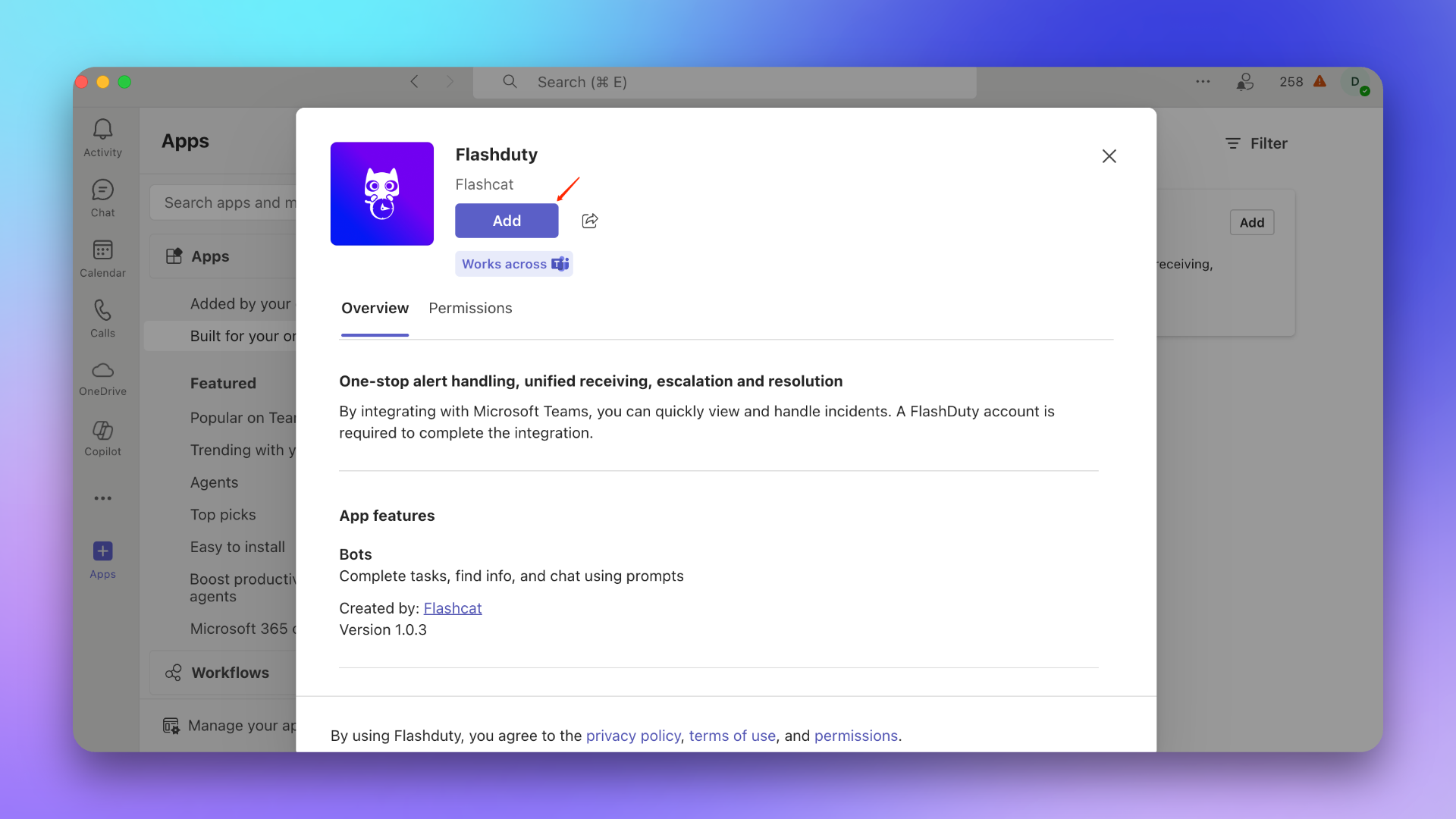
|
|
6167
6258
|
|
|
6168
6259
|
2. Add the application to the target Team.
|
|
6169
6260
|
::: caution
|
|
6170
6261
|
This step must select the General Channel of the target Team, otherwise incidents cannot be sent to the Team.
|
|
6171
6262
|
:::
|
|
6172
6263
|
|
|
6173
|
-
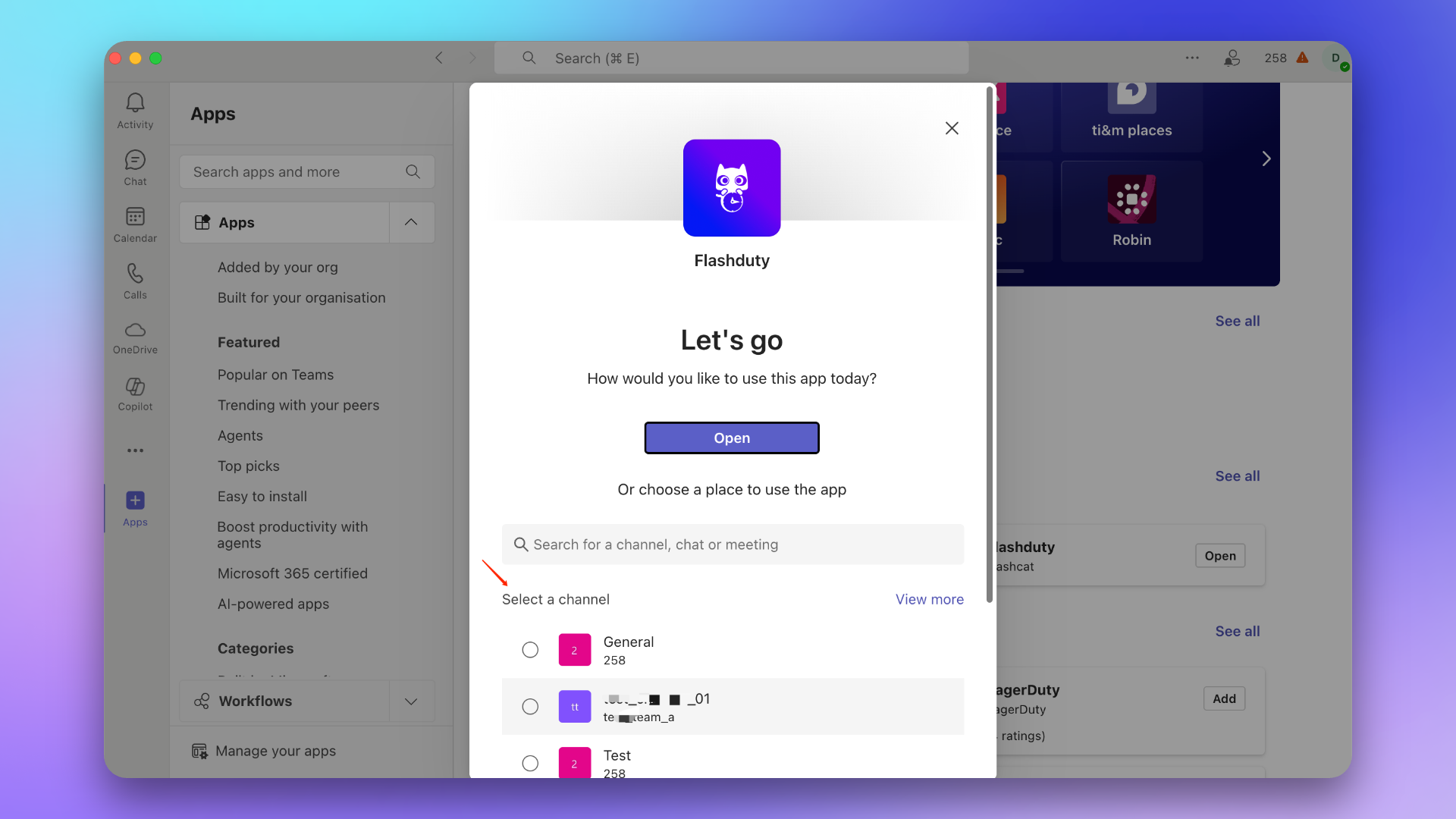
|
|
6174
6265
|
|
|
6175
6266
|
### 2. Send link command
|
|
6176
6267
|
In the Team, @Flashduty and send the command \`linkTeam {ID}\`, then click **Link Now**.
|
|
@@ -6183,11 +6274,11 @@ In the Team, @Flashduty and send the command \`linkTeam {ID}\`, then click **Lin
|
|
|
6183
6274
|
1. Find the Flashduty application in the app marketplace.
|
|
6184
6275
|
> If there is no application, please contact your Microsoft Teams organization administrator.
|
|
6185
6276
|
|
|
6186
|
-

|
|
6187
6278
|
|
|
6188
6279
|
2. Add the application to the target Chat.
|
|
6189
6280
|
|
|
6190
|
-
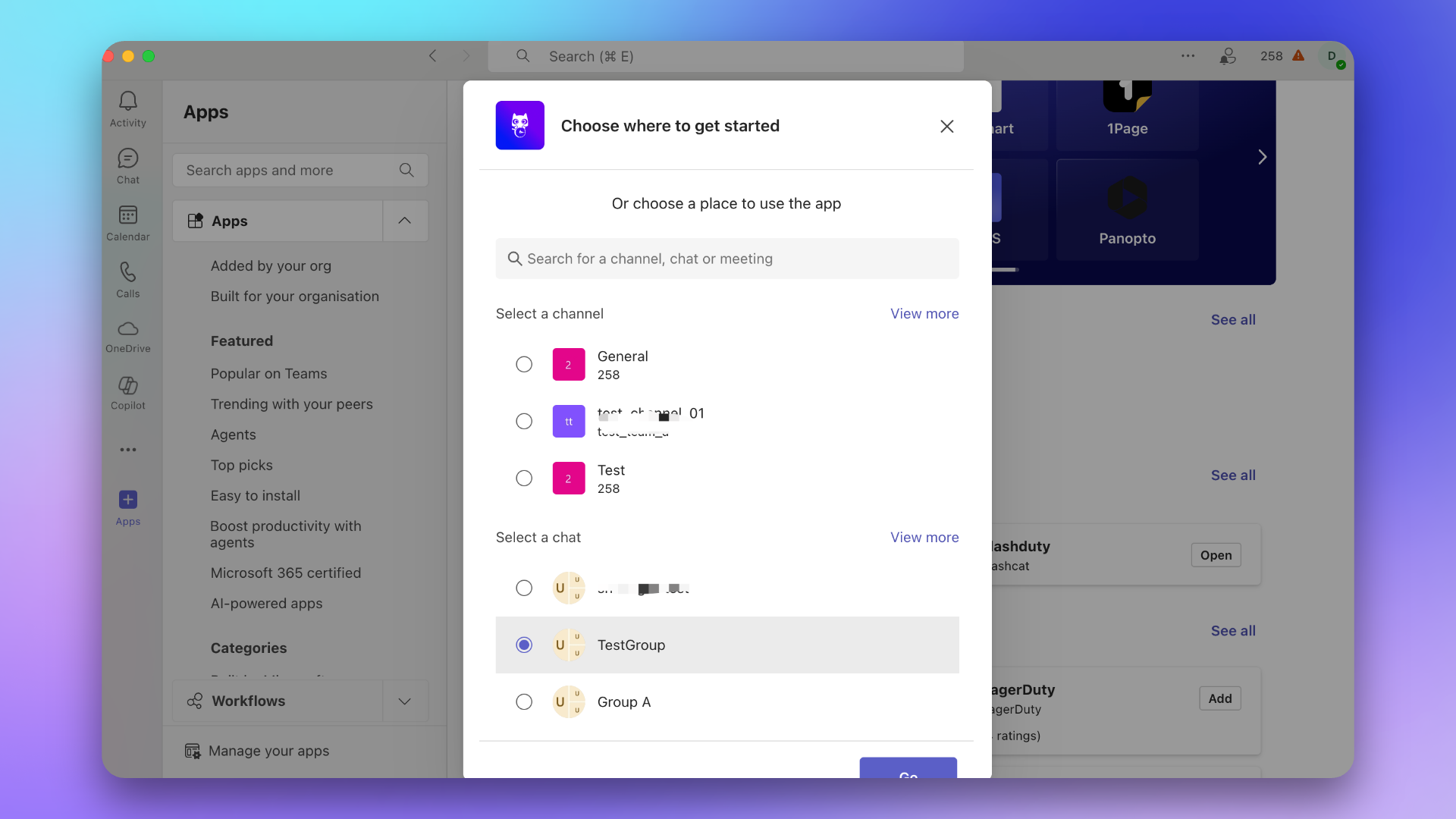
|
|
6191
6282
|
|
|
6192
6283
|
### 2. Send link command
|
|
6193
6284
|
In the Chat, @Flashduty and send the command \`linkChat {ID} {ChatName}\`, then click **Link Now**.
|
|
@@ -6200,7 +6291,7 @@ In the Chat, @Flashduty and send the command \`linkChat {ID} {ChatName}\`, then
|
|
|
6200
6291
|
1. Find the Flashduty application in the app marketplace.
|
|
6201
6292
|
> If there is no application, please contact your Microsoft Teams organization administrator.
|
|
6202
6293
|
|
|
6203
|
-

|
|
6204
6295
|
|
|
6205
6296
|
2. Click **Open Application**.
|
|
6206
6297
|
|
|
@@ -6387,7 +6478,7 @@ curl -X POST 'https://example.com/alert/webhook?a=a' \\
|
|
|
6387
6478
|
4. **Trusted IP whitelist for push sources?**
|
|
6388
6479
|
- {ip_whitelist}
|
|
6389
6480
|
- May be updated in the future, please check periodically
|
|
6390
|
-
`,
|
|
6481
|
+
`,se=`Configure incident webhooks to receive HTTP callbacks at your specified URL when incidents have specific actions (such as triggering or closing). The callback content includes the latest key information about the incident, allowing integration with your custom tools.
|
|
6391
6482
|
|
|
6392
6483
|
<span id="EventTypes"></span>
|
|
6393
6484
|
|
|
@@ -6594,7 +6685,7 @@ curl -X POST 'https://example.com/incident/webhook?a=a' \\
|
|
|
6594
6685
|
|
|
6595
6686
|
4. **Trusted IP whitelist for push sources?**
|
|
6596
6687
|
- {ip_whitelist}
|
|
6597
|
-
- May be updated in the future, please check periodically`,
|
|
6688
|
+
- May be updated in the future, please check periodically`,re=`Custom incident actions allow you to quickly invoke external interfaces during incident troubleshooting for incident self-healing, information enrichment, and other custom operations.
|
|
6598
6689
|
|
|
6599
6690
|
## I. Creating Actions
|
|
6600
6691
|
|
|
@@ -6841,7 +6932,7 @@ When an incident occurs and is confirmed to be caused by a change, directly trig
|
|
|
6841
6932
|
|
|
6842
6933
|
### Update Status Page
|
|
6843
6934
|
|
|
6844
|
-
When an incident is confirmed to affect online services, trigger external status page updates to prompt`,
|
|
6935
|
+
When an incident is confirmed to affect online services, trigger external status page updates to prompt`,le=`---
|
|
6845
6936
|
title: "Jira Sync"
|
|
6846
6937
|
description: "Sync incidents with Jira issues through Jira Sync Webhook."
|
|
6847
6938
|
date: "2025-05-19T10:00:00+08:00"
|
|
@@ -6923,7 +7014,7 @@ In the Integration Center, select **Webhook**, choose **Jira Sync** integration,
|
|
|
6923
7014
|
|
|
6924
7015
|
- Flashduty syncs information according to default field mappings and your custom field configurations. If your Jira issue type has required fields without mapping relationships, Jira issue creation may fail.
|
|
6925
7016
|
- Jira issue details are accessed using project KEY + number format. If you modify the project KEY, saved issue URLs in Flashduty may become inaccessible, so please modify project KEYs with caution.
|
|
6926
|
-
`,
|
|
7017
|
+
`,de=`---
|
|
6927
7018
|
title: "ServiceNow Sync"
|
|
6928
7019
|
description: "Sync incidents with ServiceNow Incidents through ServiceNow sync webhook."
|
|
6929
7020
|
date: "2025-05-19T10:00:00+08:00"
|
|
@@ -6935,6 +7026,7 @@ Through ServiceNow sync webhook, Flashduty incidents are associated and synchron
|
|
|
6935
7026
|
## In ServiceNow
|
|
6936
7027
|
|
|
6937
7028
|
### Create User
|
|
7029
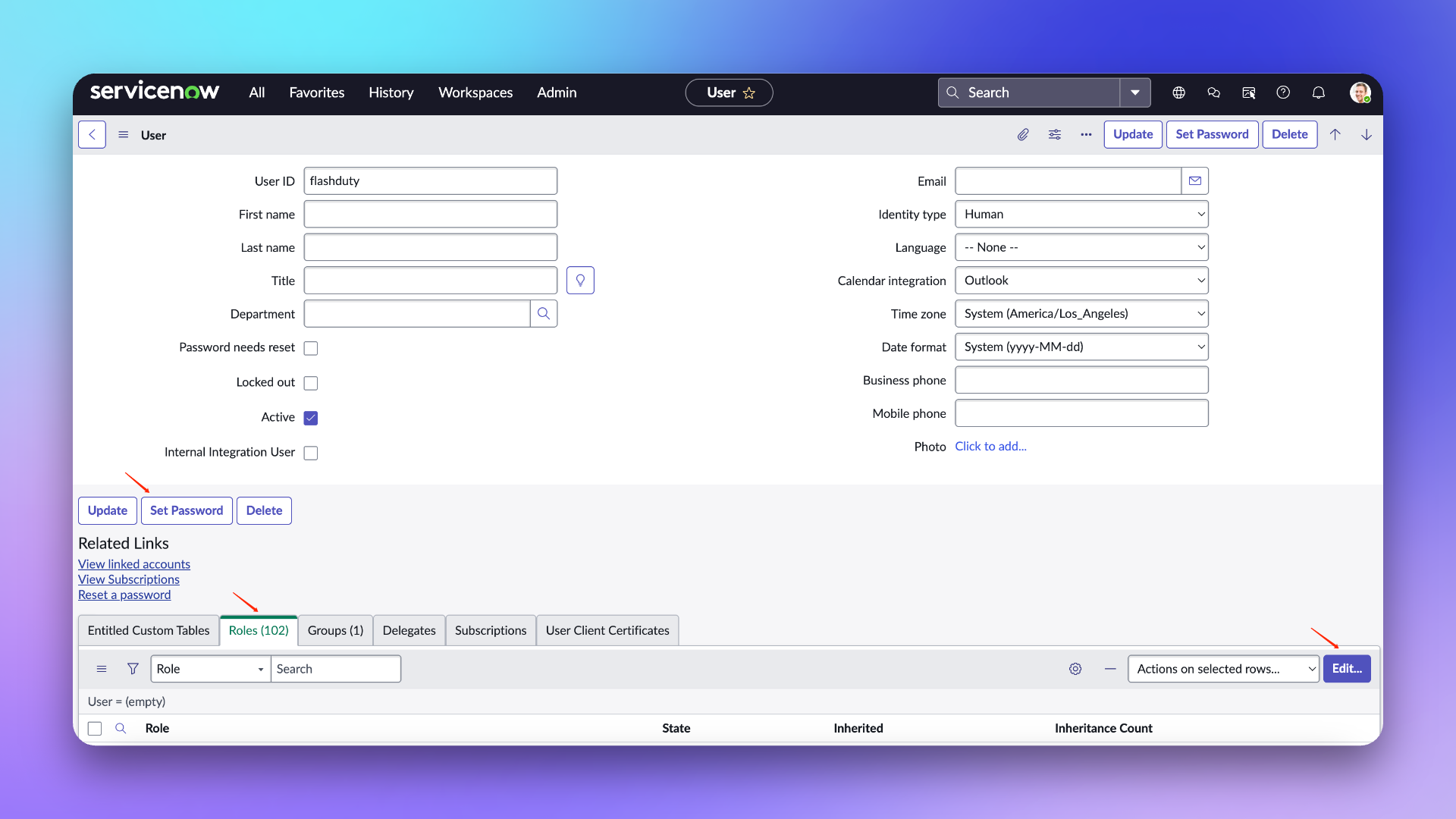
|
+
Create a user to connect to the ServiceNow instance for Incident sync and updates. Skip this step if you already have an available user.
|
|
6938
7030
|
|
|
6939
7031
|
1. Log in to the ServiceNow instance console, select \`ALL\`, enter \`USERS\` and select \`Organization\`-\`Users\`.
|
|
6940
7032
|
2. Click \`New\` to create a new user.
|
|
@@ -6946,14 +7038,20 @@ Through ServiceNow sync webhook, Flashduty incidents are associated and synchron
|
|
|
6946
7038
|
|
|
6947
7039
|
### Configure User
|
|
6948
7040
|
|
|
6949
|
-
|
|
7041
|
+
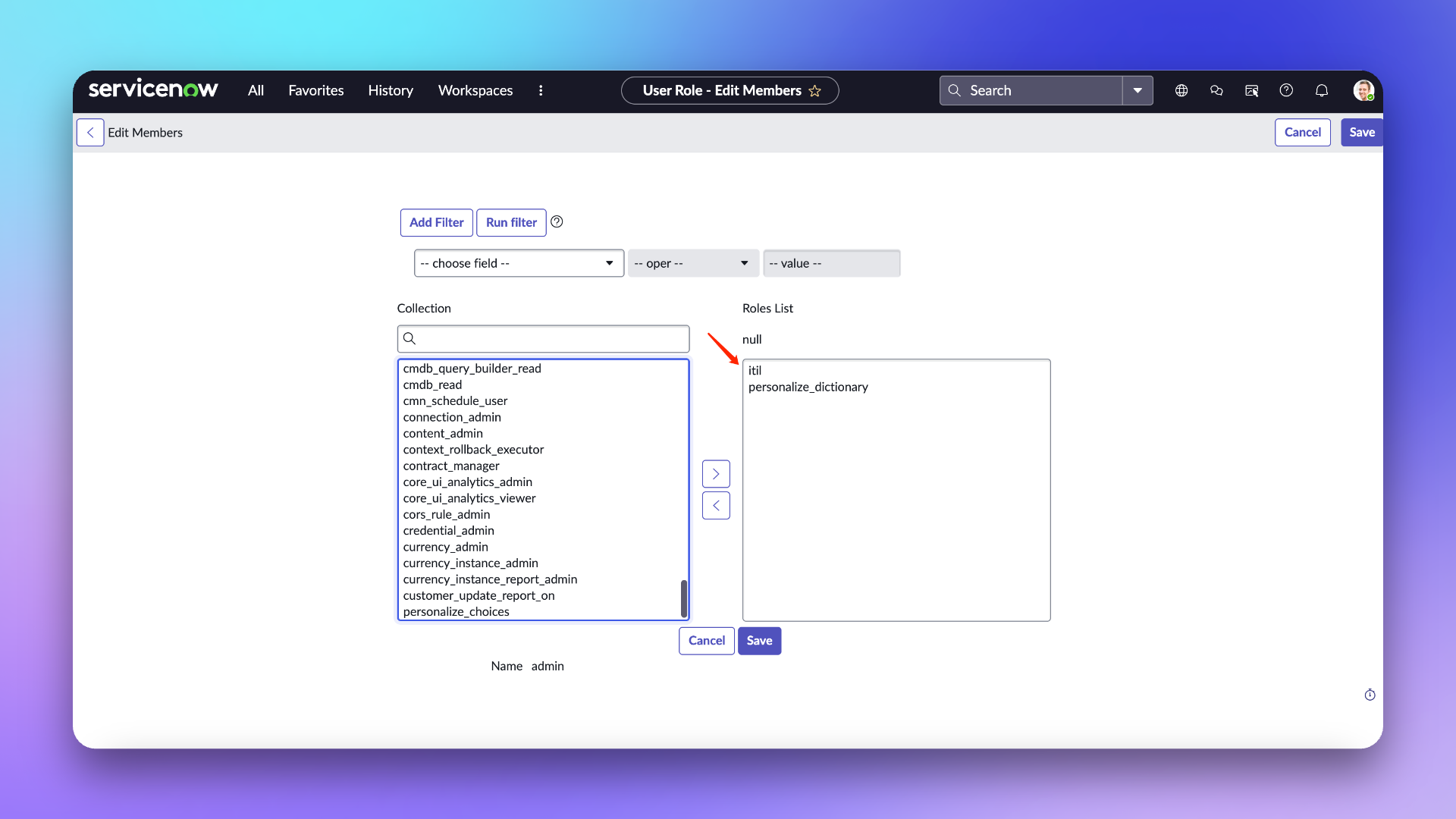
> **User Role Description**
|
|
7042
|
+
> **itil:** The main usage scope of this role in Flashduty is limited to field retrieval in ServiceNow Incident Table and does not involve any other operations.
|
|
7043
|
+
>
|
|
7044
|
+
> **personalize_dictionary:** This role in Flashduty is primarily used only for field retrieval from ServiceNow Incident Tables, and does not involve any other operations.
|
|
7045
|
+
>
|
|
7046
|
+
> For more information about the permission scope of these two roles, please refer to the ServiceNow [official documentation](https://www.servicenow.com/docs/bundle/washingtondc-platform-administration/page/administer/roles/reference/r_BaseSystemRoles.html#d130465e3182)
|
|
6950
7047
|
|
|
6951
7048
|
1. On the user list page, find the newly created \`flashduty\` user and go to the configuration page.
|
|
6952
7049
|
2. In the edit page, click \`Set Password\` to set a password.
|
|
6953
7050
|
3. Click \`Roles\` to add **personalize_dictionary and itil** roles (If custom field mapping configuration is not required, the personalize_dictionary permission does not need to be retained).
|
|
6954
7051
|
4. Click \`Update\` to update the configuration.
|
|
6955
7052
|
|
|
6956
|
-
|
|
7053
|
+
|
|
7054
|
+
|
|
6957
7055
|
|
|
6958
7056
|
## In Flashduty
|
|
6959
7057
|
|
|
@@ -6965,14 +7063,27 @@ Enter the username/password and instance name configured above into the integrat
|
|
|
6965
7063
|
- **Management Team:** When a management team is selected, only team members and tenant administrators can edit this integration.
|
|
6966
7064
|
- **Channel:** Select the channel where this integration takes effect.
|
|
6967
7065
|
- **Sync Direction:**
|
|
7066
|
+
|
|
6968
7067
|
- To_ServiceNow: Sync Flashduty incidents to ServiceNow.
|
|
6969
7068
|
- From_ServiceNow: Sync ServiceNow Incidents to Flashduty.
|
|
6970
7069
|
- Two-way: Bidirectional sync between Flashduty and ServiceNow.
|
|
6971
|
-
|
|
7070
|
+
|
|
7071
|
+
- **Trigger Mode:**
|
|
7072
|
+
|
|
6972
7073
|
- Auto Trigger: Requires configuration of corresponding conditions, Flashduty will automatically sync incidents that meet the conditions to ServiceNow.
|
|
6973
7074
|
- Manual Trigger: Requires manual triggering of ServiceNow sync in the More Actions section of the incident details page (the integration configuration name is the trigger name).
|
|
6974
|
-
|
|
6975
|
-
- **
|
|
7075
|
+
|
|
7076
|
+
- **Severity Mapping:**
|
|
7077
|
+
- ServiceNow's Priority is determined by the combined values of Impact and Urgency, so you can refer to ServiceNow's \`Priority Lookup Rules\` for configuration.
|
|
7078
|
+
- Only when the Urgency of a ServiceNow Incident changes will it trigger an update to the Flashduty incident severity.
|
|
7079
|
+
- Since Flashduty cannot obtain ServiceNow's Impact and Urgency lists while following the principle of least privilege, only default values are provided. If you need to customize the mapping relationship, please contact technical support.
|
|
7080
|
+
|
|
7081
|
+
- **Custom Field Mapping:** You can map tags or custom fields from incidents to corresponding text fields in ServiceNow tickets, enabling automatic information filling. This feature supports synchronizing common contextual information (such as service name, instance address, metric name, etc.) to ServiceNow for easier subsequent troubleshooting and tracking.
|
|
7082
|
+
|
|
7083
|
+
- Only supports target fields of single-line text or multi-line text types.
|
|
7084
|
+
- Supports extracting values from incident tags (such as service, instance) or custom attributes.
|
|
7085
|
+
- If the source field is empty, the target field will also remain empty and will not overwrite existing content.
|
|
7086
|
+
- Mapping configurations are managed centrally in integration settings, eliminating the need for manual entry each time.
|
|
6976
7087
|
|
|
6977
7088
|
## In ServiceNow
|
|
6978
7089
|
|
|
@@ -7180,34 +7291,235 @@ Note: The body configures default receiving fields. If you have custom fields th
|
|
|
7180
7291
|
|
|
7181
7292
|
| ServiceNow | Flashduty | Notes |
|
|
7182
7293
|
| ------------------- | ------------- | ----- |
|
|
7183
|
-
| Short_description | Title |
|
|
7294
|
+
| Short_description | Title | Title |
|
|
7295
|
+
| Description | Description | Description |
|
|
7296
|
+
| Additional comments | Comments | Comments |
|
|
7297
|
+
| State | Progress | Progress |
|
|
7298
|
+
| Urgency | Severity | Severity |
|
|
7299
|
+
| Others | Custom Fields | Custom Fields |
|
|
7300
|
+
|
|
7301
|
+
### Status Mapping
|
|
7302
|
+
|
|
7303
|
+
| ServiceNow | Flashduty | Notes |
|
|
7304
|
+
| ----------- | ---------- | ---------------------- |
|
|
7305
|
+
| New | Trigger | Trigger |
|
|
7306
|
+
| In Progress | Processing | Processing |
|
|
7307
|
+
| On Hold | Snoozed | Default snooze 2 hours |
|
|
7308
|
+
| Resolved | CLosed | CLosed |
|
|
7309
|
+
| Closed | CLosed | CLosed |
|
|
7310
|
+
| Canceled | CLosed | CLosed |
|
|
7311
|
+
|
|
7312
|
+
### Priority Mapping
|
|
7313
|
+
|
|
7314
|
+
Only when ServiceNow's Urgency value changes will it affect Flashduty's Severity
|
|
7315
|
+
|
|
7316
|
+
| ServiceNow | Flashduty | Notes |
|
|
7317
|
+
| ---------- | --------- | ----- |
|
|
7318
|
+
| Low | Info | Info |
|
|
7319
|
+
| Medium | Warning | Warning |
|
|
7320
|
+
| High | Critical | Critical |
|
|
7321
|
+
|
|
7322
|
+
|
|
7323
|
+
## QA
|
|
7324
|
+
|
|
7325
|
+
<details>
|
|
7326
|
+
<summary>Can the UserID be customized when creating a new ServiceNow user?</summary>
|
|
7327
|
+
Yes, it can be customized. The documentation uses "flashduty" as the UserID to better identify that this user is used for Incident synchronization.
|
|
7328
|
+
</details>
|
|
7329
|
+
|
|
7330
|
+
<details>
|
|
7331
|
+
<summary>Getting 401 error when configuring integration</summary>
|
|
7332
|
+
A 401 error is generally caused by an incorrect password. Please check if the password is correct, or reset a new password (when setting the password, do not check the "Password needs reset" option).
|
|
7333
|
+
</details>`,ce=`---
|
|
7334
|
+
title: "ServiceDesk Plus Sync"
|
|
7335
|
+
description: "Sync incidents with ServiceDesk Plus requests through ServiceDesk Plus sync webhook."
|
|
7336
|
+
date: "2025-05-19T10:00:00+08:00"
|
|
7337
|
+
url: "https://docs.flashcat.cloud/en/flashduty/servicedesk-plus-sync"
|
|
7338
|
+
---
|
|
7339
|
+
|
|
7340
|
+
Through ServiceDesk Plus sync webhook, Flashduty incidents are associated and synchronized with ServiceDesk Plus requests to achieve integration between Flashduty and ServiceDesk Plus.
|
|
7341
|
+
|
|
7342
|
+
This integration is based on the official v3 API protocol provided by ServiceDesk Plus and is compatible with its interface specifications. If you are using an on-premises deployment version, please confirm whether its API supports the v3 version. Additionally, there are differences in authorization configuration between the cloud and on-premises of ServiceDesk Plus. Please refer to the relevant documentation for specific configurations.
|
|
7343
|
+
|
|
7344
|
+
- [Cloud](#cloud-version)
|
|
7345
|
+
- [On-premises](#on-premises)
|
|
7346
|
+
|
|
7347
|
+
When configuring this integration, if you choose the sync direction as From_ServiceDesk_Plus, you can skip the authorization-related configuration and directly refer to [Configure Sync](#configure-sync).
|
|
7348
|
+
|
|
7349
|
+
## Cloud <span id="cloud-version"></span>
|
|
7350
|
+
|
|
7351
|
+
### In ServiceDesk Plus
|
|
7352
|
+
#### Step 1 Create Authorization Application
|
|
7353
|
+
Please select the corresponding Developer Console address according to your ServiceDesk Plus service region: [Data Centres](https://www.manageengine.com/products/service-desk/sdpod-v3-api/getting-started/data-centers.html)
|
|
7354
|
+
|
|
7355
|
+
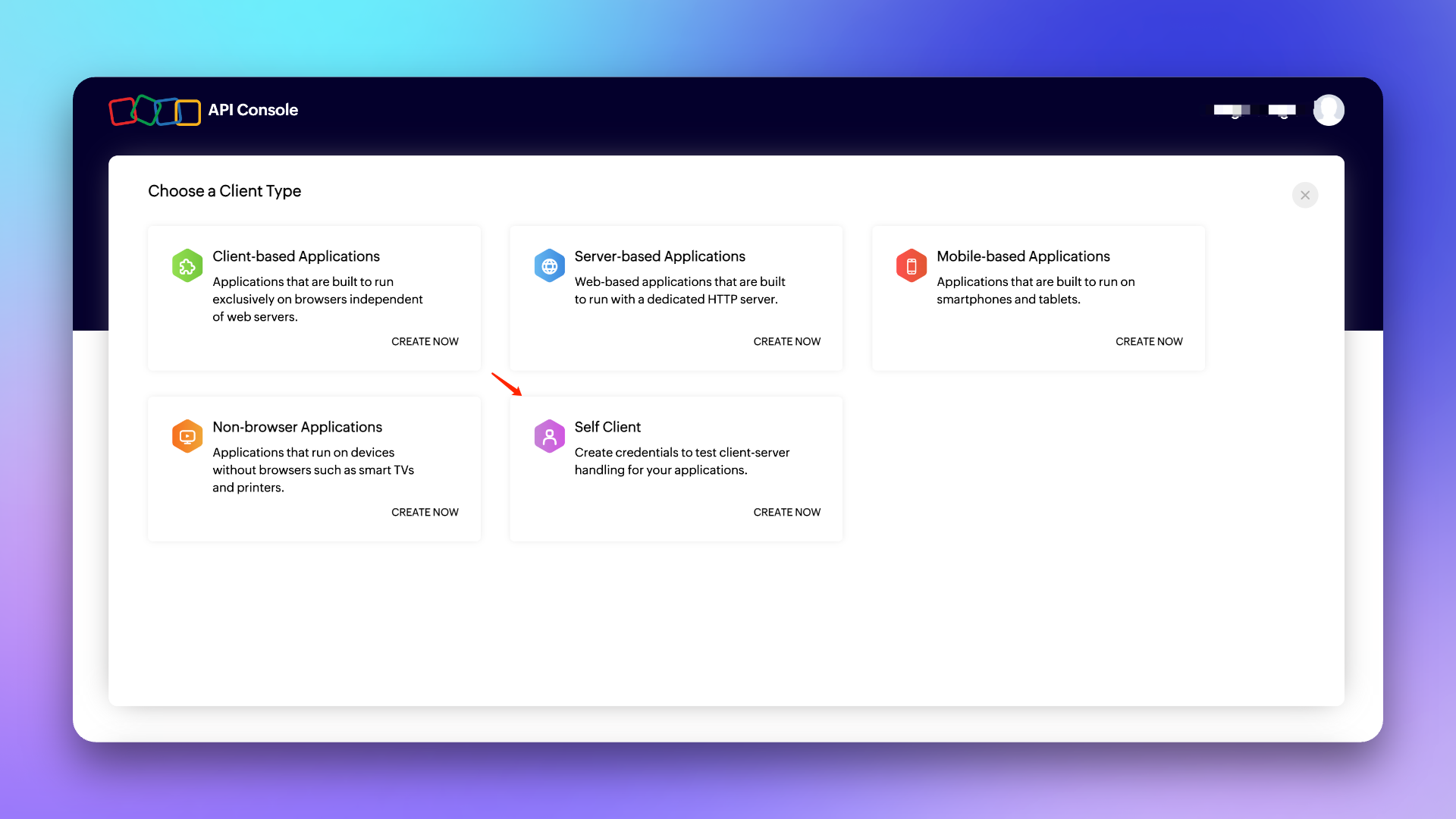
1. Log in to the Developer Console, select \`Self Client\` type Client and create it.
|
|
7356
|
+
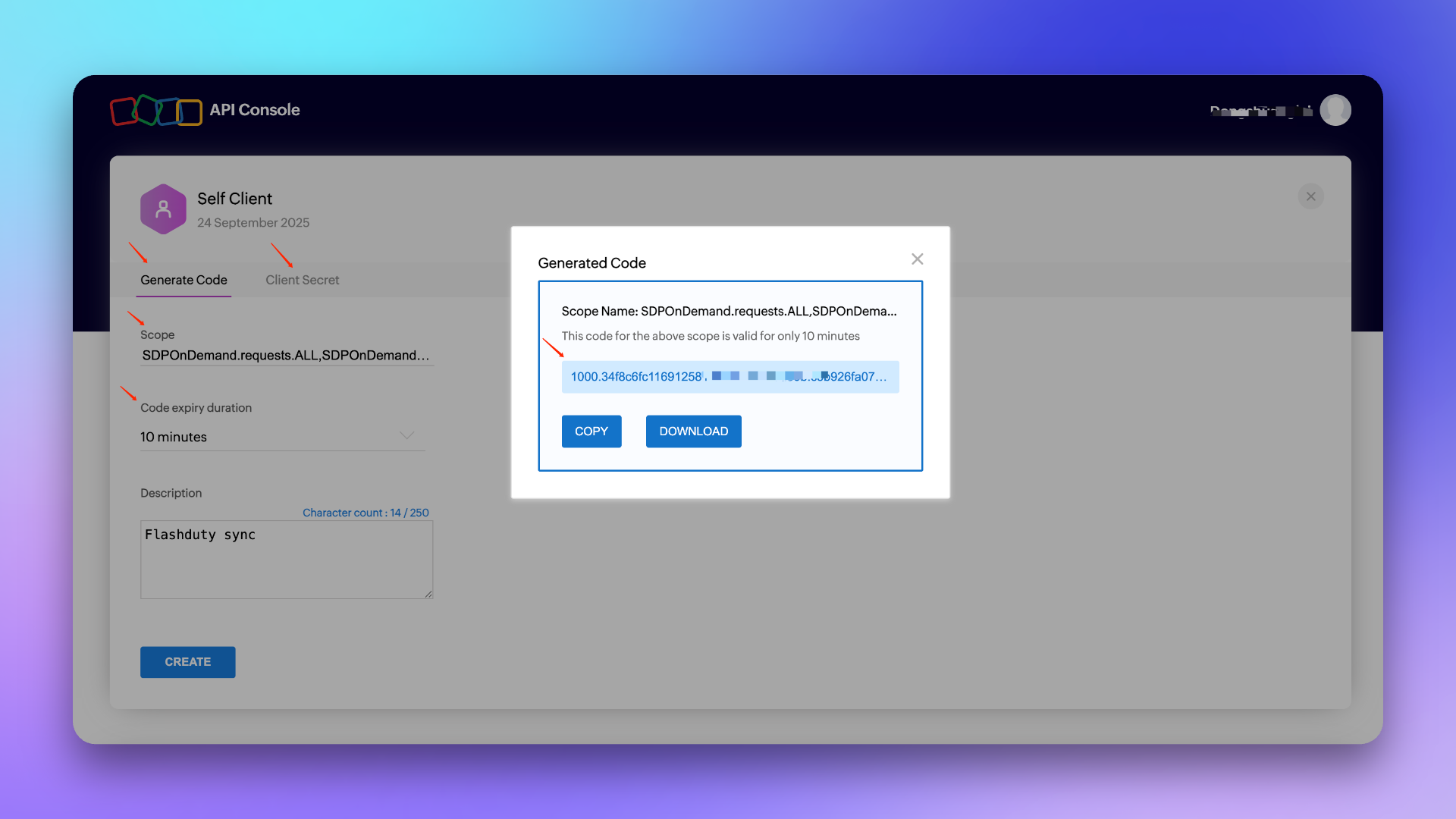
2. Click \`Generate Code\`, fill in the \`Scope\`: **SDPOnDemand.requests.ALL,SDPOnDemand.setup.READ,SDPOnDemand.custommodule.READ**. Refer to [official documentation](https://www.manageengine.com/products/service-desk/sdpod-v3-api/getting-started/oauth-2.0.html#scopes) for permission scope.
|
|
7357
|
+
|
|
7358
|
+
3. Select the maximum **10 minutes** for \`Time Duration\`, fill in the \`Scope Description\` as customizable, for example: For Flashduty sync use, and create.
|
|
7359
|
+
4. Copy the generated **Code**, **Client ID** and **Client Secret** for backup.
|
|
7360
|
+
|
|
7361
|
+
|
|
7362
|
+
|
|
7363
|
+
|
|
7364
|
+
###### Note: The Code is only valid for 10 minutes and can only be used once, so after obtaining the Code, please complete the [Integration Authorization](#integration-authorization) as soon as possible within the validity period.
|
|
7365
|
+
|
|
7366
|
+
### In Flashduty
|
|
7367
|
+
#### Step 2 Integration Authorization <span id="integration-authorization"></span>
|
|
7368
|
+
Please select the corresponding API Endpoint and Accounts Server URL according to your ServiceDesk Plus service region: [Data Centres](https://www.manageengine.com/products/service-desk/sdpod-v3-api/getting-started/data-centers.html)
|
|
7369
|
+
|
|
7370
|
+
1. Select **Cloud** for \`Platform Type\`, fill in \`API Endpoint\` and \`Accounts Server URL\`.
|
|
7371
|
+
2. Fill in the \`Code\`, \`Client ID\` and \`Client Secret\` generated in the **Create Authorization Application** step into the corresponding edit boxes and click Next to complete [Integration Configuration](#integration-configuration) (if an error occurs, please re-obtain the Code or contact technical support to troubleshoot the problem).
|
|
7372
|
+
|
|
7373
|
+
## On-premises <span id="on-premises"></span>
|
|
7374
|
+
### In ServiceDesk Plus
|
|
7375
|
+
#### Step 1 Generate API Key
|
|
7376
|
+
1. Log in to the ServiceDesk Plus console, click \`Generate API Key\` in the personal center.
|
|
7377
|
+
2. Select **Never Expires** for \`Token Expiration Time\`, copy the generated **Token** for backup, and complete [Integration Authorization](#on-premises-integration-authorization).
|
|
7378
|
+
|
|
7379
|
+
###### Note: The user who generates the API key needs to have relevant permissions, such as create/update requests, obtain template/priority/custom field lists and other permissions. If the permissions are insufficient, it will cause the integration configuration to fail. It is recommended to use an administrator role to generate.
|
|
7380
|
+
|
|
7381
|
+
### In Flashduty
|
|
7382
|
+
#### Step 2 Integration Authorization <span id="on-premises-integration-authorization"></span>
|
|
7383
|
+
1. Select **On-premises** for \`Platform Type\`, fill in \`API Endpoint\`.
|
|
7384
|
+
2. Fill in the generated **Token** into the corresponding edit box and click Next to complete [Integration Configuration](#integration-configuration).
|
|
7385
|
+
|
|
7386
|
+
|
|
7387
|
+
## General Configuration
|
|
7388
|
+
|
|
7389
|
+
### In Flashduty
|
|
7390
|
+
#### Step 1 Integration Configuration <span id="integration-configuration"></span>
|
|
7391
|
+
|
|
7392
|
+
1. **Integration Name:** Define a name for the current integration.
|
|
7393
|
+
2. **Management Team:** When a management team is selected, only team members and tenant administrators can edit this integration.
|
|
7394
|
+
3. **Sync Direction:**
|
|
7395
|
+
|
|
7396
|
+
- To_ServiceDesk_Plus: Sync Flashduty incidents to ServiceDesk Plus.
|
|
7397
|
+
- From_ServiceDesk_Plus: Sync ServiceDesk Plus requests to Flashduty.
|
|
7398
|
+
- Two-way: Bidirectional sync between Flashduty and ServiceDesk Plus.
|
|
7399
|
+
|
|
7400
|
+
4. **Trigger Mode**:
|
|
7401
|
+
- Auto Trigger: Requires configuration of corresponding conditions, Flashduty will automatically sync incidents that meet the conditions to ServiceDesk Plus.
|
|
7402
|
+
- Manual Trigger: Requires manual triggering of ServiceDesk Plus sync in the More Actions section of the incident details page (the integration configuration name is the trigger name).
|
|
7403
|
+
|
|
7404
|
+
5. **Channel:** Select the channel where this integration takes effect.
|
|
7405
|
+
6. **Request Template:** Select the template to use when creating requests.
|
|
7406
|
+
7. **Severity Mapping:** The mapping relationship between Flashduty severity and ServiceDesk Plus priority. For default mapping relationship, please refer to [Priority Mapping](#priority-mapping).
|
|
7407
|
+
8. **Custom Field Mapping:** You can map labels or custom fields in incidents to corresponding text fields in ServiceDesk Plus tickets to achieve automatic information filling. This feature supports syncing common context information (such as service name, instance address, metric name, etc.) to ServiceDesk Plus for subsequent troubleshooting and tracking.
|
|
7408
|
+
- Only supports target fields of single-line text or multi-line text type.
|
|
7409
|
+
- Supports extracting values from incident labels (such as service, instance) or custom attributes.
|
|
7410
|
+
- If the source field is empty, the target field will also remain empty and will not overwrite existing content.
|
|
7411
|
+
- Mapping configuration is managed uniformly in integration settings without manual filling each time.
|
|
7412
|
+
|
|
7413
|
+
9. **Assignee Mapping:** When Flashduty incidents are synced to ServiceDesk Plus and need to be automatically assigned to Technician or Group, you can get the value of Flashduty incident labels as the assignee (if the corresponding assignee does not exist, it will cause sync failure, please choose carefully).
|
|
7414
|
+
|
|
7415
|
+
10. Click \`Save\` to complete the configuration.
|
|
7416
|
+
|
|
7417
|
+
### In ServiceDesk Plus
|
|
7418
|
+
#### Step 2 Create Requester
|
|
7419
|
+
When Flashduty incidents are synced to ServiceDesk Plus, the Requester automatically set by the system
|
|
7420
|
+
|
|
7421
|
+
1. Log in to the ServiceDesk Plus console and find the \`Setup\` configuration page.
|
|
7422
|
+
2. Select \`Users & Permissions\`, then enter the \`Users\` creation page and select \`New Requester\`.
|
|
7423
|
+
3. Fill in **flashduty** for \`Name (Display Name)\` and \`First Name\`, fill in **flashduty-sync@flashcat.cloud** for \`Email\`.
|
|
7424
|
+
4. Other settings can be configured as needed, click \`Save\` to save the configuration.
|
|
7425
|
+
|
|
7426
|
+
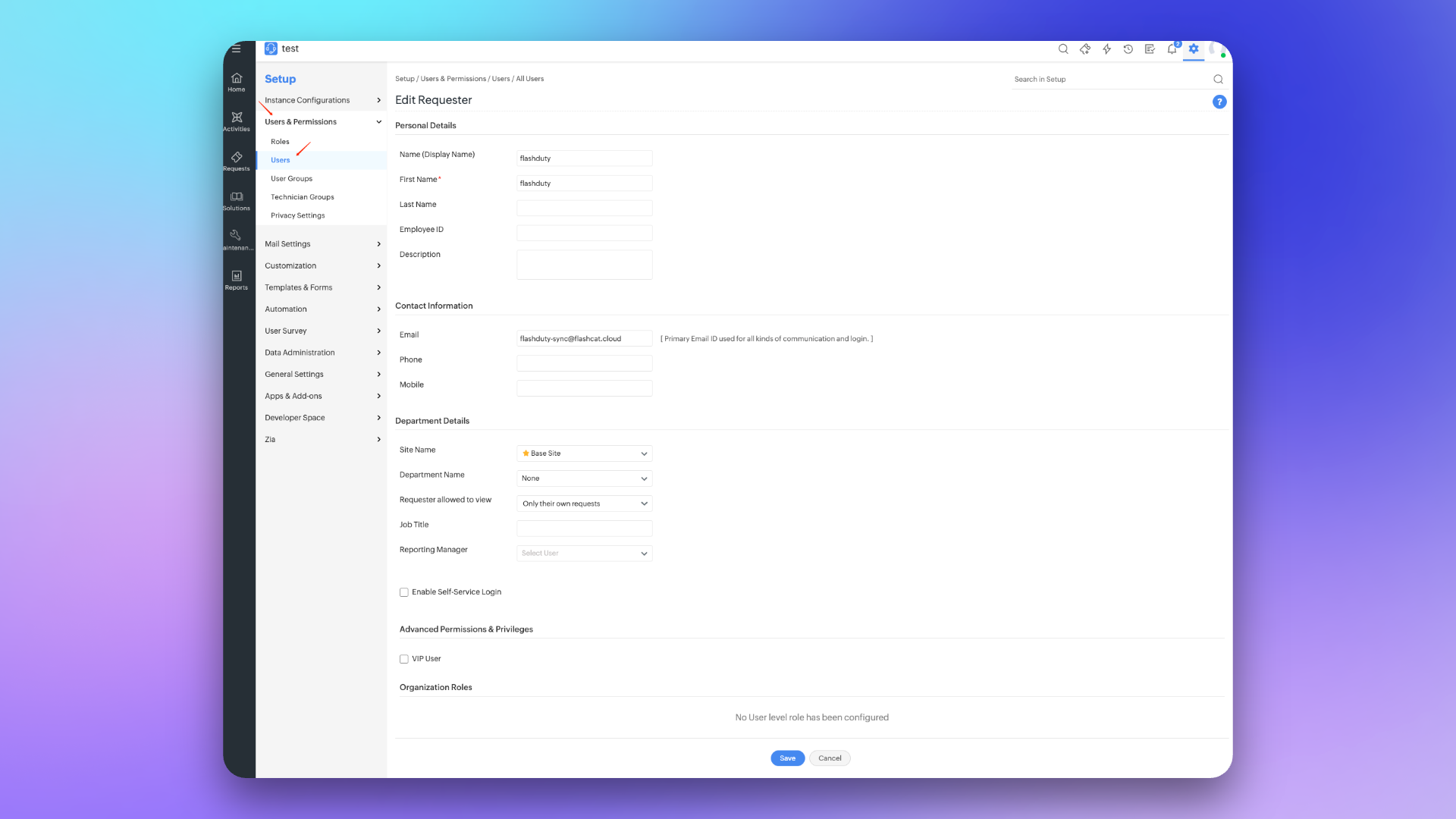
|
|
7427
|
+
|
|
7428
|
+
#### Step 3 Configure Sync <span id="configure-sync"></span>
|
|
7429
|
+
To achieve synchronization of ServiceDesk Plus requests to Flashduty, please refer to this configuration item. **Note:** Different versions may have slightly different paths, but the configuration method is the same.
|
|
7430
|
+
##### Create Webhook
|
|
7431
|
+
1. Log in to the ServiceDesk Plus console and find the \`Setup\` configuration page.
|
|
7432
|
+
2. Select \`Automation\`, then enter the \`Custom Actions\` page and select \`Webhooks\`.
|
|
7433
|
+
3. Click \`New Webhook\`, fill in **to_Flashduty** for \`Webhook Name\` in the edit page.
|
|
7434
|
+
4. Fill in the integration's <span class='integration_url'>push URL</span> for \`URL\`.
|
|
7435
|
+
5. Select **Requests** for \`Applies to\`, select **POST** for \`Method\`, fill in **Content-Type application/json** in \`Headers\`.
|
|
7436
|
+
6. Select **JSON** for \`Message Body\` Type and fill in the following content:
|
|
7437
|
+
|
|
7438
|
+
\`\`\`
|
|
7439
|
+
# Cloud
|
|
7440
|
+
{
|
|
7441
|
+
"subject":"\${subject}",
|
|
7442
|
+
"request_id":"\${id}",
|
|
7443
|
+
"description":"\${udf_fields.txt_destination}",
|
|
7444
|
+
"priority":"\${priority.name}",
|
|
7445
|
+
"status":"\${status.name}",
|
|
7446
|
+
"txt_test_field":"\${udf_fields.txt_test_field}"
|
|
7447
|
+
|
|
7448
|
+
}
|
|
7449
|
+
\`\`\`
|
|
7450
|
+
|
|
7451
|
+
\`\`\`
|
|
7452
|
+
# On-premises
|
|
7453
|
+
{
|
|
7454
|
+
"suject":"\${{request.subject}}",
|
|
7455
|
+
"request_id":"\${{request.id}}",
|
|
7456
|
+
"description":"\${{request.description}}",
|
|
7457
|
+
"status":"\${{request.status.name}}",
|
|
7458
|
+
"priority":"\${{request.priority.name}}",
|
|
7459
|
+
"udf_sline_301":"\${{request.udf_fields.udf_sline_301}}"
|
|
7460
|
+
}
|
|
7461
|
+
|
|
7462
|
+
\`\`\`
|
|
7463
|
+
7. Click \`Save\` to complete the configuration.
|
|
7464
|
+
|
|
7465
|
+
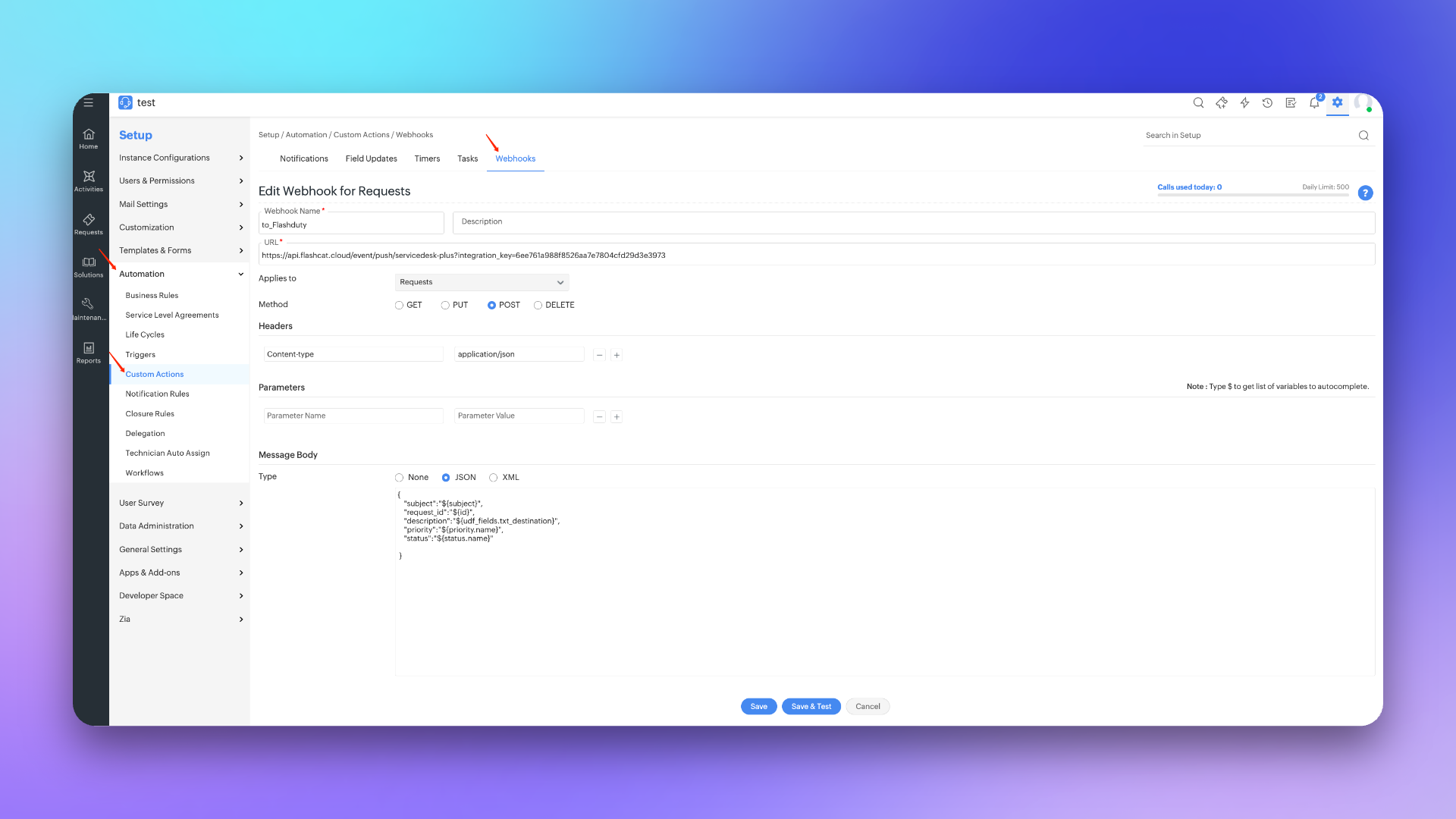
|
|
7466
|
+
|
|
7467
|
+
##### Create Trigger
|
|
7468
|
+
1. Log in to the ServiceDesk Plus console and find the \`Setup\` configuration page.
|
|
7469
|
+
2. Select \`Automation\`, then enter the \`Triggers\` page and select \`Request\`.
|
|
7470
|
+
3. Click \`New Trigger\`, fill in **to_Flashduty** for \`Name\` in the edit page.
|
|
7471
|
+
4. Select **Request** for \`Trigger applies to\`, check **Create and Edited** for \`Execute when a request is\`.
|
|
7472
|
+
5. Select **Any time** for \`Execute during\` and check **Enable Trigger**.
|
|
7473
|
+
6. Select \`Without condition\` for \`Conditions\` or configure according to actual needs.
|
|
7474
|
+
7. Select **Webhook** in \`Actions\` and check **to_Flashduty** channel.
|
|
7475
|
+
8. Click \`Save\` to complete the configuration.
|
|
7476
|
+
|
|
7477
|
+
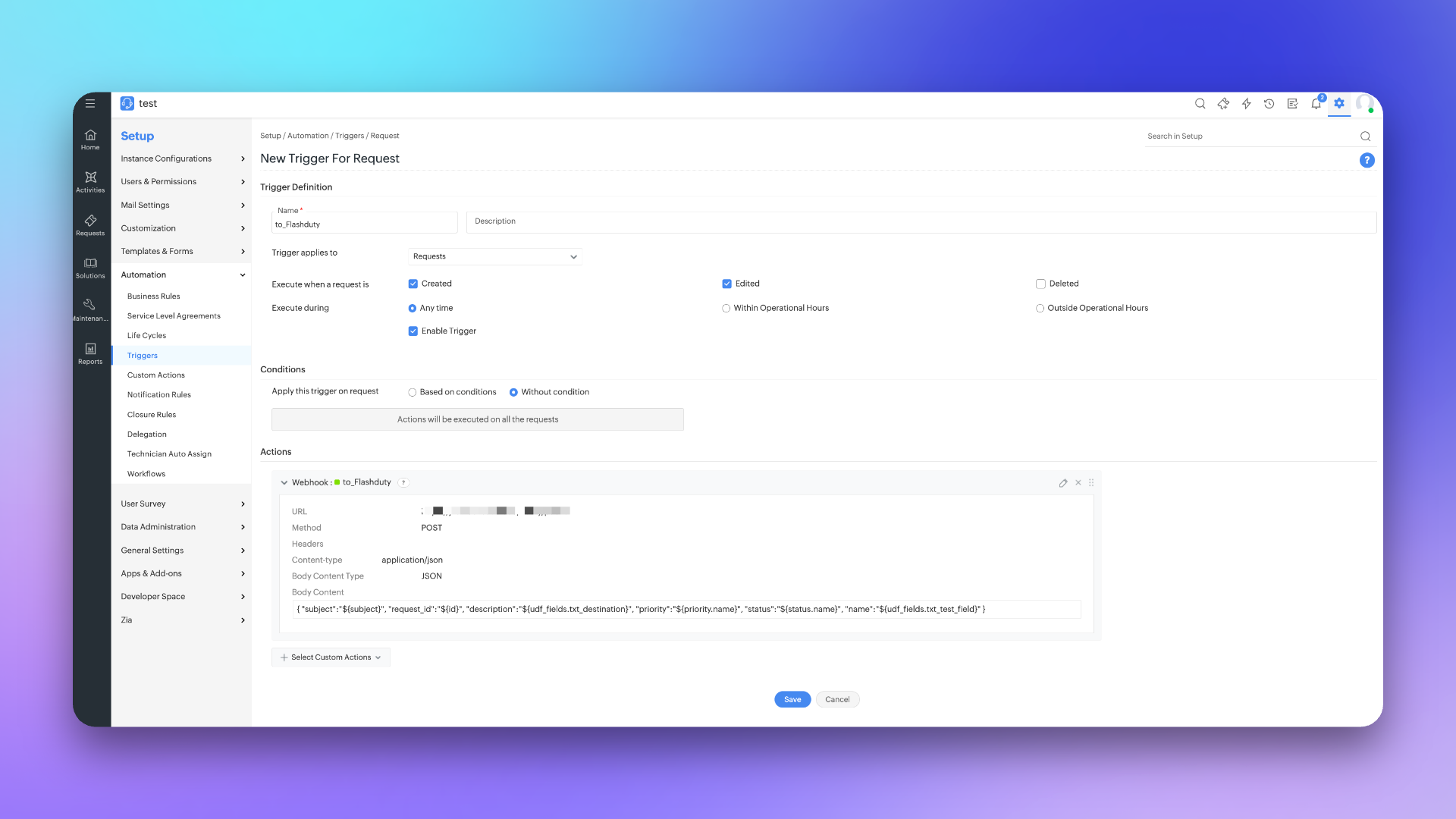
|
|
7478
|
+
|
|
7479
|
+
|
|
7480
|
+
## Sync Information
|
|
7481
|
+
|
|
7482
|
+
### Form Fields
|
|
7483
|
+
|
|
7484
|
+
| ServiceDesk Plus | Flashduty | Notes |
|
|
7485
|
+
| ------------------- | ------------- | ----- |
|
|
7486
|
+
| Subject | Title | |
|
|
7184
7487
|
| Description | Description | |
|
|
7185
|
-
|
|
|
7186
|
-
|
|
|
7187
|
-
| Urgency | Severity | |
|
|
7488
|
+
| Status | Progress | |
|
|
7489
|
+
| Priority | Severity | |
|
|
7188
7490
|
| Others | Custom Fields | |
|
|
7189
7491
|
|
|
7190
7492
|
### Status Mapping
|
|
7191
7493
|
|
|
7192
|
-
|
|
|
7494
|
+
| ServiceDesk Plus | Flashduty | Notes |
|
|
7193
7495
|
| ----------- | ---------- | ---------------------- |
|
|
7194
|
-
|
|
|
7496
|
+
| Open | Trigger | |
|
|
7195
7497
|
| In Progress | Processing | |
|
|
7498
|
+
| Assigned | Processing | |
|
|
7499
|
+
| Pending Verification | Processing | |
|
|
7500
|
+
| Staging | Processing | |
|
|
7196
7501
|
| On Hold | Snoozed | Default snooze 2 hours |
|
|
7197
7502
|
| Resolved | CLosed | |
|
|
7198
7503
|
| Closed | CLosed | |
|
|
7199
7504
|
| Canceled | CLosed | |
|
|
7505
|
+
| Rejected | CLosed | |
|
|
7200
7506
|
|
|
7201
|
-
### Priority Mapping
|
|
7507
|
+
### Priority Mapping <span id="priority-mapping"></span>
|
|
7202
7508
|
|
|
7203
|
-
|
|
7204
|
-
|
|
7205
|
-
| ServiceNow | Flashduty | Notes |
|
|
7509
|
+
| ServiceDesk Plus | Flashduty | Notes |
|
|
7206
7510
|
| ---------- | --------- | ----- |
|
|
7207
7511
|
| Low | Info | |
|
|
7208
7512
|
| Medium | Warning | |
|
|
7209
7513
|
| High | Critical | |
|
|
7210
|
-
|
|
7514
|
+
|
|
7515
|
+
|
|
7516
|
+
## FAQ
|
|
7517
|
+
|
|
7518
|
+
<details>
|
|
7519
|
+
<summary> Can the Scope be changed</summary>
|
|
7520
|
+
No, the Scope currently used is already the smallest unit. Flashduty needs to perform get/create/update operations when syncing requests with ServiceDesk Plus, and needs to obtain priority/custom field lists when configuring integration, so corresponding permission support is required.
|
|
7521
|
+
</details>
|
|
7522
|
+
`,he=`---
|
|
7211
7523
|
title: "Configure Notification Templates"
|
|
7212
7524
|
description: "Customize notification content through template configuration"
|
|
7213
7525
|
date: "2024-05-10T10:00:00+08:00"
|
|
@@ -8375,7 +8687,7 @@ As shown in the image below:
|
|
|
8375
8687
|
|
|
8376
8688
|
<img src="https://download.flashcat.cloud/flashduty/changelog/20230720/email_render.png" alt="drawing" style="display: block; margin: 0 auto;" width="500"/>
|
|
8377
8689
|
|
|
8378
|
-
</div>`,
|
|
8690
|
+
</div>`,ue=`---
|
|
8379
8691
|
title: "Link Integration"
|
|
8380
8692
|
description: "Through Link integration, you can quickly access external links by obtaining key parameters from incident attributes, labels, and other information"
|
|
8381
8693
|
date: "2025-05-19T10:00:00+08:00"
|
|
@@ -8432,4 +8744,4 @@ https://cmdb.com/vm?sn=VM123456
|
|
|
8432
8744
|
1. When referenced content does not exist, Link integration will still generate the corresponding link but will not be able to retrieve the value
|
|
8433
8745
|
2. Each channel can bind up to three Link integrations
|
|
8434
8746
|
3. Pay attention to reference syntax; improper variable reference formatting will result in failure to retrieve corresponding values
|
|
8435
|
-
`,
|
|
8747
|
+
`,ge={CustomAlert:n,Email:t,N9e:a,Prometheus:i,Grafana:o,Zabbix:s,UptimeKuma:r,AliyunARMS:l,AliyunCmEvent:d,AliyunCm:c,AliyunSLS:e,AWSCW:e,AzureMonitor:h,BaiDuBCM:u,HuaWeiCES:g,InfluxDB:p,OpenFalcon:m,PagerDuty:f,TencentBK:y,TencentCLS:v,TencentCm:b,TencentEb:w,OceanBase:C,Graylog:k,Skywalking:I,Sentry:S,Jiankongbao:A,AWSEventBridge:F,Dynatrace:x,HuaweiyunLTS:L,GoogleCM:_,Zilliz:G,Splunk:R,AppDynamics:T,SolarWinds:D,VolcEngineMetric:U,VolcEngineEvent:E,VolcEngineTLS:N,OpManager:P,Meraki:M,StateCloud:W,Guance:q,CustomChange:Q,Jira:X,Lark:ee,Dingtalk:ne,Wecom:te,Slack:ae,MicrosoftTeams:ie,AlertWebhook:oe,IncidentWebhook:se,CustomAction:re,Templates:he,HuaweiyunAPM:O,JiraSync:le,ZStack:$,Keep:j,ElastAlert2:H,DingtalkAlert:Y,FeishuAlert:z,VolcEngineDetect:B,Link:ue,ServiceNowSync:de,Monit:V,Rum:K,Cloudflare:J,WecomAlert:Z,ServiceDeskPlusSync:ce};module.exports=ge;
|