flashduty-knowledge-base 1.3.0 → 1.3.2
This diff represents the content of publicly available package versions that have been released to one of the supported registries. The information contained in this diff is provided for informational purposes only and reflects changes between package versions as they appear in their respective public registries.
- package/dist/en.d.ts +4 -0
- package/dist/esm/en.js +435 -29
- package/dist/esm/zh.js +435 -28
- package/dist/iife/en.js +410 -4
- package/dist/iife/zh.js +410 -3
- package/dist/zh.d.ts +4 -0
- package/package.json +1 -1
package/dist/iife/en.js
CHANGED
|
@@ -1370,7 +1370,7 @@ Alibaba Cloud Monitor event alert to Flashduty severity level mapping:
|
|
|
1370
1370
|
| WARNING | Warning | Warning |
|
|
1371
1371
|
| INFO | Info | Info |
|
|
1372
1372
|
|
|
1373
|
-
</div>`,
|
|
1373
|
+
</div>`,u=`---
|
|
1374
1374
|
title: "Alibaba Cloud Monitor CM Metrics Integration"
|
|
1375
1375
|
description: "Sync Alibaba Cloud Monitor alert events to Flashduty via webhook for automated alert noise reduction"
|
|
1376
1376
|
date: "2025-05-19T10:00:00+08:00"
|
|
@@ -1595,7 +1595,7 @@ Alibaba Cloud SLS monitoring to Flashduty alert severity mapping:
|
|
|
1595
1595
|
| 2 | Info | Info |
|
|
1596
1596
|
|
|
1597
1597
|
</div>
|
|
1598
|
-
`,
|
|
1598
|
+
`,h={CustomAlert:t,Email:a,N9e:i,Prometheus:o,Grafana:s,Zabbix:r,UptimeKuma:l,AliyunARMS:d,AliyunCmEvent:c,AliyunCm:u,AliyunSLS:e,AWSCW:e,AzureMonitor:`---
|
|
1599
1599
|
title: "AWS CloudWatch Integration"
|
|
1600
1600
|
description: "Sync AWS CloudWatch alert events to Flashduty via webhook to achieve automated alert noise reduction"
|
|
1601
1601
|
date: "2025-05-19T10:00:00+08:00"
|
|
@@ -5631,7 +5631,7 @@ acknowledged_at | int64| No | Acknowledgment time
|
|
|
5631
5631
|
| fields | map[string]interface{} | No | Custom field key-value pairs, Key is string, Value can be any type depending on field type |
|
|
5632
5632
|
| creator | [Person](#Person) | No | Creator information, exists only for manually created incidents |
|
|
5633
5633
|
| closer | [Person](#Person) | No | Closer information, exists only for manually closed incidents |
|
|
5634
|
-
| responders | [][Responder](#Responder) | No | List of responder information |
|
|
5634
|
+
| responders | [][Responder](#Responder) | No | List of responder information, only exists after the incident is assigned. For i_new events, this value may be empty |
|
|
5635
5635
|
| alert_cnt | int64 | No | Number of associated alerts |
|
|
5636
5636
|
| channel_id | int64 | No | Channel ID, 0 means not belonging to any channel |
|
|
5637
5637
|
| channel_name | string | No | Channel name |
|
|
@@ -7749,6 +7749,88 @@ By default, the system always creates new alerts for each message, but you can s
|
|
|
7749
7749
|
|
|
7750
7750
|
Currently, all alerts pushed to Flashduty through Feishu Alert integration are set to Warning severity.
|
|
7751
7751
|
|
|
7752
|
+
`,VolcEngineDetect:`---
|
|
7753
|
+
title: "Volcengine Cloud-Detect Alert Events"
|
|
7754
|
+
description: "Sync Volcengine Cloud-Detect alert events to Flashduty via webhook for automated alert noise reduction"
|
|
7755
|
+
date: "2024-07-05T10:00:00+08:00"
|
|
7756
|
+
url: "https://docs.flashcat.cloud/en/flashduty/volcengine-tls-integration-guide"
|
|
7757
|
+
---
|
|
7758
|
+
|
|
7759
|
+
Sync Volcengine Cloud-Detect alert events to Flashduty via webhook for automated alert noise reduction.
|
|
7760
|
+
|
|
7761
|
+
<div class="hide">
|
|
7762
|
+
|
|
7763
|
+
## In Flashduty
|
|
7764
|
+
---
|
|
7765
|
+
You can obtain an integration push URL through either of these two methods:
|
|
7766
|
+
|
|
7767
|
+
### Using Private Integration
|
|
7768
|
+
|
|
7769
|
+
Choose this method when you don't need to route alert events to different channels - it's simpler.
|
|
7770
|
+
|
|
7771
|
+
<details>
|
|
7772
|
+
<summary>Expand</summary>
|
|
7773
|
+
|
|
7774
|
+
1. Go to the Flashduty console, select **Channel**, and enter a channel's details page
|
|
7775
|
+
2. Select the **Integrations** tab, click **Add Integration** to enter the integration page
|
|
7776
|
+
3. Choose **Volcengine Detect** integration and click **Save** to generate a card
|
|
7777
|
+
4. Click the generated card to view the **Push URL**, copy it for later use, and you're done
|
|
7778
|
+
|
|
7779
|
+
</details>
|
|
7780
|
+
|
|
7781
|
+
### Using Shared Integration
|
|
7782
|
+
|
|
7783
|
+
Choose this method when you need to route alerts to different channels based on the alert event payload.
|
|
7784
|
+
|
|
7785
|
+
<details>
|
|
7786
|
+
<summary>Expand</summary>
|
|
7787
|
+
|
|
7788
|
+
1. Go to the Flashduty console, select **Integration Center=>Alert Events** to enter the integration selection page
|
|
7789
|
+
2. Select **Volcengine Detect** integration:
|
|
7790
|
+
- **Integration Name**: Define a name for this integration
|
|
7791
|
+
3. Configure the default route and select the corresponding channel (after the integration is created, you can go to \`Route\` to configure more routing rules)
|
|
7792
|
+
4. Click **Save** and copy the newly generated **push URL** for later use
|
|
7793
|
+
5. Done
|
|
7794
|
+
|
|
7795
|
+
</details>
|
|
7796
|
+
</div>
|
|
7797
|
+
|
|
7798
|
+
## In Volcengine
|
|
7799
|
+
---
|
|
7800
|
+
|
|
7801
|
+
<div class="md-block">
|
|
7802
|
+
|
|
7803
|
+
## 一、Create Notification Object
|
|
7804
|
+
|
|
7805
|
+
### Step 1: Create Notification Object
|
|
7806
|
+
1. Login to your \`Volcengine\` console, find \`Alert Manager\` in the \`Notify Object\` menu
|
|
7807
|
+
2. Click \`System Integration\`, click \`Create System Integration\` or edit the existing endpoint
|
|
7808
|
+
3. 在编辑页面中,名称填写 \`Flashduty\` ,\`回调 URL\` 处填写告警集成的<span class='integration_url'>推送地址</span>。
|
|
7809
|
+
5. Click \`OK\` to complete the configuration
|
|
7810
|
+
|
|
7811
|
+
<img alt="drawing" width="600" src="https://download.flashcat.cloud/flashduty/doc/zh/fd/volcengine-1.png" />
|
|
7812
|
+
|
|
7813
|
+
### Step 2: Use Notification Object in Alert Policy
|
|
7814
|
+
1. Login to your \`Volcengine\` console, find \`Alert Manager\` in the \`Alert Policy\` menu
|
|
7815
|
+
2. Click \`Create Alert Policy\` or edit the existing alert policy
|
|
7816
|
+
3. In the edit page, select the created \`Flashduty\` Endpoint
|
|
7817
|
+
4. Configure other settings as needed, and click \`OK\` to complete the configuration
|
|
7818
|
+
|
|
7819
|
+
<img alt="drawing" width="600" src="https://download.flashcat.cloud/flashduty/doc/zh/fd/volcengine-2.png" />
|
|
7820
|
+
|
|
7821
|
+
</dev>
|
|
7822
|
+
|
|
7823
|
+
## 二、Status Mapping
|
|
7824
|
+
|
|
7825
|
+
<div class="md-block">
|
|
7826
|
+
|
|
7827
|
+
| Detect | Flashduty | Status |
|
|
7828
|
+
| ---------- | -------- | ---- |
|
|
7829
|
+
| P0 | Critical | Critical|
|
|
7830
|
+
| P2 | Warning | Warning|
|
|
7831
|
+
|
|
7832
|
+
</div>
|
|
7833
|
+
|
|
7752
7834
|
`,Link:`---
|
|
7753
7835
|
title: "Link Integration"
|
|
7754
7836
|
description: "Through Link integration, you can quickly access external links by obtaining key parameters from incident attributes, labels, and other information"
|
|
@@ -7806,4 +7888,328 @@ https://cmdb.com/vm?sn=VM123456
|
|
|
7806
7888
|
1. When referenced content does not exist, Link integration will still generate the corresponding link but will not be able to retrieve the value
|
|
7807
7889
|
2. Each channel can bind up to three Link integrations
|
|
7808
7890
|
3. Pay attention to reference syntax; improper variable reference formatting will result in failure to retrieve corresponding values
|
|
7809
|
-
|
|
7891
|
+
`,ServiceNowSync:`---
|
|
7892
|
+
title: "ServiceNow Sync"
|
|
7893
|
+
description: "Sync incidents with ServiceNow Incidents through ServiceNow sync webhook."
|
|
7894
|
+
date: "2025-05-19T10:00:00+08:00"
|
|
7895
|
+
url: "https://docs.flashcat.cloud/en/flashduty/service-now-sync"
|
|
7896
|
+
---
|
|
7897
|
+
|
|
7898
|
+
Through ServiceNow sync webhook, Flashduty incidents are associated and synchronized with ServiceNow Incidents to achieve integration between Flashduty and ServiceNow.
|
|
7899
|
+
|
|
7900
|
+
## In ServiceNow
|
|
7901
|
+
|
|
7902
|
+
### Create User
|
|
7903
|
+
|
|
7904
|
+
1. Log in to the ServiceNow instance console, select \`ALL\`, enter \`USERS\` and select \`Organization\`-\`Users\`.
|
|
7905
|
+
2. Click \`New\` to create a new user.
|
|
7906
|
+
3. In the edit page, enter \`flashduty\` in the \`User ID\` field.
|
|
7907
|
+
4. Keep \`Password needs reset\`, \`Web service access only\`, and \`Internal Integration User\` unchecked.
|
|
7908
|
+
5. Submit and save.
|
|
7909
|
+
|
|
7910
|
+
<img alt="drawing" width="600" src="https://download.flashcat.cloud/flashduty/doc/snow/snow-1.png" />
|
|
7911
|
+
|
|
7912
|
+
### Configure User
|
|
7913
|
+
|
|
7914
|
+
The user used to access ServiceNow needs to have administrator roles.
|
|
7915
|
+
|
|
7916
|
+
1. On the user list page, find the newly created \`flashduty\` user and go to the configuration page.
|
|
7917
|
+
2. In the edit page, click \`Set Password\` to set a password.
|
|
7918
|
+
3. Click \`Roles\` to add **admin and itil** roles.
|
|
7919
|
+
4. Click \`Update\` to update the configuration.
|
|
7920
|
+
|
|
7921
|
+
<img alt="drawing" width="600" src="https://download.flashcat.cloud/flashduty/doc/snow/snow-2.png" />
|
|
7922
|
+
|
|
7923
|
+
## In Flashduty
|
|
7924
|
+
|
|
7925
|
+
### Configure Integration
|
|
7926
|
+
|
|
7927
|
+
Enter the username/password and instance name configured above into the integration information on the left and click Next to configure.
|
|
7928
|
+
|
|
7929
|
+
- **Integration Name:** Define a name for the current integration.
|
|
7930
|
+
- **Management Team:** When a management team is selected, only team members and tenant administrators can edit this integration.
|
|
7931
|
+
- **Channel:** Select the channel where this integration takes effect.
|
|
7932
|
+
- **Sync Direction:**
|
|
7933
|
+
- To_ServiceNow: Sync Flashduty incidents to ServiceNow.
|
|
7934
|
+
- From_ServiceNow: Sync ServiceNow Incidents to Flashduty.
|
|
7935
|
+
- Two-way: Bidirectional sync between Flashduty and ServiceNow.
|
|
7936
|
+
- **Trigger Mode**:
|
|
7937
|
+
- Auto Trigger: Requires configuration of corresponding conditions, Flashduty will automatically sync incidents that meet the conditions to ServiceNow.
|
|
7938
|
+
- Manual Trigger: Requires manual triggering of ServiceNow sync in the More Actions section of the incident details page (the integration configuration name is the trigger name).
|
|
7939
|
+
- **Severity Mapping:** ServiceNow's Priority is determined by the combined values of Impact and Urgency, so you can refer to ServiceNow's \`Priority Lookup Rules\` for configuration. Additionally, note that only when ServiceNow Incident's Urgency changes will it trigger updates to Flashduty incident severity.
|
|
7940
|
+
- **Custom Field Mapping:** You can choose to sync certain labels or all labels of incidents as well as custom field content to ServiceNow fields (only text-type fields are supported).
|
|
7941
|
+
|
|
7942
|
+
## In ServiceNow
|
|
7943
|
+
|
|
7944
|
+
When sync direction is set to From_ServiceNow or Two-way, additional configuration is required in ServiceNow to sync ServiceNow Incidents to Flashduty. When syncing to Flashduty, there are two methods available, choose based on your actual needs.
|
|
7945
|
+
|
|
7946
|
+
### Manual Sync
|
|
7947
|
+
|
|
7948
|
+
This method relies on ServiceNow's UI Action and Script Include configuration. The effect achieved by following the steps below: When creating or updating an Incident, you can see a button to send sync requests in the function area. Triggering this button will sync the current Incident content to Flashduty. Note that if the request fails when triggered, please retry (retry interval should be greater than 10 seconds).
|
|
7949
|
+
|
|
7950
|
+
#### Configure UI Action
|
|
7951
|
+
|
|
7952
|
+
1. Log in to the ServiceNow instance console, select \`ALL\`, enter \`UI Actions\` and select \`System Definition\`-\`UI Actions\`.
|
|
7953
|
+
2. Click \`New\` to create a new Action.
|
|
7954
|
+
3. Enter **Send To Flashduty** in \`Name\`, select **Incident** in \`Table\`.
|
|
7955
|
+
4. Keep \`Form button\`, \`Active\`, \`Show insert\`, \`Show update\`, \`Client\`, \`List v2/3 Compatible\` checked.
|
|
7956
|
+
5. Enter **onClick();** in \`Onclick\`.
|
|
7957
|
+
6. Enter the following in \`Script\`:
|
|
7958
|
+
|
|
7959
|
+
\`\`\`js
|
|
7960
|
+
function onClick() {
|
|
7961
|
+
g_form.save();
|
|
7962
|
+
|
|
7963
|
+
var ga = new GlideAjax("IncidentWebhookHelperAjax");
|
|
7964
|
+
ga.addParam("sysparm_name", "sendWebhook");
|
|
7965
|
+
ga.addParam("sysparm_sys_id", g_form.getUniqueValue());
|
|
7966
|
+
|
|
7967
|
+
ga.getXMLAnswer(function (response) {
|
|
7968
|
+
alert("Webhook Triggered: " + response);
|
|
7969
|
+
});
|
|
7970
|
+
}
|
|
7971
|
+
\`\`\`
|
|
7972
|
+
|
|
7973
|
+
7. Submit and save.
|
|
7974
|
+
|
|
7975
|
+
#### Configure Script Include
|
|
7976
|
+
|
|
7977
|
+
1. Log in to the ServiceNow instance console, select \`ALL\`, enter \`Script Includes\` and select \`System Definition\`-\`Script Includes\`.
|
|
7978
|
+
2. Click \`New\` to create a new Script Include.
|
|
7979
|
+
3. Enter **IncidentWebhookHelper** in \`Name\`, select **All application scopes** in \`Accessible from\`.
|
|
7980
|
+
4. Keep \`Client callable\` and \`Active\` checked.
|
|
7981
|
+
5. Enter the following content in \`Script\`, where you need to add the integration push URL in **request.setEndpoint**:
|
|
7982
|
+
|
|
7983
|
+
<div class="hide">
|
|
7984
|
+
|
|
7985
|
+
Note: The body configures default receiving fields. If you have custom fields that need to be synced to Flashduty, you need to manually add content to the body. For example, if you want to add a field named: test_001 (this field name can be obtained when adding custom fields in the integration configuration, do not use the field name displayed in the ServiceNow Incident form), then you need to add to the body: test_001: current.getDisplayValue("test_001").
|
|
7986
|
+
|
|
7987
|
+
</div>
|
|
7988
|
+
|
|
7989
|
+
\`\`\`js
|
|
7990
|
+
var IncidentWebhookHelper = Class.create();
|
|
7991
|
+
IncidentWebhookHelper.prototype = {
|
|
7992
|
+
initialize: function () {},
|
|
7993
|
+
|
|
7994
|
+
sendIncidentWebhook: function (current) {
|
|
7995
|
+
function getLastComment(sysId) {
|
|
7996
|
+
var journalGR = new GlideRecord("sys_journal_field");
|
|
7997
|
+
journalGR.addQuery("element_id", sysId);
|
|
7998
|
+
journalGR.addQuery("element", "comments");
|
|
7999
|
+
journalGR.orderByDesc("sys_created_on");
|
|
8000
|
+
journalGR.setLimit(1);
|
|
8001
|
+
journalGR.query();
|
|
8002
|
+
if (journalGR.next()) {
|
|
8003
|
+
return journalGR.getValue("value");
|
|
8004
|
+
}
|
|
8005
|
+
return "";
|
|
8006
|
+
}
|
|
8007
|
+
|
|
8008
|
+
var body = {
|
|
8009
|
+
action_type: current.isNewRecord() ? "insert" : "update",
|
|
8010
|
+
number: current.getValue("number"),
|
|
8011
|
+
sys_id: current.getUniqueValue(),
|
|
8012
|
+
short_description: current.getValue("short_description"),
|
|
8013
|
+
description: current.getValue("description"),
|
|
8014
|
+
state: current.getDisplayValue("state"),
|
|
8015
|
+
impact: current.getDisplayValue("impact"),
|
|
8016
|
+
urgency: current.getDisplayValue("urgency"),
|
|
8017
|
+
comments: getLastComment(current.getUniqueValue()),
|
|
8018
|
+
<label name='field_mapping' tab='6'>{original.key}: current.getDisplayValue("{original.key}")</label>
|
|
8019
|
+
};
|
|
8020
|
+
|
|
8021
|
+
try {
|
|
8022
|
+
var request = new sn_ws.RESTMessageV2();
|
|
8023
|
+
request.setHttpMethod("POST");
|
|
8024
|
+
request.setEndpoint("PUSH URL");
|
|
8025
|
+
request.setRequestHeader("Content-Type", "application/json");
|
|
8026
|
+
request.setRequestBody(JSON.stringify(body));
|
|
8027
|
+
request.executeAsync();
|
|
8028
|
+
} catch (ex) {
|
|
8029
|
+
gs.error("Webhook Call failed: " + ex.message);
|
|
8030
|
+
}
|
|
8031
|
+
},
|
|
8032
|
+
|
|
8033
|
+
type: "IncidentWebhookHelper",
|
|
8034
|
+
};
|
|
8035
|
+
\`\`\`
|
|
8036
|
+
|
|
8037
|
+
6. Submit and save.
|
|
8038
|
+
7. Return to the Script Includes list and continue creating.
|
|
8039
|
+
8. Click \`New\` to create a new Script Include.
|
|
8040
|
+
9. Enter **IncidentWebhookHelperAjax** in \`Name\`, select **All application scopes** in \`Accessible from\`.
|
|
8041
|
+
10. Keep \`Client callable\` and \`Active\` checked.
|
|
8042
|
+
11. Enter the following content in \`Script\`:
|
|
8043
|
+
|
|
8044
|
+
\`\`\`js
|
|
8045
|
+
var IncidentWebhookHelperAjax = Class.create();
|
|
8046
|
+
IncidentWebhookHelperAjax.prototype = Object.extendsObject(
|
|
8047
|
+
global.AbstractAjaxProcessor,
|
|
8048
|
+
{
|
|
8049
|
+
sendWebhook: function () {
|
|
8050
|
+
var sysId = this.getParameter("sysparm_sys_id");
|
|
8051
|
+
var gr = new GlideRecord("incident");
|
|
8052
|
+
if (gr.get(sysId)) {
|
|
8053
|
+
var helper = new IncidentWebhookHelper();
|
|
8054
|
+
helper.sendIncidentWebhook(gr);
|
|
8055
|
+
return "Success";
|
|
8056
|
+
}
|
|
8057
|
+
return "Request failed";
|
|
8058
|
+
},
|
|
8059
|
+
}
|
|
8060
|
+
);
|
|
8061
|
+
\`\`\`
|
|
8062
|
+
|
|
8063
|
+
12. Submit and save.
|
|
8064
|
+
|
|
8065
|
+
### Auto Sync
|
|
8066
|
+
|
|
8067
|
+
This method relies on ServiceNow's Business Rules configuration. Using this method, you can automatically sync Incidents to Flashduty when there are new or update events.
|
|
8068
|
+
|
|
8069
|
+
#### Configure Business Rules
|
|
8070
|
+
|
|
8071
|
+
1. Log in to the ServiceNow instance console, select \`ALL\`, enter \`Business Rules\` and select \`System Definition\`-\`Business Rules\`.
|
|
8072
|
+
2. Click \`New\` to create a new Business Rule.
|
|
8073
|
+
3. Enter **Send To Flashduty** in \`Name\`, select **Incident** in \`Table\`.
|
|
8074
|
+
4. Keep \`Advanced\` and \`Active\` checked.
|
|
8075
|
+
5. In the \`When to run\` section, select **async** in \`When\`, keep \`Insert\` and \`Upsert\` checked, configure others as needed.
|
|
8076
|
+
6. In the \`Advanced\` section, enter the following content in \`Script\`, where you need to add the integration push URL in **endpoint**:
|
|
8077
|
+
|
|
8078
|
+
<div class="hide">
|
|
8079
|
+
|
|
8080
|
+
Note: The body configures default receiving fields. If you have custom fields that need to be synced to Flashduty, you need to manually add content to the body. For example, if you want to add a field named: test_001 (this field name can be obtained when adding custom fields in the integration configuration, do not use the field name displayed in the ServiceNow Incident form), then you need to add to the body: test_001: current.getDisplayValue("test_001").
|
|
8081
|
+
|
|
8082
|
+
</div>
|
|
8083
|
+
|
|
8084
|
+
\`\`\`js
|
|
8085
|
+
(function executeRule(current, previous) {
|
|
8086
|
+
function getLastComment(recordSysId) {
|
|
8087
|
+
var journalGR = new GlideRecord("sys_journal_field");
|
|
8088
|
+
journalGR.addQuery("element_id", recordSysId);
|
|
8089
|
+
journalGR.addQuery("element", "comments");
|
|
8090
|
+
journalGR.orderByDesc("sys_created_on");
|
|
8091
|
+
journalGR.setLimit(1);
|
|
8092
|
+
journalGR.query();
|
|
8093
|
+
if (journalGR.next()) {
|
|
8094
|
+
var comment = journalGR.getValue("value");
|
|
8095
|
+
return comment;
|
|
8096
|
+
}
|
|
8097
|
+
|
|
8098
|
+
return "";
|
|
8099
|
+
}
|
|
8100
|
+
|
|
8101
|
+
var operation = current.operation() || "unknown";
|
|
8102
|
+
var isPreviousNull = previous === null;
|
|
8103
|
+
var createdOn = current.getValue("sys_created_on");
|
|
8104
|
+
var updatedOn = current.getValue("sys_updated_on");
|
|
8105
|
+
var isNewRecord = createdOn === updatedOn;
|
|
8106
|
+
|
|
8107
|
+
var action = "update";
|
|
8108
|
+
if (isPreviousNull && isNewRecord) {
|
|
8109
|
+
action = "insert";
|
|
8110
|
+
}
|
|
8111
|
+
|
|
8112
|
+
var body = {
|
|
8113
|
+
action_type: action,
|
|
8114
|
+
number: current.getValue("number"),
|
|
8115
|
+
sys_id: current.getUniqueValue(),
|
|
8116
|
+
short_description: current.getValue("short_description"),
|
|
8117
|
+
description: current.getValue("description"),
|
|
8118
|
+
state: current.getDisplayValue("state"),
|
|
8119
|
+
impact: current.getDisplayValue("impact"),
|
|
8120
|
+
urgency: current.getDisplayValue("urgency"),
|
|
8121
|
+
comments: getLastComment(current.getUniqueValue()),
|
|
8122
|
+
<label name='field_mapping' tab='4'>{original.key}: current.getDisplayValue("{original.key}")</label>
|
|
8123
|
+
|
|
8124
|
+
};
|
|
8125
|
+
|
|
8126
|
+
try {
|
|
8127
|
+
var endpoint = "";
|
|
8128
|
+
var request = new sn_ws.RESTMessageV2();
|
|
8129
|
+
request.setHttpMethod("POST");
|
|
8130
|
+
request.setEndpoint(endpoint);
|
|
8131
|
+
request.setRequestHeader("Content-Type", "application/json");
|
|
8132
|
+
request.setRequestBody(JSON.stringify(body));
|
|
8133
|
+
request.executeAsync();
|
|
8134
|
+
} catch (ex) {
|
|
8135
|
+
gs.error("Error sending webhook: " + ex.message);
|
|
8136
|
+
}
|
|
8137
|
+
})(current, previous);
|
|
8138
|
+
\`\`\`
|
|
8139
|
+
|
|
8140
|
+
7. Submit and save.
|
|
8141
|
+
|
|
8142
|
+
## Sync Information
|
|
8143
|
+
|
|
8144
|
+
### Form Fields
|
|
8145
|
+
|
|
8146
|
+
| ServiceNow | Flashduty | Notes |
|
|
8147
|
+
| ------------------- | ------------- | ----- |
|
|
8148
|
+
| Short_description | Title | |
|
|
8149
|
+
| Description | Description | |
|
|
8150
|
+
| Additional comments | Comments | |
|
|
8151
|
+
| State | Progress | |
|
|
8152
|
+
| Urgency | Severity | |
|
|
8153
|
+
| Others | Custom Fields | |
|
|
8154
|
+
|
|
8155
|
+
### Status Mapping
|
|
8156
|
+
|
|
8157
|
+
| ServiceNow | Flashduty | Notes |
|
|
8158
|
+
| ----------- | ---------- | ---------------------- |
|
|
8159
|
+
| New | Trigger | |
|
|
8160
|
+
| In Progress | Processing | |
|
|
8161
|
+
| On Hold | Snoozed | Default snooze 2 hours |
|
|
8162
|
+
| Resolved | CLosed | |
|
|
8163
|
+
| Closed | CLosed | |
|
|
8164
|
+
| Canceled | CLosed | |
|
|
8165
|
+
|
|
8166
|
+
### Priority Mapping
|
|
8167
|
+
|
|
8168
|
+
Only when ServiceNow's Urgency value changes will it affect Flashduty's Severity
|
|
8169
|
+
|
|
8170
|
+
| ServiceNow | Flashduty | Notes |
|
|
8171
|
+
| ---------- | --------- | ----- |
|
|
8172
|
+
| Low | Info | |
|
|
8173
|
+
| Medium | Warning | |
|
|
8174
|
+
| High | Critical | |
|
|
8175
|
+
`,Monit:`---
|
|
8176
|
+
title: "Monit Alert Integration"
|
|
8177
|
+
description: "Flashduty Monit alert integration, Monit service reports alerts through this integration"
|
|
8178
|
+
date: "2025-05-19T10:00:00+08:00"
|
|
8179
|
+
url: "https://docs.flashcat.cloud/en/flashduty/monit-alert-integration-guide?nav=01JCQ7A4N4WRWNXW8EWEHXCMF5"
|
|
8180
|
+
---
|
|
8181
|
+
|
|
8182
|
+
When you enable the Monit service, the system will automatically create this integration for you. This integration is used to collect alert events generated by the Monit service.
|
|
8183
|
+
|
|
8184
|
+
:::tips
|
|
8185
|
+
You cannot modify or delete this integration. However, you can manage the label enrichment, alert pipeline, and routing rules under the integration.
|
|
8186
|
+
:::
|
|
8187
|
+
|
|
8188
|
+
## How to Enable Monit Alerts
|
|
8189
|
+
|
|
8190
|
+
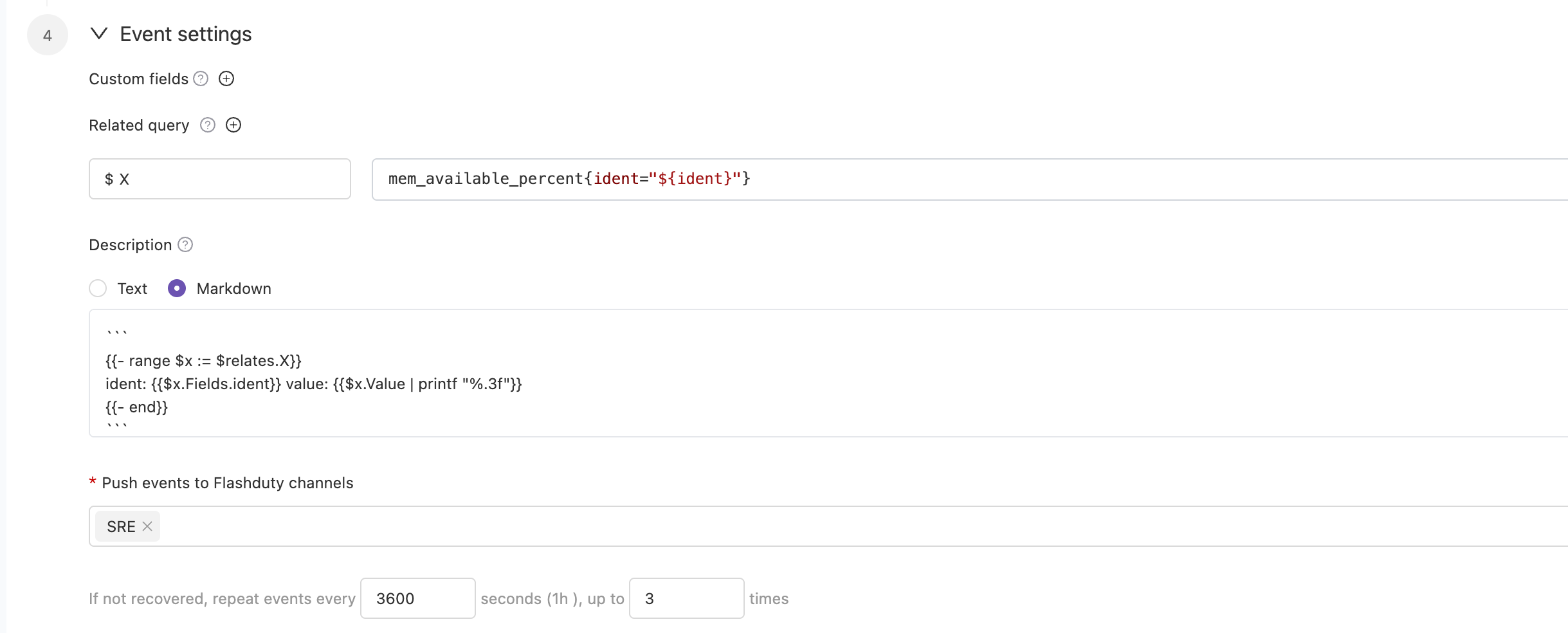
Go to the \`Monit\` - \`Alert Rules\` - \`Rule Details\` page to configure monitoring metrics and threshold conditions, and enable alerts. You can choose to deliver alerts to multiple channels. Alert notification rules follow the escalation rules under the channel, and you can set responders for the team to assign to responders when alerts occur.
|
|
8191
|
+
|
|
8192
|
+
|
|
8193
|
+
|
|
8194
|
+
In some cases, you may want to route alerts generated by the same alert rule to different channels based on conditions. In this case, you can choose to deliver alerts directly to the integration rather than to the channels, and set routing rules under the current integration.
|
|
8195
|
+
`,Rum:`---
|
|
8196
|
+
title: "RUM Alert Integration"
|
|
8197
|
+
description: "Flashduty RUM alert integration, RUM service reports alerts through this integration"
|
|
8198
|
+
date: "2025-05-19T10:00:00+08:00"
|
|
8199
|
+
url: "https://docs.flashcat.cloud/en/flashduty/rum-alert-integration-guide?nav=01JCQ7A4N4WRWNXW8EWEHXCMF5"
|
|
8200
|
+
---
|
|
8201
|
+
|
|
8202
|
+
When you enable the RUM service, the system will automatically create this integration for you. This integration is used to collect alert events generated by the RUM service.
|
|
8203
|
+
|
|
8204
|
+
:::tips
|
|
8205
|
+
You cannot modify or delete this integration. However, you can manage the label enrichment, alert pipeline, and routing rules under the integration.
|
|
8206
|
+
:::
|
|
8207
|
+
|
|
8208
|
+
## How to Enable RUM Alerts
|
|
8209
|
+
|
|
8210
|
+
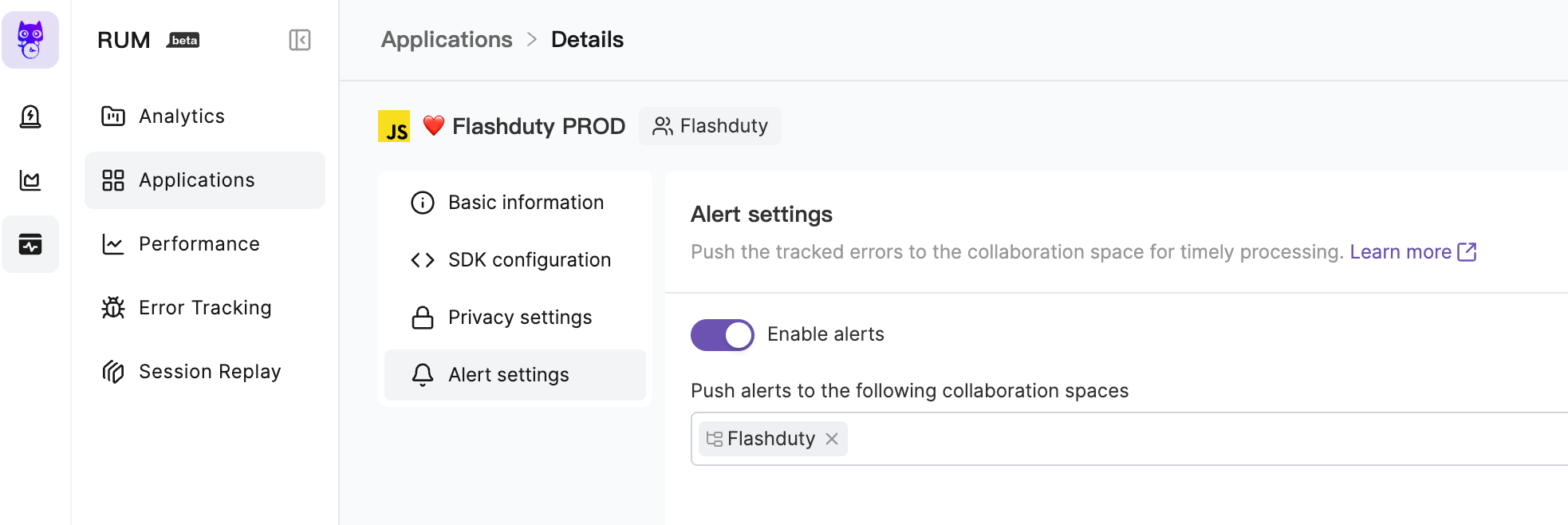
Go to the \`RUM\` - \`Application Details\` - \`Alert Settings\` page to enable alerts. You can choose to deliver alerts to multiple channels. Alert notification rules follow the escalation rules under the channel, and you can set responders for the team to assign to responders when alerts occur.
|
|
8211
|
+
|
|
8212
|
+
|
|
8213
|
+
|
|
8214
|
+
For more information, please refer to [RUM Issue Alerting](https://docs.flashcat.cloud/en/flashduty/rum/issue-alerting?nav=01JCQ7A4N4WRWNXW8EWEHXCMF5).
|
|
8215
|
+
`};n.FlashDocsEn=h})(window);
|