flashduty-knowledge-base 1.3.0 → 1.3.2
This diff represents the content of publicly available package versions that have been released to one of the supported registries. The information contained in this diff is provided for informational purposes only and reflects changes between package versions as they appear in their respective public registries.
- package/dist/en.d.ts +4 -0
- package/dist/esm/en.js +435 -29
- package/dist/esm/zh.js +435 -28
- package/dist/iife/en.js +410 -4
- package/dist/iife/zh.js +410 -3
- package/dist/zh.d.ts +4 -0
- package/package.json +1 -1
package/dist/en.d.ts
CHANGED
package/dist/esm/en.js
CHANGED
|
@@ -1595,7 +1595,7 @@ Alibaba Cloud SLS monitoring to Flashduty alert severity mapping:
|
|
|
1595
1595
|
| 2 | Info | Info |
|
|
1596
1596
|
|
|
1597
1597
|
</div>
|
|
1598
|
-
`,
|
|
1598
|
+
`,u=`---
|
|
1599
1599
|
title: "AWS CloudWatch Integration"
|
|
1600
1600
|
description: "Sync AWS CloudWatch alert events to Flashduty via webhook to achieve automated alert noise reduction"
|
|
1601
1601
|
date: "2025-05-19T10:00:00+08:00"
|
|
@@ -1674,7 +1674,7 @@ Choose this method when you need to route alerts to different channels based on
|
|
|
1674
1674
|
All CloudWatch metric alarms correspond to Flashduty "warning" severity level alerts.
|
|
1675
1675
|
|
|
1676
1676
|
</div>
|
|
1677
|
-
`,
|
|
1677
|
+
`,h=`---
|
|
1678
1678
|
title: "Baidu Cloud BCM Integration"
|
|
1679
1679
|
description: "Sync Baidu Cloud BCM alerts to Flashduty via webhook for automated alert noise reduction"
|
|
1680
1680
|
date: "2025-05-19T10:00:00+08:00"
|
|
@@ -3267,7 +3267,7 @@ Choose this option when you need to route alerts to different channels based on
|
|
|
3267
3267
|
|
|
3268
3268
|
</div>
|
|
3269
3269
|
|
|
3270
|
-
`,
|
|
3270
|
+
`,_=`---
|
|
3271
3271
|
title: "Dynatrace Alert Events"
|
|
3272
3272
|
description: "Sync Dynatrace alert events to Flashduty via webhook to achieve automated alert noise reduction."
|
|
3273
3273
|
date: "2024-08-20T10:00:00+08:00"
|
|
@@ -3374,7 +3374,7 @@ Choose this option when you need to route alerts to different channels based on
|
|
|
3374
3374
|
|CUSTOM_ALERT|Info|info|
|
|
3375
3375
|
|
|
3376
3376
|
</div>
|
|
3377
|
-
`,
|
|
3377
|
+
`,L=`---
|
|
3378
3378
|
title: "Huawei Cloud LTS Alert Events"
|
|
3379
3379
|
description: "Sync Huawei Cloud Log Tank Service (LTS) alert events to Flashduty via webhook for automated alert noise reduction."
|
|
3380
3380
|
date: "2024-08-20T10:00:00+08:00"
|
|
@@ -3813,7 +3813,7 @@ If you need to configure \`Custom Templating Variables\`, you can refer to the f
|
|
|
3813
3813
|
|INFO|Info|Info|
|
|
3814
3814
|
|
|
3815
3815
|
</div>
|
|
3816
|
-
`,
|
|
3816
|
+
`,U=`---
|
|
3817
3817
|
title: "SolarWinds Alert Events"
|
|
3818
3818
|
description: "Sync SolarWinds alert events to Flashduty via webhook for automated alert noise reduction"
|
|
3819
3819
|
date: "2024-08-20T10:00:00+08:00"
|
|
@@ -3916,7 +3916,7 @@ Choose this option when you need to route alerts to different channels based on
|
|
|
3916
3916
|
|Info|Info|Info|
|
|
3917
3917
|
|
|
3918
3918
|
</div>
|
|
3919
|
-
`,
|
|
3919
|
+
`,D=`---
|
|
3920
3920
|
title: "Volcengine Cloud Monitor Alert Events"
|
|
3921
3921
|
description: "Sync Volcengine Cloud Monitor alert events to Flashduty via webhook for automated alert noise reduction"
|
|
3922
3922
|
date: "2024-08-20T10:00:00+08:00"
|
|
@@ -4229,7 +4229,7 @@ Choose this method when you need to route alerts to different channels based on
|
|
|
4229
4229
|
</div>
|
|
4230
4230
|
|
|
4231
4231
|
</div>
|
|
4232
|
-
`,
|
|
4232
|
+
`,M=`---
|
|
4233
4233
|
title: "OpManager Alert Events"
|
|
4234
4234
|
description: "Sync OpManager alert events to Flashduty via webhook for automated alert noise reduction"
|
|
4235
4235
|
date: "2024-07-05T10:00:00+08:00"
|
|
@@ -4363,7 +4363,7 @@ Choose this method when you need to route alerts to different channels based on
|
|
|
4363
4363
|
| Attention | Info | Info |
|
|
4364
4364
|
|
|
4365
4365
|
</div>
|
|
4366
|
-
`,
|
|
4366
|
+
`,P=`---
|
|
4367
4367
|
title: "Meraki Alert Events"
|
|
4368
4368
|
description: "Sync Meraki alert events to Flashduty via webhook for automated alert noise reduction"
|
|
4369
4369
|
date: "2024-07-05T10:00:00+08:00"
|
|
@@ -4522,7 +4522,7 @@ Choose this option when you need to route alerts to different channels based on
|
|
|
4522
4522
|
| North | Beijing2/Changchun/Harbin/North China/Inner Mongolia3/Qingdao/Shenyang3/Shijiazhuang/Taiyuan/Tianjin/Zhengzhou |
|
|
4523
4523
|
|
|
4524
4524
|
</div>
|
|
4525
|
-
`,
|
|
4525
|
+
`,q=`---
|
|
4526
4526
|
title: "Guance Alert Events"
|
|
4527
4527
|
description: "Sync Guance alert events to Flashduty via webhook for automated alert noise reduction"
|
|
4528
4528
|
date: "2024-07-05T10:00:00+08:00"
|
|
@@ -4607,7 +4607,7 @@ Choose this option when you need to route alerts to different channels based on
|
|
|
4607
4607
|
| Data Missing | Info | Info |
|
|
4608
4608
|
|
|
4609
4609
|
</div>
|
|
4610
|
-
`,
|
|
4610
|
+
`,G=`---
|
|
4611
4611
|
title: "Zilliz Alert Events"
|
|
4612
4612
|
description: "Sync Zilliz alert events to Flashduty via webhook for automated alert noise reduction"
|
|
4613
4613
|
date: "2024-07-05T10:00:00+08:00"
|
|
@@ -4786,7 +4786,7 @@ When you need to route alerts to different channels based on alert payload infor
|
|
|
4786
4786
|
|
|
4787
4787
|
</div>
|
|
4788
4788
|
|
|
4789
|
-
`,
|
|
4789
|
+
`,j=`---
|
|
4790
4790
|
title: "zstack integration"
|
|
4791
4791
|
description: "Push ZStack alerts to Flashduty via webhook, to achieve automatic alert noise reduction."
|
|
4792
4792
|
date: "2024-07-05T10:00:00+08:00"
|
|
@@ -4874,7 +4874,7 @@ Choose this method when you need to route alerts to different channels based on
|
|
|
4874
4874
|
|
|
4875
4875
|
</div>
|
|
4876
4876
|
|
|
4877
|
-
`,
|
|
4877
|
+
`,H=`---
|
|
4878
4878
|
title: "Keep Alert Integration Guide"
|
|
4879
4879
|
description: "Push alert events to Flashduty through Keep's Provider to achieve automated alert noise reduction."
|
|
4880
4880
|
date: "2025-05-19T10:00:00+08:00"
|
|
@@ -4955,7 +4955,7 @@ Field|Required|Type|Definition
|
|
|
4955
4955
|
|
|
4956
4956
|
<img alt="drawing" width="600" src="https://download.flashcat.cloud/flashduty/doc/en/fd/keep-2.png" />
|
|
4957
4957
|
|
|
4958
|
-
|
|
4958
|
+
`,Y=`---
|
|
4959
4959
|
title: "ElastAlert2 Alert Integration Guide"
|
|
4960
4960
|
description: "Push alert events to Flashduty through ElastAlert2's Provider to achieve automated alert noise reduction."
|
|
4961
4961
|
date: "2025-05-19T10:00:00+08:00"
|
|
@@ -5076,7 +5076,7 @@ flashduty_env: "dev"
|
|
|
5076
5076
|
# ------- FlashDuty ----------------
|
|
5077
5077
|
\`\`\`
|
|
5078
5078
|
|
|
5079
|
-
5. Restart ElastAlert and wait for the alert to trigger
|
|
5079
|
+
5. Restart ElastAlert and wait for the alert to trigger.`,$=`---
|
|
5080
5080
|
title: "Dingtalk Alert Integration"
|
|
5081
5081
|
description: "Generate a unique Dingtalk robot address in Flashduty, and synchronize the occurrence and recovery of alerts through Dingtalk"
|
|
5082
5082
|
date: "2025-05-19T10:00:00+08:00"
|
|
@@ -5159,7 +5159,7 @@ By default, the system always creates new alerts for each message, but you can s
|
|
|
5159
5159
|
|
|
5160
5160
|
Currently, all alerts pushed to Flashduty through email integration are set to Warning severity.
|
|
5161
5161
|
|
|
5162
|
-
`,
|
|
5162
|
+
`,V=`---
|
|
5163
5163
|
title: "Feishu Alert Integration"
|
|
5164
5164
|
description: "Generate a unique Feishu robot address in Flashduty, and synchronize the occurrence and recovery of alerts through Feishu"
|
|
5165
5165
|
date: "2025-05-19T10:00:00+08:00"
|
|
@@ -5242,7 +5242,129 @@ By default, the system always creates new alerts for each message, but you can s
|
|
|
5242
5242
|
|
|
5243
5243
|
Currently, all alerts pushed to Flashduty through Feishu Alert integration are set to Warning severity.
|
|
5244
5244
|
|
|
5245
|
+
`,B=`---
|
|
5246
|
+
title: "Volcengine Cloud-Detect Alert Events"
|
|
5247
|
+
description: "Sync Volcengine Cloud-Detect alert events to Flashduty via webhook for automated alert noise reduction"
|
|
5248
|
+
date: "2024-07-05T10:00:00+08:00"
|
|
5249
|
+
url: "https://docs.flashcat.cloud/en/flashduty/volcengine-tls-integration-guide"
|
|
5250
|
+
---
|
|
5251
|
+
|
|
5252
|
+
Sync Volcengine Cloud-Detect alert events to Flashduty via webhook for automated alert noise reduction.
|
|
5253
|
+
|
|
5254
|
+
<div class="hide">
|
|
5255
|
+
|
|
5256
|
+
## In Flashduty
|
|
5257
|
+
---
|
|
5258
|
+
You can obtain an integration push URL through either of these two methods:
|
|
5259
|
+
|
|
5260
|
+
### Using Private Integration
|
|
5261
|
+
|
|
5262
|
+
Choose this method when you don't need to route alert events to different channels - it's simpler.
|
|
5263
|
+
|
|
5264
|
+
<details>
|
|
5265
|
+
<summary>Expand</summary>
|
|
5266
|
+
|
|
5267
|
+
1. Go to the Flashduty console, select **Channel**, and enter a channel's details page
|
|
5268
|
+
2. Select the **Integrations** tab, click **Add Integration** to enter the integration page
|
|
5269
|
+
3. Choose **Volcengine Detect** integration and click **Save** to generate a card
|
|
5270
|
+
4. Click the generated card to view the **Push URL**, copy it for later use, and you're done
|
|
5271
|
+
|
|
5272
|
+
</details>
|
|
5273
|
+
|
|
5274
|
+
### Using Shared Integration
|
|
5275
|
+
|
|
5276
|
+
Choose this method when you need to route alerts to different channels based on the alert event payload.
|
|
5277
|
+
|
|
5278
|
+
<details>
|
|
5279
|
+
<summary>Expand</summary>
|
|
5280
|
+
|
|
5281
|
+
1. Go to the Flashduty console, select **Integration Center=>Alert Events** to enter the integration selection page
|
|
5282
|
+
2. Select **Volcengine Detect** integration:
|
|
5283
|
+
- **Integration Name**: Define a name for this integration
|
|
5284
|
+
3. Configure the default route and select the corresponding channel (after the integration is created, you can go to \`Route\` to configure more routing rules)
|
|
5285
|
+
4. Click **Save** and copy the newly generated **push URL** for later use
|
|
5286
|
+
5. Done
|
|
5287
|
+
|
|
5288
|
+
</details>
|
|
5289
|
+
</div>
|
|
5290
|
+
|
|
5291
|
+
## In Volcengine
|
|
5292
|
+
---
|
|
5293
|
+
|
|
5294
|
+
<div class="md-block">
|
|
5295
|
+
|
|
5296
|
+
## 一、Create Notification Object
|
|
5297
|
+
|
|
5298
|
+
### Step 1: Create Notification Object
|
|
5299
|
+
1. Login to your \`Volcengine\` console, find \`Alert Manager\` in the \`Notify Object\` menu
|
|
5300
|
+
2. Click \`System Integration\`, click \`Create System Integration\` or edit the existing endpoint
|
|
5301
|
+
3. 在编辑页面中,名称填写 \`Flashduty\` ,\`回调 URL\` 处填写告警集成的<span class='integration_url'>推送地址</span>。
|
|
5302
|
+
5. Click \`OK\` to complete the configuration
|
|
5303
|
+
|
|
5304
|
+
<img alt="drawing" width="600" src="https://download.flashcat.cloud/flashduty/doc/zh/fd/volcengine-1.png" />
|
|
5305
|
+
|
|
5306
|
+
### Step 2: Use Notification Object in Alert Policy
|
|
5307
|
+
1. Login to your \`Volcengine\` console, find \`Alert Manager\` in the \`Alert Policy\` menu
|
|
5308
|
+
2. Click \`Create Alert Policy\` or edit the existing alert policy
|
|
5309
|
+
3. In the edit page, select the created \`Flashduty\` Endpoint
|
|
5310
|
+
4. Configure other settings as needed, and click \`OK\` to complete the configuration
|
|
5311
|
+
|
|
5312
|
+
<img alt="drawing" width="600" src="https://download.flashcat.cloud/flashduty/doc/zh/fd/volcengine-2.png" />
|
|
5313
|
+
|
|
5314
|
+
</dev>
|
|
5315
|
+
|
|
5316
|
+
## 二、Status Mapping
|
|
5317
|
+
|
|
5318
|
+
<div class="md-block">
|
|
5319
|
+
|
|
5320
|
+
| Detect | Flashduty | Status |
|
|
5321
|
+
| ---------- | -------- | ---- |
|
|
5322
|
+
| P0 | Critical | Critical|
|
|
5323
|
+
| P2 | Warning | Warning|
|
|
5324
|
+
|
|
5325
|
+
</div>
|
|
5326
|
+
|
|
5245
5327
|
`,z=`---
|
|
5328
|
+
title: "Monit Alert Integration"
|
|
5329
|
+
description: "Flashduty Monit alert integration, Monit service reports alerts through this integration"
|
|
5330
|
+
date: "2025-05-19T10:00:00+08:00"
|
|
5331
|
+
url: "https://docs.flashcat.cloud/en/flashduty/monit-alert-integration-guide?nav=01JCQ7A4N4WRWNXW8EWEHXCMF5"
|
|
5332
|
+
---
|
|
5333
|
+
|
|
5334
|
+
When you enable the Monit service, the system will automatically create this integration for you. This integration is used to collect alert events generated by the Monit service.
|
|
5335
|
+
|
|
5336
|
+
:::tips
|
|
5337
|
+
You cannot modify or delete this integration. However, you can manage the label enrichment, alert pipeline, and routing rules under the integration.
|
|
5338
|
+
:::
|
|
5339
|
+
|
|
5340
|
+
## How to Enable Monit Alerts
|
|
5341
|
+
|
|
5342
|
+
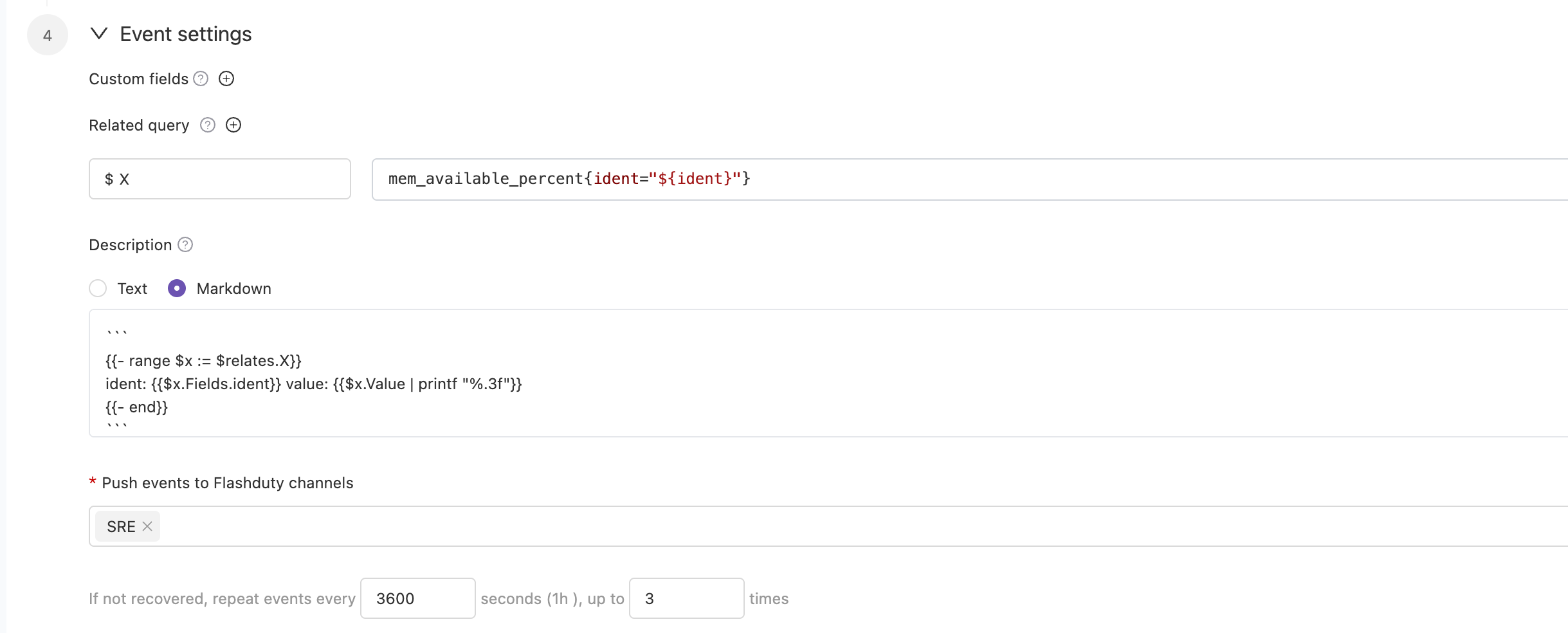
Go to the \`Monit\` - \`Alert Rules\` - \`Rule Details\` page to configure monitoring metrics and threshold conditions, and enable alerts. You can choose to deliver alerts to multiple channels. Alert notification rules follow the escalation rules under the channel, and you can set responders for the team to assign to responders when alerts occur.
|
|
5343
|
+
|
|
5344
|
+
|
|
5345
|
+
|
|
5346
|
+
In some cases, you may want to route alerts generated by the same alert rule to different channels based on conditions. In this case, you can choose to deliver alerts directly to the integration rather than to the channels, and set routing rules under the current integration.
|
|
5347
|
+
`,K=`---
|
|
5348
|
+
title: "RUM Alert Integration"
|
|
5349
|
+
description: "Flashduty RUM alert integration, RUM service reports alerts through this integration"
|
|
5350
|
+
date: "2025-05-19T10:00:00+08:00"
|
|
5351
|
+
url: "https://docs.flashcat.cloud/en/flashduty/rum-alert-integration-guide?nav=01JCQ7A4N4WRWNXW8EWEHXCMF5"
|
|
5352
|
+
---
|
|
5353
|
+
|
|
5354
|
+
When you enable the RUM service, the system will automatically create this integration for you. This integration is used to collect alert events generated by the RUM service.
|
|
5355
|
+
|
|
5356
|
+
:::tips
|
|
5357
|
+
You cannot modify or delete this integration. However, you can manage the label enrichment, alert pipeline, and routing rules under the integration.
|
|
5358
|
+
:::
|
|
5359
|
+
|
|
5360
|
+
## How to Enable RUM Alerts
|
|
5361
|
+
|
|
5362
|
+
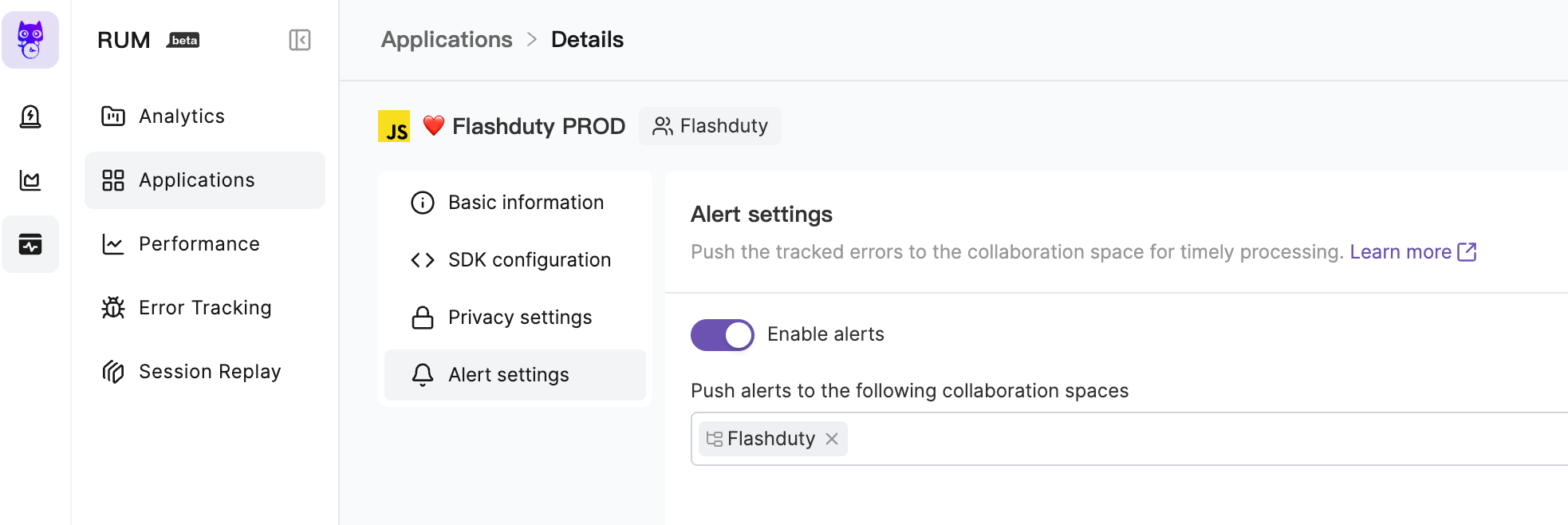
Go to the \`RUM\` - \`Application Details\` - \`Alert Settings\` page to enable alerts. You can choose to deliver alerts to multiple channels. Alert notification rules follow the escalation rules under the channel, and you can set responders for the team to assign to responders when alerts occur.
|
|
5363
|
+
|
|
5364
|
+
|
|
5365
|
+
|
|
5366
|
+
For more information, please refer to [RUM Issue Alerting](https://docs.flashcat.cloud/en/flashduty/rum/issue-alerting?nav=01JCQ7A4N4WRWNXW8EWEHXCMF5).
|
|
5367
|
+
`,J=`---
|
|
5246
5368
|
title: "Custom Change Event Integration Guide"
|
|
5247
5369
|
description: "Push change events from your own systems to Flashduty using standard protocols. Most incidents are caused by changes, and the correlation between changes and alerts helps quickly identify incident causes."
|
|
5248
5370
|
date: "2025-05-19T10:00:00+08:00"
|
|
@@ -5299,7 +5421,7 @@ Labels are descriptions of events. You should enrich label content as much as po
|
|
|
5299
5421
|
|
|
5300
5422
|
</details>
|
|
5301
5423
|
|
|
5302
|
-
`,
|
|
5424
|
+
`,Z=`---
|
|
5303
5425
|
title: "Jira Issue Events"
|
|
5304
5426
|
description: "Sync Jira Issue events to Flashduty via webhooks to collect change events."
|
|
5305
5427
|
date: "2025-05-19T10:00:00+08:00"
|
|
@@ -5373,7 +5495,7 @@ Flashduty extracts the status.name information from the webhook payload by defau
|
|
|
5373
5495
|
Please contact Flashduty if you wish to modify this mapping.
|
|
5374
5496
|
|
|
5375
5497
|
</div>
|
|
5376
|
-
`,
|
|
5498
|
+
`,Q=`---
|
|
5377
5499
|
title: Contributing to our documentation — Meilisearch documentation
|
|
5378
5500
|
description: The Meilisearch documentation is open-source. Learn how to help make it even better.
|
|
5379
5501
|
sidebarDepth: 3
|
|
@@ -5508,7 +5630,7 @@ Once published, you can access the application via mobile/PC client. First-time
|
|
|
5508
5630
|
|Group Bot Webhook|Maximum 100 calls/minute|
|
|
5509
5631
|
|Sending messages to the same user or group|Maximum 5 calls/second|
|
|
5510
5632
|
|
|
5511
|
-
**Note:** Messages cannot be pushed normally when exceeding limits, please use notification channels reasonably`,
|
|
5633
|
+
**Note:** Messages cannot be pushed normally when exceeding limits, please use notification channels reasonably`,X=`---
|
|
5512
5634
|
title: "Dingtalk Integration"
|
|
5513
5635
|
description: "Integrate with Dingtalk custom application to receive and respond to alerts within Dingtalk"
|
|
5514
5636
|
date: "2025-05-19T10:00:00+08:00"
|
|
@@ -5664,7 +5786,7 @@ After the application is released, you can access it via mobile/PC client. First
|
|
|
5664
5786
|
|Enterprise|5,500,000|60|1st of each month|
|
|
5665
5787
|
|
|
5666
5788
|
**Note:** Messages cannot be pushed normally after exceeding limits, please use notification channels reasonably
|
|
5667
|
-
`,
|
|
5789
|
+
`,ee=`---
|
|
5668
5790
|
title: "WeCom Integration"
|
|
5669
5791
|
description: "Integrate WeCom third-party application to receive and respond to alerts within WeCom"
|
|
5670
5792
|
date: "2025-05-19T10:00:00+08:00"
|
|
@@ -5743,7 +5865,7 @@ Integrate WeCom third-party application to receive and respond to alerts within
|
|
|
5743
5865
|
7. **Incident notification fails with \`WeCom License Not Activated\`?**
|
|
5744
5866
|
|
|
5745
5867
|
- Contact Flashduty customer service or dedicated support for license purchase and activation
|
|
5746
|
-
`,
|
|
5868
|
+
`,ne=`---
|
|
5747
5869
|
title: "Slack Integration"
|
|
5748
5870
|
description: "Integrate with Slack to receive and respond to alerts within Slack"
|
|
5749
5871
|
date: "2025-05-19T10:00:00+08:00"
|
|
@@ -5797,7 +5919,7 @@ Integrate with Slack to receive and respond to alerts within Slack.
|
|
|
5797
5919
|
|
|
5798
5920
|
8. **Slack App shows Other questions error**
|
|
5799
5921
|
- Try again, as this might be an unrecorded issue
|
|
5800
|
-
- If the error persists, contact customer support`,
|
|
5922
|
+
- If the error persists, contact customer support`,te=`---
|
|
5801
5923
|
title: "Microsoft Teams Integration"
|
|
5802
5924
|
description: "Integrate Microsoft Teams as a third-party application to receive and respond to alerts within Microsoft Teams"
|
|
5803
5925
|
date: "2025-05-19T10:00:00+08:00"
|
|
@@ -5925,7 +6047,7 @@ Please check in Integration Center => Instant Messaging => Microsoft Teams under
|
|
|
5925
6047
|
Currently not supported
|
|
5926
6048
|
</details>
|
|
5927
6049
|
|
|
5928
|
-
`,
|
|
6050
|
+
`,ae=`Configure alert webhooks to receive HTTP callbacks at your specified URL when alerts have specific actions (such as triggering or closing). The callback content includes the latest key information about the alert, allowing integration with your custom tools.
|
|
5929
6051
|
|
|
5930
6052
|
<span id="EventTypes"></span>
|
|
5931
6053
|
|
|
@@ -6093,7 +6215,7 @@ curl -X POST 'https://example.com/alert/webhook?a=a' \\
|
|
|
6093
6215
|
4. **Trusted IP whitelist for push sources?**
|
|
6094
6216
|
- {ip_whitelist}
|
|
6095
6217
|
- May be updated in the future, please check periodically
|
|
6096
|
-
`,
|
|
6218
|
+
`,ie=`Configure incident webhooks to receive HTTP callbacks at your specified URL when incidents have specific actions (such as triggering or closing). The callback content includes the latest key information about the incident, allowing integration with your custom tools.
|
|
6097
6219
|
|
|
6098
6220
|
<span id="EventTypes"></span>
|
|
6099
6221
|
|
|
@@ -6193,7 +6315,7 @@ acknowledged_at | int64| No | Acknowledgment time
|
|
|
6193
6315
|
| fields | map[string]interface{} | No | Custom field key-value pairs, Key is string, Value can be any type depending on field type |
|
|
6194
6316
|
| creator | [Person](#Person) | No | Creator information, exists only for manually created incidents |
|
|
6195
6317
|
| closer | [Person](#Person) | No | Closer information, exists only for manually closed incidents |
|
|
6196
|
-
| responders | [][Responder](#Responder) | No | List of responder information |
|
|
6318
|
+
| responders | [][Responder](#Responder) | No | List of responder information, only exists after the incident is assigned. For i_new events, this value may be empty |
|
|
6197
6319
|
| alert_cnt | int64 | No | Number of associated alerts |
|
|
6198
6320
|
| channel_id | int64 | No | Channel ID, 0 means not belonging to any channel |
|
|
6199
6321
|
| channel_name | string | No | Channel name |
|
|
@@ -6300,7 +6422,7 @@ curl -X POST 'https://example.com/incident/webhook?a=a' \\
|
|
|
6300
6422
|
|
|
6301
6423
|
4. **Trusted IP whitelist for push sources?**
|
|
6302
6424
|
- {ip_whitelist}
|
|
6303
|
-
- May be updated in the future, please check periodically`,
|
|
6425
|
+
- May be updated in the future, please check periodically`,oe=`Custom incident actions allow you to quickly invoke external interfaces during incident troubleshooting for incident self-healing, information enrichment, and other custom operations.
|
|
6304
6426
|
|
|
6305
6427
|
## I. Creating Actions
|
|
6306
6428
|
|
|
@@ -6547,7 +6669,7 @@ When an incident occurs and is confirmed to be caused by a change, directly trig
|
|
|
6547
6669
|
|
|
6548
6670
|
### Update Status Page
|
|
6549
6671
|
|
|
6550
|
-
When an incident is confirmed to affect online services, trigger external status page updates to prompt`,
|
|
6672
|
+
When an incident is confirmed to affect online services, trigger external status page updates to prompt`,se=`---
|
|
6551
6673
|
title: "Jira Sync"
|
|
6552
6674
|
description: "Sync incidents with Jira issues through Jira Sync Webhook."
|
|
6553
6675
|
date: "2025-05-19T10:00:00+08:00"
|
|
@@ -6629,7 +6751,291 @@ In the Integration Center, select **Webhook**, choose **Jira Sync** integration,
|
|
|
6629
6751
|
|
|
6630
6752
|
- Flashduty syncs information according to default field mappings and your custom field configurations. If your Jira issue type has required fields without mapping relationships, Jira issue creation may fail.
|
|
6631
6753
|
- Jira issue details are accessed using project KEY + number format. If you modify the project KEY, saved issue URLs in Flashduty may become inaccessible, so please modify project KEYs with caution.
|
|
6632
|
-
`,
|
|
6754
|
+
`,re=`---
|
|
6755
|
+
title: "ServiceNow Sync"
|
|
6756
|
+
description: "Sync incidents with ServiceNow Incidents through ServiceNow sync webhook."
|
|
6757
|
+
date: "2025-05-19T10:00:00+08:00"
|
|
6758
|
+
url: "https://docs.flashcat.cloud/en/flashduty/service-now-sync"
|
|
6759
|
+
---
|
|
6760
|
+
|
|
6761
|
+
Through ServiceNow sync webhook, Flashduty incidents are associated and synchronized with ServiceNow Incidents to achieve integration between Flashduty and ServiceNow.
|
|
6762
|
+
|
|
6763
|
+
## In ServiceNow
|
|
6764
|
+
|
|
6765
|
+
### Create User
|
|
6766
|
+
|
|
6767
|
+
1. Log in to the ServiceNow instance console, select \`ALL\`, enter \`USERS\` and select \`Organization\`-\`Users\`.
|
|
6768
|
+
2. Click \`New\` to create a new user.
|
|
6769
|
+
3. In the edit page, enter \`flashduty\` in the \`User ID\` field.
|
|
6770
|
+
4. Keep \`Password needs reset\`, \`Web service access only\`, and \`Internal Integration User\` unchecked.
|
|
6771
|
+
5. Submit and save.
|
|
6772
|
+
|
|
6773
|
+
<img alt="drawing" width="600" src="https://download.flashcat.cloud/flashduty/doc/snow/snow-1.png" />
|
|
6774
|
+
|
|
6775
|
+
### Configure User
|
|
6776
|
+
|
|
6777
|
+
The user used to access ServiceNow needs to have administrator roles.
|
|
6778
|
+
|
|
6779
|
+
1. On the user list page, find the newly created \`flashduty\` user and go to the configuration page.
|
|
6780
|
+
2. In the edit page, click \`Set Password\` to set a password.
|
|
6781
|
+
3. Click \`Roles\` to add **admin and itil** roles.
|
|
6782
|
+
4. Click \`Update\` to update the configuration.
|
|
6783
|
+
|
|
6784
|
+
<img alt="drawing" width="600" src="https://download.flashcat.cloud/flashduty/doc/snow/snow-2.png" />
|
|
6785
|
+
|
|
6786
|
+
## In Flashduty
|
|
6787
|
+
|
|
6788
|
+
### Configure Integration
|
|
6789
|
+
|
|
6790
|
+
Enter the username/password and instance name configured above into the integration information on the left and click Next to configure.
|
|
6791
|
+
|
|
6792
|
+
- **Integration Name:** Define a name for the current integration.
|
|
6793
|
+
- **Management Team:** When a management team is selected, only team members and tenant administrators can edit this integration.
|
|
6794
|
+
- **Channel:** Select the channel where this integration takes effect.
|
|
6795
|
+
- **Sync Direction:**
|
|
6796
|
+
- To_ServiceNow: Sync Flashduty incidents to ServiceNow.
|
|
6797
|
+
- From_ServiceNow: Sync ServiceNow Incidents to Flashduty.
|
|
6798
|
+
- Two-way: Bidirectional sync between Flashduty and ServiceNow.
|
|
6799
|
+
- **Trigger Mode**:
|
|
6800
|
+
- Auto Trigger: Requires configuration of corresponding conditions, Flashduty will automatically sync incidents that meet the conditions to ServiceNow.
|
|
6801
|
+
- Manual Trigger: Requires manual triggering of ServiceNow sync in the More Actions section of the incident details page (the integration configuration name is the trigger name).
|
|
6802
|
+
- **Severity Mapping:** ServiceNow's Priority is determined by the combined values of Impact and Urgency, so you can refer to ServiceNow's \`Priority Lookup Rules\` for configuration. Additionally, note that only when ServiceNow Incident's Urgency changes will it trigger updates to Flashduty incident severity.
|
|
6803
|
+
- **Custom Field Mapping:** You can choose to sync certain labels or all labels of incidents as well as custom field content to ServiceNow fields (only text-type fields are supported).
|
|
6804
|
+
|
|
6805
|
+
## In ServiceNow
|
|
6806
|
+
|
|
6807
|
+
When sync direction is set to From_ServiceNow or Two-way, additional configuration is required in ServiceNow to sync ServiceNow Incidents to Flashduty. When syncing to Flashduty, there are two methods available, choose based on your actual needs.
|
|
6808
|
+
|
|
6809
|
+
### Manual Sync
|
|
6810
|
+
|
|
6811
|
+
This method relies on ServiceNow's UI Action and Script Include configuration. The effect achieved by following the steps below: When creating or updating an Incident, you can see a button to send sync requests in the function area. Triggering this button will sync the current Incident content to Flashduty. Note that if the request fails when triggered, please retry (retry interval should be greater than 10 seconds).
|
|
6812
|
+
|
|
6813
|
+
#### Configure UI Action
|
|
6814
|
+
|
|
6815
|
+
1. Log in to the ServiceNow instance console, select \`ALL\`, enter \`UI Actions\` and select \`System Definition\`-\`UI Actions\`.
|
|
6816
|
+
2. Click \`New\` to create a new Action.
|
|
6817
|
+
3. Enter **Send To Flashduty** in \`Name\`, select **Incident** in \`Table\`.
|
|
6818
|
+
4. Keep \`Form button\`, \`Active\`, \`Show insert\`, \`Show update\`, \`Client\`, \`List v2/3 Compatible\` checked.
|
|
6819
|
+
5. Enter **onClick();** in \`Onclick\`.
|
|
6820
|
+
6. Enter the following in \`Script\`:
|
|
6821
|
+
|
|
6822
|
+
\`\`\`js
|
|
6823
|
+
function onClick() {
|
|
6824
|
+
g_form.save();
|
|
6825
|
+
|
|
6826
|
+
var ga = new GlideAjax("IncidentWebhookHelperAjax");
|
|
6827
|
+
ga.addParam("sysparm_name", "sendWebhook");
|
|
6828
|
+
ga.addParam("sysparm_sys_id", g_form.getUniqueValue());
|
|
6829
|
+
|
|
6830
|
+
ga.getXMLAnswer(function (response) {
|
|
6831
|
+
alert("Webhook Triggered: " + response);
|
|
6832
|
+
});
|
|
6833
|
+
}
|
|
6834
|
+
\`\`\`
|
|
6835
|
+
|
|
6836
|
+
7. Submit and save.
|
|
6837
|
+
|
|
6838
|
+
#### Configure Script Include
|
|
6839
|
+
|
|
6840
|
+
1. Log in to the ServiceNow instance console, select \`ALL\`, enter \`Script Includes\` and select \`System Definition\`-\`Script Includes\`.
|
|
6841
|
+
2. Click \`New\` to create a new Script Include.
|
|
6842
|
+
3. Enter **IncidentWebhookHelper** in \`Name\`, select **All application scopes** in \`Accessible from\`.
|
|
6843
|
+
4. Keep \`Client callable\` and \`Active\` checked.
|
|
6844
|
+
5. Enter the following content in \`Script\`, where you need to add the integration push URL in **request.setEndpoint**:
|
|
6845
|
+
|
|
6846
|
+
<div class="hide">
|
|
6847
|
+
|
|
6848
|
+
Note: The body configures default receiving fields. If you have custom fields that need to be synced to Flashduty, you need to manually add content to the body. For example, if you want to add a field named: test_001 (this field name can be obtained when adding custom fields in the integration configuration, do not use the field name displayed in the ServiceNow Incident form), then you need to add to the body: test_001: current.getDisplayValue("test_001").
|
|
6849
|
+
|
|
6850
|
+
</div>
|
|
6851
|
+
|
|
6852
|
+
\`\`\`js
|
|
6853
|
+
var IncidentWebhookHelper = Class.create();
|
|
6854
|
+
IncidentWebhookHelper.prototype = {
|
|
6855
|
+
initialize: function () {},
|
|
6856
|
+
|
|
6857
|
+
sendIncidentWebhook: function (current) {
|
|
6858
|
+
function getLastComment(sysId) {
|
|
6859
|
+
var journalGR = new GlideRecord("sys_journal_field");
|
|
6860
|
+
journalGR.addQuery("element_id", sysId);
|
|
6861
|
+
journalGR.addQuery("element", "comments");
|
|
6862
|
+
journalGR.orderByDesc("sys_created_on");
|
|
6863
|
+
journalGR.setLimit(1);
|
|
6864
|
+
journalGR.query();
|
|
6865
|
+
if (journalGR.next()) {
|
|
6866
|
+
return journalGR.getValue("value");
|
|
6867
|
+
}
|
|
6868
|
+
return "";
|
|
6869
|
+
}
|
|
6870
|
+
|
|
6871
|
+
var body = {
|
|
6872
|
+
action_type: current.isNewRecord() ? "insert" : "update",
|
|
6873
|
+
number: current.getValue("number"),
|
|
6874
|
+
sys_id: current.getUniqueValue(),
|
|
6875
|
+
short_description: current.getValue("short_description"),
|
|
6876
|
+
description: current.getValue("description"),
|
|
6877
|
+
state: current.getDisplayValue("state"),
|
|
6878
|
+
impact: current.getDisplayValue("impact"),
|
|
6879
|
+
urgency: current.getDisplayValue("urgency"),
|
|
6880
|
+
comments: getLastComment(current.getUniqueValue()),
|
|
6881
|
+
<label name='field_mapping' tab='6'>{original.key}: current.getDisplayValue("{original.key}")</label>
|
|
6882
|
+
};
|
|
6883
|
+
|
|
6884
|
+
try {
|
|
6885
|
+
var request = new sn_ws.RESTMessageV2();
|
|
6886
|
+
request.setHttpMethod("POST");
|
|
6887
|
+
request.setEndpoint("PUSH URL");
|
|
6888
|
+
request.setRequestHeader("Content-Type", "application/json");
|
|
6889
|
+
request.setRequestBody(JSON.stringify(body));
|
|
6890
|
+
request.executeAsync();
|
|
6891
|
+
} catch (ex) {
|
|
6892
|
+
gs.error("Webhook Call failed: " + ex.message);
|
|
6893
|
+
}
|
|
6894
|
+
},
|
|
6895
|
+
|
|
6896
|
+
type: "IncidentWebhookHelper",
|
|
6897
|
+
};
|
|
6898
|
+
\`\`\`
|
|
6899
|
+
|
|
6900
|
+
6. Submit and save.
|
|
6901
|
+
7. Return to the Script Includes list and continue creating.
|
|
6902
|
+
8. Click \`New\` to create a new Script Include.
|
|
6903
|
+
9. Enter **IncidentWebhookHelperAjax** in \`Name\`, select **All application scopes** in \`Accessible from\`.
|
|
6904
|
+
10. Keep \`Client callable\` and \`Active\` checked.
|
|
6905
|
+
11. Enter the following content in \`Script\`:
|
|
6906
|
+
|
|
6907
|
+
\`\`\`js
|
|
6908
|
+
var IncidentWebhookHelperAjax = Class.create();
|
|
6909
|
+
IncidentWebhookHelperAjax.prototype = Object.extendsObject(
|
|
6910
|
+
global.AbstractAjaxProcessor,
|
|
6911
|
+
{
|
|
6912
|
+
sendWebhook: function () {
|
|
6913
|
+
var sysId = this.getParameter("sysparm_sys_id");
|
|
6914
|
+
var gr = new GlideRecord("incident");
|
|
6915
|
+
if (gr.get(sysId)) {
|
|
6916
|
+
var helper = new IncidentWebhookHelper();
|
|
6917
|
+
helper.sendIncidentWebhook(gr);
|
|
6918
|
+
return "Success";
|
|
6919
|
+
}
|
|
6920
|
+
return "Request failed";
|
|
6921
|
+
},
|
|
6922
|
+
}
|
|
6923
|
+
);
|
|
6924
|
+
\`\`\`
|
|
6925
|
+
|
|
6926
|
+
12. Submit and save.
|
|
6927
|
+
|
|
6928
|
+
### Auto Sync
|
|
6929
|
+
|
|
6930
|
+
This method relies on ServiceNow's Business Rules configuration. Using this method, you can automatically sync Incidents to Flashduty when there are new or update events.
|
|
6931
|
+
|
|
6932
|
+
#### Configure Business Rules
|
|
6933
|
+
|
|
6934
|
+
1. Log in to the ServiceNow instance console, select \`ALL\`, enter \`Business Rules\` and select \`System Definition\`-\`Business Rules\`.
|
|
6935
|
+
2. Click \`New\` to create a new Business Rule.
|
|
6936
|
+
3. Enter **Send To Flashduty** in \`Name\`, select **Incident** in \`Table\`.
|
|
6937
|
+
4. Keep \`Advanced\` and \`Active\` checked.
|
|
6938
|
+
5. In the \`When to run\` section, select **async** in \`When\`, keep \`Insert\` and \`Upsert\` checked, configure others as needed.
|
|
6939
|
+
6. In the \`Advanced\` section, enter the following content in \`Script\`, where you need to add the integration push URL in **endpoint**:
|
|
6940
|
+
|
|
6941
|
+
<div class="hide">
|
|
6942
|
+
|
|
6943
|
+
Note: The body configures default receiving fields. If you have custom fields that need to be synced to Flashduty, you need to manually add content to the body. For example, if you want to add a field named: test_001 (this field name can be obtained when adding custom fields in the integration configuration, do not use the field name displayed in the ServiceNow Incident form), then you need to add to the body: test_001: current.getDisplayValue("test_001").
|
|
6944
|
+
|
|
6945
|
+
</div>
|
|
6946
|
+
|
|
6947
|
+
\`\`\`js
|
|
6948
|
+
(function executeRule(current, previous) {
|
|
6949
|
+
function getLastComment(recordSysId) {
|
|
6950
|
+
var journalGR = new GlideRecord("sys_journal_field");
|
|
6951
|
+
journalGR.addQuery("element_id", recordSysId);
|
|
6952
|
+
journalGR.addQuery("element", "comments");
|
|
6953
|
+
journalGR.orderByDesc("sys_created_on");
|
|
6954
|
+
journalGR.setLimit(1);
|
|
6955
|
+
journalGR.query();
|
|
6956
|
+
if (journalGR.next()) {
|
|
6957
|
+
var comment = journalGR.getValue("value");
|
|
6958
|
+
return comment;
|
|
6959
|
+
}
|
|
6960
|
+
|
|
6961
|
+
return "";
|
|
6962
|
+
}
|
|
6963
|
+
|
|
6964
|
+
var operation = current.operation() || "unknown";
|
|
6965
|
+
var isPreviousNull = previous === null;
|
|
6966
|
+
var createdOn = current.getValue("sys_created_on");
|
|
6967
|
+
var updatedOn = current.getValue("sys_updated_on");
|
|
6968
|
+
var isNewRecord = createdOn === updatedOn;
|
|
6969
|
+
|
|
6970
|
+
var action = "update";
|
|
6971
|
+
if (isPreviousNull && isNewRecord) {
|
|
6972
|
+
action = "insert";
|
|
6973
|
+
}
|
|
6974
|
+
|
|
6975
|
+
var body = {
|
|
6976
|
+
action_type: action,
|
|
6977
|
+
number: current.getValue("number"),
|
|
6978
|
+
sys_id: current.getUniqueValue(),
|
|
6979
|
+
short_description: current.getValue("short_description"),
|
|
6980
|
+
description: current.getValue("description"),
|
|
6981
|
+
state: current.getDisplayValue("state"),
|
|
6982
|
+
impact: current.getDisplayValue("impact"),
|
|
6983
|
+
urgency: current.getDisplayValue("urgency"),
|
|
6984
|
+
comments: getLastComment(current.getUniqueValue()),
|
|
6985
|
+
<label name='field_mapping' tab='4'>{original.key}: current.getDisplayValue("{original.key}")</label>
|
|
6986
|
+
|
|
6987
|
+
};
|
|
6988
|
+
|
|
6989
|
+
try {
|
|
6990
|
+
var endpoint = "";
|
|
6991
|
+
var request = new sn_ws.RESTMessageV2();
|
|
6992
|
+
request.setHttpMethod("POST");
|
|
6993
|
+
request.setEndpoint(endpoint);
|
|
6994
|
+
request.setRequestHeader("Content-Type", "application/json");
|
|
6995
|
+
request.setRequestBody(JSON.stringify(body));
|
|
6996
|
+
request.executeAsync();
|
|
6997
|
+
} catch (ex) {
|
|
6998
|
+
gs.error("Error sending webhook: " + ex.message);
|
|
6999
|
+
}
|
|
7000
|
+
})(current, previous);
|
|
7001
|
+
\`\`\`
|
|
7002
|
+
|
|
7003
|
+
7. Submit and save.
|
|
7004
|
+
|
|
7005
|
+
## Sync Information
|
|
7006
|
+
|
|
7007
|
+
### Form Fields
|
|
7008
|
+
|
|
7009
|
+
| ServiceNow | Flashduty | Notes |
|
|
7010
|
+
| ------------------- | ------------- | ----- |
|
|
7011
|
+
| Short_description | Title | |
|
|
7012
|
+
| Description | Description | |
|
|
7013
|
+
| Additional comments | Comments | |
|
|
7014
|
+
| State | Progress | |
|
|
7015
|
+
| Urgency | Severity | |
|
|
7016
|
+
| Others | Custom Fields | |
|
|
7017
|
+
|
|
7018
|
+
### Status Mapping
|
|
7019
|
+
|
|
7020
|
+
| ServiceNow | Flashduty | Notes |
|
|
7021
|
+
| ----------- | ---------- | ---------------------- |
|
|
7022
|
+
| New | Trigger | |
|
|
7023
|
+
| In Progress | Processing | |
|
|
7024
|
+
| On Hold | Snoozed | Default snooze 2 hours |
|
|
7025
|
+
| Resolved | CLosed | |
|
|
7026
|
+
| Closed | CLosed | |
|
|
7027
|
+
| Canceled | CLosed | |
|
|
7028
|
+
|
|
7029
|
+
### Priority Mapping
|
|
7030
|
+
|
|
7031
|
+
Only when ServiceNow's Urgency value changes will it affect Flashduty's Severity
|
|
7032
|
+
|
|
7033
|
+
| ServiceNow | Flashduty | Notes |
|
|
7034
|
+
| ---------- | --------- | ----- |
|
|
7035
|
+
| Low | Info | |
|
|
7036
|
+
| Medium | Warning | |
|
|
7037
|
+
| High | Critical | |
|
|
7038
|
+
`,le=`---
|
|
6633
7039
|
title: "Configure Notification Templates"
|
|
6634
7040
|
description: "Customize notification content through template configuration"
|
|
6635
7041
|
date: "2024-05-10T10:00:00+08:00"
|
|
@@ -7749,7 +8155,7 @@ As shown in the image below:
|
|
|
7749
8155
|
|
|
7750
8156
|
<img src="https://download.flashcat.cloud/flashduty/changelog/20230720/email_render.png" alt="drawing" style="display: block; margin: 0 auto;" width="500"/>
|
|
7751
8157
|
|
|
7752
|
-
</div>`,
|
|
8158
|
+
</div>`,de=`---
|
|
7753
8159
|
title: "Link Integration"
|
|
7754
8160
|
description: "Through Link integration, you can quickly access external links by obtaining key parameters from incident attributes, labels, and other information"
|
|
7755
8161
|
date: "2025-05-19T10:00:00+08:00"
|
|
@@ -7806,4 +8212,4 @@ https://cmdb.com/vm?sn=VM123456
|
|
|
7806
8212
|
1. When referenced content does not exist, Link integration will still generate the corresponding link but will not be able to retrieve the value
|
|
7807
8213
|
2. Each channel can bind up to three Link integrations
|
|
7808
8214
|
3. Pay attention to reference syntax; improper variable reference formatting will result in failure to retrieve corresponding values
|
|
7809
|
-
`,
|
|
8215
|
+
`,ce={CustomAlert:n,Email:t,N9e:a,Prometheus:i,Grafana:o,Zabbix:s,UptimeKuma:r,AliyunARMS:l,AliyunCmEvent:d,AliyunCm:c,AliyunSLS:e,AWSCW:e,AzureMonitor:u,BaiDuBCM:h,HuaWeiCES:g,InfluxDB:p,OpenFalcon:m,PagerDuty:f,TencentBK:y,TencentCLS:v,TencentCm:b,TencentEb:w,OceanBase:C,Graylog:k,Skywalking:I,Sentry:S,Jiankongbao:A,AWSEventBridge:x,Dynatrace:_,HuaweiyunLTS:L,GoogleCM:F,Zilliz:G,Splunk:R,AppDynamics:T,SolarWinds:U,VolcEngineMetric:D,VolcEngineEvent:E,VolcEngineTLS:N,OpManager:M,Meraki:P,StateCloud:W,Guance:q,CustomChange:J,Jira:Z,Lark:Q,Dingtalk:X,Wecom:ee,Slack:ne,MicrosoftTeams:te,AlertWebhook:ae,IncidentWebhook:ie,CustomAction:oe,Templates:le,HuaweiyunAPM:O,JiraSync:se,ZStack:j,Keep:H,ElastAlert2:Y,DingtalkAlert:$,FeishuAlert:V,VolcEngineDetect:B,Link:de,ServiceNowSync:re,Monit:z,Rum:K};module.exports=ce;
|