create-openclaw-bot 5.8.0 → 5.8.1
This diff represents the content of publicly available package versions that have been released to one of the supported registries. The information contained in this diff is provided for informational purposes only and reflects changes between package versions as they appear in their respective public registries.
- package/README.md +157 -159
- package/README.vi.md +162 -164
- package/dist/cli.js +125 -112
- package/dist/legacy-cli.js +11 -11
- package/dist/server/local-server.js +2568 -2372
- package/dist/setup/data/index.js +0 -1
- package/dist/setup/data/plugins.js +8 -1
- package/dist/setup/data/skills.js +2 -10
- package/dist/setup/shared/docker-gen.js +571 -576
- package/dist/setup/shared/workspace-gen.js +813 -526
- package/dist/setup.js +337 -299
- package/dist/web/app.js +1247 -1106
- package/dist/web/styles.css +1054 -286
- package/package.json +40 -40
package/README.vi.md
CHANGED
|
@@ -1,164 +1,162 @@
|
|
|
1
|
-
<div align="center">
|
|
2
|
-
|
|
3
|
-
# 🦞 OpenClaw Setup
|
|
4
|
-
|
|
5
|
-
<p align="center">
|
|
6
|
-
<a href="https://github.com/tuanminhhole/openclaw-setup/releases"><img src="https://img.shields.io/badge/RELEASE-v5.8.0-0EA5E9?style=for-the-badge" alt="Version 5.8.0" /></a>
|
|
7
|
-
<a href="https://github.com/tuanminhhole/openclaw-setup?tab=MIT-1-ov-file"><img src="https://img.shields.io/badge/LICENSE-MIT-success?style=for-the-badge" alt="MIT License" /></a>
|
|
8
|
-
<a href="https://www.npmjs.com/package/create-openclaw-bot"><img src="https://img.shields.io/npm/v/create-openclaw-bot?style=for-the-badge&label=CLI&color=2563EB&logo=npm&logoColor=white" alt="NPM Version" /></a>
|
|
9
|
-
<a href="https://github.com/tuanminhhole/openclaw-setup/stargazers"><img src="https://img.shields.io/github/stars/tuanminhhole/openclaw-setup?style=for-the-badge&color=eab308&logo=github&logoColor=white" alt="GitHub Stars" /></a>
|
|
10
|
-
</p>
|
|
11
|
-
|
|
12
|
-
|
|
13
|
-
|
|
14
|
-
|
|
15
|
-
|
|
16
|
-
|
|
17
|
-
|
|
18
|
-
|
|
19
|
-
<
|
|
20
|
-
|
|
21
|
-
|
|
22
|
-
</
|
|
23
|
-
|
|
24
|
-
|
|
25
|
-
|
|
26
|
-
|
|
27
|
-
|
|
28
|
-
|
|
29
|
-
|
|
30
|
-
-
|
|
31
|
-
-
|
|
32
|
-
-
|
|
33
|
-
-
|
|
34
|
-
-
|
|
35
|
-
|
|
36
|
-
|
|
37
|
-
|
|
38
|
-
|
|
39
|
-
|
|
40
|
-
|
|
41
|
-
|
|
42
|
-
-
|
|
43
|
-
-
|
|
44
|
-
-
|
|
45
|
-
-
|
|
46
|
-
-
|
|
47
|
-
|
|
48
|
-
|
|
49
|
-
|
|
50
|
-
|
|
51
|
-
|
|
52
|
-
|
|
53
|
-
|
|
54
|
-
|
|
55
|
-
|
|
56
|
-
|
|
57
|
-
|
|
58
|
-
```
|
|
59
|
-
|
|
60
|
-
|
|
61
|
-
|
|
62
|
-
|
|
63
|
-
|
|
64
|
-
|
|
65
|
-
|
|
66
|
-
|
|
67
|
-
|
|
68
|
-
|
|
69
|
-
|
|
70
|
-
|
|
71
|
-
|
|
72
|
-
|
|
73
|
-
|
|
74
|
-
|
|
75
|
-
|
|
76
|
-
|
|
77
|
-
- **
|
|
78
|
-
|
|
79
|
-
|
|
80
|
-
|
|
81
|
-
|
|
82
|
-
|
|
83
|
-
|
|
84
|
-
|
|
85
|
-
|
|
86
|
-
|
|
87
|
-
|
|
88
|
-
|
|
89
|
-
|
|
90
|
-
|
|
91
|
-
- **
|
|
92
|
-
|
|
93
|
-
|
|
94
|
-
|
|
95
|
-
|
|
96
|
-
|
|
97
|
-
|
|
98
|
-
|
|
99
|
-
|
|
100
|
-
|
|
101
|
-
|--
|
|
102
|
-
|--
|
|
103
|
-
|
|
104
|
-
|
|
105
|
-
|
|
106
|
-
|
|
107
|
-
|
|
108
|
-
|
|
109
|
-
|
|
110
|
-
|
|
111
|
-
|
|
112
|
-
<
|
|
113
|
-
|
|
114
|
-
|
|
115
|
-
|
|
116
|
-
|
|
117
|
-
<
|
|
118
|
-
|
|
119
|
-
|
|
120
|
-
|
|
121
|
-
|
|
122
|
-
|
|
123
|
-
|
|
124
|
-
|
|
125
|
-
|
|
126
|
-
|
|
127
|
-
|
|
128
|
-
|
|
129
|
-
|
|
130
|
-
|
|
131
|
-
- [
|
|
132
|
-
- [
|
|
133
|
-
- [
|
|
134
|
-
- [
|
|
135
|
-
- [
|
|
136
|
-
|
|
137
|
-
|
|
138
|
-
|
|
139
|
-
|
|
140
|
-
|
|
141
|
-
|
|
142
|
-
|
|
143
|
-
|
|
144
|
-
|
|
145
|
-
|
|
146
|
-
|
|
147
|
-
|
|
148
|
-
|
|
149
|
-
|
|
150
|
-
|
|
151
|
-
|
|
152
|
-
|
|
153
|
-
- [
|
|
154
|
-
- [
|
|
155
|
-
|
|
156
|
-
|
|
157
|
-
|
|
158
|
-
|
|
159
|
-
|
|
160
|
-
|
|
161
|
-
|
|
162
|
-
|
|
163
|
-
|
|
164
|
-
</div>
|
|
1
|
+
<div align="center">
|
|
2
|
+
|
|
3
|
+
# 🦞 OpenClaw Setup
|
|
4
|
+
|
|
5
|
+
<p align="center">
|
|
6
|
+
<a href="https://github.com/tuanminhhole/openclaw-setup/releases"><img src="https://img.shields.io/badge/RELEASE-v5.8.0-0EA5E9?style=for-the-badge" alt="Version 5.8.0" /></a>
|
|
7
|
+
<a href="https://github.com/tuanminhhole/openclaw-setup?tab=MIT-1-ov-file"><img src="https://img.shields.io/badge/LICENSE-MIT-success?style=for-the-badge" alt="MIT License" /></a>
|
|
8
|
+
<a href="https://www.npmjs.com/package/create-openclaw-bot"><img src="https://img.shields.io/npm/v/create-openclaw-bot?style=for-the-badge&label=CLI&color=2563EB&logo=npm&logoColor=white" alt="NPM Version" /></a>
|
|
9
|
+
<a href="https://github.com/tuanminhhole/openclaw-setup/stargazers"><img src="https://img.shields.io/github/stars/tuanminhhole/openclaw-setup?style=for-the-badge&color=eab308&logo=github&logoColor=white" alt="GitHub Stars" /></a>
|
|
10
|
+
</p>
|
|
11
|
+
|
|
12
|
+
 **Tiếng Việt** · [ English](README.md)
|
|
13
|
+
|
|
14
|
+
Trình cài đặt và quản trị **Web UI Setup** thế hệ mới giúp tự động hóa 100% quá trình tạo dự án, triển khai và quản lý đa bot AI miễn phí trên Telegram hoặc Zalo — hỗ trợ **Windows, macOS, Ubuntu, VPS**.
|
|
15
|
+
|
|
16
|
+
<p align="center" style="margin: 24px 0;">
|
|
17
|
+
<img src="https://raw.githubusercontent.com/tuanminhhole/openclaw-setup/main/docs/openclaw-setup-vi.png" alt="OpenClaw Setup" width="90%" style="border-radius: 8px; border: 1px solid #333; margin-bottom: 16px;" />
|
|
18
|
+
<img src="https://raw.githubusercontent.com/tuanminhhole/openclaw-setup/main/docs/dashboard-vi.png" alt="OpenClaw Dashboard" width="90%" style="border-radius: 8px; border: 1px solid #333; margin-bottom: 16px;" />
|
|
19
|
+
<img src="https://raw.githubusercontent.com/tuanminhhole/openclaw-setup/main/docs/bot.png" alt="OpenClaw Bot in Action" width="90%" style="border-radius: 8px; border: 1px solid #333;" />
|
|
20
|
+
</p>
|
|
21
|
+
|
|
22
|
+
</div>
|
|
23
|
+
|
|
24
|
+
---
|
|
25
|
+
|
|
26
|
+
## 🆕 Có gì mới trong v5.8.0 (Bản nâng cấp lớn)
|
|
27
|
+
|
|
28
|
+
- 🎨 **Giao diện Quản trị Web UI Mới**: Thay thế hoàn toàn các file tĩnh `index.html` và kịch bản dòng lệnh thủ công bằng một Dashboard cài đặt và quản lý bot cực kỳ trực quan với tone màu Dark Red/Black cao cấp.
|
|
29
|
+
- 🔀 **Hợp nhất Cấu hình AI qua 9Router**: Từ phiên bản này, trình cài đặt tối giản hóa bằng việc sử dụng duy nhất **9Router** làm Gateway AI Proxy trung tâm. Người dùng không cần cấu hình API key phức tạp hay thủ công cho từng provider nữa. Thông qua 9Router, bạn có thể dễ dàng quản lý và kết nối mọi nhà cung cấp AI từ miễn phí (như Google Gemini free tier, Ollama local chạy offline) đến các mô hình trả phí cao cấp (như OpenAI GPT-4o, Anthropic Claude...) thông qua một giao diện đăng nhập OAuth cực kỳ nhanh chóng và bảo mật.
|
|
30
|
+
- 📊 **Bảng điều khiển Tiến trình (Process Controller)**: Dễ dàng Bật (`Start`), Tắt (`Stop`), hoặc Tạo lại (`Recreate`) các bot container ngay trên giao diện Web mà không cần gõ bất cứ lệnh Docker nào.
|
|
31
|
+
- 📑 **Xem Log thời gian thực (Live Logs)**: Tích hợp trình xem nhật ký hoạt động trực tiếp (streaming logs) từ bot lên giao diện, hỗ trợ tối đa cho việc kiểm tra và khắc phục lỗi tức thì.
|
|
32
|
+
- 📁 **Trình quản lý File trực quan (File Tree Editor)**: Cho phép xem và chỉnh sửa trực tiếp các file cấu hình quan trọng như `openclaw.json`, `SOUL.md`, `AGENTS.md` ngay từ trình duyệt web.
|
|
33
|
+
- 🔑 **Đăng nhập Zalo QR trực tiếp**: Tích hợp luồng kích hoạt Zalo Personal bằng cách quét mã QR hiển thị ngay trên giao diện quản trị.
|
|
34
|
+
- 🔄 **Phân bổ Cổng Mạng thông minh**: Cơ chế tự động phát hiện cổng rảnh và gán cổng động (`routerPort`) giúp loại bỏ hoàn toàn xung đột mạng khi chạy nhiều bot trên cùng một máy.
|
|
35
|
+
|
|
36
|
+
---
|
|
37
|
+
|
|
38
|
+
## ✨ Tính năng nổi bật
|
|
39
|
+
|
|
40
|
+
- 🤖 **Đa kênh** — Telegram (1 hoặc nhiều bot), Zalo Bot API, hoặc Zalo Personal (Cá nhân).
|
|
41
|
+
- 🧑🤝🧑 **Đội bot (Multi-bot Team)** — Chạy đồng thời nhiều bot Telegram/Zalo, tự động đồng bộ hóa tài liệu và phối hợp làm việc theo nhóm.
|
|
42
|
+
- 🧠 **Đa nhà cung cấp AI qua 9Router** — Dễ dàng định tuyến đến Google Gemini, Claude, GPT-4o, OpenRouter, Ollama (chạy local offline).
|
|
43
|
+
- 🧩 **Kỹ năng (Skills)** — Web Search, Browser Automation (Chrome CDP thực tế), Cron/Scheduler lập lịch.
|
|
44
|
+
- 🔌 **Plugin tích hợp** — Cài đặt nhanh các plugin nâng cao (`openclaw-zalo-mod`, Facebook Crawler...) chỉ bằng 1 nút nhấn trên UI.
|
|
45
|
+
- 🔀 **9Router tích hợp** — Cầu nối AI proxy miễn phí không cần API key thông qua đăng nhập OAuth.
|
|
46
|
+
- 🔒 **An toàn & Riêng tư** — Toàn bộ cấu hình và API key chỉ lưu trên thiết bị của bạn.
|
|
47
|
+
|
|
48
|
+
---
|
|
49
|
+
|
|
50
|
+
## 🗺️ Cách cài đặt nhanh nhất
|
|
51
|
+
|
|
52
|
+
### 1️⃣ Cách 1: Sử dụng NPX (Không cần tải code trước)
|
|
53
|
+
|
|
54
|
+
Mở terminal trên máy của bạn và chạy lệnh duy nhất:
|
|
55
|
+
|
|
56
|
+
```bash
|
|
57
|
+
npx create-openclaw-bot
|
|
58
|
+
```
|
|
59
|
+
|
|
60
|
+
_Hệ thống sẽ tự động tạo thư mục, cài đặt môi trường và mở giao diện Web Setup trên trình duyệt._
|
|
61
|
+
|
|
62
|
+
### 2️⃣ Cách 2: Clone thủ công
|
|
63
|
+
|
|
64
|
+
Nếu bạn tải mã nguồn từ GitHub về máy:
|
|
65
|
+
|
|
66
|
+
```bash
|
|
67
|
+
npm install
|
|
68
|
+
npm start
|
|
69
|
+
```
|
|
70
|
+
|
|
71
|
+
---
|
|
72
|
+
|
|
73
|
+
## 📋 Yêu cầu hệ thống
|
|
74
|
+
|
|
75
|
+
- **Node.js**: Phiên bản 20, 22 hoặc 24 (Tránh dùng bản Node.js 25 do xung đột runtime).
|
|
76
|
+
- **Git**: Đã cài đặt và có trong biến môi trường PATH.
|
|
77
|
+
- **Docker Desktop** (Nếu chọn cài đặt qua Docker): Hỗ trợ Docker Compose V2.
|
|
78
|
+
|
|
79
|
+
---
|
|
80
|
+
|
|
81
|
+
## 🧠 Các Provider AI được hỗ trợ (Thông qua 9Router)
|
|
82
|
+
|
|
83
|
+
- [9Router GitHub](https://github.com/decolua/9router)
|
|
84
|
+
|
|
85
|
+
---
|
|
86
|
+
|
|
87
|
+
## 🔌 Kênh trò chuyện hỗ trợ
|
|
88
|
+
|
|
89
|
+
- **Telegram**: Lấy token bot chính thức từ `@BotFather`.
|
|
90
|
+
- **Zalo Bot API**: Lấy thông tin kết nối chính thức từ [developers.zalo.me](https://developers.zalo.me).
|
|
91
|
+
- **Zalo Cá nhân (Zalo Personal)**: Kích hoạt cực nhanh bằng cách quét mã QR hiển thị ngay trên Dashboard OpenClaw.
|
|
92
|
+
|
|
93
|
+
---
|
|
94
|
+
|
|
95
|
+
## 📁 Cấu trúc thư mục dự án
|
|
96
|
+
|
|
97
|
+
```text
|
|
98
|
+
openclaw-setup/
|
|
99
|
+
|-- README.md ← Tài liệu tiếng Anh
|
|
100
|
+
|-- README.vi.md ← Hướng dẫn tiếng Việt (Bạn đang đọc)
|
|
101
|
+
|-- package.json ← Điểm cấu hình NPM và scripts khởi chạy
|
|
102
|
+
|-- dist/ ← Mã nguồn đã biên dịch của Web UI và CLI
|
|
103
|
+
`-- src/ ← Mã nguồn gốc (giao diện, máy chủ cục bộ API, script build)
|
|
104
|
+
```
|
|
105
|
+
|
|
106
|
+
---
|
|
107
|
+
|
|
108
|
+
## ❓ Câu hỏi thường gặp
|
|
109
|
+
|
|
110
|
+
<details>
|
|
111
|
+
<summary><b>Làm thế nào để dừng hoặc chạy lại bot?</b></summary>
|
|
112
|
+
Giờ đây bạn không cần gõ lệnh nữa! Chỉ cần mở Web UI Setup lên, truy cập tab <b>Bot</b> và sử dụng nút bấm <b>Start / Stop / Recreate</b> để quản lý trực quan tiến trình hoạt động của Bot.
|
|
113
|
+
</details>
|
|
114
|
+
|
|
115
|
+
<details>
|
|
116
|
+
<summary><b>Sửa tính cách bot và danh sách tác vụ ở đâu?</b></summary>
|
|
117
|
+
Bạn có thể sửa trực tiếp ngay trên trình duyệt bằng cách truy cập tab <b>Bot</b>, cuộn xuống phần <b>Bot file tree</b> và click chọn file cần sửa (ví dụ: `SOUL.md`, `AGENTS.md`). Sau khi sửa xong nhấn <b>Save</b> là cấu hình sẽ được cập nhật ngay lập tức.
|
|
118
|
+
</details>
|
|
119
|
+
|
|
120
|
+
<details>
|
|
121
|
+
<summary><b>Tôi có thể đổi model AI sau khi cài không?</b></summary>
|
|
122
|
+
Hoàn toàn được. Bạn có thể sửa trực tiếp file `openclaw.json` ở giao diện web của setup, hoặc chạy lại lệnh cài đặt trỏ vào thư mục cũ để cập nhật nhanh cấu hình.
|
|
123
|
+
</details>
|
|
124
|
+
|
|
125
|
+
---
|
|
126
|
+
|
|
127
|
+
## 🔗 Liên kết hữu ích
|
|
128
|
+
|
|
129
|
+
- [OpenClaw Docs](https://openclaw.ai/docs)
|
|
130
|
+
- [9Router GitHub](https://github.com/decolua/9router)
|
|
131
|
+
- [Google AI Studio](https://aistudio.google.com/)
|
|
132
|
+
- [Telegram BotFather](https://t.me/BotFather)
|
|
133
|
+
- [Zalo Developer Platform](https://developers.zalo.me)
|
|
134
|
+
- [Docker Desktop](https://www.docker.com/products/docker-desktop/)
|
|
135
|
+
- [ClawHub (Skills)](https://clawhub.com)
|
|
136
|
+
|
|
137
|
+
---
|
|
138
|
+
|
|
139
|
+
## 📈 Star History
|
|
140
|
+
|
|
141
|
+
<div align="center">
|
|
142
|
+
|
|
143
|
+
[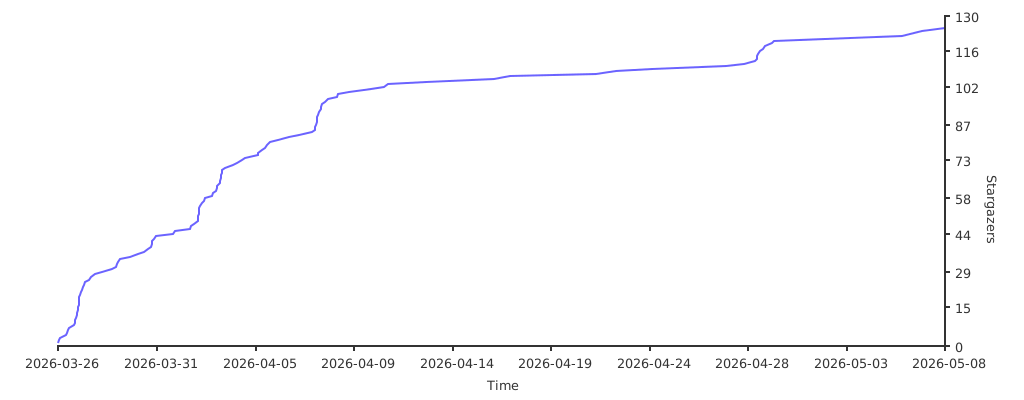](https://starchart.cc/tuanminhhole/openclaw-setup)
|
|
144
|
+
|
|
145
|
+
</div>
|
|
146
|
+
|
|
147
|
+
---
|
|
148
|
+
|
|
149
|
+
## 🙏 Lời cảm ơn
|
|
150
|
+
|
|
151
|
+
- [OpenClaw](https://openclaw.ai) — AI Gateway framework
|
|
152
|
+
- [9Router](https://github.com/decolua/9router) — Open-source AI proxy (OAuth-based, no API keys)
|
|
153
|
+
- [ClawHub](https://clawhub.com) — Kho đăng ký các kỹ năng của bot
|
|
154
|
+
- [TheSVG](https://thesvg.org) — Kho biểu tượng nhãn hiệu SVG chất lượng cao
|
|
155
|
+
|
|
156
|
+
---
|
|
157
|
+
|
|
158
|
+
<div align="center">
|
|
159
|
+
|
|
160
|
+
Made with 🦞 by [Kent](https://github.com/tuanminhhole)
|
|
161
|
+
|
|
162
|
+
</div>
|
package/dist/cli.js
CHANGED
|
@@ -1,112 +1,125 @@
|
|
|
1
|
-
#!/usr/bin/env node
|
|
2
|
-
import { spawn } from 'child_process';
|
|
3
|
-
import fs from 'fs';
|
|
4
|
-
import path from 'path';
|
|
5
|
-
import
|
|
6
|
-
|
|
7
|
-
|
|
8
|
-
const
|
|
9
|
-
|
|
10
|
-
|
|
11
|
-
|
|
12
|
-
|
|
13
|
-
path.resolve(__dirname, '
|
|
14
|
-
|
|
15
|
-
|
|
16
|
-
|
|
17
|
-
|
|
18
|
-
|
|
19
|
-
|
|
20
|
-
|
|
21
|
-
|
|
22
|
-
|
|
23
|
-
|
|
24
|
-
|
|
25
|
-
|
|
26
|
-
|
|
27
|
-
|
|
28
|
-
|
|
29
|
-
|
|
30
|
-
|
|
31
|
-
|
|
32
|
-
|
|
33
|
-
|
|
34
|
-
|
|
35
|
-
|
|
36
|
-
|
|
37
|
-
|
|
38
|
-
const
|
|
39
|
-
const
|
|
40
|
-
const
|
|
41
|
-
|
|
42
|
-
|
|
43
|
-
|
|
44
|
-
|
|
45
|
-
|
|
46
|
-
|
|
47
|
-
|
|
48
|
-
|
|
49
|
-
}
|
|
50
|
-
|
|
51
|
-
console.log('
|
|
52
|
-
console.log('
|
|
53
|
-
|
|
54
|
-
|
|
55
|
-
const
|
|
56
|
-
|
|
57
|
-
|
|
58
|
-
|
|
59
|
-
|
|
60
|
-
|
|
61
|
-
|
|
62
|
-
|
|
63
|
-
|
|
64
|
-
|
|
65
|
-
|
|
66
|
-
|
|
67
|
-
|
|
68
|
-
|
|
69
|
-
|
|
70
|
-
|
|
71
|
-
|
|
72
|
-
|
|
73
|
-
|
|
74
|
-
|
|
75
|
-
|
|
76
|
-
|
|
77
|
-
child
|
|
78
|
-
|
|
79
|
-
|
|
80
|
-
|
|
81
|
-
|
|
82
|
-
|
|
83
|
-
|
|
84
|
-
|
|
85
|
-
|
|
86
|
-
|
|
87
|
-
|
|
88
|
-
|
|
89
|
-
|
|
90
|
-
|
|
91
|
-
|
|
92
|
-
|
|
93
|
-
|
|
94
|
-
|
|
95
|
-
|
|
96
|
-
|
|
97
|
-
|
|
98
|
-
|
|
99
|
-
|
|
100
|
-
|
|
101
|
-
|
|
102
|
-
|
|
103
|
-
|
|
104
|
-
|
|
105
|
-
|
|
106
|
-
|
|
107
|
-
|
|
108
|
-
|
|
109
|
-
|
|
110
|
-
|
|
111
|
-
|
|
112
|
-
|
|
1
|
+
#!/usr/bin/env node
|
|
2
|
+
import { spawn } from 'child_process';
|
|
3
|
+
import fs from 'fs';
|
|
4
|
+
import path from 'path';
|
|
5
|
+
import os from 'os';
|
|
6
|
+
import { fileURLToPath } from 'url';
|
|
7
|
+
|
|
8
|
+
const __filename = fileURLToPath(import.meta.url);
|
|
9
|
+
const __dirname = path.dirname(__filename);
|
|
10
|
+
|
|
11
|
+
function isLocalRepo() {
|
|
12
|
+
const pathsToTry = [
|
|
13
|
+
path.resolve(__dirname, '..'),
|
|
14
|
+
path.resolve(__dirname, '../..')
|
|
15
|
+
];
|
|
16
|
+
for (const rootDir of pathsToTry) {
|
|
17
|
+
const pkgPath = path.join(rootDir, 'package.json');
|
|
18
|
+
if (fs.existsSync(pkgPath)) {
|
|
19
|
+
try {
|
|
20
|
+
const pkg = JSON.parse(fs.readFileSync(pkgPath, 'utf8'));
|
|
21
|
+
if (pkg.name === 'create-openclaw-bot' && fs.existsSync(path.join(rootDir, 'src', 'cli', 'cli.src.js'))) {
|
|
22
|
+
return true;
|
|
23
|
+
}
|
|
24
|
+
} catch {}
|
|
25
|
+
}
|
|
26
|
+
}
|
|
27
|
+
return false;
|
|
28
|
+
}
|
|
29
|
+
|
|
30
|
+
const args = process.argv.slice(2);
|
|
31
|
+
|
|
32
|
+
if (isLocalRepo()) {
|
|
33
|
+
const { startLocalInstaller } = await import('./server/local-server.js');
|
|
34
|
+
|
|
35
|
+
if (args[0] === 'legacy' || args.includes('--legacy')) {
|
|
36
|
+
await import('./legacy-cli.js');
|
|
37
|
+
} else {
|
|
38
|
+
const noOpen = args.includes('--no-open');
|
|
39
|
+
const hostArg = args.find((arg) => arg.startsWith('--host='));
|
|
40
|
+
const portArg = args.find((arg) => arg.startsWith('--port='));
|
|
41
|
+
const projectDirArg = args.find((arg) => arg.startsWith('--project-dir='));
|
|
42
|
+
|
|
43
|
+
await startLocalInstaller({
|
|
44
|
+
openBrowser: !noOpen,
|
|
45
|
+
host: hostArg ? hostArg.slice('--host='.length) : '127.0.0.1',
|
|
46
|
+
preferredPort: portArg ? Number(portArg.slice('--port='.length)) : 51789,
|
|
47
|
+
projectDir: projectDirArg ? projectDirArg.slice('--project-dir='.length) : process.cwd(),
|
|
48
|
+
});
|
|
49
|
+
}
|
|
50
|
+
} else {
|
|
51
|
+
console.log('\n============================================================');
|
|
52
|
+
console.log(' 🦞 OpenClaw Setup — Auto-downloader & Installer');
|
|
53
|
+
console.log('============================================================\n');
|
|
54
|
+
|
|
55
|
+
const targetDirName = '.openclaw-setup';
|
|
56
|
+
const targetPath = path.join(os.homedir(), targetDirName);
|
|
57
|
+
|
|
58
|
+
const runCmd = (cmd, cmdArgs, opts = {}) => {
|
|
59
|
+
return new Promise((resolve, reject) => {
|
|
60
|
+
const child = spawn(cmd, cmdArgs, {
|
|
61
|
+
shell: true,
|
|
62
|
+
stdio: 'inherit',
|
|
63
|
+
...opts
|
|
64
|
+
});
|
|
65
|
+
child.on('close', (code) => {
|
|
66
|
+
if (code === 0) resolve();
|
|
67
|
+
else reject(new Error(`${cmd} exited with code ${code}`));
|
|
68
|
+
});
|
|
69
|
+
child.on('error', reject);
|
|
70
|
+
});
|
|
71
|
+
};
|
|
72
|
+
|
|
73
|
+
try {
|
|
74
|
+
// Check if git is installed
|
|
75
|
+
try {
|
|
76
|
+
await new Promise((resolve, reject) => {
|
|
77
|
+
const child = spawn('git', ['--version'], { shell: true, stdio: 'ignore' });
|
|
78
|
+
child.on('close', (code) => {
|
|
79
|
+
if (code === 0) resolve();
|
|
80
|
+
else reject(new Error());
|
|
81
|
+
});
|
|
82
|
+
child.on('error', reject);
|
|
83
|
+
});
|
|
84
|
+
} catch {
|
|
85
|
+
throw new Error('Git is not installed or not found in PATH. Please install Git and try again.');
|
|
86
|
+
}
|
|
87
|
+
|
|
88
|
+
const isGitRepo = fs.existsSync(path.join(targetPath, '.git'));
|
|
89
|
+
const hasPackageJson = fs.existsSync(path.join(targetPath, 'package.json'));
|
|
90
|
+
|
|
91
|
+
if (!fs.existsSync(targetPath) || !isGitRepo || !hasPackageJson) {
|
|
92
|
+
if (fs.existsSync(targetPath)) {
|
|
93
|
+
console.log(`⚠️ Thư mục cài đặt UI tồn tại ở ${targetPath} nhưng bị lỗi hoặc thiếu tệp (.git / package.json).`);
|
|
94
|
+
console.log(' Đang dọn dẹp thư mục UI ẩn để tiến hành tải mới hoàn toàn...');
|
|
95
|
+
try {
|
|
96
|
+
fs.rmSync(targetPath, { recursive: true, force: true });
|
|
97
|
+
} catch (rmErr) {
|
|
98
|
+
console.warn(' Cảnh báo: Không thể xóa thư mục, sẽ thử tải đè:', rmErr.message);
|
|
99
|
+
}
|
|
100
|
+
}
|
|
101
|
+
console.log(`[1/3] Cloning OpenClaw setup repository to: ${targetPath}...`);
|
|
102
|
+
await runCmd('git', ['clone', 'https://github.com/tuanminhhole/openclaw-setup.git', targetPath]);
|
|
103
|
+
} else {
|
|
104
|
+
console.log(`[1/3] OpenClaw setup folder already exists at: ${targetPath}`);
|
|
105
|
+
console.log(' Updating repository to latest version...');
|
|
106
|
+
try {
|
|
107
|
+
await runCmd('git', ['pull'], { cwd: targetPath });
|
|
108
|
+
} catch (err) {
|
|
109
|
+
console.warn(' Warning: Failed to git pull (continuing anyway):', err.message);
|
|
110
|
+
}
|
|
111
|
+
}
|
|
112
|
+
|
|
113
|
+
console.log('\n[2/3] Installing dependencies...');
|
|
114
|
+
await runCmd('npm', ['install'], { cwd: targetPath });
|
|
115
|
+
|
|
116
|
+
console.log('\n[3/3] Starting OpenClaw Setup UI...');
|
|
117
|
+
const originalCwd = process.cwd();
|
|
118
|
+
const cliPath = path.join('dist', 'cli.js');
|
|
119
|
+
await runCmd('node', [cliPath, ...args, `--project-dir=${originalCwd}`], { cwd: targetPath });
|
|
120
|
+
|
|
121
|
+
} catch (error) {
|
|
122
|
+
console.error('\n❌ Error during setup:', error.message);
|
|
123
|
+
process.exit(1);
|
|
124
|
+
}
|
|
125
|
+
}
|