create-openclaw-bot 5.8.0 → 5.8.1
This diff represents the content of publicly available package versions that have been released to one of the supported registries. The information contained in this diff is provided for informational purposes only and reflects changes between package versions as they appear in their respective public registries.
- package/README.md +157 -159
- package/README.vi.md +162 -164
- package/dist/cli.js +125 -112
- package/dist/legacy-cli.js +11 -11
- package/dist/server/local-server.js +2568 -2372
- package/dist/setup/data/index.js +0 -1
- package/dist/setup/data/plugins.js +8 -1
- package/dist/setup/data/skills.js +2 -10
- package/dist/setup/shared/docker-gen.js +571 -576
- package/dist/setup/shared/workspace-gen.js +813 -526
- package/dist/setup.js +337 -299
- package/dist/web/app.js +1247 -1106
- package/dist/web/styles.css +1054 -286
- package/package.json +40 -40
package/README.md
CHANGED
|
@@ -1,159 +1,157 @@
|
|
|
1
|
-
<div align="center">
|
|
2
|
-
|
|
3
|
-
# 🦞 OpenClaw Setup
|
|
4
|
-
|
|
5
|
-
<p align="center">
|
|
6
|
-
<a href="https://github.com/tuanminhhole/openclaw-setup/releases"><img src="https://img.shields.io/badge/RELEASE-v5.8.0-0EA5E9?style=for-the-badge" alt="Version 5.8.0" /></a>
|
|
7
|
-
<a href="https://github.com/tuanminhhole/openclaw-setup?tab=MIT-1-ov-file"><img src="https://img.shields.io/badge/LICENSE-MIT-success?style=for-the-badge" alt="MIT License" /></a>
|
|
8
|
-
<a href="https://www.npmjs.com/package/create-openclaw-bot"><img src="https://img.shields.io/npm/v/create-openclaw-bot?style=for-the-badge&label=CLI&color=2563EB&logo=npm&logoColor=white" alt="NPM Version" /></a>
|
|
9
|
-
<a href="https://github.com/tuanminhhole/openclaw-setup/stargazers"><img src="https://img.shields.io/github/stars/tuanminhhole/openclaw-setup?style=for-the-badge&color=eab308&logo=github&logoColor=white" alt="GitHub Stars" /></a>
|
|
10
|
-
</p>
|
|
11
|
-
|
|
12
|
-
|
|
13
|
-
|
|
14
|
-
|
|
15
|
-
|
|
16
|
-
|
|
17
|
-
|
|
18
|
-
|
|
19
|
-
<
|
|
20
|
-
|
|
21
|
-
|
|
22
|
-
</
|
|
23
|
-
|
|
24
|
-
|
|
25
|
-
|
|
26
|
-
|
|
27
|
-
|
|
28
|
-
|
|
29
|
-
|
|
30
|
-
-
|
|
31
|
-
-
|
|
32
|
-
-
|
|
33
|
-
-
|
|
34
|
-
-
|
|
35
|
-
|
|
36
|
-
|
|
37
|
-
|
|
38
|
-
|
|
39
|
-
|
|
40
|
-
|
|
41
|
-
|
|
42
|
-
-
|
|
43
|
-
-
|
|
44
|
-
-
|
|
45
|
-
-
|
|
46
|
-
-
|
|
47
|
-
|
|
48
|
-
|
|
49
|
-
|
|
50
|
-
|
|
51
|
-
|
|
52
|
-
|
|
53
|
-
|
|
54
|
-
|
|
55
|
-
|
|
56
|
-
```
|
|
57
|
-
|
|
58
|
-
|
|
59
|
-
|
|
60
|
-
|
|
61
|
-
|
|
62
|
-
|
|
63
|
-
|
|
64
|
-
|
|
65
|
-
|
|
66
|
-
|
|
67
|
-
|
|
68
|
-
|
|
69
|
-
|
|
70
|
-
|
|
71
|
-
|
|
72
|
-
- **
|
|
73
|
-
|
|
74
|
-
|
|
75
|
-
|
|
76
|
-
|
|
77
|
-
|
|
78
|
-
|
|
79
|
-
|
|
80
|
-
|
|
81
|
-
|
|
82
|
-
|
|
83
|
-
|
|
84
|
-
|
|
85
|
-
|
|
86
|
-
- **
|
|
87
|
-
|
|
88
|
-
|
|
89
|
-
|
|
90
|
-
|
|
91
|
-
|
|
92
|
-
|
|
93
|
-
|
|
94
|
-
|
|
95
|
-
|
|
96
|
-
|--
|
|
97
|
-
|--
|
|
98
|
-
|
|
99
|
-
|
|
100
|
-
|
|
101
|
-
|
|
102
|
-
|
|
103
|
-
|
|
104
|
-
|
|
105
|
-
|
|
106
|
-
|
|
107
|
-
<
|
|
108
|
-
|
|
109
|
-
|
|
110
|
-
|
|
111
|
-
|
|
112
|
-
<
|
|
113
|
-
|
|
114
|
-
|
|
115
|
-
|
|
116
|
-
|
|
117
|
-
|
|
118
|
-
|
|
119
|
-
|
|
120
|
-
|
|
121
|
-
|
|
122
|
-
|
|
123
|
-
|
|
124
|
-
|
|
125
|
-
|
|
126
|
-
- [
|
|
127
|
-
- [
|
|
128
|
-
- [
|
|
129
|
-
- [
|
|
130
|
-
- [
|
|
131
|
-
|
|
132
|
-
|
|
133
|
-
|
|
134
|
-
|
|
135
|
-
|
|
136
|
-
|
|
137
|
-
|
|
138
|
-
|
|
139
|
-
|
|
140
|
-
|
|
141
|
-
|
|
142
|
-
|
|
143
|
-
|
|
144
|
-
|
|
145
|
-
|
|
146
|
-
|
|
147
|
-
|
|
148
|
-
- [
|
|
149
|
-
- [
|
|
150
|
-
|
|
151
|
-
|
|
152
|
-
|
|
153
|
-
|
|
154
|
-
|
|
155
|
-
|
|
156
|
-
|
|
157
|
-
|
|
158
|
-
|
|
159
|
-
</div>
|
|
1
|
+
<div align="center">
|
|
2
|
+
|
|
3
|
+
# 🦞 OpenClaw Setup
|
|
4
|
+
|
|
5
|
+
<p align="center">
|
|
6
|
+
<a href="https://github.com/tuanminhhole/openclaw-setup/releases"><img src="https://img.shields.io/badge/RELEASE-v5.8.0-0EA5E9?style=for-the-badge" alt="Version 5.8.0" /></a>
|
|
7
|
+
<a href="https://github.com/tuanminhhole/openclaw-setup?tab=MIT-1-ov-file"><img src="https://img.shields.io/badge/LICENSE-MIT-success?style=for-the-badge" alt="MIT License" /></a>
|
|
8
|
+
<a href="https://www.npmjs.com/package/create-openclaw-bot"><img src="https://img.shields.io/npm/v/create-openclaw-bot?style=for-the-badge&label=CLI&color=2563EB&logo=npm&logoColor=white" alt="NPM Version" /></a>
|
|
9
|
+
<a href="https://github.com/tuanminhhole/openclaw-setup/stargazers"><img src="https://img.shields.io/github/stars/tuanminhhole/openclaw-setup?style=for-the-badge&color=eab308&logo=github&logoColor=white" alt="GitHub Stars" /></a>
|
|
10
|
+
</p>
|
|
11
|
+
|
|
12
|
+
[ Tiếng Việt](README.vi.md) ·  **English**
|
|
13
|
+
|
|
14
|
+
A next-generation **Web UI Setup** and management dashboard that automates 100% of the project scaffolding, deployment, and control of free multi-bot AI assistants on Telegram or Zalo — supports **Windows, macOS, Ubuntu, and VPS**.
|
|
15
|
+
|
|
16
|
+
<p align="center" style="margin: 24px 0;">
|
|
17
|
+
<img src="https://raw.githubusercontent.com/tuanminhhole/openclaw-setup/main/docs/openclaw-setup.png" alt="OpenClaw Setup" width="90%" style="border-radius: 8px; border: 1px solid #333; margin-bottom: 16px;" />
|
|
18
|
+
<img src="https://raw.githubusercontent.com/tuanminhhole/openclaw-setup/main/docs/dashboard.png" alt="OpenClaw Dashboard" width="90%" style="border-radius: 8px; border: 1px solid #333; margin-bottom: 16px;" />
|
|
19
|
+
<img src="https://raw.githubusercontent.com/tuanminhhole/openclaw-setup/main/docs/bot.png" alt="OpenClaw Bot in Action" width="90%" style="border-radius: 8px; border: 1px solid #333;" />
|
|
20
|
+
</p>
|
|
21
|
+
|
|
22
|
+
</div>
|
|
23
|
+
|
|
24
|
+
---
|
|
25
|
+
|
|
26
|
+
## 🆕 What's New in v5.8.0 (Major Release)
|
|
27
|
+
|
|
28
|
+
- 🎨 **Modern Web UI Dashboard**: Completely replaces the legacy `index.html` static wizard and terminal-based manual setups with a highly intuitive, premium dark red/black themed web dashboard to install and manage bots.
|
|
29
|
+
- 🔀 **Centralized AI Proxy via 9Router**: The installer now relies exclusively on **9Router** as the unified AI gateway. You no longer need to manually manage separate API keys or endpoints for each provider. Through 9Router's OAuth sign-in flow, you can easily route requests to free models (like Google Gemini free tier, Ollama local offline models) as well as premium paid models (like OpenAI GPT-4o, Anthropic Claude...).
|
|
30
|
+
- 📊 **Process Controller**: Directly Start, Stop, or Recreate bot containers and processes via user-friendly dashboard buttons without ever touching Docker CLI commands.
|
|
31
|
+
- 📑 **Real-Time Live Logs**: View real-time streaming console logs of your bot processes directly on the Web UI for instant debugging and monitoring.
|
|
32
|
+
- 📁 **File Tree Editor**: Read, modify, and save configuration files (`openclaw.json`, `SOUL.md`, `AGENTS.md`) directly in the browser.
|
|
33
|
+
- 🔑 **Zalo QR Authorization**: Authorize Zalo Personal bots in seconds by scanning the Zalo login QR code rendered directly on the management dashboard.
|
|
34
|
+
- 🔄 **Smart Port Conflict Resolution**: Automatically scans and dynamically assigns unique network ports (`routerPort`) to avoid conflicts when launching multiple bot instances.
|
|
35
|
+
|
|
36
|
+
---
|
|
37
|
+
|
|
38
|
+
## ✨ Features
|
|
39
|
+
|
|
40
|
+
- 🤖 **Multi-Channel** — Telegram (single or multi-bot relay), Zalo Bot API, or Zalo Personal.
|
|
41
|
+
- 🧑🤝🧑 **Multi-Bot Team** — Run multiple Telegram/Zalo bots simultaneously with synchronized workspaces and teamwork.
|
|
42
|
+
- 🧠 **Unified AI Routing via 9Router** — Easily route messages to Google Gemini, Claude, GPT-4o, OpenRouter, and Ollama (local offline models).
|
|
43
|
+
- 🧩 **Built-in Skills** — Web Search, Browser Automation (Chrome CDP), and Cron/Scheduler tasks.
|
|
44
|
+
- 🔌 **Integrated Marketplace** — Install advanced plugins (like `openclaw-zalo-mod`, Facebook Crawler...) with a single click.
|
|
45
|
+
- 🔀 **9Router Integration** — Open-source OAuth-based AI proxy that gets you up and running for free without individual API keys.
|
|
46
|
+
- 🔒 **Safe & Private** — All configurations and API keys are stored locally on your own machine.
|
|
47
|
+
|
|
48
|
+
---
|
|
49
|
+
|
|
50
|
+
## 🗺️ Quick Start
|
|
51
|
+
|
|
52
|
+
### 1️⃣ Method 1: Using NPX (Recommended)
|
|
53
|
+
Open your terminal and run this single command:
|
|
54
|
+
```bash
|
|
55
|
+
npx create-openclaw-bot
|
|
56
|
+
```
|
|
57
|
+
*The bootstrapper will automatically download package files, launch the local backend server, and open the Setup UI in your browser.*
|
|
58
|
+
|
|
59
|
+
### 2️⃣ Method 2: Manual Clone
|
|
60
|
+
If you downloaded or cloned the repository files locally:
|
|
61
|
+
```bash
|
|
62
|
+
npm install
|
|
63
|
+
npm start
|
|
64
|
+
```
|
|
65
|
+
|
|
66
|
+
---
|
|
67
|
+
|
|
68
|
+
## 📋 System Prerequisites
|
|
69
|
+
|
|
70
|
+
- **Node.js**: Version 20, 22, or 24 (Avoid Node 25 due to runtime library deprecations).
|
|
71
|
+
- **Git**: Installed and available in your environment PATH.
|
|
72
|
+
- **Docker Desktop** (If deploying via Docker): Support for Docker Compose V2.
|
|
73
|
+
|
|
74
|
+
---
|
|
75
|
+
|
|
76
|
+
## 🧠 Supported AI Providers (via 9Router)
|
|
77
|
+
|
|
78
|
+
- [9Router GitHub](https://github.com/decolua/9router)
|
|
79
|
+
|
|
80
|
+
---
|
|
81
|
+
|
|
82
|
+
## 🔌 Supported Channels
|
|
83
|
+
|
|
84
|
+
- **Telegram**: Acquire your official Bot Token from `@BotFather`.
|
|
85
|
+
- **Zalo Bot API**: Obtain credentials from [developers.zalo.me](https://developers.zalo.me).
|
|
86
|
+
- **Zalo Personal**: Scan the QR authorization image displayed on the OpenClaw Dashboard.
|
|
87
|
+
|
|
88
|
+
---
|
|
89
|
+
|
|
90
|
+
## 📁 Repository Structure
|
|
91
|
+
|
|
92
|
+
```text
|
|
93
|
+
openclaw-setup/
|
|
94
|
+
|-- README.md ← English documentation (You are here)
|
|
95
|
+
|-- README.vi.md ← Vietnamese documentation
|
|
96
|
+
|-- package.json ← NPM entry and runner scripts
|
|
97
|
+
|-- dist/ ← Compiled Web UI and CLI bundles
|
|
98
|
+
`-- src/ ← Source code (UI, local API backend, build tools)
|
|
99
|
+
```
|
|
100
|
+
|
|
101
|
+
---
|
|
102
|
+
|
|
103
|
+
## ❓ FAQ
|
|
104
|
+
|
|
105
|
+
<details>
|
|
106
|
+
<summary><b>How do I start or stop the bot?</b></summary>
|
|
107
|
+
You no longer need to type terminal commands! Simply access the Setup Web UI, navigate to the <b>Bot</b> tab, and use the interactive <b>Start / Stop / Recreate</b> buttons to manage your bot lifecycle.
|
|
108
|
+
</details>
|
|
109
|
+
|
|
110
|
+
<details>
|
|
111
|
+
<summary><b>Where do I edit the bot's persona and instructions?</b></summary>
|
|
112
|
+
You can edit them directly in your browser. Go to the <b>Bot</b> tab, scroll down to the <b>Bot file tree</b> section, and select the file you want to edit (e.g., `SOUL.md` or `AGENTS.md`). Click <b>Save</b> to apply changes instantly.
|
|
113
|
+
</details>
|
|
114
|
+
|
|
115
|
+
<details>
|
|
116
|
+
<summary><b>Can I change the AI model configuration later?</b></summary>
|
|
117
|
+
Yes. You can edit the config JSON directly via the integrated File Editor in the Web UI, or re-run the setup script pointing to your existing project folder.
|
|
118
|
+
</details>
|
|
119
|
+
|
|
120
|
+
---
|
|
121
|
+
|
|
122
|
+
## 🔗 Useful Links
|
|
123
|
+
|
|
124
|
+
- [OpenClaw Docs](https://openclaw.ai/docs)
|
|
125
|
+
- [9Router GitHub](https://github.com/decolua/9router)
|
|
126
|
+
- [Google AI Studio](https://aistudio.google.com/)
|
|
127
|
+
- [Telegram BotFather](https://t.me/BotFather)
|
|
128
|
+
- [Zalo Developer Platform](https://developers.zalo.me)
|
|
129
|
+
- [Docker Desktop](https://www.docker.com/products/docker-desktop/)
|
|
130
|
+
- [ClawHub (Skills)](https://clawhub.com)
|
|
131
|
+
|
|
132
|
+
---
|
|
133
|
+
|
|
134
|
+
## 📈 Star History
|
|
135
|
+
|
|
136
|
+
<div align="center">
|
|
137
|
+
|
|
138
|
+
[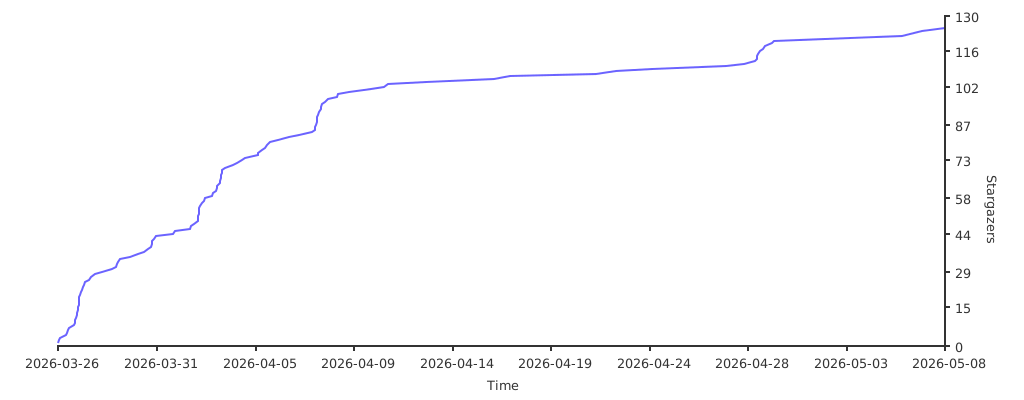](https://starchart.cc/tuanminhhole/openclaw-setup)
|
|
139
|
+
|
|
140
|
+
</div>
|
|
141
|
+
|
|
142
|
+
---
|
|
143
|
+
|
|
144
|
+
## 🙏 Acknowledgments
|
|
145
|
+
|
|
146
|
+
- [OpenClaw](https://openclaw.ai) — Core AI Gateway framework
|
|
147
|
+
- [9Router](https://github.com/decolua/9router) — Open-source AI proxy (OAuth-based, no API keys)
|
|
148
|
+
- [ClawHub](https://clawhub.com) — Bot skills registry
|
|
149
|
+
- [TheSVG](https://thesvg.org) — High-quality SVG brand icons
|
|
150
|
+
|
|
151
|
+
---
|
|
152
|
+
|
|
153
|
+
<div align="center">
|
|
154
|
+
|
|
155
|
+
Made with 🦞 by [Kent](https://github.com/tuanminhhole)
|
|
156
|
+
|
|
157
|
+
</div>
|