codeceptjs 3.5.15 → 3.6.0-beta.1.ai-healers
This diff represents the content of publicly available package versions that have been released to one of the supported registries. The information contained in this diff is provided for informational purposes only and reflects changes between package versions as they appear in their respective public registries.
- package/README.md +2 -2
- package/bin/codecept.js +66 -30
- package/docs/advanced.md +351 -0
- package/docs/ai.md +365 -0
- package/docs/api.md +323 -0
- package/docs/basics.md +979 -0
- package/docs/bdd.md +539 -0
- package/docs/best.md +237 -0
- package/docs/books.md +37 -0
- package/docs/bootstrap.md +135 -0
- package/docs/build/AI.js +124 -0
- package/docs/build/ApiDataFactory.js +410 -0
- package/docs/build/Appium.js +2027 -0
- package/docs/build/Expect.js +422 -0
- package/docs/build/FileSystem.js +228 -0
- package/docs/build/GraphQL.js +229 -0
- package/docs/build/GraphQLDataFactory.js +309 -0
- package/docs/build/JSONResponse.js +338 -0
- package/docs/build/Mochawesome.js +71 -0
- package/docs/build/Nightmare.js +2152 -0
- package/docs/build/Playwright.js +5110 -0
- package/docs/build/Protractor.js +2706 -0
- package/docs/build/Puppeteer.js +3905 -0
- package/docs/build/REST.js +344 -0
- package/docs/build/TestCafe.js +2125 -0
- package/docs/build/WebDriver.js +4240 -0
- package/docs/changelog.md +2572 -0
- package/docs/commands.md +266 -0
- package/docs/community-helpers.md +58 -0
- package/docs/configuration.md +157 -0
- package/docs/continuous-integration.md +22 -0
- package/docs/custom-helpers.md +306 -0
- package/docs/data.md +379 -0
- package/docs/detox.md +235 -0
- package/docs/docker.md +136 -0
- package/docs/email.md +183 -0
- package/docs/examples.md +149 -0
- package/docs/heal.md +186 -0
- package/docs/helpers/ApiDataFactory.md +266 -0
- package/docs/helpers/Appium.md +1374 -0
- package/docs/helpers/Detox.md +586 -0
- package/docs/helpers/Expect.md +275 -0
- package/docs/helpers/FileSystem.md +152 -0
- package/docs/helpers/GraphQL.md +151 -0
- package/docs/helpers/GraphQLDataFactory.md +226 -0
- package/docs/helpers/JSONResponse.md +254 -0
- package/docs/helpers/Mochawesome.md +8 -0
- package/docs/helpers/MockRequest.md +377 -0
- package/docs/helpers/Nightmare.md +1305 -0
- package/docs/helpers/OpenAI.md +70 -0
- package/docs/helpers/Playwright.md +2759 -0
- package/docs/helpers/Polly.md +44 -0
- package/docs/helpers/Protractor.md +1769 -0
- package/docs/helpers/Puppeteer-firefox.md +86 -0
- package/docs/helpers/Puppeteer.md +2317 -0
- package/docs/helpers/REST.md +218 -0
- package/docs/helpers/TestCafe.md +1321 -0
- package/docs/helpers/WebDriver.md +2547 -0
- package/docs/hooks.md +340 -0
- package/docs/index.md +111 -0
- package/docs/installation.md +75 -0
- package/docs/internal-api.md +266 -0
- package/docs/locators.md +339 -0
- package/docs/mobile-react-native-locators.md +67 -0
- package/docs/mobile.md +338 -0
- package/docs/pageobjects.md +291 -0
- package/docs/parallel.md +400 -0
- package/docs/playwright.md +632 -0
- package/docs/plugins.md +1247 -0
- package/docs/puppeteer.md +316 -0
- package/docs/quickstart.md +162 -0
- package/docs/react.md +70 -0
- package/docs/reports.md +392 -0
- package/docs/secrets.md +36 -0
- package/docs/shadow.md +68 -0
- package/docs/shared/keys.mustache +31 -0
- package/docs/shared/react.mustache +1 -0
- package/docs/testcafe.md +174 -0
- package/docs/translation.md +247 -0
- package/docs/tutorial.md +271 -0
- package/docs/typescript.md +180 -0
- package/docs/ui.md +59 -0
- package/docs/videos.md +28 -0
- package/docs/visual.md +202 -0
- package/docs/vue.md +143 -0
- package/docs/webdriver.md +701 -0
- package/docs/wiki/Books-&-Posts.md +27 -0
- package/docs/wiki/Community-Helpers-&-Plugins.md +53 -0
- package/docs/wiki/Converting-Playwright-to-Istanbul-Coverage.md +61 -0
- package/docs/wiki/Examples.md +145 -0
- package/docs/wiki/Google-Summer-of-Code-(GSoC)-2020.md +68 -0
- package/docs/wiki/Home.md +16 -0
- package/docs/wiki/Migration-to-Appium-v2---CodeceptJS.md +83 -0
- package/docs/wiki/Release-Process.md +24 -0
- package/docs/wiki/Roadmap.md +23 -0
- package/docs/wiki/Tests.md +1393 -0
- package/docs/wiki/Upgrading-to-CodeceptJS-3.md +153 -0
- package/docs/wiki/Videos.md +19 -0
- package/lib/actor.js +3 -6
- package/lib/ai.js +152 -80
- package/lib/cli.js +1 -0
- package/lib/command/dryRun.js +13 -44
- package/lib/command/generate.js +34 -0
- package/lib/command/run-workers.js +3 -0
- package/lib/command/run.js +3 -0
- package/lib/container.js +2 -0
- package/lib/heal.js +172 -0
- package/lib/helper/AI.js +124 -0
- package/lib/helper/Appium.js +12 -36
- package/lib/helper/Expect.js +8 -11
- package/lib/helper/JSONResponse.js +8 -8
- package/lib/helper/Playwright.js +240 -100
- package/lib/helper/Puppeteer.js +68 -182
- package/lib/helper/REST.js +1 -4
- package/lib/helper/WebDriver.js +10 -324
- package/lib/index.js +3 -0
- package/lib/listener/steps.js +0 -2
- package/lib/locator.js +4 -13
- package/lib/plugin/coverage.js +99 -112
- package/lib/plugin/heal.js +26 -117
- package/lib/recorder.js +11 -5
- package/lib/step.js +1 -3
- package/lib/store.js +2 -0
- package/lib/template/heal.js +39 -0
- package/package.json +35 -47
- package/typings/index.d.ts +0 -17
- package/typings/promiseBasedTypes.d.ts +57 -340
- package/typings/types.d.ts +73 -433
- package/docs/webapi/dontSeeTraffic.mustache +0 -13
- package/docs/webapi/flushNetworkTraffics.mustache +0 -5
- package/docs/webapi/grabRecordedNetworkTraffics.mustache +0 -10
- package/docs/webapi/seeTraffic.mustache +0 -36
- package/docs/webapi/startRecordingTraffic.mustache +0 -8
- package/docs/webapi/stopRecordingTraffic.mustache +0 -5
- package/docs/webapi/waitForCookie.mustache +0 -9
- package/lib/helper/MockServer.js +0 -221
- package/lib/helper/errors/ElementAssertion.js +0 -38
- package/lib/helper/networkTraffics/utils.js +0 -137
- /package/{lib/helper → docs/build}/OpenAI.js +0 -0
|
@@ -0,0 +1,180 @@
|
|
|
1
|
+
---
|
|
2
|
+
permalink: /typescript
|
|
3
|
+
title: TypeScript
|
|
4
|
+
---
|
|
5
|
+
|
|
6
|
+
# TypeScript
|
|
7
|
+
|
|
8
|
+
CodeceptJS supports [type declaration](https://github.com/codeceptjs/CodeceptJS/tree/master/typings) for [TypeScript](https://www.typescriptlang.org/). It means that you can write your tests in TS. Also, all of your custom steps can be written in TS
|
|
9
|
+
|
|
10
|
+
# Why TypeScript?
|
|
11
|
+
|
|
12
|
+
With the TypeScript writing CodeceptJS tests becomes much easier. If you configure TS properly in your project as well as your IDE, you will get the following features:
|
|
13
|
+
- [Autocomplete (with IntelliSense)](https://code.visualstudio.com/docs/editor/intellisense) - a tool that streamlines your work by suggesting when you typing what function or property which exists in a class, what arguments can be passed to that method, what it returns, etc.
|
|
14
|
+
Example:
|
|
15
|
+
|
|
16
|
+

|
|
17
|
+
|
|
18
|
+
- To show additional information for a step in a test. Example:
|
|
19
|
+
|
|
20
|
+

|
|
21
|
+
|
|
22
|
+
- Checks types - thanks to TypeScript support in CodeceptJS now allow to tests your tests. TypeScript can prevent some errors:
|
|
23
|
+
- invalid type of variables passed to function;
|
|
24
|
+
- calls no-exist method from PageObject or `I` object;
|
|
25
|
+
- incorrectly used CodeceptJS features;
|
|
26
|
+
|
|
27
|
+
|
|
28
|
+
## Getting Started <Badge text="Since 3.3.5" type="warning"/>
|
|
29
|
+
|
|
30
|
+
CodeceptJS can initialize tests as a TypeScript project.
|
|
31
|
+
When starting a new project with a standard installation via
|
|
32
|
+
|
|
33
|
+
```
|
|
34
|
+
npx codeceptjs init
|
|
35
|
+
```
|
|
36
|
+
Then select TypeScript as the first question:
|
|
37
|
+
|
|
38
|
+
```
|
|
39
|
+
? Do you plan to write tests in TypeScript? Yes
|
|
40
|
+
```
|
|
41
|
+
|
|
42
|
+
Then a config file and new tests will be created in TypeScript format.
|
|
43
|
+
|
|
44
|
+
If a config file is set in TypeScript format (`codecept.conf.ts`) package `ts-node` will be used to run tests.
|
|
45
|
+
|
|
46
|
+
## Promise-Based Typings
|
|
47
|
+
|
|
48
|
+
By default, CodeceptJS tests are written in synchronous mode. This is a regular CodeceptJS test:
|
|
49
|
+
|
|
50
|
+
```js
|
|
51
|
+
I.amOnPage('/')
|
|
52
|
+
I.click('Login')
|
|
53
|
+
I.see('Hello!')
|
|
54
|
+
```
|
|
55
|
+
|
|
56
|
+
Even thought we don't see any `await`, those commands are executed synchronously, one by one.
|
|
57
|
+
All methods of `I` object actually return promise and TypeScript linter requires to use `await` operator for those promises.
|
|
58
|
+
To trick TypeScript and allow writing tests in CodeceptJS manner we create typings where `void` is returned instead of promises. This way linter won't complain on async code without await, as no promise is returned.
|
|
59
|
+
|
|
60
|
+
Our philosophy here is: use `await` only when it is actually needed, don't add visual mess to your code prefixing each line with `await`. However, you might want to get a better control of your tests and follow TypeScript conventions.
|
|
61
|
+
This is why you might want to **enable promise-based typings**.
|
|
62
|
+
|
|
63
|
+
A previous test should be rewritten with `await`s:
|
|
64
|
+
|
|
65
|
+
```js
|
|
66
|
+
await I.amOnPage('/')
|
|
67
|
+
await I.click('Login')
|
|
68
|
+
await I.see('Hello!')
|
|
69
|
+
```
|
|
70
|
+
|
|
71
|
+
Using `await` explicitly provides a beter control of execution flow. Some CodeceptJS users report that they increased stability of tests by adopting `await` for all CodeceptJS commands in their codebase.
|
|
72
|
+
|
|
73
|
+
If you select to use promise-based typings, type definitions will be generated so all actions to return a promise.
|
|
74
|
+
Otherwise they will still return promises but it won't be relfected in type definitions.
|
|
75
|
+
|
|
76
|
+
To introduce promise-based typings into a current project edit `codecept.conf.ts`:
|
|
77
|
+
|
|
78
|
+
```ts
|
|
79
|
+
fullPromiseBased: true;
|
|
80
|
+
```
|
|
81
|
+
|
|
82
|
+
and rebuild type definitions with
|
|
83
|
+
|
|
84
|
+
```
|
|
85
|
+
npx codeceptjs def
|
|
86
|
+
```
|
|
87
|
+
|
|
88
|
+
## Types for custom helper or page object
|
|
89
|
+
|
|
90
|
+
If you want to get types for your [custom helper](https://codecept.io/helpers/#configuration), you can add their automatically with CodeceptJS command `npx codeceptjs def`.
|
|
91
|
+
|
|
92
|
+
For example, if you add the new step `printMessage` for your custom helper like this:
|
|
93
|
+
```js
|
|
94
|
+
// customHelper.ts
|
|
95
|
+
export class CustomHelper extends Helper {
|
|
96
|
+
printMessage(msg: string) {
|
|
97
|
+
console.log(msg)
|
|
98
|
+
}
|
|
99
|
+
}
|
|
100
|
+
|
|
101
|
+
```
|
|
102
|
+
|
|
103
|
+
Then you need to add this helper to your `codecept.conf.js` like in this [docs](https://codecept.io/helpers/#configuration).
|
|
104
|
+
And then run the command `npx codeceptjs def`.
|
|
105
|
+
|
|
106
|
+
As result our `steps.d.ts` file will be updated like this:
|
|
107
|
+
```ts
|
|
108
|
+
/// <reference types='codeceptjs' />
|
|
109
|
+
type CustomHelper = import('./CustomHelper');
|
|
110
|
+
|
|
111
|
+
declare namespace CodeceptJS {
|
|
112
|
+
interface SupportObject { I: I }
|
|
113
|
+
interface Methods extends Puppeteer, CustomHelper {}
|
|
114
|
+
interface I extends WithTranslation<Methods> {}
|
|
115
|
+
namespace Translation {
|
|
116
|
+
interface Actions {}
|
|
117
|
+
}
|
|
118
|
+
}
|
|
119
|
+
```
|
|
120
|
+
|
|
121
|
+
And now you can use autocomplete on your test.
|
|
122
|
+
|
|
123
|
+
Generation types for PageObject looks like for a custom helper, but `steps.d.ts` will look like:
|
|
124
|
+
```ts
|
|
125
|
+
/// <reference types='codeceptjs' />
|
|
126
|
+
type loginPage = typeof import('./loginPage');
|
|
127
|
+
type homePage = typeof import('./homePage');
|
|
128
|
+
type CustomHelper = import('./CustomHelper');
|
|
129
|
+
|
|
130
|
+
declare namespace CodeceptJS {
|
|
131
|
+
interface SupportObject { I: I, loginPage: loginPage, homePage: homePage }
|
|
132
|
+
interface Methods extends Puppeteer, CustomHelper {}
|
|
133
|
+
interface I extends WithTranslation<Methods> {}
|
|
134
|
+
namespace Translation {
|
|
135
|
+
interface Actions {}
|
|
136
|
+
}
|
|
137
|
+
}
|
|
138
|
+
```
|
|
139
|
+
|
|
140
|
+
## Types for custom strict locators
|
|
141
|
+
|
|
142
|
+
You can define [custom strict locators](https://codecept.io/locators/#custom-strict-locators) that can be used in all methods taking a locator (parameter type `LocatorOrString`).
|
|
143
|
+
|
|
144
|
+
Example: A custom strict locator with a `data` property, which can be used like this:
|
|
145
|
+
|
|
146
|
+
```ts
|
|
147
|
+
I.click({ data: 'user-login' });
|
|
148
|
+
```
|
|
149
|
+
|
|
150
|
+
In order to use the custom locator in TypeScript code, its type shape needs to be registered in the interface `CustomLocators` in your `steps.d.ts` file:
|
|
151
|
+
|
|
152
|
+
```ts
|
|
153
|
+
/// <reference types='codeceptjs' />
|
|
154
|
+
...
|
|
155
|
+
|
|
156
|
+
declare namespace CodeceptJS {
|
|
157
|
+
...
|
|
158
|
+
|
|
159
|
+
interface CustomLocators {
|
|
160
|
+
data: { data: string };
|
|
161
|
+
}
|
|
162
|
+
}
|
|
163
|
+
```
|
|
164
|
+
|
|
165
|
+
The property keys used in the `CustomLocators` interface do not matter (only the *types* of the interface properties are used). For simplicity it is recommended to use the name that is also used in your custom locator itself.
|
|
166
|
+
|
|
167
|
+
You can also define more complicated custom locators with multiple (also optional) properties:
|
|
168
|
+
|
|
169
|
+
```ts
|
|
170
|
+
/// <reference types='codeceptjs' />
|
|
171
|
+
...
|
|
172
|
+
|
|
173
|
+
declare namespace CodeceptJS {
|
|
174
|
+
...
|
|
175
|
+
|
|
176
|
+
interface CustomLocators {
|
|
177
|
+
data: { data: string, value?: number, flag?: boolean };
|
|
178
|
+
}
|
|
179
|
+
}
|
|
180
|
+
```
|
package/docs/ui.md
ADDED
|
@@ -0,0 +1,59 @@
|
|
|
1
|
+
---
|
|
2
|
+
title: CodeceptUI
|
|
3
|
+
permalink: /ui
|
|
4
|
+
---
|
|
5
|
+
|
|
6
|
+
|
|
7
|
+
<img src="/img/codeceptui.png" alt="CodeceptUI" style="width: 100%; border-radius: 5px; box-shadow: 0px 5px 10px rgba(0,0,0,0.1)" />
|
|
8
|
+
|
|
9
|
+
|
|
10
|
+
## CodeceptUI
|
|
11
|
+
|
|
12
|
+
CodeceptJS has an interactive, graphical test runner. We call it CodeceptUI. It works in your browser and helps you to manage your tests.
|
|
13
|
+
|
|
14
|
+
CodeceptUI can be used for
|
|
15
|
+
|
|
16
|
+
* running tests by groups or single
|
|
17
|
+
* get test reports
|
|
18
|
+
* review tests
|
|
19
|
+
* edit tests and page objects
|
|
20
|
+
* write new tests
|
|
21
|
+
* reuse one browser session accross multiple test runs
|
|
22
|
+
* easily switch to headless/headful mode
|
|
23
|
+
|
|
24
|
+
|
|
25
|
+

|
|
26
|
+
|
|
27
|
+
## Installation
|
|
28
|
+
|
|
29
|
+
CodeceptUI is already installed with `create-codeceptjs` command but you can install it manually via:
|
|
30
|
+
|
|
31
|
+
```
|
|
32
|
+
npm i @codeceptjs/ui --save
|
|
33
|
+
```
|
|
34
|
+
|
|
35
|
+
## Usage
|
|
36
|
+
|
|
37
|
+
To start using CodeceptUI you need to have CodeceptJS project with a few tests written.
|
|
38
|
+
If CodeceptUI was installed by `create-codecept` command it can be started with:
|
|
39
|
+
|
|
40
|
+
```
|
|
41
|
+
npm run codeceptjs:ui
|
|
42
|
+
```
|
|
43
|
+
|
|
44
|
+
CodeceptUI can be started in two modes:
|
|
45
|
+
|
|
46
|
+
* **Application** mode - starts Electron application in a window. Designed for desktop systems.
|
|
47
|
+
* **Server** mode - starts a webserver. Deigned for CI systems.
|
|
48
|
+
|
|
49
|
+
To start CodeceptUI in application mode:
|
|
50
|
+
|
|
51
|
+
```
|
|
52
|
+
npx codecept-ui --app
|
|
53
|
+
```
|
|
54
|
+
|
|
55
|
+
To start CodeceptUI in server mode:
|
|
56
|
+
|
|
57
|
+
```
|
|
58
|
+
npx codecept-ui
|
|
59
|
+
```
|
package/docs/videos.md
ADDED
|
@@ -0,0 +1,28 @@
|
|
|
1
|
+
---
|
|
2
|
+
permalink: /videos
|
|
3
|
+
layout: Section
|
|
4
|
+
sidebar: false
|
|
5
|
+
title: Videos
|
|
6
|
+
editLink: false
|
|
7
|
+
---
|
|
8
|
+
|
|
9
|
+
> Add your own videos to our [Wiki Page](https://github.com/codeceptjs/CodeceptJS/wiki/Videos)
|
|
10
|
+
[](https://www.youtube.com/watch?v=BRMWstiOTks)
|
|
11
|
+
|
|
12
|
+
## [An Introduction, Getting started and working with CodeceptJS & Puppeteer (EAWeekend)](https://www.youtube.com/watch?v=BRMWstiOTks)
|
|
13
|
+
|
|
14
|
+
## [CodeceptJS Official YouTube Channel](https://www.youtube.com/channel/UCEs4030bmtonyDhTHEXa_2g)
|
|
15
|
+
|
|
16
|
+
## [Introductory Videos](https://www.youtube.com/watch?v=FPFG1rBNJ64&list=PLcFXthgti9Lt4SjSvL1ALDg6dOeTC0TvT)
|
|
17
|
+
|
|
18
|
+
Free educational videos provided by our community member **[@ontytoom](http://github.com/ontytoom)**.
|
|
19
|
+
|
|
20
|
+
1. [Installation](https://www.youtube.com/watch?v=FPFG1rBNJ64)
|
|
21
|
+
1. [Creating a Test](https://www.youtube.com/watch?v=mdQZjL3h9d0)
|
|
22
|
+
1. [Using Page Objects](https://www.youtube.com/watch?v=s677_6VctjQ)
|
|
23
|
+
|
|
24
|
+
## [Practical E2E Testing with CodeceptJS](https://www.udemy.com/practical-e2e-testing-with-codeceptjs/)
|
|
25
|
+
|
|
26
|
+
Udemy course by Luke Beilharz
|
|
27
|
+
|
|
28
|
+
|
package/docs/visual.md
ADDED
|
@@ -0,0 +1,202 @@
|
|
|
1
|
+
---
|
|
2
|
+
permalink: /visual
|
|
3
|
+
title: Visual Testing
|
|
4
|
+
---
|
|
5
|
+
|
|
6
|
+
# Visual Testing
|
|
7
|
+
|
|
8
|
+
How does one test if the UI being rendered appears correctly to the users or how to test if each UI element appears in the right position and size? The traditional way to test the UI of the application has always been manually, which is time consuming.
|
|
9
|
+
|
|
10
|
+
Visual testing with help of CodeceptJS will help in improving such use cases for the QA folks.
|
|
11
|
+
|
|
12
|
+
By default CodeceptJS uses [WebDriver](/helpers/WebDriver/) helper and **Selenium** to automate browser. It is also capable of taking screenshots of the application and this could be used for visual testing.
|
|
13
|
+
|
|
14
|
+
Currently there are two helpers available for Visual testing with CodeceptJS
|
|
15
|
+
|
|
16
|
+
## Using Resemble helper
|
|
17
|
+
|
|
18
|
+
[Resemble.js](https://github.com/rsmbl/Resemble.js) is a great tool for image comparison and analysis, which can be used with CodeceptJS
|
|
19
|
+
|
|
20
|
+
### Setup
|
|
21
|
+
|
|
22
|
+
To install the package, just run
|
|
23
|
+
|
|
24
|
+
```
|
|
25
|
+
npm install codeceptjs-resemblehelper --save
|
|
26
|
+
```
|
|
27
|
+
|
|
28
|
+
### Configuring
|
|
29
|
+
|
|
30
|
+
This helper should be added to `codecept.conf.js` config file.
|
|
31
|
+
|
|
32
|
+
Example:
|
|
33
|
+
|
|
34
|
+
```json
|
|
35
|
+
{
|
|
36
|
+
"helpers": {
|
|
37
|
+
"ResembleHelper" : {
|
|
38
|
+
"require": "codeceptjs-resemblehelper",
|
|
39
|
+
"screenshotFolder" : "./tests/output/",
|
|
40
|
+
"baseFolder": "./tests/screenshots/base/",
|
|
41
|
+
"diffFolder": "./tests/screenshots/diff/"
|
|
42
|
+
}
|
|
43
|
+
}
|
|
44
|
+
}
|
|
45
|
+
```
|
|
46
|
+
|
|
47
|
+
To use the Helper, users must provide the three parameters:
|
|
48
|
+
|
|
49
|
+
* `screenshotFolder` : This will always have the same value as `output` in Codecept configuration, this is the folder where WebDriver saves a screenshot when using `I.saveScreenshot` method
|
|
50
|
+
* `baseFolder`: This is the folder for base images, which will be used with screenshot for comparison
|
|
51
|
+
* `diffFolder`: This will the folder where resemble would try to store the difference image, which can be viewed later.
|
|
52
|
+
|
|
53
|
+
### Usage
|
|
54
|
+
|
|
55
|
+
Details about the helper can be found on the [Github Repo](https://github.com/puneet0191/codeceptjs-resemblehelper)
|
|
56
|
+
|
|
57
|
+
Base Image is compared with the screenshot image and test results are derived based on the `mismatch tolerance` level provided by the user for the comparison
|
|
58
|
+
|
|
59
|
+
### Example
|
|
60
|
+
|
|
61
|
+
Lets consider visual testing for [CodeceptJS Home](https://codecept.io)
|
|
62
|
+
|
|
63
|
+
```js
|
|
64
|
+
Feature('To test screen comparison with resemble Js Example test');
|
|
65
|
+
|
|
66
|
+
Scenario('Compare CodeceptIO Home Page @visual-test', async ({ I }) => {
|
|
67
|
+
I.amOnPage("/");
|
|
68
|
+
I.saveScreenshot("Codecept_IO_Screenshot_Image.png");
|
|
69
|
+
I.seeVisualDiff("Codecept_IO_Screenshot_Image.png", {tolerance: 2, prepareBaseImage: false});
|
|
70
|
+
});
|
|
71
|
+
```
|
|
72
|
+
|
|
73
|
+
In this example, we are setting the expected mismatch tolerance level as `2`
|
|
74
|
+
|
|
75
|
+
`Base Image` (Generated by User)
|
|
76
|
+

|
|
77
|
+
|
|
78
|
+
`Screenshot Image` (Generated by Test)
|
|
79
|
+

|
|
80
|
+
|
|
81
|
+
Clearly the difference in both the images visible to human eye is the section about `Scenario Driven`
|
|
82
|
+
|
|
83
|
+

|
|
84
|
+
|
|
85
|
+
`Diff Image` generated by the helper clearly highlights the section which don't match
|
|
86
|
+
|
|
87
|
+

|
|
88
|
+
|
|
89
|
+
`Failed Test output`
|
|
90
|
+
```
|
|
91
|
+
To test screen comparison with resemble Js Example test --
|
|
92
|
+
Compare CodeceptIO Home Page @visual-test
|
|
93
|
+
I see Visual Diff "Codecept_IO_Screenshot_Image.png", {tolerance: 2, prepareBaseImage: false}
|
|
94
|
+
MisMatch Percentage Calculated is 2.85
|
|
95
|
+
✖ FAILED in 418ms
|
|
96
|
+
|
|
97
|
+
|
|
98
|
+
-- FAILURES:
|
|
99
|
+
|
|
100
|
+
1) To test screen comparison with resemble Js Example test
|
|
101
|
+
Compare CodeceptIO Home Page @visual-test:
|
|
102
|
+
|
|
103
|
+
MissMatch Percentage 2.85
|
|
104
|
+
+ expected - actual
|
|
105
|
+
|
|
106
|
+
-false
|
|
107
|
+
+true
|
|
108
|
+
```
|
|
109
|
+
|
|
110
|
+
`Codeceptjs-resemblehelper` basically comes with two major functions
|
|
111
|
+
|
|
112
|
+
1) `seeVisualDiff` which can be used to compare two images and calculate the misMatch percentage.
|
|
113
|
+
2) `seeVisualDiffForElement` which can be used to compare elements on the two images and calculate misMatch percentage.
|
|
114
|
+
|
|
115
|
+
## Using Applitools
|
|
116
|
+
|
|
117
|
+
Applitools helps Test Automation engineers, DevOps, and FrontEnd Developers continuously test and validate visually perfect mobile, web, and native apps. Now it can be used with CodeceptJS.
|
|
118
|
+
|
|
119
|
+
### Setup
|
|
120
|
+
|
|
121
|
+
Create an account at [Applitools](https://applitools.com/users/register) and install the npm packages
|
|
122
|
+
|
|
123
|
+
```
|
|
124
|
+
npm i codeceptjs-applitoolshelper --save
|
|
125
|
+
npm i webdriverio@5 --save
|
|
126
|
+
```
|
|
127
|
+
|
|
128
|
+
### Configuring
|
|
129
|
+
|
|
130
|
+
```js
|
|
131
|
+
...
|
|
132
|
+
helpers: {
|
|
133
|
+
WebDriver: {
|
|
134
|
+
url: 'https://applitools.com/helloworld',
|
|
135
|
+
browser: 'chrome',
|
|
136
|
+
desiredCapabilities: {
|
|
137
|
+
chromeOptions: {
|
|
138
|
+
args: [ '--headless', '--disable-extensions', '--disable-gpu', '--no-sandbox', '--disable-dev-shm-usage']
|
|
139
|
+
}
|
|
140
|
+
},
|
|
141
|
+
windowSize: '1920x600',
|
|
142
|
+
smartWait: 5000,
|
|
143
|
+
timeouts: {
|
|
144
|
+
'script': 60000,
|
|
145
|
+
'page load': 10000
|
|
146
|
+
},
|
|
147
|
+
},
|
|
148
|
+
ApplitoolsHelper: {
|
|
149
|
+
require: 'codeceptjs-applitoolshelper',
|
|
150
|
+
applitoolsKey: 'YOUR_API_KEY'
|
|
151
|
+
}
|
|
152
|
+
},
|
|
153
|
+
...
|
|
154
|
+
```
|
|
155
|
+
|
|
156
|
+
#### To use this helper you need to provide the following info:
|
|
157
|
+
|
|
158
|
+
- applitoolsKey (Required): You can find your API key under the user menu located at the right hand side of the test manager toolbar
|
|
159
|
+
- windowSize (Optional): the windows size as for instance 1440x700, if not provided, the default 1920x600 will be used. The windowSize will follow this precedence: ApplitoolsHelper, Webdriver.
|
|
160
|
+
- appName (Optional): you can either provide your desired application name, if not provided, the default 'Application Under Test' will be used.
|
|
161
|
+
|
|
162
|
+
### Usage
|
|
163
|
+
|
|
164
|
+
```javascript
|
|
165
|
+
/**
|
|
166
|
+
* @param pageToCheck {string} Name of page you want to check
|
|
167
|
+
*/
|
|
168
|
+
I.eyeCheck(pageToCheck);
|
|
169
|
+
|
|
170
|
+
```
|
|
171
|
+
|
|
172
|
+
The first time you run this test a new baseline will be created, and subsequent test runs will be compared to this baseline. If any screenshot mismatch its baseline image in a perceptible way, there will be a `DiffsFoundException` which includes a URL that points to a detailed report where you can see the detected differences and take appropriate actions such as reporting bugs, updating the baseline and more.
|
|
173
|
+
|
|
174
|
+
```js
|
|
175
|
+
-- FAILURES:
|
|
176
|
+
|
|
177
|
+
1) Applitools functionality
|
|
178
|
+
Check home page @test:
|
|
179
|
+
Test 'Applitools functionality' of 'Application Under Test' detected differences!. See details at: https://eyes.applitools.com/app/batches/00000251831777088983/00000251831777088717?accountId=KO-Oh9tXI0e8VF8Ha_GLVA~~
|
|
180
|
+
```
|
|
181
|
+
|
|
182
|
+
> You can find the latest documentation here [Applitools Docs](https://applitools.com/tutorials/webdriverio5.html#run-your-first-test)
|
|
183
|
+
|
|
184
|
+
### Example
|
|
185
|
+
|
|
186
|
+
Lets consider visual testing for [CodeceptJS Home](https://codecept.io).
|
|
187
|
+
You can also find example repo here: https://github.com/PeterNgTr/codeceptjs-applitoolshelper
|
|
188
|
+
|
|
189
|
+
```js
|
|
190
|
+
const { I } = inject();
|
|
191
|
+
|
|
192
|
+
Feature('Applitools functionality');
|
|
193
|
+
|
|
194
|
+
Before(() => {
|
|
195
|
+
I.amOnPage('https://applitools.com/helloworld');
|
|
196
|
+
});
|
|
197
|
+
|
|
198
|
+
Scenario('Check home page @test', async ({ }) => {
|
|
199
|
+
await I.eyeCheck('Homepage');
|
|
200
|
+
});
|
|
201
|
+
```
|
|
202
|
+
|
package/docs/vue.md
ADDED
|
@@ -0,0 +1,143 @@
|
|
|
1
|
+
---
|
|
2
|
+
permalink: /vue
|
|
3
|
+
layout: Section
|
|
4
|
+
sidebar: false
|
|
5
|
+
title: Testing Vue Apps
|
|
6
|
+
---
|
|
7
|
+
|
|
8
|
+
|
|
9
|
+
# vue-cli-plugin-e2e-codeceptjs
|
|
10
|
+
|
|
11
|
+
*Hey, how about some end 2 end testing for your Vue apps?* 🤔
|
|
12
|
+
|
|
13
|
+
*Let's do it together! Vue, me, [CodeceptJS](https://codecept.io) & [Puppeteer](https://pptr.dev).* 🤗
|
|
14
|
+
|
|
15
|
+
*Browser testing was never that simple. Just see it!* 😍
|
|
16
|
+
|
|
17
|
+
```js
|
|
18
|
+
I.amOnPage('/');
|
|
19
|
+
I.click('My Component Button');
|
|
20
|
+
I.see('My Component');
|
|
21
|
+
I.say('I am happy!');
|
|
22
|
+
// that's right, this is a valid test!
|
|
23
|
+
```
|
|
24
|
+
|
|
25
|
+
## How to try it?
|
|
26
|
+
|
|
27
|
+
**Requirements:**
|
|
28
|
+
|
|
29
|
+
* NodeJS >= 8.9
|
|
30
|
+
* NPM / Yarn
|
|
31
|
+
* Vue CLI installed globally
|
|
32
|
+
|
|
33
|
+
```
|
|
34
|
+
npm i vue-cli-plugin-codeceptjs-puppeteer --save-dev
|
|
35
|
+
```
|
|
36
|
+
|
|
37
|
+
This will install CodeceptJS, CodeceptUI & Puppeteer with Chrome browser.
|
|
38
|
+
|
|
39
|
+
To add CodeceptJS to your project invoke installer:
|
|
40
|
+
|
|
41
|
+
```
|
|
42
|
+
vue invoke vue-cli-plugin-codeceptjs-puppeteer
|
|
43
|
+
```
|
|
44
|
+
|
|
45
|
+
> You will be asked about installing a demo component. If you start a fresh project **it is recommended to agree and install a demo component**, so you could see tests passing.
|
|
46
|
+
|
|
47
|
+
|
|
48
|
+
## Running Tests
|
|
49
|
+
|
|
50
|
+
We added npm scripts:
|
|
51
|
+
|
|
52
|
+
* `test:e2e` - will execute tests with browser opened. If you installed test component, and started a test server, running this command will show you a brower window passed test.
|
|
53
|
+
* Use `--headless` option to run browser headlessly
|
|
54
|
+
* Use `--serve` option to start a dev server before tests
|
|
55
|
+
|
|
56
|
+
|
|
57
|
+
Examples:
|
|
58
|
+
|
|
59
|
+
```
|
|
60
|
+
npm run test:e2e
|
|
61
|
+
npm run test:e2e -- --headless
|
|
62
|
+
npm run test:e2e -- --serve
|
|
63
|
+
```
|
|
64
|
+
|
|
65
|
+
> This command is a wrapper for `codecept run --steps`. You can use the [Run arguments and options](/commands#run) here.
|
|
66
|
+
|
|
67
|
+
* `test:e2e:parallel` - will execute tests headlessly in parallel processes (workers). By default runs tests in 2 workers.
|
|
68
|
+
* Use an argument to set number of workers
|
|
69
|
+
* Use `--serve` option to start dev server before running
|
|
70
|
+
|
|
71
|
+
Examples:
|
|
72
|
+
|
|
73
|
+
```
|
|
74
|
+
npm run test:e2e:parallel
|
|
75
|
+
npm run test:e2e:parallel -- 3
|
|
76
|
+
npm run test:e2e:parallel -- 3 --serve
|
|
77
|
+
```
|
|
78
|
+
|
|
79
|
+
> This command is a wrapper for `codecept run-workers 2`. You can use the [Run arguments and options](/commands#run-workers) here.
|
|
80
|
+
|
|
81
|
+
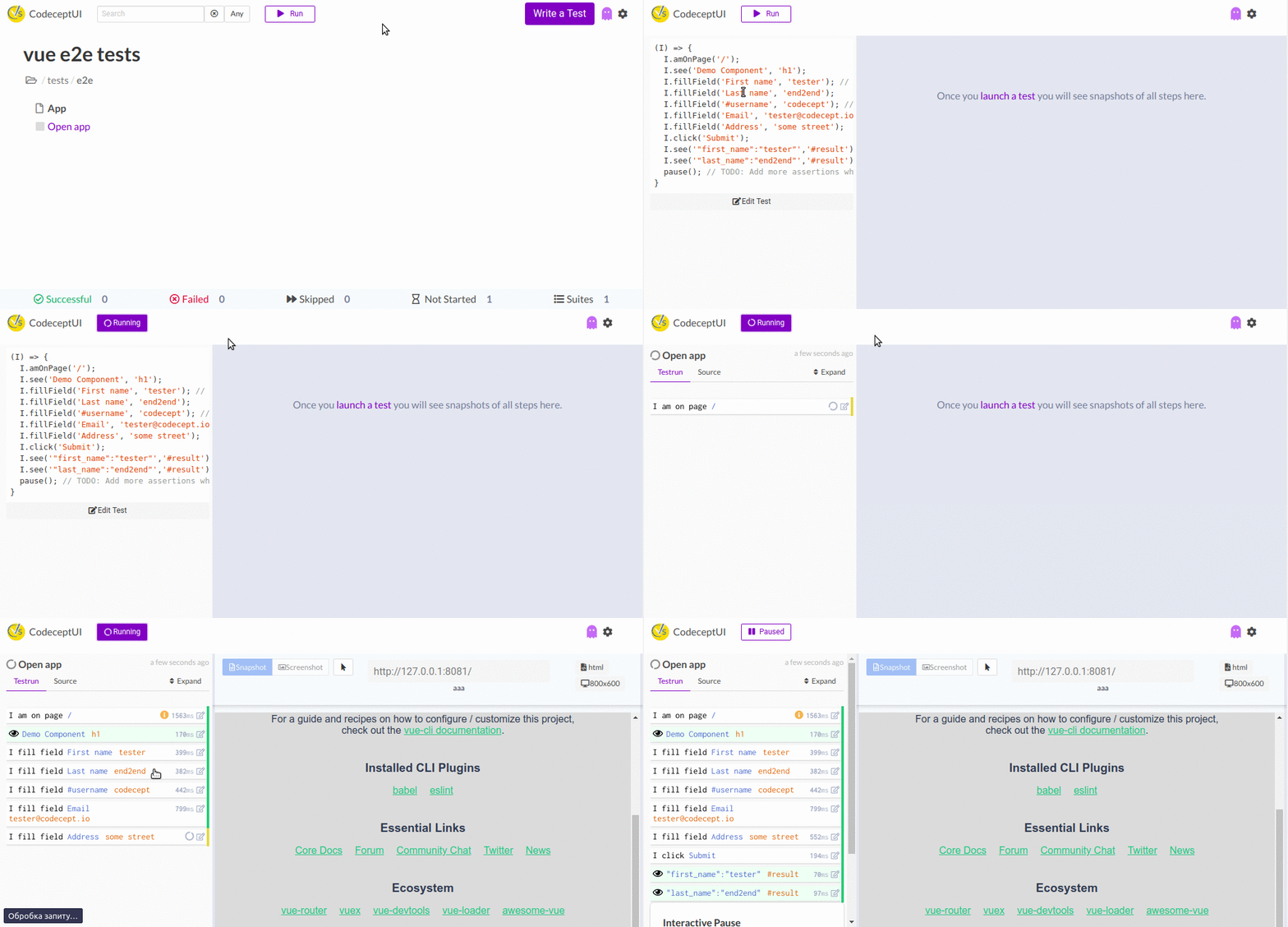
* `test:e2e:open` - this opens interactive web test runner. So you could see, review & run your tests from a browser.
|
|
82
|
+
|
|
83
|
+
|
|
84
|
+
|
|
85
|
+
```
|
|
86
|
+
npm run test:e2e:open
|
|
87
|
+
```
|
|
88
|
+
|
|
89
|
+
## Directory Structure
|
|
90
|
+
|
|
91
|
+
Generator has created these files:
|
|
92
|
+
|
|
93
|
+
```js
|
|
94
|
+
codecept.conf.js 👈 codeceptjs config
|
|
95
|
+
jsconfig.json 👈 enabling type definitons
|
|
96
|
+
tests
|
|
97
|
+
├── e2e
|
|
98
|
+
│ ├── app_test.js 👈 demo test, edit it!
|
|
99
|
+
│ ├── output 👈 temp directory for screenshots, reports, etc
|
|
100
|
+
│ └── support
|
|
101
|
+
│ └── steps_file.js 👈 common steps
|
|
102
|
+
└── steps.d.ts 👈 type definitions
|
|
103
|
+
```
|
|
104
|
+
|
|
105
|
+
If you agreed to create a demo component, you will also see `TestMe` component in `src/components` folder.
|
|
106
|
+
|
|
107
|
+
## Locators
|
|
108
|
+
|
|
109
|
+
For Vue apps a special `vue` locator is available. It allows to select an element by its component name, and props.
|
|
110
|
+
|
|
111
|
+
```js
|
|
112
|
+
{ vue: 'MyComponent' }
|
|
113
|
+
{ vue: 'Button', props: { title: 'Click Me' }}
|
|
114
|
+
```
|
|
115
|
+
|
|
116
|
+
With Playwright, you can use Vue locators in any method where locator is required:
|
|
117
|
+
|
|
118
|
+
```js
|
|
119
|
+
I.click({ vue: 'Tab', props: { title: 'Click Me!' }});
|
|
120
|
+
I.seeElement({ vue: 't', props: { title: 'Clicked' }});
|
|
121
|
+
```
|
|
122
|
+
|
|
123
|
+
To find Vue element names and props in a tree use [Vue DevTools](https://chromewebstore.google.com/detail/vuejs-devtools/nhdogjmejiglipccpnnnanhbledajbpd) extension.
|
|
124
|
+
|
|
125
|
+
> Turn off minification for application builds otherwise component names will be uglified as well
|
|
126
|
+
|
|
127
|
+
Vue locators work via [Playwright Vue Locator](https://playwright.dev/docs/other-locators#vue-locator).
|
|
128
|
+
|
|
129
|
+
## How to write tests?
|
|
130
|
+
|
|
131
|
+
* Open `tests/e2e/app_js` and see the demo test
|
|
132
|
+
* Execute a test & use interactive pause to see how CodeceptJS works
|
|
133
|
+
* [Learn CodeceptJS basics](/basics)
|
|
134
|
+
* [Learn how to write CodeceptJS tests with Puppeteer](/puppeteer)
|
|
135
|
+
* [See full reference for CodeceptJS Puppeteer Helper](/helpers/Puppeteer)
|
|
136
|
+
* Ask your questions in [Slack](https://bit.ly/chat-codeceptjs) & [Forum](https://codecept.discourse.group/)
|
|
137
|
+
|
|
138
|
+
## Enjoy testing!
|
|
139
|
+
|
|
140
|
+
Testing is simple & fun, enjoy it!
|
|
141
|
+
|
|
142
|
+
With ❤ [CodeceptJS Team](https://codecept.io)
|
|
143
|
+
|