canvas-datagrid 0.25.4 → 0.26.0
This diff represents the content of publicly available package versions that have been released to one of the supported registries. The information contained in this diff is provided for informational purposes only and reflects changes between package versions as they appear in their respective public registries.
- package/CHANGELOG.md +320 -0
- package/README.md +85 -67
- package/dist/canvas-datagrid.debug.js +7531 -3071
- package/dist/canvas-datagrid.debug.map +1 -1
- package/dist/canvas-datagrid.js +1 -1
- package/dist/canvas-datagrid.module.js +1 -1
- package/dist/canvas-datagrid.module.js.map +1 -1
- package/dist/types.d.ts +2508 -0
- package/lib/button.js +326 -0
- package/lib/component.js +40 -3
- package/lib/contextMenu.js +408 -30
- package/lib/defaults.js +100 -7
- package/lib/docs.js +121 -11
- package/lib/dom.js +239 -18
- package/lib/draw.js +1446 -206
- package/lib/events/index.js +2640 -0
- package/lib/events/util.js +165 -0
- package/lib/groups/util.js +42 -0
- package/lib/intf.js +908 -87
- package/lib/main.js +8 -1
- package/lib/publicMethods.js +773 -377
- package/lib/selections/index.js +989 -0
- package/lib/selections/type.d.ts +38 -0
- package/lib/selections/util.js +1320 -0
- package/lib/touch.js +20 -47
- package/package.json +24 -10
- package/lib/events.js +0 -1740
package/CHANGELOG.md
CHANGED
|
@@ -7,6 +7,326 @@ All notable changes to this project will be documented in this file.
|
|
|
7
7
|
The format is based on [Keep a Changelog](https://keepachangelog.com/en/1.0.0/),
|
|
8
8
|
and this project adheres to [Semantic Versioning](https://semver.org/spec/v2.0.0.html).
|
|
9
9
|
|
|
10
|
+
## 0.26.0 - 2026-09-19
|
|
11
|
+
|
|
12
|
+
Version note: the project restarted its numbering at 0.3.0 in 2021 while the
|
|
13
|
+
registry still held 0.22 to 0.25.4, so every release since then sorted below
|
|
14
|
+
0.25.4 and `latest` had to be forced by hand. This release continues from
|
|
15
|
+
0.25.4 instead, which makes npm's version ordering correct again. There is
|
|
16
|
+
no 0.5.0 release; the changes below were briefly tagged as such.
|
|
17
|
+
|
|
18
|
+
|
|
19
|
+
### Added
|
|
20
|
+
|
|
21
|
+
- `activecellchanged` event (Tomasz Pędraszewski, #582)
|
|
22
|
+
- `fillLastColumn` attribute: the last visible column fills the remaining grid width and its outer edge cannot be resized (Cauho, #589, fixes #474)
|
|
23
|
+
- `allowGridExpandOnPaste` attribute: pasted data larger than the grid adds rows and columns (Roman Stetsyk, #553, fixes #552); the expansion happens in one pass
|
|
24
|
+
- `allowColumnSelection` attribute: when false, header clicks sort without selecting the column (#473)
|
|
25
|
+
- `maxCanvasSize` attribute: auto-sized grids stop growing at the browser canvas limit and scroll for the rest (#254)
|
|
26
|
+
- `datachanged` fires for every data mutation with `e.source` (`edit`, `paste`, `cut`, `delete`, `fill`, `addrow`, ...); `afterpaste` cell tuples carry the pasted value (#250, #512, #549)
|
|
27
|
+
- A `ResizeObserver` on the host and its parent keeps auto/percentage-sized grids in sync with layout changes without calling `resize()` (#289, #239)
|
|
28
|
+
- `getColumnWidth` and `getRowHeight` are public (#448)
|
|
29
|
+
- `dist/types.d.ts` is a real module with a default-exported factory, `canvasDatagrid` class/namespace and `CanvasDatagridArgs`; `npm test` type-checks it (#567)
|
|
30
|
+
- CSS font shorthand support: weights/styles are kept, pt/em/rem/% sizes are converted (#157)
|
|
31
|
+
- Docs: "Using with React/Vue/Angular", "Using with TypeScript", "Use a custom editor for a cell", "Load data on demand with fetch", "Sparkline charts", "Large arrays"; demo scripts moved into the docs (evanbenjamin, #570)
|
|
32
|
+
|
|
33
|
+
### Changed
|
|
34
|
+
|
|
35
|
+
- `resizerow` always carries `rowIndex`, `height`, `width`, `x`, `y`, `draggingItem`; `cellHeight` and `row` remain as aliases (#503)
|
|
36
|
+
- `grid.changes` is keyed by the bound row index instead of the view row index (#418)
|
|
37
|
+
- `singleSelectionMode` now also limits drag, shift and ctrl selection to one row/cell (#472)
|
|
38
|
+
- Column reordering no longer requires `allowRowReordering`; the right part of each header is a reorder grab zone (`columnGrabZoneSize`) and a plain header click still sorts (#514)
|
|
39
|
+
- A mouseup anywhere ends a selection drag, not only a mouseup over the canvas
|
|
40
|
+
- `touchstart` is a passive listener (#328)
|
|
41
|
+
- `treeHorizontalScroll` is documented as reserved/not implemented (#314)
|
|
42
|
+
- CI runs on Node 20/22 with current GitHub Actions; the docs build works on Node 23+ (#574 build)
|
|
43
|
+
|
|
44
|
+
### Fixed
|
|
45
|
+
|
|
46
|
+
- Delete/Backspace, cut and the fill handle respect `editable: false` (#587, #458)
|
|
47
|
+
- Deleting the edited row in `beforeendedit` no longer re-adds it (#583)
|
|
48
|
+
- `treeGridAttributes` are applied to child grids (#444)
|
|
49
|
+
- `fitColumnToValues()` without a name fits every column and unknown names no longer throw (#193)
|
|
50
|
+
- Setting `columnOrder` redraws (#160)
|
|
51
|
+
- `verticalAlignment: 'bottom'` is no longer one line too high (#530)
|
|
52
|
+
- The number filter matches numeric cell values (#431)
|
|
53
|
+
- `rendertext` handlers may supply lines without a width; right/center alignment no longer blanks the column (#460)
|
|
54
|
+
- Assigning a new array to `e.items` in the `contextmenu` event replaces the menu (#263)
|
|
55
|
+
- `scrollIndexRect` is initialised before the first draw (#226)
|
|
56
|
+
- Touch handlers tolerate a missing starting cell (#554)
|
|
57
|
+
- Copy with an active cell but no selection no longer throws (#566)
|
|
58
|
+
- The string sorter coerces values so numbers and blanks sort consistently (#256)
|
|
59
|
+
- The enum editor opens its picker immediately where supported (#230)
|
|
60
|
+
- The web component's MutationObserver is disconnected on dispose/disconnect and never stacked; dispose is idempotent and removes every listener (#237, #338, #455)
|
|
61
|
+
- No `eval` in the bundles; the grid works under a CSP without `unsafe-eval` (#311)
|
|
62
|
+
- The context menu survives the click macOS Safari sends after a ctrl-click (#521)
|
|
63
|
+
- Docs: `{@link}` tags render as links (#574); broken demo links (#540, #562, #563, #568); the format-data example no longer throws on invalid dates (#576); the rendertext example uses `formattext` (#262)
|
|
64
|
+
|
|
65
|
+
## 0.4.7 - 2023-05-22
|
|
66
|
+
|
|
67
|
+
- Ensure only cells from selection get copied onto clipboard (mdebrauw, #556)
|
|
68
|
+
- Fix clearing of data when filter applied (mdebrauw, #560)
|
|
69
|
+
- Fixes 'paste into wrong cell when columns are reordered' (romanstetsyk, #518)
|
|
70
|
+
|
|
71
|
+
## 0.4.6 - 2023-04-03
|
|
72
|
+
|
|
73
|
+
## Added
|
|
74
|
+
|
|
75
|
+
- Add class name to allow targeting context menu by CSS (ilyaem, #526)
|
|
76
|
+
|
|
77
|
+
## Changed
|
|
78
|
+
|
|
79
|
+
- Add more tests for properties `selections` and `selectionList` (hangxingliu, #505)
|
|
80
|
+
- Improve row/column resizing (velitasali, #502)
|
|
81
|
+
- Re-implement(Optimize) select function (hangxingliu, #498)
|
|
82
|
+
|
|
83
|
+
## Fixed
|
|
84
|
+
|
|
85
|
+
- Fix sorting on header click (romanstetsyk, #550)
|
|
86
|
+
- Fix activeColumnHeaderCell docs (HitomiTenshi, #513)
|
|
87
|
+
- Fix some small bugs (hangxingliu, #504)
|
|
88
|
+
|
|
89
|
+
## 0.4.5 - 2022-03-16
|
|
90
|
+
|
|
91
|
+
## Added
|
|
92
|
+
|
|
93
|
+
- Added support for filling cells using a user-passed fill function (velitasali, #500)
|
|
94
|
+
|
|
95
|
+
## 0.4.4 - 2022-02-23
|
|
96
|
+
|
|
97
|
+
## Added
|
|
98
|
+
|
|
99
|
+
- Introduce frozen style markers (like Google Sheets) (xianzhi3, hangxingliu, #483)
|
|
100
|
+
- Dispatch column hide/unhide events (mdebrauw, #491)
|
|
101
|
+
- Allow cell editor overflow with long content (xianzhi3, #492)
|
|
102
|
+
|
|
103
|
+
## Fixed
|
|
104
|
+
|
|
105
|
+
- Fix bug that cleared the canvas under a certain unusual refresh flow (hangxingliu, #494)
|
|
106
|
+
|
|
107
|
+
## 0.4.3 - 2022-02-16
|
|
108
|
+
|
|
109
|
+
## Added
|
|
110
|
+
|
|
111
|
+
- Ability to hide rows/cols with UI toggle (hangxingliu, #480)
|
|
112
|
+
- Add Vue setup instructions (Bouke Versteegh, #482)
|
|
113
|
+
|
|
114
|
+
## Fixed
|
|
115
|
+
|
|
116
|
+
- Update column resizing including header (xianzhi3, #486)
|
|
117
|
+
|
|
118
|
+
## 0.4.2 - 2022-01-22
|
|
119
|
+
|
|
120
|
+
## Fixed
|
|
121
|
+
|
|
122
|
+
- Cancel moving when cursor exits grid (xianzhi3 #476)
|
|
123
|
+
- Fix clearing cells when grid is filtered (mdebrauw, #478)
|
|
124
|
+
|
|
125
|
+
## 0.4.1 - 2022-01-19
|
|
126
|
+
|
|
127
|
+
## Fixed
|
|
128
|
+
|
|
129
|
+
- Update row/column selection (xianzhi3, #467)
|
|
130
|
+
- Fix the behavior of the conext menu item used to hide column (hangxingliu, #470)
|
|
131
|
+
|
|
132
|
+
## 0.4.0 - 2022-01-10
|
|
133
|
+
|
|
134
|
+
## Added
|
|
135
|
+
|
|
136
|
+
- Feature: Add column/row grouping for tables (xianzhi3, #453)
|
|
137
|
+
- Feature: Add support for grouped columns (hangxingliu, #443)
|
|
138
|
+
|
|
139
|
+
## Fixed
|
|
140
|
+
|
|
141
|
+
- Update ESLint config for incorrect errors. (hangxingliu, #465)
|
|
142
|
+
- Fix: Columns are hidden when there are frozen columns and hidden columns simultaneously (hangxingliu, #462)
|
|
143
|
+
- Fix: null values are cast to strings ('null') on copy (mdebrauw, #461)
|
|
144
|
+
|
|
145
|
+
## 0.3.25 - 2021-12-22
|
|
146
|
+
|
|
147
|
+
### Fixed
|
|
148
|
+
|
|
149
|
+
- Fix null value bug when copying value (ndrsn)
|
|
150
|
+
- Fix setting property `dragOffset` of undefined (Lie Yue, #457)
|
|
151
|
+
- Fix cell editing in the inner grid (Liu Yue, #456)
|
|
152
|
+
|
|
153
|
+
## 0.3.24 - 2021-12-22
|
|
154
|
+
|
|
155
|
+
### Changed
|
|
156
|
+
|
|
157
|
+
- Prevent default when handling cut event and cleanup utility functions (mdebrauw, #454)
|
|
158
|
+
|
|
159
|
+
## 0.3.23 - 2021-12-16
|
|
160
|
+
|
|
161
|
+
### Fixed
|
|
162
|
+
|
|
163
|
+
- Slight refactor and set minimum width when resizing (mdebrauw, #452)
|
|
164
|
+
|
|
165
|
+
## 0.3.22 - 2021-12-15
|
|
166
|
+
|
|
167
|
+
### Changed
|
|
168
|
+
|
|
169
|
+
- Resize selected columns simultaneously (mdebrauw, #451)
|
|
170
|
+
- Refactor `cut` and `copy` event handlers (mdebrauw, #450)
|
|
171
|
+
|
|
172
|
+
## 0.3.21 - 2021-12-08
|
|
173
|
+
|
|
174
|
+
### Added
|
|
175
|
+
|
|
176
|
+
- Add `afterdelete` event and `deleteSelectedData()` public method (mdebrauw, #446)
|
|
177
|
+
|
|
178
|
+
### Fixed
|
|
179
|
+
|
|
180
|
+
- Remove mousemove at body when dispose (faimaklg, #449)
|
|
181
|
+
- Fire event when resizing column by double clicking column border (mdebrauw, #447)
|
|
182
|
+
- Fix filter button active/hover states, remove inline grid button after menu item click (xianzhi3, #445)
|
|
183
|
+
|
|
184
|
+
## 0.3.20 - 2021-12-04
|
|
185
|
+
|
|
186
|
+
### Added
|
|
187
|
+
|
|
188
|
+
- Add option for dropdown button when filtering (xianzhi3, #442)
|
|
189
|
+
|
|
190
|
+
## 0.3.19 - 2021-11-24
|
|
191
|
+
|
|
192
|
+
### Fixed
|
|
193
|
+
|
|
194
|
+
- Fix copy when column name or cell value is number (faimaklg, #402)
|
|
195
|
+
- Fix moving multiple columns or rows (xianzhi3, #390)
|
|
196
|
+
- Fix position of scroll bar with frozen pane xianzhi3, (#393)
|
|
197
|
+
|
|
198
|
+
## 0.3.18 - 2021-11-18
|
|
199
|
+
|
|
200
|
+
No changes; had to bump version number because race condition caused 0.3.16 to be published instead of 0.3.17.
|
|
201
|
+
|
|
202
|
+
## 0.3.17 - 2021-11-18
|
|
203
|
+
|
|
204
|
+
### Fixed
|
|
205
|
+
|
|
206
|
+
- Do not render row gaps when sorting (ndrsn, #391)
|
|
207
|
+
|
|
208
|
+
## 0.3.16 - 2021-11-18
|
|
209
|
+
|
|
210
|
+
### Fixed
|
|
211
|
+
|
|
212
|
+
- Fix string sort when value is null/undefined (faimaklg, #388)
|
|
213
|
+
|
|
214
|
+
## 0.3.15 - 2021-11-18
|
|
215
|
+
|
|
216
|
+
### Fixed
|
|
217
|
+
|
|
218
|
+
- Fix highlighting incorrect column after repositioning column (xianzhi3, #399)
|
|
219
|
+
- Reverse sort order icon (faimaklg, #387)
|
|
220
|
+
- Fix link in tutorials (slominskir, #386)
|
|
221
|
+
|
|
222
|
+
## 0.3.14 - 2021-10-20
|
|
223
|
+
|
|
224
|
+
### Added
|
|
225
|
+
|
|
226
|
+
- Emit affected cells in `cut` event (mdebrauw, #383)
|
|
227
|
+
|
|
228
|
+
## 0.3.13 - 2021-10-18
|
|
229
|
+
|
|
230
|
+
### Changed
|
|
231
|
+
|
|
232
|
+
- `afterpaste` event now includes bound row/column index (mdebrauw, #381)
|
|
233
|
+
- Adds selectedCells to selectionchanged event (mdebrauw, #380)
|
|
234
|
+
- Add keepFocusOnMouseOut attribute (mdebrauw, #379)
|
|
235
|
+
- Better pasting of clipboard data (mdebrauw, #378)
|
|
236
|
+
|
|
237
|
+
## 0.3.12 - 2021-10-11
|
|
238
|
+
|
|
239
|
+
### Changed
|
|
240
|
+
|
|
241
|
+
- New options to exclude frozen rows when filtering and sorting (mdebrauw, #377)
|
|
242
|
+
|
|
243
|
+
## 0.3.11 - 2021-10-04
|
|
244
|
+
|
|
245
|
+
### Fixed
|
|
246
|
+
|
|
247
|
+
- Fix inconsistent selection behavior between touch and mouse (tmaroschik, #376)
|
|
248
|
+
|
|
249
|
+
## 0.3.10 - 2021-10-04
|
|
250
|
+
|
|
251
|
+
### Changed
|
|
252
|
+
|
|
253
|
+
- Allow shrinking selections with keyboard (mdebrauw, #375)
|
|
254
|
+
|
|
255
|
+
## 0.3.9 - 2021-09-22
|
|
256
|
+
|
|
257
|
+
### Fixed
|
|
258
|
+
|
|
259
|
+
- Fix buggy paste behavior introduced in #371 (mdebrauw, #373)
|
|
260
|
+
|
|
261
|
+
## 0.3.8 - 2021-09-09
|
|
262
|
+
|
|
263
|
+
### Fixed
|
|
264
|
+
|
|
265
|
+
- Fix autoscroll issue when selecting a cell on top or bottom row (mdebrauw, #369)
|
|
266
|
+
- Make copy and pasting more like Excel (faimaklg, #371)
|
|
267
|
+
|
|
268
|
+
## 0.3.7 - 2021-08-30
|
|
269
|
+
|
|
270
|
+
### Fixed
|
|
271
|
+
|
|
272
|
+
- Fix paste in filter mode (mdebrauw, #370)
|
|
273
|
+
|
|
274
|
+
## 0.3.6 - 2021-08-16
|
|
275
|
+
|
|
276
|
+
Same as previous release but bumped version to get package to publish to NPM.
|
|
277
|
+
|
|
278
|
+
## 0.3.5 - 2021-08-13
|
|
279
|
+
|
|
280
|
+
### Fixed
|
|
281
|
+
|
|
282
|
+
- Fix missing text where value has multiple '-' (faimaklg, #363)
|
|
283
|
+
|
|
284
|
+
## 0.3.4 - 2021-03-11
|
|
285
|
+
|
|
286
|
+
### Added
|
|
287
|
+
|
|
288
|
+
- Adds option 'hoverMode' (twojtylak, #350)
|
|
289
|
+
|
|
290
|
+
## 0.3.3 - 2021-02-08
|
|
291
|
+
|
|
292
|
+
### Fixed
|
|
293
|
+
|
|
294
|
+
- Fixes situation where undefined `data` breaks drawing (ndrsn, #344)
|
|
295
|
+
|
|
296
|
+
## 0.3.2 - 2021-02-05
|
|
297
|
+
|
|
298
|
+
### Added
|
|
299
|
+
|
|
300
|
+
- Now shows row gaps when filtering data
|
|
301
|
+
|
|
302
|
+
### Removed
|
|
303
|
+
|
|
304
|
+
- Remove unused currentFilter
|
|
305
|
+
- Drop support for IE11
|
|
306
|
+
|
|
307
|
+
### Fixed
|
|
308
|
+
|
|
309
|
+
- Ctrl+click to select also emits selectionchanged event (ndrsn, #342)
|
|
310
|
+
- Pass row index to defaultValue function (ndrsn, #265)
|
|
311
|
+
- Rename getColummnWidth -> getColumnWidth (ndrsn, #281)
|
|
312
|
+
|
|
313
|
+
## 0.3.1 - 2021-02-01
|
|
314
|
+
|
|
315
|
+
Nothing changed here, it was a failed attempt to get the type definitions
|
|
316
|
+
file automatically included in the NPM release.
|
|
317
|
+
|
|
318
|
+
## 0.3.0 - 2021-02-01
|
|
319
|
+
|
|
320
|
+
### Added
|
|
321
|
+
|
|
322
|
+
- Adds TypeScript type definitions (josh-hemphill, #333)
|
|
323
|
+
|
|
324
|
+
### Changed
|
|
325
|
+
|
|
326
|
+
- Make distinction between original data and view data (ndrsn, #334)
|
|
327
|
+
- Fixes typo and possible bug (voderl, #339)
|
|
328
|
+
- Split up tests into separate files (ndrsn)
|
|
329
|
+
|
|
10
330
|
## 0.25.4 - 2020-11-26
|
|
11
331
|
|
|
12
332
|
### Changed
|
package/README.md
CHANGED
|
@@ -1,47 +1,40 @@
|
|
|
1
|
-
canvas-datagrid
|
|
2
|
-
---------------
|
|
1
|
+
# canvas-datagrid
|
|
3
2
|
|
|
4
|
-
[Demo](https://canvas-datagrid.js.org/
|
|
3
|
+
[Demo](https://canvas-datagrid.js.org/examples/create-new-grid)
|
|
5
4
|
|
|
6
|
-

|
|
5
|
+
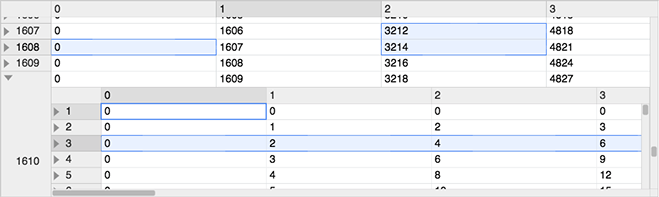
|
|
7
6
|
|
|
8
7
|
[](https://www.npmjs.com/package/canvas-datagrid)
|
|
9
8
|
[](https://opensource.org/licenses/BSD-3-Clause)
|
|
10
9
|
[](https://www.webcomponents.org/element/TonyGermaneri/canvas-datagrid)
|
|
11
10
|
|
|
12
|
-
|
|
13
|
-
|
|
14
|
-
|
|
15
|
-
|
|
16
|
-
|
|
17
|
-
|
|
18
|
-
|
|
19
|
-
|
|
20
|
-
|
|
21
|
-
|
|
22
|
-
|
|
23
|
-
|
|
24
|
-
|
|
25
|
-
* Small file size
|
|
11
|
+
- Works with Firefox, Edge, Safari and Chrome.
|
|
12
|
+
- Native support for touch devices (phones and tablets).
|
|
13
|
+
- Rich [documentation](https://canvas-datagrid.js.org/), [examples](https://canvas-datagrid.js.org/examples), and [slack support](https://canvas-datagrid.slack.com/).
|
|
14
|
+
- Single canvas element, drawn in immediate mode, data size does not impact performance.
|
|
15
|
+
- Support for unlimited rows and columns without paging or loading.
|
|
16
|
+
- Rich API of events, methods and properties using the familiar W3C DOM interface.
|
|
17
|
+
- Extensible styling, filtering, formatting, resizing, selecting, and ordering.
|
|
18
|
+
- Support for hierarchal drill in style row level inner grids as well grids in cells.
|
|
19
|
+
- Customizable hierarchal context menu.
|
|
20
|
+
- Built in and custom styles.
|
|
21
|
+
- W3C Web Component. Works in all frameworks.
|
|
22
|
+
- Per-user styles, column sizes, row sizes, view preferences and settings using localStorage.
|
|
23
|
+
- Small file size
|
|
26
24
|
|
|
27
25
|
[Documentation](https://canvas-datagrid.js.org/)
|
|
28
26
|
|
|
29
|
-
[
|
|
27
|
+
[Examples](https://canvas-datagrid.js.org/examples)
|
|
30
28
|
|
|
31
29
|
[Slack Support](https://canvas-datagrid.slack.com/) (message author for invite)
|
|
32
30
|
|
|
33
|
-
[Style
|
|
31
|
+
[Style reference](https://canvas-datagrid.js.org/reference/styling)
|
|
34
32
|
|
|
35
33
|
[Download latest version (minified)](https://canvas-datagrid.js.org/canvas-datagrid.js)
|
|
36
34
|
|
|
37
|
-
[Tests](https://canvas-datagrid.js.org/test/tests.html)
|
|
38
|
-
|
|
39
35
|
[Source Code](https://github.com/TonyGermaneri/canvas-datagrid)
|
|
40
36
|
|
|
41
|
-
|
|
42
|
-
|
|
43
|
-
Installation
|
|
44
|
-
------------
|
|
37
|
+
## Installation
|
|
45
38
|
|
|
46
39
|
With [npm](https://www.npmjs.com/package/canvas-datagrid)
|
|
47
40
|
|
|
@@ -49,7 +42,6 @@ With [npm](https://www.npmjs.com/package/canvas-datagrid)
|
|
|
49
42
|
npm install canvas-datagrid
|
|
50
43
|
```
|
|
51
44
|
|
|
52
|
-
|
|
53
45
|
Place the single source file `./dist/canvas-datagrid.js` in your web page using a script tag that points to the source or use webpack.
|
|
54
46
|
|
|
55
47
|
```html
|
|
@@ -64,30 +56,26 @@ Alternatively, instead of downloading and installing, you can link directly to a
|
|
|
64
56
|
|
|
65
57
|
A function will be added to the global scope of the web page called `canvasDatagrid` as well as module loader definitions.
|
|
66
58
|
|
|
67
|
-
Getting started
|
|
68
|
-
---------------
|
|
59
|
+
## Getting started
|
|
69
60
|
|
|
70
|
-
Works [with
|
|
61
|
+
Works [with a bundler](https://canvas-datagrid.js.org/examples/Webpack3-AMD), [without one](https://canvas-datagrid.js.org/getting-started#using-pure-javascript) or as a [web component](https://canvas-datagrid.js.org/getting-started#using-as-a-web-component).
|
|
71
62
|
No matter how you load it, `canvasDatagrid` is declared in the global scope.
|
|
72
63
|
|
|
73
64
|
Canvas-datagrid is a [Web Component](https://www.webcomponents.org/element/TonyGermaneri/canvas-datagrid) when
|
|
74
65
|
in a compatible browser, otherwise it is a `<canvas>` tag.
|
|
75
66
|
|
|
76
|
-
Using pure JavaScript
|
|
77
|
-
---------------------
|
|
67
|
+
## Using pure JavaScript
|
|
78
68
|
|
|
79
69
|
```js
|
|
80
70
|
var grid = canvasDatagrid();
|
|
81
71
|
document.body.appendChild(grid);
|
|
82
72
|
grid.data = [
|
|
83
|
-
|
|
84
|
-
|
|
73
|
+
{ col1: 'row 1 column 1', col2: 'row 1 column 2', col3: 'row 1 column 3' },
|
|
74
|
+
{ col1: 'row 2 column 1', col2: 'row 2 column 2', col3: 'row 2 column 3' },
|
|
85
75
|
];
|
|
86
76
|
```
|
|
87
77
|
|
|
88
|
-
|
|
89
|
-
Using Web Component
|
|
90
|
-
-------------------
|
|
78
|
+
## Using Web Component
|
|
91
79
|
|
|
92
80
|
<!--
|
|
93
81
|
```
|
|
@@ -101,10 +89,11 @@ Using Web Component
|
|
|
101
89
|
-->
|
|
102
90
|
|
|
103
91
|
```html
|
|
104
|
-
<canvas-datagrid class="myGridStyle" data="data can go here too"
|
|
105
|
-
|
|
106
|
-
|
|
107
|
-
]</canvas-datagrid
|
|
92
|
+
<canvas-datagrid class="myGridStyle" data="data can go here too"
|
|
93
|
+
>[ {"col1": "row 1 column 1", "col2": "row 1 column 2", "col3": "row 1 column
|
|
94
|
+
3"}, {"col1": "row 2 column 1", "col2": "row 2 column 2", "col3": "row 2
|
|
95
|
+
column 3"} ]</canvas-datagrid
|
|
96
|
+
>
|
|
108
97
|
```
|
|
109
98
|
|
|
110
99
|
or
|
|
@@ -112,56 +101,85 @@ or
|
|
|
112
101
|
```js
|
|
113
102
|
var grid = document.createElement('canvas-datagrid');
|
|
114
103
|
grid.data = [
|
|
115
|
-
|
|
116
|
-
|
|
104
|
+
{ col1: 'row 1 column 1', col2: 'row 1 column 2', col3: 'row 1 column 3' },
|
|
105
|
+
{ col1: 'row 2 column 1', col2: 'row 2 column 2', col3: 'row 2 column 3' },
|
|
117
106
|
];
|
|
118
107
|
```
|
|
119
108
|
|
|
120
|
-
|
|
121
|
-
Using Vue
|
|
122
|
-
---------
|
|
109
|
+
## Using Vue
|
|
123
110
|
|
|
124
111
|
```vue
|
|
125
112
|
<canvas-datagrid :data.prop="[{"col1": "row 1 column 1"}]"></canvas-datagrid>
|
|
126
113
|
```
|
|
127
114
|
|
|
115
|
+
See [Using with Vue](https://canvas-datagrid.js.org/examples/vue-demo) for a full component, and [Using with React](https://canvas-datagrid.js.org/examples/react-demo) for React.
|
|
128
116
|
|
|
129
|
-
|
|
130
|
-
----------
|
|
131
|
-
|
|
132
|
-
* [Using Vue](https://canvas-datagrid.js.org/vueExample.html)
|
|
117
|
+
## Using TypeScript
|
|
133
118
|
|
|
134
|
-
|
|
119
|
+
Type declarations are included. Import the factory and, when you need them, the instance and argument types:
|
|
135
120
|
|
|
136
|
-
|
|
137
|
-
|
|
138
|
-
|
|
139
|
-
|
|
140
|
-
|
|
121
|
+
```ts
|
|
122
|
+
import canvasDatagrid, {
|
|
123
|
+
type canvasDatagrid as CanvasDatagrid,
|
|
124
|
+
type CanvasDatagridArgs,
|
|
125
|
+
} from 'canvas-datagrid';
|
|
126
|
+
```
|
|
141
127
|
|
|
142
|
-
|
|
128
|
+
The declarations are generated from JSDoc and are not strict-clean yet, so keep `skipLibCheck: true` in your `tsconfig.json`.
|
|
143
129
|
|
|
144
|
-
|
|
130
|
+
## More Demos
|
|
145
131
|
|
|
146
|
-
|
|
132
|
+
- [Using with React](https://canvas-datagrid.js.org/examples/react-demo)
|
|
133
|
+
- [Using with Vue](https://canvas-datagrid.js.org/examples/vue-demo)
|
|
134
|
+
- [Using with a bundler or module loader](https://canvas-datagrid.js.org/examples/Webpack3-AMD)
|
|
135
|
+
- [Create a web component grid](https://canvas-datagrid.js.org/examples/create-a-web-component-grid)
|
|
136
|
+
- [Load data on demand with fetch](https://canvas-datagrid.js.org/examples/xhr-demo)
|
|
137
|
+
- [Sparkline charts in cells](https://canvas-datagrid.js.org/examples/sparkline)
|
|
138
|
+
- [Large arrays](https://canvas-datagrid.js.org/examples/largeArrays)
|
|
139
|
+
- [Use a custom editor for a cell](https://canvas-datagrid.js.org/examples/custom-cell-editor)
|
|
140
|
+
- [All examples](https://canvas-datagrid.js.org/examples)
|
|
147
141
|
|
|
148
|
-
Building & Testing
|
|
149
|
-
------------------
|
|
142
|
+
## Building & Testing
|
|
150
143
|
|
|
151
|
-
To install development dependencies.
|
|
144
|
+
To install development dependencies. Required to build or test.
|
|
152
145
|
|
|
153
146
|
npm install
|
|
154
147
|
|
|
155
|
-
To build production and debug versions
|
|
148
|
+
To build production and debug versions:
|
|
156
149
|
|
|
157
150
|
npm run build
|
|
158
151
|
|
|
159
|
-
To build documentation
|
|
152
|
+
To build documentation:
|
|
160
153
|
|
|
161
|
-
npm run build
|
|
154
|
+
npm run build:docs
|
|
162
155
|
|
|
163
|
-
To
|
|
156
|
+
To build types:
|
|
164
157
|
|
|
165
|
-
npm
|
|
158
|
+
npm run build:types
|
|
159
|
+
|
|
160
|
+
To run tests. Note: Headless tests will mostly fail due to lack of headless canvas pixel detection support. Use VM testing or your browser.
|
|
166
161
|
|
|
162
|
+
npm test
|
|
167
163
|
|
|
164
|
+
### Windows 10 WSL Testing
|
|
165
|
+
*This is info for wsl version 1. v2 seems to be [different](https://dev.to/davelsan/comment/nnf5).*
|
|
166
|
+
|
|
167
|
+
- `CHROME_BIN` needs to be set to the location of your Google Chrome exe in Windows. (e.g. `/mnt/c/Program Files (x86)/Google/Chrome/Application/chrome.exe`)
|
|
168
|
+
*in WSL, `export CHROME_BIN='path/to/chrome'`*
|
|
169
|
+
- Chrome needs access to [karma's temp folder](https://stackoverflow.com/a/56204265/292067).
|
|
170
|
+
- Create a `tmp` folder on the same Windows drive as your repo.
|
|
171
|
+
- set `TEMP` to a folder that exists on the same Windows drive as your repo. (matching capitalization probably matters)
|
|
172
|
+
*in WSL, `export TEMP='/Temp/karma'`, if your repo is on drive C, then create folder C:\Temp\karma*
|
|
173
|
+
- karma.conf.js needs to be edited
|
|
174
|
+
- Change the browser from `ChromeHeadless` to `Chrome`
|
|
175
|
+
- Modify to run ChromeHeadless without sandboxing. This is not ideal, but it seems to be necessary in [WSL](https://github.com/microsoft/WSL/issues/3282) and [Linux containers](https://docs.travis-ci.com/user/chrome#sandboxing) ([see also](https://github.com/karma-runner/karma-chrome-launcher/issues/158#issuecomment-339265457))
|
|
176
|
+
- Add a custom launcher
|
|
177
|
+
```
|
|
178
|
+
customLaunchers: {
|
|
179
|
+
ChromeHeadlessNoSandbox: {
|
|
180
|
+
base: 'ChromeHeadless',
|
|
181
|
+
flags: ['--no-sandbox']
|
|
182
|
+
}
|
|
183
|
+
}
|
|
184
|
+
```
|
|
185
|
+
- Change the browser from `ChromeHeadless` to `ChromeHeadlessNoSandbox`
|