bun-types 1.1.37-canary.20241124T140524 → 1.1.37-canary.20241125T140601
This diff represents the content of publicly available package versions that have been released to one of the supported registries. The information contained in this diff is provided for informational purposes only and reflects changes between package versions as they appear in their respective public registries.
- package/docs/api/binary-data.md +1028 -0
- package/docs/api/cc.md +197 -0
- package/docs/api/color.md +262 -0
- package/docs/api/console.md +38 -0
- package/docs/api/dns.md +113 -0
- package/docs/api/fetch.md +308 -0
- package/docs/api/ffi.md +536 -0
- package/docs/api/file-io.md +358 -0
- package/docs/api/file-system-router.md +112 -0
- package/docs/api/file.md +19 -0
- package/docs/api/glob.md +157 -0
- package/docs/api/globals.md +387 -0
- package/docs/api/hashing.md +314 -0
- package/docs/api/html-rewriter.md +31 -0
- package/docs/api/http.md +661 -0
- package/docs/api/import-meta.md +69 -0
- package/docs/api/node-api.md +16 -0
- package/docs/api/semver.md +52 -0
- package/docs/api/spawn.md +441 -0
- package/docs/api/sqlite.md +692 -0
- package/docs/api/streams.md +214 -0
- package/docs/api/tcp.md +221 -0
- package/docs/api/test.md +1 -0
- package/docs/api/transpiler.md +274 -0
- package/docs/api/udp.md +125 -0
- package/docs/api/utils.md +773 -0
- package/docs/api/websockets.md +547 -0
- package/docs/api/workers.md +230 -0
- package/docs/benchmarks.md +120 -0
- package/docs/bun-flavored-toml.md +42 -0
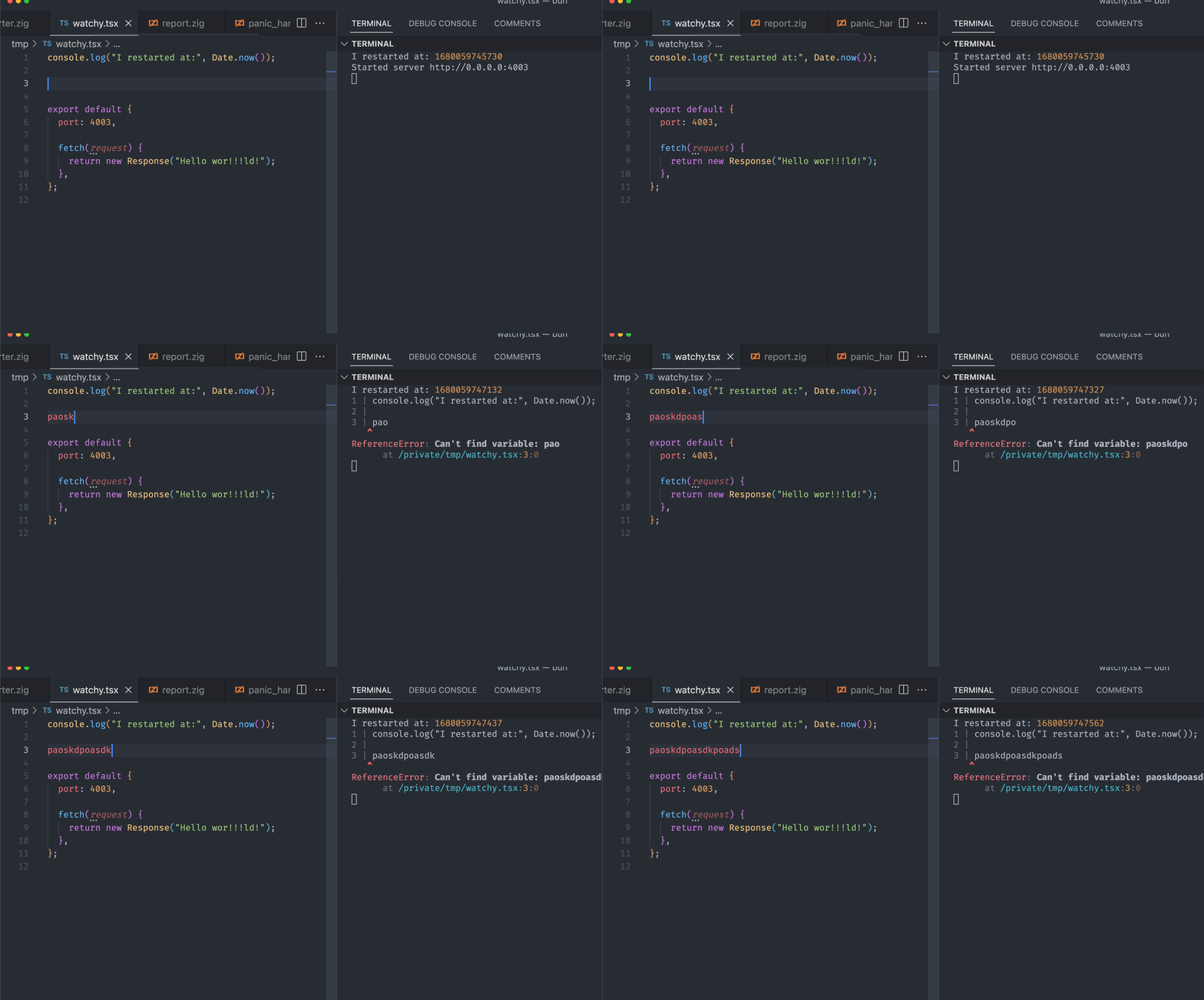
- package/docs/bundler/executables.md +291 -0
- package/docs/bundler/index.md +1543 -0
- package/docs/bundler/intro.md +75 -0
- package/docs/bundler/loaders.md +288 -0
- package/docs/bundler/macros.md +327 -0
- package/docs/bundler/plugins.md +30 -0
- package/docs/bundler/vs-esbuild.md +1127 -0
- package/docs/cli/add.md +163 -0
- package/docs/cli/bun-completions.md +3 -0
- package/docs/cli/bun-create.md +254 -0
- package/docs/cli/bun-dev.md +21 -0
- package/docs/cli/bun-install.md +255 -0
- package/docs/cli/bun-upgrade.md +39 -0
- package/docs/cli/bunx.md +80 -0
- package/docs/cli/filter.md +57 -0
- package/docs/cli/init.md +40 -0
- package/docs/cli/install.md +205 -0
- package/docs/cli/link.md +38 -0
- package/docs/cli/outdated.md +61 -0
- package/docs/cli/patch-commit.md +9 -0
- package/docs/cli/pm.md +150 -0
- package/docs/cli/publish.md +107 -0
- package/docs/cli/remove.md +5 -0
- package/docs/cli/run.md +196 -0
- package/docs/cli/test.md +247 -0
- package/docs/cli/unlink.md +7 -0
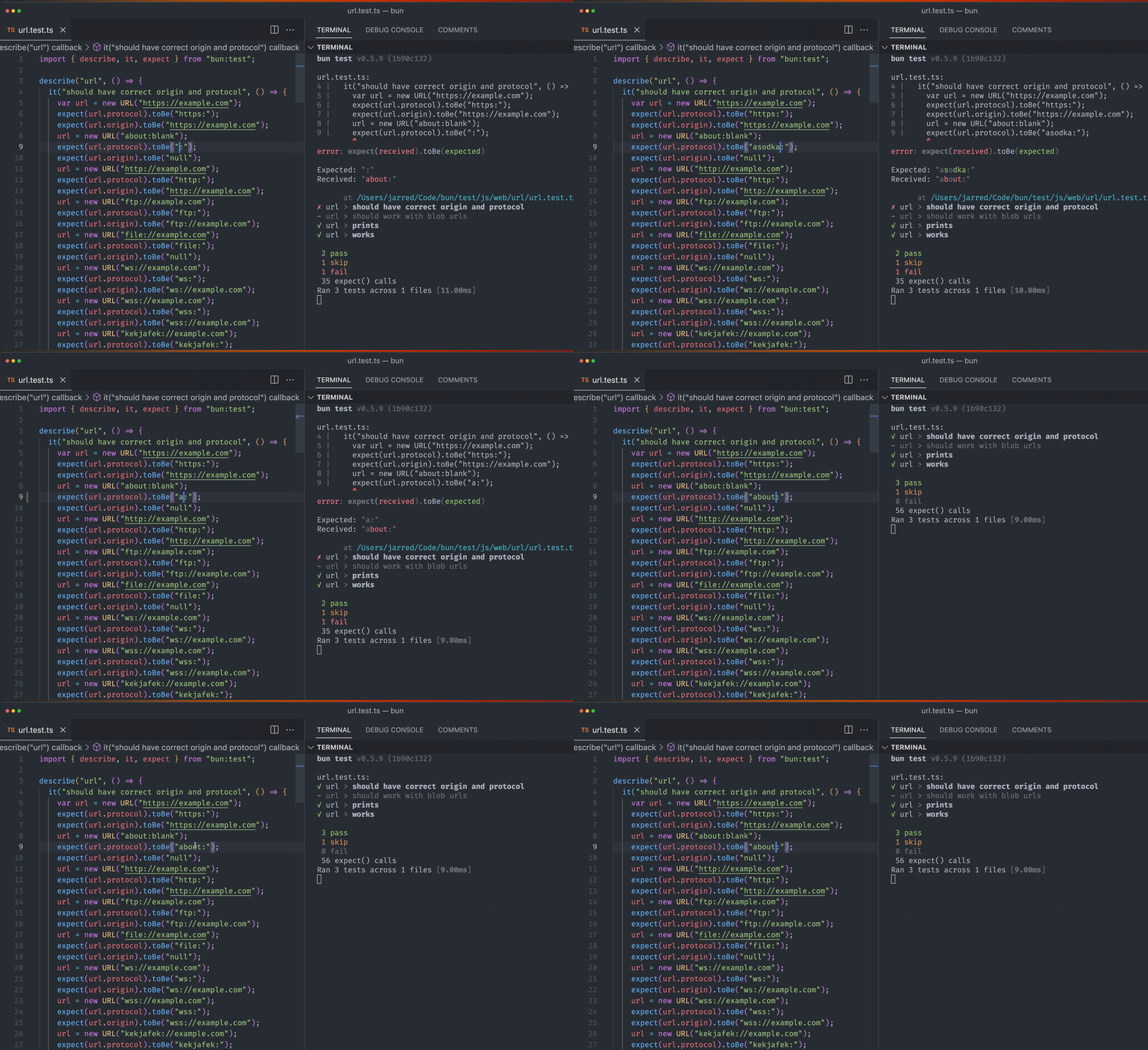
- package/docs/cli/update.md +34 -0
- package/docs/contributing/upgrading-webkit.md +57 -0
- package/docs/ecosystem/elysia.md +24 -0
- package/docs/ecosystem/express.md +37 -0
- package/docs/ecosystem/hono.md +18 -0
- package/docs/ecosystem/react.md +65 -0
- package/docs/ecosystem/stric.md +37 -0
- package/docs/guides/binary/arraybuffer-to-array.md +27 -0
- package/docs/guides/binary/arraybuffer-to-blob.md +24 -0
- package/docs/guides/binary/arraybuffer-to-buffer.md +25 -0
- package/docs/guides/binary/arraybuffer-to-string.md +15 -0
- package/docs/guides/binary/arraybuffer-to-typedarray.md +39 -0
- package/docs/guides/binary/blob-to-arraybuffer.md +14 -0
- package/docs/guides/binary/blob-to-dataview.md +14 -0
- package/docs/guides/binary/blob-to-stream.md +14 -0
- package/docs/guides/binary/blob-to-string.md +15 -0
- package/docs/guides/binary/blob-to-typedarray.md +14 -0
- package/docs/guides/binary/buffer-to-arraybuffer.md +14 -0
- package/docs/guides/binary/buffer-to-blob.md +14 -0
- package/docs/guides/binary/buffer-to-readablestream.md +41 -0
- package/docs/guides/binary/buffer-to-string.md +25 -0
- package/docs/guides/binary/buffer-to-typedarray.md +14 -0
- package/docs/guides/binary/dataview-to-string.md +15 -0
- package/docs/guides/binary/typedarray-to-arraybuffer.md +25 -0
- package/docs/guides/binary/typedarray-to-blob.md +16 -0
- package/docs/guides/binary/typedarray-to-buffer.md +14 -0
- package/docs/guides/binary/typedarray-to-dataview.md +14 -0
- package/docs/guides/binary/typedarray-to-readablestream.md +41 -0
- package/docs/guides/binary/typedarray-to-string.md +16 -0
- package/docs/guides/ecosystem/astro.md +72 -0
- package/docs/guides/ecosystem/discordjs.md +77 -0
- package/docs/guides/ecosystem/docker.md +140 -0
- package/docs/guides/ecosystem/drizzle.md +185 -0
- package/docs/guides/ecosystem/edgedb.md +228 -0
- package/docs/guides/ecosystem/elysia.md +31 -0
- package/docs/guides/ecosystem/express.md +40 -0
- package/docs/guides/ecosystem/hono.md +39 -0
- package/docs/guides/ecosystem/mongoose.md +87 -0
- package/docs/guides/ecosystem/neon-drizzle.md +220 -0
- package/docs/guides/ecosystem/neon-serverless-postgres.md +55 -0
- package/docs/guides/ecosystem/nextjs.md +38 -0
- package/docs/guides/ecosystem/nuxt.md +56 -0
- package/docs/guides/ecosystem/pm2.md +57 -0
- package/docs/guides/ecosystem/prisma.md +140 -0
- package/docs/guides/ecosystem/qwik.md +107 -0
- package/docs/guides/ecosystem/react.md +49 -0
- package/docs/guides/ecosystem/remix.md +78 -0
- package/docs/guides/ecosystem/render.md +79 -0
- package/docs/guides/ecosystem/sentry.md +52 -0
- package/docs/guides/ecosystem/solidstart.md +58 -0
- package/docs/guides/ecosystem/ssr-react.md +51 -0
- package/docs/guides/ecosystem/stric.md +55 -0
- package/docs/guides/ecosystem/sveltekit.md +125 -0
- package/docs/guides/ecosystem/systemd.md +113 -0
- package/docs/guides/ecosystem/vite.md +70 -0
- package/docs/guides/http/cluster.md +66 -0
- package/docs/guides/http/fetch-unix.md +33 -0
- package/docs/guides/http/fetch.md +24 -0
- package/docs/guides/http/file-uploads.md +94 -0
- package/docs/guides/http/hot.md +22 -0
- package/docs/guides/http/proxy.md +24 -0
- package/docs/guides/http/server.md +46 -0
- package/docs/guides/http/simple.md +18 -0
- package/docs/guides/http/stream-file.md +48 -0
- package/docs/guides/http/stream-iterator.md +47 -0
- package/docs/guides/http/stream-node-streams-in-bun.md +20 -0
- package/docs/guides/http/tls.md +30 -0
- package/docs/guides/install/add-dev.md +26 -0
- package/docs/guides/install/add-git.md +36 -0
- package/docs/guides/install/add-optional.md +25 -0
- package/docs/guides/install/add-peer.md +17 -0
- package/docs/guides/install/add-tarball.md +33 -0
- package/docs/guides/install/add.md +42 -0
- package/docs/guides/install/azure-artifacts.md +73 -0
- package/docs/guides/install/cicd.md +41 -0
- package/docs/guides/install/custom-registry.md +30 -0
- package/docs/guides/install/from-npm-install-to-bun-install.md +214 -0
- package/docs/guides/install/git-diff-bun-lockfile.md +38 -0
- package/docs/guides/install/jfrog-artifactory.md +28 -0
- package/docs/guides/install/npm-alias.md +23 -0
- package/docs/guides/install/registry-scope.md +36 -0
- package/docs/guides/install/trusted.md +48 -0
- package/docs/guides/install/workspaces.md +70 -0
- package/docs/guides/install/yarnlock.md +42 -0
- package/docs/guides/process/argv.md +57 -0
- package/docs/guides/process/ctrl-c.md +16 -0
- package/docs/guides/process/ipc.md +66 -0
- package/docs/guides/process/nanoseconds.md +13 -0
- package/docs/guides/process/os-signals.md +39 -0
- package/docs/guides/process/spawn-stderr.md +31 -0
- package/docs/guides/process/spawn-stdout.md +26 -0
- package/docs/guides/process/spawn.md +41 -0
- package/docs/guides/process/stdin.md +54 -0
- package/docs/guides/read-file/arraybuffer.md +28 -0
- package/docs/guides/read-file/buffer.md +19 -0
- package/docs/guides/read-file/exists.md +16 -0
- package/docs/guides/read-file/json.md +17 -0
- package/docs/guides/read-file/mime.md +20 -0
- package/docs/guides/read-file/stream.md +26 -0
- package/docs/guides/read-file/string.md +22 -0
- package/docs/guides/read-file/uint8array.md +21 -0
- package/docs/guides/read-file/watch.md +68 -0
- package/docs/guides/runtime/cicd.md +43 -0
- package/docs/guides/runtime/define-constant.md +145 -0
- package/docs/guides/runtime/import-html.md +15 -0
- package/docs/guides/runtime/import-json.md +44 -0
- package/docs/guides/runtime/import-toml.md +30 -0
- package/docs/guides/runtime/read-env.md +32 -0
- package/docs/guides/runtime/set-env.md +37 -0
- package/docs/guides/runtime/shell.md +40 -0
- package/docs/guides/runtime/timezone.md +35 -0
- package/docs/guides/runtime/tsconfig-paths.md +29 -0
- package/docs/guides/runtime/typescript.md +47 -0
- package/docs/guides/runtime/vscode-debugger.md +47 -0
- package/docs/guides/runtime/web-debugger.md +82 -0
- package/docs/guides/streams/node-readable-to-arraybuffer.md +11 -0
- package/docs/guides/streams/node-readable-to-blob.md +11 -0
- package/docs/guides/streams/node-readable-to-json.md +12 -0
- package/docs/guides/streams/node-readable-to-string.md +12 -0
- package/docs/guides/streams/node-readable-to-uint8array.md +11 -0
- package/docs/guides/streams/to-array.md +14 -0
- package/docs/guides/streams/to-arraybuffer.md +14 -0
- package/docs/guides/streams/to-blob.md +14 -0
- package/docs/guides/streams/to-buffer.md +15 -0
- package/docs/guides/streams/to-json.md +14 -0
- package/docs/guides/streams/to-string.md +14 -0
- package/docs/guides/streams/to-typedarray.md +22 -0
- package/docs/guides/test/bail.md +22 -0
- package/docs/guides/test/coverage-threshold.md +60 -0
- package/docs/guides/test/coverage.md +44 -0
- package/docs/guides/test/happy-dom.md +68 -0
- package/docs/guides/test/migrate-from-jest.md +110 -0
- package/docs/guides/test/mock-clock.md +48 -0
- package/docs/guides/test/mock-functions.md +68 -0
- package/docs/guides/test/rerun-each.md +14 -0
- package/docs/guides/test/run-tests.md +111 -0
- package/docs/guides/test/skip-tests.md +39 -0
- package/docs/guides/test/snapshot.md +99 -0
- package/docs/guides/test/spy-on.md +46 -0
- package/docs/guides/test/testing-library.md +87 -0
- package/docs/guides/test/timeout.md +15 -0
- package/docs/guides/test/todo-tests.md +67 -0
- package/docs/guides/test/update-snapshots.md +50 -0
- package/docs/guides/test/watch-mode.md +19 -0
- package/docs/guides/util/base64.md +15 -0
- package/docs/guides/util/deep-equals.md +39 -0
- package/docs/guides/util/deflate.md +18 -0
- package/docs/guides/util/detect-bun.md +23 -0
- package/docs/guides/util/entrypoint.md +17 -0
- package/docs/guides/util/escape-html.md +22 -0
- package/docs/guides/util/file-url-to-path.md +14 -0
- package/docs/guides/util/gzip.md +18 -0
- package/docs/guides/util/hash-a-password.md +54 -0
- package/docs/guides/util/import-meta-dir.md +13 -0
- package/docs/guides/util/import-meta-file.md +13 -0
- package/docs/guides/util/import-meta-path.md +13 -0
- package/docs/guides/util/main.md +32 -0
- package/docs/guides/util/path-to-file-url.md +14 -0
- package/docs/guides/util/sleep.md +22 -0
- package/docs/guides/util/version.md +21 -0
- package/docs/guides/util/which-path-to-executable-bin.md +15 -0
- package/docs/guides/websocket/compression.md +31 -0
- package/docs/guides/websocket/context.md +72 -0
- package/docs/guides/websocket/pubsub.md +38 -0
- package/docs/guides/websocket/simple.md +33 -0
- package/docs/guides/write-file/append.md +52 -0
- package/docs/guides/write-file/basic.md +44 -0
- package/docs/guides/write-file/blob.md +28 -0
- package/docs/guides/write-file/cat.md +17 -0
- package/docs/guides/write-file/file-cp.md +16 -0
- package/docs/guides/write-file/filesink.md +52 -0
- package/docs/guides/write-file/response.md +17 -0
- package/docs/guides/write-file/stdout.md +21 -0
- package/docs/guides/write-file/stream.md +17 -0
- package/docs/guides/write-file/unlink.md +23 -0
- package/docs/index.md +77 -0
- package/docs/install/cache.md +57 -0
- package/docs/install/index.md +202 -0
- package/docs/install/lifecycle.md +46 -0
- package/docs/install/lockfile.md +90 -0
- package/docs/install/npmrc.md +75 -0
- package/docs/install/overrides.md +73 -0
- package/docs/install/patch.md +57 -0
- package/docs/install/registries.md +30 -0
- package/docs/install/workspaces.md +70 -0
- package/docs/installation.md +289 -0
- package/docs/project/benchmarking.md +203 -0
- package/docs/project/building-windows.md +162 -0
- package/docs/project/internals/build-process-for-ci.md +75 -0
- package/docs/project/roadmap.md +87 -0
- package/docs/quickstart.md +144 -0
- package/docs/runtime/autoimport.md +94 -0
- package/docs/runtime/bun-apis.md +129 -0
- package/docs/runtime/bunfig.md +532 -0
- package/docs/runtime/debugger.md +325 -0
- package/docs/runtime/env.md +214 -0
- package/docs/runtime/hot.md +139 -0
- package/docs/runtime/index.md +309 -0
- package/docs/runtime/jsx.md +326 -0
- package/docs/runtime/loaders.md +127 -0
- package/docs/runtime/modules.md +298 -0
- package/docs/runtime/nodejs-apis.md +456 -0
- package/docs/runtime/plugins.md +605 -0
- package/docs/runtime/shell.md +537 -0
- package/docs/runtime/typescript.md +60 -0
- package/docs/runtime/web-apis.md +128 -0
- package/docs/test/coverage.md +91 -0
- package/docs/test/dom.md +75 -0
- package/docs/test/hot.md +15 -0
- package/docs/test/lifecycle.md +81 -0
- package/docs/test/mocks.md +236 -0
- package/docs/test/snapshots.md +15 -0
- package/docs/test/time.md +106 -0
- package/docs/test/writing.md +547 -0
- package/docs/typescript.md +51 -0
- package/package.json +5 -4
|
@@ -0,0 +1,325 @@
|
|
|
1
|
+
---
|
|
2
|
+
name: Debugging
|
|
3
|
+
---
|
|
4
|
+
|
|
5
|
+
Bun speaks the [WebKit Inspector Protocol](https://github.com/oven-sh/bun/blob/main/packages/bun-types/jsc.d.ts), so you can debug your code with an interactive debugger. For demonstration purposes, consider the following simple web server.
|
|
6
|
+
|
|
7
|
+
## Debugging JavaScript and TypeScript
|
|
8
|
+
|
|
9
|
+
```ts#server.ts
|
|
10
|
+
Bun.serve({
|
|
11
|
+
fetch(req){
|
|
12
|
+
console.log(req.url);
|
|
13
|
+
return new Response("Hello, world!");
|
|
14
|
+
}
|
|
15
|
+
})
|
|
16
|
+
```
|
|
17
|
+
|
|
18
|
+
### `--inspect`
|
|
19
|
+
|
|
20
|
+
To enable debugging when running code with Bun, use the `--inspect` flag. This automatically starts a WebSocket server on an available port that can be used to introspect the running Bun process.
|
|
21
|
+
|
|
22
|
+
```sh
|
|
23
|
+
$ bun --inspect server.ts
|
|
24
|
+
------------------ Bun Inspector ------------------
|
|
25
|
+
Listening at:
|
|
26
|
+
ws://localhost:6499/0tqxs9exrgrm
|
|
27
|
+
|
|
28
|
+
Inspect in browser:
|
|
29
|
+
https://debug.bun.sh/#localhost:6499/0tqxs9exrgrm
|
|
30
|
+
------------------ Bun Inspector ------------------
|
|
31
|
+
```
|
|
32
|
+
|
|
33
|
+
### `--inspect-brk`
|
|
34
|
+
|
|
35
|
+
The `--inspect-brk` flag behaves identically to `--inspect`, except it automatically injects a breakpoint at the first line of the executed script. This is useful for debugging scripts that run quickly and exit immediately.
|
|
36
|
+
|
|
37
|
+
### `--inspect-wait`
|
|
38
|
+
|
|
39
|
+
The `--inspect-wait` flag behaves identically to `--inspect`, except the code will not execute until a debugger has attached to the running process.
|
|
40
|
+
|
|
41
|
+
### Setting a port or URL for the debugger
|
|
42
|
+
|
|
43
|
+
Regardless of which flag you use, you can optionally specify a port number, URL prefix, or both.
|
|
44
|
+
|
|
45
|
+
```sh
|
|
46
|
+
$ bun --inspect=4000 server.ts
|
|
47
|
+
$ bun --inspect=localhost:4000 server.ts
|
|
48
|
+
$ bun --inspect=localhost:4000/prefix server.ts
|
|
49
|
+
```
|
|
50
|
+
|
|
51
|
+
## Debuggers
|
|
52
|
+
|
|
53
|
+
Various debugging tools can connect to this server to provide an interactive debugging experience.
|
|
54
|
+
|
|
55
|
+
### `debug.bun.sh`
|
|
56
|
+
|
|
57
|
+
Bun hosts a web-based debugger at [debug.bun.sh](https://debug.bun.sh). It is a modified version of WebKit's [Web Inspector Interface](https://webkit.org/web-inspector/web-inspector-interface/), which will look familiar to Safari users.
|
|
58
|
+
|
|
59
|
+
Open the provided `debug.bun.sh` URL in your browser to start a debugging session. From this interface, you'll be able to view the source code of the running file, view and set breakpoints, and execute code with the built-in console.
|
|
60
|
+
|
|
61
|
+
{% image src="https://github.com/oven-sh/bun/assets/3084745/e6a976a8-80cc-4394-8925-539025cc025d" alt="Screenshot of Bun debugger, Console tab" /%}
|
|
62
|
+
|
|
63
|
+
Let's set a breakpoint. Navigate to the Sources tab; you should see the code from earlier. Click on the line number `3` to set a breakpoint on our `console.log(req.url)` statement.
|
|
64
|
+
|
|
65
|
+
{% image src="https://github.com/oven-sh/bun/assets/3084745/3b69c7e9-25ff-4f9d-acc4-caa736862935" alt="screenshot of Bun debugger" /%}
|
|
66
|
+
|
|
67
|
+
Then visit [`http://localhost:3000`](http://localhost:3000) in your web browser. This will send an HTTP request to our `localhost` web server. It will seem like the page isn't loading. Why? Because the program has paused execution at the breakpoint we set earlier.
|
|
68
|
+
|
|
69
|
+
Note how the UI has changed.
|
|
70
|
+
|
|
71
|
+
{% image src="https://github.com/oven-sh/bun/assets/3084745/8b565e58-5445-4061-9bc4-f41090dfe769" alt="screenshot of Bun debugger" /%}
|
|
72
|
+
|
|
73
|
+
At this point there's a lot we can do to introspect the current execution environment. We can use the console at the bottom to run arbitrary code in the context of the program, with full access to the variables in scope at our breakpoint.
|
|
74
|
+
|
|
75
|
+
{% image src="https://github.com/oven-sh/bun/assets/3084745/f4312b76-48ba-4a7d-b3b6-6205968ac681" /%}
|
|
76
|
+
|
|
77
|
+
On the right side of the Sources pane, we can see all local variables currently in scope, and drill down to see their properties and methods. Here, we're inspecting the `req` variable.
|
|
78
|
+
|
|
79
|
+
{% image src="https://github.com/oven-sh/bun/assets/3084745/63d7f843-5180-489c-aa94-87c486e68646" /%}
|
|
80
|
+
|
|
81
|
+
In the upper left of the Sources pane, we can control the execution of the program.
|
|
82
|
+
|
|
83
|
+
{% image src="https://github.com/oven-sh/bun/assets/3084745/41b76deb-7371-4461-9d5d-81b5a6d2f7a4" /%}
|
|
84
|
+
|
|
85
|
+
Here's a cheat sheet explaining the functions of the control flow buttons.
|
|
86
|
+
|
|
87
|
+
- _Continue script execution_ — continue running the program until the next breakpoint or exception.
|
|
88
|
+
- _Step over_ — The program will continue to the next line.
|
|
89
|
+
- _Step into_ — If the current statement contains a function call, the debugger will "step into" the called function.
|
|
90
|
+
- _Step out_ — If the current statement is a function call, the debugger will finish executing the call, then "step out" of the function to the location where it was called.
|
|
91
|
+
|
|
92
|
+
{% image src="https://github-production-user-asset-6210df.s3.amazonaws.com/3084745/261510346-6a94441c-75d3-413a-99a7-efa62365f83d.png" /%}
|
|
93
|
+
|
|
94
|
+
### Visual Studio Code Debugger
|
|
95
|
+
|
|
96
|
+
Experimental support for debugging Bun scripts is available in Visual Studio Code. To use it, you'll need to install the [Bun VSCode extension](https://bun.sh/guides/runtime/vscode-debugger).
|
|
97
|
+
|
|
98
|
+
## Debugging Network Requests
|
|
99
|
+
|
|
100
|
+
The `BUN_CONFIG_VERBOSE_FETCH` environment variable lets you log network requests made with `fetch()` or `node:http` automatically.
|
|
101
|
+
|
|
102
|
+
| Value | Description |
|
|
103
|
+
| ------- | ---------------------------------- |
|
|
104
|
+
| `curl` | Print requests as `curl` commands. |
|
|
105
|
+
| `true` | Print request & response info |
|
|
106
|
+
| `false` | Don't print anything. Default |
|
|
107
|
+
|
|
108
|
+
### Print fetch & node:http requests as curl commands
|
|
109
|
+
|
|
110
|
+
Bun also supports printing `fetch()` and `node:http` network requests as `curl` commands by setting the environment variable `BUN_CONFIG_VERBOSE_FETCH` to `curl`.
|
|
111
|
+
|
|
112
|
+
```ts
|
|
113
|
+
process.env.BUN_CONFIG_VERBOSE_FETCH = "curl";
|
|
114
|
+
|
|
115
|
+
await fetch("https://example.com", {
|
|
116
|
+
method: "POST",
|
|
117
|
+
headers: {
|
|
118
|
+
"Content-Type": "application/json",
|
|
119
|
+
},
|
|
120
|
+
body: JSON.stringify({ foo: "bar" }),
|
|
121
|
+
});
|
|
122
|
+
```
|
|
123
|
+
|
|
124
|
+
This prints the `fetch` request as a single-line `curl` command to let you copy-paste into your terminal to replicate the request.
|
|
125
|
+
|
|
126
|
+
```sh
|
|
127
|
+
[fetch] $ curl --http1.1 "https://example.com/" -X POST -H "content-type: application/json" -H "Connection: keep-alive" -H "User-Agent: Bun/1.1.14" -H "Accept: */*" -H "Host: example.com" -H "Accept-Encoding: gzip, deflate, br" --compressed -H "Content-Length: 13" --data-raw "{\"foo\":\"bar\"}"
|
|
128
|
+
[fetch] > HTTP/1.1 POST https://example.com/
|
|
129
|
+
[fetch] > content-type: application/json
|
|
130
|
+
[fetch] > Connection: keep-alive
|
|
131
|
+
[fetch] > User-Agent: Bun/1.1.14
|
|
132
|
+
[fetch] > Accept: */*
|
|
133
|
+
[fetch] > Host: example.com
|
|
134
|
+
[fetch] > Accept-Encoding: gzip, deflate, br
|
|
135
|
+
[fetch] > Content-Length: 13
|
|
136
|
+
|
|
137
|
+
[fetch] < 200 OK
|
|
138
|
+
[fetch] < Accept-Ranges: bytes
|
|
139
|
+
[fetch] < Cache-Control: max-age=604800
|
|
140
|
+
[fetch] < Content-Type: text/html; charset=UTF-8
|
|
141
|
+
[fetch] < Date: Tue, 18 Jun 2024 05:12:07 GMT
|
|
142
|
+
[fetch] < Etag: "3147526947"
|
|
143
|
+
[fetch] < Expires: Tue, 25 Jun 2024 05:12:07 GMT
|
|
144
|
+
[fetch] < Last-Modified: Thu, 17 Oct 2019 07:18:26 GMT
|
|
145
|
+
[fetch] < Server: EOS (vny/044F)
|
|
146
|
+
[fetch] < Content-Length: 1256
|
|
147
|
+
```
|
|
148
|
+
|
|
149
|
+
The lines with `[fetch] >` are the request from your local code, and the lines with `[fetch] <` are the response from the remote server.
|
|
150
|
+
|
|
151
|
+
The `BUN_CONFIG_VERBOSE_FETCH` environment variable is supported in both `fetch()` and `node:http` requests, so it should just work.
|
|
152
|
+
|
|
153
|
+
To print without the `curl` command, set `BUN_CONFIG_VERBOSE_FETCH` to `true`.
|
|
154
|
+
|
|
155
|
+
```ts
|
|
156
|
+
process.env.BUN_CONFIG_VERBOSE_FETCH = "true";
|
|
157
|
+
|
|
158
|
+
await fetch("https://example.com", {
|
|
159
|
+
method: "POST",
|
|
160
|
+
headers: {
|
|
161
|
+
"Content-Type": "application/json",
|
|
162
|
+
},
|
|
163
|
+
body: JSON.stringify({ foo: "bar" }),
|
|
164
|
+
});
|
|
165
|
+
```
|
|
166
|
+
|
|
167
|
+
This prints the following to the console:
|
|
168
|
+
|
|
169
|
+
```sh
|
|
170
|
+
[fetch] > HTTP/1.1 POST https://example.com/
|
|
171
|
+
[fetch] > content-type: application/json
|
|
172
|
+
[fetch] > Connection: keep-alive
|
|
173
|
+
[fetch] > User-Agent: Bun/1.1.14
|
|
174
|
+
[fetch] > Accept: */*
|
|
175
|
+
[fetch] > Host: example.com
|
|
176
|
+
[fetch] > Accept-Encoding: gzip, deflate, br
|
|
177
|
+
[fetch] > Content-Length: 13
|
|
178
|
+
|
|
179
|
+
[fetch] < 200 OK
|
|
180
|
+
[fetch] < Accept-Ranges: bytes
|
|
181
|
+
[fetch] < Cache-Control: max-age=604800
|
|
182
|
+
[fetch] < Content-Type: text/html; charset=UTF-8
|
|
183
|
+
[fetch] < Date: Tue, 18 Jun 2024 05:12:07 GMT
|
|
184
|
+
[fetch] < Etag: "3147526947"
|
|
185
|
+
[fetch] < Expires: Tue, 25 Jun 2024 05:12:07 GMT
|
|
186
|
+
[fetch] < Last-Modified: Thu, 17 Oct 2019 07:18:26 GMT
|
|
187
|
+
[fetch] < Server: EOS (vny/044F)
|
|
188
|
+
[fetch] < Content-Length: 1256
|
|
189
|
+
```
|
|
190
|
+
|
|
191
|
+
## Stacktraces & sourcemaps
|
|
192
|
+
|
|
193
|
+
Bun transpiles every file, which sounds like it would mean that the stack traces you see in the console would unhelpfully point to the transpiled output. To address this, Bun automatically generates and serves sourcemapped files for every file it transpiles. When you see a stack trace in the console, you can click on the file path and be taken to the original source code, even though it was written in TypeScript or JSX, or has some other transformation applied.
|
|
194
|
+
|
|
195
|
+
<!-- TODO: uncomment once v1.1.13 regression is fixed (cc @paperdave) -->
|
|
196
|
+
<!-- In Bun, each `Error` object gets four additional properties:
|
|
197
|
+
|
|
198
|
+
- `line` — the source-mapped line number. This number points to the input source code, not the transpiled output.
|
|
199
|
+
- `column` — the source-mapped column number. This number points to the input source code, not the transpiled output.
|
|
200
|
+
- `originalColumn` — the column number pointing to transpiled source code, without sourcemaps. This number comes from JavaScriptCore.
|
|
201
|
+
- `originalLine` — the line number pointing to transpiled source code, without sourcemaps. This number comes from JavaScriptCore.
|
|
202
|
+
|
|
203
|
+
These properties are populated lazily when `error.stack` is accessed. -->
|
|
204
|
+
|
|
205
|
+
Bun automatically loads sourcemaps both at runtime when transpiling files on-demand, and when using `bun build` to precompile files ahead of time.
|
|
206
|
+
|
|
207
|
+
### Syntax-highlighted source code preview
|
|
208
|
+
|
|
209
|
+
To help with debugging, Bun automatically prints a small source-code preview when an unhandled exception or rejection occurs. You can simulate this behavior by calling `Bun.inspect(error)`:
|
|
210
|
+
|
|
211
|
+
```ts
|
|
212
|
+
// Create an error
|
|
213
|
+
const err = new Error("Something went wrong");
|
|
214
|
+
console.log(Bun.inspect(err, { colors: true }));
|
|
215
|
+
```
|
|
216
|
+
|
|
217
|
+
This prints a syntax-highlighted preview of the source code where the error occurred, along with the error message and stack trace.
|
|
218
|
+
|
|
219
|
+
```js
|
|
220
|
+
1 | // Create an error
|
|
221
|
+
2 | const err = new Error("Something went wrong");
|
|
222
|
+
^
|
|
223
|
+
error: Something went wrong
|
|
224
|
+
at file.js:2:13
|
|
225
|
+
```
|
|
226
|
+
|
|
227
|
+
### V8 Stack Traces
|
|
228
|
+
|
|
229
|
+
Bun uses JavaScriptCore as it's engine, but much of the Node.js ecosystem & npm expects V8. JavaScript engines differ in `error.stack` formatting. Bun intends to be a drop-in replacement for Node.js, and that means it's our job to make sure that even though the engine is different, the stack traces are as similar as possible.
|
|
230
|
+
|
|
231
|
+
That's why when you log `error.stack` in Bun, the formatting of `error.stack` is the same as in Node.js's V8 engine. This is especially useful when you're using libraries that expect V8 stack traces.
|
|
232
|
+
|
|
233
|
+
#### V8 Stack Trace API
|
|
234
|
+
|
|
235
|
+
Bun implements the [V8 Stack Trace API](https://v8.dev/docs/stack-trace-api), which is a set of functions that allow you to manipulate stack traces.
|
|
236
|
+
|
|
237
|
+
##### Error.prepareStackTrace
|
|
238
|
+
|
|
239
|
+
The `Error.prepareStackTrace` function is a global function that lets you customize the stack trace output. This function is called with the error object and an array of `CallSite` objects and lets you return a custom stack trace.
|
|
240
|
+
|
|
241
|
+
```ts
|
|
242
|
+
Error.prepareStackTrace = (err, stack) => {
|
|
243
|
+
return stack.map(callSite => {
|
|
244
|
+
return callSite.getFileName();
|
|
245
|
+
});
|
|
246
|
+
};
|
|
247
|
+
|
|
248
|
+
const err = new Error("Something went wrong");
|
|
249
|
+
console.log(err.stack);
|
|
250
|
+
// [ "error.js" ]
|
|
251
|
+
```
|
|
252
|
+
|
|
253
|
+
The `CallSite` object has the following methods:
|
|
254
|
+
|
|
255
|
+
| Method | Returns |
|
|
256
|
+
| -------------------------- | ----------------------------------------------------- |
|
|
257
|
+
| `getThis` | `this` value of the function call |
|
|
258
|
+
| `getTypeName` | typeof `this` |
|
|
259
|
+
| `getFunction` | function object |
|
|
260
|
+
| `getFunctionName` | function name as a string |
|
|
261
|
+
| `getMethodName` | method name as a string |
|
|
262
|
+
| `getFileName` | file name or URL |
|
|
263
|
+
| `getLineNumber` | line number |
|
|
264
|
+
| `getColumnNumber` | column number |
|
|
265
|
+
| `getEvalOrigin` | `undefined` |
|
|
266
|
+
| `getScriptNameOrSourceURL` | source URL |
|
|
267
|
+
| `isToplevel` | returns `true` if the function is in the global scope |
|
|
268
|
+
| `isEval` | returns `true` if the function is an `eval` call |
|
|
269
|
+
| `isNative` | returns `true` if the function is native |
|
|
270
|
+
| `isConstructor` | returns `true` if the function is a constructor |
|
|
271
|
+
| `isAsync` | returns `true` if the function is `async` |
|
|
272
|
+
| `isPromiseAll` | Not implemented yet. |
|
|
273
|
+
| `getPromiseIndex` | Not implemented yet. |
|
|
274
|
+
| `toString` | returns a string representation of the call site |
|
|
275
|
+
|
|
276
|
+
In some cases, the `Function` object may have already been garbage collected, so some of these methods may return `undefined`.
|
|
277
|
+
|
|
278
|
+
##### Error.captureStackTrace(error, startFn)
|
|
279
|
+
|
|
280
|
+
The `Error.captureStackTrace` function lets you capture a stack trace at a specific point in your code, rather than at the point where the error was thrown.
|
|
281
|
+
|
|
282
|
+
This can be helpful when you have callbacks or asynchronous code that makes it difficult to determine where an error originated. The 2nd argument to `Error.captureStackTrace` is the function where you want the stack trace to start.
|
|
283
|
+
|
|
284
|
+
For example, the below code will make `err.stack` point to the code calling `fn()`, even though the error was thrown at `myInner`.
|
|
285
|
+
|
|
286
|
+
```ts
|
|
287
|
+
const fn = () => {
|
|
288
|
+
function myInner() {
|
|
289
|
+
throw err;
|
|
290
|
+
}
|
|
291
|
+
|
|
292
|
+
try {
|
|
293
|
+
myInner();
|
|
294
|
+
} catch (err) {
|
|
295
|
+
console.log(err.stack);
|
|
296
|
+
console.log("");
|
|
297
|
+
console.log("-- captureStackTrace --");
|
|
298
|
+
console.log("");
|
|
299
|
+
Error.captureStackTrace(err, fn);
|
|
300
|
+
console.log(err.stack);
|
|
301
|
+
}
|
|
302
|
+
};
|
|
303
|
+
|
|
304
|
+
fn();
|
|
305
|
+
```
|
|
306
|
+
|
|
307
|
+
This logs the following:
|
|
308
|
+
|
|
309
|
+
```sh
|
|
310
|
+
Error: here!
|
|
311
|
+
at myInner (file.js:4:15)
|
|
312
|
+
at fn (file.js:8:5)
|
|
313
|
+
at module code (file.js:17:1)
|
|
314
|
+
at moduleEvaluation (native)
|
|
315
|
+
at moduleEvaluation (native)
|
|
316
|
+
at <anonymous> (native)
|
|
317
|
+
|
|
318
|
+
-- captureStackTrace --
|
|
319
|
+
|
|
320
|
+
Error: here!
|
|
321
|
+
at module code (file.js:17:1)
|
|
322
|
+
at moduleEvaluation (native)
|
|
323
|
+
at moduleEvaluation (native)
|
|
324
|
+
at <anonymous> (native)
|
|
325
|
+
```
|
|
@@ -0,0 +1,214 @@
|
|
|
1
|
+
Bun reads your `.env` files automatically and provides idiomatic ways to read and write your environment variables programmatically. Plus, some aspects of Bun's runtime behavior can be configured with Bun-specific environment variables.
|
|
2
|
+
|
|
3
|
+
## Setting environment variables
|
|
4
|
+
|
|
5
|
+
Bun reads the following files automatically (listed in order of increasing precedence).
|
|
6
|
+
|
|
7
|
+
- `.env`
|
|
8
|
+
- `.env.production`, `.env.development`, `.env.test` (depending on value of `NODE_ENV`)
|
|
9
|
+
- `.env.local`
|
|
10
|
+
|
|
11
|
+
```txt#.env
|
|
12
|
+
FOO=hello
|
|
13
|
+
BAR=world
|
|
14
|
+
```
|
|
15
|
+
|
|
16
|
+
Variables can also be set via the command line.
|
|
17
|
+
|
|
18
|
+
```sh
|
|
19
|
+
$ FOO=helloworld bun run dev
|
|
20
|
+
```
|
|
21
|
+
|
|
22
|
+
Or programmatically by assigning a property to `process.env`.
|
|
23
|
+
|
|
24
|
+
```ts
|
|
25
|
+
process.env.FOO = "hello";
|
|
26
|
+
```
|
|
27
|
+
|
|
28
|
+
### Manually specifying `.env` files
|
|
29
|
+
|
|
30
|
+
Bun supports `--env-file` to override which specific `.env` file to load. You can use `--env-file` when running scripts in bun's runtime, or when running package.json scripts.
|
|
31
|
+
|
|
32
|
+
```sh
|
|
33
|
+
bun --env-file=.env.1 src/index.ts
|
|
34
|
+
|
|
35
|
+
bun --env-file=.env.abc --env-file=.env.def run build
|
|
36
|
+
```
|
|
37
|
+
|
|
38
|
+
### Quotation marks
|
|
39
|
+
|
|
40
|
+
Bun supports double quotes, single quotes, and template literal backticks:
|
|
41
|
+
|
|
42
|
+
```txt#.env
|
|
43
|
+
FOO='hello'
|
|
44
|
+
FOO="hello"
|
|
45
|
+
FOO=`hello`
|
|
46
|
+
```
|
|
47
|
+
|
|
48
|
+
### Expansion
|
|
49
|
+
|
|
50
|
+
Environment variables are automatically _expanded_. This means you can reference previously-defined variables in your environment variables.
|
|
51
|
+
|
|
52
|
+
```txt#.env
|
|
53
|
+
FOO=world
|
|
54
|
+
BAR=hello$FOO
|
|
55
|
+
```
|
|
56
|
+
|
|
57
|
+
```ts
|
|
58
|
+
process.env.BAR; // => "helloworld"
|
|
59
|
+
```
|
|
60
|
+
|
|
61
|
+
This is useful for constructing connection strings or other compound values.
|
|
62
|
+
|
|
63
|
+
```txt#.env
|
|
64
|
+
DB_USER=postgres
|
|
65
|
+
DB_PASSWORD=secret
|
|
66
|
+
DB_HOST=localhost
|
|
67
|
+
DB_PORT=5432
|
|
68
|
+
DB_URL=postgres://$DB_USER:$DB_PASSWORD@$DB_HOST:$DB_PORT/$DB_NAME
|
|
69
|
+
```
|
|
70
|
+
|
|
71
|
+
This can be disabled by escaping the `$` with a backslash.
|
|
72
|
+
|
|
73
|
+
```txt#.env
|
|
74
|
+
FOO=world
|
|
75
|
+
BAR=hello\$FOO
|
|
76
|
+
```
|
|
77
|
+
|
|
78
|
+
```ts
|
|
79
|
+
process.env.BAR; // => "hello$FOO"
|
|
80
|
+
```
|
|
81
|
+
|
|
82
|
+
### `dotenv`
|
|
83
|
+
|
|
84
|
+
Generally speaking, you won't need `dotenv` or `dotenv-expand` anymore, because Bun reads `.env` files automatically.
|
|
85
|
+
|
|
86
|
+
## Reading environment variables
|
|
87
|
+
|
|
88
|
+
The current environment variables can be accessed via `process.env`.
|
|
89
|
+
|
|
90
|
+
```ts
|
|
91
|
+
process.env.API_TOKEN; // => "secret"
|
|
92
|
+
```
|
|
93
|
+
|
|
94
|
+
Bun also exposes these variables via `Bun.env` and `import.meta.env`, which is a simple alias of `process.env`.
|
|
95
|
+
|
|
96
|
+
```ts
|
|
97
|
+
Bun.env.API_TOKEN; // => "secret"
|
|
98
|
+
import.meta.env.API_TOKEN; // => "secret"
|
|
99
|
+
```
|
|
100
|
+
|
|
101
|
+
To print all currently-set environment variables to the command line, run `bun --print process.env`. This is useful for debugging.
|
|
102
|
+
|
|
103
|
+
```sh
|
|
104
|
+
$ bun --print process.env
|
|
105
|
+
BAZ=stuff
|
|
106
|
+
FOOBAR=aaaaaa
|
|
107
|
+
<lots more lines>
|
|
108
|
+
```
|
|
109
|
+
|
|
110
|
+
## TypeScript
|
|
111
|
+
|
|
112
|
+
In TypeScript, all properties of `process.env` are typed as `string | undefined`.
|
|
113
|
+
|
|
114
|
+
```ts
|
|
115
|
+
Bun.env.whatever;
|
|
116
|
+
// string | undefined
|
|
117
|
+
```
|
|
118
|
+
|
|
119
|
+
To get autocompletion and tell TypeScript to treat a variable as a non-optional string, we'll use [interface merging](https://www.typescriptlang.org/docs/handbook/declaration-merging.html#merging-interfaces).
|
|
120
|
+
|
|
121
|
+
```ts
|
|
122
|
+
declare module "bun" {
|
|
123
|
+
interface Env {
|
|
124
|
+
AWESOME: string;
|
|
125
|
+
}
|
|
126
|
+
}
|
|
127
|
+
```
|
|
128
|
+
|
|
129
|
+
Add this line to any file in your project. It will globally add the `AWESOME` property to `process.env` and `Bun.env`.
|
|
130
|
+
|
|
131
|
+
```ts
|
|
132
|
+
process.env.AWESOME; // => string
|
|
133
|
+
```
|
|
134
|
+
|
|
135
|
+
## Configuring Bun
|
|
136
|
+
|
|
137
|
+
These environment variables are read by Bun and configure aspects of its behavior.
|
|
138
|
+
|
|
139
|
+
{% table %}
|
|
140
|
+
|
|
141
|
+
- Name
|
|
142
|
+
- Description
|
|
143
|
+
|
|
144
|
+
---
|
|
145
|
+
|
|
146
|
+
- `NODE_TLS_REJECT_UNAUTHORIZED`
|
|
147
|
+
- `NODE_TLS_REJECT_UNAUTHORIZED=0` disables SSL certificate validation. This is useful for testing and debugging, but you should be very hesitant to use this in production. Note: This environment variable was originally introduced by Node.js and we kept the name for compatibility.
|
|
148
|
+
|
|
149
|
+
---
|
|
150
|
+
|
|
151
|
+
- `BUN_CONFIG_VERBOSE_FETCH`
|
|
152
|
+
- If `BUN_CONFIG_VERBOSE_FETCH=curl`, then fetch requests will log the url, method, request headers and response headers to the console. This is useful for debugging network requests. This also works with `node:http`. `BUN_CONFIG_VERBOSE_FETCH=1` is equivalent to `BUN_CONFIG_VERBOSE_FETCH=curl` except without the `curl` output.
|
|
153
|
+
|
|
154
|
+
---
|
|
155
|
+
|
|
156
|
+
- `BUN_RUNTIME_TRANSPILER_CACHE_PATH`
|
|
157
|
+
- The runtime transpiler caches the transpiled output of source files larger than 50 kb. This makes CLIs using Bun load faster. If `BUN_RUNTIME_TRANSPILER_CACHE_PATH` is set, then the runtime transpiler will cache transpiled output to the specified directory. If `BUN_RUNTIME_TRANSPILER_CACHE_PATH` is set to an empty string or the string `"0"`, then the runtime transpiler will not cache transpiled output. If `BUN_RUNTIME_TRANSPILER_CACHE_PATH` is unset, then the runtime transpiler will cache transpiled output to the platform-specific cache directory.
|
|
158
|
+
|
|
159
|
+
---
|
|
160
|
+
|
|
161
|
+
- `TMPDIR`
|
|
162
|
+
- Bun occasionally requires a directory to store intermediate assets during bundling or other operations. If unset, defaults to the platform-specific temporary directory: `/tmp` on Linux, `/private/tmp` on macOS.
|
|
163
|
+
|
|
164
|
+
---
|
|
165
|
+
|
|
166
|
+
- `NO_COLOR`
|
|
167
|
+
- If `NO_COLOR=1`, then ANSI color output is [disabled](https://no-color.org/).
|
|
168
|
+
|
|
169
|
+
---
|
|
170
|
+
|
|
171
|
+
- `FORCE_COLOR`
|
|
172
|
+
- If `FORCE_COLOR=1`, then ANSI color output is force enabled, even if `NO_COLOR` is set.
|
|
173
|
+
|
|
174
|
+
---
|
|
175
|
+
|
|
176
|
+
- `BUN_CONFIG_MAX_HTTP_REQUESTS`
|
|
177
|
+
- Control the maximum number of concurrent HTTP requests sent by fetch and `bun install`. Defaults to `256`. If you are running into rate limits or connection issues, you can reduce this number.
|
|
178
|
+
|
|
179
|
+
---
|
|
180
|
+
|
|
181
|
+
- `BUN_CONFIG_NO_CLEAR_TERMINAL_ON_RELOAD`
|
|
182
|
+
- If `BUN_CONFIG_NO_CLEAR_TERMINAL_ON_RELOAD=true`, then `bun --watch` will not clear the console on reload
|
|
183
|
+
|
|
184
|
+
---
|
|
185
|
+
|
|
186
|
+
- `DO_NOT_TRACK`
|
|
187
|
+
- Disable uploading crash reports to `bun.report` on crash. On macOS & Windows, crash report uploads are enabled by default. Otherwise, telemetry is not sent yet as of May 21st, 2024, but we are planning to add telemetry in the coming weeks. If `DO_NOT_TRACK=1`, then auto-uploading crash reports and telemetry are both [disabled](https://do-not-track.dev/).
|
|
188
|
+
|
|
189
|
+
{% /table %}
|
|
190
|
+
|
|
191
|
+
## Runtime transpiler caching
|
|
192
|
+
|
|
193
|
+
For files larger than 50 KB, Bun caches transpiled output into `$BUN_RUNTIME_TRANSPILER_CACHE_PATH` or the platform-specific cache directory. This makes CLIs using Bun load faster.
|
|
194
|
+
|
|
195
|
+
This transpiler cache is global and shared across all projects. It is safe to delete the cache at any time. It is a content-addressable cache, so it will never contain duplicate entries. It is also safe to delete the cache while a Bun process is running.
|
|
196
|
+
|
|
197
|
+
It is recommended to disable this cache when using ephemeral filesystems like Docker. Bun's Docker images automatically disable this cache.
|
|
198
|
+
|
|
199
|
+
### Disable the runtime transpiler cache
|
|
200
|
+
|
|
201
|
+
To disable the runtime transpiler cache, set `BUN_RUNTIME_TRANSPILER_CACHE_PATH` to an empty string or the string `"0"`.
|
|
202
|
+
|
|
203
|
+
```sh
|
|
204
|
+
BUN_RUNTIME_TRANSPILER_CACHE_PATH=0 bun run dev
|
|
205
|
+
```
|
|
206
|
+
|
|
207
|
+
### What does it cache?
|
|
208
|
+
|
|
209
|
+
It caches:
|
|
210
|
+
|
|
211
|
+
- The transpiled output of source files larger than 50 KB.
|
|
212
|
+
- The sourcemap for the transpiled output of the file
|
|
213
|
+
|
|
214
|
+
The file extension `.pile` is used for these cached files.
|
|
@@ -0,0 +1,139 @@
|
|
|
1
|
+
Bun supports two kinds of automatic reloading via CLI flags:
|
|
2
|
+
|
|
3
|
+
- `--watch` mode, which hard restarts Bun's process when imported files change.
|
|
4
|
+
- `--hot` mode, which soft reloads the code (without restarting the process) when imported files change.
|
|
5
|
+
|
|
6
|
+
## `--watch` mode
|
|
7
|
+
|
|
8
|
+
Watch mode can be used with `bun test` or when running TypeScript, JSX, and JavaScript files.
|
|
9
|
+
|
|
10
|
+
To run a file in `--watch` mode:
|
|
11
|
+
|
|
12
|
+
```bash
|
|
13
|
+
$ bun --watch index.tsx
|
|
14
|
+
```
|
|
15
|
+
|
|
16
|
+
To run your tests in `--watch` mode:
|
|
17
|
+
|
|
18
|
+
```bash
|
|
19
|
+
$ bun --watch test
|
|
20
|
+
```
|
|
21
|
+
|
|
22
|
+
In `--watch` mode, Bun keeps track of all imported files and watches them for changes. When a change is detected, Bun restarts the process, preserving the same set of CLI arguments and environment variables used in the initial run. If Bun crashes, `--watch` will attempt to automatically restart the process.
|
|
23
|
+
|
|
24
|
+
{% callout %}
|
|
25
|
+
|
|
26
|
+
**⚡️ Reloads are fast.** The filesystem watchers you're probably used to have several layers of libraries wrapping the native APIs or worse, rely on polling.
|
|
27
|
+
|
|
28
|
+
Instead, Bun uses operating system native filesystem watcher APIs like kqueue or inotify to detect changes to files. Bun also does a number of optimizations to enable it scale to larger projects (such as setting a high rlimit for file descriptors, statically allocated file path buffers, reuse file descriptors when possible, etc).
|
|
29
|
+
|
|
30
|
+
{% /callout %}
|
|
31
|
+
|
|
32
|
+
The following examples show Bun live-reloading a file as it is edited, with VSCode configured to save the file [on each keystroke](https://code.visualstudio.com/docs/editor/codebasics#_save-auto-save).
|
|
33
|
+
|
|
34
|
+
{% codetabs %}
|
|
35
|
+
|
|
36
|
+
```bash
|
|
37
|
+
$ bun run --watch watchy.tsx
|
|
38
|
+
```
|
|
39
|
+
|
|
40
|
+
```tsx#watchy.tsx
|
|
41
|
+
import { serve } from "bun";
|
|
42
|
+
console.log("I restarted at:", Date.now());
|
|
43
|
+
|
|
44
|
+
serve({
|
|
45
|
+
port: 4003,
|
|
46
|
+
|
|
47
|
+
fetch(request) {
|
|
48
|
+
return new Response("Sup");
|
|
49
|
+
},
|
|
50
|
+
});
|
|
51
|
+
```
|
|
52
|
+
|
|
53
|
+
{% /codetabs %}
|
|
54
|
+
|
|
55
|
+
In this example, Bun is
|
|
56
|
+
|
|
57
|
+
|
|
58
|
+
Running `bun test` in watch mode and `save-on-keypress` enabled:
|
|
59
|
+
|
|
60
|
+
```bash
|
|
61
|
+
$ bun --watch test
|
|
62
|
+
```
|
|
63
|
+
|
|
64
|
+
|
|
65
|
+
|
|
66
|
+
## `--hot` mode
|
|
67
|
+
|
|
68
|
+
Use `bun --hot` to enable hot reloading when executing code with Bun. This is distinct from `--watch` mode in that Bun does not hard-restart the entire process. Instead, it detects code changes and updates its internal module cache with the new code.
|
|
69
|
+
|
|
70
|
+
**Note** — This is not the same as hot reloading in the browser! Many frameworks provide a "hot reloading" experience, where you can edit & save your frontend code (say, a React component) and see the changes reflected in the browser without refreshing the page. Bun's `--hot` is the server-side equivalent of this experience. To get hot reloading in the browser, use a framework like [Vite](https://vitejs.dev).
|
|
71
|
+
|
|
72
|
+
```bash
|
|
73
|
+
$ bun --hot server.ts
|
|
74
|
+
```
|
|
75
|
+
|
|
76
|
+
Starting from the entrypoint (`server.ts` in the example above), Bun builds a registry of all imported source files (excluding those in `node_modules`) and watches them for changes. When a change is detected, Bun performs a "soft reload". All files are re-evaluated, but all global state (notably, the `globalThis` object) is persisted.
|
|
77
|
+
|
|
78
|
+
```ts#server.ts
|
|
79
|
+
// make TypeScript happy
|
|
80
|
+
declare global {
|
|
81
|
+
var count: number;
|
|
82
|
+
}
|
|
83
|
+
|
|
84
|
+
globalThis.count ??= 0;
|
|
85
|
+
console.log(`Reloaded ${globalThis.count} times`);
|
|
86
|
+
globalThis.count++;
|
|
87
|
+
|
|
88
|
+
// prevent `bun run` from exiting
|
|
89
|
+
setInterval(function () {}, 1000000);
|
|
90
|
+
```
|
|
91
|
+
|
|
92
|
+
If you run this file with `bun --hot server.ts`, you'll see the reload count increment every time you save the file.
|
|
93
|
+
|
|
94
|
+
```bash
|
|
95
|
+
$ bun --hot index.ts
|
|
96
|
+
Reloaded 1 times
|
|
97
|
+
Reloaded 2 times
|
|
98
|
+
Reloaded 3 times
|
|
99
|
+
```
|
|
100
|
+
|
|
101
|
+
Traditional file watchers like `nodemon` restart the entire process, so HTTP servers and other stateful objects are lost. By contrast, `bun --hot` is able to reflect the updated code without restarting the process.
|
|
102
|
+
|
|
103
|
+
### HTTP servers
|
|
104
|
+
|
|
105
|
+
This makes it possible, for instance, to update your HTTP request handler without shutting down the server itself. When you save the file, your HTTP server will be reloaded with the updated code without the process being restarted. This results in seriously fast refresh speeds.
|
|
106
|
+
|
|
107
|
+
```ts#server.ts
|
|
108
|
+
globalThis.count ??= 0;
|
|
109
|
+
globalThis.count++;
|
|
110
|
+
|
|
111
|
+
Bun.serve({
|
|
112
|
+
fetch(req: Request) {
|
|
113
|
+
return new Response(`Reloaded ${globalThis.count} times`);
|
|
114
|
+
},
|
|
115
|
+
port: 3000,
|
|
116
|
+
});
|
|
117
|
+
```
|
|
118
|
+
|
|
119
|
+
<!-- The file above is simply exporting an object with a `fetch` handler defined. When this file is executed, Bun interprets this as an HTTP server and passes the exported object into `Bun.serve`. -->
|
|
120
|
+
|
|
121
|
+
<!-- {% image src="https://user-images.githubusercontent.com/709451/195477632-5fd8a73e-014d-4589-9ba2-e075ad9eb040.gif" alt="Bun vs Nodemon refresh speeds" caption="Bun on the left, Nodemon on the right." /%} -->
|
|
122
|
+
|
|
123
|
+
{% callout %}
|
|
124
|
+
**Note** — In a future version of Bun, support for Vite's `import.meta.hot` is planned to enable better lifecycle management for hot reloading and to align with the ecosystem.
|
|
125
|
+
|
|
126
|
+
{% /callout %}
|
|
127
|
+
|
|
128
|
+
{% details summary="Implementation details" %}
|
|
129
|
+
|
|
130
|
+
On hot reload, Bun:
|
|
131
|
+
|
|
132
|
+
- Resets the internal `require` cache and ES module registry (`Loader.registry`)
|
|
133
|
+
- Runs the garbage collector synchronously (to minimize memory leaks, at the cost of runtime performance)
|
|
134
|
+
- Re-transpiles all of your code from scratch (including sourcemaps)
|
|
135
|
+
- Re-evaluates the code with JavaScriptCore
|
|
136
|
+
|
|
137
|
+
This implementation isn't particularly optimized. It re-transpiles files that haven't changed. It makes no attempt at incremental compilation. It's a starting point.
|
|
138
|
+
|
|
139
|
+
{% /details %}
|