bun-types 1.1.37-canary.20241124T140524 → 1.1.37-canary.20241125T140601
This diff represents the content of publicly available package versions that have been released to one of the supported registries. The information contained in this diff is provided for informational purposes only and reflects changes between package versions as they appear in their respective public registries.
- package/docs/api/binary-data.md +1028 -0
- package/docs/api/cc.md +197 -0
- package/docs/api/color.md +262 -0
- package/docs/api/console.md +38 -0
- package/docs/api/dns.md +113 -0
- package/docs/api/fetch.md +308 -0
- package/docs/api/ffi.md +536 -0
- package/docs/api/file-io.md +358 -0
- package/docs/api/file-system-router.md +112 -0
- package/docs/api/file.md +19 -0
- package/docs/api/glob.md +157 -0
- package/docs/api/globals.md +387 -0
- package/docs/api/hashing.md +314 -0
- package/docs/api/html-rewriter.md +31 -0
- package/docs/api/http.md +661 -0
- package/docs/api/import-meta.md +69 -0
- package/docs/api/node-api.md +16 -0
- package/docs/api/semver.md +52 -0
- package/docs/api/spawn.md +441 -0
- package/docs/api/sqlite.md +692 -0
- package/docs/api/streams.md +214 -0
- package/docs/api/tcp.md +221 -0
- package/docs/api/test.md +1 -0
- package/docs/api/transpiler.md +274 -0
- package/docs/api/udp.md +125 -0
- package/docs/api/utils.md +773 -0
- package/docs/api/websockets.md +547 -0
- package/docs/api/workers.md +230 -0
- package/docs/benchmarks.md +120 -0
- package/docs/bun-flavored-toml.md +42 -0
- package/docs/bundler/executables.md +291 -0
- package/docs/bundler/index.md +1543 -0
- package/docs/bundler/intro.md +75 -0
- package/docs/bundler/loaders.md +288 -0
- package/docs/bundler/macros.md +327 -0
- package/docs/bundler/plugins.md +30 -0
- package/docs/bundler/vs-esbuild.md +1127 -0
- package/docs/cli/add.md +163 -0
- package/docs/cli/bun-completions.md +3 -0
- package/docs/cli/bun-create.md +254 -0
- package/docs/cli/bun-dev.md +21 -0
- package/docs/cli/bun-install.md +255 -0
- package/docs/cli/bun-upgrade.md +39 -0
- package/docs/cli/bunx.md +80 -0
- package/docs/cli/filter.md +57 -0
- package/docs/cli/init.md +40 -0
- package/docs/cli/install.md +205 -0
- package/docs/cli/link.md +38 -0
- package/docs/cli/outdated.md +61 -0
- package/docs/cli/patch-commit.md +9 -0
- package/docs/cli/pm.md +150 -0
- package/docs/cli/publish.md +107 -0
- package/docs/cli/remove.md +5 -0
- package/docs/cli/run.md +196 -0
- package/docs/cli/test.md +247 -0
- package/docs/cli/unlink.md +7 -0
- package/docs/cli/update.md +34 -0
- package/docs/contributing/upgrading-webkit.md +57 -0
- package/docs/ecosystem/elysia.md +24 -0
- package/docs/ecosystem/express.md +37 -0
- package/docs/ecosystem/hono.md +18 -0
- package/docs/ecosystem/react.md +65 -0
- package/docs/ecosystem/stric.md +37 -0
- package/docs/guides/binary/arraybuffer-to-array.md +27 -0
- package/docs/guides/binary/arraybuffer-to-blob.md +24 -0
- package/docs/guides/binary/arraybuffer-to-buffer.md +25 -0
- package/docs/guides/binary/arraybuffer-to-string.md +15 -0
- package/docs/guides/binary/arraybuffer-to-typedarray.md +39 -0
- package/docs/guides/binary/blob-to-arraybuffer.md +14 -0
- package/docs/guides/binary/blob-to-dataview.md +14 -0
- package/docs/guides/binary/blob-to-stream.md +14 -0
- package/docs/guides/binary/blob-to-string.md +15 -0
- package/docs/guides/binary/blob-to-typedarray.md +14 -0
- package/docs/guides/binary/buffer-to-arraybuffer.md +14 -0
- package/docs/guides/binary/buffer-to-blob.md +14 -0
- package/docs/guides/binary/buffer-to-readablestream.md +41 -0
- package/docs/guides/binary/buffer-to-string.md +25 -0
- package/docs/guides/binary/buffer-to-typedarray.md +14 -0
- package/docs/guides/binary/dataview-to-string.md +15 -0
- package/docs/guides/binary/typedarray-to-arraybuffer.md +25 -0
- package/docs/guides/binary/typedarray-to-blob.md +16 -0
- package/docs/guides/binary/typedarray-to-buffer.md +14 -0
- package/docs/guides/binary/typedarray-to-dataview.md +14 -0
- package/docs/guides/binary/typedarray-to-readablestream.md +41 -0
- package/docs/guides/binary/typedarray-to-string.md +16 -0
- package/docs/guides/ecosystem/astro.md +72 -0
- package/docs/guides/ecosystem/discordjs.md +77 -0
- package/docs/guides/ecosystem/docker.md +140 -0
- package/docs/guides/ecosystem/drizzle.md +185 -0
- package/docs/guides/ecosystem/edgedb.md +228 -0
- package/docs/guides/ecosystem/elysia.md +31 -0
- package/docs/guides/ecosystem/express.md +40 -0
- package/docs/guides/ecosystem/hono.md +39 -0
- package/docs/guides/ecosystem/mongoose.md +87 -0
- package/docs/guides/ecosystem/neon-drizzle.md +220 -0
- package/docs/guides/ecosystem/neon-serverless-postgres.md +55 -0
- package/docs/guides/ecosystem/nextjs.md +38 -0
- package/docs/guides/ecosystem/nuxt.md +56 -0
- package/docs/guides/ecosystem/pm2.md +57 -0
- package/docs/guides/ecosystem/prisma.md +140 -0
- package/docs/guides/ecosystem/qwik.md +107 -0
- package/docs/guides/ecosystem/react.md +49 -0
- package/docs/guides/ecosystem/remix.md +78 -0
- package/docs/guides/ecosystem/render.md +79 -0
- package/docs/guides/ecosystem/sentry.md +52 -0
- package/docs/guides/ecosystem/solidstart.md +58 -0
- package/docs/guides/ecosystem/ssr-react.md +51 -0
- package/docs/guides/ecosystem/stric.md +55 -0
- package/docs/guides/ecosystem/sveltekit.md +125 -0
- package/docs/guides/ecosystem/systemd.md +113 -0
- package/docs/guides/ecosystem/vite.md +70 -0
- package/docs/guides/http/cluster.md +66 -0
- package/docs/guides/http/fetch-unix.md +33 -0
- package/docs/guides/http/fetch.md +24 -0
- package/docs/guides/http/file-uploads.md +94 -0
- package/docs/guides/http/hot.md +22 -0
- package/docs/guides/http/proxy.md +24 -0
- package/docs/guides/http/server.md +46 -0
- package/docs/guides/http/simple.md +18 -0
- package/docs/guides/http/stream-file.md +48 -0
- package/docs/guides/http/stream-iterator.md +47 -0
- package/docs/guides/http/stream-node-streams-in-bun.md +20 -0
- package/docs/guides/http/tls.md +30 -0
- package/docs/guides/install/add-dev.md +26 -0
- package/docs/guides/install/add-git.md +36 -0
- package/docs/guides/install/add-optional.md +25 -0
- package/docs/guides/install/add-peer.md +17 -0
- package/docs/guides/install/add-tarball.md +33 -0
- package/docs/guides/install/add.md +42 -0
- package/docs/guides/install/azure-artifacts.md +73 -0
- package/docs/guides/install/cicd.md +41 -0
- package/docs/guides/install/custom-registry.md +30 -0
- package/docs/guides/install/from-npm-install-to-bun-install.md +214 -0
- package/docs/guides/install/git-diff-bun-lockfile.md +38 -0
- package/docs/guides/install/jfrog-artifactory.md +28 -0
- package/docs/guides/install/npm-alias.md +23 -0
- package/docs/guides/install/registry-scope.md +36 -0
- package/docs/guides/install/trusted.md +48 -0
- package/docs/guides/install/workspaces.md +70 -0
- package/docs/guides/install/yarnlock.md +42 -0
- package/docs/guides/process/argv.md +57 -0
- package/docs/guides/process/ctrl-c.md +16 -0
- package/docs/guides/process/ipc.md +66 -0
- package/docs/guides/process/nanoseconds.md +13 -0
- package/docs/guides/process/os-signals.md +39 -0
- package/docs/guides/process/spawn-stderr.md +31 -0
- package/docs/guides/process/spawn-stdout.md +26 -0
- package/docs/guides/process/spawn.md +41 -0
- package/docs/guides/process/stdin.md +54 -0
- package/docs/guides/read-file/arraybuffer.md +28 -0
- package/docs/guides/read-file/buffer.md +19 -0
- package/docs/guides/read-file/exists.md +16 -0
- package/docs/guides/read-file/json.md +17 -0
- package/docs/guides/read-file/mime.md +20 -0
- package/docs/guides/read-file/stream.md +26 -0
- package/docs/guides/read-file/string.md +22 -0
- package/docs/guides/read-file/uint8array.md +21 -0
- package/docs/guides/read-file/watch.md +68 -0
- package/docs/guides/runtime/cicd.md +43 -0
- package/docs/guides/runtime/define-constant.md +145 -0
- package/docs/guides/runtime/import-html.md +15 -0
- package/docs/guides/runtime/import-json.md +44 -0
- package/docs/guides/runtime/import-toml.md +30 -0
- package/docs/guides/runtime/read-env.md +32 -0
- package/docs/guides/runtime/set-env.md +37 -0
- package/docs/guides/runtime/shell.md +40 -0
- package/docs/guides/runtime/timezone.md +35 -0
- package/docs/guides/runtime/tsconfig-paths.md +29 -0
- package/docs/guides/runtime/typescript.md +47 -0
- package/docs/guides/runtime/vscode-debugger.md +47 -0
- package/docs/guides/runtime/web-debugger.md +82 -0
- package/docs/guides/streams/node-readable-to-arraybuffer.md +11 -0
- package/docs/guides/streams/node-readable-to-blob.md +11 -0
- package/docs/guides/streams/node-readable-to-json.md +12 -0
- package/docs/guides/streams/node-readable-to-string.md +12 -0
- package/docs/guides/streams/node-readable-to-uint8array.md +11 -0
- package/docs/guides/streams/to-array.md +14 -0
- package/docs/guides/streams/to-arraybuffer.md +14 -0
- package/docs/guides/streams/to-blob.md +14 -0
- package/docs/guides/streams/to-buffer.md +15 -0
- package/docs/guides/streams/to-json.md +14 -0
- package/docs/guides/streams/to-string.md +14 -0
- package/docs/guides/streams/to-typedarray.md +22 -0
- package/docs/guides/test/bail.md +22 -0
- package/docs/guides/test/coverage-threshold.md +60 -0
- package/docs/guides/test/coverage.md +44 -0
- package/docs/guides/test/happy-dom.md +68 -0
- package/docs/guides/test/migrate-from-jest.md +110 -0
- package/docs/guides/test/mock-clock.md +48 -0
- package/docs/guides/test/mock-functions.md +68 -0
- package/docs/guides/test/rerun-each.md +14 -0
- package/docs/guides/test/run-tests.md +111 -0
- package/docs/guides/test/skip-tests.md +39 -0
- package/docs/guides/test/snapshot.md +99 -0
- package/docs/guides/test/spy-on.md +46 -0
- package/docs/guides/test/testing-library.md +87 -0
- package/docs/guides/test/timeout.md +15 -0
- package/docs/guides/test/todo-tests.md +67 -0
- package/docs/guides/test/update-snapshots.md +50 -0
- package/docs/guides/test/watch-mode.md +19 -0
- package/docs/guides/util/base64.md +15 -0
- package/docs/guides/util/deep-equals.md +39 -0
- package/docs/guides/util/deflate.md +18 -0
- package/docs/guides/util/detect-bun.md +23 -0
- package/docs/guides/util/entrypoint.md +17 -0
- package/docs/guides/util/escape-html.md +22 -0
- package/docs/guides/util/file-url-to-path.md +14 -0
- package/docs/guides/util/gzip.md +18 -0
- package/docs/guides/util/hash-a-password.md +54 -0
- package/docs/guides/util/import-meta-dir.md +13 -0
- package/docs/guides/util/import-meta-file.md +13 -0
- package/docs/guides/util/import-meta-path.md +13 -0
- package/docs/guides/util/main.md +32 -0
- package/docs/guides/util/path-to-file-url.md +14 -0
- package/docs/guides/util/sleep.md +22 -0
- package/docs/guides/util/version.md +21 -0
- package/docs/guides/util/which-path-to-executable-bin.md +15 -0
- package/docs/guides/websocket/compression.md +31 -0
- package/docs/guides/websocket/context.md +72 -0
- package/docs/guides/websocket/pubsub.md +38 -0
- package/docs/guides/websocket/simple.md +33 -0
- package/docs/guides/write-file/append.md +52 -0
- package/docs/guides/write-file/basic.md +44 -0
- package/docs/guides/write-file/blob.md +28 -0
- package/docs/guides/write-file/cat.md +17 -0
- package/docs/guides/write-file/file-cp.md +16 -0
- package/docs/guides/write-file/filesink.md +52 -0
- package/docs/guides/write-file/response.md +17 -0
- package/docs/guides/write-file/stdout.md +21 -0
- package/docs/guides/write-file/stream.md +17 -0
- package/docs/guides/write-file/unlink.md +23 -0
- package/docs/index.md +77 -0
- package/docs/install/cache.md +57 -0
- package/docs/install/index.md +202 -0
- package/docs/install/lifecycle.md +46 -0
- package/docs/install/lockfile.md +90 -0
- package/docs/install/npmrc.md +75 -0
- package/docs/install/overrides.md +73 -0
- package/docs/install/patch.md +57 -0
- package/docs/install/registries.md +30 -0
- package/docs/install/workspaces.md +70 -0
- package/docs/installation.md +289 -0
- package/docs/project/benchmarking.md +203 -0
- package/docs/project/building-windows.md +162 -0
- package/docs/project/internals/build-process-for-ci.md +75 -0
- package/docs/project/roadmap.md +87 -0
- package/docs/quickstart.md +144 -0
- package/docs/runtime/autoimport.md +94 -0
- package/docs/runtime/bun-apis.md +129 -0
- package/docs/runtime/bunfig.md +532 -0
- package/docs/runtime/debugger.md +325 -0
- package/docs/runtime/env.md +214 -0
- package/docs/runtime/hot.md +139 -0
- package/docs/runtime/index.md +309 -0
- package/docs/runtime/jsx.md +326 -0
- package/docs/runtime/loaders.md +127 -0
- package/docs/runtime/modules.md +298 -0
- package/docs/runtime/nodejs-apis.md +456 -0
- package/docs/runtime/plugins.md +605 -0
- package/docs/runtime/shell.md +537 -0
- package/docs/runtime/typescript.md +60 -0
- package/docs/runtime/web-apis.md +128 -0
- package/docs/test/coverage.md +91 -0
- package/docs/test/dom.md +75 -0
- package/docs/test/hot.md +15 -0
- package/docs/test/lifecycle.md +81 -0
- package/docs/test/mocks.md +236 -0
- package/docs/test/snapshots.md +15 -0
- package/docs/test/time.md +106 -0
- package/docs/test/writing.md +547 -0
- package/docs/typescript.md +51 -0
- package/package.json +5 -4
|
@@ -0,0 +1,39 @@
|
|
|
1
|
+
To upgrade Bun, run `bun upgrade`.
|
|
2
|
+
|
|
3
|
+
It automatically downloads the latest version of Bun and overwrites the currently-running version.
|
|
4
|
+
|
|
5
|
+
This works by checking the latest version of Bun in [bun-releases-for-updater](https://github.com/Jarred-Sumner/bun-releases-for-updater/releases) and unzipping it using the system-provided `unzip` library (so that Gatekeeper works on macOS)
|
|
6
|
+
|
|
7
|
+
If for any reason you run into issues, you can also use the curl install script:
|
|
8
|
+
|
|
9
|
+
```bash
|
|
10
|
+
$ curl https://bun.sh/install | bash
|
|
11
|
+
```
|
|
12
|
+
|
|
13
|
+
It will still work when Bun is already installed.
|
|
14
|
+
|
|
15
|
+
Bun is distributed as a single binary file, so you can also do this manually:
|
|
16
|
+
|
|
17
|
+
- Download the latest version of Bun for your platform in [bun-releases-for-updater](https://github.com/Jarred-Sumner/bun-releases-for-updater/releases/latest) (`darwin` == macOS)
|
|
18
|
+
- Unzip the folder
|
|
19
|
+
- Move the `bun` binary to `~/.bun/bin` (or anywhere)
|
|
20
|
+
|
|
21
|
+
## `--canary`
|
|
22
|
+
|
|
23
|
+
[Canary](https://github.com/oven-sh/bun/releases/tag/canary) builds are generated on every commit.
|
|
24
|
+
|
|
25
|
+
To install a [canary](https://github.com/oven-sh/bun/releases/tag/canary) build of Bun, run:
|
|
26
|
+
|
|
27
|
+
```bash
|
|
28
|
+
$ bun upgrade --canary
|
|
29
|
+
```
|
|
30
|
+
|
|
31
|
+
This flag is not persistent (though that might change in the future). If you want to always run the canary build of Bun, set the `BUN_CANARY` environment variable to `1` in your shell's startup script.
|
|
32
|
+
|
|
33
|
+
This will download the release zip from https://github.com/oven-sh/bun/releases/tag/canary.
|
|
34
|
+
|
|
35
|
+
To revert to the latest published version of Bun, run:
|
|
36
|
+
|
|
37
|
+
```bash
|
|
38
|
+
$ bun upgrade
|
|
39
|
+
```
|
package/docs/cli/bunx.md
ADDED
|
@@ -0,0 +1,80 @@
|
|
|
1
|
+
{% callout %}
|
|
2
|
+
**Note** — `bunx` is an alias for `bun x`. The `bunx` CLI will be auto-installed when you install `bun`.
|
|
3
|
+
{% /callout %}
|
|
4
|
+
|
|
5
|
+
Use `bunx` to auto-install and run packages from `npm`. It's Bun's equivalent of `npx` or `yarn dlx`.
|
|
6
|
+
|
|
7
|
+
```bash
|
|
8
|
+
$ bunx cowsay "Hello world!"
|
|
9
|
+
```
|
|
10
|
+
|
|
11
|
+
{% callout %}
|
|
12
|
+
⚡️ **Speed** — With Bun's fast startup times, `bunx` is [roughly 100x faster](https://twitter.com/jarredsumner/status/1606163655527059458) than `npx` for locally installed packages.
|
|
13
|
+
{% /callout %}
|
|
14
|
+
|
|
15
|
+
Packages can declare executables in the `"bin"` field of their `package.json`. These are known as _package executables_ or _package binaries_.
|
|
16
|
+
|
|
17
|
+
```jsonc#package.json
|
|
18
|
+
{
|
|
19
|
+
// ... other fields
|
|
20
|
+
"name": "my-cli",
|
|
21
|
+
"bin": {
|
|
22
|
+
"my-cli": "dist/index.js"
|
|
23
|
+
}
|
|
24
|
+
}
|
|
25
|
+
```
|
|
26
|
+
|
|
27
|
+
These executables are commonly plain JavaScript files marked with a [shebang line](<https://en.wikipedia.org/wiki/Shebang_(Unix)>) to indicate which program should be used to execute them. The following file indicates that it should be executed with `node`.
|
|
28
|
+
|
|
29
|
+
```js#dist/index.js
|
|
30
|
+
#!/usr/bin/env node
|
|
31
|
+
|
|
32
|
+
console.log("Hello world!");
|
|
33
|
+
```
|
|
34
|
+
|
|
35
|
+
These executables can be run with `bunx`,
|
|
36
|
+
|
|
37
|
+
```bash
|
|
38
|
+
$ bunx my-cli
|
|
39
|
+
```
|
|
40
|
+
|
|
41
|
+
As with `npx`, `bunx` will check for a locally installed package first, then fall back to auto-installing the package from `npm`. Installed packages will be stored in Bun's global cache for future use.
|
|
42
|
+
|
|
43
|
+
## Arguments and flags
|
|
44
|
+
|
|
45
|
+
To pass additional command-line flags and arguments through to the executable, place them after the executable name.
|
|
46
|
+
|
|
47
|
+
```bash
|
|
48
|
+
$ bunx my-cli --foo bar
|
|
49
|
+
```
|
|
50
|
+
|
|
51
|
+
## Shebangs
|
|
52
|
+
|
|
53
|
+
By default, Bun respects shebangs. If an executable is marked with `#!/usr/bin/env node`, Bun will spin up a `node` process to execute the file. However, in some cases it may be desirable to run executables using Bun's runtime, even if the executable indicates otherwise. To do so, include the `--bun` flag.
|
|
54
|
+
|
|
55
|
+
```bash
|
|
56
|
+
$ bunx --bun my-cli
|
|
57
|
+
```
|
|
58
|
+
|
|
59
|
+
The `--bun` flag must occur _before_ the executable name. Flags that appear _after_ the name are passed through to the executable.
|
|
60
|
+
|
|
61
|
+
```bash
|
|
62
|
+
$ bunx --bun my-cli # good
|
|
63
|
+
$ bunx my-cli --bun # bad
|
|
64
|
+
```
|
|
65
|
+
|
|
66
|
+
To force bun to always be used with a script, use a shebang.
|
|
67
|
+
|
|
68
|
+
```
|
|
69
|
+
#!/usr/bin/env bun
|
|
70
|
+
```
|
|
71
|
+
|
|
72
|
+
<!-- ## Environment variables
|
|
73
|
+
|
|
74
|
+
Bun automatically loads environment variables from `.env` files before running a file, script, or executable. The following files are checked, in order:
|
|
75
|
+
|
|
76
|
+
1. `.env.local` (first)
|
|
77
|
+
2. `NODE_ENV` === `"production"` ? `.env.production` : `.env.development`
|
|
78
|
+
3. `.env`
|
|
79
|
+
|
|
80
|
+
To debug environment variables, run `bun --print process.env` to view a list of resolved environment variables. -->
|
|
@@ -0,0 +1,57 @@
|
|
|
1
|
+
Use the `--filter` flag to execute lifecycle scripts in multiple packages at once:
|
|
2
|
+
|
|
3
|
+
```bash
|
|
4
|
+
bun --filter <pattern> <script>
|
|
5
|
+
```
|
|
6
|
+
|
|
7
|
+
Say you have a monorepo with two packages: `packages/api` and `packages/frontend`, both with a `dev` script that will start a local development server. Normally, you would have to open two separate terminal tabs, cd into each package directory, and run `bun dev`:
|
|
8
|
+
|
|
9
|
+
```bash
|
|
10
|
+
cd packages/api
|
|
11
|
+
bun dev
|
|
12
|
+
|
|
13
|
+
# in another terminal
|
|
14
|
+
cd packages/frontend
|
|
15
|
+
bun dev
|
|
16
|
+
```
|
|
17
|
+
|
|
18
|
+
Using `--filter`, you can run the `dev` script in both packages at once:
|
|
19
|
+
|
|
20
|
+
```bash
|
|
21
|
+
bun --filter '*' dev
|
|
22
|
+
```
|
|
23
|
+
|
|
24
|
+
Both commands will be run in parallel, and you will see a nice terminal UI showing their respective outputs:
|
|
25
|
+
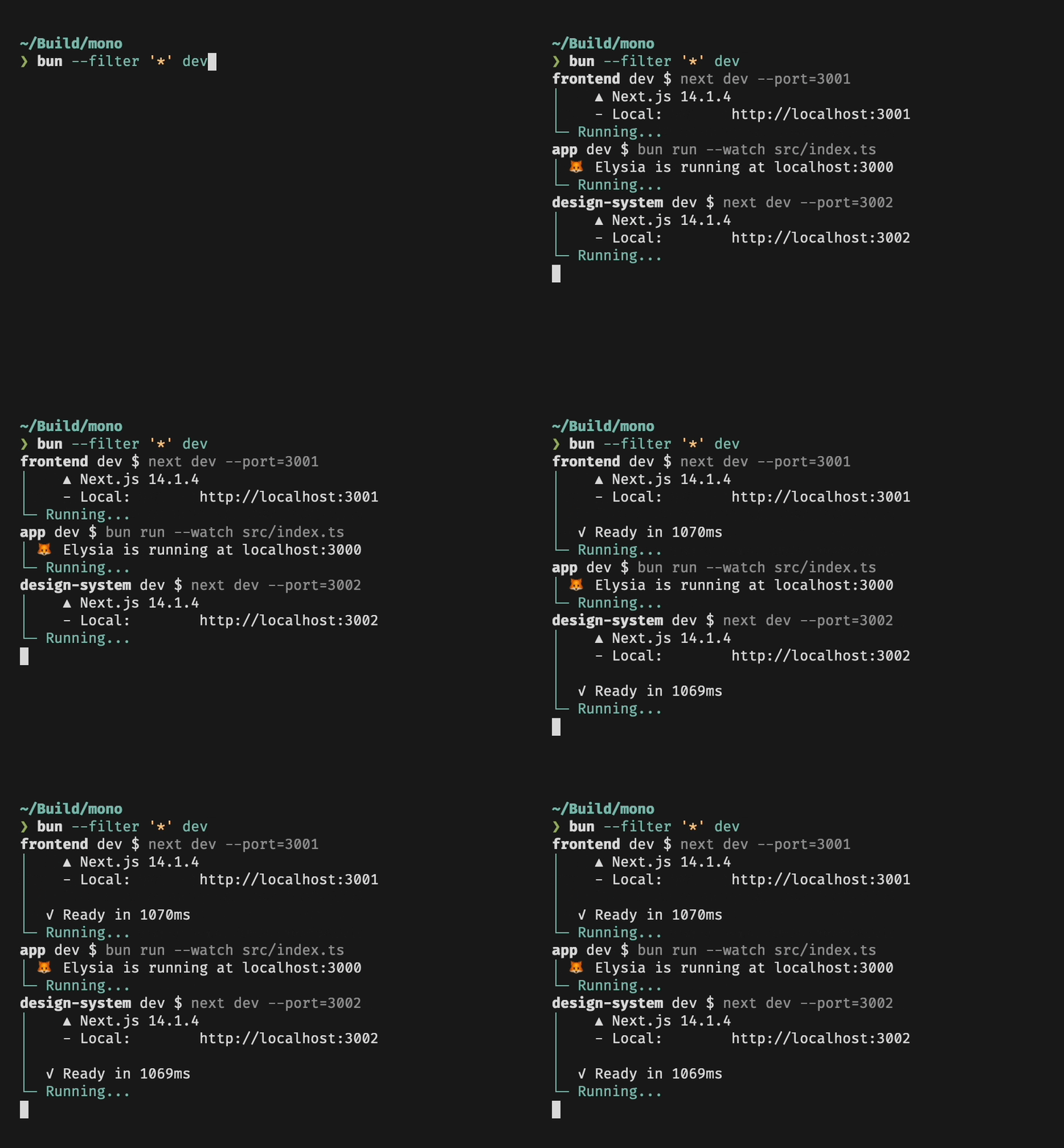
|
|
26
|
+
|
|
27
|
+
## Matching
|
|
28
|
+
|
|
29
|
+
`--filter` accepts a pattern to match specific packages, either by name or by path. Patterns have full support for glob syntax.
|
|
30
|
+
|
|
31
|
+
### Package Name `--filter <pattern>`
|
|
32
|
+
|
|
33
|
+
Name patterns select packages based on the package name, as specified in `package.json`. For example, if you have packages `pkga`, `pkgb` and `other`, you can match all packages with `*`, only `pkga` and `pkgb` with `pkg*`, and a specific package by providing the full name of the package.
|
|
34
|
+
|
|
35
|
+
### Package Path `--filter ./<glob>`
|
|
36
|
+
|
|
37
|
+
Path patterns are specified by starting the pattern with `./`, and will select all packages in directories that match the pattern. For example, to match all packages in subdirectories of `packages`, you can use `--filter './packages/**'`. To match a package located in `pkgs/foo`, use `--filter ./pkgs/foo`.
|
|
38
|
+
|
|
39
|
+
## Workspaces
|
|
40
|
+
|
|
41
|
+
Filters respect your [workspace configuration](https://bun.sh/docs/install/workspaces): If you have a `package.json` file that specifies which packages are part of the workspace,
|
|
42
|
+
`--filter` will be restricted to only these packages. Also, in a workspace you can use `--filter` to run scripts in packages that are located anywhere in the workspace:
|
|
43
|
+
|
|
44
|
+
```bash
|
|
45
|
+
# Packages
|
|
46
|
+
# src/foo
|
|
47
|
+
# src/bar
|
|
48
|
+
|
|
49
|
+
# in src/bar: runs myscript in src/foo, no need to cd!
|
|
50
|
+
bun run --filter foo myscript
|
|
51
|
+
```
|
|
52
|
+
|
|
53
|
+
## Dependency Order
|
|
54
|
+
|
|
55
|
+
Bun will respect package dependency order when running scripts. Say you have a package `foo` that depends on another package `bar` in your workspace, and both packages have a `build` script. When you run `bun --filter '*' build`, you will notice that `foo` will only start running once `bar` is done.
|
|
56
|
+
|
|
57
|
+
### Cyclic Dependencies
|
package/docs/cli/init.md
ADDED
|
@@ -0,0 +1,40 @@
|
|
|
1
|
+
Scaffold an empty Bun project with the interactive `bun init` command.
|
|
2
|
+
|
|
3
|
+
```bash
|
|
4
|
+
$ bun init
|
|
5
|
+
bun init helps you get started with a minimal project and tries to
|
|
6
|
+
guess sensible defaults. Press ^C anytime to quit.
|
|
7
|
+
|
|
8
|
+
package name (quickstart):
|
|
9
|
+
entry point (index.ts):
|
|
10
|
+
|
|
11
|
+
Done! A package.json file was saved in the current directory.
|
|
12
|
+
+ index.ts
|
|
13
|
+
+ .gitignore
|
|
14
|
+
+ tsconfig.json (for editor auto-complete)
|
|
15
|
+
+ README.md
|
|
16
|
+
|
|
17
|
+
To get started, run:
|
|
18
|
+
bun run index.ts
|
|
19
|
+
```
|
|
20
|
+
|
|
21
|
+
Press `enter` to accept the default answer for each prompt, or pass the `-y` flag to auto-accept the defaults.
|
|
22
|
+
|
|
23
|
+
{% details summary="How `bun init` works" %}
|
|
24
|
+
|
|
25
|
+
`bun init` is a quick way to start a blank project with Bun. It guesses with sane defaults and is non-destructive when run multiple times.
|
|
26
|
+
|
|
27
|
+

|
|
28
|
+
|
|
29
|
+
It creates:
|
|
30
|
+
|
|
31
|
+
- a `package.json` file with a name that defaults to the current directory name
|
|
32
|
+
- a `tsconfig.json` file or a `jsconfig.json` file, depending if the entry point is a TypeScript file or not
|
|
33
|
+
- an entry point which defaults to `index.ts` unless any of `index.{tsx, jsx, js, mts, mjs}` exist or the `package.json` specifies a `module` or `main` field
|
|
34
|
+
- a `README.md` file
|
|
35
|
+
|
|
36
|
+
If you pass `-y` or `--yes`, it will assume you want to continue without asking questions.
|
|
37
|
+
|
|
38
|
+
At the end, it runs `bun install` to install `@types/bun`.
|
|
39
|
+
|
|
40
|
+
{% /details %}
|
|
@@ -0,0 +1,205 @@
|
|
|
1
|
+
The `bun` CLI contains a Node.js-compatible package manager designed to be a dramatically faster replacement for `npm`, `yarn`, and `pnpm`. It's a standalone tool that will work in pre-existing Node.js projects; if your project has a `package.json`, `bun install` can help you speed up your workflow.
|
|
2
|
+
|
|
3
|
+
{% callout %}
|
|
4
|
+
|
|
5
|
+
**⚡️ 25x faster** — Switch from `npm install` to `bun install` in any Node.js project to make your installations up to 25x faster.
|
|
6
|
+
|
|
7
|
+
{% image src="https://user-images.githubusercontent.com/709451/147004342-571b6123-17a9-49a2-8bfd-dcfc5204047e.png" height="200" /%}
|
|
8
|
+
|
|
9
|
+
{% /callout %}
|
|
10
|
+
|
|
11
|
+
{% details summary="For Linux users" %}
|
|
12
|
+
The recommended minimum Linux Kernel version is 5.6. If you're on Linux kernel 5.1 - 5.5, `bun install` will work, but HTTP requests will be slow due to a lack of support for io_uring's `connect()` operation.
|
|
13
|
+
|
|
14
|
+
If you're using Ubuntu 20.04, here's how to install a [newer kernel](https://wiki.ubuntu.com/Kernel/LTSEnablementStack):
|
|
15
|
+
|
|
16
|
+
```bash
|
|
17
|
+
# If this returns a version >= 5.6, you don't need to do anything
|
|
18
|
+
uname -r
|
|
19
|
+
|
|
20
|
+
# Install the official Ubuntu hardware enablement kernel
|
|
21
|
+
sudo apt install --install-recommends linux-generic-hwe-20.04
|
|
22
|
+
```
|
|
23
|
+
|
|
24
|
+
{% /details %}
|
|
25
|
+
|
|
26
|
+
To install all dependencies of a project:
|
|
27
|
+
|
|
28
|
+
```bash
|
|
29
|
+
$ bun install
|
|
30
|
+
```
|
|
31
|
+
|
|
32
|
+
Running `bun install` will:
|
|
33
|
+
|
|
34
|
+
- **Install** all `dependencies`, `devDependencies`, and `optionalDependencies`. Bun will install `peerDependencies` by default.
|
|
35
|
+
- **Run** your project's `{pre|post}install` and `{pre|post}prepare` scripts at the appropriate time. For security reasons Bun _does not execute_ lifecycle scripts of installed dependencies.
|
|
36
|
+
- **Write** a `bun.lockb` lockfile to the project root.
|
|
37
|
+
|
|
38
|
+
## Logging
|
|
39
|
+
|
|
40
|
+
To modify logging verbosity:
|
|
41
|
+
|
|
42
|
+
```bash
|
|
43
|
+
$ bun install --verbose # debug logging
|
|
44
|
+
$ bun install --silent # no logging
|
|
45
|
+
```
|
|
46
|
+
|
|
47
|
+
## Lifecycle scripts
|
|
48
|
+
|
|
49
|
+
Unlike other npm clients, Bun does not execute arbitrary lifecycle scripts like `postinstall` for installed dependencies. Executing arbitrary scripts represents a potential security risk.
|
|
50
|
+
|
|
51
|
+
To tell Bun to allow lifecycle scripts for a particular package, add the package to `trustedDependencies` in your package.json.
|
|
52
|
+
|
|
53
|
+
```json-diff
|
|
54
|
+
{
|
|
55
|
+
"name": "my-app",
|
|
56
|
+
"version": "1.0.0",
|
|
57
|
+
+ "trustedDependencies": ["my-trusted-package"]
|
|
58
|
+
}
|
|
59
|
+
```
|
|
60
|
+
|
|
61
|
+
Then re-install the package. Bun will read this field and run lifecycle scripts for `my-trusted-package`.
|
|
62
|
+
|
|
63
|
+
Lifecycle scripts will run in parallel during installation. To adjust the maximum number of concurrent scripts, use the `--concurrent-scripts` flag. The default is two times the reported cpu count or GOMAXPROCS.
|
|
64
|
+
|
|
65
|
+
```bash
|
|
66
|
+
$ bun install --concurrent-scripts 5
|
|
67
|
+
```
|
|
68
|
+
|
|
69
|
+
## Workspaces
|
|
70
|
+
|
|
71
|
+
Bun supports `"workspaces"` in package.json. For complete documentation refer to [Package manager > Workspaces](https://bun.sh/docs/install/workspaces).
|
|
72
|
+
|
|
73
|
+
```json#package.json
|
|
74
|
+
{
|
|
75
|
+
"name": "my-app",
|
|
76
|
+
"version": "1.0.0",
|
|
77
|
+
"workspaces": ["packages/*"],
|
|
78
|
+
"dependencies": {
|
|
79
|
+
"preact": "^10.5.13"
|
|
80
|
+
}
|
|
81
|
+
}
|
|
82
|
+
```
|
|
83
|
+
|
|
84
|
+
## Overrides and resolutions
|
|
85
|
+
|
|
86
|
+
Bun supports npm's `"overrides"` and Yarn's `"resolutions"` in `package.json`. These are mechanisms for specifying a version range for _metadependencies_—the dependencies of your dependencies. Refer to [Package manager > Overrides and resolutions](https://bun.sh/docs/install/overrides) for complete documentation.
|
|
87
|
+
|
|
88
|
+
```json-diff#package.json
|
|
89
|
+
{
|
|
90
|
+
"name": "my-app",
|
|
91
|
+
"dependencies": {
|
|
92
|
+
"foo": "^2.0.0"
|
|
93
|
+
},
|
|
94
|
+
+ "overrides": {
|
|
95
|
+
+ "bar": "~4.4.0"
|
|
96
|
+
+ }
|
|
97
|
+
}
|
|
98
|
+
```
|
|
99
|
+
|
|
100
|
+
## Global packages
|
|
101
|
+
|
|
102
|
+
To install a package globally, use the `-g`/`--global` flag. Typically this is used for installing command-line tools.
|
|
103
|
+
|
|
104
|
+
```bash
|
|
105
|
+
$ bun install --global cowsay # or `bun install -g cowsay`
|
|
106
|
+
$ cowsay "Bun!"
|
|
107
|
+
______
|
|
108
|
+
< Bun! >
|
|
109
|
+
------
|
|
110
|
+
\ ^__^
|
|
111
|
+
\ (oo)\_______
|
|
112
|
+
(__)\ )\/\
|
|
113
|
+
||----w |
|
|
114
|
+
|| ||
|
|
115
|
+
```
|
|
116
|
+
|
|
117
|
+
## Production mode
|
|
118
|
+
|
|
119
|
+
To install in production mode (i.e. without `devDependencies` or `optionalDependencies`):
|
|
120
|
+
|
|
121
|
+
```bash
|
|
122
|
+
$ bun install --production
|
|
123
|
+
```
|
|
124
|
+
|
|
125
|
+
For reproducible installs, use `--frozen-lockfile`. This will install the exact versions of each package specified in the lockfile. If your `package.json` disagrees with `bun.lockb`, Bun will exit with an error. The lockfile will not be updated.
|
|
126
|
+
|
|
127
|
+
```bash
|
|
128
|
+
$ bun install --frozen-lockfile
|
|
129
|
+
```
|
|
130
|
+
|
|
131
|
+
For more information on Bun's binary lockfile `bun.lockb`, refer to [Package manager > Lockfile](https://bun.sh/docs/install/lockfile).
|
|
132
|
+
|
|
133
|
+
## Dry run
|
|
134
|
+
|
|
135
|
+
To perform a dry run (i.e. don't actually install anything):
|
|
136
|
+
|
|
137
|
+
```bash
|
|
138
|
+
$ bun install --dry-run
|
|
139
|
+
```
|
|
140
|
+
|
|
141
|
+
## Non-npm dependencies
|
|
142
|
+
|
|
143
|
+
Bun supports installing dependencies from Git, GitHub, and local or remotely-hosted tarballs. For complete documentation refer to [Package manager > Git, GitHub, and tarball dependencies](https://bun.sh/docs/cli/add).
|
|
144
|
+
|
|
145
|
+
```json#package.json
|
|
146
|
+
{
|
|
147
|
+
"dependencies": {
|
|
148
|
+
"dayjs": "git+https://github.com/iamkun/dayjs.git",
|
|
149
|
+
"lodash": "git+ssh://github.com/lodash/lodash.git#4.17.21",
|
|
150
|
+
"moment": "git@github.com:moment/moment.git",
|
|
151
|
+
"zod": "github:colinhacks/zod",
|
|
152
|
+
"react": "https://registry.npmjs.org/react/-/react-18.2.0.tgz"
|
|
153
|
+
}
|
|
154
|
+
}
|
|
155
|
+
```
|
|
156
|
+
|
|
157
|
+
## Configuration
|
|
158
|
+
|
|
159
|
+
The default behavior of `bun install` can be configured in `bunfig.toml`. The default values are shown below.
|
|
160
|
+
|
|
161
|
+
```toml
|
|
162
|
+
[install]
|
|
163
|
+
|
|
164
|
+
# whether to install optionalDependencies
|
|
165
|
+
optional = true
|
|
166
|
+
|
|
167
|
+
# whether to install devDependencies
|
|
168
|
+
dev = true
|
|
169
|
+
|
|
170
|
+
# whether to install peerDependencies
|
|
171
|
+
peer = true
|
|
172
|
+
|
|
173
|
+
# equivalent to `--production` flag
|
|
174
|
+
production = false
|
|
175
|
+
|
|
176
|
+
# equivalent to `--frozen-lockfile` flag
|
|
177
|
+
frozenLockfile = false
|
|
178
|
+
|
|
179
|
+
# equivalent to `--dry-run` flag
|
|
180
|
+
dryRun = false
|
|
181
|
+
|
|
182
|
+
# equivalent to `--concurrent-scripts` flag
|
|
183
|
+
concurrentScripts = 16 # (cpu count or GOMAXPROCS) x2
|
|
184
|
+
```
|
|
185
|
+
|
|
186
|
+
## CI/CD
|
|
187
|
+
|
|
188
|
+
Looking to speed up your CI? Use the official [`oven-sh/setup-bun`](https://github.com/oven-sh/setup-bun) action to install `bun` in a GitHub Actions pipeline.
|
|
189
|
+
|
|
190
|
+
```yaml#.github/workflows/release.yml
|
|
191
|
+
name: bun-types
|
|
192
|
+
jobs:
|
|
193
|
+
build:
|
|
194
|
+
name: build-app
|
|
195
|
+
runs-on: ubuntu-latest
|
|
196
|
+
steps:
|
|
197
|
+
- name: Checkout repo
|
|
198
|
+
uses: actions/checkout@v4
|
|
199
|
+
- name: Install bun
|
|
200
|
+
uses: oven-sh/setup-bun@v1
|
|
201
|
+
- name: Install dependencies
|
|
202
|
+
run: bun install
|
|
203
|
+
- name: Build app
|
|
204
|
+
run: bun run build
|
|
205
|
+
```
|
package/docs/cli/link.md
ADDED
|
@@ -0,0 +1,38 @@
|
|
|
1
|
+
Use `bun link` in a local directory to register the current package as a "linkable" package.
|
|
2
|
+
|
|
3
|
+
```bash
|
|
4
|
+
$ cd /path/to/cool-pkg
|
|
5
|
+
$ cat package.json
|
|
6
|
+
{
|
|
7
|
+
"name": "cool-pkg",
|
|
8
|
+
"version": "1.0.0"
|
|
9
|
+
}
|
|
10
|
+
$ bun link
|
|
11
|
+
bun link v1.x (7416672e)
|
|
12
|
+
Success! Registered "cool-pkg"
|
|
13
|
+
|
|
14
|
+
To use cool-pkg in a project, run:
|
|
15
|
+
bun link cool-pkg
|
|
16
|
+
|
|
17
|
+
Or add it in dependencies in your package.json file:
|
|
18
|
+
"cool-pkg": "link:cool-pkg"
|
|
19
|
+
```
|
|
20
|
+
|
|
21
|
+
This package can now be "linked" into other projects using `bun link cool-pkg`. This will create a symlink in the `node_modules` directory of the target project, pointing to the local directory.
|
|
22
|
+
|
|
23
|
+
```bash
|
|
24
|
+
$ cd /path/to/my-app
|
|
25
|
+
$ bun link cool-pkg
|
|
26
|
+
```
|
|
27
|
+
|
|
28
|
+
In addition, the `--save` flag can be used to add `cool-pkg` to the `dependencies` field of your app's package.json with a special version specifier that tells Bun to load from the registered local directory instead of installing from `npm`:
|
|
29
|
+
|
|
30
|
+
```json-diff
|
|
31
|
+
{
|
|
32
|
+
"name": "my-app",
|
|
33
|
+
"version": "1.0.0",
|
|
34
|
+
"dependencies": {
|
|
35
|
+
+ "cool-pkg": "link:cool-pkg"
|
|
36
|
+
}
|
|
37
|
+
}
|
|
38
|
+
```
|
|
@@ -0,0 +1,61 @@
|
|
|
1
|
+
Use `bun outdated` to display a table of outdated dependencies with their latest versions for the current workspace:
|
|
2
|
+
|
|
3
|
+
```sh
|
|
4
|
+
$ bun outdated
|
|
5
|
+
|
|
6
|
+
|--------------------------------------------------------------------|
|
|
7
|
+
| Package | Current | Update | Latest |
|
|
8
|
+
|----------------------------------------|---------|--------|--------|
|
|
9
|
+
| @types/bun (dev) | 1.1.6 | 1.1.7 | 1.1.7 |
|
|
10
|
+
|----------------------------------------|---------|--------|--------|
|
|
11
|
+
| @types/react (dev) | 18.3.3 | 18.3.4 | 18.3.4 |
|
|
12
|
+
|----------------------------------------|---------|--------|--------|
|
|
13
|
+
| @typescript-eslint/eslint-plugin (dev) | 7.16.1 | 7.18.0 | 8.2.0 |
|
|
14
|
+
|----------------------------------------|---------|--------|--------|
|
|
15
|
+
| @typescript-eslint/parser (dev) | 7.16.1 | 7.18.0 | 8.2.0 |
|
|
16
|
+
|----------------------------------------|---------|--------|--------|
|
|
17
|
+
| esbuild (dev) | 0.21.5 | 0.21.5 | 0.23.1 |
|
|
18
|
+
|----------------------------------------|---------|--------|--------|
|
|
19
|
+
| eslint (dev) | 9.7.0 | 9.9.1 | 9.9.1 |
|
|
20
|
+
|----------------------------------------|---------|--------|--------|
|
|
21
|
+
| typescript (dev) | 5.5.3 | 5.5.4 | 5.5.4 |
|
|
22
|
+
|--------------------------------------------------------------------|
|
|
23
|
+
```
|
|
24
|
+
|
|
25
|
+
The `Update` column shows the version that would be installed if you ran `bun update [package]`. This version is the latest version that satisfies the version range specified in your `package.json`.
|
|
26
|
+
|
|
27
|
+
The `Latest` column shows the latest version available from the registry. `bun update --latest [package]` will update to this version.
|
|
28
|
+
|
|
29
|
+
Dependency names can be provided to filter the output (pattern matching is supported):
|
|
30
|
+
|
|
31
|
+
```sh
|
|
32
|
+
$ bun outdated "@types/*"
|
|
33
|
+
|
|
34
|
+
|------------------------------------------------|
|
|
35
|
+
| Package | Current | Update | Latest |
|
|
36
|
+
|--------------------|---------|--------|--------|
|
|
37
|
+
| @types/bun (dev) | 1.1.6 | 1.1.8 | 1.1.8 |
|
|
38
|
+
|--------------------|---------|--------|--------|
|
|
39
|
+
| @types/react (dev) | 18.3.3 | 18.3.4 | 18.3.4 |
|
|
40
|
+
|------------------------------------------------|
|
|
41
|
+
```
|
|
42
|
+
|
|
43
|
+
## `--filter`
|
|
44
|
+
|
|
45
|
+
The `--filter` flag can be used to select workspaces to include in the output. Workspace names or paths can be used as patterns.
|
|
46
|
+
|
|
47
|
+
```sh
|
|
48
|
+
$ bun outdated --filter <pattern>
|
|
49
|
+
```
|
|
50
|
+
|
|
51
|
+
For example, to only show outdated dependencies for workspaces in the `./apps` directory:
|
|
52
|
+
|
|
53
|
+
```sh
|
|
54
|
+
$ bun outdated --filter './apps/*'
|
|
55
|
+
```
|
|
56
|
+
|
|
57
|
+
If you want to do the same, but exclude the `./apps/api` workspace:
|
|
58
|
+
|
|
59
|
+
```sh
|
|
60
|
+
$ bun outdated --filter './apps/*' --filter '!./apps/api'
|
|
61
|
+
```
|
|
@@ -0,0 +1,9 @@
|
|
|
1
|
+
An alias for `bun patch --commit` to maintain compatibility with pnpm.
|
|
2
|
+
|
|
3
|
+
To get started with patch, first prepare the package for patching with [`bun patch <pkg>`](https://bun.sh/docs/install/patch).
|
|
4
|
+
|
|
5
|
+
### `--patches-dir`
|
|
6
|
+
|
|
7
|
+
By default, `bun patch-commit` will use the `patches` directory in the temporary directory.
|
|
8
|
+
|
|
9
|
+
You can specify a different directory with the `--patches-dir` flag.
|
package/docs/cli/pm.md
ADDED
|
@@ -0,0 +1,150 @@
|
|
|
1
|
+
The `bun pm` command group provides a set of utilities for working with Bun's package manager.
|
|
2
|
+
|
|
3
|
+
## pack
|
|
4
|
+
|
|
5
|
+
To create a tarball of the current workspace:
|
|
6
|
+
|
|
7
|
+
```bash
|
|
8
|
+
$ bun pm pack
|
|
9
|
+
```
|
|
10
|
+
|
|
11
|
+
Options for the `pack` command:
|
|
12
|
+
|
|
13
|
+
- `--dry-run`: Perform all tasks except writing the tarball to disk.
|
|
14
|
+
- `--destination`: Specify the directory where the tarball will be saved.
|
|
15
|
+
- `--ignore-scripts`: Skip running pre/postpack and prepare scripts.
|
|
16
|
+
- `--gzip-level`: Set a custom compression level for gzip, ranging from 0 to 9 (default is 9).
|
|
17
|
+
|
|
18
|
+
## bin
|
|
19
|
+
|
|
20
|
+
To print the path to the `bin` directory for the local project:
|
|
21
|
+
|
|
22
|
+
```bash
|
|
23
|
+
$ bun pm bin
|
|
24
|
+
/path/to/current/project/node_modules/.bin
|
|
25
|
+
```
|
|
26
|
+
|
|
27
|
+
To print the path to the global `bin` directory:
|
|
28
|
+
|
|
29
|
+
```bash
|
|
30
|
+
$ bun pm bin -g
|
|
31
|
+
<$HOME>/.bun/bin
|
|
32
|
+
```
|
|
33
|
+
|
|
34
|
+
## ls
|
|
35
|
+
|
|
36
|
+
To print a list of installed dependencies in the current project and their resolved versions, excluding their dependencies.
|
|
37
|
+
|
|
38
|
+
```bash
|
|
39
|
+
$ bun pm ls
|
|
40
|
+
/path/to/project node_modules (135)
|
|
41
|
+
├── eslint@8.38.0
|
|
42
|
+
├── react@18.2.0
|
|
43
|
+
├── react-dom@18.2.0
|
|
44
|
+
├── typescript@5.0.4
|
|
45
|
+
└── zod@3.21.4
|
|
46
|
+
```
|
|
47
|
+
|
|
48
|
+
To print all installed dependencies, including nth-order dependencies.
|
|
49
|
+
|
|
50
|
+
```bash
|
|
51
|
+
$ bun pm ls --all
|
|
52
|
+
/path/to/project node_modules (135)
|
|
53
|
+
├── @eslint-community/eslint-utils@4.4.0
|
|
54
|
+
├── @eslint-community/regexpp@4.5.0
|
|
55
|
+
├── @eslint/eslintrc@2.0.2
|
|
56
|
+
├── @eslint/js@8.38.0
|
|
57
|
+
├── @nodelib/fs.scandir@2.1.5
|
|
58
|
+
├── @nodelib/fs.stat@2.0.5
|
|
59
|
+
├── @nodelib/fs.walk@1.2.8
|
|
60
|
+
├── acorn@8.8.2
|
|
61
|
+
├── acorn-jsx@5.3.2
|
|
62
|
+
├── ajv@6.12.6
|
|
63
|
+
├── ansi-regex@5.0.1
|
|
64
|
+
├── ...
|
|
65
|
+
```
|
|
66
|
+
|
|
67
|
+
## whoami
|
|
68
|
+
|
|
69
|
+
Print your npm username. Requires you to be logged in (`bunx npm login`) with credentials in either `bunfig.toml` or `.npmrc`:
|
|
70
|
+
|
|
71
|
+
```bash
|
|
72
|
+
$ bun pm whoami
|
|
73
|
+
```
|
|
74
|
+
|
|
75
|
+
## hash
|
|
76
|
+
|
|
77
|
+
To generate and print the hash of the current lockfile:
|
|
78
|
+
|
|
79
|
+
```bash
|
|
80
|
+
$ bun pm hash
|
|
81
|
+
```
|
|
82
|
+
|
|
83
|
+
To print the string used to hash the lockfile:
|
|
84
|
+
|
|
85
|
+
```bash
|
|
86
|
+
$ bun pm hash-string
|
|
87
|
+
```
|
|
88
|
+
|
|
89
|
+
To print the hash stored in the current lockfile:
|
|
90
|
+
|
|
91
|
+
```bash
|
|
92
|
+
$ bun pm hash-print
|
|
93
|
+
```
|
|
94
|
+
|
|
95
|
+
## cache
|
|
96
|
+
|
|
97
|
+
To print the path to Bun's global module cache:
|
|
98
|
+
|
|
99
|
+
```bash
|
|
100
|
+
$ bun pm cache
|
|
101
|
+
```
|
|
102
|
+
|
|
103
|
+
To clear Bun's global module cache:
|
|
104
|
+
|
|
105
|
+
```bash
|
|
106
|
+
$ bun pm cache rm
|
|
107
|
+
```
|
|
108
|
+
|
|
109
|
+
## migrate
|
|
110
|
+
|
|
111
|
+
To migrate another package manager's lockfile without installing anything:
|
|
112
|
+
|
|
113
|
+
```bash
|
|
114
|
+
$ bun pm migrate
|
|
115
|
+
```
|
|
116
|
+
|
|
117
|
+
## untrusted
|
|
118
|
+
|
|
119
|
+
To print current untrusted dependencies with scripts:
|
|
120
|
+
|
|
121
|
+
```bash
|
|
122
|
+
$ bun pm untrusted
|
|
123
|
+
|
|
124
|
+
./node_modules/@biomejs/biome @1.8.3
|
|
125
|
+
» [postinstall]: node scripts/postinstall.js
|
|
126
|
+
|
|
127
|
+
These dependencies had their lifecycle scripts blocked during install.
|
|
128
|
+
```
|
|
129
|
+
|
|
130
|
+
## trust
|
|
131
|
+
|
|
132
|
+
To run scripts for untrusted dependencies and add to `trustedDependencies`:
|
|
133
|
+
|
|
134
|
+
```bash
|
|
135
|
+
$ bun pm trust <names>
|
|
136
|
+
```
|
|
137
|
+
|
|
138
|
+
Options for the `trust` command:
|
|
139
|
+
|
|
140
|
+
- `--all`: Trust all untrusted dependencies.
|
|
141
|
+
|
|
142
|
+
## default-trusted
|
|
143
|
+
|
|
144
|
+
To print the default trusted dependencies list:
|
|
145
|
+
|
|
146
|
+
```bash
|
|
147
|
+
$ bun pm default-trusted
|
|
148
|
+
```
|
|
149
|
+
|
|
150
|
+
see the current list on GitHub [here](https://github.com/oven-sh/bun/blob/main/src/install/default-trusted-dependencies.txt)
|