@transistorsoft/background-geolocation-types 5.0.0-beta.3 → 5.0.0-beta.4
This diff represents the content of publicly available package versions that have been released to one of the supported registries. The information contained in this diff is provided for informational purposes only and reflects changes between package versions as they appear in their respective public registries.
- package/dist/core/api/BackgroundGeolocation.d.ts +0 -1551
- package/dist/core/api/CurrentPositionRequest.d.ts +0 -36
- package/dist/core/api/DeviceSettings.d.ts +0 -63
- package/dist/core/api/Logger.d.ts +0 -400
- package/dist/core/api/State.d.ts +0 -63
- package/dist/core/api/TransistorAuthorizationService.d.ts +0 -110
- package/dist/core/config/ActivityConfig.d.ts +0 -260
- package/dist/core/config/AppConfig.d.ts +0 -581
- package/dist/core/config/AuthorizationConfig.d.ts +0 -191
- package/dist/core/config/Config.d.ts +0 -176
- package/dist/core/config/GeoConfig.d.ts +0 -876
- package/dist/core/config/HttpConfig.d.ts +0 -565
- package/dist/core/config/LocationFilter.d.ts +0 -256
- package/dist/core/config/LoggerConfig.d.ts +0 -313
- package/dist/core/config/NotificationConfig.d.ts +0 -504
- package/dist/core/config/PersistenceConfig.d.ts +0 -541
- package/dist/core/data/DeviceInfo.d.ts +0 -54
- package/dist/core/data/Geofence.d.ts +0 -5
- package/dist/core/data/Location.d.ts +0 -213
- package/dist/core/data/Sensors.d.ts +0 -22
- package/dist/core/events/AuthorizationEvent.d.ts +0 -9
- package/dist/core/events/ConnectivityChangeEvent.d.ts +0 -6
- package/dist/core/events/GeofenceEvent.d.ts +0 -10
- package/dist/core/events/GeofencesChangeEvent.d.ts +0 -7
- package/dist/core/events/HeadlessEvent.d.ts +0 -7
- package/dist/core/events/HeartbeatEvent.d.ts +0 -10
- package/dist/core/events/HttpEvent.d.ts +0 -8
- package/dist/core/events/MotionActivityEvent.d.ts +0 -7
- package/dist/core/events/MotionChangeEvent.d.ts +0 -7
- package/dist/core/events/ProviderChangeEvent.d.ts +0 -10
- package/dist/core/events/Subscription.d.ts +0 -83
- package/dist/docs-entry.js +0 -3
- package/dist/enums/AccuracyAuthorization.d.ts +0 -16
- package/dist/enums/AccuracyAuthorization.js +0 -12
- package/dist/enums/ActivityType.d.ts +0 -25
- package/dist/enums/ActivityType.js +0 -21
- package/dist/enums/AuthorizationStatus.d.ts +0 -16
- package/dist/enums/AuthorizationStatus.js +0 -13
- package/dist/enums/AuthorizationStrategy.d.ts +0 -9
- package/dist/enums/AuthorizationStrategy.js +0 -6
- package/dist/enums/DesiredAccuracy.d.ts +0 -6
- package/dist/enums/DesiredAccuracy.js +0 -5
- package/dist/enums/Event.d.ts +0 -9
- package/dist/enums/Event.js +0 -5
- package/dist/enums/GeofenceAction.d.ts +0 -17
- package/dist/enums/GeofenceAction.js +0 -13
- package/dist/enums/HttpMethod.d.ts +0 -7
- package/dist/enums/HttpMethod.js +0 -6
- package/dist/enums/KalmanProfile.d.ts +0 -26
- package/dist/enums/KalmanProfile.js +0 -25
- package/dist/enums/LocationError.d.ts +0 -19
- package/dist/enums/LocationError.js +0 -15
- package/dist/enums/LocationFilterPolicy.d.ts +0 -104
- package/dist/enums/LocationFilterPolicy.js +0 -103
- package/dist/enums/LocationRequest.d.ts +0 -19
- package/dist/enums/LocationRequest.js +0 -15
- package/dist/enums/LogLevel.d.ts +0 -20
- package/dist/enums/LogLevel.js +0 -16
- package/dist/enums/LogLevelName.d.ts +0 -6
- package/dist/enums/LogLevelName.js +0 -5
- package/dist/enums/MotionActivityType.d.ts +0 -6
- package/dist/enums/MotionActivityType.js +0 -5
- package/dist/enums/NotificationPriority.d.ts +0 -16
- package/dist/enums/NotificationPriority.js +0 -15
- package/dist/enums/PersistMode.d.ts +0 -7
- package/dist/enums/PersistMode.js +0 -6
- package/dist/enums/SQLQueryOrder.d.ts +0 -11
- package/dist/enums/SQLQueryOrder.js +0 -10
- package/dist/enums/TrackingMode.d.ts +0 -11
- package/dist/enums/TrackingMode.js +0 -10
- package/dist/enums/TriggerActivity.d.ts +0 -7
- package/dist/enums/TriggerActivity.js +0 -6
- package/dist/index.js +0 -4
- package/dist/legacy/LegacyConfig.d.ts +0 -19
- package/package.json +8 -9
|
@@ -1,519 +1,15 @@
|
|
|
1
1
|
import { NotificationPriority } from '../../enums/NotificationPriority';
|
|
2
|
-
/**
|
|
3
|
-
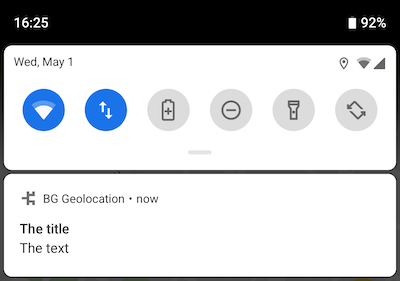
* __Android foreground notification__
|
|
4
|
-
*
|
|
5
|
-
* Android requires a persistent notification whenever the SDK runs its
|
|
6
|
-
* foreground service. This notification is shown in the system status bar
|
|
7
|
-
* while tracking is active.
|
|
8
|
-
*
|
|
9
|
-
* 
|
|
10
|
-
*
|
|
11
|
-
* Configure this via {@link NotificationConfig} on {@link AppConfig.notification}.
|
|
12
|
-
*
|
|
13
|
-
* @example
|
|
14
|
-
* ```ts
|
|
15
|
-
* BackgroundGeolocation.ready({
|
|
16
|
-
* app: {
|
|
17
|
-
* notification: {
|
|
18
|
-
* title: "The Title",
|
|
19
|
-
* text: "The Text",
|
|
20
|
-
* }
|
|
21
|
-
* });
|
|
22
|
-
*
|
|
23
|
-
* // Update notification fields at runtime.
|
|
24
|
-
* // Only changed keys must be provided; existing values persist.
|
|
25
|
-
* BackgroundGeolocation.setConfig({
|
|
26
|
-
* app: {
|
|
27
|
-
* notification: {
|
|
28
|
-
* title: "The New Title",
|
|
29
|
-
* }
|
|
30
|
-
* }
|
|
31
|
-
* });
|
|
32
|
-
* ```
|
|
33
|
-
*
|
|
34
|
-
* __Custom Notification Layouts__
|
|
35
|
-
*
|
|
36
|
-
* Supply a custom Android Layout XML file using {@link NotificationConfig.layout}.
|
|
37
|
-
* This allows complete control over the appearance of the foreground notification.
|
|
38
|
-
*
|
|
39
|
-
* See the guide:
|
|
40
|
-
* **Android Custom Notification Layout** — (github:wiki/Android-Custom-Notification-Layout)
|
|
41
|
-
*
|
|
42
|
-
* @category Config
|
|
43
|
-
*/
|
|
44
2
|
export interface NotificationConfig {
|
|
45
|
-
/**
|
|
46
|
-
* __Android notification priority__
|
|
47
|
-
*
|
|
48
|
-
* Android requires a persistent foreground-service notification.
|
|
49
|
-
* The `priority` option controls both:
|
|
50
|
-
*
|
|
51
|
-
* - The **order** of the notification in the system shade.
|
|
52
|
-
* - The **position/visibility** of the small status-bar icon.
|
|
53
|
-
*
|
|
54
|
-
* The following values are defined as static constants on
|
|
55
|
-
* {@link BackgroundGeolocation}:
|
|
56
|
-
*
|
|
57
|
-
* | Value | Description |
|
|
58
|
-
* |-----------------------------------------------------------|----------------------------------------------------------------------------------------------------------|
|
|
59
|
-
* | {@link NotificationPriority.Default} | Weighted toward the top of the notification list; status-bar icon left-aligned. |
|
|
60
|
-
* | {@link NotificationPriority.High} | Strongly weighted to the top; icon strongly left-aligned. |
|
|
61
|
-
* | {@link NotificationPriority.Low} | Weighted toward the bottom; icon right-aligned. |
|
|
62
|
-
* | {@link NotificationPriority.Max} | Equivalent to `NOTIFICATION_PRIORITY_HIGH`. |
|
|
63
|
-
* | {@link NotificationPriority.Min} | Strongly weighted to the bottom; icon hidden. |
|
|
64
|
-
*
|
|
65
|
-
* @example
|
|
66
|
-
* ```ts
|
|
67
|
-
* BackgroundGeolocation.ready({
|
|
68
|
-
* app: {
|
|
69
|
-
* foregroundService: true,
|
|
70
|
-
* notification: {
|
|
71
|
-
* priority: NotificationPriority.High
|
|
72
|
-
* }
|
|
73
|
-
* }
|
|
74
|
-
* });
|
|
75
|
-
* ```
|
|
76
|
-
*
|
|
77
|
-
*/
|
|
78
3
|
priority?: NotificationPriority;
|
|
79
|
-
/**
|
|
80
|
-
* Configure the Android Foreground Service icon and notification to be displayed __always__. Defaults to `false`.
|
|
81
|
-
*
|
|
82
|
-
* The default behaviour is for the notification to be shown only while the SDK detects the device to be *moving*.
|
|
83
|
-
* Some developers desire to provide full-disclosure to their users when the SDK has been enabled.
|
|
84
|
-
*/
|
|
85
4
|
sticky?: boolean;
|
|
86
|
-
/**
|
|
87
|
-
* Configure the *title* of the persistent notification in the Notification Bar.
|
|
88
|
-
*
|
|
89
|
-
* Defaults to the application name from `AndroidManifest`. Android requires a persistent notification for foreground-services. This will configure the **title** of that notification.
|
|
90
|
-
*/
|
|
91
5
|
title?: string;
|
|
92
|
-
/**
|
|
93
|
-
* Configure the *text* of the persistent notification in the Notification Bar.
|
|
94
|
-
*
|
|
95
|
-
* Defaults to *"Location service activated"*. Android requires a persistent notification for foreground-services. This will configure the **text** of that notification.
|
|
96
|
-
*/
|
|
97
6
|
text?: string;
|
|
98
|
-
/**
|
|
99
|
-
* Configure the *color* of the persistent notification icon in the Notification Bar.
|
|
100
|
-
*
|
|
101
|
-
* Defaults to `null`. Android requires a persistent notification for foreground-services. This will configure the **color** of the notification **icon** (API >= 21).
|
|
102
|
-
*
|
|
103
|
-
* Supported formats are:
|
|
104
|
-
* - `#RRGGBB`
|
|
105
|
-
* - `#AARRGGBB`
|
|
106
|
-
*/
|
|
107
7
|
color?: string;
|
|
108
|
-
/**
|
|
109
|
-
* Configure the *small icon* of the persistent notification in the Notification Bar.
|
|
110
|
-
*
|
|
111
|
-
* Android requires a persistent notification in the Notification Bar. This allows you customize that icon. Defaults to your application icon.
|
|
112
|
-
*
|
|
113
|
-
* __⚠️ Warning:__
|
|
114
|
-
* - You must specify the **`type`** (`drawable|mipmap`) of resource you wish to use in the following format: `{type}/icon_name`
|
|
115
|
-
* - Do not append the file-extension (eg: `.png`)
|
|
116
|
-
*
|
|
117
|
-
* @example
|
|
118
|
-
* ```typescript
|
|
119
|
-
* // 1. drawable
|
|
120
|
-
* BackgroundGeolocation.ready({
|
|
121
|
-
* app: {
|
|
122
|
-
* notification: {
|
|
123
|
-
* smallIcon: "drawable/my_custom_notification_small_icon"
|
|
124
|
-
* }
|
|
125
|
-
* }
|
|
126
|
-
* });
|
|
127
|
-
*
|
|
128
|
-
* // 2. mipmap
|
|
129
|
-
* BackgroundGeolocation.ready({
|
|
130
|
-
* app: {
|
|
131
|
-
* notification: {
|
|
132
|
-
* smallIcon: "mipmap/my_custom_notification_small_icon"
|
|
133
|
-
* }
|
|
134
|
-
* }
|
|
135
|
-
* });
|
|
136
|
-
* ```
|
|
137
|
-
*
|
|
138
|
-
* __ℹ️ See also:__
|
|
139
|
-
* - {@link largeIcon}
|
|
140
|
-
*/
|
|
141
8
|
smallIcon?: string;
|
|
142
|
-
/**
|
|
143
|
-
* Configure the *large icon* of the persistent notification in the Notification Bar.
|
|
144
|
-
*
|
|
145
|
-
* Android requires a persistent notification in the Notification Bar. This allows you customize that icon. Defaults to your application icon.
|
|
146
|
-
*
|
|
147
|
-
* __⚠️ Warning:__
|
|
148
|
-
* - You must specify the **`type`** (`drawable|mipmap`) of resource you wish to use in the following format: `{type}/icon_name`
|
|
149
|
-
* - Do not append the file-extension (eg: `.png`)
|
|
150
|
-
*
|
|
151
|
-
* @example
|
|
152
|
-
* ```typescript
|
|
153
|
-
* // 1. drawable
|
|
154
|
-
* BackgroundGeolocation.ready({
|
|
155
|
-
* app: {
|
|
156
|
-
* notification: {
|
|
157
|
-
* smallIcon: "drawable/my_custom_notification_small_icon"
|
|
158
|
-
* }
|
|
159
|
-
* });
|
|
160
|
-
*
|
|
161
|
-
* // 2. mipmap
|
|
162
|
-
* BackgroundGeolocation.ready({
|
|
163
|
-
* app: {
|
|
164
|
-
* notification: {
|
|
165
|
-
* smallIcon: "mipmap/my_custom_notification_small_icon"
|
|
166
|
-
* }
|
|
167
|
-
* }
|
|
168
|
-
* });
|
|
169
|
-
* ```
|
|
170
|
-
*
|
|
171
|
-
* __ℹ️ See also:__
|
|
172
|
-
* - {@link smallIcon}
|
|
173
|
-
*/
|
|
174
9
|
largeIcon?: string;
|
|
175
|
-
/**
|
|
176
|
-
* __Custom Android Notification Layout__
|
|
177
|
-
*
|
|
178
|
-
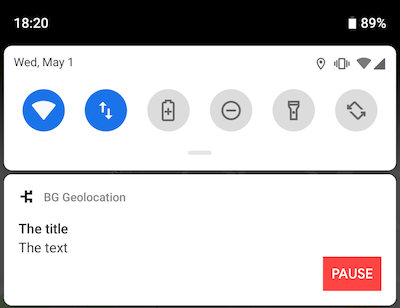
* Specifies the name of your custom Android Layout XML file.
|
|
179
|
-
*
|
|
180
|
-
* __ℹ️ See:__
|
|
181
|
-
* - **[Android Custom Notification Layout](github:wiki/Android-Custom-Notification-Layout)** for full setup instructions.
|
|
182
|
-
*
|
|
183
|
-
* 
|
|
184
|
-
*
|
|
185
|
-
* Even if you have no prior Android UI experience, custom layouts are very approachable.
|
|
186
|
-
* You will typically add `<TextView />`, `<ImageView />`, and `<Button />` elements.
|
|
187
|
-
*
|
|
188
|
-
* **Important:** Your `android:id` values **must be prefixed** with `notification`
|
|
189
|
-
* (e.g., `notificationText`, `notificationTitle`).
|
|
190
|
-
* The only exception is `applicationName`, which the SDK will populate with your app name.
|
|
191
|
-
*
|
|
192
|
-
* __Layout Special Elements__
|
|
193
|
-
*
|
|
194
|
-
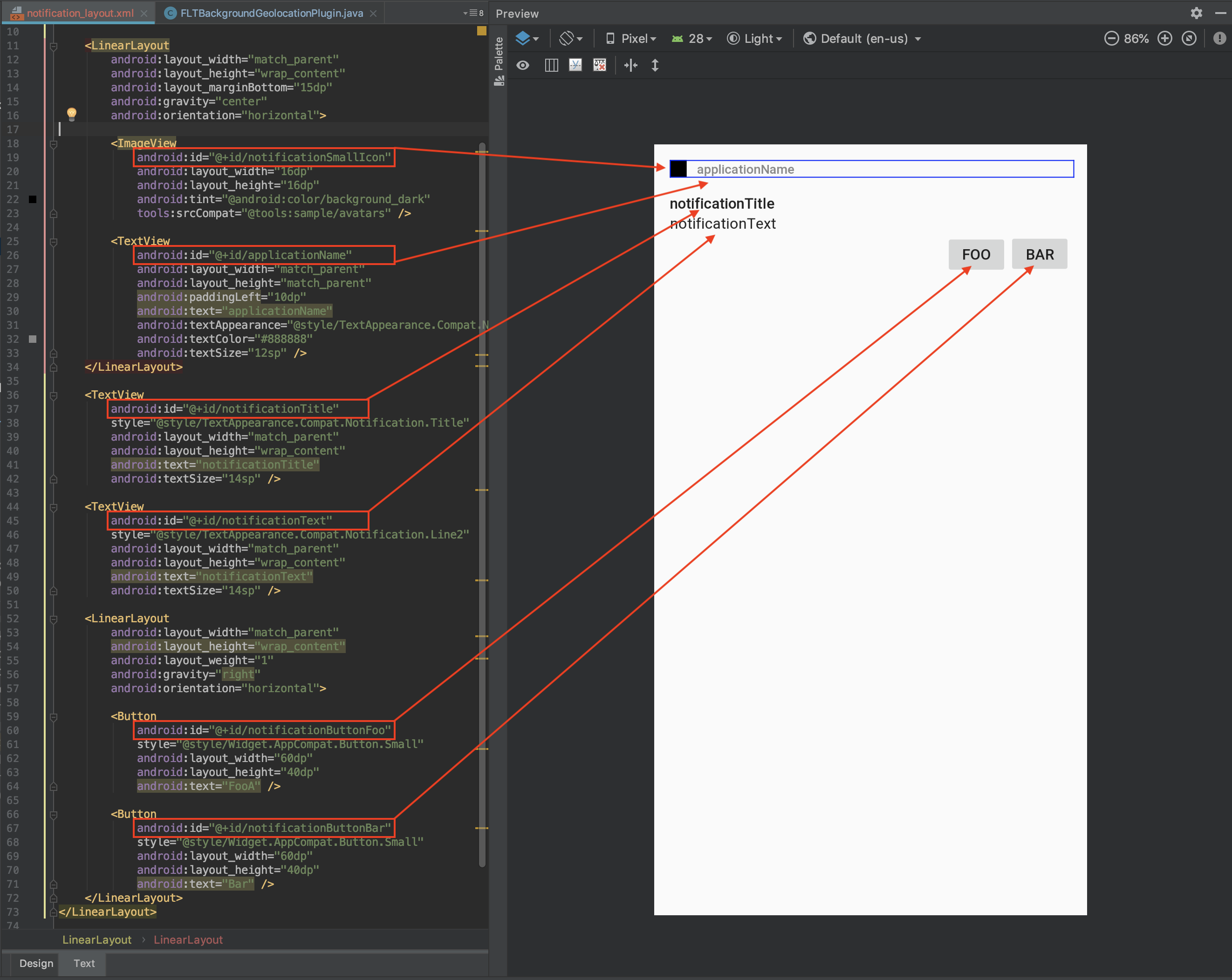
* When the SDK renders your custom notification, it searches for the following IDs and
|
|
195
|
-
* sets their content from the associated data source:
|
|
196
|
-
*
|
|
197
|
-
* | Layout element `android:id` | Data source |
|
|
198
|
-
* |-------------------------------|---------------------------------------------|
|
|
199
|
-
* | `applicationName` | Application name from AndroidManifest |
|
|
200
|
-
* | `notificationTitle` | {@link title} |
|
|
201
|
-
* | `notificationText` | {@link text} |
|
|
202
|
-
* | `notificationSmallIcon` | {@link smallIcon} |
|
|
203
|
-
* | `notificationLargeIcon` | {@link largeIcon} |
|
|
204
|
-
*
|
|
205
|
-
* @example
|
|
206
|
-
* ```ts
|
|
207
|
-
* BackgroundGeolocation.ready({
|
|
208
|
-
* app: {
|
|
209
|
-
* notification: {
|
|
210
|
-
* layout: "my_notification_layout",
|
|
211
|
-
* title: "The Notification Title",
|
|
212
|
-
* text: "The Notification Text",
|
|
213
|
-
* smallIcon: "mipmap/my_small_icon",
|
|
214
|
-
* largeIcon: "mipmap/my_large_icon"
|
|
215
|
-
* }
|
|
216
|
-
* }
|
|
217
|
-
* });
|
|
218
|
-
* ```
|
|
219
|
-
*
|
|
220
|
-
* __Custom `<TextView />` Elements__
|
|
221
|
-
*
|
|
222
|
-
* You may define your own custom text fields and populate them using
|
|
223
|
-
* {@link strings}.
|
|
224
|
-
*
|
|
225
|
-
* @example
|
|
226
|
-
* ```xml
|
|
227
|
-
* <TextView
|
|
228
|
-
* android:id="@+id/myCustomElement"
|
|
229
|
-
* android:layout_width="match_parent"
|
|
230
|
-
* android:layout_height="wrap_content"
|
|
231
|
-
* android:text="notificationTitle" />
|
|
232
|
-
* ```
|
|
233
|
-
*
|
|
234
|
-
* @example
|
|
235
|
-
* ```ts
|
|
236
|
-
* BackgroundGeolocation.ready({
|
|
237
|
-
* app: {
|
|
238
|
-
* notification: {
|
|
239
|
-
* strings: {
|
|
240
|
-
* myCustomElement: "My Custom Element Text"
|
|
241
|
-
* }
|
|
242
|
-
* }
|
|
243
|
-
* }
|
|
244
|
-
* });
|
|
245
|
-
* ```
|
|
246
|
-
*
|
|
247
|
-
* __Custom `<Button />` Elements__
|
|
248
|
-
*
|
|
249
|
-
* Define your own buttons and register click listeners using
|
|
250
|
-
* {@link actions}.
|
|
251
|
-
*
|
|
252
|
-
* @example
|
|
253
|
-
* ```xml
|
|
254
|
-
* <Button
|
|
255
|
-
* android:id="@+id/notificationButtonFoo"
|
|
256
|
-
* style="@style/Widget.AppCompat.Button.Small"
|
|
257
|
-
* android:layout_width="60dp"
|
|
258
|
-
* android:layout_height="40dp"
|
|
259
|
-
* android:text="Foo" />
|
|
260
|
-
* ```
|
|
261
|
-
*
|
|
262
|
-
* @example
|
|
263
|
-
* ```ts
|
|
264
|
-
* BackgroundGeolocation.ready({
|
|
265
|
-
* app: {
|
|
266
|
-
* notification: {
|
|
267
|
-
* actions: [
|
|
268
|
-
* "notificationButtonFoo",
|
|
269
|
-
* "notificationButtonBar"
|
|
270
|
-
* ]
|
|
271
|
-
* }
|
|
272
|
-
* }
|
|
273
|
-
* });
|
|
274
|
-
*
|
|
275
|
-
* BackgroundGeolocation.onNotificationAction((buttonId) => {
|
|
276
|
-
* console.log("[onNotificationAction]", buttonId);
|
|
277
|
-
* switch (buttonId) {
|
|
278
|
-
* case "notificationButtonFoo":
|
|
279
|
-
* break;
|
|
280
|
-
* case "notificationButtonBar":
|
|
281
|
-
* break;
|
|
282
|
-
* }
|
|
283
|
-
* });
|
|
284
|
-
* ```
|
|
285
|
-
*
|
|
286
|
-
* __Sample Layout__
|
|
287
|
-
*
|
|
288
|
-
* As a starting point, copy this into your XML file:
|
|
289
|
-
*
|
|
290
|
-
* @example
|
|
291
|
-
* ```xml
|
|
292
|
-
* <?xml version="1.0" encoding="utf-8"?>
|
|
293
|
-
* <LinearLayout xmlns:android="http://schemas.android.com/apk/res/android"
|
|
294
|
-
* xmlns:tools="http://schemas.android.com/tools"
|
|
295
|
-
* android:layout_width="match_parent"
|
|
296
|
-
* android:layout_height="135dp"
|
|
297
|
-
* android:gravity="start"
|
|
298
|
-
* android:orientation="vertical"
|
|
299
|
-
* android:padding="15dp">
|
|
300
|
-
*
|
|
301
|
-
* <LinearLayout
|
|
302
|
-
* android:layout_width="match_parent"
|
|
303
|
-
* android:layout_height="wrap_content"
|
|
304
|
-
* android:layout_marginBottom="15dp"
|
|
305
|
-
* android:gravity="center"
|
|
306
|
-
* android:orientation="horizontal">
|
|
307
|
-
*
|
|
308
|
-
* <ImageView
|
|
309
|
-
* android:id="@+id/notificationSmallIcon"
|
|
310
|
-
* android:layout_width="16dp"
|
|
311
|
-
* android:layout_height="16dp"
|
|
312
|
-
* android:tint="@android:color/background_dark"
|
|
313
|
-
* tools:srcCompat="@tools:sample/avatars" />
|
|
314
|
-
*
|
|
315
|
-
* <TextView
|
|
316
|
-
* android:id="@+id/applicationName"
|
|
317
|
-
* android:layout_width="match_parent"
|
|
318
|
-
* android:layout_height="match_parent"
|
|
319
|
-
* android:paddingLeft="10dp"
|
|
320
|
-
* android:text="applicationName"
|
|
321
|
-
* android:textAppearance="@style/TextAppearance.Compat.Notification.Title"
|
|
322
|
-
* android:textColor="#888888"
|
|
323
|
-
* android:textSize="12sp" />
|
|
324
|
-
* </LinearLayout>
|
|
325
|
-
*
|
|
326
|
-
* <TextView
|
|
327
|
-
* android:id="@+id/notificationTitle"
|
|
328
|
-
* style="@style/TextAppearance.Compat.Notification.Title"
|
|
329
|
-
* android:layout_width="match_parent"
|
|
330
|
-
* android:layout_height="wrap_content"
|
|
331
|
-
* android:text="notificationTitle"
|
|
332
|
-
* android:textSize="14sp" />
|
|
333
|
-
*
|
|
334
|
-
* <TextView
|
|
335
|
-
* android:id="@+id/notificationText"
|
|
336
|
-
* style="@style/TextAppearance.Compat.Notification.Line2"
|
|
337
|
-
* android:layout_width="match_parent"
|
|
338
|
-
* android:layout_height="wrap_content"
|
|
339
|
-
* android:text="notificationText"
|
|
340
|
-
* android:textSize="14sp" />
|
|
341
|
-
*
|
|
342
|
-
* <LinearLayout
|
|
343
|
-
* android:layout_width="match_parent"
|
|
344
|
-
* android:layout_height="wrap_content"
|
|
345
|
-
* android:gravity="right"
|
|
346
|
-
* android:orientation="horizontal">
|
|
347
|
-
*
|
|
348
|
-
* <Button
|
|
349
|
-
* android:id="@+id/notificationButtonFoo"
|
|
350
|
-
* style="@style/Widget.AppCompat.Button.Small"
|
|
351
|
-
* android:layout_width="60dp"
|
|
352
|
-
* android:layout_height="40dp"
|
|
353
|
-
* android:text="FooA" />
|
|
354
|
-
*
|
|
355
|
-
* <Button
|
|
356
|
-
* android:id="@+id/notificationButtonBar"
|
|
357
|
-
* style="@style/Widget.AppCompat.Button.Small"
|
|
358
|
-
* android:layout_width="60dp"
|
|
359
|
-
* android:layout_height="40dp"
|
|
360
|
-
* android:text="Bar" />
|
|
361
|
-
* </LinearLayout>
|
|
362
|
-
* </LinearLayout>
|
|
363
|
-
* ```
|
|
364
|
-
*
|
|
365
|
-
* 
|
|
366
|
-
*
|
|
367
|
-
* __Using your custom layout__
|
|
368
|
-
*
|
|
369
|
-
* @example
|
|
370
|
-
* ```ts
|
|
371
|
-
* BackgroundGeolocation.ready({
|
|
372
|
-
* app: {
|
|
373
|
-
* notification: {
|
|
374
|
-
* title: "The title",
|
|
375
|
-
* text: "The text",
|
|
376
|
-
* layout: "notification_layout",
|
|
377
|
-
* actions: [
|
|
378
|
-
* "notificationButtonFoo",
|
|
379
|
-
* "notificationButtonBar"
|
|
380
|
-
* ],
|
|
381
|
-
* strings: {
|
|
382
|
-
* myCustomTextBox1: "custom TextBox element"
|
|
383
|
-
* }
|
|
384
|
-
* }
|
|
385
|
-
* }
|
|
386
|
-
* });
|
|
387
|
-
*
|
|
388
|
-
* BackgroundGeolocation.onNotificationAction((buttonId) => {
|
|
389
|
-
* console.log("[onNotificationAction]", buttonId);
|
|
390
|
-
* switch (buttonId) {
|
|
391
|
-
* case "notificationButtonFoo":
|
|
392
|
-
* break;
|
|
393
|
-
* case "notificationButtonBar":
|
|
394
|
-
* break;
|
|
395
|
-
* }
|
|
396
|
-
* });
|
|
397
|
-
* ```
|
|
398
|
-
*/
|
|
399
10
|
layout?: string;
|
|
400
|
-
/**
|
|
401
|
-
* Custom strings to render into `<TextView />` elements of a custom notification [[layout]].
|
|
402
|
-
*
|
|
403
|
-
* ℹ️ See [Android Custom Notification Layout](github:wiki/Android-Custom-Notification-Layout) for setup instructions.
|
|
404
|
-
*
|
|
405
|
-
* You can declare your own custom `<TextView />` elements and render data into them using the `notification.strings` parameter.
|
|
406
|
-
*
|
|
407
|
-
* @example
|
|
408
|
-
* ```xml
|
|
409
|
-
* <TextView
|
|
410
|
-
* android:id="@+id/myCustomElement" // <-- myCustomElement
|
|
411
|
-
* android:layout_width="match_parent"
|
|
412
|
-
* android:layout_height="wrap_content"
|
|
413
|
-
* android:text="notificationTitle" />
|
|
414
|
-
* ```
|
|
415
|
-
*
|
|
416
|
-
* You can provide data to your custom elements using the [[strings]] configuration parameter:
|
|
417
|
-
*
|
|
418
|
-
* @example
|
|
419
|
-
* ```typescript
|
|
420
|
-
* BackgroundGeolocation.ready({
|
|
421
|
-
* app: {
|
|
422
|
-
* notification: {
|
|
423
|
-
* strings: {
|
|
424
|
-
* myCustomElement: "My Custom Element Text"
|
|
425
|
-
* }
|
|
426
|
-
* }
|
|
427
|
-
* }
|
|
428
|
-
* });
|
|
429
|
-
* ```
|
|
430
|
-
*/
|
|
431
11
|
strings?: Record<string, string>;
|
|
432
|
-
/**
|
|
433
|
-
* Declare click listeners for `<Button />` elements of a custom notification {@link layout}.
|
|
434
|
-
*
|
|
435
|
-
* 
|
|
436
|
-
*
|
|
437
|
-
* ℹ️ See [Android Custom Notification Layout](github:wiki/Android-Custom-Notification-Layout) for setup instructions.
|
|
438
|
-
*
|
|
439
|
-
* You can declare custom Android `<Button />` elements in your layout XML and
|
|
440
|
-
* register click listeners for them using the {@link actions} parameter.
|
|
441
|
-
*
|
|
442
|
-
* __Example: Custom `<Button />` element__
|
|
443
|
-
*
|
|
444
|
-
* ```xml
|
|
445
|
-
* <Button
|
|
446
|
-
* android:id="@+id/notificationButtonPause" <!-- notificationButtonPause -->
|
|
447
|
-
* style="@style/Widget.AppCompat.Button.Small"
|
|
448
|
-
* android:layout_width="60dp"
|
|
449
|
-
* android:layout_height="40dp"
|
|
450
|
-
* android:text="Foo" />
|
|
451
|
-
* ```
|
|
452
|
-
*
|
|
453
|
-
* __Example: Register button listeners__
|
|
454
|
-
*
|
|
455
|
-
* ```ts
|
|
456
|
-
* BackgroundGeolocation.ready({
|
|
457
|
-
* app: {
|
|
458
|
-
* notification: {
|
|
459
|
-
* actions: [
|
|
460
|
-
* "notificationButtonPause" // <-- register button listeners
|
|
461
|
-
* ]
|
|
462
|
-
* }
|
|
463
|
-
* }
|
|
464
|
-
* });
|
|
465
|
-
*
|
|
466
|
-
* // Listen to custom button clicks:
|
|
467
|
-
* BackgroundGeolocation.onNotificationAction((buttonId) => {
|
|
468
|
-
* console.log("[onNotificationAction] - ", buttonId);
|
|
469
|
-
* switch (buttonId) {
|
|
470
|
-
* case "notificationButtonPause":
|
|
471
|
-
* BackgroundGeolocation.changePace(false);
|
|
472
|
-
* break;
|
|
473
|
-
* // ...
|
|
474
|
-
* }
|
|
475
|
-
* });
|
|
476
|
-
* ```
|
|
477
|
-
*/
|
|
478
12
|
actions?: string[];
|
|
479
|
-
/**
|
|
480
|
-
* Configure the name of the plugin's notification-channel used to display the required, persistent foreground notification.
|
|
481
|
-
*
|
|
482
|
-
* On Android O+, the plugin's foreground-service needs to create a "Notification Channel". The name of this channel can be seen in:
|
|
483
|
-
* > `Settings->App & Notifications->Your App.`
|
|
484
|
-
*
|
|
485
|
-
* Defaults to your application's name from `AndroidManifest`.
|
|
486
|
-
*
|
|
487
|
-
* 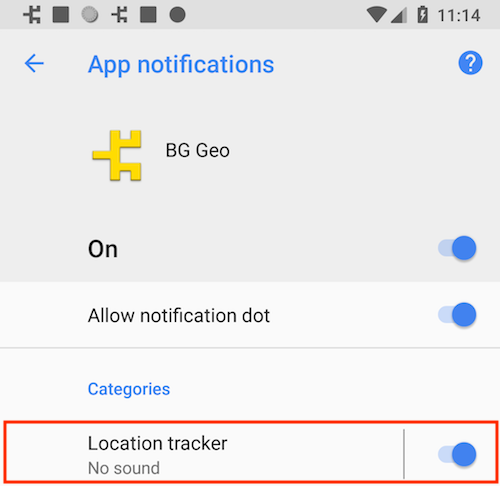\
|
|
488
|
-
*
|
|
489
|
-
*
|
|
490
|
-
* @example
|
|
491
|
-
* ```typescript
|
|
492
|
-
* BackgroundGeolocation.ready({
|
|
493
|
-
* app: {
|
|
494
|
-
* notification: {
|
|
495
|
-
* channelName: "Location Tracker"
|
|
496
|
-
* }
|
|
497
|
-
* }
|
|
498
|
-
* });
|
|
499
|
-
*
|
|
500
|
-
* // or with #setConfig
|
|
501
|
-
* BackgroundGeolocation.setConfig({
|
|
502
|
-
* app: {
|
|
503
|
-
* notification: {
|
|
504
|
-
* channelName: "My new channel name"
|
|
505
|
-
* }
|
|
506
|
-
* }
|
|
507
|
-
* });
|
|
508
|
-
* ```
|
|
509
|
-
*/
|
|
510
13
|
channelName?: string;
|
|
511
|
-
/**
|
|
512
|
-
* Customize the notification channel ID.
|
|
513
|
-
*
|
|
514
|
-
* Defaults to `your.package.name.TSLocationManager`
|
|
515
|
-
*
|
|
516
|
-
* __NOTE__: It is not typically required to change this. Typical use-cases are for users who use an existing Android foreground-service who wish the SDK to share an existing notification and channel.
|
|
517
|
-
*/
|
|
518
14
|
channelId?: string;
|
|
519
15
|
}
|