@transistorsoft/background-geolocation-types 5.0.0-beta.3 → 5.0.0-beta.4
This diff represents the content of publicly available package versions that have been released to one of the supported registries. The information contained in this diff is provided for informational purposes only and reflects changes between package versions as they appear in their respective public registries.
- package/dist/core/api/BackgroundGeolocation.d.ts +0 -1551
- package/dist/core/api/CurrentPositionRequest.d.ts +0 -36
- package/dist/core/api/DeviceSettings.d.ts +0 -63
- package/dist/core/api/Logger.d.ts +0 -400
- package/dist/core/api/State.d.ts +0 -63
- package/dist/core/api/TransistorAuthorizationService.d.ts +0 -110
- package/dist/core/config/ActivityConfig.d.ts +0 -260
- package/dist/core/config/AppConfig.d.ts +0 -581
- package/dist/core/config/AuthorizationConfig.d.ts +0 -191
- package/dist/core/config/Config.d.ts +0 -176
- package/dist/core/config/GeoConfig.d.ts +0 -876
- package/dist/core/config/HttpConfig.d.ts +0 -565
- package/dist/core/config/LocationFilter.d.ts +0 -256
- package/dist/core/config/LoggerConfig.d.ts +0 -313
- package/dist/core/config/NotificationConfig.d.ts +0 -504
- package/dist/core/config/PersistenceConfig.d.ts +0 -541
- package/dist/core/data/DeviceInfo.d.ts +0 -54
- package/dist/core/data/Geofence.d.ts +0 -5
- package/dist/core/data/Location.d.ts +0 -213
- package/dist/core/data/Sensors.d.ts +0 -22
- package/dist/core/events/AuthorizationEvent.d.ts +0 -9
- package/dist/core/events/ConnectivityChangeEvent.d.ts +0 -6
- package/dist/core/events/GeofenceEvent.d.ts +0 -10
- package/dist/core/events/GeofencesChangeEvent.d.ts +0 -7
- package/dist/core/events/HeadlessEvent.d.ts +0 -7
- package/dist/core/events/HeartbeatEvent.d.ts +0 -10
- package/dist/core/events/HttpEvent.d.ts +0 -8
- package/dist/core/events/MotionActivityEvent.d.ts +0 -7
- package/dist/core/events/MotionChangeEvent.d.ts +0 -7
- package/dist/core/events/ProviderChangeEvent.d.ts +0 -10
- package/dist/core/events/Subscription.d.ts +0 -83
- package/dist/docs-entry.js +0 -3
- package/dist/enums/AccuracyAuthorization.d.ts +0 -16
- package/dist/enums/AccuracyAuthorization.js +0 -12
- package/dist/enums/ActivityType.d.ts +0 -25
- package/dist/enums/ActivityType.js +0 -21
- package/dist/enums/AuthorizationStatus.d.ts +0 -16
- package/dist/enums/AuthorizationStatus.js +0 -13
- package/dist/enums/AuthorizationStrategy.d.ts +0 -9
- package/dist/enums/AuthorizationStrategy.js +0 -6
- package/dist/enums/DesiredAccuracy.d.ts +0 -6
- package/dist/enums/DesiredAccuracy.js +0 -5
- package/dist/enums/Event.d.ts +0 -9
- package/dist/enums/Event.js +0 -5
- package/dist/enums/GeofenceAction.d.ts +0 -17
- package/dist/enums/GeofenceAction.js +0 -13
- package/dist/enums/HttpMethod.d.ts +0 -7
- package/dist/enums/HttpMethod.js +0 -6
- package/dist/enums/KalmanProfile.d.ts +0 -26
- package/dist/enums/KalmanProfile.js +0 -25
- package/dist/enums/LocationError.d.ts +0 -19
- package/dist/enums/LocationError.js +0 -15
- package/dist/enums/LocationFilterPolicy.d.ts +0 -104
- package/dist/enums/LocationFilterPolicy.js +0 -103
- package/dist/enums/LocationRequest.d.ts +0 -19
- package/dist/enums/LocationRequest.js +0 -15
- package/dist/enums/LogLevel.d.ts +0 -20
- package/dist/enums/LogLevel.js +0 -16
- package/dist/enums/LogLevelName.d.ts +0 -6
- package/dist/enums/LogLevelName.js +0 -5
- package/dist/enums/MotionActivityType.d.ts +0 -6
- package/dist/enums/MotionActivityType.js +0 -5
- package/dist/enums/NotificationPriority.d.ts +0 -16
- package/dist/enums/NotificationPriority.js +0 -15
- package/dist/enums/PersistMode.d.ts +0 -7
- package/dist/enums/PersistMode.js +0 -6
- package/dist/enums/SQLQueryOrder.d.ts +0 -11
- package/dist/enums/SQLQueryOrder.js +0 -10
- package/dist/enums/TrackingMode.d.ts +0 -11
- package/dist/enums/TrackingMode.js +0 -10
- package/dist/enums/TriggerActivity.d.ts +0 -7
- package/dist/enums/TriggerActivity.js +0 -6
- package/dist/index.js +0 -4
- package/dist/legacy/LegacyConfig.d.ts +0 -19
- package/package.json +8 -9
|
@@ -1,905 +1,29 @@
|
|
|
1
1
|
import { DesiredAccuracy } from '../../enums/DesiredAccuracy';
|
|
2
2
|
import { LocationFilter } from './LocationFilter';
|
|
3
3
|
import { ActivityType } from '../../enums/ActivityType';
|
|
4
|
-
/**
|
|
5
|
-
* **Geolocation Configuration**
|
|
6
|
-
*
|
|
7
|
-
* {@link GeoConfig} defines all geolocation-related options for the
|
|
8
|
-
* {@link BackgroundGeolocation} SDK.
|
|
9
|
-
*
|
|
10
|
-
* These parameters control:
|
|
11
|
-
* - how often the SDK acquires locations,
|
|
12
|
-
* - how accurate those locations should be,
|
|
13
|
-
* - how long tracking persists when the device becomes stationary,
|
|
14
|
-
* - platform-specific permission behavior,
|
|
15
|
-
* - filtering / denoising rules,
|
|
16
|
-
* - elastic responsiveness to motion and idling.
|
|
17
|
-
*
|
|
18
|
-
* **Overview**
|
|
19
|
-
*
|
|
20
|
-
* {@link GeoConfig} is supplied via {@link Config.geolocation} when calling
|
|
21
|
-
* {@link BackgroundGeolocation.ready} or {@link BackgroundGeolocation.setConfig}.
|
|
22
|
-
*
|
|
23
|
-
* | Category | Description |
|
|
24
|
-
* |---------------|-------------|
|
|
25
|
-
* | **Accuracy** | Precision and noise control via {@link desiredAccuracy}, {@link distanceFilter}, {@link locationUpdateInterval}, {@link fastestLocationUpdateInterval}. |
|
|
26
|
-
* | **Elasticity** | Controls dynamic location sampling-rate: {@link disableElasticity}, {@link elasticityMultiplier}, {@link stopTimeout}. |
|
|
27
|
-
* | **Permissions** | Platform authorization and alerts: {@link locationAuthorizationRequest}, {@link locationAuthorizationAlert}, {@link disableLocationAuthorizationAlert}. |
|
|
28
|
-
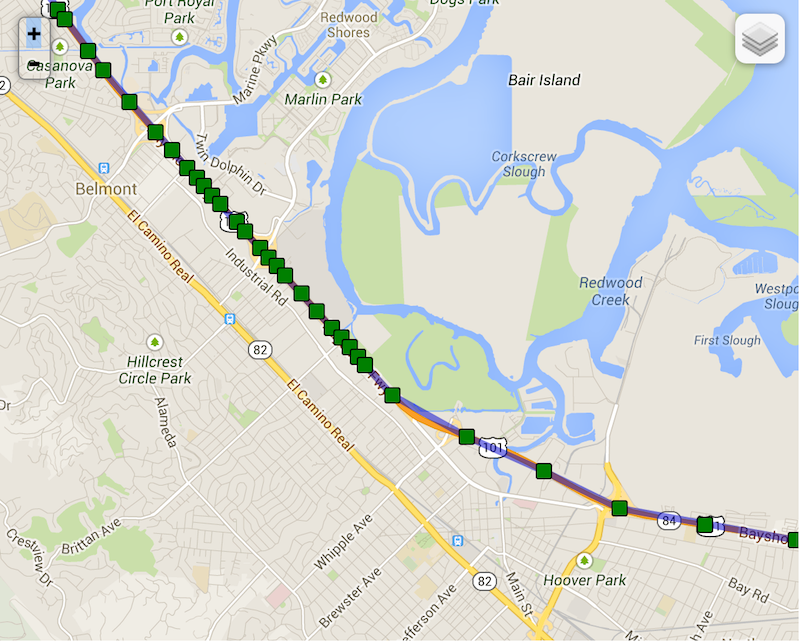
* | **Geofencing** | Geofence proximity, accuracy mode, and initial triggers. |
|
|
29
|
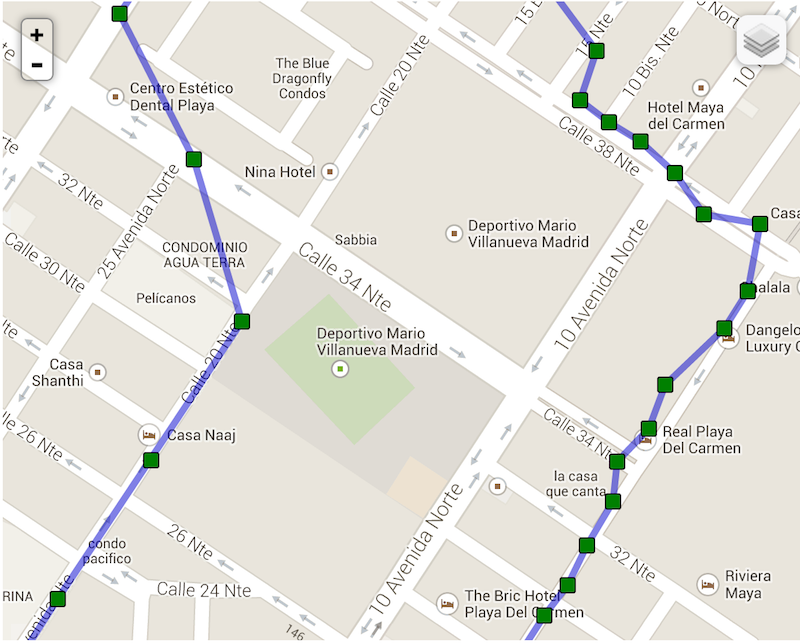
-
* | **Filtering** | Fine-grained denoising via {@link LocationFilter}. |
|
|
30
|
-
*
|
|
31
|
-
* **Example**
|
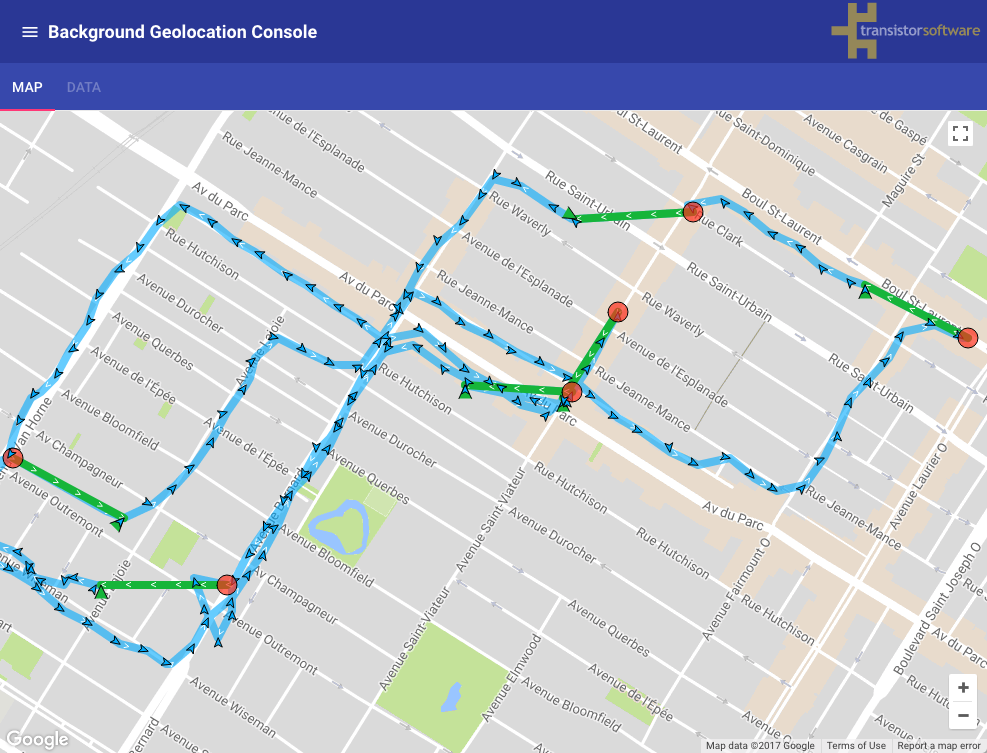
|
32
|
-
*
|
|
33
|
-
* ```ts
|
|
34
|
-
* import BackgroundGeolocation, {
|
|
35
|
-
* Config,
|
|
36
|
-
* GeoConfig,
|
|
37
|
-
* DesiredAccuracy,
|
|
38
|
-
* LocationFilter
|
|
39
|
-
* } from "react-native-background-geolocation";
|
|
40
|
-
*
|
|
41
|
-
* const config: Config = {
|
|
42
|
-
* geolocation: {
|
|
43
|
-
* // High-precision GPS
|
|
44
|
-
* desiredAccuracy: DesiredAccuracy.High,
|
|
45
|
-
*
|
|
46
|
-
* // Move at least 50m before recording next location
|
|
47
|
-
* distanceFilter: 50,
|
|
48
|
-
*
|
|
49
|
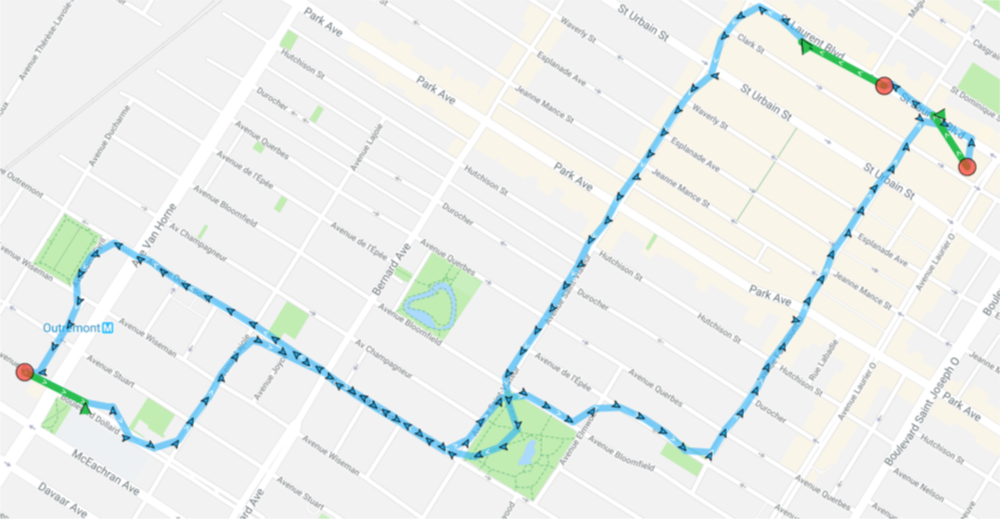
-
* // Consider stationary after 5 minutes with no motion
|
|
50
|
-
* stopTimeout: 5,
|
|
51
|
-
*
|
|
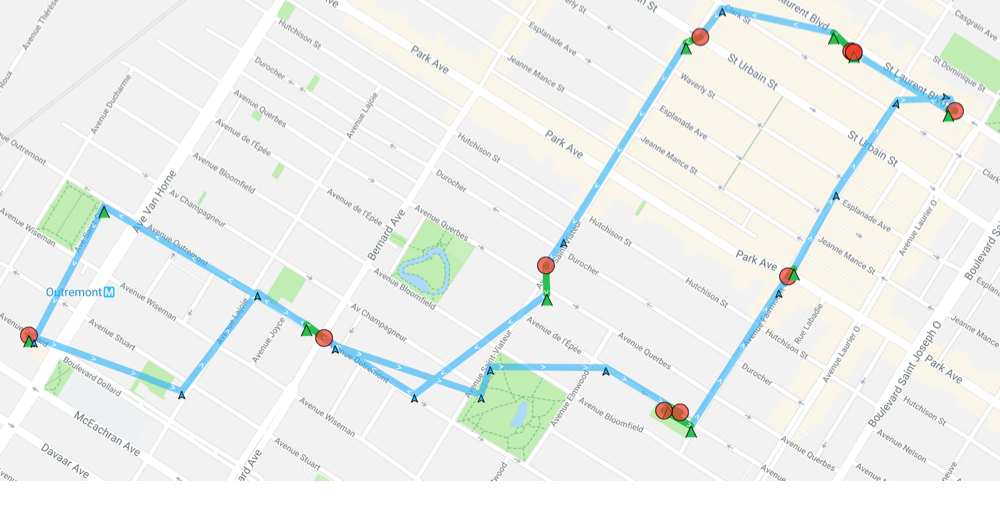
52
|
-
* // Automatically stop tracking after 120 minutes of continuous operation
|
|
53
|
-
* stopAfterElapsedMinutes: 120,
|
|
54
|
-
*
|
|
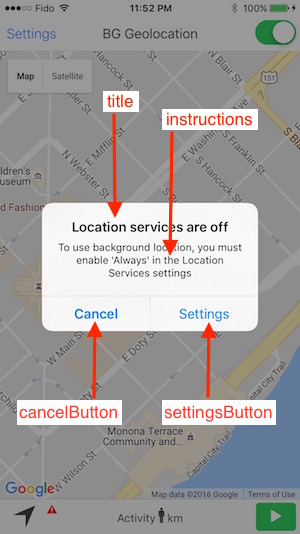
55
|
-
* // iOS: Show blue bar / pill when active in background
|
|
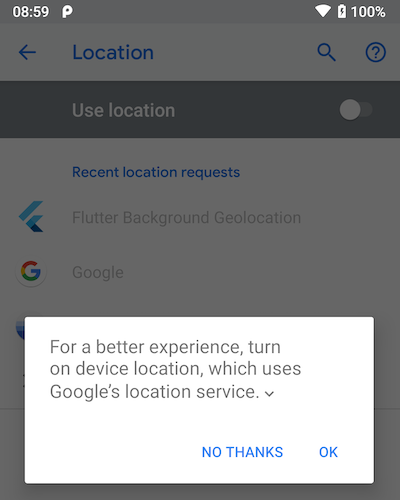
56
|
-
* showsBackgroundLocationIndicator: true,
|
|
57
|
-
*
|
|
58
|
-
* // Noise-reduction / denoising filter
|
|
59
|
-
* filter: {
|
|
60
|
-
* policy: "adjust",
|
|
61
|
-
* maxImpliedSpeed: 60,
|
|
62
|
-
* odometerAccuracyThreshold: 20,
|
|
63
|
-
* trackingAccuracyThreshold: 100
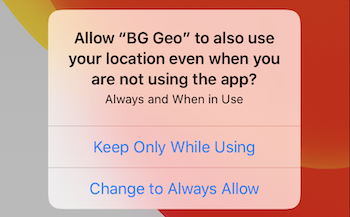
|
|
64
|
-
* },
|
|
65
|
-
*
|
|
66
|
-
* // Geofencing behavior
|
|
67
|
-
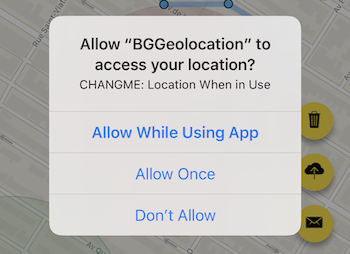
* geofenceProximityRadius: 1000,
|
|
68
|
-
* geofenceInitialTriggerEntry: true,
|
|
69
|
-
* geofenceModeHighAccuracy: true,
|
|
70
|
-
*
|
|
71
|
-
* // Permissions / alerts (iOS)
|
|
72
|
-
* locationAuthorizationRequest: "Always",
|
|
73
|
-
* disableLocationAuthorizationAlert: false,
|
|
74
|
-
* locationAuthorizationAlert: {
|
|
75
|
-
* titleWhenNotEnabled: "Location Required",
|
|
76
|
-
* message: "Enable location access for full functionality.",
|
|
77
|
-
* cancelButton: "Cancel",
|
|
78
|
-
* settingsButton: "Settings"
|
|
79
|
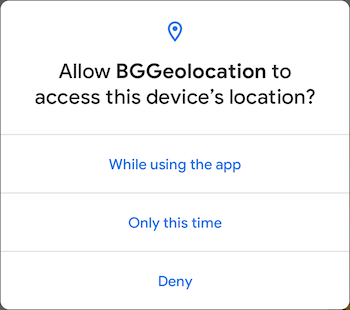
-
* }
|
|
80
|
-
* },
|
|
81
|
-
*
|
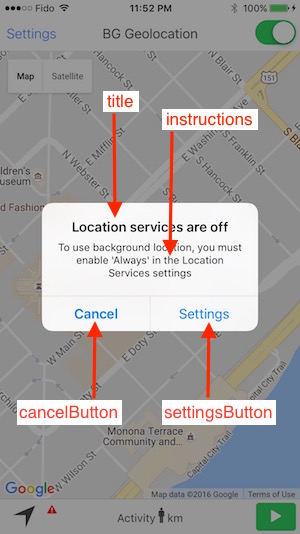
|
82
|
-
* // Additional compound config groups
|
|
83
|
-
* http: {
|
|
84
|
-
* url: "https://example.com/api/locations",
|
|
85
|
-
* autoSync: true,
|
|
86
|
-
* batchSync: true,
|
|
87
|
-
* maxBatchSize: 10,
|
|
88
|
-
* method: "POST",
|
|
89
|
-
* params: {
|
|
90
|
-
* user_id: 1234,
|
|
91
|
-
* trip_id: 5678
|
|
92
|
-
* },
|
|
93
|
-
* headers: {
|
|
94
|
-
* "X-FOO": "bar"
|
|
95
|
-
* }
|
|
96
|
-
* },
|
|
97
|
-
*
|
|
98
|
-
* app: {
|
|
99
|
-
* stopOnTerminate: false,
|
|
100
|
-
* startOnBoot: true
|
|
101
|
-
* },
|
|
102
|
-
*
|
|
103
|
-
* logging: {
|
|
104
|
-
* debug: true,
|
|
105
|
-
* logLevel: BackgroundGeolocation.LOG_LEVEL_VERBOSE
|
|
106
|
-
* }
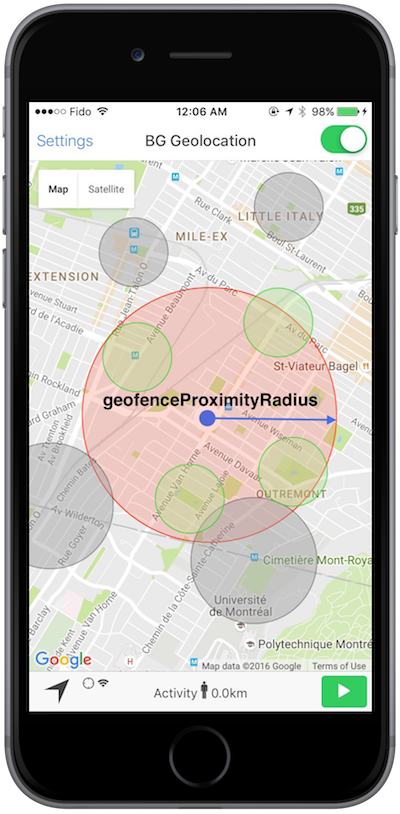
|
|
107
|
-
* };
|
|
108
|
-
*
|
|
109
|
-
* await BackgroundGeolocation.ready(config);
|
|
110
|
-
* ```
|
|
111
|
-
*
|
|
112
|
-
* **Migration from Legacy Flat Config**
|
|
113
|
-
*
|
|
114
|
-
* Previously, geolocation options were configured directly on the root
|
|
115
|
-
* {@link Config} object:
|
|
116
|
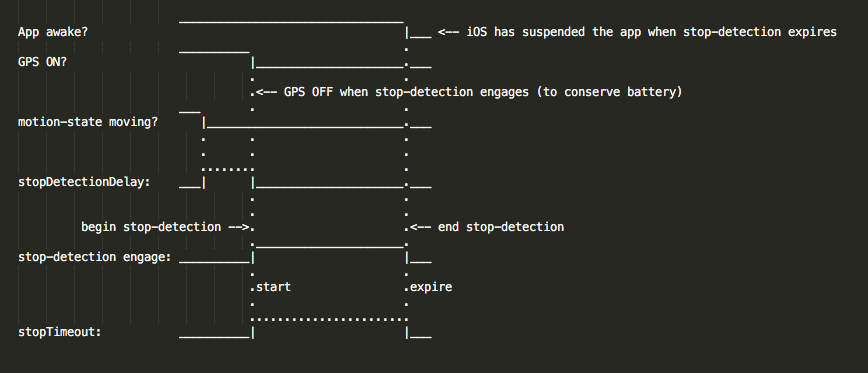
-
*
|
|
117
|
-
* ```ts
|
|
118
|
-
* // Legacy (flat)
|
|
119
|
-
* BackgroundGeolocation.ready({
|
|
120
|
-
* desiredAccuracy: BackgroundGeolocation.DESIRED_ACCURACY_HIGH,
|
|
121
|
-
* distanceFilter: 10,
|
|
122
|
-
* stopTimeout: 5,
|
|
123
|
-
* stationaryRadius: 150,
|
|
124
|
-
* locationTimeout: 60
|
|
125
|
-
* });
|
|
126
|
-
* ```
|
|
127
|
-
*
|
|
128
|
-
* These options now belong to this {@link GeoConfig} group:
|
|
129
|
-
*
|
|
130
|
-
* ```ts
|
|
131
|
-
* BackgroundGeolocation.ready({
|
|
132
|
-
* geolocation: {
|
|
133
|
-
* desiredAccuracy: DesiredAccuracy.High,
|
|
134
|
-
* distanceFilter: 10,
|
|
135
|
-
* stopTimeout: 5,
|
|
136
|
-
* stationaryRadius: 150,
|
|
137
|
-
* locationTimeout: 60
|
|
138
|
-
* }
|
|
139
|
-
* });
|
|
140
|
-
* ```
|
|
141
|
-
*
|
|
142
|
-
* Legacy flat fields remain supported for backward compatibility, but they are now
|
|
143
|
-
* marked **deprecated**. Prefer {@link Config.geolocation} going forward for clarity and structure.
|
|
144
|
-
*
|
|
145
|
-
* **See also**
|
|
146
|
-
* - {@link LocationFilter}
|
|
147
|
-
*
|
|
148
|
-
* @category Config
|
|
149
|
-
*/
|
|
150
4
|
export interface GeoConfig {
|
|
151
|
-
/**
|
|
152
|
-
* Specify the desired-accuracy of the geolocation system.
|
|
153
|
-
*
|
|
154
|
-
* The following constants are defined upon the {@link BackgroundGeolocation} class:
|
|
155
|
-
*
|
|
156
|
-
* | Name | Location Providers | Description |
|
|
157
|
-
* |-------------------------------------------------------|--------------------------------------|---------------------------------|
|
|
158
|
-
* | {@link DesiredAccuracy.Navigation} | (**iOS only**) GPS + Wifi + Cellular | Highest power; highest accuracy |
|
|
159
|
-
* | {@link DesiredAccuracy.High} | GPS + Wifi + Cellular | Highest power; highest accuracy |
|
|
160
|
-
* | {@link DesiredAccuracy.Medium} | Wifi + Cellular | Medium power; Medium accuracy; |
|
|
161
|
-
* | {@link DesiredAccuracy.Low} | Wifi (low power) + Cellular | Lower power; No GPS |
|
|
162
|
-
* | {@link DesiredAccuracy.VeryLow} | Cellular only | Lowest power; lowest accuracy |
|
|
163
|
-
* | {@link DesiredAccuracy.Lowest} | (**iOS only**) | Lowest power; lowest accuracy |
|
|
164
|
-
*
|
|
165
|
-
* ### ⚠️ Note:
|
|
166
|
-
* - Only **`DESIRED_ACCURACY_HIGH`** uses GPS. `speed`, `heading` and `altitude` are available only from GPS.
|
|
167
|
-
*
|
|
168
|
-
* @example
|
|
169
|
-
* ```typescript
|
|
170
|
-
* BackgroundGeoloction.ready({
|
|
171
|
-
* desiredAccuracy: BackgroundGeolocation.DesiredAccuracy.High,
|
|
172
|
-
* });
|
|
173
|
-
*```
|
|
174
|
-
* For platform-specific information about location accuracy, see the corresponding API docs:
|
|
175
|
-
* - [Android](https://developer.android.com/reference/com/google/android/gms/location/LocationRequest.html#PRIORITY_BALANCED_POWER_ACCURACY)
|
|
176
|
-
* - [iOS](https://developer.apple.com/reference/corelocation/cllocationmanager/1423836-desiredaccuracy?language=objc)
|
|
177
|
-
*/
|
|
178
5
|
desiredAccuracy?: DesiredAccuracy;
|
|
179
|
-
/**
|
|
180
|
-
* **`[iOS only]`** Specifies the Core Motion activity type used by iOS to
|
|
181
|
-
* optimize its internal stop-detection algorithm.
|
|
182
|
-
*
|
|
183
|
-
* Apple is intentionally vague about how this affects motion interpretation,
|
|
184
|
-
* but each activity type provides platform hints about the expected movement
|
|
185
|
-
* pattern (e.g., automotive navigation, fitness, airborne).
|
|
186
|
-
*
|
|
187
|
-
* Available values are defined as constants on {@link ActivityType}.
|
|
188
|
-
*
|
|
189
|
-
* | Name |
|
|
190
|
-
* |--------------------------------------------------|
|
|
191
|
-
* | {@link ActivityType.Other} |
|
|
192
|
-
* | {@link ActivityType.AutomotiveNavigation} |
|
|
193
|
-
* | {@link ActivityType.Fitness} |
|
|
194
|
-
* | {@link ActivityType.OtherNavigation} |
|
|
195
|
-
* | {@link ActivityType.Airborne} |
|
|
196
|
-
*
|
|
197
|
-
* @example
|
|
198
|
-
*
|
|
199
|
-
* ```ts
|
|
200
|
-
* BackgroundGeolocation.ready({
|
|
201
|
-
* geolocation: {
|
|
202
|
-
* activityType: ActivityType.Other,
|
|
203
|
-
* },
|
|
204
|
-
* });
|
|
205
|
-
* ```
|
|
206
|
-
*
|
|
207
|
-
* **Note:** For more details, see Apple docs:
|
|
208
|
-
* https://developer.apple.com/reference/corelocation/cllocationmanager/1620567-activitytype
|
|
209
|
-
*
|
|
210
|
-
* @category Geolocation
|
|
211
|
-
*/
|
|
212
6
|
activityType?: ActivityType;
|
|
213
|
-
/**
|
|
214
|
-
* The minimum distance (measured in meters) a device must move horizontally before an update event is generated.
|
|
215
|
-
*
|
|
216
|
-
* However, by default, **`distanceFilter`** is elastically auto-calculated by the plugin: When speed increases, **`distanceFilter`** increases; when speed decreases, so too does **`distanceFilter`**.
|
|
217
|
-
*
|
|
218
|
-
*
|
|
219
|
-
* ### ℹ️ Note:
|
|
220
|
-
* - To disable this behavior, configure {@link disableElasticity} __`true`__.
|
|
221
|
-
* - To control the scale of the automatic `distanceFilter` calculation, see {{@link elasticityMultiplier}
|
|
222
|
-
*
|
|
223
|
-
* `distanceFilter` is auto-scaled by rounding speed to the nearest `5 m/s` and adding `distanceFilter` meters for each `5 m/s` increment.
|
|
224
|
-
*
|
|
225
|
-
* For example, at biking speed of 7.7 m/s with a configured `distanceFilter: 30`:
|
|
226
|
-
* @example
|
|
227
|
-
* ```
|
|
228
|
-
* rounded_speed = round(7.7, 5)
|
|
229
|
-
* => 10
|
|
230
|
-
* multiplier = rounded_speed / 5
|
|
231
|
-
* => 10 / 5 = 2
|
|
232
|
-
* adjusted_distance_filter = multiplier * distanceFilter
|
|
233
|
-
* => 2 * 30 = 60 meters
|
|
234
|
-
* ```
|
|
235
|
-
*
|
|
236
|
-
* At highway speed of `27 m/s` with a configured `distanceFilter: 50`:
|
|
237
|
-
* @example
|
|
238
|
-
* ```
|
|
239
|
-
* rounded_speed = round(27, 5)
|
|
240
|
-
* => 30
|
|
241
|
-
* multiplier = rounded_speed / 5
|
|
242
|
-
* => 30 / 5 = 6
|
|
243
|
-
* adjusted_distance_filter = multiplier * distanceFilter * elasticityMultipiler
|
|
244
|
-
* => 6 * 50 = 300 meters
|
|
245
|
-
* ```
|
|
246
|
-
*
|
|
247
|
-
* Note the following real example of "elasticity" on highway 101 towards San Francisco as the driver slows down while running into
|
|
248
|
-
* slower traffic — locations become compressed as `distanceFilter` decreases.
|
|
249
|
-
*
|
|
250
|
-
* 
|
|
251
|
-
*
|
|
252
|
-
* Compare now background-geolocation in the scope of a city. In this image, the left-hand track is from a cab-ride, while the right-hand
|
|
253
|
-
* track is walking speed.
|
|
254
|
-
*
|
|
255
|
-
* 
|
|
256
|
-
*/
|
|
257
7
|
distanceFilter?: number;
|
|
258
|
-
/**
|
|
259
|
-
* The minimum distance the device must move beyond the stationary location for aggressive background-tracking to engage.
|
|
260
|
-
*
|
|
261
|
-
* ⚠️ Note: The device will not detect the exact moment it moves out of the stationary-radius. In normal conditions, it will typically
|
|
262
|
-
* take **~200 meters** of movement before the plugin begins tracking.
|
|
263
|
-
*
|
|
264
|
-
* Configuring **`stationaryRadius: 0`** has **NO EFFECT**. In fact the plugin enforces a minimum **`stationaryRadius`** of `25` and
|
|
265
|
-
* in-practice, the native API won't respond for at least 200 meters.
|
|
266
|
-
*
|
|
267
|
-
* The following image shows the typical distance iOS requires to detect exit of the **`stationaryRadius`**:
|
|
268
|
-
* - *Green polylines*: represent a transition from **stationary** state to **moving** (__~200 meters__).
|
|
269
|
-
* - *Red circles*: locations where the plugin entered the **stationary** state.
|
|
270
|
-
*
|
|
271
|
-
* 
|
|
272
|
-
*
|
|
273
|
-
* ℹ️ See also:
|
|
274
|
-
* - 📘 [Philosophy of Operation](github:wiki/Philosophy-of-Operation)
|
|
275
|
-
*
|
|
276
|
-
*/
|
|
277
8
|
stationaryRadius?: number;
|
|
278
|
-
/**
|
|
279
|
-
* Minutes to wait in *moving* state with no movement before considering the device *stationary*.
|
|
280
|
-
*
|
|
281
|
-
* Defaults to `5` minutes. When in the *moving* state, specifies the number of minutes to wait before turning off location-services and
|
|
282
|
-
* transitioning to *stationary* state after the ActivityRecognition System detects the device is `STILL`. An example use-case for this
|
|
283
|
-
* configuration is to delay GPS OFF while in a car waiting at a traffic light.
|
|
284
|
-
*
|
|
285
|
-
* :warning: Setting a very long `stopTimeout` will cause the device's location API to remain ON while the device is potentially motionless for extended periods, which may have a significant impact on battery life. It depends upon your use-case.
|
|
286
|
-
*
|
|
287
|
-
* ### ℹ️ See also:
|
|
288
|
-
* - {@link BackgroundGeolocation.onMotionChange}
|
|
289
|
-
* - 📘 [Philosophy of Operation](github:wiki/Philosophy-of-Operation)
|
|
290
|
-
*/
|
|
291
9
|
stopTimeout?: number;
|
|
292
|
-
/**
|
|
293
|
-
* Automatically {@link BackgroundGeolocation.stop} when the {@link stopTimeout} elapses.
|
|
294
|
-
*
|
|
295
|
-
* The plugin can optionally automatically stop tracking when the {@link stopTimeout} timer elapses. For example, when the plugin
|
|
296
|
-
* first fires {@link BackgroundGeolocation.onMotionChange} into the *moving* state, the next time an *onMotionChange* event occurs
|
|
297
|
-
* into the *stationary* state, the plugin will have automatically called {@link BackgroundGeolocation.stop} upon itself.
|
|
298
|
-
*
|
|
299
|
-
* ⚠️ `stopOnStationary` will **only** occur due to {@link stopTimeout} timer elapse. It will **not** occur by manually executing
|
|
300
|
-
* {@link BackgroundGeolocation.changePace} __`false`__.
|
|
301
|
-
*
|
|
302
|
-
* @example
|
|
303
|
-
* ```typescript
|
|
304
|
-
* BackgroundGeolocation.ready({
|
|
305
|
-
* stopOnStationary: true,
|
|
306
|
-
* isMoving: true
|
|
307
|
-
* }, (state) => {
|
|
308
|
-
* BackgroundGeolocation.start();
|
|
309
|
-
* });
|
|
310
|
-
* ```
|
|
311
|
-
*/
|
|
312
10
|
stopOnStationary?: boolean;
|
|
313
|
-
/**
|
|
314
|
-
* **`[iOS only]`** Prevent the iOS location API from *ever* automatically turning off.
|
|
315
|
-
*
|
|
316
|
-
* **⚠️ WARNING:**
|
|
317
|
-
* This option should almost always remain `undefined`.
|
|
318
|
-
* Only set this if you know **exactly** what you're doing.
|
|
319
|
-
*
|
|
320
|
-
* By default, the SDK automatically turns **off** iOS location-services when the
|
|
321
|
-
* device remains stationary for {@link stopTimeout} minutes.
|
|
322
|
-
*
|
|
323
|
-
* When this option is explicitly set to `false`, location-services will **never**
|
|
324
|
-
* be turned off. In this mode:
|
|
325
|
-
*
|
|
326
|
-
* - {@link ActivityConfig.disableStopDetection} will automatically be forced to `true`
|
|
327
|
-
* - You are responsible for disabling tracking when you no longer need it
|
|
328
|
-
* - This can have **severe battery-drain implications**
|
|
329
|
-
* - {@link AppConfig.preventSuspend} will no longer function
|
|
330
|
-
*
|
|
331
|
-
* This option exists only for highly specialized use-cases and should generally
|
|
332
|
-
* **not** be used in production applications.
|
|
333
|
-
*/
|
|
334
11
|
pausesLocationUpdatesAutomatically?: boolean;
|
|
335
|
-
/**
|
|
336
|
-
* Defaults to **`false`**. Set **`true`** to disable automatic, speed-based {@link distanceFilter} auto-scaling. By default, the SDK automatically
|
|
337
|
-
* increases {@link distanceFilter} as speed increases (and decreases it as speed *decreases*) in order to record fewer locations and conserve energy.
|
|
338
|
-
*
|
|
339
|
-
* Note the following real example of "elasticity" on highway 101 towards San Francisco as the driver slows down while running into slower
|
|
340
|
-
* traffic — locations become compressed as {@link distanceFilter} decreases.
|
|
341
|
-
*
|
|
342
|
-
* 
|
|
343
|
-
*
|
|
344
|
-
* ### ℹ️ See also:
|
|
345
|
-
* - {@link elasticityMultiplier}
|
|
346
|
-
* - {@link distanceFilter}
|
|
347
|
-
*/
|
|
348
12
|
disableElasticity?: boolean;
|
|
349
|
-
/**
|
|
350
|
-
* Controls the scale of automatic speed-based {@link distanceFilter} elasticity.
|
|
351
|
-
*
|
|
352
|
-
* Increasing `elasticityMultiplier` will result in fewer location samples as speed increases. A value of `0` has the same effect as
|
|
353
|
-
* {@link disableElasticity} __`true`__.
|
|
354
|
-
*/
|
|
355
13
|
elasticityMultiplier?: number;
|
|
356
|
-
/**
|
|
357
|
-
* Automatically {@link BackgroundGeolocation.stop} tracking after *x* minutes.
|
|
358
|
-
*
|
|
359
|
-
* The plugin can optionally automatically {@link BackgroundGeolocation.stop} after some number of minutes elapses after the {@link BackgroundGeolocation.start} method was called.
|
|
360
|
-
*
|
|
361
|
-
* @example
|
|
362
|
-
* ```typescript
|
|
363
|
-
* BackgroundGeolocation.ready({
|
|
364
|
-
* stopAfterElapsedMinutes: 30
|
|
365
|
-
* }).then((state) => {
|
|
366
|
-
* BackgroundGeolocation.start(); // <-- plugin will automatically #stop in 30 minutes
|
|
367
|
-
* });
|
|
368
|
-
* ```
|
|
369
|
-
*/
|
|
370
14
|
stopAfterElapsedMinutes?: number;
|
|
371
|
-
/**
|
|
372
|
-
* Set `true` in order to disable constant background-tracking. Locations will be recorded only periodically.
|
|
373
|
-
*
|
|
374
|
-
* Defaults to `false`. A location will be recorded only every `500` to `1000` meters (can be higher in non urban environments; depends upon the spacing of Cellular towers). Many of the plugin's configuration parameters **will have no effect**, such as {@link distanceFilter}, {@link stationaryRadius}, {@link activityType}, etc.
|
|
375
|
-
*
|
|
376
|
-
* Using `significantChangesOnly: true` will provide **significant** power-saving at the expense of fewer recorded locations.
|
|
377
|
-
*
|
|
378
|
-
* **iOS**
|
|
379
|
-
*
|
|
380
|
-
* Engages the iOS [Significant Location Changes API](https://developer.apple.com/reference/corelocation/cllocationmanager/1423531-startmonitoringsignificantlocati?language=objc) API for only periodic location updates every 500-1000 meters.
|
|
381
|
-
*
|
|
382
|
-
* ⚠️ If Apple has rejected your application, refusing to grant your app the privilege of using the **`UIBackgroundMode: "location"`**, this can be a solution.
|
|
383
|
-
*
|
|
384
|
-
* **Android**
|
|
385
|
-
*
|
|
386
|
-
* A location will be recorded several times per hour while the device is in the *moving* state. No foreground-service will be run (nor its corresponding persistent {@link NotificationConfig}).
|
|
387
|
-
*
|
|
388
|
-
* Example 1 **`useSignificantChangesOnly: true`**
|
|
389
|
-
*
|
|
390
|
-
* 
|
|
391
|
-
*
|
|
392
|
-
* Example 2 **`useSignificantChangesOnly: false` (Default)**
|
|
393
|
-
*
|
|
394
|
-
* 
|
|
395
|
-
*/
|
|
396
15
|
useSignificantChangesOnly?: boolean;
|
|
397
|
-
/**
|
|
398
|
-
* Disables automatic authorization alert when plugin detects the user has disabled location authorization.
|
|
399
|
-
*
|
|
400
|
-
* You will be responsible for handling disabled location authorization by listening to the {@link BackgroundGeolocation.onProviderChange} event.
|
|
401
|
-
*
|
|
402
|
-
* By default, the plugin automatically shows a native alert to the user when location-services are disabled, directing them to the settings screen. If you **do not** desire this automated behavior, set `disableLocationAuthorizationAlert: true`.
|
|
403
|
-
*
|
|
404
|
-
* __iOS__
|
|
405
|
-
*
|
|
406
|
-
* The iOS alert dialog text elements can be configured via {@link locationAuthorizationAlert} and {@link locationAuthorizationRequest}.
|
|
407
|
-
*
|
|
408
|
-
* 
|
|
409
|
-
*
|
|
410
|
-
* __Android__
|
|
411
|
-
*
|
|
412
|
-
* Android can detect when the user has configured the device's *Settings->Location* in a manner that does not match your location request (eg: {@link desiredAccuracy}). For example, if the user configures *Settings->Location->Mode* with *Battery Saving* (ie: Wifi only) but you've specifically requested {@link DesiredAccuracy.High} (ie: GPS), Android will show a dialog asking the user to confirm the desired changes. If the user clicks `[OK]`, the OS will automcatically modify the Device settings.
|
|
413
|
-
*
|
|
414
|
-
* 
|
|
415
|
-
*
|
|
416
|
-
* This automated Android dialog will be shown in the following cases:
|
|
417
|
-
* - {@link BackgroundGeolocation.onProviderChange}
|
|
418
|
-
* - {@link BackgroundGeolocation.start}
|
|
419
|
-
* - {@link BackgroundGeolocation.requestPermission}
|
|
420
|
-
*
|
|
421
|
-
* @example
|
|
422
|
-
* ```typescript
|
|
423
|
-
* BackgroundGeolocation.onProviderChange((event) => {
|
|
424
|
-
* console.log("[onProviderChange] ", event);
|
|
425
|
-
*
|
|
426
|
-
* if (!provider.enabled) {
|
|
427
|
-
* alert("Please enable location services");
|
|
428
|
-
* }
|
|
429
|
-
* });
|
|
430
|
-
*
|
|
431
|
-
* BackgroundGeolocation.ready({
|
|
432
|
-
* disableLocationAuthorizationAlert: true
|
|
433
|
-
* });
|
|
434
|
-
* ```
|
|
435
|
-
*/
|
|
436
16
|
disableLocationAuthorizationAlert?: boolean;
|
|
437
|
-
/**
|
|
438
|
-
* Defines the *desired* location-authorization level your app expects from the user:
|
|
439
|
-
*
|
|
440
|
-
* - **`"Always"`**
|
|
441
|
-
* - **`"WhenInUse"`**
|
|
442
|
-
* - **`"Any"`**
|
|
443
|
-
*
|
|
444
|
-
* Defaults to **`"Always"`**.
|
|
445
|
-
*
|
|
446
|
-
* Setting `locationAuthorizationRequest` tells the SDK *what authorization level
|
|
447
|
-
* your app expects*, so it can guide the user and present helpful upgrade dialogs
|
|
448
|
-
* when needed. If you do **not care** which authorization is granted, configure
|
|
449
|
-
* **`"Any"`**.
|
|
450
|
-
*
|
|
451
|
-
* If you request **`"Always"`** but the user grants only **When-In-Use**, the SDK
|
|
452
|
-
* will display {@link locationAuthorizationAlert} unless disabled via
|
|
453
|
-
* {@link disableLocationAuthorizationAlert}.
|
|
454
|
-
*
|
|
455
|
-
*
|
|
456
|
-
* **iOS**
|
|
457
|
-
*
|
|
458
|
-
* iOS 13 introduced major changes to the authorization workflow.
|
|
459
|
-
* Apps no longer receive **Always Allow** on the initial dialog.
|
|
460
|
-
*
|
|
461
|
-
* After a user first grants **While Using the App**, iOS may show a second,
|
|
462
|
-
* system-managed **upgrade prompt**, asking if they’d like to enable:
|
|
463
|
-
*
|
|
464
|
-
* - **Keep Only While Using**
|
|
465
|
-
* - **Change to Always Allow**
|
|
466
|
-
*
|
|
467
|
-
* **1. When `locationAuthorizationRequest: "Always"`**
|
|
468
|
-
*
|
|
469
|
-
* The user will first see the **While Using App** dialog, followed immediately by
|
|
470
|
-
* the upgrade prompt asking for **Always Allow**:
|
|
471
|
-
*
|
|
472
|
-
* 
|
|
473
|
-
*
|
|
474
|
-
* If the user *denies* Always, the SDK displays
|
|
475
|
-
* {@link locationAuthorizationAlert} (unless disabled).
|
|
476
|
-
*
|
|
477
|
-
* 
|
|
478
|
-
*
|
|
479
|
-
* **2. When `locationAuthorizationRequest: "WhenInUse"`**
|
|
480
|
-
*
|
|
481
|
-
* Only the initial dialog appears:
|
|
482
|
-
*
|
|
483
|
-
* 
|
|
484
|
-
*
|
|
485
|
-
* If you later upgrade the config to `"Always"`, the upgrade prompt
|
|
486
|
-
* appears immediately:
|
|
487
|
-
*
|
|
488
|
-
* 
|
|
489
|
-
*
|
|
490
|
-
* **3. When `locationAuthorizationRequest: "Any"`**
|
|
491
|
-
*
|
|
492
|
-
* The SDK requests **Always** internally, but accepts either result.
|
|
493
|
-
* iOS may spontaneously show the upgrade dialog later:
|
|
494
|
-
*
|
|
495
|
-
* 
|
|
496
|
-
*
|
|
497
|
-
* @example
|
|
498
|
-
* ```ts
|
|
499
|
-
* // Start with When-In-Use
|
|
500
|
-
* BackgroundGeolocation.ready({
|
|
501
|
-
* geolocation: { locationAuthorizationRequest: "WhenInUse" }
|
|
502
|
-
* });
|
|
503
|
-
*
|
|
504
|
-
* async function onClickStartTracking() {
|
|
505
|
-
* await BackgroundGeolocation.start();
|
|
506
|
-
*
|
|
507
|
-
* // Later — you may upgrade to Always at any time.
|
|
508
|
-
* BackgroundGeolocation.setConfig({
|
|
509
|
-
* geolocation: { locationAuthorizationRequest: "Always" }
|
|
510
|
-
* });
|
|
511
|
-
* }
|
|
512
|
-
* ```
|
|
513
|
-
*
|
|
514
|
-
* **Android**
|
|
515
|
-
*
|
|
516
|
-
* **Android 11+ (targetSdkVersion ≥ 30)**
|
|
517
|
-
*
|
|
518
|
-
* Android 11 removes **Allow all the time** from the initial dialog.
|
|
519
|
-
* Instead, apps must present a custom rationale UI before navigating the user
|
|
520
|
-
* to the system **Location Permissions** screen.
|
|
521
|
-
*
|
|
522
|
-
* The SDK automatically presents {@link AppConfig.backgroundPermissionRationale}
|
|
523
|
-
* when configured.
|
|
524
|
-
*
|
|
525
|
-
* - The dialog shows **only once**, unless the user resets permissions.
|
|
526
|
-
*
|
|
527
|
-
* 
|
|
528
|
-
*
|
|
529
|
-
* ```ts
|
|
530
|
-
* BackgroundGeolocation.ready({
|
|
531
|
-
* geolocation: { locationAuthorizationRequest: "Always" },
|
|
532
|
-
* app: {
|
|
533
|
-
* backgroundPermissionRationale: {
|
|
534
|
-
* title: "Allow access to this device's location in the background?",
|
|
535
|
-
* message: "To track your trips, please enable 'Allow all the time' location permission.",
|
|
536
|
-
* positiveAction: "Change to Allow all the time",
|
|
537
|
-
* negativeAction: "Cancel"
|
|
538
|
-
* }
|
|
539
|
-
* }
|
|
540
|
-
* });
|
|
541
|
-
* ```
|
|
542
|
-
*
|
|
543
|
-
* **1. When `locationAuthorizationRequest: "Always"`**
|
|
544
|
-
*
|
|
545
|
-
* After granting **While Using**, Android immediately displays your configured
|
|
546
|
-
* rationale dialog:
|
|
547
|
-
*
|
|
548
|
-
* 
|
|
549
|
-
*
|
|
550
|
-
* **2. When `locationAuthorizationRequest: "WhenInUse"`**
|
|
551
|
-
*
|
|
552
|
-
* Only the initial system dialog appears:
|
|
553
|
-
*
|
|
554
|
-
* 
|
|
555
|
-
*
|
|
556
|
-
* Upgrading later to `"Always"` triggers the rationale dialog:
|
|
557
|
-
*
|
|
558
|
-
* 
|
|
559
|
-
*
|
|
560
|
-
* **3. When `locationAuthorizationRequest: "Any"`**
|
|
561
|
-
*
|
|
562
|
-
* Treated the same as `"Always"`.
|
|
563
|
-
*
|
|
564
|
-
*/
|
|
565
17
|
locationAuthorizationRequest?: 'Always' | 'WhenInUse' | 'Any';
|
|
566
|
-
/**
|
|
567
|
-
* **[iOS only]** Customize the text displayed in the SDK’s
|
|
568
|
-
* location-authorization alert dialog.
|
|
569
|
-
*
|
|
570
|
-
* When {@link locationAuthorizationRequest} is configured as
|
|
571
|
-
* `"Always"` or `"WhenInUse"` and the user subsequently *downgrades* or disables
|
|
572
|
-
* location permission in iOS Settings, the SDK presents an alert directing the
|
|
573
|
-
* user back to the **Settings** screen.
|
|
574
|
-
*
|
|
575
|
-
* `locationAuthorizationAlert` lets you override all of the strings used in that
|
|
576
|
-
* alert. You must supply an object matching {@link locationAuthorizationAlert}.
|
|
577
|
-
*
|
|
578
|
-
* 
|
|
579
|
-
*
|
|
580
|
-
* @example
|
|
581
|
-
* ```ts
|
|
582
|
-
* BackgroundGeolocation.ready({
|
|
583
|
-
* geolocation: {
|
|
584
|
-
* locationAuthorizationAlert: {
|
|
585
|
-
* titleWhenNotEnabled: "Location services are not enabled",
|
|
586
|
-
* titleWhenOff: "Location services are OFF",
|
|
587
|
-
* instructions:
|
|
588
|
-
* "Please enable 'Always' in Location Services to allow background tracking.",
|
|
589
|
-
* cancelButton: "Cancel",
|
|
590
|
-
* settingsButton: "Open Settings"
|
|
591
|
-
* }
|
|
592
|
-
* }
|
|
593
|
-
* });
|
|
594
|
-
* ```
|
|
595
|
-
*
|
|
596
|
-
* **⚠️ Warning**
|
|
597
|
-
*
|
|
598
|
-
* If you provide `locationAuthorizationAlert`, you **must** supply **all**
|
|
599
|
-
* {@link locationAuthorizationAlert} fields — not just a subset.
|
|
600
|
-
*/
|
|
601
18
|
locationAuthorizationAlert?: Record<string, any>;
|
|
602
|
-
/**
|
|
603
|
-
* [__iOS Only__] A Boolean indicating whether the status bar changes its appearance when an app uses location services in the background with `Always` authorization.
|
|
604
|
-
*
|
|
605
|
-
* The default value of this property is `true`. The background location usage indicator is a blue bar or a blue pill in the status bar on iOS; on watchOS the indicator is a small icon. Users can tap the indicator to return to your app.
|
|
606
|
-
*
|
|
607
|
-
* This property affects only apps that received `Always` authorization. When such an app moves to the background, the system uses this property to determine whether to change the status bar appearance to indicate that location services are in use. Set this value to true to maintain transparency with the user.
|
|
608
|
-
*
|
|
609
|
-
* For apps with When In Use authorization, the system changes the appearance of the status bar when the app uses location services in the background.
|
|
610
|
-
*/
|
|
611
19
|
showsBackgroundLocationIndicator?: boolean;
|
|
612
|
-
/**
|
|
613
|
-
* **[Android only]** Desired interval for *active* location updates, in milliseconds.
|
|
614
|
-
*
|
|
615
|
-
* **⚠️ Important**
|
|
616
|
-
* - To use `locationUpdateInterval`, you **must** also set
|
|
617
|
-
* {@link distanceFilter} to `0`.
|
|
618
|
-
* If `distanceFilter` > 0, it **overrides** this interval.
|
|
619
|
-
*
|
|
620
|
-
* This value tells Android how frequently your app *wants* location updates.
|
|
621
|
-
* The system will try to honor it but may deliver updates:
|
|
622
|
-
* - slower (no providers available),
|
|
623
|
-
* - faster (another app requests faster updates),
|
|
624
|
-
* - or not at all (permission or system constraints).
|
|
625
|
-
*
|
|
626
|
-
* Apps with only *coarse* location permission may have this interval silently throttled.
|
|
627
|
-
*
|
|
628
|
-
* @example
|
|
629
|
-
* ```ts
|
|
630
|
-
* BackgroundGeolocation.ready({
|
|
631
|
-
* geolocation: {
|
|
632
|
-
* distanceFilter: 0, // Required — otherwise this field is ignored.
|
|
633
|
-
* locationUpdateInterval: 5000 // Request a fix every ~5 seconds
|
|
634
|
-
* }
|
|
635
|
-
* });
|
|
636
|
-
* ```
|
|
637
|
-
*
|
|
638
|
-
* **ℹ️ See also**
|
|
639
|
-
* - Android’s `LocationRequest.setInterval`:
|
|
640
|
-
* https://developers.google.com/android/reference/com/google/android/gms/location/LocationRequest.html#setInterval(long)
|
|
641
|
-
*/
|
|
642
20
|
locationUpdateInterval?: number;
|
|
643
|
-
/**
|
|
644
|
-
* __`[Android only]`__ Explicitly sets the *fastest* interval for location updates,
|
|
645
|
-
* in milliseconds.
|
|
646
|
-
*
|
|
647
|
-
* This value defines the maximum rate at which the SDK will deliver passive
|
|
648
|
-
* location updates. It may be faster than {@link locationUpdateInterval}
|
|
649
|
-
* when other applications or system components are triggering more frequent updates.
|
|
650
|
-
*
|
|
651
|
-
* Configuring a faster passive rate allows your application to benefit from
|
|
652
|
-
* locations generated by other apps **without** increasing power usage.
|
|
653
|
-
*
|
|
654
|
-
* Unlike {@link locationUpdateInterval}, this parameter is *exact*:
|
|
655
|
-
* your application will **never** receive updates faster than this value.
|
|
656
|
-
*
|
|
657
|
-
* - If not configured, the default fastest interval is **30000 ms (30 seconds)**.
|
|
658
|
-
* - A value of `0` is allowed but **not recommended**, since future devices may
|
|
659
|
-
* deliver extremely rapid updates.
|
|
660
|
-
* - If `fastestLocationUpdateInterval` is *slower* than
|
|
661
|
-
* {@link locationUpdateInterval}, the effective fastest interval becomes
|
|
662
|
-
* {@link locationUpdateInterval}.
|
|
663
|
-
*
|
|
664
|
-
* **Example**
|
|
665
|
-
*
|
|
666
|
-
* ```ts
|
|
667
|
-
* import BackgroundGeolocation from "react-native-background-geolocation";
|
|
668
|
-
*
|
|
669
|
-
* BackgroundGeolocation.ready({
|
|
670
|
-
* geolocation: {
|
|
671
|
-
* // Receive passive updates as fast as 5 seconds
|
|
672
|
-
* fastestLocationUpdateInterval: 5000,
|
|
673
|
-
*
|
|
674
|
-
* // Active updates occur according to distanceFilter or locationUpdateInterval
|
|
675
|
-
* }
|
|
676
|
-
* });
|
|
677
|
-
* ```
|
|
678
|
-
*
|
|
679
|
-
* **See also**
|
|
680
|
-
* - [Android documentation](https://developers.google.com/android/reference/com/google/android/gms/location/LocationRequest.html#setFastestInterval(long))
|
|
681
|
-
*
|
|
682
|
-
*/
|
|
683
21
|
fastestLocationUpdateInterval?: number;
|
|
684
|
-
/**
|
|
685
|
-
* __`[Android only]`__ Sets the maximum wait time in milliseconds for location updates.
|
|
686
|
-
*
|
|
687
|
-
* Defaults to `0` (no defer).
|
|
688
|
-
*
|
|
689
|
-
* If you pass a value at least 2x larger than the interval specified with {@link locationUpdateInterval},
|
|
690
|
-
* then location delivery may be delayed and multiple locations can be delivered at once.
|
|
691
|
-
*
|
|
692
|
-
* Locations are determined at the {@link locationUpdateInterval} rate,
|
|
693
|
-
* but can be delivered in batch after the interval you set in this method. This **can consume less battery** and **give more accurate locations**,
|
|
694
|
-
* depending on the device's hardware capabilities. You should set this value to be as large as possible for your needs if you don't need immediate location delivery.
|
|
695
|
-
*/
|
|
696
22
|
deferTime?: number;
|
|
697
|
-
/**
|
|
698
|
-
* __`[Android only]`__ Allow recording locations which are duplicates of the previous.
|
|
699
|
-
*
|
|
700
|
-
* By default, the Android plugin will ignore a received location when it is *identical* to the previous location. Set `true` to override this behavior
|
|
701
|
-
* and record *every* location, regardless if it is identical to the last location.
|
|
702
|
-
*
|
|
703
|
-
* In the logs, you will see a location being ignored:
|
|
704
|
-
*
|
|
705
|
-
* ```
|
|
706
|
-
* TSLocationManager: ℹ️ IGNORED: same as last location
|
|
707
|
-
* ```
|
|
708
|
-
*
|
|
709
|
-
* An identical location is often generated when changing state from *stationary* -> *moving*, where a single location is first requested
|
|
710
|
-
* (the {@link BackgroundGeolocation.onMotionChange} location) before turning on regular location updates.
|
|
711
|
-
*
|
|
712
|
-
* Changing geolocation config params can also generate a duplicate location (eg: changing {@link distanceFilter}).
|
|
713
|
-
*/
|
|
714
23
|
allowIdenticalLocations?: boolean;
|
|
715
|
-
/**
|
|
716
|
-
* Defines the radius (in meters) around the device used to query for geofences
|
|
717
|
-
* that should be actively monitored.
|
|
718
|
-
*
|
|
719
|
-
* The default — and **minimum** — value is **1000 meters**.
|
|
720
|
-
*
|
|
721
|
-
* Mobile platforms allow only a limited number of concurrently monitored geofences
|
|
722
|
-
* (**iOS: 20**, **Android: ~100**).
|
|
723
|
-
*
|
|
724
|
-
* The SDK removes this limitation by allowing you to register **any number of geofences**
|
|
725
|
-
* (thousands even). It stores them in its internal database and performs efficient
|
|
726
|
-
* spatial queries to determine which subset of geofences should be activated based on
|
|
727
|
-
* the device’s current position.
|
|
728
|
-
*
|
|
729
|
-
* As the device moves, this radius determines when the monitored geofence set changes,
|
|
730
|
-
* firing {@link BackgroundGeolocation.onGeofencesChange}.
|
|
731
|
-
*
|
|
732
|
-
* **See also**
|
|
733
|
-
* - 📘 {@link Geofence | Geofencing Guide}
|
|
734
|
-
* - [Animation of this behavior](https://www.transistorsoft.com/shop/products/assets/images/background-geolocation-infinite-geofencing.gif)
|
|
735
|
-
*
|
|
736
|
-
* 
|
|
737
|
-
*/
|
|
738
24
|
geofenceProximityRadius?: number;
|
|
739
|
-
/**
|
|
740
|
-
* Disable the motion-activity–based stop-detection system.
|
|
741
|
-
*
|
|
742
|
-
* When enabled (`true`), the SDK ignores platform motion-activity signals when
|
|
743
|
-
* determining whether the device is *stationary*. This affects how and when
|
|
744
|
-
* location-services are automatically turned off on both iOS and Android.
|
|
745
|
-
*
|
|
746
|
-
* **iOS**
|
|
747
|
-
*
|
|
748
|
-
* Disables the accelerometer-based **stop-detection system**. When disabled,
|
|
749
|
-
* the plugin falls back to the default iOS behavior: location-services turn off
|
|
750
|
-
* automatically after **exactly 15 minutes** of no motion. In this mode, you
|
|
751
|
-
* lose control over {@link stopTimeout}.
|
|
752
|
-
*
|
|
753
|
-
* To *completely* prevent iOS from automatically disabling location-services,
|
|
754
|
-
* you must also set {@link pausesLocationUpdatesAutomatically}
|
|
755
|
-
* to `false`:
|
|
756
|
-
*
|
|
757
|
-
* ```ts
|
|
758
|
-
* BackgroundGeolocation.ready({
|
|
759
|
-
* geolocation: {
|
|
760
|
-
* disableStopDetection: true,
|
|
761
|
-
* pausesLocationUpdatesAutomatically: false
|
|
762
|
-
* }
|
|
763
|
-
* });
|
|
764
|
-
* ```
|
|
765
|
-
*
|
|
766
|
-
* **⚠️ iOS location-services will *never* turn off!**
|
|
767
|
-
*
|
|
768
|
-
* With the configuration above, iOS will **never** disable location-services.
|
|
769
|
-
* This can **heavily drain the battery**. Do **not** use this unless you fully
|
|
770
|
-
* control tracking manually (for example, a workout app that toggles tracking
|
|
771
|
-
* using {@link BackgroundGeolocation.changePace}).
|
|
772
|
-
*
|
|
773
|
-
* **iOS Stop-detection timing**
|
|
774
|
-
*
|
|
775
|
-
* 
|
|
776
|
-
*
|
|
777
|
-
* **Android**
|
|
778
|
-
*
|
|
779
|
-
* If set to `true`, Android location-services will **never** turn off
|
|
780
|
-
* automatically. It becomes your responsibility (or the user’s) to disable
|
|
781
|
-
* tracking manually by calling:
|
|
782
|
-
*
|
|
783
|
-
* - {@link BackgroundGeolocation.changePace} with `false`, or
|
|
784
|
-
* - {@link BackgroundGeolocation.stop}
|
|
785
|
-
*/
|
|
786
25
|
disableStopDetection?: boolean;
|
|
787
|
-
/**
|
|
788
|
-
* When a device is already within a just-created geofence, fire the **enter** transition immediately.
|
|
789
|
-
*
|
|
790
|
-
* Defaults to `true`. Set `false` to disable triggering a geofence immediately if device is already inside it.
|
|
791
|
-
*
|
|
792
|
-
* __ℹ️ See also__
|
|
793
|
-
* - 📘 [[Geofence | Geofencing Guide]].
|
|
794
|
-
*/
|
|
795
26
|
geofenceInitialTriggerEntry?: boolean;
|
|
796
|
-
/**
|
|
797
|
-
* Defines how raw GPS samples are filtered, denoised, and smoothed before being
|
|
798
|
-
* recorded or used for odometer calculations.
|
|
799
|
-
*
|
|
800
|
-
* `LocationFilter` is supplied via {@link GeoConfig.filter} and provides
|
|
801
|
-
* fine-grained control over how the SDK handles noisy or inconsistent
|
|
802
|
-
* location data from the underlying platform.
|
|
803
|
-
*
|
|
804
|
-
* **Overview**
|
|
805
|
-
*
|
|
806
|
-
* The native platform continuously produces raw `CLLocation` (iOS) or
|
|
807
|
-
* `Location` (Android) samples. The `LocationFilter` applies:
|
|
808
|
-
*
|
|
809
|
-
* - Kalman filtering
|
|
810
|
-
* - rolling-window averaging
|
|
811
|
-
* - speed, distance, and accuracy constraints
|
|
812
|
-
*
|
|
813
|
-
* These produce smoother paths, reduce jitter, and improve odometer stability.
|
|
814
|
-
*
|
|
815
|
-
* @example
|
|
816
|
-
* ```ts
|
|
817
|
-
* BackgroundGeolocation.ready({
|
|
818
|
-
* geolocation: {
|
|
819
|
-
* filter: {
|
|
820
|
-
* policy: LocationFilterPolicy.Adjust,
|
|
821
|
-
* useKalman: true,
|
|
822
|
-
* kalmanProfile: KalmanProfile.Default,
|
|
823
|
-
* trackingAccuracyThreshold: 100,
|
|
824
|
-
* odometerAccuracyThreshold: 20
|
|
825
|
-
* }
|
|
826
|
-
* }
|
|
827
|
-
* });
|
|
828
|
-
* ```
|
|
829
|
-
*
|
|
830
|
-
* **Filtering Flow**
|
|
831
|
-
*
|
|
832
|
-
* 
|
|
833
|
-
*
|
|
834
|
-
* **Parameters**
|
|
835
|
-
*
|
|
836
|
-
* | Field | Description |
|
|
837
|
-
* |-------|-------------|
|
|
838
|
-
* | **{@link LocationFilter.policy}** | Selects which filtering policy to apply. See {@link LocationFilterPolicy}. |
|
|
839
|
-
* | **{@link LocationFilter.useKalman}** | Enables Kalman filtering of speed and position (default: `true`). |
|
|
840
|
-
* | **{@link LocationFilter.kalmanDebug}** | Enables verbose Kalman diagnostic logs. |
|
|
841
|
-
* | **{@link LocationFilter.kalmanProfile}** | Selects a Kalman tuning profile (see {@link KalmanProfile}). |
|
|
842
|
-
* | **{@link LocationFilter.rollingWindow}** | Number of samples for rolling burst averaging. Larger values increase smoothness but reduce responsiveness. |
|
|
843
|
-
* | **{@link LocationFilter.burstWindow}** | Duration of each averaging burst (seconds). Default: `10`. |
|
|
844
|
-
* | **{@link LocationFilter.maxBurstDistance}** | Maximum distance (meters) for samples to be included in the same burst window. Default: `300`. |
|
|
845
|
-
* | **{@link LocationFilter.trackingAccuracyThreshold}** | Minimum GPS horizontal accuracy (meters) required to accept a location. Default: `100`. |
|
|
846
|
-
* | **{@link LocationFilter.maxImpliedSpeed}** | Maximum implied speed (m/s) before rejecting a sample as unrealistic. Default: `60` (~216 km/h). |
|
|
847
|
-
* | **{@link LocationFilter.filterDebug}** | Enables verbose logging of filter decisions (`ACCEPTED`, `REJECTED`, etc). |
|
|
848
|
-
* | **{@link LocationFilter.odometerUseKalmanFilter}** | Applies Kalman smoothing to odometer calculations. |
|
|
849
|
-
* | **{@link LocationFilter.odometerAccuracyThreshold}** | Maximum accuracy (meters) allowed for a sample to affect the odometer. Default: `100`. |
|
|
850
|
-
*
|
|
851
|
-
* **Notes**
|
|
852
|
-
*
|
|
853
|
-
* - Distances are in **meters**.
|
|
854
|
-
* - Time fields are in **milliseconds** unless otherwise specified.
|
|
855
|
-
* - Filtering affects **recorded** locations only; it does *not* influence real-time motion detection.
|
|
856
|
-
*
|
|
857
|
-
* **Disable all filtering**
|
|
858
|
-
*
|
|
859
|
-
* @example
|
|
860
|
-
* ```ts
|
|
861
|
-
* BackgroundGeolocation.ready({
|
|
862
|
-
* geolocation: {
|
|
863
|
-
* filter: {
|
|
864
|
-
* policy: LocationFilterPolicy.PassThrough,
|
|
865
|
-
* useKalman: false
|
|
866
|
-
* }
|
|
867
|
-
* }
|
|
868
|
-
* });
|
|
869
|
-
* ```
|
|
870
|
-
*/
|
|
871
27
|
filter?: LocationFilter;
|
|
872
|
-
/**
|
|
873
|
-
* Enable extra timestamp meta data to be appended to each recorded location, including system-time.
|
|
874
|
-
*
|
|
875
|
-
* Some developers have reported GPS {@link Location.timestamp} issues with some Android devices. This option will append extra meta-data related to the device's system time.
|
|
876
|
-
*
|
|
877
|
-
* __Android implementation:__
|
|
878
|
-
*
|
|
879
|
-
* ```Java
|
|
880
|
-
* JSONObject timestampMeta = new JSONObject();
|
|
881
|
-
* timestampMeta.put("time", mLocation.getTime());
|
|
882
|
-
* if (Build.VERSION.SDK_INT >= Build.VERSION_CODES.JELLY_BEAN_MR1) {
|
|
883
|
-
* timestampMeta.put("systemClockElaspsedRealtime", SystemClock.elapsedRealtimeNanos()/1000000);
|
|
884
|
-
* timestampMeta.put("elapsedRealtime", mLocation.getElapsedRealtimeNanos()/1000000);
|
|
885
|
-
* } else {
|
|
886
|
-
* timestampMeta.put("systemTime", System.currentTimeMillis());
|
|
887
|
-
* }
|
|
888
|
-
* ```
|
|
889
|
-
*
|
|
890
|
-
* __iOS Implementation:__
|
|
891
|
-
*
|
|
892
|
-
* ```Java
|
|
893
|
-
* long long systemTime = (long long)([[NSDate date] timeIntervalSince1970] * 1000.0);
|
|
894
|
-
* long long locationTime = (long long)([_location.timestamp timeIntervalSince1970] * 1000.0);
|
|
895
|
-
* long long uptime = (long long) [self.class uptime] * 1000;
|
|
896
|
-
*
|
|
897
|
-
* return @{
|
|
898
|
-
* @"time": @(locationTime),
|
|
899
|
-
* @"systemTime": @(systemTime),
|
|
900
|
-
* @"systemClockElapsedRealtime": @(uptime)
|
|
901
|
-
* };
|
|
902
|
-
* ```
|
|
903
|
-
*/
|
|
904
28
|
enableTimestampMeta?: boolean;
|
|
905
29
|
}
|