@tencentcloud/sdk-mcp 1.3.2 → 1.3.4
This diff represents the content of publicly available package versions that have been released to one of the supported registries. The information contained in this diff is provided for informational purposes only and reflects changes between package versions as they appear in their respective public registries.
- package/package.json +1 -1
- package/resource/doc/livekit/live/android/live-audience-list.md +335 -0
- package/resource/doc/livekit/live/android/live-audio-effect.md +384 -0
- package/resource/doc/livekit/live/android/live-barrage.md +569 -0
- package/resource/doc/livekit/live/android/live-base-beauty.md +265 -0
- package/resource/doc/livekit/live/android/live-co-guest-interaction.md +600 -0
- package/resource/doc/livekit/live/android/live-gift.md +833 -0
- package/resource/doc/livekit/live/android/live-host-interaction.md +810 -0
- package/resource/doc/livekit/live/android/live-integration.md +883 -0
- package/resource/doc/livekit/live/android/live-live-list.md +657 -0
- package/resource/doc/livekit/live/android/workflow.md +189 -0
- package/tools/common/record-prompt.js +2 -2
- package/tools/common/record-prompt.js.map +1 -1
- package/tools/definitions/get_native_live_extra_features_def.js +109 -0
- package/tools/definitions/get_native_live_extra_features_def.js.map +1 -0
- package/tools/definitions/get_native_live_interaction_def.js +115 -0
- package/tools/definitions/get_native_live_interaction_def.js.map +1 -0
- package/tools/definitions/get_native_live_uikit_integration_def.js +50 -0
- package/tools/definitions/get_native_live_uikit_integration_def.js.map +1 -0
- package/tools/definitions/record_prompt_def.js +42 -11
- package/tools/definitions/record_prompt_def.js.map +1 -1
- package/tools/definitions/record_result_def.js +1 -1
- package/tools/index.js +6 -0
- package/tools/index.js.map +1 -1
- package/tools/live/get-native-live-uikit-integration.js +101 -0
- package/tools/live/get-native-live-uikit-integration.js.map +1 -0
- package/tools/live/get-web-live-component-detail.js +1 -1
- package/tools/live/get-web-live-component-detail.js.map +1 -1
- package/tools/live/get-web-live-state-detail.js +1 -1
- package/tools/live/get-web-live-state-detail.js.map +1 -1
- package/tools/live/get-web-live-uikit-integration.js +6 -6
- package/tools/live/get-web-live-uikit-integration.js.map +1 -1
- package/tools/live/get_native_live_extra_features.js +105 -0
- package/tools/live/get_native_live_extra_features.js.map +1 -0
- package/tools/live/get_native_live_interaction.js +101 -0
- package/tools/live/get_native_live_interaction.js.map +1 -0
- package/utils/generate-structured-result.js +1 -1
- package/utils/report-cls-client.js +1 -1
- package/utils/report-es-client.js +1 -1
- /package/resource/doc/livekit/{vue → live/vue}/components/barrage.md +0 -0
- /package/resource/doc/livekit/{vue → live/vue}/components/co-guest-panel.md +0 -0
- /package/resource/doc/livekit/{vue → live/vue}/components/live-audience-list.md +0 -0
- /package/resource/doc/livekit/{vue → live/vue}/components/live-scene-panel.md +0 -0
- /package/resource/doc/livekit/{vue → live/vue}/components/live-view.md +0 -0
- /package/resource/doc/livekit/{vue → live/vue}/components/stream-mixer.md +0 -0
- /package/resource/doc/livekit/{vue → live/vue}/faq.md +0 -0
- /package/resource/doc/livekit/{vue → live/vue}/live-list-integration.md +0 -0
- /package/resource/doc/livekit/{vue → live/vue}/live-player-desk-integration.md +0 -0
- /package/resource/doc/livekit/{vue → live/vue}/live-player-h5-integration.md +0 -0
- /package/resource/doc/livekit/{vue → live/vue}/live-pusher-integration.md +0 -0
- /package/resource/doc/livekit/{vue → live/vue}/states/live-state.md +0 -0
- /package/resource/doc/livekit/{vue → live/vue}/workflow.md +0 -0
|
@@ -0,0 +1,657 @@
|
|
|
1
|
+
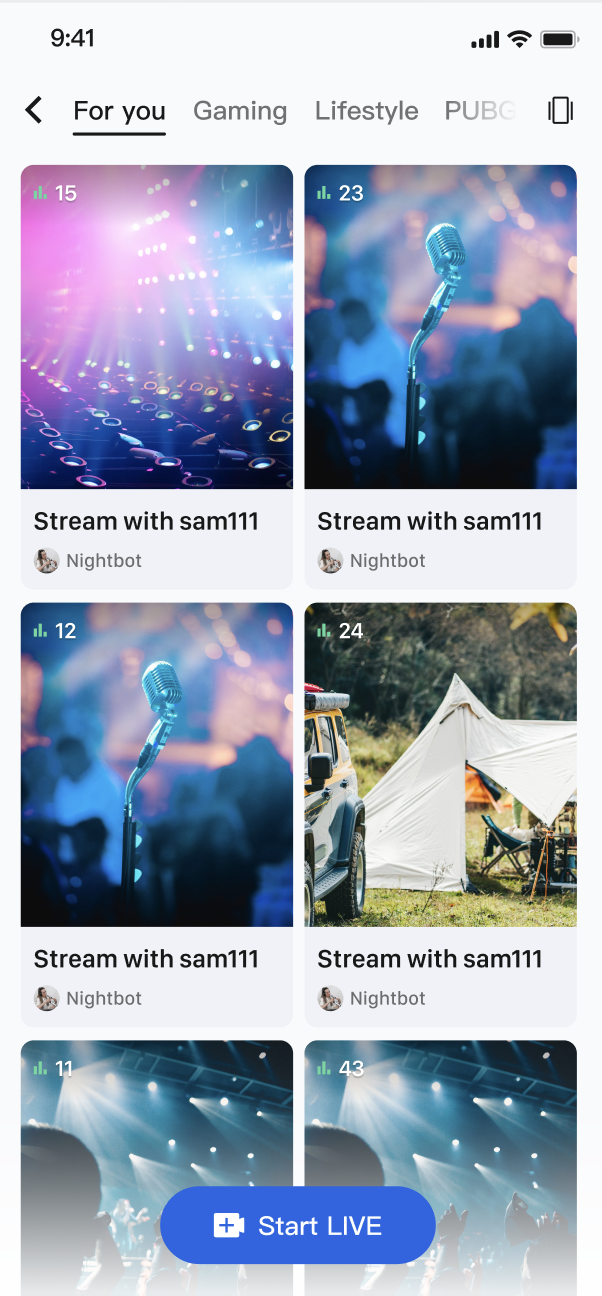
`LiveListStore` 是 `AtomicXCore` 中负责管理直播房间列表、创建、加入以及维护房间状态的核心模块。通过`LiveListStore`,您可以为您的应用构建完整的直播生命周期管理。
|
|
2
|
+
|
|
3
|
+
|
|
4
|
+
|
|
5
|
+
|
|
6
|
+
## 核心功能
|
|
7
|
+
- **直播列表拉取**:获取当前所有公开的直播间列表,支持分页加载。
|
|
8
|
+
|
|
9
|
+
- **直播生命周期管理**:提供从创建、开播、加入、离开到结束直播的全套流程接口。
|
|
10
|
+
|
|
11
|
+
- **直播信息更新**:主播可以随时更新直播间的公开信息,例如封面、公告等。
|
|
12
|
+
|
|
13
|
+
- **实时事件监听**:监听直播结束、用户被踢出等关键事件。
|
|
14
|
+
|
|
15
|
+
- **自定义业务数据**:强大的自定义元数据(`MetaData`)能力,允许您在房间内存储和同步任何业务相关的信息,例如直播状态、音乐信息、自定义角色等 。
|
|
16
|
+
|
|
17
|
+
|
|
18
|
+
## 核心概念
|
|
19
|
+
|
|
20
|
+
在开始集成之前,我们先通过下表了解一下 `LiveListStore` 相关的几个核心概念:
|
|
21
|
+
<table>
|
|
22
|
+
<tr>
|
|
23
|
+
<td rowspan="1" colSpan="1" >**核心概念**</td>
|
|
24
|
+
|
|
25
|
+
<td rowspan="1" colSpan="1" >**类型**</td>
|
|
26
|
+
|
|
27
|
+
<td rowspan="1" colSpan="1" >**核心职责与描述**</td>
|
|
28
|
+
</tr>
|
|
29
|
+
|
|
30
|
+
<tr>
|
|
31
|
+
<td rowspan="1" colSpan="1" >`LiveInfo`</td>
|
|
32
|
+
|
|
33
|
+
<td rowspan="1" colSpan="1" >`data class`</td>
|
|
34
|
+
|
|
35
|
+
<td rowspan="1" colSpan="1" >代表一个直播间的所有信息模型。包含了直播ID (`liveID`)、名称 (`liveName`)、房主信息 (`liveOwner`) 以及自定义元数据 (`metaData`) 等。</td>
|
|
36
|
+
</tr>
|
|
37
|
+
|
|
38
|
+
<tr>
|
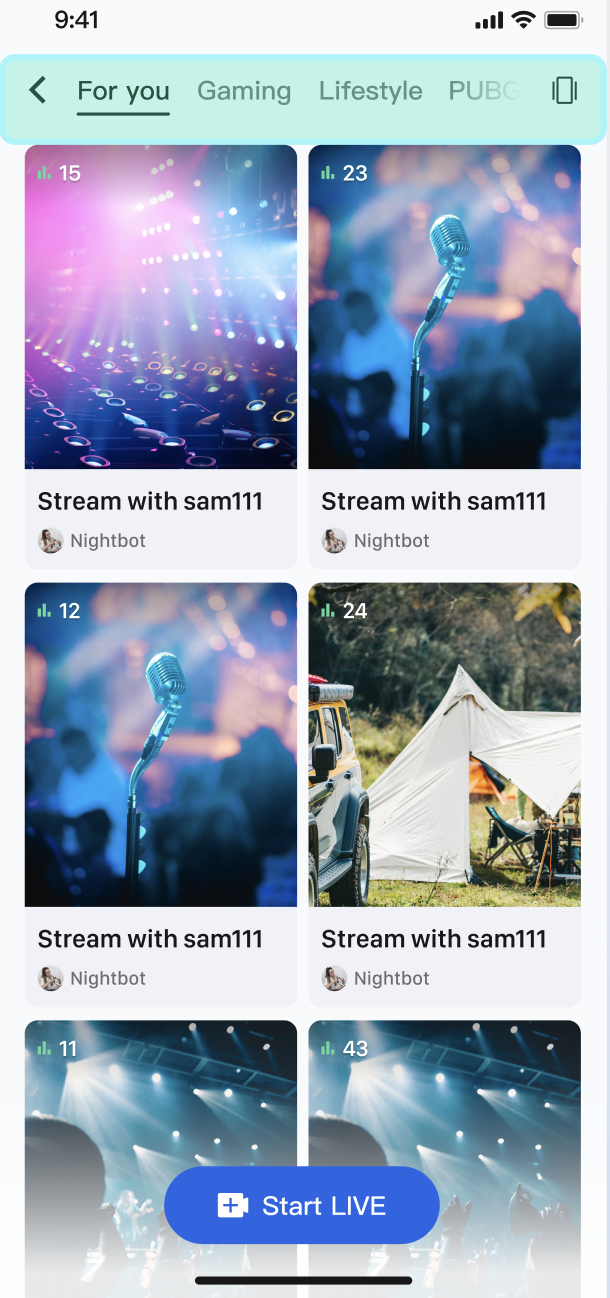
|
39
|
+
<td rowspan="1" colSpan="1" >`LiveListState`</td>
|
|
40
|
+
|
|
41
|
+
<td rowspan="1" colSpan="1" >`data class`</td>
|
|
42
|
+
|
|
43
|
+
<td rowspan="1" colSpan="1" >代表直播列表模块的当前状态。其核心属性 liveList 是一个 `StateFlow`,存储了拉取到的直播列表;`currentLive` 则代表用户当前所在的直播间信息。</td>
|
|
44
|
+
</tr>
|
|
45
|
+
|
|
46
|
+
<tr>
|
|
47
|
+
<td rowspan="1" colSpan="1" >`LiveListListener`</td>
|
|
48
|
+
|
|
49
|
+
<td rowspan="1" colSpan="1" >`abstract class`</td>
|
|
50
|
+
|
|
51
|
+
<td rowspan="1" colSpan="1" >代表直播房间的全局事件。分为 `onLiveEnded` (直播结束) 和 `onKickedOutOfLive` (被踢出直播) 两种,用于处理关键的房间状态变更。</td>
|
|
52
|
+
</tr>
|
|
53
|
+
|
|
54
|
+
<tr>
|
|
55
|
+
<td rowspan="1" colSpan="1" >`LiveListStore`</td>
|
|
56
|
+
|
|
57
|
+
<td rowspan="1" colSpan="1" >`abstract class`</td>
|
|
58
|
+
|
|
59
|
+
<td rowspan="1" colSpan="1" >代表直播房间的全局事件。分为 `.onLiveEnded` (直播结束) 和 `.onKickedOutOfLive` (被踢出直播) 两种,用于处理关键的房间状态变更。</td>
|
|
60
|
+
</tr>
|
|
61
|
+
</table>
|
|
62
|
+
|
|
63
|
+
|
|
64
|
+
## 实现步骤
|
|
65
|
+
|
|
66
|
+
### 步骤1:组件集成
|
|
67
|
+
|
|
68
|
+
请参考 [开始直播](https://write.woa.com/document/191126372105478144) 集成 **AtomicXCore**,并完成 [主播开播](https://write.woa.com/document/191126372105478144) 和 [观众观看](https://write.woa.com/document/191126372105478144) 的功能实现。
|
|
69
|
+
|
|
70
|
+
### 步骤2:实现观众从直播列表进入直播间
|
|
71
|
+
|
|
72
|
+
创建一个展示直播列表的页面,该页面使用 `RecyclerView` 来布局直播间卡片。当用户点击某个卡片时,获取该直播间的 `liveId`,并跳转到观众观看页面。
|
|
73
|
+
``` kotlin
|
|
74
|
+
import android.content.Intent
|
|
75
|
+
import android.os.Bundle
|
|
76
|
+
import android.view.LayoutInflater
|
|
77
|
+
import android.view.View
|
|
78
|
+
import android.view.ViewGroup
|
|
79
|
+
import androidx.appcompat.app.AppCompatActivity
|
|
80
|
+
import androidx.recyclerview.widget.GridLayoutManager
|
|
81
|
+
import androidx.recyclerview.widget.RecyclerView
|
|
82
|
+
import io.trtc.tuikit.atomicxcore.api.CompletionHandler
|
|
83
|
+
import io.trtc.tuikit.atomicxcore.api.live.LiveInfo
|
|
84
|
+
import io.trtc.tuikit.atomicxcore.api.live.LiveListStore
|
|
85
|
+
import kotlinx.coroutines.*
|
|
86
|
+
import kotlinx.coroutines.flow.*
|
|
87
|
+
|
|
88
|
+
class LiveListActivity : AppCompatActivity() {
|
|
89
|
+
private val liveListStore = LiveListStore.shared()
|
|
90
|
+
private var liveList: List<LiveInfo> = emptyList()
|
|
91
|
+
private val coroutineScope = CoroutineScope(Dispatchers.Main)
|
|
92
|
+
|
|
93
|
+
private lateinit var recyclerView: RecyclerView
|
|
94
|
+
private lateinit var adapter: LiveListAdapter
|
|
95
|
+
|
|
96
|
+
override fun onCreate(savedInstanceState: Bundle?) {
|
|
97
|
+
super.onCreate(savedInstanceState)
|
|
98
|
+
setContentView(R.layout.activity_live_list)
|
|
99
|
+
setupUI()
|
|
100
|
+
bindStore()
|
|
101
|
+
fetchLiveList()
|
|
102
|
+
}
|
|
103
|
+
|
|
104
|
+
private fun bindStore() {
|
|
105
|
+
// 订阅 state,自动接收列表更新
|
|
106
|
+
coroutineScope.launch {
|
|
107
|
+
liveListStore.liveState.liveList.collect { fetchedList ->
|
|
108
|
+
liveList = fetchedList
|
|
109
|
+
adapter.notifyDataSetChanged()
|
|
110
|
+
}
|
|
111
|
+
}
|
|
112
|
+
}
|
|
113
|
+
|
|
114
|
+
private fun fetchLiveList() {
|
|
115
|
+
liveListStore.fetchLiveList(
|
|
116
|
+
cursor = "",
|
|
117
|
+
count = 20,
|
|
118
|
+
completion = object : CompletionHandler {
|
|
119
|
+
override fun onSuccess() {
|
|
120
|
+
println("直播列表拉取成功")
|
|
121
|
+
}
|
|
122
|
+
|
|
123
|
+
override fun onFailure(code: Int, desc: String) {
|
|
124
|
+
println("直播列表拉取失败: $desc")
|
|
125
|
+
}
|
|
126
|
+
}
|
|
127
|
+
)
|
|
128
|
+
}
|
|
129
|
+
|
|
130
|
+
// 当用户点击列表中的某个Item时
|
|
131
|
+
private fun onLiveItemClick(liveInfo: LiveInfo) {
|
|
132
|
+
// 创建观众观看页面,并将 liveId 传入
|
|
133
|
+
val intent = Intent(this, YourAudienceActivity::class.java)
|
|
134
|
+
intent.putExtra("liveId", liveInfo.liveID)
|
|
135
|
+
startActivity(intent)
|
|
136
|
+
}
|
|
137
|
+
|
|
138
|
+
|
|
139
|
+
// --- RecyclerView 相关方法 ---
|
|
140
|
+
private fun setupUI() {
|
|
141
|
+
recyclerView = findViewById(R.id.recyclerView)
|
|
142
|
+
adapter = LiveListAdapter(liveList) { liveInfo ->
|
|
143
|
+
onLiveItemClick(liveInfo)
|
|
144
|
+
}
|
|
145
|
+
recyclerView.layoutManager = GridLayoutManager(this, 2)
|
|
146
|
+
recyclerView.adapter = adapter
|
|
147
|
+
}
|
|
148
|
+
|
|
149
|
+
override fun onDestroy() {
|
|
150
|
+
super.onDestroy()
|
|
151
|
+
coroutineScope.cancel()
|
|
152
|
+
}
|
|
153
|
+
}
|
|
154
|
+
|
|
155
|
+
// RecyclerView Adapter
|
|
156
|
+
class LiveListAdapter(
|
|
157
|
+
private var liveList: List<LiveInfo>,
|
|
158
|
+
private val onItemClick: (LiveInfo) -> Unit
|
|
159
|
+
) : RecyclerView.Adapter<LiveListAdapter.LiveViewHolder>() {
|
|
160
|
+
|
|
161
|
+
class LiveViewHolder(itemView: View) : RecyclerView.ViewHolder(itemView) {
|
|
162
|
+
// 定义您的ViewHolder视图组件
|
|
163
|
+
// val titleTextView: TextView = itemView.findViewById(R.id.titleTextView)
|
|
164
|
+
// val coverImageView: ImageView = itemView.findViewById(R.id.coverImageView)
|
|
165
|
+
}
|
|
166
|
+
|
|
167
|
+
override fun onCreateViewHolder(parent: ViewGroup, viewType: Int): LiveViewHolder {
|
|
168
|
+
val view = LayoutInflater.from(parent.context)
|
|
169
|
+
.inflate(R.layout.item_live_card, parent, false)
|
|
170
|
+
return LiveViewHolder(view)
|
|
171
|
+
}
|
|
172
|
+
|
|
173
|
+
override fun onBindViewHolder(holder: LiveViewHolder, position: Int) {
|
|
174
|
+
val liveInfo = liveList[position]
|
|
175
|
+
// 设置数据到ViewHolder
|
|
176
|
+
// holder.titleTextView.text = liveInfo.liveName
|
|
177
|
+
// 加载封面图片等
|
|
178
|
+
|
|
179
|
+
holder.itemView.setOnClickListener {
|
|
180
|
+
onItemClick(liveInfo)
|
|
181
|
+
}
|
|
182
|
+
}
|
|
183
|
+
|
|
184
|
+
override fun getItemCount(): Int = liveList.size
|
|
185
|
+
}
|
|
186
|
+
|
|
187
|
+
```
|
|
188
|
+
|
|
189
|
+
**LiveInfo 参数说明**
|
|
190
|
+
<table>
|
|
191
|
+
<tr>
|
|
192
|
+
<td rowspan="1" colSpan="1" >**参数名**</td>
|
|
193
|
+
|
|
194
|
+
<td rowspan="1" colSpan="1" >**类型**</td>
|
|
195
|
+
|
|
196
|
+
<td rowspan="1" colSpan="1" >**描述**</td>
|
|
197
|
+
</tr>
|
|
198
|
+
|
|
199
|
+
<tr>
|
|
200
|
+
<td rowspan="1" colSpan="1" >`liveID`</td>
|
|
201
|
+
|
|
202
|
+
<td rowspan="1" colSpan="1" >`String`</td>
|
|
203
|
+
|
|
204
|
+
<td rowspan="1" colSpan="1" >直播间的唯一标识符</td>
|
|
205
|
+
</tr>
|
|
206
|
+
|
|
207
|
+
<tr>
|
|
208
|
+
<td rowspan="1" colSpan="1" >`liveName`</td>
|
|
209
|
+
|
|
210
|
+
<td rowspan="1" colSpan="1" >`String`</td>
|
|
211
|
+
|
|
212
|
+
<td rowspan="1" colSpan="1" >直播间的标题</td>
|
|
213
|
+
</tr>
|
|
214
|
+
|
|
215
|
+
<tr>
|
|
216
|
+
<td rowspan="1" colSpan="1" >`coverURL`</td>
|
|
217
|
+
|
|
218
|
+
<td rowspan="1" colSpan="1" >`String`</td>
|
|
219
|
+
|
|
220
|
+
<td rowspan="1" colSpan="1" >直播间的封面图片地址</td>
|
|
221
|
+
</tr>
|
|
222
|
+
|
|
223
|
+
<tr>
|
|
224
|
+
<td rowspan="1" colSpan="1" >`liveOwner`</td>
|
|
225
|
+
|
|
226
|
+
<td rowspan="1" colSpan="1" >[LiveUserInfo](https://tencent-rtc.github.io/TUIKit_Android/-atomic-x%20-core%20-a-p-i/io.trtc.tuikit.atomicxcore.api.live/-live-user-info/index.html)</td>
|
|
227
|
+
|
|
228
|
+
<td rowspan="1" colSpan="1" >房主的个人信息</td>
|
|
229
|
+
</tr>
|
|
230
|
+
|
|
231
|
+
<tr>
|
|
232
|
+
<td rowspan="1" colSpan="1" >`totalViewerCount`</td>
|
|
233
|
+
|
|
234
|
+
<td rowspan="1" colSpan="1" >`Int`</td>
|
|
235
|
+
|
|
236
|
+
<td rowspan="1" colSpan="1" >直播间的总观看人数</td>
|
|
237
|
+
</tr>
|
|
238
|
+
|
|
239
|
+
<tr>
|
|
240
|
+
<td rowspan="1" colSpan="1" >`categoryList`</td>
|
|
241
|
+
|
|
242
|
+
<td rowspan="1" colSpan="1" >`List<Int>`</td>
|
|
243
|
+
|
|
244
|
+
<td rowspan="1" colSpan="1" >直播间的分类标签列表</td>
|
|
245
|
+
</tr>
|
|
246
|
+
|
|
247
|
+
<tr>
|
|
248
|
+
<td rowspan="1" colSpan="1" >`notice`</td>
|
|
249
|
+
|
|
250
|
+
<td rowspan="1" colSpan="1" >`String`</td>
|
|
251
|
+
|
|
252
|
+
<td rowspan="1" colSpan="1" >直播间的公告信息</td>
|
|
253
|
+
</tr>
|
|
254
|
+
|
|
255
|
+
<tr>
|
|
256
|
+
<td rowspan="1" colSpan="1" >`metaData`</td>
|
|
257
|
+
|
|
258
|
+
<td rowspan="1" colSpan="1" >`Map<String: String>`</td>
|
|
259
|
+
|
|
260
|
+
<td rowspan="1" colSpan="1" >开发者自定义的元数据,用于实现复杂的业务场景</td>
|
|
261
|
+
</tr>
|
|
262
|
+
</table>
|
|
263
|
+
|
|
264
|
+
|
|
265
|
+
## 功能进阶
|
|
266
|
+
|
|
267
|
+
### 场景一:实现直播列表的分类展示
|
|
268
|
+
|
|
269
|
+
在 App 的直播广场页,顶部设有"热门"、"音乐"、"游戏"等分类标签。用户点击不同的标签后,下方的直播列表会动态筛选,只展示对应分类的直播间,从而帮助用户快速发现感兴趣的内容。
|
|
270
|
+
|
|
271
|
+
|
|
272
|
+
|
|
273
|
+
|
|
274
|
+
#### 实现方式
|
|
275
|
+
|
|
276
|
+
核心是利用 `LiveInfo` 模型中的 `categoryList` 属性。当主播开播设置分类后,`fetchLiveList` 返回的 `LiveInfo` 对象中就会包含这些分类信息。您的 App 在获取到完整的直播列表后,只需在客户端根据用户选择的分类,对这个列表进行一次简单的筛选,然后刷新 UI 即可。
|
|
277
|
+
|
|
278
|
+
#### 代码示例
|
|
279
|
+
|
|
280
|
+
以下示例展示了如何在 `LiveListActivity` 中扩展一个 `LiveListManager` 来处理数据和筛选逻辑。
|
|
281
|
+
``` kotlin
|
|
282
|
+
import android.os.Bundle
|
|
283
|
+
import androidx.appcompat.app.AppCompatActivity
|
|
284
|
+
import androidx.recyclerview.widget.RecyclerView
|
|
285
|
+
import io.trtc.tuikit.atomicxcore.api.live.LiveInfo
|
|
286
|
+
import io.trtc.tuikit.atomicxcore.api.live.LiveListStore
|
|
287
|
+
import kotlinx.coroutines.*
|
|
288
|
+
import kotlinx.coroutines.flow.*
|
|
289
|
+
|
|
290
|
+
// 1. 创建一个数据管理器来封装数据获取和筛选逻辑
|
|
291
|
+
class LiveListManager {
|
|
292
|
+
private val liveListStore = LiveListStore.shared()
|
|
293
|
+
private var fullLiveList: List<LiveInfo> = emptyList()
|
|
294
|
+
|
|
295
|
+
// 对外暴露最终的直播列表
|
|
296
|
+
private val _filteredLiveList = MutableStateFlow<List<LiveInfo>>(emptyList())
|
|
297
|
+
val filteredLiveList: StateFlow<List<LiveInfo>> = _filteredLiveList
|
|
298
|
+
|
|
299
|
+
init {
|
|
300
|
+
// 监听完整列表变化
|
|
301
|
+
CoroutineScope(Dispatchers.Main).launch {
|
|
302
|
+
liveListStore.liveState.liveList.collect { fetchedList ->
|
|
303
|
+
fullLiveList = fetchedList
|
|
304
|
+
// 默认将完整列表发布出去
|
|
305
|
+
_filteredLiveList.value = fetchedList
|
|
306
|
+
}
|
|
307
|
+
}
|
|
308
|
+
}
|
|
309
|
+
|
|
310
|
+
fun fetchFirstPage() {
|
|
311
|
+
liveListStore.fetchLiveList(cursor = "", count = 20, completion = null)
|
|
312
|
+
}
|
|
313
|
+
|
|
314
|
+
/// 根据分类筛选直播列表
|
|
315
|
+
fun filterLiveList(categoryId: Int?) {
|
|
316
|
+
if (categoryId == null) {
|
|
317
|
+
// 如果 categoryId 为 null,则显示完整列表
|
|
318
|
+
_filteredLiveList.value = fullLiveList
|
|
319
|
+
return
|
|
320
|
+
}
|
|
321
|
+
|
|
322
|
+
val filteredList = fullLiveList.filter { liveInfo ->
|
|
323
|
+
liveInfo.categoryList.contains(categoryId)
|
|
324
|
+
}
|
|
325
|
+
_filteredLiveList.value = filteredList
|
|
326
|
+
}
|
|
327
|
+
}
|
|
328
|
+
|
|
329
|
+
// 2. 在您的 LiveListActivity 中使用 Manager
|
|
330
|
+
class LiveListActivity : AppCompatActivity() {
|
|
331
|
+
private val manager = LiveListManager()
|
|
332
|
+
private lateinit var recyclerView: RecyclerView
|
|
333
|
+
|
|
334
|
+
override fun onCreate(savedInstanceState: Bundle?) {
|
|
335
|
+
super.onCreate(savedInstanceState)
|
|
336
|
+
setContentView(R.layout.activity_live_list)
|
|
337
|
+
// setupUI()
|
|
338
|
+
|
|
339
|
+
// 绑定数据
|
|
340
|
+
CoroutineScope(Dispatchers.Main).launch {
|
|
341
|
+
manager.filteredLiveList.collect { filteredList ->
|
|
342
|
+
// 刷新UI
|
|
343
|
+
// adapter.updateList(filteredList)
|
|
344
|
+
}
|
|
345
|
+
}
|
|
346
|
+
|
|
347
|
+
// 首次拉取
|
|
348
|
+
manager.fetchFirstPage()
|
|
349
|
+
}
|
|
350
|
+
|
|
351
|
+
// 当用户点击顶部分类标签时
|
|
352
|
+
fun onCategorySelected(categoryId: Int) {
|
|
353
|
+
manager.filterLiveList(categoryId)
|
|
354
|
+
}
|
|
355
|
+
|
|
356
|
+
// ... (RecyclerView 相关代码)
|
|
357
|
+
}
|
|
358
|
+
```
|
|
359
|
+
|
|
360
|
+
### 场景二:实现直播列表的滑动播放
|
|
361
|
+
|
|
362
|
+
用户可以通过上下滑动来切换直播间,当一个新的直播间滑动到屏幕中央时,视频会自动开始播放预览;当它滑出屏幕时,视频则会自动停止,以节省带宽和设备性能。
|
|
363
|
+
|
|
364
|
+
#### 交互流程图
|
|
365
|
+
|
|
366
|
+
|
|
367
|
+
|
|
368
|
+
|
|
369
|
+
#### 实现方式
|
|
370
|
+
|
|
371
|
+
`LiveCoreView` 支持多实例使用,我们为每一个 `RecyclerView.ViewHolder` 都创建一个独立的 `LiveCoreView` 实例。通过监听 `RecyclerView` 的滚动状态,我们可以精确地控制即将出现和已经离开屏幕的 ViewHolder 中的 `LiveCoreView` 何时开始和停止拉流,从而实现“即滑即播、即走即停”的效果。
|
|
372
|
+
|
|
373
|
+
#### 代码示例
|
|
374
|
+
|
|
375
|
+
我们创建一个自定义的 `LiveFeedViewHolder`,它内部持有一个 `LiveCoreView`。然后在 Activity 中管理这些 ViewHolder 的播放状态。
|
|
376
|
+
``` kotlin
|
|
377
|
+
import android.os.Bundle
|
|
378
|
+
import android.view.LayoutInflater
|
|
379
|
+
import android.view.View
|
|
380
|
+
import android.view.ViewGroup
|
|
381
|
+
import androidx.appcompat.app.AppCompatActivity
|
|
382
|
+
import androidx.recyclerview.widget.LinearLayoutManager
|
|
383
|
+
import androidx.recyclerview.widget.RecyclerView
|
|
384
|
+
import io.trtc.tuikit.atomicxcore.api.live.LiveInfo
|
|
385
|
+
import io.trtc.tuikit.atomicxcore.api.view.CoreViewType
|
|
386
|
+
import io.trtc.tuikit.atomicxcore.api.view.LiveCoreView
|
|
387
|
+
|
|
388
|
+
// 1. 自定义 RecyclerView.ViewHolder,内部包含一个 LiveCoreView
|
|
389
|
+
class LiveFeedViewHolder(itemView: View) : RecyclerView.ViewHolder(itemView) {
|
|
390
|
+
private var liveCoreView: LiveCoreView? = null
|
|
391
|
+
|
|
392
|
+
fun setLiveInfo(liveInfo: LiveInfo) {
|
|
393
|
+
// 为新的直播信息创建一个新的 LiveCoreView
|
|
394
|
+
liveCoreView = LiveCoreView(itemView.context, viewType = CoreViewType.PLAY_VIEW)
|
|
395
|
+
liveCoreView?.let { view ->
|
|
396
|
+
(itemView as ViewGroup).addView(view)
|
|
397
|
+
view.layoutParams = ViewGroup.LayoutParams(
|
|
398
|
+
ViewGroup.LayoutParams.MATCH_PARENT,
|
|
399
|
+
ViewGroup.LayoutParams.MATCH_PARENT
|
|
400
|
+
)
|
|
401
|
+
}
|
|
402
|
+
}
|
|
403
|
+
|
|
404
|
+
fun startPlay(roomId: String) {
|
|
405
|
+
liveCoreView?.startPreviewLiveStream(roomId, false, callback = null)
|
|
406
|
+
}
|
|
407
|
+
|
|
408
|
+
fun stopPlay(roomId: String) {
|
|
409
|
+
liveCoreView?.stopPreviewLiveStream(roomId)
|
|
410
|
+
}
|
|
411
|
+
}
|
|
412
|
+
|
|
413
|
+
// 2. 在 Activity 中管理播放逻辑
|
|
414
|
+
class LiveFeedActivity : AppCompatActivity() {
|
|
415
|
+
|
|
416
|
+
private lateinit var recyclerView: RecyclerView
|
|
417
|
+
private var liveList: List<LiveInfo> = emptyList()
|
|
418
|
+
private var currentPlayingPosition: Int = -1
|
|
419
|
+
|
|
420
|
+
override fun onCreate(savedInstanceState: Bundle?) {
|
|
421
|
+
super.onCreate(savedInstanceState)
|
|
422
|
+
setContentView(R.layout.activity_live_feed)
|
|
423
|
+
setupRecyclerView()
|
|
424
|
+
}
|
|
425
|
+
|
|
426
|
+
private fun setupRecyclerView() {
|
|
427
|
+
recyclerView = findViewById(R.id.recyclerView)
|
|
428
|
+
recyclerView.layoutManager = LinearLayoutManager(this, LinearLayoutManager.VERTICAL, false)
|
|
429
|
+
recyclerView.adapter = LiveFeedAdapter(liveList) { position ->
|
|
430
|
+
playVideoAtPosition(position)
|
|
431
|
+
}
|
|
432
|
+
|
|
433
|
+
// 监听滚动状态
|
|
434
|
+
recyclerView.addOnScrollListener(object : RecyclerView.OnScrollListener() {
|
|
435
|
+
override fun onScrollStateChanged(recyclerView: RecyclerView, newState: Int) {
|
|
436
|
+
super.onScrollStateChanged(recyclerView, newState)
|
|
437
|
+
if (newState == RecyclerView.SCROLL_STATE_IDLE) {
|
|
438
|
+
val layoutManager = recyclerView.layoutManager as LinearLayoutManager
|
|
439
|
+
val firstVisiblePosition = layoutManager.findFirstCompletelyVisibleItemPosition()
|
|
440
|
+
if (firstVisiblePosition != RecyclerView.NO_POSITION) {
|
|
441
|
+
playVideoAtPosition(firstVisiblePosition)
|
|
442
|
+
}
|
|
443
|
+
}
|
|
444
|
+
}
|
|
445
|
+
})
|
|
446
|
+
}
|
|
447
|
+
|
|
448
|
+
private fun playVideoAtPosition(position: Int) {
|
|
449
|
+
// 只有当居中的位置变化时才切换播放
|
|
450
|
+
if (currentPlayingPosition != position) {
|
|
451
|
+
// 停止当前播放
|
|
452
|
+
if (currentPlayingPosition != -1) {
|
|
453
|
+
val currentViewHolder = recyclerView.findViewHolderForAdapterPosition(currentPlayingPosition)
|
|
454
|
+
if (currentViewHolder is LiveFeedViewHolder) {
|
|
455
|
+
val liveInfo = liveList[currentPlayingPosition]
|
|
456
|
+
currentViewHolder.stopPlay(liveInfo.liveID)
|
|
457
|
+
}
|
|
458
|
+
}
|
|
459
|
+
|
|
460
|
+
// 开始新的播放
|
|
461
|
+
val newViewHolder = recyclerView.findViewHolderForAdapterPosition(position)
|
|
462
|
+
if (newViewHolder is LiveFeedViewHolder) {
|
|
463
|
+
val liveInfo = liveList[position]
|
|
464
|
+
newViewHolder.startPlay(liveInfo.liveID)
|
|
465
|
+
currentPlayingPosition = position
|
|
466
|
+
}
|
|
467
|
+
}
|
|
468
|
+
}
|
|
469
|
+
|
|
470
|
+
// RecyclerView Adapter
|
|
471
|
+
inner class LiveFeedAdapter(
|
|
472
|
+
private var liveList: List<LiveInfo>,
|
|
473
|
+
private val onItemClick: (Int) -> Unit
|
|
474
|
+
) : RecyclerView.Adapter<LiveFeedViewHolder>() {
|
|
475
|
+
|
|
476
|
+
override fun onCreateViewHolder(parent: ViewGroup, viewType: Int): LiveFeedViewHolder {
|
|
477
|
+
val view = LayoutInflater.from(parent.context)
|
|
478
|
+
.inflate(R.layout.item_live_feed, parent, false)
|
|
479
|
+
return LiveFeedViewHolder(view)
|
|
480
|
+
}
|
|
481
|
+
|
|
482
|
+
override fun onBindViewHolder(holder: LiveFeedViewHolder, position: Int) {
|
|
483
|
+
val liveInfo = liveList[position]
|
|
484
|
+
holder.setLiveInfo(liveInfo)
|
|
485
|
+
holder.itemView.setOnClickListener {
|
|
486
|
+
onItemClick(position)
|
|
487
|
+
}
|
|
488
|
+
}
|
|
489
|
+
|
|
490
|
+
override fun getItemCount(): Int = liveList.size
|
|
491
|
+
}
|
|
492
|
+
}
|
|
493
|
+
```
|
|
494
|
+
|
|
495
|
+
### 场景三:实现电商直播的商品信息展示
|
|
496
|
+
|
|
497
|
+
在电商直播中,主播正在讲解一款商品。此时,所有观众的直播画面下方都会弹出一张商品卡片,实时展示该商品的图片、名称和价格。当主播切换讲解下一件商品时,所有观众端的卡片都会自动、同步更新。
|
|
498
|
+
|
|
499
|
+

|
|
500
|
+
|
|
501
|
+
|
|
502
|
+
#### 实现方式
|
|
503
|
+
|
|
504
|
+
主播端将当前商品的结构化信息(建议使用 **JSON **格式)通过 `updateLiveMetaData` 接口设置到一个自定义的 key(例如 "`product_info`")中。**AtomicXCore** 会将这个变更实时同步给所有观众。观众端只需订阅 `LiveListStore.liveState.currentLive`,监听 `metaData` 的变化,一旦发现 `product_info` 的值更新,就解析其中的 JSON 数据并刷新商品卡片 UI。
|
|
505
|
+
|
|
506
|
+
#### 代码示例
|
|
507
|
+
``` kotlin
|
|
508
|
+
import android.os.Bundle
|
|
509
|
+
import androidx.appcompat.app.AppCompatActivity
|
|
510
|
+
import io.trtc.tuikit.atomicxcore.api.CompletionHandler
|
|
511
|
+
import io.trtc.tuikit.atomicxcore.api.live.LiveListStore
|
|
512
|
+
import org.json.JSONObject
|
|
513
|
+
import org.json.JSONException
|
|
514
|
+
import kotlinx.coroutines.*
|
|
515
|
+
import kotlinx.coroutines.flow.*
|
|
516
|
+
|
|
517
|
+
// 1. 定义一个商品信息数据类
|
|
518
|
+
data class Product(
|
|
519
|
+
val id: String,
|
|
520
|
+
val name: String,
|
|
521
|
+
val price: String,
|
|
522
|
+
val imageUrl: String
|
|
523
|
+
)
|
|
524
|
+
|
|
525
|
+
// 2. 主播端:在 YourAnchorActivity 中添加推送商品的方法
|
|
526
|
+
class YourAnchorActivity : AppCompatActivity() {
|
|
527
|
+
fun pushProductInfo(product: Product) {
|
|
528
|
+
try {
|
|
529
|
+
val jsonObject = JSONObject().apply {
|
|
530
|
+
put("id", product.id)
|
|
531
|
+
put("name", product.name)
|
|
532
|
+
put("price", product.price)
|
|
533
|
+
put("imageUrl", product.imageUrl)
|
|
534
|
+
}
|
|
535
|
+
val jsonString = jsonObject.toString()
|
|
536
|
+
|
|
537
|
+
|
|
538
|
+
val metaData = hashMapOf("product_info" to jsonString)
|
|
539
|
+
|
|
540
|
+
|
|
541
|
+
// 使用全局单例的 liveListStore 来更新 metaData
|
|
542
|
+
LiveListStore.shared().updateLiveMetaData(
|
|
543
|
+
metaData,
|
|
544
|
+
object : CompletionHandler {
|
|
545
|
+
override fun onSuccess() {
|
|
546
|
+
println("商品 ${product.name} 信息推送成功")
|
|
547
|
+
}
|
|
548
|
+
|
|
549
|
+
override fun onFailure(code: Int, desc: String) {
|
|
550
|
+
println("商品信息推送失败: $desc")
|
|
551
|
+
}
|
|
552
|
+
}
|
|
553
|
+
)
|
|
554
|
+
} catch (e: JSONException) {
|
|
555
|
+
println("JSON序列化失败: ${e.message}")
|
|
556
|
+
}
|
|
557
|
+
}
|
|
558
|
+
}
|
|
559
|
+
|
|
560
|
+
// 3. 观众端:在 YourAudienceActivity 中订阅并响应
|
|
561
|
+
class YourAudienceActivity : AppCompatActivity() {
|
|
562
|
+
|
|
563
|
+
private val liveListStore = LiveListStore.shared()
|
|
564
|
+
private val coroutineScope = CoroutineScope(Dispatchers.Main)
|
|
565
|
+
// 假设您有一个自定义的商品卡片视图
|
|
566
|
+
// private lateinit var productCardView: ProductCardView
|
|
567
|
+
|
|
568
|
+
override fun onCreate(savedInstanceState: Bundle?) {
|
|
569
|
+
super.onCreate(savedInstanceState)
|
|
570
|
+
setContentView(R.layout.activity_audience)
|
|
571
|
+
// ... (setupUI, 布局 productCardView)
|
|
572
|
+
joinLive()
|
|
573
|
+
subscribeToProductUpdates()
|
|
574
|
+
}
|
|
575
|
+
|
|
576
|
+
private fun subscribeToProductUpdates() {
|
|
577
|
+
coroutineScope.launch {
|
|
578
|
+
liveListStore.liveState.currentLive.collect { currentLive ->
|
|
579
|
+
val productInfoJson = currentLive.metaData["product_info"]
|
|
580
|
+
if (productInfoJson != null) {
|
|
581
|
+
try {
|
|
582
|
+
val jsonObject = JSONObject(productInfoJson)
|
|
583
|
+
val product = Product(
|
|
584
|
+
id = jsonObject.getString("id"),
|
|
585
|
+
name = jsonObject.getString("name"),
|
|
586
|
+
price = jsonObject.getString("price"),
|
|
587
|
+
imageUrl = jsonObject.getString("imageUrl")
|
|
588
|
+
)
|
|
589
|
+
// productCardView.updateProduct(product)
|
|
590
|
+
// productCardView.show()
|
|
591
|
+
} catch (e: JSONException) {
|
|
592
|
+
println("商品信息解析失败: ${e.message}")
|
|
593
|
+
// productCardView.hide()
|
|
594
|
+
}
|
|
595
|
+
} else {
|
|
596
|
+
// productCardView.hide() // 如果没有商品信息,则隐藏卡片
|
|
597
|
+
}
|
|
598
|
+
}
|
|
599
|
+
}
|
|
600
|
+
}
|
|
601
|
+
|
|
602
|
+
override fun onDestroy() {
|
|
603
|
+
super.onDestroy()
|
|
604
|
+
coroutineScope.cancel()
|
|
605
|
+
}
|
|
606
|
+
|
|
607
|
+
// ... (joinLive 和 leaveLive 方法)
|
|
608
|
+
}
|
|
609
|
+
|
|
610
|
+
```
|
|
611
|
+
|
|
612
|
+
## API 文档
|
|
613
|
+
|
|
614
|
+
关于 [LiveListStore](https://tencent-rtc.github.io/TUIKit_Android/-atomic-x%20-core%20-a-p-i/io.trtc.tuikit.atomicxcore.api.live/-live-list-store/index.html) 及其相关类的所有公开接口、属性和方法的详细信息,请参阅随 [AtomicXCore](https://tencent-rtc.github.io/TUIKit_Android/index.html) 框架的官方 API 文档。本文档使用到的相关 Store 如下:
|
|
615
|
+
<table>
|
|
616
|
+
<tr>
|
|
617
|
+
<td rowspan="1" colSpan="1" >Store/Component</td>
|
|
618
|
+
|
|
619
|
+
<td rowspan="1" colSpan="1" >功能描述</td>
|
|
620
|
+
|
|
621
|
+
<td rowspan="1" colSpan="1" >API 文档</td>
|
|
622
|
+
</tr>
|
|
623
|
+
|
|
624
|
+
<tr>
|
|
625
|
+
<td rowspan="1" colSpan="1" >LiveCoreView</td>
|
|
626
|
+
|
|
627
|
+
<td rowspan="1" colSpan="1" >直播视频流展示与交互的核心视图组件:负责视频流渲染和视图挂件处理,支持主播直播、观众连麦、主播连线等场景。</td>
|
|
628
|
+
|
|
629
|
+
<td rowspan="1" colSpan="1" >[API 文档](https://tencent-rtc.github.io/TUIKit_Android/-atomic-x%20-core%20-a-p-i/io.trtc.tuikit.atomicxcore.api.view/-live-core-view/index.html)</td>
|
|
630
|
+
</tr>
|
|
631
|
+
|
|
632
|
+
<tr>
|
|
633
|
+
<td rowspan="1" colSpan="1" >LiveListStore</td>
|
|
634
|
+
|
|
635
|
+
<td rowspan="1" colSpan="1" >直播间全生命周期管理:创建 / 加入 / 离开 / 销毁房间,查询房间列表,修改直播信息(名称、公告等),监听直播状态(例如被踢出、结束)。</td>
|
|
636
|
+
|
|
637
|
+
<td rowspan="1" colSpan="1" >[API 文档](https://tencent-rtc.github.io/TUIKit_Android/-atomic-x%20-core%20-a-p-i/io.trtc.tuikit.atomicxcore.api.live/-live-list-store/index.html)</td>
|
|
638
|
+
</tr>
|
|
639
|
+
</table>
|
|
640
|
+
|
|
641
|
+
|
|
642
|
+
## 常见问题
|
|
643
|
+
|
|
644
|
+
### 使用 `updateLiveMetaData` 时有哪些需要注意的限制和规则?
|
|
645
|
+
|
|
646
|
+
为了保证系统的稳定和高效,`metaData` 的使用遵循以下规则:
|
|
647
|
+
- **权限**: 只有房主和管理员可以调用 `updateLiveMetaData`。普通观众没有权限。
|
|
648
|
+
|
|
649
|
+
- **数量与大小限制**:
|
|
650
|
+
|
|
651
|
+
- 单个房间最多支持 **10** 个 key。
|
|
652
|
+
|
|
653
|
+
- 每个 key 的长度不超过 **50 字节**,每个 value 的长度不超过 **2KB**。
|
|
654
|
+
|
|
655
|
+
- 单个房间所有 value 的总大小不超过 **16KB**。
|
|
656
|
+
|
|
657
|
+
- **冲突解决**: `metaData` 的更新机制是"后来者覆盖"。如果多个管理员在短时间内修改同一个 key,最后一次的修改会生效。建议在业务设计上避免多人同时修改同一个关键信息。
|