@tencentcloud/sdk-mcp 1.3.0 → 1.3.2
This diff represents the content of publicly available package versions that have been released to one of the supported registries. The information contained in this diff is provided for informational purposes only and reflects changes between package versions as they appear in their respective public registries.
- package/index.js +5 -1
- package/index.js.map +1 -1
- package/package.json +2 -2
- package/resource/doc/chatuikit/faq/web_sdk/faq.md +117 -0
- package/resource/doc/chatuikit/flutter/client_api_Flutter.md +100 -179
- package/resource/doc/chatuikit/flutter/faq.md +17 -112
- package/resource/doc/chatuikit/flutter/integrate_tuikit_Flutter.md +272 -1281
- package/resource/doc/chatuikit/react/integration.md +516 -48
- package/resource/doc/chatuikit/react/workflow.md +254 -0
- package/resource/doc/chatuikit/uniapp-app/faq.md +0 -0
- package/resource/doc/chatuikit/uniapp-app/integration.md +619 -0
- package/resource/doc/chatuikit/uniapp-app/workflow.md +576 -0
- package/resource/doc/chatuikit/vue/integration.md +511 -129
- package/resource/doc/chatuikit/vue/workflow.md +395 -0
- package/resource/doc/roomkit/vue/features/call-user-to-room.md +256 -0
- package/resource/doc/roomkit/vue/features/device-detection.md +388 -0
- package/resource/doc/roomkit/vue/features/device-state.md +480 -0
- package/resource/doc/roomkit/vue/features/free-beauty-panel.md +238 -0
- package/resource/doc/roomkit/vue/features/room-chat.md +427 -0
- package/resource/doc/roomkit/vue/features/room-participant-state.md +407 -0
- package/resource/doc/roomkit/vue/features/room-state.md +291 -0
- package/resource/doc/roomkit/vue/features/room-view.md +338 -0
- package/resource/doc/roomkit/vue/features/schedule-room.md +349 -0
- package/resource/doc/roomkit/vue/features/screen-share.md +333 -0
- package/resource/doc/roomkit/vue/features/virtual-background.md +281 -0
- package/resource/doc/roomkit/vue/features/workflow.md +553 -0
- package/resource/doc/roomkit/vue/integration.md +479 -0
- package/resource/doc/roomkit/vue/workflow.md +487 -0
- package/resource/doc/tuicallkit/react/api.md +16 -0
- package/resource/doc/tuicallkit/vue/api.md +16 -0
- package/tools/chat/get-web-chat-integration.js +31 -14
- package/tools/chat/get-web-chat-integration.js.map +1 -1
- package/tools/definitions/get_web_chat_uikit_integration_def.js +18 -11
- package/tools/definitions/get_web_chat_uikit_integration_def.js.map +1 -1
- package/tools/definitions/get_web_live_uikit_integration_def.js +1 -1
- package/tools/definitions/get_web_room_feature_detail_def.js +95 -0
- package/tools/definitions/get_web_room_feature_detail_def.js.map +1 -0
- package/tools/definitions/get_web_room_uikit_integration_def.js +44 -0
- package/tools/definitions/get_web_room_uikit_integration_def.js.map +1 -0
- package/tools/definitions/present_framework_choice_def.js +1 -1
- package/tools/definitions/record_result_def.js +1 -1
- package/tools/definitions/record_result_def.js.map +1 -1
- package/tools/index.js +4 -4
- package/tools/index.js.map +1 -1
- package/tools/live/get-web-live-uikit-integration.js +1 -1
- package/tools/room/get-web-room-feature-detail.js +68 -0
- package/tools/room/get-web-room-feature-detail.js.map +1 -0
- package/tools/room/get-web-room-integration.js +43 -0
- package/tools/room/get-web-room-integration.js.map +1 -0
- package/utils/generate-structured-result.js +2 -2
- package/utils/generate-structured-result.js.map +1 -1
- package/utils/report-cls-client.js +1 -1
- package/utils/report-es-client.js +1 -1
- package/resource/doc/chatuikit/react/chat_window_integration.md +0 -83
- package/resource/doc/chatuikit/vue/chat_window_integration.md +0 -131
- package/resource/doc/roomkit/vue/states/device-state.md +0 -316
- package/resource/doc/roomkit/vue/states/login-state.md +0 -51
- package/resource/doc/roomkit/vue/states/room-list-state.md +0 -287
- package/resource/doc/roomkit/vue/states/room-participant-state.md +0 -307
- package/tools/chat/get-web-chat-window-integration.js +0 -28
- package/tools/chat/get-web-chat-window-integration.js.map +0 -1
- package/tools/definitions/get_web_chat_window_integration_def.js +0 -26
- package/tools/definitions/get_web_chat_window_integration_def.js.map +0 -1
- package/tools/definitions/get_web_room_state_detail_def.js +0 -19
- package/tools/definitions/get_web_room_state_detail_def.js.map +0 -1
- package/tools/room/get-web-room-state-detail.js +0 -31
- package/tools/room/get-web-room-state-detail.js.map +0 -1
|
@@ -1,207 +1,93 @@
|
|
|
1
|
-
|
|
1
|
+
TUIKit Flutter 是基于腾讯云 IM SDK 的一套 Flutter UI 组件库,提供了聊天、会话列表、联系人管理等即时通信功能的完整解决方案。本文介绍如何手动集成该组件并实现核心功能。
|
|
2
2
|
|
|
3
|
-
|
|
3
|
+
## 关键概念
|
|
4
4
|
|
|
5
|
-
TUIKit
|
|
5
|
+
TUIKit 提供了一套完整的即时通信 UI 组件,向下依赖 AtomicXCore 数据层,向上可构建各种功能性 Page。
|
|
6
|
+
- Page 层:基于 TUIKit 组件封装的完整功能页面:ChatPage、ContactsPage、ConversationsPage,您可以直接使用。
|
|
6
7
|
|
|
7
|
-
|
|
8
|
+
- TUIKit Flutter(UI 组件层):基于 AtomicXCore 构建的 Flutter 组件,您可将其嵌套到自己已有的 App 页面中。
|
|
8
9
|
|
|
9
|
-
|
|
10
|
+
- AtomicXCore(数据层):提供数据管理和业务逻辑,包含各种 Store 和 Manager。
|
|
10
11
|
|
|
11
12
|
|
|
12
|
-
|
|
13
|
+
## 前提条件
|
|
14
|
+
- Flutter >= 3.29.0 版本,Dart >= 3.7.0 版本,Kotlin >= 1.9版本。
|
|
13
15
|
|
|
14
|
-
|
|
15
|
-
<table>
|
|
16
|
-
<tr>
|
|
17
|
-
<td rowspan="1" colSpan="1" >组件名</td>
|
|
18
|
-
|
|
19
|
-
<td rowspan="1" colSpan="1" >组件功能</td>
|
|
20
|
-
</tr>
|
|
21
|
-
|
|
22
|
-
<tr>
|
|
23
|
-
<td rowspan="1" colSpan="1" >[TIMUIKitConversation](https://cloud.tencent.com/document/product/269/70747#timuikitconversation-.E9.87.8D.E7.82.B9.E5.8A.9F.E8.83.BD.E4.BB.8B.E7.BB.8D.5B.5D(id.3Atimuikitconversation))</td>
|
|
24
|
-
|
|
25
|
-
<td rowspan="1" colSpan="1" >会话列表组件</td>
|
|
26
|
-
</tr>
|
|
27
|
-
|
|
28
|
-
<tr>
|
|
29
|
-
<td rowspan="1" colSpan="1" >[TIMUIKitChat](https://cloud.tencent.com/document/product/269/70747#timuikitchat-.E9.87.8D.E7.82.B9.E5.8A.9F.E8.83.BD.E4.BB.8B.E7.BB.8D.5B.5D(id.3Atimuikitchat))</td>
|
|
30
|
-
|
|
31
|
-
<td rowspan="1" colSpan="1" >核心聊天组件</td>
|
|
32
|
-
</tr>
|
|
33
|
-
|
|
34
|
-
<tr>
|
|
35
|
-
<td rowspan="1" colSpan="1" >[TIMUIKitAddFriend](https://cloud.tencent.com/document/product/269/70747#.E6.B7.BB.E5.8A.A0.E7.94.A8.E6.88.B7.E4.B8.8E.E7.BE.A4.E7.BB.84-.E5.8A.9F.E8.83.BD.E4.BB.8B.E7.BB.8D.5B.5D(id.3Aadd)) / [TIMUIKitAddGroup](https://cloud.tencent.com/document/product/269/70747#.E6.B7.BB.E5.8A.A0.E7.94.A8.E6.88.B7.E4.B8.8E.E7.BE.A4.E7.BB.84-.E5.8A.9F.E8.83.BD.E4.BB.8B.E7.BB.8D.5B.5D(id.3Aadd))</td>
|
|
36
|
-
|
|
37
|
-
<td rowspan="1" colSpan="1" >添加好友组件/添加群组组件</td>
|
|
38
|
-
</tr>
|
|
39
|
-
|
|
40
|
-
<tr>
|
|
41
|
-
<td rowspan="1" colSpan="1" >[TIMUIKitBlackList](https://cloud.tencent.com/document/product/269/70747#132ca212-60d3-4fda-ac24-dfb1b749abe8) / [TIMUIKitNewContact](https://cloud.tencent.com/document/product/269/70747#132ca212-60d3-4fda-ac24-dfb1b749abe8)</td>
|
|
42
|
-
|
|
43
|
-
<td rowspan="1" colSpan="1" >黑名单列表组件/新的联系人申请列表组件</td>
|
|
44
|
-
</tr>
|
|
45
|
-
|
|
46
|
-
<tr>
|
|
47
|
-
<td rowspan="1" colSpan="1" >[TIMUIKitContact](https://cloud.tencent.com/document/product/269/70747#132ca212-60d3-4fda-ac24-dfb1b749abe8) / [TIMUIKitGroup](https://cloud.tencent.com/document/product/269/70747#132ca212-60d3-4fda-ac24-dfb1b749abe8)</td>
|
|
48
|
-
|
|
49
|
-
<td rowspan="1" colSpan="1" >好友列表组件/群组列表组件</td>
|
|
50
|
-
</tr>
|
|
51
|
-
|
|
52
|
-
<tr>
|
|
53
|
-
<td rowspan="1" colSpan="1" >[TIMUIKitProfile](https://cloud.tencent.com/document/product/269/70747#timuikitprofile-.E9.87.8D.E7.82.B9.E5.8A.9F.E8.83.BD.E4.BB.8B.E7.BB.8D.5B.5D(id.3Atimuikitprofile)) / [TIMUIKitGroupProfile](https://cloud.tencent.com/document/product/269/70747#timuikitgroupprofile-.E9.87.8D.E7.82.B9.E5.8A.9F.E8.83.BD.E4.BB.8B.E7.BB.8D.5B.5D(id.3Atimuikitgroupprofile))</td>
|
|
54
|
-
|
|
55
|
-
<td rowspan="1" colSpan="1" >用户信息组件/群组信息组件</td>
|
|
56
|
-
</tr>
|
|
57
|
-
|
|
58
|
-
<tr>
|
|
59
|
-
<td rowspan="1" colSpan="1" >[TIMUIKitSearch / TIMUIKitSearchMsgDetail](https://cloud.tencent.com/document/product/269/70747#.E6.9C.AC.E5.9C.B0.E6.90.9C.E7.B4.A2-.E9.87.8D.E7.82.B9.E5.8A.9F.E8.83.BD.E4.BB.8B.E7.BB.8D.5B.5D(id.3Asearch))</td>
|
|
60
|
-
|
|
61
|
-
<td rowspan="1" colSpan="1" >全局搜索组件/会话内搜索组件</td>
|
|
62
|
-
</tr>
|
|
63
|
-
</table>
|
|
64
|
-
|
|
65
|
-
|
|
66
|
-
## 准备步骤
|
|
67
|
-
|
|
68
|
-
### 环境要求
|
|
69
|
-
<table>
|
|
70
|
-
<tr>
|
|
71
|
-
<td rowspan="1" colSpan="1" >环境</td>
|
|
72
|
-
|
|
73
|
-
<td rowspan="1" colSpan="1" >版本</td>
|
|
74
|
-
</tr>
|
|
75
|
-
|
|
76
|
-
<tr>
|
|
77
|
-
<td rowspan="1" colSpan="1" >Flutter</td>
|
|
78
|
-
|
|
79
|
-
<td rowspan="1" colSpan="1" >要求 Flutter 版本 >= 3.24.0,Dart >= 3.5.0 版本。</td>
|
|
80
|
-
</tr>
|
|
81
|
-
|
|
82
|
-
<tr>
|
|
83
|
-
<td rowspan="1" colSpan="1" >Android</td>
|
|
84
|
-
|
|
85
|
-
<td rowspan="1" colSpan="1" >Android Studio Dolphin \| 2021.3.1 及以上版本,Android Gradle plugin 4.1.0 以上版本。</td>
|
|
86
|
-
</tr>
|
|
87
|
-
|
|
88
|
-
<tr>
|
|
89
|
-
<td rowspan="1" colSpan="1" >iOS</td>
|
|
90
|
-
|
|
91
|
-
<td rowspan="1" colSpan="1" >Xcode 12.0 及以上版本,请确保您的项目已设置有效的开发者签名。</td>
|
|
92
|
-
</tr>
|
|
93
|
-
</table>
|
|
94
|
-
|
|
95
|
-
|
|
96
|
-
### 支持平台
|
|
97
|
-
|
|
98
|
-
TUIKit 拥有自适应 UI 界面,可同时用于 **移动端 及 桌面端。**并支持以下所有平台,针对不同平台有不同的特色能力。方便您**一套代码开发全平台应用**。
|
|
99
|
-
<table>
|
|
100
|
-
<tr>
|
|
101
|
-
<td rowspan="1" colSpan="1" >平台</td>
|
|
102
|
-
|
|
103
|
-
<td rowspan="1" colSpan="1" >支持状态</td>
|
|
104
|
-
</tr>
|
|
105
|
-
|
|
106
|
-
<tr>
|
|
107
|
-
<td rowspan="1" colSpan="1" >iOS</td>
|
|
108
|
-
|
|
109
|
-
<td rowspan="1" colSpan="1" >支持</td>
|
|
110
|
-
</tr>
|
|
16
|
+
- Android Studio Ladybug | 2024.2.1 及以上版本,Android Gradle plugin 7.3.1 以上版本,JDK 17 版本。
|
|
111
17
|
|
|
112
|
-
|
|
113
|
-
<td rowspan="1" colSpan="1" >Android</td>
|
|
18
|
+
- Xcode 12.0 及以上版本。
|
|
114
19
|
|
|
115
|
-
|
|
116
|
-
</tr>
|
|
20
|
+
- 一个有效的腾讯云账号及 Chat 应用。可参考 [开通服务](https://write.woa.com/document/107052220771086336#step1) 从控制台获取以下信息:
|
|
117
21
|
|
|
118
|
-
|
|
119
|
-
<td rowspan="1" colSpan="1" >Web</td>
|
|
22
|
+
- SDKAppID:App 在控制台获取的 Chat 应用的 ID,为应用的唯一标识。
|
|
120
23
|
|
|
121
|
-
|
|
122
|
-
|
|
24
|
+
- SDKSecretKey:应用的密钥。
|
|
25
|
+
|
|
123
26
|
|
|
124
|
-
|
|
125
|
-
|
|
27
|
+
> **说明:**
|
|
28
|
+
>
|
|
29
|
+
> - 本项目目前仅支持手动集成,暂不支持通过 pub.dev 集成。
|
|
30
|
+
> - 为确保构建环境稳定,请严格遵循官方兼容性要求进行配置:
|
|
31
|
+
> - Gradle、Android Gradle Plugin、JDK 与 Android Studio 的兼容性,请参阅 Android 官方文档:[版本说明](https://developer.android.com/build/releases/gradle-plugin#updating-gradle)。
|
|
32
|
+
> - Kotlin、Android Gradle Plugin 与 Gradle 的版本对应关系,请参阅 Kotlin 官方文档:[Kotlin-Gradle 插件兼容性](https://kotlinlang.org/docs/gradle-configure-project.html#apply-the-plugin)。
|
|
33
|
+
> - 使用 JDK 17 版本,其他版本可能导致编译失败,请参阅:[Java 版本切换](https://developer.android.com/build/jdks#kts)。
|
|
126
34
|
|
|
127
|
-
|
|
128
|
-
|
|
35
|
+
> 我们建议您根据上述指南,选择与项目要求完全匹配的版本组合。
|
|
36
|
+
>
|
|
129
37
|
|
|
130
|
-
<tr>
|
|
131
|
-
<td rowspan="1" colSpan="1" >Windows</td>
|
|
132
38
|
|
|
133
|
-
|
|
134
|
-
</tr>
|
|
39
|
+
## 集成并引入组件
|
|
135
40
|
|
|
136
|
-
|
|
137
|
-
<td rowspan="1" colSpan="1" >[混合开发](https://cloud.tencent.com/document/product/269/83153) (将 Flutter SDK 添加至现有原生应用)</td>
|
|
41
|
+
### 下载源码
|
|
138
42
|
|
|
139
|
-
|
|
140
|
-
|
|
141
|
-
|
|
43
|
+
1. 从 GitHub 下载 [TUIKit Flutter](https://github.com/Tencent-RTC/TUIKit_Flutter) 源码:
|
|
44
|
+
``` xml
|
|
45
|
+
git clone https://github.com/Tencent-RTC/TUIKit_Flutter.git
|
|
46
|
+
```
|
|
142
47
|
|
|
48
|
+
项目目录结构说明:
|
|
49
|
+
``` bash
|
|
50
|
+
atomic-x/
|
|
51
|
+
├── lib/ # UI 组件源码(必需集成)
|
|
52
|
+
│ ├── messagelist/ # 消息列表组件
|
|
53
|
+
│ ├── messageinput/ # 消息输入组件
|
|
54
|
+
│ ├── conversationlist/ # 会话列表组件
|
|
55
|
+
│ ├── contactlist/ # 联系人列表组件
|
|
56
|
+
│ ├── basecomponent/ # 基础组件
|
|
57
|
+
│ └── ... # 其他 UI 组件
|
|
58
|
+
├── call_assets/ # call 资源文件(必需集成)
|
|
59
|
+
├── chat_assets/ # chat 资源文件(必需集成)
|
|
60
|
+
chat/
|
|
61
|
+
├── uikit/ # Page 组件(参考实现)
|
|
62
|
+
│ ├── lib/
|
|
63
|
+
│ ├── chat_page.dart
|
|
64
|
+
│ ├── contacts_page.dart
|
|
65
|
+
│ └── conversations_page.dart
|
|
66
|
+
└── demo/ # 示例应用(可选参考)
|
|
67
|
+
```
|
|
143
68
|
|
|
144
|
-
###
|
|
145
|
-
1.
|
|
69
|
+
### 集成组件
|
|
70
|
+
1. 将组件目录完整复制到您的 Flutter 项目中,如下图所示,其中 flutter_demo 是示例项目,TUIKit_Flutter 是从 GitHub 上下载的组件源码:
|
|
146
71
|
|
|
147
|
-
|
|
72
|
+

|
|
148
73
|
|
|
149
|
-
|
|
150
|
-
|
|
74
|
+
2. 在您的 pubspec.yaml 文件中添加 TUIKit Flutter 组件。注意,TUIKit_Flutter 可以放在任何位置,只要在 pubspec.yaml 中正确设置相对路径即可:
|
|
151
75
|
|
|
152
|
-
|
|
153
|
-
|
|
76
|
+
``` bash
|
|
77
|
+
tuikit_atomic_x:
|
|
78
|
+
path: ../TUIKit_Flutter/atomic-x
|
|
79
|
+
```
|
|
154
80
|
|
|
155
|
-
>
|
|
81
|
+
> **注意:**
|
|
156
82
|
>
|
|
83
|
+
> - 使用本地集成方案时,如需升级,您需要从 GitHub 获取最新的组件代码,覆盖您本地项目的 TUIKit_Flutter 目录。
|
|
84
|
+
> - 当私有化修改和远端有冲突时,需要手动合并,处理冲突。
|
|
157
85
|
|
|
158
|
-
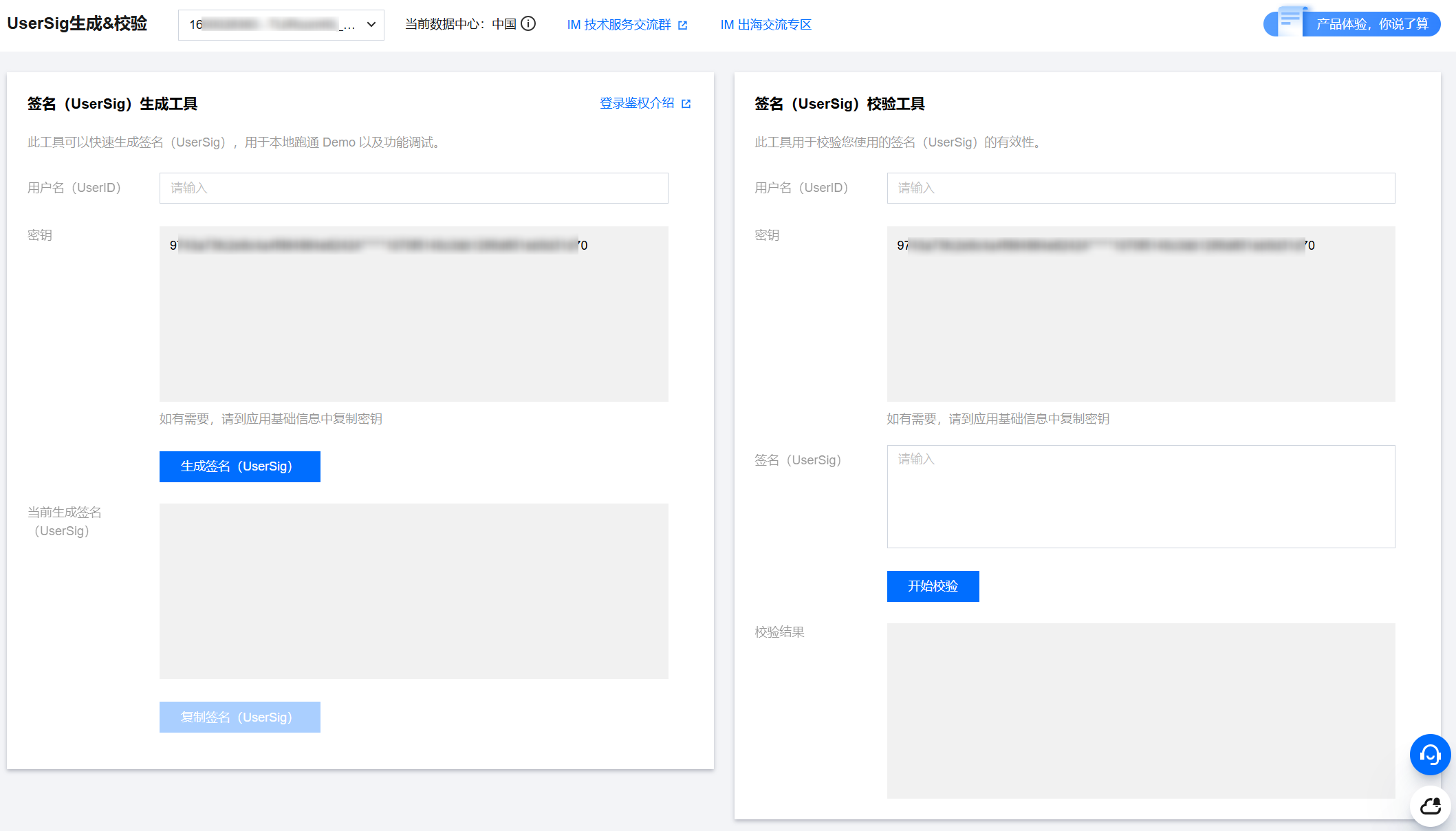
|
|
159
|
-
|
|
160
|
-
|
|
161
|
-
## 接入步骤
|
|
162
|
-
|
|
163
|
-
如下会介绍如何使用 Flutter TUIKit 快速构建一个简单的即时通信应用。
|
|
164
|
-
|
|
165
|
-
### 步骤1:创建 Flutter 应用并添加权限
|
|
166
86
|
|
|
167
|
-
|
|
87
|
+
### 配置项目
|
|
168
88
|
|
|
169
|
-
|
|
170
|
-
|
|
171
|
-
由于 TUIKit 运行,需要拍摄/相册/录音/网络等权限,需要您在 Native 的文件中手动声明,才可正常使用相关能力。
|
|
172
|
-
|
|
173
|
-
**Android**
|
|
174
|
-
|
|
175
|
-
打开 `android/app/src/main/AndroidManifest.xml` ,在 `<manifest></manifest>`中,添加如下权限。
|
|
176
|
-
``` xml
|
|
177
|
-
<uses-permission
|
|
178
|
-
android:name="android.permission.INTERNET"/>
|
|
179
|
-
<uses-permission
|
|
180
|
-
android:name="android.permission.RECORD_AUDIO"/>
|
|
181
|
-
<uses-permission
|
|
182
|
-
android:name="android.permission.FOREGROUND_SERVICE"/>
|
|
183
|
-
<uses-permission
|
|
184
|
-
android:name="android.permission.ACCESS_NETWORK_STATE"/>
|
|
185
|
-
<uses-permission
|
|
186
|
-
android:name="android.permission.VIBRATE"/>
|
|
187
|
-
<uses-permission
|
|
188
|
-
android:name="android.permission.ACCESS_BACKGROUND_LOCATION"/>
|
|
189
|
-
<uses-permission
|
|
190
|
-
android:name="android.permission.WRITE_EXTERNAL_STORAGE"/>
|
|
191
|
-
<uses-permission
|
|
192
|
-
android:name="android.permission.READ_EXTERNAL_STORAGE"/>
|
|
193
|
-
<uses-permission
|
|
194
|
-
android:name="android.permission.CAMERA"/>
|
|
195
|
-
<uses-permission
|
|
196
|
-
android:name="android.permission.READ_MEDIA_IMAGES"/>
|
|
197
|
-
<uses-permission
|
|
198
|
-
android:name="android.permission.READ_MEDIA_VIDEO"/>
|
|
199
|
-
```
|
|
200
|
-
|
|
201
|
-
**iOS**
|
|
202
|
-
|
|
203
|
-
打开 `ios/Podfile` ,在文件末尾新增如下权限代码。
|
|
204
|
-
``` bash
|
|
89
|
+
在 iOS 端添加必要的权限配置。请打开 ios/Podfile ,在文件末尾新增如下权限代码:
|
|
90
|
+
``` objectivec
|
|
205
91
|
post_install do |installer|
|
|
206
92
|
installer.pods_project.targets.each do |target|
|
|
207
93
|
flutter_additional_ios_build_settings(target)
|
|
@@ -220,1213 +106,318 @@ post_install do |installer|
|
|
|
220
106
|
end
|
|
221
107
|
end
|
|
222
108
|
end
|
|
223
|
-
```
|
|
224
|
-
|
|
225
|
-
> **说明:**
|
|
226
|
-
>
|
|
227
|
-
|
|
228
|
-
> 如您需要用到推送能力,还需要添加推送相关权限,详情可查看 [Flutter 厂商推送服务(Push)集成指南](https://cloud.tencent.com/document/product/269/101961)。
|
|
229
|
-
>
|
|
230
|
-
|
|
231
109
|
|
|
232
|
-
|
|
110
|
+
```
|
|
233
111
|
|
|
234
|
-
|
|
112
|
+
## 接入步骤
|
|
235
113
|
|
|
236
|
-
|
|
114
|
+
### 步骤1:配置用户鉴权
|
|
237
115
|
|
|
116
|
+
在 [即时通信 IM 控制台](https://console.cloud.tencent.com/im/tool-usersig) 根据 UserID 获取 UserSig 用于后续登录时的用户鉴权。
|
|
238
117
|
|
|
239
|
-
|
|
118
|
+
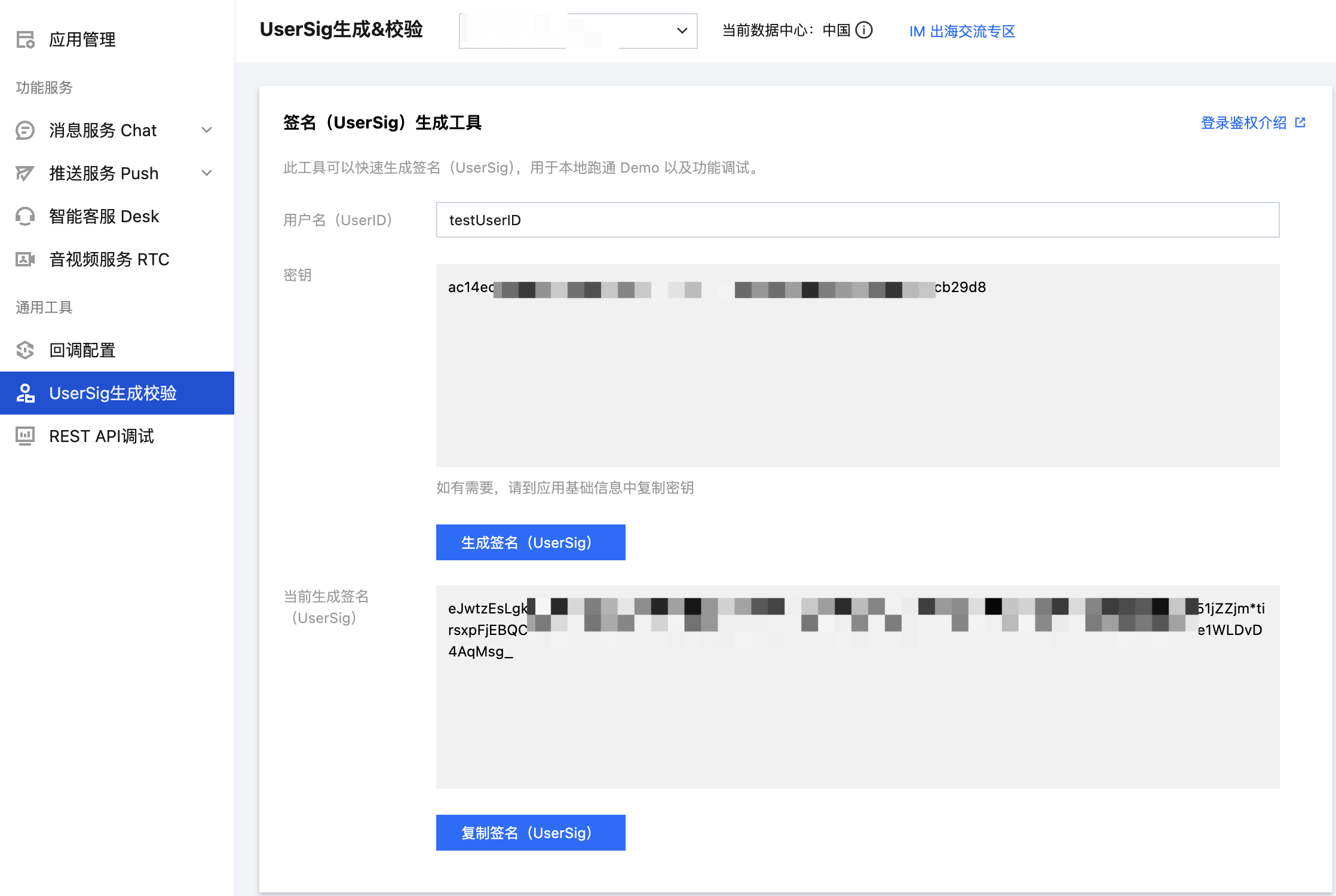
|
|
240
119
|
|
|
241
|
-
``` bash
|
|
242
|
-
flutter pub add tencent_cloud_chat_uikit
|
|
243
|
-
```
|
|
244
|
-
- 如果差异较大,我们更建议您fork一份我们的 [TUIKit 源码](https://github.com/TencentCloud/chat-uikit-flutter),并直接修改fork后的版本,并将其引入您的项目中。如果需要更新至我们的最新版本,您可以使用 git upstream 的方式,将新版本的更改从我们的GitHub仓库同步到您的fork仓库中。
|
|
245
120
|
|
|
121
|
+
### 步骤2:用户登录
|
|
246
122
|
|
|
247
|
-
|
|
123
|
+
登录鉴权后才能正常使用组件的功能。您可以调用 login 接口,传入上文获取的 SDKAPPID、userID、userSig 用于登录鉴权:
|
|
124
|
+
``` java
|
|
125
|
+
final result = await LoginStore.shared.login(
|
|
126
|
+
sdkAppID: SDKAPPID,
|
|
127
|
+
userID: userID,
|
|
128
|
+
userSig: userSig,
|
|
129
|
+
);
|
|
130
|
+
if (result.errorCode == 0) {
|
|
131
|
+
// 登录成功,可跳转聊天或会话页
|
|
132
|
+
} else {
|
|
133
|
+
// 登录失败,可弹框报错
|
|
134
|
+
}
|
|
135
|
+
```
|
|
248
136
|
|
|
249
137
|
> **注意:**
|
|
250
138
|
>
|
|
251
|
-
> - 如果您需要同时使用 IM TUIKit 和 音视频通话 Callkit,请务必确保本步骤 IM 的初始化及登录完成后,再执行 Callkit 的初始化相关操作。
|
|
252
|
-
> - 为了尊重版权,IM Demo/TUIKit 工程中默认不包含大表情元素切图。在正式上线商用前,请您替换为自己设计或拥有版权的其他表情包。请注意,下图所示的**默认小黄脸表情包版权属于腾讯云**,您可以通过升级至 [IM 企业版套餐](https://buy.cloud.tencent.com/avc) 免费使用该表情包。
|
|
253
139
|
|
|
254
|
-
>
|
|
140
|
+
> 在正式的生产环境中,建议在您的服务端生成 UserSig,在需要 UserSig 时由您的 App 向业务服务器发起请求获取动态 UserSig 来进行鉴权。详见 [服务端生成 UserSig](https://cloud.tencent.com/document/product/269/32688)。
|
|
255
141
|
>
|
|
256
142
|
|
|
257
|
-
1. 在您应用启动时,初始化 IM。
|
|
258
|
-
|
|
259
|
-
2. 请务必保证先执行 [`TIMUIKitCore.getInstance()`](https://comm.qq.com/im/doc/flutter/zh/TUIKit/TIMUIKitCore/getInstance.html) ,再调用初始化函数 [`init()`](https://comm.qq.com/im/doc/flutter/zh/TUIKit/TIMUIKitCore/init.html) ,并将您的`sdkAppID`传入。
|
|
260
|
-
|
|
261
|
-
3. 为方便您获取API报错及建议提醒用户的提示语,此处建议挂载一个 onTUIKitCallbackListener 监听,[详见此部分](https://write.woa.com/#callback)。
|
|
262
|
-
|
|
263
|
-
|
|
264
|
-
示例代码如下,[全部初始化参数可参考此文档](https://comm.qq.com/im/doc/flutter/zh/TUIKit/TIMUIKitCore/init.html)。
|
|
265
|
-
|
|
266
|
-
``` dart
|
|
267
|
-
/// main.dart
|
|
268
|
-
import 'package:tencent_cloud_chat_uikit/tencent_cloud_chat_uikit.dart';
|
|
269
|
-
|
|
270
|
-
final CoreServicesImpl _coreInstance = TIMUIKitCore.getInstance();
|
|
271
|
-
@override
|
|
272
|
-
void initState() {
|
|
273
|
-
_coreInstance.init(
|
|
274
|
-
sdkAppID: 0, // Replace 0 with the SDKAppID of your IM application when integrating
|
|
275
|
-
// language: LanguageEnum.en, // 界面语言配置,若不配置,则跟随系统语言
|
|
276
|
-
loglevel: LogLevelEnum.V2TIM_LOG_DEBUG,
|
|
277
|
-
onTUIKitCallbackListener: (TIMCallback callbackValue){}, // [建议配置,详见此部分](https://cloud.tencent.com/document/product/269/70746#callback)
|
|
278
|
-
listener: V2TimSDKListener());
|
|
279
|
-
super.initState();
|
|
280
|
-
}
|
|
281
|
-
}
|
|
282
|
-
```
|
|
283
|
-
|
|
284
|
-
> **注意:**
|
|
285
|
-
>
|
|
286
|
-
> 1. 请在本步骤 await 初始化完成后,才可执行后续步骤。
|
|
287
|
-
> 2. TUIKit 界面语言支持自动或手动在**简体中文/繁体中文/英文/日语/韩语**间切换。此处语言配置用法,[请参考此文档](https://cloud.tencent.com/document/product/269/84481)。
|
|
288
|
-
|
|
289
|
-
|
|
290
|
-
#### 登录测试账户
|
|
291
|
-
1. 此时,您可以使用最开始的时候,在控制台生成的测试账户,完成登录验证。
|
|
292
|
-
|
|
293
|
-
2. 调用 [`_coreInstance.login`](https://comm.qq.com/im/doc/flutter/zh/TUIKit/TIMUIKitCore/login.html) 方法,登录一个测试账户。
|
|
294
|
-
|
|
295
|
-
``` dart
|
|
296
|
-
import 'package:tencent_cloud_chat_uikit/tencent_cloud_chat_uikit.dart';
|
|
297
|
-
|
|
298
|
-
final CoreServicesImpl _coreInstance = TIMUIKitCore.getInstance();
|
|
299
|
-
_coreInstance.login(userID: userID, userSig: userSig);
|
|
300
|
-
```
|
|
301
|
-
|
|
302
|
-
> **说明:**
|
|
303
|
-
>
|
|
304
|
-
|
|
305
|
-
> 在下方的步骤3-5中,我们将教您如何使用我们常用组件的最基础用法,移动端和桌面端保持一致,**使用同一套代码和文件**。
|
|
306
|
-
>
|
|
307
|
-
|
|
308
|
-
> 而在 [步骤6](https://write.woa.com/#step6) 中,我们将教您如何将这些组件拼装成一个整体,即分别搭建移动端和桌面端的整体架构。在整体架构层面,部分内容需要单独适配。
|
|
309
|
-
>
|
|
310
143
|
|
|
144
|
+
### 步骤3:构建会话列表界面
|
|
311
145
|
|
|
312
|
-
|
|
313
|
-
|
|
314
|
-
[本小节 Demo 代码](https://github.com/TencentCloud/chat-demo-flutter/blob/main/lib/src/conversation.dart)
|
|
315
|
-
|
|
316
|
-
您可以以会话列表作为您的 IM 功能首页,其涵盖了与所有有聊天记录的用户及群聊的会话。
|
|
317
|
-
|
|
318
|
-
|
|
319
|
-
|
|
320
|
-
请创建一个 `Conversation` 类,`body` 中使用 [`TIMUIKitConversation`](https://comm.qq.com/im/doc/flutter/zh/TUIKit/TIMUIKitConversation/TIMUIKitConversation-Implementation.html) 组件,渲染会话列表。
|
|
321
|
-
|
|
322
|
-
您仅需传入一个 `onTapItem` 事件的处理函数,用于跳转至具体会话聊天页的导航。关于 `Chat` 类,会在下一步讲解。
|
|
323
|
-
``` dart
|
|
324
|
-
import 'package:flutter/material.dart';
|
|
325
|
-
import 'package:tencent_cloud_chat_uikit/tencent_cloud_chat_uikit.dart';
|
|
326
|
-
|
|
327
|
-
class Conversation extends StatelessWidget {
|
|
328
|
-
const Conversation({Key? key}) : super(key: key);
|
|
329
|
-
@override
|
|
330
|
-
Widget build(BuildContext context) {
|
|
331
|
-
return Scaffold(
|
|
332
|
-
appBar: AppBar(
|
|
333
|
-
title: const Text(
|
|
334
|
-
"Message",
|
|
335
|
-
style: TextStyle(color: Colors.black),
|
|
336
|
-
),
|
|
337
|
-
),
|
|
338
|
-
body: TIMUIKitConversation(
|
|
339
|
-
onTapItem: (selectedConv) {
|
|
340
|
-
// 如果需要适配桌面端,此处需要参考 Demo 代码修改。
|
|
341
|
-
Navigator.push(
|
|
342
|
-
context,
|
|
343
|
-
MaterialPageRoute(
|
|
344
|
-
builder: (context) => Chat(
|
|
345
|
-
selectedConversation: selectedConv,
|
|
346
|
-
),
|
|
347
|
-
));
|
|
348
|
-
},
|
|
349
|
-
),
|
|
350
|
-
);
|
|
351
|
-
}
|
|
352
|
-
}
|
|
353
|
-
```
|
|
146
|
+
您可以基于 TUIKit Flutter 中的 ConversationList 组件,构建一个会话列表页面。ConversationList 内建的功能是:
|
|
147
|
+
- 展示用户的会话列表,包含单聊和群聊会话
|
|
354
148
|
|
|
355
|
-
|
|
149
|
+
- 支持用户操作单个会话:置顶、删除、清空会话消息等
|
|
356
150
|
|
|
357
|
-
[本小节 Demo 代码](https://github.com/TencentCloud/chat-demo-flutter/blob/main/lib/src/chat.dart)
|
|
358
151
|
|
|
359
|
-
|
|
152
|
+
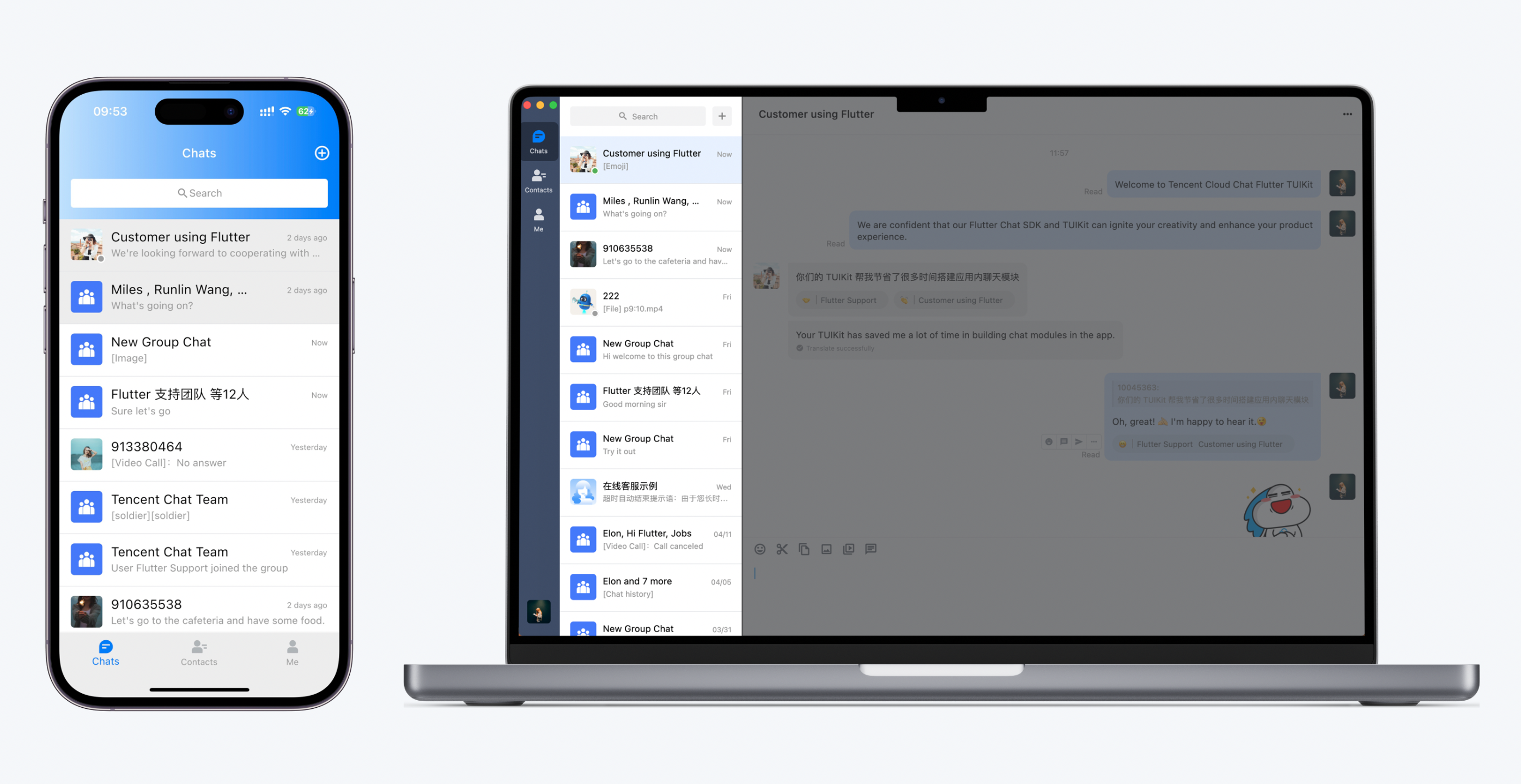
您可以将 ConversationList 直接集成到现有的 App 页面中,也可以新构建一个完整的会话列表页,组装后的一种 UI 效果如下图所示:
|
|
360
153
|
|
|
361
|
-

|
|
362
155
|
|
|
363
|
-
请创建一个 `Chat` 类,`body` 中使用 [`TIMUIKitChat`](https://comm.qq.com/im/doc/flutter/zh/TUIKit/TIMUIKitChat/TIMUIKitChat-Implementation.html) 组件,渲染聊天页面。
|
|
364
156
|
|
|
365
|
-
|
|
366
|
-
``` dart
|
|
367
|
-
import 'package:flutter/material.dart';
|
|
368
|
-
import 'package:tencent_cloud_chat_uikit/tencent_cloud_chat_uikit.dart';
|
|
157
|
+
将 ConversationList 封装为会话列表页,可参考 `chat/uikit/lib/conversations_page.dart` 文件里的实现,`ConversationsPage` 主要做了以下工作:
|
|
369
158
|
|
|
370
|
-
|
|
371
|
-
final V2TimConversation selectedConversation;
|
|
372
|
-
const Chat({Key? key, required this.selectedConversation}) : super(key: key);
|
|
373
|
-
String? _getConvID() {
|
|
374
|
-
return selectedConversation.type == 1
|
|
375
|
-
? selectedConversation.userID
|
|
376
|
-
: selectedConversation.groupID;
|
|
377
|
-
}
|
|
378
|
-
@override
|
|
379
|
-
Widget build(BuildContext context) {
|
|
380
|
-
return TIMUIKitChat(
|
|
381
|
-
conversation: selectedConversation,
|
|
382
|
-
onTapAvatar: (_) {
|
|
383
|
-
// 如果需要适配桌面端,此处需要参考 Demo 代码修改。
|
|
384
|
-
Navigator.push(
|
|
385
|
-
context,
|
|
386
|
-
MaterialPageRoute(
|
|
387
|
-
builder: (context) => UserProfile(userID: userID),
|
|
388
|
-
));
|
|
389
|
-
}, // Callback for the clicking of the message sender profile photo. This callback can be used with `TIMUIKitProfile`.
|
|
390
|
-
);
|
|
391
|
-
}
|
|
392
|
-
```
|
|
159
|
+
1. 在 ConversationList 上方添加了 AppBar。
|
|
393
160
|
|
|
394
|
-
|
|
395
|
-
``` plaintext
|
|
396
|
-
TIMUIKitChat(
|
|
397
|
-
conversation: V2TimConversation(
|
|
398
|
-
conversationID: "c2c_10040818", // 单聊:"c2c_${对方的userID}" ; 群聊:"group_${groupID}"
|
|
399
|
-
userID: "", // 仅单聊需要此字段,对方userID
|
|
400
|
-
groupID: "", // 仅群聊需要此字段,群groupID
|
|
401
|
-
showName: "", // 顶部 AppBar 显示的标题
|
|
402
|
-
type: 1, // 单聊传1,群聊传2
|
|
403
|
-
// 以上是最简化最基础的必要配置,您还可在此指定更多参数配置,根据 V2TimConversation 的注释
|
|
404
|
-
),
|
|
405
|
-
// ......其他 TIMUIKitChat 的配置参数
|
|
406
|
-
);
|
|
407
|
-
```
|
|
161
|
+
2. 实现点击会话列表 cell 事件。
|
|
408
162
|
|
|
409
|
-
|
|
163
|
+
3. 支持创建会话和群组功能:
|
|
410
164
|
|
|
411
|
-
|
|
165
|
+
1. 点击右上角按钮可以创建新会话或群组
|
|
412
166
|
|
|
413
|
-
|
|
167
|
+
2. 支持从联系人列表选择好友创建单聊
|
|
414
168
|
|
|
415
|
-
|
|
169
|
+
3. 支持选择多个好友创建群聊
|
|
416
170
|
|
|
417
|
-
> **说明:**
|
|
418
|
-
>
|
|
419
171
|
|
|
420
|
-
|
|
421
|
-
>
|
|
172
|
+
核心示例代码如下所示:
|
|
422
173
|
|
|
174
|
+
``` java
|
|
175
|
+
@override
|
|
176
|
+
Widget build(BuildContext context) {
|
|
177
|
+
return Scaffold(
|
|
178
|
+
appBar: AppBar(
|
|
179
|
+
backgroundColor: colorsTheme.bgColorOperate,
|
|
180
|
+
title: Text(atomicLocale.chat, style: TextStyle(fontSize: 34, fontWeight: FontWeight.w600)),
|
|
181
|
+
centerTitle: false,
|
|
182
|
+
scrolledUnderElevation: 0,
|
|
183
|
+
actions: [],
|
|
184
|
+
),
|
|
185
|
+
body: Column(
|
|
186
|
+
children: [
|
|
187
|
+
Expanded(
|
|
188
|
+
child: ConversationList(
|
|
189
|
+
onConversationClick: (conversation) {
|
|
190
|
+
Navigator.push(
|
|
191
|
+
context,
|
|
192
|
+
MaterialPageRoute(
|
|
193
|
+
builder: (context) => ChatPage(
|
|
194
|
+
conversation: conversation,
|
|
195
|
+
),
|
|
196
|
+
),
|
|
197
|
+
);
|
|
198
|
+
},
|
|
199
|
+
),
|
|
200
|
+
),
|
|
201
|
+
],
|
|
202
|
+
),
|
|
203
|
+
);
|
|
204
|
+
}
|
|
205
|
+
```
|
|
423
206
|
|
|
424
|
-
|
|
425
|
-
``` dart
|
|
426
|
-
import 'package:flutter/material.dart';
|
|
427
|
-
import 'package:tencent_cloud_chat_uikit/tencent_cloud_chat_uikit.dart';
|
|
428
|
-
|
|
429
|
-
class UserProfile extends StatelessWidget {
|
|
430
|
-
final String userID;
|
|
431
|
-
const UserProfile({required this.userID, Key? key}) : super(key: key);
|
|
432
|
-
|
|
433
|
-
@override
|
|
434
|
-
Widget build(BuildContext context) {
|
|
435
|
-
return Scaffold(
|
|
436
|
-
appBar: AppBar(
|
|
437
|
-
title: const Text(
|
|
438
|
-
"Message",
|
|
439
|
-
style: TextStyle(color: Colors.black),
|
|
440
|
-
),
|
|
441
|
-
),
|
|
442
|
-
body: TIMUIKitProfile(
|
|
443
|
-
userID: widget.userID,
|
|
444
|
-
),
|
|
445
|
-
);
|
|
446
|
-
}
|
|
447
|
-
}
|
|
448
|
-
```
|
|
207
|
+
### 步骤4:构建聊天界面
|
|
449
208
|
|
|
450
|
-
|
|
209
|
+
您可以基于 TUIKit Flutter 中的 MessageList、MessageInput 组件,构建一个聊天页面。
|
|
451
210
|
|
|
452
|
-
|
|
211
|
+
MessageList 内建的功能是:
|
|
212
|
+
- 展示单聊或群聊消息列表。
|
|
453
213
|
|
|
454
|
-
|
|
214
|
+
- 支持对单条消息操作:查看图片消息的大图、播放视频或语音消息、复制文本消息、撤回消息、删除消息等。
|
|
455
215
|
|
|
456
|
-
然而,在应用架构方面,您仍需要针对移动端和桌面端两种不同的模式进行独立适配,包括组件的放置位置、组件间的跳转方式以及页面的整体布局。
|
|
457
216
|
|
|
458
|
-
|
|
217
|
+
MessageInput 内建的功能是:
|
|
459
218
|
|
|
460
|
-
|
|
219
|
+
- 支持用户组建并发送多种类型的消息:文本、表情、图片、语音、视频、文件等。
|
|
461
220
|
|
|
462
|
-
以下功能是我们为桌面端适配开发的**通用功能**,TUIKit 内部已经实现了这些功能,您可以在您的项目中直接使用。
|
|
463
221
|
|
|
464
|
-
|
|
222
|
+
您可以将 MessageList 和 MessageInput 直接集成到现有的 App 页面中,也可以新构建一个完整的聊天页,组装后的一种 UI 效果如下图所示:
|
|
465
223
|
|
|
466
|
-
|
|
224
|
+
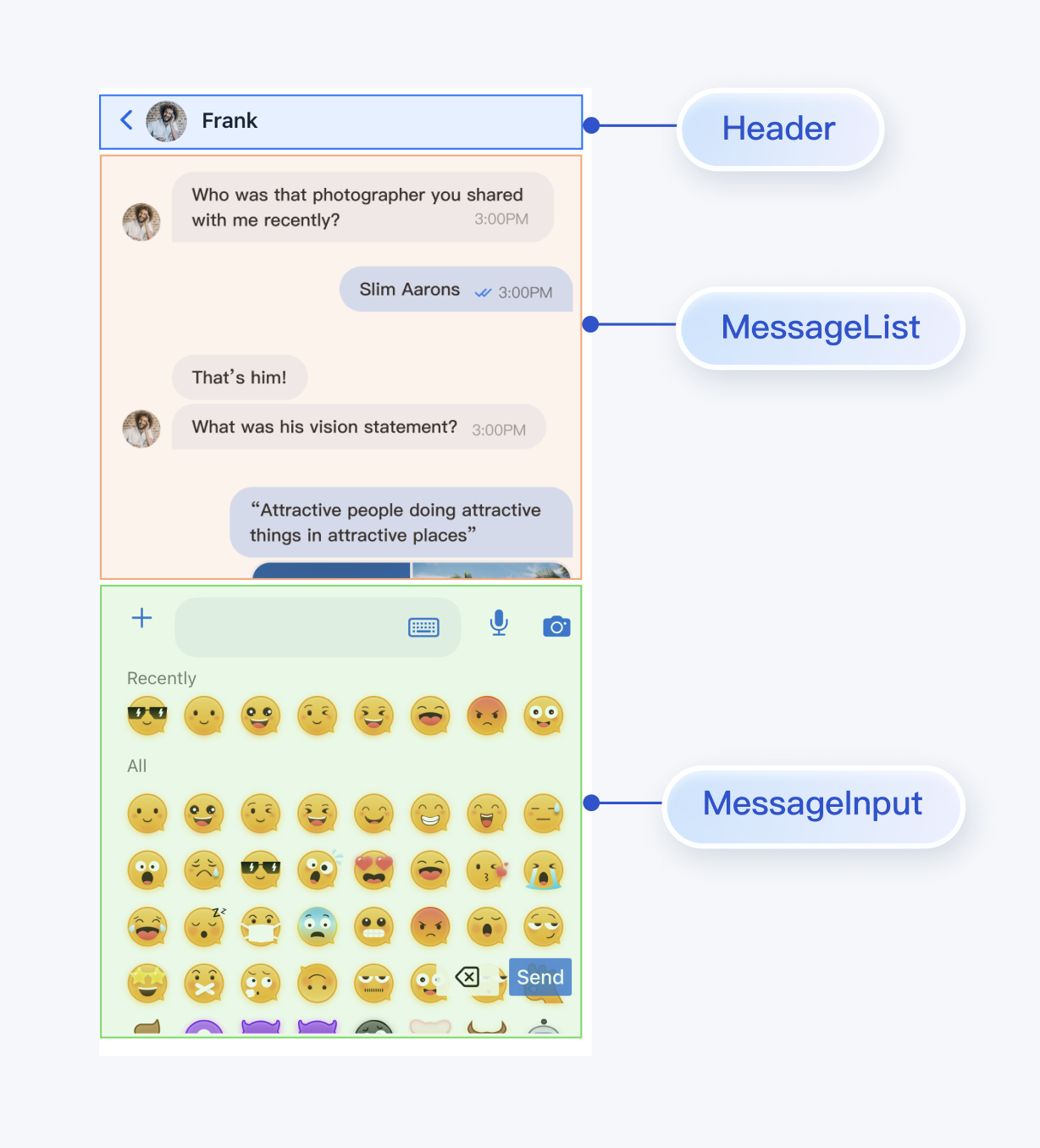
|
|
467
225
|
|
|
468
|
-
您可以通过执行以下代码来判断是否为桌面端。通常情况下,无需传入 `context`,仅在应用启动后第一次执行时需要。
|
|
469
|
-
``` plaintext
|
|
470
|
-
import 'package:tencent_cloud_chat_uikit/ui/utils/screen_utils.dart';
|
|
471
226
|
|
|
472
|
-
|
|
473
|
-
```
|
|
227
|
+
将 MessageList 和 MessageInput 组装为聊天页,可参考 `chat/uikit/lib/chat_page.dart` 文件里的实现,`ChatPage` 主要做了以下工作:
|
|
474
228
|
|
|
475
|
-
|
|
229
|
+
1. 在最上方添加了 AppBar,展示会话的名称。
|
|
476
230
|
|
|
477
|
-
|
|
231
|
+
2. 按照移动端用户使用习惯,上下拼接 MessageList 和 MessageInput。
|
|
478
232
|
|
|
479
|
-
此外,根据相关隐私政策,建议您不要频繁调用系统API以获取当前系统类型。因此,我们推荐您使用我们提供的系统平台识别能力进行此操作。我们仅在应用启动时获取一次系统类型,并将其存储在全局变量中,以便后续调用时直接返回该参数。
|
|
480
|
-
``` plaintext
|
|
481
|
-
import 'package:tencent_cloud_chat_uikit/ui/utils/platform.dart';
|
|
482
233
|
|
|
483
|
-
|
|
484
|
-
final bool isWeb = PlatformUtils().isWeb; // 判断当前是否是网页
|
|
485
|
-
final bool isIOS = PlatformUtils().isIOS; // 判断当前是否是 iOS 设备
|
|
486
|
-
final bool isWindows = PlatformUtils().isWindows; // 判断当前是否是 Windows 桌面系统
|
|
487
|
-
final bool isMacOS = PlatformUtils().isMacOS; // 判断当前是否是 macOS 桌面系统
|
|
488
|
-
final bool isMobile = PlatformUtils().isMobile; // 判断当前是否是手机 app 应用,包含了 Android 及 iOS 设备。
|
|
489
|
-
final bool isDesktop = PlatformUtils().isDesktop; // 判断当前是否是桌面端应用,包含了 Windows 及 macOS 系统。
|
|
490
|
-
```
|
|
234
|
+
核心示例代码如下所示:
|
|
491
235
|
|
|
492
|
-
|
|
236
|
+
``` java
|
|
237
|
+
@override
|
|
238
|
+
Widget build(BuildContext context) {
|
|
239
|
+
return Scaffold(
|
|
240
|
+
appBar: AppBar(
|
|
241
|
+
backgroundColor: colorsTheme.bgColorOperate,
|
|
242
|
+
titleSpacing: 4.0,
|
|
243
|
+
centerTitle: false,
|
|
244
|
+
title: GestureDetector(
|
|
245
|
+
onTap: _onTitleTap,
|
|
246
|
+
child: Row(
|
|
247
|
+
mainAxisSize: MainAxisSize.min,
|
|
248
|
+
children: [
|
|
249
|
+
Padding(
|
|
250
|
+
padding: const EdgeInsets.only(right: 8.0),
|
|
251
|
+
child: Avatar.image(
|
|
252
|
+
name: widget.conversation.title,
|
|
253
|
+
url: widget.conversation.avatarURL,
|
|
254
|
+
),
|
|
255
|
+
),
|
|
256
|
+
Expanded(
|
|
257
|
+
child: Text(
|
|
258
|
+
widget.conversation.title ?? atomicLocale.chat,
|
|
259
|
+
style: TextStyle(fontSize: 14, fontWeight: FontWeight.w600),
|
|
260
|
+
overflow: TextOverflow.ellipsis,
|
|
261
|
+
maxLines: 1,
|
|
262
|
+
),
|
|
263
|
+
),
|
|
264
|
+
],
|
|
265
|
+
),
|
|
266
|
+
),
|
|
267
|
+
scrolledUnderElevation: 0.0,
|
|
268
|
+
leading: IconButton.buttonContent(
|
|
269
|
+
content: IconOnlyContent(Icon(Icons.arrow_back_ios, color: colorsTheme.buttonColorPrimaryDefault)),
|
|
270
|
+
type: ButtonType.noBorder,
|
|
271
|
+
size: ButtonSize.l,
|
|
272
|
+
onClick: () => Navigator.of(context).pop(),
|
|
273
|
+
),
|
|
274
|
+
actions: []),
|
|
275
|
+
body: Column(
|
|
276
|
+
children: [
|
|
277
|
+
MessageList(
|
|
278
|
+
conversationID: widget.conversation.conversationID,
|
|
279
|
+
locateMessage: widget.message,
|
|
280
|
+
onUserClick: (String userID) => _onUserClick(userID),
|
|
281
|
+
),
|
|
282
|
+
MessageInput(
|
|
283
|
+
conversationID: widget.conversation.conversationID,
|
|
284
|
+
),
|
|
285
|
+
],
|
|
286
|
+
),
|
|
287
|
+
);
|
|
288
|
+
}
|
|
289
|
+
```
|
|
493
290
|
|
|
494
|
-
|
|
291
|
+
### 步骤5:构建联系人界面
|
|
495
292
|
|
|
496
|
-
|
|
497
|
-
|
|
498
|
-
TUIKitScreenUtils.getDeviceWidget(
|
|
499
|
-
desktopWidget: Container(), // 桌面端 Widget。
|
|
500
|
-
defaultWidget: Container(), // 默认 Widget,必传。当对应平台的 Widget 没有传入时,用此 Widget 兜底。
|
|
501
|
-
mobileWidget: Container(), // 移动端 Widget。
|
|
502
|
-
);
|
|
503
|
-
```
|
|
293
|
+
您可以基于 TUIKit Flutter 中的 ContactList 组件,构建一个联系人页面。ContactList 内建的功能是:
|
|
294
|
+
- 查看好友申请列表。
|
|
504
295
|
|
|
505
|
-
|
|
506
|
-
``` plaintext
|
|
507
|
-
@overrideWidget
|
|
508
|
-
build(BuildContext context) {
|
|
509
|
-
Widget widgetBody() {
|
|
510
|
-
return const TIMUIKitBlackList(); // 这里替换成实际需要展示的 Widget
|
|
511
|
-
}
|
|
512
|
-
return TUIKitScreenUtils.getDeviceWidget(
|
|
513
|
-
desktopWidget: widgetBody(), // 桌面端直接展示组件
|
|
514
|
-
defaultWidget: Scaffold( // 如非特殊情况,移动端可以使用 defaultWidget 默认,包含 Scaffold
|
|
515
|
-
appBar: AppBar(),
|
|
516
|
-
body: widgetBody(),
|
|
517
|
-
)
|
|
518
|
-
);
|
|
519
|
-
}
|
|
520
|
-
```
|
|
296
|
+
- 查看已加入的群列表。
|
|
521
297
|
|
|
522
|
-
|
|
298
|
+
- 处理群组邀请和申请。
|
|
523
299
|
|
|
524
|
-
|
|
525
|
-
>
|
|
300
|
+
- 管理黑名单列表。
|
|
526
301
|
|
|
527
|
-
|
|
528
|
-
>
|
|
302
|
+
- 查看好友。
|
|
529
303
|
|
|
530
304
|
|
|
305
|
+
您可以将 ContactList 直接集成到现有的 App 中,也可以新构建一个完整的联系人列表页,组装后的一种 UI 效果如下图所示:
|
|
531
306
|
|
|
307
|
+
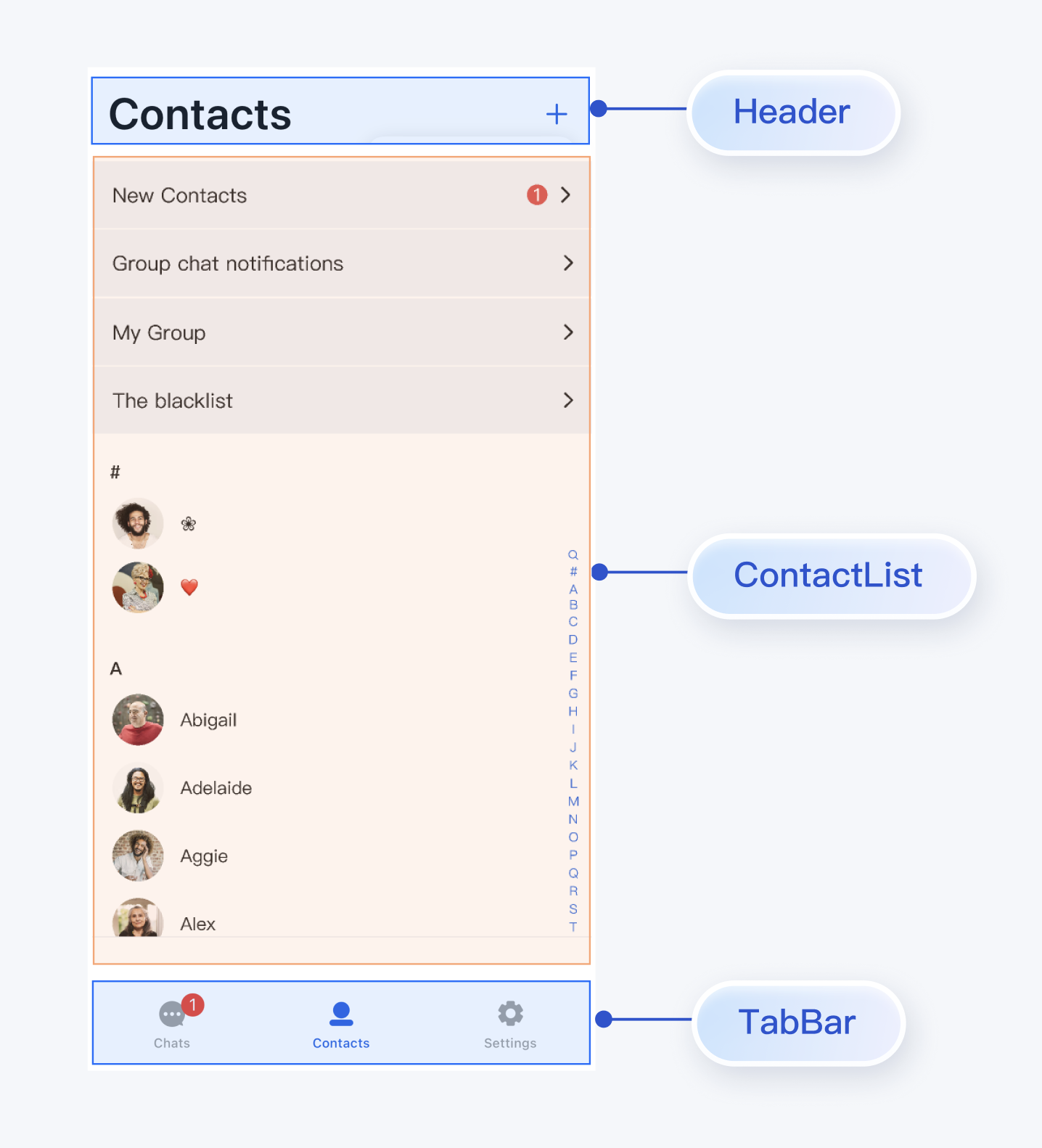
|
|
532
308
|
|
|
533
|
-
【移动端】
|
|
534
309
|
|
|
535
|
-
|
|
310
|
+
将 ContactList 封装为联系人列表页,可参考 `chat/uikit/lib/contacts_page.dart `文件里的实现,`ContactsPage` 主要做了以下工作:
|
|
536
311
|
|
|
537
|
-
|
|
312
|
+
1. 在 ContactList 上方添加了 AppBar。
|
|
538
313
|
|
|
539
|
-
|
|
314
|
+
2. 实现点击联系人列表 cell 事件。
|
|
540
315
|
|
|
541
|
-
|
|
542
|
-
``` plaintext
|
|
543
|
-
TIMUIKitConversation(
|
|
544
|
-
onTapItem: (selectedConv) {
|
|
545
|
-
Navigator.push(
|
|
546
|
-
context,
|
|
547
|
-
MaterialPageRoute(
|
|
548
|
-
builder: (context) => Chat(
|
|
549
|
-
selectedConversation: selectedConv,
|
|
550
|
-
),
|
|
551
|
-
)
|
|
552
|
-
);
|
|
553
|
-
}
|
|
554
|
-
);
|
|
555
|
-
```
|
|
316
|
+
3. 支持添加联系人和添加群组:
|
|
556
317
|
|
|
557
|
-
|
|
318
|
+
1. 点击右上角 "+" 按钮可以添加联系人或群组
|
|
558
319
|
|
|
559
|
-
|
|
320
|
+
2. 支持根据 UserID 搜索目标联系人
|
|
560
321
|
|
|
561
|
-
|
|
562
|
-
>
|
|
322
|
+
3. 支持根据 GroupID 搜索目标群组
|
|
563
323
|
|
|
564
|
-
> 对于此类 `Appbar`,您可通过[配置主题的方式](https://cloud.tencent.com/document/product/269/85902),配置 `appbarBgColor``appbarTextColor``chatHeaderBgColor``chatHeaderTitleTextColor` 等参数以自定义颜色及样式。
|
|
565
|
-
>
|
|
566
324
|
|
|
325
|
+
核心示例代码如下所示:
|
|
567
326
|
|
|
568
|
-
|
|
327
|
+
``` java
|
|
328
|
+
@override
|
|
329
|
+
Widget build(BuildContext context) {
|
|
330
|
+
AtomicLocalizations atomicLocale = AtomicLocalizations.of(context);
|
|
331
|
+
SemanticColorScheme colorsScheme = BaseThemeProvider.colorsOf(context);
|
|
332
|
+
return Scaffold(
|
|
333
|
+
appBar: AppBar(
|
|
334
|
+
backgroundColor: colorsScheme.bgColorOperate,
|
|
335
|
+
title: Text(atomicLocale.contact, style: TextStyle(fontSize: 34, fontWeight: FontWeight.w600),),
|
|
336
|
+
centerTitle: false,
|
|
337
|
+
scrolledUnderElevation: 0,
|
|
338
|
+
actions: [],
|
|
339
|
+
),
|
|
340
|
+
body: ContactList(
|
|
341
|
+
onGroupClick: (ContactInfo contactInfo) {
|
|
342
|
+
_onGroupClick(context, contactInfo);
|
|
343
|
+
},
|
|
344
|
+
onContactClick: (ContactInfo contactInfo) {
|
|
345
|
+
_onContactClick(context, contactInfo);
|
|
346
|
+
},
|
|
347
|
+
),
|
|
348
|
+
);
|
|
349
|
+
}
|
|
350
|
+
```
|
|
569
351
|
|
|
570
|
-
|
|
352
|
+
### 步骤6:完善界面间的跳转逻辑
|
|
571
353
|
|
|
572
|
-
|
|
573
|
-
>
|
|
354
|
+
ConversationsPage、ChatPage、ContactsPage 中实现了默认的用户点击事件,您可以自定义事件来实现页面间的交互:
|
|
355
|
+
<table>
|
|
356
|
+
<tr>
|
|
357
|
+
<td rowspan="1" colSpan="1" >Page</td>
|
|
574
358
|
|
|
575
|
-
|
|
576
|
-
>
|
|
359
|
+
<td rowspan="1" colSpan="1" >回调</td>
|
|
577
360
|
|
|
361
|
+
<td rowspan="1" colSpan="1" >建议跳转逻辑</td>
|
|
362
|
+
</tr>
|
|
578
363
|
|
|
579
|
-
|
|
364
|
+
<tr>
|
|
365
|
+
<td rowspan="1" colSpan="1" >**ConversationsPage**</td>
|
|
580
366
|
|
|
581
|
-
|
|
367
|
+
<td rowspan="1" colSpan="1" >`onConversationClick: (conversation) {}`</td>
|
|
582
368
|
|
|
583
|
-
|
|
369
|
+
<td rowspan="1" colSpan="1" >点击会话列表中的会话时触发,建议跳转到聊天页面(ChatPage)。</td>
|
|
370
|
+
</tr>
|
|
584
371
|
|
|
585
|
-
常见的模块包括:
|
|
586
|
-
<table>
|
|
587
372
|
<tr>
|
|
588
|
-
<td rowspan="
|
|
373
|
+
<td rowspan="2" colSpan="1" >**ContactsPage**</td>
|
|
589
374
|
|
|
590
|
-
<td rowspan="1" colSpan="1"
|
|
375
|
+
<td rowspan="1" colSpan="1" >`onContactClick: (ContactInfo contactInfo) {}`</td>
|
|
376
|
+
|
|
377
|
+
<td rowspan="1" colSpan="1" >点击联系人 cell 时触发,建议跳转到用户信息页(C2CChatSetting)。</td>
|
|
591
378
|
</tr>
|
|
592
379
|
|
|
593
380
|
<tr>
|
|
594
|
-
<td rowspan="1" colSpan="1"
|
|
381
|
+
<td rowspan="1" colSpan="1" >`onGroupClick: (ContactInfo contactInfo) {}`</td>
|
|
595
382
|
|
|
596
|
-
<td rowspan="1" colSpan="1"
|
|
383
|
+
<td rowspan="1" colSpan="1" >点击群组 cell 时触发,建议跳转群聊页面(ChatPage)。</td>
|
|
597
384
|
</tr>
|
|
598
385
|
|
|
599
386
|
<tr>
|
|
600
|
-
<td rowspan="
|
|
387
|
+
<td rowspan="3" colSpan="1" >**ChatPage**</td>
|
|
388
|
+
|
|
389
|
+
<td rowspan="1" colSpan="1" >`onUserClick: (String userID) {}`</td>
|
|
601
390
|
|
|
602
|
-
<td rowspan="1" colSpan="1"
|
|
391
|
+
<td rowspan="1" colSpan="1" >点击消息中的用户头像或昵称时触发,建议跳转用户信息页(C2CChatSetting)。</td>
|
|
603
392
|
</tr>
|
|
604
393
|
|
|
605
394
|
<tr>
|
|
606
|
-
<td rowspan="1" colSpan="1"
|
|
395
|
+
<td rowspan="1" colSpan="1" >`onChatHeaderClick: () {}`</td>
|
|
607
396
|
|
|
608
|
-
<td rowspan="1" colSpan="1"
|
|
397
|
+
<td rowspan="1" colSpan="1" >点击导航栏中的头像时触发,建议跳转用户信息页(C2CChatSetting)或群聊信息页(GroupChatSetting)</td>
|
|
609
398
|
</tr>
|
|
610
399
|
|
|
611
400
|
<tr>
|
|
612
|
-
<td rowspan="1" colSpan="1"
|
|
401
|
+
<td rowspan="1" colSpan="1" >`onBackClick: () {}`</td>
|
|
613
402
|
|
|
614
|
-
<td rowspan="1" colSpan="1"
|
|
403
|
+
<td rowspan="1" colSpan="1" >点击返回按钮时触发,建议返回上一级页面。</td>
|
|
615
404
|
</tr>
|
|
616
405
|
</table>
|
|
617
406
|
|
|
618
407
|
|
|
619
|
-
|
|
620
|
-
|
|
621
|
-
此整体架构布局的设计实践,[可参考我们的 Demo 源码桌面端适配部分代码](https://github.com/TencentCloud/chat-demo-flutter/tree/main/lib/src/pages/cross_platform/wide_screen)。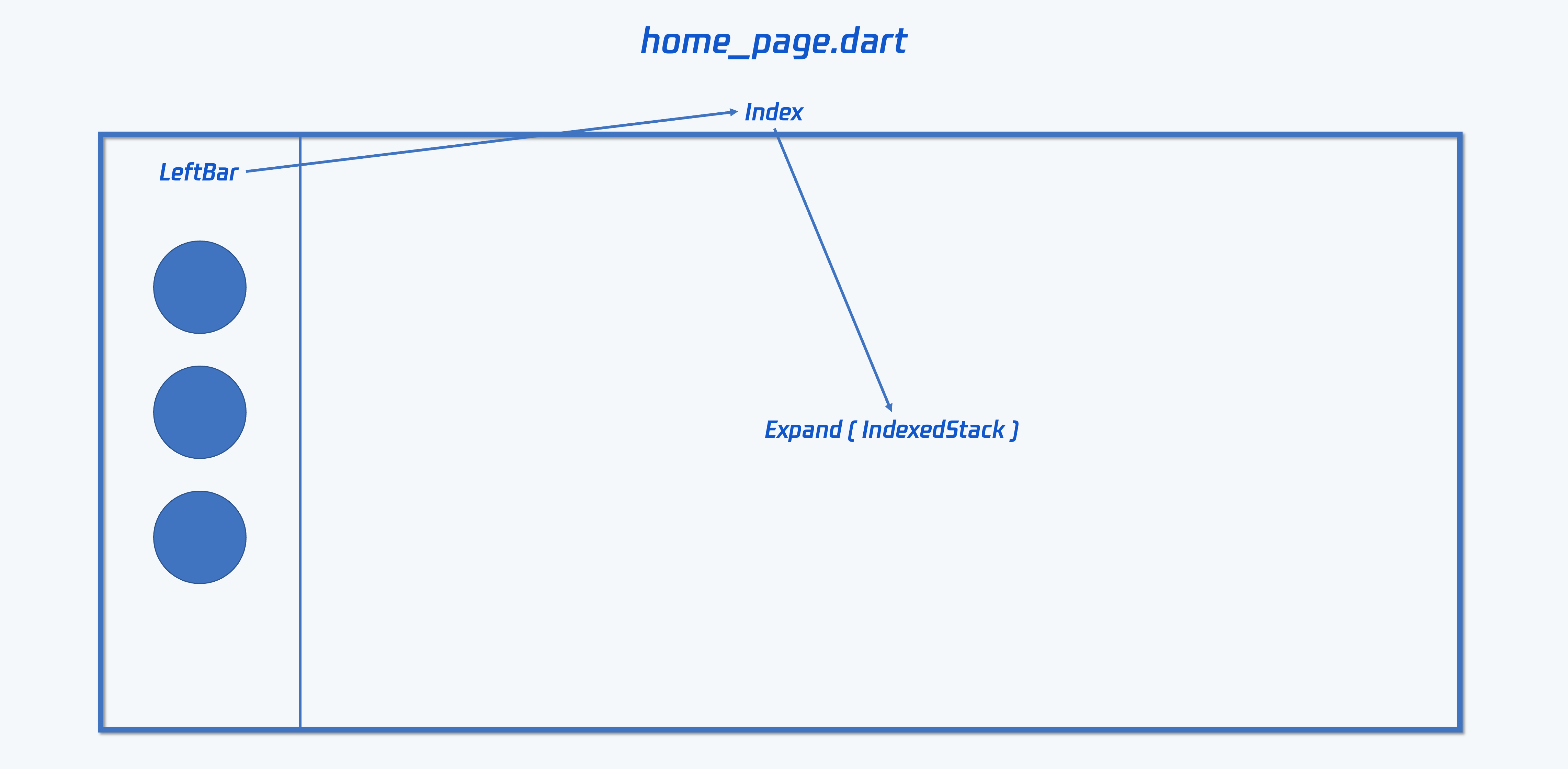
|
|
622
|
-
|
|
623
|
-
现在,基于上方提供的 Demo 源码,分别简单介绍一下几个右侧常见的页面,用于上图 `Expand(IndexedStack)` 部分,的架构布局设计实践。
|
|
624
|
-
|
|
625
|
-
##### **1. 会话列表及会话聊天页面**
|
|
626
|
-
|
|
627
|
-
[本部分 Demo 代码参考](https://github.com/TencentCloud/chat-demo-flutter/blob/main/lib/src/pages/cross_platform/wide_screen/conversation_and_chat.dart)
|
|
628
|
-
|
|
629
|
-
建议您,参考我们的 Demo 代码,新建一个 `dart` 文件,用于放置 `ConversationAndChat` Widget 类,用于承载本部分业务逻辑。
|
|
630
|
-
|
|
631
|
-
这个类,可以引入您在前序步骤制作的 `Chat`, `Conversation`, `UserProfile` 组件,并基本保持这几个用于承载一级组件的 class 代码不变。
|
|
632
|
-
|
|
633
|
-
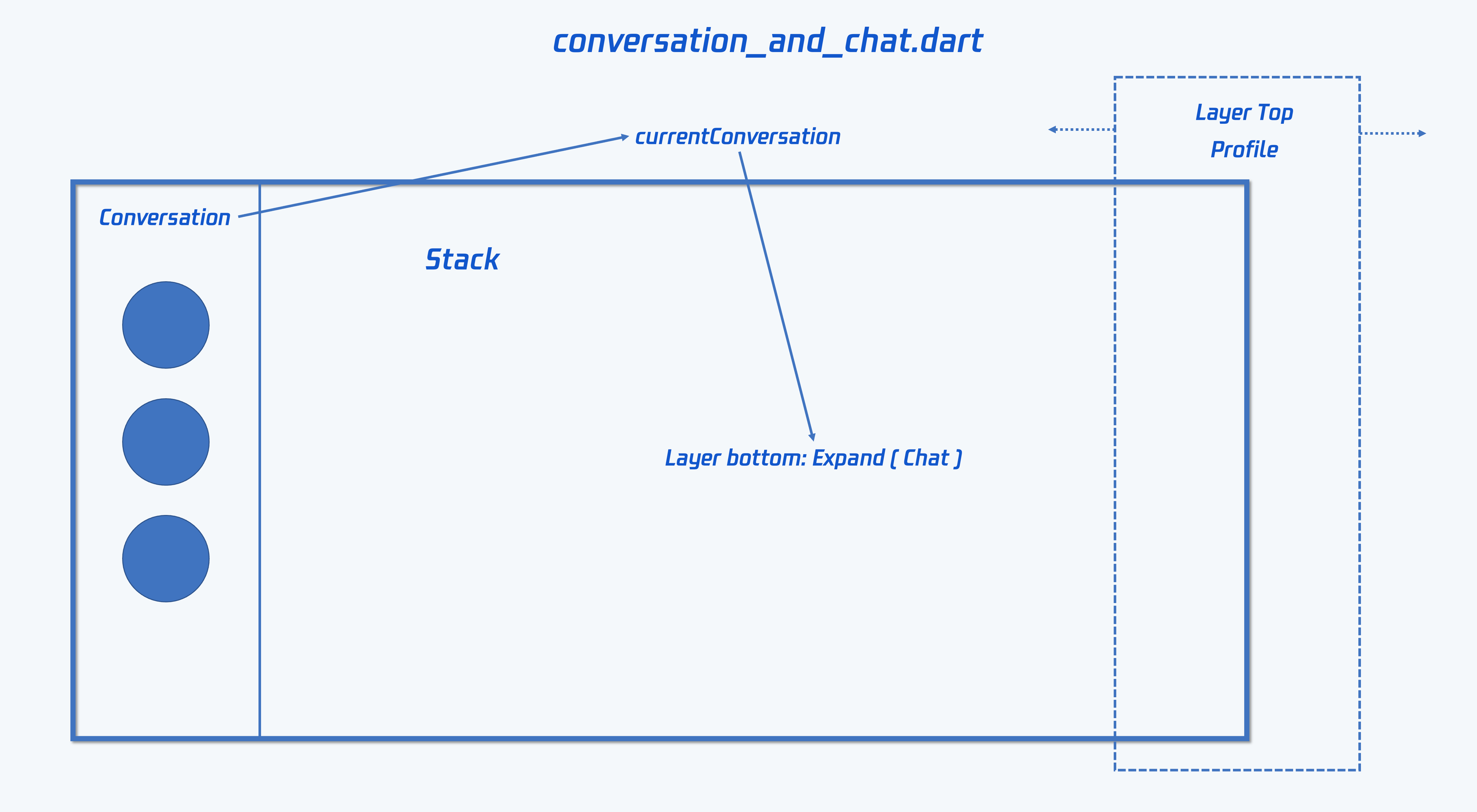
这个类采用 Row 布局,左侧放置 `ConstrainedBox` 用于限制宽度的 `Conversation` 组件,右侧可用 `Expand` 撑开放置 `Chat` 组件。此外,还可以 `Stack` 配合 `AnimatedPositioned` 动画修改位置的形式,在最右侧浮动一个 `UserProfile` 或 `GroupProfile` 组件,用于点击查看联系人或群组详情,在点击时从屏幕外侧进入,并在用完后,回到屏幕外侧。
|
|
634
|
-
|
|
635
|
-
这个 `ConversationAndChat` 类需要包含状态,记录当前的 `V2TimConversation? currentConversation` 会话。
|
|
636
|
-
|
|
637
|
-
为上方步骤 3 制作的 `Conversation` Widget 类,[如此段 Demo 代码所示](https://github.com/TencentCloud/chat-demo-flutter/blob/main/lib/src/conversation.dart#L22),新增一个对外暴露的方法:`onConversationChanged`。用于将当前用户点击的会话回调至此。
|
|
638
|
-
|
|
639
|
-
##### 监听这个 `onConversationChanged` 事件,并将当前切换至的会话,通过 `setState` 的方式,记录,并传入 `Chat` 组件,用于更改当前右侧显示的会话聊天。
|
|
640
|
-
|
|
641
|
-
##### 
|
|
642
|
-
|
|
643
|
-
##### 2. 联系人页面
|
|
644
|
-
|
|
645
|
-
[本部分 Demo 代码参考](https://github.com/TencentCloud/chat-demo-flutter/blob/main/lib/src/pages/cross_platform/wide_screen/contact_and_profile.dart)
|
|
646
|
-
|
|
647
|
-
联系人页面,通常需要包含以下几个能力:*展示联系人列表 / 展示加入的群聊列表/ 展示新的好友申请 / 展示黑名单 / 展示联系人详情 / 展示群组详情 / 搜索联系人或群 / 跳转至会话(单聊和群聊)*。
|
|
648
|
-
|
|
649
|
-
为本部分的代码新建一个 dart 文件,并新建一个 `ContactsAndProfile` Widget 类,用于承载本部分业务逻辑。
|
|
650
|
-
|
|
651
|
-
本部分的结构,和上方 会话列表及会话聊天页面 类似,一样采用 Row 布局配合 `ConstrainedBox` 和 `Expand` 使用。左侧 `ConstrainedBox` 用于放置 `Contact` 及 `GroupList` 等列表组件,右侧 `Expand` 用于放置 `UserProfile` 或 `GroupProfile` 等信息组件。
|
|
652
|
-
|
|
653
|
-
具体的实现方式和上方 会话列表及会话聊天页面 类似,这里不再重复阐述。您可参考[本部分的 Demo 代码](https://github.com/TencentCloud/chat-demo-flutter/blob/main/lib/src/pages/cross_platform/wide_screen/contact_and_profile.dart),配合阅读理解。
|
|
654
|
-
|
|
655
|
-
此外,这个页面有个特殊的特性在于,您可能需要实现跳转至单聊会话或群聊会话的能力,一键进入会话。这部分代码不属于 TUIKit部分,需要您根据自己的业务需要,单独适配。Demo 效果如图所示,图片后有实现思路介绍。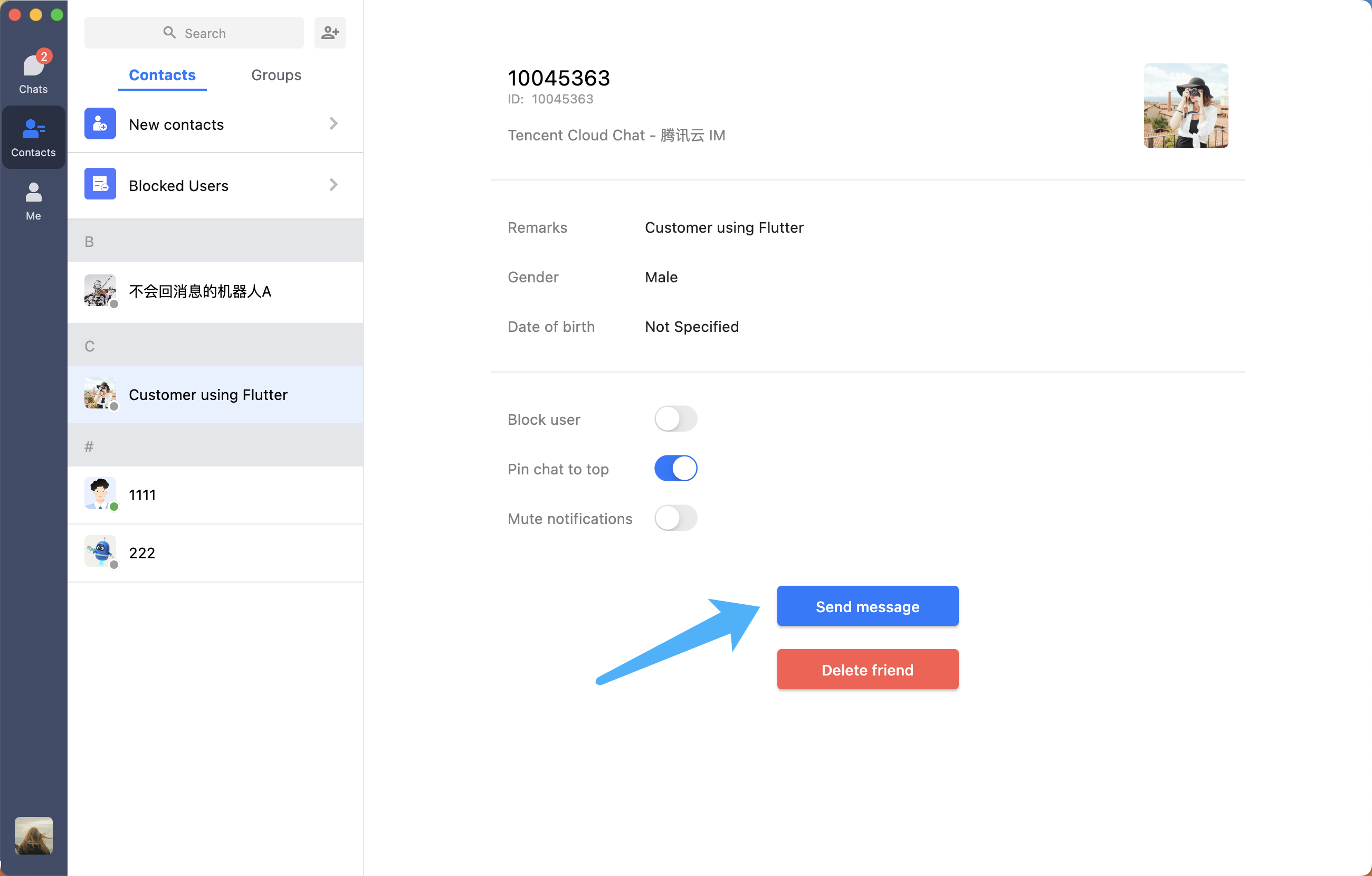
|
|
656
|
-
|
|
657
|
-
以单聊为例,为您在前序步骤制作的 `UserProfile` 组件,增加[一个自定义按钮](https://github.com/TencentCloud/chat-demo-flutter/blob/main/lib/src/user_profile.dart#L107)和一个 `onClickSendMessage` 方法,用于将用户点击这个自定义按钮的点击事件抛出。
|
|
658
|
-
|
|
659
|
-
同样,`ContactsAndProfile` 也需要配置一个 `onNavigateToChat` 方法,将监听到的 `onClickSendMessage` 事件加以转发。
|
|
408
|
+
您可以参考上述回调说明及参考代码,实现 Page 之间交互逻辑。
|
|
660
409
|
|
|
661
|
-
|
|
662
|
-
|
|
663
|
-
ConversationAndChat 组件类中,可通过 `didUpdateWidget` 动态刷新外部传入的 `V2TimConversation` 会话,更新当前聊天页面和会话列表所在的会话。
|
|
664
|
-
|
|
665
|
-
为了达到这个目的,还需要为此前制作的 `Chat` Widget 新增一个 `directToChat` 方法,让外部可以指定当前所在的会话聊天。
|
|
666
|
-
|
|
667
|
-
以及,为 `Conversation` 组件类新增一个 `directToChat` 方法,让外部可以指定当前所在的会话,以更新展示当前选中的样式。(默认选中的会话是蓝色背景,未选中白色背景,置顶灰色背景)。
|
|
668
|
-
|
|
669
|
-
此时,即可完成这个从通讯录跳转至会话聊天的能力开发。
|
|
670
|
-
|
|
671
|
-
##### 3. 其他页面
|
|
672
|
-
|
|
673
|
-
其他页面的开发思路也类似。
|
|
674
|
-
|
|
675
|
-
核心还是,尽可能少的修改为每个一级组件配置的全平台通用类,而通过外部页面承载的方式,来实现桌面端适配。
|
|
676
|
-
|
|
677
|
-
以达到一套代码,一次开发,一个模块全端仅一处维护的目的。
|
|
678
|
-
|
|
679
|
-
您可参考我们的 [Demo 源码中,桌面端适配的部分](https://github.com/TencentCloud/chat-demo-flutter/tree/main/lib/src/pages/cross_platform/wide_screen),完成您的开发。
|
|
680
|
-
|
|
681
|
-
#### 桌面端特色能力
|
|
682
|
-
|
|
683
|
-
由于桌面多种种特性,例如切换组件不导航跳转,我们为桌面端也制作了一些特色能力,**公共通用组件,供您直接使用**。
|
|
684
|
-
|
|
685
|
-
##### 组件一:Modal 弹窗:您可用我们的,也可自定义 TUIKit 中所有弹窗
|
|
686
|
-
|
|
687
|
-
TUIKit中,大部分在移动端用新页面组件承载的模块,在适配桌面端时,采用了 Modal 弹窗的形式进行处理。
|
|
688
|
-
|
|
689
|
-
为了保证体验一致性,整个TUIKit中,所有的弹窗均使用同一个组件。该弹窗组件支持配置 *标题 / 发送按钮 / 取消按钮 / 宽高 / 位置* 等参数。可用于承载二级组件 / 小配置项修改 / 右键菜单 等模块。
|
|
690
|
-
1. 您的项目可也用我们的:
|
|
691
|
-
|
|
692
|
-
|
|
693
|
-
您的项目中,如果需要使用弹窗,可以直接选用我们的。保证整个程序中所有弹窗的一致性。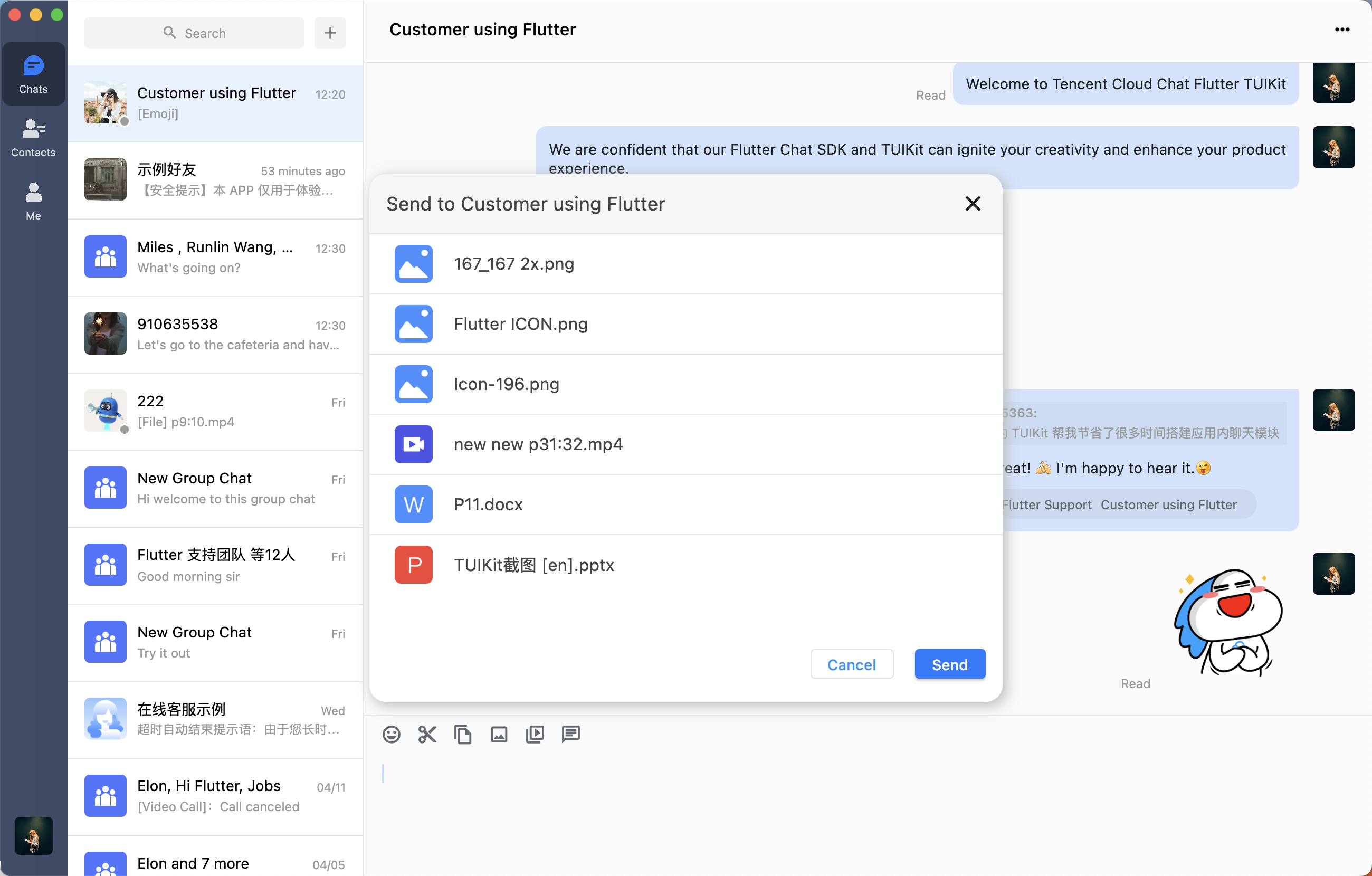
|
|
694
|
-
|
|
695
|
-
以下展示 showPopupWindow 展示 Modal 的方法的基础用法。更多自定义配置,如展示位置等,可查看该方法注释。
|
|
696
|
-
``` plaintext
|
|
697
|
-
import 'package:tencent_cloud_chat_uikit/ui/widgets/wide_popup.dart';
|
|
698
|
-
|
|
699
|
-
TUIKitWidePopup.showPopupWindow(
|
|
700
|
-
context: context,
|
|
701
|
-
title: Modal名称,
|
|
702
|
-
operationKey: TUIKitWideModalOperationKey.custom,
|
|
703
|
-
width: MediaQuery.of(context).size.width * 0.4, // 宽度
|
|
704
|
-
height: MediaQuery.of(context).size.width * 0.5, //高度
|
|
705
|
-
child: (onClose) => 具体要展示的内部组件(
|
|
706
|
-
groupID: groupID,
|
|
707
|
-
controller: _chatController,
|
|
708
|
-
onClosed: onClose,
|
|
709
|
-
),
|
|
710
|
-
);
|
|
711
|
-
```
|
|
712
|
-
2. 自定义整个 TUIKit 中所有或部分 Modal 弹窗:
|
|
713
|
-
|
|
714
|
-
|
|
715
|
-
可监听 `TIMUIKitConfig` 的 `showDesktopModalFunc` 方法,并根据提供的参数(如点击确认事件回调 /当前的操作类型 `operationKey` / 位置)等信息,构建您自己的弹窗。
|
|
716
|
-
|
|
717
|
-
每次 TUIKit 内部需要弹窗前,都会触发这个回调,并通过 `operationKey` 字段给您当前弹窗的场景,如果根据 `operationKey` 判定当前弹窗类型,您需要自定义弹窗,请返回 `true` 否则返回 `false` 使用 TUIKit 默认 Modal 弹窗。
|
|
718
|
-
|
|
719
|
-
##### 组件二:二次确认弹窗
|
|
720
|
-
|
|
721
|
-
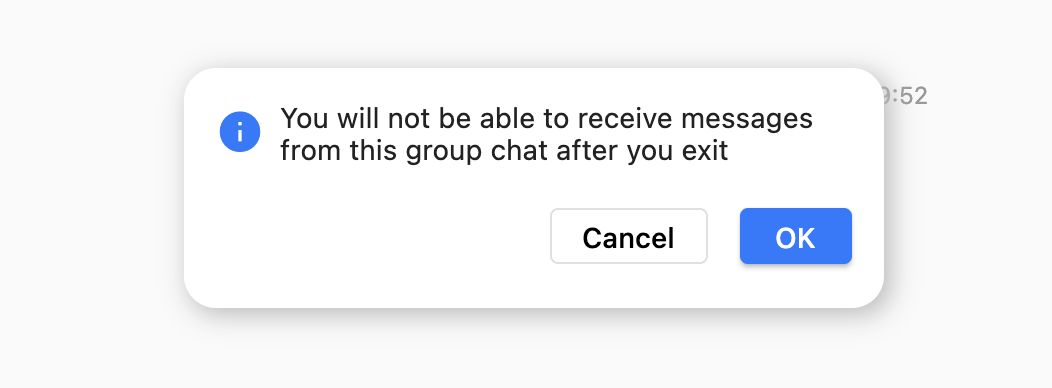
|
|
722
|
-
|
|
723
|
-
TUIKit中的二次确认弹窗暂不支持自定义,不过如果您的业务代码有需要的话,也可以使用我们的,保证体验相近。
|
|
724
|
-
|
|
725
|
-
与上方 Modal 类似,调用 `TUIKitWidePopup.showSecondaryConfirmDialog()` 方法即可。参数和配置可查看注释说明。
|
|
726
|
-
|
|
727
|
-
##### 组件三:鼠标右键菜单
|
|
728
|
-
|
|
729
|
-
有别与移动端的长按或侧滑出现菜单的操作,桌面端通常采用点击或鼠标右键出现菜单列表的方式,进行功能交互。如图:
|
|
730
|
-
|
|
731
|
-
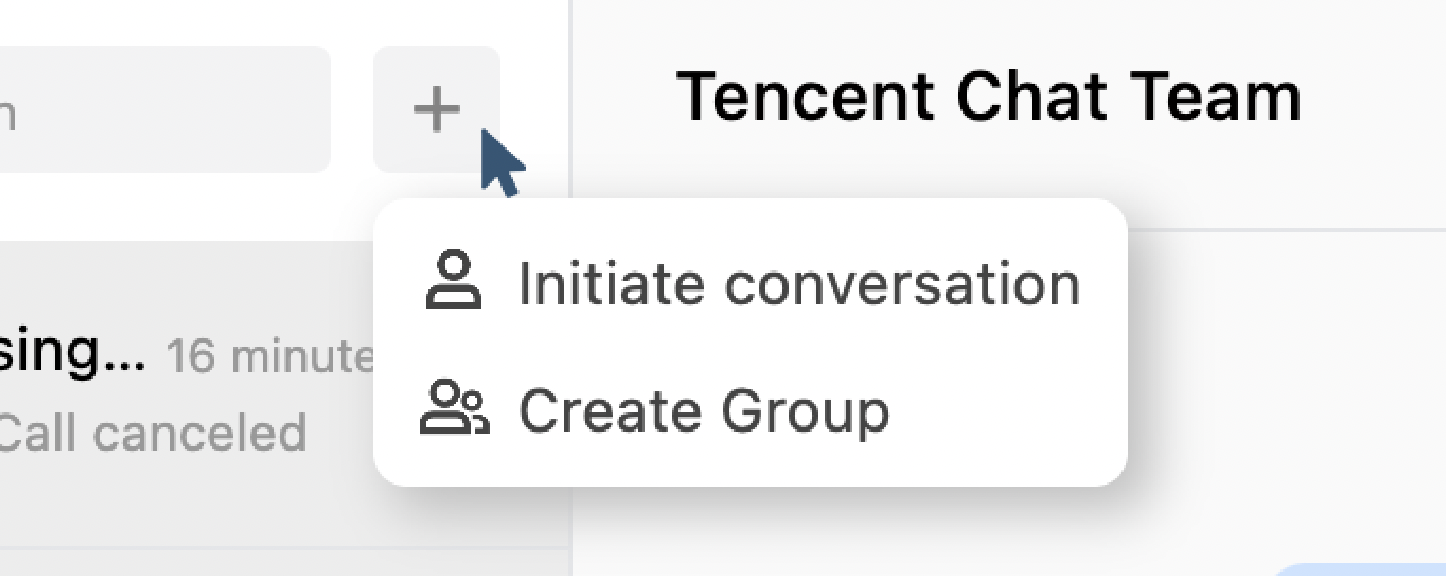
|
|
732
|
-
|
|
733
|
-
配合上述组件一:`TUIKitWidePopup.showPopupWindow()` 使用。
|
|
734
|
-
|
|
735
|
-
提供 `TUIKitColumnMenu` 菜单列表组件,其中每个菜单项都是一个 `ColumnMenuItem` 组件,可以定义菜单项的显示 `label` 文字,左侧 `icon` 图标,及点击事件。并提供 `closeFunc` 方法,用于在点击事件末尾,关闭右键菜单。
|
|
736
|
-
|
|
737
|
-
需要点击的按钮用 InkWell 包裹,监听 onTapDown 等可以获取到 TapDownDetails 的事件,获得点击鼠标位置,并将位置加以传入。当然,这里您还需要根据实际放置位置,考虑边界因素的影响,避免这个菜单出界,利用 min 方法和 MediaQuery.of(context).size 等参数配合决定 offset 位置。
|
|
738
|
-
|
|
739
|
-
以下展示最基础用法,更多用法可参考方法注释:
|
|
740
|
-
``` plaintext
|
|
741
|
-
return InkWell(
|
|
742
|
-
onTapDown: (details){
|
|
743
|
-
TUIKitWidePopup.showPopupWindow(
|
|
744
|
-
isDarkBackground: false,
|
|
745
|
-
operationKey: TUIKitWideModalOperationKey.custom,
|
|
746
|
-
borderRadius: const BorderRadius.all(
|
|
747
|
-
Radius.circular(4)
|
|
748
|
-
),
|
|
749
|
-
context: context,
|
|
750
|
-
// 下面的 offset 需要根据实际情况及 details 加以计算。
|
|
751
|
-
offset: Offset(details.globalPosition.dx + 10, details.globalPosition.dy - 200),
|
|
752
|
-
child: (closeFunc) => TUIKitColumnMenu(
|
|
753
|
-
data: [
|
|
754
|
-
ColumnMenuItem(label: TIM_t("个人中心"), onClick: (){
|
|
755
|
-
// 你定义的点击事件
|
|
756
|
-
closeFunc();
|
|
757
|
-
}),
|
|
758
|
-
ColumnMenuItem(label: TIM_t("个人中心"), onClick: (){
|
|
759
|
-
// 你定义的点击事件
|
|
760
|
-
closeFunc();
|
|
761
|
-
}),
|
|
762
|
-
],
|
|
763
|
-
)
|
|
764
|
-
);
|
|
765
|
-
},
|
|
766
|
-
child: Container(),
|
|
767
|
-
);
|
|
768
|
-
```
|
|
769
|
-
|
|
770
|
-
|
|
771
|
-
|
|
772
|
-
### 附加1:TUIKit 的更多能力
|
|
773
|
-
|
|
774
|
-
您还可以继续使用以下 TUIKit 组件快速实现完整 IM 功能。
|
|
775
|
-
- [TIMUIKitContact](https://comm.qq.com/im/doc/flutter/zh/TUIKit/TIMUIKitContact/TIMUIKitContact-Implementation.html):联系人列表页面。
|
|
776
|
-
|
|
777
|
-
- [TIMUIKitGroupProfile](https://comm.qq.com/im/doc/flutter/zh/TUIKit/TIMUIKitGroupProfile/TIMUIKitGroupProfile-Implementation.html):群资料页面,使用方式与 `TIMUIKitProfile` 基本一致。
|
|
778
|
-
|
|
779
|
-
- [TIMUIKitGroup](https://comm.qq.com/im/doc/flutter/zh/TUIKit/TIMUIKitGroup/TIMUIKitGroup-Implementation.html):群列表界面。
|
|
780
|
-
|
|
781
|
-
- [TIMUIKitBlackList](https://comm.qq.com/im/doc/flutter/zh/TUIKit/TIMUIKitBlackList/TIMUIKitBlackList-Implementation.html):黑名单列表界面。
|
|
782
|
-
|
|
783
|
-
- [TIMUIKitNewContact](https://comm.qq.com/im/doc/flutter/zh/TUIKit/TIMUIKitNewContact/TIMUIKitNewContact-Implementation.html):联系人(好友)申请列表。如需在外部显示小红点,可使用 `TIMUIKitUnreadCount` 小红点组件,其会自动挂载监听。
|
|
784
|
-
|
|
785
|
-
- [本地搜索](https://cloud.tencent.com/document/product/269/79121):`TIMUIKitSearch` 全局搜索组件,支持全局搜索联系人/群组/聊天记录,也支持使用 `TIMUIKitSearchMsgDetail` 在特定会话中搜索聊天记录。两种模式取决于是否传入 `conversation`。
|
|
786
|
-
|
|
787
|
-
|
|
788
|
-
UI 组件全貌可参见 [本全览文档](https://cloud.tencent.com/document/product/269/70747) 或 [详细文档](https://comm.qq.com/im/doc/flutter/zh/TUIKit/readme.html)。接入过程中,可以参考我们的 [Demo 源码](https://github.com/TencentCloud/chat-demo-flutter)。
|
|
789
|
-
|
|
790
|
-
|
|
791
|
-
### 附加2:[选装] 使用 Controller 控制 TUIKit
|
|
792
|
-
|
|
793
|
-
> **说明:**
|
|
794
|
-
>
|
|
795
|
-
|
|
796
|
-
> 建议在 tencent_cloud_chat_uikit 0.1.5 及以后版本中使用本功能。
|
|
797
|
-
>
|
|
798
|
-
|
|
799
|
-
|
|
800
|
-
通过上述步骤的快速集成,您已经可以搭建一套可用的 IM 模块。如果您有其他额外的控制操作需求,可以使用组件配套的 controller 完成。
|
|
801
|
-
|
|
802
|
-
使用场景如,在会话列表页面中,您可自定义会话 item 的侧滑菜单,提供置顶会话/删除会话/删除历史消息等功能;抑或是发送消息,满足您的额外消息发送需求,例如通过您自行开发的送礼界面发送一条礼物消息。
|
|
803
|
-
|
|
804
|
-
目前我们提供三个 controller,如下:
|
|
805
|
-
<table>
|
|
806
|
-
<tr>
|
|
807
|
-
<td rowspan="1" colSpan="1" >组件</td>
|
|
808
|
-
|
|
809
|
-
<td rowspan="1" colSpan="1" >控制器</td>
|
|
410
|
+
## 常见问题
|
|
810
411
|
|
|
811
|
-
|
|
812
|
-
</tr>
|
|
412
|
+
### **集成 tuikit_atomic_x 组件后,有 **`theme_state`** 和 **`atomic_localizations`** 的报错怎么办?**
|
|
813
413
|
|
|
814
|
-
|
|
815
|
-
<td rowspan="1" colSpan="1" >[TIMUIKitChat](https://comm.qq.com/im/doc/flutter/zh/TUIKit/TIMUIKitChat/TIMUIKitChat-Implementation.html)</td>
|
|
414
|
+
组件支持主题颜色和国际化字符串切换,需要在项目根目录的 `main.dart` 文件中使用 `ComponentTheme` 来包装根 `widget`,并且需要在 `MaterialApp` 的 `localizationsDelegates` 中增加 `AtomicLocalizations.delegate` 的配置,可参考源码 Demo 中的 `main.dart` 文件的使用。
|
|
816
415
|
|
|
817
|
-
|
|
416
|
+
### **登录失败,提示签名错误怎么办?**
|
|
818
417
|
|
|
819
|
-
|
|
820
|
-
</tr>
|
|
418
|
+
请检查 SDKAppID 和 UserSig 是否正确,UserSig 是否已过期。可以参考上文 [配置用户鉴权](https://write.woa.com/document/193282372365111296) 重新生成 UserSig。
|
|
821
419
|
|
|
822
|
-
|
|
823
|
-
<td rowspan="1" colSpan="1" >[TIMUIKitConversation](https://comm.qq.com/im/doc/flutter/zh/TUIKit/TIMUIKitConversation/TIMUIKitConversation-Implementation.html)</td>
|
|
420
|
+
## 联系我们
|
|
824
421
|
|
|
825
|
-
|
|
422
|
+
如果您在接入或使用过程中有任何疑问或者建议,欢迎 [联系我们](https://cloud.tencent.com/document/product/269/59590) 提交反馈。
|
|
826
423
|
|
|
827
|
-
<td rowspan="1" colSpan="1" >获取及刷新会话列表/会话置顶/设置会话的草稿/清空会话内所有消息/删除会话/滚动到特定会话等</td>
|
|
828
|
-
</tr>
|
|
829
|
-
|
|
830
|
-
<tr>
|
|
831
|
-
<td rowspan="1" colSpan="1" >[TIMUIKitProfile](https://comm.qq.com/im/doc/flutter/zh/TUIKit/TIMUIKitProfile/TIMUIKitProfile-Implementation.html)</td>
|
|
832
|
-
|
|
833
|
-
<td rowspan="1" colSpan="1" >[TIMUIKitProfileController](https://comm.qq.com/im/doc/flutter/zh/TUIKit/TIMUIKitProfile/TIMUIKitProfileController.html)</td>
|
|
834
|
-
|
|
835
|
-
<td rowspan="1" colSpan="1" >删除联系人好友/置顶当前联系人的会话/将用户加入黑名单/修改被加好友方式/更新联系人备注名/设置联系人消息免打扰/添加联系人好友/更新自己的资料等</td>
|
|
836
|
-
</tr>
|
|
837
|
-
</table>
|
|
838
|
-
|
|
839
|
-
|
|
840
|
-
他们的使用方式一致,以 [TIMUIKitChatController](https://comm.qq.com/im/doc/flutter/zh/TUIKit/TIMUIKitChat/TIMUIKitChatController.html) 举例用法。完整代码可[参考DEMO](https://github.com/TencentCloud/tc-chat-demo-flutter/blob/main/lib/src/chat.dart)。
|
|
841
|
-
1. 在使用到 [TIMUIKitChat](https://comm.qq.com/im/doc/flutter/zh/TUIKit/TIMUIKitChat/TIMUIKitChat-Implementation.html) 的类中,实例化一个 [TIMUIKitChatController](https://comm.qq.com/im/doc/flutter/zh/TUIKit/TIMUIKitChat/TIMUIKitChatController.html) 对象。
|
|
842
|
-
|
|
843
|
-
|
|
844
|
-
|
|
845
|
-
【dart】
|
|
846
|
-
``` bash
|
|
847
|
-
final TIMUIKitChatController _chatController = TIMUIKitChatController();
|
|
848
|
-
```
|
|
849
|
-
2. 将此对象传入 [TIMUIKitChat](https://comm.qq.com/im/doc/flutter/zh/TUIKit/TIMUIKitChat/TIMUIKitChat-Implementation.html) 的 `controller` 参数中。
|
|
850
|
-
|
|
851
|
-
|
|
852
|
-
|
|
853
|
-
【dart】
|
|
854
|
-
``` bash
|
|
855
|
-
@override
|
|
856
|
-
Widget build(BuildContext context) {
|
|
857
|
-
return TIMUIKitChat(
|
|
858
|
-
controller: _chatController,
|
|
859
|
-
// ...其他参数
|
|
860
|
-
);
|
|
861
|
-
}
|
|
862
|
-
```
|
|
863
|
-
3. 在这个类中,即可使用控制器,完成自定义操作。例如发送一条地理位置消息:
|
|
864
|
-
|
|
865
|
-
|
|
866
|
-
|
|
867
|
-
【dart】
|
|
868
|
-
``` bash
|
|
869
|
-
_sendLocationMessage(String desc, double longitude, double latitude) async {
|
|
870
|
-
final locationMessageInfo = await sdkInstance.v2TIMMessageManager
|
|
871
|
-
.createLocationMessage(
|
|
872
|
-
desc: desc,
|
|
873
|
-
longitude: longitude,
|
|
874
|
-
latitude: latitude);
|
|
875
|
-
final messageInfo = locationMessageInfo.data!.messageInfo;
|
|
876
|
-
_chatController.sendMessage(
|
|
877
|
-
receiverID: _getConvID(),
|
|
878
|
-
groupID:_getConvID(),
|
|
879
|
-
convType: _getConvType(),
|
|
880
|
-
messageInfo: messageInfo);
|
|
881
|
-
}
|
|
882
|
-
```
|
|
883
|
-
|
|
884
|
-
### 附加3:[选装] 使用更多插件丰富 TUIKit 使用体验
|
|
885
|
-
|
|
886
|
-
除 TUIKit 本体基础功能外,我们还提供了四个选装插件,帮助您丰富 IM 能力。
|
|
887
|
-
- [推送服务(Push)](https://write.woa.com/document/125424690534191104):支持厂商原生离线推送能力及在线推送能力,并支持推送您的其他业务消息,帮助您提高消息触达率。
|
|
888
|
-
|
|
889
|
-
- [音视频通话插件](https://cloud.tencent.com/document/product/269/72485):支持类似微信的一对一/群组音视频通话。
|
|
890
|
-
|
|
891
|
-
- [自定义表情插件](https://cloud.tencent.com/document/product/269/80882):0.1.5版本后, TUIKit 无自带表情包,需要使用此插件,快速简便集成表情能力。支持 emoji unicode 编码及自定义图片表情。集成过程可参考我们的 [Demo](https://github.com/TencentCloud/tc-chat-demo-flutter/blob/main/lib/src/pages/app.dart)。
|
|
892
|
-
|
|
893
|
-
|
|
894
|
-
> **说明**
|
|
895
|
-
>
|
|
896
|
-
|
|
897
|
-
> 更多实用的插件正在开发中,如果您有好的想法及建议,欢迎随时 [联系我们](https://cloud.tencent.com/online-service?from=doc_269&source=PRESALE)。
|
|
898
|
-
>
|
|
899
|
-
|
|
900
|
-
|
|
901
|
-
## 常见问题
|
|
902
|
-
|
|
903
|
-
### Android 端报错 `compileSdkVersion` 不合适怎么办?
|
|
904
|
-
1. 请在您项目的 `pubspec.yaml` 文件中,指定确保如下两个插件的版本。
|
|
905
|
-
|
|
906
|
-
``` yaml
|
|
907
|
-
video_thumbnail: ^0.5.3
|
|
908
|
-
permission_handler: ^10.0.0
|
|
909
|
-
flutter_local_notifications: 9.7.0
|
|
910
|
-
```
|
|
911
|
-
2. 修改 `android/app/build.gradle` 文件,保证 `android => compileSdkVersion 33`。
|
|
912
|
-
|
|
913
|
-
``` gradle
|
|
914
|
-
android {
|
|
915
|
-
compileSdkVersion 33
|
|
916
|
-
...
|
|
917
|
-
}
|
|
918
|
-
```
|
|
919
|
-
3. 执行如下命令,重新安装 Android 端依赖。
|
|
920
|
-
|
|
921
|
-
``` shell
|
|
922
|
-
flutter pub cache clean
|
|
923
|
-
flutter pub get
|
|
924
|
-
```
|
|
925
|
-
|
|
926
|
-
### 在 Flutter 2.x 上,Android 构建报错 `Codepoint 984472 not found in font, aborting.` 怎么办?
|
|
927
|
-
|
|
928
|
-
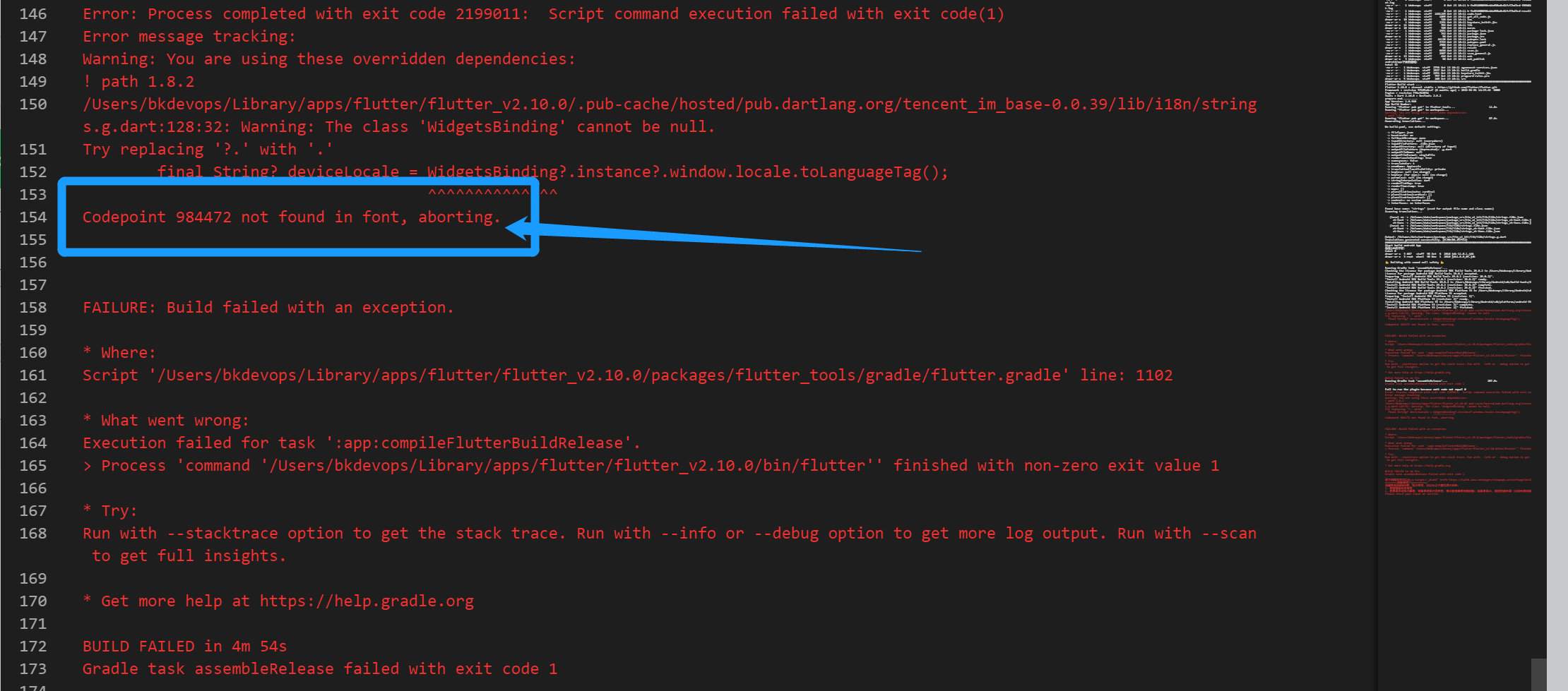
|
|
929
|
-
|
|
930
|
-
在您的编译命令中,加入 `--no-tree-shake-icons`。如:
|
|
931
|
-
``` shell
|
|
932
|
-
flutter build apk --no-tree-shake-icons --dart-define=SDK_APPID={您的SDKAPPID}
|
|
933
|
-
```
|
|
934
|
-
|
|
935
|
-
### iOS 端 Pods 依赖无法安装成功怎么办?
|
|
936
|
-
|
|
937
|
-
#### **尝试方案一:**配置运行后,如果报错,可以单击 **Product** > **Clean Build Folder**,清除产物后重新 `pod install` 或 `flutter run`
|
|
938
|
-
|
|
939
|
-
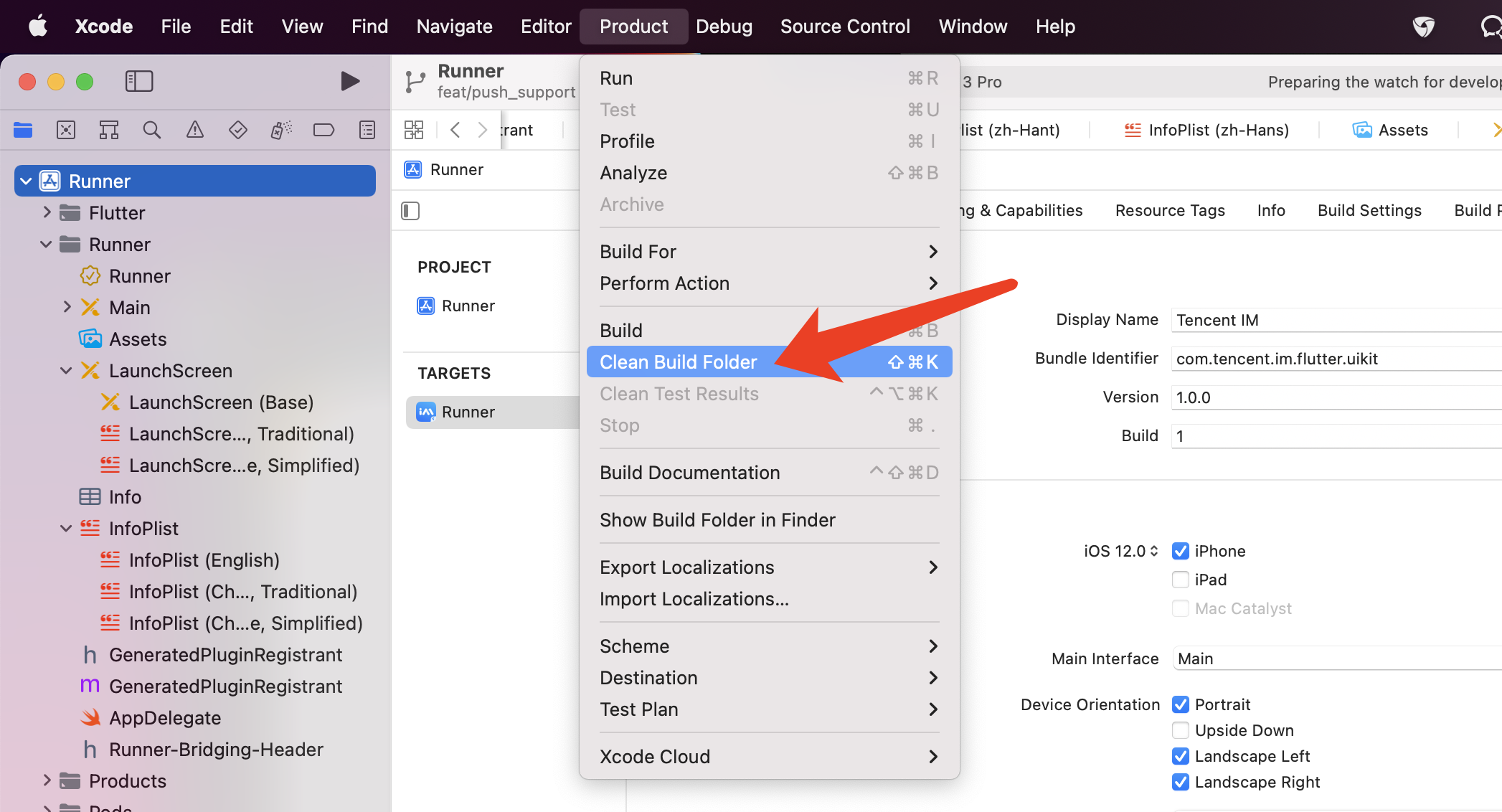
|
|
940
|
-
|
|
941
|
-
#### **尝试方案二:**手动删除 `ios/Pods` 文件夹,及 `ios/Podfile.lock` 文件,并执行如下命令,重新安装依赖
|
|
942
|
-
1. 搭载新款 Apple Silicon 的Mac设备,例如 M1。
|
|
943
|
-
|
|
944
|
-
|
|
945
|
-
``` shell
|
|
946
|
-
cd ios
|
|
947
|
-
sudo arch -x86_64 gem install ffi
|
|
948
|
-
arch -x86_64 pod install --repo-update
|
|
949
|
-
```
|
|
950
|
-
2. 搭载老款 Intel 芯片的 Mac 设备。
|
|
951
|
-
|
|
952
|
-
``` shell
|
|
953
|
-
cd ios
|
|
954
|
-
sudo gem install ffi
|
|
955
|
-
pod install --repo-update
|
|
956
|
-
```
|
|
957
|
-
|
|
958
|
-
### 佩戴 Apple Watch 时,真机调试 iOS 报错怎么办?
|
|
959
|
-
|
|
960
|
-

|
|
961
|
-
|
|
962
|
-
请将您的 Apple Watch 调整至飞行模式,并将 iPhone 的蓝牙功能通过 `设置 => 蓝牙` 彻底关闭。
|
|
963
|
-
|
|
964
|
-
重新启动 Xcode(若打开),并重新 `flutter run` 即可。
|
|
965
|
-
|
|
966
|
-
### Flutter 环境问题如何确认?
|
|
967
|
-
|
|
968
|
-
如您需得知 Flutter 的环境是否存在问题,请运行 Flutter doctor 检测 Flutter 环境是否装好。
|
|
969
|
-
|
|
970
|
-
### 使用 Flutter 自动生成的项目,引入 TUIKit 后,运行 Android 端报错怎么办?
|
|
971
|
-
|
|
972
|
-

|
|
973
|
-
1. 打开 `android\app\src\main\AndroidManifest.xml`,根据如下,补全 `xmlns:tools="http://schemas.android.com/tools"` / `android:label="@string/android_label"` 及 `tools:replace="android:label"`。
|
|
974
|
-
|
|
975
|
-
|
|
976
|
-
|
|
977
|
-
【xml】
|
|
978
|
-
``` bash
|
|
979
|
-
<manifest xmlns:android="http://schemas.android.com/apk/res/android"
|
|
980
|
-
package="替换成您的 Android 端包名"
|
|
981
|
-
xmlns:tools="http://schemas.android.com/tools">
|
|
982
|
-
<application
|
|
983
|
-
android:label="@string/android_label"
|
|
984
|
-
tools:replace="android:label"
|
|
985
|
-
android:icon="@mipmap/ic_launcher" // 指定一个 icon 路径
|
|
986
|
-
android:usesCleartextTraffic="true"
|
|
987
|
-
android:requestLegacyExternalStorage="true">
|
|
988
|
-
|
|
989
|
-
```
|
|
990
|
-
2. 打开 `android\app\build.gradle`,补全 `defaultConfig` 中 `minSdkVersion` 及 `targetSdkVersion`。
|
|
991
|
-
|
|
992
|
-
|
|
993
|
-
|
|
994
|
-
【gradle】
|
|
995
|
-
``` bash
|
|
996
|
-
defaultConfig {
|
|
997
|
-
applicationId "" // 替换成您的Android端包名
|
|
998
|
-
minSdkVersion 21
|
|
999
|
-
targetSdkVersion 30
|
|
1000
|
-
}
|
|
1001
|
-
|
|
1002
|
-
```
|
|
1003
|
-
|
|
1004
|
-
### 如果国际化界面语言?
|
|
1005
|
-
|
|
1006
|
-
国际化界面语言用法详情,或新增其他语言包,请参见 [Flutter](https://cloud.tencent.com/document/product/269/84481)。
|
|
1007
|
-
|
|
1008
|
-
### 如何获取 API 接口调用报错/Flutter 层报错/弹窗提示信息?
|
|
1009
|
-
|
|
1010
|
-
请在初始化 TUIKit 时,挂载 `onTUIKitCallbackListener` 监听。
|
|
1011
|
-
|
|
1012
|
-
该监听用于返回包括:SDK API 错误 / Flutter 报错 / 一些可能需要弹窗提示用户的场景信息。
|
|
1013
|
-
|
|
1014
|
-
通过`TIMCallbackType`确定类型。
|
|
1015
|
-
|
|
1016
|
-
示例代码如下。您可以根据您的业务需要,修改以下代码,自定义提醒用户的逻辑,包括但不限于弹窗/横幅等。
|
|
1017
|
-
``` dart
|
|
1018
|
-
final CoreServicesImpl _coreInstance = TIMUIKitCore.getInstance();
|
|
1019
|
-
|
|
1020
|
-
final isInitSuccess = await _coreInstance.init(
|
|
1021
|
-
onTUIKitCallbackListener: (TIMCallback callbackValue){
|
|
1022
|
-
switch(callbackValue.type) {
|
|
1023
|
-
case TIMCallbackType.INFO:
|
|
1024
|
-
// Shows the recommend text for info callback directly
|
|
1025
|
-
Utils.toast(callbackValue.infoRecommendText!);
|
|
1026
|
-
break;
|
|
1027
|
-
case TIMCallbackType.API_ERROR:
|
|
1028
|
-
//Prints the API error to console, and shows the error message.
|
|
1029
|
-
print("Error from TUIKit: ${callbackValue.errorMsg}, Code: ${callbackValue.errorCode}");
|
|
1030
|
-
if (callbackValue.errorCode == 10004 && callbackValue.errorMsg!.contains("not support @all")) {
|
|
1031
|
-
Utils.toast(imt("当前群组不支持@全体成员"));
|
|
1032
|
-
}else{
|
|
1033
|
-
Utils.toast(callbackValue.errorMsg ?? callbackValue.errorCode.toString());
|
|
1034
|
-
}
|
|
1035
|
-
break;
|
|
1036
|
-
case TIMCallbackType.FLUTTER_ERROR:
|
|
1037
|
-
default:
|
|
1038
|
-
// prints the stack trace to console or shows the catch error
|
|
1039
|
-
if(callbackValue.catchError != null){
|
|
1040
|
-
Utils.toast(callbackValue.catchError.toString());
|
|
1041
|
-
}else{
|
|
1042
|
-
print(callbackValue.stackTrace);
|
|
1043
|
-
}
|
|
1044
|
-
}
|
|
1045
|
-
},
|
|
1046
|
-
);
|
|
1047
|
-
```
|
|
1048
|
-
|
|
1049
|
-
下面,分别介绍这三种类型的回调:
|
|
1050
|
-
|
|
1051
|
-
#### SDK API 错误(`TIMCallbackType.API_ERROR`)
|
|
1052
|
-
|
|
1053
|
-
该场景下,提供 SDK API 原生`errorMsg`及`errorCode`。
|
|
1054
|
-
|
|
1055
|
-
[错误码请参考该文档](https://cloud.tencent.com/document/product/269/1671)
|
|
1056
|
-
|
|
1057
|
-
#### Flutter 报错(`TIMCallbackType.FLUTTER_ERROR`)
|
|
1058
|
-
|
|
1059
|
-
该错误由监听 Flutter 原生抛出异常产生,提供错误发生时的`stackTrace`(来自`FlutterError.onError`)或`catchError`(来自 try-catch)。
|
|
1060
|
-
|
|
1061
|
-
#### 场景信息(`TIMCallbackType.INFO`)
|
|
1062
|
-
|
|
1063
|
-
建议根据实际情况,将这些信息弹窗提示用户。
|
|
1064
|
-
|
|
1065
|
-
具体提示规则和弹窗样式可由您决定。
|
|
1066
|
-
|
|
1067
|
-
提供`infoCode`场景码帮助您确定当前的场景,及默认的提示推荐语`infoRecommendText`。
|
|
1068
|
-
|
|
1069
|
-
您可直接弹窗提示我们的推荐语,也可根据场景码自定义推荐语。推荐语语言使用系统语言语言或您指定的语言,请勿根据推荐语来判断场景。
|
|
1070
|
-
|
|
1071
|
-
**场景码规则如下:**
|
|
1072
|
-
|
|
1073
|
-
场景码由七位数组成,前五位数确定场景发生的组件,后两位确定具体的场景表现。
|
|
1074
|
-
<table>
|
|
1075
|
-
<tr>
|
|
1076
|
-
<td rowspan="1" colSpan="1" >场景码开头</td>
|
|
1077
|
-
|
|
1078
|
-
<td rowspan="1" colSpan="1" >对应的组件</td>
|
|
1079
|
-
</tr>
|
|
1080
|
-
|
|
1081
|
-
<tr>
|
|
1082
|
-
<td rowspan="1" colSpan="1" >66601</td>
|
|
1083
|
-
|
|
1084
|
-
<td rowspan="1" colSpan="1" >`TIMUIKitAddFriend`</td>
|
|
1085
|
-
</tr>
|
|
1086
|
-
|
|
1087
|
-
<tr>
|
|
1088
|
-
<td rowspan="1" colSpan="1" >66602</td>
|
|
1089
|
-
|
|
1090
|
-
<td rowspan="1" colSpan="1" >`TIMUIKitAddGroup`</td>
|
|
1091
|
-
</tr>
|
|
1092
|
-
|
|
1093
|
-
<tr>
|
|
1094
|
-
<td rowspan="1" colSpan="1" >66603</td>
|
|
1095
|
-
|
|
1096
|
-
<td rowspan="1" colSpan="1" >`TIMUIKitBlackList`</td>
|
|
1097
|
-
</tr>
|
|
1098
|
-
|
|
1099
|
-
<tr>
|
|
1100
|
-
<td rowspan="1" colSpan="1" >66604</td>
|
|
1101
|
-
|
|
1102
|
-
<td rowspan="1" colSpan="1" >`TIMUIKitChat`</td>
|
|
1103
|
-
</tr>
|
|
1104
|
-
|
|
1105
|
-
<tr>
|
|
1106
|
-
<td rowspan="1" colSpan="1" >66605</td>
|
|
1107
|
-
|
|
1108
|
-
<td rowspan="1" colSpan="1" >`TIMUIKitContact`</td>
|
|
1109
|
-
</tr>
|
|
1110
|
-
|
|
1111
|
-
<tr>
|
|
1112
|
-
<td rowspan="1" colSpan="1" >66606</td>
|
|
1113
|
-
|
|
1114
|
-
<td rowspan="1" colSpan="1" >`TIMUIKitConversation`</td>
|
|
1115
|
-
</tr>
|
|
1116
|
-
|
|
1117
|
-
<tr>
|
|
1118
|
-
<td rowspan="1" colSpan="1" >66607</td>
|
|
1119
|
-
|
|
1120
|
-
<td rowspan="1" colSpan="1" >`TIMUIKitGroup`</td>
|
|
1121
|
-
</tr>
|
|
1122
|
-
|
|
1123
|
-
<tr>
|
|
1124
|
-
<td rowspan="1" colSpan="1" >66608</td>
|
|
1125
|
-
|
|
1126
|
-
<td rowspan="1" colSpan="1" >`TIMUIKitGroupProfile`</td>
|
|
1127
|
-
</tr>
|
|
1128
|
-
|
|
1129
|
-
<tr>
|
|
1130
|
-
<td rowspan="1" colSpan="1" >66609</td>
|
|
1131
|
-
|
|
1132
|
-
<td rowspan="1" colSpan="1" >`TIMUIKitNewContact`</td>
|
|
1133
|
-
</tr>
|
|
1134
|
-
|
|
1135
|
-
<tr>
|
|
1136
|
-
<td rowspan="1" colSpan="1" >66610</td>
|
|
1137
|
-
|
|
1138
|
-
<td rowspan="1" colSpan="1" >`TIMUIKitGroupProfile`</td>
|
|
1139
|
-
</tr>
|
|
1140
|
-
|
|
1141
|
-
<tr>
|
|
1142
|
-
<td rowspan="1" colSpan="1" >66611</td>
|
|
1143
|
-
|
|
1144
|
-
<td rowspan="1" colSpan="1" >`TIMUIKitNewContact`</td>
|
|
1145
|
-
</tr>
|
|
1146
|
-
|
|
1147
|
-
<tr>
|
|
1148
|
-
<td rowspan="1" colSpan="1" >66612</td>
|
|
1149
|
-
|
|
1150
|
-
<td rowspan="1" colSpan="1" >`TIMUIKitProfile`</td>
|
|
1151
|
-
</tr>
|
|
1152
|
-
|
|
1153
|
-
<tr>
|
|
1154
|
-
<td rowspan="1" colSpan="1" >66613</td>
|
|
1155
|
-
|
|
1156
|
-
<td rowspan="1" colSpan="1" >`TIMUIKitSearch`</td>
|
|
1157
|
-
</tr>
|
|
1158
|
-
|
|
1159
|
-
<tr>
|
|
1160
|
-
<td rowspan="1" colSpan="1" >66614</td>
|
|
1161
|
-
|
|
1162
|
-
<td rowspan="1" colSpan="1" >通用组件</td>
|
|
1163
|
-
</tr>
|
|
1164
|
-
</table>
|
|
1165
|
-
|
|
1166
|
-
|
|
1167
|
-
**全部场景码清单如下:**
|
|
1168
|
-
<table>
|
|
1169
|
-
<tr>
|
|
1170
|
-
<td rowspan="1" colSpan="1" >场景码 `infoCode`</td>
|
|
1171
|
-
|
|
1172
|
-
<td rowspan="1" colSpan="1" >推荐提示语 `infoRecommendText`</td>
|
|
1173
|
-
|
|
1174
|
-
<td rowspan="1" colSpan="1" >场景描述</td>
|
|
1175
|
-
</tr>
|
|
1176
|
-
|
|
1177
|
-
<tr>
|
|
1178
|
-
<td rowspan="1" colSpan="1" >6660101</td>
|
|
1179
|
-
|
|
1180
|
-
<td rowspan="1" colSpan="1" >好友申请已发送</td>
|
|
1181
|
-
|
|
1182
|
-
<td rowspan="1" colSpan="1" >用户申请添加其他用户为联系人</td>
|
|
1183
|
-
</tr>
|
|
1184
|
-
|
|
1185
|
-
<tr>
|
|
1186
|
-
<td rowspan="1" colSpan="1" >6660102</td>
|
|
1187
|
-
|
|
1188
|
-
<td rowspan="1" colSpan="1" >该用户已是好友</td>
|
|
1189
|
-
|
|
1190
|
-
<td rowspan="1" colSpan="1" >用户申请添加其他已是好友的用户为好友时,触发 `onTapAlreadyFriendsItem` 回调</td>
|
|
1191
|
-
</tr>
|
|
1192
|
-
|
|
1193
|
-
<tr>
|
|
1194
|
-
<td rowspan="1" colSpan="1" >6660201</td>
|
|
1195
|
-
|
|
1196
|
-
<td rowspan="1" colSpan="1" >群申请已发送</td>
|
|
1197
|
-
|
|
1198
|
-
<td rowspan="1" colSpan="1" >用户申请加入需要管理员审批的群聊</td>
|
|
1199
|
-
</tr>
|
|
1200
|
-
|
|
1201
|
-
<tr>
|
|
1202
|
-
<td rowspan="1" colSpan="1" >6660202</td>
|
|
1203
|
-
|
|
1204
|
-
<td rowspan="1" colSpan="1" >您已是群成员</td>
|
|
1205
|
-
|
|
1206
|
-
<td rowspan="1" colSpan="1" >用户申请加群时,判断用户已经是当前群成员,触发 `onTapExistGroup` 回调</td>
|
|
1207
|
-
</tr>
|
|
1208
|
-
|
|
1209
|
-
<tr>
|
|
1210
|
-
<td rowspan="1" colSpan="1" >6660401</td>
|
|
1211
|
-
|
|
1212
|
-
<td rowspan="1" colSpan="1" >无法定位到原消息</td>
|
|
1213
|
-
|
|
1214
|
-
<td rowspan="1" colSpan="1" >当用户需要跳转至@消息或者是引用消息时,在消息列表中查不到目标消息</td>
|
|
1215
|
-
</tr>
|
|
1216
|
-
|
|
1217
|
-
<tr>
|
|
1218
|
-
<td rowspan="1" colSpan="1" >6660402</td>
|
|
1219
|
-
|
|
1220
|
-
<td rowspan="1" colSpan="1" >视频保存成功</td>
|
|
1221
|
-
|
|
1222
|
-
<td rowspan="1" colSpan="1" >用户在消息列表,点开视频消息后,选择保存视频</td>
|
|
1223
|
-
</tr>
|
|
1224
|
-
|
|
1225
|
-
<tr>
|
|
1226
|
-
<td rowspan="1" colSpan="1" >6660403</td>
|
|
1227
|
-
|
|
1228
|
-
<td rowspan="1" colSpan="1" >视频保存失败</td>
|
|
1229
|
-
|
|
1230
|
-
<td rowspan="1" colSpan="1" >用户在消息列表,点开视频消息后,选择保存视频</td>
|
|
1231
|
-
</tr>
|
|
1232
|
-
|
|
1233
|
-
<tr>
|
|
1234
|
-
<td rowspan="1" colSpan="1" >6660404</td>
|
|
1235
|
-
|
|
1236
|
-
<td rowspan="1" colSpan="1" >说话时间太短</td>
|
|
1237
|
-
|
|
1238
|
-
<td rowspan="1" colSpan="1" >用户发送了过短的语音消息</td>
|
|
1239
|
-
</tr>
|
|
1240
|
-
|
|
1241
|
-
<tr>
|
|
1242
|
-
<td rowspan="1" colSpan="1" >6660405</td>
|
|
1243
|
-
|
|
1244
|
-
<td rowspan="1" colSpan="1" >发送失败,视频不能大于 100MB</td>
|
|
1245
|
-
|
|
1246
|
-
<td rowspan="1" colSpan="1" >用户试图发送大于 100MB 的视频</td>
|
|
1247
|
-
</tr>
|
|
1248
|
-
|
|
1249
|
-
<tr>
|
|
1250
|
-
<td rowspan="1" colSpan="1" >6660406</td>
|
|
1251
|
-
|
|
1252
|
-
<td rowspan="1" colSpan="1" >图片保存成功</td>
|
|
1253
|
-
|
|
1254
|
-
<td rowspan="1" colSpan="1" >用户在消息列表,点开图片大图后,选择保存图片</td>
|
|
1255
|
-
</tr>
|
|
1256
|
-
|
|
1257
|
-
<tr>
|
|
1258
|
-
<td rowspan="1" colSpan="1" >6660407</td>
|
|
1259
|
-
|
|
1260
|
-
<td rowspan="1" colSpan="1" >图片保存失败</td>
|
|
1261
|
-
|
|
1262
|
-
<td rowspan="1" colSpan="1" >用户在消息列表,点开图片大图后,选择保存图片</td>
|
|
1263
|
-
</tr>
|
|
1264
|
-
|
|
1265
|
-
<tr>
|
|
1266
|
-
<td rowspan="1" colSpan="1" >6660408</td>
|
|
1267
|
-
|
|
1268
|
-
<td rowspan="1" colSpan="1" >已复制</td>
|
|
1269
|
-
|
|
1270
|
-
<td rowspan="1" colSpan="1" >用户在弹窗内选择复制文字消息</td>
|
|
1271
|
-
</tr>
|
|
1272
|
-
|
|
1273
|
-
<tr>
|
|
1274
|
-
<td rowspan="1" colSpan="1" >6660409</td>
|
|
1275
|
-
|
|
1276
|
-
<td rowspan="1" colSpan="1" >暂未实现</td>
|
|
1277
|
-
|
|
1278
|
-
<td rowspan="1" colSpan="1" >用户在弹窗内选择非标功能</td>
|
|
1279
|
-
</tr>
|
|
1280
|
-
|
|
1281
|
-
<tr>
|
|
1282
|
-
<td rowspan="1" colSpan="1" >6660410</td>
|
|
1283
|
-
|
|
1284
|
-
<td rowspan="1" colSpan="1" >其他文件正在接收中</td>
|
|
1285
|
-
|
|
1286
|
-
<td rowspan="1" colSpan="1" >用户点击下载文件消息时,前序下载任务还未完成</td>
|
|
1287
|
-
</tr>
|
|
1288
|
-
|
|
1289
|
-
<tr>
|
|
1290
|
-
<td rowspan="1" colSpan="1" >6660411</td>
|
|
1291
|
-
|
|
1292
|
-
<td rowspan="1" colSpan="1" >正在接收中</td>
|
|
1293
|
-
|
|
1294
|
-
<td rowspan="1" colSpan="1" >用户点击下载文件消息</td>
|
|
1295
|
-
</tr>
|
|
1296
|
-
|
|
1297
|
-
<tr>
|
|
1298
|
-
<td rowspan="1" colSpan="1" >6660412</td>
|
|
1299
|
-
|
|
1300
|
-
<td rowspan="1" colSpan="1" >视频消息仅限 mp4 格式</td>
|
|
1301
|
-
|
|
1302
|
-
<td rowspan="1" colSpan="1" >用户发送了一条非 mp4 格式的视频消息</td>
|
|
1303
|
-
</tr>
|
|
1304
|
-
|
|
1305
|
-
<tr>
|
|
1306
|
-
<td rowspan="1" colSpan="1" >6660413</td>
|
|
1307
|
-
|
|
1308
|
-
<td rowspan="1" colSpan="1" >已加入待下载队列,其他文件下载中</td>
|
|
1309
|
-
|
|
1310
|
-
<td rowspan="1" colSpan="1" >已加入待下载队列,其他文件下载中</td>
|
|
1311
|
-
</tr>
|
|
1312
|
-
|
|
1313
|
-
<tr>
|
|
1314
|
-
<td rowspan="1" colSpan="1" >6660414</td>
|
|
1315
|
-
|
|
1316
|
-
<td rowspan="1" colSpan="1" >正在下载中</td>
|
|
1317
|
-
|
|
1318
|
-
<td rowspan="1" colSpan="1" >桌面端图片/视频资源正在下载中,暂时无法打开,过一会下载好了才能打开</td>
|
|
1319
|
-
</tr>
|
|
1320
|
-
|
|
1321
|
-
<tr>
|
|
1322
|
-
<td rowspan="1" colSpan="1" >6660415</td>
|
|
1323
|
-
|
|
1324
|
-
<td rowspan="1" colSpan="1" >视频文件异常</td>
|
|
1325
|
-
|
|
1326
|
-
<td rowspan="1" colSpan="1" >发送的视频文件资源本身是错误或被损坏,无法发送</td>
|
|
1327
|
-
</tr>
|
|
1328
|
-
|
|
1329
|
-
<tr>
|
|
1330
|
-
<td rowspan="1" colSpan="1" >6661001</td>
|
|
1331
|
-
|
|
1332
|
-
<td rowspan="1" colSpan="1" >无网络连接,无法修改</td>
|
|
1333
|
-
|
|
1334
|
-
<td rowspan="1" colSpan="1" >当用户试图在无网络环境下,修改群资料</td>
|
|
1335
|
-
</tr>
|
|
1336
|
-
|
|
1337
|
-
<tr>
|
|
1338
|
-
<td rowspan="1" colSpan="1" >6661002</td>
|
|
1339
|
-
|
|
1340
|
-
<td rowspan="1" colSpan="1" >无网络连接,无法查看群成员</td>
|
|
1341
|
-
|
|
1342
|
-
<td rowspan="1" colSpan="1" >当用户试图在无网络环境下,修改群资料</td>
|
|
1343
|
-
</tr>
|
|
1344
|
-
|
|
1345
|
-
<tr>
|
|
1346
|
-
<td rowspan="1" colSpan="1" >6661003</td>
|
|
1347
|
-
|
|
1348
|
-
<td rowspan="1" colSpan="1" >成功取消管理员身份</td>
|
|
1349
|
-
|
|
1350
|
-
<td rowspan="1" colSpan="1" >用户将群内其他用户移除管理员</td>
|
|
1351
|
-
</tr>
|
|
1352
|
-
|
|
1353
|
-
<tr>
|
|
1354
|
-
<td rowspan="1" colSpan="1" >6661201</td>
|
|
1355
|
-
|
|
1356
|
-
<td rowspan="1" colSpan="1" >无网络连接,无法修改</td>
|
|
1357
|
-
|
|
1358
|
-
<td rowspan="1" colSpan="1" >当用户试图在无网络环境下,修改自己或联系人的资料</td>
|
|
1359
|
-
</tr>
|
|
1360
|
-
|
|
1361
|
-
<tr>
|
|
1362
|
-
<td rowspan="1" colSpan="1" >6661202</td>
|
|
1363
|
-
|
|
1364
|
-
<td rowspan="1" colSpan="1" >好友添加成功</td>
|
|
1365
|
-
|
|
1366
|
-
<td rowspan="1" colSpan="1" >在资料页添加其他用户为好友,并自动添加成功,无需验证</td>
|
|
1367
|
-
</tr>
|
|
1368
|
-
|
|
1369
|
-
<tr>
|
|
1370
|
-
<td rowspan="1" colSpan="1" >6661203</td>
|
|
1371
|
-
|
|
1372
|
-
<td rowspan="1" colSpan="1" >好友申请已发出</td>
|
|
1373
|
-
|
|
1374
|
-
<td rowspan="1" colSpan="1" >在资料页添加其他用户为好友,对方设置需要验证</td>
|
|
1375
|
-
</tr>
|
|
1376
|
-
|
|
1377
|
-
<tr>
|
|
1378
|
-
<td rowspan="1" colSpan="1" >6661204</td>
|
|
1379
|
-
|
|
1380
|
-
<td rowspan="1" colSpan="1" >当前用户在黑名单</td>
|
|
1381
|
-
|
|
1382
|
-
<td rowspan="1" colSpan="1" >在资料页添加其他用户为好友,对方在自己的黑名单内</td>
|
|
1383
|
-
</tr>
|
|
1384
|
-
|
|
1385
|
-
<tr>
|
|
1386
|
-
<td rowspan="1" colSpan="1" >6661205</td>
|
|
1387
|
-
|
|
1388
|
-
<td rowspan="1" colSpan="1" >好友添加失败</td>
|
|
1389
|
-
|
|
1390
|
-
<td rowspan="1" colSpan="1" >在资料页添加其他用户为好友,添加失败,可能是由于对方禁止加好友</td>
|
|
1391
|
-
</tr>
|
|
1392
|
-
|
|
1393
|
-
<tr>
|
|
1394
|
-
<td rowspan="1" colSpan="1" >6661206</td>
|
|
1395
|
-
|
|
1396
|
-
<td rowspan="1" colSpan="1" >好友删除成功</td>
|
|
1397
|
-
|
|
1398
|
-
<td rowspan="1" colSpan="1" >在资料页删除其他用户为好友,成功</td>
|
|
1399
|
-
</tr>
|
|
1400
|
-
|
|
1401
|
-
<tr>
|
|
1402
|
-
<td rowspan="1" colSpan="1" >6661207</td>
|
|
1403
|
-
|
|
1404
|
-
<td rowspan="1" colSpan="1" >好友删除失败</td>
|
|
1405
|
-
|
|
1406
|
-
<td rowspan="1" colSpan="1" >在资料页删除其他用户为好友,失败</td>
|
|
1407
|
-
</tr>
|
|
1408
|
-
|
|
1409
|
-
<tr>
|
|
1410
|
-
<td rowspan="1" colSpan="1" >6661401</td>
|
|
1411
|
-
|
|
1412
|
-
<td rowspan="1" colSpan="1" >输入不能为空</td>
|
|
1413
|
-
|
|
1414
|
-
<td rowspan="1" colSpan="1" >当用户在录入信息时,输入了空字符串</td>
|
|
1415
|
-
</tr>
|
|
1416
|
-
|
|
1417
|
-
<tr>
|
|
1418
|
-
<td rowspan="1" colSpan="1" >6661402</td>
|
|
1419
|
-
|
|
1420
|
-
<td rowspan="1" colSpan="1" >请传入离开群组生命周期函数,提供返回首页或其他页面的导航方法</td>
|
|
1421
|
-
|
|
1422
|
-
<td rowspan="1" colSpan="1" >用户退出群或解散群时,为提供返回首页办法</td>
|
|
1423
|
-
</tr>
|
|
1424
|
-
|
|
1425
|
-
<tr>
|
|
1426
|
-
<td rowspan="1" colSpan="1" >6661403</td>
|
|
1427
|
-
|
|
1428
|
-
<td rowspan="1" colSpan="1" >设备存储空间不足,建议清理,以获得更好使用体验</td>
|
|
1429
|
-
|
|
1430
|
-
<td rowspan="1" colSpan="1" >在 login 成功后,会自动检测设备存储空间,如果不足1GB,会提示存储空间不足</td>
|
|
1431
|
-
</tr>
|
|
1432
|
-
</table>
|