@tencentcloud/sdk-mcp 1.3.0 → 1.3.2
This diff represents the content of publicly available package versions that have been released to one of the supported registries. The information contained in this diff is provided for informational purposes only and reflects changes between package versions as they appear in their respective public registries.
- package/index.js +5 -1
- package/index.js.map +1 -1
- package/package.json +2 -2
- package/resource/doc/chatuikit/faq/web_sdk/faq.md +117 -0
- package/resource/doc/chatuikit/flutter/client_api_Flutter.md +100 -179
- package/resource/doc/chatuikit/flutter/faq.md +17 -112
- package/resource/doc/chatuikit/flutter/integrate_tuikit_Flutter.md +272 -1281
- package/resource/doc/chatuikit/react/integration.md +516 -48
- package/resource/doc/chatuikit/react/workflow.md +254 -0
- package/resource/doc/chatuikit/uniapp-app/faq.md +0 -0
- package/resource/doc/chatuikit/uniapp-app/integration.md +619 -0
- package/resource/doc/chatuikit/uniapp-app/workflow.md +576 -0
- package/resource/doc/chatuikit/vue/integration.md +511 -129
- package/resource/doc/chatuikit/vue/workflow.md +395 -0
- package/resource/doc/roomkit/vue/features/call-user-to-room.md +256 -0
- package/resource/doc/roomkit/vue/features/device-detection.md +388 -0
- package/resource/doc/roomkit/vue/features/device-state.md +480 -0
- package/resource/doc/roomkit/vue/features/free-beauty-panel.md +238 -0
- package/resource/doc/roomkit/vue/features/room-chat.md +427 -0
- package/resource/doc/roomkit/vue/features/room-participant-state.md +407 -0
- package/resource/doc/roomkit/vue/features/room-state.md +291 -0
- package/resource/doc/roomkit/vue/features/room-view.md +338 -0
- package/resource/doc/roomkit/vue/features/schedule-room.md +349 -0
- package/resource/doc/roomkit/vue/features/screen-share.md +333 -0
- package/resource/doc/roomkit/vue/features/virtual-background.md +281 -0
- package/resource/doc/roomkit/vue/features/workflow.md +553 -0
- package/resource/doc/roomkit/vue/integration.md +479 -0
- package/resource/doc/roomkit/vue/workflow.md +487 -0
- package/resource/doc/tuicallkit/react/api.md +16 -0
- package/resource/doc/tuicallkit/vue/api.md +16 -0
- package/tools/chat/get-web-chat-integration.js +31 -14
- package/tools/chat/get-web-chat-integration.js.map +1 -1
- package/tools/definitions/get_web_chat_uikit_integration_def.js +18 -11
- package/tools/definitions/get_web_chat_uikit_integration_def.js.map +1 -1
- package/tools/definitions/get_web_live_uikit_integration_def.js +1 -1
- package/tools/definitions/get_web_room_feature_detail_def.js +95 -0
- package/tools/definitions/get_web_room_feature_detail_def.js.map +1 -0
- package/tools/definitions/get_web_room_uikit_integration_def.js +44 -0
- package/tools/definitions/get_web_room_uikit_integration_def.js.map +1 -0
- package/tools/definitions/present_framework_choice_def.js +1 -1
- package/tools/definitions/record_result_def.js +1 -1
- package/tools/definitions/record_result_def.js.map +1 -1
- package/tools/index.js +4 -4
- package/tools/index.js.map +1 -1
- package/tools/live/get-web-live-uikit-integration.js +1 -1
- package/tools/room/get-web-room-feature-detail.js +68 -0
- package/tools/room/get-web-room-feature-detail.js.map +1 -0
- package/tools/room/get-web-room-integration.js +43 -0
- package/tools/room/get-web-room-integration.js.map +1 -0
- package/utils/generate-structured-result.js +2 -2
- package/utils/generate-structured-result.js.map +1 -1
- package/utils/report-cls-client.js +1 -1
- package/utils/report-es-client.js +1 -1
- package/resource/doc/chatuikit/react/chat_window_integration.md +0 -83
- package/resource/doc/chatuikit/vue/chat_window_integration.md +0 -131
- package/resource/doc/roomkit/vue/states/device-state.md +0 -316
- package/resource/doc/roomkit/vue/states/login-state.md +0 -51
- package/resource/doc/roomkit/vue/states/room-list-state.md +0 -287
- package/resource/doc/roomkit/vue/states/room-participant-state.md +0 -307
- package/tools/chat/get-web-chat-window-integration.js +0 -28
- package/tools/chat/get-web-chat-window-integration.js.map +0 -1
- package/tools/definitions/get_web_chat_window_integration_def.js +0 -26
- package/tools/definitions/get_web_chat_window_integration_def.js.map +0 -1
- package/tools/definitions/get_web_room_state_detail_def.js +0 -19
- package/tools/definitions/get_web_room_state_detail_def.js.map +0 -1
- package/tools/room/get-web-room-state-detail.js +0 -31
- package/tools/room/get-web-room-state-detail.js.map +0 -1
|
@@ -0,0 +1,338 @@
|
|
|
1
|
+
本篇文档将指导您使用 Atomicx 的核心视图组件 `RoomView` 实现实时音视频房间的视频画面渲染。通过配置布局模板和利用组件插槽,您可以快速实现视频布局的切换与个性化定制。
|
|
2
|
+
|
|
3
|
+
`RoomView` 是 Atomicx 中负责视频画面渲染的主容器组件。它会自动处理视频流的订阅、渲染和释放,您只需关注其布局配置和 UI 增强。
|
|
4
|
+
|
|
5
|
+

|
|
6
|
+
|
|
7
|
+
|
|
8
|
+
## 核心能力
|
|
9
|
+
|
|
10
|
+
`RoomView` 作为多人音视频房间的核心视图容器,内置了多项企业级音视频处理能力:
|
|
11
|
+
- **智能性能管理**:支持视口内视频流懒加载,并能根据流区域尺寸,远端流数量自动进行高低清流切换,显著降低系统能耗与带宽占用。
|
|
12
|
+
|
|
13
|
+
- **精细化排序策略**:系统根据角色(主持人优先)与媒体状态(音视频开启优先)自动调整画面顺序。
|
|
14
|
+
|
|
15
|
+
- **交互式演讲者模式**:支持双击锁定主画面,并在侧边栏或顶部栏布局中支持收起非核心区域,聚焦演示内容。
|
|
16
|
+
|
|
17
|
+
- **沉浸式视觉设计**:所有视频窗口强制保持 `16:9` 的标准比例,并配合交互显示的工具栏,提供无干扰的多人音视频房间体验。
|
|
18
|
+
|
|
19
|
+
|
|
20
|
+
## 可定制范围
|
|
21
|
+
|
|
22
|
+
`RoomView` 仅聚焦于底层视频流的播放,而将视图层的所有“表现权”交给了开发者。使用 `RoomView` 您可以自由定义:
|
|
23
|
+
- **布局切换**:根据业务场景(例如演讲模式或讨论模式)实时变换布局。
|
|
24
|
+
|
|
25
|
+
- **视频挂件 UI:**包含昵称标签、音量动态波形、角色徽章等。
|
|
26
|
+
|
|
27
|
+
|
|
28
|
+
## **前提条件**
|
|
29
|
+
- 用户已经通过 [useLoginState](https://web.sdk.qcloud.com/trtc/live/web/doc/zh/index.html#module-LoginState) 完成登录鉴权,请参考 [接入概览](https://write.woa.com/document/197379797539790848)。
|
|
30
|
+
|
|
31
|
+
- 用户已经通过 [useRoomState](https://web.sdk.qcloud.com/trtc/live/web/doc/zh/index.html#module-RoomState) 进入房间,参考 [房间管理](https://write.woa.com/document/197379861957083136)。
|
|
32
|
+
|
|
33
|
+
- 已在 `App.vue` 中配置全局 `UIKitProvider`,具体请参考 [配置 App.vue](https://cloud.tencent.com/document/product/647/81962#ce98ee15-b0cb-43af-81da-70f51231430e)。
|
|
34
|
+
|
|
35
|
+
|
|
36
|
+
## 实现视频布局功能
|
|
37
|
+
|
|
38
|
+
### 步骤1:引入并渲染基础布局
|
|
39
|
+
|
|
40
|
+
在您的会议页面(例如 RoomLayoutView.vue)中引入 `RoomView` 及布局枚举 `RoomLayoutTemplate`。
|
|
41
|
+
``` typescript
|
|
42
|
+
<template>
|
|
43
|
+
<div class="room-container">
|
|
44
|
+
<RoomView />
|
|
45
|
+
</div>
|
|
46
|
+
</template>
|
|
47
|
+
|
|
48
|
+
<script setup lang="ts">
|
|
49
|
+
import { ref } from 'vue';
|
|
50
|
+
import { RoomView } from 'tuikit-atomicx-vue3/room';
|
|
51
|
+
</script>
|
|
52
|
+
|
|
53
|
+
<style lang="scss">
|
|
54
|
+
.room-container {
|
|
55
|
+
width: 100%;
|
|
56
|
+
height: 100%;
|
|
57
|
+
}
|
|
58
|
+
</style>
|
|
59
|
+
```
|
|
60
|
+
|
|
61
|
+
> **注意:**
|
|
62
|
+
>
|
|
63
|
+
|
|
64
|
+
> `RoomView` 会自动占满父容器的高度和宽度,请确保其父容器具备明确的尺寸。
|
|
65
|
+
>
|
|
66
|
+
|
|
67
|
+
|
|
68
|
+
### 步骤2:切换布局模式
|
|
69
|
+
|
|
70
|
+
您可以根据业务逻辑(例如点击切换按钮)动态更新 `RoomView` 属性 `layoutTemplate` 的值。
|
|
71
|
+
<table>
|
|
72
|
+
<tr>
|
|
73
|
+
<td rowspan="1" colSpan="1" >属性名</td>
|
|
74
|
+
|
|
75
|
+
<td rowspan="1" colSpan="1" >类型</td>
|
|
76
|
+
|
|
77
|
+
<td rowspan="1" colSpan="1" >默认值</td>
|
|
78
|
+
|
|
79
|
+
<td rowspan="1" colSpan="1" >说明</td>
|
|
80
|
+
</tr>
|
|
81
|
+
|
|
82
|
+
<tr>
|
|
83
|
+
<td rowspan="1" colSpan="1" >`layoutTemplate`</td>
|
|
84
|
+
|
|
85
|
+
<td rowspan="1" colSpan="1" >`RoomLayoutTemplate`</td>
|
|
86
|
+
|
|
87
|
+
<td rowspan="1" colSpan="1" >`RoomLayoutTemplate.GridLayout`</td>
|
|
88
|
+
|
|
89
|
+
<td rowspan="1" colSpan="1" >视频流布局</td>
|
|
90
|
+
</tr>
|
|
91
|
+
</table>
|
|
92
|
+
|
|
93
|
+
|
|
94
|
+
`RoomLayoutTemplate` 可选值解析:
|
|
95
|
+
<table>
|
|
96
|
+
<tr>
|
|
97
|
+
<td rowspan="1" colSpan="1" >布局模式</td>
|
|
98
|
+
|
|
99
|
+
<td rowspan="1" colSpan="1" >枚举值</td>
|
|
100
|
+
|
|
101
|
+
<td rowspan="1" colSpan="1" >描述</td>
|
|
102
|
+
</tr>
|
|
103
|
+
|
|
104
|
+
<tr>
|
|
105
|
+
<td rowspan="1" colSpan="1" >宫格布局</td>
|
|
106
|
+
|
|
107
|
+
<td rowspan="1" colSpan="1" >`RoomLayoutTemplate.GridLayout`</td>
|
|
108
|
+
|
|
109
|
+
<td rowspan="1" colSpan="1" >默认布局。所有参会者画面均匀排列,参会者超出 9 人时支持翻页。</td>
|
|
110
|
+
</tr>
|
|
111
|
+
|
|
112
|
+
<tr>
|
|
113
|
+
<td rowspan="1" colSpan="1" >侧边栏布局</td>
|
|
114
|
+
|
|
115
|
+
<td rowspan="1" colSpan="1" >`RoomLayoutTemplate.SidebarLayout`</td>
|
|
116
|
+
|
|
117
|
+
<td rowspan="1" colSpan="1" >主画面突出显示,其余参会者画面以侧边栏的形式排列,适用于演讲、报告等场景。</td>
|
|
118
|
+
</tr>
|
|
119
|
+
|
|
120
|
+
<tr>
|
|
121
|
+
<td rowspan="1" colSpan="1" >顶部栏布局</td>
|
|
122
|
+
|
|
123
|
+
<td rowspan="1" colSpan="1" >`RoomLayoutTemplate.CinemaLayout`</td>
|
|
124
|
+
|
|
125
|
+
<td rowspan="1" colSpan="1" >主画面突出显示,其余参会者画面以顶部栏的形式排列,适用于演讲、报告等场景。<br></td>
|
|
126
|
+
</tr>
|
|
127
|
+
</table>
|
|
128
|
+
|
|
129
|
+
``` typescript
|
|
130
|
+
<template>
|
|
131
|
+
<!-- 添加布局切换按钮 -->
|
|
132
|
+
<div class="layout-switcher">
|
|
133
|
+
<button @click="switchLayout(RoomLayoutTemplate.GridLayout)">宫格</button>
|
|
134
|
+
<button @click="switchLayout(RoomLayoutTemplate.SidebarLayout)">侧边栏</button>
|
|
135
|
+
<button @click="switchLayout(RoomLayoutTemplate.CinemaLayout)">顶部栏</button>
|
|
136
|
+
</div>
|
|
137
|
+
<div class="room-container">
|
|
138
|
+
<RoomView :layoutTemplate="currentLayout" />
|
|
139
|
+
</div>
|
|
140
|
+
</template>
|
|
141
|
+
|
|
142
|
+
<script setup lang="ts">
|
|
143
|
+
import { ref } from 'vue';
|
|
144
|
+
import { RoomView, RoomLayoutTemplate } from 'tuikit-atomicx-vue3/room';
|
|
145
|
+
// 默认使用宫格布局
|
|
146
|
+
const currentLayout = ref(RoomLayoutTemplate.GridLayout);
|
|
147
|
+
|
|
148
|
+
// 切换布局
|
|
149
|
+
const switchLayout = (layout: RoomLayoutTemplate) => {
|
|
150
|
+
currentLayout.value = layout;
|
|
151
|
+
};
|
|
152
|
+
</script>
|
|
153
|
+
|
|
154
|
+
<style lang="scss">
|
|
155
|
+
.room-container {
|
|
156
|
+
width: 100%;
|
|
157
|
+
height: 100%;
|
|
158
|
+
}
|
|
159
|
+
</style>
|
|
160
|
+
```
|
|
161
|
+
|
|
162
|
+
### 步骤3:实现视频流挂件信息
|
|
163
|
+
|
|
164
|
+
您可以通过使用 `participantViewUI` 插槽,为视频画面定制 UI 显示内容(例如设置昵称,添加自定义图标)。
|
|
165
|
+
|
|
166
|
+
|
|
167
|
+
|
|
168
|
+
<table>
|
|
169
|
+
<tr>
|
|
170
|
+
<td rowspan="1" colSpan="1" >插槽参数</td>
|
|
171
|
+
|
|
172
|
+
<td rowspan="1" colSpan="1" >类型</td>
|
|
173
|
+
|
|
174
|
+
<td rowspan="1" colSpan="1" >说明</td>
|
|
175
|
+
</tr>
|
|
176
|
+
|
|
177
|
+
<tr>
|
|
178
|
+
<td rowspan="1" colSpan="1" >`participant`</td>
|
|
179
|
+
|
|
180
|
+
<td rowspan="1" colSpan="1" >`RoomParticipant`</td>
|
|
181
|
+
|
|
182
|
+
<td rowspan="1" colSpan="1" >当前视频流对应的参会者对象,包含用户的 `userId`、`userName`、`role` 等实时状态信息。</td>
|
|
183
|
+
</tr>
|
|
184
|
+
|
|
185
|
+
<tr>
|
|
186
|
+
<td rowspan="1" colSpan="1" >`streamType`</td>
|
|
187
|
+
|
|
188
|
+
<td rowspan="1" colSpan="1" >`VideoStreamType`</td>
|
|
189
|
+
|
|
190
|
+
<td rowspan="1" colSpan="1" >区分当前是摄像头流(Camera)还是屏幕分享流(Screen)</td>
|
|
191
|
+
</tr>
|
|
192
|
+
</table>
|
|
193
|
+
|
|
194
|
+
|
|
195
|
+
#### 准备视觉资源
|
|
196
|
+
|
|
197
|
+
为了提供完整的交互反馈,建议您提前准备以下图标:
|
|
198
|
+
- 麦克风状态图标:区分开启、静音及动态音量条。
|
|
199
|
+
|
|
200
|
+
- 身份标识图标:用于区分房主(Owner)、管理员(Admin)与普通成员。
|
|
201
|
+
|
|
202
|
+
- 网络信号图标:展示实时的上/下行网络质量。
|
|
203
|
+
|
|
204
|
+
|
|
205
|
+
> **特别说明:**
|
|
206
|
+
>
|
|
207
|
+
|
|
208
|
+
> 我们在示例项目的 @tencentcloud/uikit-base-component-vue3 npm 包中提供了免版权的图标,您可以直接引入使用。
|
|
209
|
+
>
|
|
210
|
+
|
|
211
|
+
|
|
212
|
+
#### 实现代码示例
|
|
213
|
+
1. 新增文件 `ParticipantViewUI.vue` 实现单个视频流挂件层 UI 渲染逻辑。
|
|
214
|
+
|
|
215
|
+
``` typescript
|
|
216
|
+
<template>
|
|
217
|
+
<div class="stream-cover-container">
|
|
218
|
+
<div class="corner-user-info-container">
|
|
219
|
+
<div
|
|
220
|
+
v-if="showMasterIcon || showAdminIcon"
|
|
221
|
+
:class="{ 'master-icon': showMasterIcon, 'admin-icon': showAdminIcon }"
|
|
222
|
+
>
|
|
223
|
+
<IconUser />
|
|
224
|
+
</div>
|
|
225
|
+
<div v-if="!isScreenStream" :class="['audio-icon-container']">
|
|
226
|
+
<div class="audio-level-container">
|
|
227
|
+
<div class="audio-level" :style="audioLevelStyle" />
|
|
228
|
+
</div>
|
|
229
|
+
<IconMicOff v-if="!isMicrophoneOn" class="audio-icon" size="20" />
|
|
230
|
+
<IconMicOn v-else class="audio-icon" size="20" />
|
|
231
|
+
</div>
|
|
232
|
+
<span class="user-name" :title="displayName">
|
|
233
|
+
{{ displayName }}
|
|
234
|
+
</span>
|
|
235
|
+
</div>
|
|
236
|
+
</div>
|
|
237
|
+
</template>
|
|
238
|
+
|
|
239
|
+
<script setup lang="ts">
|
|
240
|
+
import { computed, defineProps } from 'vue';
|
|
241
|
+
import {
|
|
242
|
+
IconUser,
|
|
243
|
+
IconMicOff,
|
|
244
|
+
IconMicOn,
|
|
245
|
+
} from '@tencentcloud/uikit-base-component-vue3';
|
|
246
|
+
import { RoomParticipantRole, DeviceStatus, VideoStreamType, useRoomParticipantState } from 'tuikit-atomicx-vue3/room';
|
|
247
|
+
import type { RoomParticipant } from 'tuikit-atomicx-vue3/room';
|
|
248
|
+
|
|
249
|
+
interface Props {
|
|
250
|
+
participant: RoomParticipant;
|
|
251
|
+
streamType: VideoStreamType;
|
|
252
|
+
}
|
|
253
|
+
const props = defineProps<Props>();
|
|
254
|
+
|
|
255
|
+
const { speakingUsers } = useRoomParticipantState();
|
|
256
|
+
const speakingAudioVolume = computed(() => speakingUsers.value.get(props.participant.userId) || 0);
|
|
257
|
+
const audioLevelStyle = computed(() => {
|
|
258
|
+
if (props.participant.microphoneStatus === DeviceStatus.Off || !speakingAudioVolume.value) {
|
|
259
|
+
return '';
|
|
260
|
+
}
|
|
261
|
+
return `height: ${speakingAudioVolume.value * 4}%`;
|
|
262
|
+
});
|
|
263
|
+
|
|
264
|
+
const isMicrophoneOn = computed(() => props.participant.microphoneStatus === DeviceStatus.On);
|
|
265
|
+
const displayName = computed(() => props.participant.nameCard || props.participant.userName || props.participant.userId);
|
|
266
|
+
|
|
267
|
+
const showMasterIcon = computed(() => {
|
|
268
|
+
const { role } = props.participant;
|
|
269
|
+
return role === RoomParticipantRole.Owner && props.streamType === VideoStreamType.Camera;
|
|
270
|
+
});
|
|
271
|
+
|
|
272
|
+
const showAdminIcon = computed(() => {
|
|
273
|
+
const { role } = props.participant;
|
|
274
|
+
return (role === RoomParticipantRole.Admin && props.streamType === VideoStreamType.Camera);
|
|
275
|
+
});
|
|
276
|
+
</script>
|
|
277
|
+
|
|
278
|
+
<style lang="scss" scoped>
|
|
279
|
+
.stream-cover-container { position: absolute; top: 0; left: 0; width: 100%; height: 100%; border-radius: 12px; pointer-events: none; .corner-user-info-container { position: absolute; bottom: 8px; left: 8px; display: flex; align-content: center; align-items: center; box-sizing: border-box; min-width: 118px; max-width: calc(100% - 24px); padding-right: 10px; height: 32px; overflow: hidden; font-size: 14px; color: var(--uikit-color-white-1); border-radius: 16px; background-color: var(--uikit-color-black-5); .master-icon, .admin-icon { display: flex; flex-shrink: 0; align-items: center; justify-content: center; width: 32px; height: 32px; margin-left: 0; border-radius: 50%; background-color: var(--button-color-primary-default); } .admin-icon { background-color: var(--text-color-warning); } .audio-icon-container { margin-left: 4px; position: relative; width: 20px; height: 20px; flex-shrink: 0; min-width: 20px; &:first-child { margin-left: 8px; } .audio-level-container { position: absolute; top: 2px; left: 6px; display: flex; flex-flow: column-reverse wrap; justify-content: space-between; width: 8px; height: 12px; overflow: hidden; border-radius: 4px; .audio-level { width: 100%; background-color: var(--text-color-success); transition: height 0.2s; } } .audio-icon { position: absolute; top: 0; left: 0; } } .user-name { margin-left: 4px; overflow: hidden; text-overflow: ellipsis; white-space: nowrap; min-width: 0; } .screen-icon { flex-shrink: 0; min-width: 0; color: var(--uikit-color-white-1); margin-left: 4px; margin-right: 2px; } .screen-info { margin-left: 4px; font-size: 12px; color: var(--uikit-color-white-1); flex-shrink: 0; min-width: 0; } }}
|
|
280
|
+
</style>
|
|
281
|
+
```
|
|
282
|
+
2. 配置 `RoomView` 插槽,在页面中渲染视频流挂件内容。
|
|
283
|
+
|
|
284
|
+
``` typescript
|
|
285
|
+
<template>
|
|
286
|
+
<div class="room-container">
|
|
287
|
+
<RoomView :layout-template="currentLayout">
|
|
288
|
+
<template #participantViewUI="{ participant, streamType }">
|
|
289
|
+
<ParticipantViewUI :participant="participant" :stream-type="streamType" />
|
|
290
|
+
</template>
|
|
291
|
+
</RoomView>
|
|
292
|
+
</div>
|
|
293
|
+
</template>
|
|
294
|
+
|
|
295
|
+
<script setup lang="ts">
|
|
296
|
+
import { ref } from 'vue';
|
|
297
|
+
import { RoomView, RoomLayoutTemplate } from 'tuikit-atomicx-vue3/room';
|
|
298
|
+
// 引入新增的 ParticipantViewUI.vue 文件
|
|
299
|
+
import ParticipantViewUI from './ParticipantViewUI.vue';
|
|
300
|
+
|
|
301
|
+
// 默认使用宫格布局
|
|
302
|
+
const currentLayout = ref(RoomLayoutTemplate.GridLayout);
|
|
303
|
+
</script>
|
|
304
|
+
```
|
|
305
|
+
|
|
306
|
+
## API 文档
|
|
307
|
+
<table>
|
|
308
|
+
<tr>
|
|
309
|
+
<td rowspan="1" colSpan="1" >**State/Component**</td>
|
|
310
|
+
|
|
311
|
+
<td rowspan="1" colSpan="1" >**功能描述**</td>
|
|
312
|
+
|
|
313
|
+
<td rowspan="1" colSpan="1" >**API 文档**</td>
|
|
314
|
+
</tr>
|
|
315
|
+
|
|
316
|
+
<tr>
|
|
317
|
+
<td rowspan="1" colSpan="1" >**useRoomParticipantState**</td>
|
|
318
|
+
|
|
319
|
+
<td rowspan="1" colSpan="1" >包含房间内用户数据,用户管理接口。</td>
|
|
320
|
+
|
|
321
|
+
<td rowspan="1" colSpan="1" >[API 文档](https://web.sdk.qcloud.com/trtc/live/web/doc/zh/index.html#module-RoomParticipantState)</td>
|
|
322
|
+
</tr>
|
|
323
|
+
</table>
|
|
324
|
+
|
|
325
|
+
|
|
326
|
+
## 常见问题
|
|
327
|
+
|
|
328
|
+
### **RoomView 是否包含屏幕分享流的渲染?**
|
|
329
|
+
|
|
330
|
+
`RoomView` 内置远端屏幕分享流的渲染,对于本地屏幕共享您需要通过 `participantViewUI` 插槽完成本地屏幕分享的占位 UI。
|
|
331
|
+
|
|
332
|
+
### RoomView 是否默认包含 UI 挂件?
|
|
333
|
+
|
|
334
|
+
`RoomView` 内部无默认 UI 挂件,您可以参考 [RoomView 开源使用示例](https://github.com/Tencent-RTC/TUIRoomKit/tree/main/Web/example/atomicx-vite-vue3-ts/src/components/RoomLayoutView) 快速完成自定义 UI 挂件。
|
|
335
|
+
|
|
336
|
+
### RoomView 提供的布局均不满足需求,是否可以提供更多的可选布局?
|
|
337
|
+
|
|
338
|
+
`RoomView` 暂时支持宫格布局、侧边栏和顶部栏布局。如果您有定制需求请 [联系我们](https://cloud.tencent.com/document/product/647/19906)。
|
|
@@ -0,0 +1,349 @@
|
|
|
1
|
+
预定房间功能允许用户提前规划会议时间、主题和入会密码。通过该功能,用户可以创建未来的会议计划,生成专属的会议号和入会链接,方便提前通知参会人员。
|
|
2
|
+
|
|
3
|
+
## 适用场景
|
|
4
|
+
- **企业定期会议:** 提前安排周会、月会,确保参会者提前收到通知。
|
|
5
|
+
|
|
6
|
+
- **在线课堂排课:** 老师可以提前设置好一周的课程表。
|
|
7
|
+
|
|
8
|
+
- **远程面试预约:** HR 为面试者和面试官预约特定的时间段。
|
|
9
|
+
|
|
10
|
+
|
|
11
|
+
## 前提条件
|
|
12
|
+
- **用户状态:** 用户已经通过 useLoginState 完成登录鉴权,参考 [接入概览](https://write.woa.com/document/197379797539790848),处于**已登录**状态才能发起预定或查看预定列表。
|
|
13
|
+
|
|
14
|
+
- **环境依赖:** 项目已引入 `tuikit-atomicx-vue3`。
|
|
15
|
+
|
|
16
|
+
|
|
17
|
+
## 实现预定房间功能
|
|
18
|
+
|
|
19
|
+
本功能提供两种集成方案,您可以根据业务需求选择最适合的一种:
|
|
20
|
+
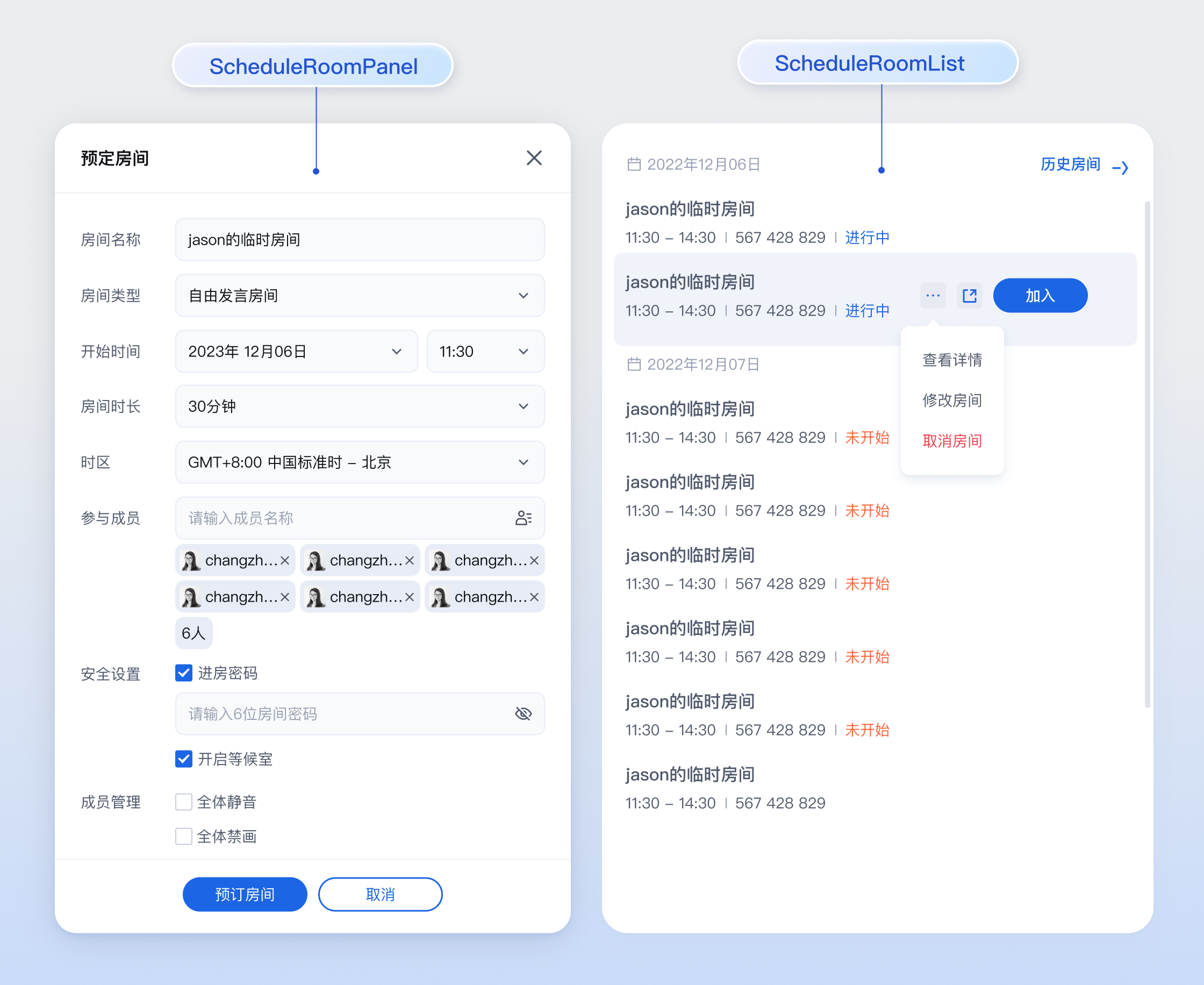
- **方案一(推荐):** 使用 UI 组件快速集成。直接引入 `tuikit-atomicx-vue3` 提供的预定房间面板([ScheduleRoomPanel](https://github.com/Tencent-RTC/TUIKit_Vue3/blob/main/packages/tuikit-atomicx-vue3/src/components/ScheduleRoomPanel/ScheduleRoomPanel.vue))和预定房间列表组件([ScheduledRoomList](https://github.com/Tencent-RTC/TUIKit_Vue3/blob/main/packages/tuikit-atomicx-vue3/src/components/ScheduleRoomPanel/ScheduledRoomList.vue)),开发成本最低。
|
|
21
|
+
|
|
22
|
+
- **方案二(高级):** 使用底层 API 自定义集成。基于 atomicx-core SDK API `useRoomState` 状态钩子自行实现 UI 和交互逻辑,灵活度最高。
|
|
23
|
+
|
|
24
|
+
|
|
25
|
+
|
|
26
|
+
|
|
27
|
+
## 方案一:使用 UI 组件快速集成
|
|
28
|
+
|
|
29
|
+
`tuikit-atomicx-vue3` 提供了两个核心组件:
|
|
30
|
+
- [**ScheduleRoomPanel**](https://github.com/Tencent-RTC/TUIKit_Vue3/blob/main/packages/tuikit-atomicx-vue3/src/components/ScheduleRoomPanel/ScheduleRoomPanel.vue)**:**预定会议的配置面板,包含时间选择、成员邀请等功能。
|
|
31
|
+
|
|
32
|
+
- [**ScheduledRoomList**](https://github.com/Tencent-RTC/TUIKit_Vue3/blob/main/packages/tuikit-atomicx-vue3/src/components/ScheduleRoomPanel/ScheduledRoomList.vue)**:**展示当前用户的预定会议列表,支持点击入会、修改和取消预定。
|
|
33
|
+
|
|
34
|
+
|
|
35
|
+
### 步骤1:引入组件
|
|
36
|
+
``` typescript
|
|
37
|
+
import { ScheduleRoomPanel, ScheduledRoomList } from 'tuikit-atomicx-vue3/room';
|
|
38
|
+
```
|
|
39
|
+
|
|
40
|
+
### 步骤2:使用组件
|
|
41
|
+
|
|
42
|
+
在您的页面中,可以直接组合使用这两个组件。
|
|
43
|
+
``` typescript
|
|
44
|
+
<template>
|
|
45
|
+
<UIKitProvider theme="light" language="zh-CN">
|
|
46
|
+
<div class="schedule-container">
|
|
47
|
+
<!-- 预定按钮,点击后显示预定弹窗 -->
|
|
48
|
+
<button @click="showSchedulePanel = true">
|
|
49
|
+
预定会议
|
|
50
|
+
</button>
|
|
51
|
+
|
|
52
|
+
<!-- 预定列表组件 -->
|
|
53
|
+
<div class="list-container">
|
|
54
|
+
<!-- 监听 join-room 事件处理入会逻辑 -->
|
|
55
|
+
<ScheduledRoomList @join-room="handleJoinRoom" />
|
|
56
|
+
</div>
|
|
57
|
+
|
|
58
|
+
<!-- 预定面板弹窗 -->
|
|
59
|
+
<!-- 建议将其包裹在 Dialog 或 Modal 组件中 -->
|
|
60
|
+
<div v-if="showSchedulePanel" class="modal-mask">
|
|
61
|
+
<div class="modal-content">
|
|
62
|
+
<ScheduleRoomPanel
|
|
63
|
+
@confirm="handleScheduleConfirm"
|
|
64
|
+
@cancel="showSchedulePanel = false"
|
|
65
|
+
/>
|
|
66
|
+
</div>
|
|
67
|
+
</div>
|
|
68
|
+
</div>
|
|
69
|
+
</UIKitProvider>
|
|
70
|
+
</template>
|
|
71
|
+
|
|
72
|
+
<script setup lang="ts">
|
|
73
|
+
import { ref } from 'vue';
|
|
74
|
+
import { UIKitProvider } from '@tencentcloud/uikit-base-component-vue3';
|
|
75
|
+
import { ScheduleRoomPanel, ScheduledRoomList, useRoomState } from 'tuikit-atomicx-vue3/room';
|
|
76
|
+
|
|
77
|
+
const { joinRoom } = useRoomState();
|
|
78
|
+
|
|
79
|
+
const showSchedulePanel = ref(false);
|
|
80
|
+
|
|
81
|
+
const handleScheduleConfirm = (roomId: string, options: Record<string, any>) => {
|
|
82
|
+
console.log('预定成功', roomId, options);
|
|
83
|
+
showSchedulePanel.value = false;
|
|
84
|
+
// 可选:显示邀请弹窗或复制链接
|
|
85
|
+
};
|
|
86
|
+
|
|
87
|
+
const handleJoinRoom = async (roomInfo: { roomId: string }) => {
|
|
88
|
+
console.log('点击入会', roomInfo.roomId);
|
|
89
|
+
await joinRoom(roomInfo.roomId);
|
|
90
|
+
};
|
|
91
|
+
</script>
|
|
92
|
+
|
|
93
|
+
<style scoped>
|
|
94
|
+
.schedule-container{padding:24px;max-width:1000px;margin:0 auto;font-family:-apple-system,BlinkMacSystemFont,'Segoe UI',Roboto,'Helvetica Neue',Arial,sans-serif}button{background-color:#006eff;color:#fff;border:none;padding:10px 20px;border-radius:4px;cursor:pointer;font-size:14px;font-weight:500;transition:background-color .2s;margin-bottom:24px}button:hover{background-color:#0056cc}.list-container{background:#fff;border-radius:8px;box-shadow:0 2px 8px rgba(0,0,0,.05);padding:16px}.modal-mask{position:fixed;top:0;left:0;right:0;bottom:0;background-color:rgba(0,0,0,.4);backdrop-filter:blur(4px);display:flex;align-items:center;justify-content:center;z-index:1000}.modal-content{background-color:#fff;border-radius:8px;box-shadow:0 4px 16px rgba(0,0,0,.1);padding:24px;width:100%;max-width:480px}
|
|
95
|
+
</style>
|
|
96
|
+
```
|
|
97
|
+
|
|
98
|
+
## 方案二:使用底层 API 自定义集成
|
|
99
|
+
|
|
100
|
+
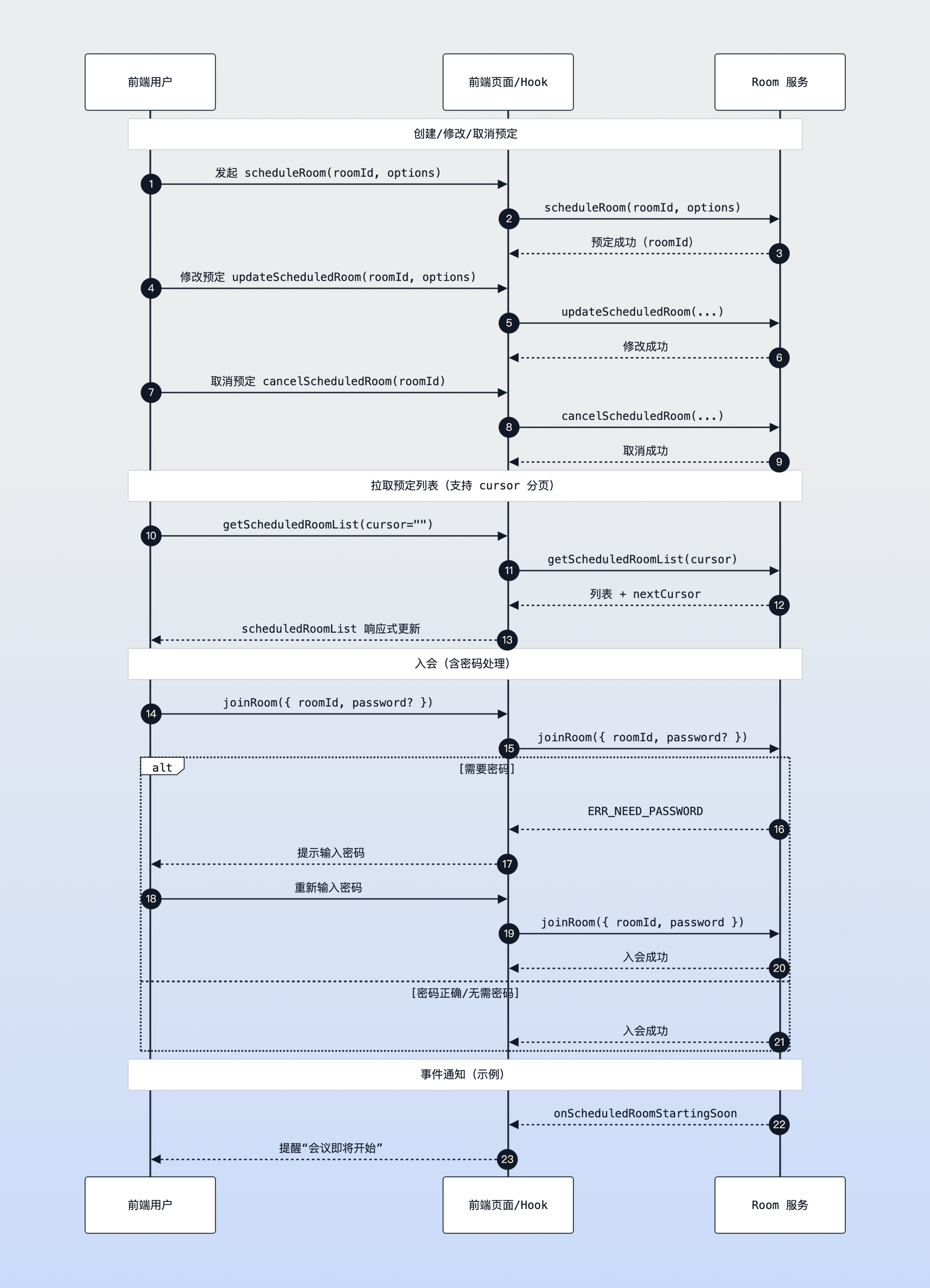
本节主要介绍如何通过 atomicx-core SDK API [useRoomState](https://web.sdk.qcloud.com/trtc/live/web/doc/zh/index.html#module-RoomState) 接口来实现预定房间的核心逻辑。
|
|
101
|
+
|
|
102
|
+
|
|
103
|
+
|
|
104
|
+
预定房间时序图
|
|
105
|
+
|
|
106
|
+
|
|
107
|
+
### 步骤1:发起预定
|
|
108
|
+
|
|
109
|
+
使用 [scheduleRoom](https://web.sdk.qcloud.com/trtc/live/web/doc/zh/index.html#scheduleRoom) 方法创建一个新的预定会议。您需要指定会议的开始时间、结束时间以及房间名称等信息。
|
|
110
|
+
``` typescript
|
|
111
|
+
import { useRoomState } from 'tuikit-atomicx-vue3/room';
|
|
112
|
+
|
|
113
|
+
const { scheduleRoom } = useRoomState();
|
|
114
|
+
|
|
115
|
+
const createSchedule = async () => {
|
|
116
|
+
try {
|
|
117
|
+
// roomId 限制:字符串类型,必传参数,建议随机生成
|
|
118
|
+
const roomId = '123456';
|
|
119
|
+
|
|
120
|
+
// 注意:时间戳单位必须为 **秒** (Date.getTime() 获取的是毫秒,需除以 1000)
|
|
121
|
+
const startTime = Math.floor(new Date().getTime() / 1000) + 3600; // 1小时后开始
|
|
122
|
+
const duration = 1800; // 30分钟
|
|
123
|
+
|
|
124
|
+
const options = {
|
|
125
|
+
roomName: '产品需求评审会',
|
|
126
|
+
scheduleStartTime: startTime, // 单位:秒
|
|
127
|
+
scheduleEndTime: startTime + duration, // 单位:秒
|
|
128
|
+
scheduleAttendees: ['userA', 'userB'], // 邀请参会成员ID列表
|
|
129
|
+
password: '123', // 可选:设置入会密码
|
|
130
|
+
isAllMicrophoneDisabled: false, // 可选:是否全体禁麦
|
|
131
|
+
isAllCameraDisabled: false, // 可选:是否全体禁画
|
|
132
|
+
};
|
|
133
|
+
|
|
134
|
+
await scheduleRoom({ roomId, options });
|
|
135
|
+
console.log('预定成功', roomId);
|
|
136
|
+
} catch (error) {
|
|
137
|
+
console.error('预定失败', error);
|
|
138
|
+
}
|
|
139
|
+
};
|
|
140
|
+
```
|
|
141
|
+
|
|
142
|
+
### 步骤2:获取预定列表
|
|
143
|
+
|
|
144
|
+
使用 [getScheduledRoomList](https://web.sdk.qcloud.com/trtc/live/web/doc/zh/index.html#getScheduledRoomList) 方法拉取当前用户的预定会议列表。列表数据会响应式更新到 [scheduledRoomList](https://web.sdk.qcloud.com/trtc/live/web/doc/zh/index.html#scheduledRoomList) 状态中。
|
|
145
|
+
``` typescript
|
|
146
|
+
import { onMounted, watch } from 'vue';
|
|
147
|
+
import { useRoomState } from 'tuikit-atomicx-vue3/room';
|
|
148
|
+
|
|
149
|
+
const {
|
|
150
|
+
scheduledRoomList, // 响应式数据:预定会议列表
|
|
151
|
+
getScheduledRoomList // 方法:拉取列表
|
|
152
|
+
} = useRoomState();
|
|
153
|
+
|
|
154
|
+
// 初始化加载列表
|
|
155
|
+
onMounted(async () => {
|
|
156
|
+
// cursor 表示从哪里开始拉取数据,空字符串表示从头开始
|
|
157
|
+
// getScheduledRoomList 返回值包含新的 cursor
|
|
158
|
+
const { cursor } = await getScheduledRoomList({ cursor: '' });
|
|
159
|
+
// 如果 cursor 不为空,表示还有更多数据,可继续调用拉取
|
|
160
|
+
});
|
|
161
|
+
|
|
162
|
+
// 监听列表变化,实时更新 UI
|
|
163
|
+
watch(scheduledRoomList, (list) => {
|
|
164
|
+
console.log('当前预定列表:', list);
|
|
165
|
+
});
|
|
166
|
+
```
|
|
167
|
+
|
|
168
|
+
### 步骤3:修改预定
|
|
169
|
+
|
|
170
|
+
如果需要调整已预定会议的时间或主题,可以使用 [updateScheduledRoom](https://web.sdk.qcloud.com/trtc/live/web/doc/zh/index.html#updateScheduledRoom) 方法。
|
|
171
|
+
``` typescript
|
|
172
|
+
import { useRoomState } from 'tuikit-atomicx-vue3/room';
|
|
173
|
+
|
|
174
|
+
const { updateScheduledRoom } = useRoomState();
|
|
175
|
+
|
|
176
|
+
const updateRoom = async (roomId: string) => {
|
|
177
|
+
try {
|
|
178
|
+
const newStartTime = Math.floor(new Date().getTime() / 1000) + 7200; // 延后2小时
|
|
179
|
+
const options = {
|
|
180
|
+
roomName: '产品需求评审会(改期)',
|
|
181
|
+
scheduleStartTime: newStartTime,
|
|
182
|
+
scheduleEndTime: newStartTime + 1800,
|
|
183
|
+
};
|
|
184
|
+
|
|
185
|
+
await updateScheduledRoom({ roomId, options });
|
|
186
|
+
console.log('修改成功');
|
|
187
|
+
} catch (error) {
|
|
188
|
+
console.error('修改失败', error);
|
|
189
|
+
}
|
|
190
|
+
};
|
|
191
|
+
```
|
|
192
|
+
|
|
193
|
+
### 步骤4:取消预定
|
|
194
|
+
|
|
195
|
+
如果需要取消某个已预定的会议,可以调用 [cancelScheduledRoom](https://web.sdk.qcloud.com/trtc/live/web/doc/zh/index.html#cancelScheduledRoom) 方法。
|
|
196
|
+
``` typescript
|
|
197
|
+
import { useRoomState } from 'tuikit-atomicx-vue3/room';
|
|
198
|
+
|
|
199
|
+
const { cancelScheduledRoom } = useRoomState();
|
|
200
|
+
|
|
201
|
+
const cancelRoom = async (roomId: string) => {
|
|
202
|
+
try {
|
|
203
|
+
await cancelScheduledRoom({ roomId });
|
|
204
|
+
console.log('取消成功');
|
|
205
|
+
// 取消成功后,scheduledRoomList 会自动更新,无需手动重新拉取
|
|
206
|
+
} catch (error) {
|
|
207
|
+
console.error('取消失败', error);
|
|
208
|
+
}
|
|
209
|
+
};
|
|
210
|
+
```
|
|
211
|
+
|
|
212
|
+
### 步骤5:处理入会密码
|
|
213
|
+
|
|
214
|
+
对于设置了密码的预定会议,在调用 [joinRoom](https://web.sdk.qcloud.com/trtc/live/web/doc/zh/index.html#joinRoom) 接口入会时,需要捕获鉴权失败的错误,并引导用户输入密码。
|
|
215
|
+
``` typescript
|
|
216
|
+
import { useRoomState, TUIErrorCode } from 'tuikit-atomicx-vue3/room';
|
|
217
|
+
|
|
218
|
+
const { joinRoom } = useRoomState();
|
|
219
|
+
|
|
220
|
+
const enterRoom = async (roomId: string, password?: string) => {
|
|
221
|
+
try {
|
|
222
|
+
await joinRoom({ roomId, password });
|
|
223
|
+
} catch (error: any) {
|
|
224
|
+
// 捕获特定错误码,TUIErrorCode.ERR_NEED_PASSWORD (-2010)
|
|
225
|
+
if (error.code === TUIErrorCode.ERR_NEED_PASSWORD) {
|
|
226
|
+
console.log('该房间需要密码,请引导用户输入');
|
|
227
|
+
// 1. 弹出密码输入框
|
|
228
|
+
// 2. 获取用户输入的密码 inputPassword
|
|
229
|
+
// 3. 重新调用 enterRoom(roomId, inputPassword)
|
|
230
|
+
} else if (error.code === TUIErrorCode.ERR_WRONG_PASSWORD) {
|
|
231
|
+
console.error('密码错误,请重新输入');
|
|
232
|
+
} else {
|
|
233
|
+
console.error('入会失败', error);
|
|
234
|
+
}
|
|
235
|
+
}
|
|
236
|
+
};
|
|
237
|
+
```
|
|
238
|
+
|
|
239
|
+
### 步骤6:监听预定事件
|
|
240
|
+
|
|
241
|
+
除了被动响应数据变化,您还可以监听特定的预定事件来处理业务逻辑,例如在会议即将开始时弹出提醒。
|
|
242
|
+
``` typescript
|
|
243
|
+
import { onMounted, onUnmounted } from 'vue';
|
|
244
|
+
import { useRoomState, RoomEvent } from 'tuikit-atomicx-vue3/room';
|
|
245
|
+
|
|
246
|
+
const { subscribeEvent, unsubscribeEvent } = useRoomState();
|
|
247
|
+
|
|
248
|
+
// 会议即将开始通知(默认为开始前5分钟)
|
|
249
|
+
const handleRoomStartingSoon = (info: { roomInfo: any }) => {
|
|
250
|
+
console.log('会议即将开始:', info.roomInfo.roomName);
|
|
251
|
+
// 可在此处实现 Toast 提醒或系统通知
|
|
252
|
+
};
|
|
253
|
+
|
|
254
|
+
// 会议被取消通知
|
|
255
|
+
const handleRoomCancelled = (info: { roomInfo: any; operateUser: any }) => {
|
|
256
|
+
console.log(`会议 ${info.roomInfo.roomName} 已被 ${info.operateUser.userName} 取消`);
|
|
257
|
+
};
|
|
258
|
+
|
|
259
|
+
// 收到新的会议邀请通知
|
|
260
|
+
const handleRoomAdded = (info: { roomInfo: any }) => {
|
|
261
|
+
console.log('收到新的会议邀请:', info.roomInfo.roomName);
|
|
262
|
+
};
|
|
263
|
+
|
|
264
|
+
// 被移出会议通知
|
|
265
|
+
const handleRemovedFromRoom = (info: { roomInfo: any; operateUser: any }) => {
|
|
266
|
+
console.log(`您已被 ${info.operateUser.userName} 移出会议 ${info.roomInfo.roomName}`);
|
|
267
|
+
};
|
|
268
|
+
|
|
269
|
+
onMounted(() => {
|
|
270
|
+
// 注册事件监听
|
|
271
|
+
subscribeEvent(RoomEvent.onScheduledRoomStartingSoon, handleRoomStartingSoon);
|
|
272
|
+
subscribeEvent(RoomEvent.onScheduledRoomCancelled, handleRoomCancelled);
|
|
273
|
+
subscribeEvent(RoomEvent.onAddedToScheduledRoom, handleRoomAdded);
|
|
274
|
+
subscribeEvent(RoomEvent.onRemovedFromScheduledRoom, handleRemovedFromRoom);
|
|
275
|
+
});
|
|
276
|
+
|
|
277
|
+
onUnmounted(() => {
|
|
278
|
+
// 移除事件监听
|
|
279
|
+
unsubscribeEvent(RoomEvent.onScheduledRoomStartingSoon, handleRoomStartingSoon);
|
|
280
|
+
unsubscribeEvent(RoomEvent.onScheduledRoomCancelled, handleRoomCancelled);
|
|
281
|
+
unsubscribeEvent(RoomEvent.onAddedToScheduledRoom, handleRoomAdded);
|
|
282
|
+
unsubscribeEvent(RoomEvent.onRemovedFromScheduledRoom, handleRemovedFromRoom);
|
|
283
|
+
});
|
|
284
|
+
```
|
|
285
|
+
|
|
286
|
+
## 开发注意事项
|
|
287
|
+
1. **时间戳单位**:SDK 中涉及的所有时间参数(例如 `scheduleStartTime`、`scheduleEndTime`)单位均为 **秒**,而非 JavaScript 中 `Date` 对象默认的毫秒。在传参前请务必执行 `/ 1000` 操作。
|
|
288
|
+
|
|
289
|
+
2. **样式引入**:使用 UI 组件时,务必引入 `UIKitProvider`,否则组件样式将无法正常渲染。
|
|
290
|
+
|
|
291
|
+
3. **RoomID 建议**:虽然 `scheduleRoom` 允许前端传入 `roomId`,但为了避免 ID 冲突,建议该 ID 由业务后端生成并保证全局唯一。
|
|
292
|
+
|
|
293
|
+
4. **分页处理**:预定列表可能会很长,`getScheduledRoomList` 接口支持分页拉取。请关注返回值中的 `cursor` 字段,若不为空,则说明还有更多数据。
|
|
294
|
+
|
|
295
|
+
|
|
296
|
+
## 常见问题
|
|
297
|
+
1. **预定成功但列表不更新?**
|
|
298
|
+
|
|
299
|
+
|
|
300
|
+
请确认已登录且首屏调用过 `getScheduledRoomList`(例如 `cursor: ''`)。返回的 `cursor` 不为空需继续拉取;列表是响应式的,更新后 UI 会同步。
|
|
301
|
+
|
|
302
|
+
2. `joinRoom`** 参数怎么传?**
|
|
303
|
+
|
|
304
|
+
|
|
305
|
+
推荐统一使用对象入参:`joinRoom({ roomId, password })`,避免直接传字符串导致类型不匹配或后续扩展受限。
|
|
306
|
+
|
|
307
|
+
3. **时间戳用毫秒导致预约失败?**
|
|
308
|
+
|
|
309
|
+
|
|
310
|
+
所有时间相关参数必须是秒,`Date.now()` 需 `/ 1000`,否则会返回时间冲突错误。
|
|
311
|
+
|
|
312
|
+
4. **房间设置了密码如何处理?**
|
|
313
|
+
|
|
314
|
+
|
|
315
|
+
捕获 `TUIErrorCode.ERR_NEED_PASSWORD` / `ERR_WRONG_PASSWORD`,弹出密码输入框,重新 `joinRoom({ roomId, password })`;错误多次后可提示联系房主重置。
|
|
316
|
+
|
|
317
|
+
5. **roomId 冲突或重复?**
|
|
318
|
+
|
|
319
|
+
|
|
320
|
+
建议由后端生成全局唯一 roomId;如果前端生成,请在调度前检查冲突并做好重试策略。
|
|
321
|
+
|
|
322
|
+
6. **分页怎么继续拉取?**
|
|
323
|
+
|
|
324
|
+
|
|
325
|
+
`getScheduledRoomList` 返回的 `cursor` 不为空时继续传入;为空表示已拉完。
|
|
326
|
+
|
|
327
|
+
|
|
328
|
+
## **示例项目**
|
|
329
|
+
|
|
330
|
+
腾讯云在 GitHub 上提供了示例项目 [atomicx-vite-vue3-ts](https://github.com/Tencent-RTC/TUIRoomKit/tree/main/Web/example/atomicx-vite-vue3-ts) ,您可以参考以实现完整的 RoomKit 功能。
|
|
331
|
+
|
|
332
|
+
## API 文档
|
|
333
|
+
<table>
|
|
334
|
+
<tr>
|
|
335
|
+
<td rowspan="1" colSpan="1" >**State/Component**</td>
|
|
336
|
+
|
|
337
|
+
<td rowspan="1" colSpan="1" >**功能描述**</td>
|
|
338
|
+
|
|
339
|
+
<td rowspan="1" colSpan="1" >**API 文档**</td>
|
|
340
|
+
</tr>
|
|
341
|
+
|
|
342
|
+
<tr>
|
|
343
|
+
<td rowspan="1" colSpan="1" >**useRoomState**</td>
|
|
344
|
+
|
|
345
|
+
<td rowspan="1" colSpan="1" >房间状态管理(创建、加入、预约等)</td>
|
|
346
|
+
|
|
347
|
+
<td rowspan="1" colSpan="1" >[API 文档](https://web.sdk.qcloud.com/trtc/live/web/doc/zh/index.html#module-RoomState)</td>
|
|
348
|
+
</tr>
|
|
349
|
+
</table>
|