@tencentcloud/ai-desk-customer-vue 1.5.10 → 1.6.0
This diff represents the content of publicly available package versions that have been released to one of the supported registries. The information contained in this diff is provided for informational purposes only and reflects changes between package versions as they appear in their respective public registries.
- package/CHANGELOG.md +22 -1
- package/README.md +103 -77
- package/README_EN.md +873 -0
- package/assets/audio-blue.svg +4 -0
- package/assets/audio_icon_1.svg +3 -0
- package/assets/audio_icon_2.svg +3 -0
- package/assets/audio_icon_3.svg +3 -0
- package/assets/keyboard-icon.svg +9 -0
- package/components/CustomerServiceChat/chat-header/index-web.vue +41 -10
- package/components/CustomerServiceChat/feedback-modal/index.vue +1 -1
- package/components/CustomerServiceChat/index-web.vue +13 -3
- package/components/CustomerServiceChat/message-input/index-web.vue +57 -10
- package/components/CustomerServiceChat/message-input/message-input-editor-web.vue +342 -11
- package/components/CustomerServiceChat/message-list/index-web.vue +13 -0
- package/components/CustomerServiceChat/message-list/message-elements/message-audio-web.vue +50 -78
- package/components/CustomerServiceChat/message-list/message-elements/message-bubble-web.vue +1 -1
- package/components/CustomerServiceChat/message-list/message-elements/message-desk/message-desk-elements/marked.ts +4 -3
- package/components/CustomerServiceChat/message-list/message-elements/message-desk/message-desk-elements/message-robot-welcome.vue +13 -6
- package/components/CustomerServiceChat/message-list/message-elements/message-text.vue +3 -2
- package/components/CustomerServiceChat/message-toolbar-button/index.vue +11 -6
- package/components/CustomerServiceChat/message-toolbar-button/toolbar-button-end-human-service.vue +16 -5
- package/components/CustomerServiceChat/message-toolbar-button/toolbar-button-human-service.vue +8 -5
- package/components/CustomerServiceChat/message-toolbar-button/toolbar-button-service-rating.vue +8 -5
- package/components/common/Toast/index-web.ts +16 -3
- package/components/common/Toast/index-web.vue +16 -6
- package/constant.ts +1 -0
- package/interface.ts +8 -0
- package/locales/en/TUIChat.ts +6 -2
- package/locales/fil/TUIChat.ts +6 -2
- package/locales/id/TUIChat.ts +76 -72
- package/locales/ja/TUIChat.ts +76 -72
- package/locales/ms/TUIChat.ts +76 -72
- package/locales/ru/TUIChat.ts +6 -2
- package/locales/th/TUIChat.ts +76 -72
- package/locales/vi/TUIChat.ts +76 -72
- package/locales/zh_cn/TUIChat.ts +6 -2
- package/locales/zh_tw/TUIChat.ts +6 -2
- package/package.json +2 -1
- package/server.ts +22 -3
- package/utils/utils.ts +13 -0
- package/assets/keyboard_icon.png +0 -0
package/CHANGELOG.md
CHANGED
|
@@ -1,4 +1,25 @@
|
|
|
1
|
-
## 1.
|
|
1
|
+
## 1.6.0 @2025.10.21
|
|
2
|
+
|
|
3
|
+
### Features
|
|
4
|
+
- 支持用户端转人工成功后发送语音消息。
|
|
5
|
+
- 优化 emoji 表情的交互体验。
|
|
6
|
+
- 开启 url 识别特性时,确保消息安全。
|
|
7
|
+
|
|
8
|
+
### Fixed
|
|
9
|
+
- 部分场景下,消息已读状态异常问题。
|
|
10
|
+
- 富文本换行问题。
|
|
11
|
+
- 切换账号登录可能导致的用户资料异常问题。
|
|
12
|
+
- 部分手机浏览器软键盘遮挡输入框问题。
|
|
13
|
+
|
|
14
|
+
## 1.5.11 @2025.9.28
|
|
15
|
+
|
|
16
|
+
### Features
|
|
17
|
+
- 支持自定义 header 的 logo 和 title。
|
|
18
|
+
- 优化 markdown url 识别的准确性。
|
|
19
|
+
- 点赞点踩信令不存漫游。
|
|
20
|
+
- toolbar button 增加点击防抖。
|
|
21
|
+
|
|
22
|
+
## 1.5.10 @2025.9.18
|
|
2
23
|
|
|
3
24
|
### Features
|
|
4
25
|
- 支持展示工作台快捷回复的视频。
|
package/README.md
CHANGED
|
@@ -1,3 +1,4 @@
|
|
|
1
|
+
[简体中文](./README.md) / [English](./README_EN.md)
|
|
1
2
|
## 介绍
|
|
2
3
|
|
|
3
4
|
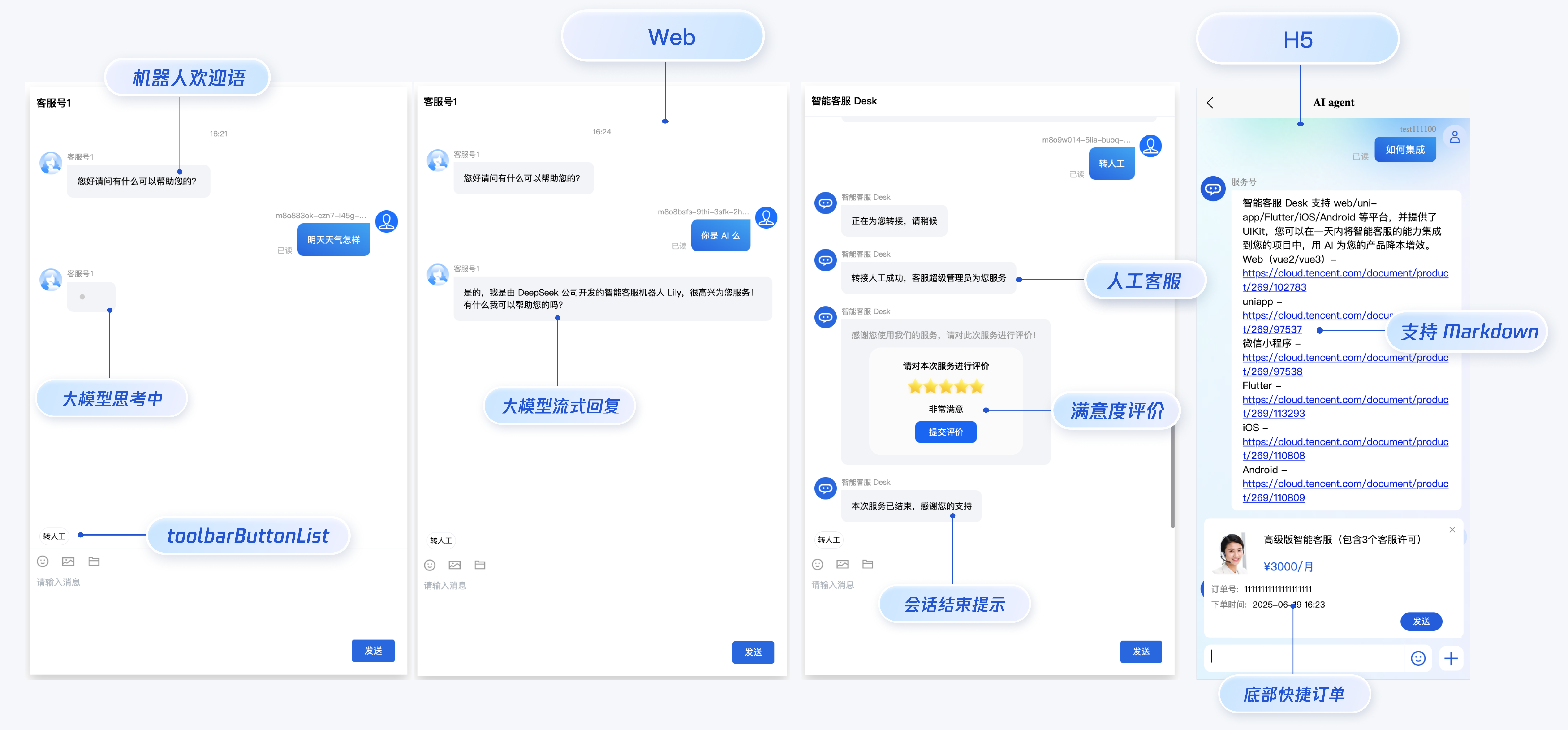
智能客服用户端 Web UIKit。使用此 UIKit,您可以在一天内将智能客服的能力集成到您的 Web 或 Hybrid 项目。极简接入,用智能客服为您的产品增收提效,提升用户满意度和付费转化。
|
|
@@ -6,6 +7,10 @@
|
|
|
6
7
|
|
|
7
8
|
|
|
8
9
|
|
|
10
|
+
## 智能客服
|
|
11
|
+
|
|
12
|
+
如果您想要关于智能客服的更详细的内容,请访问[腾讯云智能客服(Desk)](https://cloud.tencent.com/document/product/269/96056)。
|
|
13
|
+
|
|
9
14
|
|
|
10
15
|
## 开发环境要求
|
|
11
16
|
- Vue ( 全面支持 Vue2 & Vue3 , 请您在下方接入时选择您所匹配的 Vue 版本接入指引进行接入)
|
|
@@ -23,11 +28,11 @@
|
|
|
23
28
|
|
|
24
29
|
### 步骤1:创建项目
|
|
25
30
|
|
|
26
|
-
支持使用 webpack 或 vite 创建项目工程,配置 Vue3 / Vue2 + TypeScript + sass。以下是几种项目工程搭建示例:
|
|
31
|
+
支持使用 [webpack](#vue-cli) 或 [vite](#vite) 创建项目工程,配置 Vue3 / Vue2 + TypeScript + sass。以下是几种项目工程搭建示例:
|
|
27
32
|
|
|
28
33
|
|
|
29
|
-
|
|
30
|
-
|
|
34
|
+
<span id="vue-cli"></span>
|
|
35
|
+
#### vue-cli
|
|
31
36
|
|
|
32
37
|
> **说明:**
|
|
33
38
|
>
|
|
@@ -39,16 +44,12 @@
|
|
|
39
44
|
|
|
40
45
|
如果您尚未安装 vue-cli 或者 vue-cli 版本低于 5.0.0 ,可以在 terminal 或 cmd 中采用如下方式进行安装:
|
|
41
46
|
|
|
42
|
-
|
|
43
|
-
【shell】
|
|
44
|
-
``` bash
|
|
47
|
+
``` shell
|
|
45
48
|
npm install -g @vue/cli@5.0.8 sass sass-loader@10.1.1
|
|
46
49
|
```
|
|
47
50
|
|
|
48
51
|
通过 vue-cli 创建项目,并选择下图中所选配置项。
|
|
49
52
|
|
|
50
|
-
|
|
51
|
-
【shell】
|
|
52
53
|
``` bash
|
|
53
54
|
vue create ai-desk-example
|
|
54
55
|
```
|
|
@@ -65,25 +66,22 @@ cd ai-desk-example
|
|
|
65
66
|
如果您是 vue2 项目,请根据您所使用的 Vue 版本进行以下相应的环境配置, vue3 项目请忽略。
|
|
66
67
|
|
|
67
68
|
|
|
68
|
-
|
|
69
|
-
【vue2.7】
|
|
69
|
+
##### vue2.7
|
|
70
70
|
``` bash
|
|
71
71
|
npm i vue@2.7.9 vue-template-compiler@2.7.9
|
|
72
72
|
```
|
|
73
73
|
|
|
74
|
-
|
|
74
|
+
##### vue2.6及以下
|
|
75
75
|
``` bash
|
|
76
76
|
npm i @vue/composition-api unplugin-vue2-script-setup vue@2.6.14 vue-template-compiler@2.6.14
|
|
77
77
|
```
|
|
78
78
|
|
|
79
|
-
|
|
79
|
+
<span id="vue-cli"></span>
|
|
80
|
+
#### vite
|
|
80
81
|
|
|
81
82
|
> **说明:**
|
|
82
83
|
>
|
|
83
|
-
|
|
84
84
|
> Vite 需要[**Node.js**](https://nodejs.org/en/)** 版本 18+,20+。**当您的包管理器发出警告时,请注意升级您的 Node 版本,详情请参考 [Vite 官网](https://cn.vitejs.dev/guide/)。
|
|
85
|
-
>
|
|
86
|
-
|
|
87
85
|
|
|
88
86
|
使用 vite 方式创建项目,按照下图选项配置 Vue + TypeScript 。
|
|
89
87
|
``` bash
|
|
@@ -106,8 +104,6 @@ npm i -D sass sass-loader
|
|
|
106
104
|
|
|
107
105
|
清除项目默认的样式,避免样式问题:
|
|
108
106
|
|
|
109
|
-
|
|
110
|
-
|
|
111
107
|
【macOS 端】
|
|
112
108
|
``` bash
|
|
113
109
|
echo -n > src/style.css
|
|
@@ -127,33 +123,17 @@ echo. > src\style.css
|
|
|
127
123
|
|
|
128
124
|
通过 npm 方式下载 UI 组件,并将 UI 组件复制到自己工程的 src 目录下:
|
|
129
125
|
|
|
130
|
-
|
|
131
|
-
|
|
132
126
|
【macOS 端】
|
|
133
127
|
|
|
134
|
-
|
|
135
|
-
【shell】
|
|
136
128
|
``` bash
|
|
137
129
|
npm i @tencentcloud/ai-desk-customer-vue@latest
|
|
138
|
-
```
|
|
139
|
-
|
|
140
|
-
|
|
141
|
-
【shell】
|
|
142
|
-
``` bash
|
|
143
130
|
mkdir -p ./src/ai-desk-customer-vue && rsync -av --exclude={'node_modules','excluded-list.txt'} ./node_modules/@tencentcloud/ai-desk-customer-vue/ ./src/ai-desk-customer-vue
|
|
144
131
|
```
|
|
145
132
|
|
|
146
133
|
【Windows 端】
|
|
147
134
|
|
|
148
|
-
|
|
149
|
-
【shell】
|
|
150
135
|
``` bash
|
|
151
136
|
npm i @tencentcloud/ai-desk-customer-vue@latest
|
|
152
|
-
```
|
|
153
|
-
|
|
154
|
-
|
|
155
|
-
【shell】
|
|
156
|
-
``` bash
|
|
157
137
|
xcopy .\node_modules\@tencentcloud\ai-desk-customer-vue .\src\ai-desk-customer-vue /i /e /exclude:.\node_modules\@tencentcloud\ai-desk-customer-vue\excluded-list.txt
|
|
158
138
|
```
|
|
159
139
|
|
|
@@ -165,14 +145,9 @@ xcopy .\node_modules\@tencentcloud\ai-desk-customer-vue .\src\ai-desk-customer-v
|
|
|
165
145
|
|
|
166
146
|
> **说明:**
|
|
167
147
|
>
|
|
168
|
-
|
|
169
148
|
> 以下示例代码使用了 setup 语法,如果您的项目没有使用 setup 语法,请按照 Vue3/Vue2 的标准方式注册组件。
|
|
170
|
-
>
|
|
171
|
-
|
|
172
|
-
|
|
173
|
-
|
|
174
149
|
|
|
175
|
-
|
|
150
|
+
##### vue3
|
|
176
151
|
``` javascript
|
|
177
152
|
<template>
|
|
178
153
|
<CustomerServiceChat
|
|
@@ -194,7 +169,7 @@ onMounted(() => {
|
|
|
194
169
|
</style>
|
|
195
170
|
```
|
|
196
171
|
|
|
197
|
-
|
|
172
|
+
##### vue2.7
|
|
198
173
|
``` javascript
|
|
199
174
|
<template>
|
|
200
175
|
<div id="app">
|
|
@@ -220,7 +195,7 @@ onMounted(() => {
|
|
|
220
195
|
</style>
|
|
221
196
|
```
|
|
222
197
|
|
|
223
|
-
|
|
198
|
+
##### vue2.6及以下
|
|
224
199
|
``` javascript
|
|
225
200
|
<template>
|
|
226
201
|
<div id="app">
|
|
@@ -285,9 +260,9 @@ export * from "@vue/composition-api";
|
|
|
285
260
|
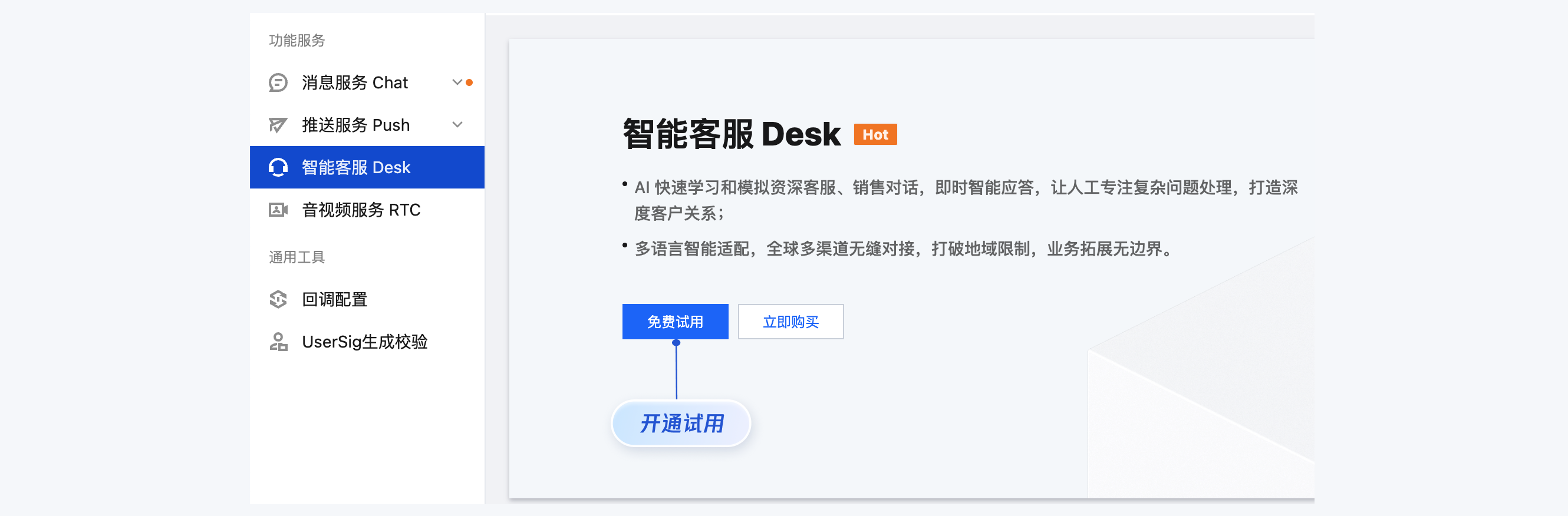
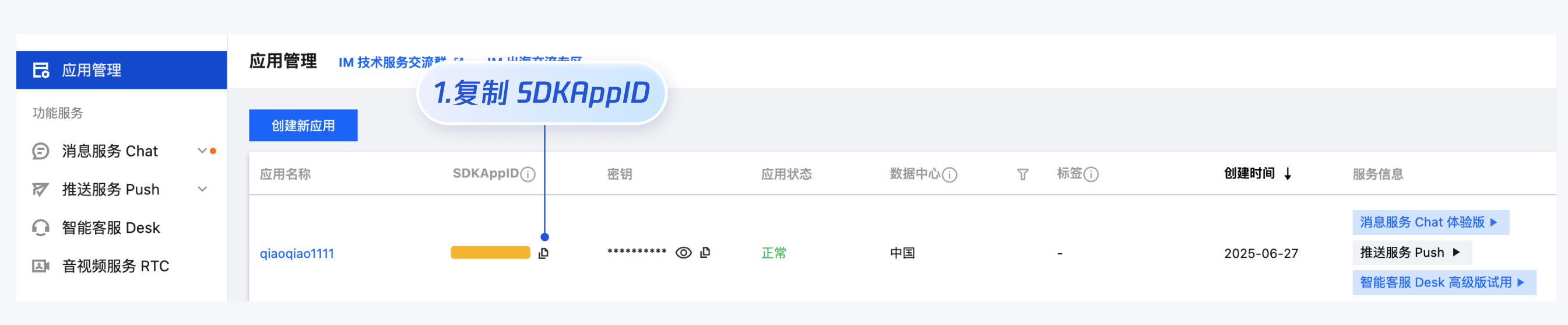
- SDKAppID 信息,可在 [即时通信 IM 控制台](https://console.cloud.tencent.com/im) 单击**应用管理** > **创建新应用**,并选择**智能客服 Desk**, [开通智能客服](https://console.cloud.tencent.com/im/ai-desk) 后获取。
|
|
286
261
|
|
|
287
262
|
|
|
288
|
-
|
|
263
|
+

|
|
289
264
|
|
|
290
|
-
|
|
265
|
+

|
|
291
266
|
|
|
292
267
|
- userID 信息,可本地生成一个随机的字符串,例如 test-1234。
|
|
293
268
|
|
|
@@ -300,22 +275,13 @@ export * from "@vue/composition-api";
|
|
|
300
275
|
|
|
301
276
|
执行以下命令启动项目:
|
|
302
277
|
|
|
303
|
-
|
|
304
|
-
|
|
305
|
-
【vue-cli】
|
|
278
|
+
#### vue-cli
|
|
306
279
|
|
|
307
280
|
> **说明:**
|
|
308
281
|
>
|
|
309
|
-
|
|
310
282
|
> 由于 vue-cli 默认开启 webpack 全局 overlay 报错信息提示,为了您有更好的体验,**建议您关闭全局 overlay 报错提示。**
|
|
311
|
-
>
|
|
312
|
-
|
|
313
283
|
> 在 vue.config.js 中添加以下代码
|
|
314
|
-
>
|
|
315
|
-
|
|
316
|
-
>
|
|
317
|
-
|
|
318
|
-
【webpack4及以上】
|
|
284
|
+
> ##### webpack4及以上
|
|
319
285
|
> `module.exports = defineConfig({`
|
|
320
286
|
> ` devServer: {`
|
|
321
287
|
> ` client: {`
|
|
@@ -323,15 +289,13 @@ export * from "@vue/composition-api";
|
|
|
323
289
|
> ` },`
|
|
324
290
|
> ` },`
|
|
325
291
|
> `});`
|
|
326
|
-
|
|
327
|
-
【webpack3】
|
|
292
|
+
> ##### webpack3
|
|
328
293
|
> `module.exports = {`
|
|
329
294
|
> ` devServer: {`
|
|
330
295
|
> ` overlay: false,`
|
|
331
296
|
> ` },`
|
|
332
297
|
> `};`
|
|
333
298
|
>
|
|
334
|
-
|
|
335
299
|
> 在 tsconfig.json 中关闭 ai-desk-customer-vue 的ts检测。
|
|
336
300
|
>
|
|
337
301
|
> `{`
|
|
@@ -342,16 +306,11 @@ export * from "@vue/composition-api";
|
|
|
342
306
|
> `}`
|
|
343
307
|
|
|
344
308
|
|
|
345
|
-
|
|
346
|
-
【shell】
|
|
347
309
|
``` bash
|
|
348
310
|
npm run serve
|
|
349
311
|
```
|
|
312
|
+
#### vite
|
|
350
313
|
|
|
351
|
-
【vite】
|
|
352
|
-
|
|
353
|
-
|
|
354
|
-
【shell】
|
|
355
314
|
``` bash
|
|
356
315
|
npm run dev
|
|
357
316
|
```
|
|
@@ -486,8 +445,7 @@ TUICustomerServer.initWithProfile({
|
|
|
486
445
|
### 工具栏快捷按钮
|
|
487
446
|
|
|
488
447
|
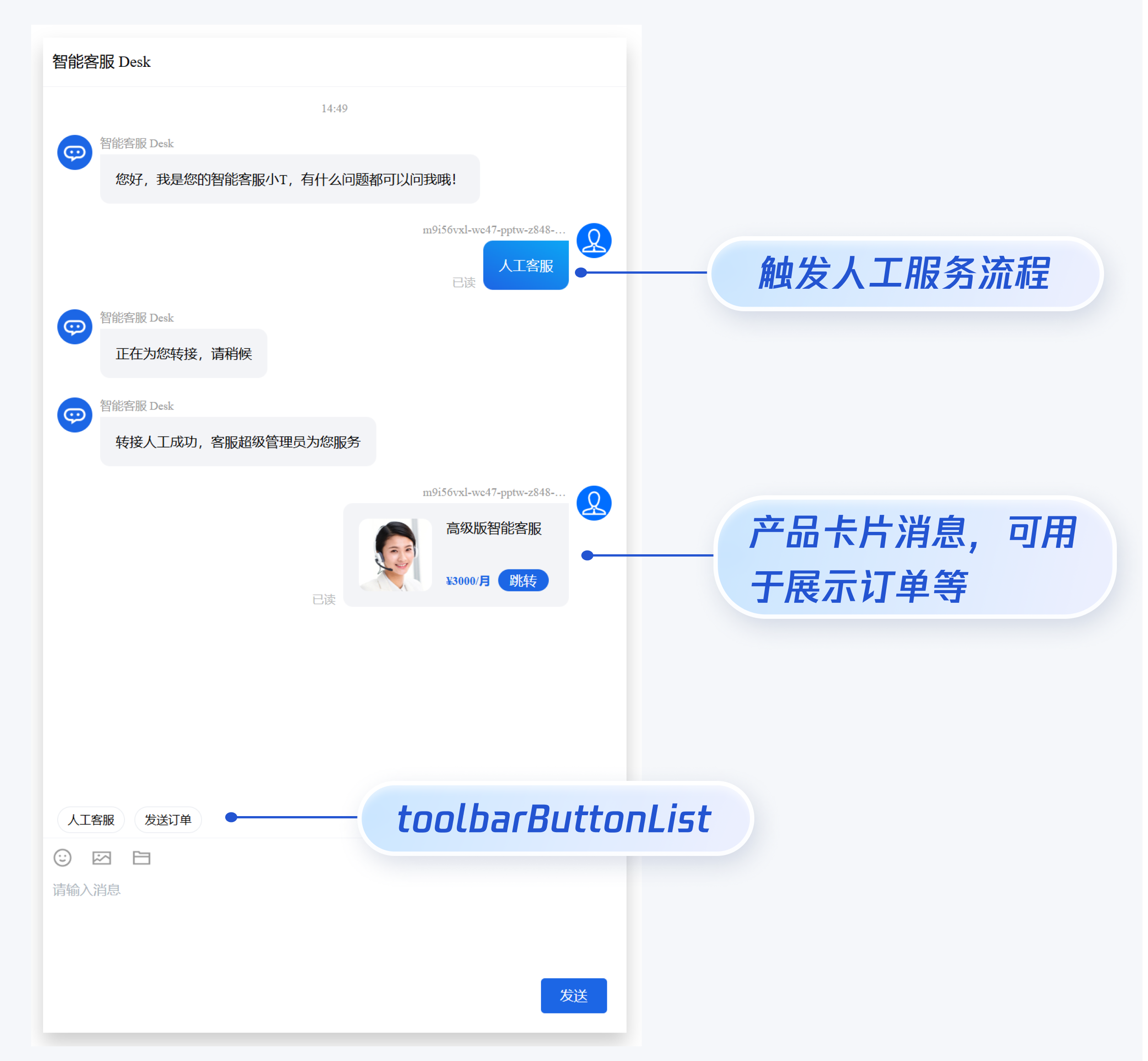
如果您想实现输入框上方增加快捷按钮,方便用户使用,例如增加“人工客服”,“发送订单消息”等,可在引入智能客服时设置 `toolbarButtonList`。效果如下所示:
|
|
489
|
-
|
|
490
|
-
|
|
448
|
+
<img src="https://write-document-release-1258344699.cos.ap-guangzhou.tencentcos.cn/100027960326/b727aeef19cd11f0abe05254005ef0f7.png" width="450px"></img>
|
|
491
449
|
|
|
492
450
|
|
|
493
451
|
`toolbarButtonList` 是一个包含了一个或多个配置的数组,配置的描述如下:
|
|
@@ -606,14 +564,13 @@ onMounted(() => {
|
|
|
606
564
|
|
|
607
565
|
> **说明:**
|
|
608
566
|
>
|
|
609
|
-
|
|
610
567
|
> 请升级 [ai-desk-customer-vue](https://www.npmjs.com/package/@tencentcloud/ai-desk-customer-vue) 到 v1.5.2 或更高版本。
|
|
611
568
|
>
|
|
612
569
|
|
|
613
570
|
|
|
614
571
|
如果您想实现打开客服会话时在聊天区域底部展示快捷订单,可以配置 `bottomQuickOrder`,效果如下所示:
|
|
615
572
|
|
|
616
|
-
|
|
573
|
+
<img src="https://write-document-release-1258344699.cos.ap-guangzhou.tencentcos.cn/100027960326/d9eb994a572211f0b3f05254001c06ec.png" width="400px"></img>
|
|
617
574
|
|
|
618
575
|
|
|
619
576
|
`bottomQuickOrder` 的参数描述如下:
|
|
@@ -718,14 +675,74 @@ onMounted(() => {
|
|
|
718
675
|
</style>
|
|
719
676
|
```
|
|
720
677
|
|
|
678
|
+
### 转指定坐席或客服分组
|
|
679
|
+
|
|
680
|
+
> **说明:**
|
|
681
|
+
> 请升级 [ai-desk-customer-vue](https://www.npmjs.com/package/@tencentcloud/ai-desk-customer-vue) 到 v1.5.6 或更高版本。
|
|
682
|
+
>
|
|
683
|
+
|
|
684
|
+
|
|
685
|
+
如果您的应用需要在用户登录后自动转指定坐席或客服分组,请参考以下代码实现。
|
|
686
|
+
|
|
687
|
+
【转指定坐席】
|
|
688
|
+
``` javascript
|
|
689
|
+
TUICustomerServer.initWithProfile({
|
|
690
|
+
SDKAppID,
|
|
691
|
+
userID,
|
|
692
|
+
userSig,
|
|
693
|
+
nickName: '张三 1852010****',
|
|
694
|
+
avatar: 'https://im.sdk.qcloud.com/download/tuikit-resource/avatar/avatar_3.png'
|
|
695
|
+
}).then(() => {
|
|
696
|
+
TUICustomerServer.transferToHuman({
|
|
697
|
+
specificMemberList: ['agent_account_1', 'agent_account_2'], // 请替换为您应用的人工坐席账号
|
|
698
|
+
description: 'your description'
|
|
699
|
+
});
|
|
700
|
+
});
|
|
701
|
+
```
|
|
702
|
+
|
|
703
|
+
【转客服分组】
|
|
704
|
+
``` javascript
|
|
705
|
+
TUICustomerServer.initWithProfile({
|
|
706
|
+
SDKAppID,
|
|
707
|
+
userID,
|
|
708
|
+
userSig,
|
|
709
|
+
nickName: '张三 1852010****',
|
|
710
|
+
avatar: 'https://im.sdk.qcloud.com/download/tuikit-resource/avatar/avatar_3.png'
|
|
711
|
+
}).then(() => {
|
|
712
|
+
TUICustomerServer.transferToHuman({
|
|
713
|
+
groupID: 0, // 请替换为您应用的客服分组 ID
|
|
714
|
+
description: 'your description'
|
|
715
|
+
});
|
|
716
|
+
});
|
|
717
|
+
```
|
|
718
|
+
|
|
719
|
+
### 触发指定任务流
|
|
720
|
+
|
|
721
|
+
> **说明:**
|
|
722
|
+
> 请升级 [ai-desk-customer-vue](https://www.npmjs.com/package/@tencentcloud/ai-desk-customer-vue) 到 v1.5.6 或更高版本。
|
|
723
|
+
>
|
|
724
|
+
|
|
725
|
+
如果您的应用需要在用户登录后自动触发指定任务流,请参考以下代码实现。
|
|
726
|
+
``` javascript
|
|
727
|
+
TUICustomerServer.initWithProfile({
|
|
728
|
+
SDKAppID,
|
|
729
|
+
userID,
|
|
730
|
+
userSig,
|
|
731
|
+
nickName: '张三 1852010****',
|
|
732
|
+
avatar: 'https://im.sdk.qcloud.com/download/tuikit-resource/avatar/avatar_3.png'
|
|
733
|
+
}).then(() => {
|
|
734
|
+
TUICustomerServer.transferToTaskFlow({
|
|
735
|
+
taskFlowID: 0, // 请替换为您应用的任务流 ID
|
|
736
|
+
description: 'your description'
|
|
737
|
+
});
|
|
738
|
+
});
|
|
739
|
+
```
|
|
740
|
+
|
|
721
741
|
### 多客服号
|
|
722
742
|
|
|
723
743
|
> **说明:**
|
|
724
744
|
>
|
|
725
|
-
|
|
726
745
|
> 请升级 [ai-desk-customer-vue](https://www.npmjs.com/package/@tencentcloud/ai-desk-customer-vue) 到 v1.5.3 或更高版本。
|
|
727
|
-
>
|
|
728
|
-
|
|
729
746
|
|
|
730
747
|
如果您的应用内需要多个客服号,为用户提供专属客服功能,以提高服务质量和响应速度,可用 UIKit 提供的多客服号功能实现。效果如下所示:
|
|
731
748
|
|
|
@@ -747,13 +764,24 @@ TUICustomerServer.initWithProfile({
|
|
|
747
764
|
});
|
|
748
765
|
```
|
|
749
766
|
|
|
767
|
+
### 识别文本消息超链接并支持点击
|
|
768
|
+
|
|
769
|
+
> **说明:**
|
|
770
|
+
>
|
|
771
|
+
|
|
772
|
+
> 请升级 [ai-desk-customer-vue](https://www.npmjs.com/package/@tencentcloud/ai-desk-customer-vue) 到 v1.5.9 或更高版本。
|
|
773
|
+
>
|
|
774
|
+
|
|
775
|
+
|
|
776
|
+
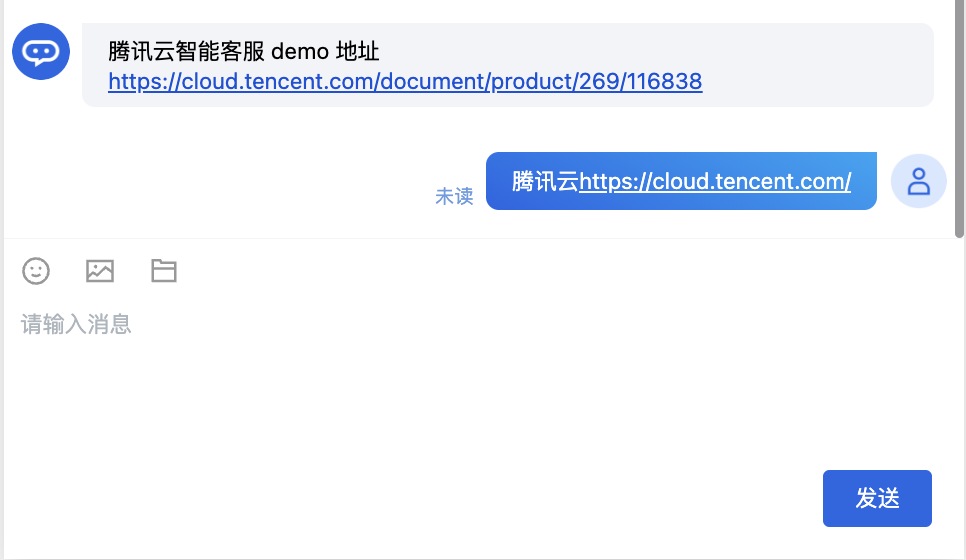
如果您的应用需要识别文本消息超链接并支持点击,请设置`enableURLDetection`值为 1,效果如下所示:
|
|
777
|
+
|
|
778
|
+
|
|
779
|
+
|
|
750
780
|
### 用户端主动结束人工会话
|
|
751
781
|
|
|
752
782
|
> **说明:**
|
|
753
783
|
>
|
|
754
|
-
|
|
755
784
|
> 用户端可以通过发送自定义消息的方式实现主动结束会话,适用于以下 3 种情况:
|
|
756
|
-
>
|
|
757
785
|
> 1. 用户转人工触发排队,发送此消息可以结束排队。
|
|
758
786
|
> 2. 客服接待方式为手动接待,用户转人工分配客服成功后等待客服确认接待,发送此消息可以结束等待。
|
|
759
787
|
> 3. 用户转人工且成功接入人工客服,发送此消息可以结束本次会话。
|
|
@@ -783,9 +811,7 @@ UserSig 签发方式是将 UserSig 的计算代码集成到您的服务端,并
|
|
|
783
811
|
|
|
784
812
|
UIKit 仅支持 ts 环境运行,您可以通过渐进式配置 typescript 来使您项目中已有的 js 代码 与 UIKit 中 ts 代码共存。
|
|
785
813
|
|
|
786
|
-
|
|
787
|
-
|
|
788
|
-
【vue-cli】
|
|
814
|
+
###### vue-cli
|
|
789
815
|
|
|
790
816
|
请在您 vue-cli 脚手架创建的工程根目录执行:
|
|
791
817
|
``` bash
|
|
@@ -796,7 +822,7 @@ vue add typescript
|
|
|
796
822
|
|
|
797
823
|
**完成以上步骤后,请重新运行项目!**
|
|
798
824
|
|
|
799
|
-
|
|
825
|
+
###### Vite
|
|
800
826
|
|
|
801
827
|
请在您 vite 创建的工程根目录执行:
|
|
802
828
|
``` bash
|
|
@@ -829,4 +855,4 @@ npm i marked@6.0.0 --legacy-peer-deps
|
|
|
829
855
|
|
|
830
856
|
## 交流与反馈
|
|
831
857
|
|
|
832
|
-
[
|
|
858
|
+
[腾讯云智能客服(Desk)](https://cloud.tencent.com/document/product/269/96056)
|