@tencent-rtc/mcp 1.3.9 → 1.4.0
This diff represents the content of publicly available package versions that have been released to one of the supported registries. The information contained in this diff is provided for informational purposes only and reflects changes between package versions as they appear in their respective public registries.
- package/package.json +2 -2
- package/resource/doc/{tuicallkit/iOS/faq.md → callkit/faq/android-faq.md} +10 -22
- package/resource/doc/{tuicallkit/android/faq.md → callkit/faq/flutter-faq.md} +10 -22
- package/resource/doc/{tuicallkit/flutter/faq.md → callkit/faq/ios-faq.md} +10 -22
- package/resource/doc/callkit/preset/android/api.md +296 -0
- package/resource/doc/{tuicallkit → callkit/preset}/android/integration.md +53 -365
- package/resource/doc/callkit/preset/flutter/api.md +410 -0
- package/resource/doc/{tuicallkit → callkit/preset}/flutter/integration.md +35 -97
- package/resource/doc/callkit/preset/ios/api.md +80 -0
- package/resource/doc/{tuicallkit/iOS → callkit/preset/ios}/integration.md +37 -118
- package/resource/doc/callkit/preset/react/api.md +501 -0
- package/resource/doc/{tuicallkit → callkit/preset}/react/integration.md +5 -20
- package/resource/doc/callkit/preset/vue/api.md +501 -0
- package/resource/doc/{tuicallkit → callkit/preset}/vue/integration.md +4 -19
- package/resource/doc/{chatuikit → chatkit}/android/faq.md +29 -38
- package/resource/doc/{chatuikit → chatkit}/android/features/theme.md +22 -166
- package/resource/doc/{chatuikit → chatkit}/android/integration.md +28 -121
- package/resource/doc/chatkit/faq/android_sdk/client-api.md +281 -0
- package/resource/doc/{chatuikit → chatkit}/faq/common/product.md +0 -1
- package/resource/doc/{chatuikit → chatkit}/faq/common/server.md +1 -1
- package/resource/doc/chatkit/faq/flutter_sdk/client-api.md +199 -0
- package/resource/doc/{chatuikit → chatkit}/faq/flutter_sdk/faq.md +3 -3
- package/resource/doc/chatkit/faq/ios_sdk/client-api.md +235 -0
- package/resource/doc/{chatuikit → chatkit}/faq/web_sdk/faq.md +3 -3
- package/resource/doc/{chatuikit → chatkit}/flutter/features/theme.md +22 -166
- package/resource/doc/{chatuikit → chatkit}/flutter/integration.md +18 -87
- package/resource/doc/{chatuikit/iOS → chatkit/ios}/faq.md +29 -38
- package/resource/doc/{chatuikit/iOS → chatkit/ios}/features/theme.md +27 -176
- package/resource/doc/{chatuikit/iOS → chatkit/ios}/integration.md +47 -165
- package/resource/doc/{chatuikit → chatkit}/react/components/avatar.md +0 -33
- package/resource/doc/{chatuikit → chatkit}/react/components/chat-header.md +8 -49
- package/resource/doc/{chatuikit → chatkit}/react/components/chat-setting.md +6 -35
- package/resource/doc/{chatuikit → chatkit}/react/components/chat.md +0 -6
- package/resource/doc/{chatuikit → chatkit}/react/components/component-list.md +0 -11
- package/resource/doc/{chatuikit → chatkit}/react/components/contact-list.md +96 -502
- package/resource/doc/chatkit/react/components/conversation-actions.md +174 -0
- package/resource/doc/chatkit/react/components/conversation-list.md +333 -0
- package/resource/doc/chatkit/react/components/conversation-preview.md +118 -0
- package/resource/doc/chatkit/react/components/conversation-search.md +60 -0
- package/resource/doc/{chatuikit → chatkit}/react/components/message-input.md +36 -337
- package/resource/doc/{chatuikit → chatkit}/react/components/message-list.md +20 -212
- package/resource/doc/chatkit/react/components/search.md +243 -0
- package/resource/doc/{chatuikit → chatkit}/react/components/tuikit.md +1 -47
- package/resource/doc/{chatuikit → chatkit}/react/integration.md +21 -81
- package/resource/doc/{chatuikit → chatkit}/vue/components/avatar.md +0 -33
- package/resource/doc/{chatuikit → chatkit}/vue/components/chat-header.md +7 -48
- package/resource/doc/{chatuikit → chatkit}/vue/components/chat-setting.md +3 -5
- package/resource/doc/{chatuikit → chatkit}/vue/components/chat.md +0 -5
- package/resource/doc/{chatuikit → chatkit}/vue/components/component-list.md +0 -15
- package/resource/doc/chatkit/vue/components/contact-list.md +271 -0
- package/resource/doc/chatkit/vue/components/conversation-actions.md +228 -0
- package/resource/doc/{chatuikit → chatkit}/vue/components/conversation-list.md +42 -492
- package/resource/doc/chatkit/vue/components/conversation-preview.md +213 -0
- package/resource/doc/chatkit/vue/components/conversation-search.md +50 -0
- package/resource/doc/{chatuikit → chatkit}/vue/components/message-input.md +2 -223
- package/resource/doc/{chatuikit → chatkit}/vue/components/message-list.md +23 -252
- package/resource/doc/{chatuikit → chatkit}/vue/components/search.md +73 -640
- package/resource/doc/{chatuikit → chatkit}/vue/components/tuikit.md +7 -21
- package/resource/doc/{chatuikit → chatkit}/vue/components/userpicker.md +3 -62
- package/resource/doc/{chatuikit → chatkit}/vue/faq.md +1 -1
- package/resource/doc/{chatuikit → chatkit}/vue/integration.md +22 -23
- package/resource/doc/livekit/{live → core-sdk/live}/android/live-audience-list.md +18 -89
- package/resource/doc/livekit/{live → core-sdk/live}/android/live-audio-effect.md +34 -192
- package/resource/doc/livekit/{live → core-sdk/live}/android/live-barrage.md +28 -141
- package/resource/doc/livekit/{live → core-sdk/live}/android/live-base-beauty.md +20 -112
- package/resource/doc/livekit/{live → core-sdk/live}/android/live-co-guest-interaction.md +59 -193
- package/resource/doc/livekit/{live → core-sdk/live}/android/live-gift.md +75 -455
- package/resource/doc/livekit/{live → core-sdk/live}/android/live-host-interaction.md +94 -344
- package/resource/doc/livekit/{live → core-sdk/live}/android/live-integration.md +107 -515
- package/resource/doc/livekit/{live → core-sdk/live}/android/live-live-list.md +33 -173
- package/resource/doc/livekit/{live → core-sdk/live}/flutter/live-audience-list.md +14 -93
- package/resource/doc/livekit/{live → core-sdk/live}/flutter/live-audio-effect.md +34 -179
- package/resource/doc/livekit/{live → core-sdk/live}/flutter/live-barrage.md +19 -107
- package/resource/doc/livekit/{live → core-sdk/live}/flutter/live-base-beauty.md +24 -166
- package/resource/doc/livekit/{live → core-sdk/live}/flutter/live-co-guest-interaction.md +56 -163
- package/resource/doc/livekit/{live → core-sdk/live}/flutter/live-gift.md +69 -443
- package/resource/doc/livekit/{live → core-sdk/live}/flutter/live-host-interaction.md +117 -364
- package/resource/doc/livekit/{live → core-sdk/live}/flutter/live-integration.md +107 -492
- package/resource/doc/livekit/{live → core-sdk/live}/flutter/live-live-list.md +23 -165
- package/resource/doc/livekit/{live → core-sdk/live}/ios/live-audience-list.md +35 -111
- package/resource/doc/livekit/{live → core-sdk/live}/ios/live-audio-effect.md +35 -193
- package/resource/doc/livekit/{live → core-sdk/live}/ios/live-barrage.md +31 -144
- package/resource/doc/livekit/{live → core-sdk/live}/ios/live-base-beauty.md +24 -116
- package/resource/doc/livekit/{live → core-sdk/live}/ios/live-co-guest-interaction.md +37 -171
- package/resource/doc/livekit/{live → core-sdk/live}/ios/live-gift.md +79 -459
- package/resource/doc/livekit/{live → core-sdk/live}/ios/live-host-interaction.md +69 -320
- package/resource/doc/livekit/{live → core-sdk/live}/ios/live-integration.md +85 -502
- package/resource/doc/livekit/{live → core-sdk/live}/ios/live-live-list.md +32 -169
- package/resource/doc/livekit/{voice → core-sdk/voice}/android/voice-audience-list.md +18 -89
- package/resource/doc/livekit/{voice → core-sdk/voice}/android/voice-audio-effect.md +34 -192
- package/resource/doc/livekit/{voice → core-sdk/voice}/android/voice-barrage.md +28 -141
- package/resource/doc/livekit/{voice → core-sdk/voice}/android/voice-co-guest-interaction.md +50 -259
- package/resource/doc/livekit/{voice → core-sdk/voice}/android/voice-gift.md +75 -455
- package/resource/doc/livekit/{voice → core-sdk/voice}/android/voice-host-interaction.md +51 -265
- package/resource/doc/livekit/{voice → core-sdk/voice}/android/voice-integration.md +61 -427
- package/resource/doc/livekit/{voice → core-sdk/voice}/android/voice-room-list.md +33 -173
- package/resource/doc/livekit/{voice → core-sdk/voice}/flutter/voice-co-guest-interaction.md +44 -203
- package/resource/doc/livekit/{voice → core-sdk/voice}/flutter/voice-integration.md +56 -416
- package/resource/doc/livekit/{voice → core-sdk/voice}/ios/voice-audience-list.md +35 -111
- package/resource/doc/livekit/{voice → core-sdk/voice}/ios/voice-audio-effect.md +35 -193
- package/resource/doc/livekit/{voice → core-sdk/voice}/ios/voice-barrage.md +31 -144
- package/resource/doc/livekit/{voice → core-sdk/voice}/ios/voice-co-guest-interaction.md +43 -252
- package/resource/doc/livekit/{voice → core-sdk/voice}/ios/voice-gift.md +79 -459
- package/resource/doc/livekit/{voice → core-sdk/voice}/ios/voice-host-interaction.md +46 -264
- package/resource/doc/livekit/{voice → core-sdk/voice}/ios/voice-integration.md +61 -445
- package/resource/doc/livekit/{voice → core-sdk/voice}/ios/voice-room-list.md +32 -169
- package/resource/doc/livekit/faq/common/{error_code.md → error-code.md} +2 -2
- package/resource/doc/livekit/preset/live/vue/api-reference/index.md +780 -0
- package/resource/doc/livekit/preset/live/vue/components/barrage.md +291 -0
- package/resource/doc/livekit/{live → preset/live}/vue/components/co-guest-panel.md +10 -49
- package/resource/doc/livekit/{live → preset/live}/vue/components/live-audience-list.md +26 -144
- package/resource/doc/livekit/{live → preset/live}/vue/components/live-scene-panel.md +12 -75
- package/resource/doc/livekit/{live → preset/live}/vue/components/live-view.md +36 -227
- package/resource/doc/livekit/preset/live/vue/components/stream-mixer.md +215 -0
- package/resource/doc/livekit/preset/live/vue/faq.md +1 -0
- package/resource/doc/livekit/preset/live/vue/live-list-integration.md +241 -0
- package/resource/doc/livekit/preset/live/vue/live-player-desk-integration.md +299 -0
- package/resource/doc/livekit/preset/live/vue/live-player-h5-integration.md +300 -0
- package/resource/doc/livekit/preset/live/vue/live-pusher-integration.md +743 -0
- package/resource/doc/roomkit/vue/faq.md +1 -0
- package/resource/doc/roomkit/vue/features/call-user-to-room.md +17 -53
- package/resource/doc/roomkit/vue/features/device-detection.md +30 -48
- package/resource/doc/roomkit/vue/features/device-state.md +24 -44
- package/resource/doc/roomkit/vue/features/free-beauty-panel.md +13 -36
- package/resource/doc/roomkit/vue/features/room-chat.md +31 -89
- package/resource/doc/roomkit/vue/features/room-participant-state.md +28 -50
- package/resource/doc/roomkit/vue/features/room-state.md +25 -34
- package/resource/doc/roomkit/vue/features/room-view.md +30 -125
- package/resource/doc/roomkit/vue/features/schedule-room.md +9 -40
- package/resource/doc/roomkit/vue/features/screen-share.md +22 -90
- package/resource/doc/roomkit/vue/features/virtual-background.md +13 -29
- package/resource/doc/roomkit/vue/integration.md +21 -76
- package/resource/doc/rtcengine/faq/common/error_code.md +1 -0
- package/resource/doc/rtcengine/faq/web/web.md +14 -24
- package/resource/doc/rtcengine/web/api.md +1 -3
- package/resource/doc/rtcengine/web/how_to_integrated_web_sdk.md +3 -10
- package/resource/doc/rtcengine/web/how_to_run_web_sdk_demo.md +1 -5
- package/resource/doc/rtcengine/web/plugin/20-advanced-customized-capture-rendering.md +1 -2
- package/resource/doc/rtcengine/web/plugin/21-advanced-auto-play-policy.md +2 -4
- package/resource/doc/rtcengine/web/plugin/23-advanced-support-detection.md +3 -5
- package/resource/doc/rtcengine/web/plugin/24-advanced-network-quality.md +1 -7
- package/resource/doc/rtcengine/web/plugin/25-advanced-device-change.md +0 -2
- package/resource/doc/rtcengine/web/plugin/26-advanced-publish-cdn-stream.md +4 -8
- package/resource/doc/rtcengine/web/plugin/27-advanced-small-stream.md +11 -11
- package/resource/doc/rtcengine/web/plugin/28-advanced-beauty.md +12 -88
- package/resource/doc/rtcengine/web/plugin/31-advanced-plugins-overview.md +5 -5
- package/resource/doc/rtcengine/web/plugin/34-advanced-proxy.md +30 -37
- package/resource/doc/rtcengine/web/plugin/36-advanced-virtual-background.md +13 -90
- package/resource/doc/rtcengine/web/plugin/37-advanced-voice-changer.md +1 -2
- package/resource/doc/rtcengine/web/plugin/39-advanced-video-decoder.md +1 -2
- package/resource/doc/rtcengine/web/plugin/40-advanced-video-mixer.md +19 -19
- package/resource/doc/rtcengine/web/plugin/41-advanced-small-stream-auto-switcher.md +1 -1
- package/resource/doc/rtcengine/web/plugin/42-advanced-realtime-transcriber.md +4 -5
- package/resource/doc/rtcengine/web/plugin/43-advanced-face-detection.md +3 -3
- package/resource/doc/trtc/C++/ITRTCCloud.md +686 -2835
- package/resource/doc/trtc/C++/ITRTCStatistics.md +53 -308
- package/resource/doc/trtc/C++/ITXAudioEffectManager.md +202 -1022
- package/resource/doc/trtc/C++/ITXDeviceManager.md +126 -767
- package/resource/doc/trtc/C++/TRTCCloudCallback.md +579 -2147
- package/resource/doc/trtc/C++/TRTCTypeDef.md +703 -3378
- package/resource/doc/trtc/C++/TXLiteAVCode.md +116 -908
- package/resource/doc/trtc/android/TRTCCloud.md +606 -2573
- package/resource/doc/trtc/android/TRTCCloudDef.md +752 -3640
- package/resource/doc/trtc/android/TRTCCloudListener.md +581 -2008
- package/resource/doc/trtc/android/TRTCStatistics.md +48 -278
- package/resource/doc/trtc/android/TXAudioEffectManager.md +202 -1022
- package/resource/doc/trtc/android/TXBeautyManager.md +127 -704
- package/resource/doc/trtc/android/TXDeviceManager.md +51 -318
- package/resource/doc/trtc/android/TXLiteAVCode.md +114 -892
- package/resource/doc/trtc/iOS/TRTCCloud.md +694 -2904
- package/resource/doc/trtc/iOS/TRTCCloudDef.md +726 -3498
- package/resource/doc/trtc/iOS/TRTCCloudDelegate.md +543 -2028
- package/resource/doc/trtc/iOS/TRTCStatistics.md +48 -278
- package/resource/doc/trtc/iOS/TXAudioEffectManager.md +174 -877
- package/resource/doc/trtc/iOS/TXBeautyManager.md +128 -710
- package/resource/doc/trtc/iOS/TXDeviceManager.md +129 -772
- package/resource/doc/trtc/iOS/TXLiteAVCode.md +117 -915
- package/server.js +1 -5
- package/server.js.map +1 -1
- package/tools/call/get_callkit_api.js +32 -0
- package/tools/call/get_callkit_api.js.map +1 -0
- package/tools/call/get_native_call_uikit_integration.js +34 -0
- package/tools/call/get_native_call_uikit_integration.js.map +1 -0
- package/tools/call/{get-web-call-integration.js → get_web_call_uikit_integration.js} +13 -8
- package/tools/call/get_web_call_uikit_integration.js.map +1 -0
- package/tools/chat/get_native_chat_uikit_feature_detail.js +34 -0
- package/tools/chat/get_native_chat_uikit_feature_detail.js.map +1 -0
- package/tools/chat/get_native_chat_uikit_integration.js +45 -0
- package/tools/chat/get_native_chat_uikit_integration.js.map +1 -0
- package/tools/chat/get_web_chat_uikit_component_detail.js +34 -0
- package/tools/chat/get_web_chat_uikit_component_detail.js.map +1 -0
- package/tools/chat/get_web_chat_uikit_integration.js +45 -0
- package/tools/chat/get_web_chat_uikit_integration.js.map +1 -0
- package/tools/common/get_faq.js +265 -0
- package/tools/common/get_faq.js.map +1 -0
- package/tools/common/{get-usersig.js → get_usersig.js} +6 -3
- package/tools/common/get_usersig.js.map +1 -0
- package/tools/common/present_framework_choice.js +63 -0
- package/tools/common/present_framework_choice.js.map +1 -0
- package/tools/definitions/get_callkit_api_def.js +29 -0
- package/tools/definitions/get_callkit_api_def.js.map +1 -0
- package/tools/definitions/get_faq_def.js +17 -18
- package/tools/definitions/get_faq_def.js.map +1 -1
- package/tools/definitions/get_native_call_uikit_integration_def.js +15 -34
- package/tools/definitions/get_native_call_uikit_integration_def.js.map +1 -1
- package/tools/definitions/get_native_chat_uikit_feature_detail_def.js +31 -0
- package/tools/definitions/get_native_chat_uikit_feature_detail_def.js.map +1 -0
- package/tools/definitions/get_native_chat_uikit_integration_def.js +16 -41
- package/tools/definitions/get_native_chat_uikit_integration_def.js.map +1 -1
- package/tools/definitions/get_native_livekit_core_features_def.js +34 -0
- package/tools/definitions/get_native_livekit_core_features_def.js.map +1 -0
- package/tools/definitions/get_native_livekit_core_integration_def.js +34 -0
- package/tools/definitions/get_native_livekit_core_integration_def.js.map +1 -0
- package/tools/definitions/get_native_trtc_sdk_docs_def.js +32 -0
- package/tools/definitions/get_native_trtc_sdk_docs_def.js.map +1 -0
- package/tools/definitions/get_usersig_def.js +17 -22
- package/tools/definitions/get_usersig_def.js.map +1 -1
- package/tools/definitions/get_web_call_uikit_integration_def.js +15 -7
- package/tools/definitions/get_web_call_uikit_integration_def.js.map +1 -1
- package/tools/definitions/get_web_chat_uikit_component_detail_def.js +17 -49
- package/tools/definitions/get_web_chat_uikit_component_detail_def.js.map +1 -1
- package/tools/definitions/get_web_chat_uikit_integration_def.js +16 -19
- package/tools/definitions/get_web_chat_uikit_integration_def.js.map +1 -1
- package/tools/definitions/get_web_live_uikit_integration_def.js +15 -18
- package/tools/definitions/get_web_live_uikit_integration_def.js.map +1 -1
- package/tools/definitions/get_web_livekit_api_def.js +30 -0
- package/tools/definitions/get_web_livekit_api_def.js.map +1 -0
- package/tools/definitions/get_web_livekit_component_detail_def.js +32 -0
- package/tools/definitions/get_web_livekit_component_detail_def.js.map +1 -0
- package/tools/definitions/get_web_room_uikit_integration_def.js +15 -46
- package/tools/definitions/get_web_room_uikit_integration_def.js.map +1 -1
- package/tools/definitions/get_web_roomkit_feature_detail_def.js +31 -0
- package/tools/definitions/get_web_roomkit_feature_detail_def.js.map +1 -0
- package/tools/definitions/get_web_trtc_sdk_api_def.js +27 -0
- package/tools/definitions/get_web_trtc_sdk_api_def.js.map +1 -0
- package/tools/definitions/get_web_trtc_sdk_integration_def.js +27 -0
- package/tools/definitions/get_web_trtc_sdk_integration_def.js.map +1 -0
- package/tools/definitions/get_web_trtc_sdk_plugin_def.js +27 -0
- package/tools/definitions/get_web_trtc_sdk_plugin_def.js.map +1 -0
- package/tools/definitions/present_framework_choice_def.js +24 -12
- package/tools/definitions/present_framework_choice_def.js.map +1 -1
- package/tools/index.js +47 -61
- package/tools/index.js.map +1 -1
- package/tools/live/get_native_livekit_core_features.js +65 -0
- package/tools/live/get_native_livekit_core_features.js.map +1 -0
- package/tools/live/get_native_livekit_core_integration.js +59 -0
- package/tools/live/get_native_livekit_core_integration.js.map +1 -0
- package/tools/live/get_web_live_uikit_integration.js +48 -0
- package/tools/live/get_web_live_uikit_integration.js.map +1 -0
- package/tools/live/get_web_livekit_api.js +32 -0
- package/tools/live/get_web_livekit_api.js.map +1 -0
- package/tools/live/get_web_livekit_component_detail.js +34 -0
- package/tools/live/get_web_livekit_component_detail.js.map +1 -0
- package/tools/room/{get-web-room-integration.js → get_web_room_uikit_integration.js} +13 -14
- package/tools/room/get_web_room_uikit_integration.js.map +1 -0
- package/tools/room/{get-web-room-feature-detail.js → get_web_roomkit_feature_detail.js} +30 -31
- package/tools/room/get_web_roomkit_feature_detail.js.map +1 -0
- package/tools/rtcengine/get_web_trtc_sdk_api.js +31 -0
- package/tools/rtcengine/get_web_trtc_sdk_api.js.map +1 -0
- package/tools/rtcengine/get_web_trtc_sdk_integration.js +31 -0
- package/tools/rtcengine/get_web_trtc_sdk_integration.js.map +1 -0
- package/tools/rtcengine/get_web_trtc_sdk_plugin.js +31 -0
- package/tools/rtcengine/get_web_trtc_sdk_plugin.js.map +1 -0
- package/tools/trtc/get_native_trtc_sdk_docs.js +73 -0
- package/tools/trtc/get_native_trtc_sdk_docs.js.map +1 -0
- package/utils/generate-structured-result.js +61 -17
- package/utils/generate-structured-result.js.map +1 -1
- package/utils/report-cls-client.js +12 -1
- package/utils/report-cls-client.js.map +1 -1
- package/utils/report-es-client.js +2 -2
- package/resource/doc/chatuikit/android/workflow.md +0 -713
- package/resource/doc/chatuikit/faq/android_sdk/client-api.md +0 -1371
- package/resource/doc/chatuikit/faq/flutter_sdk/client-api.md +0 -932
- package/resource/doc/chatuikit/faq/ios_sdk/client-api.md +0 -1119
- package/resource/doc/chatuikit/flutter/workflow.md +0 -941
- package/resource/doc/chatuikit/react/components/conversation-list.md +0 -1017
- package/resource/doc/chatuikit/react/components/search.md +0 -745
- package/resource/doc/chatuikit/react/create-group.md +0 -23
- package/resource/doc/chatuikit/react/init.md +0 -26
- package/resource/doc/chatuikit/react/workflow.md +0 -258
- package/resource/doc/chatuikit/vue/components/contact-list.md +0 -679
- package/resource/doc/chatuikit/vue/create-group.md +0 -25
- package/resource/doc/chatuikit/vue/init.md +0 -40
- package/resource/doc/chatuikit/vue/workflow.md +0 -395
- package/resource/doc/livekit/live/android/workflow.md +0 -320
- package/resource/doc/livekit/live/flutter/workflow.md +0 -353
- package/resource/doc/livekit/live/ios/workflow.md +0 -454
- package/resource/doc/livekit/live/vue/components/barrage.md +0 -616
- package/resource/doc/livekit/live/vue/components/stream-mixer.md +0 -446
- package/resource/doc/livekit/live/vue/faq.md +0 -0
- package/resource/doc/livekit/live/vue/live-list-integration.md +0 -200
- package/resource/doc/livekit/live/vue/live-player-desk-integration.md +0 -269
- package/resource/doc/livekit/live/vue/live-player-h5-integration.md +0 -269
- package/resource/doc/livekit/live/vue/live-pusher-integration.md +0 -595
- package/resource/doc/livekit/live/vue/states/live-state.md +0 -3591
- package/resource/doc/livekit/live/vue/workflow.md +0 -218
- package/resource/doc/native_live/android/V2TXLiveCode_api_android.md +0 -312
- package/resource/doc/native_live/android/V2TXLiveDef_api_android.md +0 -430
- package/resource/doc/native_live/android/V2TXLivePlayerObserver_api_android.md +0 -679
- package/resource/doc/native_live/android/V2TXLivePlayer_api_android.md +0 -671
- package/resource/doc/native_live/android/V2TXLivePremier_api_android.md +0 -271
- package/resource/doc/native_live/android/V2TXLivePusherObserver_api_android.md +0 -849
- package/resource/doc/native_live/android/V2TXLivePusher_api_android.md +0 -1046
- package/resource/doc/native_live/flutter/V2TXLiveCode_api_flutter.md +0 -460
- package/resource/doc/native_live/flutter/V2TXLiveDef_api_flutter.md +0 -558
- package/resource/doc/native_live/flutter/V2TXLivePlayerObserver_api_flutter.md +0 -865
- package/resource/doc/native_live/flutter/V2TXLivePlayer_api_flutter.md +0 -657
- package/resource/doc/native_live/flutter/V2TXLivePremier_api_flutter.md +0 -437
- package/resource/doc/native_live/flutter/V2TXLivePusherObserver_api_flutter.md +0 -335
- package/resource/doc/native_live/flutter/V2TXLivePusher_api_flutter.md +0 -748
- package/resource/doc/native_live/iOS/V2TXLiveCode_api_iOS.md +0 -327
- package/resource/doc/native_live/iOS/V2TXLiveDef_api_iOS.md +0 -507
- package/resource/doc/native_live/iOS/V2TXLivePlayerObserver_api_iOS.md +0 -507
- package/resource/doc/native_live/iOS/V2TXLivePlayer_api_iOS.md +0 -659
- package/resource/doc/native_live/iOS/V2TXLivePremier_api_iOS.md +0 -284
- package/resource/doc/native_live/iOS/V2TXLivePusherObserver_api_iOS.md +0 -814
- package/resource/doc/native_live/iOS/V2TXLivePusher_api_iOS.md +0 -1000
- package/resource/doc/roomkit/vue/features/workflow.md +0 -553
- package/resource/doc/roomkit/vue/workflow.md +0 -733
- package/resource/doc/tuicallkit/android/workflow.md +0 -441
- package/resource/doc/tuicallkit/faq/android_sdk/call-observer-api.md +0 -784
- package/resource/doc/tuicallkit/faq/android_sdk/callkit-api.md +0 -610
- package/resource/doc/tuicallkit/faq/flutter_sdk/call-define-api.md +0 -938
- package/resource/doc/tuicallkit/faq/flutter_sdk/call-observer-api.md +0 -897
- package/resource/doc/tuicallkit/faq/flutter_sdk/callkit-api.md +0 -469
- package/resource/doc/tuicallkit/faq/ios_sdk/call-observer-api.md +0 -781
- package/resource/doc/tuicallkit/faq/ios_sdk/callkit-api.md +0 -398
- package/resource/doc/tuicallkit/flutter/workflow.md +0 -331
- package/resource/doc/tuicallkit/react/api.md +0 -1404
- package/resource/doc/tuicallkit/vue/api.md +0 -1406
- package/resource/doc/tuicallkit/vue/faq.md +0 -36
- package/tools/call/get-native-call-integration.js +0 -43
- package/tools/call/get-native-call-integration.js.map +0 -1
- package/tools/call/get-web-call-api.js +0 -27
- package/tools/call/get-web-call-api.js.map +0 -1
- package/tools/call/get-web-call-integration.js.map +0 -1
- package/tools/chat/get-native-chat-feature-detail.js +0 -30
- package/tools/chat/get-native-chat-feature-detail.js.map +0 -1
- package/tools/chat/get-native-chat-integration.js +0 -45
- package/tools/chat/get-native-chat-integration.js.map +0 -1
- package/tools/chat/get-web-chat-component-detail.js +0 -31
- package/tools/chat/get-web-chat-component-detail.js.map +0 -1
- package/tools/chat/get-web-chat-integration.js +0 -45
- package/tools/chat/get-web-chat-integration.js.map +0 -1
- package/tools/chat/get-web-chat-uikit-init.js +0 -28
- package/tools/chat/get-web-chat-uikit-init.js.map +0 -1
- package/tools/chat/get-web-create-group-doc.js +0 -28
- package/tools/chat/get-web-create-group-doc.js.map +0 -1
- package/tools/common/get-faq.js +0 -91
- package/tools/common/get-faq.js.map +0 -1
- package/tools/common/get-usersig.js.map +0 -1
- package/tools/common/present-framework-choice.js +0 -16
- package/tools/common/present-framework-choice.js.map +0 -1
- package/tools/common/present-scenario-choice.js +0 -16
- package/tools/common/present-scenario-choice.js.map +0 -1
- package/tools/common/record-prompt.js +0 -55
- package/tools/common/record-prompt.js.map +0 -1
- package/tools/common/record-result.js +0 -60
- package/tools/common/record-result.js.map +0 -1
- package/tools/definitions/get_native_chat_feature_detail_def.js +0 -32
- package/tools/definitions/get_native_chat_feature_detail_def.js.map +0 -1
- package/tools/definitions/get_native_live_api_def.js +0 -23
- package/tools/definitions/get_native_live_api_def.js.map +0 -1
- package/tools/definitions/get_native_live_uikit_extra_features_def.js +0 -87
- package/tools/definitions/get_native_live_uikit_extra_features_def.js.map +0 -1
- package/tools/definitions/get_native_live_uikit_integration_def.js +0 -75
- package/tools/definitions/get_native_live_uikit_integration_def.js.map +0 -1
- package/tools/definitions/get_native_live_uikit_interaction_def.js +0 -63
- package/tools/definitions/get_native_live_uikit_interaction_def.js.map +0 -1
- package/tools/definitions/get_trtc_native_api_def.js +0 -16
- package/tools/definitions/get_trtc_native_api_def.js.map +0 -1
- package/tools/definitions/get_web_call_uikit_api_def.js +0 -23
- package/tools/definitions/get_web_call_uikit_api_def.js.map +0 -1
- package/tools/definitions/get_web_chat_uikit_init_def.js +0 -23
- package/tools/definitions/get_web_chat_uikit_init_def.js.map +0 -1
- package/tools/definitions/get_web_create_group_doc_def.js +0 -18
- package/tools/definitions/get_web_create_group_doc_def.js.map +0 -1
- package/tools/definitions/get_web_live_state_detail_def.js +0 -19
- package/tools/definitions/get_web_live_state_detail_def.js.map +0 -1
- package/tools/definitions/get_web_live_uikit_component_detail_def.js +0 -27
- package/tools/definitions/get_web_live_uikit_component_detail_def.js.map +0 -1
- package/tools/definitions/get_web_room_feature_detail_def.js +0 -92
- package/tools/definitions/get_web_room_feature_detail_def.js.map +0 -1
- package/tools/definitions/get_web_room_state_detail_def.js +0 -19
- package/tools/definitions/get_web_room_state_detail_def.js.map +0 -1
- package/tools/definitions/present_scenario_choice_def.js +0 -53
- package/tools/definitions/present_scenario_choice_def.js.map +0 -1
- package/tools/definitions/record_prompt_def.js +0 -58
- package/tools/definitions/record_prompt_def.js.map +0 -1
- package/tools/definitions/record_result_def.js +0 -46
- package/tools/definitions/record_result_def.js.map +0 -1
- package/tools/live/get-native-live-uikit-integration.js +0 -177
- package/tools/live/get-native-live-uikit-integration.js.map +0 -1
- package/tools/live/get-web-live-component-detail.js +0 -31
- package/tools/live/get-web-live-component-detail.js.map +0 -1
- package/tools/live/get-web-live-state-detail.js +0 -31
- package/tools/live/get-web-live-state-detail.js.map +0 -1
- package/tools/live/get-web-live-uikit-integration.js +0 -52
- package/tools/live/get-web-live-uikit-integration.js.map +0 -1
- package/tools/live/get_native_live_uikit_extra_features.js +0 -105
- package/tools/live/get_native_live_uikit_extra_features.js.map +0 -1
- package/tools/live/get_native_live_uikit_interaction.js +0 -194
- package/tools/live/get_native_live_uikit_interaction.js.map +0 -1
- package/tools/native_live/get-native-live-api.js +0 -31
- package/tools/native_live/get-native-live-api.js.map +0 -1
- package/tools/room/get-web-room-feature-detail.js.map +0 -1
- package/tools/room/get-web-room-integration.js.map +0 -1
- package/tools/rtcengine/get-rtcengine-web-sdk-integration.js +0 -28
- package/tools/rtcengine/get-rtcengine-web-sdk-integration.js.map +0 -1
- package/tools/rtcengine/get-trtc-sdk-faq.js +0 -32
- package/tools/rtcengine/get-trtc-sdk-faq.js.map +0 -1
- package/tools/rtcengine/get-trtc-web-sdk-api.js +0 -28
- package/tools/rtcengine/get-trtc-web-sdk-api.js.map +0 -1
- package/tools/rtcengine/get-trtc-web-sdk-faq.js +0 -30
- package/tools/rtcengine/get-trtc-web-sdk-faq.js.map +0 -1
- package/tools/rtcengine/get-trtc-web-sdk-integration.js +0 -29
- package/tools/rtcengine/get-trtc-web-sdk-integration.js.map +0 -1
- package/tools/rtcengine/get-trtc-web-sdk-plugin.js +0 -45
- package/tools/rtcengine/get-trtc-web-sdk-plugin.js.map +0 -1
- package/tools/trtc/get-trtc-native-api.js +0 -31
- package/tools/trtc/get-trtc-native-api.js.map +0 -1
- package/utils/handle-component-name.js +0 -33
- package/utils/handle-component-name.js.map +0 -1
- /package/resource/doc/{chatuikit/iOS/workflow.md → callkit/core-sdk/.gitkeep} +0 -0
- /package/resource/doc/{tuicallkit/faq/common/error_code.md → callkit/faq/common/error-code.md} +0 -0
- /package/resource/doc/{tuicallkit/react/faq.md → callkit/faq/web-faq.md} +0 -0
- /package/resource/doc/{chatuikit → chatkit}/faq/common/server_error_code.md +0 -0
- /package/resource/doc/{chatuikit → chatkit}/faq/web_sdk/error_code.md +0 -0
- /package/resource/doc/{chatuikit → chatkit}/flutter/faq.md +0 -0
- /package/resource/doc/{chatuikit → chatkit}/react/faq.md +0 -0
- /package/resource/doc/roomkit/faq/common/{error_code.md → error-code.md} +0 -0
|
@@ -6,21 +6,15 @@ This documentation guides you through using the core component of the AtomicXCor
|
|
|
6
6
|
|
|
7
7
|
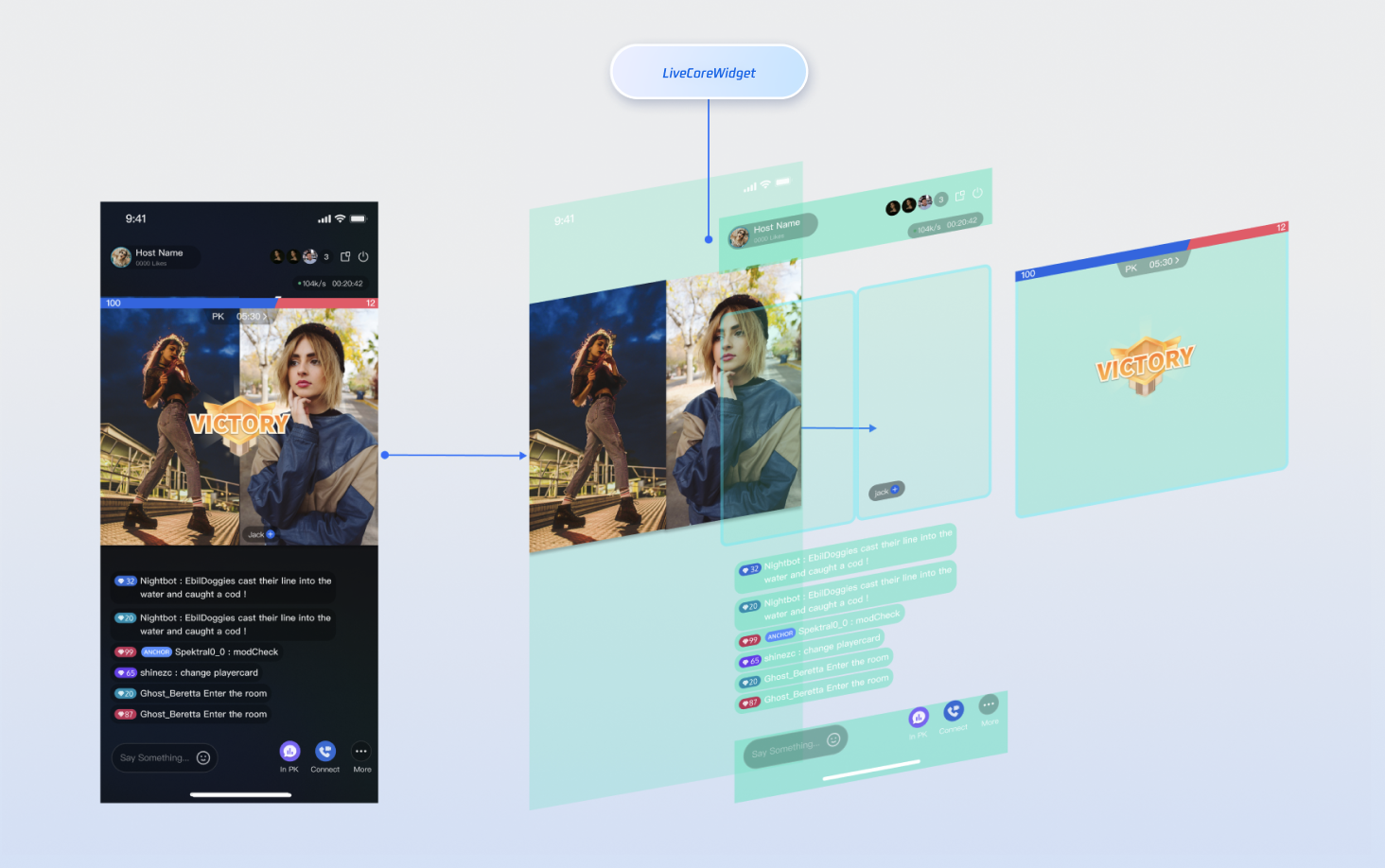
The following diagram illustrates where **LiveCoreWidget** fits within your live streaming interface and its role in the view hierarchy:
|
|
8
8
|
|
|
9
|
-
|
|
10
|
-
|
|
11
|
-
|
|
12
9
|
## Preparations
|
|
13
10
|
|
|
14
11
|
### Step 1: Activate the Service
|
|
15
12
|
|
|
16
|
-
See
|
|
13
|
+
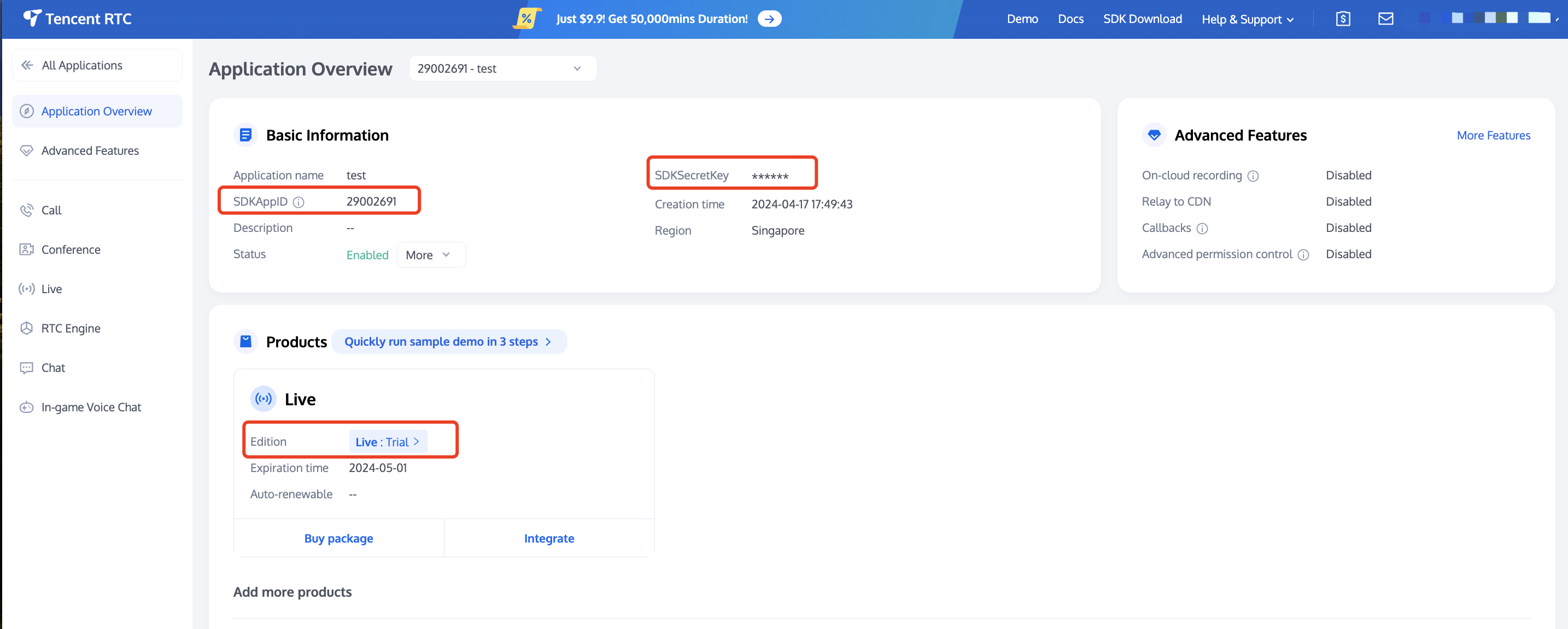
See Activate Service to obtain either the trial or paid version of the SDK.Then, go to [the Console](https://console.trtc.io/app) for application management, and get the following:
|
|
17
14
|
- `SDKAppID`: Application identifier (required). Tencent Cloud uses `SDKAppID` for billing and details.
|
|
18
15
|
|
|
19
16
|
- `SDKSecretKey`: Application secret key, used to initialize the configuration file with secret information.
|
|
20
17
|
|
|
21
|
-
|
|
22
|
-
|
|
23
|
-
|
|
24
18
|
### Step 2: Import AtomicXCore into Your Project
|
|
25
19
|
1. **Component installation**: Please add the `atomic_x_core` dependency in your `pubspec.yaml` file and execute `flutter pub get`.
|
|
26
20
|
|
|
@@ -30,9 +24,6 @@ See [Activate Service](https://write.woa.com/document/141936672617742336) to obt
|
|
|
30
24
|
```
|
|
31
25
|
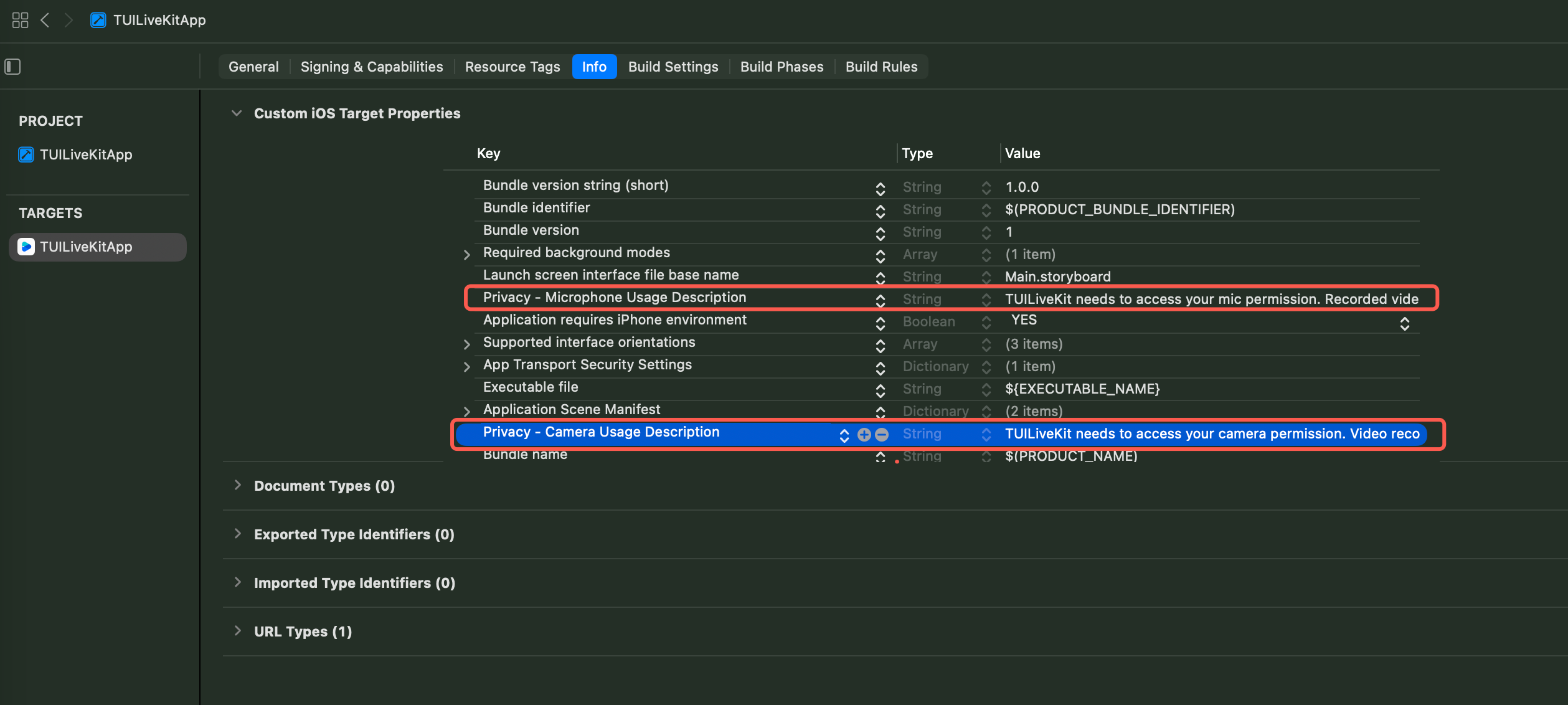
2. **Configure project permissions:** Both Android and iOS projects require configuration.
|
|
32
26
|
|
|
33
|
-
|
|
34
|
-
|
|
35
|
-
|
|
36
27
|
【Android】
|
|
37
28
|
|
|
38
29
|
Please add permission to use camera and microphone in the `android/app/src/main/AndroidManifest.xml` file.
|
|
@@ -69,19 +60,15 @@ end
|
|
|
69
60
|
<string>TUILiveKit needs to access your mic permission. Recorded video will have sound when enabled.</string>
|
|
70
61
|
```
|
|
71
62
|
|
|
72
|
-
|
|
73
|
-
|
|
74
|
-
|
|
75
|
-
|
|
76
63
|
### Step 3: Implement Login Logic
|
|
77
64
|
|
|
78
65
|
Call `LoginStore.shared.login` in your project to complete login. **This is the key premise for using all functions of AtomicXCore.**
|
|
79
66
|
|
|
80
67
|
> **Important:**
|
|
81
|
-
>
|
|
68
|
+
>
|
|
82
69
|
|
|
83
70
|
> It is recommended to call LoginStore.shared.login after successful log-in to your App's user account to ensure clear and consistent business logic.
|
|
84
|
-
>
|
|
71
|
+
>
|
|
85
72
|
|
|
86
73
|
``` java
|
|
87
74
|
import 'package:flutter/material.dart';
|
|
@@ -107,40 +94,11 @@ void main() async {
|
|
|
107
94
|
```
|
|
108
95
|
|
|
109
96
|
**Logon API parameter description:**
|
|
110
|
-
|
|
111
|
-
|
|
112
|
-
|
|
113
|
-
|
|
114
|
-
|
|
115
|
-
|
|
116
|
-
<td rowspan="1" colSpan="1" >**Note**</td>
|
|
117
|
-
</tr>
|
|
118
|
-
|
|
119
|
-
<tr>
|
|
120
|
-
<td rowspan="1" colSpan="1" >`sdkAppID`</td>
|
|
121
|
-
|
|
122
|
-
<td rowspan="1" colSpan="1" >`int`</td>
|
|
123
|
-
|
|
124
|
-
<td rowspan="1" colSpan="1" >Get this from [TRTC console](https://console.trtc.io/app).</td>
|
|
125
|
-
</tr>
|
|
126
|
-
|
|
127
|
-
<tr>
|
|
128
|
-
<td rowspan="1" colSpan="1" >`userID`</td>
|
|
129
|
-
|
|
130
|
-
<td rowspan="1" colSpan="1" >`String`</td>
|
|
131
|
-
|
|
132
|
-
<td rowspan="1" colSpan="1" >The unique ID for the current user. Must contain only English letters, numbers, hyphens, and underscores.. To avoid multi-end login conflict, **do not use**`1`, `123`**or other simple IDs**.</td>
|
|
133
|
-
</tr>
|
|
134
|
-
|
|
135
|
-
<tr>
|
|
136
|
-
<td rowspan="1" colSpan="1" >`userSig`</td>
|
|
137
|
-
|
|
138
|
-
<td rowspan="1" colSpan="1" >`String`</td>
|
|
139
|
-
|
|
140
|
-
<td rowspan="1" colSpan="1" >A ticket for Tencent Cloud authentication. Please note:<br>- Development Environment: You can use the local `GenerateTestUserSig.genTestSig` function to generate a `UserSig` or generate a temporary UserSig via the [UserSig Generation Tool](https://console.trtc.io/usersig).<br>- Production Environment: To prevent key leakage, you must use a server-side method to generate `UserSig`. For details, see [Generating UserSig on the Server](https://write.woa.com/document/89644530319802368).</td>
|
|
141
|
-
</tr>
|
|
142
|
-
</table>
|
|
143
|
-
|
|
97
|
+
| **Parameter** | **Type** | **Note** |
|
|
98
|
+
| --- | --- | --- |
|
|
99
|
+
| `sdkAppID` | `int` | Get this from [TRTC console](https://console.trtc.io/app). |
|
|
100
|
+
| `userID` | `String` | The unique ID for the current user. Must contain only English letters, numbers, hyphens, and underscores.. To avoid multi-end login conflict, **do not use**`1`, `123`**or other simple IDs**. |
|
|
101
|
+
| `userSig` | `String` | A ticket for Tencent Cloud authentication. Please note:<br>- Development Environment: You can use the local `GenerateTestUserSig.genTestSig` function to generate a `UserSig` or generate a temporary UserSig via the [UserSig Generation Tool](https://console.trtc.io/usersig).<br>- Production Environment: To prevent key leakage, you must use a server-side method to generate `UserSig`. For details, see Generating UserSig on the Server. |
|
|
144
102
|
|
|
145
103
|
## Building a Basic Live Room
|
|
146
104
|
|
|
@@ -148,38 +106,34 @@ void main() async {
|
|
|
148
106
|
|
|
149
107
|
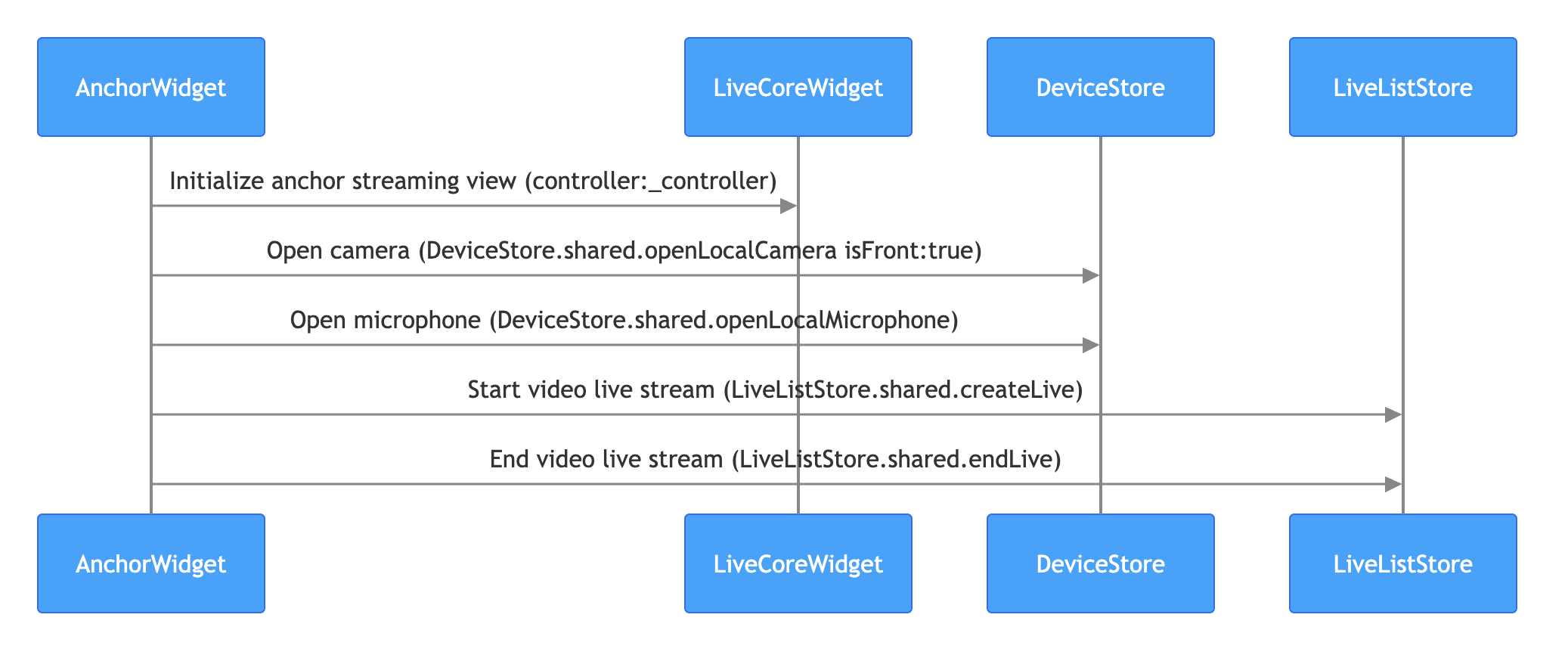
The anchor starts live streaming process is as follows. You just need to perform the following steps to quickly build a live stream.
|
|
150
108
|
|
|
151
|
-
|
|
152
|
-
|
|
153
|
-
|
|
154
109
|
> **Note:**
|
|
155
|
-
>
|
|
110
|
+
>
|
|
156
111
|
|
|
157
112
|
> For the business code of live stream publishing, you can also refer to the [live_room_anchor_widget.dart](https://github.com/Tencent-RTC/TUIKit_Flutter/blob/main/live/livekit/lib/live_stream/features/live_room_anchor_widget.dart) file in the TUILiveKit open-source project to understand the complete implementation logic.
|
|
158
|
-
>
|
|
113
|
+
>
|
|
159
114
|
|
|
160
115
|
1. **Initialize the Anchor live streaming view**
|
|
161
116
|
|
|
162
|
-
|
|
163
117
|
On your Anchor page, create a `LiveCoreWidget` instance and control the live stream behavior through `LiveCoreController`.
|
|
164
118
|
|
|
165
119
|
``` java
|
|
166
120
|
import 'package:flutter/material.dart';
|
|
167
121
|
import 'package:atomic_x_core/atomicxcore.dart';
|
|
168
|
-
|
|
122
|
+
|
|
169
123
|
/// YourAnchorPage represents your anchor starts live streaming page
|
|
170
124
|
class YourAnchorPage extends StatefulWidget {
|
|
171
125
|
final String liveId;
|
|
172
|
-
|
|
126
|
+
|
|
173
127
|
const YourAnchorPage({super.key, required this.liveId});
|
|
174
|
-
|
|
128
|
+
|
|
175
129
|
@override
|
|
176
130
|
State<YourAnchorPage> createState() => _YourAnchorPageState();
|
|
177
131
|
}
|
|
178
|
-
|
|
132
|
+
|
|
179
133
|
class _YourAnchorPageState extends State<YourAnchorPage> {
|
|
180
134
|
// 1. Create a LiveCoreController instance
|
|
181
135
|
late final LiveCoreController _controller;
|
|
182
|
-
|
|
136
|
+
|
|
183
137
|
@override
|
|
184
138
|
void initState() {
|
|
185
139
|
super.initState();
|
|
@@ -188,7 +142,7 @@ The anchor starts live streaming process is as follows. You just need to perform
|
|
|
188
142
|
// 3. Set up live streaming ID
|
|
189
143
|
_controller.setLiveID(widget.liveId);
|
|
190
144
|
}
|
|
191
|
-
|
|
145
|
+
|
|
192
146
|
@override
|
|
193
147
|
Widget build(BuildContext context) {
|
|
194
148
|
return Scaffold(
|
|
@@ -205,26 +159,25 @@ The anchor starts live streaming process is as follows. You just need to perform
|
|
|
205
159
|
```
|
|
206
160
|
2. **Turn on the camera and microphone**
|
|
207
161
|
|
|
208
|
-
|
|
209
162
|
By calling the **DeviceStore**`openLocalCamera` and `openLocalMicrophone` APIs to turn on the camera and microphone, **no need to do additional configuration as LiveCoreWidget will auto preview the current camera's video stream**. Sample code:
|
|
210
163
|
|
|
211
164
|
``` java
|
|
212
165
|
import 'package:flutter/material.dart';
|
|
213
166
|
import 'package:atomic_x_core/atomicxcore.dart';
|
|
214
|
-
|
|
167
|
+
|
|
215
168
|
/// YourAnchorPage represents your anchor starts live streaming page
|
|
216
169
|
class YourAnchorPage extends StatefulWidget {
|
|
217
170
|
final String liveId;
|
|
218
|
-
|
|
171
|
+
|
|
219
172
|
const YourAnchorPage({super.key, required this.liveId});
|
|
220
|
-
|
|
173
|
+
|
|
221
174
|
@override
|
|
222
175
|
State<YourAnchorPage> createState() => _YourAnchorPageState();
|
|
223
176
|
}
|
|
224
|
-
|
|
177
|
+
|
|
225
178
|
class _YourAnchorPageState extends State<YourAnchorPage> {
|
|
226
179
|
late final LiveCoreController _controller;
|
|
227
|
-
|
|
180
|
+
|
|
228
181
|
@override
|
|
229
182
|
void initState() {
|
|
230
183
|
super.initState();
|
|
@@ -233,14 +186,14 @@ The anchor starts live streaming process is as follows. You just need to perform
|
|
|
233
186
|
// Turn on the device
|
|
234
187
|
_openDevices();
|
|
235
188
|
}
|
|
236
|
-
|
|
189
|
+
|
|
237
190
|
void _openDevices() {
|
|
238
191
|
// 1. Open front camera
|
|
239
192
|
DeviceStore.shared.openLocalCamera(true);
|
|
240
193
|
// 2. Turn on the microphone
|
|
241
194
|
DeviceStore.shared.openLocalMicrophone();
|
|
242
195
|
}
|
|
243
|
-
|
|
196
|
+
|
|
244
197
|
@override
|
|
245
198
|
Widget build(BuildContext context) {
|
|
246
199
|
return Scaffold(
|
|
@@ -255,26 +208,25 @@ The anchor starts live streaming process is as follows. You just need to perform
|
|
|
255
208
|
```
|
|
256
209
|
3. **Start live streaming**
|
|
257
210
|
|
|
258
|
-
|
|
259
211
|
By calling the **LiveListStore**`createLive` API to start video live streaming, sample code:
|
|
260
212
|
|
|
261
213
|
``` java
|
|
262
214
|
import 'package:flutter/material.dart';
|
|
263
215
|
import 'package:atomic_x_core/atomicxcore.dart';
|
|
264
|
-
|
|
216
|
+
|
|
265
217
|
/// YourAnchorPage represents your anchor starts live streaming page
|
|
266
218
|
class YourAnchorPage extends StatefulWidget {
|
|
267
219
|
final String liveId;
|
|
268
|
-
|
|
220
|
+
|
|
269
221
|
const YourAnchorPage({super.key, required this.liveId});
|
|
270
|
-
|
|
222
|
+
|
|
271
223
|
@override
|
|
272
224
|
State<YourAnchorPage> createState() => _YourAnchorPageState();
|
|
273
225
|
}
|
|
274
|
-
|
|
226
|
+
|
|
275
227
|
class _YourAnchorPageState extends State<YourAnchorPage> {
|
|
276
228
|
late final LiveCoreController _controller;
|
|
277
|
-
|
|
229
|
+
|
|
278
230
|
@override
|
|
279
231
|
void initState() {
|
|
280
232
|
super.initState();
|
|
@@ -282,12 +234,12 @@ The anchor starts live streaming process is as follows. You just need to perform
|
|
|
282
234
|
_controller.setLiveID(widget.liveId);
|
|
283
235
|
_openDevices();
|
|
284
236
|
}
|
|
285
|
-
|
|
237
|
+
|
|
286
238
|
void _openDevices() {
|
|
287
239
|
DeviceStore.shared.openLocalCamera(true);
|
|
288
240
|
DeviceStore.shared.openLocalMicrophone();
|
|
289
241
|
}
|
|
290
|
-
|
|
242
|
+
|
|
291
243
|
// Call the go live API to start live streaming
|
|
292
244
|
Future<void> _startLive() async {
|
|
293
245
|
// 1. Prepare the LiveInfo object
|
|
@@ -301,17 +253,17 @@ The anchor starts live streaming process is as follows. You just need to perform
|
|
|
301
253
|
// Configure the anchor to always stay on the seat
|
|
302
254
|
keepOwnerOnSeat: true,
|
|
303
255
|
);
|
|
304
|
-
|
|
256
|
+
|
|
305
257
|
// 2. Call LiveListStore.shared.createLive to start live streaming
|
|
306
258
|
final result = await LiveListStore.shared.createLive(liveInfo);
|
|
307
|
-
|
|
259
|
+
|
|
308
260
|
if (result.isSuccess) {
|
|
309
261
|
debugPrint("startLive success");
|
|
310
262
|
} else {
|
|
311
263
|
debugPrint("startLive error: ${result.errorMessage}");
|
|
312
264
|
}
|
|
313
265
|
}
|
|
314
|
-
|
|
266
|
+
|
|
315
267
|
@override
|
|
316
268
|
Widget build(BuildContext context) {
|
|
317
269
|
return Scaffold(
|
|
@@ -339,201 +291,56 @@ The anchor starts live streaming process is as follows. You just need to perform
|
|
|
339
291
|
|
|
340
292
|
**LiveInfo parameter description:**
|
|
341
293
|
|
|
342
|
-
|
|
343
|
-
|
|
344
|
-
|
|
345
|
-
|
|
346
|
-
|
|
347
|
-
|
|
348
|
-
|
|
349
|
-
|
|
350
|
-
|
|
351
|
-
|
|
352
|
-
|
|
353
|
-
|
|
354
|
-
|
|
355
|
-
|
|
356
|
-
<
|
|
357
|
-
|
|
358
|
-
|
|
359
|
-
|
|
360
|
-
<td rowspan="1" colSpan="1" >Unique identifier for the live streaming room.</td>
|
|
361
|
-
</tr>
|
|
362
|
-
|
|
363
|
-
<tr>
|
|
364
|
-
<td rowspan="1" colSpan="1" >`liveName`</td>
|
|
365
|
-
|
|
366
|
-
<td rowspan="1" colSpan="1" >`String`</td>
|
|
367
|
-
|
|
368
|
-
<td rowspan="1" colSpan="1" >Optional.</td>
|
|
369
|
-
|
|
370
|
-
<td rowspan="1" colSpan="1" >Title of the live streaming room.</td>
|
|
371
|
-
</tr>
|
|
372
|
-
|
|
373
|
-
<tr>
|
|
374
|
-
<td rowspan="1" colSpan="1" >`notice`</td>
|
|
375
|
-
|
|
376
|
-
<td rowspan="1" colSpan="1" >`String`</td>
|
|
377
|
-
|
|
378
|
-
<td rowspan="1" colSpan="1" >Optional.</td>
|
|
379
|
-
|
|
380
|
-
<td rowspan="1" colSpan="1" >Announcement information of the live streaming room.</td>
|
|
381
|
-
</tr>
|
|
382
|
-
|
|
383
|
-
<tr>
|
|
384
|
-
<td rowspan="1" colSpan="1" >`isMessageDisable`</td>
|
|
385
|
-
|
|
386
|
-
<td rowspan="1" colSpan="1" >`bool`</td>
|
|
387
|
-
|
|
388
|
-
<td rowspan="1" colSpan="1" >Optional.</td>
|
|
389
|
-
|
|
390
|
-
<td rowspan="1" colSpan="1" >Whether to mute (`true`: yes, `false`: no).</td>
|
|
391
|
-
</tr>
|
|
392
|
-
|
|
393
|
-
<tr>
|
|
394
|
-
<td rowspan="1" colSpan="1" >`isPublicVisible`</td>
|
|
395
|
-
|
|
396
|
-
<td rowspan="1" colSpan="1" >`bool`</td>
|
|
397
|
-
|
|
398
|
-
<td rowspan="1" colSpan="1" >Optional.</td>
|
|
399
|
-
|
|
400
|
-
<td rowspan="1" colSpan="1" >Whether publicly visible (`true`: yes, `false`: no).</td>
|
|
401
|
-
</tr>
|
|
402
|
-
|
|
403
|
-
<tr>
|
|
404
|
-
<td rowspan="1" colSpan="1" >`isSeatEnabled`</td>
|
|
405
|
-
|
|
406
|
-
<td rowspan="1" colSpan="1" >`bool`</td>
|
|
407
|
-
|
|
408
|
-
<td rowspan="1" colSpan="1" >Optional.</td>
|
|
409
|
-
|
|
410
|
-
<td rowspan="1" colSpan="1" >Whether to enable the seat feature (`true`: yes, `false`: no).</td>
|
|
411
|
-
</tr>
|
|
412
|
-
|
|
413
|
-
<tr>
|
|
414
|
-
<td rowspan="1" colSpan="1" >`keepOwnerOnSeat`</td>
|
|
415
|
-
|
|
416
|
-
<td rowspan="1" colSpan="1" >`bool`</td>
|
|
417
|
-
|
|
418
|
-
<td rowspan="1" colSpan="1" >Optional.</td>
|
|
419
|
-
|
|
420
|
-
<td rowspan="1" colSpan="1" >Whether to keep the room owner on the seat.</td>
|
|
421
|
-
</tr>
|
|
422
|
-
|
|
423
|
-
<tr>
|
|
424
|
-
<td rowspan="1" colSpan="1" >`maxSeatCount`</td>
|
|
425
|
-
|
|
426
|
-
<td rowspan="1" colSpan="1" >`int`</td>
|
|
427
|
-
|
|
428
|
-
<td rowspan="1" colSpan="1" >Optional.</td>
|
|
429
|
-
|
|
430
|
-
<td rowspan="1" colSpan="1" >Maximum number of microphones.</td>
|
|
431
|
-
</tr>
|
|
432
|
-
|
|
433
|
-
<tr>
|
|
434
|
-
<td rowspan="1" colSpan="1" >`seatMode`</td>
|
|
435
|
-
|
|
436
|
-
<td rowspan="1" colSpan="1" >`TakeSeatMode`</td>
|
|
437
|
-
|
|
438
|
-
<td rowspan="1" colSpan="1" >Optional.</td>
|
|
439
|
-
|
|
440
|
-
<td rowspan="1" colSpan="1" >Microphone mode (`TakeSeatMode.free`: Free to Join the Podium, `TakeSeatMode.apply`: Request to speak).</td>
|
|
441
|
-
</tr>
|
|
442
|
-
|
|
443
|
-
<tr>
|
|
444
|
-
<td rowspan="1" colSpan="1" >`seatLayoutTemplateID`</td>
|
|
445
|
-
|
|
446
|
-
<td rowspan="1" colSpan="1" >`int`</td>
|
|
447
|
-
|
|
448
|
-
<td rowspan="1" colSpan="1" >Required</td>
|
|
449
|
-
|
|
450
|
-
<td rowspan="1" colSpan="1" >layout template ID.</td>
|
|
451
|
-
</tr>
|
|
452
|
-
|
|
453
|
-
<tr>
|
|
454
|
-
<td rowspan="1" colSpan="1" >`coverURL`</td>
|
|
455
|
-
|
|
456
|
-
<td rowspan="1" colSpan="1" >`String`</td>
|
|
457
|
-
|
|
458
|
-
<td rowspan="1" colSpan="1" >Optional.</td>
|
|
459
|
-
|
|
460
|
-
<td rowspan="1" colSpan="1" >Thumbnail URL of the live streaming room.</td>
|
|
461
|
-
</tr>
|
|
462
|
-
|
|
463
|
-
<tr>
|
|
464
|
-
<td rowspan="1" colSpan="1" >`backgroundURL`</td>
|
|
465
|
-
|
|
466
|
-
<td rowspan="1" colSpan="1" >`String`</td>
|
|
467
|
-
|
|
468
|
-
<td rowspan="1" colSpan="1" >Optional.</td>
|
|
469
|
-
|
|
470
|
-
<td rowspan="1" colSpan="1" >Background image URL of the live streaming room.</td>
|
|
471
|
-
</tr>
|
|
472
|
-
|
|
473
|
-
<tr>
|
|
474
|
-
<td rowspan="1" colSpan="1" >`categoryList`</td>
|
|
475
|
-
|
|
476
|
-
<td rowspan="1" colSpan="1" >`List<int>`</td>
|
|
477
|
-
|
|
478
|
-
<td rowspan="1" colSpan="1" >Optional.</td>
|
|
479
|
-
|
|
480
|
-
<td rowspan="1" colSpan="1" >Tag list of categories in the live streaming room.</td>
|
|
481
|
-
</tr>
|
|
482
|
-
|
|
483
|
-
<tr>
|
|
484
|
-
<td rowspan="1" colSpan="1" >`activityStatus`</td>
|
|
485
|
-
|
|
486
|
-
<td rowspan="1" colSpan="1" >`int`</td>
|
|
487
|
-
|
|
488
|
-
<td rowspan="1" colSpan="1" >Optional.</td>
|
|
489
|
-
|
|
490
|
-
<td rowspan="1" colSpan="1" >Live stream status.</td>
|
|
491
|
-
</tr>
|
|
492
|
-
|
|
493
|
-
<tr>
|
|
494
|
-
<td rowspan="1" colSpan="1" >`isGiftEnabled`</td>
|
|
495
|
-
|
|
496
|
-
<td rowspan="1" colSpan="1" >`bool`</td>
|
|
497
|
-
|
|
498
|
-
<td rowspan="1" colSpan="1" >Optional.</td>
|
|
499
|
-
|
|
500
|
-
<td rowspan="1" colSpan="1" >Whether to enable the gift function (`true`: yes, `false`: no).</td>
|
|
501
|
-
</tr>
|
|
502
|
-
</table>
|
|
294
|
+
| **Parameter Name** | **Type** | **Attribute** | **Description** |
|
|
295
|
+
| --- | --- | --- | --- |
|
|
296
|
+
| `liveID` | `String` | Required | Unique identifier for the live streaming room. |
|
|
297
|
+
| `liveName` | `String` | Optional. | Title of the live streaming room. |
|
|
298
|
+
| `notice` | `String` | Optional. | Announcement information of the live streaming room. |
|
|
299
|
+
| `isMessageDisable` | `bool` | Optional. | Whether to mute (`true`: yes, `false`: no). |
|
|
300
|
+
| `isPublicVisible` | `bool` | Optional. | Whether publicly visible (`true`: yes, `false`: no). |
|
|
301
|
+
| `isSeatEnabled` | `bool` | Optional. | Whether to enable the seat feature (`true`: yes, `false`: no). |
|
|
302
|
+
| `keepOwnerOnSeat` | `bool` | Optional. | Whether to keep the room owner on the seat. |
|
|
303
|
+
| `maxSeatCount` | `int` | Optional. | Maximum number of microphones. |
|
|
304
|
+
| `seatMode` | `TakeSeatMode` | Optional. | Microphone mode (`TakeSeatMode.free`: Free to Join the Podium, `TakeSeatMode.apply`: Request to speak). |
|
|
305
|
+
| `seatLayoutTemplateID` | `int` | Required | layout template ID. |
|
|
306
|
+
| `coverURL` | `String` | Optional. | Thumbnail URL of the live streaming room. |
|
|
307
|
+
| `backgroundURL` | `String` | Optional. | Background image URL of the live streaming room. |
|
|
308
|
+
| `categoryList` | `List<int>` | Optional. | Tag list of categories in the live streaming room. |
|
|
309
|
+
| `activityStatus` | `int` | Optional. | Live stream status. |
|
|
310
|
+
| `isGiftEnabled` | `bool` | Optional. | Whether to enable the gift function (`true`: yes, `false`: no). |
|
|
503
311
|
|
|
504
312
|
4. **End live streaming**
|
|
505
313
|
|
|
506
|
-
|
|
507
314
|
After the live streaming ends, the Anchor can call the **LiveListStore**'s `endLive` API to end the live stream. The SDK will handle the logic of stopping streaming and room termination.
|
|
508
315
|
|
|
509
316
|
``` java
|
|
510
317
|
import 'package:flutter/material.dart';
|
|
511
318
|
import 'package:atomic_x_core/atomicxcore.dart';
|
|
512
|
-
|
|
319
|
+
|
|
513
320
|
/// YourAnchorPage represents your anchor starts live streaming page
|
|
514
321
|
class YourAnchorPage extends StatefulWidget {
|
|
515
322
|
final String liveId;
|
|
516
|
-
|
|
323
|
+
|
|
517
324
|
const YourAnchorPage({super.key, required this.liveId});
|
|
518
|
-
|
|
325
|
+
|
|
519
326
|
@override
|
|
520
327
|
State<YourAnchorPage> createState() => _YourAnchorPageState();
|
|
521
328
|
}
|
|
522
|
-
|
|
329
|
+
|
|
523
330
|
class _YourAnchorPageState extends State<YourAnchorPage> {
|
|
524
331
|
// ... Other code ...
|
|
525
|
-
|
|
332
|
+
|
|
526
333
|
End live streaming
|
|
527
334
|
Future<void> _stopLive() async {
|
|
528
335
|
final result = await LiveListStore.shared.endLive();
|
|
529
|
-
|
|
336
|
+
|
|
530
337
|
if (result.isSuccess) {
|
|
531
338
|
debugPrint("endLive success");
|
|
532
339
|
} else {
|
|
533
340
|
debugPrint("endLive error: ${result.errorMessage}");
|
|
534
341
|
}
|
|
535
342
|
}
|
|
536
|
-
|
|
343
|
+
|
|
537
344
|
// ... Other code ...
|
|
538
345
|
}
|
|
539
346
|
```
|
|
@@ -542,38 +349,34 @@ The anchor starts live streaming process is as follows. You just need to perform
|
|
|
542
349
|
|
|
543
350
|
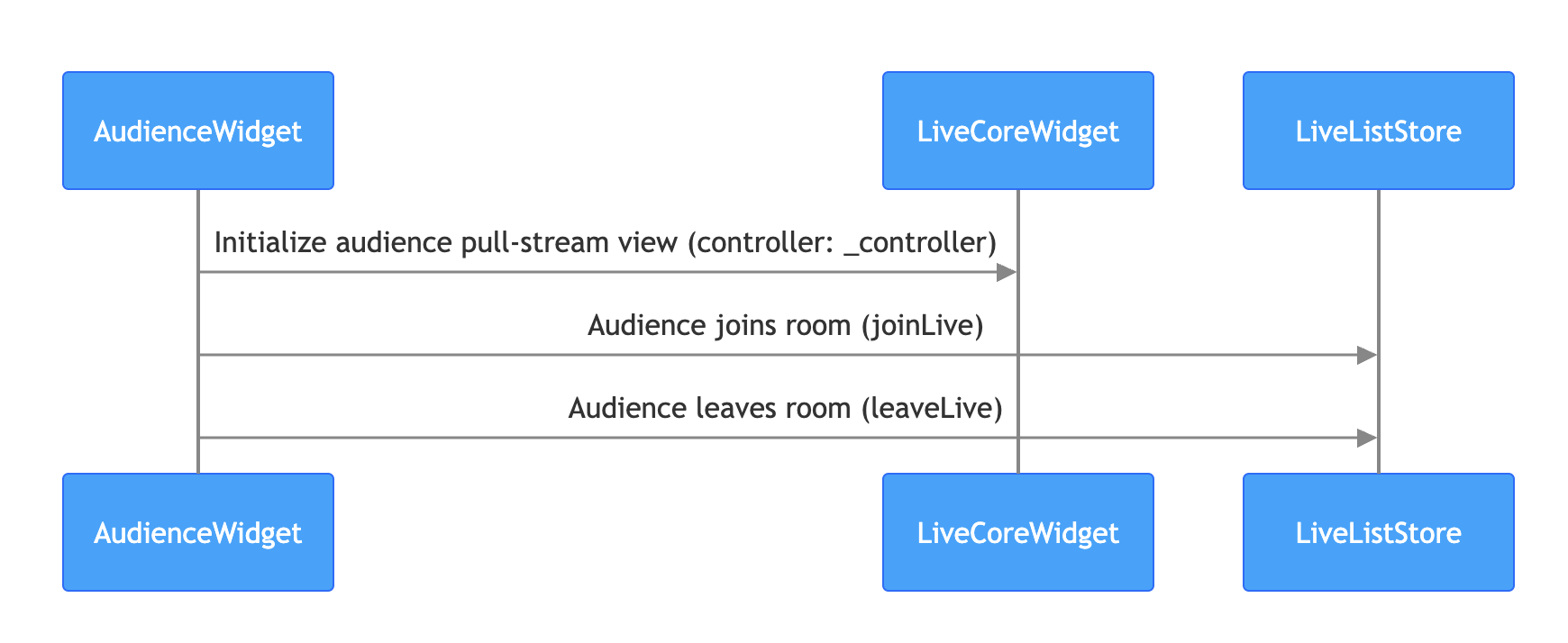
The audience viewing process is as follows. In just a few simple steps, you can achieve audience watching live.
|
|
544
351
|
|
|
545
|
-
|
|
546
|
-
|
|
547
|
-
|
|
548
352
|
> **Note:**
|
|
549
|
-
>
|
|
353
|
+
>
|
|
550
354
|
|
|
551
355
|
> For the business code of audience enter room to pull stream, you can also refer to the [audience_widget.dart](https://github.com/Tencent-RTC/TUIKit_Flutter/blob/main/live/livekit/lib/live_stream/features/audience/audience_widget.dart) file in the TUILiveKit open-source project to understand the complete implementation logic.
|
|
552
|
-
>
|
|
356
|
+
>
|
|
553
357
|
|
|
554
358
|
1. **Implement the audience pull stream page**
|
|
555
359
|
|
|
556
|
-
|
|
557
360
|
On your audience page, create a `LiveCoreWidget` instance and control the live stream behavior through `LiveCoreController`.
|
|
558
361
|
|
|
559
362
|
``` java
|
|
560
363
|
import 'package:flutter/material.dart';
|
|
561
364
|
import 'package:atomic_x_core/atomicxcore.dart';
|
|
562
|
-
|
|
365
|
+
|
|
563
366
|
/// YourAudiencePage represents your audience viewing webpage
|
|
564
367
|
class YourAudiencePage extends StatefulWidget {
|
|
565
368
|
final String liveId;
|
|
566
|
-
|
|
369
|
+
|
|
567
370
|
const YourAudiencePage({super.key, required this.liveId});
|
|
568
|
-
|
|
371
|
+
|
|
569
372
|
@override
|
|
570
373
|
State<YourAudiencePage> createState() => _YourAudiencePageState();
|
|
571
374
|
}
|
|
572
|
-
|
|
375
|
+
|
|
573
376
|
class _YourAudiencePageState extends State<YourAudiencePage> {
|
|
574
377
|
// 1. Create a LiveCoreController instance
|
|
575
378
|
late final LiveCoreController _controller;
|
|
576
|
-
|
|
379
|
+
|
|
577
380
|
@override
|
|
578
381
|
void initState() {
|
|
579
382
|
super.initState();
|
|
@@ -582,7 +385,7 @@ The audience viewing process is as follows. In just a few simple steps, you can
|
|
|
582
385
|
// 3. Bind live streaming id
|
|
583
386
|
_controller.setLiveID(widget.liveId);
|
|
584
387
|
}
|
|
585
|
-
|
|
388
|
+
|
|
586
389
|
@override
|
|
587
390
|
Widget build(BuildContext context) {
|
|
588
391
|
return Scaffold(
|
|
@@ -598,26 +401,25 @@ The audience viewing process is as follows. In just a few simple steps, you can
|
|
|
598
401
|
```
|
|
599
402
|
2. **Enter live room to watch**
|
|
600
403
|
|
|
601
|
-
|
|
602
404
|
By calling the **LiveListStore**`joinLive` API to join the live stream, **no need to do additional configuration, LiveCoreWidget will autoplay the current room video stream**, sample code:
|
|
603
405
|
|
|
604
406
|
``` java
|
|
605
407
|
import 'package:flutter/material.dart';
|
|
606
408
|
import 'package:atomic_x_core/atomicxcore.dart';
|
|
607
|
-
|
|
409
|
+
|
|
608
410
|
/// YourAudiencePage represents your audience viewing webpage
|
|
609
411
|
class YourAudiencePage extends StatefulWidget {
|
|
610
412
|
final String liveId;
|
|
611
|
-
|
|
413
|
+
|
|
612
414
|
const YourAudiencePage({super.key, required this.liveId});
|
|
613
|
-
|
|
415
|
+
|
|
614
416
|
@override
|
|
615
417
|
State<YourAudiencePage> createState() => _YourAudiencePageState();
|
|
616
418
|
}
|
|
617
|
-
|
|
419
|
+
|
|
618
420
|
class _YourAudiencePageState extends State<YourAudiencePage> {
|
|
619
421
|
late final LiveCoreController _controller;
|
|
620
|
-
|
|
422
|
+
|
|
621
423
|
@override
|
|
622
424
|
void initState() {
|
|
623
425
|
super.initState();
|
|
@@ -626,12 +428,12 @@ The audience viewing process is as follows. In just a few simple steps, you can
|
|
|
626
428
|
// Enter live room
|
|
627
429
|
_joinLive();
|
|
628
430
|
}
|
|
629
|
-
|
|
431
|
+
|
|
630
432
|
Future<void> _joinLive() async {
|
|
631
433
|
// Call LiveListStore.shared.joinLive to enter live room
|
|
632
434
|
// - liveId: same liveId as anchor starts live streaming
|
|
633
435
|
final result = await LiveListStore.shared.joinLive(widget.liveId);
|
|
634
|
-
|
|
436
|
+
|
|
635
437
|
if (result.isSuccess) {
|
|
636
438
|
debugPrint("joinLive success");
|
|
637
439
|
} else {
|
|
@@ -640,7 +442,7 @@ The audience viewing process is as follows. In just a few simple steps, you can
|
|
|
640
442
|
// if (mounted) Navigator.of(context).pop();
|
|
641
443
|
}
|
|
642
444
|
}
|
|
643
|
-
|
|
445
|
+
|
|
644
446
|
@override
|
|
645
447
|
Widget build(BuildContext context) {
|
|
646
448
|
return Scaffold(
|
|
@@ -655,37 +457,36 @@ The audience viewing process is as follows. In just a few simple steps, you can
|
|
|
655
457
|
```
|
|
656
458
|
3. **Log out of live stream**
|
|
657
459
|
|
|
658
|
-
|
|
659
460
|
When the audience exits the live streaming room, they need to call the **LiveListStore**'s `leaveLive` API to exit the live stream. The SDK will automatically stop pulling streams and leave the room.
|
|
660
461
|
|
|
661
462
|
``` java
|
|
662
463
|
import 'package:flutter/material.dart';
|
|
663
464
|
import 'package:atomic_x_core/atomicxcore.dart';
|
|
664
|
-
|
|
465
|
+
|
|
665
466
|
/// YourAudiencePage represents your audience viewing webpage
|
|
666
467
|
class YourAudiencePage extends StatefulWidget {
|
|
667
468
|
final String liveId;
|
|
668
|
-
|
|
469
|
+
|
|
669
470
|
const YourAudiencePage({super.key, required this.liveId});
|
|
670
|
-
|
|
471
|
+
|
|
671
472
|
@override
|
|
672
473
|
State<YourAudiencePage> createState() => _YourAudiencePageState();
|
|
673
474
|
}
|
|
674
|
-
|
|
475
|
+
|
|
675
476
|
class _YourAudiencePageState extends State<YourAudiencePage> {
|
|
676
477
|
// ... Other code ...
|
|
677
|
-
|
|
478
|
+
|
|
678
479
|
End live stream
|
|
679
480
|
Future<void> _leaveLive() async {
|
|
680
481
|
final result = await LiveListStore.shared.leaveLive();
|
|
681
|
-
|
|
482
|
+
|
|
682
483
|
if (result.isSuccess) {
|
|
683
484
|
debugPrint("leaveLive success");
|
|
684
485
|
} else {
|
|
685
486
|
debugPrint("leaveLive error: ${result.errorMessage}");
|
|
686
487
|
}
|
|
687
488
|
}
|
|
688
|
-
|
|
489
|
+
|
|
689
490
|
// ... Other code ...
|
|
690
491
|
}
|
|
691
492
|
```
|
|
@@ -784,221 +585,39 @@ class _YourAudiencePageState extends State<YourAudiencePage> {
|
|
|
784
585
|
|
|
785
586
|
### Run and Test
|
|
786
587
|
|
|
787
|
-
After integrating `LiveCoreWidget`, you will obtain a pure video rendering view with complete live streaming business capability but no interactive UI. You can refer to the next chapter
|
|
788
|
-
|
|
789
|
-
|
|
790
|
-
|
|
791
|
-
|
|
792
|
-
|
|
793
|
-
|
|
794
|
-
<td rowspan="1" colSpan="1" >**Floating Window Layout**</td>
|
|
795
|
-
|
|
796
|
-
<td rowspan="1" colSpan="1" >**Fixed Grid Layout**</td>
|
|
797
|
-
</tr>
|
|
798
|
-
|
|
799
|
-
<tr>
|
|
800
|
-
<td rowspan="1" colSpan="1" >Template ID</td>
|
|
801
|
-
|
|
802
|
-
<td rowspan="1" colSpan="1" >600</td>
|
|
803
|
-
|
|
804
|
-
<td rowspan="1" colSpan="1" >601</td>
|
|
805
|
-
|
|
806
|
-
<td rowspan="1" colSpan="1" >800</td>
|
|
807
|
-
</tr>
|
|
808
|
-
|
|
809
|
-
<tr>
|
|
810
|
-
<td rowspan="1" colSpan="1" >Description</td>
|
|
811
|
-
|
|
812
|
-
<td rowspan="1" colSpan="1" >Default layout; grid size adjusts dynamically based on number of co-hosts.</td>
|
|
813
|
-
|
|
814
|
-
<td rowspan="1" colSpan="1" >Co-hosts are displayed as floating windows.</td>
|
|
815
|
-
|
|
816
|
-
<td rowspan="1" colSpan="1" >Fixed number of co-hosts; each occupies a fixed grid.</td>
|
|
817
|
-
</tr>
|
|
818
|
-
|
|
819
|
-
<tr>
|
|
820
|
-
<td rowspan="1" colSpan="1" >Example</td>
|
|
821
|
-
|
|
822
|
-
<td rowspan="1" colSpan="1" ><br></td>
|
|
823
|
-
|
|
824
|
-
<td rowspan="1" colSpan="1" ><br></td>
|
|
825
|
-
|
|
826
|
-
<td rowspan="1" colSpan="1" ><br></td>
|
|
827
|
-
</tr>
|
|
828
|
-
</table>
|
|
829
|
-
|
|
588
|
+
After integrating `LiveCoreWidget`, you will obtain a pure video rendering view with complete live streaming business capability but no interactive UI. You can refer to the next chapter Enrich Live-Streaming Scenarios to refine live broadcasting scenarios.
|
|
589
|
+
| | **Dynamic Grid Layout** | **Floating Window Layout** | **Fixed Grid Layout** |
|
|
590
|
+
| --- | --- | --- | --- |
|
|
591
|
+
| Template ID | 600 | 601 | 800 |
|
|
592
|
+
| Description | Default layout; grid size adjusts dynamically based on number of co-hosts. | Co-hosts are displayed as floating windows. | Fixed number of co-hosts; each occupies a fixed grid. |
|
|
593
|
+
| Example | | | |
|
|
830
594
|
|
|
831
595
|
## Enrich Live Streaming Scenarios
|
|
832
596
|
|
|
833
597
|
Once the basic live streaming functionality is in place, refer to the following guides to add interactive features to your live stream:
|
|
834
|
-
|
|
835
|
-
|
|
836
|
-
|
|
837
|
-
|
|
838
|
-
|
|
839
|
-
|
|
840
|
-
<td rowspan="1" colSpan="1" >**Store**</td>
|
|
841
|
-
|
|
842
|
-
<td rowspan="1" colSpan="1" >**Implementation Guide**</td>
|
|
843
|
-
</tr>
|
|
844
|
-
|
|
845
|
-
<tr>
|
|
846
|
-
<td rowspan="1" colSpan="1" >**Enable Audience Audio/Video Co-hosting**</td>
|
|
847
|
-
|
|
848
|
-
<td rowspan="1" colSpan="1" >Audience can apply to join the host and interact via real-time video.</td>
|
|
849
|
-
|
|
850
|
-
<td rowspan="1" colSpan="1" >[CoGuestStore](https://tencent-rtc.github.io/TUIKit_Flutter/api_live_co_guest_store/CoGuestStore-class.html)</td>
|
|
851
|
-
|
|
852
|
-
<td rowspan="1" colSpan="1" >[Implementation Guide](https://write.woa.com/document/200455653984186368)</td>
|
|
853
|
-
</tr>
|
|
854
|
-
|
|
855
|
-
<tr>
|
|
856
|
-
<td rowspan="1" colSpan="1" >**Enable Host Cross-room PK**</td>
|
|
857
|
-
|
|
858
|
-
<td rowspan="1" colSpan="1" >Hosts from different rooms can connect for interaction or PK.</td>
|
|
859
|
-
|
|
860
|
-
<td rowspan="1" colSpan="1" >[CoHostStore](https://tencent-rtc.github.io/TUIKit_Flutter/api_live_co_host_store/CoHostStore-class.html) / [BattleStore](https://tencent-rtc.github.io/TUIKit_Flutter/api_live_battle_store/BattleStore-class.html)</td>
|
|
861
|
-
|
|
862
|
-
<td rowspan="1" colSpan="1" >[Implementation Guide](https://write.woa.com/document/200455659512819712)</td>
|
|
863
|
-
</tr>
|
|
864
|
-
|
|
865
|
-
<tr>
|
|
866
|
-
<td rowspan="1" colSpan="1" >**Add Bullet Chat Feature**</td>
|
|
867
|
-
|
|
868
|
-
<td rowspan="1" colSpan="1" >Audience can send and receive real-time text messages in the live room.</td>
|
|
869
|
-
|
|
870
|
-
<td rowspan="1" colSpan="1" >[BarrageStore](https://tencent-rtc.github.io/TUIKit_Flutter/api_barrage_barrage_store/BarrageStore-class.html)</td>
|
|
871
|
-
|
|
872
|
-
<td rowspan="1" colSpan="1" >[Implementation Guide](https://write.woa.com/document/200455665056206848)</td>
|
|
873
|
-
</tr>
|
|
874
|
-
|
|
875
|
-
<tr>
|
|
876
|
-
<td rowspan="1" colSpan="1" >**Build a Gift Giving System**</td>
|
|
877
|
-
|
|
878
|
-
<td rowspan="1" colSpan="1" >Audience can send virtual gifts to the host, increasing engagement and fun.</td>
|
|
879
|
-
|
|
880
|
-
<td rowspan="1" colSpan="1" >[GiftStore](https://tencent-rtc.github.io/TUIKit_Flutter/api_gift_gift_store/GiftStore-class.html)</td>
|
|
881
|
-
|
|
882
|
-
<td rowspan="1" colSpan="1" >[Implementation Guide](https://write.woa.com/document/195925512239050752)</td>
|
|
883
|
-
</tr>
|
|
884
|
-
</table>
|
|
885
|
-
|
|
598
|
+
| **Feature** | **Description** | **Store** | **Implementation Guide** |
|
|
599
|
+
| --- | --- | --- | --- |
|
|
600
|
+
| **Enable Audience Audio/Video Co-hosting** | Audience can apply to join the host and interact via real-time video. | [CoGuestStore](https://tencent-rtc.github.io/TUIKit_Flutter/api_live_co_guest_store/CoGuestStore-class.html) | Implementation Guide |
|
|
601
|
+
| **Enable Host Cross-room PK** | Hosts from different rooms can connect for interaction or PK. | [CoHostStore](https://tencent-rtc.github.io/TUIKit_Flutter/api_live_co_host_store/CoHostStore-class.html) / [BattleStore](https://tencent-rtc.github.io/TUIKit_Flutter/api_live_battle_store/BattleStore-class.html) | Implementation Guide |
|
|
602
|
+
| **Add Bullet Chat Feature** | Audience can send and receive real-time text messages in the live room. | [BarrageStore](https://tencent-rtc.github.io/TUIKit_Flutter/api_barrage_barrage_store/BarrageStore-class.html) | Implementation Guide |
|
|
603
|
+
| **Build a Gift Giving System** | Audience can send virtual gifts to the host, increasing engagement and fun. | [GiftStore](https://tencent-rtc.github.io/TUIKit_Flutter/api_gift_gift_store/GiftStore-class.html) | Implementation Guide |
|
|
886
604
|
|
|
887
605
|
## API documentation
|
|
888
|
-
|
|
889
|
-
|
|
890
|
-
|
|
891
|
-
|
|
892
|
-
|
|
893
|
-
|
|
894
|
-
|
|
895
|
-
|
|
896
|
-
|
|
897
|
-
|
|
898
|
-
|
|
899
|
-
|
|
900
|
-
|
|
901
|
-
|
|
902
|
-
|
|
903
|
-
</tr>
|
|
904
|
-
|
|
905
|
-
<tr>
|
|
906
|
-
<td rowspan="1" colSpan="1" >**LiveCoreController**</td>
|
|
907
|
-
|
|
908
|
-
<td rowspan="1" colSpan="1" >The controller of LiveCoreWidget: used to set up the live streaming ID, control the preview, and perform other operations.</td>
|
|
909
|
-
|
|
910
|
-
<td rowspan="1" colSpan="1" >[API documentation](https://tencent-rtc.github.io/TUIKit_Flutter/api_view_live_live_core_widget/LiveCoreController-class.html)</td>
|
|
911
|
-
</tr>
|
|
912
|
-
|
|
913
|
-
<tr>
|
|
914
|
-
<td rowspan="1" colSpan="1" >**LiveListStore**</td>
|
|
915
|
-
|
|
916
|
-
<td rowspan="1" colSpan="1" >Full lifecycle management of live streaming room: create/join/leave/terminate room, query room list, modify live information (name, notice), listen to live status (for example, being kicked out, ended).</td>
|
|
917
|
-
|
|
918
|
-
<td rowspan="1" colSpan="1" >[API documentation](https://tencent-rtc.github.io/TUIKit_Flutter/api_live_live_list_store/LiveListStore-class.html)</td>
|
|
919
|
-
</tr>
|
|
920
|
-
|
|
921
|
-
<tr>
|
|
922
|
-
<td rowspan="1" colSpan="1" >**DeviceStore**</td>
|
|
923
|
-
|
|
924
|
-
<td rowspan="1" colSpan="1" >Audio/Video device control: microphone (on/off, volume), camera (on/off, switchover, video quality), screen sharing, monitor device status in real time.</td>
|
|
925
|
-
|
|
926
|
-
<td rowspan="1" colSpan="1" >[API documentation](https://tencent-rtc.github.io/TUIKit_Flutter/api_device_device_store/DeviceStore-class.html)</td>
|
|
927
|
-
</tr>
|
|
928
|
-
|
|
929
|
-
<tr>
|
|
930
|
-
<td rowspan="1" colSpan="1" >**CoGuestStore**</td>
|
|
931
|
-
|
|
932
|
-
<td rowspan="1" colSpan="1" >Audience co-broadcasting management: join microphone application/invite/grant/deny, attendee permission control (microphone/camera), state synchronization.</td>
|
|
933
|
-
|
|
934
|
-
<td rowspan="1" colSpan="1" >[API documentation](https://tencent-rtc.github.io/TUIKit_Flutter/api_live_co_guest_store/CoGuestStore-class.html)</td>
|
|
935
|
-
</tr>
|
|
936
|
-
|
|
937
|
-
<tr>
|
|
938
|
-
<td rowspan="1" colSpan="1" >**CoHostStore**</td>
|
|
939
|
-
|
|
940
|
-
<td rowspan="1" colSpan="1" >Anchor cross-room connection: supports multiple layout templates (dynamic grid, etc.), initiate/accept/reject connection, and manage interactive co-broadcasting with Anchors.</td>
|
|
941
|
-
|
|
942
|
-
<td rowspan="1" colSpan="1" >[API documentation](https://tencent-rtc.github.io/TUIKit_Flutter/api_live_co_host_store/CoHostStore-class.html)</td>
|
|
943
|
-
</tr>
|
|
944
|
-
|
|
945
|
-
<tr>
|
|
946
|
-
<td rowspan="1" colSpan="1" >**BattleStore**</td>
|
|
947
|
-
|
|
948
|
-
<td rowspan="1" colSpan="1" >Anchor PK battle: trigger PK (duration configuration/competitor), manage PK status (start/End), synchronize score, listen to battle results.</td>
|
|
949
|
-
|
|
950
|
-
<td rowspan="1" colSpan="1" >[API documentation](https://tencent-rtc.github.io/TUIKit_Flutter/api_live_battle_store/BattleStore-class.html)</td>
|
|
951
|
-
</tr>
|
|
952
|
-
|
|
953
|
-
<tr>
|
|
954
|
-
<td rowspan="1" colSpan="1" >**GiftStore**</td>
|
|
955
|
-
|
|
956
|
-
<td rowspan="1" colSpan="1" >Gift interaction: get gift list, send/receive gifts, listen to gift events (including sender, gift details).</td>
|
|
957
|
-
|
|
958
|
-
<td rowspan="1" colSpan="1" >[API documentation](https://tencent-rtc.github.io/TUIKit_Flutter/api_gift_gift_store/GiftStore-class.html)</td>
|
|
959
|
-
</tr>
|
|
960
|
-
|
|
961
|
-
<tr>
|
|
962
|
-
<td rowspan="1" colSpan="1" >**BarrageStore**</td>
|
|
963
|
-
|
|
964
|
-
<td rowspan="1" colSpan="1" >Danmaku function: send text/custom barrage item, maintain bullet screen list, monitor bullet screen status in real time.</td>
|
|
965
|
-
|
|
966
|
-
<td rowspan="1" colSpan="1" >[API documentation](https://tencent-rtc.github.io/TUIKit_Flutter/api_barrage_barrage_store/BarrageStore-class.html)</td>
|
|
967
|
-
</tr>
|
|
968
|
-
|
|
969
|
-
<tr>
|
|
970
|
-
<td rowspan="1" colSpan="1" >**LikeStore**</td>
|
|
971
|
-
|
|
972
|
-
<td rowspan="1" colSpan="1" >Like interaction: send likes, listen to like events, sync total likes.</td>
|
|
973
|
-
|
|
974
|
-
<td rowspan="1" colSpan="1" >[API documentation](https://tencent-rtc.github.io/TUIKit_Flutter/api_live_like_store/LikeStore-class.html)</td>
|
|
975
|
-
</tr>
|
|
976
|
-
|
|
977
|
-
<tr>
|
|
978
|
-
<td rowspan="1" colSpan="1" >**LiveAudienceStore**</td>
|
|
979
|
-
|
|
980
|
-
<td rowspan="1" colSpan="1" >Audience management: get real-time audience list (ID/name/avatar), check audience size, listen to Enter/Exit Event.</td>
|
|
981
|
-
|
|
982
|
-
<td rowspan="1" colSpan="1" >[API documentation](https://tencent-rtc.github.io/TUIKit_Flutter/api_live_live_audience_store/LiveAudienceStore-class.html)</td>
|
|
983
|
-
</tr>
|
|
984
|
-
|
|
985
|
-
<tr>
|
|
986
|
-
<td rowspan="1" colSpan="1" >**AudioEffectStore**</td>
|
|
987
|
-
|
|
988
|
-
<td rowspan="1" colSpan="1" >Audio effects: voice-changing (child voice/male voice), reverberation (KTV), ear monitoring adjustment, switch effects in real time.</td>
|
|
989
|
-
|
|
990
|
-
<td rowspan="1" colSpan="1" >[API documentation](https://tencent-rtc.github.io/TUIKit_Flutter/api_device_audio_effect_store/AudioEffectStore-class.html)</td>
|
|
991
|
-
</tr>
|
|
992
|
-
|
|
993
|
-
<tr>
|
|
994
|
-
<td rowspan="1" colSpan="1" >**BaseBeautyStore**</td>
|
|
995
|
-
|
|
996
|
-
<td rowspan="1" colSpan="1" >Basic beauty filter: adjust skin smoothing/whitening/rosy (0-100 levels), reset beauty effect status, synchronize effect parameters.</td>
|
|
997
|
-
|
|
998
|
-
<td rowspan="1" colSpan="1" >[API documentation](https://tencent-rtc.github.io/TUIKit_Flutter/api_device_base_beauty_store/BaseBeautyStore-class.html)</td>
|
|
999
|
-
</tr>
|
|
1000
|
-
</table>
|
|
1001
|
-
|
|
606
|
+
| **Store/Component** | **Feature Description** | **API Reference** |
|
|
607
|
+
| --- | --- | --- |
|
|
608
|
+
| **LiveCoreWidget** | The core view component for live video stream display and interaction: responsible for video stream rendering and view widget processing, supporting scenarios like live streaming, audience co-broadcasting, and anchor connection. | [API documentation](https://tencent-rtc.github.io/TUIKit_Flutter/api_view_live_live_core_widget/LiveCoreWidget-class.html) |
|
|
609
|
+
| **LiveCoreController** | The controller of LiveCoreWidget: used to set up the live streaming ID, control the preview, and perform other operations. | [API documentation](https://tencent-rtc.github.io/TUIKit_Flutter/api_view_live_live_core_widget/LiveCoreController-class.html) |
|
|
610
|
+
| **LiveListStore** | Full lifecycle management of live streaming room: create/join/leave/terminate room, query room list, modify live information (name, notice), listen to live status (for example, being kicked out, ended). | [API documentation](https://tencent-rtc.github.io/TUIKit_Flutter/api_live_live_list_store/LiveListStore-class.html) |
|
|
611
|
+
| **DeviceStore** | Audio/Video device control: microphone (on/off, volume), camera (on/off, switchover, video quality), screen sharing, monitor device status in real time. | [API documentation](https://tencent-rtc.github.io/TUIKit_Flutter/api_device_device_store/DeviceStore-class.html) |
|
|
612
|
+
| **CoGuestStore** | Audience co-broadcasting management: join microphone application/invite/grant/deny, attendee permission control (microphone/camera), state synchronization. | [API documentation](https://tencent-rtc.github.io/TUIKit_Flutter/api_live_co_guest_store/CoGuestStore-class.html) |
|
|
613
|
+
| **CoHostStore** | Anchor cross-room connection: supports multiple layout templates (dynamic grid, etc.), initiate/accept/reject connection, and manage interactive co-broadcasting with Anchors. | [API documentation](https://tencent-rtc.github.io/TUIKit_Flutter/api_live_co_host_store/CoHostStore-class.html) |
|
|
614
|
+
| **BattleStore** | Anchor PK battle: trigger PK (duration configuration/competitor), manage PK status (start/End), synchronize score, listen to battle results. | [API documentation](https://tencent-rtc.github.io/TUIKit_Flutter/api_live_battle_store/BattleStore-class.html) |
|
|
615
|
+
| **GiftStore** | Gift interaction: get gift list, send/receive gifts, listen to gift events (including sender, gift details). | [API documentation](https://tencent-rtc.github.io/TUIKit_Flutter/api_gift_gift_store/GiftStore-class.html) |
|
|
616
|
+
| **BarrageStore** | Danmaku function: send text/custom barrage item, maintain bullet screen list, monitor bullet screen status in real time. | [API documentation](https://tencent-rtc.github.io/TUIKit_Flutter/api_barrage_barrage_store/BarrageStore-class.html) |
|
|
617
|
+
| **LikeStore** | Like interaction: send likes, listen to like events, sync total likes. | [API documentation](https://tencent-rtc.github.io/TUIKit_Flutter/api_live_like_store/LikeStore-class.html) |
|
|
618
|
+
| **LiveAudienceStore** | Audience management: get real-time audience list (ID/name/avatar), check audience size, listen to Enter/Exit Event. | [API documentation](https://tencent-rtc.github.io/TUIKit_Flutter/api_live_live_audience_store/LiveAudienceStore-class.html) |
|
|
619
|
+
| **AudioEffectStore** | Audio effects: voice-changing (child voice/male voice), reverberation (KTV), ear monitoring adjustment, switch effects in real time. | [API documentation](https://tencent-rtc.github.io/TUIKit_Flutter/api_device_audio_effect_store/AudioEffectStore-class.html) |
|
|
620
|
+
| **BaseBeautyStore** | Basic beauty filter: adjust skin smoothing/whitening/rosy (0-100 levels), reset beauty effect status, synchronize effect parameters. | [API documentation](https://tencent-rtc.github.io/TUIKit_Flutter/api_device_base_beauty_store/BaseBeautyStore-class.html) |
|
|
1002
621
|
|
|
1003
622
|
## FAQs
|
|
1004
623
|
|
|
@@ -1011,7 +630,6 @@ Once the basic live streaming functionality is in place, refer to the following
|
|
|
1011
630
|
|
|
1012
631
|
- **Check the network**: Please check whether the device network connection is normal.
|
|
1013
632
|
|
|
1014
|
-
|
|
1015
633
|
### How to Request Permission in a Flutter Project?
|
|
1016
634
|
|
|
1017
635
|
You can use the `permission_handler` plug-in to request camera and mic permission:
|
|
@@ -1036,6 +654,3 @@ void dispose() {
|
|
|
1036
654
|
super.dispose();
|
|
1037
655
|
}
|
|
1038
656
|
```
|
|
1039
|
-
|
|
1040
|
-
|
|
1041
|
-
|