@tencent-rtc/mcp 1.3.9 → 1.4.0
This diff represents the content of publicly available package versions that have been released to one of the supported registries. The information contained in this diff is provided for informational purposes only and reflects changes between package versions as they appear in their respective public registries.
- package/package.json +2 -2
- package/resource/doc/{tuicallkit/iOS/faq.md → callkit/faq/android-faq.md} +10 -22
- package/resource/doc/{tuicallkit/android/faq.md → callkit/faq/flutter-faq.md} +10 -22
- package/resource/doc/{tuicallkit/flutter/faq.md → callkit/faq/ios-faq.md} +10 -22
- package/resource/doc/callkit/preset/android/api.md +296 -0
- package/resource/doc/{tuicallkit → callkit/preset}/android/integration.md +53 -365
- package/resource/doc/callkit/preset/flutter/api.md +410 -0
- package/resource/doc/{tuicallkit → callkit/preset}/flutter/integration.md +35 -97
- package/resource/doc/callkit/preset/ios/api.md +80 -0
- package/resource/doc/{tuicallkit/iOS → callkit/preset/ios}/integration.md +37 -118
- package/resource/doc/callkit/preset/react/api.md +501 -0
- package/resource/doc/{tuicallkit → callkit/preset}/react/integration.md +5 -20
- package/resource/doc/callkit/preset/vue/api.md +501 -0
- package/resource/doc/{tuicallkit → callkit/preset}/vue/integration.md +4 -19
- package/resource/doc/{chatuikit → chatkit}/android/faq.md +29 -38
- package/resource/doc/{chatuikit → chatkit}/android/features/theme.md +22 -166
- package/resource/doc/{chatuikit → chatkit}/android/integration.md +28 -121
- package/resource/doc/chatkit/faq/android_sdk/client-api.md +281 -0
- package/resource/doc/{chatuikit → chatkit}/faq/common/product.md +0 -1
- package/resource/doc/{chatuikit → chatkit}/faq/common/server.md +1 -1
- package/resource/doc/chatkit/faq/flutter_sdk/client-api.md +199 -0
- package/resource/doc/{chatuikit → chatkit}/faq/flutter_sdk/faq.md +3 -3
- package/resource/doc/chatkit/faq/ios_sdk/client-api.md +235 -0
- package/resource/doc/{chatuikit → chatkit}/faq/web_sdk/faq.md +3 -3
- package/resource/doc/{chatuikit → chatkit}/flutter/features/theme.md +22 -166
- package/resource/doc/{chatuikit → chatkit}/flutter/integration.md +18 -87
- package/resource/doc/{chatuikit/iOS → chatkit/ios}/faq.md +29 -38
- package/resource/doc/{chatuikit/iOS → chatkit/ios}/features/theme.md +27 -176
- package/resource/doc/{chatuikit/iOS → chatkit/ios}/integration.md +47 -165
- package/resource/doc/{chatuikit → chatkit}/react/components/avatar.md +0 -33
- package/resource/doc/{chatuikit → chatkit}/react/components/chat-header.md +8 -49
- package/resource/doc/{chatuikit → chatkit}/react/components/chat-setting.md +6 -35
- package/resource/doc/{chatuikit → chatkit}/react/components/chat.md +0 -6
- package/resource/doc/{chatuikit → chatkit}/react/components/component-list.md +0 -11
- package/resource/doc/{chatuikit → chatkit}/react/components/contact-list.md +96 -502
- package/resource/doc/chatkit/react/components/conversation-actions.md +174 -0
- package/resource/doc/chatkit/react/components/conversation-list.md +333 -0
- package/resource/doc/chatkit/react/components/conversation-preview.md +118 -0
- package/resource/doc/chatkit/react/components/conversation-search.md +60 -0
- package/resource/doc/{chatuikit → chatkit}/react/components/message-input.md +36 -337
- package/resource/doc/{chatuikit → chatkit}/react/components/message-list.md +20 -212
- package/resource/doc/chatkit/react/components/search.md +243 -0
- package/resource/doc/{chatuikit → chatkit}/react/components/tuikit.md +1 -47
- package/resource/doc/{chatuikit → chatkit}/react/integration.md +21 -81
- package/resource/doc/{chatuikit → chatkit}/vue/components/avatar.md +0 -33
- package/resource/doc/{chatuikit → chatkit}/vue/components/chat-header.md +7 -48
- package/resource/doc/{chatuikit → chatkit}/vue/components/chat-setting.md +3 -5
- package/resource/doc/{chatuikit → chatkit}/vue/components/chat.md +0 -5
- package/resource/doc/{chatuikit → chatkit}/vue/components/component-list.md +0 -15
- package/resource/doc/chatkit/vue/components/contact-list.md +271 -0
- package/resource/doc/chatkit/vue/components/conversation-actions.md +228 -0
- package/resource/doc/{chatuikit → chatkit}/vue/components/conversation-list.md +42 -492
- package/resource/doc/chatkit/vue/components/conversation-preview.md +213 -0
- package/resource/doc/chatkit/vue/components/conversation-search.md +50 -0
- package/resource/doc/{chatuikit → chatkit}/vue/components/message-input.md +2 -223
- package/resource/doc/{chatuikit → chatkit}/vue/components/message-list.md +23 -252
- package/resource/doc/{chatuikit → chatkit}/vue/components/search.md +73 -640
- package/resource/doc/{chatuikit → chatkit}/vue/components/tuikit.md +7 -21
- package/resource/doc/{chatuikit → chatkit}/vue/components/userpicker.md +3 -62
- package/resource/doc/{chatuikit → chatkit}/vue/faq.md +1 -1
- package/resource/doc/{chatuikit → chatkit}/vue/integration.md +22 -23
- package/resource/doc/livekit/{live → core-sdk/live}/android/live-audience-list.md +18 -89
- package/resource/doc/livekit/{live → core-sdk/live}/android/live-audio-effect.md +34 -192
- package/resource/doc/livekit/{live → core-sdk/live}/android/live-barrage.md +28 -141
- package/resource/doc/livekit/{live → core-sdk/live}/android/live-base-beauty.md +20 -112
- package/resource/doc/livekit/{live → core-sdk/live}/android/live-co-guest-interaction.md +59 -193
- package/resource/doc/livekit/{live → core-sdk/live}/android/live-gift.md +75 -455
- package/resource/doc/livekit/{live → core-sdk/live}/android/live-host-interaction.md +94 -344
- package/resource/doc/livekit/{live → core-sdk/live}/android/live-integration.md +107 -515
- package/resource/doc/livekit/{live → core-sdk/live}/android/live-live-list.md +33 -173
- package/resource/doc/livekit/{live → core-sdk/live}/flutter/live-audience-list.md +14 -93
- package/resource/doc/livekit/{live → core-sdk/live}/flutter/live-audio-effect.md +34 -179
- package/resource/doc/livekit/{live → core-sdk/live}/flutter/live-barrage.md +19 -107
- package/resource/doc/livekit/{live → core-sdk/live}/flutter/live-base-beauty.md +24 -166
- package/resource/doc/livekit/{live → core-sdk/live}/flutter/live-co-guest-interaction.md +56 -163
- package/resource/doc/livekit/{live → core-sdk/live}/flutter/live-gift.md +69 -443
- package/resource/doc/livekit/{live → core-sdk/live}/flutter/live-host-interaction.md +117 -364
- package/resource/doc/livekit/{live → core-sdk/live}/flutter/live-integration.md +107 -492
- package/resource/doc/livekit/{live → core-sdk/live}/flutter/live-live-list.md +23 -165
- package/resource/doc/livekit/{live → core-sdk/live}/ios/live-audience-list.md +35 -111
- package/resource/doc/livekit/{live → core-sdk/live}/ios/live-audio-effect.md +35 -193
- package/resource/doc/livekit/{live → core-sdk/live}/ios/live-barrage.md +31 -144
- package/resource/doc/livekit/{live → core-sdk/live}/ios/live-base-beauty.md +24 -116
- package/resource/doc/livekit/{live → core-sdk/live}/ios/live-co-guest-interaction.md +37 -171
- package/resource/doc/livekit/{live → core-sdk/live}/ios/live-gift.md +79 -459
- package/resource/doc/livekit/{live → core-sdk/live}/ios/live-host-interaction.md +69 -320
- package/resource/doc/livekit/{live → core-sdk/live}/ios/live-integration.md +85 -502
- package/resource/doc/livekit/{live → core-sdk/live}/ios/live-live-list.md +32 -169
- package/resource/doc/livekit/{voice → core-sdk/voice}/android/voice-audience-list.md +18 -89
- package/resource/doc/livekit/{voice → core-sdk/voice}/android/voice-audio-effect.md +34 -192
- package/resource/doc/livekit/{voice → core-sdk/voice}/android/voice-barrage.md +28 -141
- package/resource/doc/livekit/{voice → core-sdk/voice}/android/voice-co-guest-interaction.md +50 -259
- package/resource/doc/livekit/{voice → core-sdk/voice}/android/voice-gift.md +75 -455
- package/resource/doc/livekit/{voice → core-sdk/voice}/android/voice-host-interaction.md +51 -265
- package/resource/doc/livekit/{voice → core-sdk/voice}/android/voice-integration.md +61 -427
- package/resource/doc/livekit/{voice → core-sdk/voice}/android/voice-room-list.md +33 -173
- package/resource/doc/livekit/{voice → core-sdk/voice}/flutter/voice-co-guest-interaction.md +44 -203
- package/resource/doc/livekit/{voice → core-sdk/voice}/flutter/voice-integration.md +56 -416
- package/resource/doc/livekit/{voice → core-sdk/voice}/ios/voice-audience-list.md +35 -111
- package/resource/doc/livekit/{voice → core-sdk/voice}/ios/voice-audio-effect.md +35 -193
- package/resource/doc/livekit/{voice → core-sdk/voice}/ios/voice-barrage.md +31 -144
- package/resource/doc/livekit/{voice → core-sdk/voice}/ios/voice-co-guest-interaction.md +43 -252
- package/resource/doc/livekit/{voice → core-sdk/voice}/ios/voice-gift.md +79 -459
- package/resource/doc/livekit/{voice → core-sdk/voice}/ios/voice-host-interaction.md +46 -264
- package/resource/doc/livekit/{voice → core-sdk/voice}/ios/voice-integration.md +61 -445
- package/resource/doc/livekit/{voice → core-sdk/voice}/ios/voice-room-list.md +32 -169
- package/resource/doc/livekit/faq/common/{error_code.md → error-code.md} +2 -2
- package/resource/doc/livekit/preset/live/vue/api-reference/index.md +780 -0
- package/resource/doc/livekit/preset/live/vue/components/barrage.md +291 -0
- package/resource/doc/livekit/{live → preset/live}/vue/components/co-guest-panel.md +10 -49
- package/resource/doc/livekit/{live → preset/live}/vue/components/live-audience-list.md +26 -144
- package/resource/doc/livekit/{live → preset/live}/vue/components/live-scene-panel.md +12 -75
- package/resource/doc/livekit/{live → preset/live}/vue/components/live-view.md +36 -227
- package/resource/doc/livekit/preset/live/vue/components/stream-mixer.md +215 -0
- package/resource/doc/livekit/preset/live/vue/faq.md +1 -0
- package/resource/doc/livekit/preset/live/vue/live-list-integration.md +241 -0
- package/resource/doc/livekit/preset/live/vue/live-player-desk-integration.md +299 -0
- package/resource/doc/livekit/preset/live/vue/live-player-h5-integration.md +300 -0
- package/resource/doc/livekit/preset/live/vue/live-pusher-integration.md +743 -0
- package/resource/doc/roomkit/vue/faq.md +1 -0
- package/resource/doc/roomkit/vue/features/call-user-to-room.md +17 -53
- package/resource/doc/roomkit/vue/features/device-detection.md +30 -48
- package/resource/doc/roomkit/vue/features/device-state.md +24 -44
- package/resource/doc/roomkit/vue/features/free-beauty-panel.md +13 -36
- package/resource/doc/roomkit/vue/features/room-chat.md +31 -89
- package/resource/doc/roomkit/vue/features/room-participant-state.md +28 -50
- package/resource/doc/roomkit/vue/features/room-state.md +25 -34
- package/resource/doc/roomkit/vue/features/room-view.md +30 -125
- package/resource/doc/roomkit/vue/features/schedule-room.md +9 -40
- package/resource/doc/roomkit/vue/features/screen-share.md +22 -90
- package/resource/doc/roomkit/vue/features/virtual-background.md +13 -29
- package/resource/doc/roomkit/vue/integration.md +21 -76
- package/resource/doc/rtcengine/faq/common/error_code.md +1 -0
- package/resource/doc/rtcengine/faq/web/web.md +14 -24
- package/resource/doc/rtcengine/web/api.md +1 -3
- package/resource/doc/rtcengine/web/how_to_integrated_web_sdk.md +3 -10
- package/resource/doc/rtcengine/web/how_to_run_web_sdk_demo.md +1 -5
- package/resource/doc/rtcengine/web/plugin/20-advanced-customized-capture-rendering.md +1 -2
- package/resource/doc/rtcengine/web/plugin/21-advanced-auto-play-policy.md +2 -4
- package/resource/doc/rtcengine/web/plugin/23-advanced-support-detection.md +3 -5
- package/resource/doc/rtcengine/web/plugin/24-advanced-network-quality.md +1 -7
- package/resource/doc/rtcengine/web/plugin/25-advanced-device-change.md +0 -2
- package/resource/doc/rtcengine/web/plugin/26-advanced-publish-cdn-stream.md +4 -8
- package/resource/doc/rtcengine/web/plugin/27-advanced-small-stream.md +11 -11
- package/resource/doc/rtcengine/web/plugin/28-advanced-beauty.md +12 -88
- package/resource/doc/rtcengine/web/plugin/31-advanced-plugins-overview.md +5 -5
- package/resource/doc/rtcengine/web/plugin/34-advanced-proxy.md +30 -37
- package/resource/doc/rtcengine/web/plugin/36-advanced-virtual-background.md +13 -90
- package/resource/doc/rtcengine/web/plugin/37-advanced-voice-changer.md +1 -2
- package/resource/doc/rtcengine/web/plugin/39-advanced-video-decoder.md +1 -2
- package/resource/doc/rtcengine/web/plugin/40-advanced-video-mixer.md +19 -19
- package/resource/doc/rtcengine/web/plugin/41-advanced-small-stream-auto-switcher.md +1 -1
- package/resource/doc/rtcengine/web/plugin/42-advanced-realtime-transcriber.md +4 -5
- package/resource/doc/rtcengine/web/plugin/43-advanced-face-detection.md +3 -3
- package/resource/doc/trtc/C++/ITRTCCloud.md +686 -2835
- package/resource/doc/trtc/C++/ITRTCStatistics.md +53 -308
- package/resource/doc/trtc/C++/ITXAudioEffectManager.md +202 -1022
- package/resource/doc/trtc/C++/ITXDeviceManager.md +126 -767
- package/resource/doc/trtc/C++/TRTCCloudCallback.md +579 -2147
- package/resource/doc/trtc/C++/TRTCTypeDef.md +703 -3378
- package/resource/doc/trtc/C++/TXLiteAVCode.md +116 -908
- package/resource/doc/trtc/android/TRTCCloud.md +606 -2573
- package/resource/doc/trtc/android/TRTCCloudDef.md +752 -3640
- package/resource/doc/trtc/android/TRTCCloudListener.md +581 -2008
- package/resource/doc/trtc/android/TRTCStatistics.md +48 -278
- package/resource/doc/trtc/android/TXAudioEffectManager.md +202 -1022
- package/resource/doc/trtc/android/TXBeautyManager.md +127 -704
- package/resource/doc/trtc/android/TXDeviceManager.md +51 -318
- package/resource/doc/trtc/android/TXLiteAVCode.md +114 -892
- package/resource/doc/trtc/iOS/TRTCCloud.md +694 -2904
- package/resource/doc/trtc/iOS/TRTCCloudDef.md +726 -3498
- package/resource/doc/trtc/iOS/TRTCCloudDelegate.md +543 -2028
- package/resource/doc/trtc/iOS/TRTCStatistics.md +48 -278
- package/resource/doc/trtc/iOS/TXAudioEffectManager.md +174 -877
- package/resource/doc/trtc/iOS/TXBeautyManager.md +128 -710
- package/resource/doc/trtc/iOS/TXDeviceManager.md +129 -772
- package/resource/doc/trtc/iOS/TXLiteAVCode.md +117 -915
- package/server.js +1 -5
- package/server.js.map +1 -1
- package/tools/call/get_callkit_api.js +32 -0
- package/tools/call/get_callkit_api.js.map +1 -0
- package/tools/call/get_native_call_uikit_integration.js +34 -0
- package/tools/call/get_native_call_uikit_integration.js.map +1 -0
- package/tools/call/{get-web-call-integration.js → get_web_call_uikit_integration.js} +13 -8
- package/tools/call/get_web_call_uikit_integration.js.map +1 -0
- package/tools/chat/get_native_chat_uikit_feature_detail.js +34 -0
- package/tools/chat/get_native_chat_uikit_feature_detail.js.map +1 -0
- package/tools/chat/get_native_chat_uikit_integration.js +45 -0
- package/tools/chat/get_native_chat_uikit_integration.js.map +1 -0
- package/tools/chat/get_web_chat_uikit_component_detail.js +34 -0
- package/tools/chat/get_web_chat_uikit_component_detail.js.map +1 -0
- package/tools/chat/get_web_chat_uikit_integration.js +45 -0
- package/tools/chat/get_web_chat_uikit_integration.js.map +1 -0
- package/tools/common/get_faq.js +265 -0
- package/tools/common/get_faq.js.map +1 -0
- package/tools/common/{get-usersig.js → get_usersig.js} +6 -3
- package/tools/common/get_usersig.js.map +1 -0
- package/tools/common/present_framework_choice.js +63 -0
- package/tools/common/present_framework_choice.js.map +1 -0
- package/tools/definitions/get_callkit_api_def.js +29 -0
- package/tools/definitions/get_callkit_api_def.js.map +1 -0
- package/tools/definitions/get_faq_def.js +17 -18
- package/tools/definitions/get_faq_def.js.map +1 -1
- package/tools/definitions/get_native_call_uikit_integration_def.js +15 -34
- package/tools/definitions/get_native_call_uikit_integration_def.js.map +1 -1
- package/tools/definitions/get_native_chat_uikit_feature_detail_def.js +31 -0
- package/tools/definitions/get_native_chat_uikit_feature_detail_def.js.map +1 -0
- package/tools/definitions/get_native_chat_uikit_integration_def.js +16 -41
- package/tools/definitions/get_native_chat_uikit_integration_def.js.map +1 -1
- package/tools/definitions/get_native_livekit_core_features_def.js +34 -0
- package/tools/definitions/get_native_livekit_core_features_def.js.map +1 -0
- package/tools/definitions/get_native_livekit_core_integration_def.js +34 -0
- package/tools/definitions/get_native_livekit_core_integration_def.js.map +1 -0
- package/tools/definitions/get_native_trtc_sdk_docs_def.js +32 -0
- package/tools/definitions/get_native_trtc_sdk_docs_def.js.map +1 -0
- package/tools/definitions/get_usersig_def.js +17 -22
- package/tools/definitions/get_usersig_def.js.map +1 -1
- package/tools/definitions/get_web_call_uikit_integration_def.js +15 -7
- package/tools/definitions/get_web_call_uikit_integration_def.js.map +1 -1
- package/tools/definitions/get_web_chat_uikit_component_detail_def.js +17 -49
- package/tools/definitions/get_web_chat_uikit_component_detail_def.js.map +1 -1
- package/tools/definitions/get_web_chat_uikit_integration_def.js +16 -19
- package/tools/definitions/get_web_chat_uikit_integration_def.js.map +1 -1
- package/tools/definitions/get_web_live_uikit_integration_def.js +15 -18
- package/tools/definitions/get_web_live_uikit_integration_def.js.map +1 -1
- package/tools/definitions/get_web_livekit_api_def.js +30 -0
- package/tools/definitions/get_web_livekit_api_def.js.map +1 -0
- package/tools/definitions/get_web_livekit_component_detail_def.js +32 -0
- package/tools/definitions/get_web_livekit_component_detail_def.js.map +1 -0
- package/tools/definitions/get_web_room_uikit_integration_def.js +15 -46
- package/tools/definitions/get_web_room_uikit_integration_def.js.map +1 -1
- package/tools/definitions/get_web_roomkit_feature_detail_def.js +31 -0
- package/tools/definitions/get_web_roomkit_feature_detail_def.js.map +1 -0
- package/tools/definitions/get_web_trtc_sdk_api_def.js +27 -0
- package/tools/definitions/get_web_trtc_sdk_api_def.js.map +1 -0
- package/tools/definitions/get_web_trtc_sdk_integration_def.js +27 -0
- package/tools/definitions/get_web_trtc_sdk_integration_def.js.map +1 -0
- package/tools/definitions/get_web_trtc_sdk_plugin_def.js +27 -0
- package/tools/definitions/get_web_trtc_sdk_plugin_def.js.map +1 -0
- package/tools/definitions/present_framework_choice_def.js +24 -12
- package/tools/definitions/present_framework_choice_def.js.map +1 -1
- package/tools/index.js +47 -61
- package/tools/index.js.map +1 -1
- package/tools/live/get_native_livekit_core_features.js +65 -0
- package/tools/live/get_native_livekit_core_features.js.map +1 -0
- package/tools/live/get_native_livekit_core_integration.js +59 -0
- package/tools/live/get_native_livekit_core_integration.js.map +1 -0
- package/tools/live/get_web_live_uikit_integration.js +48 -0
- package/tools/live/get_web_live_uikit_integration.js.map +1 -0
- package/tools/live/get_web_livekit_api.js +32 -0
- package/tools/live/get_web_livekit_api.js.map +1 -0
- package/tools/live/get_web_livekit_component_detail.js +34 -0
- package/tools/live/get_web_livekit_component_detail.js.map +1 -0
- package/tools/room/{get-web-room-integration.js → get_web_room_uikit_integration.js} +13 -14
- package/tools/room/get_web_room_uikit_integration.js.map +1 -0
- package/tools/room/{get-web-room-feature-detail.js → get_web_roomkit_feature_detail.js} +30 -31
- package/tools/room/get_web_roomkit_feature_detail.js.map +1 -0
- package/tools/rtcengine/get_web_trtc_sdk_api.js +31 -0
- package/tools/rtcengine/get_web_trtc_sdk_api.js.map +1 -0
- package/tools/rtcengine/get_web_trtc_sdk_integration.js +31 -0
- package/tools/rtcengine/get_web_trtc_sdk_integration.js.map +1 -0
- package/tools/rtcengine/get_web_trtc_sdk_plugin.js +31 -0
- package/tools/rtcengine/get_web_trtc_sdk_plugin.js.map +1 -0
- package/tools/trtc/get_native_trtc_sdk_docs.js +73 -0
- package/tools/trtc/get_native_trtc_sdk_docs.js.map +1 -0
- package/utils/generate-structured-result.js +61 -17
- package/utils/generate-structured-result.js.map +1 -1
- package/utils/report-cls-client.js +12 -1
- package/utils/report-cls-client.js.map +1 -1
- package/utils/report-es-client.js +2 -2
- package/resource/doc/chatuikit/android/workflow.md +0 -713
- package/resource/doc/chatuikit/faq/android_sdk/client-api.md +0 -1371
- package/resource/doc/chatuikit/faq/flutter_sdk/client-api.md +0 -932
- package/resource/doc/chatuikit/faq/ios_sdk/client-api.md +0 -1119
- package/resource/doc/chatuikit/flutter/workflow.md +0 -941
- package/resource/doc/chatuikit/react/components/conversation-list.md +0 -1017
- package/resource/doc/chatuikit/react/components/search.md +0 -745
- package/resource/doc/chatuikit/react/create-group.md +0 -23
- package/resource/doc/chatuikit/react/init.md +0 -26
- package/resource/doc/chatuikit/react/workflow.md +0 -258
- package/resource/doc/chatuikit/vue/components/contact-list.md +0 -679
- package/resource/doc/chatuikit/vue/create-group.md +0 -25
- package/resource/doc/chatuikit/vue/init.md +0 -40
- package/resource/doc/chatuikit/vue/workflow.md +0 -395
- package/resource/doc/livekit/live/android/workflow.md +0 -320
- package/resource/doc/livekit/live/flutter/workflow.md +0 -353
- package/resource/doc/livekit/live/ios/workflow.md +0 -454
- package/resource/doc/livekit/live/vue/components/barrage.md +0 -616
- package/resource/doc/livekit/live/vue/components/stream-mixer.md +0 -446
- package/resource/doc/livekit/live/vue/faq.md +0 -0
- package/resource/doc/livekit/live/vue/live-list-integration.md +0 -200
- package/resource/doc/livekit/live/vue/live-player-desk-integration.md +0 -269
- package/resource/doc/livekit/live/vue/live-player-h5-integration.md +0 -269
- package/resource/doc/livekit/live/vue/live-pusher-integration.md +0 -595
- package/resource/doc/livekit/live/vue/states/live-state.md +0 -3591
- package/resource/doc/livekit/live/vue/workflow.md +0 -218
- package/resource/doc/native_live/android/V2TXLiveCode_api_android.md +0 -312
- package/resource/doc/native_live/android/V2TXLiveDef_api_android.md +0 -430
- package/resource/doc/native_live/android/V2TXLivePlayerObserver_api_android.md +0 -679
- package/resource/doc/native_live/android/V2TXLivePlayer_api_android.md +0 -671
- package/resource/doc/native_live/android/V2TXLivePremier_api_android.md +0 -271
- package/resource/doc/native_live/android/V2TXLivePusherObserver_api_android.md +0 -849
- package/resource/doc/native_live/android/V2TXLivePusher_api_android.md +0 -1046
- package/resource/doc/native_live/flutter/V2TXLiveCode_api_flutter.md +0 -460
- package/resource/doc/native_live/flutter/V2TXLiveDef_api_flutter.md +0 -558
- package/resource/doc/native_live/flutter/V2TXLivePlayerObserver_api_flutter.md +0 -865
- package/resource/doc/native_live/flutter/V2TXLivePlayer_api_flutter.md +0 -657
- package/resource/doc/native_live/flutter/V2TXLivePremier_api_flutter.md +0 -437
- package/resource/doc/native_live/flutter/V2TXLivePusherObserver_api_flutter.md +0 -335
- package/resource/doc/native_live/flutter/V2TXLivePusher_api_flutter.md +0 -748
- package/resource/doc/native_live/iOS/V2TXLiveCode_api_iOS.md +0 -327
- package/resource/doc/native_live/iOS/V2TXLiveDef_api_iOS.md +0 -507
- package/resource/doc/native_live/iOS/V2TXLivePlayerObserver_api_iOS.md +0 -507
- package/resource/doc/native_live/iOS/V2TXLivePlayer_api_iOS.md +0 -659
- package/resource/doc/native_live/iOS/V2TXLivePremier_api_iOS.md +0 -284
- package/resource/doc/native_live/iOS/V2TXLivePusherObserver_api_iOS.md +0 -814
- package/resource/doc/native_live/iOS/V2TXLivePusher_api_iOS.md +0 -1000
- package/resource/doc/roomkit/vue/features/workflow.md +0 -553
- package/resource/doc/roomkit/vue/workflow.md +0 -733
- package/resource/doc/tuicallkit/android/workflow.md +0 -441
- package/resource/doc/tuicallkit/faq/android_sdk/call-observer-api.md +0 -784
- package/resource/doc/tuicallkit/faq/android_sdk/callkit-api.md +0 -610
- package/resource/doc/tuicallkit/faq/flutter_sdk/call-define-api.md +0 -938
- package/resource/doc/tuicallkit/faq/flutter_sdk/call-observer-api.md +0 -897
- package/resource/doc/tuicallkit/faq/flutter_sdk/callkit-api.md +0 -469
- package/resource/doc/tuicallkit/faq/ios_sdk/call-observer-api.md +0 -781
- package/resource/doc/tuicallkit/faq/ios_sdk/callkit-api.md +0 -398
- package/resource/doc/tuicallkit/flutter/workflow.md +0 -331
- package/resource/doc/tuicallkit/react/api.md +0 -1404
- package/resource/doc/tuicallkit/vue/api.md +0 -1406
- package/resource/doc/tuicallkit/vue/faq.md +0 -36
- package/tools/call/get-native-call-integration.js +0 -43
- package/tools/call/get-native-call-integration.js.map +0 -1
- package/tools/call/get-web-call-api.js +0 -27
- package/tools/call/get-web-call-api.js.map +0 -1
- package/tools/call/get-web-call-integration.js.map +0 -1
- package/tools/chat/get-native-chat-feature-detail.js +0 -30
- package/tools/chat/get-native-chat-feature-detail.js.map +0 -1
- package/tools/chat/get-native-chat-integration.js +0 -45
- package/tools/chat/get-native-chat-integration.js.map +0 -1
- package/tools/chat/get-web-chat-component-detail.js +0 -31
- package/tools/chat/get-web-chat-component-detail.js.map +0 -1
- package/tools/chat/get-web-chat-integration.js +0 -45
- package/tools/chat/get-web-chat-integration.js.map +0 -1
- package/tools/chat/get-web-chat-uikit-init.js +0 -28
- package/tools/chat/get-web-chat-uikit-init.js.map +0 -1
- package/tools/chat/get-web-create-group-doc.js +0 -28
- package/tools/chat/get-web-create-group-doc.js.map +0 -1
- package/tools/common/get-faq.js +0 -91
- package/tools/common/get-faq.js.map +0 -1
- package/tools/common/get-usersig.js.map +0 -1
- package/tools/common/present-framework-choice.js +0 -16
- package/tools/common/present-framework-choice.js.map +0 -1
- package/tools/common/present-scenario-choice.js +0 -16
- package/tools/common/present-scenario-choice.js.map +0 -1
- package/tools/common/record-prompt.js +0 -55
- package/tools/common/record-prompt.js.map +0 -1
- package/tools/common/record-result.js +0 -60
- package/tools/common/record-result.js.map +0 -1
- package/tools/definitions/get_native_chat_feature_detail_def.js +0 -32
- package/tools/definitions/get_native_chat_feature_detail_def.js.map +0 -1
- package/tools/definitions/get_native_live_api_def.js +0 -23
- package/tools/definitions/get_native_live_api_def.js.map +0 -1
- package/tools/definitions/get_native_live_uikit_extra_features_def.js +0 -87
- package/tools/definitions/get_native_live_uikit_extra_features_def.js.map +0 -1
- package/tools/definitions/get_native_live_uikit_integration_def.js +0 -75
- package/tools/definitions/get_native_live_uikit_integration_def.js.map +0 -1
- package/tools/definitions/get_native_live_uikit_interaction_def.js +0 -63
- package/tools/definitions/get_native_live_uikit_interaction_def.js.map +0 -1
- package/tools/definitions/get_trtc_native_api_def.js +0 -16
- package/tools/definitions/get_trtc_native_api_def.js.map +0 -1
- package/tools/definitions/get_web_call_uikit_api_def.js +0 -23
- package/tools/definitions/get_web_call_uikit_api_def.js.map +0 -1
- package/tools/definitions/get_web_chat_uikit_init_def.js +0 -23
- package/tools/definitions/get_web_chat_uikit_init_def.js.map +0 -1
- package/tools/definitions/get_web_create_group_doc_def.js +0 -18
- package/tools/definitions/get_web_create_group_doc_def.js.map +0 -1
- package/tools/definitions/get_web_live_state_detail_def.js +0 -19
- package/tools/definitions/get_web_live_state_detail_def.js.map +0 -1
- package/tools/definitions/get_web_live_uikit_component_detail_def.js +0 -27
- package/tools/definitions/get_web_live_uikit_component_detail_def.js.map +0 -1
- package/tools/definitions/get_web_room_feature_detail_def.js +0 -92
- package/tools/definitions/get_web_room_feature_detail_def.js.map +0 -1
- package/tools/definitions/get_web_room_state_detail_def.js +0 -19
- package/tools/definitions/get_web_room_state_detail_def.js.map +0 -1
- package/tools/definitions/present_scenario_choice_def.js +0 -53
- package/tools/definitions/present_scenario_choice_def.js.map +0 -1
- package/tools/definitions/record_prompt_def.js +0 -58
- package/tools/definitions/record_prompt_def.js.map +0 -1
- package/tools/definitions/record_result_def.js +0 -46
- package/tools/definitions/record_result_def.js.map +0 -1
- package/tools/live/get-native-live-uikit-integration.js +0 -177
- package/tools/live/get-native-live-uikit-integration.js.map +0 -1
- package/tools/live/get-web-live-component-detail.js +0 -31
- package/tools/live/get-web-live-component-detail.js.map +0 -1
- package/tools/live/get-web-live-state-detail.js +0 -31
- package/tools/live/get-web-live-state-detail.js.map +0 -1
- package/tools/live/get-web-live-uikit-integration.js +0 -52
- package/tools/live/get-web-live-uikit-integration.js.map +0 -1
- package/tools/live/get_native_live_uikit_extra_features.js +0 -105
- package/tools/live/get_native_live_uikit_extra_features.js.map +0 -1
- package/tools/live/get_native_live_uikit_interaction.js +0 -194
- package/tools/live/get_native_live_uikit_interaction.js.map +0 -1
- package/tools/native_live/get-native-live-api.js +0 -31
- package/tools/native_live/get-native-live-api.js.map +0 -1
- package/tools/room/get-web-room-feature-detail.js.map +0 -1
- package/tools/room/get-web-room-integration.js.map +0 -1
- package/tools/rtcengine/get-rtcengine-web-sdk-integration.js +0 -28
- package/tools/rtcengine/get-rtcengine-web-sdk-integration.js.map +0 -1
- package/tools/rtcengine/get-trtc-sdk-faq.js +0 -32
- package/tools/rtcengine/get-trtc-sdk-faq.js.map +0 -1
- package/tools/rtcengine/get-trtc-web-sdk-api.js +0 -28
- package/tools/rtcengine/get-trtc-web-sdk-api.js.map +0 -1
- package/tools/rtcengine/get-trtc-web-sdk-faq.js +0 -30
- package/tools/rtcengine/get-trtc-web-sdk-faq.js.map +0 -1
- package/tools/rtcengine/get-trtc-web-sdk-integration.js +0 -29
- package/tools/rtcengine/get-trtc-web-sdk-integration.js.map +0 -1
- package/tools/rtcengine/get-trtc-web-sdk-plugin.js +0 -45
- package/tools/rtcengine/get-trtc-web-sdk-plugin.js.map +0 -1
- package/tools/trtc/get-trtc-native-api.js +0 -31
- package/tools/trtc/get-trtc-native-api.js.map +0 -1
- package/utils/handle-component-name.js +0 -33
- package/utils/handle-component-name.js.map +0 -1
- /package/resource/doc/{chatuikit/iOS/workflow.md → callkit/core-sdk/.gitkeep} +0 -0
- /package/resource/doc/{tuicallkit/faq/common/error_code.md → callkit/faq/common/error-code.md} +0 -0
- /package/resource/doc/{tuicallkit/react/faq.md → callkit/faq/web-faq.md} +0 -0
- /package/resource/doc/{chatuikit → chatkit}/faq/common/server_error_code.md +0 -0
- /package/resource/doc/{chatuikit → chatkit}/faq/web_sdk/error_code.md +0 -0
- /package/resource/doc/{chatuikit → chatkit}/flutter/faq.md +0 -0
- /package/resource/doc/{chatuikit → chatkit}/react/faq.md +0 -0
- /package/resource/doc/roomkit/faq/common/{error_code.md → error-code.md} +0 -0
|
@@ -9,7 +9,6 @@ TUIKit provides a complete set of instant messaging UI components, relying on th
|
|
|
9
9
|
|
|
10
10
|
- AtomicXCore (Data Layer): Provides data management and business logic, including various Stores and Managers.
|
|
11
11
|
|
|
12
|
-
|
|
13
12
|
## Prerequisites
|
|
14
13
|
- Flutter >= 3.29.0, Dart >= 3.7.0, Kotlin >= 1.9.
|
|
15
14
|
|
|
@@ -22,10 +21,9 @@ TUIKit provides a complete set of instant messaging UI components, relying on th
|
|
|
22
21
|
- SDKAppID: The ID of the Chat application obtained from the console, serving as the unique identifier for the application.
|
|
23
22
|
|
|
24
23
|
- SDKSecretKey: The application's secret key.
|
|
25
|
-
|
|
26
24
|
|
|
27
25
|
> **Note:**
|
|
28
|
-
>
|
|
26
|
+
>
|
|
29
27
|
> - This project currently only supports manual integration and does not support integration via pub.dev.
|
|
30
28
|
> - To ensure a stable build environment, please strictly follow the official compatibility requirements for configuration:
|
|
31
29
|
> - For compatibility between Gradle, Android Gradle Plugin, JDK, and Android Studio, please refer to the Android official documentation: [Version Notes](https://developer.android.com/build/releases/gradle-plugin#updating-gradle).
|
|
@@ -33,8 +31,7 @@ TUIKit provides a complete set of instant messaging UI components, relying on th
|
|
|
33
31
|
> - Use JDK 17, as other versions may cause compilation failures. Refer to: [Java Version Switching](https://developer.android.com/build/jdks#kts).
|
|
34
32
|
|
|
35
33
|
> We recommend that you choose a version combination that fully matches the project requirements according to the above guidelines.
|
|
36
|
-
>
|
|
37
|
-
|
|
34
|
+
>
|
|
38
35
|
|
|
39
36
|
## Integration and Import Components
|
|
40
37
|
|
|
@@ -69,21 +66,18 @@ chat/
|
|
|
69
66
|
### Integrate Components
|
|
70
67
|
1. Copy the complete component directory to your Flutter project, as shown below. Here flutter_demo is the example project, and TUIKit_Flutter is the component source code downloaded from GitHub:
|
|
71
68
|
|
|
72
|
-

|
|
73
|
-
|
|
74
69
|
2. Add TUIKit Flutter components to your pubspec.yaml file. Note that TUIKit_Flutter can be placed anywhere, as long as the relative path is correctly set in pubspec.yaml:
|
|
75
70
|
|
|
76
71
|
``` bash
|
|
77
72
|
tuikit_atomic_x:
|
|
78
73
|
path: ../TUIKit_Flutter/atomic-x
|
|
79
|
-
```
|
|
74
|
+
```
|
|
80
75
|
|
|
81
76
|
> **Note:**
|
|
82
|
-
>
|
|
77
|
+
>
|
|
83
78
|
> - When using the local integration solution, if you need to upgrade, you need to obtain the latest component code from GitHub and overwrite the TUIKit_Flutter directory in your local project.
|
|
84
79
|
> - When there are conflicts between private modifications and remote changes, you need to manually merge and resolve conflicts.
|
|
85
80
|
|
|
86
|
-
|
|
87
81
|
### Configure Project
|
|
88
82
|
|
|
89
83
|
Add necessary permission configurations on the iOS side. Open ios/Podfile and add the following permission code at the end of the file:
|
|
@@ -91,10 +85,10 @@ Add necessary permission configurations on the iOS side. Open ios/Podfile and ad
|
|
|
91
85
|
post_install do |installer|
|
|
92
86
|
installer.pods_project.targets.each do |target|
|
|
93
87
|
flutter_additional_ios_build_settings(target)
|
|
94
|
-
target.build_configurations.each do |config|
|
|
95
|
-
config.build_settings['EXCLUDED_ARCHS[sdk=iphonesimulator*]'] = 'arm64'
|
|
96
|
-
config.build_settings['ENABLE_BITCODE'] = 'NO'
|
|
97
|
-
config.build_settings["ONLY_ACTIVE_ARCH"] = "NO"
|
|
88
|
+
target.build_configurations.each do |config|
|
|
89
|
+
config.build_settings['EXCLUDED_ARCHS[sdk=iphonesimulator*]'] = 'arm64'
|
|
90
|
+
config.build_settings['ENABLE_BITCODE'] = 'NO'
|
|
91
|
+
config.build_settings["ONLY_ACTIVE_ARCH"] = "NO"
|
|
98
92
|
end
|
|
99
93
|
target.build_configurations.each do |config|
|
|
100
94
|
config.build_settings['GCC_PREPROCESSOR_DEFINITIONS'] ||= [
|
|
@@ -115,7 +109,6 @@ end
|
|
|
115
109
|
|
|
116
110
|
Obtain UserSig according to UserID in the [Chat Console](https://console.trtc.io/usersig) for subsequent user authentication during login.
|
|
117
111
|
|
|
118
|
-
|
|
119
112
|
### Step 2: User Login
|
|
120
113
|
|
|
121
114
|
After login authentication, you can use the component features normally. You can call the login interface and pass the SDKAPPID, userID, and userSig obtained above for login authentication:
|
|
@@ -133,11 +126,10 @@ if (result.errorCode == 0) {
|
|
|
133
126
|
```
|
|
134
127
|
|
|
135
128
|
> **Note:**
|
|
136
|
-
>
|
|
129
|
+
>
|
|
137
130
|
|
|
138
131
|
> In a formal production environment, it is recommended to generate UserSig on your server. When UserSig is needed, your App should send a request to your business server to obtain dynamic UserSig for authentication. See [Generate UserSig on Server](https://trtc.io/document/34385).
|
|
139
|
-
>
|
|
140
|
-
|
|
132
|
+
>
|
|
141
133
|
|
|
142
134
|
### Step 3: Build Conversation List Interface
|
|
143
135
|
|
|
@@ -146,12 +138,8 @@ You can build a conversation list page based on the ConversationList component i
|
|
|
146
138
|
|
|
147
139
|
- Support user operations on individual conversations: pin, delete, clear conversation messages, etc.
|
|
148
140
|
|
|
149
|
-
|
|
150
141
|
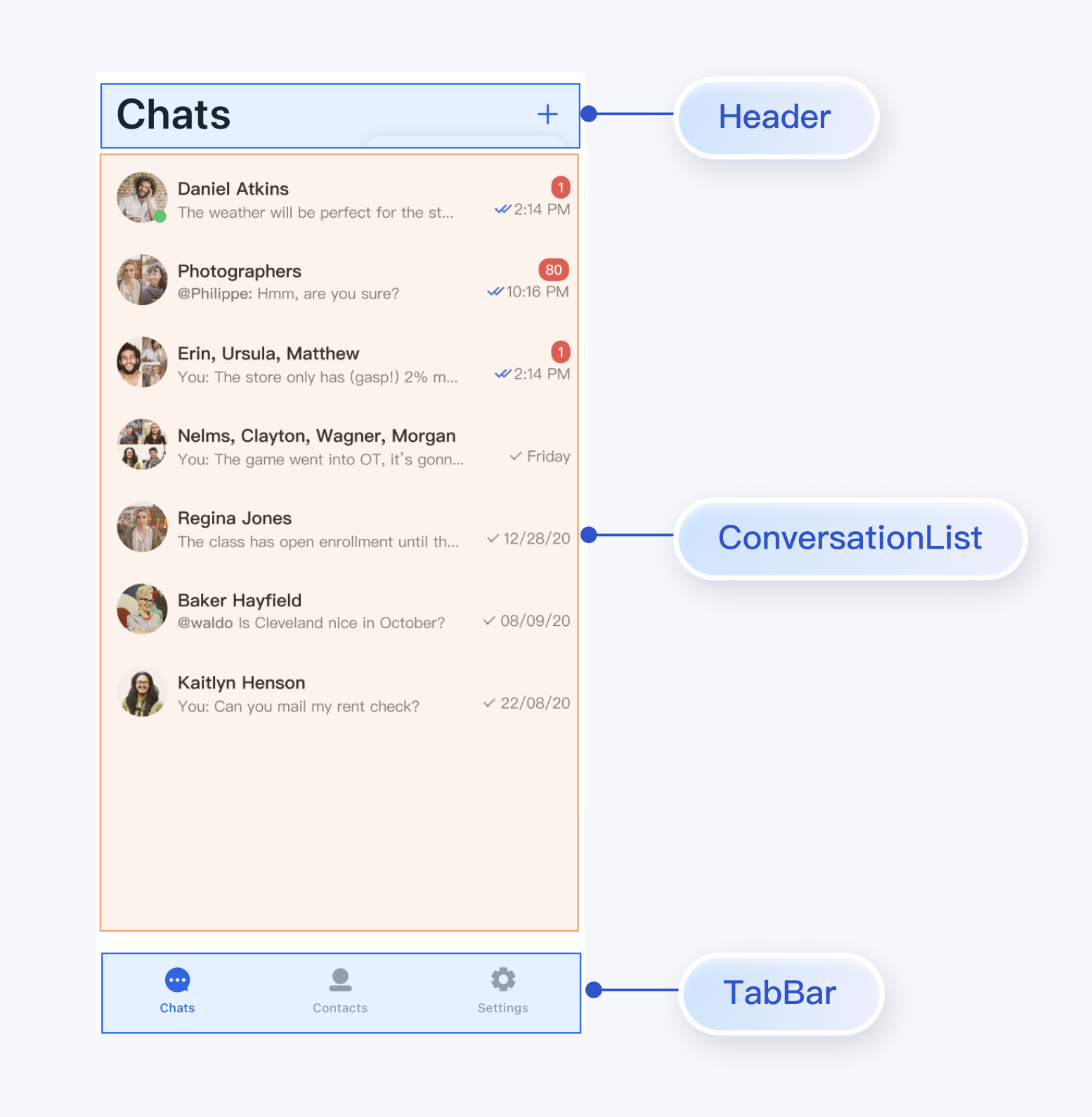
You can integrate ConversationList directly into your existing App page, or build a complete new conversation list page. One assembled UI effect is shown below:
|
|
151
142
|
|
|
152
|
-
|
|
153
|
-
|
|
154
|
-
|
|
155
143
|
To encapsulate ConversationList as a conversation list page, refer to the implementation in the `chat/uikit/lib/conversations_page.dart` file. `ConversationsPage` mainly does the following:
|
|
156
144
|
|
|
157
145
|
1. Adds AppBar above ConversationList.
|
|
@@ -166,7 +154,6 @@ You can build a conversation list page based on the ConversationList component i
|
|
|
166
154
|
|
|
167
155
|
3. Supports selecting multiple friends to create group chats
|
|
168
156
|
|
|
169
|
-
|
|
170
157
|
Core example code is as follows:
|
|
171
158
|
|
|
172
159
|
``` java
|
|
@@ -211,24 +198,18 @@ Built-in features of MessageList include:
|
|
|
211
198
|
|
|
212
199
|
- Support operations on individual messages: view large images for image messages, play video or voice messages, copy text messages, recall messages, delete messages, etc.
|
|
213
200
|
|
|
214
|
-
|
|
215
201
|
Built-in features of MessageInput include:
|
|
216
202
|
|
|
217
203
|
- Support users in composing and sending various types of messages: text, emoji, image, voice, video, file, etc.
|
|
218
204
|
|
|
219
|
-
|
|
220
205
|
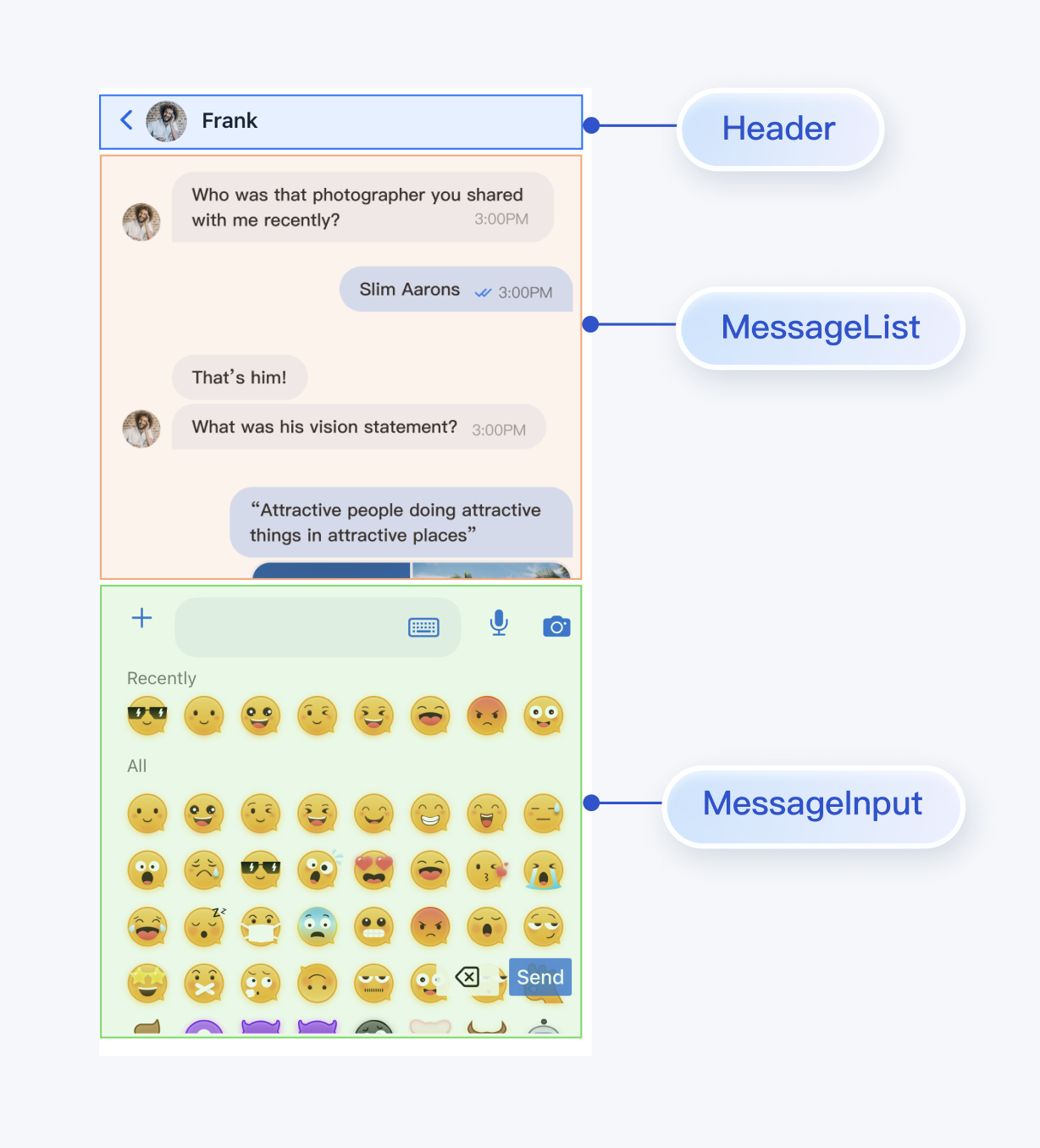
You can integrate MessageList and MessageInput directly into your existing App page, or build a complete new chat page. One assembled UI effect is shown below:
|
|
221
206
|
|
|
222
|
-
|
|
223
|
-
|
|
224
|
-
|
|
225
207
|
To assemble MessageList and MessageInput as a chat page, refer to the implementation in the `chat/uikit/lib/chat_page.dart` file. `ChatPage` mainly does the following:
|
|
226
208
|
|
|
227
209
|
1. Adds AppBar at the top to display the conversation name.
|
|
228
210
|
|
|
229
211
|
2. Vertically combines MessageList and MessageInput according to mobile user habits.
|
|
230
212
|
|
|
231
|
-
|
|
232
213
|
Core example code is as follows:
|
|
233
214
|
|
|
234
215
|
``` java
|
|
@@ -299,12 +280,8 @@ You can build a contact page based on the ContactList component in TUIKit Flutte
|
|
|
299
280
|
|
|
300
281
|
- View friends.
|
|
301
282
|
|
|
302
|
-
|
|
303
283
|
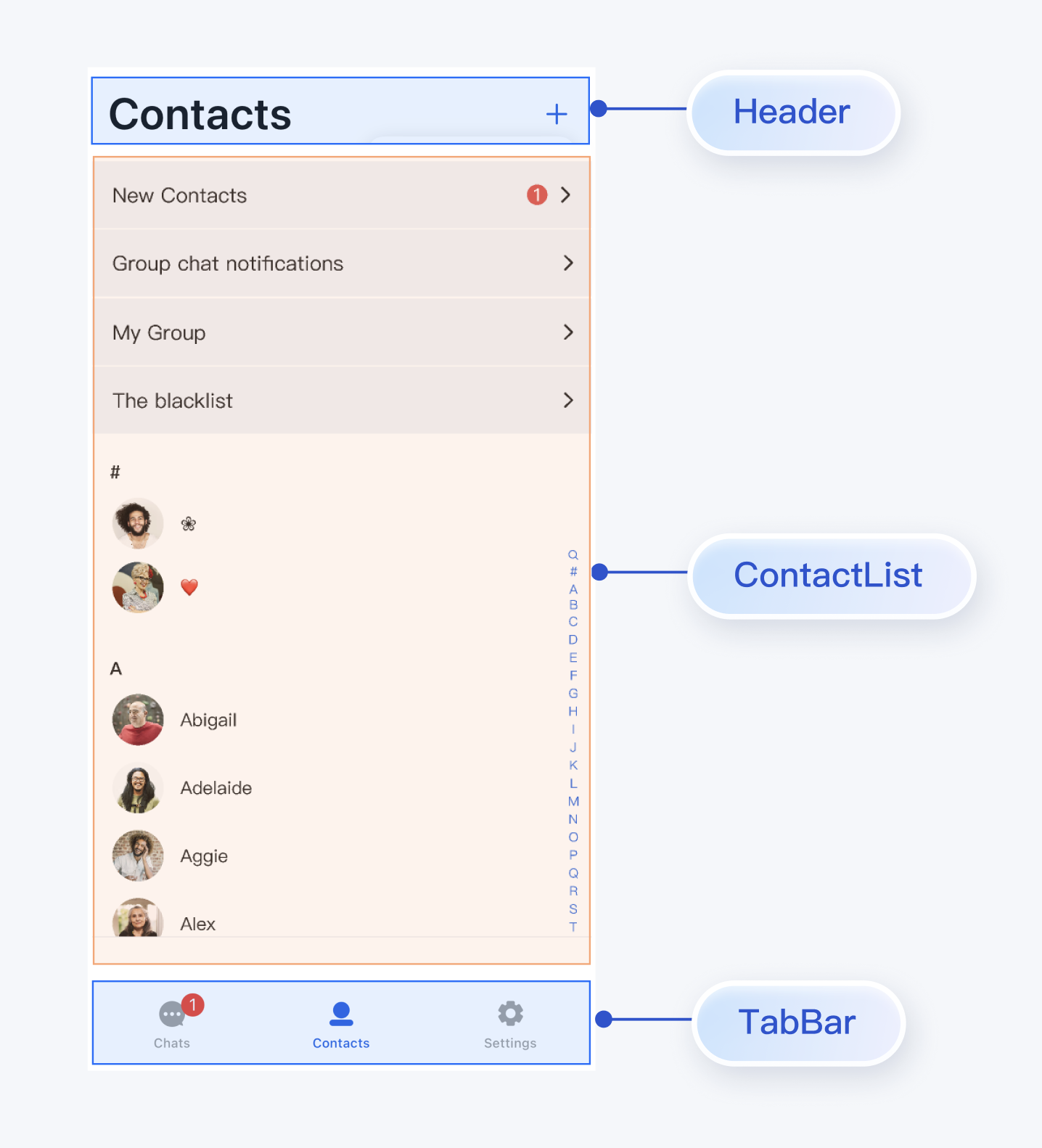
You can integrate ContactList directly into your existing App, or build a complete new contact list page. One assembled UI effect is shown below:
|
|
304
284
|
|
|
305
|
-
|
|
306
|
-
|
|
307
|
-
|
|
308
285
|
To encapsulate ContactList as a contact list page, refer to the implementation in the `chat/uikit/lib/contacts_page.dart` file. `ContactsPage` mainly does the following:
|
|
309
286
|
|
|
310
287
|
1. Adds AppBar above ContactList.
|
|
@@ -319,7 +296,6 @@ You can build a contact page based on the ContactList component in TUIKit Flutte
|
|
|
319
296
|
|
|
320
297
|
3. Supports searching for target groups by GroupID
|
|
321
298
|
|
|
322
|
-
|
|
323
299
|
Core example code is as follows:
|
|
324
300
|
|
|
325
301
|
``` java
|
|
@@ -350,58 +326,14 @@ You can build a contact page based on the ContactList component in TUIKit Flutte
|
|
|
350
326
|
### Step 6: Complete Navigation Logic Between Interfaces
|
|
351
327
|
|
|
352
328
|
ConversationsPage, ChatPage, and ContactsPage implement default user click events. You can customize events to implement interactions between pages:
|
|
353
|
-
|
|
354
|
-
|
|
355
|
-
|
|
356
|
-
|
|
357
|
-
|
|
358
|
-
|
|
359
|
-
|
|
360
|
-
|
|
361
|
-
|
|
362
|
-
<tr>
|
|
363
|
-
<td rowspan="1" colSpan="1" >**ConversationsPage**</td>
|
|
364
|
-
|
|
365
|
-
<td rowspan="1" colSpan="1" >`onConversationClick: (conversation) {}`</td>
|
|
366
|
-
|
|
367
|
-
<td rowspan="1" colSpan="1" >Triggered when clicking a conversation in the conversation list, recommended to navigate to the chat page (ChatPage).</td>
|
|
368
|
-
</tr>
|
|
369
|
-
|
|
370
|
-
<tr>
|
|
371
|
-
<td rowspan="2" colSpan="1" >**ContactsPage**</td>
|
|
372
|
-
|
|
373
|
-
<td rowspan="1" colSpan="1" >`onContactClick: (ContactInfo contactInfo) {}`</td>
|
|
374
|
-
|
|
375
|
-
<td rowspan="1" colSpan="1" >Triggered when clicking a contact cell, recommended to navigate to the user info page (C2CChatSetting).</td>
|
|
376
|
-
</tr>
|
|
377
|
-
|
|
378
|
-
<tr>
|
|
379
|
-
<td rowspan="1" colSpan="1" >`onGroupClick: (ContactInfo contactInfo) {}`</td>
|
|
380
|
-
|
|
381
|
-
<td rowspan="1" colSpan="1" >Triggered when clicking a group cell, recommended to navigate to the group chat page (ChatPage).</td>
|
|
382
|
-
</tr>
|
|
383
|
-
|
|
384
|
-
<tr>
|
|
385
|
-
<td rowspan="3" colSpan="1" >**ChatPage**</td>
|
|
386
|
-
|
|
387
|
-
<td rowspan="1" colSpan="1" >`onUserClick: (String userID) {}`</td>
|
|
388
|
-
|
|
389
|
-
<td rowspan="1" colSpan="1" >Triggered when clicking a user avatar or nickname in a message, recommended to navigate to the user info page (C2CChatSetting).</td>
|
|
390
|
-
</tr>
|
|
391
|
-
|
|
392
|
-
<tr>
|
|
393
|
-
<td rowspan="1" colSpan="1" >`onChatHeaderClick: () {}`</td>
|
|
394
|
-
|
|
395
|
-
<td rowspan="1" colSpan="1" >Triggered when clicking the avatar in the navigation bar, recommended to navigate to the user info page (C2CChatSetting) or group chat info page (GroupChatSetting)</td>
|
|
396
|
-
</tr>
|
|
397
|
-
|
|
398
|
-
<tr>
|
|
399
|
-
<td rowspan="1" colSpan="1" >`onBackClick: () {}`</td>
|
|
400
|
-
|
|
401
|
-
<td rowspan="1" colSpan="1" >Triggered when clicking the back button, recommended to return to the previous page.</td>
|
|
402
|
-
</tr>
|
|
403
|
-
</table>
|
|
404
|
-
|
|
329
|
+
| Page | Callback | Suggested Navigation Logic |
|
|
330
|
+
| --- | --- | --- |
|
|
331
|
+
| **ConversationsPage** | `onConversationClick: (conversation) {}` | Triggered when clicking a conversation in the conversation list, recommended to navigate to the chat page (ChatPage). |
|
|
332
|
+
| **ContactsPage** | `onContactClick: (ContactInfo contactInfo) {}` | Triggered when clicking a contact cell, recommended to navigate to the user info page (C2CChatSetting). |
|
|
333
|
+
| `onGroupClick: (ContactInfo contactInfo) {}` | Triggered when clicking a group cell, recommended to navigate to the group chat page (ChatPage). | |
|
|
334
|
+
| **ChatPage** | `onUserClick: (String userID) {}` | Triggered when clicking a user avatar or nickname in a message, recommended to navigate to the user info page (C2CChatSetting). |
|
|
335
|
+
| `onChatHeaderClick: () {}` | Triggered when clicking the avatar in the navigation bar, recommended to navigate to the user info page (C2CChatSetting) or group chat info page (GroupChatSetting) | |
|
|
336
|
+
| `onBackClick: () {}` | Triggered when clicking the back button, recommended to return to the previous page. | |
|
|
405
337
|
|
|
406
338
|
You can refer to the above callback descriptions and reference code to implement interaction logic between Pages.
|
|
407
339
|
|
|
@@ -410,4 +342,3 @@ You can refer to the above callback descriptions and reference code to implement
|
|
|
410
342
|
### **After integrating the tuikit_atomic_x component, what should I do about errors related to **`theme_state`** and **`atomic_localizations`**?**
|
|
411
343
|
|
|
412
344
|
The component supports theme color and internationalized string switching. You need to use `ComponentTheme` to wrap the root `widget` in the `main.dart` file in the project root directory, and add the `AtomicLocalizations.delegate` configuration to the `localizationsDelegates` of `MaterialApp`. You can refer to the `main.dart` file in the source code Demo for usage.
|
|
413
|
-
|
|
@@ -7,7 +7,6 @@ Yes.
|
|
|
7
7
|
|
|
8
8
|
- If you are using Chat Free edition and upgrade to Chat Pro Edition, after the upgrade, you can configure your SDKAppID in the console to ensure proper login. For pricing details, see [Pricing](https://intl.cloud.tencent.com/document/product/1047/34350).
|
|
9
9
|
|
|
10
|
-
|
|
11
10
|
### Why do I encounter a 6013 "SDK Not Initialized" error?
|
|
12
11
|
|
|
13
12
|
If the 6013 "SDK Not Initialized" error occurs, try the following troubleshooting methods:
|
|
@@ -17,7 +16,6 @@ If the 6013 "SDK Not Initialized" error occurs, try the following troubleshootin
|
|
|
17
16
|
|
|
18
17
|
3. For Android, verify that all library files have been loaded or repossessed by the system during use.
|
|
19
18
|
|
|
20
|
-
|
|
21
19
|
### Why do I encounter "code: 6205 desc: QALSERVICE not ready" error?
|
|
22
20
|
|
|
23
21
|
This error is caused by calling `stopQALService` after initialization. To fix it, refer to the [configuration method](https://blog.csdn.net/qq_16131393/article/details/54895733) shared by one of our customers.
|
|
@@ -31,10 +29,8 @@ There are two ways to use emojis:
|
|
|
31
29
|
|
|
32
30
|
- Use data in TIMFaceElem. For example, the names of emoji images are string-type. Use the word "smile" to represent the smile emoji, and store "smile" in data. Then, both iOS and Android devices use data as the key to retrieve and display the corresponding emoji.
|
|
33
31
|
|
|
34
|
-
|
|
35
32
|
You can also use the two fields at the same time. For example, use data to specify the emoji set and index to indicate the specific index in this emoji set. This way, you can implement many different emoji effects as in QQ. It is possible to store more complex data structures in data as long as the devices follow the same parsing rules.
|
|
36
33
|
|
|
37
|
-
|
|
38
34
|
### Why do I encounter error 10002 during operations?
|
|
39
35
|
|
|
40
36
|
This status code is returned when a network exception, timeout, or ticket switching failure occurs during server-side authentication. If you see this status code, wait a moment and try again.
|
|
@@ -60,7 +56,6 @@ These errors occur because UserID and UserSig do not match. To fix it, check the
|
|
|
60
56
|
|
|
61
57
|
- -5: When the login attempt is not completed and the SDK has not received the a2key and tinyID returned by the server, directly calling other APIs returns the "tinyid or a2 is empty" error message and -5 error code.
|
|
62
58
|
|
|
63
|
-
|
|
64
59
|
### What should I do when the SDK on the armeabi platform reports "java.lang.UnsatisfiedLinkError: No implementation found for"?
|
|
65
60
|
|
|
66
61
|
Copy jni/armeabi-v7a/libImSDK.so in the Chat SDK’s aar file to the src/main/jniLibs/armeabi directory in your source code project and load it in build.gradle.
|
|
@@ -77,44 +72,40 @@ This error occurs because App Store does not support the x86_64 and i386 archite
|
|
|
77
72
|
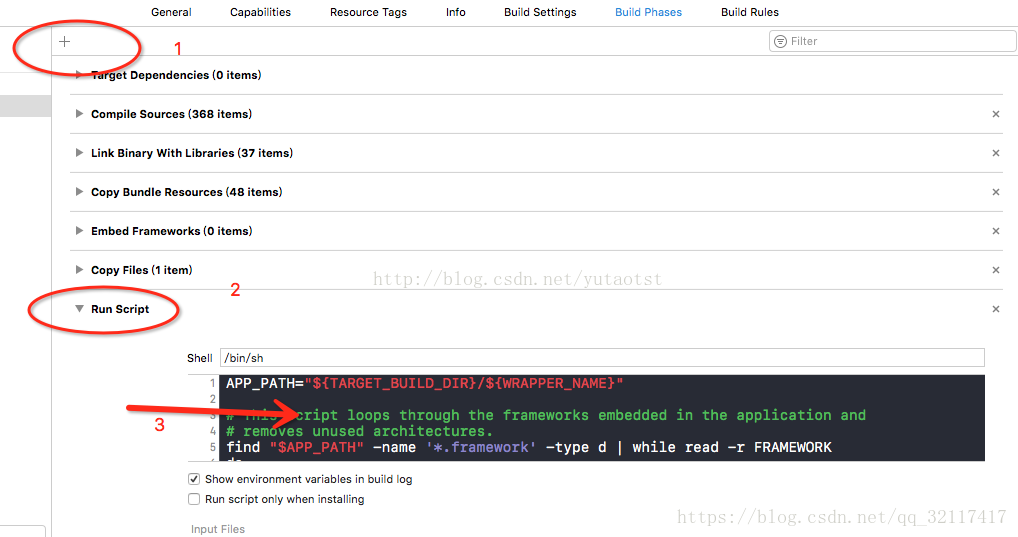
c. Add the following code:
|
|
78
73
|
|
|
79
74
|
``` bash
|
|
80
|
-
APP_PATH="${TARGET_BUILD_DIR}/${WRAPPER_NAME}"
|
|
81
|
-
|
|
82
|
-
# This script loops through the frameworks embedded in the application and
|
|
83
|
-
|
|
84
|
-
# removes unused architectures.
|
|
85
|
-
|
|
86
|
-
find "$APP_PATH" -name '*.framework' -type d | while read -r FRAMEWORK
|
|
87
|
-
do
|
|
88
|
-
FRAMEWORK_EXECUTABLE_NAME=$(defaults read "$FRAMEWORK/Info.plist" CFBundleExecutable)
|
|
89
|
-
FRAMEWORK_EXECUTABLE_PATH="$FRAMEWORK/$FRAMEWORK_EXECUTABLE_NAME"
|
|
90
|
-
echo "Executable is $FRAMEWORK_EXECUTABLE_PATH"
|
|
91
|
-
|
|
92
|
-
EXTRACTED_ARCHS=()
|
|
93
|
-
|
|
94
|
-
for ARCH in $ARCHS
|
|
95
|
-
do
|
|
96
|
-
echo "Extracting $ARCH from $FRAMEWORK_EXECUTABLE_NAME"
|
|
97
|
-
lipo -extract "$ARCH" "$FRAMEWORK_EXECUTABLE_PATH" -o "$FRAMEWORK_EXECUTABLE_PATH-$ARCH"
|
|
98
|
-
EXTRACTED_ARCHS+=("$FRAMEWORK_EXECUTABLE_PATH-$ARCH")
|
|
99
|
-
done
|
|
100
|
-
|
|
101
|
-
echo "Merging extracted architectures: ${ARCHS}"
|
|
102
|
-
lipo -o "$FRAMEWORK_EXECUTABLE_PATH-merged" -create "${EXTRACTED_ARCHS[@]}"
|
|
103
|
-
rm "${EXTRACTED_ARCHS[@]}"
|
|
104
|
-
|
|
105
|
-
echo "Replacing original executable with thinned version"
|
|
106
|
-
rm "$FRAMEWORK_EXECUTABLE_PATH"
|
|
107
|
-
mv "$FRAMEWORK_EXECUTABLE_PATH-merged" "$FRAMEWORK_EXECUTABLE_PATH"
|
|
108
|
-
|
|
75
|
+
APP_PATH="${TARGET_BUILD_DIR}/${WRAPPER_NAME}"
|
|
76
|
+
|
|
77
|
+
# This script loops through the frameworks embedded in the application and
|
|
78
|
+
|
|
79
|
+
# removes unused architectures.
|
|
80
|
+
|
|
81
|
+
find "$APP_PATH" -name '*.framework' -type d | while read -r FRAMEWORK
|
|
82
|
+
do
|
|
83
|
+
FRAMEWORK_EXECUTABLE_NAME=$(defaults read "$FRAMEWORK/Info.plist" CFBundleExecutable)
|
|
84
|
+
FRAMEWORK_EXECUTABLE_PATH="$FRAMEWORK/$FRAMEWORK_EXECUTABLE_NAME"
|
|
85
|
+
echo "Executable is $FRAMEWORK_EXECUTABLE_PATH"
|
|
86
|
+
|
|
87
|
+
EXTRACTED_ARCHS=()
|
|
88
|
+
|
|
89
|
+
for ARCH in $ARCHS
|
|
90
|
+
do
|
|
91
|
+
echo "Extracting $ARCH from $FRAMEWORK_EXECUTABLE_NAME"
|
|
92
|
+
lipo -extract "$ARCH" "$FRAMEWORK_EXECUTABLE_PATH" -o "$FRAMEWORK_EXECUTABLE_PATH-$ARCH"
|
|
93
|
+
EXTRACTED_ARCHS+=("$FRAMEWORK_EXECUTABLE_PATH-$ARCH")
|
|
94
|
+
done
|
|
95
|
+
|
|
96
|
+
echo "Merging extracted architectures: ${ARCHS}"
|
|
97
|
+
lipo -o "$FRAMEWORK_EXECUTABLE_PATH-merged" -create "${EXTRACTED_ARCHS[@]}"
|
|
98
|
+
rm "${EXTRACTED_ARCHS[@]}"
|
|
99
|
+
|
|
100
|
+
echo "Replacing original executable with thinned version"
|
|
101
|
+
rm "$FRAMEWORK_EXECUTABLE_PATH"
|
|
102
|
+
mv "$FRAMEWORK_EXECUTABLE_PATH-merged" "$FRAMEWORK_EXECUTABLE_PATH"
|
|
103
|
+
|
|
109
104
|
done
|
|
110
105
|
```
|
|
111
|
-
|
|
112
106
|
|
|
113
107
|
3. Package the app and upload it again.
|
|
114
108
|
|
|
115
|
-
|
|
116
109
|
### Can developers directly utilize the emoticon packs demonstrated in the Chat various client demos/TUIKit projects?
|
|
117
110
|
|
|
118
111
|
To respect the copyright of emoji designs, the Chat Demo/TUIKit project does not include cutouts of large emoji elements. Please replace them with your own designs or other emoji packs for which you hold the copyright before officially launching for commercial use. **The default smiley face emoji pack shown below is copyrighted by Tencent RTC** and is available for licensed use for a fee. If you need to obtain a license, please [contact us](https://trtc.io/contact).
|
|
119
|
-
|
|
120
|
-
|
|
@@ -1,28 +1,9 @@
|
|
|
1
1
|
TUIKit SwiftUI provides powerful appearance customization capabilities, supporting custom theme modes (Light/Dark/Follow System) and theme colors for your application. Through simple configuration, developers can easily implement app-level theme switching and brand color customization.
|
|
2
2
|
|
|
3
3
|
Taking the message list as an example, the effects of custom theme modes and theme colors are shown below:
|
|
4
|
-
|
|
5
|
-
|
|
6
|
-
|
|
7
|
-
|
|
8
|
-
<td rowspan="1" colSpan="1" >**Light + Orange**</td>
|
|
9
|
-
|
|
10
|
-
<td rowspan="1" colSpan="1" >**Dark + Default Color**</td>
|
|
11
|
-
|
|
12
|
-
<td rowspan="1" colSpan="1" >**Dark + Green Theme**</td>
|
|
13
|
-
</tr>
|
|
14
|
-
|
|
15
|
-
<tr>
|
|
16
|
-
<td rowspan="1" colSpan="1" >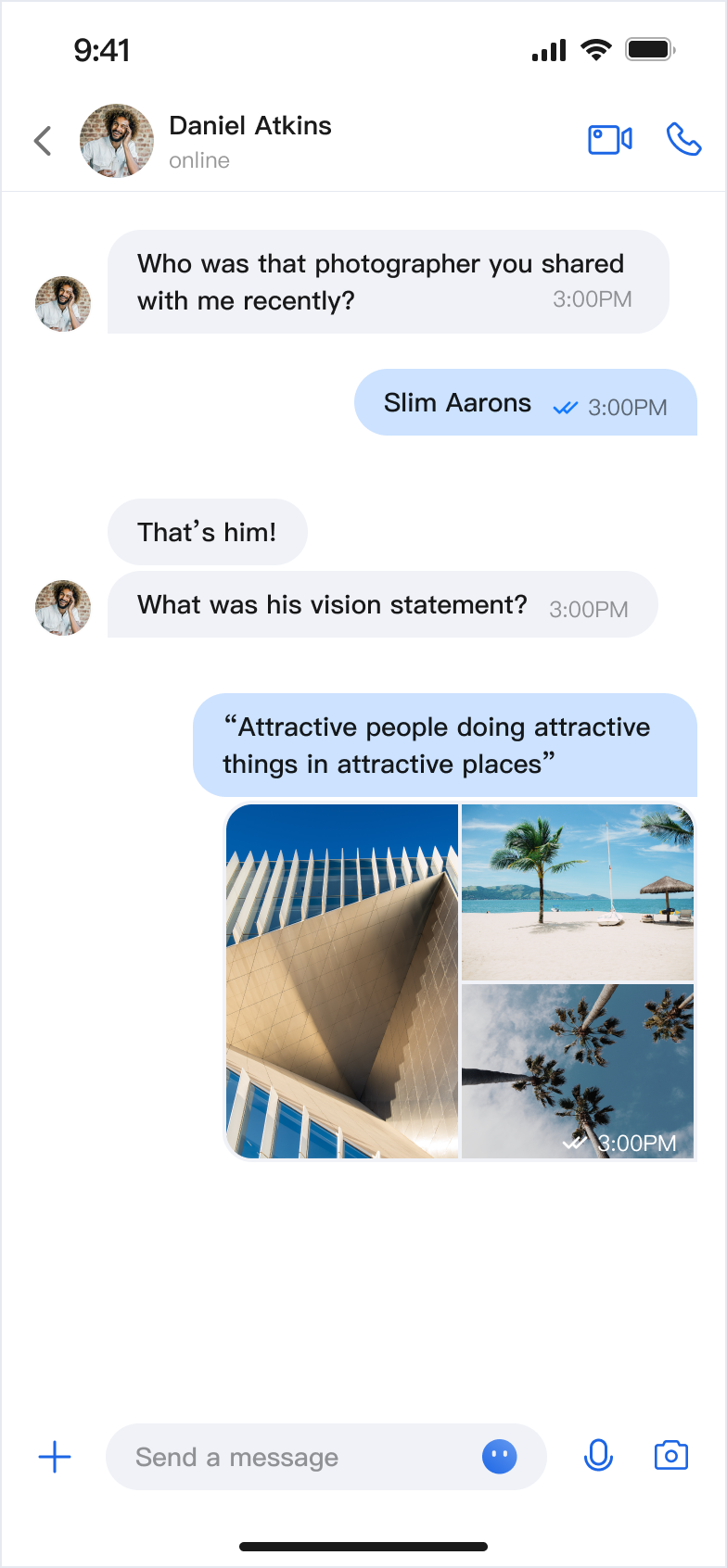</td>
|
|
17
|
-
|
|
18
|
-
<td rowspan="1" colSpan="1" ><br>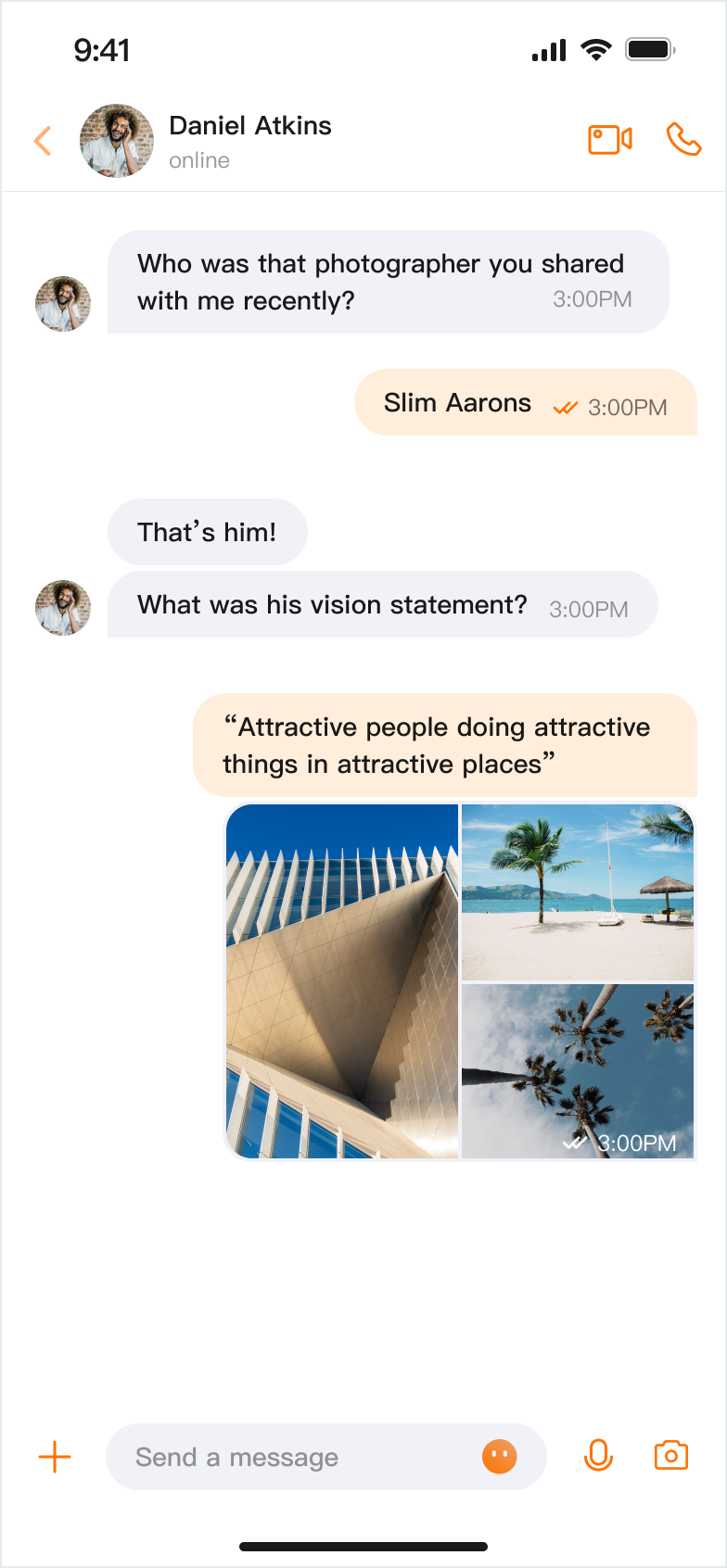</td>
|
|
19
|
-
|
|
20
|
-
<td rowspan="1" colSpan="1" >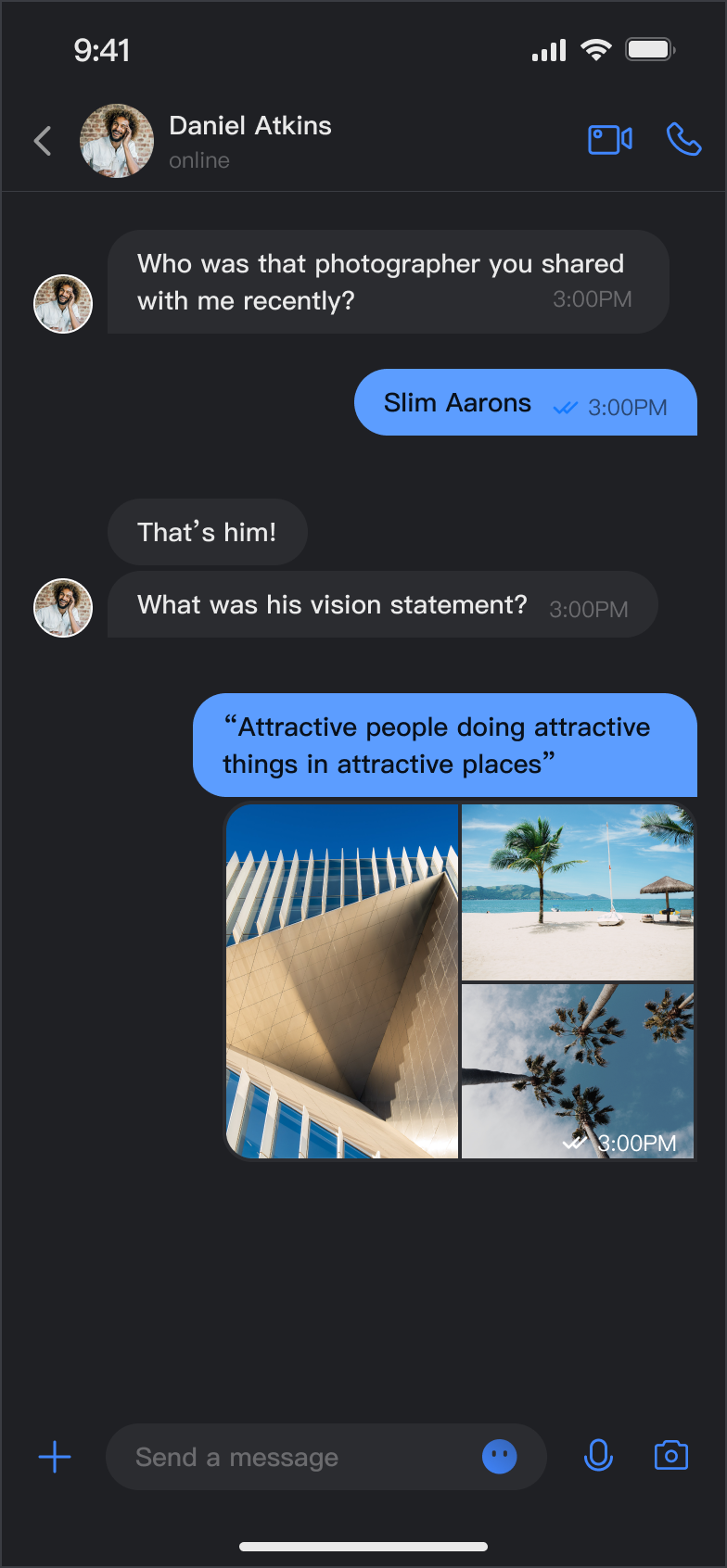</td>
|
|
21
|
-
|
|
22
|
-
<td rowspan="1" colSpan="1" >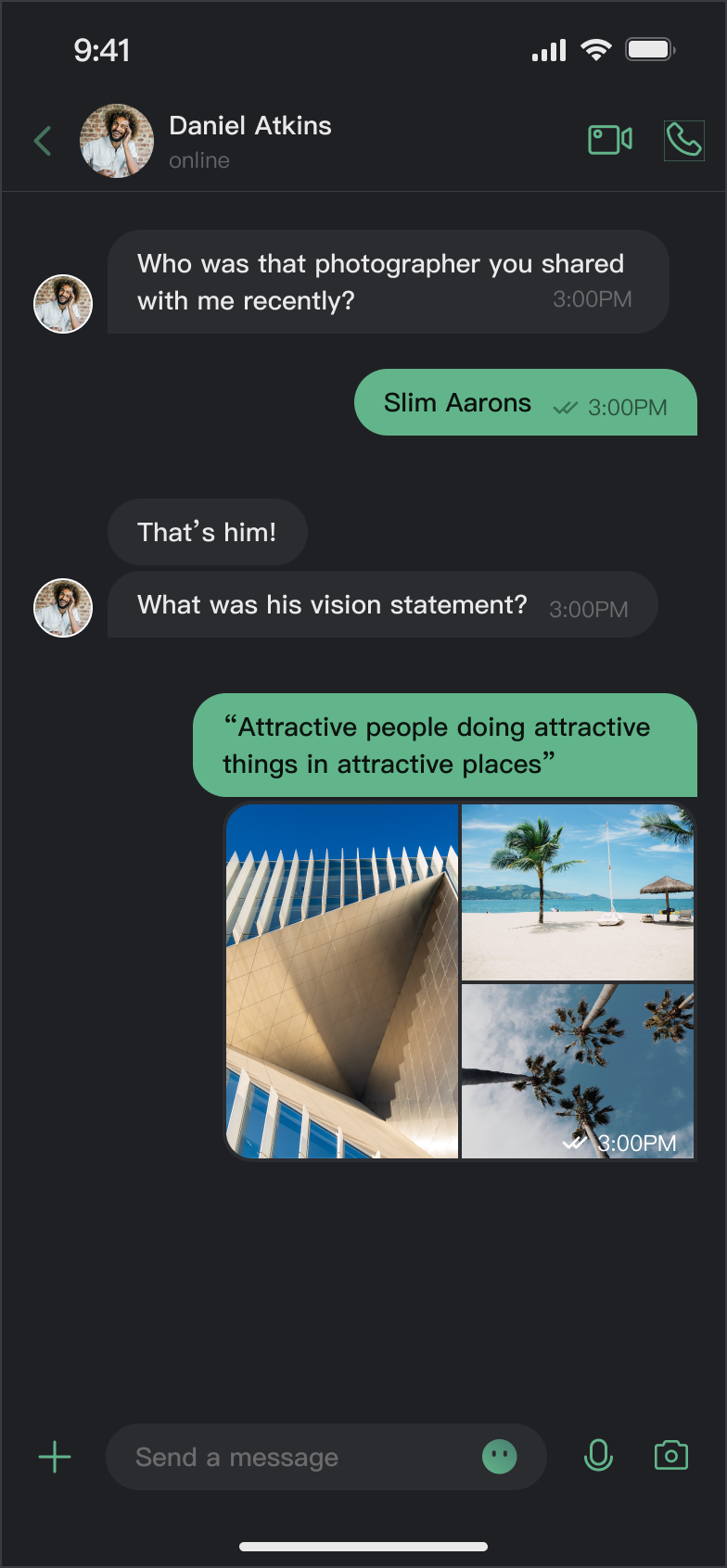</td>
|
|
23
|
-
</tr>
|
|
24
|
-
</table>
|
|
25
|
-
|
|
4
|
+
| **Light + Default Color** | **Light + Orange** | **Dark + Default Color** | **Dark + Green Theme** |
|
|
5
|
+
| --- | --- | --- | --- |
|
|
6
|
+
| | | | |
|
|
26
7
|
|
|
27
8
|
## Core Capabilities
|
|
28
9
|
|
|
@@ -33,7 +14,6 @@ Taking the message list as an example, the effects of custom theme modes and the
|
|
|
33
14
|
|
|
34
15
|
- Follow System: Automatically follows system appearance settings.
|
|
35
16
|
|
|
36
|
-
|
|
37
17
|
**Theme Color Customization**
|
|
38
18
|
|
|
39
19
|
- Preset Theme Colors: Provides standard colors like blue, green, red, orange, etc.
|
|
@@ -44,121 +24,36 @@ Taking the message list as an example, the effects of custom theme modes and the
|
|
|
44
24
|
|
|
45
25
|
- Clear Customization: One-click restore to default theme color.
|
|
46
26
|
|
|
47
|
-
|
|
48
27
|
## API Reference
|
|
49
28
|
|
|
50
29
|
The above functionalities are based on a set of concise APIs provided by `ThemeState` for theme configuration and information queries.
|
|
51
30
|
|
|
52
31
|
### Set Theme Mode
|
|
53
|
-
|
|
54
|
-
|
|
55
|
-
|
|
56
|
-
|
|
57
|
-
<td rowspan="1" colSpan="1" >Parameters</td>
|
|
58
|
-
|
|
59
|
-
<td rowspan="1" colSpan="1" >Return Value</td>
|
|
60
|
-
|
|
61
|
-
<td rowspan="1" colSpan="1" >Description</td>
|
|
62
|
-
</tr>
|
|
63
|
-
|
|
64
|
-
<tr>
|
|
65
|
-
<td rowspan="1" colSpan="1" >`setThemeMode(_:)`</td>
|
|
66
|
-
|
|
67
|
-
<td rowspan="1" colSpan="1" >`ThemeMode`</td>
|
|
68
|
-
|
|
69
|
-
<td rowspan="1" colSpan="1" >`Void`</td>
|
|
70
|
-
|
|
71
|
-
<td rowspan="1" colSpan="1" >Sets the display mode, automatically saves and refreshes.<br>• `.system`: Follow system appearance.<br>• `.light`: Force light mode.<br>• `.dark`: Force dark mode.</td>
|
|
72
|
-
</tr>
|
|
73
|
-
</table>
|
|
74
|
-
|
|
32
|
+
| Method | Parameters | Return Value | Description |
|
|
33
|
+
| --- | --- | --- | --- |
|
|
34
|
+
| `setThemeMode(_:)` | `ThemeMode` | `Void` | Sets the display mode, automatically saves and refreshes.<br>• `.system`: Follow system appearance.<br>• `.light`: Force light mode.<br>• `.dark`: Force dark mode. |
|
|
75
35
|
|
|
76
36
|
### Set Theme Color
|
|
77
|
-
|
|
78
|
-
|
|
79
|
-
|
|
80
|
-
|
|
81
|
-
<td rowspan="1" colSpan="1" >Parameters</td>
|
|
82
|
-
|
|
83
|
-
<td rowspan="1" colSpan="1" >Return Value</td>
|
|
84
|
-
|
|
85
|
-
<td rowspan="1" colSpan="1" >Description</td>
|
|
86
|
-
</tr>
|
|
87
|
-
|
|
88
|
-
<tr>
|
|
89
|
-
<td rowspan="1" colSpan="1" >`setPrimaryColor(_:)`</td>
|
|
90
|
-
|
|
91
|
-
<td rowspan="1" colSpan="1" >`String`</td>
|
|
92
|
-
|
|
93
|
-
<td rowspan="1" colSpan="1" >`Void`</td>
|
|
94
|
-
|
|
95
|
-
<td rowspan="1" colSpan="1" >Sets the theme color, requires Hex format (e.g., "#1C66E5").</td>
|
|
96
|
-
</tr>
|
|
97
|
-
|
|
98
|
-
<tr>
|
|
99
|
-
<td rowspan="1" colSpan="1" >`clearPrimaryColor()`</td>
|
|
100
|
-
|
|
101
|
-
<td rowspan="1" colSpan="1" >None</td>
|
|
102
|
-
|
|
103
|
-
<td rowspan="1" colSpan="1" >`Void`</td>
|
|
104
|
-
|
|
105
|
-
<td rowspan="1" colSpan="1" >Clears custom theme color and restores default blue.</td>
|
|
106
|
-
</tr>
|
|
107
|
-
</table>
|
|
108
|
-
|
|
37
|
+
| Method | Parameters | Return Value | Description |
|
|
38
|
+
| --- | --- | --- | --- |
|
|
39
|
+
| `setPrimaryColor(_:)` | `String` | `Void` | Sets the theme color, requires Hex format (e.g., "#1C66E5"). |
|
|
40
|
+
| `clearPrimaryColor()` | None | `Void` | Clears custom theme color and restores default blue. |
|
|
109
41
|
|
|
110
42
|
> **Note:**
|
|
111
|
-
>
|
|
43
|
+
>
|
|
112
44
|
> 1. After calling `setThemeMode` or `setPrimaryColor`, the configuration is automatically saved to `UserDefaults` without manual saving. It will automatically load on next app launch.
|
|
113
45
|
> 2. Cache is automatically cleared when modifying theme configuration, ensuring the color scheme updates in real-time. Developers don't need to manage cache.
|
|
114
46
|
> 3. Avoid frequently switching themes when using settings APIs (e.g., calling in a loop).
|
|
115
47
|
|
|
116
|
-
|
|
117
48
|
### Query ThemeState Information
|
|
118
49
|
|
|
119
50
|
The following read-only properties can be used to query the current theme configuration status and information:
|
|
120
|
-
|
|
121
|
-
|
|
122
|
-
|
|
123
|
-
|
|
124
|
-
|
|
125
|
-
|
|
126
|
-
<td rowspan="1" colSpan="1" >Description</td>
|
|
127
|
-
</tr>
|
|
128
|
-
|
|
129
|
-
<tr>
|
|
130
|
-
<td rowspan="1" colSpan="1" >`currentMode`</td>
|
|
131
|
-
|
|
132
|
-
<td rowspan="1" colSpan="1" >`ThemeMode`</td>
|
|
133
|
-
|
|
134
|
-
<td rowspan="1" colSpan="1" >Current theme mode.</td>
|
|
135
|
-
</tr>
|
|
136
|
-
|
|
137
|
-
<tr>
|
|
138
|
-
<td rowspan="1" colSpan="1" >`currentPrimaryColor`</td>
|
|
139
|
-
|
|
140
|
-
<td rowspan="1" colSpan="1" >`String?`</td>
|
|
141
|
-
|
|
142
|
-
<td rowspan="1" colSpan="1" >Current theme color (Hex format).</td>
|
|
143
|
-
</tr>
|
|
144
|
-
|
|
145
|
-
<tr>
|
|
146
|
-
<td rowspan="1" colSpan="1" >`hasCustomPrimaryColor`</td>
|
|
147
|
-
|
|
148
|
-
<td rowspan="1" colSpan="1" >`Bool`</td>
|
|
149
|
-
|
|
150
|
-
<td rowspan="1" colSpan="1" >Whether a custom theme color is set.</td>
|
|
151
|
-
</tr>
|
|
152
|
-
|
|
153
|
-
<tr>
|
|
154
|
-
<td rowspan="1" colSpan="1" >`isDarkMode`</td>
|
|
155
|
-
|
|
156
|
-
<td rowspan="1" colSpan="1" >`Bool`</td>
|
|
157
|
-
|
|
158
|
-
<td rowspan="1" colSpan="1" >Whether currently in dark mode.</td>
|
|
159
|
-
</tr>
|
|
160
|
-
</table>
|
|
161
|
-
|
|
51
|
+
| Property | Type | Description |
|
|
52
|
+
| --- | --- | --- |
|
|
53
|
+
| `currentMode` | `ThemeMode` | Current theme mode. |
|
|
54
|
+
| `currentPrimaryColor` | `String?` | Current theme color (Hex format). |
|
|
55
|
+
| `hasCustomPrimaryColor` | `Bool` | Whether a custom theme color is set. |
|
|
56
|
+
| `isDarkMode` | `Bool` | Whether currently in dark mode. |
|
|
162
57
|
|
|
163
58
|
## Usage
|
|
164
59
|
|
|
@@ -170,9 +65,6 @@ AppBuilder is a convenient feature and UI customization configuration tool, mana
|
|
|
170
65
|
|
|
171
66
|
You can experience the AppBuilder feature at [Chat Web Demo](https://trtc.io/demo/homepage/#/detail?scene=messenger), experience entry:
|
|
172
67
|
|
|
173
|
-
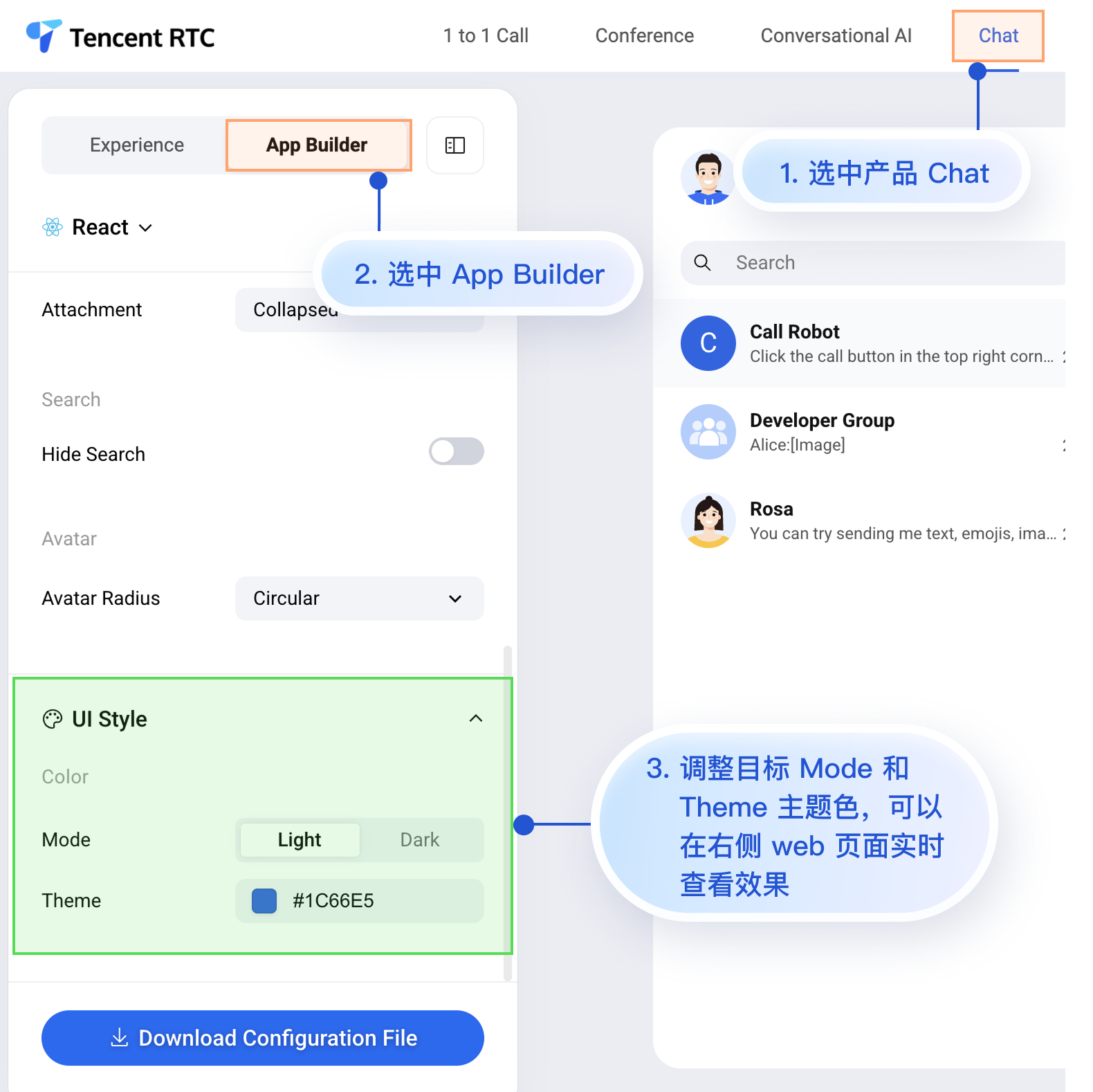
|
|
174
|
-
|
|
175
|
-
|
|
176
68
|
Although the Chat Web Demo currently cannot preview mobile configuration effects in real-time, mobile platforms already support AppBuilder's configuration capabilities.
|
|
177
69
|
|
|
178
70
|
Next, we'll introduce how to apply custom configurations to mobile projects after setting up AppBuilder in the Web demo. The process is quite simple, with only 3 steps:
|
|
@@ -182,14 +74,10 @@ Next, we'll introduce how to apply custom configurations to mobile projects afte
|
|
|
182
74
|
|
|
183
75
|
3. Load the configuration file at app launch.
|
|
184
76
|
|
|
185
|
-
|
|
186
77
|
#### Step 1: Download Configuration File
|
|
187
78
|
|
|
188
79
|
Visit [Chat Web Demo](https://trtc.io/demo/homepage/#/detail?scene=messenger) and download the appConfig.json configuration file. The download path is:
|
|
189
80
|
|
|
190
|
-
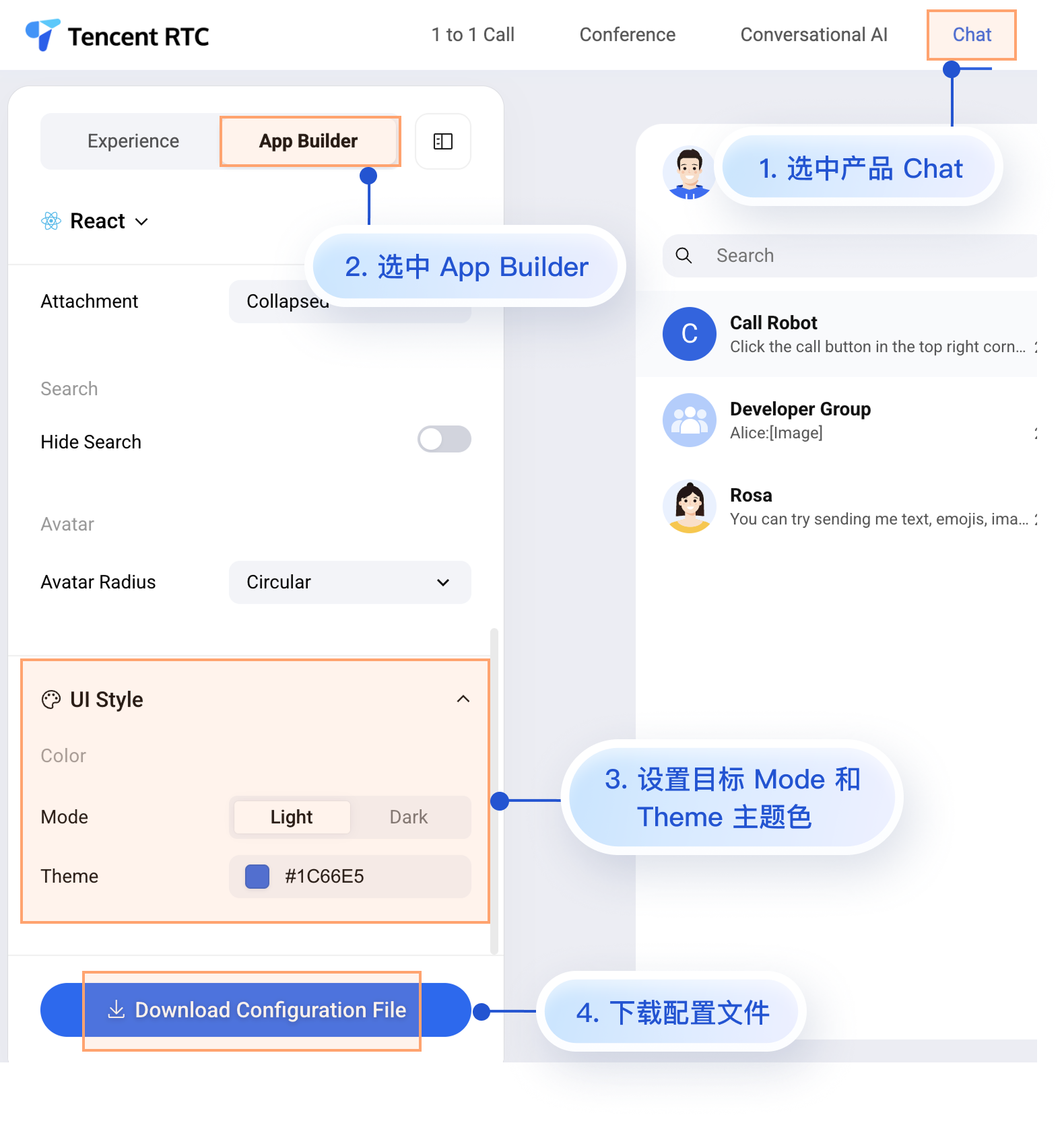
|
|
191
|
-
|
|
192
|
-
|
|
193
81
|
The `appConfig.json` file content is shown below, corresponding one-to-one with the configuration items on the AppBuilder page. The appearance-related configurations are `theme` and its subfields:
|
|
194
82
|
``` json
|
|
195
83
|
{
|
|
@@ -231,38 +119,10 @@ The `appConfig.json` file content is shown below, corresponding one-to-one with
|
|
|
231
119
|
```
|
|
232
120
|
|
|
233
121
|
**Configuration Options**
|
|
234
|
-
|
|
235
|
-
|
|
236
|
-
|
|
237
|
-
|
|
238
|
-
<td rowspan="1" colSpan="1" >Type</td>
|
|
239
|
-
|
|
240
|
-
<td rowspan="1" colSpan="1" >Options</td>
|
|
241
|
-
|
|
242
|
-
<td rowspan="1" colSpan="1" >Description</td>
|
|
243
|
-
</tr>
|
|
244
|
-
|
|
245
|
-
<tr>
|
|
246
|
-
<td rowspan="1" colSpan="1" >`mode`</td>
|
|
247
|
-
|
|
248
|
-
<td rowspan="1" colSpan="1" >String</td>
|
|
249
|
-
|
|
250
|
-
<td rowspan="1" colSpan="1" >`"system"`, `"light"`, `"dark"`</td>
|
|
251
|
-
|
|
252
|
-
<td rowspan="1" colSpan="1" >Theme mode.</td>
|
|
253
|
-
</tr>
|
|
254
|
-
|
|
255
|
-
<tr>
|
|
256
|
-
<td rowspan="1" colSpan="1" >`primaryColor`</td>
|
|
257
|
-
|
|
258
|
-
<td rowspan="1" colSpan="1" >String</td>
|
|
259
|
-
|
|
260
|
-
<td rowspan="1" colSpan="1" >Hex color value, e.g., `"#0ABF77"`</td>
|
|
261
|
-
|
|
262
|
-
<td rowspan="1" colSpan="1" >Theme color.</td>
|
|
263
|
-
</tr>
|
|
264
|
-
</table>
|
|
265
|
-
|
|
122
|
+
| Parameter | Type | Options | Description |
|
|
123
|
+
| --- | --- | --- | --- |
|
|
124
|
+
| `mode` | String | `"system"`, `"light"`, `"dark"` | Theme mode. |
|
|
125
|
+
| `primaryColor` | String | Hex color value, e.g., `"#0ABF77"` | Theme color. |
|
|
266
126
|
|
|
267
127
|
#### Step 2: Add Configuration File to Project
|
|
268
128
|
|
|
@@ -270,9 +130,6 @@ Drag appConfig.json into your project, ensuring the correct Target is selected a
|
|
|
270
130
|
|
|
271
131
|
Taking the GitHub open source Demo [TUIKit iOS SwiftUI](https://github.com/Tencent-RTC/TUIKit_iOS_SwiftUI/blob/main/chat/demo/ChatDemo/appConfig.json) project as an example, appConfig.json is located in the main bundle of demo/ChatDemo:
|
|
272
132
|
|
|
273
|
-
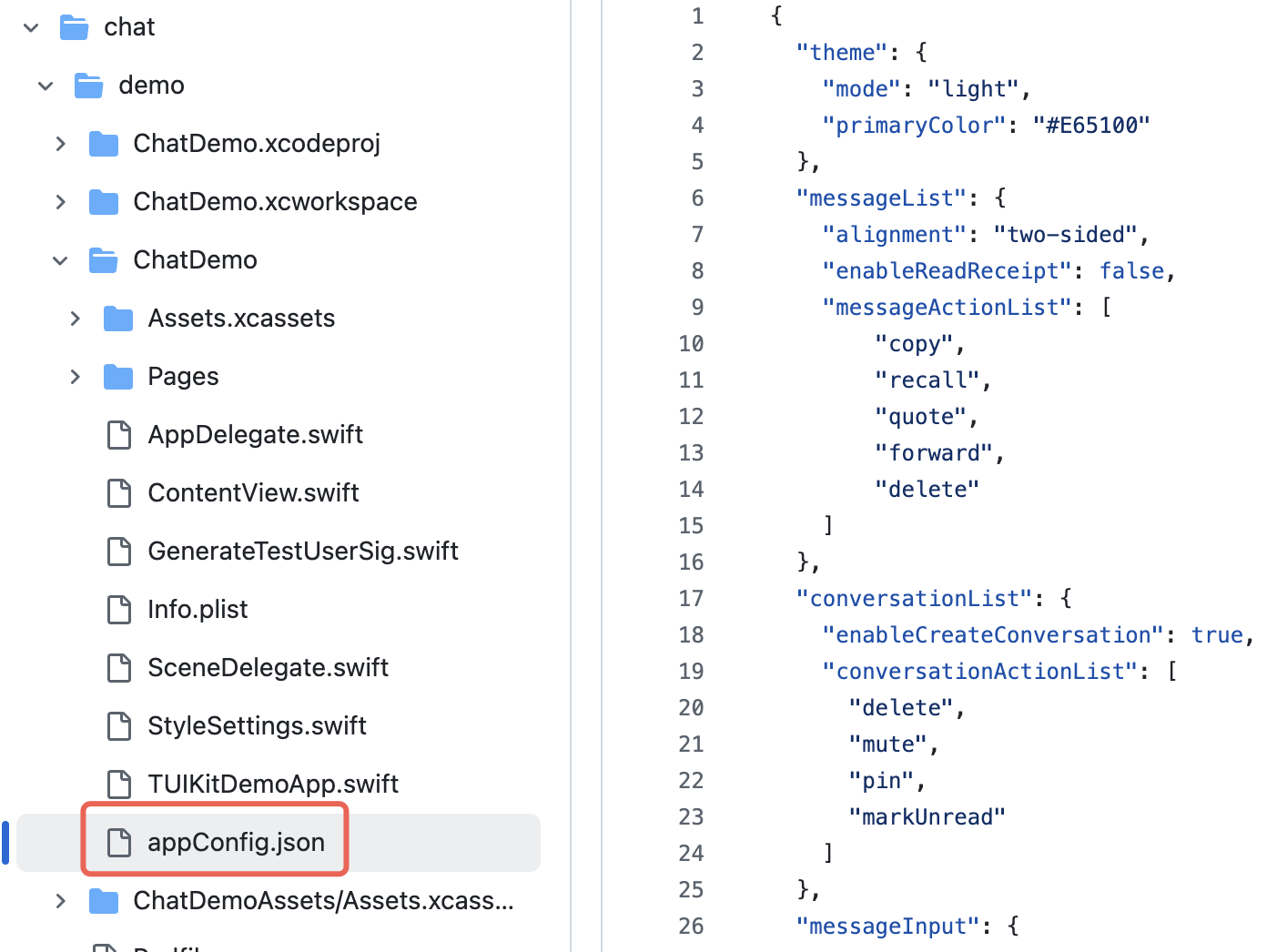
|
|
274
|
-
|
|
275
|
-
|
|
276
133
|
#### Step 3: Load Configuration File
|
|
277
134
|
|
|
278
135
|
Set the JSON file path at app launch to load the configuration file. If you also place appConfig.json in the app's main bundle, you can obtain the JSON file like this:
|
|
@@ -287,7 +144,7 @@ struct MyApp: App {
|
|
|
287
144
|
AppBuilderHelper.setJsonPath(path: path)
|
|
288
145
|
}
|
|
289
146
|
}
|
|
290
|
-
|
|
147
|
+
|
|
291
148
|
var body: some Scene {
|
|
292
149
|
WindowGroup {
|
|
293
150
|
ContentView()
|
|
@@ -309,7 +166,7 @@ import AtomicX
|
|
|
309
166
|
|
|
310
167
|
struct SettingsView: View {
|
|
311
168
|
@EnvironmentObject var themeState: ThemeState
|
|
312
|
-
|
|
169
|
+
|
|
313
170
|
var body: some View {
|
|
314
171
|
List {
|
|
315
172
|
Section("Appearance Mode") {
|
|
@@ -336,7 +193,7 @@ You can set the theme color through the API `setPrimaryColor` by passing a prima
|
|
|
336
193
|
struct CustomColorPicker: View {
|
|
337
194
|
@EnvironmentObject var themeState: ThemeState
|
|
338
195
|
@State private var customColor = "#1C66E5"
|
|
339
|
-
|
|
196
|
+
|
|
340
197
|
var body: some View {
|
|
341
198
|
VStack(spacing: 20) {
|
|
342
199
|
TextField("Enter color value", text: $customColor)
|
|
@@ -344,7 +201,7 @@ struct CustomColorPicker: View {
|
|
|
344
201
|
.placeholder(when: customColor.isEmpty) {
|
|
345
202
|
Text("#1C66E5").foregroundColor(.gray)
|
|
346
203
|
}
|
|
347
|
-
|
|
204
|
+
|
|
348
205
|
Button("Apply Theme Color") {
|
|
349
206
|
themeState.setPrimaryColor(customColor)
|
|
350
207
|
}
|
|
@@ -352,7 +209,7 @@ struct CustomColorPicker: View {
|
|
|
352
209
|
}
|
|
353
210
|
.padding()
|
|
354
211
|
}
|
|
355
|
-
|
|
212
|
+
|
|
356
213
|
private func isValidHexColor(_ hex: String) -> Bool {
|
|
357
214
|
let pattern = "^#[0-9A-Fa-f]{6}$"
|
|
358
215
|
return hex.range(of: pattern, options: .regularExpression) != nil
|
|
@@ -361,11 +218,10 @@ struct CustomColorPicker: View {
|
|
|
361
218
|
```
|
|
362
219
|
|
|
363
220
|
> **Usage Recommendations:**
|
|
364
|
-
>
|
|
221
|
+
>
|
|
365
222
|
> - For most applications, it's recommended to use the JSON configuration file approach, which is simple, reliable, and supports multi-platform uniformity.
|
|
366
223
|
> - Consistently use colors from `themeState.colors` throughout the application to ensure interface consistency when switching themes.
|
|
367
224
|
|
|
368
|
-
|
|
369
225
|
## FAQ
|
|
370
226
|
- **How to determine if currently in dark mode?**
|
|
371
227
|
|
|
@@ -378,12 +234,10 @@ struct CustomColorPicker: View {
|
|
|
378
234
|
```
|
|
379
235
|
- **How to see effects immediately after setting theme color?**
|
|
380
236
|
|
|
381
|
-
|
|
382
237
|
The UI will automatically refresh after setting the theme color because `ThemeState` is an `ObservableObject`. Ensure your views use `@EnvironmentObject` or `@ObservedObject` to observe state changes.
|
|
383
238
|
|
|
384
239
|
- **Can I set transparency?**
|
|
385
240
|
|
|
386
|
-
|
|
387
241
|
Not supported. Theme colors only support 6-digit Hex format (RGB), not 8-digit format (RGBA). If you need transparency effects, add the `.opacity()` modifier when using colors.
|
|
388
242
|
|
|
389
243
|
- **How to restore default theme?**
|
|
@@ -394,7 +248,6 @@ struct CustomColorPicker: View {
|
|
|
394
248
|
```
|
|
395
249
|
- **Where is theme configuration stored?**
|
|
396
250
|
|
|
397
|
-
|
|
398
251
|
Stored in `UserDefaults` with key `"BaseComponentThemeKey"`. It will be lost after uninstalling the app and will restore to default configuration after reinstalling.
|
|
399
252
|
|
|
400
253
|
- **How to get the complete current theme configuration?**
|
|
@@ -406,11 +259,9 @@ struct CustomColorPicker: View {
|
|
|
406
259
|
```
|
|
407
260
|
- **Can I set mode and theme color simultaneously?**
|
|
408
261
|
|
|
409
|
-
|
|
410
262
|
Yes, you can call both methods separately, and the system will automatically merge the configurations:
|
|
411
263
|
|
|
412
264
|
``` swift
|
|
413
265
|
themeState.setThemeMode(.dark)
|
|
414
266
|
themeState.setPrimaryColor("#0ABF77")
|
|
415
267
|
```
|
|
416
|
-
|