@tencent-rtc/mcp 1.3.8 → 1.4.0
This diff represents the content of publicly available package versions that have been released to one of the supported registries. The information contained in this diff is provided for informational purposes only and reflects changes between package versions as they appear in their respective public registries.
- package/package.json +2 -2
- package/resource/doc/{tuicallkit/iOS/faq.md → callkit/faq/android-faq.md} +10 -22
- package/resource/doc/{tuicallkit/android/faq.md → callkit/faq/flutter-faq.md} +10 -22
- package/resource/doc/{tuicallkit/flutter/faq.md → callkit/faq/ios-faq.md} +10 -22
- package/resource/doc/callkit/preset/android/api.md +296 -0
- package/resource/doc/callkit/preset/android/integration.md +430 -0
- package/resource/doc/callkit/preset/flutter/api.md +410 -0
- package/resource/doc/{tuicallkit → callkit/preset}/flutter/integration.md +35 -97
- package/resource/doc/callkit/preset/ios/api.md +80 -0
- package/resource/doc/{tuicallkit/iOS → callkit/preset/ios}/integration.md +37 -118
- package/resource/doc/callkit/preset/react/api.md +501 -0
- package/resource/doc/{tuicallkit → callkit/preset}/react/integration.md +5 -20
- package/resource/doc/callkit/preset/vue/api.md +501 -0
- package/resource/doc/{tuicallkit → callkit/preset}/vue/integration.md +4 -19
- package/resource/doc/{chatuikit → chatkit}/android/faq.md +29 -38
- package/resource/doc/{chatuikit → chatkit}/android/features/theme.md +22 -166
- package/resource/doc/chatkit/android/integration.md +490 -0
- package/resource/doc/chatkit/faq/android_sdk/client-api.md +281 -0
- package/resource/doc/{chatuikit → chatkit}/faq/common/product.md +0 -1
- package/resource/doc/{chatuikit → chatkit}/faq/common/server.md +1 -1
- package/resource/doc/chatkit/faq/flutter_sdk/client-api.md +199 -0
- package/resource/doc/{chatuikit → chatkit}/faq/flutter_sdk/faq.md +3 -3
- package/resource/doc/chatkit/faq/ios_sdk/client-api.md +235 -0
- package/resource/doc/{chatuikit → chatkit}/faq/web_sdk/faq.md +3 -3
- package/resource/doc/{chatuikit → chatkit}/flutter/features/theme.md +22 -166
- package/resource/doc/{chatuikit → chatkit}/flutter/integration.md +19 -88
- package/resource/doc/{chatuikit/iOS → chatkit/ios}/faq.md +29 -38
- package/resource/doc/{chatuikit/iOS → chatkit/ios}/features/theme.md +27 -176
- package/resource/doc/{chatuikit/iOS → chatkit/ios}/integration.md +47 -165
- package/resource/doc/{chatuikit → chatkit}/react/components/avatar.md +0 -33
- package/resource/doc/{chatuikit → chatkit}/react/components/chat-header.md +8 -49
- package/resource/doc/{chatuikit → chatkit}/react/components/chat-setting.md +6 -35
- package/resource/doc/{chatuikit → chatkit}/react/components/chat.md +0 -6
- package/resource/doc/{chatuikit → chatkit}/react/components/component-list.md +0 -11
- package/resource/doc/{chatuikit → chatkit}/react/components/contact-list.md +96 -502
- package/resource/doc/chatkit/react/components/conversation-actions.md +174 -0
- package/resource/doc/chatkit/react/components/conversation-list.md +333 -0
- package/resource/doc/chatkit/react/components/conversation-preview.md +118 -0
- package/resource/doc/chatkit/react/components/conversation-search.md +60 -0
- package/resource/doc/{chatuikit → chatkit}/react/components/message-input.md +36 -337
- package/resource/doc/{chatuikit → chatkit}/react/components/message-list.md +20 -212
- package/resource/doc/chatkit/react/components/search.md +243 -0
- package/resource/doc/{chatuikit → chatkit}/react/components/tuikit.md +1 -47
- package/resource/doc/{chatuikit → chatkit}/react/integration.md +21 -81
- package/resource/doc/{chatuikit → chatkit}/vue/components/avatar.md +0 -33
- package/resource/doc/{chatuikit → chatkit}/vue/components/chat-header.md +7 -48
- package/resource/doc/{chatuikit → chatkit}/vue/components/chat-setting.md +3 -5
- package/resource/doc/{chatuikit → chatkit}/vue/components/chat.md +0 -5
- package/resource/doc/{chatuikit → chatkit}/vue/components/component-list.md +0 -15
- package/resource/doc/chatkit/vue/components/contact-list.md +271 -0
- package/resource/doc/chatkit/vue/components/conversation-actions.md +228 -0
- package/resource/doc/{chatuikit → chatkit}/vue/components/conversation-list.md +42 -492
- package/resource/doc/chatkit/vue/components/conversation-preview.md +213 -0
- package/resource/doc/chatkit/vue/components/conversation-search.md +50 -0
- package/resource/doc/{chatuikit → chatkit}/vue/components/message-input.md +2 -223
- package/resource/doc/{chatuikit → chatkit}/vue/components/message-list.md +23 -252
- package/resource/doc/{chatuikit → chatkit}/vue/components/search.md +73 -640
- package/resource/doc/{chatuikit → chatkit}/vue/components/tuikit.md +7 -21
- package/resource/doc/{chatuikit → chatkit}/vue/components/userpicker.md +3 -62
- package/resource/doc/{chatuikit → chatkit}/vue/faq.md +1 -1
- package/resource/doc/{chatuikit → chatkit}/vue/integration.md +22 -23
- package/resource/doc/livekit/{live → core-sdk/live}/android/live-audience-list.md +18 -89
- package/resource/doc/livekit/{live → core-sdk/live}/android/live-audio-effect.md +34 -192
- package/resource/doc/livekit/{live → core-sdk/live}/android/live-barrage.md +28 -141
- package/resource/doc/livekit/{live → core-sdk/live}/android/live-base-beauty.md +20 -112
- package/resource/doc/livekit/{live → core-sdk/live}/android/live-co-guest-interaction.md +59 -193
- package/resource/doc/livekit/{live → core-sdk/live}/android/live-gift.md +75 -455
- package/resource/doc/livekit/{live → core-sdk/live}/android/live-host-interaction.md +94 -344
- package/resource/doc/livekit/{live → core-sdk/live}/android/live-integration.md +107 -515
- package/resource/doc/livekit/{live → core-sdk/live}/android/live-live-list.md +33 -173
- package/resource/doc/livekit/{live → core-sdk/live}/flutter/live-audience-list.md +14 -93
- package/resource/doc/livekit/{live → core-sdk/live}/flutter/live-audio-effect.md +34 -179
- package/resource/doc/livekit/{live → core-sdk/live}/flutter/live-barrage.md +19 -107
- package/resource/doc/livekit/{live → core-sdk/live}/flutter/live-base-beauty.md +24 -166
- package/resource/doc/livekit/{live → core-sdk/live}/flutter/live-co-guest-interaction.md +56 -163
- package/resource/doc/livekit/{live → core-sdk/live}/flutter/live-gift.md +69 -443
- package/resource/doc/livekit/{live → core-sdk/live}/flutter/live-host-interaction.md +117 -364
- package/resource/doc/livekit/{live → core-sdk/live}/flutter/live-integration.md +107 -492
- package/resource/doc/livekit/{live → core-sdk/live}/flutter/live-live-list.md +23 -165
- package/resource/doc/livekit/{live → core-sdk/live}/ios/live-audience-list.md +35 -111
- package/resource/doc/livekit/{live → core-sdk/live}/ios/live-audio-effect.md +35 -193
- package/resource/doc/livekit/{live → core-sdk/live}/ios/live-barrage.md +31 -144
- package/resource/doc/livekit/{live → core-sdk/live}/ios/live-base-beauty.md +24 -116
- package/resource/doc/livekit/{live → core-sdk/live}/ios/live-co-guest-interaction.md +37 -171
- package/resource/doc/livekit/{live → core-sdk/live}/ios/live-gift.md +79 -459
- package/resource/doc/livekit/{live → core-sdk/live}/ios/live-host-interaction.md +69 -320
- package/resource/doc/livekit/{live → core-sdk/live}/ios/live-integration.md +85 -502
- package/resource/doc/livekit/{live → core-sdk/live}/ios/live-live-list.md +32 -169
- package/resource/doc/livekit/core-sdk/voice/android/voice-audience-list.md +263 -0
- package/resource/doc/livekit/core-sdk/voice/android/voice-audio-effect.md +222 -0
- package/resource/doc/livekit/core-sdk/voice/android/voice-barrage.md +452 -0
- package/resource/doc/livekit/core-sdk/voice/android/voice-co-guest-interaction.md +536 -0
- package/resource/doc/livekit/core-sdk/voice/android/voice-gift.md +442 -0
- package/resource/doc/livekit/core-sdk/voice/android/voice-host-interaction.md +489 -0
- package/resource/doc/livekit/core-sdk/voice/android/voice-integration.md +574 -0
- package/resource/doc/livekit/core-sdk/voice/android/voice-room-list.md +435 -0
- package/resource/doc/livekit/core-sdk/voice/flutter/voice-co-guest-interaction.md +516 -0
- package/resource/doc/livekit/core-sdk/voice/flutter/voice-integration.md +576 -0
- package/resource/doc/livekit/core-sdk/voice/ios/voice-audience-list.md +263 -0
- package/resource/doc/livekit/core-sdk/voice/ios/voice-audio-effect.md +212 -0
- package/resource/doc/livekit/core-sdk/voice/ios/voice-barrage.md +404 -0
- package/resource/doc/livekit/core-sdk/voice/ios/voice-co-guest-interaction.md +499 -0
- package/resource/doc/livekit/core-sdk/voice/ios/voice-gift.md +403 -0
- package/resource/doc/livekit/core-sdk/voice/ios/voice-host-interaction.md +552 -0
- package/resource/doc/livekit/core-sdk/voice/ios/voice-integration.md +514 -0
- package/resource/doc/livekit/core-sdk/voice/ios/voice-room-list.md +348 -0
- package/resource/doc/livekit/faq/common/{error_code.md → error-code.md} +2 -2
- package/resource/doc/livekit/preset/live/vue/api-reference/index.md +780 -0
- package/resource/doc/livekit/preset/live/vue/components/barrage.md +291 -0
- package/resource/doc/livekit/{live → preset/live}/vue/components/co-guest-panel.md +10 -49
- package/resource/doc/livekit/{live → preset/live}/vue/components/live-audience-list.md +26 -144
- package/resource/doc/livekit/{live → preset/live}/vue/components/live-scene-panel.md +12 -75
- package/resource/doc/livekit/{live → preset/live}/vue/components/live-view.md +36 -227
- package/resource/doc/livekit/preset/live/vue/components/stream-mixer.md +215 -0
- package/resource/doc/livekit/preset/live/vue/faq.md +1 -0
- package/resource/doc/livekit/preset/live/vue/live-list-integration.md +241 -0
- package/resource/doc/livekit/preset/live/vue/live-player-desk-integration.md +299 -0
- package/resource/doc/livekit/preset/live/vue/live-player-h5-integration.md +300 -0
- package/resource/doc/livekit/preset/live/vue/live-pusher-integration.md +743 -0
- package/resource/doc/roomkit/vue/faq.md +1 -0
- package/resource/doc/roomkit/vue/features/call-user-to-room.md +17 -53
- package/resource/doc/roomkit/vue/features/device-detection.md +30 -48
- package/resource/doc/roomkit/vue/features/device-state.md +24 -44
- package/resource/doc/roomkit/vue/features/free-beauty-panel.md +13 -36
- package/resource/doc/roomkit/vue/features/room-chat.md +31 -89
- package/resource/doc/roomkit/vue/features/room-participant-state.md +28 -50
- package/resource/doc/roomkit/vue/features/room-state.md +25 -34
- package/resource/doc/roomkit/vue/features/room-view.md +30 -125
- package/resource/doc/roomkit/vue/features/schedule-room.md +9 -40
- package/resource/doc/roomkit/vue/features/screen-share.md +22 -90
- package/resource/doc/roomkit/vue/features/virtual-background.md +13 -29
- package/resource/doc/roomkit/vue/integration.md +173 -337
- package/resource/doc/rtcengine/faq/common/error_code.md +1 -0
- package/resource/doc/rtcengine/faq/web/web.md +14 -24
- package/resource/doc/rtcengine/web/api.md +1 -3
- package/resource/doc/rtcengine/web/how_to_integrated_web_sdk.md +3 -10
- package/resource/doc/rtcengine/web/how_to_run_web_sdk_demo.md +1 -5
- package/resource/doc/rtcengine/web/plugin/20-advanced-customized-capture-rendering.md +1 -2
- package/resource/doc/rtcengine/web/plugin/21-advanced-auto-play-policy.md +2 -4
- package/resource/doc/rtcengine/web/plugin/23-advanced-support-detection.md +3 -5
- package/resource/doc/rtcengine/web/plugin/24-advanced-network-quality.md +1 -7
- package/resource/doc/rtcengine/web/plugin/25-advanced-device-change.md +0 -2
- package/resource/doc/rtcengine/web/plugin/26-advanced-publish-cdn-stream.md +4 -8
- package/resource/doc/rtcengine/web/plugin/27-advanced-small-stream.md +11 -11
- package/resource/doc/rtcengine/web/plugin/28-advanced-beauty.md +12 -88
- package/resource/doc/rtcengine/web/plugin/31-advanced-plugins-overview.md +5 -5
- package/resource/doc/rtcengine/web/plugin/34-advanced-proxy.md +30 -37
- package/resource/doc/rtcengine/web/plugin/36-advanced-virtual-background.md +13 -90
- package/resource/doc/rtcengine/web/plugin/37-advanced-voice-changer.md +1 -2
- package/resource/doc/rtcengine/web/plugin/39-advanced-video-decoder.md +1 -2
- package/resource/doc/rtcengine/web/plugin/40-advanced-video-mixer.md +19 -19
- package/resource/doc/rtcengine/web/plugin/41-advanced-small-stream-auto-switcher.md +1 -1
- package/resource/doc/rtcengine/web/plugin/42-advanced-realtime-transcriber.md +4 -5
- package/resource/doc/rtcengine/web/plugin/43-advanced-face-detection.md +3 -3
- package/resource/doc/trtc/C++/ITRTCCloud.md +686 -2835
- package/resource/doc/trtc/C++/ITRTCStatistics.md +53 -308
- package/resource/doc/trtc/C++/ITXAudioEffectManager.md +202 -1022
- package/resource/doc/trtc/C++/ITXDeviceManager.md +126 -767
- package/resource/doc/trtc/C++/TRTCCloudCallback.md +579 -2147
- package/resource/doc/trtc/C++/TRTCTypeDef.md +703 -3378
- package/resource/doc/trtc/C++/TXLiteAVCode.md +116 -908
- package/resource/doc/trtc/android/TRTCCloud.md +606 -2573
- package/resource/doc/trtc/android/TRTCCloudDef.md +752 -3640
- package/resource/doc/trtc/android/TRTCCloudListener.md +581 -2008
- package/resource/doc/trtc/android/TRTCStatistics.md +48 -278
- package/resource/doc/trtc/android/TXAudioEffectManager.md +202 -1022
- package/resource/doc/trtc/android/TXBeautyManager.md +127 -704
- package/resource/doc/trtc/android/TXDeviceManager.md +51 -318
- package/resource/doc/trtc/android/TXLiteAVCode.md +114 -892
- package/resource/doc/trtc/iOS/TRTCCloud.md +694 -2904
- package/resource/doc/trtc/iOS/TRTCCloudDef.md +726 -3498
- package/resource/doc/trtc/iOS/TRTCCloudDelegate.md +543 -2028
- package/resource/doc/trtc/iOS/TRTCStatistics.md +48 -278
- package/resource/doc/trtc/iOS/TXAudioEffectManager.md +174 -877
- package/resource/doc/trtc/iOS/TXBeautyManager.md +128 -710
- package/resource/doc/trtc/iOS/TXDeviceManager.md +129 -772
- package/resource/doc/trtc/iOS/TXLiteAVCode.md +117 -915
- package/server.js +1 -5
- package/server.js.map +1 -1
- package/tools/call/get_callkit_api.js +32 -0
- package/tools/call/get_callkit_api.js.map +1 -0
- package/tools/call/get_native_call_uikit_integration.js +34 -0
- package/tools/call/get_native_call_uikit_integration.js.map +1 -0
- package/tools/call/{get-web-call-integration.js → get_web_call_uikit_integration.js} +13 -8
- package/tools/call/get_web_call_uikit_integration.js.map +1 -0
- package/tools/chat/get_native_chat_uikit_feature_detail.js +34 -0
- package/tools/chat/get_native_chat_uikit_feature_detail.js.map +1 -0
- package/tools/chat/get_native_chat_uikit_integration.js +45 -0
- package/tools/chat/get_native_chat_uikit_integration.js.map +1 -0
- package/tools/chat/get_web_chat_uikit_component_detail.js +34 -0
- package/tools/chat/get_web_chat_uikit_component_detail.js.map +1 -0
- package/tools/chat/get_web_chat_uikit_integration.js +45 -0
- package/tools/chat/get_web_chat_uikit_integration.js.map +1 -0
- package/tools/common/get_faq.js +265 -0
- package/tools/common/get_faq.js.map +1 -0
- package/tools/common/{get-usersig.js → get_usersig.js} +6 -3
- package/tools/common/get_usersig.js.map +1 -0
- package/tools/common/present_framework_choice.js +63 -0
- package/tools/common/present_framework_choice.js.map +1 -0
- package/tools/definitions/get_callkit_api_def.js +29 -0
- package/tools/definitions/get_callkit_api_def.js.map +1 -0
- package/tools/definitions/get_faq_def.js +17 -18
- package/tools/definitions/get_faq_def.js.map +1 -1
- package/tools/definitions/get_native_call_uikit_integration_def.js +15 -18
- package/tools/definitions/get_native_call_uikit_integration_def.js.map +1 -1
- package/tools/definitions/get_native_chat_uikit_feature_detail_def.js +31 -0
- package/tools/definitions/get_native_chat_uikit_feature_detail_def.js.map +1 -0
- package/tools/definitions/get_native_chat_uikit_integration_def.js +16 -19
- package/tools/definitions/get_native_chat_uikit_integration_def.js.map +1 -1
- package/tools/definitions/get_native_livekit_core_features_def.js +34 -0
- package/tools/definitions/get_native_livekit_core_features_def.js.map +1 -0
- package/tools/definitions/get_native_livekit_core_integration_def.js +34 -0
- package/tools/definitions/get_native_livekit_core_integration_def.js.map +1 -0
- package/tools/definitions/get_native_trtc_sdk_docs_def.js +32 -0
- package/tools/definitions/get_native_trtc_sdk_docs_def.js.map +1 -0
- package/tools/definitions/get_usersig_def.js +17 -22
- package/tools/definitions/get_usersig_def.js.map +1 -1
- package/tools/definitions/get_web_call_uikit_integration_def.js +15 -7
- package/tools/definitions/get_web_call_uikit_integration_def.js.map +1 -1
- package/tools/definitions/get_web_chat_uikit_component_detail_def.js +17 -49
- package/tools/definitions/get_web_chat_uikit_component_detail_def.js.map +1 -1
- package/tools/definitions/get_web_chat_uikit_integration_def.js +16 -19
- package/tools/definitions/get_web_chat_uikit_integration_def.js.map +1 -1
- package/tools/definitions/get_web_live_uikit_integration_def.js +15 -18
- package/tools/definitions/get_web_live_uikit_integration_def.js.map +1 -1
- package/tools/definitions/get_web_livekit_api_def.js +30 -0
- package/tools/definitions/get_web_livekit_api_def.js.map +1 -0
- package/tools/definitions/get_web_livekit_component_detail_def.js +32 -0
- package/tools/definitions/get_web_livekit_component_detail_def.js.map +1 -0
- package/tools/definitions/get_web_room_uikit_integration_def.js +15 -30
- package/tools/definitions/get_web_room_uikit_integration_def.js.map +1 -1
- package/tools/definitions/get_web_roomkit_feature_detail_def.js +31 -0
- package/tools/definitions/get_web_roomkit_feature_detail_def.js.map +1 -0
- package/tools/definitions/get_web_trtc_sdk_api_def.js +27 -0
- package/tools/definitions/get_web_trtc_sdk_api_def.js.map +1 -0
- package/tools/definitions/get_web_trtc_sdk_integration_def.js +27 -0
- package/tools/definitions/get_web_trtc_sdk_integration_def.js.map +1 -0
- package/tools/definitions/get_web_trtc_sdk_plugin_def.js +27 -0
- package/tools/definitions/get_web_trtc_sdk_plugin_def.js.map +1 -0
- package/tools/definitions/present_framework_choice_def.js +24 -12
- package/tools/definitions/present_framework_choice_def.js.map +1 -1
- package/tools/index.js +47 -59
- package/tools/index.js.map +1 -1
- package/tools/live/get_native_livekit_core_features.js +65 -0
- package/tools/live/get_native_livekit_core_features.js.map +1 -0
- package/tools/live/get_native_livekit_core_integration.js +59 -0
- package/tools/live/get_native_livekit_core_integration.js.map +1 -0
- package/tools/live/get_web_live_uikit_integration.js +48 -0
- package/tools/live/get_web_live_uikit_integration.js.map +1 -0
- package/tools/live/get_web_livekit_api.js +32 -0
- package/tools/live/get_web_livekit_api.js.map +1 -0
- package/tools/live/get_web_livekit_component_detail.js +34 -0
- package/tools/live/get_web_livekit_component_detail.js.map +1 -0
- package/tools/room/{get-web-room-integration.js → get_web_room_uikit_integration.js} +13 -14
- package/tools/room/get_web_room_uikit_integration.js.map +1 -0
- package/tools/room/{get-web-room-feature-detail.js → get_web_roomkit_feature_detail.js} +30 -31
- package/tools/room/get_web_roomkit_feature_detail.js.map +1 -0
- package/tools/rtcengine/get_web_trtc_sdk_api.js +31 -0
- package/tools/rtcengine/get_web_trtc_sdk_api.js.map +1 -0
- package/tools/rtcengine/get_web_trtc_sdk_integration.js +31 -0
- package/tools/rtcengine/get_web_trtc_sdk_integration.js.map +1 -0
- package/tools/rtcengine/get_web_trtc_sdk_plugin.js +31 -0
- package/tools/rtcengine/get_web_trtc_sdk_plugin.js.map +1 -0
- package/tools/trtc/get_native_trtc_sdk_docs.js +73 -0
- package/tools/trtc/get_native_trtc_sdk_docs.js.map +1 -0
- package/utils/generate-structured-result.js +61 -17
- package/utils/generate-structured-result.js.map +1 -1
- package/utils/report-cls-client.js +12 -1
- package/utils/report-cls-client.js.map +1 -1
- package/utils/report-es-client.js +2 -2
- package/resource/doc/chatuikit/android/integration.md +0 -287
- package/resource/doc/chatuikit/faq/android_sdk/client-api.md +0 -1371
- package/resource/doc/chatuikit/faq/flutter_sdk/client-api.md +0 -932
- package/resource/doc/chatuikit/faq/ios_sdk/client-api.md +0 -1119
- package/resource/doc/chatuikit/flutter/workflow.md +0 -941
- package/resource/doc/chatuikit/iOS/workflow.md +0 -0
- package/resource/doc/chatuikit/react/components/conversation-list.md +0 -1017
- package/resource/doc/chatuikit/react/components/search.md +0 -745
- package/resource/doc/chatuikit/react/create-group.md +0 -23
- package/resource/doc/chatuikit/react/init.md +0 -26
- package/resource/doc/chatuikit/react/workflow.md +0 -258
- package/resource/doc/chatuikit/vue/components/contact-list.md +0 -679
- package/resource/doc/chatuikit/vue/create-group.md +0 -25
- package/resource/doc/chatuikit/vue/init.md +0 -40
- package/resource/doc/chatuikit/vue/workflow.md +0 -395
- package/resource/doc/livekit/live/android/workflow.md +0 -320
- package/resource/doc/livekit/live/flutter/workflow.md +0 -353
- package/resource/doc/livekit/live/ios/workflow.md +0 -454
- package/resource/doc/livekit/live/vue/components/barrage.md +0 -616
- package/resource/doc/livekit/live/vue/components/stream-mixer.md +0 -446
- package/resource/doc/livekit/live/vue/faq.md +0 -0
- package/resource/doc/livekit/live/vue/live-list-integration.md +0 -200
- package/resource/doc/livekit/live/vue/live-player-desk-integration.md +0 -269
- package/resource/doc/livekit/live/vue/live-player-h5-integration.md +0 -269
- package/resource/doc/livekit/live/vue/live-pusher-integration.md +0 -595
- package/resource/doc/livekit/live/vue/states/live-state.md +0 -3591
- package/resource/doc/livekit/live/vue/workflow.md +0 -218
- package/resource/doc/native_live/android/V2TXLiveCode_api_android.md +0 -312
- package/resource/doc/native_live/android/V2TXLiveDef_api_android.md +0 -430
- package/resource/doc/native_live/android/V2TXLivePlayerObserver_api_android.md +0 -679
- package/resource/doc/native_live/android/V2TXLivePlayer_api_android.md +0 -671
- package/resource/doc/native_live/android/V2TXLivePremier_api_android.md +0 -271
- package/resource/doc/native_live/android/V2TXLivePusherObserver_api_android.md +0 -849
- package/resource/doc/native_live/android/V2TXLivePusher_api_android.md +0 -1046
- package/resource/doc/native_live/flutter/V2TXLiveCode_api_flutter.md +0 -460
- package/resource/doc/native_live/flutter/V2TXLiveDef_api_flutter.md +0 -558
- package/resource/doc/native_live/flutter/V2TXLivePlayerObserver_api_flutter.md +0 -865
- package/resource/doc/native_live/flutter/V2TXLivePlayer_api_flutter.md +0 -657
- package/resource/doc/native_live/flutter/V2TXLivePremier_api_flutter.md +0 -437
- package/resource/doc/native_live/flutter/V2TXLivePusherObserver_api_flutter.md +0 -335
- package/resource/doc/native_live/flutter/V2TXLivePusher_api_flutter.md +0 -748
- package/resource/doc/native_live/iOS/V2TXLiveCode_api_iOS.md +0 -327
- package/resource/doc/native_live/iOS/V2TXLiveDef_api_iOS.md +0 -507
- package/resource/doc/native_live/iOS/V2TXLivePlayerObserver_api_iOS.md +0 -507
- package/resource/doc/native_live/iOS/V2TXLivePlayer_api_iOS.md +0 -659
- package/resource/doc/native_live/iOS/V2TXLivePremier_api_iOS.md +0 -284
- package/resource/doc/native_live/iOS/V2TXLivePusherObserver_api_iOS.md +0 -814
- package/resource/doc/native_live/iOS/V2TXLivePusher_api_iOS.md +0 -1000
- package/resource/doc/roomkit/vue/features/workflow.md +0 -553
- package/resource/doc/roomkit/vue/workflow.md +0 -487
- package/resource/doc/tuicallkit/android/integration.md +0 -286
- package/resource/doc/tuicallkit/android/workflow.md +0 -0
- package/resource/doc/tuicallkit/faq/android_sdk/call-observer-api.md +0 -784
- package/resource/doc/tuicallkit/faq/android_sdk/callkit-api.md +0 -610
- package/resource/doc/tuicallkit/faq/flutter_sdk/call-define-api.md +0 -938
- package/resource/doc/tuicallkit/faq/flutter_sdk/call-observer-api.md +0 -897
- package/resource/doc/tuicallkit/faq/flutter_sdk/callkit-api.md +0 -469
- package/resource/doc/tuicallkit/faq/ios_sdk/call-observer-api.md +0 -781
- package/resource/doc/tuicallkit/faq/ios_sdk/callkit-api.md +0 -398
- package/resource/doc/tuicallkit/flutter/workflow.md +0 -331
- package/resource/doc/tuicallkit/react/api.md +0 -1404
- package/resource/doc/tuicallkit/vue/api.md +0 -1406
- package/resource/doc/tuicallkit/vue/faq.md +0 -36
- package/tools/call/get-native-call-integration.js +0 -43
- package/tools/call/get-native-call-integration.js.map +0 -1
- package/tools/call/get-web-call-api.js +0 -27
- package/tools/call/get-web-call-api.js.map +0 -1
- package/tools/call/get-web-call-integration.js.map +0 -1
- package/tools/chat/get-native-chat-feature-detail.js +0 -30
- package/tools/chat/get-native-chat-feature-detail.js.map +0 -1
- package/tools/chat/get-native-chat-integration.js +0 -45
- package/tools/chat/get-native-chat-integration.js.map +0 -1
- package/tools/chat/get-web-chat-component-detail.js +0 -31
- package/tools/chat/get-web-chat-component-detail.js.map +0 -1
- package/tools/chat/get-web-chat-integration.js +0 -45
- package/tools/chat/get-web-chat-integration.js.map +0 -1
- package/tools/chat/get-web-chat-uikit-init.js +0 -28
- package/tools/chat/get-web-chat-uikit-init.js.map +0 -1
- package/tools/chat/get-web-create-group-doc.js +0 -28
- package/tools/chat/get-web-create-group-doc.js.map +0 -1
- package/tools/common/get-faq.js +0 -91
- package/tools/common/get-faq.js.map +0 -1
- package/tools/common/get-usersig.js.map +0 -1
- package/tools/common/present-framework-choice.js +0 -16
- package/tools/common/present-framework-choice.js.map +0 -1
- package/tools/common/record-prompt.js +0 -55
- package/tools/common/record-prompt.js.map +0 -1
- package/tools/common/record-result.js +0 -60
- package/tools/common/record-result.js.map +0 -1
- package/tools/definitions/get_native_chat_feature_detail_def.js +0 -32
- package/tools/definitions/get_native_chat_feature_detail_def.js.map +0 -1
- package/tools/definitions/get_native_live_api_def.js +0 -23
- package/tools/definitions/get_native_live_api_def.js.map +0 -1
- package/tools/definitions/get_native_live_uikit_extra_features_def.js +0 -87
- package/tools/definitions/get_native_live_uikit_extra_features_def.js.map +0 -1
- package/tools/definitions/get_native_live_uikit_integration_def.js +0 -49
- package/tools/definitions/get_native_live_uikit_integration_def.js.map +0 -1
- package/tools/definitions/get_native_live_uikit_interaction_def.js +0 -74
- package/tools/definitions/get_native_live_uikit_interaction_def.js.map +0 -1
- package/tools/definitions/get_trtc_native_api_def.js +0 -16
- package/tools/definitions/get_trtc_native_api_def.js.map +0 -1
- package/tools/definitions/get_web_call_uikit_api_def.js +0 -23
- package/tools/definitions/get_web_call_uikit_api_def.js.map +0 -1
- package/tools/definitions/get_web_chat_uikit_init_def.js +0 -23
- package/tools/definitions/get_web_chat_uikit_init_def.js.map +0 -1
- package/tools/definitions/get_web_create_group_doc_def.js +0 -18
- package/tools/definitions/get_web_create_group_doc_def.js.map +0 -1
- package/tools/definitions/get_web_live_state_detail_def.js +0 -19
- package/tools/definitions/get_web_live_state_detail_def.js.map +0 -1
- package/tools/definitions/get_web_live_uikit_component_detail_def.js +0 -27
- package/tools/definitions/get_web_live_uikit_component_detail_def.js.map +0 -1
- package/tools/definitions/get_web_room_feature_detail_def.js +0 -95
- package/tools/definitions/get_web_room_feature_detail_def.js.map +0 -1
- package/tools/definitions/get_web_room_state_detail_def.js +0 -19
- package/tools/definitions/get_web_room_state_detail_def.js.map +0 -1
- package/tools/definitions/record_prompt_def.js +0 -53
- package/tools/definitions/record_prompt_def.js.map +0 -1
- package/tools/definitions/record_result_def.js +0 -30
- package/tools/definitions/record_result_def.js.map +0 -1
- package/tools/live/get-native-live-uikit-integration.js +0 -101
- package/tools/live/get-native-live-uikit-integration.js.map +0 -1
- package/tools/live/get-web-live-component-detail.js +0 -31
- package/tools/live/get-web-live-component-detail.js.map +0 -1
- package/tools/live/get-web-live-state-detail.js +0 -31
- package/tools/live/get-web-live-state-detail.js.map +0 -1
- package/tools/live/get-web-live-uikit-integration.js +0 -52
- package/tools/live/get-web-live-uikit-integration.js.map +0 -1
- package/tools/live/get_native_live_uikit_extra_features.js +0 -105
- package/tools/live/get_native_live_uikit_extra_features.js.map +0 -1
- package/tools/live/get_native_live_uikit_interaction.js +0 -101
- package/tools/live/get_native_live_uikit_interaction.js.map +0 -1
- package/tools/native_live/get-native-live-api.js +0 -31
- package/tools/native_live/get-native-live-api.js.map +0 -1
- package/tools/room/get-web-room-feature-detail.js.map +0 -1
- package/tools/room/get-web-room-integration.js.map +0 -1
- package/tools/rtcengine/get-rtcengine-web-sdk-integration.js +0 -28
- package/tools/rtcengine/get-rtcengine-web-sdk-integration.js.map +0 -1
- package/tools/rtcengine/get-trtc-sdk-faq.js +0 -32
- package/tools/rtcengine/get-trtc-sdk-faq.js.map +0 -1
- package/tools/rtcengine/get-trtc-web-sdk-api.js +0 -28
- package/tools/rtcengine/get-trtc-web-sdk-api.js.map +0 -1
- package/tools/rtcengine/get-trtc-web-sdk-faq.js +0 -30
- package/tools/rtcengine/get-trtc-web-sdk-faq.js.map +0 -1
- package/tools/rtcengine/get-trtc-web-sdk-integration.js +0 -29
- package/tools/rtcengine/get-trtc-web-sdk-integration.js.map +0 -1
- package/tools/rtcengine/get-trtc-web-sdk-plugin.js +0 -45
- package/tools/rtcengine/get-trtc-web-sdk-plugin.js.map +0 -1
- package/tools/trtc/get-trtc-native-api.js +0 -31
- package/tools/trtc/get-trtc-native-api.js.map +0 -1
- package/utils/handle-component-name.js +0 -33
- package/utils/handle-component-name.js.map +0 -1
- /package/resource/doc/{chatuikit/android/workflow.md → callkit/core-sdk/.gitkeep} +0 -0
- /package/resource/doc/{tuicallkit/faq/common/error_code.md → callkit/faq/common/error-code.md} +0 -0
- /package/resource/doc/{tuicallkit/react/faq.md → callkit/faq/web-faq.md} +0 -0
- /package/resource/doc/{chatuikit → chatkit}/faq/common/server_error_code.md +0 -0
- /package/resource/doc/{chatuikit → chatkit}/faq/web_sdk/error_code.md +0 -0
- /package/resource/doc/{chatuikit → chatkit}/flutter/faq.md +0 -0
- /package/resource/doc/{chatuikit → chatkit}/react/faq.md +0 -0
- /package/resource/doc/roomkit/faq/common/{error_code.md → error-code.md} +0 -0
|
@@ -1,8 +1,5 @@
|
|
|
1
1
|
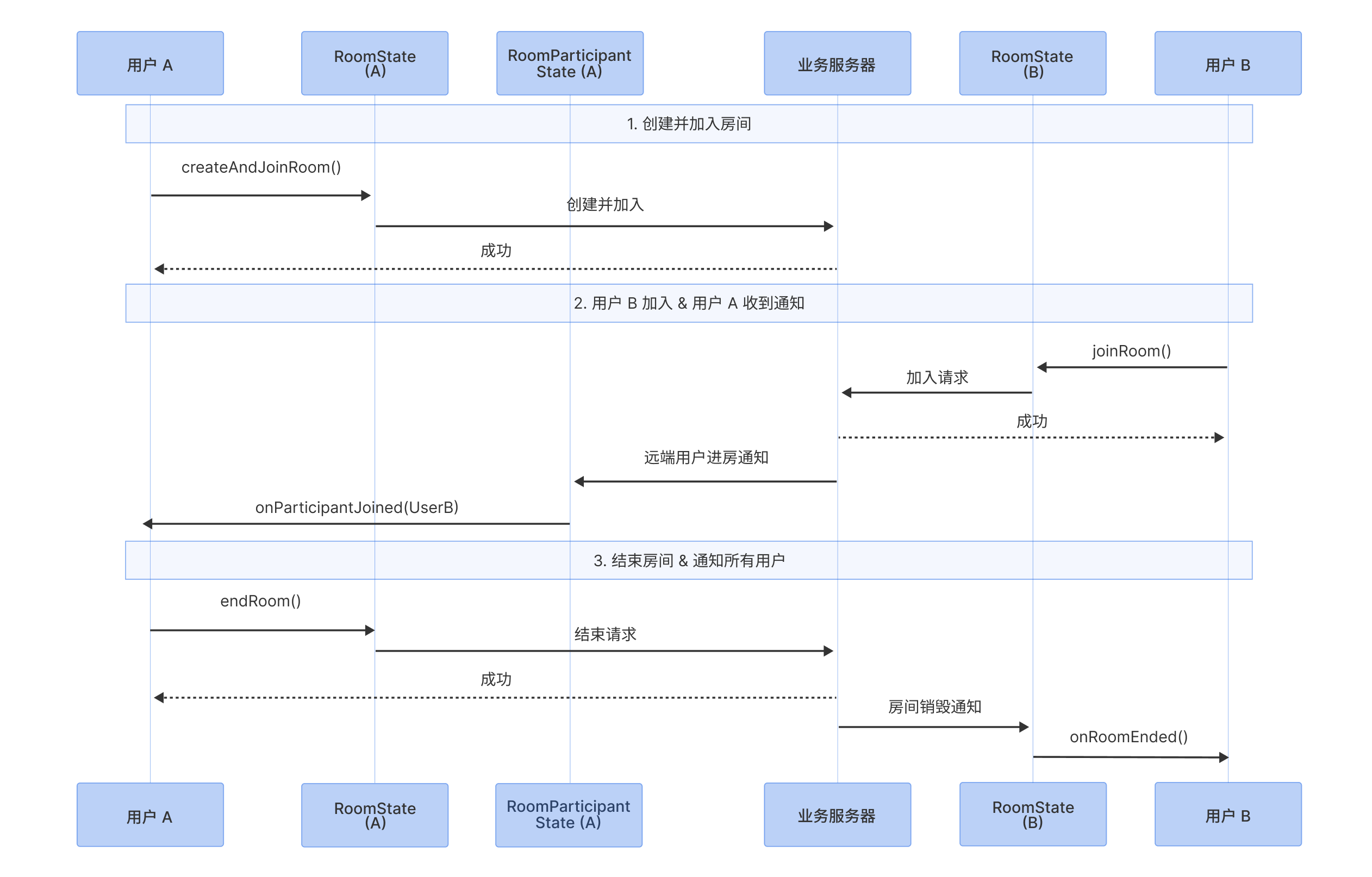
This document will guide you in detail on how to use Atomicx's [useRoomState](https://web.sdk.qcloud.com/trtc/live/web/doc/zh/index.html#module-RoomState) to manage the complete lifecycle of a room, including creating, joining, leaving, and ending a room, as well as handling key room status notifications. The following sequence diagram demonstrates the main process from room creation to destruction.
|
|
2
2
|
|
|
3
|
-
|
|
4
|
-
|
|
5
|
-
|
|
6
3
|
## Feature Introduction
|
|
7
4
|
|
|
8
5
|
[useRoomState](https://web.sdk.qcloud.com/trtc/live/web/doc/zh/index.html#module-RoomState) is the core Hook responsible for room management in the Atomicx solution. It encapsulates complex underlying signaling processes, and developers can drive room state through simple reactive data and method calls.
|
|
@@ -12,10 +9,9 @@ This document will guide you in detail on how to use Atomicx's [useRoomState](ht
|
|
|
12
9
|
|
|
13
10
|
- **Role-based Exit Mechanism:** Provides clear operational boundaries for different roles. Regular members can use [leaveRoom](https://web.sdk.qcloud.com/trtc/live/web/doc/zh/index.html#leaveRoom) to exit; while the room owner (host) has [endRoom](https://web.sdk.qcloud.com/trtc/live/web/doc/zh/index.html#endRoom) permission to end the room and destroy room resources with one click.
|
|
14
11
|
|
|
15
|
-
|
|
16
12
|
## **Prerequisites**
|
|
17
13
|
|
|
18
|
-
User has completed login authentication through [useLoginState](https://web.sdk.qcloud.com/trtc/live/web/doc/zh/index.html#module-LoginState), please refer to
|
|
14
|
+
User has completed login authentication through [useLoginState](https://web.sdk.qcloud.com/trtc/live/web/doc/zh/index.html#module-LoginState), please refer to Integration Overview.
|
|
19
15
|
|
|
20
16
|
## Implementing Room Management
|
|
21
17
|
|
|
@@ -23,12 +19,12 @@ User has completed login authentication through [useLoginState](https://web.sdk.
|
|
|
23
19
|
``` typescript
|
|
24
20
|
import { useRoomState } from 'tuikit-atomicx-vue3/room';
|
|
25
21
|
|
|
26
|
-
const {
|
|
27
|
-
createAndJoinRoom,
|
|
28
|
-
joinRoom,
|
|
29
|
-
leaveRoom,
|
|
22
|
+
const {
|
|
23
|
+
createAndJoinRoom,
|
|
24
|
+
joinRoom,
|
|
25
|
+
leaveRoom,
|
|
30
26
|
endRoom,
|
|
31
|
-
currentRoom
|
|
27
|
+
currentRoom
|
|
32
28
|
} = useRoomState();
|
|
33
29
|
```
|
|
34
30
|
|
|
@@ -37,17 +33,17 @@ const {
|
|
|
37
33
|
Create room (room owner): Use [createAndJoinRoom](https://web.sdk.qcloud.com/trtc/live/web/doc/zh/index.html#createAndJoinRoom), after successful call the user will automatically obtain room owner permissions.
|
|
38
34
|
|
|
39
35
|
> **Note:**
|
|
40
|
-
>
|
|
36
|
+
>
|
|
41
37
|
|
|
42
38
|
> The roomId specified when creating a room is recommended to be generated and issued by the business backend to ensure global uniqueness and stability of the room ID.
|
|
43
|
-
>
|
|
39
|
+
>
|
|
44
40
|
|
|
45
41
|
- **Example 1: User creates room**
|
|
46
42
|
|
|
47
43
|
``` typescript
|
|
48
44
|
import { useRoomState } from 'tuikit-atomicx-vue3/room';
|
|
49
45
|
const { createAndJoinRoom } = useRoomState();
|
|
50
|
-
|
|
46
|
+
|
|
51
47
|
await createAndJoinRoom({
|
|
52
48
|
roomId: 'YOUR_ROOM_ID', // Specify room ID, generated by business backend
|
|
53
49
|
})
|
|
@@ -57,7 +53,7 @@ Create room (room owner): Use [createAndJoinRoom](https://web.sdk.qcloud.com/trt
|
|
|
57
53
|
``` typescript
|
|
58
54
|
import { useRoomState } from 'tuikit-atomicx-vue3/room';
|
|
59
55
|
const { createAndJoinRoom } = useRoomState();
|
|
60
|
-
|
|
56
|
+
|
|
61
57
|
await createAndJoinRoom({
|
|
62
58
|
roomId: 'YOUR_ROOM_ID', // Specify room ID, generated by business backend
|
|
63
59
|
options: {
|
|
@@ -70,7 +66,7 @@ Create room (room owner): Use [createAndJoinRoom](https://web.sdk.qcloud.com/trt
|
|
|
70
66
|
``` typescript
|
|
71
67
|
import { useRoomState } from 'tuikit-atomicx-vue3/room';
|
|
72
68
|
const { createAndJoinRoom } = useRoomState();
|
|
73
|
-
|
|
69
|
+
|
|
74
70
|
await createAndJoinRoom({
|
|
75
71
|
roomId: 'YOUR_ROOM_ID', // Specify room ID, generated by business backend
|
|
76
72
|
options: {
|
|
@@ -78,20 +74,20 @@ Create room (room owner): Use [createAndJoinRoom](https://web.sdk.qcloud.com/trt
|
|
|
78
74
|
password: '123456',
|
|
79
75
|
}
|
|
80
76
|
})
|
|
81
|
-
```
|
|
77
|
+
```
|
|
82
78
|
|
|
83
79
|
> **Note:**
|
|
84
|
-
>
|
|
80
|
+
>
|
|
85
81
|
|
|
86
82
|
> Creator automatically joins the room when calling [createAndJoinRoom](https://web.sdk.qcloud.com/trtc/live/web/doc/zh/index.html#createAndJoinRoom), no password required.
|
|
87
|
-
>
|
|
83
|
+
>
|
|
88
84
|
|
|
89
85
|
- **Example 4: User creates room and configures member management settings**
|
|
90
86
|
|
|
91
87
|
``` typescript
|
|
92
88
|
import { useRoomState } from 'tuikit-atomicx-vue3/room';
|
|
93
89
|
const { createAndJoinRoom } = useRoomState();
|
|
94
|
-
|
|
90
|
+
|
|
95
91
|
await createAndJoinRoom({
|
|
96
92
|
roomId: 'YOUR_ROOM_ID', // Specify room ID, generated by business backend
|
|
97
93
|
options: {
|
|
@@ -103,14 +99,13 @@ Create room (room owner): Use [createAndJoinRoom](https://web.sdk.qcloud.com/trt
|
|
|
103
99
|
isAllMessageDisabled: true, // Enable disable all in-meeting messages
|
|
104
100
|
}
|
|
105
101
|
})
|
|
106
|
-
```
|
|
102
|
+
```
|
|
107
103
|
|
|
108
104
|
> **Note:**
|
|
109
|
-
>
|
|
110
|
-
|
|
111
|
-
> Member management configuration only applies to regular members, room owner and administrators are not restricted. To modify member management configuration after room creation or manage individual member permissions, please refer to [Member Management](https://write.woa.com/document/197380064613830656).
|
|
112
|
-
>
|
|
105
|
+
>
|
|
113
106
|
|
|
107
|
+
> Member management configuration only applies to regular members, room owner and administrators are not restricted. To modify member management configuration after room creation or manage individual member permissions, please refer to Member Management.
|
|
108
|
+
>
|
|
114
109
|
|
|
115
110
|
### Step 3: User joins existing room
|
|
116
111
|
|
|
@@ -120,7 +115,7 @@ Logged-in users can call [joinRoom](https://web.sdk.qcloud.com/trtc/live/web/doc
|
|
|
120
115
|
``` typescript
|
|
121
116
|
import { useRoomState } from 'tuikit-atomicx-vue3/room';
|
|
122
117
|
const { joinRoom } = useRoomState();
|
|
123
|
-
|
|
118
|
+
|
|
124
119
|
await joinRoom({
|
|
125
120
|
roomId: 'YOUR_ROOM_ID', // Specify room ID, generated by business backend
|
|
126
121
|
})
|
|
@@ -130,7 +125,7 @@ Logged-in users can call [joinRoom](https://web.sdk.qcloud.com/trtc/live/web/doc
|
|
|
130
125
|
``` typescript
|
|
131
126
|
import { useRoomState } from 'tuikit-atomicx-vue3/room';
|
|
132
127
|
const { joinRoom } = useRoomState();
|
|
133
|
-
|
|
128
|
+
|
|
134
129
|
await joinRoom({
|
|
135
130
|
roomId: 'YOUR_ROOM_ID', // Specify room ID, generated by business backend
|
|
136
131
|
password: '123456',
|
|
@@ -154,11 +149,10 @@ await updateRoomInfo({
|
|
|
154
149
|
```
|
|
155
150
|
|
|
156
151
|
> **Note:**
|
|
157
|
-
>
|
|
152
|
+
>
|
|
158
153
|
|
|
159
154
|
> Room owner must be in the room to call [updateRoomInfo](https://web.sdk.qcloud.com/trtc/live/web/doc/zh/index.html#updateRoomInfo). If room owner has left the room, they need to rejoin before updating room information.
|
|
160
|
-
>
|
|
161
|
-
|
|
155
|
+
>
|
|
162
156
|
|
|
163
157
|
### Step 5: Leave room
|
|
164
158
|
|
|
@@ -181,11 +175,10 @@ await endRoom();
|
|
|
181
175
|
```
|
|
182
176
|
|
|
183
177
|
> **Note:**
|
|
184
|
-
>
|
|
178
|
+
>
|
|
185
179
|
> - If room owner leaves the room without calling [endRoom](https://web.sdk.qcloud.com/trtc/live/web/doc/zh/index.html#endRoom), the room will continue to exist until automatic reclamation conditions are met (6 consecutive hours without users).
|
|
186
180
|
> - Room owner can transfer owner status to other users through [transferOwner](https://web.sdk.qcloud.com/trtc/live/web/doc/zh/index.html#transferOwner) interface.
|
|
187
181
|
|
|
188
|
-
|
|
189
182
|
### Step 7: Handle abnormal exit
|
|
190
183
|
|
|
191
184
|
#### Handle room destroyed event
|
|
@@ -268,9 +261,7 @@ Atomicx provides complete scheduled room capabilities, including:
|
|
|
268
261
|
|
|
269
262
|
- **Meeting Reminders:** Support automatic reminder logic before start.
|
|
270
263
|
|
|
271
|
-
|
|
272
|
-
If you need to implement more complex business multi-party audio/video room management logic as described above, please refer to: [Schedule Room](https://write.woa.com/document/197380092150673408).
|
|
273
|
-
|
|
264
|
+
If you need to implement more complex business multi-party audio/video room management logic as described above, please refer to: Schedule Room.
|
|
274
265
|
|
|
275
266
|
## FAQ
|
|
276
267
|
|
|
@@ -2,9 +2,6 @@ This document will guide you in using Atomicx's core view component `RoomView` t
|
|
|
2
2
|
|
|
3
3
|
`RoomView` is the main container component responsible for video rendering in Atomicx. It automatically handles video stream subscription, rendering, and release. You only need to focus on its layout configuration and UI enhancement.
|
|
4
4
|
|
|
5
|
-

|
|
6
|
-
|
|
7
|
-
|
|
8
5
|
## Core Capabilities
|
|
9
6
|
|
|
10
7
|
`RoomView`, as the core view container for multi-party audio and video rooms, has built-in multiple enterprise-grade audio and video processing capabilities:
|
|
@@ -16,7 +13,6 @@ This document will guide you in using Atomicx's core view component `RoomView` t
|
|
|
16
13
|
|
|
17
14
|
- **Immersive Visual Design**: All video windows are forced to maintain a standard `16:9` ratio, combined with interactive display toolbars, providing an interference-free multi-party audio and video room experience.
|
|
18
15
|
|
|
19
|
-
|
|
20
16
|
## Customizable Range
|
|
21
17
|
|
|
22
18
|
`RoomView` focuses only on underlying video stream playback, while giving developers all "presentation rights" at the view layer. Using `RoomView`, you can freely define:
|
|
@@ -24,15 +20,13 @@ This document will guide you in using Atomicx's core view component `RoomView` t
|
|
|
24
20
|
|
|
25
21
|
- **Video Widget UI:** Including name tags, volume dynamic waveforms, role badges, etc.
|
|
26
22
|
|
|
27
|
-
|
|
28
23
|
## **Prerequisites**
|
|
29
|
-
- The user has completed login authentication through [useLoginState](https://web.sdk.qcloud.com/trtc/live/web/doc/zh/index.html#module-LoginState), please refer to
|
|
24
|
+
- The user has completed login authentication through [useLoginState](https://web.sdk.qcloud.com/trtc/live/web/doc/zh/index.html#module-LoginState), please refer to Integration Overview.
|
|
30
25
|
|
|
31
|
-
- The user has entered a room through [useRoomState](https://web.sdk.qcloud.com/trtc/live/web/doc/zh/index.html#module-RoomState), refer to
|
|
26
|
+
- The user has entered a room through [useRoomState](https://web.sdk.qcloud.com/trtc/live/web/doc/zh/index.html#module-RoomState), refer to Room Management.
|
|
32
27
|
|
|
33
28
|
- Global `UIKitProvider` has been configured in `App.vue`, please refer to [Configure App.vue](https://cloud.tencent.com/document/product/647/81962#ce98ee15-b0cb-43af-81da-70f51231430e).
|
|
34
29
|
|
|
35
|
-
|
|
36
30
|
## Implementing Video Layout Feature
|
|
37
31
|
|
|
38
32
|
### Step 1: Import and Render Basic Layout
|
|
@@ -59,72 +53,24 @@ import { RoomView } from 'tuikit-atomicx-vue3/room';
|
|
|
59
53
|
```
|
|
60
54
|
|
|
61
55
|
> **Note:**
|
|
62
|
-
>
|
|
56
|
+
>
|
|
63
57
|
|
|
64
58
|
> `RoomView` will automatically fill the parent container's height and width, please ensure its parent container has explicit dimensions.
|
|
65
|
-
>
|
|
66
|
-
|
|
59
|
+
>
|
|
67
60
|
|
|
68
61
|
### Step 2: Switch Layout Mode
|
|
69
62
|
|
|
70
63
|
You can dynamically update the `layoutTemplate` attribute value of `RoomView` based on business logic (e.g., clicking a switch button).
|
|
71
|
-
|
|
72
|
-
|
|
73
|
-
|
|
74
|
-
|
|
75
|
-
<td rowspan="1" colSpan="1" >Type</td>
|
|
76
|
-
|
|
77
|
-
<td rowspan="1" colSpan="1" >Default Value</td>
|
|
78
|
-
|
|
79
|
-
<td rowspan="1" colSpan="1" >Description</td>
|
|
80
|
-
</tr>
|
|
81
|
-
|
|
82
|
-
<tr>
|
|
83
|
-
<td rowspan="1" colSpan="1" >`layoutTemplate`</td>
|
|
84
|
-
|
|
85
|
-
<td rowspan="1" colSpan="1" >`RoomLayoutTemplate`</td>
|
|
86
|
-
|
|
87
|
-
<td rowspan="1" colSpan="1" >`RoomLayoutTemplate.GridLayout`</td>
|
|
88
|
-
|
|
89
|
-
<td rowspan="1" colSpan="1" >Video stream layout</td>
|
|
90
|
-
</tr>
|
|
91
|
-
</table>
|
|
92
|
-
|
|
64
|
+
| Property Name | Type | Default Value | Description |
|
|
65
|
+
| --- | --- | --- | --- |
|
|
66
|
+
| `layoutTemplate` | `RoomLayoutTemplate` | `RoomLayoutTemplate.GridLayout` | Video stream layout |
|
|
93
67
|
|
|
94
68
|
`RoomLayoutTemplate` optional value analysis:
|
|
95
|
-
|
|
96
|
-
|
|
97
|
-
|
|
98
|
-
|
|
99
|
-
|
|
100
|
-
|
|
101
|
-
<td rowspan="1" colSpan="1" >Description</td>
|
|
102
|
-
</tr>
|
|
103
|
-
|
|
104
|
-
<tr>
|
|
105
|
-
<td rowspan="1" colSpan="1" >Grid Layout</td>
|
|
106
|
-
|
|
107
|
-
<td rowspan="1" colSpan="1" >`RoomLayoutTemplate.GridLayout`</td>
|
|
108
|
-
|
|
109
|
-
<td rowspan="1" colSpan="1" >Default layout. All participant screens are evenly arranged, supports pagination when participants exceed 9 people.</td>
|
|
110
|
-
</tr>
|
|
111
|
-
|
|
112
|
-
<tr>
|
|
113
|
-
<td rowspan="1" colSpan="1" >Sidebar Layout</td>
|
|
114
|
-
|
|
115
|
-
<td rowspan="1" colSpan="1" >`RoomLayoutTemplate.SidebarLayout`</td>
|
|
116
|
-
|
|
117
|
-
<td rowspan="1" colSpan="1" >Main screen is prominently displayed, with other participant screens arranged in a sidebar format, suitable for speeches, reports, and other scenarios.</td>
|
|
118
|
-
</tr>
|
|
119
|
-
|
|
120
|
-
<tr>
|
|
121
|
-
<td rowspan="1" colSpan="1" >Top Bar Layout</td>
|
|
122
|
-
|
|
123
|
-
<td rowspan="1" colSpan="1" >`RoomLayoutTemplate.CinemaLayout`</td>
|
|
124
|
-
|
|
125
|
-
<td rowspan="1" colSpan="1" >Main screen is prominently displayed, with other participant screens arranged in a top bar format, suitable for speeches, reports, and other scenarios.<br></td>
|
|
126
|
-
</tr>
|
|
127
|
-
</table>
|
|
69
|
+
| Layout Mode | Enum Value | Description |
|
|
70
|
+
| --- | --- | --- |
|
|
71
|
+
| Grid Layout | `RoomLayoutTemplate.GridLayout` | Default layout. All participant screens are evenly arranged, supports pagination when participants exceed 9 people. |
|
|
72
|
+
| Sidebar Layout | `RoomLayoutTemplate.SidebarLayout` | Main screen is prominently displayed, with other participant screens arranged in a sidebar format, suitable for speeches, reports, and other scenarios. |
|
|
73
|
+
| Top Bar Layout | `RoomLayoutTemplate.CinemaLayout` | Main screen is prominently displayed, with other participant screens arranged in a top bar format, suitable for speeches, reports, and other scenarios. |
|
|
128
74
|
|
|
129
75
|
``` typescript
|
|
130
76
|
<template>
|
|
@@ -163,34 +109,10 @@ const switchLayout = (layout: RoomLayoutTemplate) => {
|
|
|
163
109
|
|
|
164
110
|
You can customize UI display content for video screens (e.g., set nicknames, add custom icons) by using the `participantViewUI` slot.
|
|
165
111
|
|
|
166
|
-
|
|
167
|
-
|
|
168
|
-
|
|
169
|
-
|
|
170
|
-
<td rowspan="1" colSpan="1" >Slot Parameter</td>
|
|
171
|
-
|
|
172
|
-
<td rowspan="1" colSpan="1" >Type</td>
|
|
173
|
-
|
|
174
|
-
<td rowspan="1" colSpan="1" >Description</td>
|
|
175
|
-
</tr>
|
|
176
|
-
|
|
177
|
-
<tr>
|
|
178
|
-
<td rowspan="1" colSpan="1" >`participant`</td>
|
|
179
|
-
|
|
180
|
-
<td rowspan="1" colSpan="1" >`RoomParticipant`</td>
|
|
181
|
-
|
|
182
|
-
<td rowspan="1" colSpan="1" >Participant object corresponding to the current video stream, containing real-time status information such as user's `userId`, `userName`, `role`, etc.</td>
|
|
183
|
-
</tr>
|
|
184
|
-
|
|
185
|
-
<tr>
|
|
186
|
-
<td rowspan="1" colSpan="1" >`streamType`</td>
|
|
187
|
-
|
|
188
|
-
<td rowspan="1" colSpan="1" >`VideoStreamType`</td>
|
|
189
|
-
|
|
190
|
-
<td rowspan="1" colSpan="1" >Distinguish whether the current is camera stream (Camera) or screen share stream (Screen)</td>
|
|
191
|
-
</tr>
|
|
192
|
-
</table>
|
|
193
|
-
|
|
112
|
+
| Slot Parameter | Type | Description |
|
|
113
|
+
| --- | --- | --- |
|
|
114
|
+
| `participant` | `RoomParticipant` | Participant object corresponding to the current video stream, containing real-time status information such as user's `userId`, `userName`, `role`, etc. |
|
|
115
|
+
| `streamType` | `VideoStreamType` | Distinguish whether the current is camera stream (Camera) or screen share stream (Screen) |
|
|
194
116
|
|
|
195
117
|
#### Prepare Visual Resources
|
|
196
118
|
|
|
@@ -200,14 +122,12 @@ To provide complete interactive feedback, it is recommended to prepare the follo
|
|
|
200
122
|
- Identity icons: Used to distinguish room owner (Owner), administrator (Admin), and regular members.
|
|
201
123
|
|
|
202
124
|
- Network signal icons: Display real-time uplink/downlink network quality.
|
|
203
|
-
|
|
204
125
|
|
|
205
126
|
> **Special Note:**
|
|
206
|
-
>
|
|
127
|
+
>
|
|
207
128
|
|
|
208
129
|
> We provide copyright-free icons in the @tencentcloud/uikit-base-component-vue3 npm package in the sample project, which you can directly import and use.
|
|
209
|
-
>
|
|
210
|
-
|
|
130
|
+
>
|
|
211
131
|
|
|
212
132
|
#### Implementation Code Example
|
|
213
133
|
1. Add file `ParticipantViewUI.vue` to implement UI rendering logic for a single video stream widget layer.
|
|
@@ -235,7 +155,7 @@ To provide complete interactive feedback, it is recommended to prepare the follo
|
|
|
235
155
|
</div>
|
|
236
156
|
</div>
|
|
237
157
|
</template>
|
|
238
|
-
|
|
158
|
+
|
|
239
159
|
<script setup lang="ts">
|
|
240
160
|
import { computed, defineProps } from 'vue';
|
|
241
161
|
import {
|
|
@@ -245,13 +165,13 @@ To provide complete interactive feedback, it is recommended to prepare the follo
|
|
|
245
165
|
} from '@tencentcloud/uikit-base-component-vue3';
|
|
246
166
|
import { RoomParticipantRole, DeviceStatus, VideoStreamType, useRoomParticipantState } from 'tuikit-atomicx-vue3/room';
|
|
247
167
|
import type { RoomParticipant } from 'tuikit-atomicx-vue3/room';
|
|
248
|
-
|
|
168
|
+
|
|
249
169
|
interface Props {
|
|
250
170
|
participant: RoomParticipant;
|
|
251
171
|
streamType: VideoStreamType;
|
|
252
172
|
}
|
|
253
173
|
const props = defineProps<Props>();
|
|
254
|
-
|
|
174
|
+
|
|
255
175
|
const { speakingUsers } = useRoomParticipantState();
|
|
256
176
|
const speakingAudioVolume = computed(() => speakingUsers.value.get(props.participant.userId) || 0);
|
|
257
177
|
const audioLevelStyle = computed(() => {
|
|
@@ -260,21 +180,21 @@ To provide complete interactive feedback, it is recommended to prepare the follo
|
|
|
260
180
|
}
|
|
261
181
|
return `height: ${speakingAudioVolume.value * 4}%`;
|
|
262
182
|
});
|
|
263
|
-
|
|
183
|
+
|
|
264
184
|
const isMicrophoneOn = computed(() => props.participant.microphoneStatus === DeviceStatus.On);
|
|
265
185
|
const displayName = computed(() => props.participant.nameCard || props.participant.userName || props.participant.userId);
|
|
266
|
-
|
|
186
|
+
|
|
267
187
|
const showMasterIcon = computed(() => {
|
|
268
188
|
const { role } = props.participant;
|
|
269
189
|
return role === RoomParticipantRole.Owner && props.streamType === VideoStreamType.Camera;
|
|
270
190
|
});
|
|
271
|
-
|
|
191
|
+
|
|
272
192
|
const showAdminIcon = computed(() => {
|
|
273
193
|
const { role } = props.participant;
|
|
274
194
|
return (role === RoomParticipantRole.Admin && props.streamType === VideoStreamType.Camera);
|
|
275
195
|
});
|
|
276
196
|
</script>
|
|
277
|
-
|
|
197
|
+
|
|
278
198
|
<style lang="scss" scoped>
|
|
279
199
|
.stream-cover-container { position: absolute; top: 0; left: 0; width: 100%; height: 100%; border-radius: 12px; pointer-events: none; .corner-user-info-container { position: absolute; bottom: 8px; left: 8px; display: flex; align-content: center; align-items: center; box-sizing: border-box; min-width: 118px; max-width: calc(100% - 24px); padding-right: 10px; height: 32px; overflow: hidden; font-size: 14px; color: var(--uikit-color-white-1); border-radius: 16px; background-color: var(--uikit-color-black-5); .master-icon, .admin-icon { display: flex; flex-shrink: 0; align-items: center; justify-content: center; width: 32px; height: 32px; margin-left: 0; border-radius: 50%; background-color: var(--button-color-primary-default); } .admin-icon { background-color: var(--text-color-warning); } .audio-icon-container { margin-left: 4px; position: relative; width: 20px; height: 20px; flex-shrink: 0; min-width: 20px; &:first-child { margin-left: 8px; } .audio-level-container { position: absolute; top: 2px; left: 6px; display: flex; flex-flow: column-reverse wrap; justify-content: space-between; width: 8px; height: 12px; overflow: hidden; border-radius: 4px; .audio-level { width: 100%; background-color: var(--text-color-success); transition: height 0.2s; } } .audio-icon { position: absolute; top: 0; left: 0; } } .user-name { margin-left: 4px; overflow: hidden; text-overflow: ellipsis; white-space: nowrap; min-width: 0; } .screen-icon { flex-shrink: 0; min-width: 0; color: var(--uikit-color-white-1); margin-left: 4px; margin-right: 2px; } .screen-info { margin-left: 4px; font-size: 12px; color: var(--uikit-color-white-1); flex-shrink: 0; min-width: 0; } }}
|
|
280
200
|
</style>
|
|
@@ -291,37 +211,22 @@ To provide complete interactive feedback, it is recommended to prepare the follo
|
|
|
291
211
|
</RoomView>
|
|
292
212
|
</div>
|
|
293
213
|
</template>
|
|
294
|
-
|
|
214
|
+
|
|
295
215
|
<script setup lang="ts">
|
|
296
216
|
import { ref } from 'vue';
|
|
297
217
|
import { RoomView, RoomLayoutTemplate } from 'tuikit-atomicx-vue3/room';
|
|
298
218
|
// Import the newly added ParticipantViewUI.vue file
|
|
299
219
|
import ParticipantViewUI from './ParticipantViewUI.vue';
|
|
300
|
-
|
|
220
|
+
|
|
301
221
|
// Default to grid layout
|
|
302
222
|
const currentLayout = ref(RoomLayoutTemplate.GridLayout);
|
|
303
223
|
</script>
|
|
304
224
|
```
|
|
305
225
|
|
|
306
226
|
## API Documentation
|
|
307
|
-
|
|
308
|
-
|
|
309
|
-
|
|
310
|
-
|
|
311
|
-
<td rowspan="1" colSpan="1" >**Feature Description**</td>
|
|
312
|
-
|
|
313
|
-
<td rowspan="1" colSpan="1" >**API Documentation**</td>
|
|
314
|
-
</tr>
|
|
315
|
-
|
|
316
|
-
<tr>
|
|
317
|
-
<td rowspan="1" colSpan="1" >**useRoomParticipantState**</td>
|
|
318
|
-
|
|
319
|
-
<td rowspan="1" colSpan="1" >Contains room user data and user management interface.</td>
|
|
320
|
-
|
|
321
|
-
<td rowspan="1" colSpan="1" >[API Documentation](https://web.sdk.qcloud.com/trtc/live/web/doc/zh/index.html#module-RoomParticipantState)</td>
|
|
322
|
-
</tr>
|
|
323
|
-
</table>
|
|
324
|
-
|
|
227
|
+
| **State/Component** | **Feature Description** | **API Documentation** |
|
|
228
|
+
| --- | --- | --- |
|
|
229
|
+
| **useRoomParticipantState** | Contains room user data and user management interface. | [API Documentation](https://web.sdk.qcloud.com/trtc/live/web/doc/zh/index.html#module-RoomParticipantState) |
|
|
325
230
|
|
|
326
231
|
## Common Questions
|
|
327
232
|
|
|
@@ -7,13 +7,11 @@ The scheduled room feature allows users to plan meeting times, topics, and entry
|
|
|
7
7
|
|
|
8
8
|
- **Remote Interview Appointments:** HR can schedule specific time slots for interviewees and interviewers.
|
|
9
9
|
|
|
10
|
-
|
|
11
10
|
## Prerequisites
|
|
12
|
-
- **User Status:** The user has completed login authentication through useLoginState, refer to
|
|
11
|
+
- **User Status:** The user has completed login authentication through useLoginState, refer to Integration Overview, and must be in **logged in** status to initiate scheduling or view scheduled list.
|
|
13
12
|
|
|
14
13
|
- **Environment Dependencies:** The project has imported `tuikit-atomicx-vue3`.
|
|
15
14
|
|
|
16
|
-
|
|
17
15
|
## Implementing Scheduled Room Feature
|
|
18
16
|
|
|
19
17
|
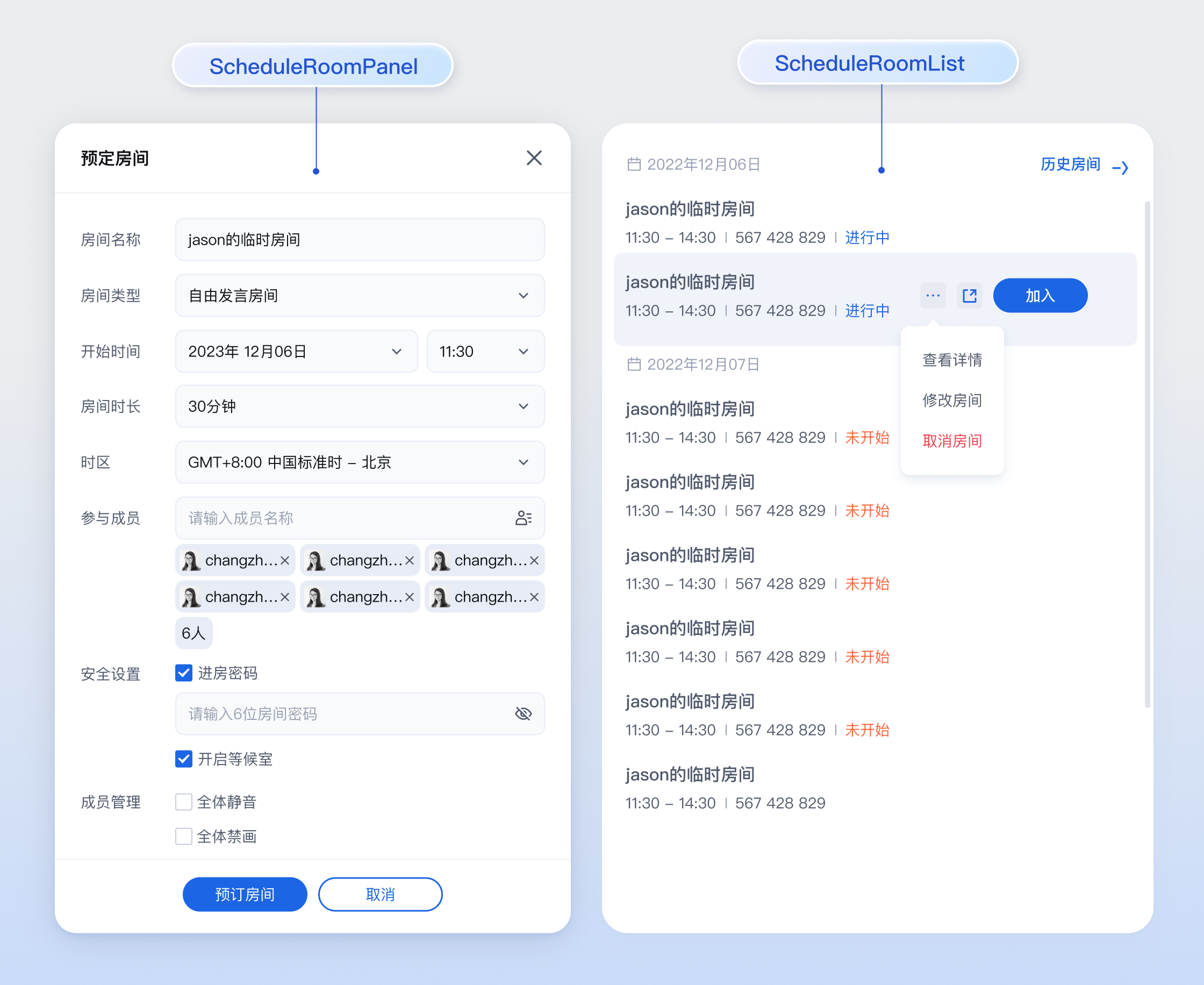
This feature provides two integration solutions. You can choose the most suitable one according to business needs:
|
|
@@ -21,9 +19,6 @@ This feature provides two integration solutions. You can choose the most suitabl
|
|
|
21
19
|
|
|
22
20
|
- **Solution 2 (Advanced):** Custom integration using underlying API. Based on atomicx-core SDK API `useRoomState` state hook to implement UI and interaction logic yourself, with the highest flexibility.
|
|
23
21
|
|
|
24
|
-
|
|
25
|
-
|
|
26
|
-
|
|
27
22
|
## Solution 1: Quick Integration Using UI Components
|
|
28
23
|
|
|
29
24
|
`tuikit-atomicx-vue3` provides two core components:
|
|
@@ -31,7 +26,6 @@ This feature provides two integration solutions. You can choose the most suitabl
|
|
|
31
26
|
|
|
32
27
|
- [**ScheduledRoomList**](https://github.com/Tencent-RTC/TUIKit_Vue3/blob/main/packages/tuikit-atomicx-vue3/src/components/ScheduleRoomPanel/ScheduledRoomList.vue)**:** Displays the current user's scheduled meeting list, supports clicking to join, modify, and cancel schedules.
|
|
33
28
|
|
|
34
|
-
|
|
35
29
|
### Step 1: Import Components
|
|
36
30
|
``` typescript
|
|
37
31
|
import { ScheduleRoomPanel, ScheduledRoomList } from 'tuikit-atomicx-vue3/room';
|
|
@@ -86,7 +80,7 @@ const handleScheduleConfirm = (roomId: string, options: Record<string, any>) =>
|
|
|
86
80
|
|
|
87
81
|
const handleJoinRoom = async (roomInfo: { roomId: string }) => {
|
|
88
82
|
console.log('Click to join', roomInfo.roomId);
|
|
89
|
-
await joinRoom(roomInfo.roomId);
|
|
83
|
+
await joinRoom(roomInfo.roomId);
|
|
90
84
|
};
|
|
91
85
|
</script>
|
|
92
86
|
|
|
@@ -99,11 +93,8 @@ const handleJoinRoom = async (roomInfo: { roomId: string }) => {
|
|
|
99
93
|
|
|
100
94
|
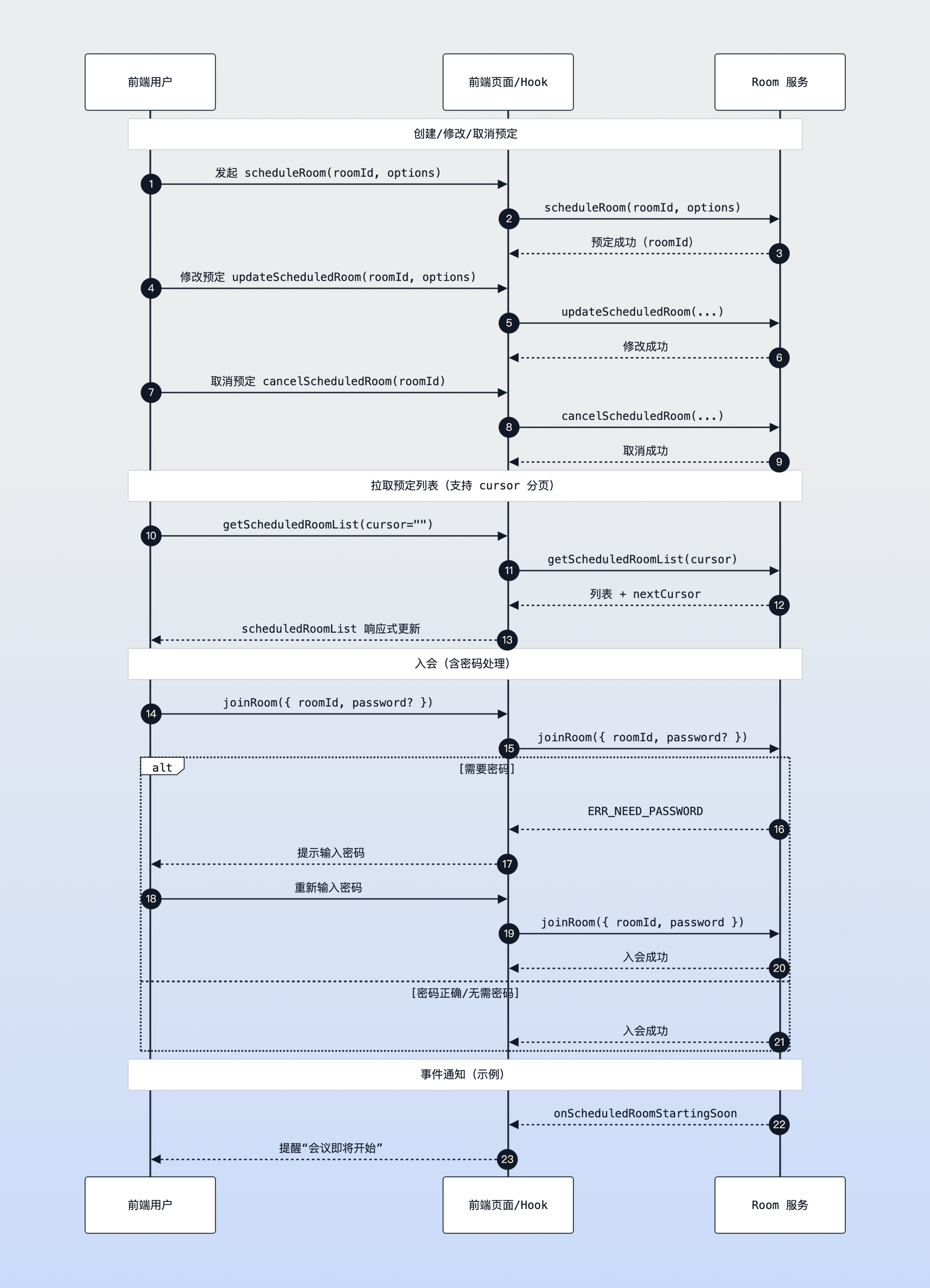
This section mainly introduces how to implement the core logic of scheduled rooms through atomicx-core SDK API [useRoomState](https://web.sdk.qcloud.com/trtc/live/web/doc/zh/index.html#module-RoomState) interface.
|
|
101
95
|
|
|
102
|
-
|
|
103
|
-
|
|
104
96
|
Scheduled room sequence diagram
|
|
105
97
|
|
|
106
|
-
|
|
107
98
|
### Step 1: Initiate Schedule
|
|
108
99
|
|
|
109
100
|
Use the [scheduleRoom](https://web.sdk.qcloud.com/trtc/live/web/doc/zh/index.html#scheduleRoom) method to create a new scheduled meeting. You need to specify the meeting's start time, end time, room name, and other information.
|
|
@@ -115,8 +106,8 @@ const { scheduleRoom } = useRoomState();
|
|
|
115
106
|
const createSchedule = async () => {
|
|
116
107
|
try {
|
|
117
108
|
// roomId restriction: string type, required parameter, recommended to generate randomly
|
|
118
|
-
const roomId = '123456';
|
|
119
|
-
|
|
109
|
+
const roomId = '123456';
|
|
110
|
+
|
|
120
111
|
// Note: Timestamp unit must be **seconds** (Date.getTime() gets milliseconds, need to divide by 1000)
|
|
121
112
|
const startTime = Math.floor(new Date().getTime() / 1000) + 3600; // Start after 1 hour
|
|
122
113
|
const duration = 1800; // 30 minutes
|
|
@@ -146,7 +137,7 @@ Use the [getScheduledRoomList](https://web.sdk.qcloud.com/trtc/live/web/doc/zh/i
|
|
|
146
137
|
import { onMounted, watch } from 'vue';
|
|
147
138
|
import { useRoomState } from 'tuikit-atomicx-vue3/room';
|
|
148
139
|
|
|
149
|
-
const {
|
|
140
|
+
const {
|
|
150
141
|
scheduledRoomList, // Reactive data: scheduled meeting list
|
|
151
142
|
getScheduledRoomList // Method: Retrieve list
|
|
152
143
|
} = useRoomState();
|
|
@@ -155,7 +146,7 @@ const {
|
|
|
155
146
|
onMounted(async () => {
|
|
156
147
|
// cursor indicates where to start pulling data, empty string means start from beginning
|
|
157
148
|
// getScheduledRoomList return value includes new cursor
|
|
158
|
-
const { cursor } = await getScheduledRoomList({ cursor: '' });
|
|
149
|
+
const { cursor } = await getScheduledRoomList({ cursor: '' });
|
|
159
150
|
// If cursor is not empty, it means there is more data, can continue calling to retrieve
|
|
160
151
|
});
|
|
161
152
|
|
|
@@ -292,58 +283,36 @@ onUnmounted(() => {
|
|
|
292
283
|
|
|
293
284
|
4. **Pagination Handling**: The scheduled list may be very long, and the `getScheduledRoomList` interface supports paginated retrieval. Please pay attention to the `cursor` field in the return value. If it is not empty, it means there is more data.
|
|
294
285
|
|
|
295
|
-
|
|
296
286
|
## Common Questions
|
|
297
287
|
1. **Schedule successful but list not updating?**
|
|
298
288
|
|
|
299
|
-
|
|
300
289
|
Please confirm that you are logged in and have called `getScheduledRoomList` on the first screen (e.g., `cursor: ''`). If the returned `cursor` is not empty, you need to continue retrieving; the list is reactive and UI will synchronize after updates.
|
|
301
290
|
|
|
302
291
|
2. `joinRoom`** how to pass parameters?**
|
|
303
292
|
|
|
304
|
-
|
|
305
293
|
It is recommended to use object parameters uniformly: `joinRoom({ roomId, password })`, avoid directly passing strings which may cause type mismatch or limit subsequent extensions.
|
|
306
294
|
|
|
307
295
|
3. **Using milliseconds for timestamp causes appointment failure?**
|
|
308
296
|
|
|
309
|
-
|
|
310
297
|
All time-related parameters must be in seconds, `Date.now()` needs `/ 1000`, otherwise it will return time conflict error.
|
|
311
298
|
|
|
312
299
|
4. **How to handle rooms with passwords?**
|
|
313
300
|
|
|
314
|
-
|
|
315
301
|
Catch `TUIErrorCode.ERR_NEED_PASSWORD` / `ERR_WRONG_PASSWORD`, pop up password input box, re-call `joinRoom({ roomId, password })`; after multiple errors, you can prompt to contact room owner to reset.
|
|
316
302
|
|
|
317
303
|
5. **roomId conflict or duplication?**
|
|
318
304
|
|
|
319
|
-
|
|
320
305
|
It is recommended that roomId be generated by the backend to ensure global uniqueness; if generated by the frontend, please check for conflicts before scheduling and have a retry strategy.
|
|
321
306
|
|
|
322
307
|
6. **How to continue paginated retrieval?**
|
|
323
308
|
|
|
324
|
-
|
|
325
309
|
When the `cursor` returned by `getScheduledRoomList` is not empty, continue passing it in; empty means all data has been retrieved.
|
|
326
310
|
|
|
327
|
-
|
|
328
311
|
## **Sample Project**
|
|
329
312
|
|
|
330
313
|
Tencent Cloud provides a sample project [atomicx-vite-vue3-ts](https://github.com/Tencent-RTC/TUIRoomKit/tree/main/Web/example/atomicx-vite-vue3-ts) on GitHub, which you can refer to for implementing complete RoomKit functionality.
|
|
331
314
|
|
|
332
315
|
## API Documentation
|
|
333
|
-
|
|
334
|
-
|
|
335
|
-
|
|
336
|
-
|
|
337
|
-
<td rowspan="1" colSpan="1" >**Feature Description**</td>
|
|
338
|
-
|
|
339
|
-
<td rowspan="1" colSpan="1" >**API Documentation**</td>
|
|
340
|
-
</tr>
|
|
341
|
-
|
|
342
|
-
<tr>
|
|
343
|
-
<td rowspan="1" colSpan="1" >**useRoomState**</td>
|
|
344
|
-
|
|
345
|
-
<td rowspan="1" colSpan="1" >Room state management (create, join, schedule, etc.)</td>
|
|
346
|
-
|
|
347
|
-
<td rowspan="1" colSpan="1" >[API Documentation](https://web.sdk.qcloud.com/trtc/live/web/doc/zh/index.html#module-RoomState)</td>
|
|
348
|
-
</tr>
|
|
349
|
-
</table>
|
|
316
|
+
| **State/Component** | **Feature Description** | **API Documentation** |
|
|
317
|
+
| --- | --- | --- |
|
|
318
|
+
| **useRoomState** | Room state management (create, join, schedule, etc.) | [API Documentation](https://web.sdk.qcloud.com/trtc/live/web/doc/zh/index.html#module-RoomState) |
|