@tencent-rtc/mcp 1.3.8 → 1.4.0
This diff represents the content of publicly available package versions that have been released to one of the supported registries. The information contained in this diff is provided for informational purposes only and reflects changes between package versions as they appear in their respective public registries.
- package/package.json +2 -2
- package/resource/doc/{tuicallkit/iOS/faq.md → callkit/faq/android-faq.md} +10 -22
- package/resource/doc/{tuicallkit/android/faq.md → callkit/faq/flutter-faq.md} +10 -22
- package/resource/doc/{tuicallkit/flutter/faq.md → callkit/faq/ios-faq.md} +10 -22
- package/resource/doc/callkit/preset/android/api.md +296 -0
- package/resource/doc/callkit/preset/android/integration.md +430 -0
- package/resource/doc/callkit/preset/flutter/api.md +410 -0
- package/resource/doc/{tuicallkit → callkit/preset}/flutter/integration.md +35 -97
- package/resource/doc/callkit/preset/ios/api.md +80 -0
- package/resource/doc/{tuicallkit/iOS → callkit/preset/ios}/integration.md +37 -118
- package/resource/doc/callkit/preset/react/api.md +501 -0
- package/resource/doc/{tuicallkit → callkit/preset}/react/integration.md +5 -20
- package/resource/doc/callkit/preset/vue/api.md +501 -0
- package/resource/doc/{tuicallkit → callkit/preset}/vue/integration.md +4 -19
- package/resource/doc/{chatuikit → chatkit}/android/faq.md +29 -38
- package/resource/doc/{chatuikit → chatkit}/android/features/theme.md +22 -166
- package/resource/doc/chatkit/android/integration.md +490 -0
- package/resource/doc/chatkit/faq/android_sdk/client-api.md +281 -0
- package/resource/doc/{chatuikit → chatkit}/faq/common/product.md +0 -1
- package/resource/doc/{chatuikit → chatkit}/faq/common/server.md +1 -1
- package/resource/doc/chatkit/faq/flutter_sdk/client-api.md +199 -0
- package/resource/doc/{chatuikit → chatkit}/faq/flutter_sdk/faq.md +3 -3
- package/resource/doc/chatkit/faq/ios_sdk/client-api.md +235 -0
- package/resource/doc/{chatuikit → chatkit}/faq/web_sdk/faq.md +3 -3
- package/resource/doc/{chatuikit → chatkit}/flutter/features/theme.md +22 -166
- package/resource/doc/{chatuikit → chatkit}/flutter/integration.md +19 -88
- package/resource/doc/{chatuikit/iOS → chatkit/ios}/faq.md +29 -38
- package/resource/doc/{chatuikit/iOS → chatkit/ios}/features/theme.md +27 -176
- package/resource/doc/{chatuikit/iOS → chatkit/ios}/integration.md +47 -165
- package/resource/doc/{chatuikit → chatkit}/react/components/avatar.md +0 -33
- package/resource/doc/{chatuikit → chatkit}/react/components/chat-header.md +8 -49
- package/resource/doc/{chatuikit → chatkit}/react/components/chat-setting.md +6 -35
- package/resource/doc/{chatuikit → chatkit}/react/components/chat.md +0 -6
- package/resource/doc/{chatuikit → chatkit}/react/components/component-list.md +0 -11
- package/resource/doc/{chatuikit → chatkit}/react/components/contact-list.md +96 -502
- package/resource/doc/chatkit/react/components/conversation-actions.md +174 -0
- package/resource/doc/chatkit/react/components/conversation-list.md +333 -0
- package/resource/doc/chatkit/react/components/conversation-preview.md +118 -0
- package/resource/doc/chatkit/react/components/conversation-search.md +60 -0
- package/resource/doc/{chatuikit → chatkit}/react/components/message-input.md +36 -337
- package/resource/doc/{chatuikit → chatkit}/react/components/message-list.md +20 -212
- package/resource/doc/chatkit/react/components/search.md +243 -0
- package/resource/doc/{chatuikit → chatkit}/react/components/tuikit.md +1 -47
- package/resource/doc/{chatuikit → chatkit}/react/integration.md +21 -81
- package/resource/doc/{chatuikit → chatkit}/vue/components/avatar.md +0 -33
- package/resource/doc/{chatuikit → chatkit}/vue/components/chat-header.md +7 -48
- package/resource/doc/{chatuikit → chatkit}/vue/components/chat-setting.md +3 -5
- package/resource/doc/{chatuikit → chatkit}/vue/components/chat.md +0 -5
- package/resource/doc/{chatuikit → chatkit}/vue/components/component-list.md +0 -15
- package/resource/doc/chatkit/vue/components/contact-list.md +271 -0
- package/resource/doc/chatkit/vue/components/conversation-actions.md +228 -0
- package/resource/doc/{chatuikit → chatkit}/vue/components/conversation-list.md +42 -492
- package/resource/doc/chatkit/vue/components/conversation-preview.md +213 -0
- package/resource/doc/chatkit/vue/components/conversation-search.md +50 -0
- package/resource/doc/{chatuikit → chatkit}/vue/components/message-input.md +2 -223
- package/resource/doc/{chatuikit → chatkit}/vue/components/message-list.md +23 -252
- package/resource/doc/{chatuikit → chatkit}/vue/components/search.md +73 -640
- package/resource/doc/{chatuikit → chatkit}/vue/components/tuikit.md +7 -21
- package/resource/doc/{chatuikit → chatkit}/vue/components/userpicker.md +3 -62
- package/resource/doc/{chatuikit → chatkit}/vue/faq.md +1 -1
- package/resource/doc/{chatuikit → chatkit}/vue/integration.md +22 -23
- package/resource/doc/livekit/{live → core-sdk/live}/android/live-audience-list.md +18 -89
- package/resource/doc/livekit/{live → core-sdk/live}/android/live-audio-effect.md +34 -192
- package/resource/doc/livekit/{live → core-sdk/live}/android/live-barrage.md +28 -141
- package/resource/doc/livekit/{live → core-sdk/live}/android/live-base-beauty.md +20 -112
- package/resource/doc/livekit/{live → core-sdk/live}/android/live-co-guest-interaction.md +59 -193
- package/resource/doc/livekit/{live → core-sdk/live}/android/live-gift.md +75 -455
- package/resource/doc/livekit/{live → core-sdk/live}/android/live-host-interaction.md +94 -344
- package/resource/doc/livekit/{live → core-sdk/live}/android/live-integration.md +107 -515
- package/resource/doc/livekit/{live → core-sdk/live}/android/live-live-list.md +33 -173
- package/resource/doc/livekit/{live → core-sdk/live}/flutter/live-audience-list.md +14 -93
- package/resource/doc/livekit/{live → core-sdk/live}/flutter/live-audio-effect.md +34 -179
- package/resource/doc/livekit/{live → core-sdk/live}/flutter/live-barrage.md +19 -107
- package/resource/doc/livekit/{live → core-sdk/live}/flutter/live-base-beauty.md +24 -166
- package/resource/doc/livekit/{live → core-sdk/live}/flutter/live-co-guest-interaction.md +56 -163
- package/resource/doc/livekit/{live → core-sdk/live}/flutter/live-gift.md +69 -443
- package/resource/doc/livekit/{live → core-sdk/live}/flutter/live-host-interaction.md +117 -364
- package/resource/doc/livekit/{live → core-sdk/live}/flutter/live-integration.md +107 -492
- package/resource/doc/livekit/{live → core-sdk/live}/flutter/live-live-list.md +23 -165
- package/resource/doc/livekit/{live → core-sdk/live}/ios/live-audience-list.md +35 -111
- package/resource/doc/livekit/{live → core-sdk/live}/ios/live-audio-effect.md +35 -193
- package/resource/doc/livekit/{live → core-sdk/live}/ios/live-barrage.md +31 -144
- package/resource/doc/livekit/{live → core-sdk/live}/ios/live-base-beauty.md +24 -116
- package/resource/doc/livekit/{live → core-sdk/live}/ios/live-co-guest-interaction.md +37 -171
- package/resource/doc/livekit/{live → core-sdk/live}/ios/live-gift.md +79 -459
- package/resource/doc/livekit/{live → core-sdk/live}/ios/live-host-interaction.md +69 -320
- package/resource/doc/livekit/{live → core-sdk/live}/ios/live-integration.md +85 -502
- package/resource/doc/livekit/{live → core-sdk/live}/ios/live-live-list.md +32 -169
- package/resource/doc/livekit/core-sdk/voice/android/voice-audience-list.md +263 -0
- package/resource/doc/livekit/core-sdk/voice/android/voice-audio-effect.md +222 -0
- package/resource/doc/livekit/core-sdk/voice/android/voice-barrage.md +452 -0
- package/resource/doc/livekit/core-sdk/voice/android/voice-co-guest-interaction.md +536 -0
- package/resource/doc/livekit/core-sdk/voice/android/voice-gift.md +442 -0
- package/resource/doc/livekit/core-sdk/voice/android/voice-host-interaction.md +489 -0
- package/resource/doc/livekit/core-sdk/voice/android/voice-integration.md +574 -0
- package/resource/doc/livekit/core-sdk/voice/android/voice-room-list.md +435 -0
- package/resource/doc/livekit/core-sdk/voice/flutter/voice-co-guest-interaction.md +516 -0
- package/resource/doc/livekit/core-sdk/voice/flutter/voice-integration.md +576 -0
- package/resource/doc/livekit/core-sdk/voice/ios/voice-audience-list.md +263 -0
- package/resource/doc/livekit/core-sdk/voice/ios/voice-audio-effect.md +212 -0
- package/resource/doc/livekit/core-sdk/voice/ios/voice-barrage.md +404 -0
- package/resource/doc/livekit/core-sdk/voice/ios/voice-co-guest-interaction.md +499 -0
- package/resource/doc/livekit/core-sdk/voice/ios/voice-gift.md +403 -0
- package/resource/doc/livekit/core-sdk/voice/ios/voice-host-interaction.md +552 -0
- package/resource/doc/livekit/core-sdk/voice/ios/voice-integration.md +514 -0
- package/resource/doc/livekit/core-sdk/voice/ios/voice-room-list.md +348 -0
- package/resource/doc/livekit/faq/common/{error_code.md → error-code.md} +2 -2
- package/resource/doc/livekit/preset/live/vue/api-reference/index.md +780 -0
- package/resource/doc/livekit/preset/live/vue/components/barrage.md +291 -0
- package/resource/doc/livekit/{live → preset/live}/vue/components/co-guest-panel.md +10 -49
- package/resource/doc/livekit/{live → preset/live}/vue/components/live-audience-list.md +26 -144
- package/resource/doc/livekit/{live → preset/live}/vue/components/live-scene-panel.md +12 -75
- package/resource/doc/livekit/{live → preset/live}/vue/components/live-view.md +36 -227
- package/resource/doc/livekit/preset/live/vue/components/stream-mixer.md +215 -0
- package/resource/doc/livekit/preset/live/vue/faq.md +1 -0
- package/resource/doc/livekit/preset/live/vue/live-list-integration.md +241 -0
- package/resource/doc/livekit/preset/live/vue/live-player-desk-integration.md +299 -0
- package/resource/doc/livekit/preset/live/vue/live-player-h5-integration.md +300 -0
- package/resource/doc/livekit/preset/live/vue/live-pusher-integration.md +743 -0
- package/resource/doc/roomkit/vue/faq.md +1 -0
- package/resource/doc/roomkit/vue/features/call-user-to-room.md +17 -53
- package/resource/doc/roomkit/vue/features/device-detection.md +30 -48
- package/resource/doc/roomkit/vue/features/device-state.md +24 -44
- package/resource/doc/roomkit/vue/features/free-beauty-panel.md +13 -36
- package/resource/doc/roomkit/vue/features/room-chat.md +31 -89
- package/resource/doc/roomkit/vue/features/room-participant-state.md +28 -50
- package/resource/doc/roomkit/vue/features/room-state.md +25 -34
- package/resource/doc/roomkit/vue/features/room-view.md +30 -125
- package/resource/doc/roomkit/vue/features/schedule-room.md +9 -40
- package/resource/doc/roomkit/vue/features/screen-share.md +22 -90
- package/resource/doc/roomkit/vue/features/virtual-background.md +13 -29
- package/resource/doc/roomkit/vue/integration.md +173 -337
- package/resource/doc/rtcengine/faq/common/error_code.md +1 -0
- package/resource/doc/rtcengine/faq/web/web.md +14 -24
- package/resource/doc/rtcengine/web/api.md +1 -3
- package/resource/doc/rtcengine/web/how_to_integrated_web_sdk.md +3 -10
- package/resource/doc/rtcengine/web/how_to_run_web_sdk_demo.md +1 -5
- package/resource/doc/rtcengine/web/plugin/20-advanced-customized-capture-rendering.md +1 -2
- package/resource/doc/rtcengine/web/plugin/21-advanced-auto-play-policy.md +2 -4
- package/resource/doc/rtcengine/web/plugin/23-advanced-support-detection.md +3 -5
- package/resource/doc/rtcengine/web/plugin/24-advanced-network-quality.md +1 -7
- package/resource/doc/rtcengine/web/plugin/25-advanced-device-change.md +0 -2
- package/resource/doc/rtcengine/web/plugin/26-advanced-publish-cdn-stream.md +4 -8
- package/resource/doc/rtcengine/web/plugin/27-advanced-small-stream.md +11 -11
- package/resource/doc/rtcengine/web/plugin/28-advanced-beauty.md +12 -88
- package/resource/doc/rtcengine/web/plugin/31-advanced-plugins-overview.md +5 -5
- package/resource/doc/rtcengine/web/plugin/34-advanced-proxy.md +30 -37
- package/resource/doc/rtcengine/web/plugin/36-advanced-virtual-background.md +13 -90
- package/resource/doc/rtcengine/web/plugin/37-advanced-voice-changer.md +1 -2
- package/resource/doc/rtcengine/web/plugin/39-advanced-video-decoder.md +1 -2
- package/resource/doc/rtcengine/web/plugin/40-advanced-video-mixer.md +19 -19
- package/resource/doc/rtcengine/web/plugin/41-advanced-small-stream-auto-switcher.md +1 -1
- package/resource/doc/rtcengine/web/plugin/42-advanced-realtime-transcriber.md +4 -5
- package/resource/doc/rtcengine/web/plugin/43-advanced-face-detection.md +3 -3
- package/resource/doc/trtc/C++/ITRTCCloud.md +686 -2835
- package/resource/doc/trtc/C++/ITRTCStatistics.md +53 -308
- package/resource/doc/trtc/C++/ITXAudioEffectManager.md +202 -1022
- package/resource/doc/trtc/C++/ITXDeviceManager.md +126 -767
- package/resource/doc/trtc/C++/TRTCCloudCallback.md +579 -2147
- package/resource/doc/trtc/C++/TRTCTypeDef.md +703 -3378
- package/resource/doc/trtc/C++/TXLiteAVCode.md +116 -908
- package/resource/doc/trtc/android/TRTCCloud.md +606 -2573
- package/resource/doc/trtc/android/TRTCCloudDef.md +752 -3640
- package/resource/doc/trtc/android/TRTCCloudListener.md +581 -2008
- package/resource/doc/trtc/android/TRTCStatistics.md +48 -278
- package/resource/doc/trtc/android/TXAudioEffectManager.md +202 -1022
- package/resource/doc/trtc/android/TXBeautyManager.md +127 -704
- package/resource/doc/trtc/android/TXDeviceManager.md +51 -318
- package/resource/doc/trtc/android/TXLiteAVCode.md +114 -892
- package/resource/doc/trtc/iOS/TRTCCloud.md +694 -2904
- package/resource/doc/trtc/iOS/TRTCCloudDef.md +726 -3498
- package/resource/doc/trtc/iOS/TRTCCloudDelegate.md +543 -2028
- package/resource/doc/trtc/iOS/TRTCStatistics.md +48 -278
- package/resource/doc/trtc/iOS/TXAudioEffectManager.md +174 -877
- package/resource/doc/trtc/iOS/TXBeautyManager.md +128 -710
- package/resource/doc/trtc/iOS/TXDeviceManager.md +129 -772
- package/resource/doc/trtc/iOS/TXLiteAVCode.md +117 -915
- package/server.js +1 -5
- package/server.js.map +1 -1
- package/tools/call/get_callkit_api.js +32 -0
- package/tools/call/get_callkit_api.js.map +1 -0
- package/tools/call/get_native_call_uikit_integration.js +34 -0
- package/tools/call/get_native_call_uikit_integration.js.map +1 -0
- package/tools/call/{get-web-call-integration.js → get_web_call_uikit_integration.js} +13 -8
- package/tools/call/get_web_call_uikit_integration.js.map +1 -0
- package/tools/chat/get_native_chat_uikit_feature_detail.js +34 -0
- package/tools/chat/get_native_chat_uikit_feature_detail.js.map +1 -0
- package/tools/chat/get_native_chat_uikit_integration.js +45 -0
- package/tools/chat/get_native_chat_uikit_integration.js.map +1 -0
- package/tools/chat/get_web_chat_uikit_component_detail.js +34 -0
- package/tools/chat/get_web_chat_uikit_component_detail.js.map +1 -0
- package/tools/chat/get_web_chat_uikit_integration.js +45 -0
- package/tools/chat/get_web_chat_uikit_integration.js.map +1 -0
- package/tools/common/get_faq.js +265 -0
- package/tools/common/get_faq.js.map +1 -0
- package/tools/common/{get-usersig.js → get_usersig.js} +6 -3
- package/tools/common/get_usersig.js.map +1 -0
- package/tools/common/present_framework_choice.js +63 -0
- package/tools/common/present_framework_choice.js.map +1 -0
- package/tools/definitions/get_callkit_api_def.js +29 -0
- package/tools/definitions/get_callkit_api_def.js.map +1 -0
- package/tools/definitions/get_faq_def.js +17 -18
- package/tools/definitions/get_faq_def.js.map +1 -1
- package/tools/definitions/get_native_call_uikit_integration_def.js +15 -18
- package/tools/definitions/get_native_call_uikit_integration_def.js.map +1 -1
- package/tools/definitions/get_native_chat_uikit_feature_detail_def.js +31 -0
- package/tools/definitions/get_native_chat_uikit_feature_detail_def.js.map +1 -0
- package/tools/definitions/get_native_chat_uikit_integration_def.js +16 -19
- package/tools/definitions/get_native_chat_uikit_integration_def.js.map +1 -1
- package/tools/definitions/get_native_livekit_core_features_def.js +34 -0
- package/tools/definitions/get_native_livekit_core_features_def.js.map +1 -0
- package/tools/definitions/get_native_livekit_core_integration_def.js +34 -0
- package/tools/definitions/get_native_livekit_core_integration_def.js.map +1 -0
- package/tools/definitions/get_native_trtc_sdk_docs_def.js +32 -0
- package/tools/definitions/get_native_trtc_sdk_docs_def.js.map +1 -0
- package/tools/definitions/get_usersig_def.js +17 -22
- package/tools/definitions/get_usersig_def.js.map +1 -1
- package/tools/definitions/get_web_call_uikit_integration_def.js +15 -7
- package/tools/definitions/get_web_call_uikit_integration_def.js.map +1 -1
- package/tools/definitions/get_web_chat_uikit_component_detail_def.js +17 -49
- package/tools/definitions/get_web_chat_uikit_component_detail_def.js.map +1 -1
- package/tools/definitions/get_web_chat_uikit_integration_def.js +16 -19
- package/tools/definitions/get_web_chat_uikit_integration_def.js.map +1 -1
- package/tools/definitions/get_web_live_uikit_integration_def.js +15 -18
- package/tools/definitions/get_web_live_uikit_integration_def.js.map +1 -1
- package/tools/definitions/get_web_livekit_api_def.js +30 -0
- package/tools/definitions/get_web_livekit_api_def.js.map +1 -0
- package/tools/definitions/get_web_livekit_component_detail_def.js +32 -0
- package/tools/definitions/get_web_livekit_component_detail_def.js.map +1 -0
- package/tools/definitions/get_web_room_uikit_integration_def.js +15 -30
- package/tools/definitions/get_web_room_uikit_integration_def.js.map +1 -1
- package/tools/definitions/get_web_roomkit_feature_detail_def.js +31 -0
- package/tools/definitions/get_web_roomkit_feature_detail_def.js.map +1 -0
- package/tools/definitions/get_web_trtc_sdk_api_def.js +27 -0
- package/tools/definitions/get_web_trtc_sdk_api_def.js.map +1 -0
- package/tools/definitions/get_web_trtc_sdk_integration_def.js +27 -0
- package/tools/definitions/get_web_trtc_sdk_integration_def.js.map +1 -0
- package/tools/definitions/get_web_trtc_sdk_plugin_def.js +27 -0
- package/tools/definitions/get_web_trtc_sdk_plugin_def.js.map +1 -0
- package/tools/definitions/present_framework_choice_def.js +24 -12
- package/tools/definitions/present_framework_choice_def.js.map +1 -1
- package/tools/index.js +47 -59
- package/tools/index.js.map +1 -1
- package/tools/live/get_native_livekit_core_features.js +65 -0
- package/tools/live/get_native_livekit_core_features.js.map +1 -0
- package/tools/live/get_native_livekit_core_integration.js +59 -0
- package/tools/live/get_native_livekit_core_integration.js.map +1 -0
- package/tools/live/get_web_live_uikit_integration.js +48 -0
- package/tools/live/get_web_live_uikit_integration.js.map +1 -0
- package/tools/live/get_web_livekit_api.js +32 -0
- package/tools/live/get_web_livekit_api.js.map +1 -0
- package/tools/live/get_web_livekit_component_detail.js +34 -0
- package/tools/live/get_web_livekit_component_detail.js.map +1 -0
- package/tools/room/{get-web-room-integration.js → get_web_room_uikit_integration.js} +13 -14
- package/tools/room/get_web_room_uikit_integration.js.map +1 -0
- package/tools/room/{get-web-room-feature-detail.js → get_web_roomkit_feature_detail.js} +30 -31
- package/tools/room/get_web_roomkit_feature_detail.js.map +1 -0
- package/tools/rtcengine/get_web_trtc_sdk_api.js +31 -0
- package/tools/rtcengine/get_web_trtc_sdk_api.js.map +1 -0
- package/tools/rtcengine/get_web_trtc_sdk_integration.js +31 -0
- package/tools/rtcengine/get_web_trtc_sdk_integration.js.map +1 -0
- package/tools/rtcengine/get_web_trtc_sdk_plugin.js +31 -0
- package/tools/rtcengine/get_web_trtc_sdk_plugin.js.map +1 -0
- package/tools/trtc/get_native_trtc_sdk_docs.js +73 -0
- package/tools/trtc/get_native_trtc_sdk_docs.js.map +1 -0
- package/utils/generate-structured-result.js +61 -17
- package/utils/generate-structured-result.js.map +1 -1
- package/utils/report-cls-client.js +12 -1
- package/utils/report-cls-client.js.map +1 -1
- package/utils/report-es-client.js +2 -2
- package/resource/doc/chatuikit/android/integration.md +0 -287
- package/resource/doc/chatuikit/faq/android_sdk/client-api.md +0 -1371
- package/resource/doc/chatuikit/faq/flutter_sdk/client-api.md +0 -932
- package/resource/doc/chatuikit/faq/ios_sdk/client-api.md +0 -1119
- package/resource/doc/chatuikit/flutter/workflow.md +0 -941
- package/resource/doc/chatuikit/iOS/workflow.md +0 -0
- package/resource/doc/chatuikit/react/components/conversation-list.md +0 -1017
- package/resource/doc/chatuikit/react/components/search.md +0 -745
- package/resource/doc/chatuikit/react/create-group.md +0 -23
- package/resource/doc/chatuikit/react/init.md +0 -26
- package/resource/doc/chatuikit/react/workflow.md +0 -258
- package/resource/doc/chatuikit/vue/components/contact-list.md +0 -679
- package/resource/doc/chatuikit/vue/create-group.md +0 -25
- package/resource/doc/chatuikit/vue/init.md +0 -40
- package/resource/doc/chatuikit/vue/workflow.md +0 -395
- package/resource/doc/livekit/live/android/workflow.md +0 -320
- package/resource/doc/livekit/live/flutter/workflow.md +0 -353
- package/resource/doc/livekit/live/ios/workflow.md +0 -454
- package/resource/doc/livekit/live/vue/components/barrage.md +0 -616
- package/resource/doc/livekit/live/vue/components/stream-mixer.md +0 -446
- package/resource/doc/livekit/live/vue/faq.md +0 -0
- package/resource/doc/livekit/live/vue/live-list-integration.md +0 -200
- package/resource/doc/livekit/live/vue/live-player-desk-integration.md +0 -269
- package/resource/doc/livekit/live/vue/live-player-h5-integration.md +0 -269
- package/resource/doc/livekit/live/vue/live-pusher-integration.md +0 -595
- package/resource/doc/livekit/live/vue/states/live-state.md +0 -3591
- package/resource/doc/livekit/live/vue/workflow.md +0 -218
- package/resource/doc/native_live/android/V2TXLiveCode_api_android.md +0 -312
- package/resource/doc/native_live/android/V2TXLiveDef_api_android.md +0 -430
- package/resource/doc/native_live/android/V2TXLivePlayerObserver_api_android.md +0 -679
- package/resource/doc/native_live/android/V2TXLivePlayer_api_android.md +0 -671
- package/resource/doc/native_live/android/V2TXLivePremier_api_android.md +0 -271
- package/resource/doc/native_live/android/V2TXLivePusherObserver_api_android.md +0 -849
- package/resource/doc/native_live/android/V2TXLivePusher_api_android.md +0 -1046
- package/resource/doc/native_live/flutter/V2TXLiveCode_api_flutter.md +0 -460
- package/resource/doc/native_live/flutter/V2TXLiveDef_api_flutter.md +0 -558
- package/resource/doc/native_live/flutter/V2TXLivePlayerObserver_api_flutter.md +0 -865
- package/resource/doc/native_live/flutter/V2TXLivePlayer_api_flutter.md +0 -657
- package/resource/doc/native_live/flutter/V2TXLivePremier_api_flutter.md +0 -437
- package/resource/doc/native_live/flutter/V2TXLivePusherObserver_api_flutter.md +0 -335
- package/resource/doc/native_live/flutter/V2TXLivePusher_api_flutter.md +0 -748
- package/resource/doc/native_live/iOS/V2TXLiveCode_api_iOS.md +0 -327
- package/resource/doc/native_live/iOS/V2TXLiveDef_api_iOS.md +0 -507
- package/resource/doc/native_live/iOS/V2TXLivePlayerObserver_api_iOS.md +0 -507
- package/resource/doc/native_live/iOS/V2TXLivePlayer_api_iOS.md +0 -659
- package/resource/doc/native_live/iOS/V2TXLivePremier_api_iOS.md +0 -284
- package/resource/doc/native_live/iOS/V2TXLivePusherObserver_api_iOS.md +0 -814
- package/resource/doc/native_live/iOS/V2TXLivePusher_api_iOS.md +0 -1000
- package/resource/doc/roomkit/vue/features/workflow.md +0 -553
- package/resource/doc/roomkit/vue/workflow.md +0 -487
- package/resource/doc/tuicallkit/android/integration.md +0 -286
- package/resource/doc/tuicallkit/android/workflow.md +0 -0
- package/resource/doc/tuicallkit/faq/android_sdk/call-observer-api.md +0 -784
- package/resource/doc/tuicallkit/faq/android_sdk/callkit-api.md +0 -610
- package/resource/doc/tuicallkit/faq/flutter_sdk/call-define-api.md +0 -938
- package/resource/doc/tuicallkit/faq/flutter_sdk/call-observer-api.md +0 -897
- package/resource/doc/tuicallkit/faq/flutter_sdk/callkit-api.md +0 -469
- package/resource/doc/tuicallkit/faq/ios_sdk/call-observer-api.md +0 -781
- package/resource/doc/tuicallkit/faq/ios_sdk/callkit-api.md +0 -398
- package/resource/doc/tuicallkit/flutter/workflow.md +0 -331
- package/resource/doc/tuicallkit/react/api.md +0 -1404
- package/resource/doc/tuicallkit/vue/api.md +0 -1406
- package/resource/doc/tuicallkit/vue/faq.md +0 -36
- package/tools/call/get-native-call-integration.js +0 -43
- package/tools/call/get-native-call-integration.js.map +0 -1
- package/tools/call/get-web-call-api.js +0 -27
- package/tools/call/get-web-call-api.js.map +0 -1
- package/tools/call/get-web-call-integration.js.map +0 -1
- package/tools/chat/get-native-chat-feature-detail.js +0 -30
- package/tools/chat/get-native-chat-feature-detail.js.map +0 -1
- package/tools/chat/get-native-chat-integration.js +0 -45
- package/tools/chat/get-native-chat-integration.js.map +0 -1
- package/tools/chat/get-web-chat-component-detail.js +0 -31
- package/tools/chat/get-web-chat-component-detail.js.map +0 -1
- package/tools/chat/get-web-chat-integration.js +0 -45
- package/tools/chat/get-web-chat-integration.js.map +0 -1
- package/tools/chat/get-web-chat-uikit-init.js +0 -28
- package/tools/chat/get-web-chat-uikit-init.js.map +0 -1
- package/tools/chat/get-web-create-group-doc.js +0 -28
- package/tools/chat/get-web-create-group-doc.js.map +0 -1
- package/tools/common/get-faq.js +0 -91
- package/tools/common/get-faq.js.map +0 -1
- package/tools/common/get-usersig.js.map +0 -1
- package/tools/common/present-framework-choice.js +0 -16
- package/tools/common/present-framework-choice.js.map +0 -1
- package/tools/common/record-prompt.js +0 -55
- package/tools/common/record-prompt.js.map +0 -1
- package/tools/common/record-result.js +0 -60
- package/tools/common/record-result.js.map +0 -1
- package/tools/definitions/get_native_chat_feature_detail_def.js +0 -32
- package/tools/definitions/get_native_chat_feature_detail_def.js.map +0 -1
- package/tools/definitions/get_native_live_api_def.js +0 -23
- package/tools/definitions/get_native_live_api_def.js.map +0 -1
- package/tools/definitions/get_native_live_uikit_extra_features_def.js +0 -87
- package/tools/definitions/get_native_live_uikit_extra_features_def.js.map +0 -1
- package/tools/definitions/get_native_live_uikit_integration_def.js +0 -49
- package/tools/definitions/get_native_live_uikit_integration_def.js.map +0 -1
- package/tools/definitions/get_native_live_uikit_interaction_def.js +0 -74
- package/tools/definitions/get_native_live_uikit_interaction_def.js.map +0 -1
- package/tools/definitions/get_trtc_native_api_def.js +0 -16
- package/tools/definitions/get_trtc_native_api_def.js.map +0 -1
- package/tools/definitions/get_web_call_uikit_api_def.js +0 -23
- package/tools/definitions/get_web_call_uikit_api_def.js.map +0 -1
- package/tools/definitions/get_web_chat_uikit_init_def.js +0 -23
- package/tools/definitions/get_web_chat_uikit_init_def.js.map +0 -1
- package/tools/definitions/get_web_create_group_doc_def.js +0 -18
- package/tools/definitions/get_web_create_group_doc_def.js.map +0 -1
- package/tools/definitions/get_web_live_state_detail_def.js +0 -19
- package/tools/definitions/get_web_live_state_detail_def.js.map +0 -1
- package/tools/definitions/get_web_live_uikit_component_detail_def.js +0 -27
- package/tools/definitions/get_web_live_uikit_component_detail_def.js.map +0 -1
- package/tools/definitions/get_web_room_feature_detail_def.js +0 -95
- package/tools/definitions/get_web_room_feature_detail_def.js.map +0 -1
- package/tools/definitions/get_web_room_state_detail_def.js +0 -19
- package/tools/definitions/get_web_room_state_detail_def.js.map +0 -1
- package/tools/definitions/record_prompt_def.js +0 -53
- package/tools/definitions/record_prompt_def.js.map +0 -1
- package/tools/definitions/record_result_def.js +0 -30
- package/tools/definitions/record_result_def.js.map +0 -1
- package/tools/live/get-native-live-uikit-integration.js +0 -101
- package/tools/live/get-native-live-uikit-integration.js.map +0 -1
- package/tools/live/get-web-live-component-detail.js +0 -31
- package/tools/live/get-web-live-component-detail.js.map +0 -1
- package/tools/live/get-web-live-state-detail.js +0 -31
- package/tools/live/get-web-live-state-detail.js.map +0 -1
- package/tools/live/get-web-live-uikit-integration.js +0 -52
- package/tools/live/get-web-live-uikit-integration.js.map +0 -1
- package/tools/live/get_native_live_uikit_extra_features.js +0 -105
- package/tools/live/get_native_live_uikit_extra_features.js.map +0 -1
- package/tools/live/get_native_live_uikit_interaction.js +0 -101
- package/tools/live/get_native_live_uikit_interaction.js.map +0 -1
- package/tools/native_live/get-native-live-api.js +0 -31
- package/tools/native_live/get-native-live-api.js.map +0 -1
- package/tools/room/get-web-room-feature-detail.js.map +0 -1
- package/tools/room/get-web-room-integration.js.map +0 -1
- package/tools/rtcengine/get-rtcengine-web-sdk-integration.js +0 -28
- package/tools/rtcengine/get-rtcengine-web-sdk-integration.js.map +0 -1
- package/tools/rtcengine/get-trtc-sdk-faq.js +0 -32
- package/tools/rtcengine/get-trtc-sdk-faq.js.map +0 -1
- package/tools/rtcengine/get-trtc-web-sdk-api.js +0 -28
- package/tools/rtcengine/get-trtc-web-sdk-api.js.map +0 -1
- package/tools/rtcengine/get-trtc-web-sdk-faq.js +0 -30
- package/tools/rtcengine/get-trtc-web-sdk-faq.js.map +0 -1
- package/tools/rtcengine/get-trtc-web-sdk-integration.js +0 -29
- package/tools/rtcengine/get-trtc-web-sdk-integration.js.map +0 -1
- package/tools/rtcengine/get-trtc-web-sdk-plugin.js +0 -45
- package/tools/rtcengine/get-trtc-web-sdk-plugin.js.map +0 -1
- package/tools/trtc/get-trtc-native-api.js +0 -31
- package/tools/trtc/get-trtc-native-api.js.map +0 -1
- package/utils/handle-component-name.js +0 -33
- package/utils/handle-component-name.js.map +0 -1
- /package/resource/doc/{chatuikit/android/workflow.md → callkit/core-sdk/.gitkeep} +0 -0
- /package/resource/doc/{tuicallkit/faq/common/error_code.md → callkit/faq/common/error-code.md} +0 -0
- /package/resource/doc/{tuicallkit/react/faq.md → callkit/faq/web-faq.md} +0 -0
- /package/resource/doc/{chatuikit → chatkit}/faq/common/server_error_code.md +0 -0
- /package/resource/doc/{chatuikit → chatkit}/faq/web_sdk/error_code.md +0 -0
- /package/resource/doc/{chatuikit → chatkit}/flutter/faq.md +0 -0
- /package/resource/doc/{chatuikit → chatkit}/react/faq.md +0 -0
- /package/resource/doc/roomkit/faq/common/{error_code.md → error-code.md} +0 -0
|
@@ -6,63 +6,28 @@ This document guides you through building a basic live streaming app with host b
|
|
|
6
6
|
|
|
7
7
|
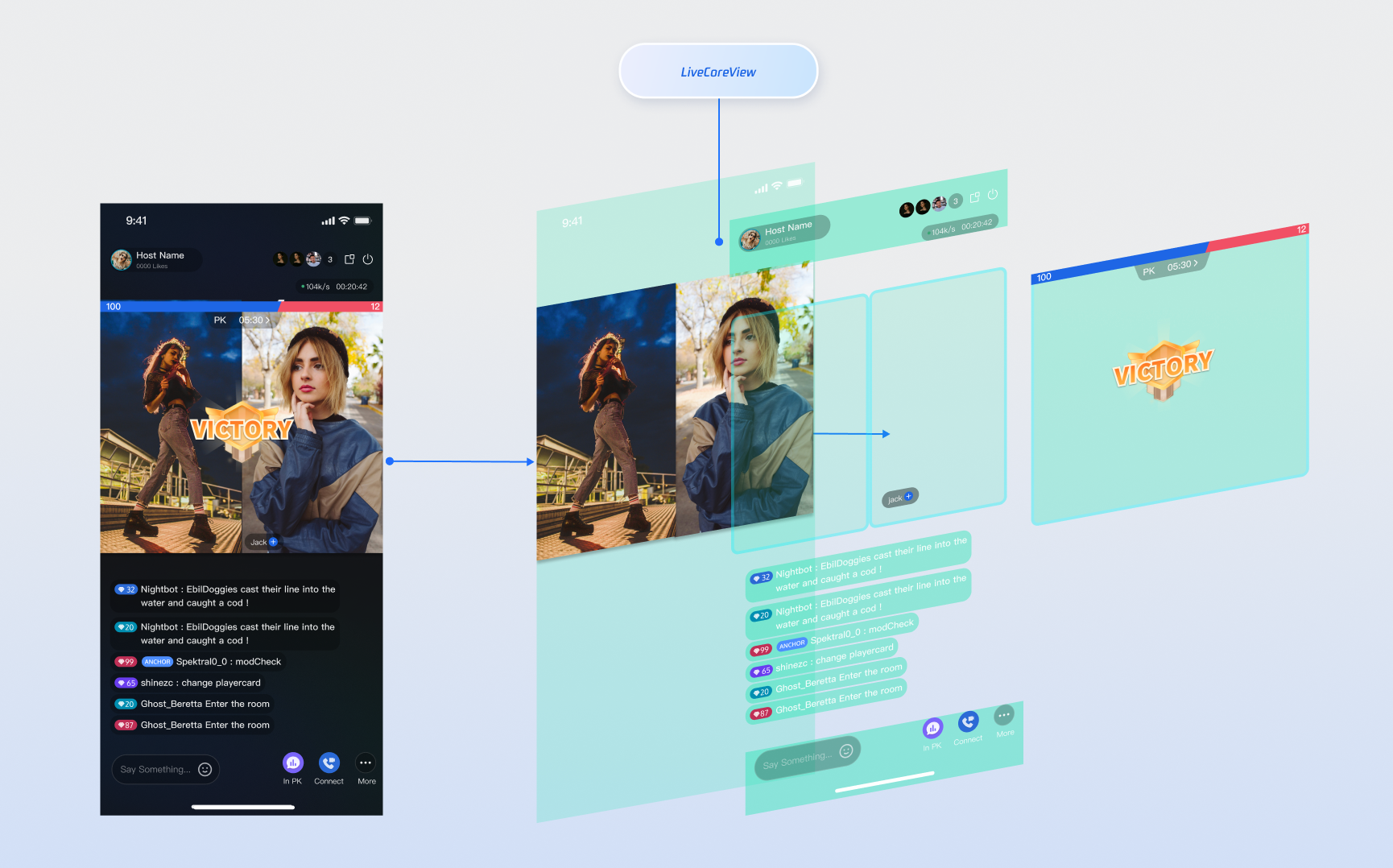
The following view hierarchy diagram illustrates the position and role of **LiveCoreView** within the live streaming interface:
|
|
8
8
|
|
|
9
|
-
|
|
10
|
-
|
|
11
|
-
|
|
12
9
|
## Core Concepts
|
|
13
|
-
|
|
14
|
-
|
|
15
|
-
<
|
|
16
|
-
|
|
17
|
-
|
|
18
|
-
|
|
19
|
-
<td rowspan="1" colSpan="1" >**Key API / Property**</td>
|
|
20
|
-
</tr>
|
|
21
|
-
|
|
22
|
-
<tr>
|
|
23
|
-
<td rowspan="1" colSpan="1" >LiveCoreView</td>
|
|
24
|
-
|
|
25
|
-
<td rowspan="1" colSpan="1" >Handles publishing, playing, and rendering audio/video streams. Provides adapter interfaces for integrating custom UI components (e.g., user info, PK progress bar).</td>
|
|
26
|
-
|
|
27
|
-
<td rowspan="1" colSpan="1" >- `viewType`:<br> - `.pushView` (host publishing view)<br> - `.playView` (audience playback view)<br>- `setLiveId()`: Binds the live room ID for this view.<br>- `videoViewDelegate`: Adapter for custom video display UI slots.</td>
|
|
28
|
-
</tr>
|
|
29
|
-
|
|
30
|
-
<tr>
|
|
31
|
-
<td rowspan="1" colSpan="1" >LiveListStore</td>
|
|
32
|
-
|
|
33
|
-
<td rowspan="1" colSpan="1" >Manages the complete live room lifecycle (create, join, leave), synchronizes state, and listens for passive events (e.g., live ended, kicked out).</td>
|
|
34
|
-
|
|
35
|
-
<td rowspan="1" colSpan="1" >- `createLive()`: Start live stream as host.<br>- `endLive()`: End live stream as host.<br>- `joinLive()`: Audience joins live room.<br>- `leaveLive()`: Leave live room.</td>
|
|
36
|
-
</tr>
|
|
37
|
-
|
|
38
|
-
<tr>
|
|
39
|
-
<td rowspan="1" colSpan="1" >LiveInfo</td>
|
|
40
|
-
|
|
41
|
-
<td rowspan="1" colSpan="1" >Defines room parameters before going live, such as room ID, seat layout mode, max co-hosts, etc.</td>
|
|
42
|
-
|
|
43
|
-
<td rowspan="1" colSpan="1" >- `liveID`: Unique room identifier.<br>- `seatLayoutTemplateID`: Layout template ID (e.g., 600 for dynamic grid).</td>
|
|
44
|
-
</tr>
|
|
45
|
-
</table>
|
|
46
|
-
|
|
10
|
+
| **Core Concept** | **Core Responsibility** | **Key API / Property** |
|
|
11
|
+
| --- | --- | --- |
|
|
12
|
+
| LiveCoreView | Handles publishing, playing, and rendering audio/video streams. Provides adapter interfaces for integrating custom UI components (e.g., user info, PK progress bar). | - `viewType`:<br>- `.pushView` (host publishing view)<br>- `.playView` (audience playback view)<br>- `setLiveId()`: Binds the live room ID for this view.<br>- `videoViewDelegate`: Adapter for custom video display UI slots. |
|
|
13
|
+
| LiveListStore | Manages the complete live room lifecycle (create, join, leave), synchronizes state, and listens for passive events (e.g., live ended, kicked out). | - `createLive()`: Start live stream as host.<br>- `endLive()`: End live stream as host.<br>- `joinLive()`: Audience joins live room.<br>- `leaveLive()`: Leave live room. |
|
|
14
|
+
| LiveInfo | Defines room parameters before going live, such as room ID, seat layout mode, max co-hosts, etc. | - `liveID`: Unique room identifier.<br>- seatTemplate: Layout template. |
|
|
47
15
|
|
|
48
16
|
## Preparation
|
|
49
17
|
|
|
50
18
|
### Step 1: Activate the Service
|
|
51
19
|
|
|
52
|
-
See
|
|
20
|
+
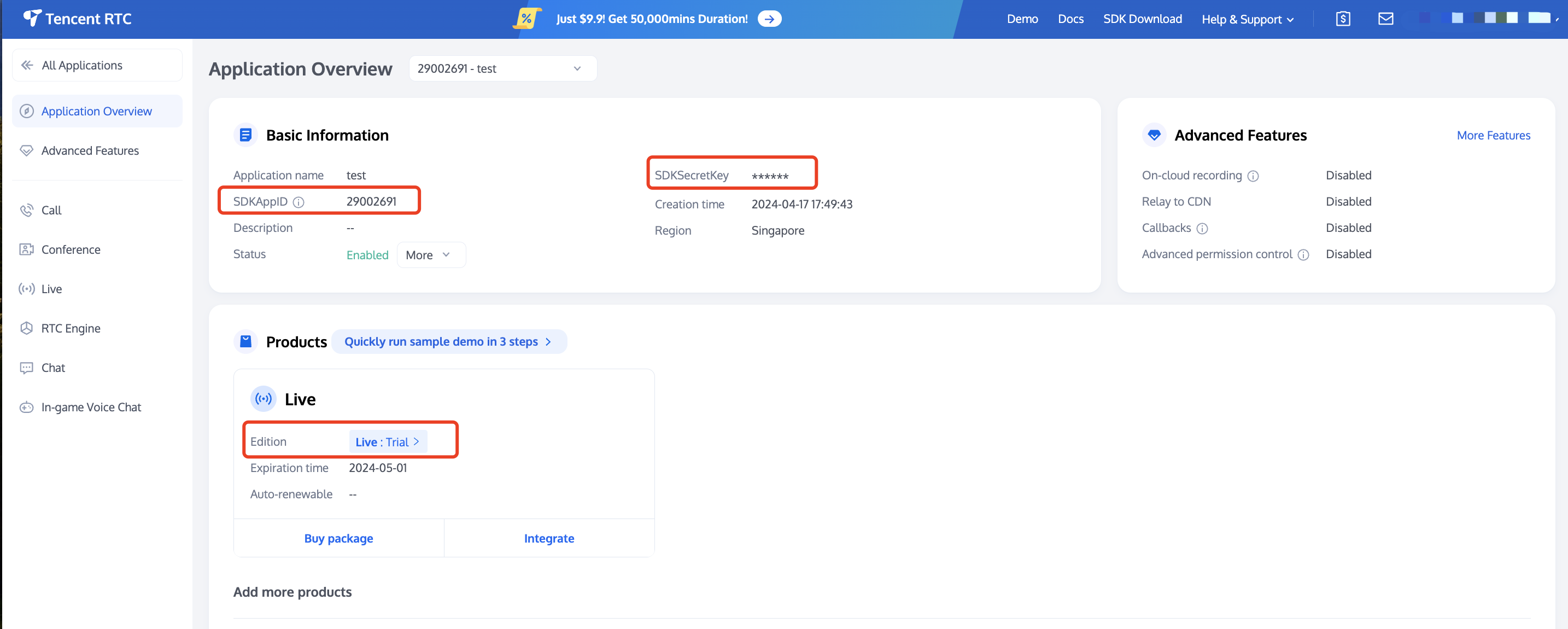
See Activate Service to obtain either the trial or paid version of the SDK.Then, go to [the Console](https://console.trtc.io/app) for application management, and get the following:
|
|
53
21
|
- `SDKAppID`: Application identifier (required). Tencent Cloud uses `SDKAppID` for billing and details.
|
|
54
22
|
|
|
55
23
|
- `SDKSecretKey`: Application secret key, used to initialize the configuration file with secret information.
|
|
56
24
|
|
|
57
|
-
|
|
58
|
-
|
|
59
|
-
|
|
60
25
|
### Step 2: Import AtomicXCore into Your Project
|
|
61
26
|
1. **Install the Component**: Add `pod 'AtomicXCore'` to your `Podfile`, then run `pod install`.
|
|
62
27
|
|
|
63
28
|
``` ruby
|
|
64
29
|
target 'xxxx' do
|
|
65
|
-
pod 'AtomicXCore'
|
|
30
|
+
pod 'AtomicXCore', '~> 4.0'
|
|
66
31
|
end
|
|
67
32
|
```
|
|
68
33
|
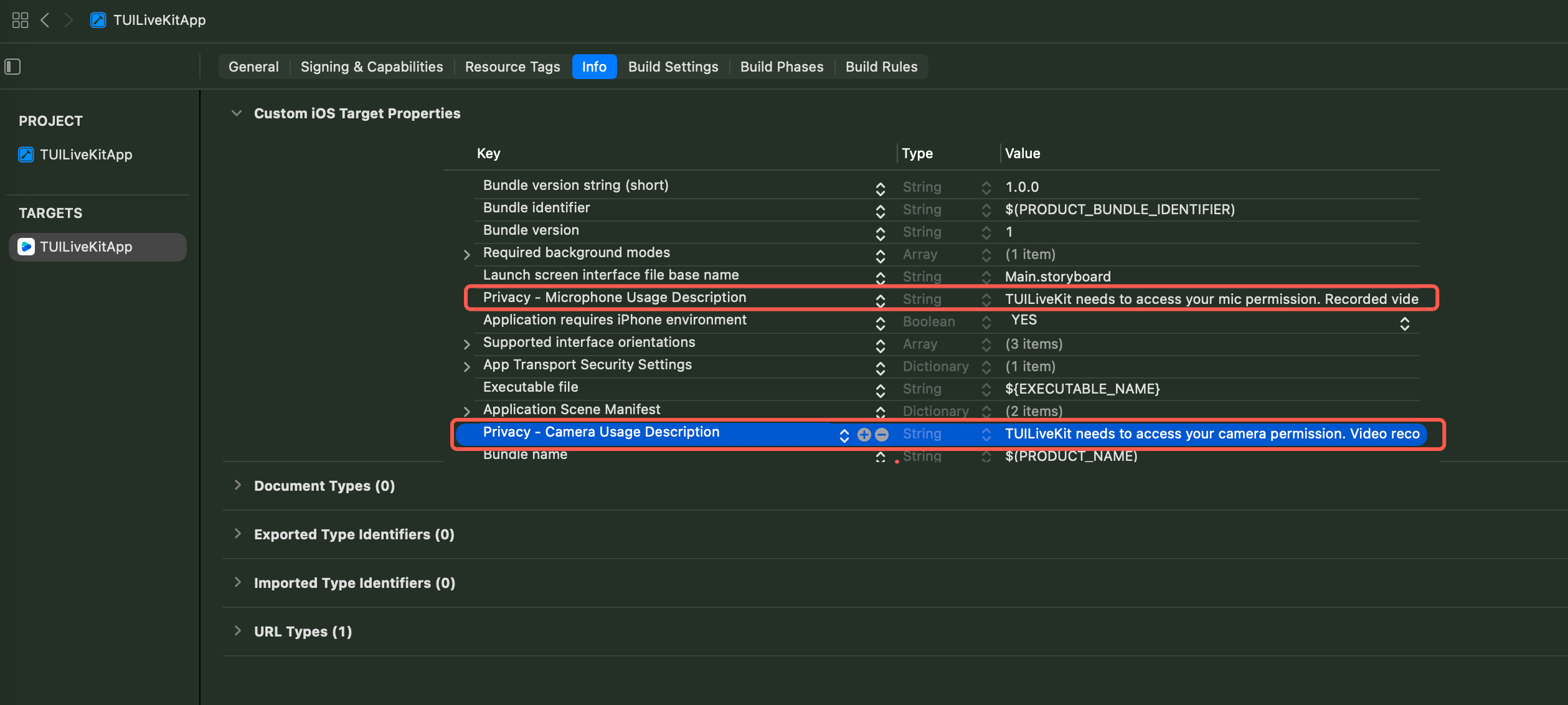
2. **Configure App Permissions**: Add camera and microphone usage descriptions to your app's `Info.plist` file.
|
|
@@ -73,18 +38,16 @@ See [Activate Service](https://write.woa.com/document/141936672617742336) to obt
|
|
|
73
38
|
<key>NSMicrophoneUsageDescription</key>
|
|
74
39
|
<string>TUILiveKit needs microphone permission to enable sound in recorded videos</string>
|
|
75
40
|
```
|
|
76
|
-
|
|
77
|
-
|
|
78
41
|
|
|
79
42
|
### Step 3: Implement Login Logic
|
|
80
43
|
|
|
81
44
|
Call `LoginStore.shared.login` in your project to complete authentication. **This is required before using any functionality of AtomicXCore**.
|
|
82
45
|
|
|
83
46
|
> **Note:**
|
|
84
|
-
>
|
|
47
|
+
>
|
|
85
48
|
|
|
86
49
|
> We recommend calling LoginStore.shared.login only after your app's own user authentication is successful, to ensure clear and consistent login logic.
|
|
87
|
-
>
|
|
50
|
+
>
|
|
88
51
|
|
|
89
52
|
``` swift
|
|
90
53
|
import AtomicXCore
|
|
@@ -106,40 +69,11 @@ func application(_ application: UIApplication, didFinishLaunchingWithOptions lau
|
|
|
106
69
|
```
|
|
107
70
|
|
|
108
71
|
**Login API Parameter Description**
|
|
109
|
-
|
|
110
|
-
|
|
111
|
-
|
|
112
|
-
|
|
113
|
-
|
|
114
|
-
|
|
115
|
-
<td rowspan="1" colSpan="1" >**Description**</td>
|
|
116
|
-
</tr>
|
|
117
|
-
|
|
118
|
-
<tr>
|
|
119
|
-
<td rowspan="1" colSpan="1" >`SDKAppID`</td>
|
|
120
|
-
|
|
121
|
-
<td rowspan="1" colSpan="1" >`Int`</td>
|
|
122
|
-
|
|
123
|
-
<td rowspan="1" colSpan="1" >Get this from [TRTC console](https://console.trtc.io/app).</td>
|
|
124
|
-
</tr>
|
|
125
|
-
|
|
126
|
-
<tr>
|
|
127
|
-
<td rowspan="1" colSpan="1" >`UserID`</td>
|
|
128
|
-
|
|
129
|
-
<td rowspan="1" colSpan="1" >`String`</td>
|
|
130
|
-
|
|
131
|
-
<td rowspan="1" colSpan="1" >The unique ID for the current user. Must contain only English letters, numbers, hyphens, and underscores.</td>
|
|
132
|
-
</tr>
|
|
133
|
-
|
|
134
|
-
<tr>
|
|
135
|
-
<td rowspan="1" colSpan="1" >`userSig`</td>
|
|
136
|
-
|
|
137
|
-
<td rowspan="1" colSpan="1" >`String`</td>
|
|
138
|
-
|
|
139
|
-
<td rowspan="1" colSpan="1" >A ticket for Tencent Cloud authentication. Please note:<br>- Development Environment: You can use the local `GenerateTestUserSig.genTestSig` function to generate a `UserSig` or generate a temporary UserSig via the [UserSig Generation Tool](https://console.trtc.io/usersig).<br>- Production Environment: To prevent key leakage, you must use a server-side method to generate `UserSig`. For details, see [Generating UserSig on the Server](https://write.woa.com/document/89644530319802368).</td>
|
|
140
|
-
</tr>
|
|
141
|
-
</table>
|
|
142
|
-
|
|
72
|
+
| **Parameter** | **Type** | **Description** |
|
|
73
|
+
| --- | --- | --- |
|
|
74
|
+
| `SDKAppID` | `Int` | Get this from [TRTC console](https://console.trtc.io/app). |
|
|
75
|
+
| `UserID` | `String` | The unique ID for the current user. Must contain only English letters, numbers, hyphens, and underscores. |
|
|
76
|
+
| `userSig` | `String` | A ticket for Tencent Cloud authentication. Please note:<br>- Development Environment: You can use the local `GenerateTestUserSig.genTestSig` function to generate a `UserSig` or generate a temporary UserSig via the [UserSig Generation Tool](https://console.trtc.io/usersig).<br>- Production Environment: To prevent key leakage, you must use a server-side method to generate `UserSig`. For details, see Generating UserSig on the Server. |
|
|
143
77
|
|
|
144
78
|
## Building a Basic Live Room
|
|
145
79
|
|
|
@@ -147,30 +81,26 @@ func application(_ application: UIApplication, didFinishLaunchingWithOptions lau
|
|
|
147
81
|
|
|
148
82
|
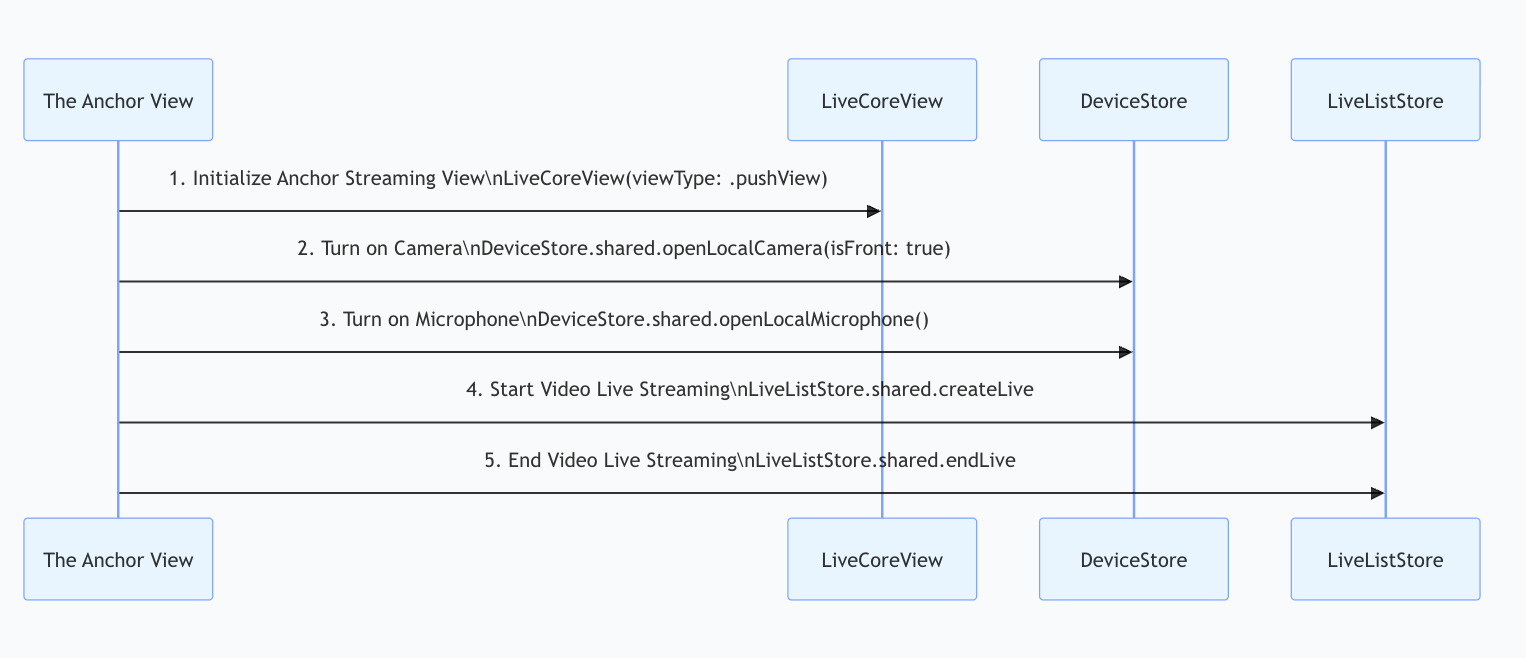
Follow these steps to quickly set up broadcaster video streaming:
|
|
149
83
|
|
|
150
|
-
|
|
151
|
-
|
|
152
|
-
|
|
153
84
|
> **Note:**
|
|
154
|
-
>
|
|
85
|
+
>
|
|
155
86
|
|
|
156
87
|
> For a complete broadcaster streaming implementation, refer to [TUILiveRoomAnchorViewController.swift](https://github.com/Tencent-RTC/TUIKit_iOS/blob/main/live/Sources/LiveStream/TUILiveRoomAnchorViewController.swift) in the TUILiveKit open source project.
|
|
157
|
-
>
|
|
88
|
+
>
|
|
158
89
|
|
|
159
90
|
1. **Initialize the Broadcaster Streaming View**
|
|
160
91
|
|
|
161
|
-
|
|
162
92
|
In your broadcaster view controller, create a `LiveCoreView` instance and set `viewType` to `.pushView`.
|
|
163
93
|
|
|
164
94
|
``` swift
|
|
165
95
|
import AtomicXCore
|
|
166
|
-
|
|
96
|
+
|
|
167
97
|
// YourAnchorViewController represents your broadcaster streaming view controller
|
|
168
98
|
class YourAnchorViewController: UIViewController {
|
|
169
|
-
|
|
99
|
+
|
|
170
100
|
private let liveId: String
|
|
171
101
|
// 1. Add LiveCoreView as a property of your view controller
|
|
172
102
|
private let coreView = LiveCoreView(viewType: .pushView, frame: UIScreen.main.bounds)
|
|
173
|
-
|
|
103
|
+
|
|
174
104
|
// 2. Add a convenience initializer for instance initialization
|
|
175
105
|
// - liveId: The ID of the live room to start streaming
|
|
176
106
|
public init(liveId: String) {
|
|
@@ -178,11 +108,11 @@ Follow these steps to quickly set up broadcaster video streaming:
|
|
|
178
108
|
super.init(nibName: nil, bundle: nil)
|
|
179
109
|
self.coreView.setLiveID(liveId)
|
|
180
110
|
}
|
|
181
|
-
|
|
111
|
+
|
|
182
112
|
required init?(coder: NSCoder) {
|
|
183
113
|
fatalError("init(coder:) has not been implemented")
|
|
184
114
|
}
|
|
185
|
-
|
|
115
|
+
|
|
186
116
|
public override func viewDidLoad() {
|
|
187
117
|
super.viewDidLoad()
|
|
188
118
|
// 3. Add the broadcaster streaming view to your view
|
|
@@ -192,12 +122,11 @@ Follow these steps to quickly set up broadcaster video streaming:
|
|
|
192
122
|
```
|
|
193
123
|
2. **Open Camera and Microphone**
|
|
194
124
|
|
|
195
|
-
|
|
196
125
|
Call `DeviceStore.shared.openLocalCamera` and `DeviceStore.shared.openLocalMicrophone` to open the camera and microphone. **No further action is required—LiveCoreView automatically previews the current camera video stream**.
|
|
197
126
|
|
|
198
127
|
``` swift
|
|
199
128
|
import AtomicXCore
|
|
200
|
-
|
|
129
|
+
|
|
201
130
|
class YourAnchorViewController: UIViewController {
|
|
202
131
|
// ... other code ...
|
|
203
132
|
public override func viewDidLoad() {
|
|
@@ -205,7 +134,7 @@ Follow these steps to quickly set up broadcaster video streaming:
|
|
|
205
134
|
// Enable devices
|
|
206
135
|
openDevices()
|
|
207
136
|
}
|
|
208
|
-
|
|
137
|
+
|
|
209
138
|
private func openDevices() {
|
|
210
139
|
// 1. Enable front camera
|
|
211
140
|
DeviceStore.shared.openLocalCamera(isFront: true, completion: nil)
|
|
@@ -216,16 +145,15 @@ Follow these steps to quickly set up broadcaster video streaming:
|
|
|
216
145
|
```
|
|
217
146
|
3. **Start Live Streaming**
|
|
218
147
|
|
|
219
|
-
|
|
220
148
|
Call `LiveListStore.shared.createLive` to start streaming.
|
|
221
149
|
|
|
222
150
|
``` swift
|
|
223
151
|
import AtomicXCore
|
|
224
|
-
|
|
152
|
+
|
|
225
153
|
class YourAnchorViewController: UIViewController {
|
|
226
|
-
|
|
154
|
+
|
|
227
155
|
// ... other code ...
|
|
228
|
-
|
|
156
|
+
|
|
229
157
|
// Call the start streaming interface to begin live streaming
|
|
230
158
|
private func startLive() {
|
|
231
159
|
var liveInfo = LiveInfo()
|
|
@@ -233,11 +161,9 @@ Follow these steps to quickly set up broadcaster video streaming:
|
|
|
233
161
|
liveInfo.liveID = self.liveId
|
|
234
162
|
// 2. Set the live room name
|
|
235
163
|
liveInfo.liveName = "test live"
|
|
236
|
-
// 3. Configure layout template
|
|
237
|
-
liveInfo.
|
|
238
|
-
// 4.
|
|
239
|
-
liveInfo.keepOwnerOnSeat = true
|
|
240
|
-
// 5. Call LiveListStore.shared.createLive to start streaming
|
|
164
|
+
// 3. Configure the seat layout template. Default: VideoDynamicGrid9Seats (portrait dynamic video grid layout)
|
|
165
|
+
liveInfo.seatTemplate = .videoDynamicGrid9Seats
|
|
166
|
+
// 4. Call LiveListStore.shared.createLive to start streaming
|
|
241
167
|
LiveListStore.shared.createLive(liveInfo) { [weak self] result in
|
|
242
168
|
guard let self = self else { return }
|
|
243
169
|
switch result {
|
|
@@ -253,180 +179,32 @@ Follow these steps to quickly set up broadcaster video streaming:
|
|
|
253
179
|
|
|
254
180
|
`LiveInfo` Parameter Descriptions:
|
|
255
181
|
|
|
256
|
-
|
|
257
|
-
|
|
258
|
-
|
|
259
|
-
|
|
260
|
-
|
|
261
|
-
|
|
262
|
-
|
|
263
|
-
|
|
264
|
-
|
|
265
|
-
|
|
266
|
-
|
|
267
|
-
|
|
268
|
-
|
|
269
|
-
|
|
270
|
-
<td rowspan="1" colSpan="1" >`String`</td>
|
|
271
|
-
|
|
272
|
-
<td rowspan="1" colSpan="1" >Required</td>
|
|
273
|
-
|
|
274
|
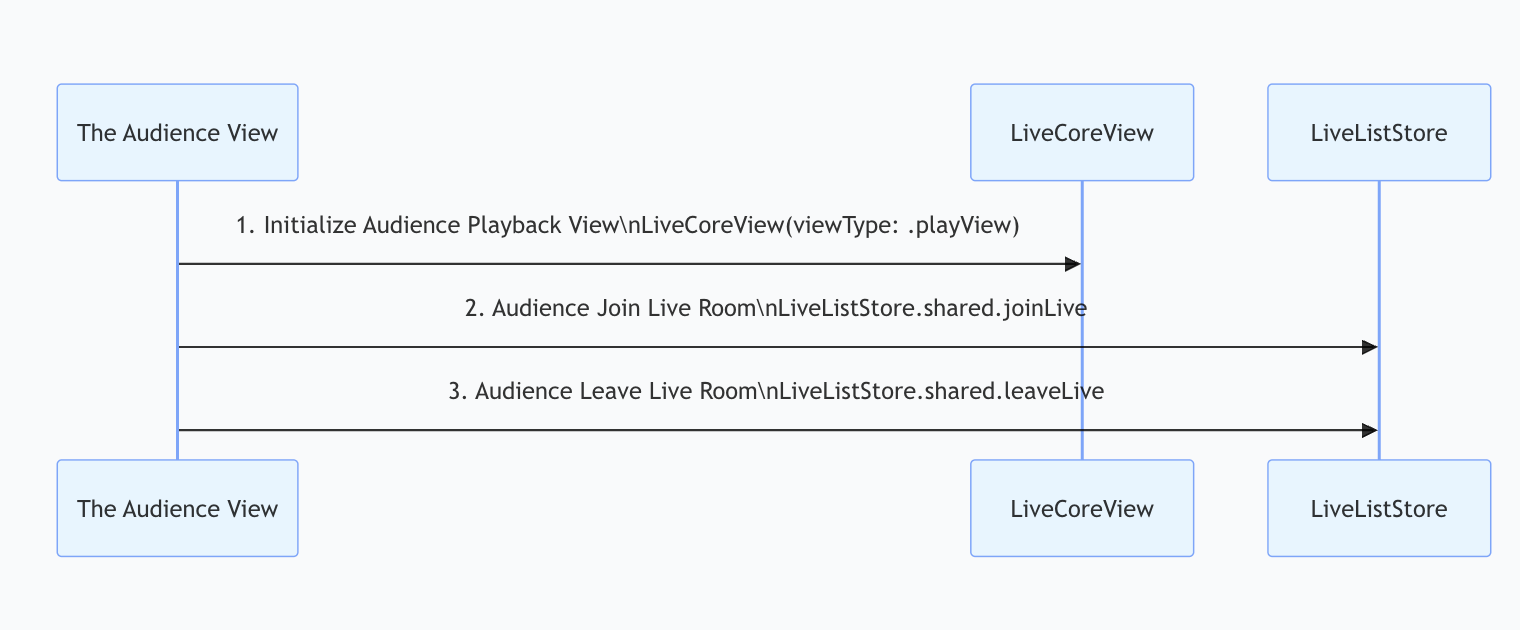
-
<td rowspan="1" colSpan="1" >Unique identifier for the live room.</td>
|
|
275
|
-
</tr>
|
|
276
|
-
|
|
277
|
-
<tr>
|
|
278
|
-
<td rowspan="1" colSpan="1" >`liveName`</td>
|
|
279
|
-
|
|
280
|
-
<td rowspan="1" colSpan="1" >`String`</td>
|
|
281
|
-
|
|
282
|
-
<td rowspan="1" colSpan="1" >Optional</td>
|
|
283
|
-
|
|
284
|
-
<td rowspan="1" colSpan="1" >Title of the live room.</td>
|
|
285
|
-
</tr>
|
|
286
|
-
|
|
287
|
-
<tr>
|
|
288
|
-
<td rowspan="1" colSpan="1" >`notice`</td>
|
|
289
|
-
|
|
290
|
-
<td rowspan="1" colSpan="1" >`String`</td>
|
|
291
|
-
|
|
292
|
-
<td rowspan="1" colSpan="1" >Optional</td>
|
|
293
|
-
|
|
294
|
-
<td rowspan="1" colSpan="1" >Announcement for the live room.</td>
|
|
295
|
-
</tr>
|
|
296
|
-
|
|
297
|
-
<tr>
|
|
298
|
-
<td rowspan="1" colSpan="1" >`isMessageDisable`</td>
|
|
299
|
-
|
|
300
|
-
<td rowspan="1" colSpan="1" >`Bool`</td>
|
|
301
|
-
|
|
302
|
-
<td rowspan="1" colSpan="1" >Optional</td>
|
|
303
|
-
|
|
304
|
-
<td rowspan="1" colSpan="1" >Whether to mute chat (true: yes, false: no).</td>
|
|
305
|
-
</tr>
|
|
306
|
-
|
|
307
|
-
<tr>
|
|
308
|
-
<td rowspan="1" colSpan="1" >`isPublicVisible`</td>
|
|
309
|
-
|
|
310
|
-
<td rowspan="1" colSpan="1" >`Bool`</td>
|
|
311
|
-
|
|
312
|
-
<td rowspan="1" colSpan="1" >Optional</td>
|
|
313
|
-
|
|
314
|
-
<td rowspan="1" colSpan="1" >Whether the room is publicly visible (true: yes, false: no).</td>
|
|
315
|
-
</tr>
|
|
316
|
-
|
|
317
|
-
<tr>
|
|
318
|
-
<td rowspan="1" colSpan="1" >`isSeatEnabled`</td>
|
|
319
|
-
|
|
320
|
-
<td rowspan="1" colSpan="1" >`Bool`</td>
|
|
321
|
-
|
|
322
|
-
<td rowspan="1" colSpan="1" >Optional</td>
|
|
323
|
-
|
|
324
|
-
<td rowspan="1" colSpan="1" >Whether to enable seat functionality (true: yes, false: no).</td>
|
|
325
|
-
</tr>
|
|
326
|
-
|
|
327
|
-
<tr>
|
|
328
|
-
<td rowspan="1" colSpan="1" >`keepOwnerOnSeat`</td>
|
|
329
|
-
|
|
330
|
-
<td rowspan="1" colSpan="1" >`Bool`</td>
|
|
331
|
-
|
|
332
|
-
<td rowspan="1" colSpan="1" >Optional</td>
|
|
333
|
-
|
|
334
|
-
<td rowspan="1" colSpan="1" >Whether to keep the owner on the seat.</td>
|
|
335
|
-
</tr>
|
|
336
|
-
|
|
337
|
-
<tr>
|
|
338
|
-
<td rowspan="1" colSpan="1" >`maxSeatCount`</td>
|
|
339
|
-
|
|
340
|
-
<td rowspan="1" colSpan="1" >`Int`</td>
|
|
341
|
-
|
|
342
|
-
<td rowspan="1" colSpan="1" >Required</td>
|
|
343
|
-
|
|
344
|
-
<td rowspan="1" colSpan="1" >Maximum number of seats.</td>
|
|
345
|
-
</tr>
|
|
346
|
-
|
|
347
|
-
<tr>
|
|
348
|
-
<td rowspan="1" colSpan="1" >`seatMode`</td>
|
|
349
|
-
|
|
350
|
-
<td rowspan="1" colSpan="1" >`TakeSeatMode`</td>
|
|
351
|
-
|
|
352
|
-
<td rowspan="1" colSpan="1" >Optional</td>
|
|
353
|
-
|
|
354
|
-
<td rowspan="1" colSpan="1" >Seat mode (.free: free to take seat, .apply: apply to take seat).</td>
|
|
355
|
-
</tr>
|
|
356
|
-
|
|
357
|
-
<tr>
|
|
358
|
-
<td rowspan="1" colSpan="1" >`seatLayoutTemplateID`</td>
|
|
359
|
-
|
|
360
|
-
<td rowspan="1" colSpan="1" >`UInt`</td>
|
|
361
|
-
|
|
362
|
-
<td rowspan="1" colSpan="1" >Required</td>
|
|
363
|
-
|
|
364
|
-
<td rowspan="1" colSpan="1" >Seat layout template ID.</td>
|
|
365
|
-
</tr>
|
|
366
|
-
|
|
367
|
-
<tr>
|
|
368
|
-
<td rowspan="1" colSpan="1" >`coverURL`</td>
|
|
369
|
-
|
|
370
|
-
<td rowspan="1" colSpan="1" >`String`</td>
|
|
371
|
-
|
|
372
|
-
<td rowspan="1" colSpan="1" >Optional</td>
|
|
373
|
-
|
|
374
|
-
<td rowspan="1" colSpan="1" >Cover image URL for the live room.</td>
|
|
375
|
-
</tr>
|
|
376
|
-
|
|
377
|
-
<tr>
|
|
378
|
-
<td rowspan="1" colSpan="1" >`backgroundURL`</td>
|
|
379
|
-
|
|
380
|
-
<td rowspan="1" colSpan="1" >`String`</td>
|
|
381
|
-
|
|
382
|
-
<td rowspan="1" colSpan="1" >Optional</td>
|
|
383
|
-
|
|
384
|
-
<td rowspan="1" colSpan="1" >Background image URL for the live room.</td>
|
|
385
|
-
</tr>
|
|
386
|
-
|
|
387
|
-
<tr>
|
|
388
|
-
<td rowspan="1" colSpan="1" >`categoryList`</td>
|
|
389
|
-
|
|
390
|
-
<td rowspan="1" colSpan="1" >`NSNumber`</td>
|
|
391
|
-
|
|
392
|
-
<td rowspan="1" colSpan="1" >Optional</td>
|
|
393
|
-
|
|
394
|
-
<td rowspan="1" colSpan="1" >Category tag list for the live room.</td>
|
|
395
|
-
</tr>
|
|
396
|
-
|
|
397
|
-
<tr>
|
|
398
|
-
<td rowspan="1" colSpan="1" >`activityStatus`</td>
|
|
399
|
-
|
|
400
|
-
<td rowspan="1" colSpan="1" >`Int`</td>
|
|
401
|
-
|
|
402
|
-
<td rowspan="1" colSpan="1" >Optional</td>
|
|
403
|
-
|
|
404
|
-
<td rowspan="1" colSpan="1" >Live activity status.</td>
|
|
405
|
-
</tr>
|
|
406
|
-
|
|
407
|
-
<tr>
|
|
408
|
-
<td rowspan="1" colSpan="1" >`isGiftEnabled`</td>
|
|
409
|
-
|
|
410
|
-
<td rowspan="1" colSpan="1" >`Bool`</td>
|
|
411
|
-
|
|
412
|
-
<td rowspan="1" colSpan="1" >Optional</td>
|
|
413
|
-
|
|
414
|
-
<td rowspan="1" colSpan="1" >Whether to enable gift functionality (true: yes, false: no).</td>
|
|
415
|
-
</tr>
|
|
416
|
-
</table>
|
|
182
|
+
| **Parameter Name** | **Type** | **Attribute** | **Description** |
|
|
183
|
+
| --- | --- | --- | --- |
|
|
184
|
+
| `liveID` | `String` | Required | Unique identifier for the live room. |
|
|
185
|
+
| `liveName` | `String` | Optional | Title of the live room. |
|
|
186
|
+
| `notice` | `String` | Optional | Announcement for the live room. |
|
|
187
|
+
| `isMessageDisable` | `Bool` | Optional | Whether to mute chat (true: yes, false: no). |
|
|
188
|
+
| `isPublicVisible` | `Bool` | Optional | Whether the room is publicly visible (true: yes, false: no). |
|
|
189
|
+
| `seatMode` | `TakeSeatMode` | Optional | Seat mode (.free: free to take seat, .apply: apply to take seat). |
|
|
190
|
+
| `seatTemplate` | SeatLayoutTemplate | Required | Seat layout template. |
|
|
191
|
+
| `coverURL` | `String` | Optional | Cover image URL for the live room. |
|
|
192
|
+
| `backgroundURL` | `String` | Optional | Background image URL for the live room. |
|
|
193
|
+
| `categoryList` | `NSNumber` | Optional | Category tag list for the live room. |
|
|
194
|
+
| `activityStatus` | `Int` | Optional | Live activity status. |
|
|
195
|
+
| `isGiftEnabled` | `Bool` | Optional | Whether to enable gift functionality (true: yes, false: no). |
|
|
417
196
|
|
|
418
197
|
4. **End Live Streaming**
|
|
419
198
|
|
|
420
|
-
|
|
421
199
|
After the live stream ends, call `LiveListStore.shared.endLive `to stop streaming and destroy the room. The SDK handles cleanup automatically.
|
|
422
200
|
|
|
423
201
|
``` swift
|
|
424
202
|
import AtomicXCore
|
|
425
|
-
|
|
203
|
+
|
|
426
204
|
class YourAnchorViewController: UIViewController {
|
|
427
|
-
|
|
205
|
+
|
|
428
206
|
// ... other code ...
|
|
429
|
-
|
|
207
|
+
|
|
430
208
|
// End live streaming
|
|
431
209
|
private func stopLive() {
|
|
432
210
|
LiveListStore.shared.endLive { [weak self] result in
|
|
@@ -446,40 +224,36 @@ Follow these steps to quickly set up broadcaster video streaming:
|
|
|
446
224
|
|
|
447
225
|
Enable audience viewing with the following steps:
|
|
448
226
|
|
|
449
|
-
|
|
450
|
-
|
|
451
|
-
|
|
452
227
|
> **Note:**
|
|
453
|
-
>
|
|
228
|
+
>
|
|
454
229
|
|
|
455
230
|
> For a complete audience playback implementation, refer to [TUILiveRoomAudienceViewController.swift](https://github.com/Tencent-RTC/TUIKit_iOS/blob/main/live/Sources/LiveStream/TUILiveRoomAudienceViewController.swift) in the TUILiveKit open source project.
|
|
456
|
-
>
|
|
231
|
+
>
|
|
457
232
|
|
|
458
233
|
1. **Implement the Audience Playback Page**
|
|
459
234
|
|
|
460
|
-
|
|
461
235
|
In your audience view controller, create a `LiveCoreView` instance and set `viewType` to `.playView`.
|
|
462
236
|
|
|
463
237
|
``` swift
|
|
464
238
|
import AtomicXCore
|
|
465
|
-
|
|
239
|
+
|
|
466
240
|
class YourAudienceViewController: UIViewController {
|
|
467
|
-
|
|
241
|
+
|
|
468
242
|
// 1. Initialize the audience playback page
|
|
469
243
|
private let coreView = LiveCoreView(viewType: .playView, frame: UIScreen.main.bounds)
|
|
470
244
|
private let liveId: String
|
|
471
|
-
|
|
245
|
+
|
|
472
246
|
public init(liveId: String) {
|
|
473
247
|
self.liveId = liveId
|
|
474
248
|
super.init(nibName: nil, bundle: nil)
|
|
475
249
|
// 2. Bind the live ID
|
|
476
250
|
self.coreView.setLiveID(liveId)
|
|
477
251
|
}
|
|
478
|
-
|
|
252
|
+
|
|
479
253
|
required init?(coder: NSCoder) {
|
|
480
254
|
fatalError("init(coder:) has not been implemented")
|
|
481
255
|
}
|
|
482
|
-
|
|
256
|
+
|
|
483
257
|
public override func viewDidLoad() {
|
|
484
258
|
super.viewDidLoad()
|
|
485
259
|
// 3. Add the playback view to your view
|
|
@@ -489,22 +263,21 @@ Enable audience viewing with the following steps:
|
|
|
489
263
|
```
|
|
490
264
|
2. **Join the Live Room to Watch**
|
|
491
265
|
|
|
492
|
-
|
|
493
266
|
Call `LiveListStore.shared.joinLive` to join the live stream. **No further action is required—LiveCoreView will automatically play the current room's video stream**.
|
|
494
267
|
|
|
495
268
|
``` swift
|
|
496
269
|
import AtomicXCore
|
|
497
|
-
|
|
270
|
+
|
|
498
271
|
class YourAudienceViewController: UIViewController {
|
|
499
272
|
// ... other code ...
|
|
500
|
-
|
|
273
|
+
|
|
501
274
|
public override func viewDidLoad() {
|
|
502
275
|
super.viewDidLoad()
|
|
503
276
|
view.addSubview(coreView)
|
|
504
277
|
// 4. Join the live room
|
|
505
278
|
joinLive()
|
|
506
279
|
}
|
|
507
|
-
|
|
280
|
+
|
|
508
281
|
private func joinLive() {
|
|
509
282
|
// Call LiveListStore.shared.joinLive to enter the live room
|
|
510
283
|
// - liveId: Same liveId as the broadcaster
|
|
@@ -524,16 +297,15 @@ Enable audience viewing with the following steps:
|
|
|
524
297
|
```
|
|
525
298
|
3. **Leave the Live Room**
|
|
526
299
|
|
|
527
|
-
|
|
528
300
|
When the audience leaves, call `LiveListStore.shared.leaveLive` to exit. The SDK will automatically stop playback and leave the room.
|
|
529
301
|
|
|
530
302
|
``` swift
|
|
531
303
|
import AtomicXCore
|
|
532
|
-
|
|
304
|
+
|
|
533
305
|
class YourAudienceViewController: UIViewController {
|
|
534
|
-
|
|
306
|
+
|
|
535
307
|
// ... other code ...
|
|
536
|
-
|
|
308
|
+
|
|
537
309
|
// Leave the live room
|
|
538
310
|
private func leaveLive() {
|
|
539
311
|
LiveListStore.shared.leaveLive { [weak self] result in
|
|
@@ -602,57 +374,12 @@ class YourAudienceViewController: UIViewController {
|
|
|
602
374
|
|
|
603
375
|
### Run and Test
|
|
604
376
|
|
|
605
|
-
After integrating `LiveCoreView`, you will have a pure video rendering view with full live streaming capabilities, but without any interactive UI. To add interactive features, see
|
|
606
|
-
|
|
607
|
-
|
|
608
|
-
|
|
609
|
-
|
|
610
|
-
|
|
611
|
-
|
|
612
|
-
<td rowspan="1" colSpan="1" >**Floating Window Layout**</td>
|
|
613
|
-
|
|
614
|
-
<td rowspan="1" colSpan="1" >**Fixed Grid Layout**</td>
|
|
615
|
-
|
|
616
|
-
<td rowspan="1" colSpan="1" >**Fixed Window Layout**</td>
|
|
617
|
-
</tr>
|
|
618
|
-
|
|
619
|
-
<tr>
|
|
620
|
-
<td rowspan="1" colSpan="1" >Template ID</td>
|
|
621
|
-
|
|
622
|
-
<td rowspan="1" colSpan="1" >600</td>
|
|
623
|
-
|
|
624
|
-
<td rowspan="1" colSpan="1" >601</td>
|
|
625
|
-
|
|
626
|
-
<td rowspan="1" colSpan="1" >800</td>
|
|
627
|
-
|
|
628
|
-
<td rowspan="1" colSpan="1" >801</td>
|
|
629
|
-
</tr>
|
|
630
|
-
|
|
631
|
-
<tr>
|
|
632
|
-
<td rowspan="1" colSpan="1" >Description</td>
|
|
633
|
-
|
|
634
|
-
<td rowspan="1" colSpan="1" >Default layout; grid size adjusts dynamically based on number of co-hosts.</td>
|
|
635
|
-
|
|
636
|
-
<td rowspan="1" colSpan="1" >Co-hosts are displayed as floating windows.</td>
|
|
637
|
-
|
|
638
|
-
<td rowspan="1" colSpan="1" >Fixed number of co-hosts; each occupies a fixed grid.</td>
|
|
639
|
-
|
|
640
|
-
<td rowspan="1" colSpan="1" >Fixed number of co-hosts; guests are displayed as fixed windows.</td>
|
|
641
|
-
</tr>
|
|
642
|
-
|
|
643
|
-
<tr>
|
|
644
|
-
<td rowspan="1" colSpan="1" >Example</td>
|
|
645
|
-
|
|
646
|
-
<td rowspan="1" colSpan="1" ><br></td>
|
|
647
|
-
|
|
648
|
-
<td rowspan="1" colSpan="1" ><br></td>
|
|
649
|
-
|
|
650
|
-
<td rowspan="1" colSpan="1" ><br></td>
|
|
651
|
-
|
|
652
|
-
<td rowspan="1" colSpan="1" ><br>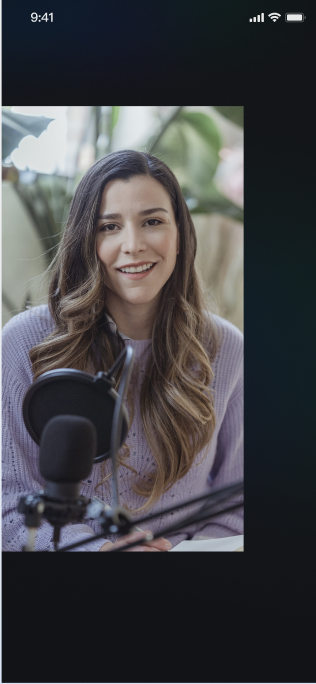</td>
|
|
653
|
-
</tr>
|
|
654
|
-
</table>
|
|
655
|
-
|
|
377
|
+
After integrating `LiveCoreView`, you will have a pure video rendering view with full live streaming capabilities, but without any interactive UI. To add interactive features, see Enriching the Live Streaming Scene.
|
|
378
|
+
| | **Dynamic Grid Layout** | **Floating Window Layout** | **Fixed Grid Layout** | **Fixed Window Layout** |
|
|
379
|
+
| --- | --- | --- | --- | --- |
|
|
380
|
+
| Template ID | .videoDynamicGrid9Seats | .videoDynamicFloat7Seats | .videoFixedGrid9Seats | .videoFixedFloat7Seats |
|
|
381
|
+
| Description | Default layout; grid size adjusts dynamically based on number of co-hosts. | Co-hosts are displayed as floating windows. | Fixed number of co-hosts; each occupies a fixed grid. | Fixed number of co-hosts; guests are displayed as fixed windows. |
|
|
382
|
+
| Example | | | | |
|
|
656
383
|
|
|
657
384
|
## Advanced Features
|
|
658
385
|
|
|
@@ -665,7 +392,6 @@ In live streaming room, the host may need to synchronize custom information to a
|
|
|
665
392
|
|
|
666
393
|
2. On the audience side, subscribe to `LiveListState.currentLive` and listen for changes in `metaData`. When a relevant key is updated, parse its value and update your business state.
|
|
667
394
|
|
|
668
|
-
|
|
669
395
|
#### Code Example
|
|
670
396
|
``` swift
|
|
671
397
|
import AtomicXCore
|
|
@@ -717,166 +443,28 @@ private func subscribeToDataUpdates() {
|
|
|
717
443
|
## Enriching the Live Streaming Scene
|
|
718
444
|
|
|
719
445
|
Once the basic live streaming functionality is in place, refer to the following guides to add interactive features to your live stream:
|
|
720
|
-
|
|
721
|
-
|
|
722
|
-
|
|
723
|
-
|
|
724
|
-
|
|
725
|
-
|
|
726
|
-
<td rowspan="1" colSpan="1" >**Store**</td>
|
|
727
|
-
|
|
728
|
-
<td rowspan="1" colSpan="1" >**Implementation Guide**</td>
|
|
729
|
-
</tr>
|
|
730
|
-
|
|
731
|
-
<tr>
|
|
732
|
-
<td rowspan="1" colSpan="1" >Enable Audience Audio/Video Co-hosting</td>
|
|
733
|
-
|
|
734
|
-
<td rowspan="1" colSpan="1" >Audience can apply to join the host and interact via real-time video.</td>
|
|
735
|
-
|
|
736
|
-
<td rowspan="1" colSpan="1" >[CoGuestStore](https://tencent-rtc.github.io/TUIKit_iOS/documentation/atomicxcore/cogueststore)</td>
|
|
737
|
-
|
|
738
|
-
<td rowspan="1" colSpan="1" >[Implementation Guide](https://write.woa.com/document/194571607036174336)</td>
|
|
739
|
-
</tr>
|
|
740
|
-
|
|
741
|
-
<tr>
|
|
742
|
-
<td rowspan="1" colSpan="1" >Enable Host Cross-room PK</td>
|
|
743
|
-
|
|
744
|
-
<td rowspan="1" colSpan="1" >Hosts from different rooms can connect for interaction or PK.</td>
|
|
745
|
-
|
|
746
|
-
<td rowspan="1" colSpan="1" >[CoHostStore](https://tencent-rtc.github.io/TUIKit_iOS/documentation/atomicxcore/cohoststore)</td>
|
|
747
|
-
|
|
748
|
-
<td rowspan="1" colSpan="1" >[Implementation Guide](https://write.woa.com/document/194571607415758848)</td>
|
|
749
|
-
</tr>
|
|
750
|
-
|
|
751
|
-
<tr>
|
|
752
|
-
<td rowspan="1" colSpan="1" >Add Bullet Chat Feature</td>
|
|
753
|
-
|
|
754
|
-
<td rowspan="1" colSpan="1" >Audience can send and receive real-time text messages in the live room.</td>
|
|
755
|
-
|
|
756
|
-
<td rowspan="1" colSpan="1" >[BarrageStore](https://tencent-rtc.github.io/TUIKit_iOS/documentation/atomicxcore/barragestore)</td>
|
|
757
|
-
|
|
758
|
-
<td rowspan="1" colSpan="1" >[Implementation Guide](https://write.woa.com/document/194571607781711872)</td>
|
|
759
|
-
</tr>
|
|
760
|
-
|
|
761
|
-
<tr>
|
|
762
|
-
<td rowspan="1" colSpan="1" >Build a Gift Giving System</td>
|
|
763
|
-
|
|
764
|
-
<td rowspan="1" colSpan="1" >Audience can send virtual gifts to the host, increasing engagement and fun.</td>
|
|
765
|
-
|
|
766
|
-
<td rowspan="1" colSpan="1" >[GiftStore](https://tencent-rtc.github.io/TUIKit_iOS/documentation/atomicxcore/giftstore)</td>
|
|
767
|
-
|
|
768
|
-
<td rowspan="1" colSpan="1" >[Implementation Guide](https://write.woa.com/document/194571602052481024)</td>
|
|
769
|
-
</tr>
|
|
770
|
-
</table>
|
|
771
|
-
|
|
446
|
+
| **Feature** | **Description** | **Store** | **Implementation Guide** |
|
|
447
|
+
| --- | --- | --- | --- |
|
|
448
|
+
| Enable Audience Audio/Video Co-hosting | Audience can apply to join the host and interact via real-time video. | [CoGuestStore](https://tencent-rtc.github.io/TUIKit_iOS/documentation/atomicxcore/cogueststore) | Implementation Guide |
|
|
449
|
+
| Enable Host Cross-room PK | Hosts from different rooms can connect for interaction or PK. | [CoHostStore](https://tencent-rtc.github.io/TUIKit_iOS/documentation/atomicxcore/cohoststore) | Implementation Guide |
|
|
450
|
+
| Add Bullet Chat Feature | Audience can send and receive real-time text messages in the live room. | [BarrageStore](https://tencent-rtc.github.io/TUIKit_iOS/documentation/atomicxcore/barragestore) | Implementation Guide |
|
|
451
|
+
| Build a Gift Giving System | Audience can send virtual gifts to the host, increasing engagement and fun. | [GiftStore](https://tencent-rtc.github.io/TUIKit_iOS/documentation/atomicxcore/giftstore) | Implementation Guide |
|
|
772
452
|
|
|
773
453
|
## API Documentation
|
|
774
|
-
|
|
775
|
-
|
|
776
|
-
|
|
777
|
-
|
|
778
|
-
|
|
779
|
-
|
|
780
|
-
|
|
781
|
-
|
|
782
|
-
|
|
783
|
-
|
|
784
|
-
|
|
785
|
-
|
|
786
|
-
|
|
787
|
-
|
|
788
|
-
<td rowspan="1" colSpan="1" >[LiveCoreView](https://tencent-rtc.github.io/TUIKit_iOS/documentation/atomicxcore/livecoreview/)</td>
|
|
789
|
-
</tr>
|
|
790
|
-
|
|
791
|
-
<tr>
|
|
792
|
-
<td rowspan="1" colSpan="1" >LiveListStore</td>
|
|
793
|
-
|
|
794
|
-
<td rowspan="1" colSpan="1" >Manages the full lifecycle of live rooms: create/join/leave/destroy rooms, query room list, modify live info (name, announcement, etc.), and listen to live status events (e.g., kicked out, ended).</td>
|
|
795
|
-
|
|
796
|
-
<td rowspan="1" colSpan="1" >[LiveListStore](https://tencent-rtc.github.io/TUIKit_iOS/documentation/atomicxcore/liveliststore)</td>
|
|
797
|
-
</tr>
|
|
798
|
-
|
|
799
|
-
<tr>
|
|
800
|
-
<td rowspan="1" colSpan="1" >DeviceStore</td>
|
|
801
|
-
|
|
802
|
-
<td rowspan="1" colSpan="1" >Controls audio/video devices: microphone (on/off, volume), camera (on/off, switch, quality), screen sharing, and real-time device status monitoring.</td>
|
|
803
|
-
|
|
804
|
-
<td rowspan="1" colSpan="1" >[DeviceStore](https://tencent-rtc.github.io/TUIKit_iOS/documentation/atomicxcore/devicestore)</td>
|
|
805
|
-
</tr>
|
|
806
|
-
|
|
807
|
-
<tr>
|
|
808
|
-
<td rowspan="1" colSpan="1" >CoGuestStore</td>
|
|
809
|
-
|
|
810
|
-
<td rowspan="1" colSpan="1" >Manages audience co-hosting: apply/invite/accept/reject co-host requests, member permission control (microphone/camera), and status synchronization.</td>
|
|
811
|
-
|
|
812
|
-
<td rowspan="1" colSpan="1" >[CoGuestStore](https://tencent-rtc.github.io/TUIKit_iOS/documentation/atomicxcore/cogueststore)</td>
|
|
813
|
-
</tr>
|
|
814
|
-
|
|
815
|
-
<tr>
|
|
816
|
-
<td rowspan="1" colSpan="1" >CoHostStore</td>
|
|
817
|
-
|
|
818
|
-
<td rowspan="1" colSpan="1" >Handles host cross-room connections: supports multiple layout templates (dynamic grid, etc.), initiates/accepts/rejects connections, and manages co-host interactions.</td>
|
|
819
|
-
|
|
820
|
-
<td rowspan="1" colSpan="1" >[CoHostStore](https://tencent-rtc.github.io/TUIKit_iOS/documentation/atomicxcore/cohoststore)</td>
|
|
821
|
-
</tr>
|
|
822
|
-
|
|
823
|
-
<tr>
|
|
824
|
-
<td rowspan="1" colSpan="1" >BattleStore</td>
|
|
825
|
-
|
|
826
|
-
<td rowspan="1" colSpan="1" >Manages host PK battles: initiate PK (set duration/opponent), manage PK status (start/end), synchronize scores, and listen for battle results.</td>
|
|
827
|
-
|
|
828
|
-
<td rowspan="1" colSpan="1" >[BattleStore](https://tencent-rtc.github.io/TUIKit_iOS/documentation/atomicxcore/battlestore)</td>
|
|
829
|
-
</tr>
|
|
830
|
-
|
|
831
|
-
<tr>
|
|
832
|
-
<td rowspan="1" colSpan="1" >GiftStore</td>
|
|
833
|
-
|
|
834
|
-
<td rowspan="1" colSpan="1" >Handles gift interactions: get gift list, send/receive gifts, and listen for gift events (including sender and gift details).</td>
|
|
835
|
-
|
|
836
|
-
<td rowspan="1" colSpan="1" >[GiftStore](https://tencent-rtc.github.io/TUIKit_iOS/documentation/atomicxcore/giftstore)</td>
|
|
837
|
-
</tr>
|
|
838
|
-
|
|
839
|
-
<tr>
|
|
840
|
-
<td rowspan="1" colSpan="1" >BarrageStore</td>
|
|
841
|
-
|
|
842
|
-
<td rowspan="1" colSpan="1" >Supports live chat: send text/custom danmaku, maintain danmaku list, and monitor danmaku status in real time.</td>
|
|
843
|
-
|
|
844
|
-
<td rowspan="1" colSpan="1" >[BarrageStore](https://tencent-rtc.github.io/TUIKit_iOS/documentation/atomicxcore/barragestore)</td>
|
|
845
|
-
</tr>
|
|
846
|
-
|
|
847
|
-
<tr>
|
|
848
|
-
<td rowspan="1" colSpan="1" >LikeStore</td>
|
|
849
|
-
|
|
850
|
-
<td rowspan="1" colSpan="1" >Handles like interactions: send likes, listen for like events, and synchronize total like count.</td>
|
|
851
|
-
|
|
852
|
-
<td rowspan="1" colSpan="1" >[LikeStore](https://tencent-rtc.github.io/TUIKit_iOS/documentation/atomicxcore/likestore)</td>
|
|
853
|
-
</tr>
|
|
854
|
-
|
|
855
|
-
<tr>
|
|
856
|
-
<td rowspan="1" colSpan="1" >LiveAudienceStore</td>
|
|
857
|
-
|
|
858
|
-
<td rowspan="1" colSpan="1" >Manages audience: get real-time audience list (ID/name/avatar), count audience, and listen for join/leave events.</td>
|
|
859
|
-
|
|
860
|
-
<td rowspan="1" colSpan="1" >[LiveAudienceStore](https://tencent-rtc.github.io/TUIKit_iOS/documentation/atomicxcore/liveaudiencestore)</td>
|
|
861
|
-
</tr>
|
|
862
|
-
|
|
863
|
-
<tr>
|
|
864
|
-
<td rowspan="1" colSpan="1" >AudioEffectStore</td>
|
|
865
|
-
|
|
866
|
-
<td rowspan="1" colSpan="1" >Audio effects: voice change (child/male), reverb (KTV, etc.), ear return adjustment, and real-time effect switching.</td>
|
|
867
|
-
|
|
868
|
-
<td rowspan="1" colSpan="1" >[AudioEffectStore](https://tencent-rtc.github.io/TUIKit_iOS/documentation/atomicxcore/audioeffectstore)</td>
|
|
869
|
-
</tr>
|
|
870
|
-
|
|
871
|
-
<tr>
|
|
872
|
-
<td rowspan="1" colSpan="1" >BaseBeautyStore</td>
|
|
873
|
-
|
|
874
|
-
<td rowspan="1" colSpan="1" >Basic beauty filters: adjust smoothing/whitening/rosiness (0-9), reset beauty status, and synchronize effect parameters.</td>
|
|
875
|
-
|
|
876
|
-
<td rowspan="1" colSpan="1" >[BaseBeautyStore](https://tencent-rtc.github.io/TUIKit_iOS/documentation/atomicxcore/basebeautystore)</td>
|
|
877
|
-
</tr>
|
|
878
|
-
</table>
|
|
879
|
-
|
|
454
|
+
| **Store/Component** | **Description** | **API Reference** |
|
|
455
|
+
| --- | --- | --- |
|
|
456
|
+
| LiveCoreView | Core view component for displaying and interacting with live video streams. Handles video rendering and view widgets, supports host streaming, audience co-hosting, host connections, and more. | [LiveCoreView](https://tencent-rtc.github.io/TUIKit_iOS/documentation/atomicxcore/livecoreview/) |
|
|
457
|
+
| LiveListStore | Manages the full lifecycle of live rooms: create/join/leave/destroy rooms, query room list, modify live info (name, announcement, etc.), and listen to live status events (e.g., kicked out, ended). | [LiveListStore](https://tencent-rtc.github.io/TUIKit_iOS/documentation/atomicxcore/liveliststore) |
|
|
458
|
+
| DeviceStore | Controls audio/video devices: microphone (on/off, volume), camera (on/off, switch, quality), screen sharing, and real-time device status monitoring. | [DeviceStore](https://tencent-rtc.github.io/TUIKit_iOS/documentation/atomicxcore/devicestore) |
|
|
459
|
+
| CoGuestStore | Manages audience co-hosting: apply/invite/accept/reject co-host requests, member permission control (microphone/camera), and status synchronization. | [CoGuestStore](https://tencent-rtc.github.io/TUIKit_iOS/documentation/atomicxcore/cogueststore) |
|
|
460
|
+
| CoHostStore | Handles host cross-room connections: supports multiple layout templates (dynamic grid, etc.), initiates/accepts/rejects connections, and manages co-host interactions. | [CoHostStore](https://tencent-rtc.github.io/TUIKit_iOS/documentation/atomicxcore/cohoststore) |
|
|
461
|
+
| BattleStore | Manages host PK battles: initiate PK (set duration/opponent), manage PK status (start/end), synchronize scores, and listen for battle results. | [BattleStore](https://tencent-rtc.github.io/TUIKit_iOS/documentation/atomicxcore/battlestore) |
|
|
462
|
+
| GiftStore | Handles gift interactions: get gift list, send/receive gifts, and listen for gift events (including sender and gift details). | [GiftStore](https://tencent-rtc.github.io/TUIKit_iOS/documentation/atomicxcore/giftstore) |
|
|
463
|
+
| BarrageStore | Supports live chat: send text/custom danmaku, maintain danmaku list, and monitor danmaku status in real time. | [BarrageStore](https://tencent-rtc.github.io/TUIKit_iOS/documentation/atomicxcore/barragestore) |
|
|
464
|
+
| LikeStore | Handles like interactions: send likes, listen for like events, and synchronize total like count. | [LikeStore](https://tencent-rtc.github.io/TUIKit_iOS/documentation/atomicxcore/likestore) |
|
|
465
|
+
| LiveAudienceStore | Manages audience: get real-time audience list (ID/name/avatar), count audience, and listen for join/leave events. | [LiveAudienceStore](https://tencent-rtc.github.io/TUIKit_iOS/documentation/atomicxcore/liveaudiencestore) |
|
|
466
|
+
| AudioEffectStore | Audio effects: voice change (child/male), reverb (KTV, etc.), ear return adjustment, and real-time effect switching. | [AudioEffectStore](https://tencent-rtc.github.io/TUIKit_iOS/documentation/atomicxcore/audioeffectstore) |
|
|
467
|
+
| BaseBeautyStore | Basic beauty filters: adjust smoothing/whitening/rosiness (0-9), reset beauty status, and synchronize effect parameters. | [BaseBeautyStore](https://tencent-rtc.github.io/TUIKit_iOS/documentation/atomicxcore/basebeautystore) |
|
|
880
468
|
|
|
881
469
|
## FAQs
|
|
882
470
|
|
|
@@ -889,13 +477,11 @@ Once the basic live streaming functionality is in place, refer to the following
|
|
|
889
477
|
|
|
890
478
|
- **Check the network**: Ensure the device has a stable network connection.
|
|
891
479
|
|
|
892
|
-
|
|
893
480
|
### After the host enables the camera, why is there a local video preview after starting the stream, but a black screen before starting?
|
|
894
481
|
- **Check the host side**: Make sure the host streaming view (`LiveCoreView`) has its `viewType` set to `PUSH_VIEW`.
|
|
895
482
|
|
|
896
483
|
- **Check the audience side**: Make sure the audience playback view (`LiveCoreView`) has its `viewType` set to `PLAY_VIEW`.
|
|
897
484
|
|
|
898
|
-
|
|
899
485
|
### What restrictions and rules apply to `updateLiveMetaData`?
|
|
900
486
|
|
|
901
487
|
To maintain system stability and efficiency, metaData usage follows these rules:
|
|
@@ -911,7 +497,6 @@ To maintain system stability and efficiency, metaData usage follows these rules:
|
|
|
911
497
|
|
|
912
498
|
- **Conflict Resolution**: The update mechanism is "last write wins". If multiple administrators modify the same key in quick succession, the last change takes effect. Avoid concurrent modifications to the same key in your business logic.
|
|
913
499
|
|
|
914
|
-
|
|
915
500
|
### sync Fails to Copy Third-party Library Resources Due to Insufficient Permissions
|
|
916
501
|
|
|
917
502
|
For example, when integrating the SnapKit framework with Xcode, you may encounter the following build error:
|
|
@@ -927,5 +512,3 @@ Solution Steps
|
|
|
927
512
|
1. Disable user script sandboxing. Open your Xcode project, go to **Build Settings**, search for User Script Sandboxing (or `ENABLE_USER_SCRIPT_SANDBOXING`), and change its value from YES to NO.
|
|
928
513
|
|
|
929
514
|
2. Clean and rebuild the project. Run **Product → Clean** Build Folder to clear the project cache, then rebuild and run the project.
|
|
930
|
-
|
|
931
|
-
|