@tencent-rtc/mcp 1.3.5 → 1.3.7
This diff represents the content of publicly available package versions that have been released to one of the supported registries. The information contained in this diff is provided for informational purposes only and reflects changes between package versions as they appear in their respective public registries.
- package/index.js +4 -4
- package/index.js.map +1 -1
- package/package.json +1 -1
- package/resource/doc/livekit/live/flutter/live-audience-list.md +339 -0
- package/resource/doc/livekit/live/flutter/live-audio-effect.md +742 -0
- package/resource/doc/livekit/live/flutter/live-barrage.md +581 -0
- package/resource/doc/livekit/live/flutter/live-base-beauty.md +486 -0
- package/resource/doc/livekit/live/flutter/live-co-guest-interaction.md +608 -0
- package/resource/doc/livekit/live/flutter/live-gift.md +800 -0
- package/resource/doc/livekit/live/flutter/live-host-interaction.md +1113 -0
- package/resource/doc/livekit/live/flutter/live-integration.md +1041 -0
- package/resource/doc/livekit/live/flutter/live-live-list.md +865 -0
- package/resource/doc/livekit/live/flutter/workflow.md +353 -0
- package/resource/doc/tuicallkit/flutter/workflow.md +331 -0
- package/tools/call/get-native-call-integration.js +27 -11
- package/tools/call/get-native-call-integration.js.map +1 -1
- package/tools/definitions/get_native_call_uikit_integration_def.js +17 -7
- package/tools/definitions/get_native_call_uikit_integration_def.js.map +1 -1
- package/utils/report-cls-client.js +1 -1
- package/utils/report-es-client.js +1 -1
- package/resource/doc/tuicallkit/flutter/how_to_run_flutter_callkit_demo.md +0 -101
- package/resource/doc/tuicallkit/iOS/how_to_run_iOS_callkit_demo.md +0 -98
- /package/resource/doc/tuicallkit/android/{how_to_integrated_android_callkit.md → integration.md} +0 -0
- /package/resource/doc/tuicallkit/android/{.gitkeep → workflow.md} +0 -0
- /package/resource/doc/tuicallkit/{android/api_TUICallObserver.md → faq/android_sdk/call-observer-api.md} +0 -0
- /package/resource/doc/tuicallkit/{android/api_TUICallKit.md → faq/android_sdk/callkit-api.md} +0 -0
- /package/resource/doc/tuicallkit/{flutter/api_TUICallDefine.md → faq/flutter_sdk/call-define-api.md} +0 -0
- /package/resource/doc/tuicallkit/{flutter/api_TUICallObserver.md → faq/flutter_sdk/call-observer-api.md} +0 -0
- /package/resource/doc/tuicallkit/{flutter/api_TUICallKit.md → faq/flutter_sdk/callkit-api.md} +0 -0
- /package/resource/doc/tuicallkit/{iOS/api_TUICallObserver.md → faq/ios_sdk/call-observer-api.md} +0 -0
- /package/resource/doc/tuicallkit/{iOS/api_TUICallKit.md → faq/ios_sdk/callkit-api.md} +0 -0
- /package/resource/doc/tuicallkit/flutter/{how_to_integrated_flutter_callkit.md → integration.md} +0 -0
- /package/resource/doc/tuicallkit/iOS/{how_to_integrated_iOS_callkit.md → integration.md} +0 -0
|
@@ -0,0 +1,608 @@
|
|
|
1
|
+
**AtomicXCore** provided the [CoGuestStore](https://tencent-rtc.github.io/TUIKit_Flutter/api_live_co_guest_store/CoGuestStore-class.html) module, specialized to manage the complete business process of audience mic connection. Developers do not need to worry about complex state synchronization and signaling interaction, just call a few simple methods to add powerful audio-video interaction between audience and Anchor to your live stream.
|
|
2
|
+
|
|
3
|
+
## Core Scenario
|
|
4
|
+
|
|
5
|
+
`CoGuestStore` supports the following two most mainstream microphone-connected scenarios:
|
|
6
|
+
- **Audience request to speak**: The audience proactively initiate mic connection request, and the Anchor can grant or reject after receiving the request.
|
|
7
|
+
|
|
8
|
+
- **Anchor invitation to speak**: The Anchor can proactively initiate mic connection to any audience in the live streaming room.
|
|
9
|
+
|
|
10
|
+
|
|
11
|
+
## Implementation Steps
|
|
12
|
+
|
|
13
|
+
### Step 1: Integrating the Component
|
|
14
|
+
|
|
15
|
+
Refer to [Quick Access](https://write.woa.com/document/200455640177692672) for seamless integration with **AtomicXCore** and complete **LiveCoreWidget** access.
|
|
16
|
+
|
|
17
|
+
After integration, start implementing the co-anchoring function.
|
|
18
|
+
|
|
19
|
+
### Step 2: Implementing Audience Request to Speak
|
|
20
|
+
|
|
21
|
+
#### Client Implementation
|
|
22
|
+
|
|
23
|
+
As an audience member, your core task is to **initiate application, receive results** and **become a listener**.
|
|
24
|
+
1. **Initiate mic connection**
|
|
25
|
+
|
|
26
|
+
|
|
27
|
+
When the user clicks the "apply for mic connection" button on the interface, call the `applyForSeat` method.
|
|
28
|
+
|
|
29
|
+
``` java
|
|
30
|
+
import 'package:atomic_x_core/atomicxcore.dart';
|
|
31
|
+
|
|
32
|
+
final String liveId = "room ID";
|
|
33
|
+
final CoGuestStore guestStore = CoGuestStore.create(liveId);
|
|
34
|
+
|
|
35
|
+
// User clicks "apply for mic connection"
|
|
36
|
+
void requestToConnect() async {
|
|
37
|
+
// seatIndex: The microphone slot index, value range is -1 (auto select an empty slot) and [0, maximum number of microphone slots in the current room -1], timeout: request timeout period (seconds)
|
|
38
|
+
final result = await guestStore.applyForSeat(
|
|
39
|
+
seatIndex: 0,
|
|
40
|
+
timeout: 30,
|
|
41
|
+
extraInfo: null,
|
|
42
|
+
);
|
|
43
|
+
if (result.isSuccess) {
|
|
44
|
+
print("Mic connection request sent, wait for anchor processing...");
|
|
45
|
+
} else {
|
|
46
|
+
print("Failed to send request: ${result.errorMessage}");
|
|
47
|
+
}
|
|
48
|
+
}
|
|
49
|
+
```
|
|
50
|
+
2. **Listen to the anchor's response**
|
|
51
|
+
|
|
52
|
+
|
|
53
|
+
By adding a listener through `addGuestListener`, you can receive the anchor's processing result.
|
|
54
|
+
|
|
55
|
+
``` java
|
|
56
|
+
late GuestListener _guestListener;
|
|
57
|
+
|
|
58
|
+
// Subscribe to events when your Widget is initialized
|
|
59
|
+
void subscribeGuestEvents() {
|
|
60
|
+
_guestListener = GuestListener(
|
|
61
|
+
onApplicationAccepted: (hostUser) {
|
|
62
|
+
print("Anchor ${hostUser.userName} agreed to your request, preparing to connect mic");
|
|
63
|
+
// 1. Turn on the camera, microphone
|
|
64
|
+
DeviceStore.shared.openLocalCamera(isFront: true);
|
|
65
|
+
DeviceStore.shared.openLocalMicrophone();
|
|
66
|
+
// 2. Update the UI here, such as disabling the apply button and displaying the mic connection state
|
|
67
|
+
},
|
|
68
|
+
onApplicationRejected: (hostUser) {
|
|
69
|
+
print("Anchor ${hostUser.userName} refused your request");
|
|
70
|
+
// Pop-up prompts user that the request was rejected
|
|
71
|
+
},
|
|
72
|
+
onInvitationReceived: (hostUser) {
|
|
73
|
+
print("Received mic connection invitation from Anchor ${hostUser.userName}");
|
|
74
|
+
// Pop up a dialog box herein for users to choose "Accept" or "Reject"
|
|
75
|
+
_showInvitationDialog(hostUser);
|
|
76
|
+
},
|
|
77
|
+
onKickedOffSeat: () {
|
|
78
|
+
print("You have been kicked off the mic by Anchor");
|
|
79
|
+
// Update UI, turn off the camera and microphone
|
|
80
|
+
},
|
|
81
|
+
);
|
|
82
|
+
guestStore.addGuestListener(_guestListener);
|
|
83
|
+
}
|
|
84
|
+
|
|
85
|
+
@override
|
|
86
|
+
void dispose() {
|
|
87
|
+
guestStore.removeGuestListener(_guestListener);
|
|
88
|
+
super.dispose();
|
|
89
|
+
}
|
|
90
|
+
```
|
|
91
|
+
3. **Leave the mic**
|
|
92
|
+
|
|
93
|
+
|
|
94
|
+
When a mic-connecting audience wants to end the interaction, call the `disconnect` method to return to general audience status.
|
|
95
|
+
|
|
96
|
+
``` java
|
|
97
|
+
// User clicks "leave mic" button
|
|
98
|
+
void leaveSeat() async {
|
|
99
|
+
final result = await guestStore.disconnect();
|
|
100
|
+
if (result.isSuccess) {
|
|
101
|
+
print("Left mic successfully");
|
|
102
|
+
} else {
|
|
103
|
+
print("Failed to leave mic: ${result.errorMessage}");
|
|
104
|
+
}
|
|
105
|
+
}
|
|
106
|
+
```
|
|
107
|
+
4. **(Optional) Cancel application**
|
|
108
|
+
|
|
109
|
+
|
|
110
|
+
If the audience wants to withdraw the application before anchor processing, they can call the API `cancelApplication`.
|
|
111
|
+
|
|
112
|
+
``` java
|
|
113
|
+
// While waiting, the user clicks "Cancel Application"
|
|
114
|
+
void cancelRequest() async {
|
|
115
|
+
final result = await guestStore.cancelApplication();
|
|
116
|
+
if (result.isSuccess) {
|
|
117
|
+
print("Application canceled");
|
|
118
|
+
} else {
|
|
119
|
+
print("Failed to cancel request: ${result.errorMessage}");
|
|
120
|
+
}
|
|
121
|
+
}
|
|
122
|
+
```
|
|
123
|
+
|
|
124
|
+
#### Anchor Implementation
|
|
125
|
+
|
|
126
|
+
As an Anchor, your core task is to **receive applications, show the Application List** and **process applications**.
|
|
127
|
+
1. **Listen for new mic connection requests**
|
|
128
|
+
|
|
129
|
+
|
|
130
|
+
By adding a listener through `addHostListener`, you can receive immediate notification when a new audience applies and get prompted.
|
|
131
|
+
|
|
132
|
+
``` java
|
|
133
|
+
import 'package:atomic_x_core/atomicxcore.dart';
|
|
134
|
+
|
|
135
|
+
final String liveId = "room ID";
|
|
136
|
+
final CoGuestStore guestStore = CoGuestStore.create(liveId);
|
|
137
|
+
late HostListener _hostListener;
|
|
138
|
+
late final VoidCallback _applicantsChangedListener = _onApplicantsChanged;
|
|
139
|
+
|
|
140
|
+
// Subscribe to anchor event
|
|
141
|
+
void subscribeHostEvents() {
|
|
142
|
+
_hostListener = HostListener(
|
|
143
|
+
onApplicationReceived: (guestUser) {
|
|
144
|
+
print("Received join microphone application from audience ${guestUser.userName}");
|
|
145
|
+
// Update UI herein, for example display a red dot on the "application list" button
|
|
146
|
+
},
|
|
147
|
+
onInvitationAccepted: (guestUser) {
|
|
148
|
+
print("Audience ${guestUser.userName} accepted your invitation");
|
|
149
|
+
},
|
|
150
|
+
onInvitationRejected: (guestUser) {
|
|
151
|
+
print("Audience ${guestUser.userName} refused your invite");
|
|
152
|
+
},
|
|
153
|
+
);
|
|
154
|
+
guestStore.addHostListener(_hostListener);
|
|
155
|
+
}
|
|
156
|
+
|
|
157
|
+
@override
|
|
158
|
+
void dispose() {
|
|
159
|
+
guestStore.removeHostListener(_hostListener);
|
|
160
|
+
super.dispose();
|
|
161
|
+
}
|
|
162
|
+
```
|
|
163
|
+
2. **Show application list**
|
|
164
|
+
|
|
165
|
+
|
|
166
|
+
`CoGuestStore`'s `coGuestState` maintains the current applicant list in real time. You can listen to it to update your UI.
|
|
167
|
+
|
|
168
|
+
``` java
|
|
169
|
+
// Subscription status update
|
|
170
|
+
void subscribeApplicants() {
|
|
171
|
+
guestStore.coGuestState.applicants.addListener(_applicantsChangedListener);
|
|
172
|
+
}
|
|
173
|
+
|
|
174
|
+
void _onApplicantsChanged() {
|
|
175
|
+
final applicants = guestStore.coGuestState.applicants.value;
|
|
176
|
+
print("Current number of applicants: ${applicants.length}");
|
|
177
|
+
// Refresh your "applicant list" UI herein
|
|
178
|
+
setState(() {
|
|
179
|
+
_applicantList = applicants;
|
|
180
|
+
});
|
|
181
|
+
}
|
|
182
|
+
|
|
183
|
+
@override
|
|
184
|
+
void dispose() {
|
|
185
|
+
guestStore.coGuestState.applicants.removeListener(_applicantsChangedListener);
|
|
186
|
+
super.dispose();
|
|
187
|
+
}
|
|
188
|
+
```
|
|
189
|
+
3. **Handle mic connection request**
|
|
190
|
+
|
|
191
|
+
|
|
192
|
+
When you select an audience from the list and click "Grant" or "Reject", call the appropriate method.
|
|
193
|
+
|
|
194
|
+
``` java
|
|
195
|
+
// Anchor clicks the "Grant" button and imports the applicant's userID
|
|
196
|
+
void accept(String userId) async {
|
|
197
|
+
final result = await guestStore.acceptApplication(userId);
|
|
198
|
+
if (result.isSuccess) {
|
|
199
|
+
print("Approved $userId's request, the other party is connecting mic");
|
|
200
|
+
}
|
|
201
|
+
}
|
|
202
|
+
|
|
203
|
+
// Anchor clicked the "Reject" button
|
|
204
|
+
void reject(String userId) async {
|
|
205
|
+
final result = await guestStore.rejectApplication(userId);
|
|
206
|
+
if (result.isSuccess) {
|
|
207
|
+
print("Denied $userId's request");
|
|
208
|
+
}
|
|
209
|
+
}
|
|
210
|
+
```
|
|
211
|
+
|
|
212
|
+
### Step 3: Implementing Anchor Invitation to Speak
|
|
213
|
+
|
|
214
|
+
#### Anchor Implementation
|
|
215
|
+
1. **Initiate invitation to audience**
|
|
216
|
+
|
|
217
|
+
|
|
218
|
+
When the Anchor selects someone from the audience list and clicks "invite to mic connection", call the `inviteToSeat` method.
|
|
219
|
+
|
|
220
|
+
``` java
|
|
221
|
+
// Anchor selects audience and initiates invitation
|
|
222
|
+
void invite(String userId) async {
|
|
223
|
+
// inviteeID: The invitee ID, seatIndex: The microphone slot index, value range is -1 (auto select an empty slot) and [0, maximum number of microphone slots in the current room -1]
|
|
224
|
+
// timeout: invitation timeout duration
|
|
225
|
+
final result = await guestStore.inviteToSeat(
|
|
226
|
+
inviteeID: userId,
|
|
227
|
+
seatIndex: 0,
|
|
228
|
+
timeout: 30,
|
|
229
|
+
extraInfo: null,
|
|
230
|
+
);
|
|
231
|
+
if (result.isSuccess) {
|
|
232
|
+
print("Invitation sent to $userId, waiting for peer response...");
|
|
233
|
+
}
|
|
234
|
+
}
|
|
235
|
+
```
|
|
236
|
+
2. **Listen to the audience response**
|
|
237
|
+
|
|
238
|
+
|
|
239
|
+
Listen to the invitation event response via `HostListener`.
|
|
240
|
+
|
|
241
|
+
``` java
|
|
242
|
+
// Callback configured in HostListener
|
|
243
|
+
_hostListener = HostListener(
|
|
244
|
+
onInvitationAccepted: (guestUser) {
|
|
245
|
+
print("Audience ${guestUser.userName} accepted your invitation");
|
|
246
|
+
},
|
|
247
|
+
onInvitationRejected: (guestUser) {
|
|
248
|
+
print("Audience ${guestUser.userName} refused your invite");
|
|
249
|
+
},
|
|
250
|
+
);
|
|
251
|
+
```
|
|
252
|
+
|
|
253
|
+
#### Client Implementation
|
|
254
|
+
1. **Receive the anchor's invitation**
|
|
255
|
+
|
|
256
|
+
|
|
257
|
+
Listen to the invitation event via `GuestListener`.
|
|
258
|
+
|
|
259
|
+
``` java
|
|
260
|
+
// Callback configured in GuestListener
|
|
261
|
+
_guestListener = GuestListener(
|
|
262
|
+
onInvitationReceived: (hostUser) {
|
|
263
|
+
print("Received mic connection invitation from Anchor ${hostUser.userName}");
|
|
264
|
+
// Pop up a dialog box herein for users to choose "Accept" or "Reject"
|
|
265
|
+
_showInvitationDialog(hostUser);
|
|
266
|
+
},
|
|
267
|
+
);
|
|
268
|
+
```
|
|
269
|
+
2. **Respond to invitation**
|
|
270
|
+
|
|
271
|
+
|
|
272
|
+
When the user makes a selection in the pop-up dialog box, call the appropriate method.
|
|
273
|
+
|
|
274
|
+
``` java
|
|
275
|
+
String inviterId = "Anchor ID initiating invitation"; // Obtain from onInvitationReceived callback
|
|
276
|
+
|
|
277
|
+
// User click "Accept"
|
|
278
|
+
void acceptInvitation() async {
|
|
279
|
+
final result = await guestStore.acceptInvitation(inviterId);
|
|
280
|
+
if (result.isSuccess) {
|
|
281
|
+
// Turn on the camera, microphone
|
|
282
|
+
DeviceStore.shared.openLocalCamera(isFront: true);
|
|
283
|
+
DeviceStore.shared.openLocalMicrophone();
|
|
284
|
+
}
|
|
285
|
+
}
|
|
286
|
+
|
|
287
|
+
// User click "Reject"
|
|
288
|
+
void rejectInvitation() async {
|
|
289
|
+
await guestStore.rejectInvitation(inviterId);
|
|
290
|
+
}
|
|
291
|
+
```
|
|
292
|
+
|
|
293
|
+
### Execution Effect
|
|
294
|
+
|
|
295
|
+
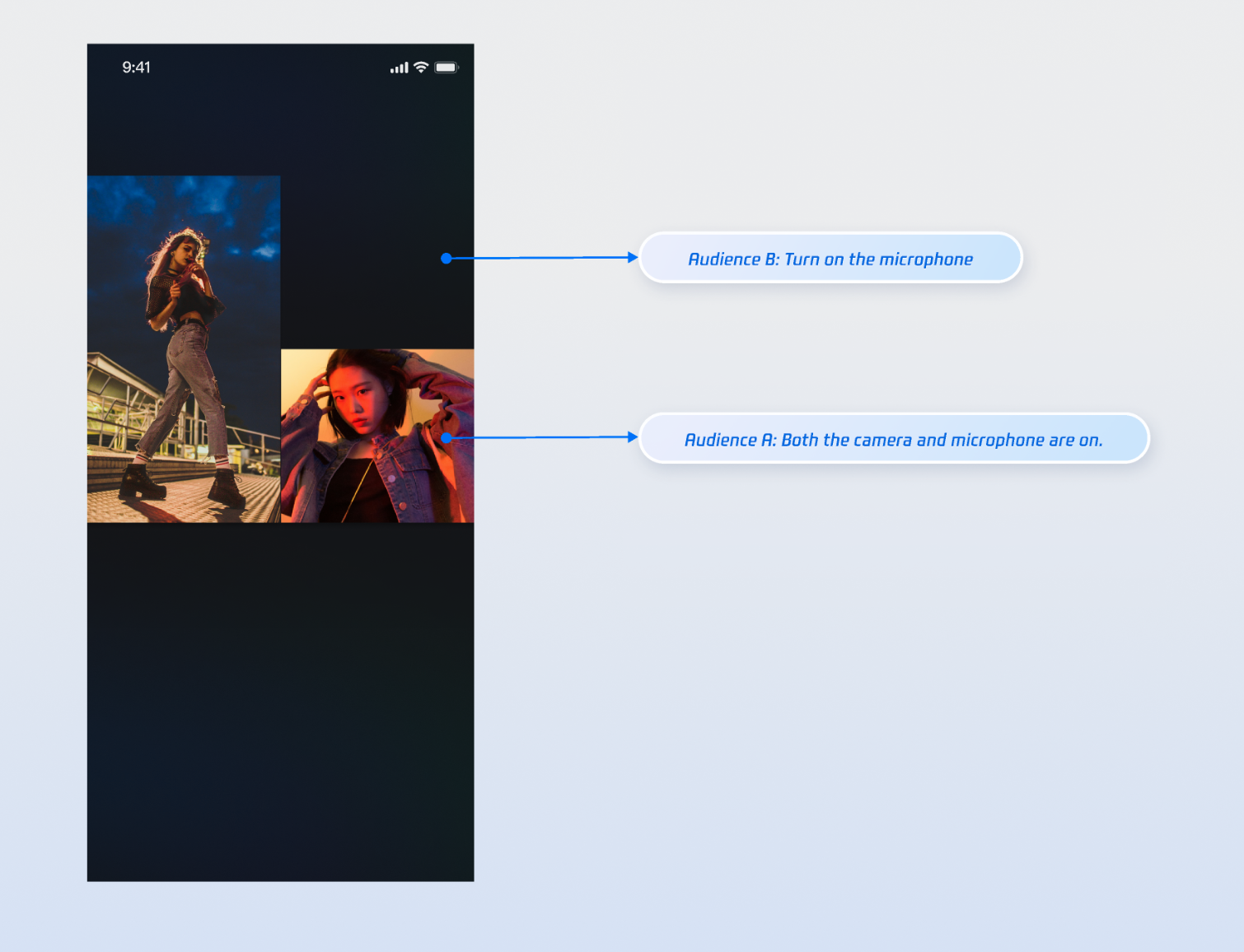
After integrating the above feature implementation, perform a co-streaming operation using two audiences and an Anchor separately. Audience A turns on the camera and microphone simultaneously, while Audience B turns on microphone only. The execution effect is as follows. You can refer to the next chapter [Refine UI Details](https://write.woa.com/#.E5.AE.8C.E5.96.84-ui-.E7.BB.86.E8.8A.82) to customize your desired UI logic.
|
|
296
|
+
|
|
297
|
+
|
|
298
|
+
|
|
299
|
+
|
|
300
|
+
## Refine UI Details
|
|
301
|
+
|
|
302
|
+
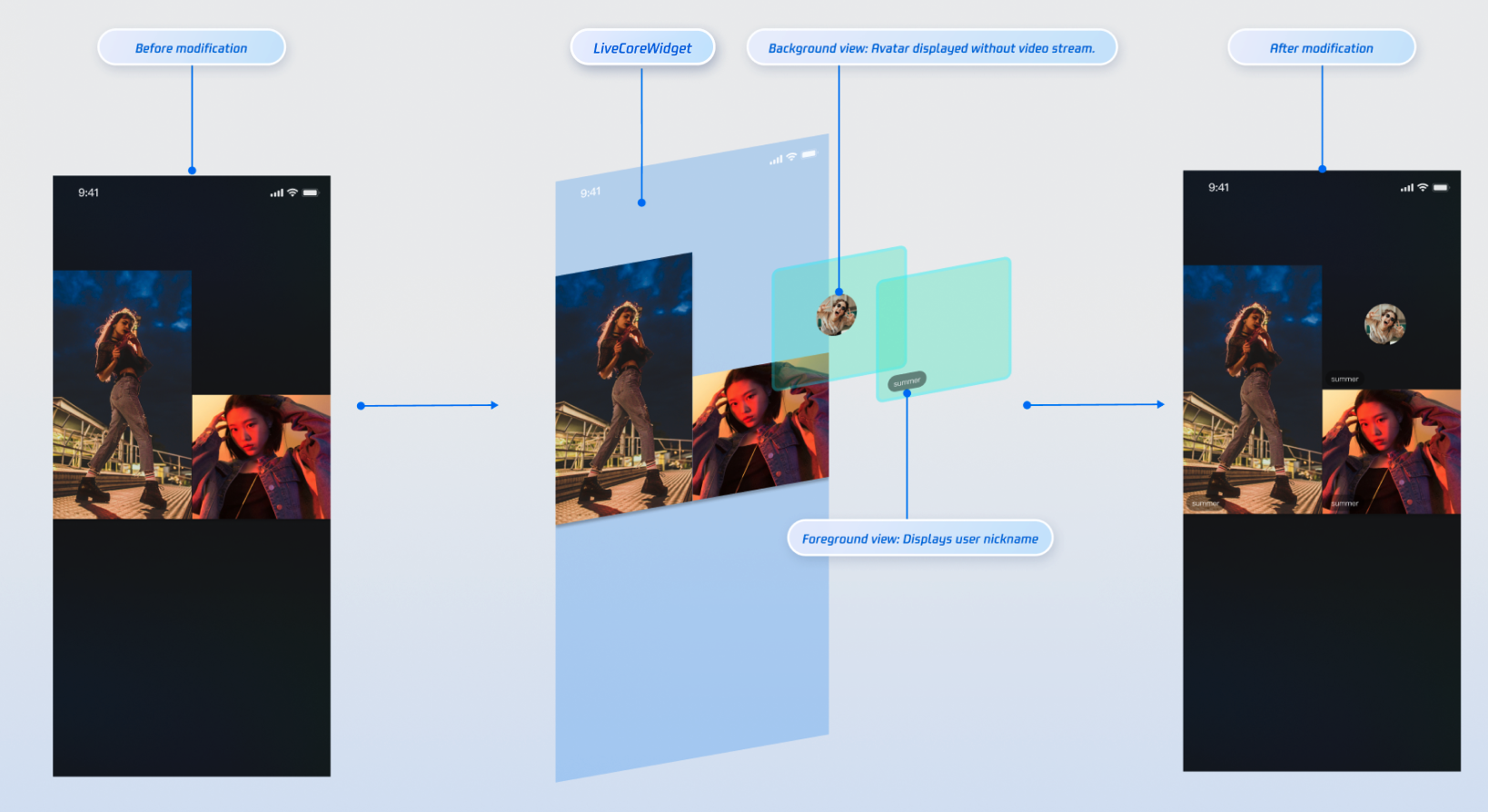
You can use the "slot" capacity provided by the `VideoWidgetBuilder` parameter of `LiveCoreWidget` to add custom views on the video stream image of audience co-broadcasting, for displaying Nickname, avatar information, etc., or offer placeholder images when they turn camera off, to optimize visual experience.
|
|
303
|
+
|
|
304
|
+
### Implementing Nickname Display on Video Stream Image
|
|
305
|
+
|
|
306
|
+
#### **Effect**
|
|
307
|
+
|
|
308
|
+
|
|
309
|
+
|
|
310
|
+
|
|
311
|
+
#### **Implementation Method**
|
|
312
|
+
- **Step 1**: Create a foreground view (**CustomSeatForegroundView**) used for displaying user information above the video stream.
|
|
313
|
+
|
|
314
|
+
``` java
|
|
315
|
+
import 'package:flutter/material.dart';
|
|
316
|
+
import 'package:rtc_room_engine/rtc_room_engine.dart';
|
|
317
|
+
|
|
318
|
+
/// Custom user information floating view (foreground)
|
|
319
|
+
class CustomSeatForegroundView extends StatelessWidget {
|
|
320
|
+
final SeatFullInfo seatInfo;
|
|
321
|
+
|
|
322
|
+
const CustomSeatForegroundView({
|
|
323
|
+
Key? key,
|
|
324
|
+
required this.seatInfo,
|
|
325
|
+
}) : super(key: key);
|
|
326
|
+
|
|
327
|
+
@override
|
|
328
|
+
Widget build(BuildContext context) {
|
|
329
|
+
return Container(
|
|
330
|
+
color: Colors.transparent,
|
|
331
|
+
child: Align(
|
|
332
|
+
alignment: Alignment.bottomLeft,
|
|
333
|
+
child: Container(
|
|
334
|
+
margin: const EdgeInsets.all(5),
|
|
335
|
+
padding: const EdgeInsets.symmetric(horizontal: 8, vertical: 4),
|
|
336
|
+
decoration: BoxDecoration(
|
|
337
|
+
color: Colors.black.withOpacity(0.5),
|
|
338
|
+
borderRadius: BorderRadius.circular(12),
|
|
339
|
+
),
|
|
340
|
+
child: Text(
|
|
341
|
+
seatInfo.userInfo.userName,
|
|
342
|
+
style: const TextStyle(
|
|
343
|
+
color: Colors.white,
|
|
344
|
+
fontSize: 14,
|
|
345
|
+
),
|
|
346
|
+
),
|
|
347
|
+
),
|
|
348
|
+
),
|
|
349
|
+
);
|
|
350
|
+
}
|
|
351
|
+
}
|
|
352
|
+
```
|
|
353
|
+
- **Step 2**: Create a background view (**CustomSeatBackgroundView**) used as a placeholder image when the user has no video stream.
|
|
354
|
+
|
|
355
|
+
``` java
|
|
356
|
+
import 'package:flutter/material.dart';
|
|
357
|
+
import 'package:rtc_room_engine/rtc_room_engine.dart';
|
|
358
|
+
|
|
359
|
+
/// Custom avatar placeholder view (background)
|
|
360
|
+
class CustomSeatBackgroundView extends StatelessWidget {
|
|
361
|
+
final SeatFullInfo seatInfo;
|
|
362
|
+
|
|
363
|
+
const CustomSeatBackgroundView({
|
|
364
|
+
Key? key,
|
|
365
|
+
required this.seatInfo,
|
|
366
|
+
}) : super(key: key);
|
|
367
|
+
|
|
368
|
+
@override
|
|
369
|
+
Widget build(BuildContext context) {
|
|
370
|
+
final avatarUrl = seatInfo.userInfo.avatarUrl;
|
|
371
|
+
return Container(
|
|
372
|
+
decoration: BoxDecoration(
|
|
373
|
+
color: Colors.grey[800],
|
|
374
|
+
),
|
|
375
|
+
child: Center(
|
|
376
|
+
child: Column(
|
|
377
|
+
mainAxisSize: MainAxisSize.min,
|
|
378
|
+
children: [
|
|
379
|
+
ClipOval(
|
|
380
|
+
child: avatarUrl.isNotEmpty
|
|
381
|
+
? Image.network(
|
|
382
|
+
avatarUrl,
|
|
383
|
+
width: 60,
|
|
384
|
+
height: 60,
|
|
385
|
+
fit: BoxFit.cover,
|
|
386
|
+
errorBuilder: (context, error, stackTrace) {
|
|
387
|
+
return _buildDefaultAvatar();
|
|
388
|
+
},
|
|
389
|
+
)
|
|
390
|
+
: _buildDefaultAvatar(),
|
|
391
|
+
),
|
|
392
|
+
const SizedBox(height: 8),
|
|
393
|
+
Text(
|
|
394
|
+
seatInfo.userInfo.userName,
|
|
395
|
+
style: const TextStyle(
|
|
396
|
+
color: Colors.white,
|
|
397
|
+
fontSize: 12,
|
|
398
|
+
),
|
|
399
|
+
),
|
|
400
|
+
],
|
|
401
|
+
),
|
|
402
|
+
),
|
|
403
|
+
);
|
|
404
|
+
}
|
|
405
|
+
|
|
406
|
+
Widget _buildDefaultAvatar() {
|
|
407
|
+
return Container(
|
|
408
|
+
width: 60,
|
|
409
|
+
height: 60,
|
|
410
|
+
color: Colors.grey,
|
|
411
|
+
child: const Icon(Icons.person, size: 40, color: Colors.white),
|
|
412
|
+
);
|
|
413
|
+
}
|
|
414
|
+
}
|
|
415
|
+
```
|
|
416
|
+
- **Step 3**: Build a custom view through the `VideoWidgetBuilder`'s `coGuestWidgetBuilder` callback, and return the corresponding view based on the `viewLayer` value.
|
|
417
|
+
|
|
418
|
+
``` java
|
|
419
|
+
import 'package:flutter/material.dart';
|
|
420
|
+
import 'package:atomic_x_core/atomicxcore.dart';
|
|
421
|
+
import 'package:rtc_room_engine/rtc_room_engine.dart';
|
|
422
|
+
|
|
423
|
+
/// Live streaming page with custom connection view
|
|
424
|
+
class CustomCoGuestLiveWidget extends StatefulWidget {
|
|
425
|
+
final String liveId;
|
|
426
|
+
|
|
427
|
+
const CustomCoGuestLiveWidget({
|
|
428
|
+
Key? key,
|
|
429
|
+
required this.liveId,
|
|
430
|
+
}) : super(key: key);
|
|
431
|
+
|
|
432
|
+
@override
|
|
433
|
+
State<CustomCoGuestLiveWidget> createState() => _CustomCoGuestLiveWidgetState();
|
|
434
|
+
}
|
|
435
|
+
|
|
436
|
+
class _CustomCoGuestLiveWidgetState extends State<CustomCoGuestLiveWidget> {
|
|
437
|
+
late LiveCoreController _controller;
|
|
438
|
+
|
|
439
|
+
@override
|
|
440
|
+
void initState() {
|
|
441
|
+
super.initState();
|
|
442
|
+
_controller = LiveCoreController.create();
|
|
443
|
+
_controller.setLiveID(widget.liveId);
|
|
444
|
+
}
|
|
445
|
+
|
|
446
|
+
@override
|
|
447
|
+
void dispose() {
|
|
448
|
+
_controller.dispose();
|
|
449
|
+
super.dispose();
|
|
450
|
+
}
|
|
451
|
+
|
|
452
|
+
/// Build a custom view for the mic-connecting audience
|
|
453
|
+
Widget _buildCoGuestWidget(
|
|
454
|
+
BuildContext context,
|
|
455
|
+
SeatFullInfo seatFullInfo,
|
|
456
|
+
ViewLayer viewLayer,
|
|
457
|
+
) {
|
|
458
|
+
if (viewLayer == ViewLayer.foreground) {
|
|
459
|
+
// Foreground layer: Always display on top of the video image, used for Nickname, information, etc.
|
|
460
|
+
return CustomSeatForegroundView(seatInfo: seatFullInfo);
|
|
461
|
+
} else {
|
|
462
|
+
// Background layer: Displayed only when the corresponding user has no video stream, used for displaying avatar placeholder images
|
|
463
|
+
return CustomSeatBackgroundView(seatInfo: seatFullInfo);
|
|
464
|
+
}
|
|
465
|
+
}
|
|
466
|
+
|
|
467
|
+
@override
|
|
468
|
+
Widget build(BuildContext context) {
|
|
469
|
+
return Scaffold(
|
|
470
|
+
body: LiveCoreWidget(
|
|
471
|
+
controller: _controller,
|
|
472
|
+
videoWidgetBuilder: VideoWidgetBuilder(
|
|
473
|
+
coGuestWidgetBuilder: _buildCoGuestWidget,
|
|
474
|
+
),
|
|
475
|
+
),
|
|
476
|
+
);
|
|
477
|
+
}
|
|
478
|
+
}
|
|
479
|
+
```
|
|
480
|
+
|
|
481
|
+
#### **Parameter description:**
|
|
482
|
+
<table>
|
|
483
|
+
<tr>
|
|
484
|
+
<td rowspan="1" colSpan="1" >**Parameter**</td>
|
|
485
|
+
|
|
486
|
+
<td rowspan="1" colSpan="1" >**Type**</td>
|
|
487
|
+
|
|
488
|
+
<td rowspan="1" colSpan="1" >**Note**</td>
|
|
489
|
+
</tr>
|
|
490
|
+
|
|
491
|
+
<tr>
|
|
492
|
+
<td rowspan="1" colSpan="1" >`seatFullInfo`</td>
|
|
493
|
+
|
|
494
|
+
<td rowspan="1" colSpan="1" >`SeatFullInfo`</td>
|
|
495
|
+
|
|
496
|
+
<td rowspan="1" colSpan="1" >Seat information object, containing the Anchor's detailed information.</td>
|
|
497
|
+
</tr>
|
|
498
|
+
|
|
499
|
+
<tr>
|
|
500
|
+
<td rowspan="1" colSpan="1" >`seatFullInfo.userInfo.userId`</td>
|
|
501
|
+
|
|
502
|
+
<td rowspan="1" colSpan="1" >`String`</td>
|
|
503
|
+
|
|
504
|
+
<td rowspan="1" colSpan="1" >Anchor's user ID.</td>
|
|
505
|
+
</tr>
|
|
506
|
+
|
|
507
|
+
<tr>
|
|
508
|
+
<td rowspan="1" colSpan="1" >`seatFullInfo.userInfo.userName`</td>
|
|
509
|
+
|
|
510
|
+
<td rowspan="1" colSpan="1" >`String`</td>
|
|
511
|
+
|
|
512
|
+
<td rowspan="1" colSpan="1" >On-mic user's nickname.</td>
|
|
513
|
+
</tr>
|
|
514
|
+
|
|
515
|
+
<tr>
|
|
516
|
+
<td rowspan="1" colSpan="1" >`seatFullInfo.userInfo.avatarUrl`</td>
|
|
517
|
+
|
|
518
|
+
<td rowspan="1" colSpan="1" >`String`</td>
|
|
519
|
+
|
|
520
|
+
<td rowspan="1" colSpan="1" >On-mic user's profile photo URL.</td>
|
|
521
|
+
</tr>
|
|
522
|
+
|
|
523
|
+
<tr>
|
|
524
|
+
<td rowspan="1" colSpan="1" >`viewLayer`</td>
|
|
525
|
+
|
|
526
|
+
<td rowspan="1" colSpan="1" >`ViewLayer`</td>
|
|
527
|
+
|
|
528
|
+
<td rowspan="1" colSpan="1" >View hierarchy enumeration.<br>- `ViewLayer.foreground` represents the pendant view, always displayed on top of the video image.<br>- `ViewLayer.background` represents the background pendant view, located in the lower layer of the foreground view. It is displayed only when the corresponding user has no video stream (for example, when the camera is not turned on), usually used for displaying the default avatar or placeholder image of the user.</td>
|
|
529
|
+
</tr>
|
|
530
|
+
</table>
|
|
531
|
+
|
|
532
|
+
|
|
533
|
+
## API documentation
|
|
534
|
+
|
|
535
|
+
For details about ALL public interfaces, properties, and methods of [CoGuestStore](https://tencent-rtc.github.io/TUIKit_Flutter/api_live_co_guest_store/CoGuestStore-class.html) and its related classes, see the official API documentation of the [AtomicXCore](https://tencent-rtc.github.io/TUIKit_Flutter/index.html) framework. The related Stores used in this guide are as follows:
|
|
536
|
+
<table>
|
|
537
|
+
<tr>
|
|
538
|
+
<td rowspan="1" colSpan="1" >**Store/Component**</td>
|
|
539
|
+
|
|
540
|
+
<td rowspan="1" colSpan="1" >**Feature Description**</td>
|
|
541
|
+
|
|
542
|
+
<td rowspan="1" colSpan="1" >**API Reference**</td>
|
|
543
|
+
</tr>
|
|
544
|
+
|
|
545
|
+
<tr>
|
|
546
|
+
<td rowspan="1" colSpan="1" >LiveCoreWidget</td>
|
|
547
|
+
|
|
548
|
+
<td rowspan="1" colSpan="1" >Core view component for live video stream display and interaction: Responsible for stream rendering and view widget processing, supporting scenarios such as Anchor live streaming, audience co-broadcasting, and cross-room connection with other anchors.</td>
|
|
549
|
+
|
|
550
|
+
<td rowspan="1" colSpan="1" >[API documentation](https://tencent-rtc.github.io/TUIKit_Flutter/api_view_live_live_core_widget/LiveCoreWidget-class.html)</td>
|
|
551
|
+
</tr>
|
|
552
|
+
|
|
553
|
+
<tr>
|
|
554
|
+
<td rowspan="1" colSpan="1" >LiveCoreController</td>
|
|
555
|
+
|
|
556
|
+
<td rowspan="1" colSpan="1" >Controller for LiveCoreWidget: Used to set the live stream ID, control the preview, and perform other operations.</td>
|
|
557
|
+
|
|
558
|
+
<td rowspan="1" colSpan="1" >[API documentation](https://tencent-rtc.github.io/TUIKit_Flutter/api_view_live_live_core_widget/LiveCoreController-class.html)</td>
|
|
559
|
+
</tr>
|
|
560
|
+
|
|
561
|
+
<tr>
|
|
562
|
+
<td rowspan="1" colSpan="1" >VideoWidgetBuilder</td>
|
|
563
|
+
|
|
564
|
+
<td rowspan="1" colSpan="1" >Video view adapter: Used for custom pendant views in scenarios such as mic-connecting audience, cross-room connection with other anchors, and PK.</td>
|
|
565
|
+
|
|
566
|
+
<td rowspan="1" colSpan="1" >[API documentation](https://tencent-rtc.github.io/TUIKit_Flutter/api_view_live_live_core_widget/VideoWidgetBuilder-class.html)</td>
|
|
567
|
+
</tr>
|
|
568
|
+
|
|
569
|
+
<tr>
|
|
570
|
+
<td rowspan="1" colSpan="1" >DeviceStore</td>
|
|
571
|
+
|
|
572
|
+
<td rowspan="1" colSpan="1" >Audio/Video device control: Microphone (on/off, volume), camera (on/off, switchover, video quality), screen sharing, and real-time monitoring of device status.</td>
|
|
573
|
+
|
|
574
|
+
<td rowspan="1" colSpan="1" >[API documentation](https://tencent-rtc.github.io/TUIKit_Flutter/api_device_device_store/DeviceStore-class.html)</td>
|
|
575
|
+
</tr>
|
|
576
|
+
|
|
577
|
+
<tr>
|
|
578
|
+
<td rowspan="1" colSpan="1" >CoGuestStore</td>
|
|
579
|
+
|
|
580
|
+
<td rowspan="1" colSpan="1" >Audience co-broadcasting management: Join microphone application/invite/grant/reject, attendee permission control (microphone/camera), state synchronization.</td>
|
|
581
|
+
|
|
582
|
+
<td rowspan="1" colSpan="1" >[API documentation](https://tencent-rtc.github.io/TUIKit_Flutter/api_live_co_guest_store/CoGuestStore-class.html)</td>
|
|
583
|
+
</tr>
|
|
584
|
+
</table>
|
|
585
|
+
|
|
586
|
+
|
|
587
|
+
## FAQs
|
|
588
|
+
|
|
589
|
+
### How to Manage the Lifecycle and Event of a Custom View Added Via `VideoWidgetBuilder`?
|
|
590
|
+
|
|
591
|
+
**LiveCoreWidget** will automatically manage the addition and removal of views returned by the `coGuestWidgetBuilder` callback, so you don't need to handle them manually. If necessary to process user interaction (such as click events) in a custom view, just add corresponding event handling when creating the view.
|
|
592
|
+
|
|
593
|
+
### `ViewLayer` What Are the Functions of the Parameter?
|
|
594
|
+
|
|
595
|
+
`ViewLayer` is used to distinguish between foreground and background widgets.
|
|
596
|
+
- `ViewLayer.foreground`: The foreground layer, always displayed on top of the video image.
|
|
597
|
+
|
|
598
|
+
- `ViewLayer.background`: The background layer, displayed only when the corresponding user has no video stream (for example, when the camera is not turned on), usually used for displaying the default avatar or placeholder image of the user.
|
|
599
|
+
|
|
600
|
+
|
|
601
|
+
### Why Is My Custom View Not Displayed?
|
|
602
|
+
- **Check VideoWidgetBuilder settings**: Please confirm the `LiveCoreWidget`'s `videoWidgetBuilder` parameter is correctly set.
|
|
603
|
+
|
|
604
|
+
- **Check callback implementation**: Please check if the `coGuestWidgetBuilder` callback function is correctly implemented.
|
|
605
|
+
|
|
606
|
+
- **Check the return value**: Ensure your callback function returns an effective `Widget` instance.
|
|
607
|
+
|
|
608
|
+
|