@tencent-rtc/mcp 1.3.5 → 1.3.7
This diff represents the content of publicly available package versions that have been released to one of the supported registries. The information contained in this diff is provided for informational purposes only and reflects changes between package versions as they appear in their respective public registries.
- package/index.js +4 -4
- package/index.js.map +1 -1
- package/package.json +1 -1
- package/resource/doc/livekit/live/flutter/live-audience-list.md +339 -0
- package/resource/doc/livekit/live/flutter/live-audio-effect.md +742 -0
- package/resource/doc/livekit/live/flutter/live-barrage.md +581 -0
- package/resource/doc/livekit/live/flutter/live-base-beauty.md +486 -0
- package/resource/doc/livekit/live/flutter/live-co-guest-interaction.md +608 -0
- package/resource/doc/livekit/live/flutter/live-gift.md +800 -0
- package/resource/doc/livekit/live/flutter/live-host-interaction.md +1113 -0
- package/resource/doc/livekit/live/flutter/live-integration.md +1041 -0
- package/resource/doc/livekit/live/flutter/live-live-list.md +865 -0
- package/resource/doc/livekit/live/flutter/workflow.md +353 -0
- package/resource/doc/tuicallkit/flutter/workflow.md +331 -0
- package/tools/call/get-native-call-integration.js +27 -11
- package/tools/call/get-native-call-integration.js.map +1 -1
- package/tools/definitions/get_native_call_uikit_integration_def.js +17 -7
- package/tools/definitions/get_native_call_uikit_integration_def.js.map +1 -1
- package/utils/report-cls-client.js +1 -1
- package/utils/report-es-client.js +1 -1
- package/resource/doc/tuicallkit/flutter/how_to_run_flutter_callkit_demo.md +0 -101
- package/resource/doc/tuicallkit/iOS/how_to_run_iOS_callkit_demo.md +0 -98
- /package/resource/doc/tuicallkit/android/{how_to_integrated_android_callkit.md → integration.md} +0 -0
- /package/resource/doc/tuicallkit/android/{.gitkeep → workflow.md} +0 -0
- /package/resource/doc/tuicallkit/{android/api_TUICallObserver.md → faq/android_sdk/call-observer-api.md} +0 -0
- /package/resource/doc/tuicallkit/{android/api_TUICallKit.md → faq/android_sdk/callkit-api.md} +0 -0
- /package/resource/doc/tuicallkit/{flutter/api_TUICallDefine.md → faq/flutter_sdk/call-define-api.md} +0 -0
- /package/resource/doc/tuicallkit/{flutter/api_TUICallObserver.md → faq/flutter_sdk/call-observer-api.md} +0 -0
- /package/resource/doc/tuicallkit/{flutter/api_TUICallKit.md → faq/flutter_sdk/callkit-api.md} +0 -0
- /package/resource/doc/tuicallkit/{iOS/api_TUICallObserver.md → faq/ios_sdk/call-observer-api.md} +0 -0
- /package/resource/doc/tuicallkit/{iOS/api_TUICallKit.md → faq/ios_sdk/callkit-api.md} +0 -0
- /package/resource/doc/tuicallkit/flutter/{how_to_integrated_flutter_callkit.md → integration.md} +0 -0
- /package/resource/doc/tuicallkit/iOS/{how_to_integrated_iOS_callkit.md → integration.md} +0 -0
|
@@ -2,26 +2,42 @@ import { z } from 'zod';
|
|
|
2
2
|
import { GET_NATIVE_CALL_UIKIT_DEFINITION } from '../definitions/get_native_call_uikit_integration_def.js';
|
|
3
3
|
import { getDocContent } from '../../utils/get-doc-content.js';
|
|
4
4
|
import { reportCLSClient } from '../../utils/report-cls-client.js';
|
|
5
|
-
|
|
5
|
+
import { generateStructuredResult } from '../../utils/generate-structured-result.js';
|
|
6
|
+
async function getResultText(params) {
|
|
6
7
|
const { framework = '' } = params;
|
|
7
8
|
reportCLSClient({
|
|
8
9
|
method: 'get_native_call_uikit_integration',
|
|
9
|
-
framework
|
|
10
|
+
framework,
|
|
10
11
|
});
|
|
11
|
-
|
|
12
|
+
// 获取工作流指令
|
|
13
|
+
const baseInstructions = getDocContent(['tuicallkit', framework, 'workflow.md']);
|
|
14
|
+
// Call 默认全量集成,无需 goals 参数
|
|
15
|
+
const result = await generateStructuredResult({
|
|
16
|
+
baseInstructions,
|
|
17
|
+
goals: ['full-featured'], // 默认全量集成
|
|
18
|
+
framework,
|
|
19
|
+
pathMap: {
|
|
20
|
+
'full-featured': ['tuicallkit', framework, 'integration.md'],
|
|
21
|
+
},
|
|
22
|
+
});
|
|
23
|
+
return result;
|
|
12
24
|
}
|
|
13
25
|
const registryGetNativeCallIntegrationTool = (mcpServer) => {
|
|
14
26
|
const { name, description, parameter_descriptions } = GET_NATIVE_CALL_UIKIT_DEFINITION;
|
|
15
27
|
mcpServer.tool(name, description, {
|
|
16
28
|
framework: z.enum(['flutter', 'android', 'ios']).describe(parameter_descriptions.framework),
|
|
17
|
-
}, (params) =>
|
|
18
|
-
|
|
19
|
-
|
|
20
|
-
|
|
21
|
-
|
|
22
|
-
|
|
23
|
-
|
|
24
|
-
|
|
29
|
+
}, async (params) => {
|
|
30
|
+
const result = await getResultText(params);
|
|
31
|
+
return {
|
|
32
|
+
content: [
|
|
33
|
+
{
|
|
34
|
+
type: 'text',
|
|
35
|
+
text: result.llm_code_generation_instructions_md,
|
|
36
|
+
}
|
|
37
|
+
],
|
|
38
|
+
result: result,
|
|
39
|
+
};
|
|
40
|
+
});
|
|
25
41
|
};
|
|
26
42
|
export { registryGetNativeCallIntegrationTool };
|
|
27
43
|
//# sourceMappingURL=get-native-call-integration.js.map
|
|
@@ -1 +1 @@
|
|
|
1
|
-
{"version":3,"file":"get-native-call-integration.js","sourceRoot":"","sources":["../../../src/tools/call/get-native-call-integration.ts"],"names":[],"mappings":"AACA,OAAO,EAAE,CAAC,EAAE,MAAM,KAAK,CAAC;AACxB,OAAO,EAAE,gCAAgC,EAAE,MAAM,yDAAyD,CAAC;AAC3G,OAAO,EAAE,aAAa,EAAE,MAAM,gCAAgC,CAAC;AAC/D,OAAO,EAAE,eAAe,EAAE,MAAM,kCAAkC,CAAC;
|
|
1
|
+
{"version":3,"file":"get-native-call-integration.js","sourceRoot":"","sources":["../../../src/tools/call/get-native-call-integration.ts"],"names":[],"mappings":"AACA,OAAO,EAAE,CAAC,EAAE,MAAM,KAAK,CAAC;AACxB,OAAO,EAAE,gCAAgC,EAAE,MAAM,yDAAyD,CAAC;AAC3G,OAAO,EAAE,aAAa,EAAE,MAAM,gCAAgC,CAAC;AAC/D,OAAO,EAAE,eAAe,EAAE,MAAM,kCAAkC,CAAC;AACnE,OAAO,EAAE,wBAAwB,EAAE,MAAM,2CAA2C,CAAC;AAErF,KAAK,UAAU,aAAa,CAAC,MAA2B;IACtD,MAAM,EAAE,SAAS,GAAG,EAAE,EAAE,GAAG,MAAM,CAAC;IAClC,eAAe,CAAC;QACd,MAAM,EAAE,mCAAmC;QAC3C,SAAS;KACV,CAAC,CAAC;IACH,UAAU;IACV,MAAM,gBAAgB,GAAG,aAAa,CAAC,CAAC,YAAY,EAAE,SAAS,EAAE,aAAa,CAAC,CAAC,CAAC;IACjF,0BAA0B;IAC1B,MAAM,MAAM,GAAG,MAAM,wBAAwB,CAAC;QAC5C,gBAAgB;QAChB,KAAK,EAAE,CAAC,eAAe,CAAC,EAAE,SAAS;QACnC,SAAS;QACT,OAAO,EAAE;YACP,eAAe,EAAE,CAAC,YAAY,EAAE,SAAS,EAAE,gBAAgB,CAAC;SAC7D;KACF,CAAC,CAAA;IACF,OAAO,MAAM,CAAC;AAChB,CAAC;AAED,MAAM,oCAAoC,GAAG,CAAC,SAAoB,EAAE,EAAE;IACpE,MAAM,EAAE,IAAI,EAAE,WAAW,EAAE,sBAAsB,EAAE,GAAG,gCAAgC,CAAC;IACvF,SAAS,CAAC,IAAI,CACZ,IAAI,EACJ,WAAW,EACX;QACE,SAAS,EAAE,CAAC,CAAC,IAAI,CAAC,CAAC,SAAS,EAAE,SAAS,EAAE,KAAK,CAAC,CAAC,CAAC,QAAQ,CAAC,sBAAsB,CAAC,SAAS,CAAC;KAC5F,EACD,KAAK,EAAE,MAAW,EAAE,EAAE;QACpB,MAAM,MAAM,GAAG,MAAM,aAAa,CAAC,MAAM,CAAC,CAAA;QAC1C,OAAO;YACL,OAAO,EAAE;gBACP;oBACE,IAAI,EAAE,MAAM;oBACZ,IAAI,EAAE,MAAM,CAAC,mCAAmC;iBACjD;aACF;YACD,MAAM,EAAE,MAAM;SACf,CAAA;IACL,CAAC,CAAC,CAAC;AACL,CAAC,CAAC;AAEF,OAAO,EAAE,oCAAoC,EAAE,CAAC"}
|
|
@@ -1,17 +1,27 @@
|
|
|
1
1
|
const TOOL_DESCRIPTION = `
|
|
2
|
-
|
|
2
|
+
【Core Purpose】: As a professional Native audio/video call TUICallKit integration assistant, this tool is specifically designed to provide Agents with workflow action instructions and real-time aggregated latest documentation content to guide LLM in helping users implement mobile audio/video call features.
|
|
3
3
|
|
|
4
|
-
|
|
4
|
+
【Functional Goals】:
|
|
5
|
+
Integrate complete audio/video call features. Including one-on-one calls, group calls, call answering, call interface, etc. **Suitable for building WeChat/WeCom-style audio/video call applications, supporting one-on-one and group call scenarios.**
|
|
5
6
|
|
|
6
|
-
|
|
7
|
+
【Keywords】:
|
|
8
|
+
'Native', 'Mobile', 'Call', 'TUICallKit', 'Audio/Video Call', 'Video Call', 'Voice Call', 'WeChat', 'WeCom', 'Flutter', 'Android', 'iOS', 'Integration', 'One-on-One Call', 'Group Call', 'Call', 'Answer'.
|
|
7
9
|
|
|
8
|
-
|
|
10
|
+
【Action Instructions and Workflow Guidance】:
|
|
11
|
+
When handling user requirements, Agents should use the llm_code_generation_instructions_md field returned by this tool. This field contains:
|
|
12
|
+
1. Core workflow instructions: Including environment preparation, dependency installation, SDK initialization, UserSig authentication, and component version information.
|
|
13
|
+
2. Real-time documentation content: Providing the latest content from official integration guides.
|
|
9
14
|
|
|
10
|
-
|
|
11
|
-
|
|
15
|
+
LLM must prioritize and exclusively use the real-time content returned by this tool to generate code, avoiding accessing external URLs independently.
|
|
16
|
+
|
|
17
|
+
【Mandatory Constraints】:
|
|
18
|
+
1. Platform Selection Constraint: If the user has not explicitly specified a platform, or the intent is unclear, must first call the 'present_framework_choice' tool to guide the user to choose among flutter, android, ios.
|
|
19
|
+
2. Result Recording Constraint: After TUICallKit component integration is complete and the project starts successfully, must call the 'record_result' tool to record integration results.
|
|
20
|
+
|
|
21
|
+
【Supported Platforms】: flutter, android, ios.
|
|
12
22
|
`;
|
|
13
23
|
const PARAMETER_DESCRIPTIONS = {
|
|
14
|
-
framework: '
|
|
24
|
+
framework: 'Native audio/video call TUICallKit platform type. Available values: flutter (Flutter cross-platform), android (Android native), ios (iOS native).',
|
|
15
25
|
};
|
|
16
26
|
export const GET_NATIVE_CALL_UIKIT_DEFINITION = {
|
|
17
27
|
name: 'get_native_call_uikit_integration',
|
|
@@ -1 +1 @@
|
|
|
1
|
-
{"version":3,"file":"get_native_call_uikit_integration_def.js","sourceRoot":"","sources":["../../../src/tools/definitions/get_native_call_uikit_integration_def.ts"],"names":[],"mappings":"AAAA,MAAM,gBAAgB,GAAG
|
|
1
|
+
{"version":3,"file":"get_native_call_uikit_integration_def.js","sourceRoot":"","sources":["../../../src/tools/definitions/get_native_call_uikit_integration_def.ts"],"names":[],"mappings":"AAAA,MAAM,gBAAgB,GAAG;;;;;;;;;;;;;;;;;;;;;CAqBxB,CAAC;AAEF,MAAM,sBAAsB,GAAG;IAC7B,SAAS,EAAE,mJAAmJ;CAC/J,CAAC;AAEF,MAAM,CAAC,MAAM,gCAAgC,GAAG;IAC9C,IAAI,EAAE,mCAAmC;IACzC,WAAW,EAAE,gBAAgB;IAC7B,sBAAsB,EAAE,sBAAsB;CAC/C,CAAC"}
|
|
@@ -1,101 +0,0 @@
|
|
|
1
|
-
This article will guide you on how to quickly run through the Audio and Video Call Demo. By following this document, you can have the Demo up and running in 10 minutes, and ultimately experience an Audio and Video Call feature with a complete UI interface.
|
|
2
|
-
<table>
|
|
3
|
-
<tr>
|
|
4
|
-
<td rowspan="1" colSpan="1" >1v1 Video Call</td>
|
|
5
|
-
|
|
6
|
-
<td rowspan="1" colSpan="1" >Group call</td>
|
|
7
|
-
</tr>
|
|
8
|
-
|
|
9
|
-
<tr>
|
|
10
|
-
<td rowspan="1" colSpan="1" >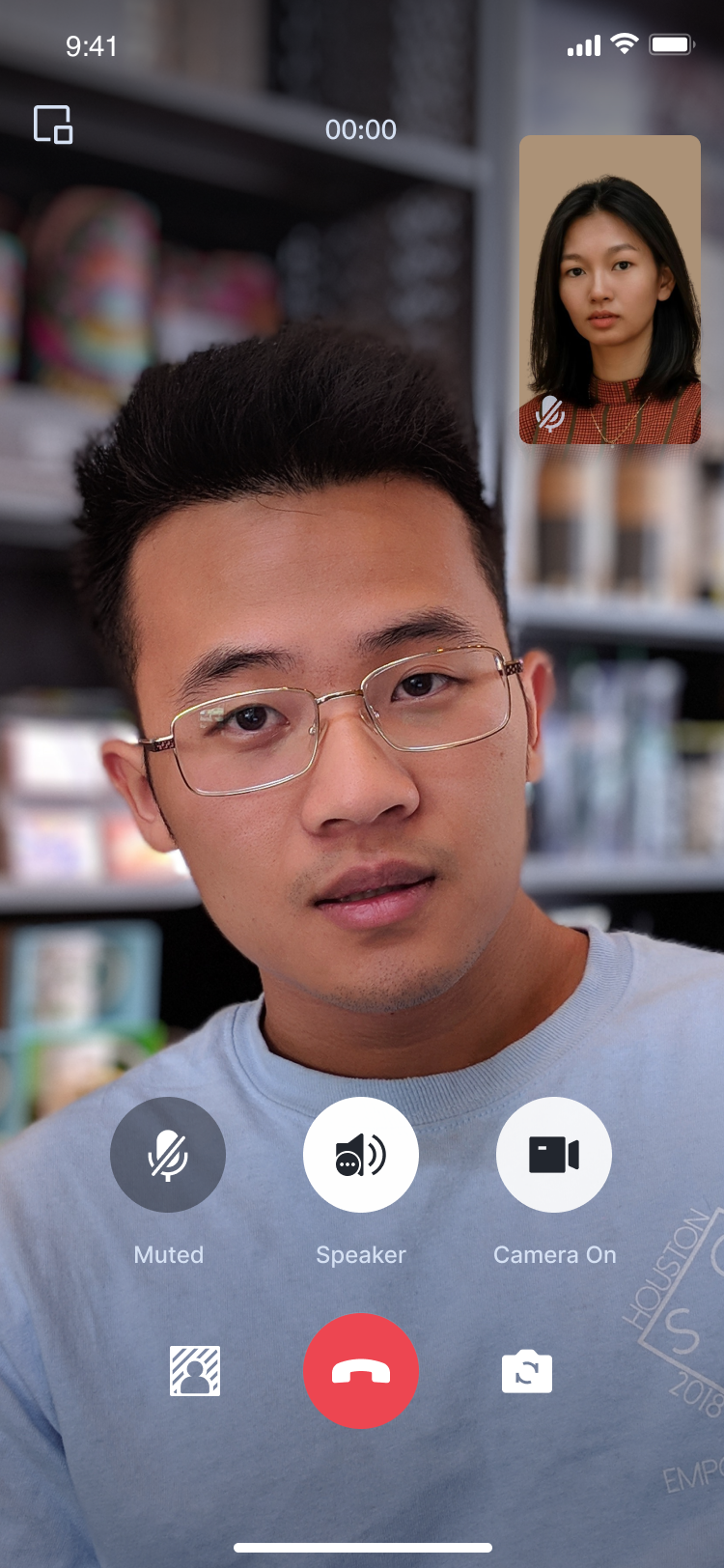</td>
|
|
11
|
-
|
|
12
|
-
<td rowspan="1" colSpan="1" >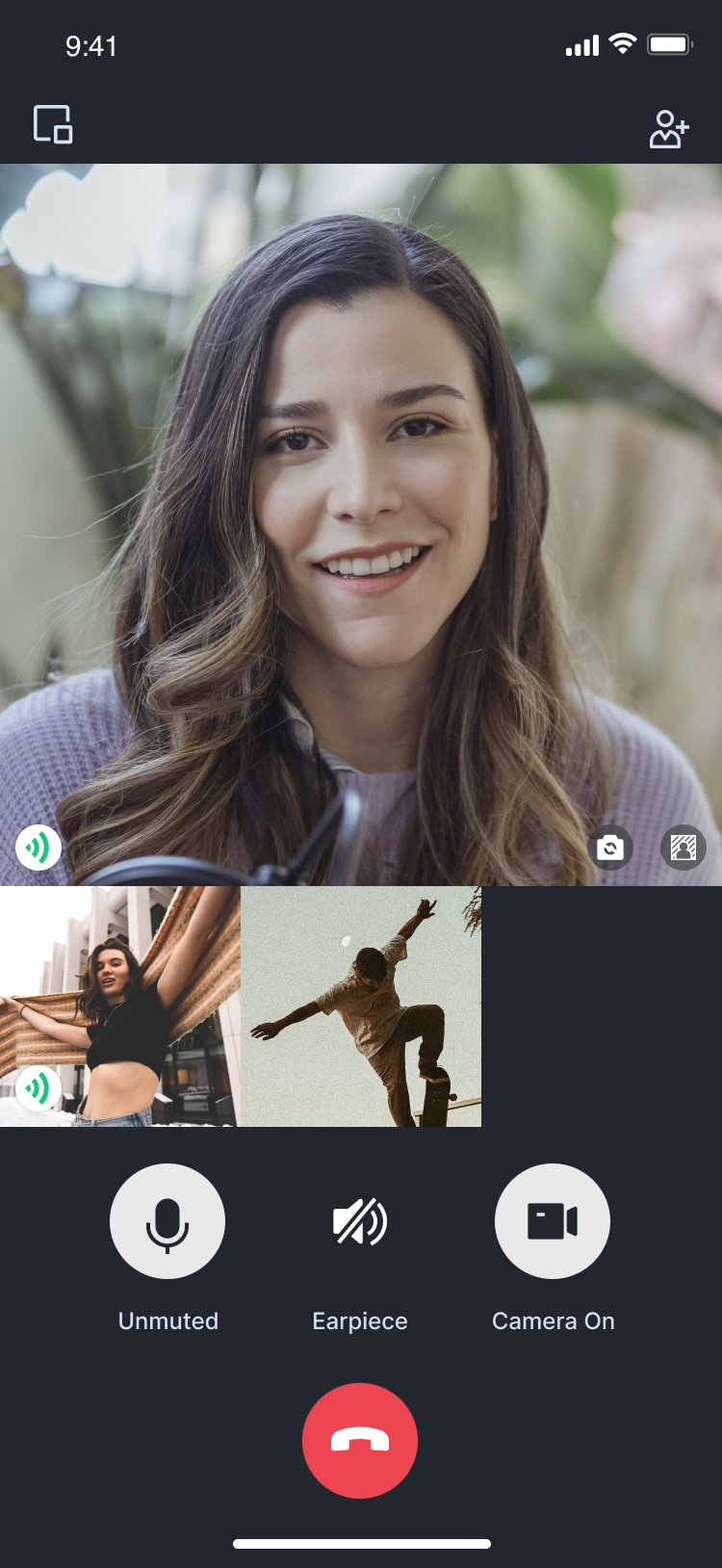</td>
|
|
13
|
-
</tr>
|
|
14
|
-
</table>
|
|
15
|
-
|
|
16
|
-
|
|
17
|
-
## Environment preparations
|
|
18
|
-
|
|
19
|
-
### Flutter
|
|
20
|
-
|
|
21
|
-
Flutter 3.0 or later.
|
|
22
|
-
|
|
23
|
-
### Android
|
|
24
|
-
- Android Studio 3.5 or above.
|
|
25
|
-
|
|
26
|
-
- Android devices with Android 4.1 or higher versions.
|
|
27
|
-
|
|
28
|
-
|
|
29
|
-
### iOS
|
|
30
|
-
- Xcode 13.0 or above.
|
|
31
|
-
|
|
32
|
-
- Please ensure your project is set up with a valid developer signature.
|
|
33
|
-
|
|
34
|
-
|
|
35
|
-
## Step 1: Download the Demo
|
|
36
|
-
1. Download the [TUICallKit Demo](https://github.com/Tencent-RTC/TUICallKit/tree/main) source code from GitHub, or directly run the following command in the command line:
|
|
37
|
-
|
|
38
|
-
``` bash
|
|
39
|
-
git clone
|
|
40
|
-
```
|
|
41
|
-
2. Open the TUICallKit Flutter example in Android Studio or VSCode. The following process will take Android Studio as an example:
|
|
42
|
-
|
|
43
|
-
|
|
44
|
-
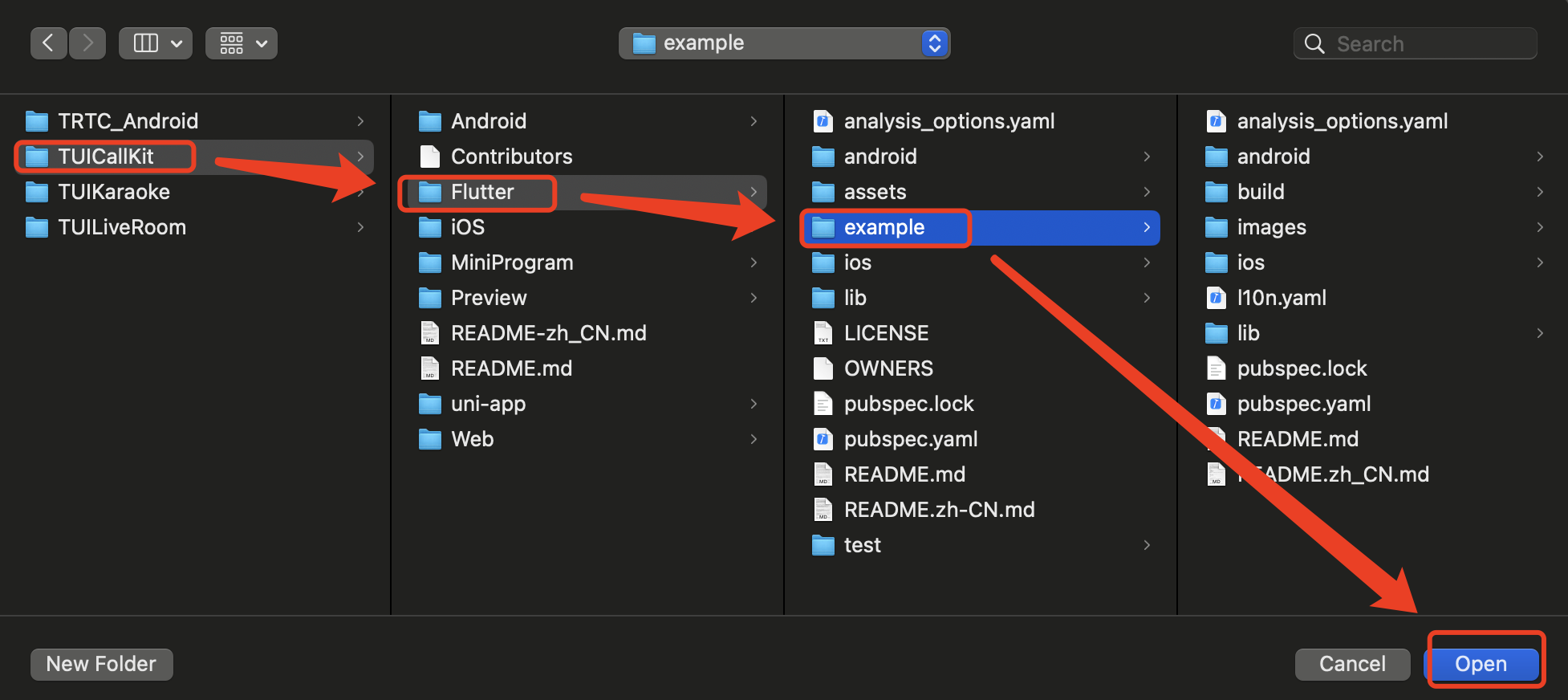
|
|
45
|
-
|
|
46
|
-
|
|
47
|
-
## Step 2: Configure the Demo
|
|
48
|
-
1. [Activate the audio and video services](https://write.woa.com/document/140196392040579072), to obtain the **SDKAppID** and **SDKSecretKey**.
|
|
49
|
-
|
|
50
|
-
|
|
51
|
-
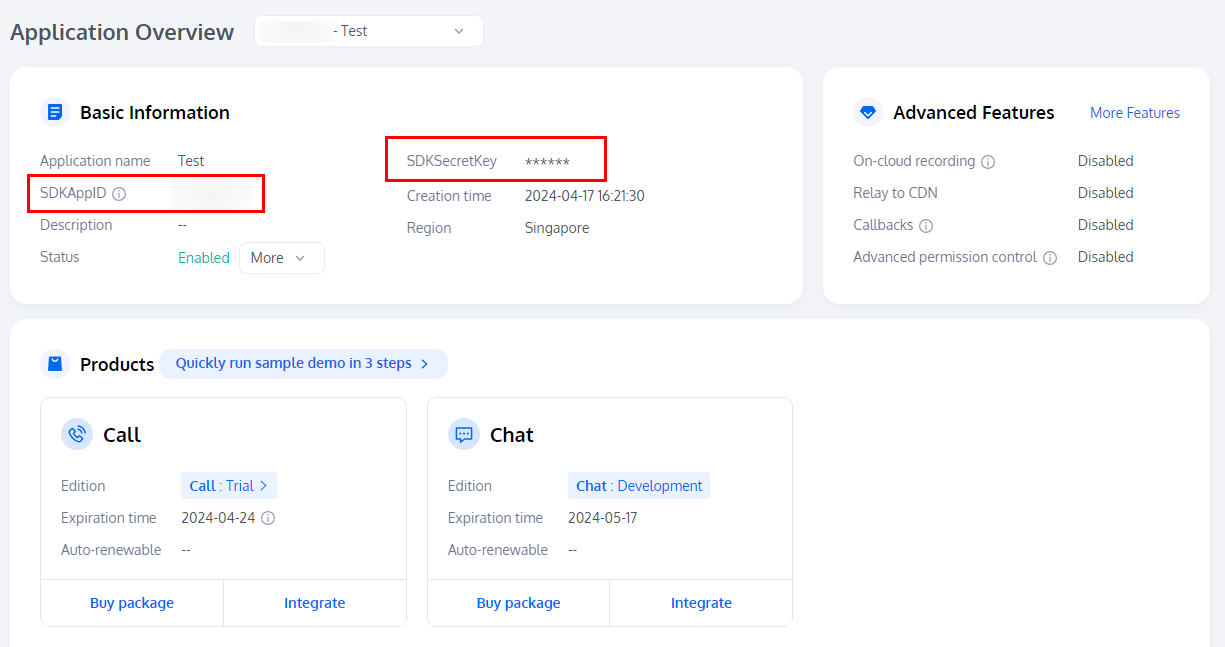
|
|
52
|
-
|
|
53
|
-
2. Open the `Flutter/example/lib/debug/generate_test_user_sig.dart` file and fill in the SDKAppID and SDKSecretKey obtained when [Activating the Service](https://write.woa.com/document/140196392040579072):
|
|
54
|
-
|
|
55
|
-
|
|
56
|
-
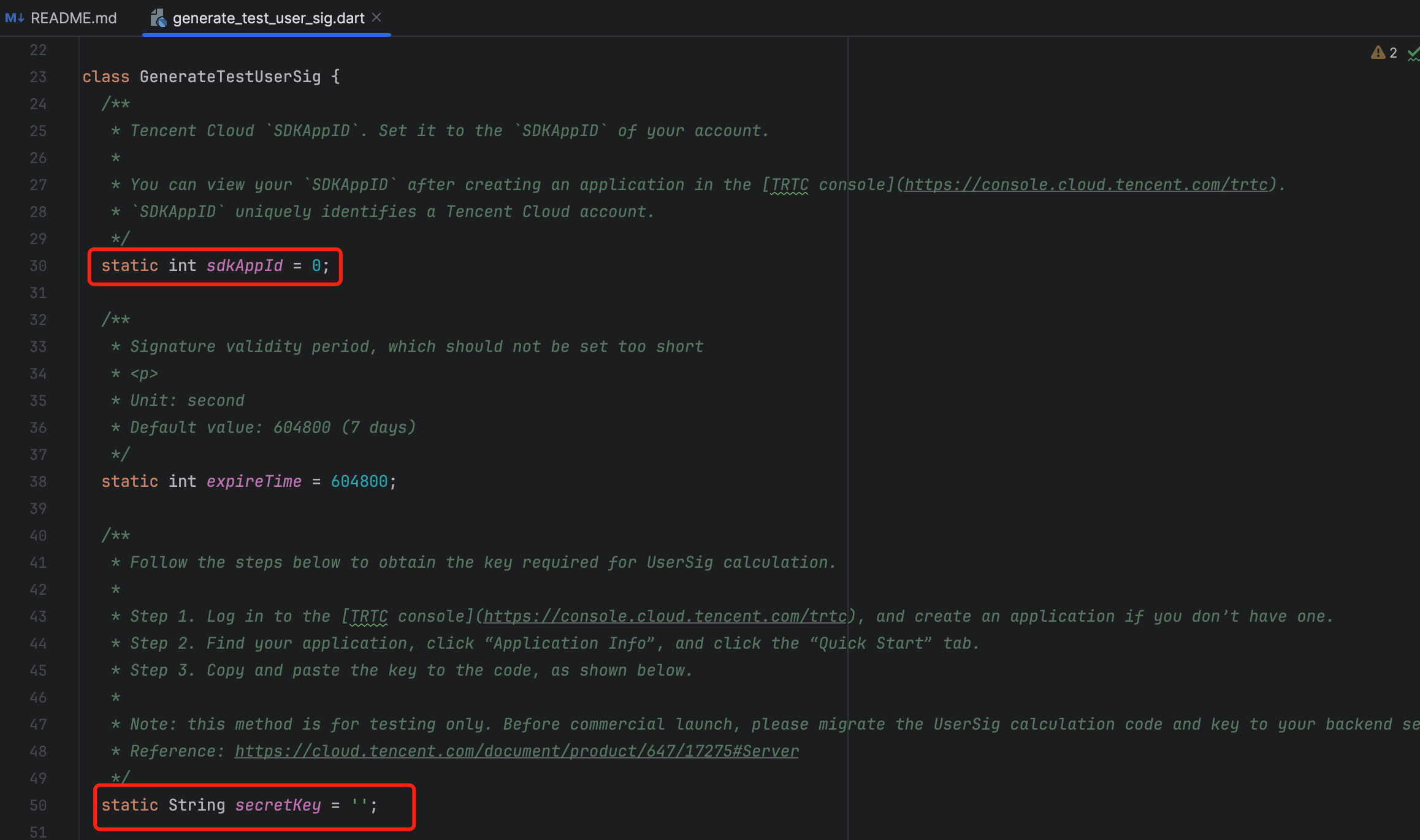
|
|
57
|
-
|
|
58
|
-
|
|
59
|
-
## Step 3: Running the Demo
|
|
60
|
-
1. In the top right corner of Android Studio, select the device you want to run the Demo on as shown below:
|
|
61
|
-
|
|
62
|
-
|
|
63
|
-
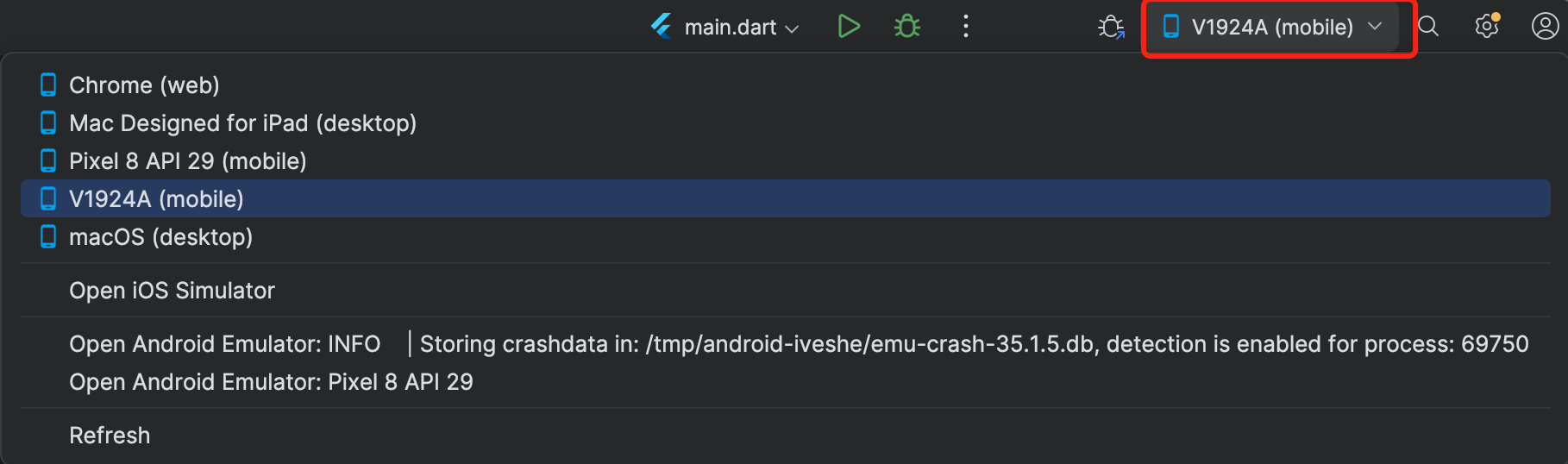
|
|
64
|
-
|
|
65
|
-
2. After selecting, click Run to execute the TUICallKit Android Demo on the target device.
|
|
66
|
-
|
|
67
|
-
|
|
68
|
-

|
|
69
|
-
|
|
70
|
-
|
|
71
|
-
## Make the first call
|
|
72
|
-
|
|
73
|
-
> **Note:**
|
|
74
|
-
>
|
|
75
|
-
|
|
76
|
-
> To experience the complete audio and video calling process, please log into the Demo on two devices as two different users, with one acting as the caller and the other as the callee.
|
|
77
|
-
>
|
|
78
|
-
|
|
79
|
-
1. Log in & Signup
|
|
80
|
-
|
|
81
|
-
|
|
82
|
-
Please enter the ID at the `User ID`. If your current User ID has not been used before, you will be taken to the **Signup** screen, where you can set your own avatar and nickname.
|
|
83
|
-
|
|
84
|
-
|
|
85
|
-
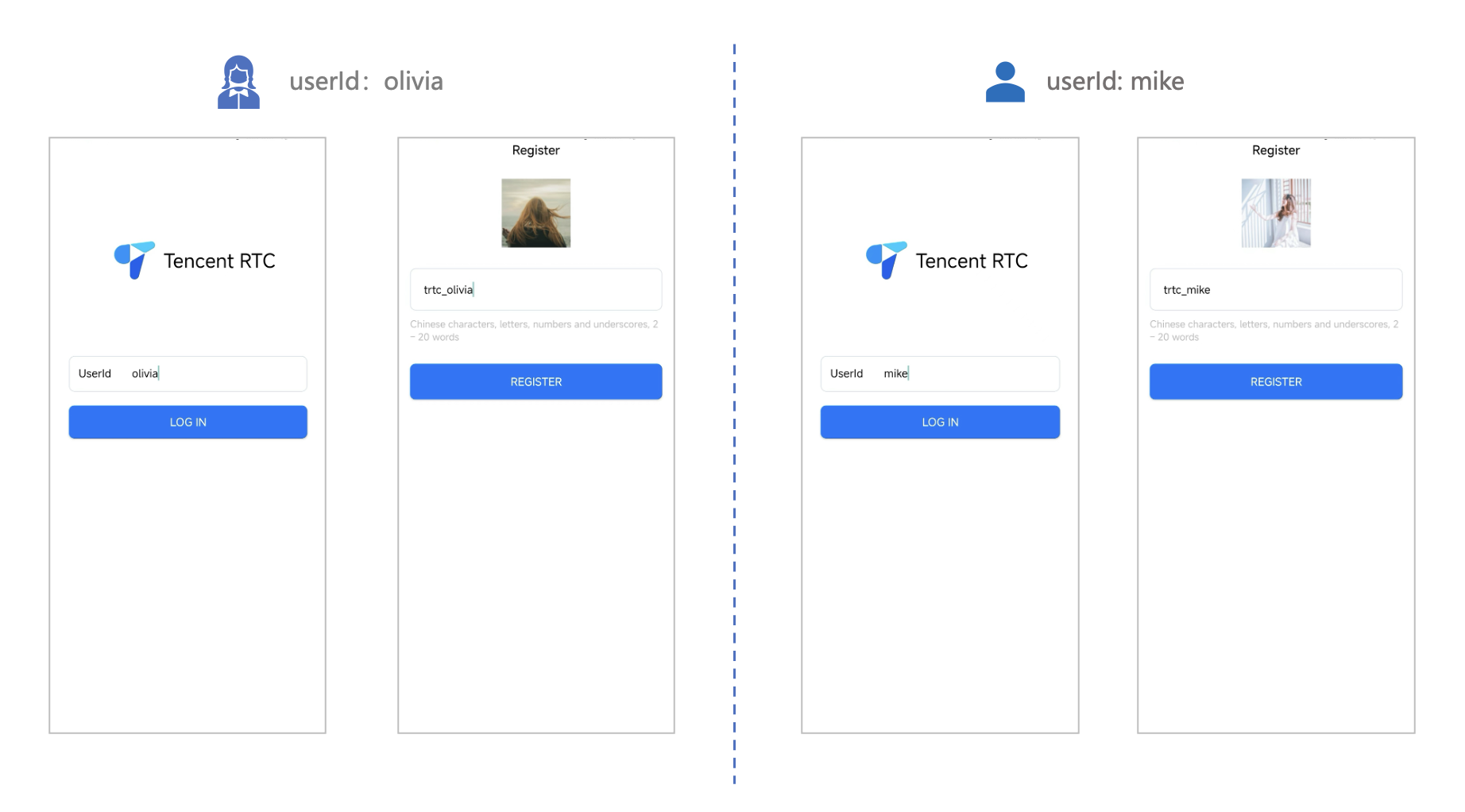
|
|
86
|
-
|
|
87
|
-
|
|
88
|
-
> **Note:**
|
|
89
|
-
>
|
|
90
|
-
|
|
91
|
-
> Try to avoid setting your User ID to simple strings like "1", "123", "111", as TRTC does not support the same User ID being logged into from multiple devices. Such User IDs like "1", "123", "111" are easily occupied by your colleagues during collaborative development, leading to login failures. Therefore, we recommend setting highly recognizable User IDs while debugging.
|
|
92
|
-
>
|
|
93
|
-
|
|
94
|
-
2. Make a phone call
|
|
95
|
-
|
|
96
|
-
1. The caller should click **1V1 Call** on the interface, enter the callee's User ID in the pop-up interface, and select the desired call type.
|
|
97
|
-
|
|
98
|
-
2. Click **Initiate Call**.
|
|
99
|
-
|
|
100
|
-
|
|
101
|
-
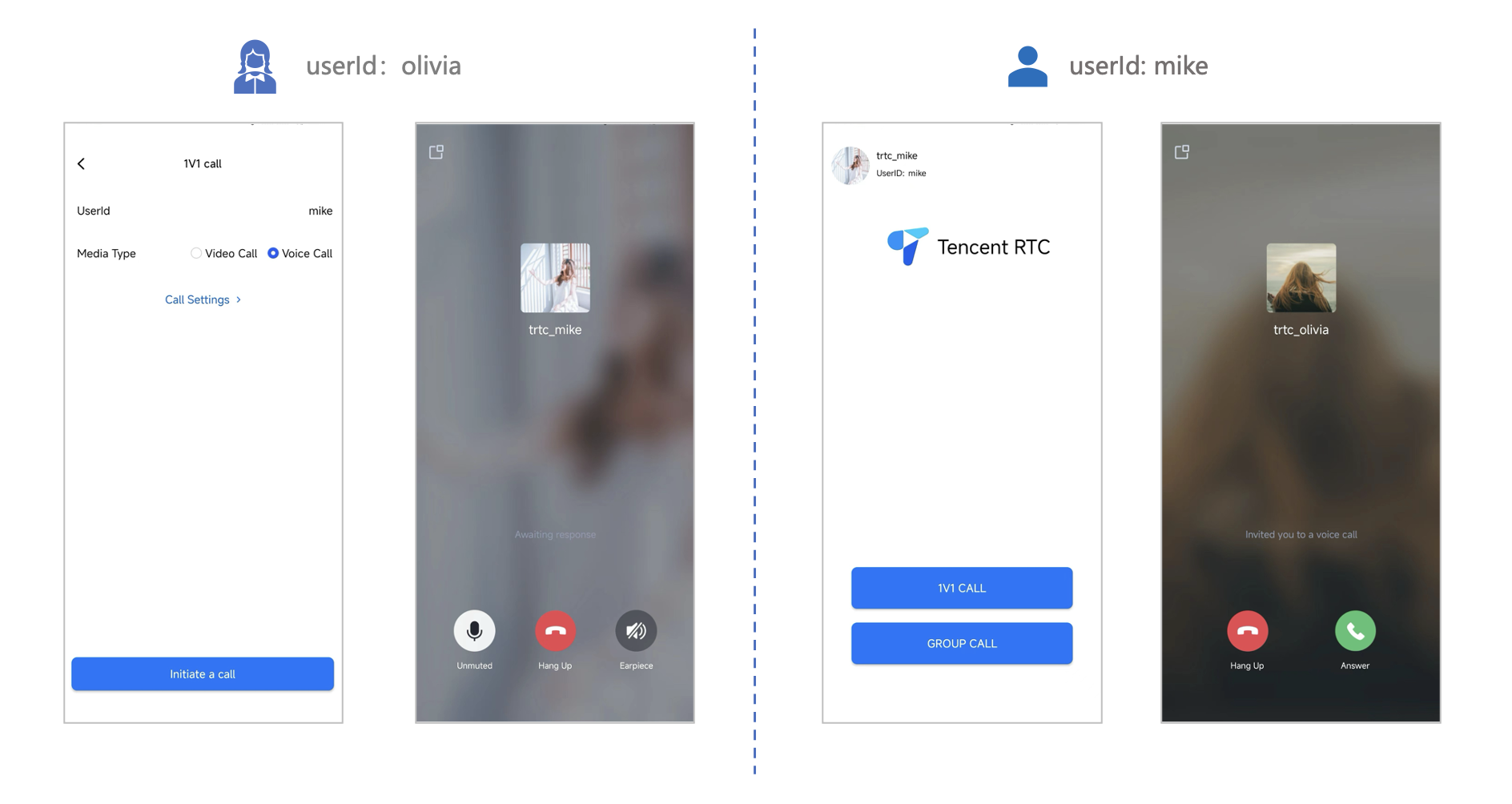
|
|
@@ -1,98 +0,0 @@
|
|
|
1
|
-
This article will guide you on how to quickly run through the Audio and Video Call Demo. By following this document, you can have the Demo up and running in 10 minutes, and ultimately experience an Audio and Video Call feature with a complete UI interface.
|
|
2
|
-
<table>
|
|
3
|
-
<tr>
|
|
4
|
-
<td rowspan="1" colSpan="1" >1v1 Video Call</td>
|
|
5
|
-
|
|
6
|
-
<td rowspan="1" colSpan="1" >Group call</td>
|
|
7
|
-
</tr>
|
|
8
|
-
|
|
9
|
-
<tr>
|
|
10
|
-
<td rowspan="1" colSpan="1" ></td>
|
|
11
|
-
|
|
12
|
-
<td rowspan="1" colSpan="1" ></td>
|
|
13
|
-
</tr>
|
|
14
|
-
</table>
|
|
15
|
-
|
|
16
|
-
|
|
17
|
-
## Environment preparations
|
|
18
|
-
- Xcode 13 or later.
|
|
19
|
-
|
|
20
|
-
- Two iOS 13.0 or later devices.
|
|
21
|
-
|
|
22
|
-
|
|
23
|
-
## Step 1: Download the Demo
|
|
24
|
-
1. Download the [TUICallKit Demo](https://github.com/Tencent-RTC/TUICallKit/tree/main) source code from GitHub, or directly run the following command in the command line:
|
|
25
|
-
|
|
26
|
-
``` bash
|
|
27
|
-
git clone
|
|
28
|
-
```
|
|
29
|
-
2. Enter the iOS project directory in the command line:
|
|
30
|
-
|
|
31
|
-
``` plaintext
|
|
32
|
-
cd TUICallKit/iOS/Example
|
|
33
|
-
```
|
|
34
|
-
3. Load the dependency library:
|
|
35
|
-
|
|
36
|
-
``` plaintext
|
|
37
|
-
pod install
|
|
38
|
-
```
|
|
39
|
-
|
|
40
|
-
> **Note:**
|
|
41
|
-
>
|
|
42
|
-
|
|
43
|
-
> If you haven't installed CocoaPods, you can refer to [this](https://guides.cocoapods.org/using/getting-started.html) for instructions on how to install.
|
|
44
|
-
>
|
|
45
|
-
|
|
46
|
-
|
|
47
|
-
## Step 2: Configure the Demo
|
|
48
|
-
1. [Activate the audio and video services](https://write.woa.com/document/140196392040579072), to obtain the **SDKAppID** and **SDKSecretKey**.
|
|
49
|
-
|
|
50
|
-
|
|
51
|
-
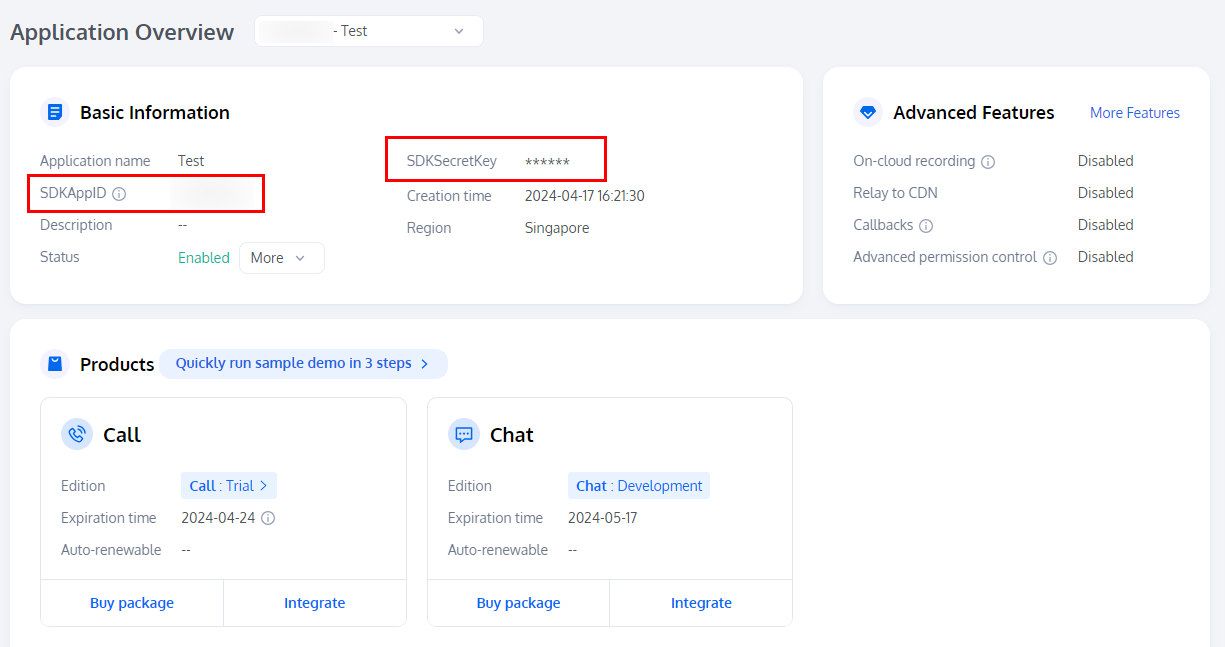
|
|
52
|
-
|
|
53
|
-
2. Open the `/iOS/Example/Debug/GenerateTestUserSig.swift` file and enter the SDKAppID and SDKSecretKey obtained when [activating the service](https://write.woa.com/document/140196392040579072):
|
|
54
|
-
|
|
55
|
-
|
|
56
|
-
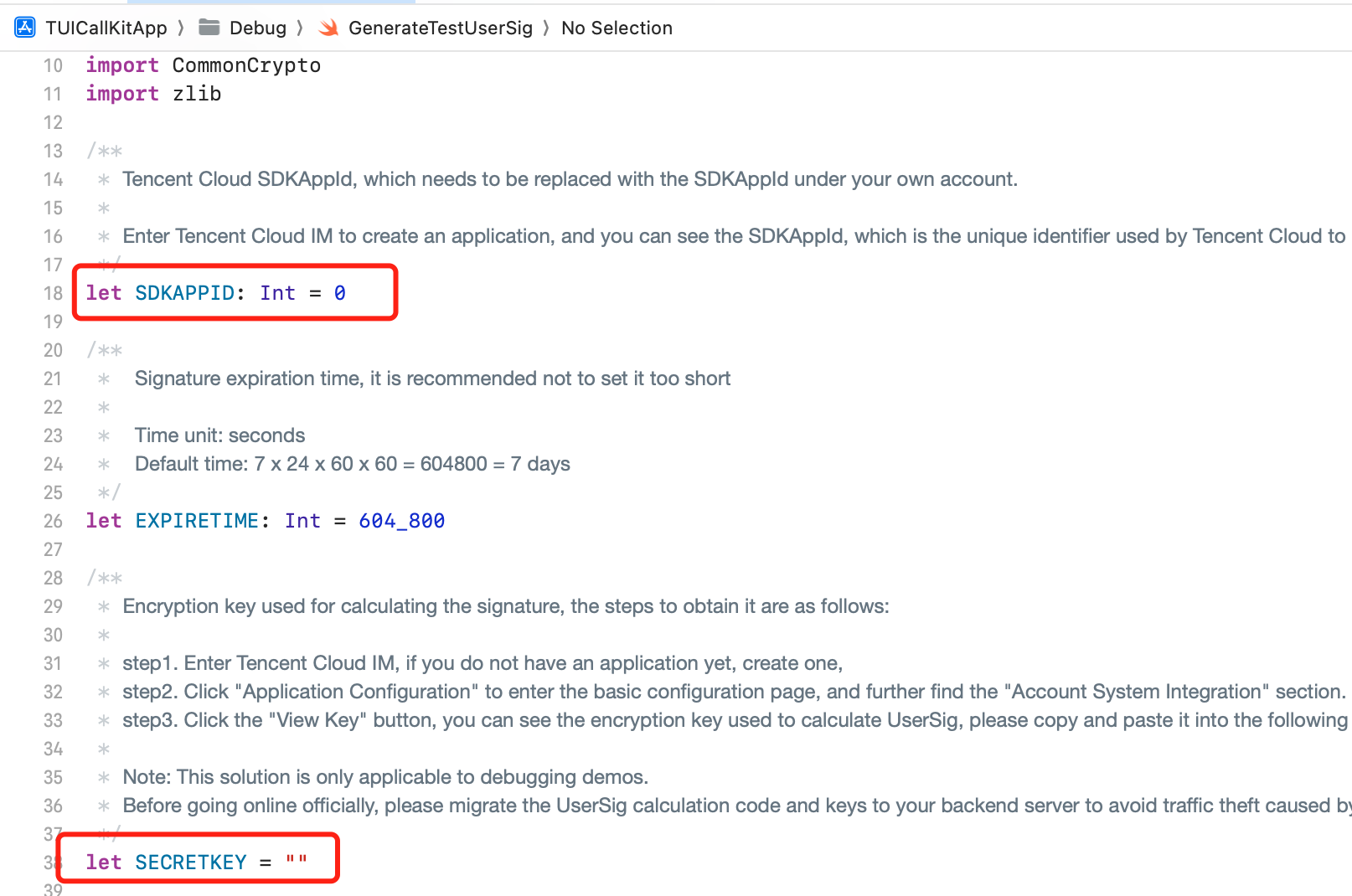
|
|
57
|
-
|
|
58
|
-
|
|
59
|
-
## Step 3: Running the Demo
|
|
60
|
-
1. In XCode, select the device you want to run the Demo on as shown below:
|
|
61
|
-
|
|
62
|
-
|
|
63
|
-
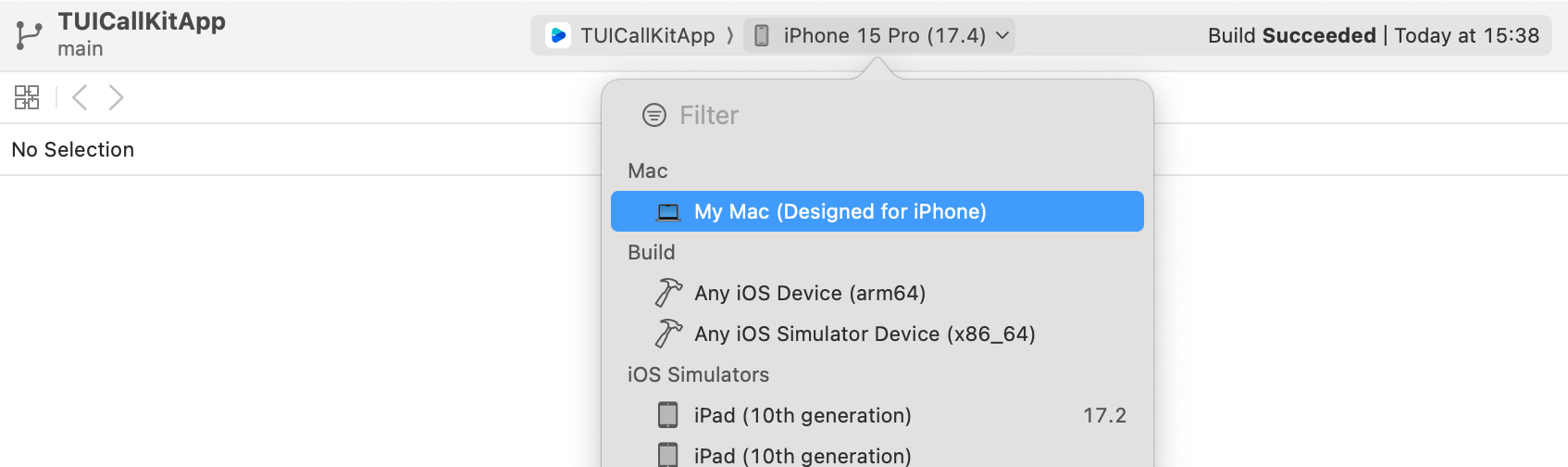
|
|
64
|
-
|
|
65
|
-
2. After selection, click run to deploy our TUICallKit iOS Demo to the target device.
|
|
66
|
-
|
|
67
|
-
|
|
68
|
-
## Make the first call
|
|
69
|
-
|
|
70
|
-
> **Note:**
|
|
71
|
-
>
|
|
72
|
-
|
|
73
|
-
> To experience the complete audio and video calling process, please log into the Demo on two devices as two different users, with one acting as the caller and the other as the callee.
|
|
74
|
-
>
|
|
75
|
-
|
|
76
|
-
1. Log in & Signup
|
|
77
|
-
|
|
78
|
-
|
|
79
|
-
Please enter the ID at the `User ID`. If your current User ID has not been used before, you will be taken to the **Signup** screen, where you can set your own avatar and nickname.
|
|
80
|
-
|
|
81
|
-
|
|
82
|
-
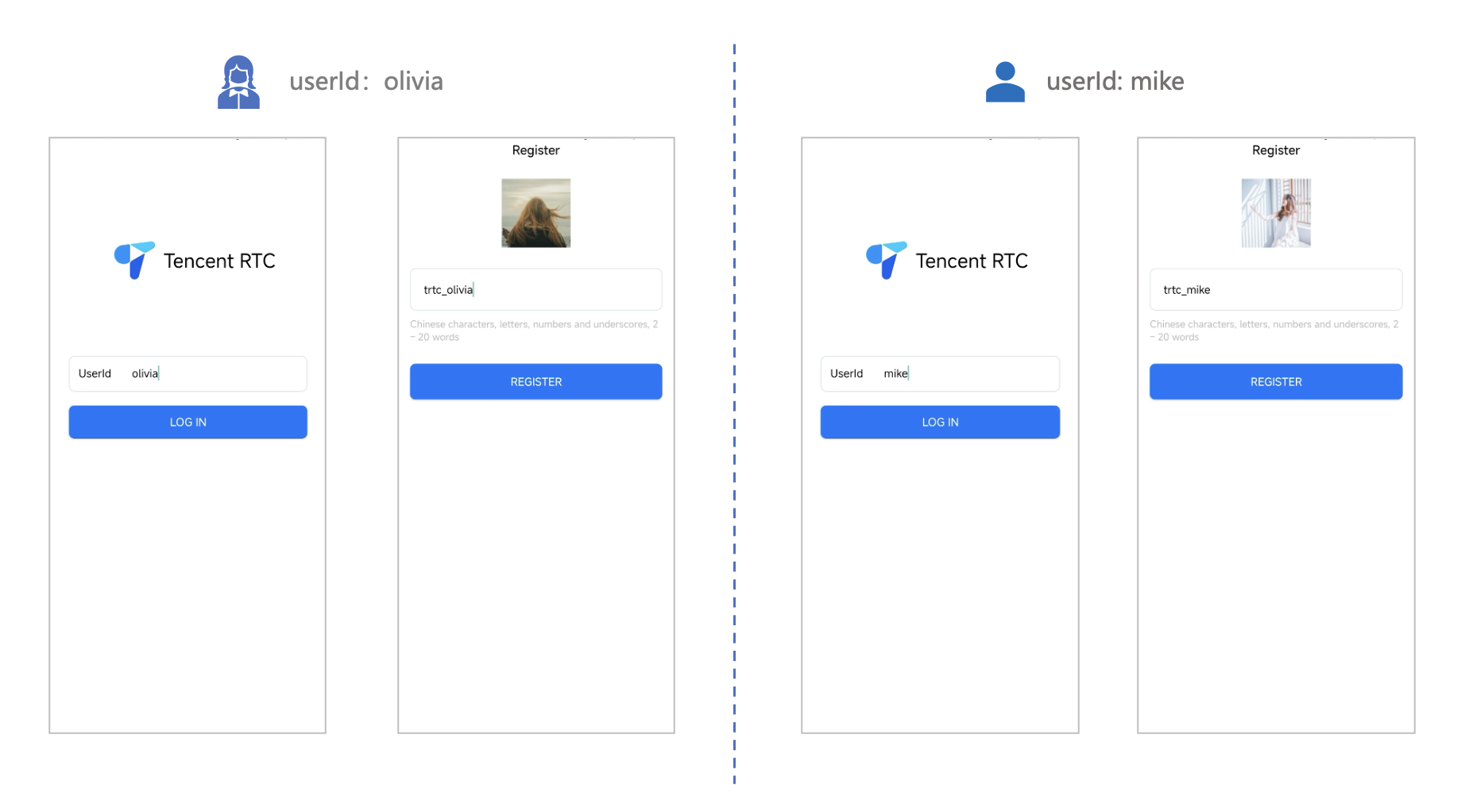
|
|
83
|
-
|
|
84
|
-
|
|
85
|
-
> **Note:**
|
|
86
|
-
>
|
|
87
|
-
|
|
88
|
-
> Try to avoid setting your User ID to simple strings like "1", "123", "111", as TRTC does not support the same User ID being logged into from multiple devices. Such User IDs like "1", "123", "111" are easily occupied by your colleagues during collaborative development, leading to login failures. Therefore, we recommend setting highly recognizable User IDs while debugging.
|
|
89
|
-
>
|
|
90
|
-
|
|
91
|
-
2. Make a phone call
|
|
92
|
-
|
|
93
|
-
1. The caller should click **1V1 Call** on the interface, enter the callee's User ID in the pop-up interface, and select the desired call type.
|
|
94
|
-
|
|
95
|
-
2. Click **Initiate Call**.
|
|
96
|
-
|
|
97
|
-
|
|
98
|
-
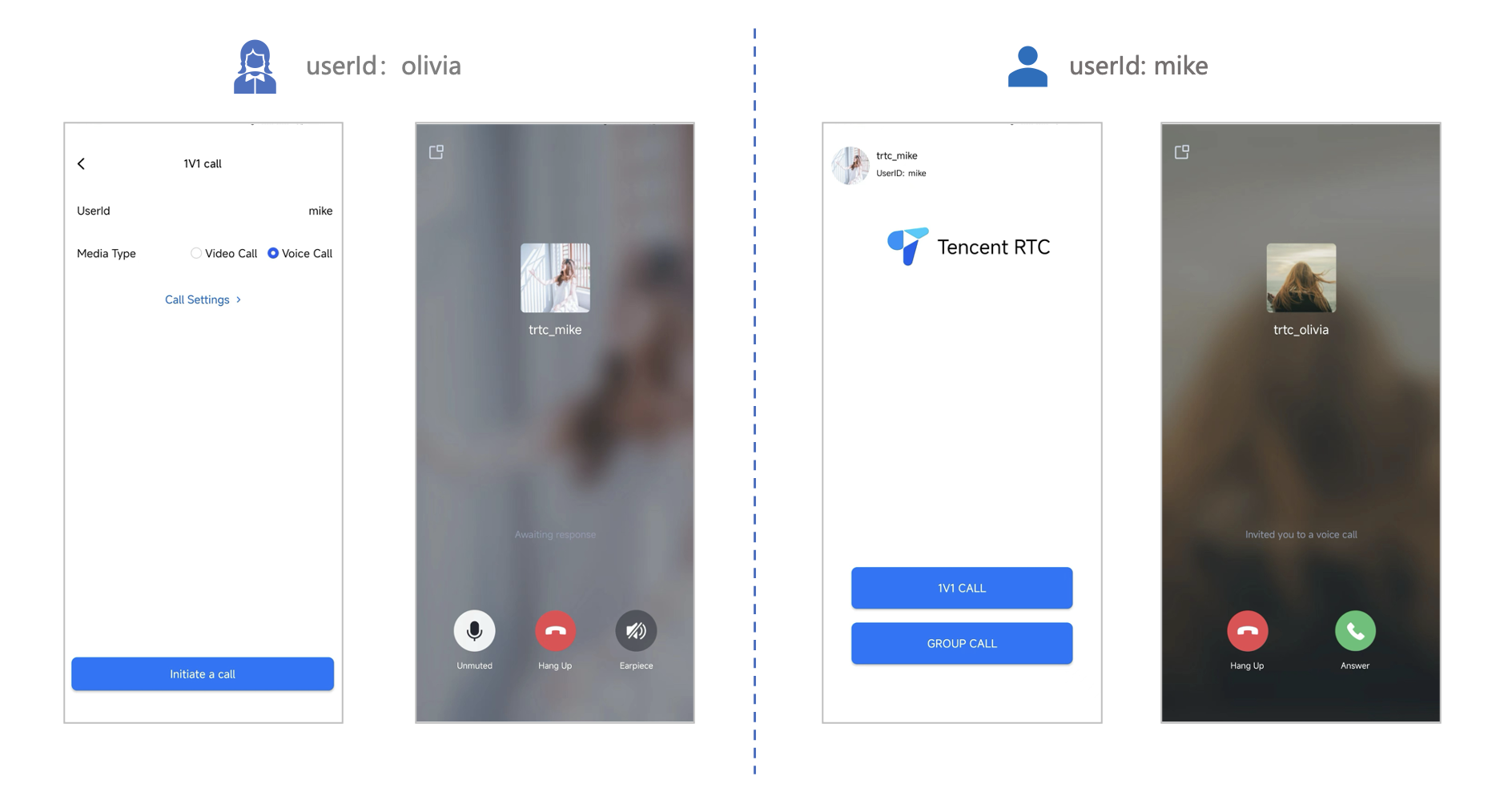
|
/package/resource/doc/tuicallkit/android/{how_to_integrated_android_callkit.md → integration.md}
RENAMED
|
File without changes
|
|
File without changes
|
|
File without changes
|
/package/resource/doc/tuicallkit/{android/api_TUICallKit.md → faq/android_sdk/callkit-api.md}
RENAMED
|
File without changes
|
/package/resource/doc/tuicallkit/{flutter/api_TUICallDefine.md → faq/flutter_sdk/call-define-api.md}
RENAMED
|
File without changes
|
|
File without changes
|
/package/resource/doc/tuicallkit/{flutter/api_TUICallKit.md → faq/flutter_sdk/callkit-api.md}
RENAMED
|
File without changes
|
/package/resource/doc/tuicallkit/{iOS/api_TUICallObserver.md → faq/ios_sdk/call-observer-api.md}
RENAMED
|
File without changes
|
|
File without changes
|
/package/resource/doc/tuicallkit/flutter/{how_to_integrated_flutter_callkit.md → integration.md}
RENAMED
|
File without changes
|
|
File without changes
|