@tencent-rtc/mcp 1.3.4 → 1.3.6
This diff represents the content of publicly available package versions that have been released to one of the supported registries. The information contained in this diff is provided for informational purposes only and reflects changes between package versions as they appear in their respective public registries.
- package/index.js +4 -4
- package/index.js.map +1 -1
- package/package.json +1 -1
- package/resource/doc/chatuikit/android/features/theme.md +363 -0
- package/resource/doc/chatuikit/{android/client_api_Android.md → faq/android_sdk/client-api.md} +0 -2
- package/resource/doc/chatuikit/faq/common/product.md +8 -0
- package/resource/doc/chatuikit/faq/flutter_sdk/faq.md +53 -0
- package/resource/doc/chatuikit/{iOS/client_api_iOS.md → faq/ios_sdk/client-api.md} +0 -2
- package/resource/doc/chatuikit/flutter/features/theme.md +379 -0
- package/resource/doc/chatuikit/flutter/integration.md +413 -0
- package/resource/doc/chatuikit/flutter/workflow.md +941 -0
- package/resource/doc/chatuikit/iOS/features/theme.md +416 -0
- package/resource/doc/chatuikit/react/components/chat-setting.md +86 -0
- package/resource/doc/chatuikit/react/components/contact-list.md +1093 -0
- package/resource/doc/chatuikit/react/components/search.md +745 -0
- package/resource/doc/chatuikit/vue/components/chat-setting.md +64 -0
- package/resource/doc/chatuikit/vue/components/contact-list.md +679 -0
- package/resource/doc/chatuikit/vue/components/search.md +1384 -0
- package/resource/doc/livekit/live/android/workflow.md +137 -6
- package/resource/doc/livekit/live/ios/live-audience-list.md +339 -0
- package/resource/doc/livekit/live/ios/live-audio-effect.md +370 -0
- package/resource/doc/livekit/live/ios/live-barrage.md +517 -0
- package/resource/doc/livekit/live/ios/live-base-beauty.md +247 -0
- package/resource/doc/livekit/live/ios/live-co-guest-interaction.md +518 -0
- package/resource/doc/livekit/live/ios/live-gift.md +783 -0
- package/resource/doc/livekit/live/ios/live-host-interaction.md +815 -0
- package/resource/doc/livekit/live/ios/live-integration.md +931 -0
- package/resource/doc/livekit/live/ios/live-live-list.md +485 -0
- package/resource/doc/livekit/live/ios/workflow.md +454 -0
- package/resource/doc/rtcengine/web/plugin/20-advanced-customized-capture-rendering.md +87 -0
- package/resource/doc/rtcengine/web/plugin/21-advanced-auto-play-policy.md +87 -0
- package/resource/doc/rtcengine/web/plugin/22-advanced-audio-mixer.md +175 -0
- package/resource/doc/rtcengine/web/plugin/23-advanced-support-detection.md +221 -0
- package/resource/doc/rtcengine/web/plugin/24-advanced-network-quality.md +140 -0
- package/resource/doc/rtcengine/web/plugin/25-advanced-device-change.md +99 -0
- package/resource/doc/rtcengine/web/plugin/26-advanced-publish-cdn-stream.md +451 -0
- package/resource/doc/rtcengine/web/plugin/27-advanced-small-stream.md +151 -0
- package/resource/doc/rtcengine/web/plugin/28-advanced-beauty.md +322 -0
- package/resource/doc/rtcengine/web/plugin/29-advanced-water-mark.md +149 -0
- package/resource/doc/rtcengine/web/plugin/30-advanced-cross-room-link.md +96 -0
- package/resource/doc/rtcengine/web/plugin/31-advanced-plugins-overview.md +330 -0
- package/resource/doc/rtcengine/web/plugin/34-advanced-proxy.md +248 -0
- package/resource/doc/rtcengine/web/plugin/35-advanced-ai-denoiser.md +81 -0
- package/resource/doc/rtcengine/web/plugin/36-advanced-virtual-background.md +242 -0
- package/resource/doc/rtcengine/web/plugin/37-advanced-voice-changer.md +99 -0
- package/resource/doc/rtcengine/web/plugin/39-advanced-video-decoder.md +33 -0
- package/resource/doc/rtcengine/web/plugin/40-advanced-video-mixer.md +379 -0
- package/resource/doc/rtcengine/web/plugin/41-advanced-small-stream-auto-switcher.md +91 -0
- package/resource/doc/rtcengine/web/plugin/42-advanced-realtime-transcriber.md +315 -0
- package/resource/doc/rtcengine/web/plugin/43-advanced-face-detection.md +180 -0
- package/resource/doc/tuicallkit/android/workflow.md +0 -0
- package/resource/doc/tuicallkit/flutter/workflow.md +331 -0
- package/tools/call/get-native-call-integration.js +27 -11
- package/tools/call/get-native-call-integration.js.map +1 -1
- package/tools/chat/get-native-chat-feature-detail.js +30 -0
- package/tools/chat/get-native-chat-feature-detail.js.map +1 -0
- package/tools/chat/get-native-chat-integration.js +30 -12
- package/tools/chat/get-native-chat-integration.js.map +1 -1
- package/tools/common/get-faq.js +2 -4
- package/tools/common/get-faq.js.map +1 -1
- package/tools/definitions/get_native_call_uikit_integration_def.js +17 -7
- package/tools/definitions/get_native_call_uikit_integration_def.js.map +1 -1
- package/tools/definitions/get_native_chat_feature_detail_def.js +32 -0
- package/tools/definitions/get_native_chat_feature_detail_def.js.map +1 -0
- package/tools/definitions/get_native_chat_uikit_integration_def.js +19 -7
- package/tools/definitions/get_native_chat_uikit_integration_def.js.map +1 -1
- package/tools/definitions/{get_native_live_extra_features_def.js → get_native_live_uikit_extra_features_def.js} +3 -3
- package/tools/definitions/get_native_live_uikit_extra_features_def.js.map +1 -0
- package/tools/definitions/{get_native_live_interaction_def.js → get_native_live_uikit_interaction_def.js} +3 -3
- package/tools/definitions/get_native_live_uikit_interaction_def.js.map +1 -0
- package/tools/definitions/get_web_chat_uikit_component_detail_def.js +49 -10
- package/tools/definitions/get_web_chat_uikit_component_detail_def.js.map +1 -1
- package/tools/index.js +6 -4
- package/tools/index.js.map +1 -1
- package/tools/live/{get_native_live_extra_features.js → get_native_live_uikit_extra_features.js} +4 -4
- package/tools/live/get_native_live_uikit_extra_features.js.map +1 -0
- package/tools/live/{get_native_live_interaction.js → get_native_live_uikit_interaction.js} +4 -4
- package/tools/live/get_native_live_uikit_interaction.js.map +1 -0
- package/tools/rtcengine/get-rtcengine-web-sdk-integration.js.map +1 -1
- package/tools/rtcengine/get-trtc-sdk-faq.js +32 -0
- package/tools/rtcengine/get-trtc-sdk-faq.js.map +1 -0
- package/tools/rtcengine/get-trtc-web-sdk-faq.js +1 -1
- package/tools/rtcengine/get-trtc-web-sdk-integration.js.map +1 -1
- package/tools/rtcengine/get-trtc-web-sdk-plugin.js +45 -0
- package/tools/rtcengine/get-trtc-web-sdk-plugin.js.map +1 -0
- package/utils/handle-component-name.js +0 -16
- package/utils/handle-component-name.js.map +1 -1
- package/utils/report-cls-client.js +1 -1
- package/utils/report-es-client.js +1 -1
- package/resource/doc/chatuikit/android/generate_UserSig.md +0 -306
- package/resource/doc/chatuikit/android/integrarte_only_tuichat_Android.md +0 -290
- package/resource/doc/chatuikit/android/quick_start_Android.md +0 -138
- package/resource/doc/chatuikit/android/show_typing_Android.md +0 -43
- package/resource/doc/chatuikit/flutter/generate_UserSig.md +0 -306
- package/resource/doc/chatuikit/flutter/integrate_tuikit_Flutter.md +0 -133
- package/resource/doc/chatuikit/iOS/generate_UserSig.md +0 -306
- package/resource/doc/chatuikit/iOS/integrate_only_tuichat_iOS.md +0 -748
- package/resource/doc/chatuikit/iOS/quick_start_iOS.md +0 -163
- package/resource/doc/chatuikit/iOS/show_typing_iOS.md +0 -52
- package/resource/doc/tuicallkit/flutter/how_to_run_flutter_callkit_demo.md +0 -101
- package/resource/doc/tuicallkit/iOS/how_to_run_iOS_callkit_demo.md +0 -98
- package/tools/definitions/get_native_live_extra_features_def.js.map +0 -1
- package/tools/definitions/get_native_live_interaction_def.js.map +0 -1
- package/tools/live/get_native_live_extra_features.js.map +0 -1
- package/tools/live/get_native_live_interaction.js.map +0 -1
- /package/resource/doc/chatuikit/android/{integrate_tuikit_Android.md → integration.md} +0 -0
- /package/resource/doc/chatuikit/{faq/native_sdk/faq.md → android/workflow.md} +0 -0
- /package/resource/doc/chatuikit/{flutter/client_api_Flutter.md → faq/flutter_sdk/client-api.md} +0 -0
- /package/resource/doc/chatuikit/iOS/{integrate_tuikit_iOS.md → integration.md} +0 -0
- /package/resource/doc/{tuicallkit/android/.gitkeep → chatuikit/iOS/workflow.md} +0 -0
- /package/resource/doc/chatuikit/react/components/{chatheader.md → chat-header.md} +0 -0
- /package/resource/doc/chatuikit/vue/components/{chatheader.md → chat-header.md} +0 -0
- /package/resource/doc/tuicallkit/android/{how_to_integrated_android_callkit.md → integration.md} +0 -0
- /package/resource/doc/tuicallkit/{android/api_TUICallObserver.md → faq/android_sdk/call-observer-api.md} +0 -0
- /package/resource/doc/tuicallkit/{android/api_TUICallKit.md → faq/android_sdk/callkit-api.md} +0 -0
- /package/resource/doc/tuicallkit/{flutter/api_TUICallDefine.md → faq/flutter_sdk/call-define-api.md} +0 -0
- /package/resource/doc/tuicallkit/{flutter/api_TUICallObserver.md → faq/flutter_sdk/call-observer-api.md} +0 -0
- /package/resource/doc/tuicallkit/{flutter/api_TUICallKit.md → faq/flutter_sdk/callkit-api.md} +0 -0
- /package/resource/doc/tuicallkit/{iOS/api_TUICallObserver.md → faq/ios_sdk/call-observer-api.md} +0 -0
- /package/resource/doc/tuicallkit/{iOS/api_TUICallKit.md → faq/ios_sdk/callkit-api.md} +0 -0
- /package/resource/doc/tuicallkit/flutter/{how_to_integrated_flutter_callkit.md → integration.md} +0 -0
- /package/resource/doc/tuicallkit/iOS/{how_to_integrated_iOS_callkit.md → integration.md} +0 -0
|
@@ -1,163 +0,0 @@
|
|
|
1
|
-
This document will guide you through integrating TUIKit and successfully sending your first message.
|
|
2
|
-
|
|
3
|
-
## Environment Requirements
|
|
4
|
-
- Xcode 10 or later
|
|
5
|
-
|
|
6
|
-
- iOS 9.0 or later
|
|
7
|
-
|
|
8
|
-
|
|
9
|
-
## Create an Application
|
|
10
|
-
|
|
11
|
-
Before integrating TUIKit, you need to create a Chat application in the console. The steps are as follows:
|
|
12
|
-
1. Register a console account.
|
|
13
|
-
|
|
14
|
-
2. Go to `Applications`, click `Create Application`, and an application information input box will pop up.
|
|
15
|
-
|
|
16
|
-
3. Fill in the application name, select the product as Chat, and choose an appropriate region.
|
|
17
|
-
|
|
18
|
-
|
|
19
|
-
After the operation is complete, you will see the application you just created in the `My Applications` list.
|
|
20
|
-
|
|
21
|
-
|
|
22
|
-
> **Note:**
|
|
23
|
-
>
|
|
24
|
-
|
|
25
|
-
> Note down the SDKAppID of this application, as it will be used in subsequent steps. Also, keep the SDKSecretKey strictly confidential and do not disclose it to irrelevant personnel.
|
|
26
|
-
>
|
|
27
|
-
|
|
28
|
-
|
|
29
|
-
The steps are illustrated as follows:
|
|
30
|
-
|
|
31
|
-
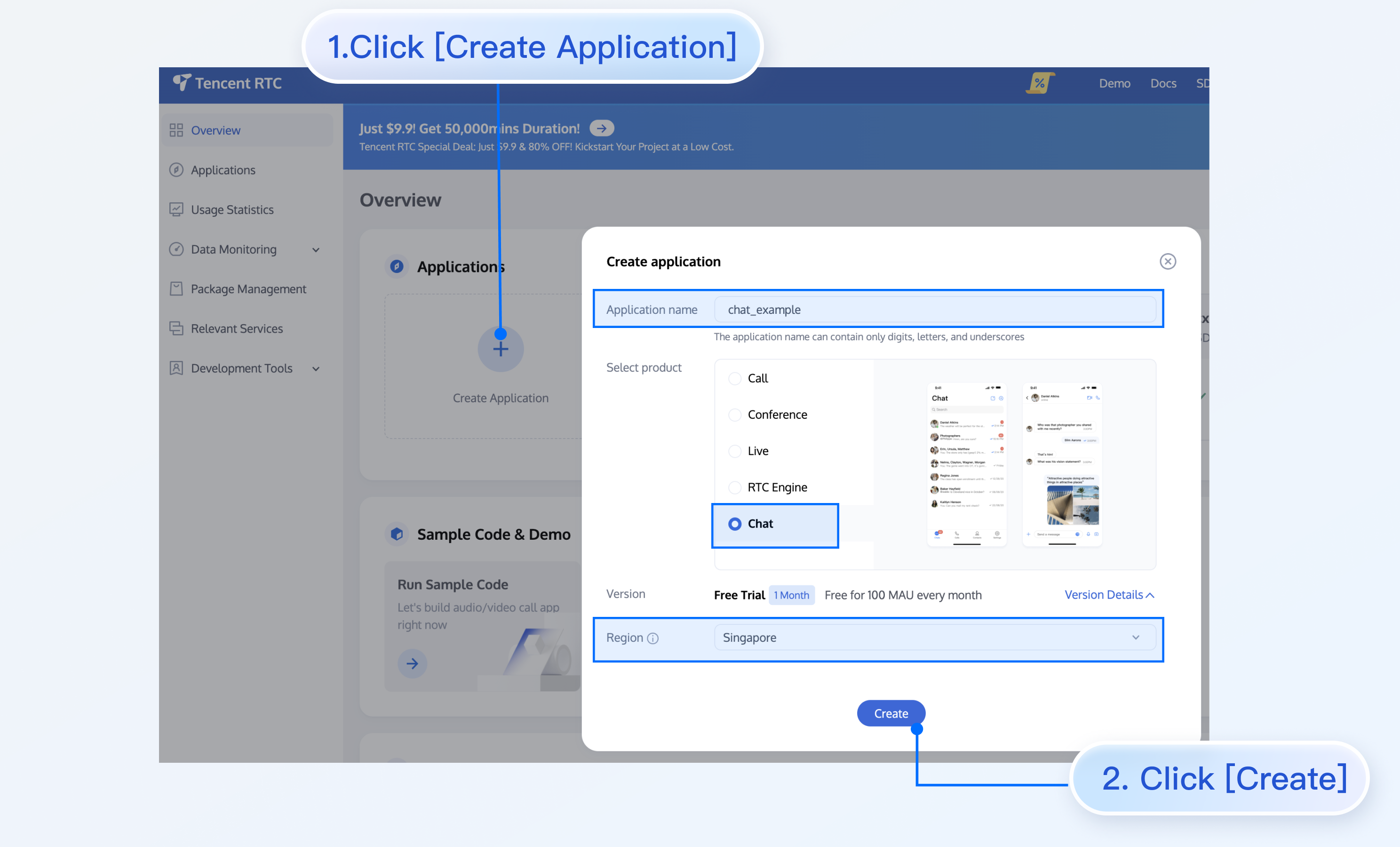
|
|
32
|
-
|
|
33
|
-
|
|
34
|
-
## Create User Accounts
|
|
35
|
-
|
|
36
|
-
Creating an application only ensures you can initialize the SDK normally. To successfully send messages, you also need to create a user account in the application. There are many ways to create an account, such as directly creating it in the console or registering via API on the client. You may choose any method that suits you best.
|
|
37
|
-
|
|
38
|
-
> **Note:**
|
|
39
|
-
>
|
|
40
|
-
|
|
41
|
-
> Sending messages involves at least two users, so at this step, you need to create at least two accounts. Note down the userID of these two accounts for subsequent steps.
|
|
42
|
-
>
|
|
43
|
-
|
|
44
|
-
|
|
45
|
-
If you need to create an account in the console, follow these steps:
|
|
46
|
-
1. Click to enter the application you created above, and you will see the Chat on the left sidebar. Click to enter.
|
|
47
|
-
|
|
48
|
-
2. On the Chat submenu, click `Users` to go to the Account Management page.
|
|
49
|
-
|
|
50
|
-
3. Click `Create account`, and an account creation dialog box will pop up. It is recommended to select `General` for a regular member. Although `Nickname` is not required, we still recommend setting it. If `userID` is not displayed on the UI, you can identify different users through `Nickname`.
|
|
51
|
-
|
|
52
|
-
|
|
53
|
-
The details are as follows:
|
|
54
|
-
|
|
55
|
-
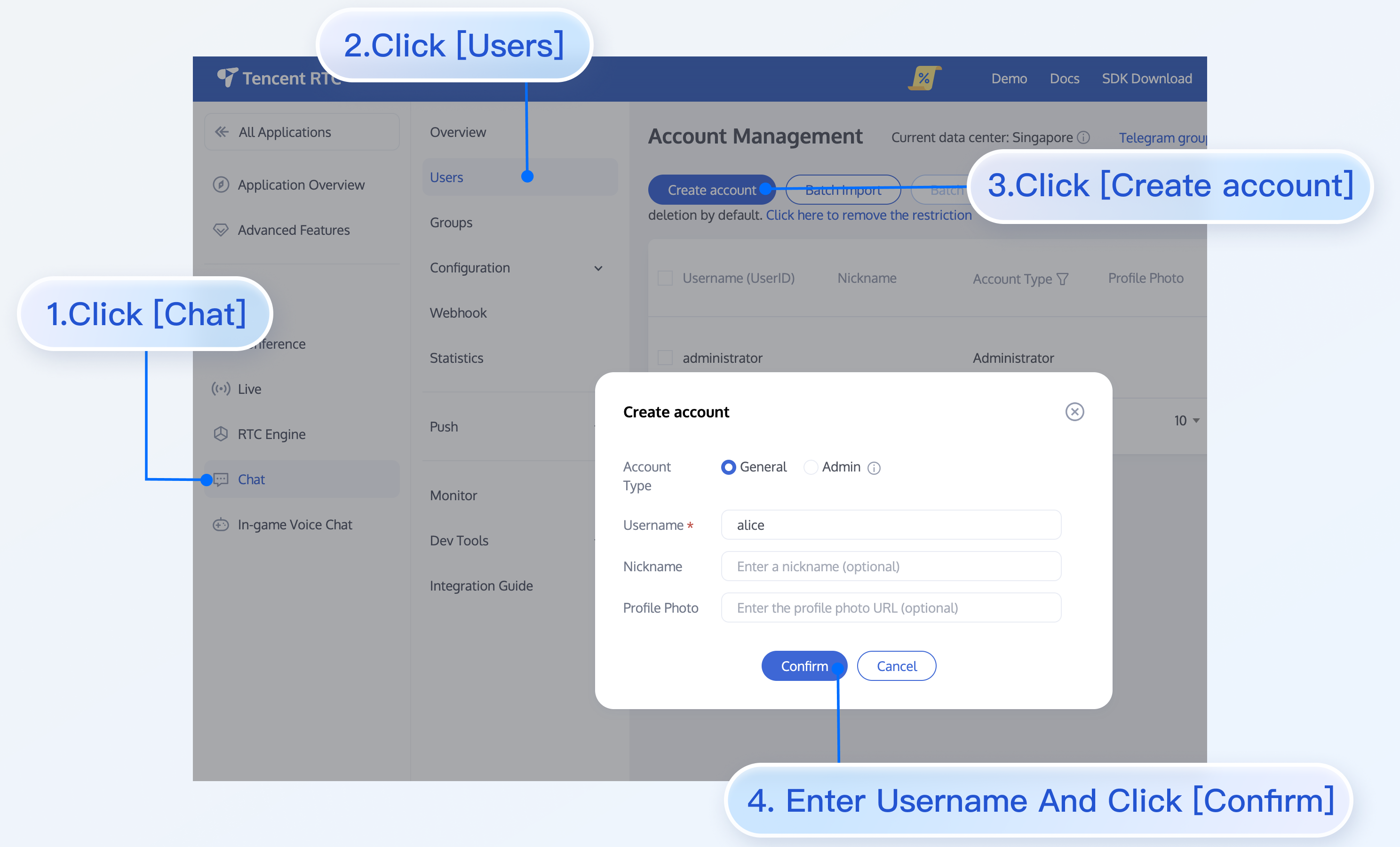
|
|
56
|
-
|
|
57
|
-
|
|
58
|
-
If you need to register through the client, no additional operations are needed. You just need to input a new `userID` in the section "Log In to TUIKit" below, and TUIKit will automatically register that `userID` for you.
|
|
59
|
-
|
|
60
|
-
|
|
61
|
-
## Install TUIKit
|
|
62
|
-
|
|
63
|
-
The feature of sending messages in chat interactions is implemented by `TUIChat`. You need to integrate at least `TUIChat` to properly send and receive messages. Other components, such as `TUIConversation`, `TUIContact`, and `TUIGroup`, can be integrated as needed.
|
|
64
|
-
- If you need multiple UI components, you can integrate TUIKit. For details, see [Install TUIKit](https://www.tencentcloud.com/document/product/1047/50056#cocoapods-.E9.9B.86.E6.88.90).
|
|
65
|
-
|
|
66
|
-
- If you only need to integrate TUIChat, see [Install TUIChat Only](https://www.tencentcloud.com/document/product/1047/60169#beaaa1f6-5555-42ca-b353-32ad98a620da).
|
|
67
|
-
|
|
68
|
-
|
|
69
|
-
## Log In to TUIKit
|
|
70
|
-
|
|
71
|
-
TUILogin provides an API to log in to TUIKit, as follows:
|
|
72
|
-
``` objectivec
|
|
73
|
-
// API location: TUICore/TUILogin.h
|
|
74
|
-
+ (void)login:(int)sdkAppID userID:(NSString *)userID userSig:(NSString *)userSig succ:(__nullable TSucc)succ fail:(__nullable TFail)fail;
|
|
75
|
-
```
|
|
76
|
-
|
|
77
|
-
This API requires three parameters:
|
|
78
|
-
- sdkAppID, the new application's SDKAppID, which was obtained in the previous steps.
|
|
79
|
-
|
|
80
|
-
- userID, user1's userID, which was obtained in the previous steps. Note that it is not the user's nickname.
|
|
81
|
-
|
|
82
|
-
- userSig, user1's userSig, which can be generated in real time using the development tools provided by the console. The path is: Homepage > Development Tools > UserSig Tools > Signature (UserSig) Generator, as shown below:
|
|
83
|
-
|
|
84
|
-
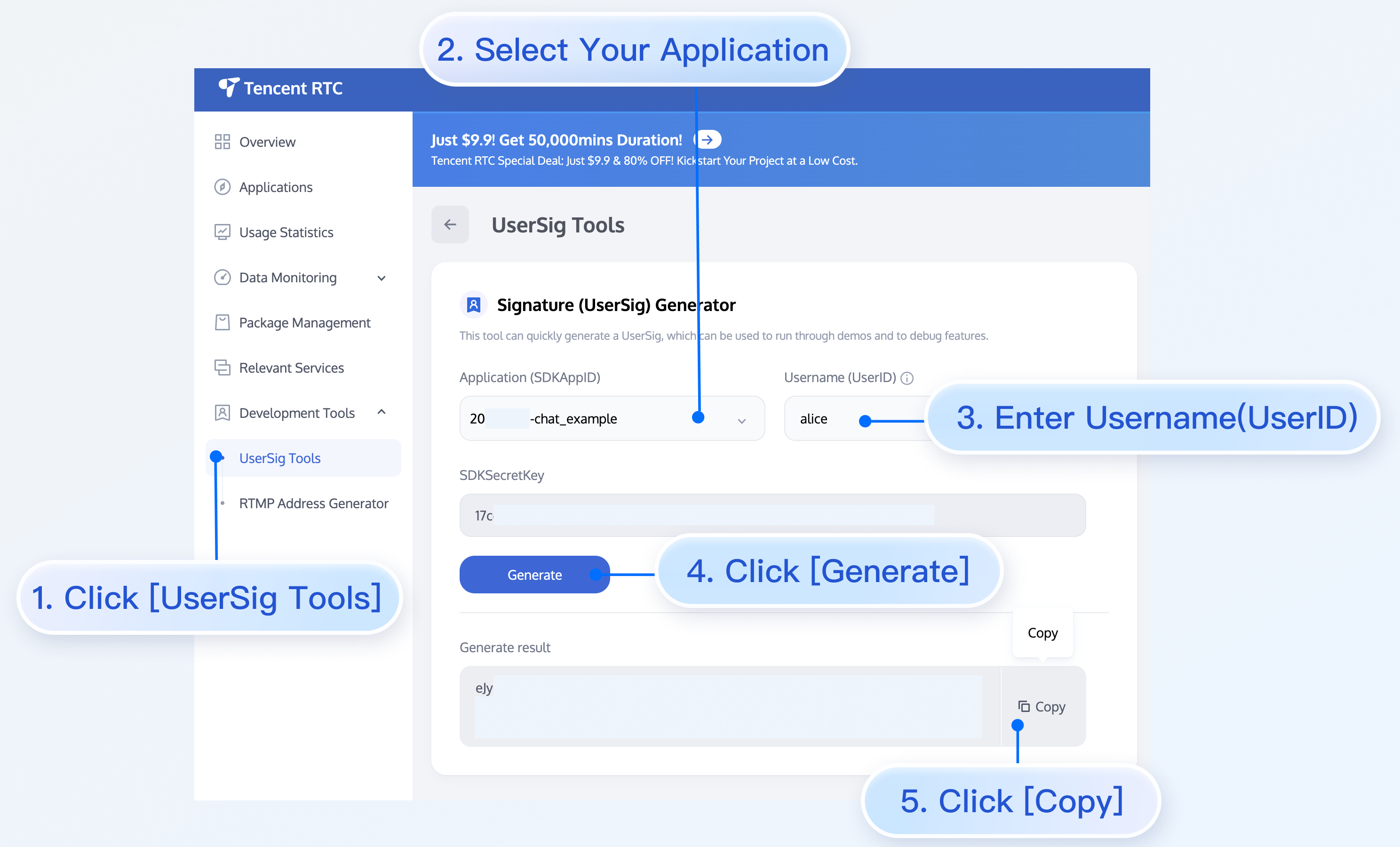
|
|
85
|
-
|
|
86
|
-
|
|
87
|
-
## Navigate to Chat Interface
|
|
88
|
-
|
|
89
|
-
To send messages, the next step is:
|
|
90
|
-
1. Use one of the previously registered accounts (hereinafter referred to as user1) to log in to TUIKit, and then user1 is online.
|
|
91
|
-
|
|
92
|
-
2. User1 sends a message to another account (hereinafter referred to as user2). User2 does not need to log in and does not need to have any friend relationship with user1.
|
|
93
|
-
|
|
94
|
-
|
|
95
|
-
> **Note:**
|
|
96
|
-
>
|
|
97
|
-
|
|
98
|
-
> The following steps explain how to send a message to user2 after logging in as user1. If you wish for user1 and user2 to interact via chat, you need to use the same steps to log in as user2 and enter the chat interface with user1.
|
|
99
|
-
>
|
|
100
|
-
|
|
101
|
-
|
|
102
|
-
You can jump to the chat interface in the callback of user1's successful login, and then you can send a message to user2.
|
|
103
|
-
|
|
104
|
-
|
|
105
|
-
The sample code is as follows, where userID needs to be user2's id.
|
|
106
|
-
|
|
107
|
-
|
|
108
|
-
|
|
109
|
-
|
|
110
|
-
|
|
111
|
-
【Swift】
|
|
112
|
-
``` swift
|
|
113
|
-
// Pass userID for 1v1 conversation.
|
|
114
|
-
func pushToChatViewController(groupID: String?, userID: String?) {
|
|
115
|
-
// Create conversationData.
|
|
116
|
-
let conversationData = TUIChatConversationModel()
|
|
117
|
-
conversationData.userID = userID
|
|
118
|
-
|
|
119
|
-
// Create c2c chatVC.
|
|
120
|
-
let chatVC = TUIC2CChatViewController_Minimalist()
|
|
121
|
-
chatVC.conversationData = conversationData
|
|
122
|
-
|
|
123
|
-
// Option 1: navigate to chatVC.
|
|
124
|
-
navigationController?.pushViewController(chatVC, animated: true)
|
|
125
|
-
// Option 2: add chatVC as a childVC to your parent VC.
|
|
126
|
-
// addChild(chatVC)
|
|
127
|
-
// view.addSubview(chatVC.view)
|
|
128
|
-
}
|
|
129
|
-
```
|
|
130
|
-
|
|
131
|
-
|
|
132
|
-
【Objective-C】
|
|
133
|
-
``` objectivec
|
|
134
|
-
// Pass userID for 1v1 conversation.
|
|
135
|
-
- (void)pushToChatViewController:(NSString *)groupID userID:(NSString *)userID {
|
|
136
|
-
// Create conversationData.
|
|
137
|
-
TUIChatConversationModel *conversationData = [[TUIChatConversationModel alloc] init];
|
|
138
|
-
conversationData.userID = userID;
|
|
139
|
-
|
|
140
|
-
// Create c2c chatVC.
|
|
141
|
-
TUIBaseChatViewController_Minimalist *chatVC = [[TUIC2CChatViewController_Minimalist alloc] init];
|
|
142
|
-
chatVC.conversationData = conversationData;
|
|
143
|
-
|
|
144
|
-
// Option 1: navigate to chatVC.
|
|
145
|
-
[self.navigationController pushViewController:chatVC animated:YES];
|
|
146
|
-
// Option 2: add chatVC as a childVC to your parent VC.
|
|
147
|
-
// [self addChildViewController:vc];
|
|
148
|
-
// [self.view addSubview:vc.view];
|
|
149
|
-
}
|
|
150
|
-
```
|
|
151
|
-
|
|
152
|
-
|
|
153
|
-
## Send Your First Message
|
|
154
|
-
|
|
155
|
-
After completing the previous steps, you can jump to the following chat interface. Click the input box to send your first message:
|
|
156
|
-
|
|
157
|
-
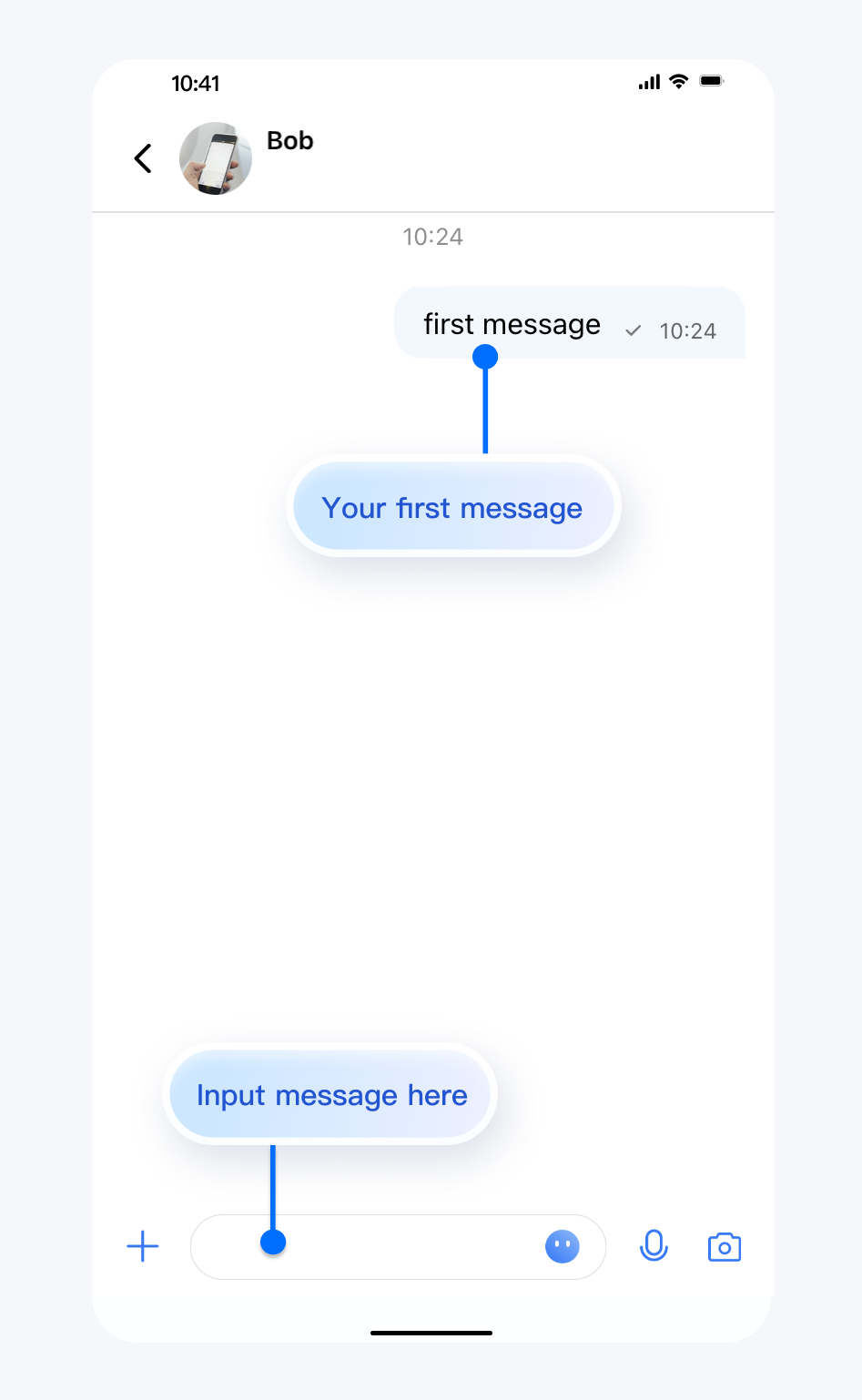
|
|
158
|
-
|
|
159
|
-
|
|
160
|
-
## Contact Us
|
|
161
|
-
|
|
162
|
-
If you have any questions about this article, feel free to join the [Telegram Technical Group](https://t.me/+EPk6TMZEZMM5OGY1), where you will receive reliable technical support.
|
|
163
|
-
|
|
@@ -1,52 +0,0 @@
|
|
|
1
|
-
## Description
|
|
2
|
-
|
|
3
|
-
TUIKit supports showing "Typing..." in a one-to-one chat in the classic UI starting from version [6.5.2803](https://www.tencentcloud.com/zh/document/product/1047/34282#6.5.2803-.402022.07.15---.E5.A2.9E.E5.BC.BA.E7.89.88).
|
|
4
|
-
|
|
5
|
-
This feature is implemented using the [Online Message](https://www.tencentcloud.com/zh/document/product/1047/48019) capability of Chat SDK.
|
|
6
|
-
<table>
|
|
7
|
-
<tr>
|
|
8
|
-
<td rowspan="1" colSpan="1" >Enabling "Typing..."</td>
|
|
9
|
-
|
|
10
|
-
<td rowspan="1" colSpan="1" >Disabling "Typing..."</td>
|
|
11
|
-
</tr>
|
|
12
|
-
|
|
13
|
-
<tr>
|
|
14
|
-
<td rowspan="1" colSpan="1" >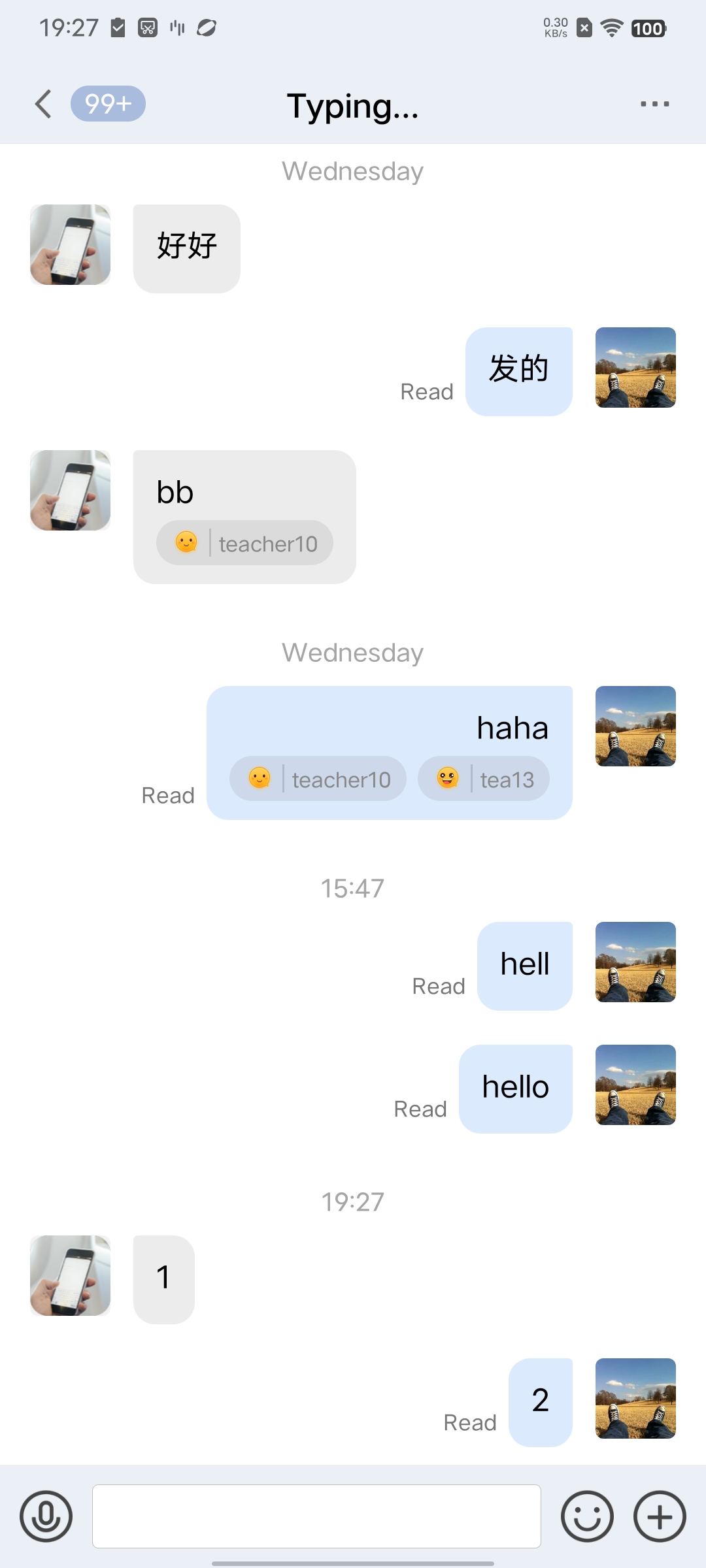</td>
|
|
15
|
-
|
|
16
|
-
<td rowspan="1" colSpan="1" >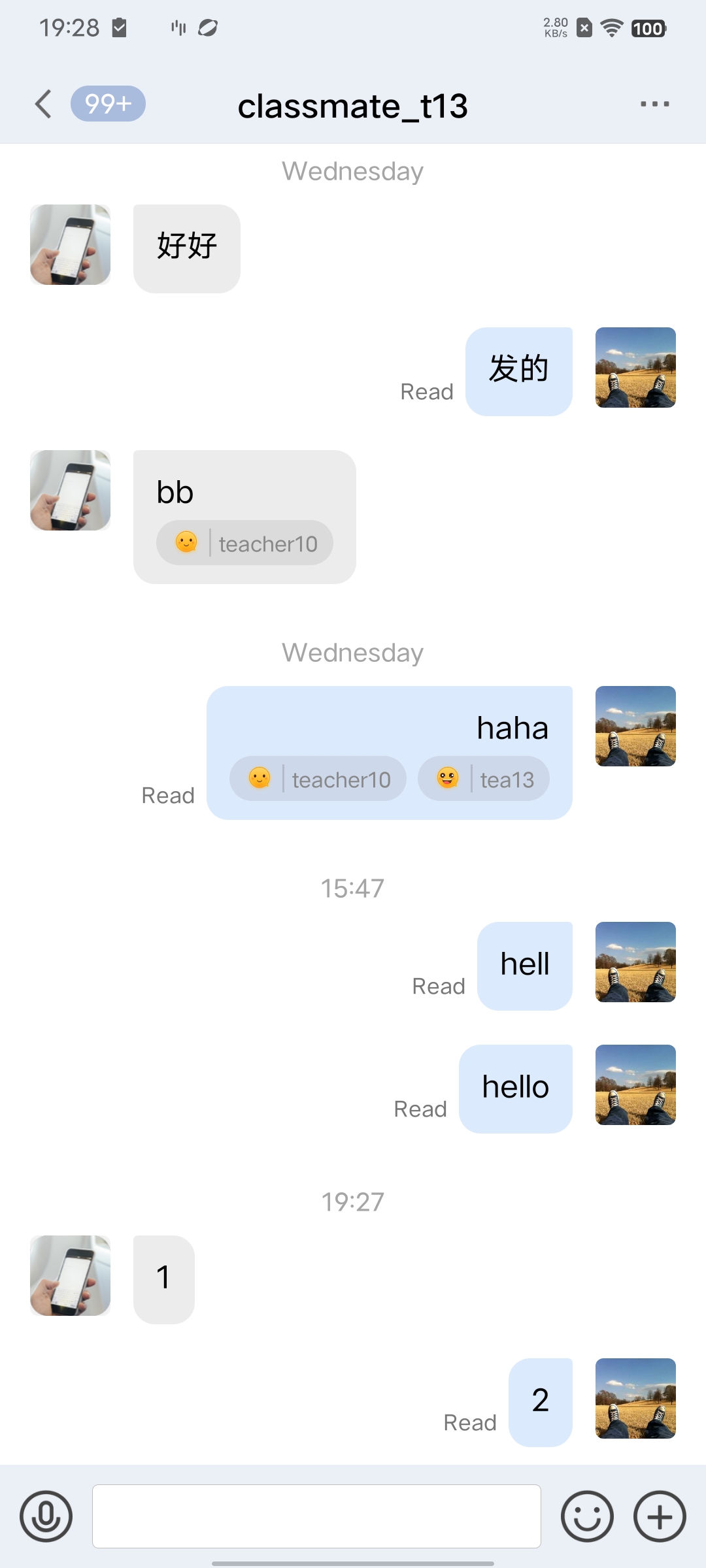</td>
|
|
17
|
-
</tr>
|
|
18
|
-
</table>
|
|
19
|
-
|
|
20
|
-
|
|
21
|
-
## Disabling "Typing..."
|
|
22
|
-
|
|
23
|
-
In the `TUIChat` component, within the `TUIChatConfig` file, a switch for the "Typing" feature, named `enableTypingStatus`, is provided. Its type is BOOL, with a default value of `YES`.
|
|
24
|
-
|
|
25
|
-
To disable the typing indicator feature, simply change the default value of `enableTypingStatus` to `NO`, or call the following method before initializing the chat page.
|
|
26
|
-
|
|
27
|
-
|
|
28
|
-
|
|
29
|
-
|
|
30
|
-
【Swift】
|
|
31
|
-
``` swift
|
|
32
|
-
TUIChatConfig.shared.enableTypingStatus = true
|
|
33
|
-
```
|
|
34
|
-
|
|
35
|
-
|
|
36
|
-
【Objective-C】
|
|
37
|
-
``` objectivec
|
|
38
|
-
TUIChatConfig.defaultConfig.enableTypingStatus = NO;
|
|
39
|
-
```
|
|
40
|
-
|
|
41
|
-
## FAQs
|
|
42
|
-
|
|
43
|
-
### Why is there no prompt for typing after the switch is turned on?
|
|
44
|
-
|
|
45
|
-
The rule for showing "Typing..." in a one-to-one chat is: the other party has sent you a message within the last 30 seconds and is currently typing.
|
|
46
|
-
|
|
47
|
-
## Exchange and Feedback
|
|
48
|
-
|
|
49
|
-
Join the [Telegram technical exchange group](https://t.me/+1doS9AUBmndhNGNl) or [WhatsApp discussion group](https://chat.whatsapp.com/Gfbxk7rQBqc8Rz4pzzP27A), benefit from the support of professional engineers, and solve your toughest challenges.
|
|
50
|
-
|
|
51
|
-
|
|
52
|
-
|
|
@@ -1,101 +0,0 @@
|
|
|
1
|
-
This article will guide you on how to quickly run through the Audio and Video Call Demo. By following this document, you can have the Demo up and running in 10 minutes, and ultimately experience an Audio and Video Call feature with a complete UI interface.
|
|
2
|
-
<table>
|
|
3
|
-
<tr>
|
|
4
|
-
<td rowspan="1" colSpan="1" >1v1 Video Call</td>
|
|
5
|
-
|
|
6
|
-
<td rowspan="1" colSpan="1" >Group call</td>
|
|
7
|
-
</tr>
|
|
8
|
-
|
|
9
|
-
<tr>
|
|
10
|
-
<td rowspan="1" colSpan="1" >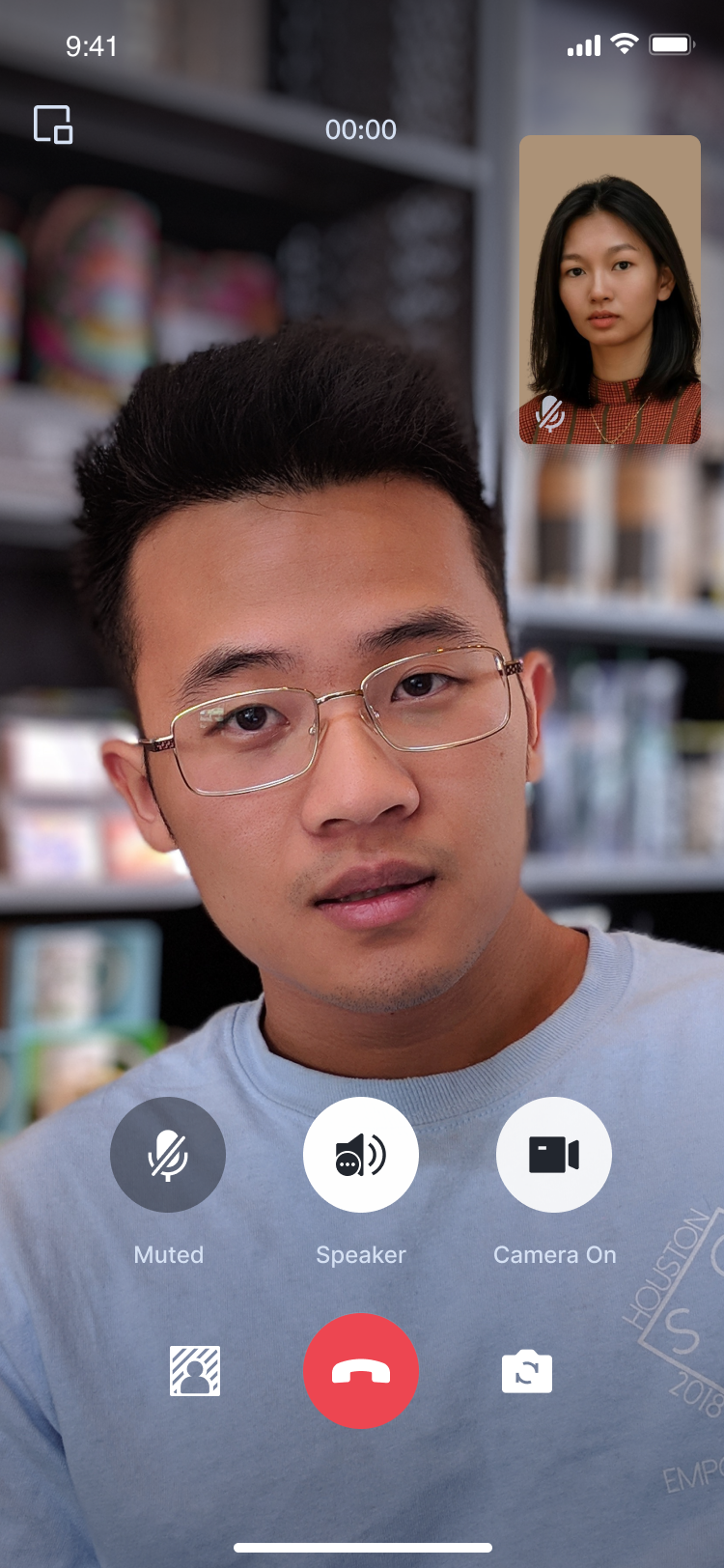</td>
|
|
11
|
-
|
|
12
|
-
<td rowspan="1" colSpan="1" >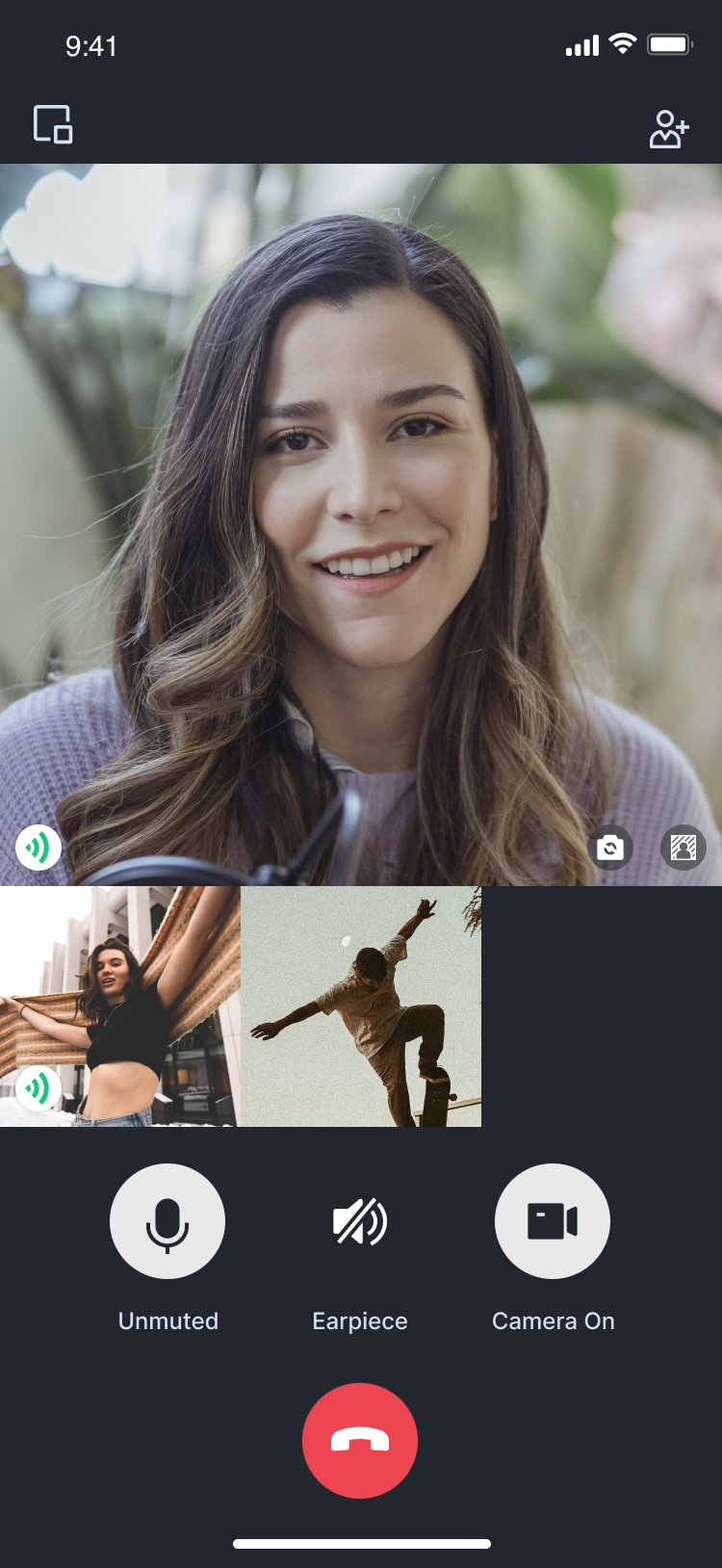</td>
|
|
13
|
-
</tr>
|
|
14
|
-
</table>
|
|
15
|
-
|
|
16
|
-
|
|
17
|
-
## Environment preparations
|
|
18
|
-
|
|
19
|
-
### Flutter
|
|
20
|
-
|
|
21
|
-
Flutter 3.0 or later.
|
|
22
|
-
|
|
23
|
-
### Android
|
|
24
|
-
- Android Studio 3.5 or above.
|
|
25
|
-
|
|
26
|
-
- Android devices with Android 4.1 or higher versions.
|
|
27
|
-
|
|
28
|
-
|
|
29
|
-
### iOS
|
|
30
|
-
- Xcode 13.0 or above.
|
|
31
|
-
|
|
32
|
-
- Please ensure your project is set up with a valid developer signature.
|
|
33
|
-
|
|
34
|
-
|
|
35
|
-
## Step 1: Download the Demo
|
|
36
|
-
1. Download the [TUICallKit Demo](https://github.com/Tencent-RTC/TUICallKit/tree/main) source code from GitHub, or directly run the following command in the command line:
|
|
37
|
-
|
|
38
|
-
``` bash
|
|
39
|
-
git clone
|
|
40
|
-
```
|
|
41
|
-
2. Open the TUICallKit Flutter example in Android Studio or VSCode. The following process will take Android Studio as an example:
|
|
42
|
-
|
|
43
|
-
|
|
44
|
-
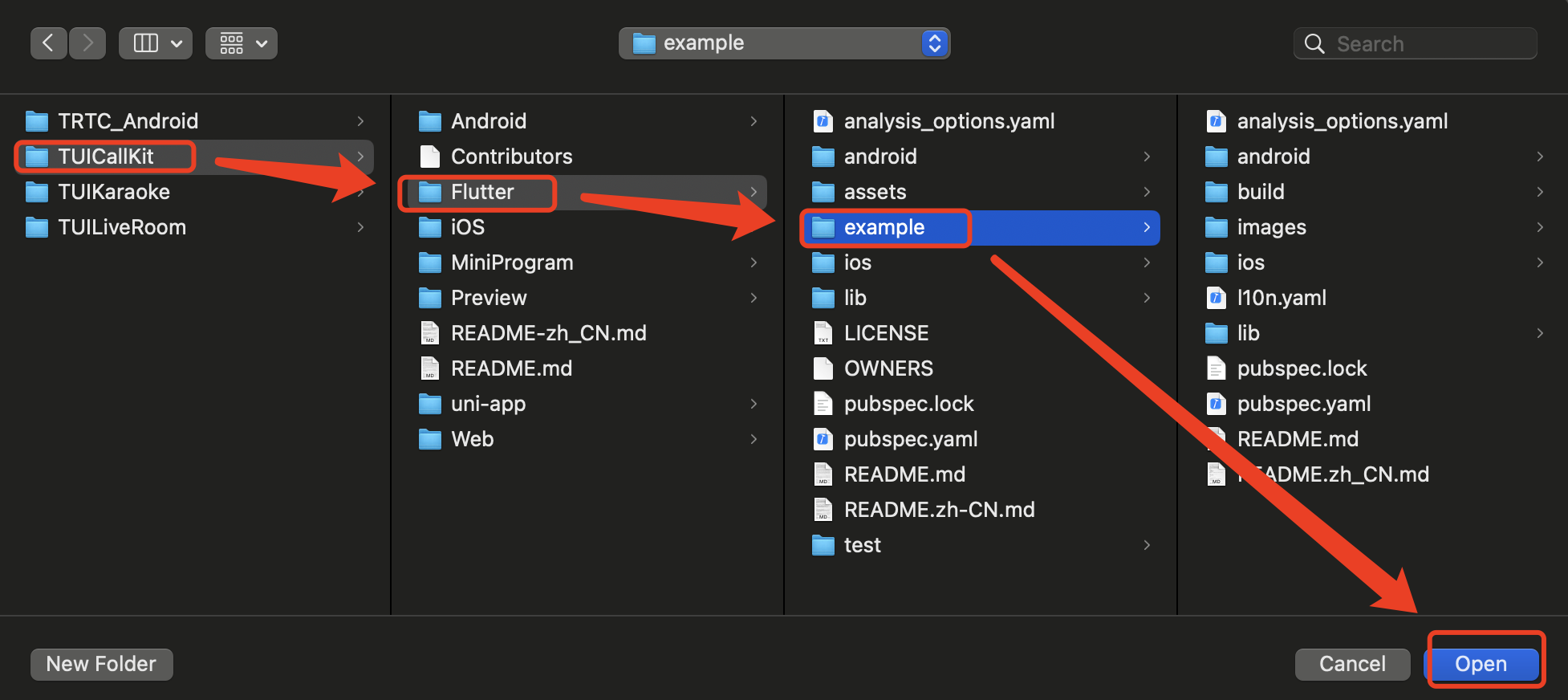
|
|
45
|
-
|
|
46
|
-
|
|
47
|
-
## Step 2: Configure the Demo
|
|
48
|
-
1. [Activate the audio and video services](https://write.woa.com/document/140196392040579072), to obtain the **SDKAppID** and **SDKSecretKey**.
|
|
49
|
-
|
|
50
|
-
|
|
51
|
-
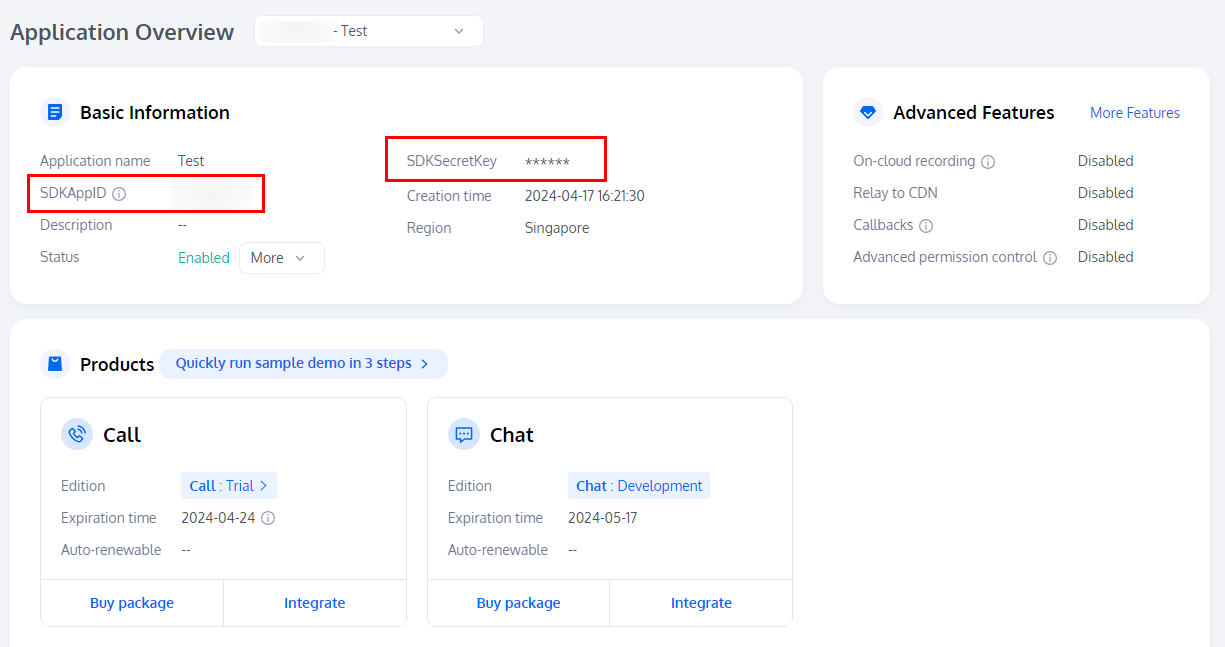
|
|
52
|
-
|
|
53
|
-
2. Open the `Flutter/example/lib/debug/generate_test_user_sig.dart` file and fill in the SDKAppID and SDKSecretKey obtained when [Activating the Service](https://write.woa.com/document/140196392040579072):
|
|
54
|
-
|
|
55
|
-
|
|
56
|
-
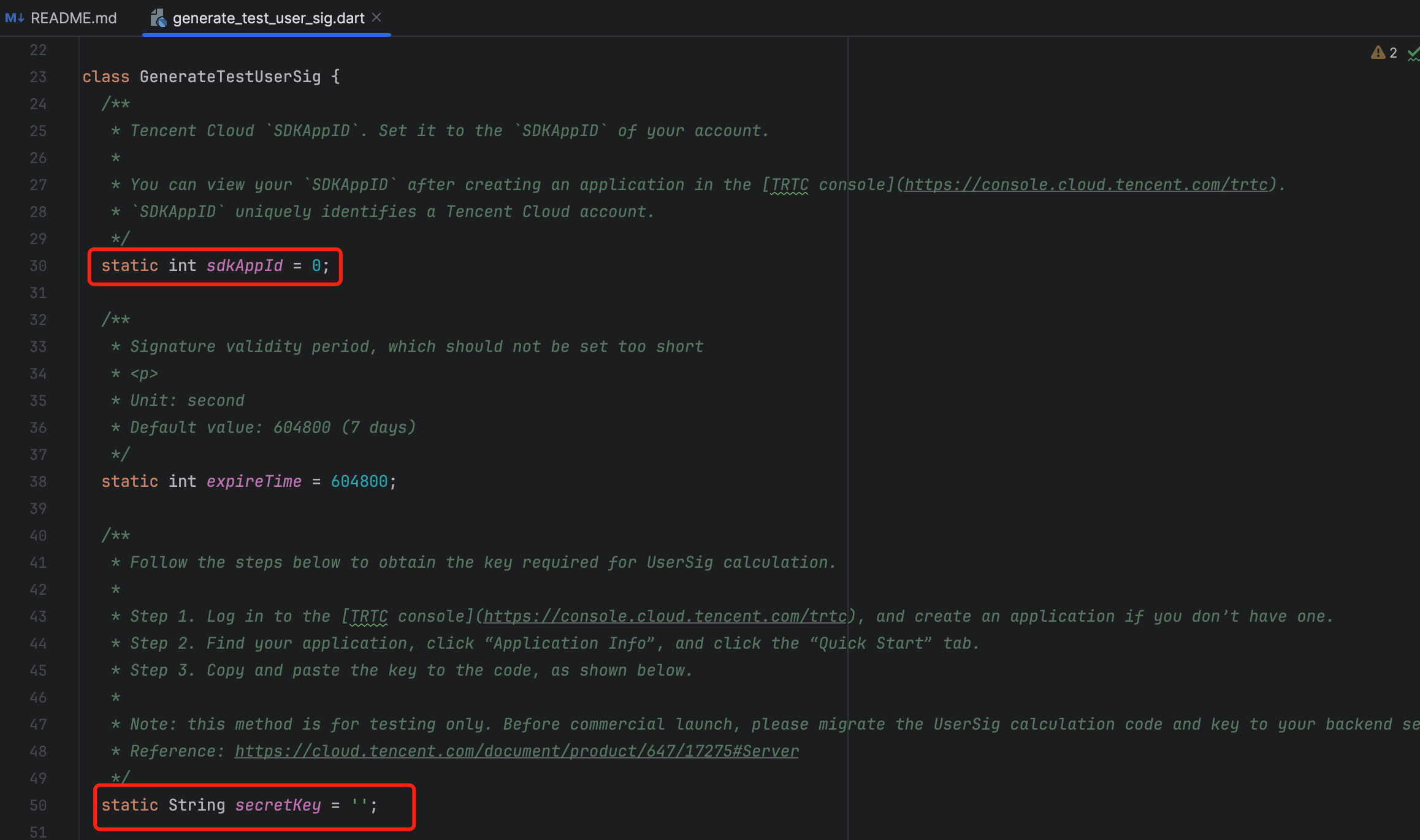
|
|
57
|
-
|
|
58
|
-
|
|
59
|
-
## Step 3: Running the Demo
|
|
60
|
-
1. In the top right corner of Android Studio, select the device you want to run the Demo on as shown below:
|
|
61
|
-
|
|
62
|
-
|
|
63
|
-
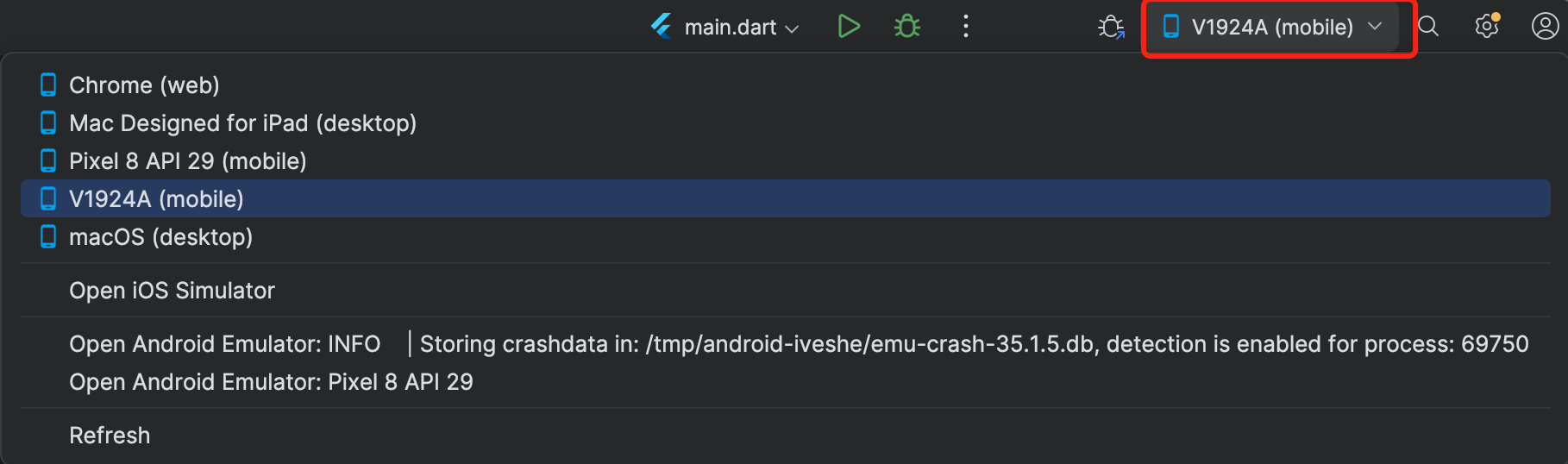
|
|
64
|
-
|
|
65
|
-
2. After selecting, click Run to execute the TUICallKit Android Demo on the target device.
|
|
66
|
-
|
|
67
|
-
|
|
68
|
-

|
|
69
|
-
|
|
70
|
-
|
|
71
|
-
## Make the first call
|
|
72
|
-
|
|
73
|
-
> **Note:**
|
|
74
|
-
>
|
|
75
|
-
|
|
76
|
-
> To experience the complete audio and video calling process, please log into the Demo on two devices as two different users, with one acting as the caller and the other as the callee.
|
|
77
|
-
>
|
|
78
|
-
|
|
79
|
-
1. Log in & Signup
|
|
80
|
-
|
|
81
|
-
|
|
82
|
-
Please enter the ID at the `User ID`. If your current User ID has not been used before, you will be taken to the **Signup** screen, where you can set your own avatar and nickname.
|
|
83
|
-
|
|
84
|
-
|
|
85
|
-
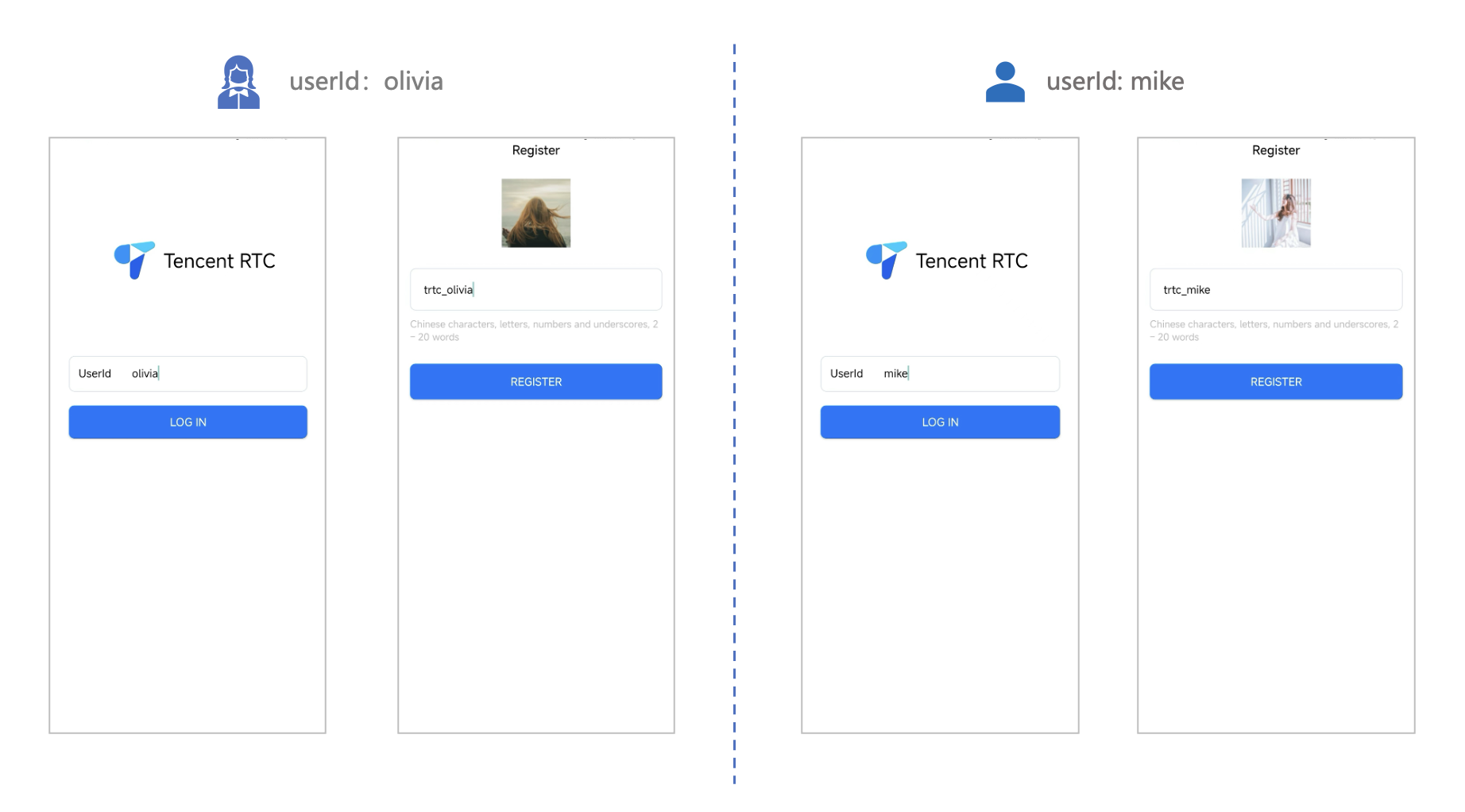
|
|
86
|
-
|
|
87
|
-
|
|
88
|
-
> **Note:**
|
|
89
|
-
>
|
|
90
|
-
|
|
91
|
-
> Try to avoid setting your User ID to simple strings like "1", "123", "111", as TRTC does not support the same User ID being logged into from multiple devices. Such User IDs like "1", "123", "111" are easily occupied by your colleagues during collaborative development, leading to login failures. Therefore, we recommend setting highly recognizable User IDs while debugging.
|
|
92
|
-
>
|
|
93
|
-
|
|
94
|
-
2. Make a phone call
|
|
95
|
-
|
|
96
|
-
1. The caller should click **1V1 Call** on the interface, enter the callee's User ID in the pop-up interface, and select the desired call type.
|
|
97
|
-
|
|
98
|
-
2. Click **Initiate Call**.
|
|
99
|
-
|
|
100
|
-
|
|
101
|
-
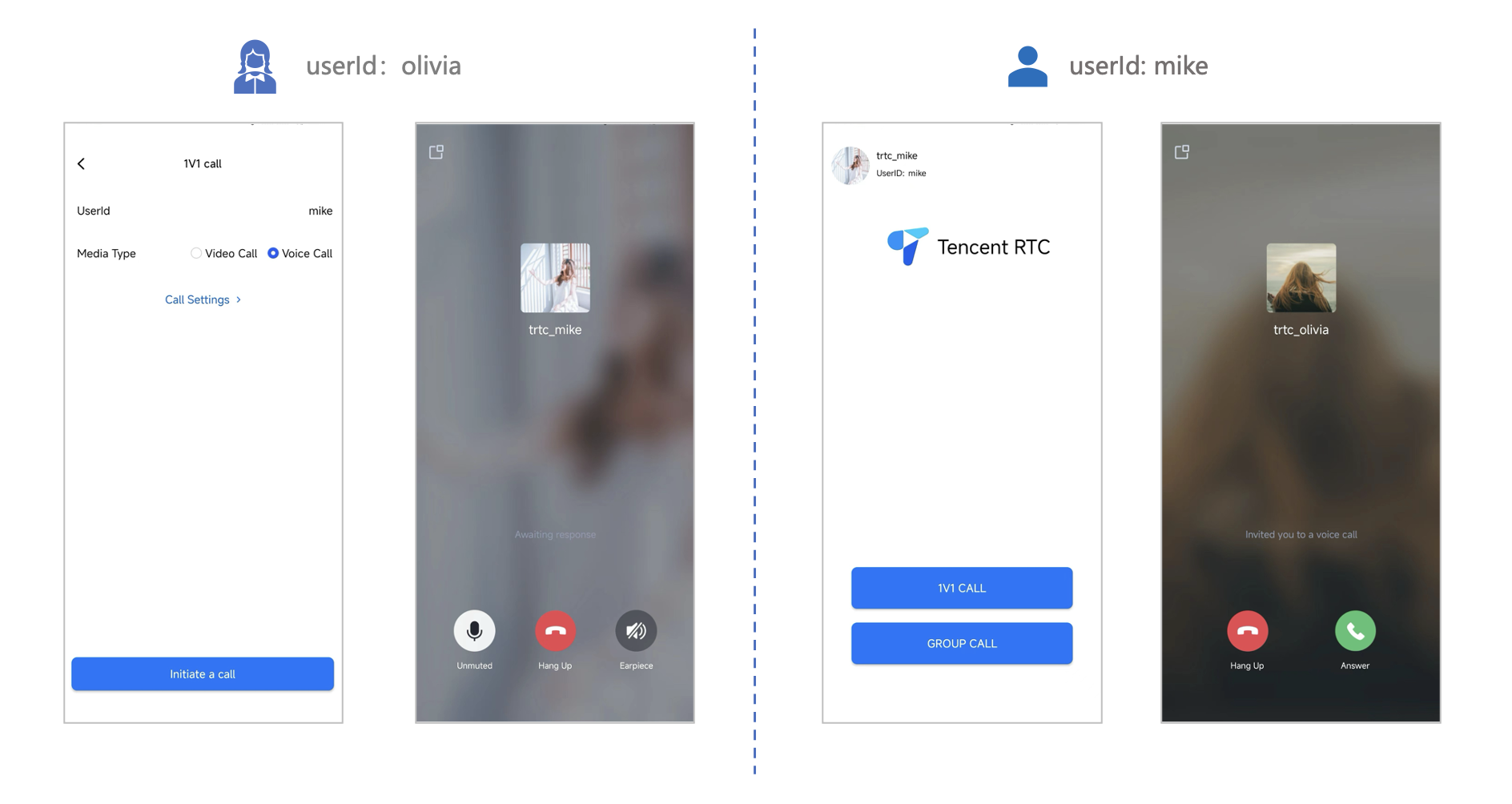
|
|
@@ -1,98 +0,0 @@
|
|
|
1
|
-
This article will guide you on how to quickly run through the Audio and Video Call Demo. By following this document, you can have the Demo up and running in 10 minutes, and ultimately experience an Audio and Video Call feature with a complete UI interface.
|
|
2
|
-
<table>
|
|
3
|
-
<tr>
|
|
4
|
-
<td rowspan="1" colSpan="1" >1v1 Video Call</td>
|
|
5
|
-
|
|
6
|
-
<td rowspan="1" colSpan="1" >Group call</td>
|
|
7
|
-
</tr>
|
|
8
|
-
|
|
9
|
-
<tr>
|
|
10
|
-
<td rowspan="1" colSpan="1" ></td>
|
|
11
|
-
|
|
12
|
-
<td rowspan="1" colSpan="1" ></td>
|
|
13
|
-
</tr>
|
|
14
|
-
</table>
|
|
15
|
-
|
|
16
|
-
|
|
17
|
-
## Environment preparations
|
|
18
|
-
- Xcode 13 or later.
|
|
19
|
-
|
|
20
|
-
- Two iOS 13.0 or later devices.
|
|
21
|
-
|
|
22
|
-
|
|
23
|
-
## Step 1: Download the Demo
|
|
24
|
-
1. Download the [TUICallKit Demo](https://github.com/Tencent-RTC/TUICallKit/tree/main) source code from GitHub, or directly run the following command in the command line:
|
|
25
|
-
|
|
26
|
-
``` bash
|
|
27
|
-
git clone
|
|
28
|
-
```
|
|
29
|
-
2. Enter the iOS project directory in the command line:
|
|
30
|
-
|
|
31
|
-
``` plaintext
|
|
32
|
-
cd TUICallKit/iOS/Example
|
|
33
|
-
```
|
|
34
|
-
3. Load the dependency library:
|
|
35
|
-
|
|
36
|
-
``` plaintext
|
|
37
|
-
pod install
|
|
38
|
-
```
|
|
39
|
-
|
|
40
|
-
> **Note:**
|
|
41
|
-
>
|
|
42
|
-
|
|
43
|
-
> If you haven't installed CocoaPods, you can refer to [this](https://guides.cocoapods.org/using/getting-started.html) for instructions on how to install.
|
|
44
|
-
>
|
|
45
|
-
|
|
46
|
-
|
|
47
|
-
## Step 2: Configure the Demo
|
|
48
|
-
1. [Activate the audio and video services](https://write.woa.com/document/140196392040579072), to obtain the **SDKAppID** and **SDKSecretKey**.
|
|
49
|
-
|
|
50
|
-
|
|
51
|
-
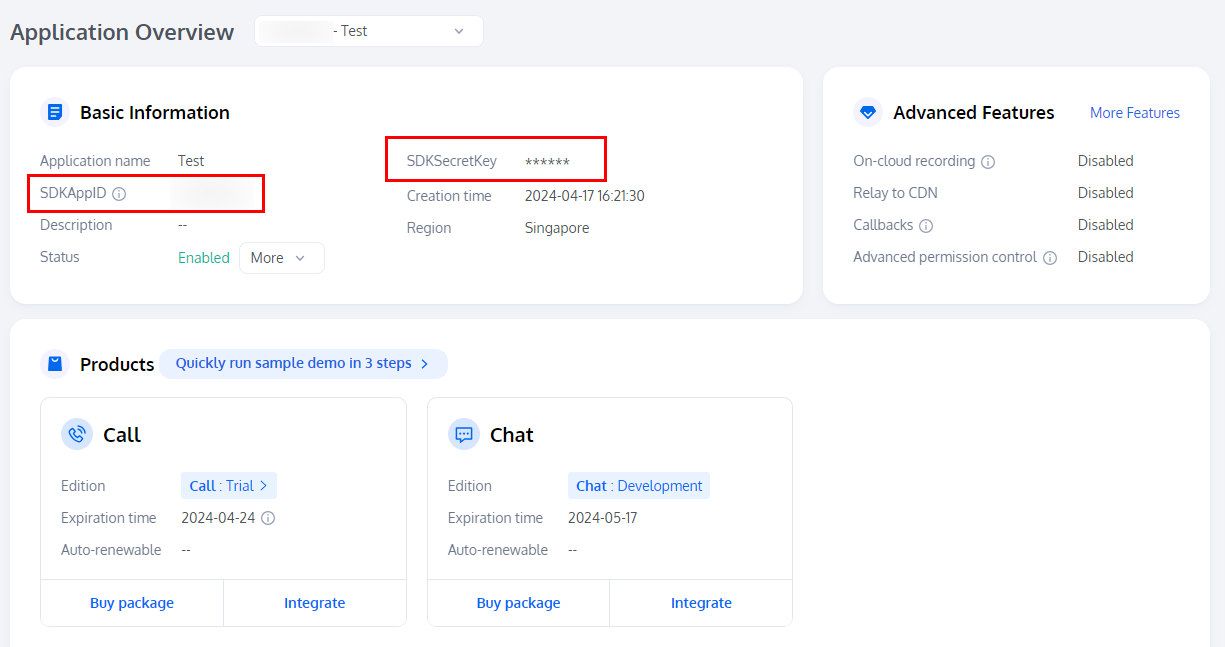
|
|
52
|
-
|
|
53
|
-
2. Open the `/iOS/Example/Debug/GenerateTestUserSig.swift` file and enter the SDKAppID and SDKSecretKey obtained when [activating the service](https://write.woa.com/document/140196392040579072):
|
|
54
|
-
|
|
55
|
-
|
|
56
|
-
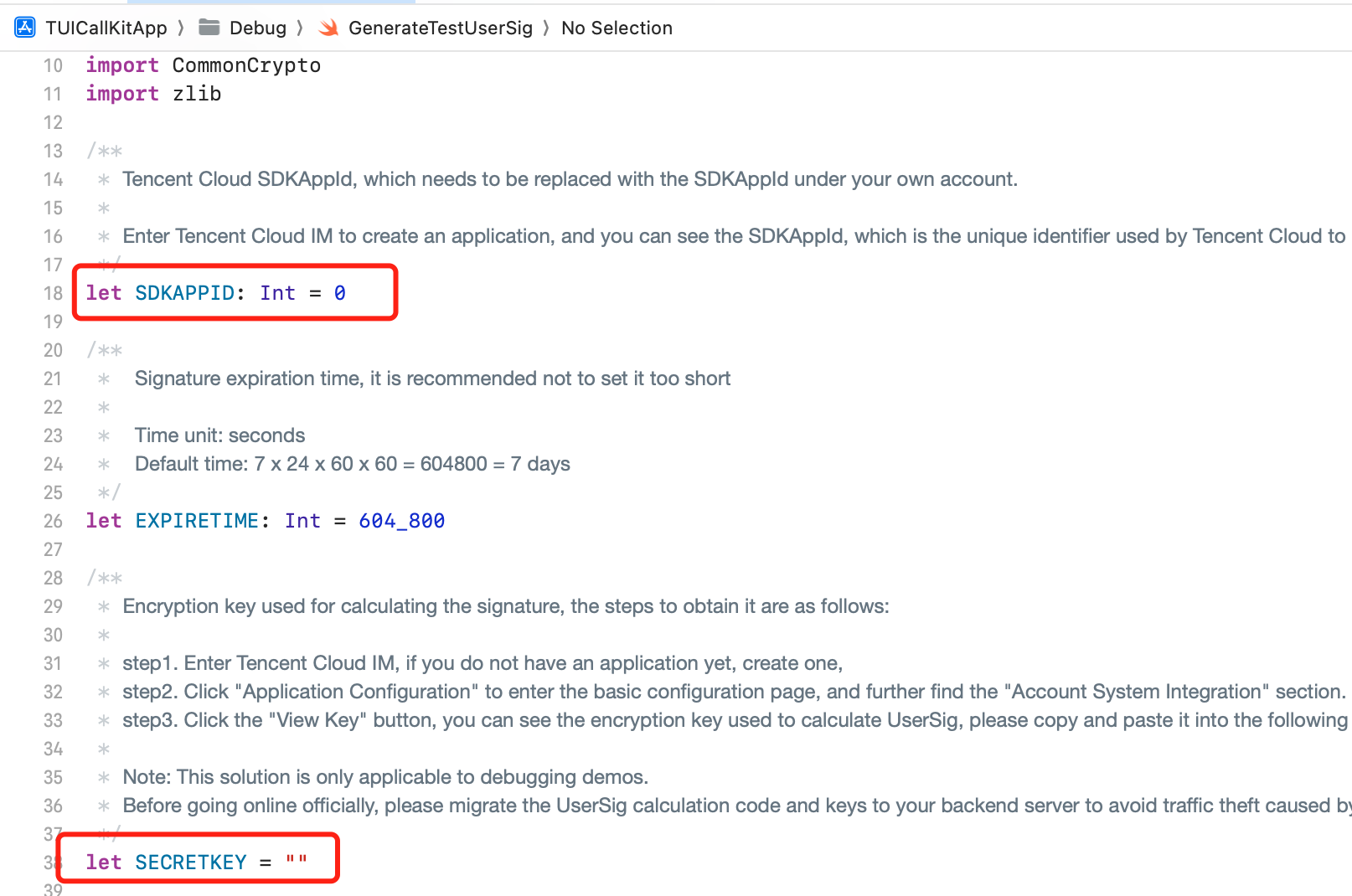
|
|
57
|
-
|
|
58
|
-
|
|
59
|
-
## Step 3: Running the Demo
|
|
60
|
-
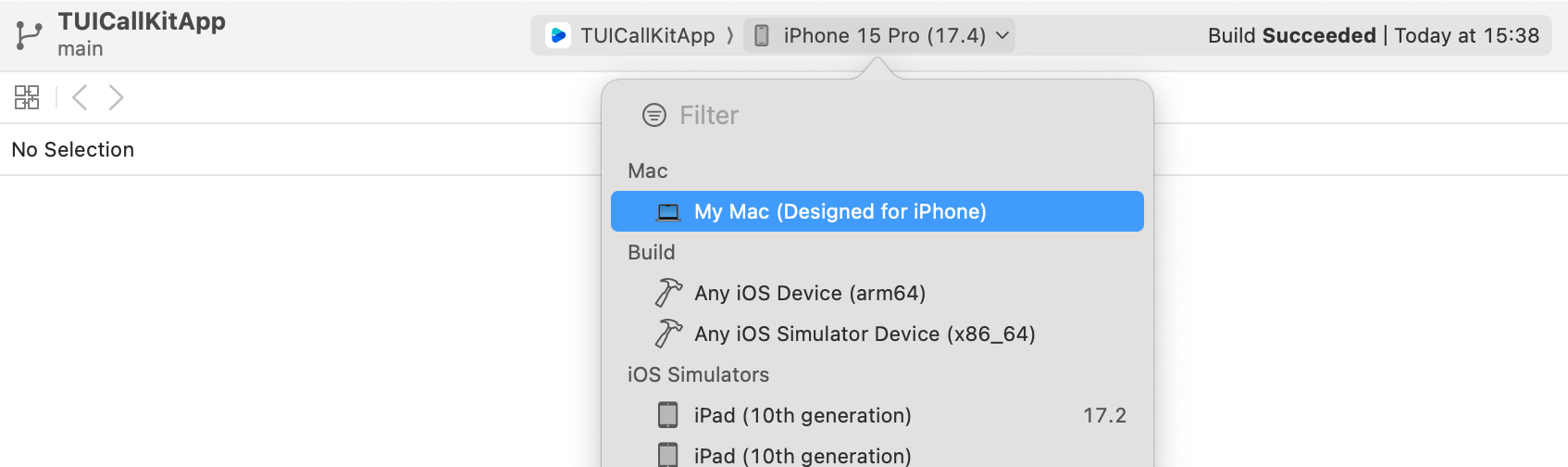
1. In XCode, select the device you want to run the Demo on as shown below:
|
|
61
|
-
|
|
62
|
-
|
|
63
|
-
|
|
64
|
-
|
|
65
|
-
2. After selection, click run to deploy our TUICallKit iOS Demo to the target device.
|
|
66
|
-
|
|
67
|
-
|
|
68
|
-
## Make the first call
|
|
69
|
-
|
|
70
|
-
> **Note:**
|
|
71
|
-
>
|
|
72
|
-
|
|
73
|
-
> To experience the complete audio and video calling process, please log into the Demo on two devices as two different users, with one acting as the caller and the other as the callee.
|
|
74
|
-
>
|
|
75
|
-
|
|
76
|
-
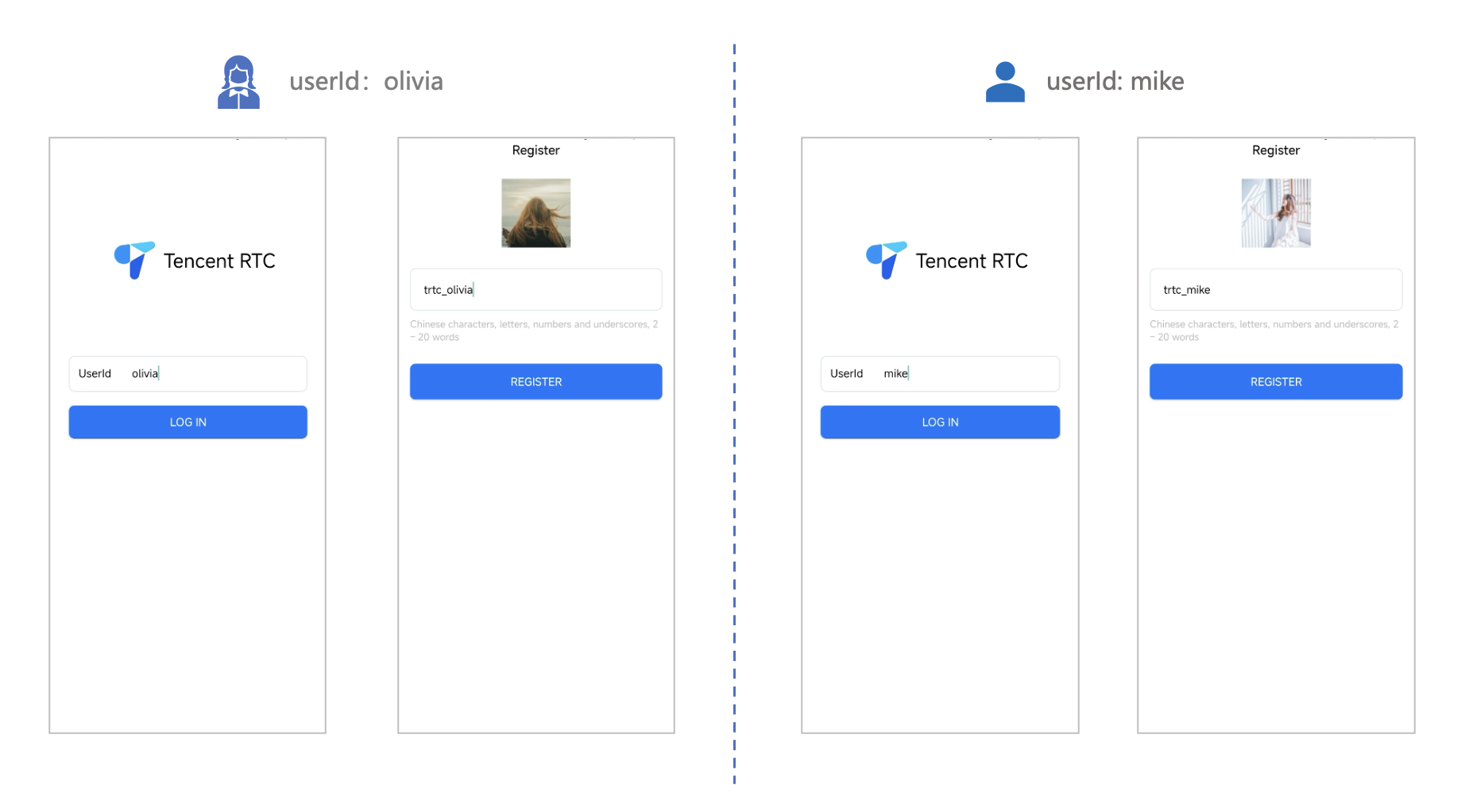
1. Log in & Signup
|
|
77
|
-
|
|
78
|
-
|
|
79
|
-
Please enter the ID at the `User ID`. If your current User ID has not been used before, you will be taken to the **Signup** screen, where you can set your own avatar and nickname.
|
|
80
|
-
|
|
81
|
-
|
|
82
|
-
|
|
83
|
-
|
|
84
|
-
|
|
85
|
-
> **Note:**
|
|
86
|
-
>
|
|
87
|
-
|
|
88
|
-
> Try to avoid setting your User ID to simple strings like "1", "123", "111", as TRTC does not support the same User ID being logged into from multiple devices. Such User IDs like "1", "123", "111" are easily occupied by your colleagues during collaborative development, leading to login failures. Therefore, we recommend setting highly recognizable User IDs while debugging.
|
|
89
|
-
>
|
|
90
|
-
|
|
91
|
-
2. Make a phone call
|
|
92
|
-
|
|
93
|
-
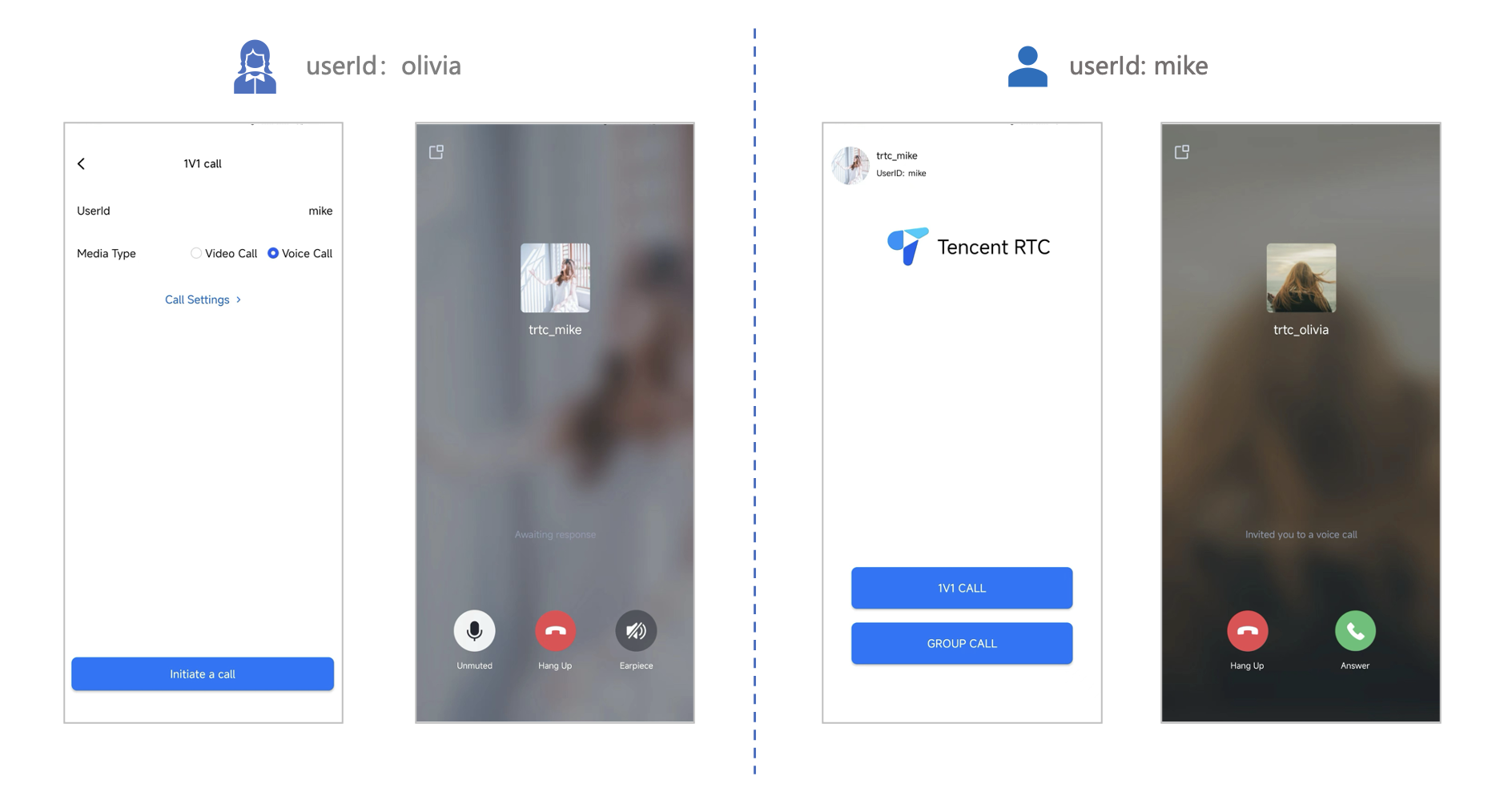
1. The caller should click **1V1 Call** on the interface, enter the callee's User ID in the pop-up interface, and select the desired call type.
|
|
94
|
-
|
|
95
|
-
2. Click **Initiate Call**.
|
|
96
|
-
|
|
97
|
-
|
|
98
|
-
|
|
@@ -1 +0,0 @@
|
|
|
1
|
-
{"version":3,"file":"get_native_live_extra_features_def.js","sourceRoot":"","sources":["../../../src/tools/definitions/get_native_live_extra_features_def.ts"],"names":[],"mappings":"AAAA,MAAM,gBAAgB,GAAG;;;;;;;;;;;;;;;;;;;;;;;;;;;;;;;;;;;;;;;;;;;;;;;;;;;;;;;;;;;;;;;;;;CAkExB,CAAC;AAEF,MAAM,sBAAsB,GAAG;IAC7B,QAAQ,EAAE;;8EAEkE;IAC5E,KAAK,EAAE;;;;;;;;wGAQ+F;CACvG,CAAC;AAEF,MAAM,CAAC,MAAM,yCAAyC,GAAG;IACvD,IAAI,EAAE,gCAAgC;IACtC,WAAW,EAAE,gBAAgB;IAC7B,sBAAsB,EAAE,sBAAsB;CAC/C,CAAC"}
|
|
@@ -1 +0,0 @@
|
|
|
1
|
-
{"version":3,"file":"get_native_live_interaction_def.js","sourceRoot":"","sources":["../../../src/tools/definitions/get_native_live_interaction_def.ts"],"names":[],"mappings":"AAAA,MAAM,gBAAgB,GAAG;;;;;;;;;;;;;;;;;;;;;;;;;;;;;;;;;;;;;;;;;;;;;;;;;;;;;CAqDxB,CAAC;AAEF,MAAM,sBAAsB,GAAG;IAC7B,QAAQ,EAAE;;8EAEkE;IAC5E,KAAK,EAAE;;;;;;;;uHAQ8G;CACtH,CAAC;AAEF,MAAM,CAAC,MAAM,sCAAsC,GAAG;IACpD,IAAI,EAAE,6BAA6B;IACnC,WAAW,EAAE,gBAAgB;IAC7B,sBAAsB,EAAE,sBAAsB;CAC/C,CAAC"}
|
|
@@ -1 +0,0 @@
|
|
|
1
|
-
{"version":3,"file":"get_native_live_extra_features.js","sourceRoot":"","sources":["../../../src/tools/live/get_native_live_extra_features.ts"],"names":[],"mappings":"AACA,OAAO,EAAE,CAAC,EAAE,MAAM,KAAK,CAAC;AACxB,OAAO,EAAE,yCAAyC,EAAE,MAAM,sDAAsD,CAAC;AACjH,OAAO,EAAE,aAAa,EAAE,MAAM,gCAAgC,CAAC;AAC/D,OAAO,EAAE,wBAAwB,EAAE,MAAM,2CAA2C,CAAC;AACrF,OAAO,EAAE,eAAe,EAAE,MAAM,kCAAkC,CAAC;AAEnE,eAAe;AACf,iCAAiC;AACjC,yDAAyD;AAEzD,mBAAmB;AACnB,MAAM,gBAAgB,GAA6B;IACjD,aAAa,EAAE,CAAC,SAAS,EAAE,MAAM,EAAE,SAAS,EAAE,qBAAqB,CAAC;IACpE,cAAc,EAAE,CAAC,SAAS,EAAE,MAAM,EAAE,SAAS,EAAE,sBAAsB,CAAC;IACtE,SAAS,EAAE,CAAC,SAAS,EAAE,MAAM,EAAE,SAAS,EAAE,iBAAiB,CAAC;IAC5D,MAAM,EAAE,CAAC,SAAS,EAAE,MAAM,EAAE,SAAS,EAAE,cAAc,CAAC;CACvD,CAAC;AAEF,iCAAiC;AACjC,MAAM,YAAY,GAA6B;IAC7C,aAAa,EAAE,CAAC,SAAS,EAAE,MAAM,EAAE,KAAK,EAAE,qBAAqB,CAAC;IAChE,cAAc,EAAE,CAAC,SAAS,EAAE,MAAM,EAAE,KAAK,EAAE,sBAAsB,CAAC;IAClE,SAAS,EAAE,CAAC,SAAS,EAAE,MAAM,EAAE,KAAK,EAAE,iBAAiB,CAAC;IACxD,MAAM,EAAE,CAAC,SAAS,EAAE,MAAM,EAAE,KAAK,EAAE,cAAc,CAAC;CACnD,CAAC;AAEF,yCAAyC;AACzC,MAAM,gBAAgB,GAA6B;IACjD,aAAa,EAAE,CAAC,SAAS,EAAE,MAAM,EAAE,SAAS,EAAE,qBAAqB,CAAC;IACpE,cAAc,EAAE,CAAC,SAAS,EAAE,MAAM,EAAE,SAAS,EAAE,sBAAsB,CAAC;IACtE,SAAS,EAAE,CAAC,SAAS,EAAE,MAAM,EAAE,SAAS,EAAE,iBAAiB,CAAC;IAC5D,MAAM,EAAE,CAAC,SAAS,EAAE,MAAM,EAAE,SAAS,EAAE,cAAc,CAAC;CACvD,CAAC;AAEF,yCAAyC;AACzC,MAAM,WAAW,GAA6B;IAC5C,aAAa,EAAE,CAAC,SAAS,EAAE,MAAM,EAAE,IAAI,EAAE,qBAAqB,CAAC;IAC/D,cAAc,EAAE,CAAC,SAAS,EAAE,MAAM,EAAE,IAAI,EAAE,sBAAsB,CAAC;IACjE,SAAS,EAAE,CAAC,SAAS,EAAE,MAAM,EAAE,IAAI,EAAE,iBAAiB,CAAC;IACvD,MAAM,EAAE,CAAC,SAAS,EAAE,MAAM,EAAE,IAAI,EAAE,cAAc,CAAC;CAClD,CAAC;AAEF;;GAEG;AACH,SAAS,oBAAoB,CAAC,QAAgB;IAC5C,MAAM,QAAQ,GAA6C;QACzD,SAAS,EAAE,gBAAgB;QAC3B,KAAK,EAAE,YAAY;QACnB,SAAS,EAAE,gBAAgB;QAC3B,IAAI,EAAE,WAAW;KAClB,CAAC;IAEF,OAAO,QAAQ,CAAC,QAAQ,CAAC,IAAI,gBAAgB,CAAC,CAAC,eAAe;AAChE,CAAC;AAED;;GAEG;AACH,SAAS,eAAe,CAAC,QAAgB;IACvC,MAAM,aAAa,GAA6B;QAC9C,SAAS,EAAE,CAAC,SAAS,EAAE,MAAM,EAAE,SAAS,EAAE,aAAa,CAAC;QACxD,KAAK,EAAE,CAAC,SAAS,EAAE,MAAM,EAAE,KAAK,EAAE,aAAa,CAAC;QAChD,SAAS,EAAE,CAAC,SAAS,EAAE,MAAM,EAAE,SAAS,EAAE,aAAa,CAAC;QACxD,IAAI,EAAE,CAAC,SAAS,EAAE,MAAM,EAAE,IAAI,EAAE,aAAa,CAAC;KAC/C,CAAC;IAEF,OAAO,aAAa,CAAC,QAAQ,CAAC,IAAI,aAAa,CAAC,SAAS,CAAC,CAAC,CAAC,eAAe;AAC7E,CAAC;AAED,KAAK,UAAU,aAAa,CAAC,MAA2B;IACtD,MAAM,EAAE,QAAQ,EAAE,KAAK,GAAG,EAAE,EAAE,GAAG,MAAM,CAAC;IAExC,iBAAiB;IACjB,IAAI,CAAC,QAAQ,EAAE,CAAC;QACd,MAAM,IAAI,KAAK,CAAC,sDAAsD,CAAC,CAAC;IAC1E,CAAC;IAED,eAAe,CAAC;QACd,MAAM,EAAE,gCAAgC;QACxC,IAAI,EAAE,KAAK,CAAC,IAAI,CAAC,GAAG,CAAC;QACrB,SAAS,EAAE,QAAQ;KACpB,CAAC,CAAC;IAEH,eAAe;IACf,MAAM,YAAY,GAAG,eAAe,CAAC,QAAQ,CAAC,CAAC;IAC/C,MAAM,gBAAgB,GAAG,aAAa,CAAC,YAAY,CAAC,CAAC;IAErD,gBAAgB;IAChB,MAAM,OAAO,GAAG,oBAAoB,CAAC,QAAQ,CAAC,CAAC;IAE/C,mBAAmB;IACnB,MAAM,MAAM,GAAG,MAAM,wBAAwB,CAAC;QAC5C,gBAAgB;QAChB,KAAK;QACL,OAAO;QACP,SAAS,EAAE,QAAQ;KACpB,CAAC,CAAC;IAEH,OAAO,MAAM,CAAC;AAChB,CAAC;AAED,MAAM,sCAAsC,GAAG,CAAC,SAAoB,EAAE,EAAE;IACtE,MAAM,EAAE,IAAI,EAAE,WAAW,EAAE,sBAAsB,EAAE,GAAG,yCAAyC,CAAC;IAEhG,SAAS,CAAC,IAAI,CACZ,IAAI,EACJ,WAAW,EACX;QACE,QAAQ,EAAE,CAAC,CAAC,IAAI,CAAC,CAAC,SAAS,EAAE,KAAK,EAAE,SAAS,EAAE,IAAI,CAAC,CAAC,CAAC,QAAQ,CAAC,sBAAsB,CAAC,QAAQ,CAAC;QAC/F,KAAK,EAAE,CAAC,CAAC,KAAK,CAAC,CAAC,CAAC,IAAI,CAAC,CAAC,aAAa,EAAE,cAAc,EAAE,SAAS,EAAE,MAAM,CAAC,CAAC,CAAC,CAAC,QAAQ,CAAC,sBAAsB,CAAC,KAAK,CAAC;KAClH,EACD,KAAK,EAAE,MAAW,EAAE,EAAE;QACpB,MAAM,MAAM,GAAG,MAAM,aAAa,CAAC,MAAM,CAAC,CAAC;QAC3C,OAAO;YACL,OAAO,EAAE;gBACP;oBACE,IAAI,EAAE,MAAM;oBACZ,IAAI,EAAE,MAAM,CAAC,mCAAmC;iBACjD;aACF;YACD,MAAM,EAAE,MAAM;SACf,CAAC;IACJ,CAAC,CACF,CAAC;AACJ,CAAC,CAAC;AAEF,OAAO,EAAE,sCAAsC,EAAE,CAAC"}
|
|
@@ -1 +0,0 @@
|
|
|
1
|
-
{"version":3,"file":"get_native_live_interaction.js","sourceRoot":"","sources":["../../../src/tools/live/get_native_live_interaction.ts"],"names":[],"mappings":"AACA,OAAO,EAAE,CAAC,EAAE,MAAM,KAAK,CAAC;AACxB,OAAO,EAAE,sCAAsC,EAAE,MAAM,mDAAmD,CAAC;AAC3G,OAAO,EAAE,aAAa,EAAE,MAAM,gCAAgC,CAAC;AAC/D,OAAO,EAAE,wBAAwB,EAAE,MAAM,2CAA2C,CAAC;AACrF,OAAO,EAAE,eAAe,EAAE,MAAM,kCAAkC,CAAC;AAEnE,eAAe;AACf,iCAAiC;AACjC,yDAAyD;AAEzD,mBAAmB;AACnB,MAAM,gBAAgB,GAA6B;IACjD,sBAAsB,EAAE,CAAC,SAAS,EAAE,MAAM,EAAE,SAAS,EAAE,8BAA8B,CAAC;IACtF,qBAAqB,EAAE,CAAC,SAAS,EAAE,MAAM,EAAE,SAAS,EAAE,0BAA0B,CAAC;IACjF,eAAe,EAAE,CAAC,SAAS,EAAE,MAAM,EAAE,SAAS,EAAE,uBAAuB,CAAC;CACzE,CAAC;AAEF,iCAAiC;AACjC,MAAM,YAAY,GAA6B;IAC7C,sBAAsB,EAAE,CAAC,SAAS,EAAE,MAAM,EAAE,KAAK,EAAE,8BAA8B,CAAC;IAClF,qBAAqB,EAAE,CAAC,SAAS,EAAE,MAAM,EAAE,KAAK,EAAE,0BAA0B,CAAC;IAC7E,eAAe,EAAE,CAAC,SAAS,EAAE,MAAM,EAAE,KAAK,EAAE,uBAAuB,CAAC;CACrE,CAAC;AAEF,yCAAyC;AACzC,MAAM,gBAAgB,GAA6B;IACjD,sBAAsB,EAAE,CAAC,SAAS,EAAE,MAAM,EAAE,SAAS,EAAE,8BAA8B,CAAC;IACtF,qBAAqB,EAAE,CAAC,SAAS,EAAE,MAAM,EAAE,SAAS,EAAE,0BAA0B,CAAC;IACjF,eAAe,EAAE,CAAC,SAAS,EAAE,MAAM,EAAE,SAAS,EAAE,uBAAuB,CAAC;CACzE,CAAC;AAEF,yCAAyC;AACzC,MAAM,WAAW,GAA6B;IAC5C,sBAAsB,EAAE,CAAC,SAAS,EAAE,MAAM,EAAE,IAAI,EAAE,8BAA8B,CAAC;IACjF,qBAAqB,EAAE,CAAC,SAAS,EAAE,MAAM,EAAE,IAAI,EAAE,0BAA0B,CAAC;IAC5E,eAAe,EAAE,CAAC,SAAS,EAAE,MAAM,EAAE,IAAI,EAAE,uBAAuB,CAAC;CACpE,CAAC;AAEF;;GAEG;AACH,SAAS,oBAAoB,CAAC,QAAgB;IAC5C,MAAM,QAAQ,GAA6C;QACzD,SAAS,EAAE,gBAAgB;QAC3B,KAAK,EAAE,YAAY;QACnB,SAAS,EAAE,gBAAgB;QAC3B,IAAI,EAAE,WAAW;KAClB,CAAC;IAEF,OAAO,QAAQ,CAAC,QAAQ,CAAC,IAAI,gBAAgB,CAAC,CAAC,eAAe;AAChE,CAAC;AAED;;GAEG;AACH,SAAS,eAAe,CAAC,QAAgB;IACvC,MAAM,aAAa,GAA6B;QAC9C,SAAS,EAAE,CAAC,SAAS,EAAE,MAAM,EAAE,SAAS,EAAE,aAAa,CAAC;QACxD,KAAK,EAAE,CAAC,SAAS,EAAE,MAAM,EAAE,KAAK,EAAE,aAAa,CAAC;QAChD,SAAS,EAAE,CAAC,SAAS,EAAE,MAAM,EAAE,SAAS,EAAE,aAAa,CAAC;QACxD,IAAI,EAAE,CAAC,SAAS,EAAE,MAAM,EAAE,IAAI,EAAE,aAAa,CAAC;KAC/C,CAAC;IAEF,OAAO,aAAa,CAAC,QAAQ,CAAC,IAAI,aAAa,CAAC,SAAS,CAAC,CAAC,CAAC,eAAe;AAC7E,CAAC;AAED,KAAK,UAAU,aAAa,CAAC,MAA2B;IACtD,MAAM,EAAE,QAAQ,EAAE,KAAK,GAAG,EAAE,EAAE,GAAG,MAAM,CAAC;IAExC,iBAAiB;IACjB,IAAI,CAAC,QAAQ,EAAE,CAAC;QACd,MAAM,IAAI,KAAK,CAAC,sDAAsD,CAAC,CAAC;IAC1E,CAAC;IAED,eAAe,CAAC;QACd,MAAM,EAAE,6BAA6B;QACrC,IAAI,EAAE,KAAK,CAAC,IAAI,CAAC,GAAG,CAAC;QACrB,SAAS,EAAE,QAAQ;KACpB,CAAC,CAAC;IAEH,eAAe;IACf,MAAM,YAAY,GAAG,eAAe,CAAC,QAAQ,CAAC,CAAC;IAC/C,MAAM,gBAAgB,GAAG,aAAa,CAAC,YAAY,CAAC,CAAC;IAErD,gBAAgB;IAChB,MAAM,OAAO,GAAG,oBAAoB,CAAC,QAAQ,CAAC,CAAC;IAE/C,mBAAmB;IACnB,MAAM,MAAM,GAAG,MAAM,wBAAwB,CAAC;QAC5C,gBAAgB;QAChB,KAAK;QACL,OAAO;QACP,SAAS,EAAE,QAAQ;KACpB,CAAC,CAAC;IAEH,OAAO,MAAM,CAAC;AAChB,CAAC;AAED,MAAM,oCAAoC,GAAG,CAAC,SAAoB,EAAE,EAAE;IACpE,MAAM,EAAE,IAAI,EAAE,WAAW,EAAE,sBAAsB,EAAE,GAAG,sCAAsC,CAAC;IAE7F,SAAS,CAAC,IAAI,CACZ,IAAI,EACJ,WAAW,EACX;QACE,QAAQ,EAAE,CAAC,CAAC,IAAI,CAAC,CAAC,SAAS,EAAE,KAAK,EAAE,SAAS,EAAE,IAAI,CAAC,CAAC,CAAC,QAAQ,CAAC,sBAAsB,CAAC,QAAQ,CAAC;QAC/F,KAAK,EAAE,CAAC,CAAC,KAAK,CAAC,CAAC,CAAC,IAAI,CAAC,CAAC,sBAAsB,EAAE,qBAAqB,EAAE,eAAe,CAAC,CAAC,CAAC,CAAC,QAAQ,CAAC,sBAAsB,CAAC,KAAK,CAAC;KAChI,EACD,KAAK,EAAE,MAAW,EAAE,EAAE;QACpB,MAAM,MAAM,GAAG,MAAM,aAAa,CAAC,MAAM,CAAC,CAAC;QAC3C,OAAO;YACL,OAAO,EAAE;gBACP;oBACE,IAAI,EAAE,MAAM;oBACZ,IAAI,EAAE,MAAM,CAAC,mCAAmC;iBACjD;aACF;YACD,MAAM,EAAE,MAAM;SACf,CAAC;IACJ,CAAC,CACF,CAAC;AACJ,CAAC,CAAC;AAEF,OAAO,EAAE,oCAAoC,EAAE,CAAC"}
|
|
File without changes
|
|
File without changes
|
/package/resource/doc/chatuikit/{flutter/client_api_Flutter.md → faq/flutter_sdk/client-api.md}
RENAMED
|
File without changes
|
|
File without changes
|
|
File without changes
|
|
File without changes
|
|
File without changes
|
/package/resource/doc/tuicallkit/android/{how_to_integrated_android_callkit.md → integration.md}
RENAMED
|
File without changes
|
|
File without changes
|
/package/resource/doc/tuicallkit/{android/api_TUICallKit.md → faq/android_sdk/callkit-api.md}
RENAMED
|
File without changes
|
/package/resource/doc/tuicallkit/{flutter/api_TUICallDefine.md → faq/flutter_sdk/call-define-api.md}
RENAMED
|
File without changes
|
|
File without changes
|
/package/resource/doc/tuicallkit/{flutter/api_TUICallKit.md → faq/flutter_sdk/callkit-api.md}
RENAMED
|
File without changes
|
/package/resource/doc/tuicallkit/{iOS/api_TUICallObserver.md → faq/ios_sdk/call-observer-api.md}
RENAMED
|
File without changes
|
|
File without changes
|
/package/resource/doc/tuicallkit/flutter/{how_to_integrated_flutter_callkit.md → integration.md}
RENAMED
|
File without changes
|
|
File without changes
|