@tencent-rtc/mcp 1.3.4 → 1.3.6
This diff represents the content of publicly available package versions that have been released to one of the supported registries. The information contained in this diff is provided for informational purposes only and reflects changes between package versions as they appear in their respective public registries.
- package/index.js +4 -4
- package/index.js.map +1 -1
- package/package.json +1 -1
- package/resource/doc/chatuikit/android/features/theme.md +363 -0
- package/resource/doc/chatuikit/{android/client_api_Android.md → faq/android_sdk/client-api.md} +0 -2
- package/resource/doc/chatuikit/faq/common/product.md +8 -0
- package/resource/doc/chatuikit/faq/flutter_sdk/faq.md +53 -0
- package/resource/doc/chatuikit/{iOS/client_api_iOS.md → faq/ios_sdk/client-api.md} +0 -2
- package/resource/doc/chatuikit/flutter/features/theme.md +379 -0
- package/resource/doc/chatuikit/flutter/integration.md +413 -0
- package/resource/doc/chatuikit/flutter/workflow.md +941 -0
- package/resource/doc/chatuikit/iOS/features/theme.md +416 -0
- package/resource/doc/chatuikit/react/components/chat-setting.md +86 -0
- package/resource/doc/chatuikit/react/components/contact-list.md +1093 -0
- package/resource/doc/chatuikit/react/components/search.md +745 -0
- package/resource/doc/chatuikit/vue/components/chat-setting.md +64 -0
- package/resource/doc/chatuikit/vue/components/contact-list.md +679 -0
- package/resource/doc/chatuikit/vue/components/search.md +1384 -0
- package/resource/doc/livekit/live/android/workflow.md +137 -6
- package/resource/doc/livekit/live/ios/live-audience-list.md +339 -0
- package/resource/doc/livekit/live/ios/live-audio-effect.md +370 -0
- package/resource/doc/livekit/live/ios/live-barrage.md +517 -0
- package/resource/doc/livekit/live/ios/live-base-beauty.md +247 -0
- package/resource/doc/livekit/live/ios/live-co-guest-interaction.md +518 -0
- package/resource/doc/livekit/live/ios/live-gift.md +783 -0
- package/resource/doc/livekit/live/ios/live-host-interaction.md +815 -0
- package/resource/doc/livekit/live/ios/live-integration.md +931 -0
- package/resource/doc/livekit/live/ios/live-live-list.md +485 -0
- package/resource/doc/livekit/live/ios/workflow.md +454 -0
- package/resource/doc/rtcengine/web/plugin/20-advanced-customized-capture-rendering.md +87 -0
- package/resource/doc/rtcengine/web/plugin/21-advanced-auto-play-policy.md +87 -0
- package/resource/doc/rtcengine/web/plugin/22-advanced-audio-mixer.md +175 -0
- package/resource/doc/rtcengine/web/plugin/23-advanced-support-detection.md +221 -0
- package/resource/doc/rtcengine/web/plugin/24-advanced-network-quality.md +140 -0
- package/resource/doc/rtcengine/web/plugin/25-advanced-device-change.md +99 -0
- package/resource/doc/rtcengine/web/plugin/26-advanced-publish-cdn-stream.md +451 -0
- package/resource/doc/rtcengine/web/plugin/27-advanced-small-stream.md +151 -0
- package/resource/doc/rtcengine/web/plugin/28-advanced-beauty.md +322 -0
- package/resource/doc/rtcengine/web/plugin/29-advanced-water-mark.md +149 -0
- package/resource/doc/rtcengine/web/plugin/30-advanced-cross-room-link.md +96 -0
- package/resource/doc/rtcengine/web/plugin/31-advanced-plugins-overview.md +330 -0
- package/resource/doc/rtcengine/web/plugin/34-advanced-proxy.md +248 -0
- package/resource/doc/rtcengine/web/plugin/35-advanced-ai-denoiser.md +81 -0
- package/resource/doc/rtcengine/web/plugin/36-advanced-virtual-background.md +242 -0
- package/resource/doc/rtcengine/web/plugin/37-advanced-voice-changer.md +99 -0
- package/resource/doc/rtcengine/web/plugin/39-advanced-video-decoder.md +33 -0
- package/resource/doc/rtcengine/web/plugin/40-advanced-video-mixer.md +379 -0
- package/resource/doc/rtcengine/web/plugin/41-advanced-small-stream-auto-switcher.md +91 -0
- package/resource/doc/rtcengine/web/plugin/42-advanced-realtime-transcriber.md +315 -0
- package/resource/doc/rtcengine/web/plugin/43-advanced-face-detection.md +180 -0
- package/resource/doc/tuicallkit/android/workflow.md +0 -0
- package/resource/doc/tuicallkit/flutter/workflow.md +331 -0
- package/tools/call/get-native-call-integration.js +27 -11
- package/tools/call/get-native-call-integration.js.map +1 -1
- package/tools/chat/get-native-chat-feature-detail.js +30 -0
- package/tools/chat/get-native-chat-feature-detail.js.map +1 -0
- package/tools/chat/get-native-chat-integration.js +30 -12
- package/tools/chat/get-native-chat-integration.js.map +1 -1
- package/tools/common/get-faq.js +2 -4
- package/tools/common/get-faq.js.map +1 -1
- package/tools/definitions/get_native_call_uikit_integration_def.js +17 -7
- package/tools/definitions/get_native_call_uikit_integration_def.js.map +1 -1
- package/tools/definitions/get_native_chat_feature_detail_def.js +32 -0
- package/tools/definitions/get_native_chat_feature_detail_def.js.map +1 -0
- package/tools/definitions/get_native_chat_uikit_integration_def.js +19 -7
- package/tools/definitions/get_native_chat_uikit_integration_def.js.map +1 -1
- package/tools/definitions/{get_native_live_extra_features_def.js → get_native_live_uikit_extra_features_def.js} +3 -3
- package/tools/definitions/get_native_live_uikit_extra_features_def.js.map +1 -0
- package/tools/definitions/{get_native_live_interaction_def.js → get_native_live_uikit_interaction_def.js} +3 -3
- package/tools/definitions/get_native_live_uikit_interaction_def.js.map +1 -0
- package/tools/definitions/get_web_chat_uikit_component_detail_def.js +49 -10
- package/tools/definitions/get_web_chat_uikit_component_detail_def.js.map +1 -1
- package/tools/index.js +6 -4
- package/tools/index.js.map +1 -1
- package/tools/live/{get_native_live_extra_features.js → get_native_live_uikit_extra_features.js} +4 -4
- package/tools/live/get_native_live_uikit_extra_features.js.map +1 -0
- package/tools/live/{get_native_live_interaction.js → get_native_live_uikit_interaction.js} +4 -4
- package/tools/live/get_native_live_uikit_interaction.js.map +1 -0
- package/tools/rtcengine/get-rtcengine-web-sdk-integration.js.map +1 -1
- package/tools/rtcengine/get-trtc-sdk-faq.js +32 -0
- package/tools/rtcengine/get-trtc-sdk-faq.js.map +1 -0
- package/tools/rtcengine/get-trtc-web-sdk-faq.js +1 -1
- package/tools/rtcengine/get-trtc-web-sdk-integration.js.map +1 -1
- package/tools/rtcengine/get-trtc-web-sdk-plugin.js +45 -0
- package/tools/rtcengine/get-trtc-web-sdk-plugin.js.map +1 -0
- package/utils/handle-component-name.js +0 -16
- package/utils/handle-component-name.js.map +1 -1
- package/utils/report-cls-client.js +1 -1
- package/utils/report-es-client.js +1 -1
- package/resource/doc/chatuikit/android/generate_UserSig.md +0 -306
- package/resource/doc/chatuikit/android/integrarte_only_tuichat_Android.md +0 -290
- package/resource/doc/chatuikit/android/quick_start_Android.md +0 -138
- package/resource/doc/chatuikit/android/show_typing_Android.md +0 -43
- package/resource/doc/chatuikit/flutter/generate_UserSig.md +0 -306
- package/resource/doc/chatuikit/flutter/integrate_tuikit_Flutter.md +0 -133
- package/resource/doc/chatuikit/iOS/generate_UserSig.md +0 -306
- package/resource/doc/chatuikit/iOS/integrate_only_tuichat_iOS.md +0 -748
- package/resource/doc/chatuikit/iOS/quick_start_iOS.md +0 -163
- package/resource/doc/chatuikit/iOS/show_typing_iOS.md +0 -52
- package/resource/doc/tuicallkit/flutter/how_to_run_flutter_callkit_demo.md +0 -101
- package/resource/doc/tuicallkit/iOS/how_to_run_iOS_callkit_demo.md +0 -98
- package/tools/definitions/get_native_live_extra_features_def.js.map +0 -1
- package/tools/definitions/get_native_live_interaction_def.js.map +0 -1
- package/tools/live/get_native_live_extra_features.js.map +0 -1
- package/tools/live/get_native_live_interaction.js.map +0 -1
- /package/resource/doc/chatuikit/android/{integrate_tuikit_Android.md → integration.md} +0 -0
- /package/resource/doc/chatuikit/{faq/native_sdk/faq.md → android/workflow.md} +0 -0
- /package/resource/doc/chatuikit/{flutter/client_api_Flutter.md → faq/flutter_sdk/client-api.md} +0 -0
- /package/resource/doc/chatuikit/iOS/{integrate_tuikit_iOS.md → integration.md} +0 -0
- /package/resource/doc/{tuicallkit/android/.gitkeep → chatuikit/iOS/workflow.md} +0 -0
- /package/resource/doc/chatuikit/react/components/{chatheader.md → chat-header.md} +0 -0
- /package/resource/doc/chatuikit/vue/components/{chatheader.md → chat-header.md} +0 -0
- /package/resource/doc/tuicallkit/android/{how_to_integrated_android_callkit.md → integration.md} +0 -0
- /package/resource/doc/tuicallkit/{android/api_TUICallObserver.md → faq/android_sdk/call-observer-api.md} +0 -0
- /package/resource/doc/tuicallkit/{android/api_TUICallKit.md → faq/android_sdk/callkit-api.md} +0 -0
- /package/resource/doc/tuicallkit/{flutter/api_TUICallDefine.md → faq/flutter_sdk/call-define-api.md} +0 -0
- /package/resource/doc/tuicallkit/{flutter/api_TUICallObserver.md → faq/flutter_sdk/call-observer-api.md} +0 -0
- /package/resource/doc/tuicallkit/{flutter/api_TUICallKit.md → faq/flutter_sdk/callkit-api.md} +0 -0
- /package/resource/doc/tuicallkit/{iOS/api_TUICallObserver.md → faq/ios_sdk/call-observer-api.md} +0 -0
- /package/resource/doc/tuicallkit/{iOS/api_TUICallKit.md → faq/ios_sdk/callkit-api.md} +0 -0
- /package/resource/doc/tuicallkit/flutter/{how_to_integrated_flutter_callkit.md → integration.md} +0 -0
- /package/resource/doc/tuicallkit/iOS/{how_to_integrated_iOS_callkit.md → integration.md} +0 -0
|
@@ -0,0 +1,413 @@
|
|
|
1
|
+
TUIKit Flutter is a set of Flutter UI component libraries based on Tencent Cloud IM SDK, providing complete solutions for instant messaging features such as chat, conversation list, and contact management. This document introduces how to manually integrate these components and implement core features.
|
|
2
|
+
|
|
3
|
+
## Key Concepts
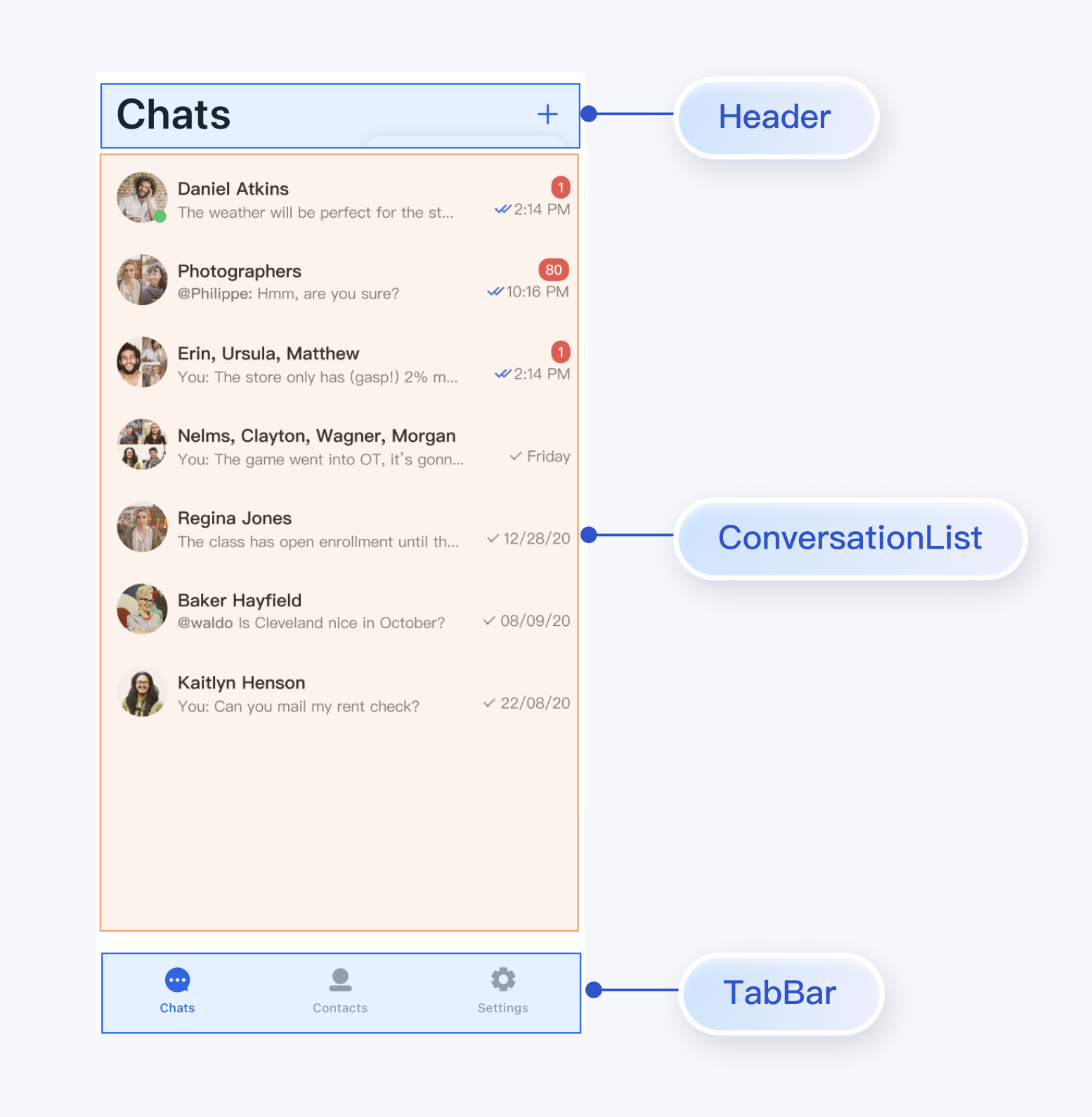
|
|
4
|
+
|
|
5
|
+
TUIKit provides a complete set of instant messaging UI components, relying on the AtomicXCore data layer at the bottom and allowing construction of various functional Pages at the top.
|
|
6
|
+
- Page Layer: Complete functional pages encapsulated based on TUIKit components: ChatPage, ContactsPage, ConversationsPage, which you can use directly.
|
|
7
|
+
|
|
8
|
+
- TUIKit Flutter (UI Component Layer): Flutter components built on AtomicXCore, which you can embed into your existing App pages.
|
|
9
|
+
|
|
10
|
+
- AtomicXCore (Data Layer): Provides data management and business logic, including various Stores and Managers.
|
|
11
|
+
|
|
12
|
+
|
|
13
|
+
## Prerequisites
|
|
14
|
+
- Flutter >= 3.29.0, Dart >= 3.7.0, Kotlin >= 1.9.
|
|
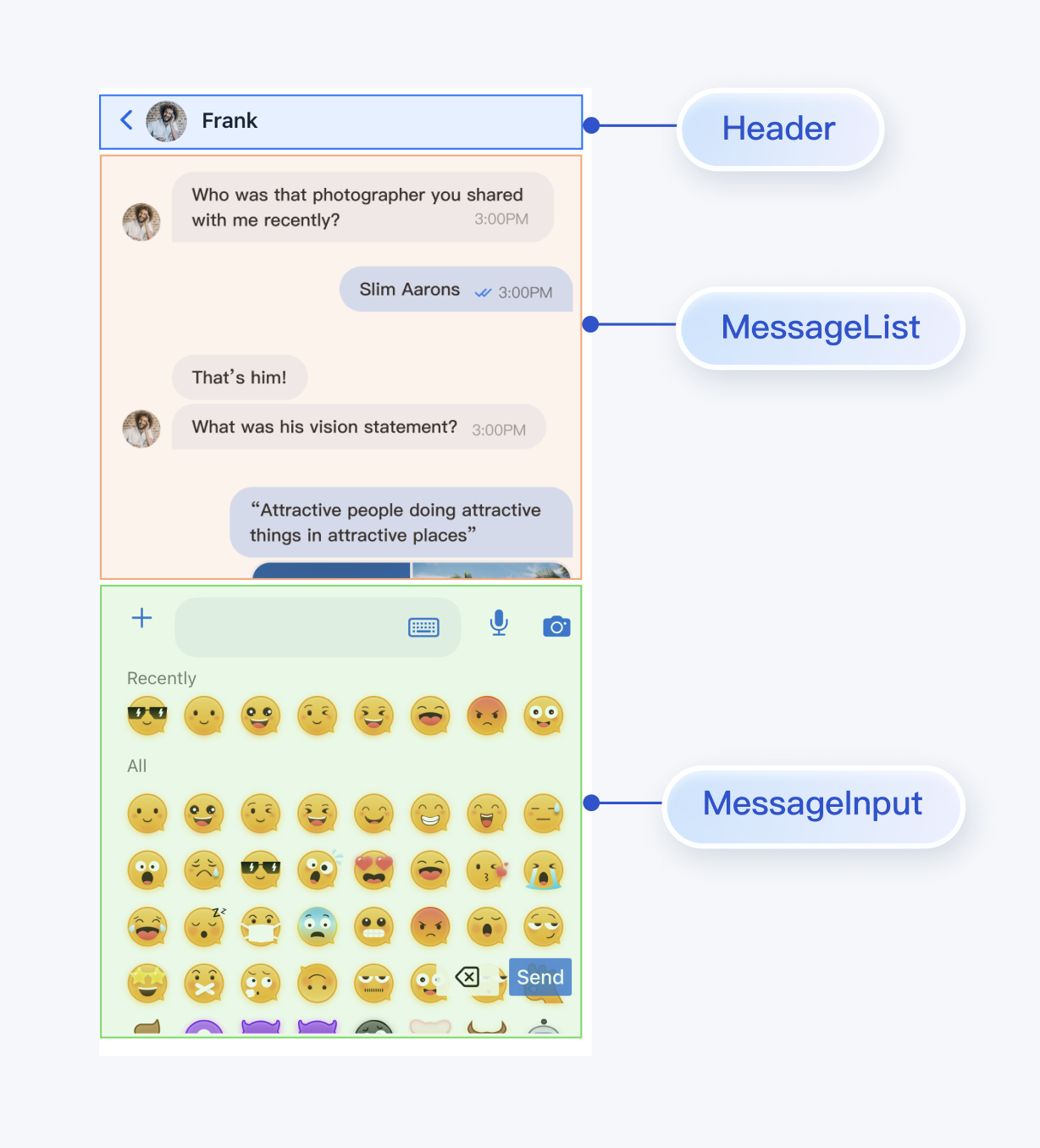
15
|
+
|
|
16
|
+
- Android Studio Ladybug | 2024.2.1 or higher, Android Gradle plugin 7.3.1 or higher, JDK 17.
|
|
17
|
+
|
|
18
|
+
- Xcode 12.0 or higher.
|
|
19
|
+
|
|
20
|
+
- A valid Tencent Cloud account and Chat application. Refer to [Activate Service](https://trtc.io/document/45907?product=chat&menulabel=uikit&platform=flutter) to obtain the following information from the console:
|
|
21
|
+
|
|
22
|
+
- SDKAppID: The ID of the Chat application obtained from the console, serving as the unique identifier for the application.
|
|
23
|
+
|
|
24
|
+
- SDKSecretKey: The application's secret key.
|
|
25
|
+
|
|
26
|
+
|
|
27
|
+
> **Note:**
|
|
28
|
+
>
|
|
29
|
+
> - This project currently only supports manual integration and does not support integration via pub.dev.
|
|
30
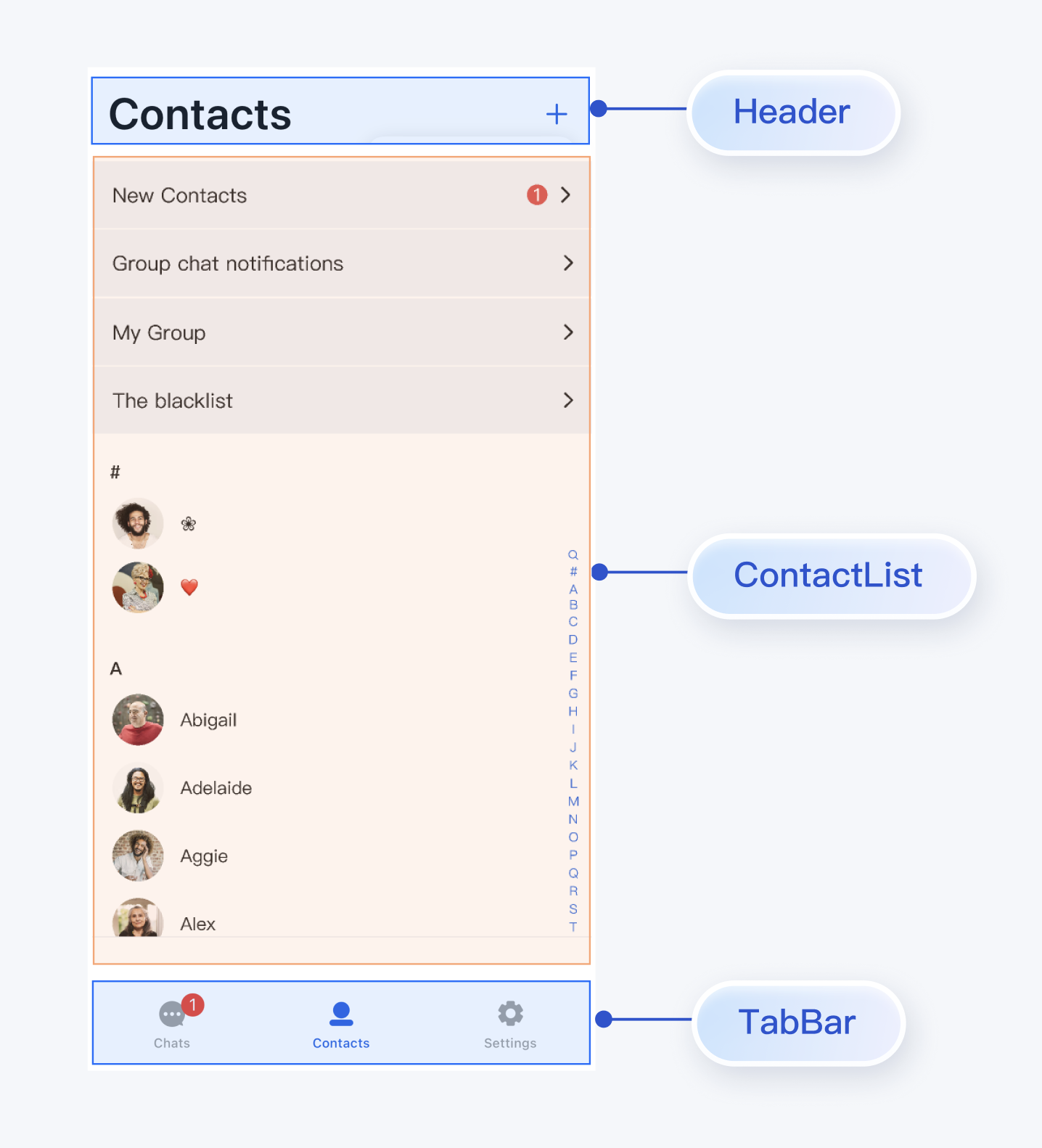
|
+
> - To ensure a stable build environment, please strictly follow the official compatibility requirements for configuration:
|
|
31
|
+
> - For compatibility between Gradle, Android Gradle Plugin, JDK, and Android Studio, please refer to the Android official documentation: [Version Notes](https://developer.android.com/build/releases/gradle-plugin#updating-gradle).
|
|
32
|
+
> - For version correspondence between Kotlin, Android Gradle Plugin, and Gradle, please refer to the Kotlin official documentation: [Kotlin-Gradle Plugin Compatibility](https://kotlinlang.org/docs/gradle-configure-project.html#apply-the-plugin).
|
|
33
|
+
> - Use JDK 17, as other versions may cause compilation failures. Refer to: [Java Version Switching](https://developer.android.com/build/jdks#kts).
|
|
34
|
+
|
|
35
|
+
> We recommend that you choose a version combination that fully matches the project requirements according to the above guidelines.
|
|
36
|
+
>
|
|
37
|
+
|
|
38
|
+
|
|
39
|
+
## Integration and Import Components
|
|
40
|
+
|
|
41
|
+
### Download Source Code
|
|
42
|
+
|
|
43
|
+
1. Download [TUIKit Flutter](https://github.com/Tencent-RTC/TUIKit_Flutter) source code from GitHub:
|
|
44
|
+
``` xml
|
|
45
|
+
git clone https://github.com/Tencent-RTC/TUIKit_Flutter.git
|
|
46
|
+
```
|
|
47
|
+
|
|
48
|
+
Project directory structure explanation:
|
|
49
|
+
``` bash
|
|
50
|
+
atomic-x/
|
|
51
|
+
├── lib/ # UI component source code (required integration)
|
|
52
|
+
│ ├── messagelist/ # Message list component
|
|
53
|
+
│ ├── messageinput/ # Message input component
|
|
54
|
+
│ ├── conversationlist/ # Conversation list component
|
|
55
|
+
│ ├── contactlist/ # Contact list component
|
|
56
|
+
│ ├── basecomponent/ # Base components
|
|
57
|
+
│ └── ... # Other UI components
|
|
58
|
+
├── call_assets/ # Call resource files (required integration)
|
|
59
|
+
├── chat_assets/ # Chat resource files (required integration)
|
|
60
|
+
chat/
|
|
61
|
+
├── uikit/ # Page components (reference implementation)
|
|
62
|
+
│ ├── lib/
|
|
63
|
+
│ ├── chat_page.dart
|
|
64
|
+
│ ├── contacts_page.dart
|
|
65
|
+
│ └── conversations_page.dart
|
|
66
|
+
└── demo/ # Example application (optional reference)
|
|
67
|
+
```
|
|
68
|
+
|
|
69
|
+
### Integrate Components
|
|
70
|
+
1. Copy the complete component directory to your Flutter project, as shown below. Here flutter_demo is the example project, and TUIKit_Flutter is the component source code downloaded from GitHub:
|
|
71
|
+
|
|
72
|
+

|
|
73
|
+
|
|
74
|
+
2. Add TUIKit Flutter components to your pubspec.yaml file. Note that TUIKit_Flutter can be placed anywhere, as long as the relative path is correctly set in pubspec.yaml:
|
|
75
|
+
|
|
76
|
+
``` bash
|
|
77
|
+
tuikit_atomic_x:
|
|
78
|
+
path: ../TUIKit_Flutter/atomic-x
|
|
79
|
+
```
|
|
80
|
+
|
|
81
|
+
> **Note:**
|
|
82
|
+
>
|
|
83
|
+
> - When using the local integration solution, if you need to upgrade, you need to obtain the latest component code from GitHub and overwrite the TUIKit_Flutter directory in your local project.
|
|
84
|
+
> - When there are conflicts between private modifications and remote changes, you need to manually merge and resolve conflicts.
|
|
85
|
+
|
|
86
|
+
|
|
87
|
+
### Configure Project
|
|
88
|
+
|
|
89
|
+
Add necessary permission configurations on the iOS side. Open ios/Podfile and add the following permission code at the end of the file:
|
|
90
|
+
``` objectivec
|
|
91
|
+
post_install do |installer|
|
|
92
|
+
installer.pods_project.targets.each do |target|
|
|
93
|
+
flutter_additional_ios_build_settings(target)
|
|
94
|
+
target.build_configurations.each do |config|
|
|
95
|
+
config.build_settings['EXCLUDED_ARCHS[sdk=iphonesimulator*]'] = 'arm64'
|
|
96
|
+
config.build_settings['ENABLE_BITCODE'] = 'NO'
|
|
97
|
+
config.build_settings["ONLY_ACTIVE_ARCH"] = "NO"
|
|
98
|
+
end
|
|
99
|
+
target.build_configurations.each do |config|
|
|
100
|
+
config.build_settings['GCC_PREPROCESSOR_DEFINITIONS'] ||= [
|
|
101
|
+
'$(inherited)',
|
|
102
|
+
'PERMISSION_MICROPHONE=1',
|
|
103
|
+
'PERMISSION_CAMERA=1',
|
|
104
|
+
'PERMISSION_PHOTOS=1',
|
|
105
|
+
]
|
|
106
|
+
end
|
|
107
|
+
end
|
|
108
|
+
end
|
|
109
|
+
|
|
110
|
+
```
|
|
111
|
+
|
|
112
|
+
## Integration Steps
|
|
113
|
+
|
|
114
|
+
### Step 1: Configure User Authentication
|
|
115
|
+
|
|
116
|
+
Obtain UserSig according to UserID in the [IM Chat Console](console.trtc.io/usersig) for subsequent user authentication during login.
|
|
117
|
+
|
|
118
|
+
|
|
119
|
+
### Step 2: User Login
|
|
120
|
+
|
|
121
|
+
After login authentication, you can use the component features normally. You can call the login interface and pass the SDKAPPID, userID, and userSig obtained above for login authentication:
|
|
122
|
+
``` java
|
|
123
|
+
final result = await LoginStore.shared.login(
|
|
124
|
+
sdkAppID: SDKAPPID,
|
|
125
|
+
userID: userID,
|
|
126
|
+
userSig: userSig,
|
|
127
|
+
);
|
|
128
|
+
if (result.errorCode == 0) {
|
|
129
|
+
// Login successful, can navigate to chat or conversation page
|
|
130
|
+
} else {
|
|
131
|
+
// Login failed, can display error popup
|
|
132
|
+
}
|
|
133
|
+
```
|
|
134
|
+
|
|
135
|
+
> **Note:**
|
|
136
|
+
>
|
|
137
|
+
|
|
138
|
+
> In a formal production environment, it is recommended to generate UserSig on your server. When UserSig is needed, your App should send a request to your business server to obtain dynamic UserSig for authentication. See [Generate UserSig on Server](https://trtc.io/document/34385).
|
|
139
|
+
>
|
|
140
|
+
|
|
141
|
+
|
|
142
|
+
### Step 3: Build Conversation List Interface
|
|
143
|
+
|
|
144
|
+
You can build a conversation list page based on the ConversationList component in TUIKit Flutter. Built-in features of ConversationList include:
|
|
145
|
+
- Display the user's conversation list, including one-on-one and group conversations
|
|
146
|
+
|
|
147
|
+
- Support user operations on individual conversations: pin, delete, clear conversation messages, etc.
|
|
148
|
+
|
|
149
|
+
|
|
150
|
+
You can integrate ConversationList directly into your existing App page, or build a complete new conversation list page. One assembled UI effect is shown below:
|
|
151
|
+
|
|
152
|
+
|
|
153
|
+
|
|
154
|
+
|
|
155
|
+
To encapsulate ConversationList as a conversation list page, refer to the implementation in the `chat/uikit/lib/conversations_page.dart` file. `ConversationsPage` mainly does the following:
|
|
156
|
+
|
|
157
|
+
1. Adds AppBar above ConversationList.
|
|
158
|
+
|
|
159
|
+
2. Implements click events for conversation list cells.
|
|
160
|
+
|
|
161
|
+
3. Supports creating conversations and groups:
|
|
162
|
+
|
|
163
|
+
1. Click the button in the upper right corner to create new conversations or groups
|
|
164
|
+
|
|
165
|
+
2. Supports selecting friends from the contact list to create one-on-one chats
|
|
166
|
+
|
|
167
|
+
3. Supports selecting multiple friends to create group chats
|
|
168
|
+
|
|
169
|
+
|
|
170
|
+
Core example code is as follows:
|
|
171
|
+
|
|
172
|
+
``` java
|
|
173
|
+
@override
|
|
174
|
+
Widget build(BuildContext context) {
|
|
175
|
+
return Scaffold(
|
|
176
|
+
appBar: AppBar(
|
|
177
|
+
backgroundColor: colorsTheme.bgColorOperate,
|
|
178
|
+
title: Text(atomicLocale.chat, style: TextStyle(fontSize: 34, fontWeight: FontWeight.w600)),
|
|
179
|
+
centerTitle: false,
|
|
180
|
+
scrolledUnderElevation: 0,
|
|
181
|
+
actions: [],
|
|
182
|
+
),
|
|
183
|
+
body: Column(
|
|
184
|
+
children: [
|
|
185
|
+
Expanded(
|
|
186
|
+
child: ConversationList(
|
|
187
|
+
onConversationClick: (conversation) {
|
|
188
|
+
Navigator.push(
|
|
189
|
+
context,
|
|
190
|
+
MaterialPageRoute(
|
|
191
|
+
builder: (context) => ChatPage(
|
|
192
|
+
conversation: conversation,
|
|
193
|
+
),
|
|
194
|
+
),
|
|
195
|
+
);
|
|
196
|
+
},
|
|
197
|
+
),
|
|
198
|
+
),
|
|
199
|
+
],
|
|
200
|
+
),
|
|
201
|
+
);
|
|
202
|
+
}
|
|
203
|
+
```
|
|
204
|
+
|
|
205
|
+
### Step 4: Build Chat Interface
|
|
206
|
+
|
|
207
|
+
You can build a chat page based on the MessageList and MessageInput components in TUIKit Flutter.
|
|
208
|
+
|
|
209
|
+
Built-in features of MessageList include:
|
|
210
|
+
- Display one-on-one or group message lists.
|
|
211
|
+
|
|
212
|
+
- Support operations on individual messages: view large images for image messages, play video or voice messages, copy text messages, recall messages, delete messages, etc.
|
|
213
|
+
|
|
214
|
+
|
|
215
|
+
Built-in features of MessageInput include:
|
|
216
|
+
|
|
217
|
+
- Support users in composing and sending various types of messages: text, emoji, image, voice, video, file, etc.
|
|
218
|
+
|
|
219
|
+
|
|
220
|
+
You can integrate MessageList and MessageInput directly into your existing App page, or build a complete new chat page. One assembled UI effect is shown below:
|
|
221
|
+
|
|
222
|
+
|
|
223
|
+
|
|
224
|
+
|
|
225
|
+
To assemble MessageList and MessageInput as a chat page, refer to the implementation in the `chat/uikit/lib/chat_page.dart` file. `ChatPage` mainly does the following:
|
|
226
|
+
|
|
227
|
+
1. Adds AppBar at the top to display the conversation name.
|
|
228
|
+
|
|
229
|
+
2. Vertically combines MessageList and MessageInput according to mobile user habits.
|
|
230
|
+
|
|
231
|
+
|
|
232
|
+
Core example code is as follows:
|
|
233
|
+
|
|
234
|
+
``` java
|
|
235
|
+
@override
|
|
236
|
+
Widget build(BuildContext context) {
|
|
237
|
+
return Scaffold(
|
|
238
|
+
appBar: AppBar(
|
|
239
|
+
backgroundColor: colorsTheme.bgColorOperate,
|
|
240
|
+
titleSpacing: 4.0,
|
|
241
|
+
centerTitle: false,
|
|
242
|
+
title: GestureDetector(
|
|
243
|
+
onTap: _onTitleTap,
|
|
244
|
+
child: Row(
|
|
245
|
+
mainAxisSize: MainAxisSize.min,
|
|
246
|
+
children: [
|
|
247
|
+
Padding(
|
|
248
|
+
padding: const EdgeInsets.only(right: 8.0),
|
|
249
|
+
child: Avatar.image(
|
|
250
|
+
name: widget.conversation.title,
|
|
251
|
+
url: widget.conversation.avatarURL,
|
|
252
|
+
),
|
|
253
|
+
),
|
|
254
|
+
Expanded(
|
|
255
|
+
child: Text(
|
|
256
|
+
widget.conversation.title ?? atomicLocale.chat,
|
|
257
|
+
style: TextStyle(fontSize: 14, fontWeight: FontWeight.w600),
|
|
258
|
+
overflow: TextOverflow.ellipsis,
|
|
259
|
+
maxLines: 1,
|
|
260
|
+
),
|
|
261
|
+
),
|
|
262
|
+
],
|
|
263
|
+
),
|
|
264
|
+
),
|
|
265
|
+
scrolledUnderElevation: 0.0,
|
|
266
|
+
leading: IconButton.buttonContent(
|
|
267
|
+
content: IconOnlyContent(Icon(Icons.arrow_back_ios, color: colorsTheme.buttonColorPrimaryDefault)),
|
|
268
|
+
type: ButtonType.noBorder,
|
|
269
|
+
size: ButtonSize.l,
|
|
270
|
+
onClick: () => Navigator.of(context).pop(),
|
|
271
|
+
),
|
|
272
|
+
actions: []),
|
|
273
|
+
body: Column(
|
|
274
|
+
children: [
|
|
275
|
+
MessageList(
|
|
276
|
+
conversationID: widget.conversation.conversationID,
|
|
277
|
+
locateMessage: widget.message,
|
|
278
|
+
onUserClick: (String userID) => _onUserClick(userID),
|
|
279
|
+
),
|
|
280
|
+
MessageInput(
|
|
281
|
+
conversationID: widget.conversation.conversationID,
|
|
282
|
+
),
|
|
283
|
+
],
|
|
284
|
+
),
|
|
285
|
+
);
|
|
286
|
+
}
|
|
287
|
+
```
|
|
288
|
+
|
|
289
|
+
### Step 5: Build Contact Interface
|
|
290
|
+
|
|
291
|
+
You can build a contact page based on the ContactList component in TUIKit Flutter. Built-in features of ContactList include:
|
|
292
|
+
- View friend request list.
|
|
293
|
+
|
|
294
|
+
- View list of joined groups.
|
|
295
|
+
|
|
296
|
+
- Handle group invitations and applications.
|
|
297
|
+
|
|
298
|
+
- Manage blocklist.
|
|
299
|
+
|
|
300
|
+
- View friends.
|
|
301
|
+
|
|
302
|
+
|
|
303
|
+
You can integrate ContactList directly into your existing App, or build a complete new contact list page. One assembled UI effect is shown below:
|
|
304
|
+
|
|
305
|
+
|
|
306
|
+
|
|
307
|
+
|
|
308
|
+
To encapsulate ContactList as a contact list page, refer to the implementation in the `chat/uikit/lib/contacts_page.dart` file. `ContactsPage` mainly does the following:
|
|
309
|
+
|
|
310
|
+
1. Adds AppBar above ContactList.
|
|
311
|
+
|
|
312
|
+
2. Implements click events for contact list cells.
|
|
313
|
+
|
|
314
|
+
3. Supports adding contacts and groups:
|
|
315
|
+
|
|
316
|
+
1. Click the "+" button in the upper right corner to add contacts or groups
|
|
317
|
+
|
|
318
|
+
2. Supports searching for target contacts by UserID
|
|
319
|
+
|
|
320
|
+
3. Supports searching for target groups by GroupID
|
|
321
|
+
|
|
322
|
+
|
|
323
|
+
Core example code is as follows:
|
|
324
|
+
|
|
325
|
+
``` java
|
|
326
|
+
@override
|
|
327
|
+
Widget build(BuildContext context) {
|
|
328
|
+
AtomicLocalizations atomicLocale = AtomicLocalizations.of(context);
|
|
329
|
+
SemanticColorScheme colorsScheme = BaseThemeProvider.colorsOf(context);
|
|
330
|
+
return Scaffold(
|
|
331
|
+
appBar: AppBar(
|
|
332
|
+
backgroundColor: colorsScheme.bgColorOperate,
|
|
333
|
+
title: Text(atomicLocale.contact, style: TextStyle(fontSize: 34, fontWeight: FontWeight.w600),),
|
|
334
|
+
centerTitle: false,
|
|
335
|
+
scrolledUnderElevation: 0,
|
|
336
|
+
actions: [],
|
|
337
|
+
),
|
|
338
|
+
body: ContactList(
|
|
339
|
+
onGroupClick: (ContactInfo contactInfo) {
|
|
340
|
+
_onGroupClick(context, contactInfo);
|
|
341
|
+
},
|
|
342
|
+
onContactClick: (ContactInfo contactInfo) {
|
|
343
|
+
_onContactClick(context, contactInfo);
|
|
344
|
+
},
|
|
345
|
+
),
|
|
346
|
+
);
|
|
347
|
+
}
|
|
348
|
+
```
|
|
349
|
+
|
|
350
|
+
### Step 6: Complete Navigation Logic Between Interfaces
|
|
351
|
+
|
|
352
|
+
ConversationsPage, ChatPage, and ContactsPage implement default user click events. You can customize events to implement interactions between pages:
|
|
353
|
+
<table>
|
|
354
|
+
<tr>
|
|
355
|
+
<td rowspan="1" colSpan="1" >Page</td>
|
|
356
|
+
|
|
357
|
+
<td rowspan="1" colSpan="1" >Callback</td>
|
|
358
|
+
|
|
359
|
+
<td rowspan="1" colSpan="1" >Suggested Navigation Logic</td>
|
|
360
|
+
</tr>
|
|
361
|
+
|
|
362
|
+
<tr>
|
|
363
|
+
<td rowspan="1" colSpan="1" >**ConversationsPage**</td>
|
|
364
|
+
|
|
365
|
+
<td rowspan="1" colSpan="1" >`onConversationClick: (conversation) {}`</td>
|
|
366
|
+
|
|
367
|
+
<td rowspan="1" colSpan="1" >Triggered when clicking a conversation in the conversation list, recommended to navigate to the chat page (ChatPage).</td>
|
|
368
|
+
</tr>
|
|
369
|
+
|
|
370
|
+
<tr>
|
|
371
|
+
<td rowspan="2" colSpan="1" >**ContactsPage**</td>
|
|
372
|
+
|
|
373
|
+
<td rowspan="1" colSpan="1" >`onContactClick: (ContactInfo contactInfo) {}`</td>
|
|
374
|
+
|
|
375
|
+
<td rowspan="1" colSpan="1" >Triggered when clicking a contact cell, recommended to navigate to the user info page (C2CChatSetting).</td>
|
|
376
|
+
</tr>
|
|
377
|
+
|
|
378
|
+
<tr>
|
|
379
|
+
<td rowspan="1" colSpan="1" >`onGroupClick: (ContactInfo contactInfo) {}`</td>
|
|
380
|
+
|
|
381
|
+
<td rowspan="1" colSpan="1" >Triggered when clicking a group cell, recommended to navigate to the group chat page (ChatPage).</td>
|
|
382
|
+
</tr>
|
|
383
|
+
|
|
384
|
+
<tr>
|
|
385
|
+
<td rowspan="3" colSpan="1" >**ChatPage**</td>
|
|
386
|
+
|
|
387
|
+
<td rowspan="1" colSpan="1" >`onUserClick: (String userID) {}`</td>
|
|
388
|
+
|
|
389
|
+
<td rowspan="1" colSpan="1" >Triggered when clicking a user avatar or nickname in a message, recommended to navigate to the user info page (C2CChatSetting).</td>
|
|
390
|
+
</tr>
|
|
391
|
+
|
|
392
|
+
<tr>
|
|
393
|
+
<td rowspan="1" colSpan="1" >`onChatHeaderClick: () {}`</td>
|
|
394
|
+
|
|
395
|
+
<td rowspan="1" colSpan="1" >Triggered when clicking the avatar in the navigation bar, recommended to navigate to the user info page (C2CChatSetting) or group chat info page (GroupChatSetting)</td>
|
|
396
|
+
</tr>
|
|
397
|
+
|
|
398
|
+
<tr>
|
|
399
|
+
<td rowspan="1" colSpan="1" >`onBackClick: () {}`</td>
|
|
400
|
+
|
|
401
|
+
<td rowspan="1" colSpan="1" >Triggered when clicking the back button, recommended to return to the previous page.</td>
|
|
402
|
+
</tr>
|
|
403
|
+
</table>
|
|
404
|
+
|
|
405
|
+
|
|
406
|
+
You can refer to the above callback descriptions and reference code to implement interaction logic between Pages.
|
|
407
|
+
|
|
408
|
+
## FAQ
|
|
409
|
+
|
|
410
|
+
### **After integrating the tuikit_atomic_x component, what should I do about errors related to **`theme_state`** and **`atomic_localizations`**?**
|
|
411
|
+
|
|
412
|
+
The component supports theme color and internationalized string switching. You need to use `ComponentTheme` to wrap the root `widget` in the `main.dart` file in the project root directory, and add the `AtomicLocalizations.delegate` configuration to the `localizationsDelegates` of `MaterialApp`. You can refer to the `main.dart` file in the source code Demo for usage.
|
|
413
|
+
|