@tencent-rtc/mcp 1.3.3 → 1.3.5
This diff represents the content of publicly available package versions that have been released to one of the supported registries. The information contained in this diff is provided for informational purposes only and reflects changes between package versions as they appear in their respective public registries.
- package/package.json +1 -1
- package/resource/doc/chatuikit/android/features/theme.md +363 -0
- package/resource/doc/chatuikit/{android/client_api_Android.md → faq/android_sdk/client-api.md} +0 -2
- package/resource/doc/chatuikit/faq/common/product.md +8 -0
- package/resource/doc/chatuikit/faq/flutter_sdk/faq.md +53 -0
- package/resource/doc/chatuikit/{iOS/client_api_iOS.md → faq/ios_sdk/client-api.md} +0 -2
- package/resource/doc/chatuikit/flutter/features/theme.md +379 -0
- package/resource/doc/chatuikit/flutter/integration.md +413 -0
- package/resource/doc/chatuikit/flutter/workflow.md +941 -0
- package/resource/doc/chatuikit/iOS/features/theme.md +416 -0
- package/resource/doc/chatuikit/iOS/workflow.md +0 -0
- package/resource/doc/chatuikit/react/components/chat-setting.md +86 -0
- package/resource/doc/chatuikit/react/components/contact-list.md +1093 -0
- package/resource/doc/chatuikit/react/components/search.md +745 -0
- package/resource/doc/chatuikit/vue/components/chat-setting.md +64 -0
- package/resource/doc/chatuikit/vue/components/contact-list.md +679 -0
- package/resource/doc/chatuikit/vue/components/search.md +1384 -0
- package/resource/doc/livekit/live/android/workflow.md +137 -6
- package/resource/doc/livekit/live/ios/live-audience-list.md +339 -0
- package/resource/doc/livekit/live/ios/live-audio-effect.md +370 -0
- package/resource/doc/livekit/live/ios/live-barrage.md +517 -0
- package/resource/doc/livekit/live/ios/live-base-beauty.md +247 -0
- package/resource/doc/livekit/live/ios/live-co-guest-interaction.md +518 -0
- package/resource/doc/livekit/live/ios/live-gift.md +783 -0
- package/resource/doc/livekit/live/ios/live-host-interaction.md +815 -0
- package/resource/doc/livekit/live/ios/live-integration.md +931 -0
- package/resource/doc/livekit/live/ios/live-live-list.md +485 -0
- package/resource/doc/livekit/live/ios/workflow.md +454 -0
- package/resource/doc/rtcengine/web/plugin/20-advanced-customized-capture-rendering.md +87 -0
- package/resource/doc/rtcengine/web/plugin/21-advanced-auto-play-policy.md +87 -0
- package/resource/doc/rtcengine/web/plugin/22-advanced-audio-mixer.md +175 -0
- package/resource/doc/rtcengine/web/plugin/23-advanced-support-detection.md +221 -0
- package/resource/doc/rtcengine/web/plugin/24-advanced-network-quality.md +140 -0
- package/resource/doc/rtcengine/web/plugin/25-advanced-device-change.md +99 -0
- package/resource/doc/rtcengine/web/plugin/26-advanced-publish-cdn-stream.md +451 -0
- package/resource/doc/rtcengine/web/plugin/27-advanced-small-stream.md +151 -0
- package/resource/doc/rtcengine/web/plugin/28-advanced-beauty.md +322 -0
- package/resource/doc/rtcengine/web/plugin/29-advanced-water-mark.md +149 -0
- package/resource/doc/rtcengine/web/plugin/30-advanced-cross-room-link.md +96 -0
- package/resource/doc/rtcengine/web/plugin/31-advanced-plugins-overview.md +330 -0
- package/resource/doc/rtcengine/web/plugin/34-advanced-proxy.md +248 -0
- package/resource/doc/rtcengine/web/plugin/35-advanced-ai-denoiser.md +81 -0
- package/resource/doc/rtcengine/web/plugin/36-advanced-virtual-background.md +242 -0
- package/resource/doc/rtcengine/web/plugin/37-advanced-voice-changer.md +99 -0
- package/resource/doc/rtcengine/web/plugin/39-advanced-video-decoder.md +33 -0
- package/resource/doc/rtcengine/web/plugin/40-advanced-video-mixer.md +379 -0
- package/resource/doc/rtcengine/web/plugin/41-advanced-small-stream-auto-switcher.md +91 -0
- package/resource/doc/rtcengine/web/plugin/42-advanced-realtime-transcriber.md +315 -0
- package/resource/doc/rtcengine/web/plugin/43-advanced-face-detection.md +180 -0
- package/tools/chat/get-native-chat-feature-detail.js +30 -0
- package/tools/chat/get-native-chat-feature-detail.js.map +1 -0
- package/tools/chat/get-native-chat-integration.js +30 -12
- package/tools/chat/get-native-chat-integration.js.map +1 -1
- package/tools/common/get-faq.js +2 -4
- package/tools/common/get-faq.js.map +1 -1
- package/tools/definitions/get_native_chat_feature_detail_def.js +32 -0
- package/tools/definitions/get_native_chat_feature_detail_def.js.map +1 -0
- package/tools/definitions/get_native_chat_uikit_integration_def.js +19 -7
- package/tools/definitions/get_native_chat_uikit_integration_def.js.map +1 -1
- package/tools/definitions/{get_native_live_extra_features_def.js → get_native_live_uikit_extra_features_def.js} +3 -3
- package/tools/definitions/get_native_live_uikit_extra_features_def.js.map +1 -0
- package/tools/definitions/{get_native_live_interaction_def.js → get_native_live_uikit_interaction_def.js} +3 -3
- package/tools/definitions/get_native_live_uikit_interaction_def.js.map +1 -0
- package/tools/definitions/get_web_chat_uikit_component_detail_def.js +49 -10
- package/tools/definitions/get_web_chat_uikit_component_detail_def.js.map +1 -1
- package/tools/definitions/record_prompt_def.js +42 -11
- package/tools/definitions/record_prompt_def.js.map +1 -1
- package/tools/definitions/record_result_def.js +1 -1
- package/tools/index.js +6 -4
- package/tools/index.js.map +1 -1
- package/tools/live/{get_native_live_extra_features.js → get_native_live_uikit_extra_features.js} +4 -4
- package/tools/live/get_native_live_uikit_extra_features.js.map +1 -0
- package/tools/live/{get_native_live_interaction.js → get_native_live_uikit_interaction.js} +4 -4
- package/tools/live/get_native_live_uikit_interaction.js.map +1 -0
- package/tools/rtcengine/get-rtcengine-web-sdk-integration.js.map +1 -1
- package/tools/rtcengine/get-trtc-sdk-faq.js +32 -0
- package/tools/rtcengine/get-trtc-sdk-faq.js.map +1 -0
- package/tools/rtcengine/get-trtc-web-sdk-faq.js +1 -1
- package/tools/rtcengine/get-trtc-web-sdk-integration.js.map +1 -1
- package/tools/rtcengine/get-trtc-web-sdk-plugin.js +45 -0
- package/tools/rtcengine/get-trtc-web-sdk-plugin.js.map +1 -0
- package/utils/handle-component-name.js +0 -16
- package/utils/handle-component-name.js.map +1 -1
- package/utils/report-cls-client.js +1 -1
- package/utils/report-es-client.js +1 -1
- package/resource/doc/chatuikit/android/generate_UserSig.md +0 -306
- package/resource/doc/chatuikit/android/integrarte_only_tuichat_Android.md +0 -290
- package/resource/doc/chatuikit/android/quick_start_Android.md +0 -138
- package/resource/doc/chatuikit/android/show_typing_Android.md +0 -43
- package/resource/doc/chatuikit/flutter/generate_UserSig.md +0 -306
- package/resource/doc/chatuikit/flutter/integrate_tuikit_Flutter.md +0 -133
- package/resource/doc/chatuikit/iOS/generate_UserSig.md +0 -306
- package/resource/doc/chatuikit/iOS/integrate_only_tuichat_iOS.md +0 -748
- package/resource/doc/chatuikit/iOS/quick_start_iOS.md +0 -163
- package/resource/doc/chatuikit/iOS/show_typing_iOS.md +0 -52
- package/tools/definitions/get_native_live_extra_features_def.js.map +0 -1
- package/tools/definitions/get_native_live_interaction_def.js.map +0 -1
- package/tools/live/get_native_live_extra_features.js.map +0 -1
- package/tools/live/get_native_live_interaction.js.map +0 -1
- /package/resource/doc/chatuikit/android/{integrate_tuikit_Android.md → integration.md} +0 -0
- /package/resource/doc/chatuikit/{faq/native_sdk/faq.md → android/workflow.md} +0 -0
- /package/resource/doc/chatuikit/{flutter/client_api_Flutter.md → faq/flutter_sdk/client-api.md} +0 -0
- /package/resource/doc/chatuikit/iOS/{integrate_tuikit_iOS.md → integration.md} +0 -0
- /package/resource/doc/chatuikit/react/components/{chatheader.md → chat-header.md} +0 -0
- /package/resource/doc/chatuikit/vue/components/{chatheader.md → chat-header.md} +0 -0
|
@@ -49,7 +49,7 @@ Provides the Agent with a **code generation blueprint** for implementing core fe
|
|
|
49
49
|
|
|
50
50
|
**Feature Dependency Logic (Important)**:
|
|
51
51
|
1. **Base First**: Basic live streaming (Broadcasting/Viewing/List) must be completed first using the base tool (`get_native_live_uikit_integration`).
|
|
52
|
-
2. **Interaction Overlay**: If requirements include "Co-guesting", "PK", or "Audience List", the interaction tool (`
|
|
52
|
+
2. **Interaction Overlay**: If requirements include "Co-guesting", "PK", or "Audience List", the interaction tool (`get_native_live_uikit_interaction`) must be called **after** basic features are completed.
|
|
53
53
|
3. **Empty Project Handling**: If the user requests interaction features in an empty project, the Agent **MUST implement basic features first**, then add interaction capabilities.
|
|
54
54
|
|
|
55
55
|
---
|
|
@@ -135,12 +135,106 @@ Execute `./gradlew assembleDebug` and deliver once verified.
|
|
|
135
135
|
* ❌ NOT 0-1 (Float), and NOT 0-100 (Int).
|
|
136
136
|
* **UI Mapping Formula**: `progress / 100.0f * 9.0f`.
|
|
137
137
|
|
|
138
|
-
#### C. Barrage, Gift & Layout
|
|
138
|
+
#### C. Barrage, Gift & Layout (Barrage, Gift & UI)
|
|
139
139
|
* **Layering Requirements**: Barrage list and full-screen gift animations MUST overlay **on top** of the video layer using `FrameLayout` or `RelativeLayout`.
|
|
140
140
|
* **Split Screen Prohibited**: Strictly prohibited to split the screen (e.g., video on top, barrage at bottom); MUST use overlay mode.
|
|
141
|
-
* **Keyboard Adaptation**:
|
|
141
|
+
* **Keyboard Adaptation**: Must set `android:windowSoftInputMode="adjustNothing"` or `adjustPan` in the Manifest to **prevent video distortion or shifting when the keyboard appears**.
|
|
142
|
+
|
|
143
|
+
##### Barrage Input
|
|
144
|
+
* **Position**: Fixed at the bottom left of the screen, in the same row as function buttons (Gift, Co-guest, etc.).
|
|
145
|
+
* **Style**: Semi-transparent rounded background + placeholder text "Say something...".
|
|
146
|
+
* **Keyboard Adaptation**:
|
|
147
|
+
* When the keyboard is raised, the input box **must remain in its original position** and is prohibited from moving up with the keyboard.
|
|
148
|
+
* The `LiveCoreView` layout must be fixed to `match_parent`, prohibiting distortion or upward shifting.
|
|
149
|
+
* **MUST** set `android:windowSoftInputMode="adjustNothing"` in the Manifest.
|
|
150
|
+
|
|
151
|
+
##### Barrage Display Flow
|
|
152
|
+
```
|
|
153
|
+
Sending Barrage:
|
|
154
|
+
User input → Click Send/Enter → BarrageStore.sendTextMessage(text) → Insert into local barrage list immediately
|
|
155
|
+
|
|
156
|
+
Receiving Barrage:
|
|
157
|
+
Subscribe to BarrageStore.barrageState.barrageList → New message received → Insert into barrage list → Scroll to bottom
|
|
158
|
+
```
|
|
159
|
+
* **Data Source**: Subscribe to `BarrageStore.create(liveId).barrageState.barrageList`.
|
|
160
|
+
* **Local Echo**: Insert into the local barrage list **immediately** after successful sending, without waiting for server callback.
|
|
161
|
+
* **Scrolling Behavior**: Automatically scroll to the bottom when a new message arrives (`recyclerView.scrollToPosition(adapter.itemCount - 1)`).
|
|
162
|
+
* **Message Format**: `[Nickname]: [Message Content]`, nickname uses theme color, content uses white.
|
|
163
|
+
|
|
142
164
|
* **Gift Barrage**: **If the user needs gift barrage integration**, when `onReceiveGift` is triggered, a gift message MUST be inserted into the barrage list on **both host and audience sides**. DO NOT display only on the audience side.
|
|
143
|
-
|
|
165
|
+
|
|
166
|
+
##### Full-screen Gift Animation
|
|
167
|
+
**⚠️ MANDATORY**: Full-screen gift animation is a **mandatory requirement** when integrating gift features and cannot be omitted.
|
|
168
|
+
|
|
169
|
+
* **Layering**: The full-screen gift animation view MUST overlay **on top** of the `LiveCoreView` using a separate `FrameLayout` container.
|
|
170
|
+
* **Layout**: Constrained to `match_parent`, covering the entire screen.
|
|
171
|
+
* **Dual-side Sync**: Upon receiving the `GiftStore.onReceiveGift` callback, the full-screen animation MUST be played on **both host and audience sides**. Playing only on the audience side is strictly prohibited.
|
|
172
|
+
|
|
173
|
+
### 🎨 Default UI/UX Design & Interaction Specifications (Only applies if user doesn't specify)
|
|
174
|
+
|
|
175
|
+
**⚠️ Note: The following specifications are only executed as default standards when the user does not provide specific UI design or requirements.**
|
|
176
|
+
|
|
177
|
+
### 1. Global Aesthetics
|
|
178
|
+
* **Immersive Dark**: The background of the live page must be `Color.BLACK`, and the video layer (`LiveCoreView`) must **fill the entire screen** (`match_parent`) and be at the bottom layer.
|
|
179
|
+
* **Safe Area**: All floating UIs must consider status and navigation bars, and are strictly prohibited from being blocked by notches or bottom navigation bars.
|
|
180
|
+
* **Text Readability**: White text above the video (e.g., barrage, ID) must have a **black shadow** (`setShadowLayer`).
|
|
181
|
+
* **Error Prompts**: Use **Toast** uniformly; prohibit the use of modal AlertDialogs that interrupt the user.
|
|
182
|
+
|
|
183
|
+
### 2. Component Standards
|
|
184
|
+
* **Glass Capsule (Top)**:
|
|
185
|
+
* **Style**: **Semi-transparent black background** + **full rounded corners** (`cornerRadius = height / 2`).
|
|
186
|
+
* **Application**: Only used at the top left to display "Host Avatar + ID + Popularity".
|
|
187
|
+
* **Flat Buttons**:
|
|
188
|
+
* **Style**: **"Text + Rounded Rectangle Background"**. Minimalist flat design, background color is semi-transparent black or theme color.
|
|
189
|
+
* **Close Button**: Special case, use a circular semi-transparent background icon.
|
|
190
|
+
* **Floating Panels**:
|
|
191
|
+
* **Style**: Only top rounded corners (`topLeftRadius, topRightRadius`).
|
|
192
|
+
* **Taboo**: Solid color backgrounds at the bottom are prohibited; floating feeling must be maintained.
|
|
193
|
+
|
|
194
|
+
### 3. Live Room Layout Blueprint
|
|
195
|
+
**⚠️ Dynamic Layout Principle: Only render function buttons that the user has actually integrated. If a user did not request a feature (e.g., PK/Beauty), DO NOT add corresponding empty buttons.**
|
|
196
|
+
|
|
197
|
+
#### A. Top Bar
|
|
198
|
+
* **Left [Room Info]**: Wrapped in a **semi-transparent capsule** [Host Avatar | Host Nickname].
|
|
199
|
+
* **Right [Control Area]**: Horizontally arranged [Online Audience Count] + [Close Icon (X)].
|
|
200
|
+
|
|
201
|
+
#### B. Bottom Bar - Dynamically switches based on state
|
|
202
|
+
* **Preview Mode**:
|
|
203
|
+
* Content **aligned to the right**: [Beauty] [Audio Effects] [Start Live (Main Button)].
|
|
204
|
+
* **Anchor Live Mode**:
|
|
205
|
+
* **Left**: [Barrage List (Transparent Background)] + [Chat Input Box].
|
|
206
|
+
* **Right**: Function array [Beauty] [Audio Effects] [Co-hosting] [PK].
|
|
207
|
+
* **Audience Live Mode**:
|
|
208
|
+
* **Left**: [Barrage List] + [Chat Input Box].
|
|
209
|
+
* **Right**: [Gift] [Apply for Co-guesting].
|
|
210
|
+
|
|
211
|
+
### 4. Home Layout & Interaction
|
|
212
|
+
|
|
213
|
+
#### A. Home Reference Layout
|
|
214
|
+
```
|
|
215
|
+
┌─────────────────────────────┐
|
|
216
|
+
│ AtomicXCore Live │
|
|
217
|
+
│ │
|
|
218
|
+
│ Live Room ID │
|
|
219
|
+
│ ┌─────────────────────────┐│
|
|
220
|
+
│ │ live_000001 ││ ← Input Box (with left padding, semi-transparent background)
|
|
221
|
+
│ └─────────────────────────┘│
|
|
222
|
+
│ │
|
|
223
|
+
│ Host Broadcasting │
|
|
224
|
+
│ (Click to login as anchor001)│
|
|
225
|
+
│ │
|
|
226
|
+
│ Audience Viewing │
|
|
227
|
+
│ (Click to login as user001) │
|
|
228
|
+
│ │
|
|
229
|
+
│ [ 📋 Live List ] │
|
|
230
|
+
└─────────────────────────────┘
|
|
231
|
+
```
|
|
232
|
+
|
|
233
|
+
#### B. Implicit Login Flow
|
|
234
|
+
**No separate login button is required on the home page**; login is automatically completed when a function button is clicked:
|
|
235
|
+
* Click "Host Broadcasting" → Login using `anchor001` → Jump to host page.
|
|
236
|
+
* Click "Audience Viewing" → Login using `user001` → Jump to audience page.
|
|
237
|
+
* Click "Live List" → Login using `user001` → Jump to list page.
|
|
144
238
|
|
|
145
239
|
---
|
|
146
240
|
|
|
@@ -161,13 +255,50 @@ Execute `./gradlew assembleDebug` and deliver once verified.
|
|
|
161
255
|
* **Data**: Subscribe to `liveState.liveList`.
|
|
162
256
|
* **Navigation**: Clicking a list item navigates to the audience page, passing the `liveID`.
|
|
163
257
|
|
|
258
|
+
### 4. Co-guest & Co-host Interaction Specifications (`co_guest` & `co_host`)
|
|
259
|
+
|
|
260
|
+
#### A. Audience Co-guesting (Host passively receives)
|
|
261
|
+
* **Host UI**: ❌ **Strictly prohibited** to display a "Co-guest Application" list button in the bottom toolbar or anywhere else.
|
|
262
|
+
* **Interaction Logic**: Upon receiving a co-guest application callback, pop up a dialog (`AlertDialog`) directly in the center of the screen:
|
|
263
|
+
* **Title**: Co-guest Application
|
|
264
|
+
* **Content**: Received a co-guest application from audience [Nickname], accept?
|
|
265
|
+
* **Operations**: [Decline] [Accept]
|
|
266
|
+
|
|
267
|
+
#### B. Host Co-hosting Panel (Pops up when clicking bottom [Co-host] button)
|
|
268
|
+
* **Presentation**: Use a bottom floating panel (`BottomSheetDialog` or custom `View` animated up); prohibit `AlertDialog`.
|
|
269
|
+
* **UI Layout (Strictly follow illustration)**:
|
|
270
|
+
```
|
|
271
|
+
┌─────────────────────────────────────┐
|
|
272
|
+
│ │
|
|
273
|
+
│ Initiate Connection [🚪 End Co-host] │ ← Red text
|
|
274
|
+
│ │
|
|
275
|
+
│ Connected (2 persons) │
|
|
276
|
+
│ ┌─────────────────────────────────┐│
|
|
277
|
+
│ │ [👤] Li Ziming [💎20] PK... ││ ← Connected users
|
|
278
|
+
│ │ [👤] Filinna [💎32] PK... ││
|
|
279
|
+
│ └─────────────────────────────────┘│
|
|
280
|
+
├─────────────────────────────────────┤
|
|
281
|
+
│ Other Live Users │
|
|
282
|
+
│ ┌─────────────────────────────────┐│
|
|
283
|
+
│ │ [👤] Li Ziming [💎20] [Cancel Inv] ││ ← Gray-black background button
|
|
284
|
+
│ │ [👤] Filinna [💎32] [Invite] ││ ← Blue background button
|
|
285
|
+
│ │ [👤] Tie Zhu [💗99] [Invite] ││
|
|
286
|
+
│ └─────────────────────────────────┘│
|
|
287
|
+
└─────────────────────────────────────┘
|
|
288
|
+
```
|
|
289
|
+
|
|
290
|
+
#### C. PK Button Interaction Constraints
|
|
291
|
+
* **Pre-check**: When clicking the bottom [PK] button, current connection status must be checked (`CoHostStore.connectedUsers.isEmpty()`).
|
|
292
|
+
* **Status Handling**:
|
|
293
|
+
* **Not connected**: ❌ Prohibit jump, show Toast: `"Please initiate co-hosting first"`.
|
|
294
|
+
* **Connected**: ✅ Pop up PK invitation panel.
|
|
295
|
+
|
|
164
296
|
---
|
|
165
297
|
|
|
166
298
|
## 📋 Agent Final Checklist
|
|
167
299
|
|
|
168
300
|
- [ ] **Build Verification**: Full `./gradlew assembleDebug` executed and result is SUCCESS.
|
|
169
301
|
- [ ] **API Accuracy**: Imports not modified, APIs not fabricated, `LiveInfo` field names verified.
|
|
170
|
-
- [ ] **Store & Listener Compliance**: Listeners are member variables, properly added and removed.
|
|
171
302
|
- [ ] **Timeout Compliance**: Co-guesting 5-1800s, Co-hosting ≤30s.
|
|
172
303
|
- [ ] **Extra Feature Compliance**: Audio enums correct, beauty range 0-9, barrage layout overlays, and keyboard adaptation.
|
|
173
304
|
- [ ] **Gift Compliance**: Full-screen gift animations implemented on both host and audience sides.
|
|
@@ -186,4 +317,4 @@ Execute `./gradlew assembleDebug` and deliver once verified.
|
|
|
186
317
|
* - ✅ UserSig MUST be generated on a backend service before official launch.
|
|
187
318
|
* - Reference: https://trtc.io/document/35166?product=live&menulabel=uikit&platform=android
|
|
188
319
|
*/
|
|
189
|
-
```
|
|
320
|
+
```
|
|
@@ -0,0 +1,339 @@
|
|
|
1
|
+
`LiveAudienceStore` is a module in `AtomicXCore` designed for managing audience information in live streaming rooms. With `LiveAudienceStore`, you can implement a comprehensive audience list and management system for your live streaming application.
|
|
2
|
+
|
|
3
|
+
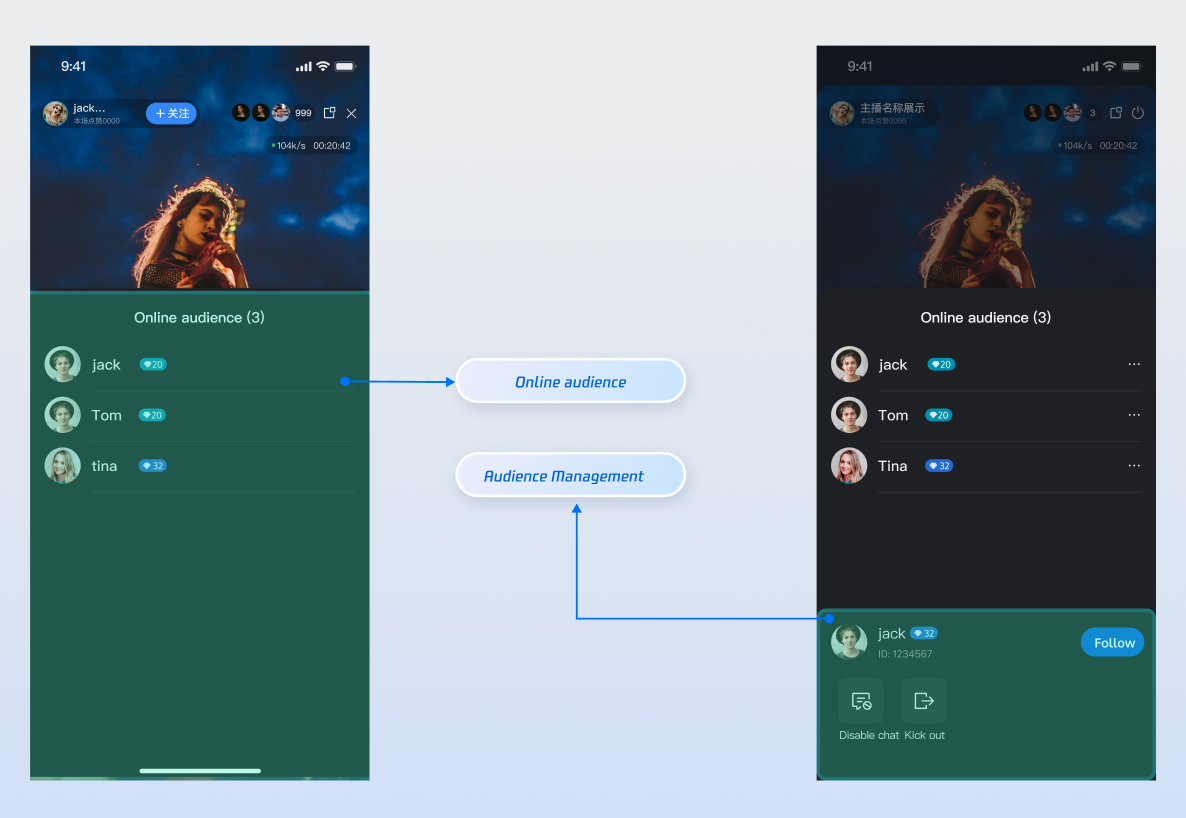
|
|
4
|
+
|
|
5
|
+
|
|
6
|
+
## Core Features
|
|
7
|
+
- **Real-Time Audience List**: Fetch and display the list of users currently in the room.
|
|
8
|
+
|
|
9
|
+
- **Audience Statistics**: Get the real-time total viewer count.
|
|
10
|
+
|
|
11
|
+
- **Event Monitoring**: Listen for events when viewers join or leave the room.
|
|
12
|
+
|
|
13
|
+
- **Role Management**: The host can grant or revoke administrator privileges for viewers.
|
|
14
|
+
|
|
15
|
+
- **Room Management**: The host or administrator can remove specific viewers from the live room.
|
|
16
|
+
|
|
17
|
+
|
|
18
|
+
## Core Concepts
|
|
19
|
+
<table>
|
|
20
|
+
<tr>
|
|
21
|
+
<td rowspan="1" colSpan="1" >**Core Concept**</td>
|
|
22
|
+
|
|
23
|
+
<td rowspan="1" colSpan="1" >**Type**</td>
|
|
24
|
+
|
|
25
|
+
<td rowspan="1" colSpan="1" >**Core Responsibilities & Description**</td>
|
|
26
|
+
</tr>
|
|
27
|
+
|
|
28
|
+
<tr>
|
|
29
|
+
<td rowspan="1" colSpan="1" >`LiveUserInfo`</td>
|
|
30
|
+
|
|
31
|
+
<td rowspan="1" colSpan="1" >`class`</td>
|
|
32
|
+
|
|
33
|
+
<td rowspan="1" colSpan="1" >- Data model representing a viewer.<br>- Contains basic profile information such as userID, userName, and avatarURL.</td>
|
|
34
|
+
</tr>
|
|
35
|
+
|
|
36
|
+
<tr>
|
|
37
|
+
<td rowspan="1" colSpan="1" >`LiveAudienceState`</td>
|
|
38
|
+
|
|
39
|
+
<td rowspan="1" colSpan="1" >`struct`</td>
|
|
40
|
+
|
|
41
|
+
<td rowspan="1" colSpan="1" >- State container for the audience module.<br>- Exposes `audienceList` (StateFlow) for the real-time user list and `audienceCount` for the total viewer count.</td>
|
|
42
|
+
</tr>
|
|
43
|
+
|
|
44
|
+
<tr>
|
|
45
|
+
<td rowspan="1" colSpan="1" >`LiveAudienceEvent`</td>
|
|
46
|
+
|
|
47
|
+
<td rowspan="1" colSpan="1" >`enum`</td>
|
|
48
|
+
|
|
49
|
+
<td rowspan="1" colSpan="1" >- Event listener for audience changes.<br>- Provides callbacks like `.onAudienceJoined` and` .onAudienceLeft` to handle incremental list updates.</td>
|
|
50
|
+
</tr>
|
|
51
|
+
|
|
52
|
+
<tr>
|
|
53
|
+
<td rowspan="1" colSpan="1" >`LiveAudienceStore`</td>
|
|
54
|
+
|
|
55
|
+
<td rowspan="1" colSpan="1" >`class`</td>
|
|
56
|
+
|
|
57
|
+
<td rowspan="1" colSpan="1" >- Primary interface for audience management.<br>- Used to fetch list snapshots, perform admin operations (e.g., kicking users), and subscribe to real-time events.</td>
|
|
58
|
+
</tr>
|
|
59
|
+
</table>
|
|
60
|
+
|
|
61
|
+
|
|
62
|
+
## Implementation
|
|
63
|
+
|
|
64
|
+
### Step 1: Component Integration
|
|
65
|
+
- **Video Live Streaming**: Please refer to [Quick Start](https://write.woa.com/document/194571606121816064) to integrate AtomicXCore.
|
|
66
|
+
|
|
67
|
+
- **Voice Chat Room**: Please refer to [Quick Start](https://write.woa.com/document/194571595685527552) to integrate AtomicXCore.
|
|
68
|
+
|
|
69
|
+
|
|
70
|
+
### Step 2: Initialize and Retrieve the Audience List
|
|
71
|
+
|
|
72
|
+
Get a `LiveAudienceStore` instance linked to the `liveId` and fetch the initial audience snapshot.
|
|
73
|
+
``` swift
|
|
74
|
+
import Foundation
|
|
75
|
+
import AtomicXCore
|
|
76
|
+
import Combine
|
|
77
|
+
|
|
78
|
+
class AudienceManager {
|
|
79
|
+
private let liveId: String
|
|
80
|
+
private let audienceStore: LiveAudienceStore
|
|
81
|
+
private var cancellables = Set<AnyCancellable>()
|
|
82
|
+
|
|
83
|
+
// Expose the [full] audience list publisher for UI layer subscription
|
|
84
|
+
let audienceListPublisher = CurrentValueSubject<[LiveUserInfo], Never>([])
|
|
85
|
+
// Expose the audience count publisher
|
|
86
|
+
let audienceCountPublisher = PassthroughSubject<UInt, Never>()
|
|
87
|
+
|
|
88
|
+
init(liveId: String) {
|
|
89
|
+
self.liveId = liveId
|
|
90
|
+
// 1. Get the LiveAudienceStore instance by liveId
|
|
91
|
+
self.audienceStore = LiveAudienceStore.create(liveID: liveId)
|
|
92
|
+
|
|
93
|
+
// 2. Subscribe to state and events
|
|
94
|
+
subscribeToAudienceState()
|
|
95
|
+
subscribeToAudienceEvents()
|
|
96
|
+
|
|
97
|
+
// 3. Proactively fetch initial data for the first screen
|
|
98
|
+
fetchInitialAudienceList()
|
|
99
|
+
}
|
|
100
|
+
|
|
101
|
+
/// Proactively fetch a snapshot of the audience list
|
|
102
|
+
func fetchInitialAudienceList() {
|
|
103
|
+
audienceStore.fetchAudienceList { [weak self] result in
|
|
104
|
+
switch result {
|
|
105
|
+
case .success:
|
|
106
|
+
print("Successfully fetched the audience list for the first time")
|
|
107
|
+
// On success, data will be automatically updated via the state subscription channel below
|
|
108
|
+
case .failure(let error):
|
|
109
|
+
print("Failed to fetch the audience list for the first time: \(error.localizedDescription)")
|
|
110
|
+
}
|
|
111
|
+
}
|
|
112
|
+
}
|
|
113
|
+
|
|
114
|
+
// ... subsequent code
|
|
115
|
+
}
|
|
116
|
+
```
|
|
117
|
+
|
|
118
|
+
### Step 3: Subscribe to State and Events
|
|
119
|
+
|
|
120
|
+
Observe the `audienceStore` state and listen for events to receive list snapshots and real-time join/leave updates
|
|
121
|
+
``` swift
|
|
122
|
+
extension AudienceManager {
|
|
123
|
+
/// Subscribe to state to get audience count and list snapshot
|
|
124
|
+
private func subscribeToAudienceState() {
|
|
125
|
+
audienceStore.state
|
|
126
|
+
.subscribe()
|
|
127
|
+
.receive(on: DispatchQueue.main)
|
|
128
|
+
.sink { [weak self] state in
|
|
129
|
+
// state.audienceList is a full snapshot
|
|
130
|
+
self?.audienceListPublisher.send(state.audienceList)
|
|
131
|
+
// state.audienceCount is the real-time total
|
|
132
|
+
self?.audienceCountPublisher.send(state.audienceCount)
|
|
133
|
+
}
|
|
134
|
+
.store(in: &cancellables)
|
|
135
|
+
}
|
|
136
|
+
|
|
137
|
+
/// Subscribe to events to handle real-time audience join/leave
|
|
138
|
+
private func subscribeToAudienceEvents() {
|
|
139
|
+
audienceStore.liveAudienceEventPublisher
|
|
140
|
+
.receive(on: DispatchQueue.main)
|
|
141
|
+
.sink { [weak self] event in
|
|
142
|
+
guard let self = self else { return }
|
|
143
|
+
|
|
144
|
+
var currentList = self.audienceListPublisher.value
|
|
145
|
+
|
|
146
|
+
switch event {
|
|
147
|
+
case .onAudienceJoined(let newAudience):
|
|
148
|
+
print("Audience \(newAudience.userName) joined the live room")
|
|
149
|
+
// Incremental update: add the new audience member to the end of the current list
|
|
150
|
+
if !currentList.contains(where: { $0.userID == newAudience.userID }) {
|
|
151
|
+
currentList.append(newAudience)
|
|
152
|
+
self.audienceListPublisher.send(currentList)
|
|
153
|
+
}
|
|
154
|
+
|
|
155
|
+
case .onAudienceLeft(let departedAudience):
|
|
156
|
+
print("Audience \(departedAudience.userName) left the live room")
|
|
157
|
+
// Incremental update: remove the departed audience member from the current list
|
|
158
|
+
currentList.removeAll { $0.userID == departedAudience.userID }
|
|
159
|
+
self.audienceListPublisher.send(currentList)
|
|
160
|
+
}
|
|
161
|
+
}
|
|
162
|
+
.store(in: &cancellables)
|
|
163
|
+
}
|
|
164
|
+
}
|
|
165
|
+
```
|
|
166
|
+
|
|
167
|
+
### Step 4: Manage Audience
|
|
168
|
+
|
|
169
|
+
As a host or administrator, you can manage viewers in the live room.
|
|
170
|
+
|
|
171
|
+
#### 4.1 Kick a Viewer Out of the Live Room
|
|
172
|
+
|
|
173
|
+
Call the `kickUserOutOfRoom` API to remove a specified user from the live room.
|
|
174
|
+
``` swift
|
|
175
|
+
extension AudienceManager {
|
|
176
|
+
func kick(userId: String) {
|
|
177
|
+
audienceStore.kickUserOutOfRoom(userID: userId) { result in
|
|
178
|
+
switch result {
|
|
179
|
+
case .success:
|
|
180
|
+
print("Successfully kicked user \(userId) out of the room")
|
|
181
|
+
// After a successful kick, you will receive an onAudienceLeft event
|
|
182
|
+
case .failure(let error):
|
|
183
|
+
print("Failed to kick user \(userId) out: \(error.localizedDescription)")
|
|
184
|
+
}
|
|
185
|
+
}
|
|
186
|
+
}
|
|
187
|
+
}
|
|
188
|
+
```
|
|
189
|
+
|
|
190
|
+
#### 4.2 Manage Admin Roles
|
|
191
|
+
|
|
192
|
+
Use the `setAdministrator` and `revokeAdministrator` APIs to grant or revoke administrator privileges for a user.
|
|
193
|
+
``` swift
|
|
194
|
+
extension AudienceManager {
|
|
195
|
+
/// Promote user to administrator
|
|
196
|
+
func promoteToAdmin(userId: String) {
|
|
197
|
+
audienceStore.setAdministrator(userID: userId) { result in
|
|
198
|
+
if case .success = result {
|
|
199
|
+
print("Successfully promoted user \(userId) to administrator")
|
|
200
|
+
}
|
|
201
|
+
}
|
|
202
|
+
}
|
|
203
|
+
|
|
204
|
+
/// Revoke user's administrator status
|
|
205
|
+
func revokeAdmin(userId: String) {
|
|
206
|
+
audienceStore.revokeAdministrator(userID: userId) { result in
|
|
207
|
+
if case .success = result {
|
|
208
|
+
print("Successfully revoked administrator status for user \(userId)")
|
|
209
|
+
}
|
|
210
|
+
}
|
|
211
|
+
}
|
|
212
|
+
}
|
|
213
|
+
```
|
|
214
|
+
|
|
215
|
+
## Advanced Features
|
|
216
|
+
|
|
217
|
+
### Display Welcome Message on Entry
|
|
218
|
+
|
|
219
|
+
When a new audience member enters the live room, a welcome message is automatically displayed locally in the barrage/chat area, such as: `"Welcome [User Nickname] to the live room"`.
|
|
220
|
+
|
|
221
|
+
#### Implementation
|
|
222
|
+
1. Listen for Join Events: Observe the `LiveAudienceEvent.onAudienceJoined` callback in `LiveAudienceStore` to receive real-time notifications when a new user enters.
|
|
223
|
+
|
|
224
|
+
2. Insert Local Message: Upon triggering the event, extract the user's nickname and immediately call the `appendLocalTip` API in BarrageStore to insert the system message locally.
|
|
225
|
+
|
|
226
|
+
``` swift
|
|
227
|
+
import Foundation
|
|
228
|
+
import AtomicXCore
|
|
229
|
+
import Combine
|
|
230
|
+
|
|
231
|
+
class LiveRoomManager {
|
|
232
|
+
private let liveId: String
|
|
233
|
+
private let audienceManager: AudienceManager
|
|
234
|
+
private let barrageManager: BarrageManager // Assume you have implemented BarrageManager as described in the barrage documentation
|
|
235
|
+
private var cancellables = Set<AnyCancellable>()
|
|
236
|
+
|
|
237
|
+
init(liveId: String) {
|
|
238
|
+
self.liveId = liveId
|
|
239
|
+
// Initialize two core managers
|
|
240
|
+
self.audienceManager = AudienceManager(liveId: liveId)
|
|
241
|
+
self.barrageManager = BarrageManager(liveId: liveId)
|
|
242
|
+
|
|
243
|
+
// Set up linkage
|
|
244
|
+
setupWelcomeMessageFlow()
|
|
245
|
+
}
|
|
246
|
+
|
|
247
|
+
private func setupWelcomeMessageFlow() {
|
|
248
|
+
// 1. Get the LiveAudienceStore instance
|
|
249
|
+
let audienceStore = LiveAudienceStore.create(liveID: self.liveId)
|
|
250
|
+
|
|
251
|
+
// 2. Get the BarrageStore instance (thanks to internal mechanisms, this will be the same instance)
|
|
252
|
+
let barrageStore = BarrageStore.create(liveID: self.liveId)
|
|
253
|
+
|
|
254
|
+
// 3. Subscribe to audience events
|
|
255
|
+
audienceStore.liveAudienceEventPublisher
|
|
256
|
+
.receive(on: DispatchQueue.main)
|
|
257
|
+
.sink { event in
|
|
258
|
+
// 4. Only handle audience join events
|
|
259
|
+
guard case .onAudienceJoined(let newAudience) = event else {
|
|
260
|
+
return
|
|
261
|
+
}
|
|
262
|
+
|
|
263
|
+
// 5. Create a local tip message
|
|
264
|
+
var welcomeTip = Barrage()
|
|
265
|
+
welcomeTip.messageType = .text
|
|
266
|
+
welcomeTip.textContent = "Welcome \(newAudience.userName) to the live room!"
|
|
267
|
+
|
|
268
|
+
// 6. Call BarrageStore's API to insert it into the barrage list
|
|
269
|
+
barrageStore.appendLocalTip(message: welcomeTip)
|
|
270
|
+
}
|
|
271
|
+
.store(in: &cancellables)
|
|
272
|
+
}
|
|
273
|
+
}
|
|
274
|
+
```
|
|
275
|
+
|
|
276
|
+
## API Documentation
|
|
277
|
+
|
|
278
|
+
For detailed information on all public interfaces, properties, and methods of [LiveAudienceStore](https://tencent-rtc.github.io/TUIKit_iOS/documentation/atomicxcore/liveaudiencestore) and its related classes, refer to the official API documentation included with the [AtomicX Core](https://tencent-rtc.github.io/TUIKit_iOS/documentation/atomicxcore) framework. The relevant Stores used in this document are as follows:
|
|
279
|
+
<table>
|
|
280
|
+
<tr>
|
|
281
|
+
<td rowspan="1" colSpan="1" >**Store/Component**</td>
|
|
282
|
+
|
|
283
|
+
<td rowspan="1" colSpan="1" >**Feature Description**</td>
|
|
284
|
+
|
|
285
|
+
<td rowspan="1" colSpan="1" >**API Documentation**</td>
|
|
286
|
+
</tr>
|
|
287
|
+
|
|
288
|
+
<tr>
|
|
289
|
+
<td rowspan="1" colSpan="1" >LiveCoreView</td>
|
|
290
|
+
|
|
291
|
+
<td rowspan="1" colSpan="1" >Core view component for live video stream display and interaction: responsible for video stream rendering and view widget handling, supporting scenarios such as host streaming, audience co-hosting, and host-to-host connection.</td>
|
|
292
|
+
|
|
293
|
+
<td rowspan="1" colSpan="1" >[API Documentation](https://tencent-rtc.github.io/TUIKit_iOS/documentation/atomicxcore/livecoreview)</td>
|
|
294
|
+
</tr>
|
|
295
|
+
|
|
296
|
+
<tr>
|
|
297
|
+
<td rowspan="1" colSpan="1" >LiveAudienceStore</td>
|
|
298
|
+
|
|
299
|
+
<td rowspan="1" colSpan="1" >Audience management: obtain real-time audience list (ID / name / avatar), count audience numbers, and listen for audience join/leave events.</td>
|
|
300
|
+
|
|
301
|
+
<td rowspan="1" colSpan="1" >[API Documentation](https://tencent-rtc.github.io/TUIKit_iOS/documentation/atomicxcore/liveaudiencestore)</td>
|
|
302
|
+
</tr>
|
|
303
|
+
|
|
304
|
+
<tr>
|
|
305
|
+
<td rowspan="1" colSpan="1" >BarrageStore</td>
|
|
306
|
+
|
|
307
|
+
<td rowspan="1" colSpan="1" >Barrage feature: send text/custom barrage, maintain barrage list, and listen to barrage status in real time.</td>
|
|
308
|
+
|
|
309
|
+
<td rowspan="1" colSpan="1" >[API Documentation](https://tencent-rtc.github.io/TUIKit_iOS/documentation/atomicxcore/barragestore)</td>
|
|
310
|
+
</tr>
|
|
311
|
+
</table>
|
|
312
|
+
|
|
313
|
+
|
|
314
|
+
## FAQs
|
|
315
|
+
|
|
316
|
+
### How is the online audience count (audienceCount) in LiveAudienceState updated? What are the timing and frequency?
|
|
317
|
+
|
|
318
|
+
The `audienceCount` is a high-precision estimate. Updates occur based on specific triggers and are subject to system frequency controls:
|
|
319
|
+
- **Active Entry/Exit (Immediate)**:When a user explicitly joins or leaves the room, the count updates immediately in `LiveAudienceState`.
|
|
320
|
+
|
|
321
|
+
- **Unexpected Disconnection (Delayed)**:If a user disconnects abnormally (e.g., app crash, network loss), the system uses a heartbeat mechanism to verify status. The user is marked offline only after 90 seconds of inactivity, triggering a delayed count update.
|
|
322
|
+
|
|
323
|
+
- **Frequency Control & Rate Limiting**: Audience count updates are broadcast as room messages. The system enforces a limit of 40 messages per second per room.
|
|
324
|
+
|
|
325
|
+
|
|
326
|
+
> **Note:**
|
|
327
|
+
>
|
|
328
|
+
|
|
329
|
+
> During high-traffic spikes (e.g., chat floods or rapid gifting), if the message rate exceeds this threshold, the system prioritizes core messages (like chat/barrage). Consequently, audience count update messages may be dropped to maintain stability.
|
|
330
|
+
>
|
|
331
|
+
|
|
332
|
+
- **What does this mean for developers?**
|
|
333
|
+
|
|
334
|
+
|
|
335
|
+
Treat `audienceCount` as a metric for UI display purposes only. Do not rely on it for billing, critical statistics, or scenarios requiring 100% accuracy, as brief delays or data loss may occur during high-concurrency events.
|
|
336
|
+
|
|
337
|
+
|
|
338
|
+
|
|
339
|
+
|