@tencent-rtc/mcp 1.3.2 → 1.3.3
This diff represents the content of publicly available package versions that have been released to one of the supported registries. The information contained in this diff is provided for informational purposes only and reflects changes between package versions as they appear in their respective public registries.
- package/package.json +1 -1
- package/resource/doc/livekit/live/android/live-audience-list.md +334 -0
- package/resource/doc/livekit/live/android/live-audio-effect.md +380 -0
- package/resource/doc/livekit/live/android/live-barrage.md +565 -0
- package/resource/doc/livekit/live/android/live-base-beauty.md +275 -0
- package/resource/doc/livekit/live/android/live-co-guest-interaction.md +629 -0
- package/resource/doc/livekit/live/android/live-gift.md +822 -0
- package/resource/doc/livekit/live/android/live-host-interaction.md +888 -0
- package/resource/doc/livekit/live/android/live-integration.md +972 -0
- package/resource/doc/livekit/live/android/live-live-list.md +575 -0
- package/resource/doc/livekit/live/android/workflow.md +189 -0
- package/tools/common/record-prompt.js +2 -2
- package/tools/common/record-prompt.js.map +1 -1
- package/tools/definitions/get_native_live_extra_features_def.js +87 -0
- package/tools/definitions/get_native_live_extra_features_def.js.map +1 -0
- package/tools/definitions/get_native_live_interaction_def.js +74 -0
- package/tools/definitions/get_native_live_interaction_def.js.map +1 -0
- package/tools/definitions/get_native_live_uikit_integration_def.js +49 -0
- package/tools/definitions/get_native_live_uikit_integration_def.js.map +1 -0
- package/tools/definitions/record_prompt_def.js +1 -1
- package/tools/definitions/record_prompt_def.js.map +1 -1
- package/tools/index.js +6 -0
- package/tools/index.js.map +1 -1
- package/tools/live/get-native-live-uikit-integration.js +101 -0
- package/tools/live/get-native-live-uikit-integration.js.map +1 -0
- package/tools/live/get-web-live-component-detail.js +1 -1
- package/tools/live/get-web-live-component-detail.js.map +1 -1
- package/tools/live/get-web-live-state-detail.js +1 -1
- package/tools/live/get-web-live-state-detail.js.map +1 -1
- package/tools/live/get-web-live-uikit-integration.js +6 -6
- package/tools/live/get-web-live-uikit-integration.js.map +1 -1
- package/tools/live/get_native_live_extra_features.js +105 -0
- package/tools/live/get_native_live_extra_features.js.map +1 -0
- package/tools/live/get_native_live_interaction.js +101 -0
- package/tools/live/get_native_live_interaction.js.map +1 -0
- package/utils/report-cls-client.js +1 -1
- package/utils/report-es-client.js +1 -1
- /package/resource/doc/livekit/{vue → live/vue}/components/barrage.md +0 -0
- /package/resource/doc/livekit/{vue → live/vue}/components/co-guest-panel.md +0 -0
- /package/resource/doc/livekit/{vue → live/vue}/components/live-audience-list.md +0 -0
- /package/resource/doc/livekit/{vue → live/vue}/components/live-scene-panel.md +0 -0
- /package/resource/doc/livekit/{vue → live/vue}/components/live-view.md +0 -0
- /package/resource/doc/livekit/{vue → live/vue}/components/stream-mixer.md +0 -0
- /package/resource/doc/livekit/{vue → live/vue}/faq.md +0 -0
- /package/resource/doc/livekit/{vue → live/vue}/live-list-integration.md +0 -0
- /package/resource/doc/livekit/{vue → live/vue}/live-player-desk-integration.md +0 -0
- /package/resource/doc/livekit/{vue → live/vue}/live-player-h5-integration.md +0 -0
- /package/resource/doc/livekit/{vue → live/vue}/live-pusher-integration.md +0 -0
- /package/resource/doc/livekit/{vue → live/vue}/states/live-state.md +0 -0
- /package/resource/doc/livekit/{vue → live/vue}/workflow.md +0 -0
|
@@ -0,0 +1,888 @@
|
|
|
1
|
+
**AtomicXCore** provides two primary modules: [CoHostStore](https://tencent-rtc.github.io/TUIKit_Android/-atomic-x%20-core%20-a-p-i/io.trtc.tuikit.atomicxcore.api.live/-co-host-store/index.html) and [BattleStore](https://tencent-rtc.github.io/TUIKit_Android/-atomic-x%20-core%20-a-p-i/io.trtc.tuikit.atomicxcore.api.live/-battle-store/index.html), which handle cross-room co-hosting and PK battles respectively. This guide walks you through using both modules together to implement the complete workflow from co-hosting to PK in a live streaming scenario.
|
|
2
|
+
|
|
3
|
+
## Core Scenario
|
|
4
|
+
|
|
5
|
+
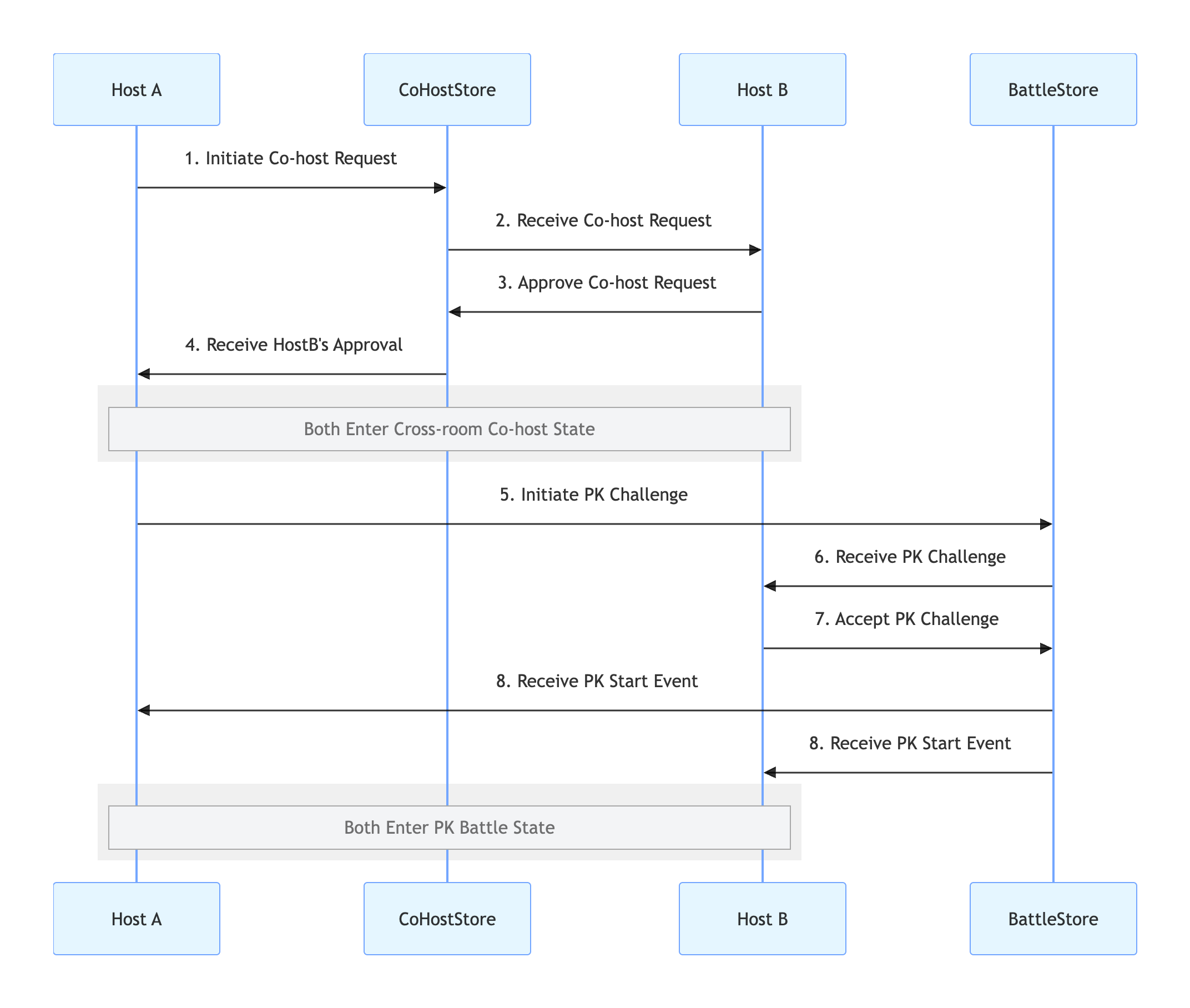
A typical "Host Co-hosting PK" session consists of three main stages, as shown below:
|
|
6
|
+
1. **Cross-room Co-hosting**: Two hosts connect, and both video streams are displayed in a shared view.
|
|
7
|
+
|
|
8
|
+
2. **Initiate PK**: After the connection is established, either host can start a PK challenge.
|
|
9
|
+
|
|
10
|
+
3. **PK Battle**: Both hosts compete in a PK battle, with scores updated in real time.
|
|
11
|
+
|
|
12
|
+
|
|
13
|
+
|
|
14
|
+
|
|
15
|
+
## Implementation
|
|
16
|
+
|
|
17
|
+
### Step 1: Component Integration
|
|
18
|
+
|
|
19
|
+
Refer to [Quick Start](https://write.woa.com/document/194571606056804352) to integrate AtomicXCore and complete the setup of LiveCoreView.
|
|
20
|
+
|
|
21
|
+
### Step 2: Implement Cross-Room Co-hosting
|
|
22
|
+
|
|
23
|
+
The goal of this step is to display the video streams of two hosts in the same view. Use [CoHostStore](https://tencent-rtc.github.io/TUIKit_Android/-atomic-x%20-core%20-a-p-i/io.trtc.tuikit.atomicxcore.api.live/-co-host-store/index.html) to achieve this.
|
|
24
|
+
|
|
25
|
+
#### Inviter (Host A) Implementation
|
|
26
|
+
1. **Initiate Co-hosting Invitation**
|
|
27
|
+
|
|
28
|
+
|
|
29
|
+
When Host A selects Host B in the UI and initiates a co-hosting request, call the `requestHostConnection` method.
|
|
30
|
+
|
|
31
|
+
``` kotlin
|
|
32
|
+
import androidx.appcompat.app.AppCompatActivity
|
|
33
|
+
import io.trtc.tuikit.atomicxcore.api.CompletionHandler
|
|
34
|
+
import io.trtc.tuikit.atomicxcore.api.live.CoHostLayoutTemplate
|
|
35
|
+
import io.trtc.tuikit.atomicxcore.api.live.CoHostStore
|
|
36
|
+
|
|
37
|
+
// Host A's Activity
|
|
38
|
+
class HostAActivity : AppCompatActivity() {
|
|
39
|
+
private val liveId = "hostA_roomID" // Host A's Room ID
|
|
40
|
+
private val coHostStore = CoHostStore.create(liveId)
|
|
41
|
+
|
|
42
|
+
// User clicks the "Co-host" button and selects Host B
|
|
43
|
+
fun inviteHostB(targetHostLiveId: String) {
|
|
44
|
+
val layout = CoHostLayoutTemplate.HOST_DYNAMIC_GRID // Select a layout template
|
|
45
|
+
val timeout = 30 // Invitation timeout (seconds)
|
|
46
|
+
|
|
47
|
+
coHostStore.requestHostConnection(
|
|
48
|
+
targetHostLiveID = targetHostLiveId,
|
|
49
|
+
layoutTemplate = layout,
|
|
50
|
+
timeout = timeout,
|
|
51
|
+
extraInfo = null,
|
|
52
|
+
completion = object : CompletionHandler {
|
|
53
|
+
override fun onSuccess() {
|
|
54
|
+
println("Co-hosting invitation sent, waiting for response...")
|
|
55
|
+
}
|
|
56
|
+
|
|
57
|
+
override fun onFailure(code: Int, desc: String) {
|
|
58
|
+
println("Invitation failed to send: $desc")
|
|
59
|
+
}
|
|
60
|
+
}
|
|
61
|
+
)
|
|
62
|
+
}
|
|
63
|
+
}
|
|
64
|
+
```
|
|
65
|
+
2. **Listen for Invitation Result**
|
|
66
|
+
|
|
67
|
+
|
|
68
|
+
Receive Host B's response via the CoHostListener callback methods.
|
|
69
|
+
|
|
70
|
+
``` java
|
|
71
|
+
import android.os.Bundle
|
|
72
|
+
import androidx.appcompat.app.AppCompatActivity
|
|
73
|
+
import io.trtc.tuikit.atomicxcore.api.live.CoHostListener
|
|
74
|
+
import io.trtc.tuikit.atomicxcore.api.live.CoHostStore
|
|
75
|
+
import io.trtc.tuikit.atomicxcore.api.live.SeatUserInfo
|
|
76
|
+
|
|
77
|
+
class HostAActivity : AppCompatActivity() {
|
|
78
|
+
private val liveId = "hostA_roomID" // Host A's Room ID
|
|
79
|
+
private val coHostStore = CoHostStore.create(liveId)
|
|
80
|
+
private val coHostListener = object : CoHostListener() {
|
|
81
|
+
override fun onCoHostRequestAccepted(invitee: SeatUserInfo) {
|
|
82
|
+
println("Host ${invitee.userName} accepted your co-hosting invitation")
|
|
83
|
+
}
|
|
84
|
+
|
|
85
|
+
override fun onCoHostRequestRejected(invitee: SeatUserInfo) {
|
|
86
|
+
println("Host ${invitee.userName} rejected your invitation")
|
|
87
|
+
}
|
|
88
|
+
|
|
89
|
+
override fun onCoHostRequestTimeout(inviter: SeatUserInfo, invitee: SeatUserInfo) {
|
|
90
|
+
println("Invitation timed out, no response received")
|
|
91
|
+
}
|
|
92
|
+
}
|
|
93
|
+
|
|
94
|
+
override fun onCreate(savedInstanceState: Bundle?) {
|
|
95
|
+
super.onCreate(savedInstanceState)
|
|
96
|
+
// ... initialization code ...
|
|
97
|
+
|
|
98
|
+
// Initialize CoHostStore
|
|
99
|
+
coHostStore.addCoHostListener(coHostListener)
|
|
100
|
+
}
|
|
101
|
+
}
|
|
102
|
+
```
|
|
103
|
+
|
|
104
|
+
#### Invitee (Host B) Implementation
|
|
105
|
+
1. **Receive Co-hosting Invitation**
|
|
106
|
+
|
|
107
|
+
|
|
108
|
+
Host B listens for invitations from Host A via `CoHostListener`.
|
|
109
|
+
|
|
110
|
+
``` kotlin
|
|
111
|
+
import androidx.appcompat.app.AppCompatActivity
|
|
112
|
+
import io.trtc.tuikit.atomicxcore.api.live.CoHostListener
|
|
113
|
+
import io.trtc.tuikit.atomicxcore.api.live.CoHostStore
|
|
114
|
+
import io.trtc.tuikit.atomicxcore.api.live.SeatUserInfo
|
|
115
|
+
|
|
116
|
+
// Host B's Activity
|
|
117
|
+
class HostBActivity : AppCompatActivity() {
|
|
118
|
+
private val liveId = "hostB_roomID" // Host B's Room ID
|
|
119
|
+
private val coHostStore = CoHostStore.create(liveId)
|
|
120
|
+
|
|
121
|
+
private val coHostListener = object : CoHostListener() {
|
|
122
|
+
override fun onCoHostRequestReceived(inviter: SeatUserInfo, extensionInfo: String) {
|
|
123
|
+
println("Received co-hosting invitation from Host ${inviter.userName}")
|
|
124
|
+
// Display invitation dialog to respond
|
|
125
|
+
// showInvitationDialog(inviter)
|
|
126
|
+
}
|
|
127
|
+
}
|
|
128
|
+
}
|
|
129
|
+
```
|
|
130
|
+
2. **Respond to Co-hosting Invitation**
|
|
131
|
+
|
|
132
|
+
|
|
133
|
+
After Host B receives the invitation, prompt for “Accept” or “Reject” and call the appropriate method:
|
|
134
|
+
|
|
135
|
+
``` kotlin
|
|
136
|
+
// Part of HostBActivity
|
|
137
|
+
fun acceptInvitation(fromHostLiveId: String) {
|
|
138
|
+
coHostStore.acceptHostConnection(fromHostLiveID = fromHostLiveId, completion = null)
|
|
139
|
+
}
|
|
140
|
+
|
|
141
|
+
fun rejectInvitation(fromHostLiveId: String) {
|
|
142
|
+
coHostStore.rejectHostConnection(fromHostLiveID = fromHostLiveId, completion = null)
|
|
143
|
+
}
|
|
144
|
+
```
|
|
145
|
+
|
|
146
|
+
### Step 3: Implement Host PK
|
|
147
|
+
|
|
148
|
+
After a successful co-hosting connection, either host can initiate a PK. Use [BattleStore](https://tencent-rtc.github.io/TUIKit_iOS/documentation/atomicxcore/battlestore) for PK functionality.
|
|
149
|
+
|
|
150
|
+
#### Challenger (e.g., Host A) Implementation
|
|
151
|
+
1. **Initiate PK Challenge**
|
|
152
|
+
|
|
153
|
+
|
|
154
|
+
When Host A clicks the "PK" button, call the `requestBattle` method.
|
|
155
|
+
|
|
156
|
+
``` kotlin
|
|
157
|
+
// Part of HostAActivity
|
|
158
|
+
class HostAActivity : AppCompatActivity() {
|
|
159
|
+
private val liveId = "hostA_roomID" // Host A's Room ID
|
|
160
|
+
private val battleStore = BattleStore.create(liveId)
|
|
161
|
+
|
|
162
|
+
fun startPK(opponentUserId: String) {
|
|
163
|
+
val config = BattleConfig(duration = 300) // PK lasts 5 minutes
|
|
164
|
+
battleStore.requestBattle(
|
|
165
|
+
config = config,
|
|
166
|
+
userIDList = listOf(opponentUserId),
|
|
167
|
+
timeout = 30,
|
|
168
|
+
completion = null
|
|
169
|
+
)
|
|
170
|
+
}
|
|
171
|
+
}
|
|
172
|
+
```
|
|
173
|
+
2. **Listen for PK Status**
|
|
174
|
+
|
|
175
|
+
|
|
176
|
+
Use `BattleListener` to monitor key events such as the start and end of PK.
|
|
177
|
+
|
|
178
|
+
``` java
|
|
179
|
+
// Part of HostAActivity
|
|
180
|
+
class HostAActivity : AppCompatActivity() {
|
|
181
|
+
private val liveId = "hostA_roomID" // Host A's Room ID
|
|
182
|
+
private val battleStore = BattleStore.create(liveId)
|
|
183
|
+
|
|
184
|
+
private val battleListener = object : BattleListener() {
|
|
185
|
+
override fun onBattleStarted(
|
|
186
|
+
battleInfo: BattleInfo,
|
|
187
|
+
inviter: SeatUserInfo,
|
|
188
|
+
invitees: List<SeatUserInfo>
|
|
189
|
+
) {
|
|
190
|
+
println("PK started")
|
|
191
|
+
}
|
|
192
|
+
|
|
193
|
+
override fun onBattleEnded(battleInfo: BattleInfo, reason: BattleEndedReason?) {
|
|
194
|
+
println("PK ended")
|
|
195
|
+
}
|
|
196
|
+
}
|
|
197
|
+
|
|
198
|
+
override fun onCreate(savedInstanceState: Bundle?) {
|
|
199
|
+
super.onCreate(savedInstanceState)
|
|
200
|
+
// ... other initialization code ...
|
|
201
|
+
battleStore.addBattleListener(battleListener)
|
|
202
|
+
}
|
|
203
|
+
}
|
|
204
|
+
```
|
|
205
|
+
|
|
206
|
+
#### Opponent (Host B) Implementation
|
|
207
|
+
1. **Receive PK Challenge**
|
|
208
|
+
|
|
209
|
+
|
|
210
|
+
Listen for PK invitations via `BattleListener`.
|
|
211
|
+
|
|
212
|
+
``` kotlin
|
|
213
|
+
// Add to HostBActivity
|
|
214
|
+
class HostBActivity : AppCompatActivity() {
|
|
215
|
+
private val liveId = "hostB_roomID" // Host B's Room ID
|
|
216
|
+
private val battleStore = BattleStore.create(liveId)
|
|
217
|
+
|
|
218
|
+
private val battleListener = object : BattleListener() {
|
|
219
|
+
override fun onBattleRequestReceived(battleID: String, inviter: SeatUserInfo, invitee: SeatUserInfo) {
|
|
220
|
+
println("Received PK challenge from Host ${inviter.userName}")
|
|
221
|
+
// Pop up a dialog for Host B to choose "Accept" or "Reject"
|
|
222
|
+
// showPKChallengeDialog(battleID, inviter)
|
|
223
|
+
}
|
|
224
|
+
}
|
|
225
|
+
|
|
226
|
+
override fun onCreate(savedInstanceState: Bundle?) {
|
|
227
|
+
super.onCreate(savedInstanceState)
|
|
228
|
+
// ... other initialization code ...
|
|
229
|
+
battleStore.addBattleListener(battleListener)
|
|
230
|
+
}
|
|
231
|
+
}
|
|
232
|
+
```
|
|
233
|
+
2. **Respond to PK Challenge**
|
|
234
|
+
|
|
235
|
+
|
|
236
|
+
Prompt Host B for “Accept” or “Reject” and call the corresponding method:
|
|
237
|
+
|
|
238
|
+
``` kotlin
|
|
239
|
+
// Part of HostBActivity
|
|
240
|
+
// User clicks "Accept Challenge"
|
|
241
|
+
fun acceptPK(battleId: String) {
|
|
242
|
+
battleStore.acceptBattle(battleID = battleId, completion = null)
|
|
243
|
+
}
|
|
244
|
+
|
|
245
|
+
// User clicks "Reject Challenge"
|
|
246
|
+
fun rejectPK(battleId: String) {
|
|
247
|
+
battleStore.rejectBattle(battleID = battleId, completion = null)
|
|
248
|
+
}
|
|
249
|
+
```
|
|
250
|
+
|
|
251
|
+
### Step 4: End PK and Disconnect Co-hosting
|
|
252
|
+
|
|
253
|
+
After the PK session, end the PK and disconnect co-hosting in sequence.
|
|
254
|
+
1. **End PK Battle**
|
|
255
|
+
|
|
256
|
+
|
|
257
|
+
PK typically ends automatically when the timer expires, but hosts can also end PK early. Use `exitBattle`:
|
|
258
|
+
|
|
259
|
+
|
|
260
|
+
> **Note****:**After PK ends, both hosts remain connected (side-by-side video streams). Only the PK progress bar and score panel are removed.
|
|
261
|
+
>
|
|
262
|
+
|
|
263
|
+
``` java
|
|
264
|
+
fun stopPK(battleId: String) {
|
|
265
|
+
battleStore.exitBattle(battleID = battleId, completion = object : CompletionHandler {
|
|
266
|
+
override fun onSuccess() {
|
|
267
|
+
println("PK ended")
|
|
268
|
+
// Handle UI refresh in onBattleEnded event
|
|
269
|
+
}
|
|
270
|
+
override fun onFailure(code: Int, desc: String) {
|
|
271
|
+
println("Failed to end PK: $desc")
|
|
272
|
+
}
|
|
273
|
+
})
|
|
274
|
+
}
|
|
275
|
+
```
|
|
276
|
+
2. **Disconnect Cross-room Co-hosting**
|
|
277
|
+
|
|
278
|
+
|
|
279
|
+
To return to solo live streaming, call `exitHostConnection`:
|
|
280
|
+
|
|
281
|
+
``` java
|
|
282
|
+
fun stopConnection() {
|
|
283
|
+
coHostStore.exitHostConnection(completion = object : CompletionHandler {
|
|
284
|
+
override fun onSuccess() {
|
|
285
|
+
println("Co-hosting disconnected, back to solo live")
|
|
286
|
+
// UI will receive onCoHostUserLeft event
|
|
287
|
+
}
|
|
288
|
+
override fun onFailure(code: Int, desc: String) {
|
|
289
|
+
println("Failed to disconnect co-hosting: $desc")
|
|
290
|
+
}
|
|
291
|
+
})
|
|
292
|
+
}
|
|
293
|
+
```
|
|
294
|
+
3. **Listen for End Events**
|
|
295
|
+
|
|
296
|
+
|
|
297
|
+
Handle UI cleanup in event listeners for consistency:
|
|
298
|
+
|
|
299
|
+
``` java
|
|
300
|
+
private val battleListener = object : BattleListener() {
|
|
301
|
+
override fun onBattleEnded(battleInfo: BattleInfo, reason: BattleEndedReason?) {
|
|
302
|
+
println("Received PK end event, reason: $reason")
|
|
303
|
+
// Remove PK score view, progress bar, etc.
|
|
304
|
+
// runOnUiThread { removeBattleUI() }
|
|
305
|
+
}
|
|
306
|
+
}
|
|
307
|
+
|
|
308
|
+
private val coHostListener = object : CoHostListener() {
|
|
309
|
+
override fun onCoHostUserLeft(userInfo: SeatUserInfo) {
|
|
310
|
+
println("Host ${userInfo.userName} has left the co-hosting session")
|
|
311
|
+
// Remove the other host's video view and restore solo live layout
|
|
312
|
+
// runOnUiThread { resetToSingleStreamLayout() }
|
|
313
|
+
}
|
|
314
|
+
}
|
|
315
|
+
```
|
|
316
|
+
|
|
317
|
+
### Run and Test
|
|
318
|
+
|
|
319
|
+
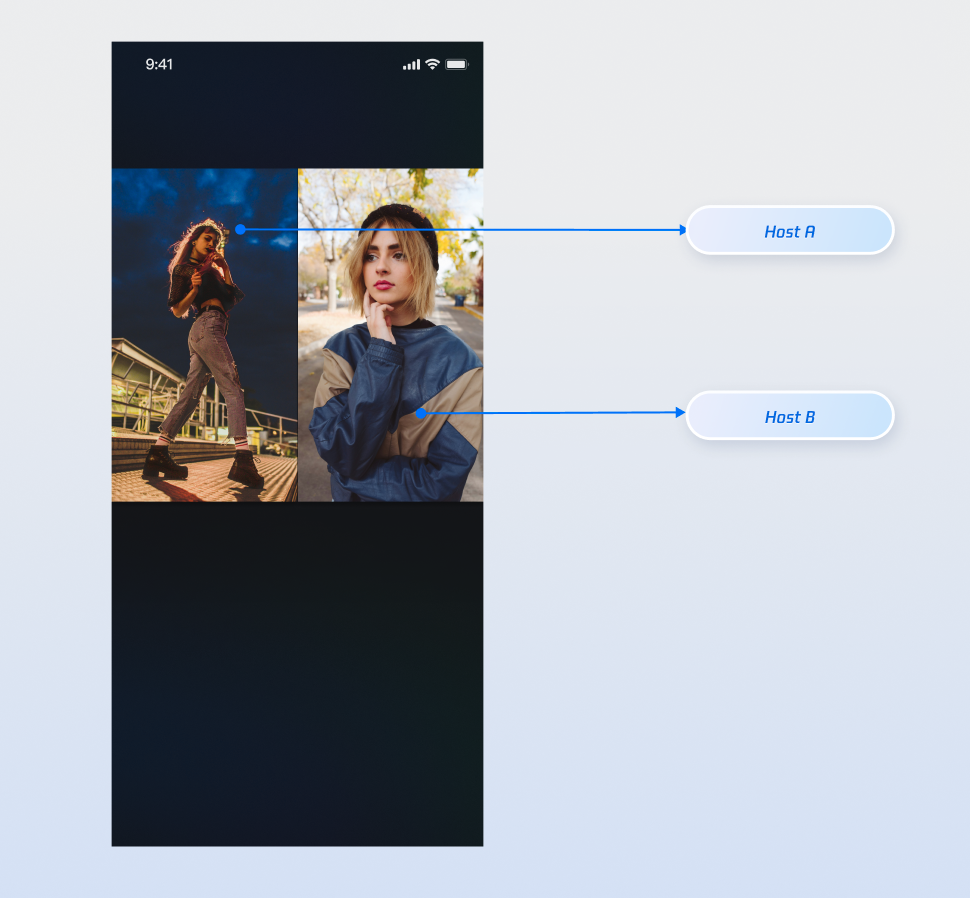
After integrating the above features, use Host A and Host B to test the corresponding operations. The runtime effect is shown below. For UI customization, see [Refine UI Details](https://write.woa.com/#.E5.AE.8C.E5.96.84-ui-.E7.BB.86.E8.8A.82).
|
|
320
|
+
|
|
321
|
+
|
|
322
|
+
|
|
323
|
+
|
|
324
|
+
## Refine UI Details
|
|
325
|
+
|
|
326
|
+
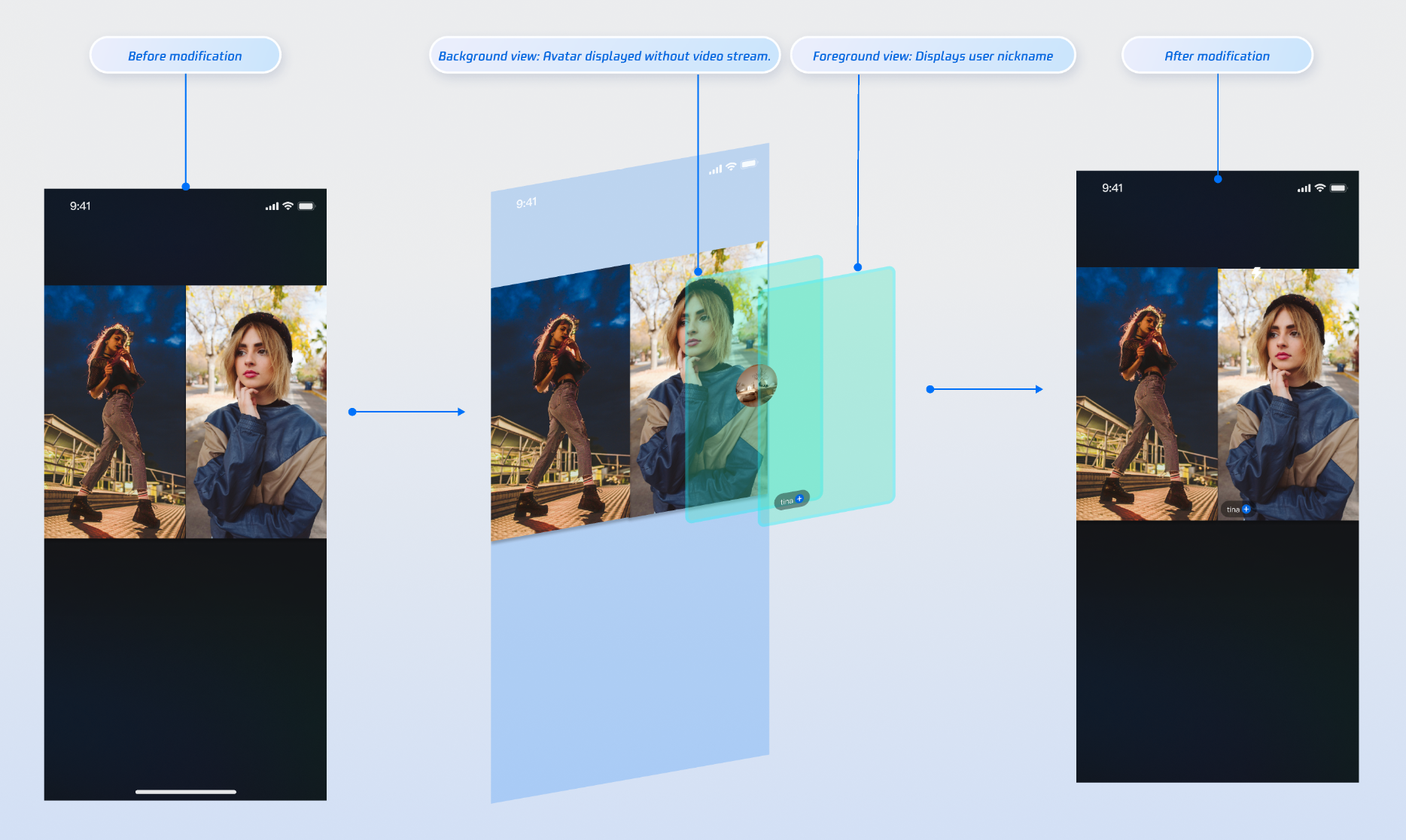
Use the slot capability in the `VideoViewAdapter` interface to overlay custom views on video streams, such as nicknames, avatars, PK progress bars, or placeholder images when the host’s camera is off.
|
|
327
|
+
|
|
328
|
+
### Display Nicknames on Video Streams
|
|
329
|
+
|
|
330
|
+
#### Implementation Example
|
|
331
|
+
|
|
332
|
+
|
|
333
|
+
|
|
334
|
+
|
|
335
|
+
#### Implementation
|
|
336
|
+
- **Step 1**: Create a foreground view `CustomSeatView` to display user information above the video stream.
|
|
337
|
+
|
|
338
|
+
|
|
339
|
+
> **Note:**
|
|
340
|
+
>
|
|
341
|
+
|
|
342
|
+
> For a complete implementation, refer to the [widgets](https://github.com/Tencent-RTC/TUIKit_Android/tree/main/live/tuilivekit/src/main/java/com/trtc/uikit/livekit/features/anchorboardcast/view/cohost/widgets) directory in the open-source TUILiveKit project.
|
|
343
|
+
>
|
|
344
|
+
|
|
345
|
+
``` kotlin
|
|
346
|
+
import android.content.Context
|
|
347
|
+
import android.graphics.Color
|
|
348
|
+
import android.view.Gravity
|
|
349
|
+
import android.widget.LinearLayout
|
|
350
|
+
import android.widget.TextView
|
|
351
|
+
|
|
352
|
+
// Custom user information overlay view (Foreground)
|
|
353
|
+
class CustomSeatView(context: Context) : LinearLayout(context) {
|
|
354
|
+
private val nameLabel: TextView
|
|
355
|
+
|
|
356
|
+
init {
|
|
357
|
+
orientation = VERTICAL
|
|
358
|
+
setBackgroundColor(Color.parseColor("#80000000")) // Semi-transparent black background
|
|
359
|
+
|
|
360
|
+
nameLabel = TextView(context).apply {
|
|
361
|
+
setTextColor(Color.WHITE)
|
|
362
|
+
textSize = 14f
|
|
363
|
+
gravity = Gravity.CENTER
|
|
364
|
+
}
|
|
365
|
+
|
|
366
|
+
addView(nameLabel)
|
|
367
|
+
val layoutParams = nameLabel.layoutParams as LayoutParams
|
|
368
|
+
layoutParams.setMargins(5, 0, 5, 5)
|
|
369
|
+
}
|
|
370
|
+
|
|
371
|
+
fun setUserName(userName: String) {
|
|
372
|
+
nameLabel.text = userName
|
|
373
|
+
}
|
|
374
|
+
}
|
|
375
|
+
```
|
|
376
|
+
- **Step 2**: Create a background view `CustomAvatarView `to serve as a placeholder when the user has no video stream.
|
|
377
|
+
|
|
378
|
+
``` kotlin
|
|
379
|
+
import com.tencent.cloud.tuikit.engine.room.TUIRoomDefine
|
|
380
|
+
import android.view.View
|
|
381
|
+
import androidx.appcompat.app.AppCompatActivity
|
|
382
|
+
import io.trtc.tuikit.atomicxcore.api.ViewLayer
|
|
383
|
+
import io.trtc.tuikit.atomicxcore.api.VideoViewAdapter
|
|
384
|
+
|
|
385
|
+
// 1. In your Activity, implement the VideoViewAdapter interface
|
|
386
|
+
class YourActivity : AppCompatActivity(), VideoViewAdapter {
|
|
387
|
+
|
|
388
|
+
// ... Other code ...
|
|
389
|
+
|
|
390
|
+
// 2. Fully implement the interface method to handle both view layers
|
|
391
|
+
override fun createCoHostView(coHostUser: TUIRoomDefine.SeatFullInfo?, viewLayer: ViewLayer?): View? {
|
|
392
|
+
val seatInfo = coHostUser ?: return null
|
|
393
|
+
val userId = seatInfo.userId
|
|
394
|
+
if (userId.isNullOrEmpty()) {
|
|
395
|
+
return null
|
|
396
|
+
}
|
|
397
|
+
|
|
398
|
+
return when (viewLayer) {
|
|
399
|
+
ViewLayer.FOREGROUND -> {
|
|
400
|
+
val seatView = CustomSeatView(this)
|
|
401
|
+
seatView.setUserName(seatInfo.userName ?: "")
|
|
402
|
+
seatView
|
|
403
|
+
}
|
|
404
|
+
ViewLayer.BACKGROUND -> {
|
|
405
|
+
val avatarView = CustomAvatarView(this)
|
|
406
|
+
// You can load the user's real avatar here using seatInfo.userAvatar
|
|
407
|
+
avatarView
|
|
408
|
+
}
|
|
409
|
+
null -> null
|
|
410
|
+
}
|
|
411
|
+
}
|
|
412
|
+
}
|
|
413
|
+
```
|
|
414
|
+
- **Step 3**: Implement the `VideoViewAdapter.createCoHostView` method, returning the appropriate view based on `viewLayer`.
|
|
415
|
+
|
|
416
|
+
``` kotlin
|
|
417
|
+
import com.tencent.cloud.tuikit.engine.room.TUIRoomDefine
|
|
418
|
+
import android.view.View
|
|
419
|
+
import androidx.appcompat.app.AppCompatActivity
|
|
420
|
+
import io.trtc.tuikit.atomicxcore.api.ViewLayer
|
|
421
|
+
import io.trtc.tuikit.atomicxcore.api.VideoViewAdapter
|
|
422
|
+
|
|
423
|
+
// 1. In your Activity, implement the VideoViewAdapter interface
|
|
424
|
+
class YourActivity : AppCompatActivity(), VideoViewAdapter {
|
|
425
|
+
|
|
426
|
+
// ... Other code ...
|
|
427
|
+
|
|
428
|
+
// 2. Fully implement the interface method to handle both view layers
|
|
429
|
+
override fun createCoHostView(coHostUser: TUIRoomDefine.SeatFullInfo?, viewLayer: ViewLayer?): View? {
|
|
430
|
+
val seatInfo = coHostUser ?: return null
|
|
431
|
+
val userId = seatInfo.userId
|
|
432
|
+
if (userId.isNullOrEmpty()) {
|
|
433
|
+
return null
|
|
434
|
+
}
|
|
435
|
+
|
|
436
|
+
return when (viewLayer) {
|
|
437
|
+
ViewLayer.FOREGROUND -> {
|
|
438
|
+
val seatView = CustomSeatView(this)
|
|
439
|
+
seatView.setUserName(seatInfo.userName ?: "")
|
|
440
|
+
seatView
|
|
441
|
+
}
|
|
442
|
+
ViewLayer.BACKGROUND -> {
|
|
443
|
+
val avatarView = CustomAvatarView(this)
|
|
444
|
+
// You can load the user's real avatar here using seatInfo.userAvatar
|
|
445
|
+
avatarView
|
|
446
|
+
}
|
|
447
|
+
null -> null
|
|
448
|
+
}
|
|
449
|
+
}
|
|
450
|
+
}
|
|
451
|
+
```
|
|
452
|
+
|
|
453
|
+
#### Parameter Description:
|
|
454
|
+
<table>
|
|
455
|
+
<tr>
|
|
456
|
+
<td rowspan="1" colSpan="1" >**Parameter**</td>
|
|
457
|
+
|
|
458
|
+
<td rowspan="1" colSpan="1" >**Type**</td>
|
|
459
|
+
|
|
460
|
+
<td rowspan="1" colSpan="1" >**Description**</td>
|
|
461
|
+
</tr>
|
|
462
|
+
|
|
463
|
+
<tr>
|
|
464
|
+
<td rowspan="1" colSpan="1" >`seatInfo`</td>
|
|
465
|
+
|
|
466
|
+
<td rowspan="1" colSpan="1" >`SeatFullInfo?`</td>
|
|
467
|
+
|
|
468
|
+
<td rowspan="1" colSpan="1" >Seat information object containing user details</td>
|
|
469
|
+
</tr>
|
|
470
|
+
|
|
471
|
+
<tr>
|
|
472
|
+
<td rowspan="1" colSpan="1" >`seatInfo.userId`</td>
|
|
473
|
+
|
|
474
|
+
<td rowspan="1" colSpan="1" >`String?`</td>
|
|
475
|
+
|
|
476
|
+
<td rowspan="1" colSpan="1" >User ID on the seat</td>
|
|
477
|
+
</tr>
|
|
478
|
+
|
|
479
|
+
<tr>
|
|
480
|
+
<td rowspan="1" colSpan="1" >`seatInfo.userName`</td>
|
|
481
|
+
|
|
482
|
+
<td rowspan="1" colSpan="1" >`String?`</td>
|
|
483
|
+
|
|
484
|
+
<td rowspan="1" colSpan="1" >User nickname on the seat</td>
|
|
485
|
+
</tr>
|
|
486
|
+
|
|
487
|
+
<tr>
|
|
488
|
+
<td rowspan="1" colSpan="1" >`seatInfo.userAvatar`</td>
|
|
489
|
+
|
|
490
|
+
<td rowspan="1" colSpan="1" >`String?`</td>
|
|
491
|
+
|
|
492
|
+
<td rowspan="1" colSpan="1" >User avatar URL</td>
|
|
493
|
+
</tr>
|
|
494
|
+
|
|
495
|
+
<tr>
|
|
496
|
+
<td rowspan="1" colSpan="1" >`seatInfo.userMicrophoneStatus`</td>
|
|
497
|
+
|
|
498
|
+
<td rowspan="1" colSpan="1" >`DeviceStatus`</td>
|
|
499
|
+
|
|
500
|
+
<td rowspan="1" colSpan="1" >User microphone status</td>
|
|
501
|
+
</tr>
|
|
502
|
+
|
|
503
|
+
<tr>
|
|
504
|
+
<td rowspan="1" colSpan="1" >`seatInfo.userCameraStatus`</td>
|
|
505
|
+
|
|
506
|
+
<td rowspan="1" colSpan="1" >`DeviceStatus`</td>
|
|
507
|
+
|
|
508
|
+
<td rowspan="1" colSpan="1" >User camera status</td>
|
|
509
|
+
</tr>
|
|
510
|
+
|
|
511
|
+
<tr>
|
|
512
|
+
<td rowspan="1" colSpan="1" >`viewLayer`</td>
|
|
513
|
+
|
|
514
|
+
<td rowspan="1" colSpan="1" >`ViewLayer`</td>
|
|
515
|
+
|
|
516
|
+
<td rowspan="1" colSpan="1" >View layer enum<br>- `FOREGROUND`: Foreground widget view, always displayed on top of the video<br>- `BACKGROUND`: Background widget view, under the foreground view, displayed only when the user has no video stream (e.g., camera off), typically used for the user's default avatar or a placeholder image</td>
|
|
517
|
+
</tr>
|
|
518
|
+
</table>
|
|
519
|
+
|
|
520
|
+
|
|
521
|
+
### Displaying PK User Score on Video View
|
|
522
|
+
|
|
523
|
+
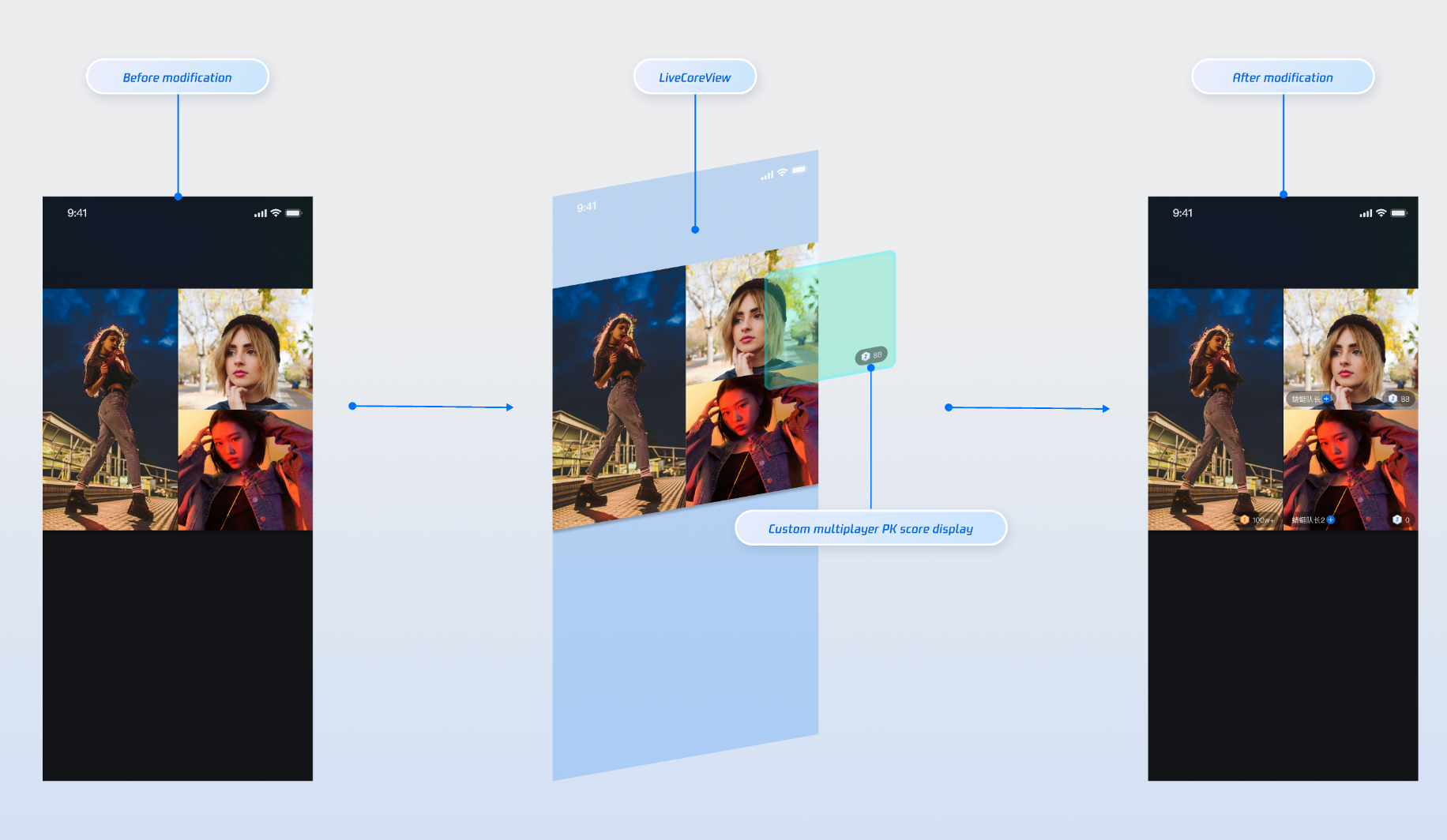
When the host starts a PK, you can attach a custom view to the opponent's video to display gift values or other PK-related information.
|
|
524
|
+
|
|
525
|
+
#### Implementation Example
|
|
526
|
+
|
|
527
|
+
|
|
528
|
+
|
|
529
|
+
|
|
530
|
+
#### Implementation
|
|
531
|
+
- **Step 1**: Create a custom PK user view. For a complete implementation, see [BattleMemberInfoView.kt](https://github.com/Tencent-RTC/TUIKit_Android/blob/main/live/tuilivekit/src/main/java/com/trtc/uikit/livekit/features/anchorboardcast/view/battle/widgets/BattleMemberInfoView.kt) in the open-source TUILiveKit project.
|
|
532
|
+
|
|
533
|
+
``` kotlin
|
|
534
|
+
import android.content.Context
|
|
535
|
+
import android.graphics.Color
|
|
536
|
+
import android.view.Gravity
|
|
537
|
+
import android.widget.LinearLayout
|
|
538
|
+
import android.widget.TextView
|
|
539
|
+
import com.tencent.cloud.tuikit.engine.extension.TUILiveBattleManager.BattleUser
|
|
540
|
+
import io.trtc.tuikit.atomicxcore.api.BattleStore
|
|
541
|
+
import kotlinx.coroutines.CoroutineScope
|
|
542
|
+
import kotlinx.coroutines.Dispatchers
|
|
543
|
+
import kotlinx.coroutines.launch
|
|
544
|
+
|
|
545
|
+
// Custom PK User View
|
|
546
|
+
class CustomBattleUserView(
|
|
547
|
+
context: Context,
|
|
548
|
+
private val liveId: String,
|
|
549
|
+
private val battleUser: BattleUser
|
|
550
|
+
) : LinearLayout(context) {
|
|
551
|
+
|
|
552
|
+
private lateinit var scoreView: LinearLayout
|
|
553
|
+
private lateinit var scoreLabel: TextView
|
|
554
|
+
private val battleStore: BattleStore
|
|
555
|
+
|
|
556
|
+
init {
|
|
557
|
+
orientation = VERTICAL
|
|
558
|
+
gravity = Gravity.BOTTOM or Gravity.END
|
|
559
|
+
setBackgroundColor(Color.TRANSPARENT)
|
|
560
|
+
isClickable = false
|
|
561
|
+
|
|
562
|
+
battleStore = BattleStore.create(liveId)
|
|
563
|
+
|
|
564
|
+
// UI Layout
|
|
565
|
+
setupUI()
|
|
566
|
+
// Subscribe to score changes
|
|
567
|
+
subscribeBattleState()
|
|
568
|
+
}
|
|
569
|
+
|
|
570
|
+
private fun setupUI() {
|
|
571
|
+
scoreView = LinearLayout(context).apply {
|
|
572
|
+
setBackgroundColor(Color.parseColor("#66000000"))
|
|
573
|
+
orientation = VERTICAL
|
|
574
|
+
gravity = Gravity.CENTER
|
|
575
|
+
}
|
|
576
|
+
|
|
577
|
+
scoreLabel = TextView(context).apply {
|
|
578
|
+
setTextColor(Color.WHITE)
|
|
579
|
+
textSize = 14f
|
|
580
|
+
gravity = Gravity.CENTER
|
|
581
|
+
}
|
|
582
|
+
|
|
583
|
+
scoreView.addView(scoreLabel)
|
|
584
|
+
addView(scoreView)
|
|
585
|
+
|
|
586
|
+
val layoutParams = scoreView.layoutParams as LayoutParams
|
|
587
|
+
layoutParams.width = LayoutParams.WRAP_CONTENT
|
|
588
|
+
layoutParams.height = 48 // 24dp
|
|
589
|
+
layoutParams.setMargins(0, 0, 10, 10)
|
|
590
|
+
}
|
|
591
|
+
|
|
592
|
+
// Subscribe to PK score changes
|
|
593
|
+
private fun subscribeBattleState() {
|
|
594
|
+
CoroutineScope(Dispatchers.Main).launch {
|
|
595
|
+
battleStore.battleState.battleScore.collect { battleScore ->
|
|
596
|
+
val score = battleScore[battleUser.userId] ?: 0
|
|
597
|
+
// Update UI
|
|
598
|
+
scoreLabel.text = score.toString()
|
|
599
|
+
}
|
|
600
|
+
}
|
|
601
|
+
}
|
|
602
|
+
}
|
|
603
|
+
```
|
|
604
|
+
- **Step 2**: Implement the `VideoViewAdapter.createBattleView `method.
|
|
605
|
+
|
|
606
|
+
``` kotlin
|
|
607
|
+
// 1. Have your Activity implement the VideoViewAdapter interface
|
|
608
|
+
class YourActivity : AppCompatActivity(), VideoViewAdapter {
|
|
609
|
+
|
|
610
|
+
override fun createBattleView(battleUser: BattleUser?): View? {
|
|
611
|
+
battleUser ?: return null
|
|
612
|
+
// CustomBattleUserView is your custom PK user information view
|
|
613
|
+
return CustomBattleUserView(this, liveId, battleUser)
|
|
614
|
+
}
|
|
615
|
+
|
|
616
|
+
}
|
|
617
|
+
```
|
|
618
|
+
|
|
619
|
+
#### Parameter Description:
|
|
620
|
+
<table>
|
|
621
|
+
<tr>
|
|
622
|
+
<td rowspan="1" colSpan="1" >**Parameter**</td>
|
|
623
|
+
|
|
624
|
+
<td rowspan="1" colSpan="1" >**Type**</td>
|
|
625
|
+
|
|
626
|
+
<td rowspan="1" colSpan="1" >**Description**</td>
|
|
627
|
+
</tr>
|
|
628
|
+
|
|
629
|
+
<tr>
|
|
630
|
+
<td rowspan="1" colSpan="1" >`battleUser`</td>
|
|
631
|
+
|
|
632
|
+
<td rowspan="1" colSpan="1" >`BattleUser?`</td>
|
|
633
|
+
|
|
634
|
+
<td rowspan="1" colSpan="1" >PK user info object</td>
|
|
635
|
+
</tr>
|
|
636
|
+
|
|
637
|
+
<tr>
|
|
638
|
+
<td rowspan="1" colSpan="1" >`battleUser.roomId`</td>
|
|
639
|
+
|
|
640
|
+
<td rowspan="1" colSpan="1" >`String`</td>
|
|
641
|
+
|
|
642
|
+
<td rowspan="1" colSpan="1" >PK room ID</td>
|
|
643
|
+
</tr>
|
|
644
|
+
|
|
645
|
+
<tr>
|
|
646
|
+
<td rowspan="1" colSpan="1" >`battleUser.userId`</td>
|
|
647
|
+
|
|
648
|
+
<td rowspan="1" colSpan="1" >`String`</td>
|
|
649
|
+
|
|
650
|
+
<td rowspan="1" colSpan="1" >PK user ID</td>
|
|
651
|
+
</tr>
|
|
652
|
+
|
|
653
|
+
<tr>
|
|
654
|
+
<td rowspan="1" colSpan="1" >`battleUser.userName`</td>
|
|
655
|
+
|
|
656
|
+
<td rowspan="1" colSpan="1" >`String`</td>
|
|
657
|
+
|
|
658
|
+
<td rowspan="1" colSpan="1" >PK user nickname</td>
|
|
659
|
+
</tr>
|
|
660
|
+
|
|
661
|
+
<tr>
|
|
662
|
+
<td rowspan="1" colSpan="1" >`battleUser.avatarUrl`</td>
|
|
663
|
+
|
|
664
|
+
<td rowspan="1" colSpan="1" >`String`</td>
|
|
665
|
+
|
|
666
|
+
<td rowspan="1" colSpan="1" >PK user avatar URL</td>
|
|
667
|
+
</tr>
|
|
668
|
+
|
|
669
|
+
<tr>
|
|
670
|
+
<td rowspan="1" colSpan="1" >`battleUser.score`</td>
|
|
671
|
+
|
|
672
|
+
<td rowspan="1" colSpan="1" >`UInt`</td>
|
|
673
|
+
|
|
674
|
+
<td rowspan="1" colSpan="1" >PK score</td>
|
|
675
|
+
</tr>
|
|
676
|
+
</table>
|
|
677
|
+
|
|
678
|
+
|
|
679
|
+
### Displaying PK Status on Video Stream
|
|
680
|
+
|
|
681
|
+
#### Implementation Example
|
|
682
|
+
|
|
683
|
+
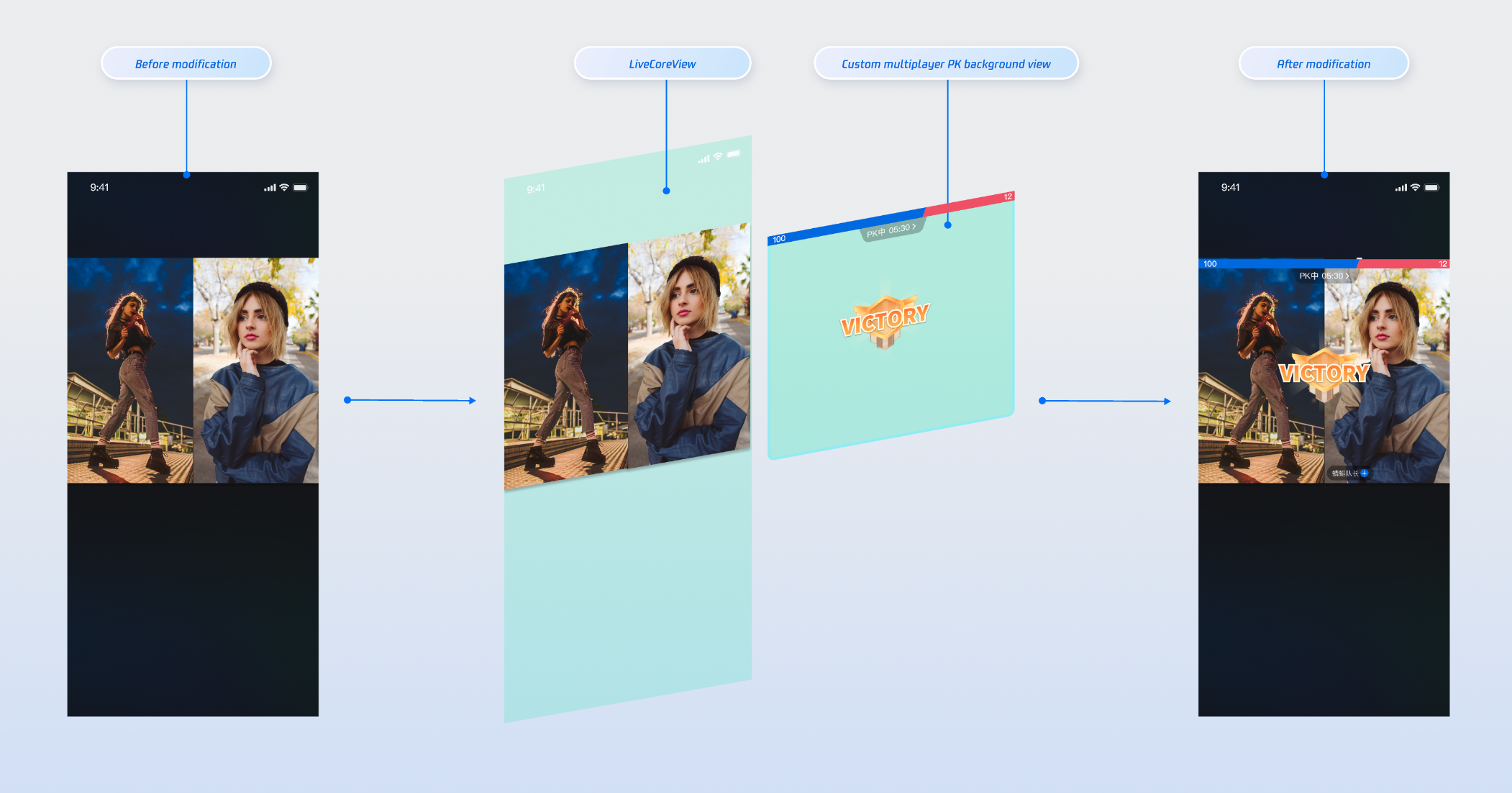
|
|
684
|
+
|
|
685
|
+
|
|
686
|
+
#### Implementation
|
|
687
|
+
- **Step 1**: Create a custom PK global view (CustomBattleContainerView). For a complete implementation, see [BattleInfoView.kt](https://github.com/Tencent-RTC/TUIKit_Android/blob/main/live/tuilivekit/src/main/java/com/trtc/uikit/livekit/features/anchorboardcast/view/battle/widgets/BattleInfoView.kt) in the open-source TUILiveKit project.
|
|
688
|
+
|
|
689
|
+
- **Step 2**: Implement the `VideoViewAdapter.createBattleContainerView `method.
|
|
690
|
+
|
|
691
|
+
``` kotlin
|
|
692
|
+
// Have your Activity implement the VideoViewAdapter interface and set the adapter
|
|
693
|
+
class YourActivity : AppCompatActivity(), VideoViewAdapter {
|
|
694
|
+
override fun createBattleContainerView(): View? {
|
|
695
|
+
return CustomBattleContainerView(this)
|
|
696
|
+
}
|
|
697
|
+
}
|
|
698
|
+
```
|
|
699
|
+
|
|
700
|
+
## Advanced Features
|
|
701
|
+
|
|
702
|
+
### Updating PK Score via REST API
|
|
703
|
+
|
|
704
|
+
In typical** live host PK scenarios,** the value of gifts received by the host is linked to the PK score (for example, when a viewer sends a "Rocket" gift, the host's PK score increases by 500 points). You can implement real-time PK score updates using our REST API.
|
|
705
|
+
|
|
706
|
+
> **Note:**
|
|
707
|
+
>
|
|
708
|
+
|
|
709
|
+
> The PK score system in the `LiveKit` backend uses pure numeric calculation and accumulation. You must calculate the PK score according to your own business logic before calling the update API. See the following PK score calculation examples:
|
|
710
|
+
>
|
|
711
|
+
<table>
|
|
712
|
+
<tr>
|
|
713
|
+
<td rowspan="1" colSpan="1" >Gift Type</td>
|
|
714
|
+
|
|
715
|
+
<td rowspan="1" colSpan="1" >Score Calculation Rule</td>
|
|
716
|
+
|
|
717
|
+
<td rowspan="1" colSpan="1" >Example</td>
|
|
718
|
+
</tr>
|
|
719
|
+
|
|
720
|
+
<tr>
|
|
721
|
+
<td rowspan="1" colSpan="1" >Basic Gift</td>
|
|
722
|
+
|
|
723
|
+
<td rowspan="1" colSpan="1" >Gift value × 5</td>
|
|
724
|
+
|
|
725
|
+
<td rowspan="1" colSpan="1" >10 RMB gift → 50 points</td>
|
|
726
|
+
</tr>
|
|
727
|
+
|
|
728
|
+
<tr>
|
|
729
|
+
<td rowspan="1" colSpan="1" >Intermediate Gift</td>
|
|
730
|
+
|
|
731
|
+
<td rowspan="1" colSpan="1" >Gift value × 8</td>
|
|
732
|
+
|
|
733
|
+
<td rowspan="1" colSpan="1" >50 RMB gift → 400 points</td>
|
|
734
|
+
</tr>
|
|
735
|
+
|
|
736
|
+
<tr>
|
|
737
|
+
<td rowspan="1" colSpan="1" >Advanced Gift</td>
|
|
738
|
+
|
|
739
|
+
<td rowspan="1" colSpan="1" >Gift value × 12</td>
|
|
740
|
+
|
|
741
|
+
<td rowspan="1" colSpan="1" >100 RMB gift → 1200 points</td>
|
|
742
|
+
</tr>
|
|
743
|
+
|
|
744
|
+
<tr>
|
|
745
|
+
<td rowspan="1" colSpan="1" >Special Effect Gift</td>
|
|
746
|
+
|
|
747
|
+
<td rowspan="1" colSpan="1" >Fixed high score</td>
|
|
748
|
+
|
|
749
|
+
<td rowspan="1" colSpan="1" >520 RMB gift → 1314 points</td>
|
|
750
|
+
</tr>
|
|
751
|
+
</table>
|
|
752
|
+
|
|
753
|
+
|
|
754
|
+
|
|
755
|
+
#### REST API Call Flow
|
|
756
|
+
|
|
757
|
+
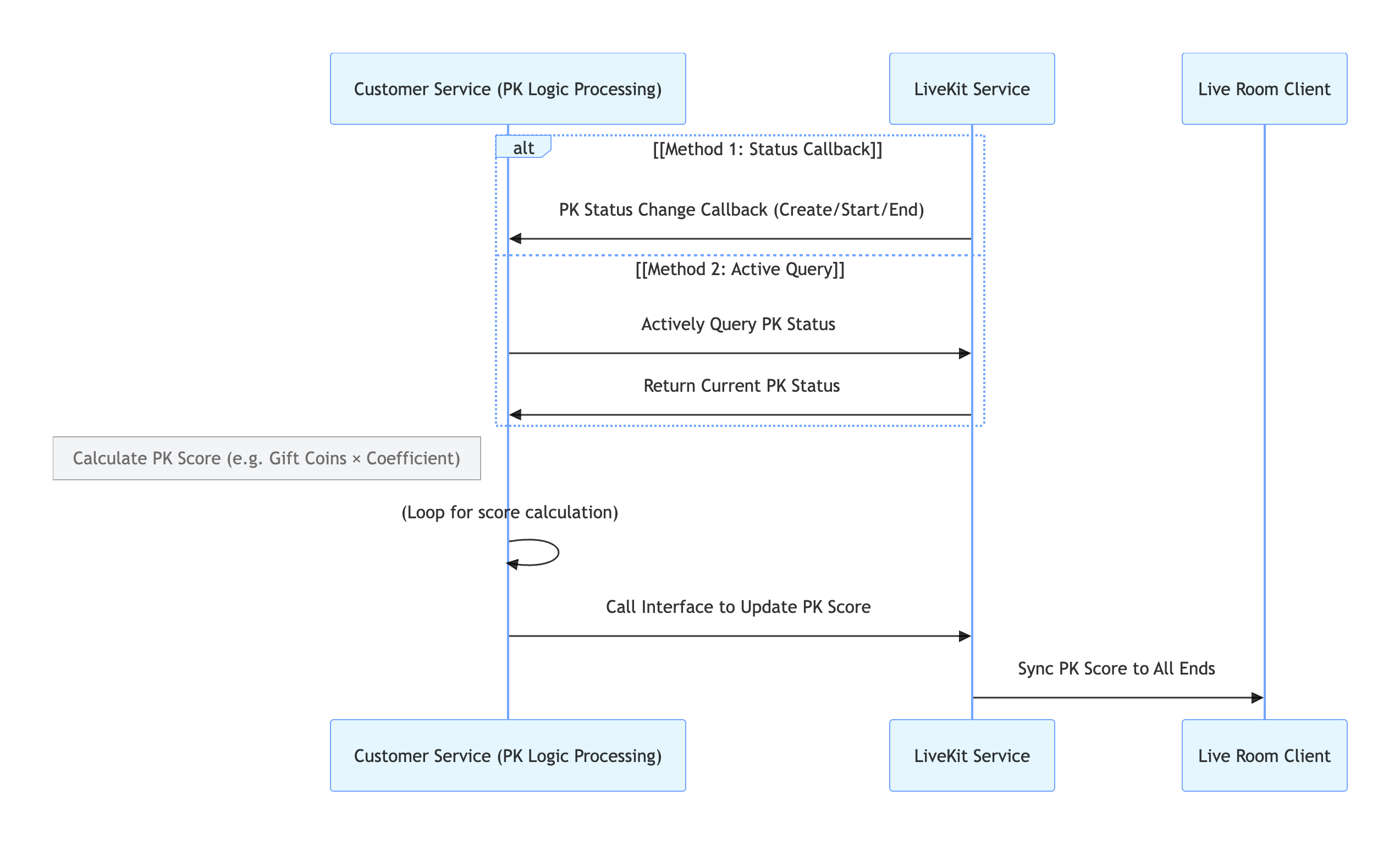
|
|
758
|
+
|
|
759
|
+
|
|
760
|
+
#### Key Process Description
|
|
761
|
+
1. **Obtain PK Status:**
|
|
762
|
+
|
|
763
|
+
- **Callback Configuration**: Configure [PK Status Callback](https://write.woa.com/document/170203265552953344) to have the `LiveKit` backend actively notify your system when PK starts or ends.
|
|
764
|
+
|
|
765
|
+
- **Active Query**: Your backend can call the [PK Status Query](https://write.woa.com/document/170220847572692992) API at any time to check the current PK status.
|
|
766
|
+
|
|
767
|
+
2. **PK Score Calculation**: Your backend calculates the PK score increment based on your business rules.
|
|
768
|
+
|
|
769
|
+
3. **PK Score Update**: Your backend calls the [Update PK Score](https://write.woa.com/document/170220034100383744) API to update the PK score in the LiveKit backend.
|
|
770
|
+
|
|
771
|
+
4. **LiveKit Backend Syncs to Client**: The backend automatically synchronizes the updated PK score to all clients.
|
|
772
|
+
|
|
773
|
+
|
|
774
|
+
#### Involved REST API Endpoints
|
|
775
|
+
<table>
|
|
776
|
+
<tr>
|
|
777
|
+
<td rowspan="1" colSpan="1" >**API**</td>
|
|
778
|
+
|
|
779
|
+
<td rowspan="1" colSpan="1" >**Function Description**</td>
|
|
780
|
+
|
|
781
|
+
<td rowspan="1" colSpan="1" >**Request Example**</td>
|
|
782
|
+
</tr>
|
|
783
|
+
|
|
784
|
+
<tr>
|
|
785
|
+
<td rowspan="1" colSpan="1" >Active API - Query PK Status</td>
|
|
786
|
+
|
|
787
|
+
<td rowspan="1" colSpan="1" >Check whether the current room is in PK</td>
|
|
788
|
+
|
|
789
|
+
<td rowspan="1" colSpan="1" >[Example](https://write.woa.com/document/170220847572692992)</td>
|
|
790
|
+
</tr>
|
|
791
|
+
|
|
792
|
+
<tr>
|
|
793
|
+
<td rowspan="1" colSpan="1" >Active API - Update PK Score</td>
|
|
794
|
+
|
|
795
|
+
<td rowspan="1" colSpan="1" >Update the calculated PK score</td>
|
|
796
|
+
|
|
797
|
+
<td rowspan="1" colSpan="1" >[Example](https://write.woa.com/document/170220034100383744)</td>
|
|
798
|
+
</tr>
|
|
799
|
+
|
|
800
|
+
<tr>
|
|
801
|
+
<td rowspan="1" colSpan="1" >Callback Configuration - PK Start Callback</td>
|
|
802
|
+
|
|
803
|
+
<td rowspan="1" colSpan="1" >Receive real-time notification when PK starts</td>
|
|
804
|
+
|
|
805
|
+
<td rowspan="1" colSpan="1" >[Example](https://write.woa.com/document/170203265552953344)</td>
|
|
806
|
+
</tr>
|
|
807
|
+
|
|
808
|
+
<tr>
|
|
809
|
+
<td rowspan="1" colSpan="1" >Callback Configuration - PK End Callback</td>
|
|
810
|
+
|
|
811
|
+
<td rowspan="1" colSpan="1" >Receive real-time notification when PK ends</td>
|
|
812
|
+
|
|
813
|
+
<td rowspan="1" colSpan="1" >[Example](https://write.woa.com/document/170221608179601408)</td>
|
|
814
|
+
</tr>
|
|
815
|
+
</table>
|
|
816
|
+
|
|
817
|
+
|
|
818
|
+
## API Documentation
|
|
819
|
+
|
|
820
|
+
For detailed information on all public interfaces, properties, and methods of [CoHostStore](https://tencent-rtc.github.io/TUIKit_Android/-atomic-x%20-core%20-a-p-i/io.trtc.tuikit.atomicxcore.api.live/-co-host-store/index.html) and related classes, refer to the official API documentation included with the [AtomicXCore](https://tencent-rtc.github.io/TUIKit_Android/index.html) framework. The relevant stores used in this guide are as follows:
|
|
821
|
+
<table>
|
|
822
|
+
<tr>
|
|
823
|
+
<td rowspan="1" colSpan="1" >**Store/Component**</td>
|
|
824
|
+
|
|
825
|
+
<td rowspan="1" colSpan="1" >**Description**</td>
|
|
826
|
+
|
|
827
|
+
<td rowspan="1" colSpan="1" >**API Reference**</td>
|
|
828
|
+
</tr>
|
|
829
|
+
|
|
830
|
+
<tr>
|
|
831
|
+
<td rowspan="1" colSpan="1" >`LiveCoreView`</td>
|
|
832
|
+
|
|
833
|
+
<td rowspan="1" colSpan="1" >Core view component for displaying and interacting with live video streams. Handles video rendering and view widgets, supports host streaming, audience co-hosting, host connections, and more.</td>
|
|
834
|
+
|
|
835
|
+
<td rowspan="1" colSpan="1" >[API Documentation](https://tencent-rtc.github.io/TUIKit_Android/-atomic-x%20-core%20-a-p-i/io.trtc.tuikit.atomicxcore.api.view/-live-core-view/index.html)</td>
|
|
836
|
+
</tr>
|
|
837
|
+
|
|
838
|
+
<tr>
|
|
839
|
+
<td rowspan="1" colSpan="1" >`DeviceStore`</td>
|
|
840
|
+
|
|
841
|
+
<td rowspan="1" colSpan="1" >Controls audio/video devices: microphone (on/off, volume), camera (on/off, switch, quality), screen sharing, and real-time device status monitoring.</td>
|
|
842
|
+
|
|
843
|
+
<td rowspan="1" colSpan="1" >[API Documentation](https://tencent-rtc.github.io/TUIKit_Android/-atomic-x%20-core%20-a-p-i/io.trtc.tuikit.atomicxcore.api.device/-device-store/index.html)</td>
|
|
844
|
+
</tr>
|
|
845
|
+
|
|
846
|
+
<tr>
|
|
847
|
+
<td rowspan="1" colSpan="1" >`CoHostStore`</td>
|
|
848
|
+
|
|
849
|
+
<td rowspan="1" colSpan="1" >Handles host cross-room connections: supports multiple layout templates (dynamic grid, etc.), initiates/accepts/rejects connections, and manages co-host interactions.</td>
|
|
850
|
+
|
|
851
|
+
<td rowspan="1" colSpan="1" >[API Documentation](https://tencent-rtc.github.io/TUIKit_Android/-atomic-x%20-core%20-a-p-i/io.trtc.tuikit.atomicxcore.api.live/-co-host-store/index.html)</td>
|
|
852
|
+
</tr>
|
|
853
|
+
|
|
854
|
+
<tr>
|
|
855
|
+
<td rowspan="1" colSpan="1" >`BattleStore`</td>
|
|
856
|
+
|
|
857
|
+
<td rowspan="1" colSpan="1" >Manages host PK battles: initiate PK (set duration/opponent), manage PK status (start/end), synchronize scores, and listen for battle results.</td>
|
|
858
|
+
|
|
859
|
+
<td rowspan="1" colSpan="1" >[API Documentation](https://tencent-rtc.github.io/TUIKit_Android/-atomic-x%20-core%20-a-p-i/io.trtc.tuikit.atomicxcore.api.live/-battle-store/index.html)</td>
|
|
860
|
+
</tr>
|
|
861
|
+
</table>
|
|
862
|
+
|
|
863
|
+
|
|
864
|
+
## FAQs
|
|
865
|
+
|
|
866
|
+
### Why didn't the other party receive my co-hosting invitation?
|
|
867
|
+
- Ensure that `targetHostLiveId` is correct and that the other host's live room is broadcasting normally.
|
|
868
|
+
|
|
869
|
+
- Check network stability. The invitation signaling has a default timeout of 30 seconds.
|
|
870
|
+
|
|
871
|
+
|
|
872
|
+
### What happens if one host disconnects from the network or the app crashes during co-hosting or PK?
|
|
873
|
+
|
|
874
|
+
Both `CoHostStore` and `BattleStore` include built-in heartbeat and timeout detection. If one party exits abnormally, the other party is notified via events such as `onCoHostUserLeft` or `onUserExitBattle`. You can update the UI accordingly, for example, by displaying "The other party has disconnected" and ending the interaction.
|
|
875
|
+
|
|
876
|
+
### Why can PK scores only be updated via REST API?
|
|
877
|
+
|
|
878
|
+
The REST API meets the security, real-time, and scalability requirements for PK scores:
|
|
879
|
+
- **Tamper-proof and fair**: Requires authentication and data validation. Each update is traceable (e.g., tied to a gift action), preventing manual score changes or cheating and ensuring fair competition.
|
|
880
|
+
|
|
881
|
+
- **Real-time synchronization across multiple clients**: Uses standardized formats (such as JSON) to quickly connect gift, PK, and display systems, ensuring real-time consistency of scores among hosts, viewers, and backend.
|
|
882
|
+
|
|
883
|
+
- **Flexible rule adaptation**: Backend configuration changes (such as adjusting gift-to-score mapping or bonus points) can be made without modifying the frontend, reducing iteration costs.
|
|
884
|
+
|
|
885
|
+
|
|
886
|
+
### How do I manage the lifecycle and events of custom views added via `VideoViewAdapter`?
|
|
887
|
+
|
|
888
|
+
`LiveCoreView` automatically manages views returned by delegate methods, including adding and removing them. No manual lifecycle management is required.
|