@tencent-rtc/mcp 1.3.2 → 1.3.3
This diff represents the content of publicly available package versions that have been released to one of the supported registries. The information contained in this diff is provided for informational purposes only and reflects changes between package versions as they appear in their respective public registries.
- package/package.json +1 -1
- package/resource/doc/livekit/live/android/live-audience-list.md +334 -0
- package/resource/doc/livekit/live/android/live-audio-effect.md +380 -0
- package/resource/doc/livekit/live/android/live-barrage.md +565 -0
- package/resource/doc/livekit/live/android/live-base-beauty.md +275 -0
- package/resource/doc/livekit/live/android/live-co-guest-interaction.md +629 -0
- package/resource/doc/livekit/live/android/live-gift.md +822 -0
- package/resource/doc/livekit/live/android/live-host-interaction.md +888 -0
- package/resource/doc/livekit/live/android/live-integration.md +972 -0
- package/resource/doc/livekit/live/android/live-live-list.md +575 -0
- package/resource/doc/livekit/live/android/workflow.md +189 -0
- package/tools/common/record-prompt.js +2 -2
- package/tools/common/record-prompt.js.map +1 -1
- package/tools/definitions/get_native_live_extra_features_def.js +87 -0
- package/tools/definitions/get_native_live_extra_features_def.js.map +1 -0
- package/tools/definitions/get_native_live_interaction_def.js +74 -0
- package/tools/definitions/get_native_live_interaction_def.js.map +1 -0
- package/tools/definitions/get_native_live_uikit_integration_def.js +49 -0
- package/tools/definitions/get_native_live_uikit_integration_def.js.map +1 -0
- package/tools/definitions/record_prompt_def.js +1 -1
- package/tools/definitions/record_prompt_def.js.map +1 -1
- package/tools/index.js +6 -0
- package/tools/index.js.map +1 -1
- package/tools/live/get-native-live-uikit-integration.js +101 -0
- package/tools/live/get-native-live-uikit-integration.js.map +1 -0
- package/tools/live/get-web-live-component-detail.js +1 -1
- package/tools/live/get-web-live-component-detail.js.map +1 -1
- package/tools/live/get-web-live-state-detail.js +1 -1
- package/tools/live/get-web-live-state-detail.js.map +1 -1
- package/tools/live/get-web-live-uikit-integration.js +6 -6
- package/tools/live/get-web-live-uikit-integration.js.map +1 -1
- package/tools/live/get_native_live_extra_features.js +105 -0
- package/tools/live/get_native_live_extra_features.js.map +1 -0
- package/tools/live/get_native_live_interaction.js +101 -0
- package/tools/live/get_native_live_interaction.js.map +1 -0
- package/utils/report-cls-client.js +1 -1
- package/utils/report-es-client.js +1 -1
- /package/resource/doc/livekit/{vue → live/vue}/components/barrage.md +0 -0
- /package/resource/doc/livekit/{vue → live/vue}/components/co-guest-panel.md +0 -0
- /package/resource/doc/livekit/{vue → live/vue}/components/live-audience-list.md +0 -0
- /package/resource/doc/livekit/{vue → live/vue}/components/live-scene-panel.md +0 -0
- /package/resource/doc/livekit/{vue → live/vue}/components/live-view.md +0 -0
- /package/resource/doc/livekit/{vue → live/vue}/components/stream-mixer.md +0 -0
- /package/resource/doc/livekit/{vue → live/vue}/faq.md +0 -0
- /package/resource/doc/livekit/{vue → live/vue}/live-list-integration.md +0 -0
- /package/resource/doc/livekit/{vue → live/vue}/live-player-desk-integration.md +0 -0
- /package/resource/doc/livekit/{vue → live/vue}/live-player-h5-integration.md +0 -0
- /package/resource/doc/livekit/{vue → live/vue}/live-pusher-integration.md +0 -0
- /package/resource/doc/livekit/{vue → live/vue}/states/live-state.md +0 -0
- /package/resource/doc/livekit/{vue → live/vue}/workflow.md +0 -0
|
@@ -0,0 +1,629 @@
|
|
|
1
|
+
**AtomicXCore** provides the [CoGuestStore](https://tencent-rtc.github.io/TUIKit_Android/-atomic-x%20-core%20-a-p-i/io.trtc.tuikit.atomicxcore.api.live/-co-guest-store/index.html) module, purpose-built to manage the complete audience co-hosting workflow. You do not need to handle complex state synchronization or signaling logic—simply call a few intuitive methods to add robust audio and video interaction between viewers and hosts in your live stream.
|
|
2
|
+
|
|
3
|
+
## Core Features
|
|
4
|
+
|
|
5
|
+
`CoGuestStore` supports the two most common co-hosting scenarios:
|
|
6
|
+
- **Audience Request to Join**: An audience member initiates a co-hosting request, and the host can accept or reject it.
|
|
7
|
+
|
|
8
|
+
- **Host Invites to Join**: The host can invite any audience member in the live room to co-host.
|
|
9
|
+
|
|
10
|
+
|
|
11
|
+
## Core Concepts
|
|
12
|
+
<table>
|
|
13
|
+
<tr>
|
|
14
|
+
<td rowspan="1" colSpan="1" >**Core Concept**</td>
|
|
15
|
+
|
|
16
|
+
<td rowspan="1" colSpan="1" >**Core Responsibilities**</td>
|
|
17
|
+
|
|
18
|
+
<td rowspan="1" colSpan="1" >**Key APIs / Properties**</td>
|
|
19
|
+
</tr>
|
|
20
|
+
|
|
21
|
+
<tr>
|
|
22
|
+
<td rowspan="1" colSpan="1" >`CoGuestStore`</td>
|
|
23
|
+
|
|
24
|
+
<td rowspan="1" colSpan="1" >Manages the entire signaling workflow for viewer-host interaction (Apply, Invite, Accept, Reject, Disconnect) and maintains real-time state of related user lists.</td>
|
|
25
|
+
|
|
26
|
+
<td rowspan="1" colSpan="1" >- `coGuestState`: A read-only StateFlowcontaining `connected` (current co-guests), `applicants` (pending applications), and `invitees` (pending invitations).<br>- `applyForSeat()`: Viewer applies to become a co-guest.<br>- `inviteToSeat()`: Host invites a viewer to take a seat.<br>- `acceptApplication()`: Host accepts a link mic application.<br>- `disconnect():` Terminates the connection.</td>
|
|
27
|
+
</tr>
|
|
28
|
+
|
|
29
|
+
<tr>
|
|
30
|
+
<td rowspan="1" colSpan="1" >`HostListener`</td>
|
|
31
|
+
|
|
32
|
+
<td rowspan="1" colSpan="1" >Used by the UI layer to respond to events such as "Received viewer application" or "Viewer accepted invitation".</td>
|
|
33
|
+
|
|
34
|
+
<td rowspan="1" colSpan="1" >- `onGuestApplicationReceived()`: Triggered when a viewer applies for a seat.<br>- `onHostInvitationResponded()`: Triggered when a viewer responds to an invitation.</td>
|
|
35
|
+
</tr>
|
|
36
|
+
|
|
37
|
+
<tr>
|
|
38
|
+
<td rowspan="1" colSpan="1" >`GuestListener`</td>
|
|
39
|
+
|
|
40
|
+
<td rowspan="1" colSpan="1" >Used by the UI layer to respond to events such as "Received host invitation", "Application approved", or "Kicked off seat".</td>
|
|
41
|
+
|
|
42
|
+
<td rowspan="1" colSpan="1" >- `onHostInvitationReceived()`: Triggered when the host sends an invitation.<br>- `onGuestApplicationResponded()`: Triggered when the host processes an application (Accept/Reject).<br>- `onKickedOffSeat()`: Triggered when kicked off the seat by the host.</td>
|
|
43
|
+
</tr>
|
|
44
|
+
</table>
|
|
45
|
+
|
|
46
|
+
|
|
47
|
+
## Implementation
|
|
48
|
+
|
|
49
|
+
### Step 1: Component Integration
|
|
50
|
+
|
|
51
|
+
Refer to [Quick Start](https://write.woa.com/document/194571606056804352) to integrate AtomicXCore and complete the setup of LiveCoreView.
|
|
52
|
+
|
|
53
|
+
### Step 2: Implement Audience Request to Join
|
|
54
|
+
|
|
55
|
+
#### Audience-Side Implementation
|
|
56
|
+
|
|
57
|
+
As an audience member, your primary tasks are to **initiate a request, handle the host's response, and leave the seat when desired.**
|
|
58
|
+
1. **Initiate a Co-hosting Request**
|
|
59
|
+
|
|
60
|
+
|
|
61
|
+
When the user taps the "Request to Join" button, call the `applyForSeat` method.
|
|
62
|
+
|
|
63
|
+
``` kotlin
|
|
64
|
+
import io.trtc.tuikit.atomicxcore.api.live.CoGuestStore
|
|
65
|
+
import io.trtc.tuikit.atomicxcore.api.CompletionHandler
|
|
66
|
+
|
|
67
|
+
val liveId = "Room ID"
|
|
68
|
+
val guestStore = CoGuestStore.create(liveId)
|
|
69
|
+
|
|
70
|
+
// User clicks "Request to Join"
|
|
71
|
+
fun requestToConnect() {
|
|
72
|
+
// timeout: Request timeout in seconds, e.g., 30
|
|
73
|
+
guestStore.applyForSeat(
|
|
74
|
+
seatIndex = 0,
|
|
75
|
+
timeout = 30,
|
|
76
|
+
extraInfo = null,
|
|
77
|
+
completion = object : CompletionHandler {
|
|
78
|
+
override fun onSuccess() {
|
|
79
|
+
println("Co-hosting request sent, waiting for host response...")
|
|
80
|
+
}
|
|
81
|
+
|
|
82
|
+
override fun onFailure(code: Int, desc: String) {
|
|
83
|
+
println("Failed to send request: $desc")
|
|
84
|
+
}
|
|
85
|
+
}
|
|
86
|
+
)
|
|
87
|
+
}
|
|
88
|
+
```
|
|
89
|
+
2. **Listen for Host Response**
|
|
90
|
+
|
|
91
|
+
|
|
92
|
+
Add a `GuestListener` to receive the host's response.
|
|
93
|
+
|
|
94
|
+
``` kotlin
|
|
95
|
+
import android.os.Bundle
|
|
96
|
+
import androidx.appcompat.app.AppCompatActivity
|
|
97
|
+
import io.trtc.tuikit.atomicxcore.api.device.DeviceStore
|
|
98
|
+
import io.trtc.tuikit.atomicxcore.api.live.CoGuestStore
|
|
99
|
+
import io.trtc.tuikit.atomicxcore.api.live.GuestListener
|
|
100
|
+
import io.trtc.tuikit.atomicxcore.api.live.LiveUserInfo
|
|
101
|
+
|
|
102
|
+
class YourActivity : AppCompatActivity() {
|
|
103
|
+
val liveId = "Room ID"
|
|
104
|
+
val guestStore = CoGuestStore.create(liveId)
|
|
105
|
+
val deviceStore = DeviceStore.shared()
|
|
106
|
+
private val guestListener = object : GuestListener() {
|
|
107
|
+
override fun onGuestApplicationResponded(isAccept: Boolean, hostUser: LiveUserInfo) {
|
|
108
|
+
if (isAccept) {
|
|
109
|
+
println("Host ${hostUser.userName} accepted your request. Preparing to join the seat.")
|
|
110
|
+
// Co-hosting request accepted; enable camera and microphone
|
|
111
|
+
DeviceStore.shared().openLocalCamera(true, completion = null)
|
|
112
|
+
DeviceStore.shared().openLocalMicrophone(completion = null)
|
|
113
|
+
// Update UI, e.g., disable request button and show co-hosting status
|
|
114
|
+
} else {
|
|
115
|
+
println("Host ${hostUser.userName} rejected your request.")
|
|
116
|
+
// Show rejection notification
|
|
117
|
+
}
|
|
118
|
+
}
|
|
119
|
+
}
|
|
120
|
+
|
|
121
|
+
override fun onCreate(savedInstanceState: Bundle?) {
|
|
122
|
+
super.onCreate(savedInstanceState)
|
|
123
|
+
guestStore.addGuestListener(guestListener)
|
|
124
|
+
}
|
|
125
|
+
|
|
126
|
+
override fun onDestroy() {
|
|
127
|
+
super.onDestroy()
|
|
128
|
+
guestStore.removeGuestListener(guestListener)
|
|
129
|
+
}
|
|
130
|
+
}
|
|
131
|
+
```
|
|
132
|
+
3. **Leave the Seat**
|
|
133
|
+
|
|
134
|
+
|
|
135
|
+
When the co-hosting audience member wants to end the interaction, call `disconnect` to return to audience status.
|
|
136
|
+
|
|
137
|
+
``` kotlin
|
|
138
|
+
// User clicks "Leave Seat"
|
|
139
|
+
fun leaveSeat() {
|
|
140
|
+
guestStore.disconnect(object : CompletionHandler {
|
|
141
|
+
override fun onSuccess() {
|
|
142
|
+
println("Successfully left the seat")
|
|
143
|
+
}
|
|
144
|
+
|
|
145
|
+
override fun onFailure(code: Int, desc: String) {
|
|
146
|
+
println("Failed to leave seat: $desc")
|
|
147
|
+
}
|
|
148
|
+
})
|
|
149
|
+
}
|
|
150
|
+
```
|
|
151
|
+
4. **(Optional) Cancel Request**
|
|
152
|
+
|
|
153
|
+
|
|
154
|
+
To withdraw a pending request before the host responds, call `cancelApplication`.
|
|
155
|
+
|
|
156
|
+
``` kotlin
|
|
157
|
+
// User clicks "Cancel Request"
|
|
158
|
+
fun cancelRequest() {
|
|
159
|
+
guestStore.cancelApplication(object : CompletionHandler {
|
|
160
|
+
override fun onSuccess() {
|
|
161
|
+
println("Request cancelled")
|
|
162
|
+
}
|
|
163
|
+
|
|
164
|
+
override fun onFailure(code: Int, desc: String) {
|
|
165
|
+
println("Failed to cancel request: $desc")
|
|
166
|
+
}
|
|
167
|
+
})
|
|
168
|
+
}
|
|
169
|
+
```
|
|
170
|
+
|
|
171
|
+
#### Host-Side Implementation
|
|
172
|
+
|
|
173
|
+
As a host, your main responsibilities are to **receive requests, display the applicant list, and process requests**.
|
|
174
|
+
1. **Listen for New Co-hosting Requests**
|
|
175
|
+
|
|
176
|
+
|
|
177
|
+
Add a `HostListener` to be notified when a new audience request arrives.
|
|
178
|
+
|
|
179
|
+
``` kotlin
|
|
180
|
+
import android.os.Bundle
|
|
181
|
+
import androidx.appcompat.app.AppCompatActivity
|
|
182
|
+
import io.trtc.tuikit.atomicxcore.api.live.CoGuestStore
|
|
183
|
+
import io.trtc.tuikit.atomicxcore.api.live.HostListener
|
|
184
|
+
import io.trtc.tuikit.atomicxcore.api.live.LiveUserInfo
|
|
185
|
+
|
|
186
|
+
class YourActivity : AppCompatActivity() {
|
|
187
|
+
val liveId = "Room ID"
|
|
188
|
+
val guestStore = CoGuestStore.create(liveId)
|
|
189
|
+
val hostListener = object : HostListener() {
|
|
190
|
+
override fun onGuestApplicationReceived(guestUser: LiveUserInfo) {
|
|
191
|
+
println("Received co-hosting request from ${guestUser.userName}")
|
|
192
|
+
// Update UI, e.g., show a badge on the "Request List" button
|
|
193
|
+
}
|
|
194
|
+
}
|
|
195
|
+
|
|
196
|
+
override fun onCreate(savedInstanceState: Bundle?) {
|
|
197
|
+
super.onCreate(savedInstanceState)
|
|
198
|
+
// Add listener
|
|
199
|
+
guestStore.addHostListener(hostListener)
|
|
200
|
+
}
|
|
201
|
+
|
|
202
|
+
override fun onDestroy() {
|
|
203
|
+
super.onDestroy()
|
|
204
|
+
// Remove listener
|
|
205
|
+
guestStore.removeHostListener(hostListener)
|
|
206
|
+
}
|
|
207
|
+
}
|
|
208
|
+
```
|
|
209
|
+
2. **Display Request List**
|
|
210
|
+
|
|
211
|
+
|
|
212
|
+
`CoGuestStore` maintains the current list of applicants in real time. Subscribe to this list to update your UI.
|
|
213
|
+
|
|
214
|
+
``` kotlin
|
|
215
|
+
class YourActivity : AppCompatActivity() {
|
|
216
|
+
val liveId = "Room ID"
|
|
217
|
+
val guestStore = CoGuestStore.create(liveId)
|
|
218
|
+
|
|
219
|
+
override fun onCreate(savedInstanceState: Bundle?) {
|
|
220
|
+
super.onCreate(savedInstanceState)
|
|
221
|
+
|
|
222
|
+
// Subscribe to applicant list updates
|
|
223
|
+
lifecycleScope.launch {
|
|
224
|
+
guestStore.coGuestState.applicants.collect { applicants ->
|
|
225
|
+
println("Current number of applicants: ${applicants.size}")
|
|
226
|
+
// Update your "Applicant List" UI here
|
|
227
|
+
// updateApplicantListView(applicants)
|
|
228
|
+
}
|
|
229
|
+
}
|
|
230
|
+
}
|
|
231
|
+
}
|
|
232
|
+
```
|
|
233
|
+
3. **Process Co-hosting Requests**
|
|
234
|
+
|
|
235
|
+
|
|
236
|
+
When you select an audience member and choose "Accept" or "Reject", call the corresponding method.
|
|
237
|
+
|
|
238
|
+
``` kotlin
|
|
239
|
+
// Host taps "Accept" for a given userId
|
|
240
|
+
fun accept(userId: String) {
|
|
241
|
+
guestStore.acceptApplication(userId, object : CompletionHandler {
|
|
242
|
+
override fun onSuccess() {
|
|
243
|
+
println("Accepted $userId's request. They are joining the stage.")
|
|
244
|
+
}
|
|
245
|
+
|
|
246
|
+
override fun onFailure(code: Int, desc: String) {
|
|
247
|
+
println("Failed to accept request: $desc")
|
|
248
|
+
}
|
|
249
|
+
})
|
|
250
|
+
}
|
|
251
|
+
|
|
252
|
+
// Host taps "Reject"
|
|
253
|
+
fun reject(userId: String) {
|
|
254
|
+
guestStore.rejectApplication(userId, object : CompletionHandler {
|
|
255
|
+
override fun onSuccess() {
|
|
256
|
+
println("Rejected $userId's request")
|
|
257
|
+
}
|
|
258
|
+
|
|
259
|
+
override fun onFailure(code: Int, desc: String) {
|
|
260
|
+
println("Failed to reject request: $desc")
|
|
261
|
+
}
|
|
262
|
+
})
|
|
263
|
+
}
|
|
264
|
+
```
|
|
265
|
+
|
|
266
|
+
### Step 3: Implement Host Inviting Audience to Join the Stage
|
|
267
|
+
|
|
268
|
+
#### Host-Side Implementation
|
|
269
|
+
1. **Send Invitation to Audience**
|
|
270
|
+
|
|
271
|
+
|
|
272
|
+
When the host selects an audience member and taps "Invite to Co-host", call the `inviteToSeat` method.
|
|
273
|
+
|
|
274
|
+
``` kotlin
|
|
275
|
+
// Host selects an audience member and sends an invitation
|
|
276
|
+
fun invite(userId: String) {
|
|
277
|
+
// timeout: Invitation timeout duration in seconds
|
|
278
|
+
guestStore.inviteToSeat(
|
|
279
|
+
inviteeID = userId,
|
|
280
|
+
seatIndex = 0,
|
|
281
|
+
timeout = 30,
|
|
282
|
+
extraInfo = null,
|
|
283
|
+
completion = object : CompletionHandler {
|
|
284
|
+
override fun onSuccess() {
|
|
285
|
+
println("Invitation sent to $userId. Waiting for response...")
|
|
286
|
+
}
|
|
287
|
+
|
|
288
|
+
override fun onFailure(code: Int, desc: String) {
|
|
289
|
+
println("Failed to send invitation: $desc")
|
|
290
|
+
}
|
|
291
|
+
}
|
|
292
|
+
)
|
|
293
|
+
}
|
|
294
|
+
```
|
|
295
|
+
2. **Listen for Audience Response**
|
|
296
|
+
|
|
297
|
+
|
|
298
|
+
Listen for the `onHostInvitationResponded` event via `HostListener`.
|
|
299
|
+
|
|
300
|
+
``` kotlin
|
|
301
|
+
// In HostListener implementation
|
|
302
|
+
override fun onHostInvitationResponded(isAccept: Boolean, guestUser: LiveUserInfo) {
|
|
303
|
+
if (isAccept) {
|
|
304
|
+
println("Audience member ${guestUser.userName} accepted your invitation")
|
|
305
|
+
} else {
|
|
306
|
+
println("Audience member ${guestUser.userName} rejected your invitation")
|
|
307
|
+
}
|
|
308
|
+
}
|
|
309
|
+
```
|
|
310
|
+
|
|
311
|
+
#### Audience-Side Implementation
|
|
312
|
+
1. **Receive Host Invitation**
|
|
313
|
+
|
|
314
|
+
|
|
315
|
+
Listen for the `onHostInvitationReceived` event via `GuestListener`.
|
|
316
|
+
|
|
317
|
+
``` kotlin
|
|
318
|
+
// In GuestListener implementation
|
|
319
|
+
override fun onHostInvitationReceived(hostUser: LiveUserInfo) {
|
|
320
|
+
println("Received co-hosting invitation from host ${hostUser.userName}")
|
|
321
|
+
// Show a dialog to let the user choose "Accept" or "Reject"
|
|
322
|
+
// showInvitationDialog(hostUser)
|
|
323
|
+
}
|
|
324
|
+
```
|
|
325
|
+
2. **Respond to Invitation**
|
|
326
|
+
|
|
327
|
+
|
|
328
|
+
After the user makes a selection, call the corresponding method.
|
|
329
|
+
|
|
330
|
+
``` kotlin
|
|
331
|
+
val inviterId = "Inviting Host ID" // Obtained from onHostInvitationReceived
|
|
332
|
+
|
|
333
|
+
// User taps "Accept"
|
|
334
|
+
fun accept() {
|
|
335
|
+
guestStore.acceptInvitation(inviterId, object : CompletionHandler {
|
|
336
|
+
override fun onSuccess() {
|
|
337
|
+
// Enable camera and microphone
|
|
338
|
+
DeviceStore.shared().openLocalCamera(true, completion = null)
|
|
339
|
+
DeviceStore.shared().openLocalMicrophone(completion = null)
|
|
340
|
+
}
|
|
341
|
+
|
|
342
|
+
override fun onFailure(code: Int, desc: String) {
|
|
343
|
+
println("Failed to accept invitation: $desc")
|
|
344
|
+
}
|
|
345
|
+
})
|
|
346
|
+
}
|
|
347
|
+
|
|
348
|
+
// User taps "Reject"
|
|
349
|
+
fun reject() {
|
|
350
|
+
guestStore.rejectInvitation(inviterId, object : CompletionHandler {
|
|
351
|
+
override fun onSuccess() {
|
|
352
|
+
println("Invitation rejected")
|
|
353
|
+
}
|
|
354
|
+
|
|
355
|
+
override fun onFailure(code: Int, desc: String) {
|
|
356
|
+
println("Failed to reject invitation: $desc")
|
|
357
|
+
}
|
|
358
|
+
})
|
|
359
|
+
}
|
|
360
|
+
```
|
|
361
|
+
|
|
362
|
+
### Run and Test
|
|
363
|
+
|
|
364
|
+
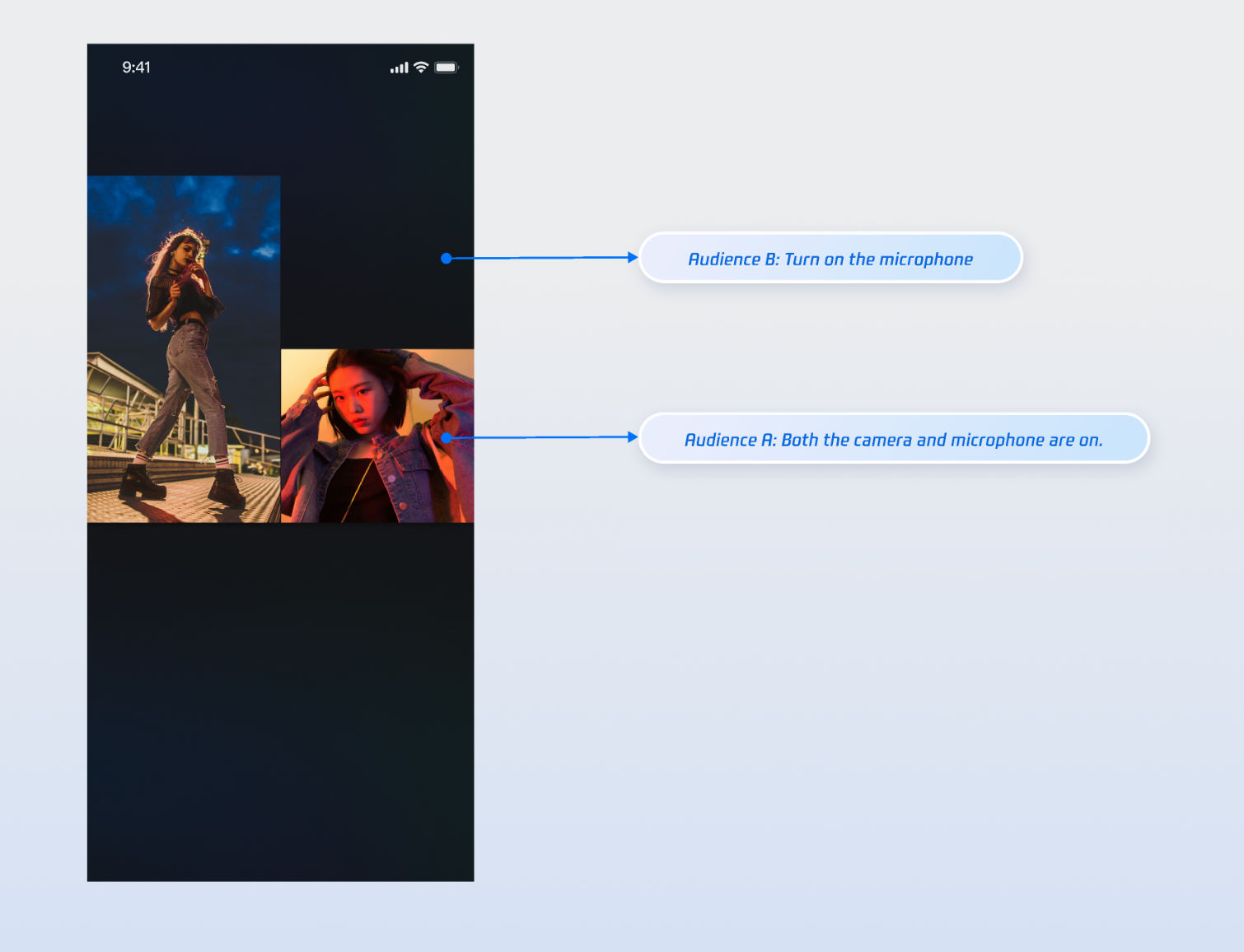
After integrating the above features, use two audience members and a host to test co-hosting. For example, Audience A enables both camera and microphone, while Audience B enables only the microphone. The result is shown below. For UI customization, see [Refining UI Details](https://write.woa.com/#.E5.AE.8C.E5.96.84-ui-.E7.BB.86.E8.8A.82).
|
|
365
|
+
|
|
366
|
+
|
|
367
|
+
|
|
368
|
+
|
|
369
|
+
## Refining UI Details
|
|
370
|
+
|
|
371
|
+
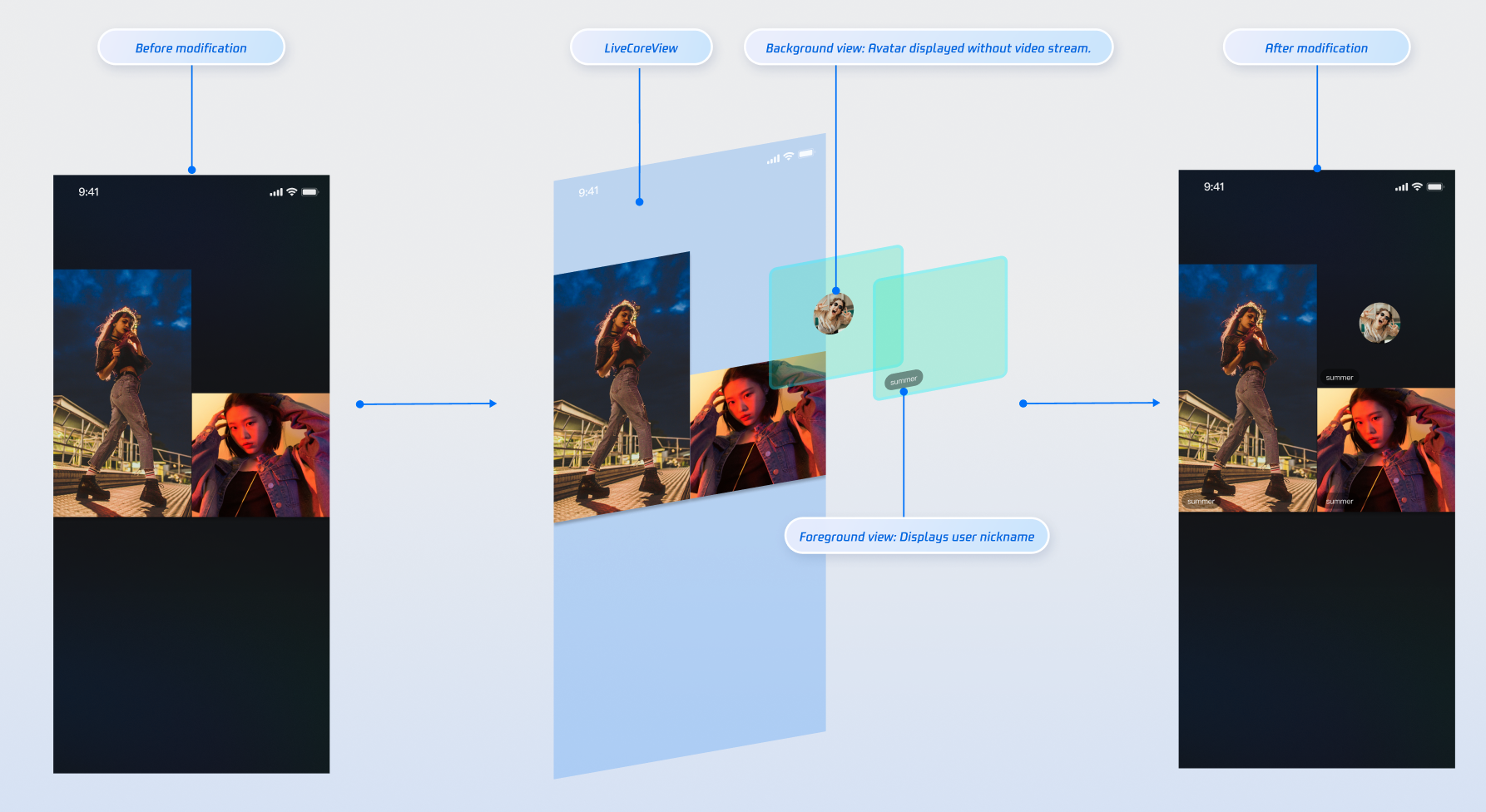
Use the "slot" feature provided by the `VideoViewAdapter` interface to add custom views on top of audience co-hosting video streams. For example, display nicknames, avatars, or show a placeholder image when the camera is off to enhance the user experience.
|
|
372
|
+
|
|
373
|
+
### Displaying Nicknames on Video Streams
|
|
374
|
+
|
|
375
|
+
#### Implementation Example
|
|
376
|
+
|
|
377
|
+
|
|
378
|
+
|
|
379
|
+
|
|
380
|
+
#### Implementation
|
|
381
|
+
|
|
382
|
+
> **Note:**
|
|
383
|
+
>
|
|
384
|
+
|
|
385
|
+
> You can also refer to the [widgets](https://github.com/Tencent-RTC/TUIKit_Android/tree/main/live/tuilivekit/src/main/java/com/trtc/uikit/livekit/features/anchorboardcast/view/coguest/widgets) directory in the open-source TUILiveKit project for a complete implementation.
|
|
386
|
+
>
|
|
387
|
+
|
|
388
|
+
- **Step 1**: Create the foreground view `CustomSeatView` to display user info above the video stream.
|
|
389
|
+
|
|
390
|
+
``` kotlin
|
|
391
|
+
import android.content.Context
|
|
392
|
+
import android.graphics.Color
|
|
393
|
+
import android.view.Gravity
|
|
394
|
+
import android.view.ViewGroup
|
|
395
|
+
import android.widget.LinearLayout
|
|
396
|
+
import android.widget.TextView
|
|
397
|
+
|
|
398
|
+
// Custom floating user info view (foreground)
|
|
399
|
+
class CustomSeatView(context: Context) : LinearLayout(context) {
|
|
400
|
+
private val nameLabel: TextView
|
|
401
|
+
|
|
402
|
+
init {
|
|
403
|
+
orientation = VERTICAL
|
|
404
|
+
gravity = Gravity.BOTTOM or Gravity.START
|
|
405
|
+
setBackgroundColor(Color.parseColor("#80000000")) // Semi-transparent black background
|
|
406
|
+
|
|
407
|
+
nameLabel = TextView(context).apply {
|
|
408
|
+
setTextColor(Color.WHITE)
|
|
409
|
+
textSize = 14f
|
|
410
|
+
}
|
|
411
|
+
|
|
412
|
+
addView(nameLabel, LayoutParams(
|
|
413
|
+
ViewGroup.LayoutParams.WRAP_CONTENT,
|
|
414
|
+
ViewGroup.LayoutParams.WRAP_CONTENT
|
|
415
|
+
).apply {
|
|
416
|
+
setMargins(20, 0, 0, 20) // Left margin 20, bottom margin 20
|
|
417
|
+
})
|
|
418
|
+
}
|
|
419
|
+
|
|
420
|
+
fun setUserName(userName: String) {
|
|
421
|
+
nameLabel.text = userName
|
|
422
|
+
}
|
|
423
|
+
}
|
|
424
|
+
```
|
|
425
|
+
- **Step 2**: Create the background view `CustomAvatarView` to serve as a placeholder when the user has no video stream.
|
|
426
|
+
|
|
427
|
+
``` kotlin
|
|
428
|
+
import android.content.Context
|
|
429
|
+
import android.graphics.Color
|
|
430
|
+
import android.view.Gravity
|
|
431
|
+
import android.view.ViewGroup
|
|
432
|
+
import android.widget.ImageView
|
|
433
|
+
import android.widget.LinearLayout
|
|
434
|
+
|
|
435
|
+
// Custom avatar placeholder view (background)
|
|
436
|
+
class CustomAvatarView(context: Context) : LinearLayout(context) {
|
|
437
|
+
private val avatarImageView: ImageView
|
|
438
|
+
|
|
439
|
+
init {
|
|
440
|
+
orientation = VERTICAL
|
|
441
|
+
gravity = Gravity.CENTER
|
|
442
|
+
setBackgroundColor(Color.TRANSPARENT)
|
|
443
|
+
|
|
444
|
+
avatarImageView = ImageView(context).apply {
|
|
445
|
+
setColorFilter(Color.GRAY)
|
|
446
|
+
scaleType = ImageView.ScaleType.CENTER_CROP
|
|
447
|
+
}
|
|
448
|
+
|
|
449
|
+
addView(avatarImageView, LayoutParams(120, 120)) // 60dp * 2 = 120px
|
|
450
|
+
}
|
|
451
|
+
|
|
452
|
+
fun setUserAvatar(avatarUrl: String) {
|
|
453
|
+
// Load user avatar here, e.g., using Glide
|
|
454
|
+
// Glide.with(context).load(avatarUrl).into(avatarImageView)
|
|
455
|
+
}
|
|
456
|
+
}
|
|
457
|
+
```
|
|
458
|
+
- **Step 3**: Implement the `VideoViewAdapter.createCoGuestView` interface. Return the appropriate view based on the viewLayer value.
|
|
459
|
+
|
|
460
|
+
``` kotlin
|
|
461
|
+
import android.os.Bundle
|
|
462
|
+
import android.view.View
|
|
463
|
+
import androidx.appcompat.app.AppCompatActivity
|
|
464
|
+
import com.tencent.cloud.tuikit.engine.room.TUIRoomDefine
|
|
465
|
+
import io.trtc.tuikit.atomicxcore.api.view.VideoViewAdapter
|
|
466
|
+
import io.trtc.tuikit.atomicxcore.api.view.ViewLayer
|
|
467
|
+
|
|
468
|
+
// Implement VideoViewAdapter in your Activity
|
|
469
|
+
class YourActivity : AppCompatActivity(), VideoViewAdapter {
|
|
470
|
+
|
|
471
|
+
// ... other code ...
|
|
472
|
+
|
|
473
|
+
// Implement the interface method for both viewLayer types
|
|
474
|
+
override fun createCoGuestView(userInfo: TUIRoomDefine.SeatFullInfo?, viewLayer: ViewLayer?): View? {
|
|
475
|
+
userInfo ?: return null
|
|
476
|
+
val userId = userInfo.userId
|
|
477
|
+
if (userId.isNullOrEmpty()) return null
|
|
478
|
+
|
|
479
|
+
return when (viewLayer) {
|
|
480
|
+
ViewLayer.FOREGROUND -> {
|
|
481
|
+
// Show foreground view when camera is on
|
|
482
|
+
val seatView = CustomSeatView(this)
|
|
483
|
+
seatView.setUserName(userInfo.userName ?: "")
|
|
484
|
+
seatView
|
|
485
|
+
}
|
|
486
|
+
ViewLayer.BACKGROUND -> {
|
|
487
|
+
// Show background view when camera is off
|
|
488
|
+
val avatarView = CustomAvatarView(this)
|
|
489
|
+
userInfo.userAvatar?.let { avatarView.setUserAvatar(it) }
|
|
490
|
+
avatarView
|
|
491
|
+
}
|
|
492
|
+
else -> null
|
|
493
|
+
}
|
|
494
|
+
}
|
|
495
|
+
|
|
496
|
+
override fun onCreate(savedInstanceState: Bundle?) {
|
|
497
|
+
super.onCreate(savedInstanceState)
|
|
498
|
+
// Set the adapter
|
|
499
|
+
liveCoreView.setVideoViewAdapter(this)
|
|
500
|
+
}
|
|
501
|
+
}
|
|
502
|
+
```
|
|
503
|
+
|
|
504
|
+
#### Parameter Description:
|
|
505
|
+
<table>
|
|
506
|
+
<tr>
|
|
507
|
+
<td rowspan="1" colSpan="1" >**Parameter**</td>
|
|
508
|
+
|
|
509
|
+
<td rowspan="1" colSpan="1" >**Type**</td>
|
|
510
|
+
|
|
511
|
+
<td rowspan="1" colSpan="1" >**Description**</td>
|
|
512
|
+
</tr>
|
|
513
|
+
|
|
514
|
+
<tr>
|
|
515
|
+
<td rowspan="1" colSpan="1" >`seatInfo`</td>
|
|
516
|
+
|
|
517
|
+
<td rowspan="1" colSpan="1" >`SeatFullInfo?`</td>
|
|
518
|
+
|
|
519
|
+
<td rowspan="1" colSpan="1" >Seat information object, containing detailed information about the user on the seat</td>
|
|
520
|
+
</tr>
|
|
521
|
+
|
|
522
|
+
<tr>
|
|
523
|
+
<td rowspan="1" colSpan="1" >`seatInfo.userId`</td>
|
|
524
|
+
|
|
525
|
+
<td rowspan="1" colSpan="1" >`String`</td>
|
|
526
|
+
|
|
527
|
+
<td rowspan="1" colSpan="1" >ID of the user on the seat</td>
|
|
528
|
+
</tr>
|
|
529
|
+
|
|
530
|
+
<tr>
|
|
531
|
+
<td rowspan="1" colSpan="1" >`seatInfo.userName`</td>
|
|
532
|
+
|
|
533
|
+
<td rowspan="1" colSpan="1" >`String`</td>
|
|
534
|
+
|
|
535
|
+
<td rowspan="1" colSpan="1" >Nickname of the user on the seat</td>
|
|
536
|
+
</tr>
|
|
537
|
+
|
|
538
|
+
<tr>
|
|
539
|
+
<td rowspan="1" colSpan="1" >`seatInfo.userAvatar`</td>
|
|
540
|
+
|
|
541
|
+
<td rowspan="1" colSpan="1" >`String`</td>
|
|
542
|
+
|
|
543
|
+
<td rowspan="1" colSpan="1" >Avatar URL of the user on the seat</td>
|
|
544
|
+
</tr>
|
|
545
|
+
|
|
546
|
+
<tr>
|
|
547
|
+
<td rowspan="1" colSpan="1" >`seatInfo.userMicrophoneStatus`</td>
|
|
548
|
+
|
|
549
|
+
<td rowspan="1" colSpan="1" >`DeviceStatus`</td>
|
|
550
|
+
|
|
551
|
+
<td rowspan="1" colSpan="1" >Microphone status of the user on the seat</td>
|
|
552
|
+
</tr>
|
|
553
|
+
|
|
554
|
+
<tr>
|
|
555
|
+
<td rowspan="1" colSpan="1" >`seatInfo.userCameraStatus`</td>
|
|
556
|
+
|
|
557
|
+
<td rowspan="1" colSpan="1" >`DeviceStatus`</td>
|
|
558
|
+
|
|
559
|
+
<td rowspan="1" colSpan="1" >Camera status of the user on the seat</td>
|
|
560
|
+
</tr>
|
|
561
|
+
|
|
562
|
+
<tr>
|
|
563
|
+
<td rowspan="1" colSpan="1" >`viewLayer`</td>
|
|
564
|
+
|
|
565
|
+
<td rowspan="1" colSpan="1" >`ViewLayer`</td>
|
|
566
|
+
|
|
567
|
+
<td rowspan="1" colSpan="1" >View layer enum:<br>- `FOREGROUND`: Foreground widget view, always displayed on top of the video<br>- `BACKGROUND`: Background widget view, displayed below the foreground view, only shown when the user has no video stream (e.g., camera is off); typically used for the user's avatar or a placeholder image</td>
|
|
568
|
+
</tr>
|
|
569
|
+
</table>
|
|
570
|
+
|
|
571
|
+
|
|
572
|
+
## API Documentation
|
|
573
|
+
|
|
574
|
+
For detailed information on all public interfaces, properties, and methods of [CoGuestStore](https://tencent-rtc.github.io/TUIKit_Android/-atomic-x%20-core%20-a-p-i/io.trtc.tuikit.atomicxcore.api.live/-co-guest-store/index.html) and related classes, refer to the official API documentation included with the [AtomicXCore](https://tencent-rtc.github.io/TUIKit_Android/index.html) framework. The relevant stores used in this guide include:
|
|
575
|
+
<table>
|
|
576
|
+
<tr>
|
|
577
|
+
<td rowspan="1" colSpan="1" >**Store/Component**</td>
|
|
578
|
+
|
|
579
|
+
<td rowspan="1" colSpan="1" >**Function Description**</td>
|
|
580
|
+
|
|
581
|
+
<td rowspan="1" colSpan="1" >**API Documentation**</td>
|
|
582
|
+
</tr>
|
|
583
|
+
|
|
584
|
+
<tr>
|
|
585
|
+
<td rowspan="1" colSpan="1" >LiveCoreView</td>
|
|
586
|
+
|
|
587
|
+
<td rowspan="1" colSpan="1" >Core view component for live video stream display and interaction. Handles video rendering and widget management, supporting host streaming, audience co-hosting, host connections, and more.</td>
|
|
588
|
+
|
|
589
|
+
<td rowspan="1" colSpan="1" >[API Documentation](https://tencent-rtc.github.io/TUIKit_Android/-atomic-x%20-core%20-a-p-i/io.trtc.tuikit.atomicxcore.api.view/-live-core-view/index.html)</td>
|
|
590
|
+
</tr>
|
|
591
|
+
|
|
592
|
+
<tr>
|
|
593
|
+
<td rowspan="1" colSpan="1" >DeviceStore</td>
|
|
594
|
+
|
|
595
|
+
<td rowspan="1" colSpan="1" >Audio and video device control: microphone (on/off, volume), camera (on/off, switch, quality), screen sharing, real-time device status monitoring.</td>
|
|
596
|
+
|
|
597
|
+
<td rowspan="1" colSpan="1" >[API Documentation](https://tencent-rtc.github.io/TUIKit_Android/-atomic-x%20-core%20-a-p-i/io.trtc.tuikit.atomicxcore.api.device/-device-store/index.html)</td>
|
|
598
|
+
</tr>
|
|
599
|
+
|
|
600
|
+
<tr>
|
|
601
|
+
<td rowspan="1" colSpan="1" >CoGuestStore</td>
|
|
602
|
+
|
|
603
|
+
<td rowspan="1" colSpan="1" >Audience co-hosting management: request/invite/accept/reject co-hosting, permission control (microphone/camera), state synchronization.</td>
|
|
604
|
+
|
|
605
|
+
<td rowspan="1" colSpan="1" >[API Documentation](https://tencent-rtc.github.io/TUIKit_Android/-atomic-x%20-core%20-a-p-i/io.trtc.tuikit.atomicxcore.api.live/-co-guest-store/index.html)</td>
|
|
606
|
+
</tr>
|
|
607
|
+
</table>
|
|
608
|
+
|
|
609
|
+
|
|
610
|
+
## FAQs
|
|
611
|
+
|
|
612
|
+
### How do I manage the lifecycle and events of custom views added via `VideoViewAdapter`?
|
|
613
|
+
|
|
614
|
+
LiveCoreView automatically manages the addition and removal of views returned by your adapter methods. You do not need to handle this manually. To support user interactions (such as click events) in your custom view, add the appropriate event listeners when creating the view.
|
|
615
|
+
|
|
616
|
+
### What is the purpose of the viewLayer parameter in VideoViewAdapter?
|
|
617
|
+
|
|
618
|
+
The viewLayer parameter distinguishes between foreground and background widgets:
|
|
619
|
+
- `FOREGROUND`: Foreground layer, always displayed on top of the video.
|
|
620
|
+
|
|
621
|
+
- `BACKGROUND`: Background layer, displayed only when the user has no video stream (e.g., camera is off); typically used to show the user's avatar or a placeholder image.
|
|
622
|
+
|
|
623
|
+
|
|
624
|
+
### Why is my custom view not showing up?
|
|
625
|
+
- **Check adapter settings**: Ensure you have called liveCoreView.setVideoViewAdapter(this) and set the adapter successfully.
|
|
626
|
+
|
|
627
|
+
- **Check implementation method**: Confirm that you have correctly implemented the relevant adapter method (such as createCoGuestView).
|
|
628
|
+
|
|
629
|
+
- **Check return value**: Make sure your adapter method returns a valid View instance at the appropriate time, not null. Add logs in the adapter method for debugging if needed.
|