@tencent-rtc/mcp 1.2.8 → 1.3.0
This diff represents the content of publicly available package versions that have been released to one of the supported registries. The information contained in this diff is provided for informational purposes only and reflects changes between package versions as they appear in their respective public registries.
- package/package.json +1 -1
- package/resource/doc/chatuikit/faq/common/server.md +44 -0
- package/resource/doc/chatuikit/faq/web_sdk/faq.md +57 -0
- package/resource/doc/livekit/vue/components/co-guest-panel.md +3 -3
- package/resource/doc/livekit/vue/components/live-view.md +4 -4
- package/resource/doc/livekit/vue/{components/live-list.md → live-list-integration.md} +7 -7
- package/resource/doc/livekit/vue/{components/live-player.md → live-player-desk-integration.md} +8 -8
- package/resource/doc/livekit/vue/live-player-h5-integration.md +269 -0
- package/resource/doc/livekit/vue/workflow.md +218 -0
- package/resource/doc/native_live/android/V2TXLiveCode_api_android.md +312 -0
- package/resource/doc/native_live/android/V2TXLiveDef_api_android.md +430 -0
- package/resource/doc/native_live/android/V2TXLivePlayerObserver_api_android.md +679 -0
- package/resource/doc/native_live/android/V2TXLivePlayer_api_android.md +671 -0
- package/resource/doc/native_live/android/V2TXLivePremier_api_android.md +271 -0
- package/resource/doc/native_live/android/V2TXLivePusherObserver_api_android.md +849 -0
- package/resource/doc/native_live/android/V2TXLivePusher_api_android.md +1046 -0
- package/resource/doc/native_live/flutter/V2TXLiveCode_api_flutter.md +460 -0
- package/resource/doc/native_live/flutter/V2TXLiveDef_api_flutter.md +558 -0
- package/resource/doc/native_live/flutter/V2TXLivePlayerObserver_api_flutter.md +865 -0
- package/resource/doc/native_live/flutter/V2TXLivePlayer_api_flutter.md +657 -0
- package/resource/doc/native_live/flutter/V2TXLivePremier_api_flutter.md +437 -0
- package/resource/doc/native_live/flutter/V2TXLivePusherObserver_api_flutter.md +335 -0
- package/resource/doc/native_live/flutter/V2TXLivePusher_api_flutter.md +748 -0
- package/resource/doc/native_live/iOS/V2TXLiveCode_api_iOS.md +327 -0
- package/resource/doc/native_live/iOS/V2TXLiveDef_api_iOS.md +507 -0
- package/resource/doc/native_live/iOS/V2TXLivePlayerObserver_api_iOS.md +507 -0
- package/resource/doc/native_live/iOS/V2TXLivePlayer_api_iOS.md +659 -0
- package/resource/doc/native_live/iOS/V2TXLivePremier_api_iOS.md +284 -0
- package/resource/doc/native_live/iOS/V2TXLivePusherObserver_api_iOS.md +814 -0
- package/resource/doc/native_live/iOS/V2TXLivePusher_api_iOS.md +1000 -0
- package/resource/doc/trtc/C++/ITRTCCloud.md +4119 -0
- package/resource/doc/trtc/C++/ITRTCStatistics.md +325 -0
- package/resource/doc/trtc/C++/ITXAudioEffectManager.md +1289 -0
- package/resource/doc/trtc/C++/ITXDeviceManager.md +1028 -0
- package/resource/doc/trtc/C++/TRTCCloudCallback.md +2650 -0
- package/resource/doc/trtc/C++/TRTCTypeDef.md +3600 -0
- package/resource/doc/trtc/C++/TXLiteAVCode.md +921 -0
- package/resource/doc/trtc/android/TRTCCloud.md +3782 -0
- package/resource/doc/trtc/android/TRTCCloudDef.md +3880 -0
- package/resource/doc/trtc/android/TRTCCloudListener.md +2431 -0
- package/resource/doc/trtc/android/TRTCStatistics.md +295 -0
- package/resource/doc/trtc/android/TXAudioEffectManager.md +1289 -0
- package/resource/doc/trtc/android/TXBeautyManager.md +979 -0
- package/resource/doc/trtc/android/TXDeviceManager.md +440 -0
- package/resource/doc/trtc/android/TXLiteAVCode.md +905 -0
- package/resource/doc/trtc/iOS/TRTCCloud.md +4238 -0
- package/resource/doc/trtc/iOS/TRTCCloudDef.md +3730 -0
- package/resource/doc/trtc/iOS/TRTCCloudDelegate.md +2531 -0
- package/resource/doc/trtc/iOS/TRTCStatistics.md +295 -0
- package/resource/doc/trtc/iOS/TXAudioEffectManager.md +1100 -0
- package/resource/doc/trtc/iOS/TXBeautyManager.md +985 -0
- package/resource/doc/trtc/iOS/TXDeviceManager.md +1024 -0
- package/resource/doc/trtc/iOS/TXLiteAVCode.md +928 -0
- package/tools/definitions/get_faq_def.js +4 -0
- package/tools/definitions/get_faq_def.js.map +1 -1
- package/tools/definitions/get_native_live_api_def.js +23 -0
- package/tools/definitions/get_native_live_api_def.js.map +1 -0
- package/tools/definitions/get_trtc_native_api_def.js +16 -0
- package/tools/definitions/get_trtc_native_api_def.js.map +1 -0
- package/tools/definitions/get_web_live_uikit_component_detail_def.js +13 -8
- package/tools/definitions/get_web_live_uikit_component_detail_def.js.map +1 -1
- package/tools/definitions/get_web_live_uikit_integration_def.js +32 -0
- package/tools/definitions/get_web_live_uikit_integration_def.js.map +1 -0
- package/tools/index.js +8 -0
- package/tools/index.js.map +1 -1
- package/tools/live/get-web-live-uikit-integration.js +52 -0
- package/tools/live/get-web-live-uikit-integration.js.map +1 -0
- package/tools/native_live/get-native-live-api.js +31 -0
- package/tools/native_live/get-native-live-api.js.map +1 -0
- package/tools/trtc/get-trtc-native-api.js +31 -0
- package/tools/trtc/get-trtc-native-api.js.map +1 -0
- package/utils/generate-structured-result.js +34 -0
- package/utils/generate-structured-result.js.map +1 -0
- package/utils/handle-component-name.js +0 -8
- package/utils/handle-component-name.js.map +1 -1
- package/utils/report-cls-client.js +1 -1
- package/utils/report-es-client.js +1 -1
- /package/resource/doc/livekit/vue/{components/broadcast.md → live-pusher-integration.md} +0 -0
|
@@ -0,0 +1,2431 @@
|
|
|
1
|
+
# TRTC Real-Time Communication (TRTC SDK) Documentation
|
|
2
|
+
## Overview
|
|
3
|
+
`TRTCCloudListener.java` provides the event callback interface for TRTC Real-Time Communication (TRTC SDK) on Android.
|
|
4
|
+
|
|
5
|
+
|
|
6
|
+
## TRTCVideoRenderListener
|
|
7
|
+
<table>
|
|
8
|
+
<tr>
|
|
9
|
+
<td rowspan="1" colSpan="1" >Function List</td>
|
|
10
|
+
|
|
11
|
+
<td rowspan="1" colSpan="1" >Description</td>
|
|
12
|
+
</tr>
|
|
13
|
+
|
|
14
|
+
<tr>
|
|
15
|
+
<td rowspan="1" colSpan="1" >[onRenderVideoFrame](https://write.woa.com/document/87029920275542016)</td>
|
|
16
|
+
|
|
17
|
+
<td rowspan="1" colSpan="1" >Self-definition video rendering callback</td>
|
|
18
|
+
</tr>
|
|
19
|
+
</table>
|
|
20
|
+
|
|
21
|
+
|
|
22
|
+
## TRTCVideoFrameListener
|
|
23
|
+
<table>
|
|
24
|
+
<tr>
|
|
25
|
+
<td rowspan="1" colSpan="1" >Function List</td>
|
|
26
|
+
|
|
27
|
+
<td rowspan="1" colSpan="1" >Description</td>
|
|
28
|
+
</tr>
|
|
29
|
+
|
|
30
|
+
<tr>
|
|
31
|
+
<td rowspan="1" colSpan="1" >[onGLContextCreated](https://write.woa.com/document/87029920275542016)</td>
|
|
32
|
+
|
|
33
|
+
<td rowspan="1" colSpan="1" >Notification that the SDK's internal OpenGL environment has been created</td>
|
|
34
|
+
</tr>
|
|
35
|
+
|
|
36
|
+
<tr>
|
|
37
|
+
<td rowspan="1" colSpan="1" >[onProcessVideoFrame](https://write.woa.com/document/87029920275542016)</td>
|
|
38
|
+
|
|
39
|
+
<td rowspan="1" colSpan="1" >Video processing callback for integrating third-party beauty components</td>
|
|
40
|
+
</tr>
|
|
41
|
+
|
|
42
|
+
<tr>
|
|
43
|
+
<td rowspan="1" colSpan="1" >[onGLContextDestory](https://write.woa.com/document/87029920275542016)</td>
|
|
44
|
+
|
|
45
|
+
<td rowspan="1" colSpan="1" >Notification that the SDK's internal OpenGL environment has been destroyed</td>
|
|
46
|
+
</tr>
|
|
47
|
+
</table>
|
|
48
|
+
|
|
49
|
+
|
|
50
|
+
## TRTCAudioFrameListener
|
|
51
|
+
<table>
|
|
52
|
+
<tr>
|
|
53
|
+
<td rowspan="1" colSpan="1" >Function List</td>
|
|
54
|
+
|
|
55
|
+
<td rowspan="1" colSpan="1" >Description</td>
|
|
56
|
+
</tr>
|
|
57
|
+
|
|
58
|
+
<tr>
|
|
59
|
+
<td rowspan="1" colSpan="1" >[onCapturedAudioFrame](https://write.woa.com/document/87029920275542016)</td>
|
|
60
|
+
|
|
61
|
+
<td rowspan="1" colSpan="1" >Local audio data callback after preprocessing by the audio module</td>
|
|
62
|
+
</tr>
|
|
63
|
+
|
|
64
|
+
<tr>
|
|
65
|
+
<td rowspan="1" colSpan="1" >[onLocalProcessedAudioFrame](https://write.woa.com/document/87029920275542016)</td>
|
|
66
|
+
|
|
67
|
+
<td rowspan="1" colSpan="1" >Local audio data callback after preprocessing, sound-effect processing, and mixing BGM by the audio module</td>
|
|
68
|
+
</tr>
|
|
69
|
+
|
|
70
|
+
<tr>
|
|
71
|
+
<td rowspan="1" colSpan="1" >[onRemoteUserAudioFrame](https://write.woa.com/document/87029920275542016)</td>
|
|
72
|
+
|
|
73
|
+
<td rowspan="1" colSpan="1" >Audio data of each remote user before mixing</td>
|
|
74
|
+
</tr>
|
|
75
|
+
|
|
76
|
+
<tr>
|
|
77
|
+
<td rowspan="1" colSpan="1" >[onMixedPlayAudioFrame](https://write.woa.com/document/87029920275542016)</td>
|
|
78
|
+
|
|
79
|
+
<td rowspan="1" colSpan="1" >Callback of mixed audio data before final submission to the system for playback</td>
|
|
80
|
+
</tr>
|
|
81
|
+
|
|
82
|
+
<tr>
|
|
83
|
+
<td rowspan="1" colSpan="1" >[onMixedAllAudioFrame](https://write.woa.com/document/87029920275542016)</td>
|
|
84
|
+
|
|
85
|
+
<td rowspan="1" colSpan="1" >Audio data mixed by the SDK (including collected and to-be-played audio)</td>
|
|
86
|
+
</tr>
|
|
87
|
+
|
|
88
|
+
<tr>
|
|
89
|
+
<td rowspan="1" colSpan="1" >[onVoiceEarMonitorAudioFrame](https://write.woa.com/document/87029920275542016)</td>
|
|
90
|
+
|
|
91
|
+
<td rowspan="1" colSpan="1" >Audio data for ear return</td>
|
|
92
|
+
</tr>
|
|
93
|
+
</table>
|
|
94
|
+
|
|
95
|
+
|
|
96
|
+
## TRTCLogListener
|
|
97
|
+
<table>
|
|
98
|
+
<tr>
|
|
99
|
+
<td rowspan="1" colSpan="1" >Function List</td>
|
|
100
|
+
|
|
101
|
+
<td rowspan="1" colSpan="1" >Description</td>
|
|
102
|
+
</tr>
|
|
103
|
+
|
|
104
|
+
<tr>
|
|
105
|
+
<td rowspan="1" colSpan="1" >[onLog](https://write.woa.com/document/87029920275542016)</td>
|
|
106
|
+
|
|
107
|
+
<td rowspan="1" colSpan="1" >Local LOG printing callback</td>
|
|
108
|
+
</tr>
|
|
109
|
+
</table>
|
|
110
|
+
|
|
111
|
+
|
|
112
|
+
## TRTCCloudListener
|
|
113
|
+
<table>
|
|
114
|
+
<tr>
|
|
115
|
+
<td rowspan="1" colSpan="1" >Function List</td>
|
|
116
|
+
|
|
117
|
+
<td rowspan="1" colSpan="1" >Description</td>
|
|
118
|
+
</tr>
|
|
119
|
+
|
|
120
|
+
<tr>
|
|
121
|
+
<td rowspan="1" colSpan="1" >[onError](https://write.woa.com/document/87029920275542016)</td>
|
|
122
|
+
|
|
123
|
+
<td rowspan="1" colSpan="1" >Error event callback</td>
|
|
124
|
+
</tr>
|
|
125
|
+
|
|
126
|
+
<tr>
|
|
127
|
+
<td rowspan="1" colSpan="1" >[onWarning](https://write.woa.com/document/87029920275542016)</td>
|
|
128
|
+
|
|
129
|
+
<td rowspan="1" colSpan="1" >Warning event callback</td>
|
|
130
|
+
</tr>
|
|
131
|
+
|
|
132
|
+
<tr>
|
|
133
|
+
<td rowspan="1" colSpan="1" >[onEnterRoom](https://write.woa.com/document/87029920275542016)</td>
|
|
134
|
+
|
|
135
|
+
<td rowspan="1" colSpan="1" >Event callback for room entry success or failure</td>
|
|
136
|
+
</tr>
|
|
137
|
+
|
|
138
|
+
<tr>
|
|
139
|
+
<td rowspan="1" colSpan="1" >[onExitRoom](https://write.woa.com/document/87029920275542016)</td>
|
|
140
|
+
|
|
141
|
+
<td rowspan="1" colSpan="1" >Event callback for leaving the room</td>
|
|
142
|
+
</tr>
|
|
143
|
+
|
|
144
|
+
<tr>
|
|
145
|
+
<td rowspan="1" colSpan="1" >[onSwitchRole](https://write.woa.com/document/87029920275542016)</td>
|
|
146
|
+
|
|
147
|
+
<td rowspan="1" colSpan="1" >Event callback for switching roles</td>
|
|
148
|
+
</tr>
|
|
149
|
+
|
|
150
|
+
<tr>
|
|
151
|
+
<td rowspan="1" colSpan="1" >[onSwitchRoom](https://write.woa.com/document/87029920275542016)</td>
|
|
152
|
+
|
|
153
|
+
<td rowspan="1" colSpan="1" >Event callback for switching rooms result</td>
|
|
154
|
+
</tr>
|
|
155
|
+
|
|
156
|
+
<tr>
|
|
157
|
+
<td rowspan="1" colSpan="1" >[onConnectOtherRoom](https://write.woa.com/document/87029920275542016)</td>
|
|
158
|
+
|
|
159
|
+
<td rowspan="1" colSpan="1" >Event callback for cross-room communication request result</td>
|
|
160
|
+
</tr>
|
|
161
|
+
|
|
162
|
+
<tr>
|
|
163
|
+
<td rowspan="1" colSpan="1" >[onDisConnectOtherRoom](https://write.woa.com/document/87029920275542016)</td>
|
|
164
|
+
|
|
165
|
+
<td rowspan="1" colSpan="1" >Event callback for ending cross-room communication result</td>
|
|
166
|
+
</tr>
|
|
167
|
+
|
|
168
|
+
<tr>
|
|
169
|
+
<td rowspan="1" colSpan="1" >[onUpdateOtherRoomForwardMode](https://write.woa.com/document/87029920275542016)</td>
|
|
170
|
+
|
|
171
|
+
<td rowspan="1" colSpan="1" >Event callback for modifying cross-room broadcaster uplink capability result</td>
|
|
172
|
+
</tr>
|
|
173
|
+
|
|
174
|
+
<tr>
|
|
175
|
+
<td rowspan="1" colSpan="1" >[onRemoteUserEnterRoom](https://write.woa.com/document/87029920275542016)</td>
|
|
176
|
+
|
|
177
|
+
<td rowspan="1" colSpan="1" >A user has joined the current room</td>
|
|
178
|
+
</tr>
|
|
179
|
+
|
|
180
|
+
<tr>
|
|
181
|
+
<td rowspan="1" colSpan="1" >[onRemoteUserLeaveRoom](https://write.woa.com/document/87029920275542016)</td>
|
|
182
|
+
|
|
183
|
+
<td rowspan="1" colSpan="1" >A user has left the current room</td>
|
|
184
|
+
</tr>
|
|
185
|
+
|
|
186
|
+
<tr>
|
|
187
|
+
<td rowspan="1" colSpan="1" >[onUserVideoAvailable](https://write.woa.com/document/87029920275542016)</td>
|
|
188
|
+
|
|
189
|
+
<td rowspan="1" colSpan="1" >A remote user has started/stopped publishing the main video stream</td>
|
|
190
|
+
</tr>
|
|
191
|
+
|
|
192
|
+
<tr>
|
|
193
|
+
<td rowspan="1" colSpan="1" >[onUserSubStreamAvailable](https://write.woa.com/document/87029920275542016)</td>
|
|
194
|
+
|
|
195
|
+
<td rowspan="1" colSpan="1" >A remote user has started/stopped publishing the auxiliary video stream</td>
|
|
196
|
+
</tr>
|
|
197
|
+
|
|
198
|
+
<tr>
|
|
199
|
+
<td rowspan="1" colSpan="1" >[onUserAudioAvailable](https://write.woa.com/document/87029920275542016)</td>
|
|
200
|
+
|
|
201
|
+
<td rowspan="1" colSpan="1" >A remote user has started/stopped publishing their audio</td>
|
|
202
|
+
</tr>
|
|
203
|
+
|
|
204
|
+
<tr>
|
|
205
|
+
<td rowspan="1" colSpan="1" >[onFirstVideoFrame](https://write.woa.com/document/87029920275542016)</td>
|
|
206
|
+
|
|
207
|
+
<td rowspan="1" colSpan="1" >The SDK has started rendering the first frame of the local or remote user's video</td>
|
|
208
|
+
</tr>
|
|
209
|
+
|
|
210
|
+
<tr>
|
|
211
|
+
<td rowspan="1" colSpan="1" >[onFirstAudioFrame](https://write.woa.com/document/87029920275542016)</td>
|
|
212
|
+
|
|
213
|
+
<td rowspan="1" colSpan="1" >The SDK has started playing the remote user's first audio frame</td>
|
|
214
|
+
</tr>
|
|
215
|
+
|
|
216
|
+
<tr>
|
|
217
|
+
<td rowspan="1" colSpan="1" >[onSendFirstLocalVideoFrame](https://write.woa.com/document/87029920275542016)</td>
|
|
218
|
+
|
|
219
|
+
<td rowspan="1" colSpan="1" >The first local video frame has been published</td>
|
|
220
|
+
</tr>
|
|
221
|
+
|
|
222
|
+
<tr>
|
|
223
|
+
<td rowspan="1" colSpan="1" >[onSendFirstLocalAudioFrame](https://write.woa.com/document/87029920275542016)</td>
|
|
224
|
+
|
|
225
|
+
<td rowspan="1" colSpan="1" >The first local audio frame has been published</td>
|
|
226
|
+
</tr>
|
|
227
|
+
|
|
228
|
+
<tr>
|
|
229
|
+
<td rowspan="1" colSpan="1" >[onRemoteVideoStatusUpdated](https://write.woa.com/document/87029920275542016)</td>
|
|
230
|
+
|
|
231
|
+
<td rowspan="1" colSpan="1" >Event callback for remote video status changes</td>
|
|
232
|
+
</tr>
|
|
233
|
+
|
|
234
|
+
<tr>
|
|
235
|
+
<td rowspan="1" colSpan="1" >[onRemoteAudioStatusUpdated](https://write.woa.com/document/87029920275542016)</td>
|
|
236
|
+
|
|
237
|
+
<td rowspan="1" colSpan="1" >Event callback for remote audio status changes</td>
|
|
238
|
+
</tr>
|
|
239
|
+
|
|
240
|
+
<tr>
|
|
241
|
+
<td rowspan="1" colSpan="1" >[onUserVideoSizeChanged](https://write.woa.com/document/87029920275542016)</td>
|
|
242
|
+
|
|
243
|
+
<td rowspan="1" colSpan="1" >Callback for changes in user video size</td>
|
|
244
|
+
</tr>
|
|
245
|
+
|
|
246
|
+
<tr>
|
|
247
|
+
<td rowspan="1" colSpan="1" >[onNetworkQuality](https://write.woa.com/document/87029920275542016)</td>
|
|
248
|
+
|
|
249
|
+
<td rowspan="1" colSpan="1" >Real-time statistics callback for network quality</td>
|
|
250
|
+
</tr>
|
|
251
|
+
|
|
252
|
+
<tr>
|
|
253
|
+
<td rowspan="1" colSpan="1" >[onStatistics](https://write.woa.com/document/87029920275542016)</td>
|
|
254
|
+
|
|
255
|
+
<td rowspan="1" colSpan="1" >Real-time statistics callback for audio and video technical indicators</td>
|
|
256
|
+
</tr>
|
|
257
|
+
|
|
258
|
+
<tr>
|
|
259
|
+
<td rowspan="1" colSpan="1" >[onSpeedTestResult](https://write.woa.com/document/87029920275542016)</td>
|
|
260
|
+
|
|
261
|
+
<td rowspan="1" colSpan="1" >Callback for internet speed test results</td>
|
|
262
|
+
</tr>
|
|
263
|
+
|
|
264
|
+
<tr>
|
|
265
|
+
<td rowspan="1" colSpan="1" >[onConnectionLost](https://write.woa.com/document/87029920275542016)</td>
|
|
266
|
+
|
|
267
|
+
<td rowspan="1" colSpan="1" >The connection between the SDK and the cloud has been disconnected.</td>
|
|
268
|
+
</tr>
|
|
269
|
+
|
|
270
|
+
<tr>
|
|
271
|
+
<td rowspan="1" colSpan="1" >[onTryToReconnect](https://write.woa.com/document/87029920275542016)</td>
|
|
272
|
+
|
|
273
|
+
<td rowspan="1" colSpan="1" >The SDK is trying to reconnect to the cloud.</td>
|
|
274
|
+
</tr>
|
|
275
|
+
|
|
276
|
+
<tr>
|
|
277
|
+
<td rowspan="1" colSpan="1" >[onConnectionRecovery](https://write.woa.com/document/87029920275542016)</td>
|
|
278
|
+
|
|
279
|
+
<td rowspan="1" colSpan="1" >The connection between the SDK and the cloud has been restored.</td>
|
|
280
|
+
</tr>
|
|
281
|
+
|
|
282
|
+
<tr>
|
|
283
|
+
<td rowspan="1" colSpan="1" >[onCameraDidReady](https://write.woa.com/document/87029920275542016)</td>
|
|
284
|
+
|
|
285
|
+
<td rowspan="1" colSpan="1" >Camera is ready</td>
|
|
286
|
+
</tr>
|
|
287
|
+
|
|
288
|
+
<tr>
|
|
289
|
+
<td rowspan="1" colSpan="1" >[onMicDidReady](https://write.woa.com/document/87029920275542016)</td>
|
|
290
|
+
|
|
291
|
+
<td rowspan="1" colSpan="1" >Microphone is ready</td>
|
|
292
|
+
</tr>
|
|
293
|
+
|
|
294
|
+
<tr>
|
|
295
|
+
<td rowspan="1" colSpan="1" >[onAudioRouteChanged](https://write.woa.com/document/87029920275542016)</td>
|
|
296
|
+
|
|
297
|
+
<td rowspan="1" colSpan="1" >Current audio routing has changed (applicable only to mobile devices)</td>
|
|
298
|
+
</tr>
|
|
299
|
+
|
|
300
|
+
<tr>
|
|
301
|
+
<td rowspan="1" colSpan="1" >[onUserVoiceVolume](https://write.woa.com/document/87029920275542016)</td>
|
|
302
|
+
|
|
303
|
+
<td rowspan="1" colSpan="1" >Callback for volume feedback</td>
|
|
304
|
+
</tr>
|
|
305
|
+
|
|
306
|
+
<tr>
|
|
307
|
+
<td rowspan="1" colSpan="1" >[onRecvCustomCmdMsg](https://write.woa.com/document/87029920275542016)</td>
|
|
308
|
+
|
|
309
|
+
<td rowspan="1" colSpan="1" >Receipt of a custom Definition message</td>
|
|
310
|
+
</tr>
|
|
311
|
+
|
|
312
|
+
<tr>
|
|
313
|
+
<td rowspan="1" colSpan="1" >[onMissCustomCmdMsg](https://write.woa.com/document/87029920275542016)</td>
|
|
314
|
+
|
|
315
|
+
<td rowspan="1" colSpan="1" >Event callback for lost custom Definition messages</td>
|
|
316
|
+
</tr>
|
|
317
|
+
|
|
318
|
+
<tr>
|
|
319
|
+
<td rowspan="1" colSpan="1" >[onRecvSEIMsg](https://write.woa.com/document/87029920275542016)</td>
|
|
320
|
+
|
|
321
|
+
<td rowspan="1" colSpan="1" >Callback for receiving SEI message</td>
|
|
322
|
+
</tr>
|
|
323
|
+
|
|
324
|
+
<tr>
|
|
325
|
+
<td rowspan="1" colSpan="1" >[onStartPublishing](https://write.woa.com/document/87029920275542016)</td>
|
|
326
|
+
|
|
327
|
+
<td rowspan="1" colSpan="1" >Event callback for starting to publish audio and video streams to Tencent CSS CDN</td>
|
|
328
|
+
</tr>
|
|
329
|
+
|
|
330
|
+
<tr>
|
|
331
|
+
<td rowspan="1" colSpan="1" >[onStopPublishing](https://write.woa.com/document/87029920275542016)</td>
|
|
332
|
+
|
|
333
|
+
<td rowspan="1" colSpan="1" >Event callback for stopping the publishing of audio and video streams to Tencent CSS CDN</td>
|
|
334
|
+
</tr>
|
|
335
|
+
|
|
336
|
+
<tr>
|
|
337
|
+
<td rowspan="1" colSpan="1" >[onStartPublishCDNStream](https://write.woa.com/document/87029920275542016)</td>
|
|
338
|
+
|
|
339
|
+
<td rowspan="1" colSpan="1" >Event callback for starting to publish audio and video streams to a non-Tencent Cloud CDN</td>
|
|
340
|
+
</tr>
|
|
341
|
+
|
|
342
|
+
<tr>
|
|
343
|
+
<td rowspan="1" colSpan="1" >[onStopPublishCDNStream](https://write.woa.com/document/87029920275542016)</td>
|
|
344
|
+
|
|
345
|
+
<td rowspan="1" colSpan="1" >Event callback for stopping the publishing of audio and video streams to a non-Tencent Cloud CDN</td>
|
|
346
|
+
</tr>
|
|
347
|
+
|
|
348
|
+
<tr>
|
|
349
|
+
<td rowspan="1" colSpan="1" >[onSetMixTranscodingConfig](https://write.woa.com/document/87029920275542016)</td>
|
|
350
|
+
|
|
351
|
+
<td rowspan="1" colSpan="1" >Event callback for setting the layout and transcoding parameters of Cloud Mixed Streaming</td>
|
|
352
|
+
</tr>
|
|
353
|
+
|
|
354
|
+
<tr>
|
|
355
|
+
<td rowspan="1" colSpan="1" >[onStartPublishMediaStream](https://write.woa.com/document/87029920275542016)</td>
|
|
356
|
+
|
|
357
|
+
<td rowspan="1" colSpan="1" >Event callback for starting to publish the media stream</td>
|
|
358
|
+
</tr>
|
|
359
|
+
|
|
360
|
+
<tr>
|
|
361
|
+
<td rowspan="1" colSpan="1" >[onUpdatePublishMediaStream](https://write.woa.com/document/87029920275542016)</td>
|
|
362
|
+
|
|
363
|
+
<td rowspan="1" colSpan="1" >Event callback for updating the media stream</td>
|
|
364
|
+
</tr>
|
|
365
|
+
|
|
366
|
+
<tr>
|
|
367
|
+
<td rowspan="1" colSpan="1" >[onStopPublishMediaStream](https://write.woa.com/document/87029920275542016)</td>
|
|
368
|
+
|
|
369
|
+
<td rowspan="1" colSpan="1" >Event callback for stopping the media stream</td>
|
|
370
|
+
</tr>
|
|
371
|
+
|
|
372
|
+
<tr>
|
|
373
|
+
<td rowspan="1" colSpan="1" >[onCdnStreamStateChanged](https://write.woa.com/document/87029920275542016)</td>
|
|
374
|
+
|
|
375
|
+
<td rowspan="1" colSpan="1" >RTMP/RTMPS streaming status change callback</td>
|
|
376
|
+
</tr>
|
|
377
|
+
|
|
378
|
+
<tr>
|
|
379
|
+
<td rowspan="1" colSpan="1" >[onScreenCaptureStarted](https://write.woa.com/document/87029920275542016)</td>
|
|
380
|
+
|
|
381
|
+
<td rowspan="1" colSpan="1" >Event callback for starting screen sharing</td>
|
|
382
|
+
</tr>
|
|
383
|
+
|
|
384
|
+
<tr>
|
|
385
|
+
<td rowspan="1" colSpan="1" >[onScreenCapturePaused](https://write.woa.com/document/87029920275542016)</td>
|
|
386
|
+
|
|
387
|
+
<td rowspan="1" colSpan="1" >Event callback for pausing screen sharing</td>
|
|
388
|
+
</tr>
|
|
389
|
+
|
|
390
|
+
<tr>
|
|
391
|
+
<td rowspan="1" colSpan="1" >[onScreenCaptureResumed](https://write.woa.com/document/87029920275542016)</td>
|
|
392
|
+
|
|
393
|
+
<td rowspan="1" colSpan="1" >Event callback for resuming screen sharing</td>
|
|
394
|
+
</tr>
|
|
395
|
+
|
|
396
|
+
<tr>
|
|
397
|
+
<td rowspan="1" colSpan="1" >[onScreenCaptureStopped](https://write.woa.com/document/87029920275542016)</td>
|
|
398
|
+
|
|
399
|
+
<td rowspan="1" colSpan="1" >Event callback for stopping screen sharing</td>
|
|
400
|
+
</tr>
|
|
401
|
+
|
|
402
|
+
<tr>
|
|
403
|
+
<td rowspan="1" colSpan="1" >[onLocalRecordBegin](https://write.woa.com/document/87029920275542016)</td>
|
|
404
|
+
|
|
405
|
+
<td rowspan="1" colSpan="1" >Event callback for the local recording task that has started</td>
|
|
406
|
+
</tr>
|
|
407
|
+
|
|
408
|
+
<tr>
|
|
409
|
+
<td rowspan="1" colSpan="1" >[onLocalRecording](https://write.woa.com/document/87029920275542016)</td>
|
|
410
|
+
|
|
411
|
+
<td rowspan="1" colSpan="1" >Progress event callback for an ongoing local recording task</td>
|
|
412
|
+
</tr>
|
|
413
|
+
|
|
414
|
+
<tr>
|
|
415
|
+
<td rowspan="1" colSpan="1" >[onLocalRecordFragment](https://write.woa.com/document/87029920275542016)</td>
|
|
416
|
+
|
|
417
|
+
<td rowspan="1" colSpan="1" >Event callback for local recording shard</td>
|
|
418
|
+
</tr>
|
|
419
|
+
|
|
420
|
+
<tr>
|
|
421
|
+
<td rowspan="1" colSpan="1" >[onLocalRecordComplete](https://write.woa.com/document/87029920275542016)</td>
|
|
422
|
+
|
|
423
|
+
<td rowspan="1" colSpan="1" >Event callback for the local recording task that has ended</td>
|
|
424
|
+
</tr>
|
|
425
|
+
|
|
426
|
+
<tr>
|
|
427
|
+
<td rowspan="1" colSpan="1" >[onSnapshotComplete](https://write.woa.com/document/87029920275542016)</td>
|
|
428
|
+
|
|
429
|
+
<td rowspan="1" colSpan="1" >Event callback for local screenshot completion</td>
|
|
430
|
+
</tr>
|
|
431
|
+
|
|
432
|
+
<tr>
|
|
433
|
+
<td rowspan="1" colSpan="1" >[onUserEnter](https://write.woa.com/document/87029920275542016)</td>
|
|
434
|
+
|
|
435
|
+
<td rowspan="1" colSpan="1" >A host has joined the current room (deprecated)</td>
|
|
436
|
+
</tr>
|
|
437
|
+
|
|
438
|
+
<tr>
|
|
439
|
+
<td rowspan="1" colSpan="1" >[onUserExit](https://write.woa.com/document/87029920275542016)</td>
|
|
440
|
+
|
|
441
|
+
<td rowspan="1" colSpan="1" >A host has left the current room (deprecated)</td>
|
|
442
|
+
</tr>
|
|
443
|
+
|
|
444
|
+
<tr>
|
|
445
|
+
<td rowspan="1" colSpan="1" >[onAudioEffectFinished](https://write.woa.com/document/87029920275542016)</td>
|
|
446
|
+
|
|
447
|
+
<td rowspan="1" colSpan="1" >Sound effect playback has ended (deprecated)</td>
|
|
448
|
+
</tr>
|
|
449
|
+
|
|
450
|
+
<tr>
|
|
451
|
+
<td rowspan="1" colSpan="1" >[onSpeedTest](https://write.woa.com/document/87029920275542016)</td>
|
|
452
|
+
|
|
453
|
+
<td rowspan="1" colSpan="1" >Callback for server speed test results (deprecated)</td>
|
|
454
|
+
</tr>
|
|
455
|
+
</table>
|
|
456
|
+
|
|
457
|
+
|
|
458
|
+
## onRenderVideoFrame
|
|
459
|
+
|
|
460
|
+
|
|
461
|
+
|
|
462
|
+
#### Self-definition video rendering callback
|
|
463
|
+
|
|
464
|
+
When you set a local or remote self-definition video rendering callback, the SDK will deliver the video frames, originally intended for the rendering controls, to you through this callback interface for self-definition rendering.
|
|
465
|
+
<table>
|
|
466
|
+
<tr>
|
|
467
|
+
<td rowspan="1" colSpan="1" >Parameters</td>
|
|
468
|
+
|
|
469
|
+
<td rowspan="1" colSpan="1" >Description</td>
|
|
470
|
+
</tr>
|
|
471
|
+
|
|
472
|
+
<tr>
|
|
473
|
+
<td rowspan="1" colSpan="1" >frame</td>
|
|
474
|
+
|
|
475
|
+
<td rowspan="1" colSpan="1" >Information on video frames to be rendered.</td>
|
|
476
|
+
</tr>
|
|
477
|
+
|
|
478
|
+
<tr>
|
|
479
|
+
<td rowspan="1" colSpan="1" >streamType</td>
|
|
480
|
+
|
|
481
|
+
<td rowspan="1" colSpan="1" >Frequency stream type: Main (generally used for carrying camera footage) and Sub (generally used for carrying screen sharing footage).</td>
|
|
482
|
+
</tr>
|
|
483
|
+
|
|
484
|
+
<tr>
|
|
485
|
+
<td rowspan="1" colSpan="1" >userId</td>
|
|
486
|
+
|
|
487
|
+
<td rowspan="1" colSpan="1" >UserId of the video source. If it's a local video callback (setLocalVideoRenderDelegate), this parameter can be ignored.</td>
|
|
488
|
+
</tr>
|
|
489
|
+
</table>
|
|
490
|
+
|
|
491
|
+
|
|
492
|
+
## onGLContextCreated
|
|
493
|
+
|
|
494
|
+
|
|
495
|
+
|
|
496
|
+
#### Notification that the SDK's internal OpenGL environment has been created
|
|
497
|
+
|
|
498
|
+
## onProcessVideoFrame
|
|
499
|
+
|
|
500
|
+
|
|
501
|
+
|
|
502
|
+
#### Video processing callback for integrating third-party beauty components
|
|
503
|
+
|
|
504
|
+
If you have purchased a third-party beauty filter component, you need to set the third-party beauty filter callback in TRTCCloud. TRTC will then deliver the video frames that need preprocessing through this callback interface.
|
|
505
|
+
|
|
506
|
+
You can then hand over the video frames from TRTC to the third-party beauty filter component for image processing. Since the data is readable and writable, the results from the third-party beauty filter can be synchronized back to TRTC for subsequent encoding and transmission.
|
|
507
|
+
|
|
508
|
+
|
|
509
|
+
|
|
510
|
+
Scenario 1: The beauty filter component generates a new texture on its own.
|
|
511
|
+
|
|
512
|
+
If the beauty filter component you are using generates a new texture (to carry the processed image) during the image processing, please set dstFrame.textureId to the new texture ID in the callback function:
|
|
513
|
+
``` java
|
|
514
|
+
private final TRTCVideoFrameListener mVideoFrameListener = new TRTCVideoFrameListener() {
|
|
515
|
+
@Override
|
|
516
|
+
public void onGLContextCreated() {
|
|
517
|
+
mFURenderer.onSurfaceCreated();
|
|
518
|
+
mFURenderer.setUseTexAsync(true);
|
|
519
|
+
}
|
|
520
|
+
@Override
|
|
521
|
+
public int onProcessVideoFrame(TRTCVideoFrame srcFrame, TRTCVideoFrame dstFrame) {
|
|
522
|
+
dstFrame.texture.textureId = mFURenderer.onDrawFrameSingleInput(srcFrame.texture.textureId, srcFrame.width, srcFrame.height);
|
|
523
|
+
return 0;
|
|
524
|
+
}
|
|
525
|
+
@Override
|
|
526
|
+
public void onGLContextDestory() {
|
|
527
|
+
mFURenderer.onSurfaceDestroyed();
|
|
528
|
+
}
|
|
529
|
+
};
|
|
530
|
+
```
|
|
531
|
+
|
|
532
|
+
Scenario 2: The beauty filter component requires you to provide the target texture.
|
|
533
|
+
|
|
534
|
+
If the third-party beauty filter module does not generate a new texture but requires an input texture and an output texture, you can consider the following solution:
|
|
535
|
+
``` java
|
|
536
|
+
int onProcessVideoFrame(TRTCCloudDef.TRTCVideoFrame srcFrame, TRTCCloudDef.TRTCVideoFrame dstFrame) {
|
|
537
|
+
thirdparty_process(srcFrame.texture.textureId, srcFrame.width, srcFrame.height, dstFrame.texture.textureId);
|
|
538
|
+
return 0;
|
|
539
|
+
}
|
|
540
|
+
```
|
|
541
|
+
<table>
|
|
542
|
+
<tr>
|
|
543
|
+
<td rowspan="1" colSpan="1" >Parameters</td>
|
|
544
|
+
|
|
545
|
+
<td rowspan="1" colSpan="1" >Description</td>
|
|
546
|
+
</tr>
|
|
547
|
+
|
|
548
|
+
<tr>
|
|
549
|
+
<td rowspan="1" colSpan="1" >dstFrame</td>
|
|
550
|
+
|
|
551
|
+
<td rowspan="1" colSpan="1" >Used to receive video frames processed by the third-party beauty filter.</td>
|
|
552
|
+
</tr>
|
|
553
|
+
|
|
554
|
+
<tr>
|
|
555
|
+
<td rowspan="1" colSpan="1" >srcFrame</td>
|
|
556
|
+
|
|
557
|
+
<td rowspan="1" colSpan="1" >Used to carry camera footage collected by TRTC.</td>
|
|
558
|
+
</tr>
|
|
559
|
+
</table>
|
|
560
|
+
|
|
561
|
+
|
|
562
|
+
> **Note**
|
|
563
|
+
>
|
|
564
|
+
|
|
565
|
+
> Currently supports only OpenGL texture schemes (PC supports only TRTCVideoBufferType_Buffer format).
|
|
566
|
+
>
|
|
567
|
+
|
|
568
|
+
|
|
569
|
+
## onGLContextDestory
|
|
570
|
+
|
|
571
|
+
|
|
572
|
+
|
|
573
|
+
#### Notification that the SDK's internal OpenGL environment has been destroyed
|
|
574
|
+
|
|
575
|
+
## onCapturedAudioFrame
|
|
576
|
+
|
|
577
|
+
|
|
578
|
+
|
|
579
|
+
#### Local audio data callback after preprocessing by the audio module
|
|
580
|
+
|
|
581
|
+
After you set the audio data self-definition callback, the SDK will deliver the freshly collected and preprocessed (ANS, AEC, AGC) data to you in PCM format through this interface callback.
|
|
582
|
+
- The time frame length of the audio callback from this interface is fixed at 0.02s, in PCM format.
|
|
583
|
+
|
|
584
|
+
- The formula to convert time frame length to byte frame length is ` Sampling Rate × Time Frame Length × Number of Channels × Sampling Point Width `.
|
|
585
|
+
|
|
586
|
+
- For example, with TRTC's default audio recording format of 48000 sampling rate, mono channel, and 16-bit sampling point width, the byte frame length is ` 48000 × 0.02s × 1 × 16bit = 15360bit = 1920 bytes `.
|
|
587
|
+
|
|
588
|
+
<table>
|
|
589
|
+
<tr>
|
|
590
|
+
<td rowspan="1" colSpan="1" >Parameters</td>
|
|
591
|
+
|
|
592
|
+
<td rowspan="1" colSpan="1" >Description</td>
|
|
593
|
+
</tr>
|
|
594
|
+
|
|
595
|
+
<tr>
|
|
596
|
+
<td rowspan="1" colSpan="1" >frame</td>
|
|
597
|
+
|
|
598
|
+
<td rowspan="1" colSpan="1" >Audio data frame in PCM format.</td>
|
|
599
|
+
</tr>
|
|
600
|
+
</table>
|
|
601
|
+
|
|
602
|
+
|
|
603
|
+
> **Note**
|
|
604
|
+
>
|
|
605
|
+
|
|
606
|
+
> 1. Please avoid any time-consuming operations in this callback function, as the SDK processes one frame of audio data every 20ms. If your processing time exceeds 20ms, it will cause sound anomalies.
|
|
607
|
+
>
|
|
608
|
+
|
|
609
|
+
> 2. The audio data from this interface callback is read-write, meaning you can modify the audio data synchronously within the callback function, but ensure that the processing time is efficient.
|
|
610
|
+
>
|
|
611
|
+
|
|
612
|
+
> 3. The audio data callback from this interface has undergone preprocessing (ANS, AEC, AGC) but does ** not include ** background music, sound effects, reverb, etc., with low latency.
|
|
613
|
+
>
|
|
614
|
+
|
|
615
|
+
|
|
616
|
+
## onLocalProcessedAudioFrame
|
|
617
|
+
|
|
618
|
+
|
|
619
|
+
|
|
620
|
+
#### Local audio data callback after preprocessing, sound-effect processing, and mixing BGM by the audio module
|
|
621
|
+
|
|
622
|
+
After you set the audio data self-definition callback, the SDK will deliver the freshly collected and preprocessed audio data, processed with sound effects and mixed BGM, in PCM format through this interface callback before final network encoding.
|
|
623
|
+
- The time frame length of the audio callback from this interface is fixed at 0.02s, in PCM format.
|
|
624
|
+
|
|
625
|
+
- The formula to convert time frame length to byte frame length is ` Sampling Rate × Time Frame Length × Number of Channels × Sampling Point Width `.
|
|
626
|
+
|
|
627
|
+
- Taking TRTC's default audio recording format as an example: 48000 sampling rate, mono, 16 sampling point width, the byte frame length is ` 48000 × 0.02s × 1 × 16bit = 15360bit = 1920 bytes `.
|
|
628
|
+
|
|
629
|
+
|
|
630
|
+
|
|
631
|
+
|
|
632
|
+
Special note:
|
|
633
|
+
|
|
634
|
+
You can achieve the signaling transmission purpose by setting the ` TRTCAudioFrame.extraData ` field in the interface. Since the data block at the head of the audio frame cannot be too large, it is recommended that when you write ` extraData `, try to control the signaling to be within a few bytes. If it exceeds 100 bytes, the written data will not be sent.
|
|
635
|
+
|
|
636
|
+
|
|
637
|
+
|
|
638
|
+
Other users in the room can receive data through the `TRTCAudioFrame.extraData` field callback in `onRemoteUserAudioFrame` of [TRTCAudioFrameListener](https://write.woa.com/document/87029920275542016).
|
|
639
|
+
<table>
|
|
640
|
+
<tr>
|
|
641
|
+
<td rowspan="1" colSpan="1" >Parameters</td>
|
|
642
|
+
|
|
643
|
+
<td rowspan="1" colSpan="1" >Description</td>
|
|
644
|
+
</tr>
|
|
645
|
+
|
|
646
|
+
<tr>
|
|
647
|
+
<td rowspan="1" colSpan="1" >frame</td>
|
|
648
|
+
|
|
649
|
+
<td rowspan="1" colSpan="1" >Audio data frame in PCM format.</td>
|
|
650
|
+
</tr>
|
|
651
|
+
</table>
|
|
652
|
+
|
|
653
|
+
|
|
654
|
+
> **Note**
|
|
655
|
+
>
|
|
656
|
+
|
|
657
|
+
> 1. Please avoid any time-consuming operations in this callback function, as the SDK processes one frame of audio data every 20ms. If your processing time exceeds 20ms, it will cause sound anomalies.
|
|
658
|
+
>
|
|
659
|
+
|
|
660
|
+
> 2. The audio data from this interface callback is read-write, meaning you can modify the audio data synchronously within the callback function, but ensure that the processing time is efficient.
|
|
661
|
+
>
|
|
662
|
+
|
|
663
|
+
> 3. The data from this callback interface has undergone preprocessing (ANS, AEC, AGC), sound effects and mixed BGM processing, resulting in higher sound delay compared to [ onCapturedAudioFrame ](https://write.woa.com/document/87029920275542016).
|
|
664
|
+
>
|
|
665
|
+
|
|
666
|
+
|
|
667
|
+
## onRemoteUserAudioFrame
|
|
668
|
+
|
|
669
|
+
|
|
670
|
+
|
|
671
|
+
#### Audio data of each remote user before mixing
|
|
672
|
+
|
|
673
|
+
After you set the audio data self-definition callback, the SDK will deliver the raw data of each remote source to you in PCM format through this interface callback before final mixing.
|
|
674
|
+
- The time frame length of the audio callback from this interface is fixed at 0.02s, in PCM format.
|
|
675
|
+
|
|
676
|
+
- The formula to convert time frame length to byte frame length is ` Sampling Rate × Time Frame Length × Number of Channels × Sampling Point Width `.
|
|
677
|
+
|
|
678
|
+
- Taking TRTC's default audio recording format as an example: 48000 sampling rate, mono, 16 sampling point width, the byte frame length is ` 48000 × 0.02s × 1 × 16bit = 15360bit = 1920 bytes `.
|
|
679
|
+
|
|
680
|
+
<table>
|
|
681
|
+
<tr>
|
|
682
|
+
<td rowspan="1" colSpan="1" >Parameters</td>
|
|
683
|
+
|
|
684
|
+
<td rowspan="1" colSpan="1" >Description</td>
|
|
685
|
+
</tr>
|
|
686
|
+
|
|
687
|
+
<tr>
|
|
688
|
+
<td rowspan="1" colSpan="1" >frame</td>
|
|
689
|
+
|
|
690
|
+
<td rowspan="1" colSpan="1" >Audio data frame in PCM format.</td>
|
|
691
|
+
</tr>
|
|
692
|
+
|
|
693
|
+
<tr>
|
|
694
|
+
<td rowspan="1" colSpan="1" >userId</td>
|
|
695
|
+
|
|
696
|
+
<td rowspan="1" colSpan="1" >User identifier.</td>
|
|
697
|
+
</tr>
|
|
698
|
+
</table>
|
|
699
|
+
|
|
700
|
+
|
|
701
|
+
> **Note**
|
|
702
|
+
>
|
|
703
|
+
|
|
704
|
+
> The audio data from this callback interface is read-only and cannot be modified.
|
|
705
|
+
>
|
|
706
|
+
|
|
707
|
+
|
|
708
|
+
## onMixedPlayAudioFrame
|
|
709
|
+
|
|
710
|
+
|
|
711
|
+
|
|
712
|
+
#### Callback of mixed audio data before final submission to the system for playback
|
|
713
|
+
|
|
714
|
+
After you set the audio data self-definition callback, the SDK will deliver the mixed audio data of each audio track to you in PCM format through this interface callback before submitting it for system playback.
|
|
715
|
+
- The time frame length of the audio callback from this interface is fixed at 0.02s, in PCM format.
|
|
716
|
+
|
|
717
|
+
- The formula to convert time frame length to byte frame length is ` Sampling Rate × Time Frame Length × Number of Channels × Sampling Point Width `.
|
|
718
|
+
|
|
719
|
+
- For example, with TRTC's default audio recording format of 48000 sampling rate, mono channel, and 16-bit sampling point width, the byte frame length is ` 48000 × 0.02s × 1 × 16bit = 15360bit = 1920 bytes `.
|
|
720
|
+
|
|
721
|
+
<table>
|
|
722
|
+
<tr>
|
|
723
|
+
<td rowspan="1" colSpan="1" >Parameters</td>
|
|
724
|
+
|
|
725
|
+
<td rowspan="1" colSpan="1" >Description</td>
|
|
726
|
+
</tr>
|
|
727
|
+
|
|
728
|
+
<tr>
|
|
729
|
+
<td rowspan="1" colSpan="1" >frame</td>
|
|
730
|
+
|
|
731
|
+
<td rowspan="1" colSpan="1" >Audio data frame in PCM format.</td>
|
|
732
|
+
</tr>
|
|
733
|
+
</table>
|
|
734
|
+
|
|
735
|
+
|
|
736
|
+
> **Note**
|
|
737
|
+
>
|
|
738
|
+
|
|
739
|
+
> 1. Please avoid any time-consuming operations in this callback function, as the SDK processes one frame of audio data every 20ms. If your processing time exceeds 20ms, it will cause sound anomalies.
|
|
740
|
+
>
|
|
741
|
+
|
|
742
|
+
> 2. The audio data from this interface callback is read-write, meaning you can modify the audio data synchronously within the callback function, but ensure that the processing time is efficient.
|
|
743
|
+
>
|
|
744
|
+
|
|
745
|
+
> 3. This interface callback delivers the mixed data of each audio track to be played, but it does not include ear return audio data.
|
|
746
|
+
>
|
|
747
|
+
|
|
748
|
+
|
|
749
|
+
## onMixedAllAudioFrame
|
|
750
|
+
|
|
751
|
+
|
|
752
|
+
|
|
753
|
+
#### Audio data mixed by the SDK (including collected and to-be-played audio)
|
|
754
|
+
|
|
755
|
+
After you set the audio data self-definition callback, the SDK will mix all the collected and to-be-played audio data and deliver it to you in PCM format through this interface callback for your self-definition recording.
|
|
756
|
+
- The time frame length of the audio callback from this interface is fixed at 0.02s, in PCM format.
|
|
757
|
+
|
|
758
|
+
- The formula to convert time frame length to byte frame length is ` Sampling Rate × Time Frame Length × Number of Channels × Sampling Point Width `.
|
|
759
|
+
|
|
760
|
+
- For example, with TRTC's default audio recording format of 48000 sampling rate, mono channel, and 16-bit sampling point width, the byte frame length is ` 48000 × 0.02s × 1 × 16bit = 15360bit = 1920 bytes `.
|
|
761
|
+
|
|
762
|
+
<table>
|
|
763
|
+
<tr>
|
|
764
|
+
<td rowspan="1" colSpan="1" >Parameters</td>
|
|
765
|
+
|
|
766
|
+
<td rowspan="1" colSpan="1" >Description</td>
|
|
767
|
+
</tr>
|
|
768
|
+
|
|
769
|
+
<tr>
|
|
770
|
+
<td rowspan="1" colSpan="1" >frame</td>
|
|
771
|
+
|
|
772
|
+
<td rowspan="1" colSpan="1" >Audio data frame in PCM format.</td>
|
|
773
|
+
</tr>
|
|
774
|
+
</table>
|
|
775
|
+
|
|
776
|
+
|
|
777
|
+
> **Note**
|
|
778
|
+
>
|
|
779
|
+
|
|
780
|
+
> 1. This interface callback delivers the mixed data of all audio data from the SDK, including: local audio after 3A preprocessing, special effects overlay, and background music mixing; all remote audio; but not including ear return audio.
|
|
781
|
+
>
|
|
782
|
+
|
|
783
|
+
> 2. The audio data from this interface callback does not support modification.
|
|
784
|
+
>
|
|
785
|
+
|
|
786
|
+
|
|
787
|
+
## onVoiceEarMonitorAudioFrame
|
|
788
|
+
|
|
789
|
+
|
|
790
|
+
|
|
791
|
+
#### Audio data for ear return
|
|
792
|
+
|
|
793
|
+
After you set the audio data self-definition callback, the SDK will deliver the ear return audio data to you in PCM format through this interface callback before playback.
|
|
794
|
+
- The audio time frame length from this interface callback is not fixed and is in PCM format.
|
|
795
|
+
|
|
796
|
+
- The formula to convert time frame length to byte frame length is ` Sampling Rate × Time Frame Length × Number of Channels × Sampling Point Width `.
|
|
797
|
+
|
|
798
|
+
- Taking the default audio recording format of TRTC with a sampling rate of 48000, mono, and 16-bit sample depth as an example, the byte frame length of 0.02s audio data is ` 48000 × 0.02s × 1 × 16bit = 15360bit = 1920 bytes `.
|
|
799
|
+
|
|
800
|
+
<table>
|
|
801
|
+
<tr>
|
|
802
|
+
<td rowspan="1" colSpan="1" >Parameters</td>
|
|
803
|
+
|
|
804
|
+
<td rowspan="1" colSpan="1" >Description</td>
|
|
805
|
+
</tr>
|
|
806
|
+
|
|
807
|
+
<tr>
|
|
808
|
+
<td rowspan="1" colSpan="1" >frame</td>
|
|
809
|
+
|
|
810
|
+
<td rowspan="1" colSpan="1" >Audio data frame in PCM format.</td>
|
|
811
|
+
</tr>
|
|
812
|
+
</table>
|
|
813
|
+
|
|
814
|
+
|
|
815
|
+
> **Note**
|
|
816
|
+
>
|
|
817
|
+
|
|
818
|
+
> 1. Please avoid performing any time-consuming operations in this callback function, as it may cause sound anomalies.
|
|
819
|
+
>
|
|
820
|
+
|
|
821
|
+
> 2. The audio data from this interface callback is read-write, meaning you can modify the audio data synchronously within the callback function, but ensure that the processing time is efficient.
|
|
822
|
+
>
|
|
823
|
+
|
|
824
|
+
|
|
825
|
+
## onLog
|
|
826
|
+
|
|
827
|
+
|
|
828
|
+
|
|
829
|
+
#### Local LOG printing callback
|
|
830
|
+
|
|
831
|
+
If you wish to capture the SDK's local log printing behavior, you can set a log callback, allowing the SDK to send all logs to you through this callback interface.
|
|
832
|
+
<table>
|
|
833
|
+
<tr>
|
|
834
|
+
<td rowspan="1" colSpan="1" >Parameters</td>
|
|
835
|
+
|
|
836
|
+
<td rowspan="1" colSpan="1" >Description</td>
|
|
837
|
+
</tr>
|
|
838
|
+
|
|
839
|
+
<tr>
|
|
840
|
+
<td rowspan="1" colSpan="1" >level</td>
|
|
841
|
+
|
|
842
|
+
<td rowspan="1" colSpan="1" >For log levels, please refer to TRTC_LOG_LEVEL.</td>
|
|
843
|
+
</tr>
|
|
844
|
+
|
|
845
|
+
<tr>
|
|
846
|
+
<td rowspan="1" colSpan="1" >log</td>
|
|
847
|
+
|
|
848
|
+
<td rowspan="1" colSpan="1" >Log content.</td>
|
|
849
|
+
</tr>
|
|
850
|
+
|
|
851
|
+
<tr>
|
|
852
|
+
<td rowspan="1" colSpan="1" >module</td>
|
|
853
|
+
|
|
854
|
+
<td rowspan="1" colSpan="1" >Reserved field; currently has no specific meaning and is fixed at TXLiteAVSDK.</td>
|
|
855
|
+
</tr>
|
|
856
|
+
</table>
|
|
857
|
+
|
|
858
|
+
|
|
859
|
+
## onError
|
|
860
|
+
|
|
861
|
+
|
|
862
|
+
|
|
863
|
+
#### Error event callback
|
|
864
|
+
|
|
865
|
+
Error events indicate unrecoverable errors thrown by the SDK, such as room entry failure or device startup failure.
|
|
866
|
+
|
|
867
|
+
Reference document: [Error Code Table](https://cloud.tencent.com/document/product/647/38308)
|
|
868
|
+
<table>
|
|
869
|
+
<tr>
|
|
870
|
+
<td rowspan="1" colSpan="1" >Parameters</td>
|
|
871
|
+
|
|
872
|
+
<td rowspan="1" colSpan="1" >Description</td>
|
|
873
|
+
</tr>
|
|
874
|
+
|
|
875
|
+
<tr>
|
|
876
|
+
<td rowspan="1" colSpan="1" >errCode</td>
|
|
877
|
+
|
|
878
|
+
<td rowspan="1" colSpan="1" >Error Code</td>
|
|
879
|
+
</tr>
|
|
880
|
+
|
|
881
|
+
<tr>
|
|
882
|
+
<td rowspan="1" colSpan="1" >errMsg</td>
|
|
883
|
+
|
|
884
|
+
<td rowspan="1" colSpan="1" >Error Message</td>
|
|
885
|
+
</tr>
|
|
886
|
+
|
|
887
|
+
<tr>
|
|
888
|
+
<td rowspan="1" colSpan="1" >extInfo</td>
|
|
889
|
+
|
|
890
|
+
<td rowspan="1" colSpan="1" >Expand Information Field, some error codes may carry additional information to help pinpoint issues</td>
|
|
891
|
+
</tr>
|
|
892
|
+
</table>
|
|
893
|
+
|
|
894
|
+
|
|
895
|
+
## onWarning
|
|
896
|
+
|
|
897
|
+
|
|
898
|
+
|
|
899
|
+
#### Warning event callback
|
|
900
|
+
|
|
901
|
+
Warning events indicate prompt issues thrown by the SDK, such as video stuttering or high CPU utilization.
|
|
902
|
+
|
|
903
|
+
Reference document: [Error Code Table](https://cloud.tencent.com/document/product/647/38308)
|
|
904
|
+
<table>
|
|
905
|
+
<tr>
|
|
906
|
+
<td rowspan="1" colSpan="1" >Parameters</td>
|
|
907
|
+
|
|
908
|
+
<td rowspan="1" colSpan="1" >Description</td>
|
|
909
|
+
</tr>
|
|
910
|
+
|
|
911
|
+
<tr>
|
|
912
|
+
<td rowspan="1" colSpan="1" >extInfo</td>
|
|
913
|
+
|
|
914
|
+
<td rowspan="1" colSpan="1" >Expand Information Field, some warning codes may carry additional information to help pinpoint issues</td>
|
|
915
|
+
</tr>
|
|
916
|
+
|
|
917
|
+
<tr>
|
|
918
|
+
<td rowspan="1" colSpan="1" >warningCode</td>
|
|
919
|
+
|
|
920
|
+
<td rowspan="1" colSpan="1" >Warning Codes</td>
|
|
921
|
+
</tr>
|
|
922
|
+
|
|
923
|
+
<tr>
|
|
924
|
+
<td rowspan="1" colSpan="1" >warningMsg</td>
|
|
925
|
+
|
|
926
|
+
<td rowspan="1" colSpan="1" >Warning Information</td>
|
|
927
|
+
</tr>
|
|
928
|
+
</table>
|
|
929
|
+
|
|
930
|
+
|
|
931
|
+
## onEnterRoom
|
|
932
|
+
|
|
933
|
+
|
|
934
|
+
|
|
935
|
+
#### Event callback for room entry success or failure
|
|
936
|
+
|
|
937
|
+
After calling the enterRoom() method in TRTCCloud to enter the room, you will receive the onEnterRoom(result) callback from TRTCCloudListener:
|
|
938
|
+
- If the entry is successful, the result will be a positive number (result > 0), representing the time taken to enter the room, in milliseconds (ms).
|
|
939
|
+
|
|
940
|
+
- If the entry fails, the result will be a negative number (result < 0), representing the error code of the failure reason.
|
|
941
|
+
|
|
942
|
+
|
|
943
|
+
For the meaning of error codes of room entry failure, please see [Error Code Table](https://cloud.tencent.com/document/product/647/38308).
|
|
944
|
+
<table>
|
|
945
|
+
<tr>
|
|
946
|
+
<td rowspan="1" colSpan="1" >Parameters</td>
|
|
947
|
+
|
|
948
|
+
<td rowspan="1" colSpan="1" >Description</td>
|
|
949
|
+
</tr>
|
|
950
|
+
|
|
951
|
+
<tr>
|
|
952
|
+
<td rowspan="1" colSpan="1" >result</td>
|
|
953
|
+
|
|
954
|
+
<td rowspan="1" colSpan="1" >When result > 0, it means the time taken to enter the room (ms). When result < 0, it means the error code for entering the room.</td>
|
|
955
|
+
</tr>
|
|
956
|
+
</table>
|
|
957
|
+
|
|
958
|
+
|
|
959
|
+
> **Note**
|
|
960
|
+
>
|
|
961
|
+
|
|
962
|
+
> 1. In versions before Ver6.6, only successful room entry would throw the onEnterRoom(result) callback; failure would be thrown by the onError() callback.
|
|
963
|
+
>
|
|
964
|
+
|
|
965
|
+
> 2. In versions after Ver6.6: regardless of success or failure, the onEnterRoom(result) callback will be thrown, and room entry failure will also throw the onError() callback.
|
|
966
|
+
>
|
|
967
|
+
|
|
968
|
+
|
|
969
|
+
## onExitRoom
|
|
970
|
+
|
|
971
|
+
|
|
972
|
+
|
|
973
|
+
#### Event callback for leaving the room
|
|
974
|
+
|
|
975
|
+
Calling the exitRoom interface in TRTCCloud will execute the related logic of leaving the room, such as releasing audio/video device resources and codec resources.
|
|
976
|
+
|
|
977
|
+
After all resources occupied by the SDK are released, the SDK will trigger the onExitRoom() callback to notify you.
|
|
978
|
+
|
|
979
|
+
|
|
980
|
+
|
|
981
|
+
If you want to call enterRoom again or switch to another audio and video SDK, please wait for the onExitRoom callback before performing related operations. Otherwise, you may encounter various abnormal issues, such as the camera and microphone equipment being forcibly occupied.
|
|
982
|
+
<table>
|
|
983
|
+
<tr>
|
|
984
|
+
<td rowspan="1" colSpan="1" >Parameters</td>
|
|
985
|
+
|
|
986
|
+
<td rowspan="1" colSpan="1" >Description</td>
|
|
987
|
+
</tr>
|
|
988
|
+
|
|
989
|
+
<tr>
|
|
990
|
+
<td rowspan="1" colSpan="1" >reason</td>
|
|
991
|
+
|
|
992
|
+
<td rowspan="1" colSpan="1" >Reasons for leaving the room: 0: Actively call exitRoom to leave the room; 1: Kicked out of the current room by the server; 2: The entire current room is dissolved.</td>
|
|
993
|
+
</tr>
|
|
994
|
+
</table>
|
|
995
|
+
|
|
996
|
+
|
|
997
|
+
## onSwitchRole
|
|
998
|
+
|
|
999
|
+
|
|
1000
|
+
|
|
1001
|
+
#### Event callback for switching roles
|
|
1002
|
+
|
|
1003
|
+
Calling the switchRole() interface in TRTCCloud will switch the roles of anchor and audience. This operation will involve a circuit switching process, and once the SDK completes the switch, it will trigger the onSwitchRole() event callback.
|
|
1004
|
+
<table>
|
|
1005
|
+
<tr>
|
|
1006
|
+
<td rowspan="1" colSpan="1" >Parameters</td>
|
|
1007
|
+
|
|
1008
|
+
<td rowspan="1" colSpan="1" >Description</td>
|
|
1009
|
+
</tr>
|
|
1010
|
+
|
|
1011
|
+
<tr>
|
|
1012
|
+
<td rowspan="1" colSpan="1" >errCode</td>
|
|
1013
|
+
|
|
1014
|
+
<td rowspan="1" colSpan="1" >Error Code, ERR_NULL represents successful switching. For others, please refer to [ Error Code ](https://cloud.tencent.com/document/product/647/32257).</td>
|
|
1015
|
+
</tr>
|
|
1016
|
+
|
|
1017
|
+
<tr>
|
|
1018
|
+
<td rowspan="1" colSpan="1" >errMsg</td>
|
|
1019
|
+
|
|
1020
|
+
<td rowspan="1" colSpan="1" >Error message.</td>
|
|
1021
|
+
</tr>
|
|
1022
|
+
</table>
|
|
1023
|
+
|
|
1024
|
+
|
|
1025
|
+
## onSwitchRoom
|
|
1026
|
+
|
|
1027
|
+
|
|
1028
|
+
|
|
1029
|
+
#### Event callback for switching rooms result
|
|
1030
|
+
|
|
1031
|
+
Calling the switchRoom() interface in TRTCCloud allows the user to quickly switch from one room to another. After the SDK completes the switch, it will trigger the onSwitchRoom() event callback.
|
|
1032
|
+
<table>
|
|
1033
|
+
<tr>
|
|
1034
|
+
<td rowspan="1" colSpan="1" >Parameters</td>
|
|
1035
|
+
|
|
1036
|
+
<td rowspan="1" colSpan="1" >Description</td>
|
|
1037
|
+
</tr>
|
|
1038
|
+
|
|
1039
|
+
<tr>
|
|
1040
|
+
<td rowspan="1" colSpan="1" >errCode</td>
|
|
1041
|
+
|
|
1042
|
+
<td rowspan="1" colSpan="1" >Error Code, ERR_NULL represents successful switching. For others, please refer to [ Error Code ](https://cloud.tencent.com/document/product/647/32257).</td>
|
|
1043
|
+
</tr>
|
|
1044
|
+
|
|
1045
|
+
<tr>
|
|
1046
|
+
<td rowspan="1" colSpan="1" >errMsg</td>
|
|
1047
|
+
|
|
1048
|
+
<td rowspan="1" colSpan="1" >Error message.</td>
|
|
1049
|
+
</tr>
|
|
1050
|
+
</table>
|
|
1051
|
+
|
|
1052
|
+
|
|
1053
|
+
## onConnectOtherRoom
|
|
1054
|
+
|
|
1055
|
+
|
|
1056
|
+
|
|
1057
|
+
#### Event callback for cross-room communication request result
|
|
1058
|
+
|
|
1059
|
+
Calling the connectOtherRoom() interface in TRTCCloud will initiate a video call between broadcasters in two different rooms, which is the so-called “Host PK” feature.
|
|
1060
|
+
|
|
1061
|
+
The caller will receive the onConnectOtherRoom() callback to learn whether the cross-room communication is successful
|
|
1062
|
+
|
|
1063
|
+
If successful, all users in both rooms will receive the onUserVideoAvailable() callback from the PK anchor in the other room.
|
|
1064
|
+
<table>
|
|
1065
|
+
<tr>
|
|
1066
|
+
<td rowspan="1" colSpan="1" >Parameters</td>
|
|
1067
|
+
|
|
1068
|
+
<td rowspan="1" colSpan="1" >Description</td>
|
|
1069
|
+
</tr>
|
|
1070
|
+
|
|
1071
|
+
<tr>
|
|
1072
|
+
<td rowspan="1" colSpan="1" >errCode</td>
|
|
1073
|
+
|
|
1074
|
+
<td rowspan="1" colSpan="1" >Error Code, ERR_NULL represents successful switching. For others, please refer to [ Error Code ](https://cloud.tencent.com/document/product/647/32257).</td>
|
|
1075
|
+
</tr>
|
|
1076
|
+
|
|
1077
|
+
<tr>
|
|
1078
|
+
<td rowspan="1" colSpan="1" >errMsg</td>
|
|
1079
|
+
|
|
1080
|
+
<td rowspan="1" colSpan="1" >Error message.</td>
|
|
1081
|
+
</tr>
|
|
1082
|
+
|
|
1083
|
+
<tr>
|
|
1084
|
+
<td rowspan="1" colSpan="1" >userId</td>
|
|
1085
|
+
|
|
1086
|
+
<td rowspan="1" colSpan="1" >User ID of the anchor in the other room for cross-room communication.</td>
|
|
1087
|
+
</tr>
|
|
1088
|
+
</table>
|
|
1089
|
+
|
|
1090
|
+
|
|
1091
|
+
## onDisConnectOtherRoom
|
|
1092
|
+
|
|
1093
|
+
|
|
1094
|
+
|
|
1095
|
+
#### Event callback for ending cross-room communication result
|
|
1096
|
+
|
|
1097
|
+
## onUpdateOtherRoomForwardMode
|
|
1098
|
+
|
|
1099
|
+
|
|
1100
|
+
|
|
1101
|
+
#### Event callback for modifying cross-room broadcaster uplink capability result
|
|
1102
|
+
|
|
1103
|
+
## onRemoteUserEnterRoom
|
|
1104
|
+
|
|
1105
|
+
|
|
1106
|
+
|
|
1107
|
+
#### A user has joined the current room
|
|
1108
|
+
|
|
1109
|
+
For performance considerations, the behavior of this notification differs in two different TRTC application scenarios (i.e., AppScene, specified by the second parameter when calling enterRoom):
|
|
1110
|
+
- Live streaming scenarios (TRTC_APP_SCENE_LIVE and TRTC_APP_SCENE_VOICE_CHATROOM): In this scenario, users are distinguished between hosts and audience. This notification is only triggered when a host enters the room. Audience members entering the room will not trigger this notification.
|
|
1111
|
+
|
|
1112
|
+
- Call scenarios (TRTC_APP_SCENE_VIDEOCALL and TRTC_APP_SCENE_AUDIOCALL): In this scenario, users are not distinguished by roles (all users can be considered as hosts). Any user entering the room will trigger this notification.
|
|
1113
|
+
|
|
1114
|
+
<table>
|
|
1115
|
+
<tr>
|
|
1116
|
+
<td rowspan="1" colSpan="1" >Parameters</td>
|
|
1117
|
+
|
|
1118
|
+
<td rowspan="1" colSpan="1" >Description</td>
|
|
1119
|
+
</tr>
|
|
1120
|
+
|
|
1121
|
+
<tr>
|
|
1122
|
+
<td rowspan="1" colSpan="1" >userId</td>
|
|
1123
|
+
|
|
1124
|
+
<td rowspan="1" colSpan="1" >User Identifier of the remote user.</td>
|
|
1125
|
+
</tr>
|
|
1126
|
+
</table>
|
|
1127
|
+
|
|
1128
|
+
|
|
1129
|
+
> **Note**
|
|
1130
|
+
>
|
|
1131
|
+
|
|
1132
|
+
> 1. The event callbacks onRemoteUserEnterRoom and onRemoteUserLeaveRoom are only applicable for maintaining the "user list" in the current room. The presence of these callbacks does not necessarily imply video streams.
|
|
1133
|
+
>
|
|
1134
|
+
|
|
1135
|
+
> 2. To display the remote screen, please listen for the onUserVideoAvailable() event callback, which indicates whether a specific user has video footage.
|
|
1136
|
+
>
|
|
1137
|
+
|
|
1138
|
+
|
|
1139
|
+
## onRemoteUserLeaveRoom
|
|
1140
|
+
|
|
1141
|
+
|
|
1142
|
+
|
|
1143
|
+
#### A user has left the current room
|
|
1144
|
+
|
|
1145
|
+
Corresponding to onRemoteUserEnterRoom, the behavior of this notification differs in two different application scenarios (i.e., AppScene, specified by the second parameter when calling enterRoom):
|
|
1146
|
+
- In live streaming scenarios (TRTC_APP_SCENE_LIVE and TRTC_APP_SCENE_VOICE_CHATROOM): This notification is triggered only when a host leaves the room. Audience members leaving the room will not trigger this notification.
|
|
1147
|
+
|
|
1148
|
+
- In call scenarios (TRTC_APP_SCENE_VIDEOCALL and TRTC_APP_SCENE_AUDIOCALL): In this scenario, users are not distinguished by roles. Any user leaving the room will trigger this notification.
|
|
1149
|
+
|
|
1150
|
+
<table>
|
|
1151
|
+
<tr>
|
|
1152
|
+
<td rowspan="1" colSpan="1" >Parameters</td>
|
|
1153
|
+
|
|
1154
|
+
<td rowspan="1" colSpan="1" >Description</td>
|
|
1155
|
+
</tr>
|
|
1156
|
+
|
|
1157
|
+
<tr>
|
|
1158
|
+
<td rowspan="1" colSpan="1" >reason</td>
|
|
1159
|
+
|
|
1160
|
+
<td rowspan="1" colSpan="1" >Reason for leaving: 0 indicates the user left the room voluntarily, 1 indicates a timeout exit, 2 indicates the user was kicked out of the room, and 3 indicates the anchor switched to audience mode and left the room.</td>
|
|
1161
|
+
</tr>
|
|
1162
|
+
|
|
1163
|
+
<tr>
|
|
1164
|
+
<td rowspan="1" colSpan="1" >userId</td>
|
|
1165
|
+
|
|
1166
|
+
<td rowspan="1" colSpan="1" >User Identifier of the remote user.</td>
|
|
1167
|
+
</tr>
|
|
1168
|
+
</table>
|
|
1169
|
+
|
|
1170
|
+
|
|
1171
|
+
## onUserVideoAvailable
|
|
1172
|
+
|
|
1173
|
+
|
|
1174
|
+
|
|
1175
|
+
#### A remote user has started/stopped publishing the main video stream
|
|
1176
|
+
|
|
1177
|
+
**The primary video** is generally used to carry the camera's video feed. When you receive the onUserVideoAvailable(userId, true) notification, it indicates that video frames are available for playback on this channel.
|
|
1178
|
+
|
|
1179
|
+
At this point, you need to call the [startRemoteView](https://write.woa.com/document/87029900866228224) interface to subscribe to the user's remote screen. Upon successful subscription, you will continue to receive the user's first frame rendering callback onFirstVideoFrame(userId).
|
|
1180
|
+
|
|
1181
|
+
|
|
1182
|
+
|
|
1183
|
+
When you receive the onUserVideoAvailable(userId, false) notification, it means that the remote video on this channel has been turned off. The shutdown may be due to the user invoking [muteLocalVideo](https://write.woa.com/document/87029900866228224) or [stopLocalPreview](https://write.woa.com/document/87029900866228224).
|
|
1184
|
+
<table>
|
|
1185
|
+
<tr>
|
|
1186
|
+
<td rowspan="1" colSpan="1" >Parameters</td>
|
|
1187
|
+
|
|
1188
|
+
<td rowspan="1" colSpan="1" >Description</td>
|
|
1189
|
+
</tr>
|
|
1190
|
+
|
|
1191
|
+
<tr>
|
|
1192
|
+
<td rowspan="1" colSpan="1" >available</td>
|
|
1193
|
+
|
|
1194
|
+
<td rowspan="1" colSpan="1" >Whether the user has published (or cancelled publishing) the Main Road Picture, true: published; false: cancelled.</td>
|
|
1195
|
+
</tr>
|
|
1196
|
+
|
|
1197
|
+
<tr>
|
|
1198
|
+
<td rowspan="1" colSpan="1" >userId</td>
|
|
1199
|
+
|
|
1200
|
+
<td rowspan="1" colSpan="1" >User Identifier of the remote user.</td>
|
|
1201
|
+
</tr>
|
|
1202
|
+
</table>
|
|
1203
|
+
|
|
1204
|
+
|
|
1205
|
+
## onUserSubStreamAvailable
|
|
1206
|
+
|
|
1207
|
+
|
|
1208
|
+
|
|
1209
|
+
#### A remote user has started/stopped publishing the auxiliary video stream
|
|
1210
|
+
|
|
1211
|
+
"Auxiliary Road Picture" is generally used to carry the screen sharing content. When you receive the onUserSubStreamAvailable(userId, true) notification, it indicates that video frames are available for playback on this channel.
|
|
1212
|
+
|
|
1213
|
+
At this point, you need to call the [startRemoteView](https://write.woa.com/document/87029900866228224) interface to subscribe to the user's remote screen. Upon successful subscription, you will continue to receive the user's first frame rendering callback onFirstVideoFrame(userId).
|
|
1214
|
+
<table>
|
|
1215
|
+
<tr>
|
|
1216
|
+
<td rowspan="1" colSpan="1" >Parameters</td>
|
|
1217
|
+
|
|
1218
|
+
<td rowspan="1" colSpan="1" >Description</td>
|
|
1219
|
+
</tr>
|
|
1220
|
+
|
|
1221
|
+
<tr>
|
|
1222
|
+
<td rowspan="1" colSpan="1" >available</td>
|
|
1223
|
+
|
|
1224
|
+
<td rowspan="1" colSpan="1" >Whether the user has published (or cancelled publishing) the auxiliary video content, true: published; false: cancelled.</td>
|
|
1225
|
+
</tr>
|
|
1226
|
+
|
|
1227
|
+
<tr>
|
|
1228
|
+
<td rowspan="1" colSpan="1" >userId</td>
|
|
1229
|
+
|
|
1230
|
+
<td rowspan="1" colSpan="1" >User Identifier of the remote user.</td>
|
|
1231
|
+
</tr>
|
|
1232
|
+
</table>
|
|
1233
|
+
|
|
1234
|
+
|
|
1235
|
+
> **Note**
|
|
1236
|
+
>
|
|
1237
|
+
|
|
1238
|
+
> The function used to display the auxiliary road picture is [startRemoteView](https://write.woa.com/document/87029900866228224), not startRemoteSubStreamView. The latter has been deprecated.
|
|
1239
|
+
>
|
|
1240
|
+
|
|
1241
|
+
|
|
1242
|
+
## onUserAudioAvailable
|
|
1243
|
+
|
|
1244
|
+
|
|
1245
|
+
|
|
1246
|
+
#### A remote user has started/stopped publishing their audio
|
|
1247
|
+
|
|
1248
|
+
When you receive the onUserAudioAvailable(userId, true) notification, it means the user has published their audio. At this time, the SDK behaves as follows:
|
|
1249
|
+
- In Automatic Subscription Mode, you do not need to take any action; the SDK will automatically play the user's audio.
|
|
1250
|
+
|
|
1251
|
+
- In manual subscription mode, you can use [muteRemoteAudio](https://write.woa.com/document/87029900866228224)(userid, false) to play the user's audio.
|
|
1252
|
+
|
|
1253
|
+
<table>
|
|
1254
|
+
<tr>
|
|
1255
|
+
<td rowspan="1" colSpan="1" >Parameters</td>
|
|
1256
|
+
|
|
1257
|
+
<td rowspan="1" colSpan="1" >Description</td>
|
|
1258
|
+
</tr>
|
|
1259
|
+
|
|
1260
|
+
<tr>
|
|
1261
|
+
<td rowspan="1" colSpan="1" >available</td>
|
|
1262
|
+
|
|
1263
|
+
<td rowspan="1" colSpan="1" >Whether the user has published (or cancelled publishing) their audio, true: published; false: cancelled.</td>
|
|
1264
|
+
</tr>
|
|
1265
|
+
|
|
1266
|
+
<tr>
|
|
1267
|
+
<td rowspan="1" colSpan="1" >userId</td>
|
|
1268
|
+
|
|
1269
|
+
<td rowspan="1" colSpan="1" >User Identifier of the remote user.</td>
|
|
1270
|
+
</tr>
|
|
1271
|
+
</table>
|
|
1272
|
+
|
|
1273
|
+
|
|
1274
|
+
> **Note**
|
|
1275
|
+
>
|
|
1276
|
+
|
|
1277
|
+
> The SDK uses automatic subscription mode by default. You can set it to manual subscription by calling [setDefaultStreamRecvMode](https://write.woa.com/document/87029900866228224), but this must be done before you enter the room.
|
|
1278
|
+
>
|
|
1279
|
+
|
|
1280
|
+
|
|
1281
|
+
## onFirstVideoFrame
|
|
1282
|
+
|
|
1283
|
+
|
|
1284
|
+
|
|
1285
|
+
#### The SDK has started rendering the first frame of the local or remote user's video
|
|
1286
|
+
|
|
1287
|
+
The SDK triggers this event when rendering the first video frame of the local or remote user. You can use the userId parameter in the callback event to determine whether the event is from "Local" or "Remote".
|
|
1288
|
+
- If userId is empty, it means the SDK has started rendering your local video footage, but you must have called [startLocalPreview](https://write.woa.com/document/87029900866228224) or [startScreenCapture](https://write.woa.com/document/87029900866228224).
|
|
1289
|
+
|
|
1290
|
+
- If userId is not empty, it means the SDK has started rendering the remote user's video footage. However, you must have called [startRemoteView](https://write.woa.com/document/87029900866228224) to subscribe to the user's video footage.
|
|
1291
|
+
|
|
1292
|
+
<table>
|
|
1293
|
+
<tr>
|
|
1294
|
+
<td rowspan="1" colSpan="1" >Parameters</td>
|
|
1295
|
+
|
|
1296
|
+
<td rowspan="1" colSpan="1" >Description</td>
|
|
1297
|
+
</tr>
|
|
1298
|
+
|
|
1299
|
+
<tr>
|
|
1300
|
+
<td rowspan="1" colSpan="1" >height</td>
|
|
1301
|
+
|
|
1302
|
+
<td rowspan="1" colSpan="1" >Height of the video footage.</td>
|
|
1303
|
+
</tr>
|
|
1304
|
+
|
|
1305
|
+
<tr>
|
|
1306
|
+
<td rowspan="1" colSpan="1" >streamType</td>
|
|
1307
|
+
|
|
1308
|
+
<td rowspan="1" colSpan="1" >Video stream type: Main is generally used for carrying camera footage, while Sub is generally used for carrying screen sharing footage.</td>
|
|
1309
|
+
</tr>
|
|
1310
|
+
|
|
1311
|
+
<tr>
|
|
1312
|
+
<td rowspan="1" colSpan="1" >userId</td>
|
|
1313
|
+
|
|
1314
|
+
<td rowspan="1" colSpan="1" >The user identifier of local or remote. If userId is empty, it means your local first video frame has arrived. If userId is not empty, it means the remote user's first video frame has arrived.</td>
|
|
1315
|
+
</tr>
|
|
1316
|
+
|
|
1317
|
+
<tr>
|
|
1318
|
+
<td rowspan="1" colSpan="1" >width</td>
|
|
1319
|
+
|
|
1320
|
+
<td rowspan="1" colSpan="1" >Width of the video footage.</td>
|
|
1321
|
+
</tr>
|
|
1322
|
+
</table>
|
|
1323
|
+
|
|
1324
|
+
|
|
1325
|
+
> **Note**
|
|
1326
|
+
>
|
|
1327
|
+
|
|
1328
|
+
> 1. The local first video frame event callback is triggered only after you call [startLocalPreview](https://write.woa.com/document/87029900866228224) or [startScreenCapture](https://write.woa.com/document/87029900866228224).
|
|
1329
|
+
>
|
|
1330
|
+
|
|
1331
|
+
> 2. The remote user's first video frame event callback is triggered only after you call [startRemoteView](https://write.woa.com/document/87029900866228224) or startRemoteSubStreamView.
|
|
1332
|
+
>
|
|
1333
|
+
|
|
1334
|
+
|
|
1335
|
+
## onFirstAudioFrame
|
|
1336
|
+
|
|
1337
|
+
|
|
1338
|
+
|
|
1339
|
+
#### The SDK has started playing the remote user's first audio frame
|
|
1340
|
+
|
|
1341
|
+
The SDK will throw this event when playing the remote user's first frame of audio. The first frame event of local audio is not thrown for now.
|
|
1342
|
+
<table>
|
|
1343
|
+
<tr>
|
|
1344
|
+
<td rowspan="1" colSpan="1" >Parameters</td>
|
|
1345
|
+
|
|
1346
|
+
<td rowspan="1" colSpan="1" >Description</td>
|
|
1347
|
+
</tr>
|
|
1348
|
+
|
|
1349
|
+
<tr>
|
|
1350
|
+
<td rowspan="1" colSpan="1" >userId</td>
|
|
1351
|
+
|
|
1352
|
+
<td rowspan="1" colSpan="1" >User Identifier of the remote user.</td>
|
|
1353
|
+
</tr>
|
|
1354
|
+
</table>
|
|
1355
|
+
|
|
1356
|
+
|
|
1357
|
+
## onSendFirstLocalVideoFrame
|
|
1358
|
+
|
|
1359
|
+
|
|
1360
|
+
|
|
1361
|
+
#### The first local video frame has been published
|
|
1362
|
+
|
|
1363
|
+
After successfully joining the room and starting local video capture via [startLocalPreview](https://write.woa.com/document/87029900866228224) or [startScreenCapture](https://write.woa.com/document/87029900866228224) (the order of starting capture and joining the room does not matter), the SDK will start video encoding and publish the local video data to the cloud using its network module. Once the SDK successfully sends the first frame of local video data to the cloud, the onSendFirstLocalVideoFrame event callback will be triggered.
|
|
1364
|
+
<table>
|
|
1365
|
+
<tr>
|
|
1366
|
+
<td rowspan="1" colSpan="1" >Parameters</td>
|
|
1367
|
+
|
|
1368
|
+
<td rowspan="1" colSpan="1" >Description</td>
|
|
1369
|
+
</tr>
|
|
1370
|
+
|
|
1371
|
+
<tr>
|
|
1372
|
+
<td rowspan="1" colSpan="1" >streamType</td>
|
|
1373
|
+
|
|
1374
|
+
<td rowspan="1" colSpan="1" >Video stream type: Main is generally used for carrying camera footage, while Sub is generally used for carrying screen sharing footage.</td>
|
|
1375
|
+
</tr>
|
|
1376
|
+
</table>
|
|
1377
|
+
|
|
1378
|
+
|
|
1379
|
+
## onSendFirstLocalAudioFrame
|
|
1380
|
+
|
|
1381
|
+
|
|
1382
|
+
|
|
1383
|
+
#### The first local audio frame has been published
|
|
1384
|
+
|
|
1385
|
+
After successfully joining the room and starting local audio capture via [startLocalAudio](https://write.woa.com/document/87029900866228224) (the order of starting capture and joining the room does not matter), the SDK will start audio encoding and publish the local audio data to the cloud using its network module. Once the SDK successfully sends the first frame of local audio data to the cloud, the onSendFirstLocalAudioFrame event callback will be triggered.
|
|
1386
|
+
|
|
1387
|
+
## onRemoteVideoStatusUpdated
|
|
1388
|
+
|
|
1389
|
+
|
|
1390
|
+
|
|
1391
|
+
#### Event callback for remote video status changes
|
|
1392
|
+
|
|
1393
|
+
You can use this event callback to obtain the playback status of each remote video stream (including three states: Playing, Loading, and Stopped) for corresponding UI display.
|
|
1394
|
+
<table>
|
|
1395
|
+
<tr>
|
|
1396
|
+
<td rowspan="1" colSpan="1" >Parameters</td>
|
|
1397
|
+
|
|
1398
|
+
<td rowspan="1" colSpan="1" >Description</td>
|
|
1399
|
+
</tr>
|
|
1400
|
+
|
|
1401
|
+
<tr>
|
|
1402
|
+
<td rowspan="1" colSpan="1" >extrainfo</td>
|
|
1403
|
+
|
|
1404
|
+
<td rowspan="1" colSpan="1" >Additional Information.</td>
|
|
1405
|
+
</tr>
|
|
1406
|
+
|
|
1407
|
+
<tr>
|
|
1408
|
+
<td rowspan="1" colSpan="1" >reason</td>
|
|
1409
|
+
|
|
1410
|
+
<td rowspan="1" colSpan="1" >Reasons for video status changes.</td>
|
|
1411
|
+
</tr>
|
|
1412
|
+
|
|
1413
|
+
<tr>
|
|
1414
|
+
<td rowspan="1" colSpan="1" >status</td>
|
|
1415
|
+
|
|
1416
|
+
<td rowspan="1" colSpan="1" >Video Status: Including Playing, Loading, and Stopped states.</td>
|
|
1417
|
+
</tr>
|
|
1418
|
+
|
|
1419
|
+
<tr>
|
|
1420
|
+
<td rowspan="1" colSpan="1" >streamType</td>
|
|
1421
|
+
|
|
1422
|
+
<td rowspan="1" colSpan="1" >Video stream type: Main is generally used for carrying camera footage, while Sub is generally used for carrying screen sharing footage.</td>
|
|
1423
|
+
</tr>
|
|
1424
|
+
|
|
1425
|
+
<tr>
|
|
1426
|
+
<td rowspan="1" colSpan="1" >userId</td>
|
|
1427
|
+
|
|
1428
|
+
<td rowspan="1" colSpan="1" >User identifier.</td>
|
|
1429
|
+
</tr>
|
|
1430
|
+
</table>
|
|
1431
|
+
|
|
1432
|
+
|
|
1433
|
+
## onRemoteAudioStatusUpdated
|
|
1434
|
+
|
|
1435
|
+
|
|
1436
|
+
|
|
1437
|
+
#### Event callback for remote audio status changes
|
|
1438
|
+
|
|
1439
|
+
You can use this event callback to obtain the playback status of each remote audio stream (including three states: Playing, Loading, and Stopped) for corresponding UI display.
|
|
1440
|
+
<table>
|
|
1441
|
+
<tr>
|
|
1442
|
+
<td rowspan="1" colSpan="1" >Parameters</td>
|
|
1443
|
+
|
|
1444
|
+
<td rowspan="1" colSpan="1" >Description</td>
|
|
1445
|
+
</tr>
|
|
1446
|
+
|
|
1447
|
+
<tr>
|
|
1448
|
+
<td rowspan="1" colSpan="1" >extrainfo</td>
|
|
1449
|
+
|
|
1450
|
+
<td rowspan="1" colSpan="1" >Additional Information.</td>
|
|
1451
|
+
</tr>
|
|
1452
|
+
|
|
1453
|
+
<tr>
|
|
1454
|
+
<td rowspan="1" colSpan="1" >reason</td>
|
|
1455
|
+
|
|
1456
|
+
<td rowspan="1" colSpan="1" >Reasons for audio status changes.</td>
|
|
1457
|
+
</tr>
|
|
1458
|
+
|
|
1459
|
+
<tr>
|
|
1460
|
+
<td rowspan="1" colSpan="1" >status</td>
|
|
1461
|
+
|
|
1462
|
+
<td rowspan="1" colSpan="1" >Audio Status: Including Playing, Loading, and Stopped states.</td>
|
|
1463
|
+
</tr>
|
|
1464
|
+
|
|
1465
|
+
<tr>
|
|
1466
|
+
<td rowspan="1" colSpan="1" >userId</td>
|
|
1467
|
+
|
|
1468
|
+
<td rowspan="1" colSpan="1" >User identifier.</td>
|
|
1469
|
+
</tr>
|
|
1470
|
+
</table>
|
|
1471
|
+
|
|
1472
|
+
|
|
1473
|
+
## onUserVideoSizeChanged
|
|
1474
|
+
|
|
1475
|
+
|
|
1476
|
+
|
|
1477
|
+
#### Callback for changes in user video size
|
|
1478
|
+
|
|
1479
|
+
When you receive the onUserVideoSizeChanged(userId, streamtype, newWidth, newHeight) notification, it indicates that the video size has changed, possibly because the user has called setVideoEncoderParam or setSubStreamEncoderParam to reset the video dimensions.
|
|
1480
|
+
<table>
|
|
1481
|
+
<tr>
|
|
1482
|
+
<td rowspan="1" colSpan="1" >Parameters</td>
|
|
1483
|
+
|
|
1484
|
+
<td rowspan="1" colSpan="1" >Description</td>
|
|
1485
|
+
</tr>
|
|
1486
|
+
|
|
1487
|
+
<tr>
|
|
1488
|
+
<td rowspan="1" colSpan="1" >newHeight</td>
|
|
1489
|
+
|
|
1490
|
+
<td rowspan="1" colSpan="1" >The height of the video stream (in pixels).</td>
|
|
1491
|
+
</tr>
|
|
1492
|
+
|
|
1493
|
+
<tr>
|
|
1494
|
+
<td rowspan="1" colSpan="1" >newWidth</td>
|
|
1495
|
+
|
|
1496
|
+
<td rowspan="1" colSpan="1" >The width of the video stream (in pixels).</td>
|
|
1497
|
+
</tr>
|
|
1498
|
+
|
|
1499
|
+
<tr>
|
|
1500
|
+
<td rowspan="1" colSpan="1" >streamType</td>
|
|
1501
|
+
|
|
1502
|
+
<td rowspan="1" colSpan="1" >Video stream type: Main is generally used for carrying camera footage, while Sub is generally used for carrying screen sharing footage.</td>
|
|
1503
|
+
</tr>
|
|
1504
|
+
|
|
1505
|
+
<tr>
|
|
1506
|
+
<td rowspan="1" colSpan="1" >userId</td>
|
|
1507
|
+
|
|
1508
|
+
<td rowspan="1" colSpan="1" >User identifier.</td>
|
|
1509
|
+
</tr>
|
|
1510
|
+
</table>
|
|
1511
|
+
|
|
1512
|
+
|
|
1513
|
+
## onNetworkQuality
|
|
1514
|
+
|
|
1515
|
+
|
|
1516
|
+
|
|
1517
|
+
#### Real-time statistics callback for network quality
|
|
1518
|
+
|
|
1519
|
+
This statistical callback is thrown every 2 seconds to notify the SDK of the perceived current network's uplink and downlink quality.
|
|
1520
|
+
|
|
1521
|
+
The SDK uses a set of proprietary algorithms to assess the current network's latency, bandwidth, and stability, and calculates an evaluation result: An evaluation result of 1 (Excellent) indicates that the current network condition is very good, while a result of 6 (Down) indicates that the current network cannot support normal calls on TRTC.
|
|
1522
|
+
<table>
|
|
1523
|
+
<tr>
|
|
1524
|
+
<td rowspan="1" colSpan="1" >Parameters</td>
|
|
1525
|
+
|
|
1526
|
+
<td rowspan="1" colSpan="1" >Description</td>
|
|
1527
|
+
</tr>
|
|
1528
|
+
|
|
1529
|
+
<tr>
|
|
1530
|
+
<td rowspan="1" colSpan="1" >localQuality</td>
|
|
1531
|
+
|
|
1532
|
+
<td rowspan="1" colSpan="1" >Uplink network quality.</td>
|
|
1533
|
+
</tr>
|
|
1534
|
+
|
|
1535
|
+
<tr>
|
|
1536
|
+
<td rowspan="1" colSpan="1" >remoteQuality</td>
|
|
1537
|
+
|
|
1538
|
+
<td rowspan="1" colSpan="1" >Downlink network quality, represents the data quality finally gathered at the client-end after the data stream travels through a complete transmission link from "remote-end -> cloud -> client-end". Thus, the downlink network quality represents the result influenced by both the remote uplink and the client downlink.</td>
|
|
1539
|
+
</tr>
|
|
1540
|
+
</table>
|
|
1541
|
+
|
|
1542
|
+
|
|
1543
|
+
> **Note**
|
|
1544
|
+
>
|
|
1545
|
+
|
|
1546
|
+
> It is temporarily impossible to assess the remote user's uplink quality through this interface alone.
|
|
1547
|
+
>
|
|
1548
|
+
|
|
1549
|
+
|
|
1550
|
+
## onStatistics
|
|
1551
|
+
|
|
1552
|
+
|
|
1553
|
+
|
|
1554
|
+
#### Real-time statistics callback for audio and video technical indicators
|
|
1555
|
+
|
|
1556
|
+
This statistical callback is thrown every 2 seconds, notifying the SDK internal audio, video, and network-related technical indicators. This information is listed in [TRTCStatistics](https://write.woa.com/document/87029938343555072):
|
|
1557
|
+
- Video statistical information: Video resolution, frame rate (FPS), and bitrate information.
|
|
1558
|
+
|
|
1559
|
+
- Audio statistical information: Audio sample rate, channel, and bitrate information.
|
|
1560
|
+
|
|
1561
|
+
- Network Statistics: Network Latency (RTT), Packet Loss Rate (loss), Upstream Traffic (sentBytes), Downstream Traffic (receivedBytes), and other information from a round-trip (SDK > Cloud > SDK).
|
|
1562
|
+
|
|
1563
|
+
<table>
|
|
1564
|
+
<tr>
|
|
1565
|
+
<td rowspan="1" colSpan="1" >Parameters</td>
|
|
1566
|
+
|
|
1567
|
+
<td rowspan="1" colSpan="1" >Description</td>
|
|
1568
|
+
</tr>
|
|
1569
|
+
|
|
1570
|
+
<tr>
|
|
1571
|
+
<td rowspan="1" colSpan="1" >statistics</td>
|
|
1572
|
+
|
|
1573
|
+
<td rowspan="1" colSpan="1" >Statistics including local and remote user statistics, for details refer to [TRTCStatistics](https://write.woa.com/document/87029938343555072).</td>
|
|
1574
|
+
</tr>
|
|
1575
|
+
</table>
|
|
1576
|
+
|
|
1577
|
+
|
|
1578
|
+
> **Note**
|
|
1579
|
+
>
|
|
1580
|
+
|
|
1581
|
+
> If you just need to know the current network quality and do not want to spend too much time studying this statistical callback, it is recommended to use [onNetworkQuality](https://write.woa.com/document/87029920275542016) to solve the problem.
|
|
1582
|
+
>
|
|
1583
|
+
|
|
1584
|
+
|
|
1585
|
+
## onSpeedTestResult
|
|
1586
|
+
|
|
1587
|
+
|
|
1588
|
+
|
|
1589
|
+
#### Callback for internet speed test results
|
|
1590
|
+
|
|
1591
|
+
This statistical callback is triggered by startSpeedTest.
|
|
1592
|
+
<table>
|
|
1593
|
+
<tr>
|
|
1594
|
+
<td rowspan="1" colSpan="1" >Parameters</td>
|
|
1595
|
+
|
|
1596
|
+
<td rowspan="1" colSpan="1" >Description</td>
|
|
1597
|
+
</tr>
|
|
1598
|
+
|
|
1599
|
+
<tr>
|
|
1600
|
+
<td rowspan="1" colSpan="1" >result</td>
|
|
1601
|
+
|
|
1602
|
+
<td rowspan="1" colSpan="1" >Internet Speed Test results, including packet loss, round-trip delay, upstream and downstream bandwidth rates; for details, refer to [TRTCSpeedTestResult](https://write.woa.com/document/87029993616093184).</td>
|
|
1603
|
+
</tr>
|
|
1604
|
+
</table>
|
|
1605
|
+
|
|
1606
|
+
|
|
1607
|
+
## onConnectionLost
|
|
1608
|
+
|
|
1609
|
+
|
|
1610
|
+
|
|
1611
|
+
#### The connection between the SDK and the cloud has been disconnected.
|
|
1612
|
+
|
|
1613
|
+
The SDK will throw this event callback when the connection to the cloud is disconnected. The main reasons for disconnection are network unavailability or network switching, such as when the user enters an elevator during a call.
|
|
1614
|
+
|
|
1615
|
+
After throwing this event, the SDK will attempt to re-establish the connection with the cloud. During the reconnection process, it will throw [onTryToReconnect](https://write.woa.com/document/87029920275542016), and once the connection is restored, it will throw [onConnectionRecovery](https://write.woa.com/document/87029920275542016).
|
|
1616
|
+
|
|
1617
|
+
Thus, the SDK will switch among the following three connection-related events in the following manner:
|
|
1618
|
+
|
|
1619
|
+
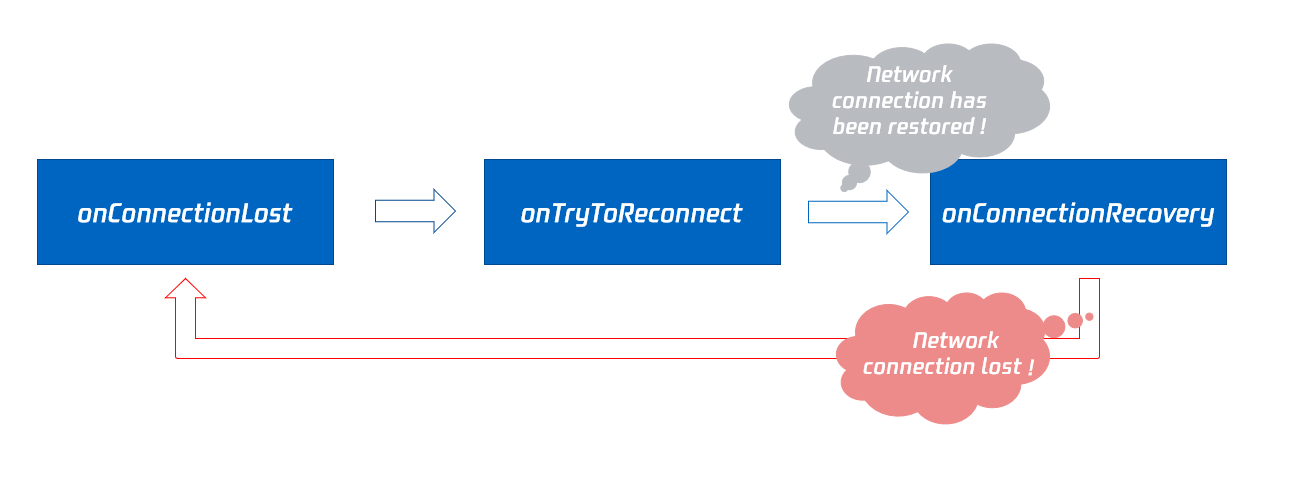
|
|
1620
|
+
|
|
1621
|
+
## onTryToReconnect
|
|
1622
|
+
|
|
1623
|
+
|
|
1624
|
+
|
|
1625
|
+
#### The SDK is trying to reconnect to the cloud.
|
|
1626
|
+
|
|
1627
|
+
The SDK will throw [onConnectionLost](https://write.woa.com/document/87029920275542016) when the connection to the cloud is disconnected, then it will attempt to re-establish the connection with the cloud and throw this event. Once the connection is restored, it will throw [onConnectionRecovery](https://write.woa.com/document/87029920275542016).
|
|
1628
|
+
|
|
1629
|
+
## onConnectionRecovery
|
|
1630
|
+
|
|
1631
|
+
|
|
1632
|
+
|
|
1633
|
+
#### The connection between the SDK and the cloud has been restored.
|
|
1634
|
+
|
|
1635
|
+
The SDK will throw [onConnectionLost](https://write.woa.com/document/87029920275542016) when the connection to the cloud is disconnected. It will then attempt to re-establish the connection and throw [onTryToReconnect](https://write.woa.com/document/87029920275542016). Once the connection is restored, this event callback will be triggered.
|
|
1636
|
+
|
|
1637
|
+
## onCameraDidReady
|
|
1638
|
+
|
|
1639
|
+
|
|
1640
|
+
|
|
1641
|
+
#### Camera is ready
|
|
1642
|
+
|
|
1643
|
+
When you call startLocalPreivew, the SDK will attempt to enable the camera. If successful, this event will be thrown.
|
|
1644
|
+
|
|
1645
|
+
If enabling the camera fails, it is most likely because the current application does not have access permissions to the camera or the camera is currently being used exclusively by another application.
|
|
1646
|
+
|
|
1647
|
+
You can capture the [onError](https://write.woa.com/document/87029920275542016) event callback to understand these exceptional conditions and prompt users through the UI interface.
|
|
1648
|
+
|
|
1649
|
+
## onMicDidReady
|
|
1650
|
+
|
|
1651
|
+
|
|
1652
|
+
|
|
1653
|
+
#### Microphone is ready
|
|
1654
|
+
|
|
1655
|
+
When you call [startLocalAudio](https://write.woa.com/document/87029900866228224), the SDK will attempt to enable the microphone. If successful, this event will be thrown.
|
|
1656
|
+
|
|
1657
|
+
If enabling the microphone fails, it is most likely because the current application does not have access permissions to the microphone or the microphone is currently being used exclusively by another application.
|
|
1658
|
+
|
|
1659
|
+
You can capture the [onError](https://write.woa.com/document/87029920275542016) event callback to understand these exceptional conditions and prompt users through the UI interface.
|
|
1660
|
+
|
|
1661
|
+
## onAudioRouteChanged
|
|
1662
|
+
|
|
1663
|
+
|
|
1664
|
+
|
|
1665
|
+
#### Current audio routing has changed (applicable only to mobile devices)
|
|
1666
|
+
|
|
1667
|
+
The term "Audio Routing" refers to whether the sound is played through the phone's speaker or receiver. A change in audio routing means a change in the playback location of the sound.
|
|
1668
|
+
- When the audio routing is set to receiver, the sound is quieter, and you need to bring the phone close to your ear to hear clearly. This offers better privacy and is suitable for phone calls.
|
|
1669
|
+
|
|
1670
|
+
- When the audio routing is set to speaker, the sound is louder, allowing for clear listening without holding the phone to your face, thus enabling the "hands-free" feature.
|
|
1671
|
+
|
|
1672
|
+
- When the audio routing is set to wired headphones.
|
|
1673
|
+
|
|
1674
|
+
- When the audio routing is set to Bluetooth headphones.
|
|
1675
|
+
|
|
1676
|
+
- When the audio routing is set to USB professional sound card device.
|
|
1677
|
+
|
|
1678
|
+
<table>
|
|
1679
|
+
<tr>
|
|
1680
|
+
<td rowspan="1" colSpan="1" >Parameters</td>
|
|
1681
|
+
|
|
1682
|
+
<td rowspan="1" colSpan="1" >Description</td>
|
|
1683
|
+
</tr>
|
|
1684
|
+
|
|
1685
|
+
<tr>
|
|
1686
|
+
<td rowspan="1" colSpan="1" >fromRoute</td>
|
|
1687
|
+
|
|
1688
|
+
<td rowspan="1" colSpan="1" >Audio routing before the change.</td>
|
|
1689
|
+
</tr>
|
|
1690
|
+
|
|
1691
|
+
<tr>
|
|
1692
|
+
<td rowspan="1" colSpan="1" >route</td>
|
|
1693
|
+
|
|
1694
|
+
<td rowspan="1" colSpan="1" >Audio routing, which refers to where the sound is output (speaker, receiver).</td>
|
|
1695
|
+
</tr>
|
|
1696
|
+
</table>
|
|
1697
|
+
|
|
1698
|
+
|
|
1699
|
+
## onUserVoiceVolume
|
|
1700
|
+
|
|
1701
|
+
|
|
1702
|
+
|
|
1703
|
+
#### Callback for volume feedback
|
|
1704
|
+
|
|
1705
|
+
The SDK can assess the volume of each audio stream and periodically trigger this event callback. You can provide corresponding UI indications based on the volume, such as `waveform chart` or `volume slider`.
|
|
1706
|
+
|
|
1707
|
+
To implement this feature, you need to call [enableAudioVolumeEvaluation](https://write.woa.com/document/87029900866228224) to enable this capability and set the time interval for event triggers.
|
|
1708
|
+
|
|
1709
|
+
It is important to note that, regardless of whether anyone is speaking in the current room, the SDK will periodically trigger this event callback at the interval you set.
|
|
1710
|
+
<table>
|
|
1711
|
+
<tr>
|
|
1712
|
+
<td rowspan="1" colSpan="1" >Parameters</td>
|
|
1713
|
+
|
|
1714
|
+
<td rowspan="1" colSpan="1" >Description</td>
|
|
1715
|
+
</tr>
|
|
1716
|
+
|
|
1717
|
+
<tr>
|
|
1718
|
+
<td rowspan="1" colSpan="1" >totalVolume</td>
|
|
1719
|
+
|
|
1720
|
+
<td rowspan="1" colSpan="1" >The total volume level of all remote users, with a range of 0 to 100.</td>
|
|
1721
|
+
</tr>
|
|
1722
|
+
|
|
1723
|
+
<tr>
|
|
1724
|
+
<td rowspan="1" colSpan="1" >userVolumes</td>
|
|
1725
|
+
|
|
1726
|
+
<td rowspan="1" colSpan="1" >It is an array that holds the volume levels of all speaking users, with a range of 0 to 100.</td>
|
|
1727
|
+
</tr>
|
|
1728
|
+
</table>
|
|
1729
|
+
|
|
1730
|
+
|
|
1731
|
+
> **Note**
|
|
1732
|
+
>
|
|
1733
|
+
|
|
1734
|
+
> userVolumes is an array. For each element in the array, if the userId is empty, it represents the volume level collected by the local microphone. If the userId is not empty, it represents the volume level of remote users.
|
|
1735
|
+
>
|
|
1736
|
+
|
|
1737
|
+
|
|
1738
|
+
## onRecvCustomCmdMsg
|
|
1739
|
+
|
|
1740
|
+
|
|
1741
|
+
|
|
1742
|
+
#### Receipt of a custom Definition message
|
|
1743
|
+
|
|
1744
|
+
When a user in a room uses [sendCustomCmdMsg](https://write.woa.com/document/87029900866228224) to send a Definition UDP Message, other users in the room can receive the message through the onRecvCustomCmdMsg event callback.
|
|
1745
|
+
<table>
|
|
1746
|
+
<tr>
|
|
1747
|
+
<td rowspan="1" colSpan="1" >Parameters</td>
|
|
1748
|
+
|
|
1749
|
+
<td rowspan="1" colSpan="1" >Description</td>
|
|
1750
|
+
</tr>
|
|
1751
|
+
|
|
1752
|
+
<tr>
|
|
1753
|
+
<td rowspan="1" colSpan="1" >cmdID</td>
|
|
1754
|
+
|
|
1755
|
+
<td rowspan="1" colSpan="1" >Command ID.</td>
|
|
1756
|
+
</tr>
|
|
1757
|
+
|
|
1758
|
+
<tr>
|
|
1759
|
+
<td rowspan="1" colSpan="1" >message</td>
|
|
1760
|
+
|
|
1761
|
+
<td rowspan="1" colSpan="1" >Message Data.</td>
|
|
1762
|
+
</tr>
|
|
1763
|
+
|
|
1764
|
+
<tr>
|
|
1765
|
+
<td rowspan="1" colSpan="1" >seq</td>
|
|
1766
|
+
|
|
1767
|
+
<td rowspan="1" colSpan="1" >Message serial number.</td>
|
|
1768
|
+
</tr>
|
|
1769
|
+
|
|
1770
|
+
<tr>
|
|
1771
|
+
<td rowspan="1" colSpan="1" >userId</td>
|
|
1772
|
+
|
|
1773
|
+
<td rowspan="1" colSpan="1" >User identifier.</td>
|
|
1774
|
+
</tr>
|
|
1775
|
+
</table>
|
|
1776
|
+
|
|
1777
|
+
|
|
1778
|
+
## onMissCustomCmdMsg
|
|
1779
|
+
|
|
1780
|
+
|
|
1781
|
+
|
|
1782
|
+
#### Event callback for lost custom Definition messages
|
|
1783
|
+
|
|
1784
|
+
When you use [sendCustomCmdMsg](https://write.woa.com/document/87029900866228224) to send a Definition UDP message, even if reliable transmission is set, it cannot guarantee 100% message delivery, but the probability of message loss is very low and meets conventional reliability requirements.
|
|
1785
|
+
|
|
1786
|
+
After setting reliable transmission on the sender side, the SDK will notify the number of lost Definition messages during the past time period (usually 5 seconds) through this callback.
|
|
1787
|
+
<table>
|
|
1788
|
+
<tr>
|
|
1789
|
+
<td rowspan="1" colSpan="1" >Parameters</td>
|
|
1790
|
+
|
|
1791
|
+
<td rowspan="1" colSpan="1" >Description</td>
|
|
1792
|
+
</tr>
|
|
1793
|
+
|
|
1794
|
+
<tr>
|
|
1795
|
+
<td rowspan="1" colSpan="1" >cmdID</td>
|
|
1796
|
+
|
|
1797
|
+
<td rowspan="1" colSpan="1" >Command ID.</td>
|
|
1798
|
+
</tr>
|
|
1799
|
+
|
|
1800
|
+
<tr>
|
|
1801
|
+
<td rowspan="1" colSpan="1" >errCode</td>
|
|
1802
|
+
|
|
1803
|
+
<td rowspan="1" colSpan="1" >Error code.</td>
|
|
1804
|
+
</tr>
|
|
1805
|
+
|
|
1806
|
+
<tr>
|
|
1807
|
+
<td rowspan="1" colSpan="1" >missed</td>
|
|
1808
|
+
|
|
1809
|
+
<td rowspan="1" colSpan="1" >Number of lost messages.</td>
|
|
1810
|
+
</tr>
|
|
1811
|
+
|
|
1812
|
+
<tr>
|
|
1813
|
+
<td rowspan="1" colSpan="1" >userId</td>
|
|
1814
|
+
|
|
1815
|
+
<td rowspan="1" colSpan="1" >User identifier.</td>
|
|
1816
|
+
</tr>
|
|
1817
|
+
</table>
|
|
1818
|
+
|
|
1819
|
+
|
|
1820
|
+
> **Note**
|
|
1821
|
+
>
|
|
1822
|
+
|
|
1823
|
+
> Only if reliable transmission is set on the sender side can the receiver receive the message loss callback.
|
|
1824
|
+
>
|
|
1825
|
+
|
|
1826
|
+
|
|
1827
|
+
## onRecvSEIMsg
|
|
1828
|
+
|
|
1829
|
+
|
|
1830
|
+
|
|
1831
|
+
#### Callback for receiving SEI message
|
|
1832
|
+
|
|
1833
|
+
When a user in the room sends an SEI message through the video frame using [sendSEIMsg](https://write.woa.com/document/87029900866228224), other users in the room can receive the message via the onRecvSEIMsg event callback.
|
|
1834
|
+
<table>
|
|
1835
|
+
<tr>
|
|
1836
|
+
<td rowspan="1" colSpan="1" >Parameters</td>
|
|
1837
|
+
|
|
1838
|
+
<td rowspan="1" colSpan="1" >Description</td>
|
|
1839
|
+
</tr>
|
|
1840
|
+
|
|
1841
|
+
<tr>
|
|
1842
|
+
<td rowspan="1" colSpan="1" >message</td>
|
|
1843
|
+
|
|
1844
|
+
<td rowspan="1" colSpan="1" >Data.</td>
|
|
1845
|
+
</tr>
|
|
1846
|
+
|
|
1847
|
+
<tr>
|
|
1848
|
+
<td rowspan="1" colSpan="1" >userId</td>
|
|
1849
|
+
|
|
1850
|
+
<td rowspan="1" colSpan="1" >User identifier.</td>
|
|
1851
|
+
</tr>
|
|
1852
|
+
</table>
|
|
1853
|
+
|
|
1854
|
+
|
|
1855
|
+
## onStartPublishing
|
|
1856
|
+
|
|
1857
|
+
|
|
1858
|
+
|
|
1859
|
+
#### Event callback for starting to publish audio and video streams to Tencent CSS CDN
|
|
1860
|
+
|
|
1861
|
+
When you call startPublishing to start publishing audio and video streams to the Tencent CSS CDN, the SDK will immediately synchronize this command to the cloud server.
|
|
1862
|
+
|
|
1863
|
+
The SDK will then receive the processing results from the cloud server and notify you of the execution results of the command through this event callback.
|
|
1864
|
+
<table>
|
|
1865
|
+
<tr>
|
|
1866
|
+
<td rowspan="1" colSpan="1" >Parameters</td>
|
|
1867
|
+
|
|
1868
|
+
<td rowspan="1" colSpan="1" >Description</td>
|
|
1869
|
+
</tr>
|
|
1870
|
+
|
|
1871
|
+
<tr>
|
|
1872
|
+
<td rowspan="1" colSpan="1" >err</td>
|
|
1873
|
+
|
|
1874
|
+
<td rowspan="1" colSpan="1" >0 indicates success, other values indicate failure.</td>
|
|
1875
|
+
</tr>
|
|
1876
|
+
|
|
1877
|
+
<tr>
|
|
1878
|
+
<td rowspan="1" colSpan="1" >errMsg</td>
|
|
1879
|
+
|
|
1880
|
+
<td rowspan="1" colSpan="1" >Specific error reasons.</td>
|
|
1881
|
+
</tr>
|
|
1882
|
+
</table>
|
|
1883
|
+
|
|
1884
|
+
|
|
1885
|
+
## onStopPublishing
|
|
1886
|
+
|
|
1887
|
+
|
|
1888
|
+
|
|
1889
|
+
#### Event callback for stopping the publishing of audio and video streams to Tencent CSS CDN
|
|
1890
|
+
|
|
1891
|
+
When you call stopPublishing to stop publishing audio and video streams to the Tencent CSS CDN, the SDK will immediately synchronize this command to the cloud server.
|
|
1892
|
+
|
|
1893
|
+
The SDK will then receive the processing results from the cloud server and notify you of the execution results of the command through this event callback.
|
|
1894
|
+
<table>
|
|
1895
|
+
<tr>
|
|
1896
|
+
<td rowspan="1" colSpan="1" >Parameters</td>
|
|
1897
|
+
|
|
1898
|
+
<td rowspan="1" colSpan="1" >Description</td>
|
|
1899
|
+
</tr>
|
|
1900
|
+
|
|
1901
|
+
<tr>
|
|
1902
|
+
<td rowspan="1" colSpan="1" >err</td>
|
|
1903
|
+
|
|
1904
|
+
<td rowspan="1" colSpan="1" >0 indicates success, other values indicate failure.</td>
|
|
1905
|
+
</tr>
|
|
1906
|
+
|
|
1907
|
+
<tr>
|
|
1908
|
+
<td rowspan="1" colSpan="1" >errMsg</td>
|
|
1909
|
+
|
|
1910
|
+
<td rowspan="1" colSpan="1" >Specific error reasons.</td>
|
|
1911
|
+
</tr>
|
|
1912
|
+
</table>
|
|
1913
|
+
|
|
1914
|
+
|
|
1915
|
+
## onStartPublishCDNStream
|
|
1916
|
+
|
|
1917
|
+
|
|
1918
|
+
|
|
1919
|
+
#### Event callback for starting to publish audio and video streams to a non-Tencent Cloud CDN
|
|
1920
|
+
|
|
1921
|
+
When you call startPublishCDNStream to start publishing audio and video streams to a non-Tencent CSS CDN, the SDK will immediately synchronize this command to the cloud server. The SDK will then receive the processing results from the cloud server and notify you of the execution results of the command through this event callback.
|
|
1922
|
+
<table>
|
|
1923
|
+
<tr>
|
|
1924
|
+
<td rowspan="1" colSpan="1" >Parameters</td>
|
|
1925
|
+
|
|
1926
|
+
<td rowspan="1" colSpan="1" >Description</td>
|
|
1927
|
+
</tr>
|
|
1928
|
+
|
|
1929
|
+
<tr>
|
|
1930
|
+
<td rowspan="1" colSpan="1" >err</td>
|
|
1931
|
+
|
|
1932
|
+
<td rowspan="1" colSpan="1" >0 indicates success, other values indicate failure.</td>
|
|
1933
|
+
</tr>
|
|
1934
|
+
|
|
1935
|
+
<tr>
|
|
1936
|
+
<td rowspan="1" colSpan="1" >errMsg</td>
|
|
1937
|
+
|
|
1938
|
+
<td rowspan="1" colSpan="1" >Specific error reasons.</td>
|
|
1939
|
+
</tr>
|
|
1940
|
+
</table>
|
|
1941
|
+
|
|
1942
|
+
|
|
1943
|
+
> **Note**
|
|
1944
|
+
>
|
|
1945
|
+
|
|
1946
|
+
> When you receive a successful event callback, it only indicates that your publishing command has been synchronized to the Tencent Cloud backend server, but if the target CDN provider's server does not accept the video stream, it may still result in a publishing failure.
|
|
1947
|
+
>
|
|
1948
|
+
|
|
1949
|
+
|
|
1950
|
+
## onStopPublishCDNStream
|
|
1951
|
+
|
|
1952
|
+
|
|
1953
|
+
|
|
1954
|
+
#### Event callback for stopping the publishing of audio and video streams to a non-Tencent Cloud CDN
|
|
1955
|
+
|
|
1956
|
+
When you call stopPublishCDNStream to stop publishing audio and video streams to a non-Tencent CSS CDN, the SDK will immediately synchronize this command to the cloud server. The SDK will then receive the processing results from the cloud server and notify you of the execution results of the command through this event callback.
|
|
1957
|
+
<table>
|
|
1958
|
+
<tr>
|
|
1959
|
+
<td rowspan="1" colSpan="1" >Parameters</td>
|
|
1960
|
+
|
|
1961
|
+
<td rowspan="1" colSpan="1" >Description</td>
|
|
1962
|
+
</tr>
|
|
1963
|
+
|
|
1964
|
+
<tr>
|
|
1965
|
+
<td rowspan="1" colSpan="1" >err</td>
|
|
1966
|
+
|
|
1967
|
+
<td rowspan="1" colSpan="1" >0 indicates success, other values indicate failure.</td>
|
|
1968
|
+
</tr>
|
|
1969
|
+
|
|
1970
|
+
<tr>
|
|
1971
|
+
<td rowspan="1" colSpan="1" >errMsg</td>
|
|
1972
|
+
|
|
1973
|
+
<td rowspan="1" colSpan="1" >Specific error reasons.</td>
|
|
1974
|
+
</tr>
|
|
1975
|
+
</table>
|
|
1976
|
+
|
|
1977
|
+
|
|
1978
|
+
## onSetMixTranscodingConfig
|
|
1979
|
+
|
|
1980
|
+
|
|
1981
|
+
|
|
1982
|
+
#### Event callback for setting the layout and transcoding parameters of Cloud Mixed Streaming
|
|
1983
|
+
|
|
1984
|
+
When you call setMixTranscodingConfig to adjust the layout and transcoding parameters of cloud mixed streaming, the SDK will immediately sync this adjustment command to the cloud server. The SDK will then receive the process results from the cloud server and notify you of the execution results through this event callback.
|
|
1985
|
+
<table>
|
|
1986
|
+
<tr>
|
|
1987
|
+
<td rowspan="1" colSpan="1" >Parameters</td>
|
|
1988
|
+
|
|
1989
|
+
<td rowspan="1" colSpan="1" >Description</td>
|
|
1990
|
+
</tr>
|
|
1991
|
+
|
|
1992
|
+
<tr>
|
|
1993
|
+
<td rowspan="1" colSpan="1" >err</td>
|
|
1994
|
+
|
|
1995
|
+
<td rowspan="1" colSpan="1" >Error code: 0 indicates success, other values indicate failure.</td>
|
|
1996
|
+
</tr>
|
|
1997
|
+
|
|
1998
|
+
<tr>
|
|
1999
|
+
<td rowspan="1" colSpan="1" >errMsg</td>
|
|
2000
|
+
|
|
2001
|
+
<td rowspan="1" colSpan="1" >Specific error reason.</td>
|
|
2002
|
+
</tr>
|
|
2003
|
+
</table>
|
|
2004
|
+
|
|
2005
|
+
|
|
2006
|
+
## onStartPublishMediaStream
|
|
2007
|
+
|
|
2008
|
+
|
|
2009
|
+
|
|
2010
|
+
#### Event callback for starting to publish the media stream
|
|
2011
|
+
|
|
2012
|
+
When you call [startPublishMediaStream](https://write.woa.com/document/87029900866228224) to start publishing the media stream to TRTC backend services, the SDK will immediately sync this command to the cloud server. The SDK will then receive the process results from the cloud server and notify you of the execution results through this event callback.
|
|
2013
|
+
<table>
|
|
2014
|
+
<tr>
|
|
2015
|
+
<td rowspan="1" colSpan="1" >Parameters</td>
|
|
2016
|
+
|
|
2017
|
+
<td rowspan="1" colSpan="1" >Description</td>
|
|
2018
|
+
</tr>
|
|
2019
|
+
|
|
2020
|
+
<tr>
|
|
2021
|
+
<td rowspan="1" colSpan="1" >code</td>
|
|
2022
|
+
|
|
2023
|
+
<td rowspan="1" colSpan="1" >Callback result, 0 indicates success, other values indicate failure.</td>
|
|
2024
|
+
</tr>
|
|
2025
|
+
|
|
2026
|
+
<tr>
|
|
2027
|
+
<td rowspan="1" colSpan="1" >extraInfo</td>
|
|
2028
|
+
|
|
2029
|
+
<td rowspan="1" colSpan="1" >Expand information field, some error codes may carry additional information to help locate the problem.</td>
|
|
2030
|
+
</tr>
|
|
2031
|
+
|
|
2032
|
+
<tr>
|
|
2033
|
+
<td rowspan="1" colSpan="1" >message</td>
|
|
2034
|
+
|
|
2035
|
+
<td rowspan="1" colSpan="1" >Specific callback information.</td>
|
|
2036
|
+
</tr>
|
|
2037
|
+
|
|
2038
|
+
<tr>
|
|
2039
|
+
<td rowspan="1" colSpan="1" >taskId</td>
|
|
2040
|
+
|
|
2041
|
+
<td rowspan="1" colSpan="1" >When the request is successful, the TRTC backend will provide the taskId of this task in the callback. Subsequently, you can use this taskId in combination with [updatePublishMediaStream](https://write.woa.com/document/87029900866228224) and [stopPublishMediaStream](https://write.woa.com/document/87029900866228224) to update and stop.</td>
|
|
2042
|
+
</tr>
|
|
2043
|
+
</table>
|
|
2044
|
+
|
|
2045
|
+
|
|
2046
|
+
## onUpdatePublishMediaStream
|
|
2047
|
+
|
|
2048
|
+
|
|
2049
|
+
|
|
2050
|
+
#### Event callback for updating the media stream
|
|
2051
|
+
|
|
2052
|
+
When you call the media stream publishing interface ([updatePublishMediaStream](https://write.woa.com/document/87029900866228224)) to start updating the media stream to the TRTC backend services, the SDK will immediately sync this command to the cloud server. The SDK will then receive the process results from the cloud server and notify you of the execution results through this event callback.
|
|
2053
|
+
<table>
|
|
2054
|
+
<tr>
|
|
2055
|
+
<td rowspan="1" colSpan="1" >Parameters</td>
|
|
2056
|
+
|
|
2057
|
+
<td rowspan="1" colSpan="1" >Description</td>
|
|
2058
|
+
</tr>
|
|
2059
|
+
|
|
2060
|
+
<tr>
|
|
2061
|
+
<td rowspan="1" colSpan="1" >code</td>
|
|
2062
|
+
|
|
2063
|
+
<td rowspan="1" colSpan="1" >Callback result, 0 indicates success, other values indicate failure.</td>
|
|
2064
|
+
</tr>
|
|
2065
|
+
|
|
2066
|
+
<tr>
|
|
2067
|
+
<td rowspan="1" colSpan="1" >extraInfo</td>
|
|
2068
|
+
|
|
2069
|
+
<td rowspan="1" colSpan="1" >Expand information field, some error codes may carry additional information to help locate the problem.</td>
|
|
2070
|
+
</tr>
|
|
2071
|
+
|
|
2072
|
+
<tr>
|
|
2073
|
+
<td rowspan="1" colSpan="1" >message</td>
|
|
2074
|
+
|
|
2075
|
+
<td rowspan="1" colSpan="1" >Specific callback information.</td>
|
|
2076
|
+
</tr>
|
|
2077
|
+
|
|
2078
|
+
<tr>
|
|
2079
|
+
<td rowspan="1" colSpan="1" >taskId</td>
|
|
2080
|
+
|
|
2081
|
+
<td rowspan="1" colSpan="1" >The taskId you provide when calling the media stream publishing interface ([updatePublishMediaStream](https://write.woa.com/document/87029900866228224)) will be brought back to you through this callback, to identify which update request this callback belongs to.</td>
|
|
2082
|
+
</tr>
|
|
2083
|
+
</table>
|
|
2084
|
+
|
|
2085
|
+
|
|
2086
|
+
## onStopPublishMediaStream
|
|
2087
|
+
|
|
2088
|
+
|
|
2089
|
+
|
|
2090
|
+
#### Event callback for stopping the media stream
|
|
2091
|
+
|
|
2092
|
+
When you call stop publishing media stream ([stopPublishMediaStream](https://write.woa.com/document/87029900866228224)) to stop the media stream to TRTC backend service, the SDK will immediately synchronize this command to the cloud server. Subsequently, the SDK will receive the process results from the cloud server and notify you of the execution results of the command through this event callback.
|
|
2093
|
+
<table>
|
|
2094
|
+
<tr>
|
|
2095
|
+
<td rowspan="1" colSpan="1" >Parameters</td>
|
|
2096
|
+
|
|
2097
|
+
<td rowspan="1" colSpan="1" >Description</td>
|
|
2098
|
+
</tr>
|
|
2099
|
+
|
|
2100
|
+
<tr>
|
|
2101
|
+
<td rowspan="1" colSpan="1" >code</td>
|
|
2102
|
+
|
|
2103
|
+
<td rowspan="1" colSpan="1" >Callback result, 0 indicates success, other values indicate failure.</td>
|
|
2104
|
+
</tr>
|
|
2105
|
+
|
|
2106
|
+
<tr>
|
|
2107
|
+
<td rowspan="1" colSpan="1" >extraInfo</td>
|
|
2108
|
+
|
|
2109
|
+
<td rowspan="1" colSpan="1" >Expand information field, some error codes may carry additional information to help locate the problem.</td>
|
|
2110
|
+
</tr>
|
|
2111
|
+
|
|
2112
|
+
<tr>
|
|
2113
|
+
<td rowspan="1" colSpan="1" >message</td>
|
|
2114
|
+
|
|
2115
|
+
<td rowspan="1" colSpan="1" >Specific callback information.</td>
|
|
2116
|
+
</tr>
|
|
2117
|
+
|
|
2118
|
+
<tr>
|
|
2119
|
+
<td rowspan="1" colSpan="1" >taskId</td>
|
|
2120
|
+
|
|
2121
|
+
<td rowspan="1" colSpan="1" >The taskId you passed in when you called stop publishing media stream ([stopPublishMediaStream](https://write.woa.com/document/87029900866228224)) will be brought back to you through this callback, identifying which stop request this callback belongs to.</td>
|
|
2122
|
+
</tr>
|
|
2123
|
+
</table>
|
|
2124
|
+
|
|
2125
|
+
|
|
2126
|
+
## onCdnStreamStateChanged
|
|
2127
|
+
|
|
2128
|
+
|
|
2129
|
+
|
|
2130
|
+
#### RTMP/RTMPS streaming status change callback
|
|
2131
|
+
|
|
2132
|
+
When you call [startPublishMediaStream](https://write.woa.com/document/87029900866228224) to start publishing media stream to TRTC backend service, the SDK will immediately synchronize this command to the cloud service.
|
|
2133
|
+
|
|
2134
|
+
If you set the URL configuration for publishing audio and video streaming to Tencent or third-party CDN in the target stream configuration ([TRTCPublishTarget](https://write.woa.com/document/87029993616093184)), the specific RTMP or RTMPS streaming status will be synchronized to you through this callback.
|
|
2135
|
+
<table>
|
|
2136
|
+
<tr>
|
|
2137
|
+
<td rowspan="1" colSpan="1" >Parameters</td>
|
|
2138
|
+
|
|
2139
|
+
<td rowspan="1" colSpan="1" >Description</td>
|
|
2140
|
+
</tr>
|
|
2141
|
+
|
|
2142
|
+
<tr>
|
|
2143
|
+
<td rowspan="1" colSpan="1" >cdnUrl</td>
|
|
2144
|
+
|
|
2145
|
+
<td rowspan="1" colSpan="1" >The URL you passed in through the target stream configuration ([TRTCPublishTarget](https://write.woa.com/document/87029993616093184)) when you called [startPublishMediaStream](https://write.woa.com/document/87029900866228224) will be synchronized to you through this callback when the streaming status changes.</td>
|
|
2146
|
+
</tr>
|
|
2147
|
+
|
|
2148
|
+
<tr>
|
|
2149
|
+
<td rowspan="1" colSpan="1" >code</td>
|
|
2150
|
+
|
|
2151
|
+
<td rowspan="1" colSpan="1" >Stream Push Result, 0 means success, other values indicate an error.</td>
|
|
2152
|
+
</tr>
|
|
2153
|
+
|
|
2154
|
+
<tr>
|
|
2155
|
+
<td rowspan="1" colSpan="1" >extraInfo</td>
|
|
2156
|
+
|
|
2157
|
+
<td rowspan="1" colSpan="1" >Expand information field, some error codes may carry additional information to help locate the problem.</td>
|
|
2158
|
+
</tr>
|
|
2159
|
+
|
|
2160
|
+
<tr>
|
|
2161
|
+
<td rowspan="1" colSpan="1" >message</td>
|
|
2162
|
+
|
|
2163
|
+
<td rowspan="1" colSpan="1" >Specific Stream Push Information.</td>
|
|
2164
|
+
</tr>
|
|
2165
|
+
|
|
2166
|
+
<tr>
|
|
2167
|
+
<td rowspan="1" colSpan="1" >status</td>
|
|
2168
|
+
|
|
2169
|
+
<td rowspan="1" colSpan="1" >Streaming Status.<br>- 0: Streaming not started or already ended. This status is returned when you call [stopPublishMediaStream](https://write.woa.com/document/87029900866228224).<br>- 1: Connecting to TRTC server and CDN server. If not immediately successful, TRTC backend service will retry multiple times and return this status (callback every 5s). If successful, it enters status 2; if server error occurs or streaming is not successful within 60 seconds, it enters status 4.<br>- 2: CDN streaming is in progress. This status is returned when streaming is successful.<br>- 3: TRTC server and CDN server streaming interruption, recovering. When CDN has an issue or streaming briefly interrupts, the TRTC backend service will automatically attempt to recover streaming and return this status (callback every 5 seconds). If streaming recovers successfully, it will transition to status 2; if server error occurs or recovery fails within 60 seconds, it will transition to status 4.<br>- 4: TRTC server and CDN server streaming interrupted, and recovery or connection timeout. At this point, streaming failed, you can call [updatePublishMediaStream](https://write.woa.com/document/87029900866228224) again to attempt streaming.<br>- 5: Disconnecting TRTC server and CDN server. When you call [stopPublishMediaStream](https://write.woa.com/document/87029900866228224), the TRTC backend service will transition to status 5 and then status 0.</td>
|
|
2170
|
+
</tr>
|
|
2171
|
+
</table>
|
|
2172
|
+
|
|
2173
|
+
|
|
2174
|
+
## onScreenCaptureStarted
|
|
2175
|
+
|
|
2176
|
+
|
|
2177
|
+
|
|
2178
|
+
#### Event callback for starting screen sharing
|
|
2179
|
+
|
|
2180
|
+
When you start screen sharing through [startScreenCapture](https://write.woa.com/document/87029900866228224) or related interfaces, the SDK will trigger this event callback.
|
|
2181
|
+
|
|
2182
|
+
## onScreenCapturePaused
|
|
2183
|
+
|
|
2184
|
+
|
|
2185
|
+
|
|
2186
|
+
#### Event callback for pausing screen sharing
|
|
2187
|
+
|
|
2188
|
+
When you pause screen sharing through [pauseScreenCapture](https://write.woa.com/document/87029900866228224), the SDK will trigger this event callback.
|
|
2189
|
+
|
|
2190
|
+
## onScreenCaptureResumed
|
|
2191
|
+
|
|
2192
|
+
|
|
2193
|
+
|
|
2194
|
+
#### Event callback for resuming screen sharing
|
|
2195
|
+
|
|
2196
|
+
When you resume screen sharing through [resumeScreenCapture](https://write.woa.com/document/87029900866228224), the SDK will trigger this event callback.
|
|
2197
|
+
|
|
2198
|
+
## onScreenCaptureStopped
|
|
2199
|
+
|
|
2200
|
+
|
|
2201
|
+
|
|
2202
|
+
#### Event callback for stopping screen sharing
|
|
2203
|
+
|
|
2204
|
+
When you stop screen sharing by calling [stopScreenCapture](https://write.woa.com/document/87029900866228224), the SDK will trigger this event callback.
|
|
2205
|
+
<table>
|
|
2206
|
+
<tr>
|
|
2207
|
+
<td rowspan="1" colSpan="1" >Parameters</td>
|
|
2208
|
+
|
|
2209
|
+
<td rowspan="1" colSpan="1" >Description</td>
|
|
2210
|
+
</tr>
|
|
2211
|
+
|
|
2212
|
+
<tr>
|
|
2213
|
+
<td rowspan="1" colSpan="1" >reason</td>
|
|
2214
|
+
|
|
2215
|
+
<td rowspan="1" colSpan="1" >Stop Reason, 0: User proactively stopped; 1: Screen window closed causing stop; 2: Indicates a change in the display screen status for screen sharing (e.g., interface unplugged, change in projection mode, etc.).</td>
|
|
2216
|
+
</tr>
|
|
2217
|
+
</table>
|
|
2218
|
+
|
|
2219
|
+
|
|
2220
|
+
## onLocalRecordBegin
|
|
2221
|
+
|
|
2222
|
+
|
|
2223
|
+
|
|
2224
|
+
#### Event callback for the local recording task that has started
|
|
2225
|
+
|
|
2226
|
+
When you start a local media recording task by calling [startLocalRecording](https://write.woa.com/document/87029900866228224), the SDK will trigger this event callback to notify you whether the recording task has successfully started.
|
|
2227
|
+
<table>
|
|
2228
|
+
<tr>
|
|
2229
|
+
<td rowspan="1" colSpan="1" >Parameters</td>
|
|
2230
|
+
|
|
2231
|
+
<td rowspan="1" colSpan="1" >Description</td>
|
|
2232
|
+
</tr>
|
|
2233
|
+
|
|
2234
|
+
<tr>
|
|
2235
|
+
<td rowspan="1" colSpan="1" >errCode</td>
|
|
2236
|
+
|
|
2237
|
+
<td rowspan="1" colSpan="1" >Status Code.<br>- 0: Recording task started successfully.<br>- -1: Internal error caused the recording task to fail to start.<br>- -2: Incorrect file suffix name (e.g., unsupported recording format).<br>- -6: Recording has already started, needs to stop recording first.<br>- -7: Recording file already exists, needs to delete the file first.<br>- -8: No write permission in the recording directory, please check directory permissions.</td>
|
|
2238
|
+
</tr>
|
|
2239
|
+
|
|
2240
|
+
<tr>
|
|
2241
|
+
<td rowspan="1" colSpan="1" >storagePath</td>
|
|
2242
|
+
|
|
2243
|
+
<td rowspan="1" colSpan="1" >CFS path for recording.</td>
|
|
2244
|
+
</tr>
|
|
2245
|
+
</table>
|
|
2246
|
+
|
|
2247
|
+
|
|
2248
|
+
## onLocalRecording
|
|
2249
|
+
|
|
2250
|
+
|
|
2251
|
+
|
|
2252
|
+
#### Progress event callback for an ongoing local recording task
|
|
2253
|
+
|
|
2254
|
+
After you successfully start a local media recording task by calling [startLocalRecording](https://write.woa.com/document/87029900866228224), the SDK will periodically trigger this event callback.
|
|
2255
|
+
|
|
2256
|
+
You can capture this event callback to know the health status of the recording task.
|
|
2257
|
+
|
|
2258
|
+
You can set the interval for this event callback when you call [startLocalRecording](https://write.woa.com/document/87029900866228224).
|
|
2259
|
+
<table>
|
|
2260
|
+
<tr>
|
|
2261
|
+
<td rowspan="1" colSpan="1" >Parameters</td>
|
|
2262
|
+
|
|
2263
|
+
<td rowspan="1" colSpan="1" >Description</td>
|
|
2264
|
+
</tr>
|
|
2265
|
+
|
|
2266
|
+
<tr>
|
|
2267
|
+
<td rowspan="1" colSpan="1" >duration</td>
|
|
2268
|
+
|
|
2269
|
+
<td rowspan="1" colSpan="1" >The cumulative recorded duration in milliseconds.</td>
|
|
2270
|
+
</tr>
|
|
2271
|
+
|
|
2272
|
+
<tr>
|
|
2273
|
+
<td rowspan="1" colSpan="1" >storagePath</td>
|
|
2274
|
+
|
|
2275
|
+
<td rowspan="1" colSpan="1" >CFS path for recording.</td>
|
|
2276
|
+
</tr>
|
|
2277
|
+
</table>
|
|
2278
|
+
|
|
2279
|
+
|
|
2280
|
+
## onLocalRecordFragment
|
|
2281
|
+
|
|
2282
|
+
|
|
2283
|
+
|
|
2284
|
+
#### Event callback for local recording shard
|
|
2285
|
+
|
|
2286
|
+
When you enable shard recording, each completed shard will trigger a callback through this interface.
|
|
2287
|
+
<table>
|
|
2288
|
+
<tr>
|
|
2289
|
+
<td rowspan="1" colSpan="1" >Parameters</td>
|
|
2290
|
+
|
|
2291
|
+
<td rowspan="1" colSpan="1" >Description</td>
|
|
2292
|
+
</tr>
|
|
2293
|
+
|
|
2294
|
+
<tr>
|
|
2295
|
+
<td rowspan="1" colSpan="1" >storagePath</td>
|
|
2296
|
+
|
|
2297
|
+
<td rowspan="1" colSpan="1" >Shard CFS path.</td>
|
|
2298
|
+
</tr>
|
|
2299
|
+
</table>
|
|
2300
|
+
|
|
2301
|
+
|
|
2302
|
+
## onLocalRecordComplete
|
|
2303
|
+
|
|
2304
|
+
|
|
2305
|
+
|
|
2306
|
+
#### Event callback for the local recording task that has ended
|
|
2307
|
+
|
|
2308
|
+
When you call [stopLocalRecording](https://write.woa.com/document/87029900866228224) to stop the local media recording task, the SDK will trigger this event callback to notify you of the final result of the recording task.
|
|
2309
|
+
<table>
|
|
2310
|
+
<tr>
|
|
2311
|
+
<td rowspan="1" colSpan="1" >Parameters</td>
|
|
2312
|
+
|
|
2313
|
+
<td rowspan="1" colSpan="1" >Description</td>
|
|
2314
|
+
</tr>
|
|
2315
|
+
|
|
2316
|
+
<tr>
|
|
2317
|
+
<td rowspan="1" colSpan="1" >errCode</td>
|
|
2318
|
+
|
|
2319
|
+
<td rowspan="1" colSpan="1" >Status Code.<br>- 0: Successfully ended the recording task.<br>- -1: Recording failed.<br>- -2: Changing resolution or switching between portrait and landscape mode caused the recording to end.<br>- -3: The recording duration is too short, or no video or audio data was captured. Please check the recording duration, or whether audio and video capture is enabled.</td>
|
|
2320
|
+
</tr>
|
|
2321
|
+
|
|
2322
|
+
<tr>
|
|
2323
|
+
<td rowspan="1" colSpan="1" >storagePath</td>
|
|
2324
|
+
|
|
2325
|
+
<td rowspan="1" colSpan="1" >CFS path for recording.</td>
|
|
2326
|
+
</tr>
|
|
2327
|
+
</table>
|
|
2328
|
+
|
|
2329
|
+
|
|
2330
|
+
## onSnapshotComplete
|
|
2331
|
+
|
|
2332
|
+
|
|
2333
|
+
|
|
2334
|
+
#### Event callback for local screenshot completion
|
|
2335
|
+
<table>
|
|
2336
|
+
<tr>
|
|
2337
|
+
<td rowspan="1" colSpan="1" >Parameters</td>
|
|
2338
|
+
|
|
2339
|
+
<td rowspan="1" colSpan="1" >Description</td>
|
|
2340
|
+
</tr>
|
|
2341
|
+
|
|
2342
|
+
<tr>
|
|
2343
|
+
<td rowspan="1" colSpan="1" >bmp</td>
|
|
2344
|
+
|
|
2345
|
+
<td rowspan="1" colSpan="1" >Screenshot result, if bmp is null it means the screenshot operation failed.</td>
|
|
2346
|
+
</tr>
|
|
2347
|
+
|
|
2348
|
+
<tr>
|
|
2349
|
+
<td rowspan="1" colSpan="1" >data</td>
|
|
2350
|
+
|
|
2351
|
+
<td rowspan="1" colSpan="1" >Screenshot data, nullptr means the screenshot failed.</td>
|
|
2352
|
+
</tr>
|
|
2353
|
+
|
|
2354
|
+
<tr>
|
|
2355
|
+
<td rowspan="1" colSpan="1" >format</td>
|
|
2356
|
+
|
|
2357
|
+
<td rowspan="1" colSpan="1" >Screenshot data format, currently only supports TRTCVideoPixelFormat_BGRA32.</td>
|
|
2358
|
+
</tr>
|
|
2359
|
+
|
|
2360
|
+
<tr>
|
|
2361
|
+
<td rowspan="1" colSpan="1" >height</td>
|
|
2362
|
+
|
|
2363
|
+
<td rowspan="1" colSpan="1" >Height of the screenshot.</td>
|
|
2364
|
+
</tr>
|
|
2365
|
+
|
|
2366
|
+
<tr>
|
|
2367
|
+
<td rowspan="1" colSpan="1" >length</td>
|
|
2368
|
+
|
|
2369
|
+
<td rowspan="1" colSpan="1" >Length of the screenshot data, for BGRA32, length = width * height * 4.</td>
|
|
2370
|
+
</tr>
|
|
2371
|
+
|
|
2372
|
+
<tr>
|
|
2373
|
+
<td rowspan="1" colSpan="1" >type</td>
|
|
2374
|
+
|
|
2375
|
+
<td rowspan="1" colSpan="1" >Video stream type.</td>
|
|
2376
|
+
</tr>
|
|
2377
|
+
|
|
2378
|
+
<tr>
|
|
2379
|
+
<td rowspan="1" colSpan="1" >userId</td>
|
|
2380
|
+
|
|
2381
|
+
<td rowspan="1" colSpan="1" >User Identifier, if userId is an empty string, it means the local screen was captured.</td>
|
|
2382
|
+
</tr>
|
|
2383
|
+
|
|
2384
|
+
<tr>
|
|
2385
|
+
<td rowspan="1" colSpan="1" >width</td>
|
|
2386
|
+
|
|
2387
|
+
<td rowspan="1" colSpan="1" >Width of the screenshot.</td>
|
|
2388
|
+
</tr>
|
|
2389
|
+
</table>
|
|
2390
|
+
|
|
2391
|
+
|
|
2392
|
+
> **Note**
|
|
2393
|
+
>
|
|
2394
|
+
|
|
2395
|
+
> The parameters for the C++ interface and the Java interface across all platforms are different. The C++ interface uses 7 parameters to describe a screenshot, while the Java interface uses only one Bitmap to describe a screenshot.
|
|
2396
|
+
>
|
|
2397
|
+
|
|
2398
|
+
|
|
2399
|
+
## onUserEnter
|
|
2400
|
+
|
|
2401
|
+
|
|
2402
|
+
|
|
2403
|
+
#### A host has joined the current room (deprecated)
|
|
2404
|
+
|
|
2405
|
+
@deprecated Starting from the new version, it is recommended to use [onRemoteUserEnterRoom](https://write.woa.com/document/87029920275542016) instead.
|
|
2406
|
+
|
|
2407
|
+
## onUserExit
|
|
2408
|
+
|
|
2409
|
+
|
|
2410
|
+
|
|
2411
|
+
#### A host has left the current room (deprecated)
|
|
2412
|
+
|
|
2413
|
+
@deprecated Starting from the new version, it is recommended to use [onRemoteUserLeaveRoom](https://write.woa.com/document/87029920275542016) instead.
|
|
2414
|
+
|
|
2415
|
+
## onAudioEffectFinished
|
|
2416
|
+
|
|
2417
|
+
|
|
2418
|
+
|
|
2419
|
+
#### Sound effect playback has ended (deprecated)
|
|
2420
|
+
|
|
2421
|
+
@deprecated Starting from the new version, it is recommended to use the ITXAudioEffectManager interface instead.
|
|
2422
|
+
|
|
2423
|
+
In the new interface, background music and sound effects are no longer distinguished and are unified with [startPlayMusic](https://write.woa.com/document/87029952305344512) instead.
|
|
2424
|
+
|
|
2425
|
+
## onSpeedTest
|
|
2426
|
+
|
|
2427
|
+
|
|
2428
|
+
|
|
2429
|
+
#### Callback for server speed test results (deprecated)
|
|
2430
|
+
|
|
2431
|
+
@deprecated Starting from the new version, it is recommended to use the [onSpeedTestResult](https://write.woa.com/document/87029920275542016) interface instead.
|