@tencent-rtc/mcp 1.0.9 → 1.1.6
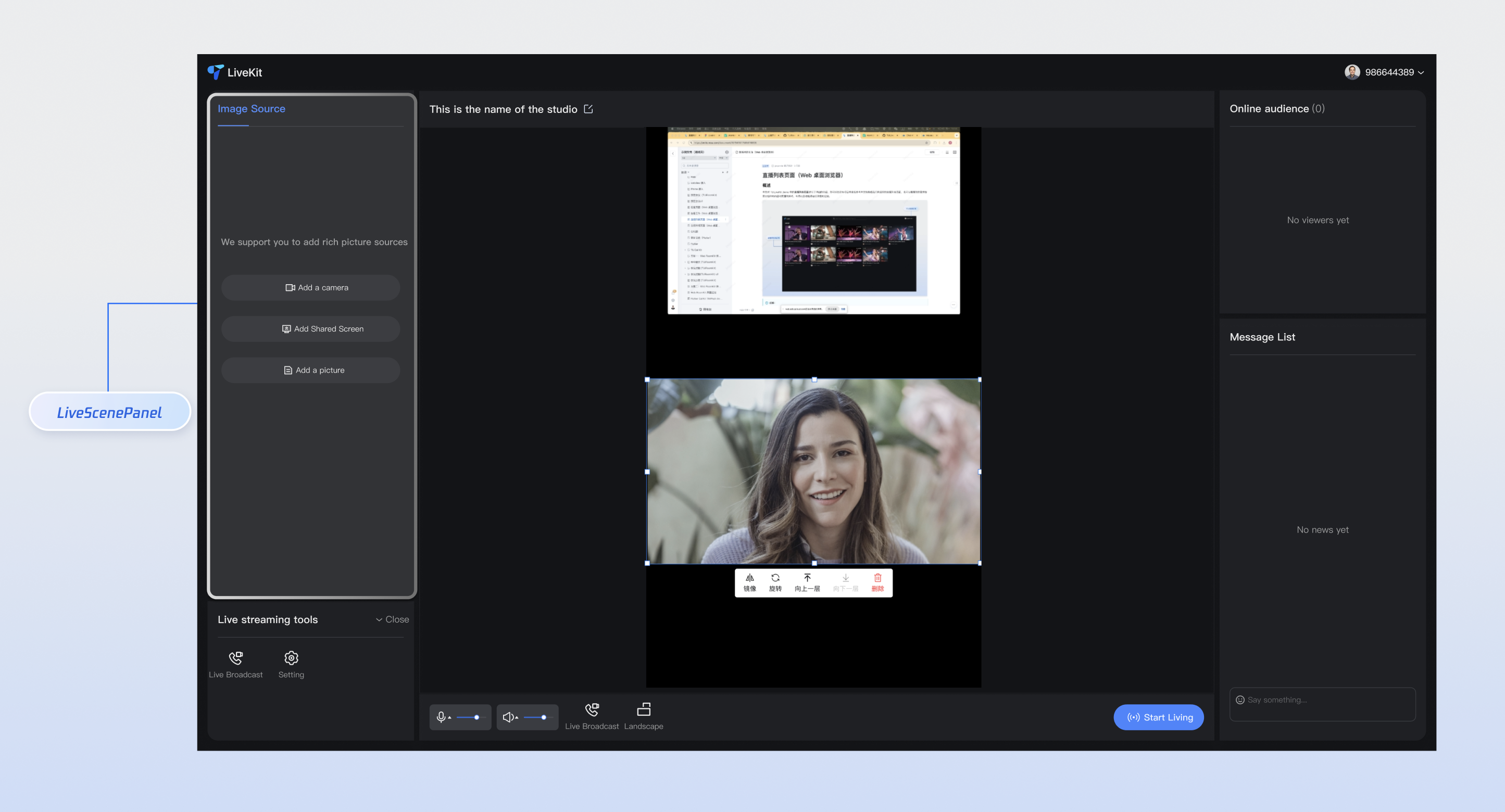
This diff represents the content of publicly available package versions that have been released to one of the supported registries. The information contained in this diff is provided for informational purposes only and reflects changes between package versions as they appear in their respective public registries.
- package/README.md +5 -1
- package/index.js +2 -0
- package/index.js.map +1 -1
- package/libs/TLSSigAPIv2.d.ts +134 -0
- package/libs/TLSSigAPIv2.js +243 -0
- package/package.json +1 -1
- package/resource/doc/chatuikit/react/chat_window_integration.md +92 -0
- package/resource/doc/chatuikit/react/integration.md +14 -10
- package/resource/doc/chatuikit/vue/chat_window_integration.md +155 -0
- package/resource/doc/chatuikit/vue/components/chat.md +8 -0
- package/resource/doc/chatuikit/vue/components/chatheader.md +1 -1
- package/resource/doc/chatuikit/vue/components/conversation-list.md +5 -0
- package/resource/doc/chatuikit/vue/components/message-input.md +4 -1
- package/resource/doc/chatuikit/vue/init.md +40 -0
- package/resource/doc/chatuikit/vue/integration.md +34 -74
- package/resource/doc/livekit/vue/components/barrage.md +616 -0
- package/resource/doc/livekit/vue/components/broadcast.md +595 -0
- package/resource/doc/livekit/vue/components/co-guest-panel.md +130 -0
- package/resource/doc/livekit/vue/components/live-audience-list.md +282 -0
- package/resource/doc/livekit/vue/components/live-list.md +200 -0
- package/resource/doc/livekit/vue/components/live-player.md +269 -0
- package/resource/doc/livekit/vue/components/live-scene-panel.md +175 -0
- package/resource/doc/livekit/vue/components/live-view.md +398 -0
- package/resource/doc/livekit/vue/components/stream-mixer.md +446 -0
- package/resource/doc/livekit/vue/states/live-state.md +3591 -0
- package/resource/doc/roomkit/vue/states/device-state.md +369 -0
- package/resource/doc/roomkit/vue/states/login-state.md +59 -0
- package/resource/doc/roomkit/vue/states/room-list-state.md +355 -0
- package/resource/doc/roomkit/vue/states/room-participant-state.md +388 -0
- package/server-config.js +35 -0
- package/server-config.js.map +1 -0
- package/tools/chat/get-chat-faq.js +3 -3
- package/tools/chat/get-chat-faq.js.map +1 -1
- package/tools/chat/get-native-chat-integration.js +4 -4
- package/tools/chat/get-web-chat-component-detail.js +4 -3
- package/tools/chat/get-web-chat-component-detail.js.map +1 -1
- package/tools/chat/get-web-chat-integration.js +9 -9
- package/tools/chat/get-web-chat-integration.js.map +1 -1
- package/tools/chat/{get-web-chat-uikit-login.js → get-web-chat-uikit-init.js} +7 -7
- package/tools/chat/get-web-chat-uikit-init.js.map +1 -0
- package/tools/chat/get-web-chat-window-integration.js +37 -0
- package/tools/chat/get-web-chat-window-integration.js.map +1 -0
- package/tools/common/get-usersig.js +31 -26
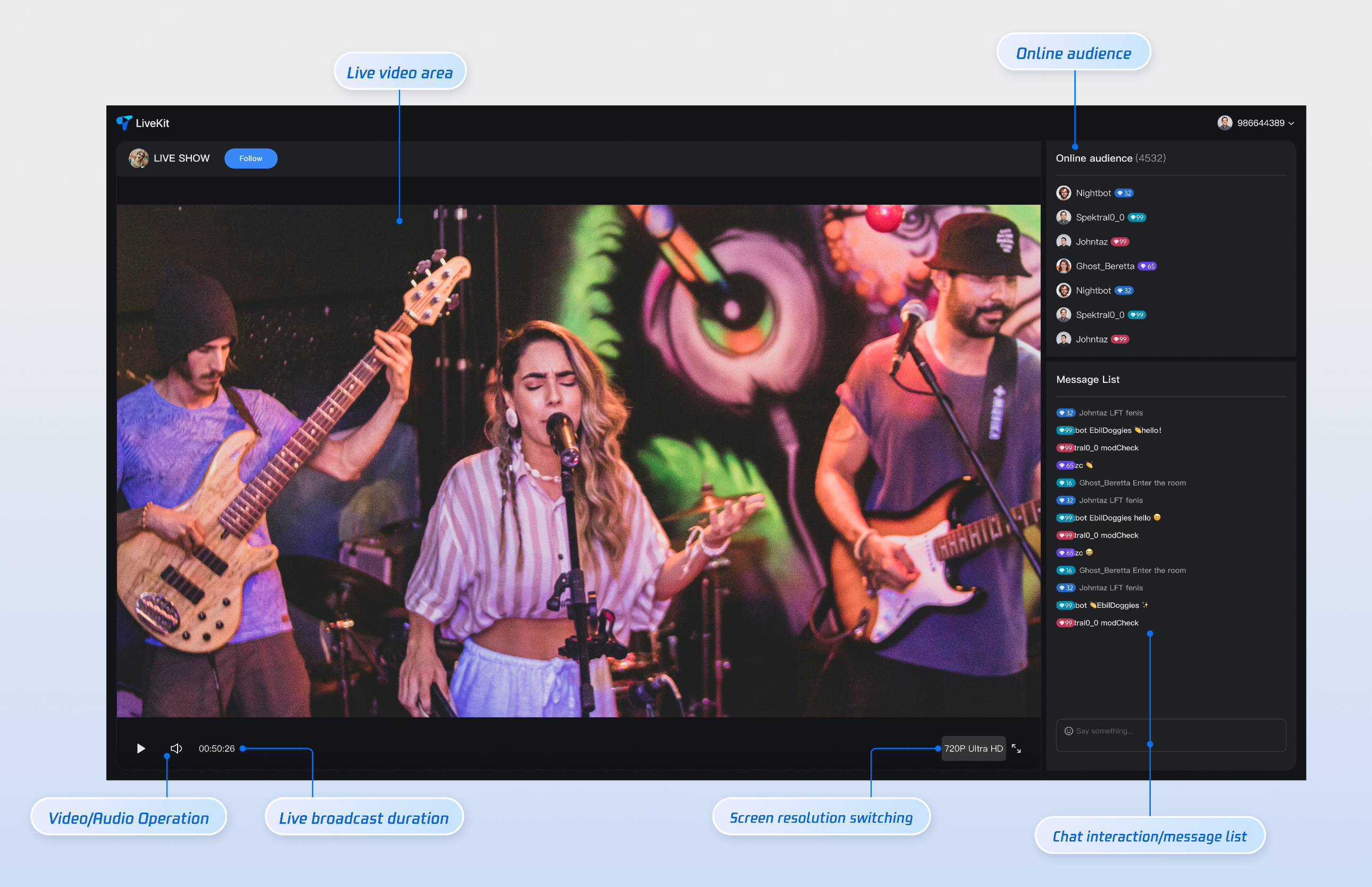
- package/tools/common/get-usersig.js.map +1 -1
- package/tools/common/present-framework-choice.js +1 -1
- package/tools/common/record-prompt.js +5 -5
- package/tools/common/record-result.js +8 -7
- package/tools/common/record-result.js.map +1 -1
- package/tools/index.js +24 -9
- package/tools/index.js.map +1 -1
- package/tools/live/get-web-live-component-detail.js +34 -0
- package/tools/live/get-web-live-component-detail.js.map +1 -0
- package/tools/live/get-web-live-state-detail.js +34 -0
- package/tools/live/get-web-live-state-detail.js.map +1 -0
- package/tools/room/get-web-room-state-detail.js +34 -0
- package/tools/room/get-web-room-state-detail.js.map +1 -0
- package/tools/rtcengine/get-rtcengine-web-sdk-integration-guide.js +35 -0
- package/tools/rtcengine/get-rtcengine-web-sdk-integration-guide.js.map +1 -0
- package/tools/rtcengine/{get-rtcenigne-faq.js → get-trtc-web-sdk-faq.js} +5 -5
- package/tools/rtcengine/get-trtc-web-sdk-faq.js.map +1 -0
- package/tools/rtcengine/get-trtc-web-sdk-integration-guide.js +36 -0
- package/tools/rtcengine/get-trtc-web-sdk-integration-guide.js.map +1 -0
- package/utils/generate-usersig.js +7 -9
- package/utils/generate-usersig.js.map +1 -1
- package/utils/handle-component-name.js +53 -8
- package/utils/handle-component-name.js.map +1 -1
- package/utils/handle-state-name.js +29 -0
- package/utils/handle-state-name.js.map +1 -0
- package/@tencent/aegis-node-sdk/CHANGELOG.md +0 -8
- package/@tencent/aegis-node-sdk/LICENSE +0 -21
- package/@tencent/aegis-node-sdk/README.md +0 -562
- package/@tencent/aegis-node-sdk/lib/aegis.min.js +0 -1
- package/@tencent/aegis-node-sdk/lib/packages/core/src/constant/config.d.ts +0 -14
- package/@tencent/aegis-node-sdk/lib/packages/core/src/constant/global.d.ts +0 -1
- package/@tencent/aegis-node-sdk/lib/packages/core/src/constant/index.d.ts +0 -9
- package/@tencent/aegis-node-sdk/lib/packages/core/src/constant/report-ignore.d.ts +0 -2
- package/@tencent/aegis-node-sdk/lib/packages/core/src/core.d.ts +0 -85
- package/@tencent/aegis-node-sdk/lib/packages/core/src/hooks/afterRequestHooks.d.ts +0 -3
- package/@tencent/aegis-node-sdk/lib/packages/core/src/hooks/beforeRequestHooks.d.ts +0 -9
- package/@tencent/aegis-node-sdk/lib/packages/core/src/hooks/modifyRequestHooks.d.ts +0 -3
- package/@tencent/aegis-node-sdk/lib/packages/core/src/index.d.ts +0 -9
- package/@tencent/aegis-node-sdk/lib/packages/core/src/interface/config.d.ts +0 -62
- package/@tencent/aegis-node-sdk/lib/packages/core/src/interface/env.d.ts +0 -11
- package/@tencent/aegis-node-sdk/lib/packages/core/src/interface/index.d.ts +0 -4
- package/@tencent/aegis-node-sdk/lib/packages/core/src/interface/log.d.ts +0 -130
- package/@tencent/aegis-node-sdk/lib/packages/core/src/interface/send.d.ts +0 -34
- package/@tencent/aegis-node-sdk/lib/packages/core/src/pipes/format.d.ts +0 -2
- package/@tencent/aegis-node-sdk/lib/packages/core/src/pipes/index.d.ts +0 -18
- package/@tencent/aegis-node-sdk/lib/packages/core/src/pipes/length-limit.d.ts +0 -8
- package/@tencent/aegis-node-sdk/lib/packages/core/src/pipes/pv.d.ts +0 -8
- package/@tencent/aegis-node-sdk/lib/packages/core/src/pipes/remove-payload.d.ts +0 -2
- package/@tencent/aegis-node-sdk/lib/packages/core/src/pipes/repeat-limit.d.ts +0 -4
- package/@tencent/aegis-node-sdk/lib/packages/core/src/pipes/report.d.ts +0 -10
- package/@tencent/aegis-node-sdk/lib/packages/core/src/pipes/sample.d.ts +0 -3
- package/@tencent/aegis-node-sdk/lib/packages/core/src/pipes/throttle.d.ts +0 -3
- package/@tencent/aegis-node-sdk/lib/packages/core/src/pipes/trace/index.d.ts +0 -34
- package/@tencent/aegis-node-sdk/lib/packages/core/src/pipes/trace/jwt.d.ts +0 -12
- package/@tencent/aegis-node-sdk/lib/packages/core/src/pipes/trace/ot-js.d.ts +0 -14
- package/@tencent/aegis-node-sdk/lib/packages/core/src/pipes/trace/uuid.d.ts +0 -2
- package/@tencent/aegis-node-sdk/lib/packages/core/src/pipes/whitelist.d.ts +0 -12
- package/@tencent/aegis-node-sdk/lib/packages/core/src/pipes/write-before.d.ts +0 -3
- package/@tencent/aegis-node-sdk/lib/packages/core/src/plugin.d.ts +0 -33
- package/@tencent/aegis-node-sdk/lib/packages/core/src/polyfill.d.ts +0 -0
- package/@tencent/aegis-node-sdk/lib/packages/core/src/util/destroy.d.ts +0 -2
- package/@tencent/aegis-node-sdk/lib/packages/core/src/util/event-emitter.d.ts +0 -18
- package/@tencent/aegis-node-sdk/lib/packages/core/src/util/index.d.ts +0 -60
- package/@tencent/aegis-node-sdk/lib/packages/node-sdk/src/index.d.ts +0 -15
- package/@tencent/aegis-node-sdk/lib/packages/node-sdk/src/interface/selector.d.ts +0 -5
- package/@tencent/aegis-node-sdk/lib/packages/node-sdk/src/pipes/batch-report-pipe.d.ts +0 -6
- package/@tencent/aegis-node-sdk/lib/packages/node-sdk/src/protocol/protocol_base.d.ts +0 -18
- package/@tencent/aegis-node-sdk/lib/packages/node-sdk/src/protocol/protocol_http.d.ts +0 -12
- package/@tencent/aegis-node-sdk/lib/packages/node-sdk/src/selector/ip_selector.d.ts +0 -10
- package/@tencent/aegis-node-sdk/lib/packages/node-sdk/src/selector/polaris_selector.d.ts +0 -20
- package/@tencent/aegis-node-sdk/lib/packages/node-sdk/src/selector/selector_base.d.ts +0 -27
- package/@tencent/aegis-node-sdk/lib/packages/node-sdk/src/util/eval_require.d.ts +0 -2
- package/@tencent/aegis-node-sdk/package.json +0 -19
- package/@tencent/polaris/README.md +0 -407
- package/@tencent/polaris/dist/consumer/health.d.ts +0 -126
- package/@tencent/polaris/dist/consumer/health.js +0 -283
- package/@tencent/polaris/dist/consumer/health.js.map +0 -1
- package/@tencent/polaris/dist/consumer/index.d.ts +0 -120
- package/@tencent/polaris/dist/consumer/index.js +0 -348
- package/@tencent/polaris/dist/consumer/index.js.map +0 -1
- package/@tencent/polaris/dist/consumer/monitor.d.ts +0 -145
- package/@tencent/polaris/dist/consumer/monitor.js +0 -343
- package/@tencent/polaris/dist/consumer/monitor.js.map +0 -1
- package/@tencent/polaris/dist/consumer/selector.d.ts +0 -73
- package/@tencent/polaris/dist/consumer/selector.js +0 -316
- package/@tencent/polaris/dist/consumer/selector.js.map +0 -1
- package/@tencent/polaris/dist/errors.d.ts +0 -373
- package/@tencent/polaris/dist/errors.js +0 -154
- package/@tencent/polaris/dist/errors.js.map +0 -1
- package/@tencent/polaris/dist/global.d.ts +0 -16
- package/@tencent/polaris/dist/global.js +0 -18
- package/@tencent/polaris/dist/global.js.map +0 -1
- package/@tencent/polaris/dist/index.d.ts +0 -62
- package/@tencent/polaris/dist/index.js +0 -145
- package/@tencent/polaris/dist/index.js.map +0 -1
- package/@tencent/polaris/dist/instance.d.ts +0 -109
- package/@tencent/polaris/dist/instance.js +0 -38
- package/@tencent/polaris/dist/instance.js.map +0 -1
- package/@tencent/polaris/dist/limiter/bucket.d.ts +0 -51
- package/@tencent/polaris/dist/limiter/bucket.js +0 -152
- package/@tencent/polaris/dist/limiter/bucket.js.map +0 -1
- package/@tencent/polaris/dist/limiter/index.d.ts +0 -73
- package/@tencent/polaris/dist/limiter/index.js +0 -149
- package/@tencent/polaris/dist/limiter/index.js.map +0 -1
- package/@tencent/polaris/dist/limiter/ratelimit.d.ts +0 -27
- package/@tencent/polaris/dist/limiter/ratelimit.js +0 -134
- package/@tencent/polaris/dist/limiter/ratelimit.js.map +0 -1
- package/@tencent/polaris/dist/limiter/ratelimiter/base.d.ts +0 -17
- package/@tencent/polaris/dist/limiter/ratelimiter/base.js +0 -15
- package/@tencent/polaris/dist/limiter/ratelimiter/base.js.map +0 -1
- package/@tencent/polaris/dist/limiter/ratelimiter/global.d.ts +0 -59
- package/@tencent/polaris/dist/limiter/ratelimiter/global.js +0 -397
- package/@tencent/polaris/dist/limiter/ratelimiter/global.js.map +0 -1
- package/@tencent/polaris/dist/limiter/ratelimiter/index.d.ts +0 -3
- package/@tencent/polaris/dist/limiter/ratelimiter/index.js +0 -19
- package/@tencent/polaris/dist/limiter/ratelimiter/index.js.map +0 -1
- package/@tencent/polaris/dist/limiter/ratelimiter/local.d.ts +0 -17
- package/@tencent/polaris/dist/limiter/ratelimiter/local.js +0 -52
- package/@tencent/polaris/dist/limiter/ratelimiter/local.js.map +0 -1
- package/@tencent/polaris/dist/location.d.ts +0 -48
- package/@tencent/polaris/dist/location.js +0 -67
- package/@tencent/polaris/dist/location.js.map +0 -1
- package/@tencent/polaris/dist/logging.d.ts +0 -106
- package/@tencent/polaris/dist/logging.js +0 -130
- package/@tencent/polaris/dist/logging.js.map +0 -1
- package/@tencent/polaris/dist/metadata.d.ts +0 -78
- package/@tencent/polaris/dist/metadata.js +0 -119
- package/@tencent/polaris/dist/metadata.js.map +0 -1
- package/@tencent/polaris/dist/plugins/breaker/polaris.d.ts +0 -47
- package/@tencent/polaris/dist/plugins/breaker/polaris.js +0 -162
- package/@tencent/polaris/dist/plugins/breaker/polaris.js.map +0 -1
- package/@tencent/polaris/dist/plugins/lb/base.d.ts +0 -24
- package/@tencent/polaris/dist/plugins/lb/base.js +0 -32
- package/@tencent/polaris/dist/plugins/lb/base.js.map +0 -1
- package/@tencent/polaris/dist/plugins/lb/edf.d.ts +0 -24
- package/@tencent/polaris/dist/plugins/lb/edf.js +0 -77
- package/@tencent/polaris/dist/plugins/lb/edf.js.map +0 -1
- package/@tencent/polaris/dist/plugins/lb/hashring.d.ts +0 -24
- package/@tencent/polaris/dist/plugins/lb/hashring.js +0 -53
- package/@tencent/polaris/dist/plugins/lb/hashring.js.map +0 -1
- package/@tencent/polaris/dist/plugins/lb/sticky.d.ts +0 -31
- package/@tencent/polaris/dist/plugins/lb/sticky.js +0 -88
- package/@tencent/polaris/dist/plugins/lb/sticky.js.map +0 -1
- package/@tencent/polaris/dist/plugins/lb/swrr.d.ts +0 -25
- package/@tencent/polaris/dist/plugins/lb/swrr.js +0 -72
- package/@tencent/polaris/dist/plugins/lb/swrr.js.map +0 -1
- package/@tencent/polaris/dist/plugins/lb/wr.d.ts +0 -17
- package/@tencent/polaris/dist/plugins/lb/wr.js +0 -50
- package/@tencent/polaris/dist/plugins/lb/wr.js.map +0 -1
- package/@tencent/polaris/dist/plugins/lb/wrr.d.ts +0 -19
- package/@tencent/polaris/dist/plugins/lb/wrr.js +0 -81
- package/@tencent/polaris/dist/plugins/lb/wrr.js.map +0 -1
- package/@tencent/polaris/dist/plugins/logging/console.d.ts +0 -10
- package/@tencent/polaris/dist/plugins/logging/console.js +0 -38
- package/@tencent/polaris/dist/plugins/logging/console.js.map +0 -1
- package/@tencent/polaris/dist/plugins/naming/local-server/index.d.ts +0 -32
- package/@tencent/polaris/dist/plugins/naming/local-server/index.js +0 -88
- package/@tencent/polaris/dist/plugins/naming/local-server/index.js.map +0 -1
- package/@tencent/polaris/dist/plugins/naming/polaris-server/adapter/base.d.ts +0 -124
- package/@tencent/polaris/dist/plugins/naming/polaris-server/adapter/base.js +0 -398
- package/@tencent/polaris/dist/plugins/naming/polaris-server/adapter/base.js.map +0 -1
- package/@tencent/polaris/dist/plugins/naming/polaris-server/adapter/discover.d.ts +0 -27
- package/@tencent/polaris/dist/plugins/naming/polaris-server/adapter/discover.js +0 -287
- package/@tencent/polaris/dist/plugins/naming/polaris-server/adapter/discover.js.map +0 -1
- package/@tencent/polaris/dist/plugins/naming/polaris-server/adapter/index.d.ts +0 -15
- package/@tencent/polaris/dist/plugins/naming/polaris-server/adapter/index.js +0 -43
- package/@tencent/polaris/dist/plugins/naming/polaris-server/adapter/index.js.map +0 -1
- package/@tencent/polaris/dist/plugins/naming/polaris-server/adapter/monitor.d.ts +0 -28
- package/@tencent/polaris/dist/plugins/naming/polaris-server/adapter/monitor.js +0 -249
- package/@tencent/polaris/dist/plugins/naming/polaris-server/adapter/monitor.js.map +0 -1
- package/@tencent/polaris/dist/plugins/naming/polaris-server/adapter/ratelimit.d.ts +0 -19
- package/@tencent/polaris/dist/plugins/naming/polaris-server/adapter/ratelimit.js +0 -222
- package/@tencent/polaris/dist/plugins/naming/polaris-server/adapter/ratelimit.js.map +0 -1
- package/@tencent/polaris/dist/plugins/naming/polaris-server/connector/grpc/bidi.d.ts +0 -26
- package/@tencent/polaris/dist/plugins/naming/polaris-server/connector/grpc/bidi.js +0 -99
- package/@tencent/polaris/dist/plugins/naming/polaris-server/connector/grpc/bidi.js.map +0 -1
- package/@tencent/polaris/dist/plugins/naming/polaris-server/connector/grpc/index.d.ts +0 -60
- package/@tencent/polaris/dist/plugins/naming/polaris-server/connector/grpc/index.js +0 -259
- package/@tencent/polaris/dist/plugins/naming/polaris-server/connector/grpc/index.js.map +0 -1
- package/@tencent/polaris/dist/plugins/naming/polaris-server/connector/grpc/pb/discover.proto +0 -24
- package/@tencent/polaris/dist/plugins/naming/polaris-server/connector/grpc/pb/monitor.proto +0 -18
- package/@tencent/polaris/dist/plugins/naming/polaris-server/connector/grpc/pb/ratelimit.proto +0 -12
- package/@tencent/polaris/dist/plugins/naming/polaris-server/connector/http/index.d.ts +0 -39
- package/@tencent/polaris/dist/plugins/naming/polaris-server/connector/http/index.js +0 -115
- package/@tencent/polaris/dist/plugins/naming/polaris-server/connector/http/index.js.map +0 -1
- package/@tencent/polaris/dist/plugins/naming/polaris-server/discover-pb/api.proto +0 -24
- package/@tencent/polaris/dist/plugins/naming/polaris-server/discover-pb/client.proto +0 -22
- package/@tencent/polaris/dist/plugins/naming/polaris-server/discover-pb/model.proto +0 -28
- package/@tencent/polaris/dist/plugins/naming/polaris-server/discover-pb/ratelimit.proto +0 -80
- package/@tencent/polaris/dist/plugins/naming/polaris-server/discover-pb/request.proto +0 -18
- package/@tencent/polaris/dist/plugins/naming/polaris-server/discover-pb/response.proto +0 -65
- package/@tencent/polaris/dist/plugins/naming/polaris-server/discover-pb/routing.proto +0 -66
- package/@tencent/polaris/dist/plugins/naming/polaris-server/discover-pb/service.proto +0 -95
- package/@tencent/polaris/dist/plugins/naming/polaris-server/discover-pb/types.d.ts +0 -1568
- package/@tencent/polaris/dist/plugins/naming/polaris-server/index.d.ts +0 -36
- package/@tencent/polaris/dist/plugins/naming/polaris-server/index.js +0 -51
- package/@tencent/polaris/dist/plugins/naming/polaris-server/index.js.map +0 -1
- package/@tencent/polaris/dist/plugins/naming/polaris-server/monitor-pb/api.proto +0 -18
- package/@tencent/polaris/dist/plugins/naming/polaris-server/monitor-pb/circuitbreak.proto +0 -67
- package/@tencent/polaris/dist/plugins/naming/polaris-server/monitor-pb/request.proto +0 -82
- package/@tencent/polaris/dist/plugins/naming/polaris-server/monitor-pb/response.proto +0 -11
- package/@tencent/polaris/dist/plugins/naming/polaris-server/monitor-pb/sdkcache.proto +0 -46
- package/@tencent/polaris/dist/plugins/naming/polaris-server/monitor-pb/sdkconfiguration.proto +0 -16
- package/@tencent/polaris/dist/plugins/naming/polaris-server/monitor-pb/sdktoken.proto +0 -10
- package/@tencent/polaris/dist/plugins/naming/polaris-server/monitor-pb/types.d.ts +0 -1102
- package/@tencent/polaris/dist/plugins/naming/polaris-server/pool.d.ts +0 -29
- package/@tencent/polaris/dist/plugins/naming/polaris-server/pool.js +0 -77
- package/@tencent/polaris/dist/plugins/naming/polaris-server/pool.js.map +0 -1
- package/@tencent/polaris/dist/plugins/naming/polaris-server/ratelimit-pb/api.proto +0 -12
- package/@tencent/polaris/dist/plugins/naming/polaris-server/ratelimit-pb/ratelimit.proto +0 -28
- package/@tencent/polaris/dist/plugins/naming/polaris-server/ratelimit-pb/types.d.ts +0 -395
- package/@tencent/polaris/dist/plugins/naming/polaris-server/rules.d.ts +0 -13
- package/@tencent/polaris/dist/plugins/naming/polaris-server/rules.js +0 -116
- package/@tencent/polaris/dist/plugins/naming/polaris-server/rules.js.map +0 -1
- package/@tencent/polaris/dist/plugins/naming/polaris-server/types.d.ts +0 -67
- package/@tencent/polaris/dist/plugins/naming/polaris-server/types.js +0 -67
- package/@tencent/polaris/dist/plugins/naming/polaris-server/types.js.map +0 -1
- package/@tencent/polaris/dist/plugins/naming/polaris-server/utils.d.ts +0 -99
- package/@tencent/polaris/dist/plugins/naming/polaris-server/utils.js +0 -217
- package/@tencent/polaris/dist/plugins/naming/polaris-server/utils.js.map +0 -1
- package/@tencent/polaris/dist/plugins/registry/memory.d.ts +0 -10
- package/@tencent/polaris/dist/plugins/registry/memory.js +0 -50
- package/@tencent/polaris/dist/plugins/registry/memory.js.map +0 -1
- package/@tencent/polaris/dist/plugins/router/polaris/nearby.d.ts +0 -51
- package/@tencent/polaris/dist/plugins/router/polaris/nearby.js +0 -145
- package/@tencent/polaris/dist/plugins/router/polaris/nearby.js.map +0 -1
- package/@tencent/polaris/dist/plugins/router/polaris/rule.d.ts +0 -11
- package/@tencent/polaris/dist/plugins/router/polaris/rule.js +0 -174
- package/@tencent/polaris/dist/plugins/router/polaris/rule.js.map +0 -1
- package/@tencent/polaris/dist/plugins/router/trpc/canary.d.ts +0 -25
- package/@tencent/polaris/dist/plugins/router/trpc/canary.js +0 -36
- package/@tencent/polaris/dist/plugins/router/trpc/canary.js.map +0 -1
- package/@tencent/polaris/dist/plugins/router/trpc/env.d.ts +0 -10
- package/@tencent/polaris/dist/plugins/router/trpc/env.js +0 -34
- package/@tencent/polaris/dist/plugins/router/trpc/env.js.map +0 -1
- package/@tencent/polaris/dist/plugins/router/trpc/set.d.ts +0 -56
- package/@tencent/polaris/dist/plugins/router/trpc/set.js +0 -106
- package/@tencent/polaris/dist/plugins/router/trpc/set.js.map +0 -1
- package/@tencent/polaris/dist/plugins/shaping/unirate.d.ts +0 -31
- package/@tencent/polaris/dist/plugins/shaping/unirate.js +0 -124
- package/@tencent/polaris/dist/plugins/shaping/unirate.js.map +0 -1
- package/@tencent/polaris/dist/plugins/shaping/warmup.d.ts +0 -61
- package/@tencent/polaris/dist/plugins/shaping/warmup.js +0 -171
- package/@tencent/polaris/dist/plugins/shaping/warmup.js.map +0 -1
- package/@tencent/polaris/dist/plugins/weight/polaris.d.ts +0 -23
- package/@tencent/polaris/dist/plugins/weight/polaris.js +0 -159
- package/@tencent/polaris/dist/plugins/weight/polaris.js.map +0 -1
- package/@tencent/polaris/dist/plugins.d.ts +0 -619
- package/@tencent/polaris/dist/plugins.js +0 -91
- package/@tencent/polaris/dist/plugins.js.map +0 -1
- package/@tencent/polaris/dist/polaris.d.ts +0 -33
- package/@tencent/polaris/dist/polaris.js +0 -59
- package/@tencent/polaris/dist/polaris.js.map +0 -1
- package/@tencent/polaris/dist/provider/index.d.ts +0 -102
- package/@tencent/polaris/dist/provider/index.js +0 -168
- package/@tencent/polaris/dist/provider/index.js.map +0 -1
- package/@tencent/polaris/dist/registry.d.ts +0 -174
- package/@tencent/polaris/dist/registry.js +0 -660
- package/@tencent/polaris/dist/registry.js.map +0 -1
- package/@tencent/polaris/dist/rules.d.ts +0 -163
- package/@tencent/polaris/dist/rules.js +0 -24
- package/@tencent/polaris/dist/rules.js.map +0 -1
- package/@tencent/polaris/dist/scripts/postinstall.d.ts +0 -1
- package/@tencent/polaris/dist/scripts/postinstall.js +0 -71
- package/@tencent/polaris/dist/scripts/postinstall.js.map +0 -1
- package/@tencent/polaris/dist/service.d.ts +0 -18
- package/@tencent/polaris/dist/service.js +0 -3
- package/@tencent/polaris/dist/service.js.map +0 -1
- package/@tencent/polaris/dist/skeleton.d.ts +0 -87
- package/@tencent/polaris/dist/skeleton.js +0 -282
- package/@tencent/polaris/dist/skeleton.js.map +0 -1
- package/@tencent/polaris/dist/utils.d.ts +0 -36
- package/@tencent/polaris/dist/utils.js +0 -74
- package/@tencent/polaris/dist/utils.js.map +0 -1
- package/@tencent/polaris/dist/weak.d.ts +0 -11
- package/@tencent/polaris/dist/weak.js +0 -44
- package/@tencent/polaris/dist/weak.js.map +0 -1
- package/@tencent/polaris/package.json +0 -114
- package/libs/lib-generate-test-usersig-es.min.d.ts +0 -6
- package/libs/lib-generate-test-usersig-es.min.js +0 -2
- package/resource/doc/chatuikit/react/generate_UserSig.md +0 -306
- package/resource/doc/chatuikit/react/integrate_tuichat_only_react.md +0 -202
- package/resource/doc/chatuikit/react/integrate_tuichat_react.md +0 -279
- package/resource/doc/chatuikit/vue/generate_UserSig.md +0 -306
- package/resource/doc/chatuikit/vue/integrate_only_tuichat_Vue_web.md +0 -124
- package/resource/doc/chatuikit/vue/integrate_tuikit_Vue_web.md +0 -552
- package/resource/doc/chatuikit/vue/login.md +0 -31
- package/resource/doc/chatuikit/vue3/components/MessageInput.md +0 -1272
- package/resource/doc/chatuikit/vue3/components/avatar.md +0 -137
- package/resource/doc/chatuikit/vue3/components/chatheader.md +0 -189
- package/resource/doc/chatuikit/vue3/components/component-list.md +0 -102
- package/resource/doc/chatuikit/vue3/components/userpicker.md +0 -315
- package/resource/doc/chatuikit/vue3/integration.md +0 -256
- package/streamableHttp.js +0 -74
- package/streamableHttp.js.map +0 -1
- package/tools/call/get-native-call-integration-guide.js +0 -36
- package/tools/call/get-native-call-integration-guide.js.map +0 -1
- package/tools/call/get-web-call-integration-guide.js +0 -35
- package/tools/call/get-web-call-integration-guide.js.map +0 -1
- package/tools/chat/get-native-chat-integration-guide.js +0 -34
- package/tools/chat/get-native-chat-integration-guide.js.map +0 -1
- package/tools/chat/get-web-chat-integration-guide.js +0 -35
- package/tools/chat/get-web-chat-integration-guide.js.map +0 -1
- package/tools/chat/get-web-chat-uikit-login.js.map +0 -1
- package/tools/rtcengine/get-rtcengine-integration-guide.js +0 -33
- package/tools/rtcengine/get-rtcengine-integration-guide.js.map +0 -1
- package/tools/rtcengine/get-rtcenigne-faq.js.map +0 -1
- /package/resource/doc/chatuikit/react/{login.md → init.md} +0 -0
|
@@ -0,0 +1,269 @@
|
|
|
1
|
+
This article provides a detailed introduction to the watch page in **TUILiveKit** Demo. You can directly refer to this document to integrate the watch page we developed in your existing project, or you can deeply customize the page style, layout, and functional items according to your needs according to the content in the document.
|
|
2
|
+
|
|
3
|
+
### Function Overview
|
|
4
|
+
<table>
|
|
5
|
+
<tr>
|
|
6
|
+
<td rowspan="1" colSpan="1" >**Functional classification**</td>
|
|
7
|
+
|
|
8
|
+
<td rowspan="1" colSpan="1" >**Specific capabilities**</td>
|
|
9
|
+
</tr>
|
|
10
|
+
|
|
11
|
+
<tr>
|
|
12
|
+
<td rowspan="1" colSpan="1" >**Live video playback**</td>
|
|
13
|
+
|
|
14
|
+
<td rowspan="1" colSpan="1" >HD and smooth live streaming experience</td>
|
|
15
|
+
</tr>
|
|
16
|
+
|
|
17
|
+
<tr>
|
|
18
|
+
<td rowspan="1" colSpan="1" >**Barrage Interaction**</td>
|
|
19
|
+
|
|
20
|
+
<td rowspan="1" colSpan="1" >Real-time Barrage chat</td>
|
|
21
|
+
</tr>
|
|
22
|
+
|
|
23
|
+
<tr>
|
|
24
|
+
<td rowspan="1" colSpan="1" >**Viewer List**</td>
|
|
25
|
+
|
|
26
|
+
<td rowspan="1" colSpan="1" >View online viewer information</td>
|
|
27
|
+
</tr>
|
|
28
|
+
|
|
29
|
+
<tr>
|
|
30
|
+
<td rowspan="1" colSpan="1" >**Follow Streamer**</td>
|
|
31
|
+
|
|
32
|
+
<td rowspan="1" colSpan="1" >Follow your favorite streamers with one click</td>
|
|
33
|
+
</tr>
|
|
34
|
+
|
|
35
|
+
<tr>
|
|
36
|
+
<td rowspan="1" colSpan="1" >**Full Screen Play**</td>
|
|
37
|
+
|
|
38
|
+
<td rowspan="1" colSpan="1" >Immersive viewing experience</td>
|
|
39
|
+
</tr>
|
|
40
|
+
</table>
|
|
41
|
+
|
|
42
|
+
|
|
43
|
+
## Function Display
|
|
44
|
+
|
|
45
|
+
The watch page provides default behavior and style, but if the default behavior and style don't fully meet your needs, you can also customize the UI. The numbers shown in the figure correspond to categories in the specific function list. These mainly include live broadcast information display, video broadcast area, online audience, audio and video operation, live broadcast duration, screen resolution switching, full screen function, chat interaction, message list, etc.
|
|
46
|
+
|
|
47
|
+
|
|
48
|
+
|
|
49
|
+
|
|
50
|
+
## Quick Access
|
|
51
|
+
|
|
52
|
+
### Step 1: Environment Configuration and Service Activation
|
|
53
|
+
|
|
54
|
+
Before using Quick Access, you need to refer to [Preparations](https://write.woa.com/document/189231573727113216) configuration requirements and activate the corresponding services.
|
|
55
|
+
|
|
56
|
+
|
|
57
|
+
|
|
58
|
+
|
|
59
|
+
【npm】
|
|
60
|
+
``` bash
|
|
61
|
+
npm install tuikit-atomicx-vue3@latest @tencentcloud/uikit-base-component-vue3 --save
|
|
62
|
+
```
|
|
63
|
+
|
|
64
|
+
|
|
65
|
+
【pnpm】
|
|
66
|
+
``` bash
|
|
67
|
+
pnpm add tuikit-atomicx-vue3@latest @tencentcloud/uikit-base-component-vue3
|
|
68
|
+
```
|
|
69
|
+
|
|
70
|
+
|
|
71
|
+
【yarn】
|
|
72
|
+
``` bash
|
|
73
|
+
yarn add tuikit-atomicx-vue3@latest @tencentcloud/uikit-base-component-vue3
|
|
74
|
+
```
|
|
75
|
+
|
|
76
|
+
### Step 2: Access the viewing page
|
|
77
|
+
|
|
78
|
+
Create a live-player.vue file in your project and copy the following code to integrate the watch page into your project.
|
|
79
|
+
``` vue
|
|
80
|
+
<template>
|
|
81
|
+
<UIKitProvider language="zh-CN">
|
|
82
|
+
<div class="container">
|
|
83
|
+
<!-- Live core area -->
|
|
84
|
+
<section class="live">
|
|
85
|
+
<header class="header">
|
|
86
|
+
<IconArrowStrokeBack class="back-btn" size="20" />
|
|
87
|
+
<Avatar :src="currentLive?.liveOwner.avatarUrl" :size="32" class="avatar" />
|
|
88
|
+
<span class="user-name">{{ currentLive?.liveOwner.userName || currentLive?.liveOwner.userId }}</span>
|
|
89
|
+
</header>
|
|
90
|
+
<LiveCoreView class="player" />
|
|
91
|
+
</section>
|
|
92
|
+
|
|
93
|
+
<div class="sidebar">
|
|
94
|
+
<!-- Online viewers list -->
|
|
95
|
+
<section class="audience">
|
|
96
|
+
<header class="section-header">
|
|
97
|
+
<h3> online viewers <span>({{ audienceList.length }})</span></h3>
|
|
98
|
+
</header>
|
|
99
|
+
<LiveAudienceList class="list" />
|
|
100
|
+
</section>
|
|
101
|
+
|
|
102
|
+
<!-- Message List & Message List -->
|
|
103
|
+
<section class="barrage">
|
|
104
|
+
<header class="section-header">
|
|
105
|
+
<h3>MessageList</h3>
|
|
106
|
+
</header>
|
|
107
|
+
<BarrageList class="list" />
|
|
108
|
+
<BarrageInput class="input" height="48px" />
|
|
109
|
+
</section>
|
|
110
|
+
</div>
|
|
111
|
+
</div>
|
|
112
|
+
</UIKitProvider>
|
|
113
|
+
</template>
|
|
114
|
+
|
|
115
|
+
<script setup lang="ts">
|
|
116
|
+
import { LiveAudienceList, BarrageList, BarrageInput, useLiveAudienceState, LiveCoreView, useLiveState, Avatar, useLoginState } from 'tuikit-atomicx-vue3';
|
|
117
|
+
import { UIKitProvider, IconArrowStrokeBack } from '@tencentcloud/uikit-base-component-vue3';
|
|
118
|
+
|
|
119
|
+
const { audienceList } = useLiveAudienceState();
|
|
120
|
+
const { currentLive } = useLiveState();
|
|
121
|
+
const { login } = useLoginState();
|
|
122
|
+
|
|
123
|
+
async function initLogin() {
|
|
124
|
+
try {
|
|
125
|
+
await login({
|
|
126
|
+
sdkAppId: 0, // SDKAppId, refer to step 1 to obtain
|
|
127
|
+
userId: '', // UserID, refer to step 1 to obtain
|
|
128
|
+
userSig: '', // userSig, refer to step 1 to obtain
|
|
129
|
+
});
|
|
130
|
+
} catch (error) {
|
|
131
|
+
console.error('Login Failed:', error);
|
|
132
|
+
}
|
|
133
|
+
}
|
|
134
|
+
|
|
135
|
+
onMounted(async () => {
|
|
136
|
+
await initLogin();
|
|
137
|
+
});
|
|
138
|
+
|
|
139
|
+
</script>
|
|
140
|
+
|
|
141
|
+
<style>:global(body){height:100vh;width:100vw;margin:0;padding:0;overflow:hidden;font-size:15px;line-height:1.6;text-rendering:optimizeLegibility;}:global(*),:global(*::before),:global(*::after){box-sizing:border-box;margin:0;}.container{display:grid;grid-template-columns:70% 30%;height:100vh;width:100vw;gap:16px;padding:16px;background:var(--bg-color-default);box-sizing:border-box;overflow:hidden;}.live{display:flex;flex-direction:column;background:var(--bg-color-operate);border-radius:12px;overflow:hidden;box-shadow:0 2px 8px var(--shadow-color);}.header{display:flex;align-items:center;gap:12px;padding:16px;border-bottom:1px solid var(--stroke-color-primary);}.back-btn{cursor:pointer;color:var(--text-color-tertiary);transition:color 0.2s;}.back-btn:hover{color:var(--text-color-link-hover);}.avatar{border:1px solid var(--uikit-color-white-7);}.user-name{color:var(--text-color-primary);font-weight:500;}.player{flex:1;background:var(--uikit-color-black-1);}.sidebar{display:flex;flex-direction:column;gap:16px;height:100%;overflow:hidden;}.audience{display:flex;flex-direction:column;background:var(--bg-color-operate);border-radius:12px;overflow:hidden;box-shadow:0 2px 8px var(--shadow-color);flex:1;min-height:0;}.barrage{display:flex;flex-direction:column;background:var(--bg-color-operate);border-radius:12px;overflow:hidden;box-shadow:0 2px 8px var(--shadow-color);flex:1;min-height:0;}.section-header{padding:16px;border-bottom:1px solid var(--stroke-color-primary);background:var(--bg-color-operate);}.section-header h3{margin:0;font-size:16px;font-weight:600;color:var(--text-color-primary);}.section-header span{font-weight:400;color:var(--text-color-secondary);font-size:14px;}.list{flex:1;min-height:0;overflow-y:auto;}.input{border-top:1px solid var(--stroke-color-primary);flex-shrink:0;height:48px;}@media (max-width:1200px){.container{grid-template-columns:1fr;grid-template-rows:60% 20% 20%;gap:12px;}.sidebar{gap:12px;}.audience,.barrage{min-height:200px;}}@media (max-width:768px){.container{padding:8px;gap:8px;grid-template-rows:50% 25% 25%;}.header,.section-header{padding:12px;}.sidebar{gap:8px;}}</style>
|
|
142
|
+
|
|
143
|
+
```
|
|
144
|
+
|
|
145
|
+
### Step 3: Start the project
|
|
146
|
+
``` bash
|
|
147
|
+
npm run dev
|
|
148
|
+
```
|
|
149
|
+
|
|
150
|
+
## Customizable
|
|
151
|
+
|
|
152
|
+
As shown in the functional diagram above, we also support customizing the UI of the watch page based on your project needs. The following table lists the main customizable features.
|
|
153
|
+
<table>
|
|
154
|
+
<tr>
|
|
155
|
+
<td rowspan="1" colSpan="1" >**Category**</td>
|
|
156
|
+
|
|
157
|
+
<td rowspan="1" colSpan="1" >**Function**</td>
|
|
158
|
+
|
|
159
|
+
<td rowspan="1" colSpan="1" >**Description**</td>
|
|
160
|
+
</tr>
|
|
161
|
+
|
|
162
|
+
<tr>
|
|
163
|
+
<td rowspan="1" colSpan="1" >**Live information display**</td>
|
|
164
|
+
|
|
165
|
+
<td rowspan="1" colSpan="1" >Customize the display of the watch page information area</td>
|
|
166
|
+
|
|
167
|
+
<td rowspan="1" colSpan="1" >**Supports:**<br>- **Show/hide the logo, replace it with your desired logo**<br>- **UI customization, show/hide the follow button, and replace it with your desired button style**</td>
|
|
168
|
+
</tr>
|
|
169
|
+
|
|
170
|
+
<tr>
|
|
171
|
+
<td rowspan="1" colSpan="1" >**Online viewers**</td>
|
|
172
|
+
|
|
173
|
+
<td rowspan="1" colSpan="1" >Customize audience information display</td>
|
|
174
|
+
|
|
175
|
+
<td rowspan="1" colSpan="1" >**Supports:**<br>- **Show/hide audience level**<br>- **Customize audience information font and color UI**<br>- **Replace icon style with your desired style**</td>
|
|
176
|
+
</tr>
|
|
177
|
+
|
|
178
|
+
<tr>
|
|
179
|
+
<td rowspan="1" colSpan="1" >**MessageList**</td>
|
|
180
|
+
|
|
181
|
+
<td rowspan="1" colSpan="1" >Custom message barrage area display</td>
|
|
182
|
+
|
|
183
|
+
<td rowspan="1" colSpan="1" >**Supports:**<br>- **Show/hide chat input area**<br>- **Supports UI customization for chat bubble style, audience level, etc.**</td>
|
|
184
|
+
</tr>
|
|
185
|
+
</table>
|
|
186
|
+
|
|
187
|
+
|
|
188
|
+
## Playing a Live Stream
|
|
189
|
+
|
|
190
|
+
#### Method 1: Playing by Specifying a LiveId
|
|
191
|
+
|
|
192
|
+
If you need to specify a LiveId for playback, you need to add the following code based on the code in [step 3](https://write.woa.com/#c1b852bc-da02-4c9f-bb11-2a63582ce978) of the Quick Access section above. The reference method is as follows:
|
|
193
|
+
``` typescript
|
|
194
|
+
// live-player.vue
|
|
195
|
+
import { onMounted } from 'vue';
|
|
196
|
+
import { useLiveState } from 'tuikit-atomicx-vue3';
|
|
197
|
+
|
|
198
|
+
const { joinLive } = useLiveState();
|
|
199
|
+
|
|
200
|
+
onMounted(async () => {
|
|
201
|
+
// Enter liveId to join the live broadcast room. For the specific meaning of the parameters,
|
|
202
|
+
// please refer to the preparation work in step 1.
|
|
203
|
+
await joinLive({ liveId: 'xxx' });
|
|
204
|
+
});
|
|
205
|
+
```
|
|
206
|
+
|
|
207
|
+
#### Method 2: Routing Configuration
|
|
208
|
+
|
|
209
|
+
Because of the logic involved in redirecting from the live stream list (or homepage) to the live stream room, you'll need to configure Vue Router. Create a new router folder in the project's src directory and create an index.ts file. Then, import and use the router in your main file (e.g., main.ts or index.ts). See the [GitHub code examples](https://github.com/Tencent-RTC/TUILiveKit/blob/main/Web/web-vite-vue3/src/main.ts) for more information. For a live stream list, see the Live Stream List documentation.
|
|
210
|
+
``` typescript
|
|
211
|
+
// src/router/index.ts
|
|
212
|
+
import { createRouter, createWebHistory } from 'vue-router';
|
|
213
|
+
|
|
214
|
+
const routes = [
|
|
215
|
+
{
|
|
216
|
+
path: '/live-player',
|
|
217
|
+
component: () => import('../views/live-player.vue'),
|
|
218
|
+
},
|
|
219
|
+
// If you need the live broadcast list function, you can add the following route
|
|
220
|
+
// {
|
|
221
|
+
// path: '/live-list',
|
|
222
|
+
// component: () => import('../views/live-list.vue'),
|
|
223
|
+
// },
|
|
224
|
+
];
|
|
225
|
+
|
|
226
|
+
const router = createRouter({
|
|
227
|
+
history: createWebHistory(),
|
|
228
|
+
routes,
|
|
229
|
+
});
|
|
230
|
+
export default router;
|
|
231
|
+
|
|
232
|
+
// src/main.ts
|
|
233
|
+
import { createApp } from 'vue';
|
|
234
|
+
import App from './App.vue';
|
|
235
|
+
import router from './router';
|
|
236
|
+
|
|
237
|
+
const app = createApp(App);
|
|
238
|
+
app.use(router);
|
|
239
|
+
app.mount('#app');
|
|
240
|
+
```
|
|
241
|
+
|
|
242
|
+
### Next Steps
|
|
243
|
+
|
|
244
|
+
Congratulations! You've successfully integrated the watch page. Next, you can implement content such as the anchor's start page and live broadcast list page. Please refer to the table below:
|
|
245
|
+
<table>
|
|
246
|
+
<tr>
|
|
247
|
+
<td rowspan="1" colSpan="1" >**Function**</td>
|
|
248
|
+
|
|
249
|
+
<td rowspan="1" colSpan="1" >**Description**</td>
|
|
250
|
+
|
|
251
|
+
<td rowspan="1" colSpan="1" >**Integration Guide**</td>
|
|
252
|
+
</tr>
|
|
253
|
+
|
|
254
|
+
<tr>
|
|
255
|
+
<td rowspan="1" colSpan="1" >**Host Streaming**</td>
|
|
256
|
+
|
|
257
|
+
<td rowspan="1" colSpan="1" >The complete workflow for a host to start a stream, including pre-stream setup and various in-stream interactions.</td>
|
|
258
|
+
|
|
259
|
+
<td rowspan="1" colSpan="1" >[Host Streaming](https://write.woa.com/document/189497714561167360)</td>
|
|
260
|
+
</tr>
|
|
261
|
+
|
|
262
|
+
<tr>
|
|
263
|
+
<td rowspan="1" colSpan="1" >**Live Stream List**</td>
|
|
264
|
+
|
|
265
|
+
<td rowspan="1" colSpan="1" >Display the live broadcast list interface and functions, including live broadcast list and room information display function</td>
|
|
266
|
+
|
|
267
|
+
<td rowspan="1" colSpan="1" >[Live Stream List](https://write.woa.com/document/189592401543360512)</td>
|
|
268
|
+
</tr>
|
|
269
|
+
</table>
|
|
@@ -0,0 +1,175 @@
|
|
|
1
|
+
This document provides a detailed introduction to the **Media Source Configuration Panel (LiveScenePanel)**. You can refer to the sample code in this document for seamless integration of our pre-developed components in your existing project, or customize the style and layout according to your needs by following the component customization section in the document.
|
|
2
|
+
|
|
3
|
+
|
|
4
|
+
|
|
5
|
+
|
|
6
|
+
## Core Features
|
|
7
|
+
<table>
|
|
8
|
+
<tr>
|
|
9
|
+
<td rowspan="1" colSpan="1" >**Feature Category**</td>
|
|
10
|
+
|
|
11
|
+
<td rowspan="1" colSpan="1" >**Specific Capability**</td>
|
|
12
|
+
</tr>
|
|
13
|
+
|
|
14
|
+
<tr>
|
|
15
|
+
<td rowspan="1" colSpan="1" >**Multi-material type support**</td>
|
|
16
|
+
|
|
17
|
+
<td rowspan="1" colSpan="1" >Camera, screen sharing, image, video, text and multiple material types, support device selection and parameter configuration.</td>
|
|
18
|
+
</tr>
|
|
19
|
+
|
|
20
|
+
<tr>
|
|
21
|
+
<td rowspan="1" colSpan="1" >**Intelligent display mode**</td>
|
|
22
|
+
|
|
23
|
+
<td rowspan="1" colSpan="1" >Display the full panel when no material is present, and automatically switch to compact button mode when material is available, with responsive layout adaptation.</td>
|
|
24
|
+
</tr>
|
|
25
|
+
|
|
26
|
+
<tr>
|
|
27
|
+
<td rowspan="1" colSpan="1" >**Material management operations**</td>
|
|
28
|
+
|
|
29
|
+
<td rowspan="1" colSpan="1" >Complete material management features including addition, editing, rename, deletion, and sorting, with support for batch operations.</td>
|
|
30
|
+
</tr>
|
|
31
|
+
|
|
32
|
+
<tr>
|
|
33
|
+
<td rowspan="1" colSpan="1" >**Real-time preview configuration**</td>
|
|
34
|
+
|
|
35
|
+
<td rowspan="1" colSpan="1" >Camera configuration pop-up provides real-time preview, supports parameter adjustment and device testing.</td>
|
|
36
|
+
</tr>
|
|
37
|
+
|
|
38
|
+
<tr>
|
|
39
|
+
<td rowspan="1" colSpan="1" >**Permission and Error Handling**</td>
|
|
40
|
+
|
|
41
|
+
<td rowspan="1" colSpan="1" >Automated permission check, Friendly error prompt and retry mechanism to guarantee user experience.</td>
|
|
42
|
+
</tr>
|
|
43
|
+
</table>
|
|
44
|
+
|
|
45
|
+
|
|
46
|
+
## Component Integration
|
|
47
|
+
|
|
48
|
+
### Step 1: Configuring the Environment and Activating the Service
|
|
49
|
+
|
|
50
|
+
Before performing quick integration, you need to refer to [preparations](https://write.woa.com/document/185222107981008896) to meet the related environment configuration and activate the corresponding service.
|
|
51
|
+
|
|
52
|
+
### Step 2: Dependency Installation
|
|
53
|
+
|
|
54
|
+
|
|
55
|
+
|
|
56
|
+
|
|
57
|
+
【npm】
|
|
58
|
+
``` bash
|
|
59
|
+
npm install tuikit-atomicx-vue3@latest @tencentcloud/uikit-base-component-vue3 --save
|
|
60
|
+
```
|
|
61
|
+
|
|
62
|
+
|
|
63
|
+
【pnpm】
|
|
64
|
+
``` bash
|
|
65
|
+
pnpm add tuikit-atomicx-vue3@latest @tencentcloud/uikit-base-component-vue3
|
|
66
|
+
```
|
|
67
|
+
|
|
68
|
+
|
|
69
|
+
【yarn】
|
|
70
|
+
``` bash
|
|
71
|
+
yarn add tuikit-atomicx-vue3@latest @tencentcloud/uikit-base-component-vue3
|
|
72
|
+
```
|
|
73
|
+
|
|
74
|
+
### Step 3: Integrating the **Media Source Configuration Panel**
|
|
75
|
+
|
|
76
|
+
Add **Media Source Configuration Panel** to your project and use it. Copy the following example code directly into your project to show the media source configuration panel.
|
|
77
|
+
``` typescript
|
|
78
|
+
<template>
|
|
79
|
+
<UIKitProvider theme="dark" language="en-US">
|
|
80
|
+
<div class="app-container">
|
|
81
|
+
<LiveScenePanel class="live-scene-panel" />
|
|
82
|
+
</div>
|
|
83
|
+
</UIKitProvider>
|
|
84
|
+
</template>
|
|
85
|
+
|
|
86
|
+
<script setup lang="ts">
|
|
87
|
+
import { onMounted } from 'vue';
|
|
88
|
+
import { UIKitProvider } from '@tencentcloud/uikit-base-component-vue3';
|
|
89
|
+
import { LiveScenePanel, useLoginState } from 'tuikit-atomicx-vue3';
|
|
90
|
+
|
|
91
|
+
const { login } = useLoginState();
|
|
92
|
+
|
|
93
|
+
async function initLogin() {
|
|
94
|
+
try {
|
|
95
|
+
await login({
|
|
96
|
+
sdkAppId: 0, // SDKAppID, see Step 1 to get it
|
|
97
|
+
userId: '', // UserID, see Step 1 to get it
|
|
98
|
+
userSig: '', // userSig, see Step 1 to get it
|
|
99
|
+
});
|
|
100
|
+
} catch (error) {
|
|
101
|
+
console.error('login error:', error);
|
|
102
|
+
}
|
|
103
|
+
}
|
|
104
|
+
|
|
105
|
+
onMounted(async () => {
|
|
106
|
+
await initLogin();
|
|
107
|
+
});
|
|
108
|
+
</script>
|
|
109
|
+
|
|
110
|
+
<style scoped>.app-container{width:100vw;height:100vh;display:flex;justify-content:center;align-items:center;padding:20px;box-sizing:border-box}.live-scene-panel{width:20%;height:80vh;background:rgba(0,0,0,0.8);border-radius:16px}</style>
|
|
111
|
+
```
|
|
112
|
+
|
|
113
|
+
## Customize Component
|
|
114
|
+
|
|
115
|
+
The media source configuration panel provides users with various and dimensional feature APIs for user customization, allowing users to customize material types, operation behavior, style themes, etc. After completing **Step 3** above, see the following example to adjust the UI of the media source configuration panel, or directly copy the sample code incrementally into the component to generate the effect example.
|
|
116
|
+
|
|
117
|
+
### Style Customization
|
|
118
|
+
|
|
119
|
+
Customize component appearance via CSS class names and variables, supporting comprehensive customization of theme colors, layout styles, animation effects, and more.
|
|
120
|
+
``` typescript
|
|
121
|
+
<template>
|
|
122
|
+
<LiveScenePanel class="custom-live-scene-panel" />
|
|
123
|
+
</template>
|
|
124
|
+
|
|
125
|
+
<style>.app-container{width:100vw;height:100vh;display:flex;justify-content:center;align-items:center;padding:20px;box-sizing:border-box}.custom-live-scene-panel{width:100%;max-width:300px;height:80vh;background:linear-gradient(135deg,#667eea 0%,#764ba2 100%);border:2px solid #4c63d2;border-radius:16px;padding:24px;box-shadow:0 8px 32px rgba(0,0,0,0.1);color:white}.custom-live-scene-panel .add-material-item{background-color:#147fcb!important;color:white;border:none;border-radius:0!important;padding:12px 24px;font-weight:600;transition:all 0.3s ease}.custom-live-scene-panel .materials-list{margin-top:20px;gap:16px;display:grid;grid-template-columns:repeat(auto-fill,minmax(200px,1fr))}.custom-live-scene-panel .material-item{background:rgba(255,255,255,0.1);border:1px solid rgba(255,255,255,0.2);border-radius:12px;padding:16px;backdrop-filter:blur(10px);transition:all 0.3s ease}.custom-live-scene-panel .material-item:hover{background:rgba(255,255,255,0.2);transform:scale(1.02)}</style>
|
|
126
|
+
```
|
|
127
|
+
<table>
|
|
128
|
+
<tr>
|
|
129
|
+
<td rowspan="1" colSpan="2" >**Before modification**</td>
|
|
130
|
+
|
|
131
|
+
<td rowspan="1" colSpan="2" >**After modification**</td>
|
|
132
|
+
</tr>
|
|
133
|
+
|
|
134
|
+
<tr>
|
|
135
|
+
<td rowspan="1" colSpan="1" >**Add Media Source Interface**</td>
|
|
136
|
+
|
|
137
|
+
<td rowspan="1" colSpan="1" >**Media Source Setting Interface**</td>
|
|
138
|
+
|
|
139
|
+
<td rowspan="1" colSpan="1" >**Add Media Source Interface**</td>
|
|
140
|
+
|
|
141
|
+
<td rowspan="1" colSpan="1" >**Media Source Setting Interface**</td>
|
|
142
|
+
</tr>
|
|
143
|
+
|
|
144
|
+
<tr>
|
|
145
|
+
<td rowspan="1" colSpan="1" ><br>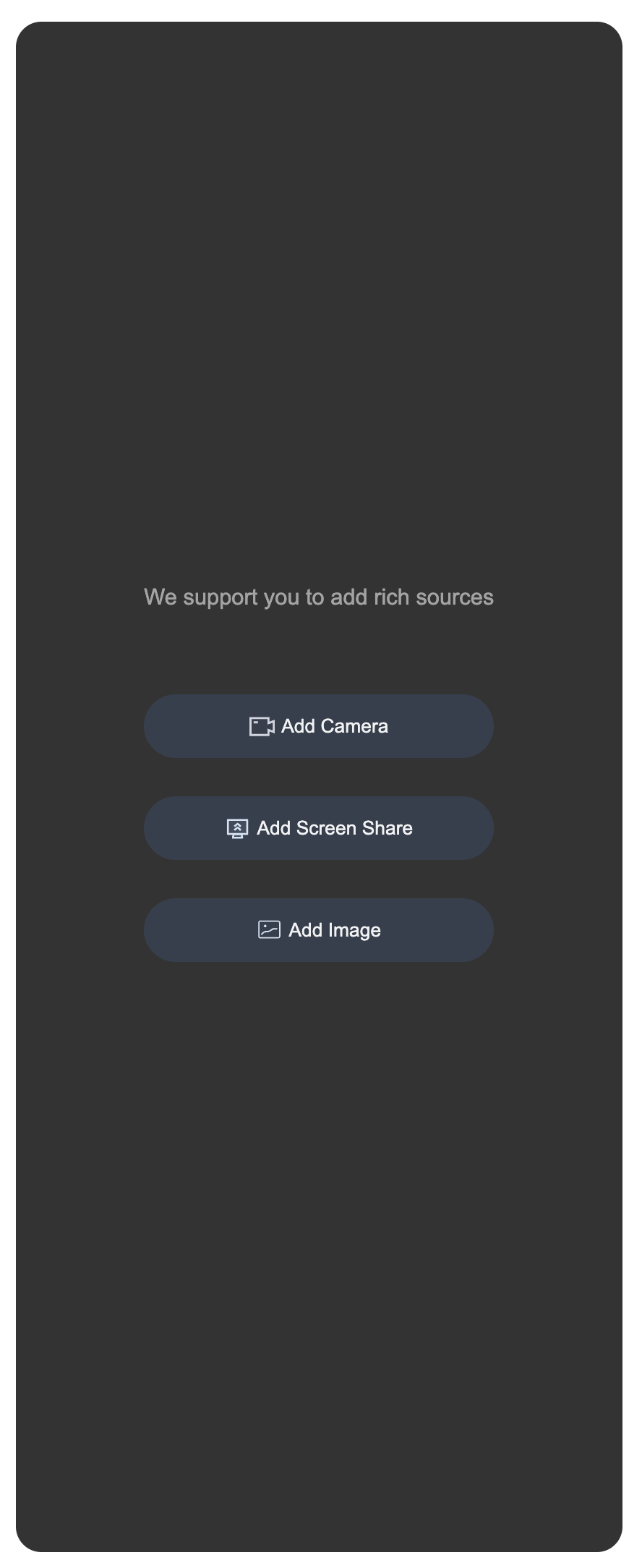</td>
|
|
146
|
+
|
|
147
|
+
<td rowspan="1" colSpan="1" ><br>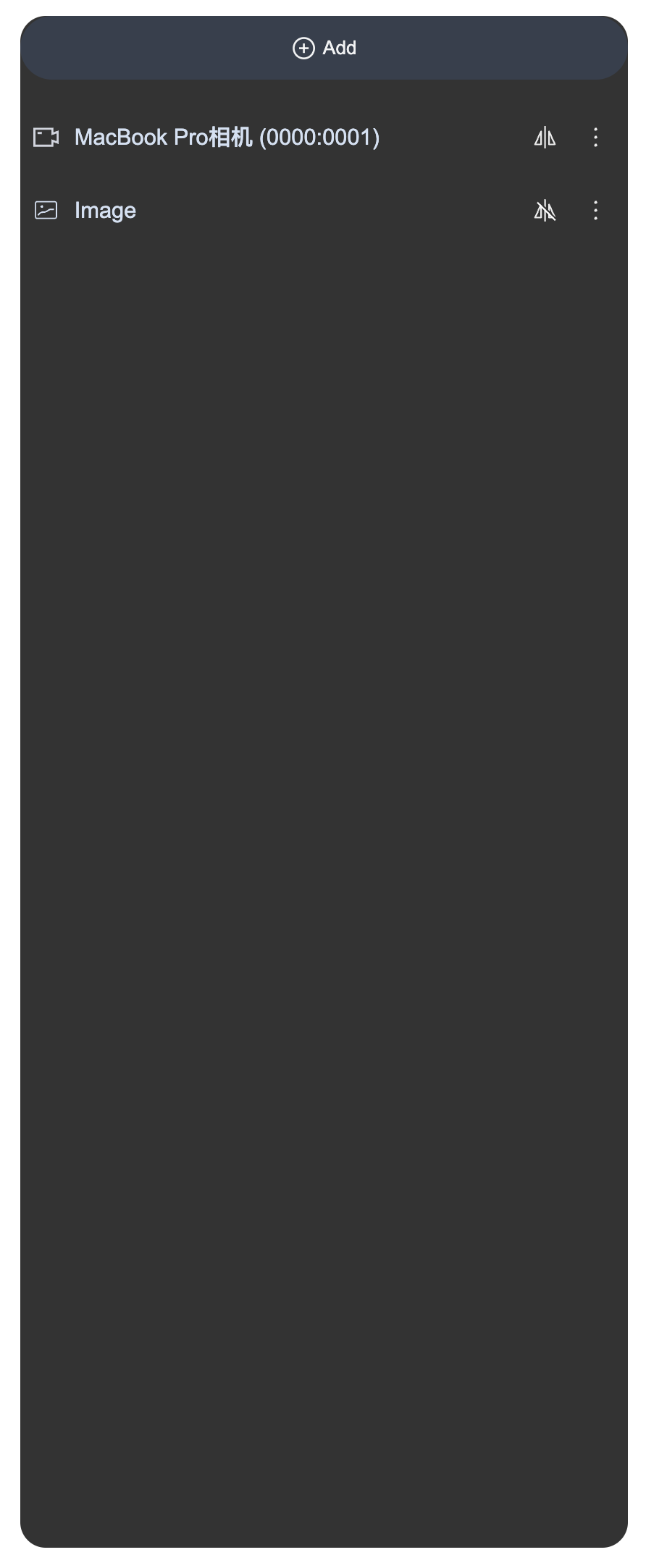</td>
|
|
148
|
+
|
|
149
|
+
<td rowspan="1" colSpan="1" ><br>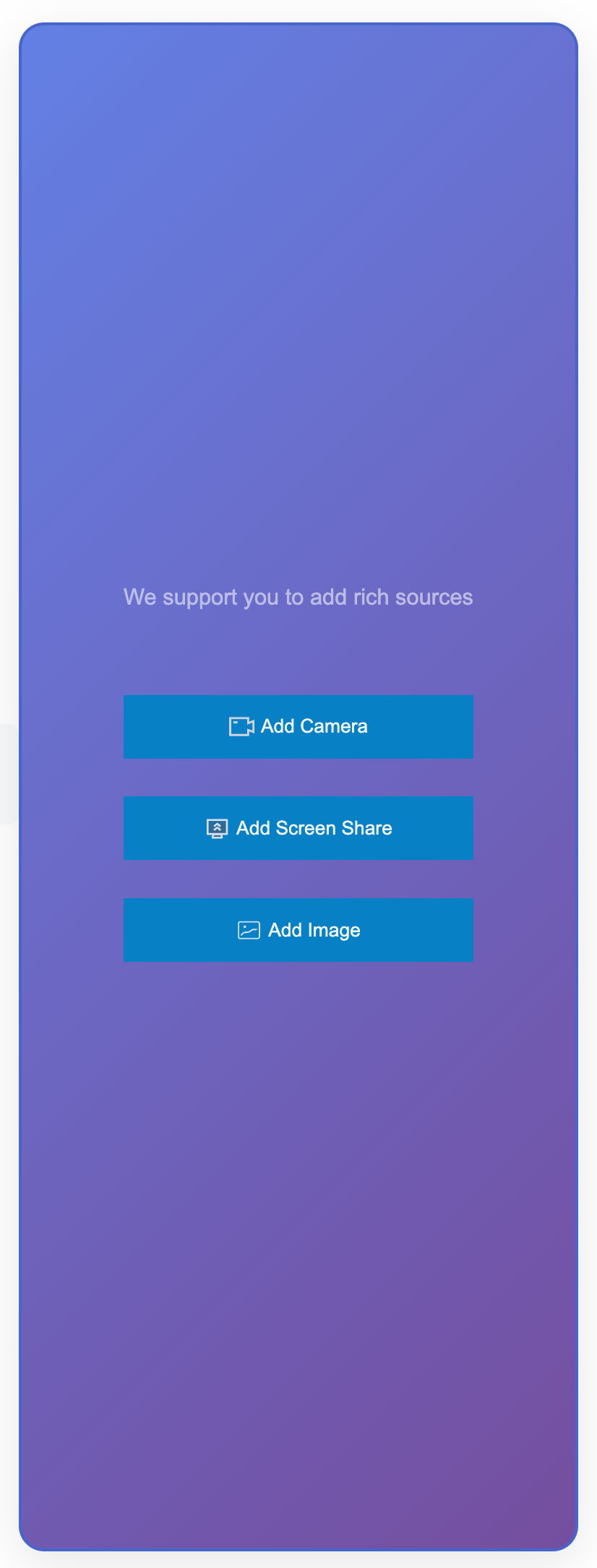</td>
|
|
150
|
+
|
|
151
|
+
<td rowspan="1" colSpan="1" ><br>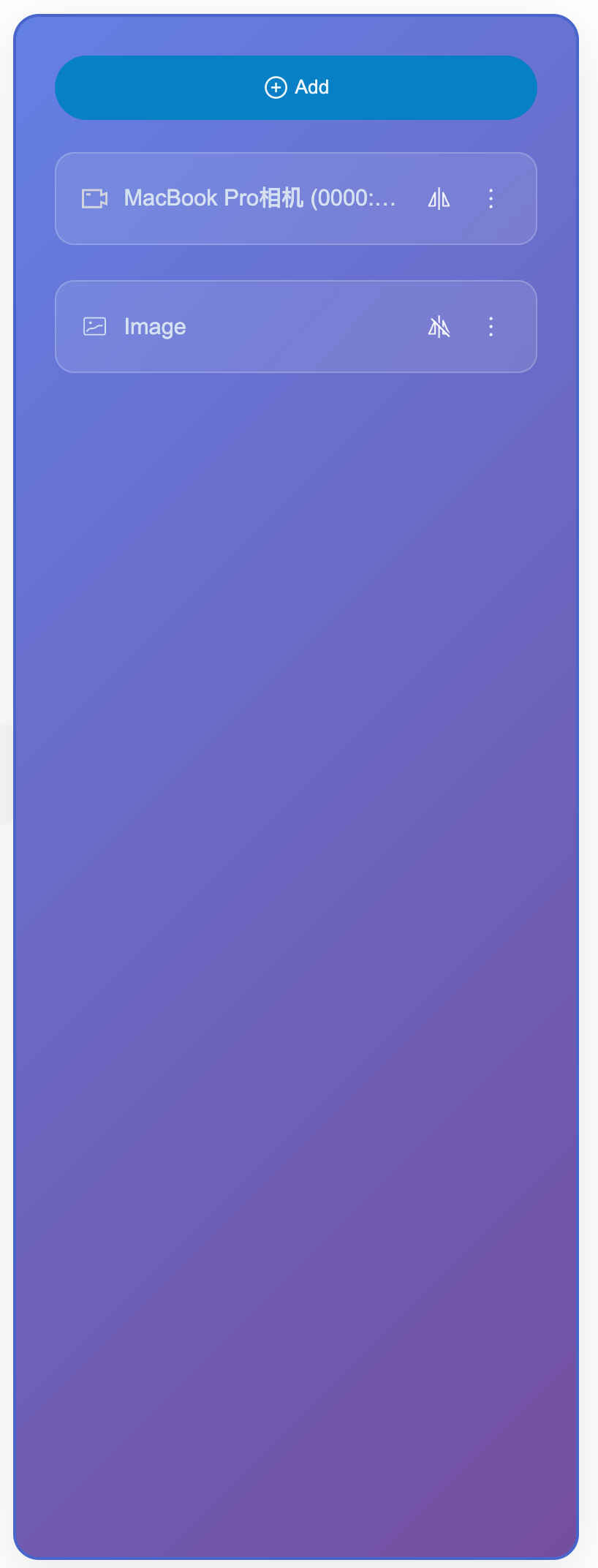</td>
|
|
152
|
+
</tr>
|
|
153
|
+
</table>
|
|
154
|
+
|
|
155
|
+
|
|
156
|
+
### Listening for Status and Scaling
|
|
157
|
+
|
|
158
|
+
Using status management Hooks, you can listen to internal state changes in the media source configuration panel and implement responsive processing for external business logic. This approach allows you to monitor and respond to operations like adding, deleting, and updating materials without modifying the component's internal code, thereby achieving data synchronization, service statistics, user prompts, and other extended features.
|
|
159
|
+
``` typescript
|
|
160
|
+
<template>
|
|
161
|
+
<!-- status display -->
|
|
162
|
+
<div class="status-info">
|
|
163
|
+
<span>Number of materials: {{ materialCount }}</span>
|
|
164
|
+
<span>Last operation: {{ lastOperation }}</span>
|
|
165
|
+
</div>
|
|
166
|
+
<LiveScenePanel />
|
|
167
|
+
<LiveScenePanel />
|
|
168
|
+
<StreamMixer />
|
|
169
|
+
</template>
|
|
170
|
+
|
|
171
|
+
<script setup lang="ts">
|
|
172
|
+
import { ref, computed, watch } from 'vue';
|
|
173
|
+
import { LiveScenePanel, useVideoMixerState, StreamMixer } from 'tuikit-atomicx-vue3';
|
|
174
|
+
|
|
175
|
+
```
|