@tencent-rtc/mcp 1.0.9 → 1.1.6
This diff represents the content of publicly available package versions that have been released to one of the supported registries. The information contained in this diff is provided for informational purposes only and reflects changes between package versions as they appear in their respective public registries.
- package/README.md +5 -1
- package/index.js +2 -0
- package/index.js.map +1 -1
- package/libs/TLSSigAPIv2.d.ts +134 -0
- package/libs/TLSSigAPIv2.js +243 -0
- package/package.json +1 -1
- package/resource/doc/chatuikit/react/chat_window_integration.md +92 -0
- package/resource/doc/chatuikit/react/integration.md +14 -10
- package/resource/doc/chatuikit/vue/chat_window_integration.md +155 -0
- package/resource/doc/chatuikit/vue/components/chat.md +8 -0
- package/resource/doc/chatuikit/vue/components/chatheader.md +1 -1
- package/resource/doc/chatuikit/vue/components/conversation-list.md +5 -0
- package/resource/doc/chatuikit/vue/components/message-input.md +4 -1
- package/resource/doc/chatuikit/vue/init.md +40 -0
- package/resource/doc/chatuikit/vue/integration.md +34 -74
- package/resource/doc/livekit/vue/components/barrage.md +616 -0
- package/resource/doc/livekit/vue/components/broadcast.md +595 -0
- package/resource/doc/livekit/vue/components/co-guest-panel.md +130 -0
- package/resource/doc/livekit/vue/components/live-audience-list.md +282 -0
- package/resource/doc/livekit/vue/components/live-list.md +200 -0
- package/resource/doc/livekit/vue/components/live-player.md +269 -0
- package/resource/doc/livekit/vue/components/live-scene-panel.md +175 -0
- package/resource/doc/livekit/vue/components/live-view.md +398 -0
- package/resource/doc/livekit/vue/components/stream-mixer.md +446 -0
- package/resource/doc/livekit/vue/states/live-state.md +3591 -0
- package/resource/doc/roomkit/vue/states/device-state.md +369 -0
- package/resource/doc/roomkit/vue/states/login-state.md +59 -0
- package/resource/doc/roomkit/vue/states/room-list-state.md +355 -0
- package/resource/doc/roomkit/vue/states/room-participant-state.md +388 -0
- package/server-config.js +35 -0
- package/server-config.js.map +1 -0
- package/tools/chat/get-chat-faq.js +3 -3
- package/tools/chat/get-chat-faq.js.map +1 -1
- package/tools/chat/get-native-chat-integration.js +4 -4
- package/tools/chat/get-web-chat-component-detail.js +4 -3
- package/tools/chat/get-web-chat-component-detail.js.map +1 -1
- package/tools/chat/get-web-chat-integration.js +9 -9
- package/tools/chat/get-web-chat-integration.js.map +1 -1
- package/tools/chat/{get-web-chat-uikit-login.js → get-web-chat-uikit-init.js} +7 -7
- package/tools/chat/get-web-chat-uikit-init.js.map +1 -0
- package/tools/chat/get-web-chat-window-integration.js +37 -0
- package/tools/chat/get-web-chat-window-integration.js.map +1 -0
- package/tools/common/get-usersig.js +31 -26
- package/tools/common/get-usersig.js.map +1 -1
- package/tools/common/present-framework-choice.js +1 -1
- package/tools/common/record-prompt.js +5 -5
- package/tools/common/record-result.js +8 -7
- package/tools/common/record-result.js.map +1 -1
- package/tools/index.js +24 -9
- package/tools/index.js.map +1 -1
- package/tools/live/get-web-live-component-detail.js +34 -0
- package/tools/live/get-web-live-component-detail.js.map +1 -0
- package/tools/live/get-web-live-state-detail.js +34 -0
- package/tools/live/get-web-live-state-detail.js.map +1 -0
- package/tools/room/get-web-room-state-detail.js +34 -0
- package/tools/room/get-web-room-state-detail.js.map +1 -0
- package/tools/rtcengine/get-rtcengine-web-sdk-integration-guide.js +35 -0
- package/tools/rtcengine/get-rtcengine-web-sdk-integration-guide.js.map +1 -0
- package/tools/rtcengine/{get-rtcenigne-faq.js → get-trtc-web-sdk-faq.js} +5 -5
- package/tools/rtcengine/get-trtc-web-sdk-faq.js.map +1 -0
- package/tools/rtcengine/get-trtc-web-sdk-integration-guide.js +36 -0
- package/tools/rtcengine/get-trtc-web-sdk-integration-guide.js.map +1 -0
- package/utils/generate-usersig.js +7 -9
- package/utils/generate-usersig.js.map +1 -1
- package/utils/handle-component-name.js +53 -8
- package/utils/handle-component-name.js.map +1 -1
- package/utils/handle-state-name.js +29 -0
- package/utils/handle-state-name.js.map +1 -0
- package/@tencent/aegis-node-sdk/CHANGELOG.md +0 -8
- package/@tencent/aegis-node-sdk/LICENSE +0 -21
- package/@tencent/aegis-node-sdk/README.md +0 -562
- package/@tencent/aegis-node-sdk/lib/aegis.min.js +0 -1
- package/@tencent/aegis-node-sdk/lib/packages/core/src/constant/config.d.ts +0 -14
- package/@tencent/aegis-node-sdk/lib/packages/core/src/constant/global.d.ts +0 -1
- package/@tencent/aegis-node-sdk/lib/packages/core/src/constant/index.d.ts +0 -9
- package/@tencent/aegis-node-sdk/lib/packages/core/src/constant/report-ignore.d.ts +0 -2
- package/@tencent/aegis-node-sdk/lib/packages/core/src/core.d.ts +0 -85
- package/@tencent/aegis-node-sdk/lib/packages/core/src/hooks/afterRequestHooks.d.ts +0 -3
- package/@tencent/aegis-node-sdk/lib/packages/core/src/hooks/beforeRequestHooks.d.ts +0 -9
- package/@tencent/aegis-node-sdk/lib/packages/core/src/hooks/modifyRequestHooks.d.ts +0 -3
- package/@tencent/aegis-node-sdk/lib/packages/core/src/index.d.ts +0 -9
- package/@tencent/aegis-node-sdk/lib/packages/core/src/interface/config.d.ts +0 -62
- package/@tencent/aegis-node-sdk/lib/packages/core/src/interface/env.d.ts +0 -11
- package/@tencent/aegis-node-sdk/lib/packages/core/src/interface/index.d.ts +0 -4
- package/@tencent/aegis-node-sdk/lib/packages/core/src/interface/log.d.ts +0 -130
- package/@tencent/aegis-node-sdk/lib/packages/core/src/interface/send.d.ts +0 -34
- package/@tencent/aegis-node-sdk/lib/packages/core/src/pipes/format.d.ts +0 -2
- package/@tencent/aegis-node-sdk/lib/packages/core/src/pipes/index.d.ts +0 -18
- package/@tencent/aegis-node-sdk/lib/packages/core/src/pipes/length-limit.d.ts +0 -8
- package/@tencent/aegis-node-sdk/lib/packages/core/src/pipes/pv.d.ts +0 -8
- package/@tencent/aegis-node-sdk/lib/packages/core/src/pipes/remove-payload.d.ts +0 -2
- package/@tencent/aegis-node-sdk/lib/packages/core/src/pipes/repeat-limit.d.ts +0 -4
- package/@tencent/aegis-node-sdk/lib/packages/core/src/pipes/report.d.ts +0 -10
- package/@tencent/aegis-node-sdk/lib/packages/core/src/pipes/sample.d.ts +0 -3
- package/@tencent/aegis-node-sdk/lib/packages/core/src/pipes/throttle.d.ts +0 -3
- package/@tencent/aegis-node-sdk/lib/packages/core/src/pipes/trace/index.d.ts +0 -34
- package/@tencent/aegis-node-sdk/lib/packages/core/src/pipes/trace/jwt.d.ts +0 -12
- package/@tencent/aegis-node-sdk/lib/packages/core/src/pipes/trace/ot-js.d.ts +0 -14
- package/@tencent/aegis-node-sdk/lib/packages/core/src/pipes/trace/uuid.d.ts +0 -2
- package/@tencent/aegis-node-sdk/lib/packages/core/src/pipes/whitelist.d.ts +0 -12
- package/@tencent/aegis-node-sdk/lib/packages/core/src/pipes/write-before.d.ts +0 -3
- package/@tencent/aegis-node-sdk/lib/packages/core/src/plugin.d.ts +0 -33
- package/@tencent/aegis-node-sdk/lib/packages/core/src/polyfill.d.ts +0 -0
- package/@tencent/aegis-node-sdk/lib/packages/core/src/util/destroy.d.ts +0 -2
- package/@tencent/aegis-node-sdk/lib/packages/core/src/util/event-emitter.d.ts +0 -18
- package/@tencent/aegis-node-sdk/lib/packages/core/src/util/index.d.ts +0 -60
- package/@tencent/aegis-node-sdk/lib/packages/node-sdk/src/index.d.ts +0 -15
- package/@tencent/aegis-node-sdk/lib/packages/node-sdk/src/interface/selector.d.ts +0 -5
- package/@tencent/aegis-node-sdk/lib/packages/node-sdk/src/pipes/batch-report-pipe.d.ts +0 -6
- package/@tencent/aegis-node-sdk/lib/packages/node-sdk/src/protocol/protocol_base.d.ts +0 -18
- package/@tencent/aegis-node-sdk/lib/packages/node-sdk/src/protocol/protocol_http.d.ts +0 -12
- package/@tencent/aegis-node-sdk/lib/packages/node-sdk/src/selector/ip_selector.d.ts +0 -10
- package/@tencent/aegis-node-sdk/lib/packages/node-sdk/src/selector/polaris_selector.d.ts +0 -20
- package/@tencent/aegis-node-sdk/lib/packages/node-sdk/src/selector/selector_base.d.ts +0 -27
- package/@tencent/aegis-node-sdk/lib/packages/node-sdk/src/util/eval_require.d.ts +0 -2
- package/@tencent/aegis-node-sdk/package.json +0 -19
- package/@tencent/polaris/README.md +0 -407
- package/@tencent/polaris/dist/consumer/health.d.ts +0 -126
- package/@tencent/polaris/dist/consumer/health.js +0 -283
- package/@tencent/polaris/dist/consumer/health.js.map +0 -1
- package/@tencent/polaris/dist/consumer/index.d.ts +0 -120
- package/@tencent/polaris/dist/consumer/index.js +0 -348
- package/@tencent/polaris/dist/consumer/index.js.map +0 -1
- package/@tencent/polaris/dist/consumer/monitor.d.ts +0 -145
- package/@tencent/polaris/dist/consumer/monitor.js +0 -343
- package/@tencent/polaris/dist/consumer/monitor.js.map +0 -1
- package/@tencent/polaris/dist/consumer/selector.d.ts +0 -73
- package/@tencent/polaris/dist/consumer/selector.js +0 -316
- package/@tencent/polaris/dist/consumer/selector.js.map +0 -1
- package/@tencent/polaris/dist/errors.d.ts +0 -373
- package/@tencent/polaris/dist/errors.js +0 -154
- package/@tencent/polaris/dist/errors.js.map +0 -1
- package/@tencent/polaris/dist/global.d.ts +0 -16
- package/@tencent/polaris/dist/global.js +0 -18
- package/@tencent/polaris/dist/global.js.map +0 -1
- package/@tencent/polaris/dist/index.d.ts +0 -62
- package/@tencent/polaris/dist/index.js +0 -145
- package/@tencent/polaris/dist/index.js.map +0 -1
- package/@tencent/polaris/dist/instance.d.ts +0 -109
- package/@tencent/polaris/dist/instance.js +0 -38
- package/@tencent/polaris/dist/instance.js.map +0 -1
- package/@tencent/polaris/dist/limiter/bucket.d.ts +0 -51
- package/@tencent/polaris/dist/limiter/bucket.js +0 -152
- package/@tencent/polaris/dist/limiter/bucket.js.map +0 -1
- package/@tencent/polaris/dist/limiter/index.d.ts +0 -73
- package/@tencent/polaris/dist/limiter/index.js +0 -149
- package/@tencent/polaris/dist/limiter/index.js.map +0 -1
- package/@tencent/polaris/dist/limiter/ratelimit.d.ts +0 -27
- package/@tencent/polaris/dist/limiter/ratelimit.js +0 -134
- package/@tencent/polaris/dist/limiter/ratelimit.js.map +0 -1
- package/@tencent/polaris/dist/limiter/ratelimiter/base.d.ts +0 -17
- package/@tencent/polaris/dist/limiter/ratelimiter/base.js +0 -15
- package/@tencent/polaris/dist/limiter/ratelimiter/base.js.map +0 -1
- package/@tencent/polaris/dist/limiter/ratelimiter/global.d.ts +0 -59
- package/@tencent/polaris/dist/limiter/ratelimiter/global.js +0 -397
- package/@tencent/polaris/dist/limiter/ratelimiter/global.js.map +0 -1
- package/@tencent/polaris/dist/limiter/ratelimiter/index.d.ts +0 -3
- package/@tencent/polaris/dist/limiter/ratelimiter/index.js +0 -19
- package/@tencent/polaris/dist/limiter/ratelimiter/index.js.map +0 -1
- package/@tencent/polaris/dist/limiter/ratelimiter/local.d.ts +0 -17
- package/@tencent/polaris/dist/limiter/ratelimiter/local.js +0 -52
- package/@tencent/polaris/dist/limiter/ratelimiter/local.js.map +0 -1
- package/@tencent/polaris/dist/location.d.ts +0 -48
- package/@tencent/polaris/dist/location.js +0 -67
- package/@tencent/polaris/dist/location.js.map +0 -1
- package/@tencent/polaris/dist/logging.d.ts +0 -106
- package/@tencent/polaris/dist/logging.js +0 -130
- package/@tencent/polaris/dist/logging.js.map +0 -1
- package/@tencent/polaris/dist/metadata.d.ts +0 -78
- package/@tencent/polaris/dist/metadata.js +0 -119
- package/@tencent/polaris/dist/metadata.js.map +0 -1
- package/@tencent/polaris/dist/plugins/breaker/polaris.d.ts +0 -47
- package/@tencent/polaris/dist/plugins/breaker/polaris.js +0 -162
- package/@tencent/polaris/dist/plugins/breaker/polaris.js.map +0 -1
- package/@tencent/polaris/dist/plugins/lb/base.d.ts +0 -24
- package/@tencent/polaris/dist/plugins/lb/base.js +0 -32
- package/@tencent/polaris/dist/plugins/lb/base.js.map +0 -1
- package/@tencent/polaris/dist/plugins/lb/edf.d.ts +0 -24
- package/@tencent/polaris/dist/plugins/lb/edf.js +0 -77
- package/@tencent/polaris/dist/plugins/lb/edf.js.map +0 -1
- package/@tencent/polaris/dist/plugins/lb/hashring.d.ts +0 -24
- package/@tencent/polaris/dist/plugins/lb/hashring.js +0 -53
- package/@tencent/polaris/dist/plugins/lb/hashring.js.map +0 -1
- package/@tencent/polaris/dist/plugins/lb/sticky.d.ts +0 -31
- package/@tencent/polaris/dist/plugins/lb/sticky.js +0 -88
- package/@tencent/polaris/dist/plugins/lb/sticky.js.map +0 -1
- package/@tencent/polaris/dist/plugins/lb/swrr.d.ts +0 -25
- package/@tencent/polaris/dist/plugins/lb/swrr.js +0 -72
- package/@tencent/polaris/dist/plugins/lb/swrr.js.map +0 -1
- package/@tencent/polaris/dist/plugins/lb/wr.d.ts +0 -17
- package/@tencent/polaris/dist/plugins/lb/wr.js +0 -50
- package/@tencent/polaris/dist/plugins/lb/wr.js.map +0 -1
- package/@tencent/polaris/dist/plugins/lb/wrr.d.ts +0 -19
- package/@tencent/polaris/dist/plugins/lb/wrr.js +0 -81
- package/@tencent/polaris/dist/plugins/lb/wrr.js.map +0 -1
- package/@tencent/polaris/dist/plugins/logging/console.d.ts +0 -10
- package/@tencent/polaris/dist/plugins/logging/console.js +0 -38
- package/@tencent/polaris/dist/plugins/logging/console.js.map +0 -1
- package/@tencent/polaris/dist/plugins/naming/local-server/index.d.ts +0 -32
- package/@tencent/polaris/dist/plugins/naming/local-server/index.js +0 -88
- package/@tencent/polaris/dist/plugins/naming/local-server/index.js.map +0 -1
- package/@tencent/polaris/dist/plugins/naming/polaris-server/adapter/base.d.ts +0 -124
- package/@tencent/polaris/dist/plugins/naming/polaris-server/adapter/base.js +0 -398
- package/@tencent/polaris/dist/plugins/naming/polaris-server/adapter/base.js.map +0 -1
- package/@tencent/polaris/dist/plugins/naming/polaris-server/adapter/discover.d.ts +0 -27
- package/@tencent/polaris/dist/plugins/naming/polaris-server/adapter/discover.js +0 -287
- package/@tencent/polaris/dist/plugins/naming/polaris-server/adapter/discover.js.map +0 -1
- package/@tencent/polaris/dist/plugins/naming/polaris-server/adapter/index.d.ts +0 -15
- package/@tencent/polaris/dist/plugins/naming/polaris-server/adapter/index.js +0 -43
- package/@tencent/polaris/dist/plugins/naming/polaris-server/adapter/index.js.map +0 -1
- package/@tencent/polaris/dist/plugins/naming/polaris-server/adapter/monitor.d.ts +0 -28
- package/@tencent/polaris/dist/plugins/naming/polaris-server/adapter/monitor.js +0 -249
- package/@tencent/polaris/dist/plugins/naming/polaris-server/adapter/monitor.js.map +0 -1
- package/@tencent/polaris/dist/plugins/naming/polaris-server/adapter/ratelimit.d.ts +0 -19
- package/@tencent/polaris/dist/plugins/naming/polaris-server/adapter/ratelimit.js +0 -222
- package/@tencent/polaris/dist/plugins/naming/polaris-server/adapter/ratelimit.js.map +0 -1
- package/@tencent/polaris/dist/plugins/naming/polaris-server/connector/grpc/bidi.d.ts +0 -26
- package/@tencent/polaris/dist/plugins/naming/polaris-server/connector/grpc/bidi.js +0 -99
- package/@tencent/polaris/dist/plugins/naming/polaris-server/connector/grpc/bidi.js.map +0 -1
- package/@tencent/polaris/dist/plugins/naming/polaris-server/connector/grpc/index.d.ts +0 -60
- package/@tencent/polaris/dist/plugins/naming/polaris-server/connector/grpc/index.js +0 -259
- package/@tencent/polaris/dist/plugins/naming/polaris-server/connector/grpc/index.js.map +0 -1
- package/@tencent/polaris/dist/plugins/naming/polaris-server/connector/grpc/pb/discover.proto +0 -24
- package/@tencent/polaris/dist/plugins/naming/polaris-server/connector/grpc/pb/monitor.proto +0 -18
- package/@tencent/polaris/dist/plugins/naming/polaris-server/connector/grpc/pb/ratelimit.proto +0 -12
- package/@tencent/polaris/dist/plugins/naming/polaris-server/connector/http/index.d.ts +0 -39
- package/@tencent/polaris/dist/plugins/naming/polaris-server/connector/http/index.js +0 -115
- package/@tencent/polaris/dist/plugins/naming/polaris-server/connector/http/index.js.map +0 -1
- package/@tencent/polaris/dist/plugins/naming/polaris-server/discover-pb/api.proto +0 -24
- package/@tencent/polaris/dist/plugins/naming/polaris-server/discover-pb/client.proto +0 -22
- package/@tencent/polaris/dist/plugins/naming/polaris-server/discover-pb/model.proto +0 -28
- package/@tencent/polaris/dist/plugins/naming/polaris-server/discover-pb/ratelimit.proto +0 -80
- package/@tencent/polaris/dist/plugins/naming/polaris-server/discover-pb/request.proto +0 -18
- package/@tencent/polaris/dist/plugins/naming/polaris-server/discover-pb/response.proto +0 -65
- package/@tencent/polaris/dist/plugins/naming/polaris-server/discover-pb/routing.proto +0 -66
- package/@tencent/polaris/dist/plugins/naming/polaris-server/discover-pb/service.proto +0 -95
- package/@tencent/polaris/dist/plugins/naming/polaris-server/discover-pb/types.d.ts +0 -1568
- package/@tencent/polaris/dist/plugins/naming/polaris-server/index.d.ts +0 -36
- package/@tencent/polaris/dist/plugins/naming/polaris-server/index.js +0 -51
- package/@tencent/polaris/dist/plugins/naming/polaris-server/index.js.map +0 -1
- package/@tencent/polaris/dist/plugins/naming/polaris-server/monitor-pb/api.proto +0 -18
- package/@tencent/polaris/dist/plugins/naming/polaris-server/monitor-pb/circuitbreak.proto +0 -67
- package/@tencent/polaris/dist/plugins/naming/polaris-server/monitor-pb/request.proto +0 -82
- package/@tencent/polaris/dist/plugins/naming/polaris-server/monitor-pb/response.proto +0 -11
- package/@tencent/polaris/dist/plugins/naming/polaris-server/monitor-pb/sdkcache.proto +0 -46
- package/@tencent/polaris/dist/plugins/naming/polaris-server/monitor-pb/sdkconfiguration.proto +0 -16
- package/@tencent/polaris/dist/plugins/naming/polaris-server/monitor-pb/sdktoken.proto +0 -10
- package/@tencent/polaris/dist/plugins/naming/polaris-server/monitor-pb/types.d.ts +0 -1102
- package/@tencent/polaris/dist/plugins/naming/polaris-server/pool.d.ts +0 -29
- package/@tencent/polaris/dist/plugins/naming/polaris-server/pool.js +0 -77
- package/@tencent/polaris/dist/plugins/naming/polaris-server/pool.js.map +0 -1
- package/@tencent/polaris/dist/plugins/naming/polaris-server/ratelimit-pb/api.proto +0 -12
- package/@tencent/polaris/dist/plugins/naming/polaris-server/ratelimit-pb/ratelimit.proto +0 -28
- package/@tencent/polaris/dist/plugins/naming/polaris-server/ratelimit-pb/types.d.ts +0 -395
- package/@tencent/polaris/dist/plugins/naming/polaris-server/rules.d.ts +0 -13
- package/@tencent/polaris/dist/plugins/naming/polaris-server/rules.js +0 -116
- package/@tencent/polaris/dist/plugins/naming/polaris-server/rules.js.map +0 -1
- package/@tencent/polaris/dist/plugins/naming/polaris-server/types.d.ts +0 -67
- package/@tencent/polaris/dist/plugins/naming/polaris-server/types.js +0 -67
- package/@tencent/polaris/dist/plugins/naming/polaris-server/types.js.map +0 -1
- package/@tencent/polaris/dist/plugins/naming/polaris-server/utils.d.ts +0 -99
- package/@tencent/polaris/dist/plugins/naming/polaris-server/utils.js +0 -217
- package/@tencent/polaris/dist/plugins/naming/polaris-server/utils.js.map +0 -1
- package/@tencent/polaris/dist/plugins/registry/memory.d.ts +0 -10
- package/@tencent/polaris/dist/plugins/registry/memory.js +0 -50
- package/@tencent/polaris/dist/plugins/registry/memory.js.map +0 -1
- package/@tencent/polaris/dist/plugins/router/polaris/nearby.d.ts +0 -51
- package/@tencent/polaris/dist/plugins/router/polaris/nearby.js +0 -145
- package/@tencent/polaris/dist/plugins/router/polaris/nearby.js.map +0 -1
- package/@tencent/polaris/dist/plugins/router/polaris/rule.d.ts +0 -11
- package/@tencent/polaris/dist/plugins/router/polaris/rule.js +0 -174
- package/@tencent/polaris/dist/plugins/router/polaris/rule.js.map +0 -1
- package/@tencent/polaris/dist/plugins/router/trpc/canary.d.ts +0 -25
- package/@tencent/polaris/dist/plugins/router/trpc/canary.js +0 -36
- package/@tencent/polaris/dist/plugins/router/trpc/canary.js.map +0 -1
- package/@tencent/polaris/dist/plugins/router/trpc/env.d.ts +0 -10
- package/@tencent/polaris/dist/plugins/router/trpc/env.js +0 -34
- package/@tencent/polaris/dist/plugins/router/trpc/env.js.map +0 -1
- package/@tencent/polaris/dist/plugins/router/trpc/set.d.ts +0 -56
- package/@tencent/polaris/dist/plugins/router/trpc/set.js +0 -106
- package/@tencent/polaris/dist/plugins/router/trpc/set.js.map +0 -1
- package/@tencent/polaris/dist/plugins/shaping/unirate.d.ts +0 -31
- package/@tencent/polaris/dist/plugins/shaping/unirate.js +0 -124
- package/@tencent/polaris/dist/plugins/shaping/unirate.js.map +0 -1
- package/@tencent/polaris/dist/plugins/shaping/warmup.d.ts +0 -61
- package/@tencent/polaris/dist/plugins/shaping/warmup.js +0 -171
- package/@tencent/polaris/dist/plugins/shaping/warmup.js.map +0 -1
- package/@tencent/polaris/dist/plugins/weight/polaris.d.ts +0 -23
- package/@tencent/polaris/dist/plugins/weight/polaris.js +0 -159
- package/@tencent/polaris/dist/plugins/weight/polaris.js.map +0 -1
- package/@tencent/polaris/dist/plugins.d.ts +0 -619
- package/@tencent/polaris/dist/plugins.js +0 -91
- package/@tencent/polaris/dist/plugins.js.map +0 -1
- package/@tencent/polaris/dist/polaris.d.ts +0 -33
- package/@tencent/polaris/dist/polaris.js +0 -59
- package/@tencent/polaris/dist/polaris.js.map +0 -1
- package/@tencent/polaris/dist/provider/index.d.ts +0 -102
- package/@tencent/polaris/dist/provider/index.js +0 -168
- package/@tencent/polaris/dist/provider/index.js.map +0 -1
- package/@tencent/polaris/dist/registry.d.ts +0 -174
- package/@tencent/polaris/dist/registry.js +0 -660
- package/@tencent/polaris/dist/registry.js.map +0 -1
- package/@tencent/polaris/dist/rules.d.ts +0 -163
- package/@tencent/polaris/dist/rules.js +0 -24
- package/@tencent/polaris/dist/rules.js.map +0 -1
- package/@tencent/polaris/dist/scripts/postinstall.d.ts +0 -1
- package/@tencent/polaris/dist/scripts/postinstall.js +0 -71
- package/@tencent/polaris/dist/scripts/postinstall.js.map +0 -1
- package/@tencent/polaris/dist/service.d.ts +0 -18
- package/@tencent/polaris/dist/service.js +0 -3
- package/@tencent/polaris/dist/service.js.map +0 -1
- package/@tencent/polaris/dist/skeleton.d.ts +0 -87
- package/@tencent/polaris/dist/skeleton.js +0 -282
- package/@tencent/polaris/dist/skeleton.js.map +0 -1
- package/@tencent/polaris/dist/utils.d.ts +0 -36
- package/@tencent/polaris/dist/utils.js +0 -74
- package/@tencent/polaris/dist/utils.js.map +0 -1
- package/@tencent/polaris/dist/weak.d.ts +0 -11
- package/@tencent/polaris/dist/weak.js +0 -44
- package/@tencent/polaris/dist/weak.js.map +0 -1
- package/@tencent/polaris/package.json +0 -114
- package/libs/lib-generate-test-usersig-es.min.d.ts +0 -6
- package/libs/lib-generate-test-usersig-es.min.js +0 -2
- package/resource/doc/chatuikit/react/generate_UserSig.md +0 -306
- package/resource/doc/chatuikit/react/integrate_tuichat_only_react.md +0 -202
- package/resource/doc/chatuikit/react/integrate_tuichat_react.md +0 -279
- package/resource/doc/chatuikit/vue/generate_UserSig.md +0 -306
- package/resource/doc/chatuikit/vue/integrate_only_tuichat_Vue_web.md +0 -124
- package/resource/doc/chatuikit/vue/integrate_tuikit_Vue_web.md +0 -552
- package/resource/doc/chatuikit/vue/login.md +0 -31
- package/resource/doc/chatuikit/vue3/components/MessageInput.md +0 -1272
- package/resource/doc/chatuikit/vue3/components/avatar.md +0 -137
- package/resource/doc/chatuikit/vue3/components/chatheader.md +0 -189
- package/resource/doc/chatuikit/vue3/components/component-list.md +0 -102
- package/resource/doc/chatuikit/vue3/components/userpicker.md +0 -315
- package/resource/doc/chatuikit/vue3/integration.md +0 -256
- package/streamableHttp.js +0 -74
- package/streamableHttp.js.map +0 -1
- package/tools/call/get-native-call-integration-guide.js +0 -36
- package/tools/call/get-native-call-integration-guide.js.map +0 -1
- package/tools/call/get-web-call-integration-guide.js +0 -35
- package/tools/call/get-web-call-integration-guide.js.map +0 -1
- package/tools/chat/get-native-chat-integration-guide.js +0 -34
- package/tools/chat/get-native-chat-integration-guide.js.map +0 -1
- package/tools/chat/get-web-chat-integration-guide.js +0 -35
- package/tools/chat/get-web-chat-integration-guide.js.map +0 -1
- package/tools/chat/get-web-chat-uikit-login.js.map +0 -1
- package/tools/rtcengine/get-rtcengine-integration-guide.js +0 -33
- package/tools/rtcengine/get-rtcengine-integration-guide.js.map +0 -1
- package/tools/rtcengine/get-rtcenigne-faq.js.map +0 -1
- /package/resource/doc/chatuikit/react/{login.md → init.md} +0 -0
|
@@ -0,0 +1,595 @@
|
|
|
1
|
+
This article provides a detailed introduction to **the anchor start page** in TUILiveKit Demo. You can directly refer to this document to integrate the anchor start page we developed in your existing project, or you can deeply customize the page style, layout, and functional items according to your needs according to the content in the document.
|
|
2
|
+
|
|
3
|
+
## Function Overview
|
|
4
|
+
<table>
|
|
5
|
+
<tr>
|
|
6
|
+
<td rowspan="1" colSpan="1" >**Functional classification**</td>
|
|
7
|
+
|
|
8
|
+
<td rowspan="1" colSpan="1" >**Specific capabilities**</td>
|
|
9
|
+
</tr>
|
|
10
|
+
|
|
11
|
+
<tr>
|
|
12
|
+
<td rowspan="1" colSpan="1" >**Video Source Control**</td>
|
|
13
|
+
|
|
14
|
+
<td rowspan="1" colSpan="1" >Supports the integration of multiple elements, including cameras, screen sharing, and images. The component also features powerful built-in canvas editing capabilities, allowing for rotation, movement, scaling, mirroring, and layer adjustments, making your livestreams more creative and professional.</td>
|
|
15
|
+
</tr>
|
|
16
|
+
|
|
17
|
+
<tr>
|
|
18
|
+
<td rowspan="1" colSpan="1" >**Call-in Function**</td>
|
|
19
|
+
|
|
20
|
+
<td rowspan="1" colSpan="1" >Supports real-time audio and video interaction between hosts and viewers, offering multiple layouts such as a nine-grid layout, 1v6, and floating windows, easily adapting to various interactive scenarios.</td>
|
|
21
|
+
</tr>
|
|
22
|
+
|
|
23
|
+
<tr>
|
|
24
|
+
<td rowspan="1" colSpan="1" >**Audience Interaction**</td>
|
|
25
|
+
|
|
26
|
+
<td rowspan="1" colSpan="1" >Integrated features such as real-time commenting, gifting, and likes enhance engagement between hosts and viewers.</td>
|
|
27
|
+
</tr>
|
|
28
|
+
|
|
29
|
+
<tr>
|
|
30
|
+
<td rowspan="1" colSpan="1" >**Live broadcast in both landscape and portrait modes**</td>
|
|
31
|
+
|
|
32
|
+
<td rowspan="1" colSpan="1" >Meet the needs of various live broadcast scenarios</td>
|
|
33
|
+
</tr>
|
|
34
|
+
|
|
35
|
+
<tr>
|
|
36
|
+
<td rowspan="1" colSpan="1" >**Viewer management**</td>
|
|
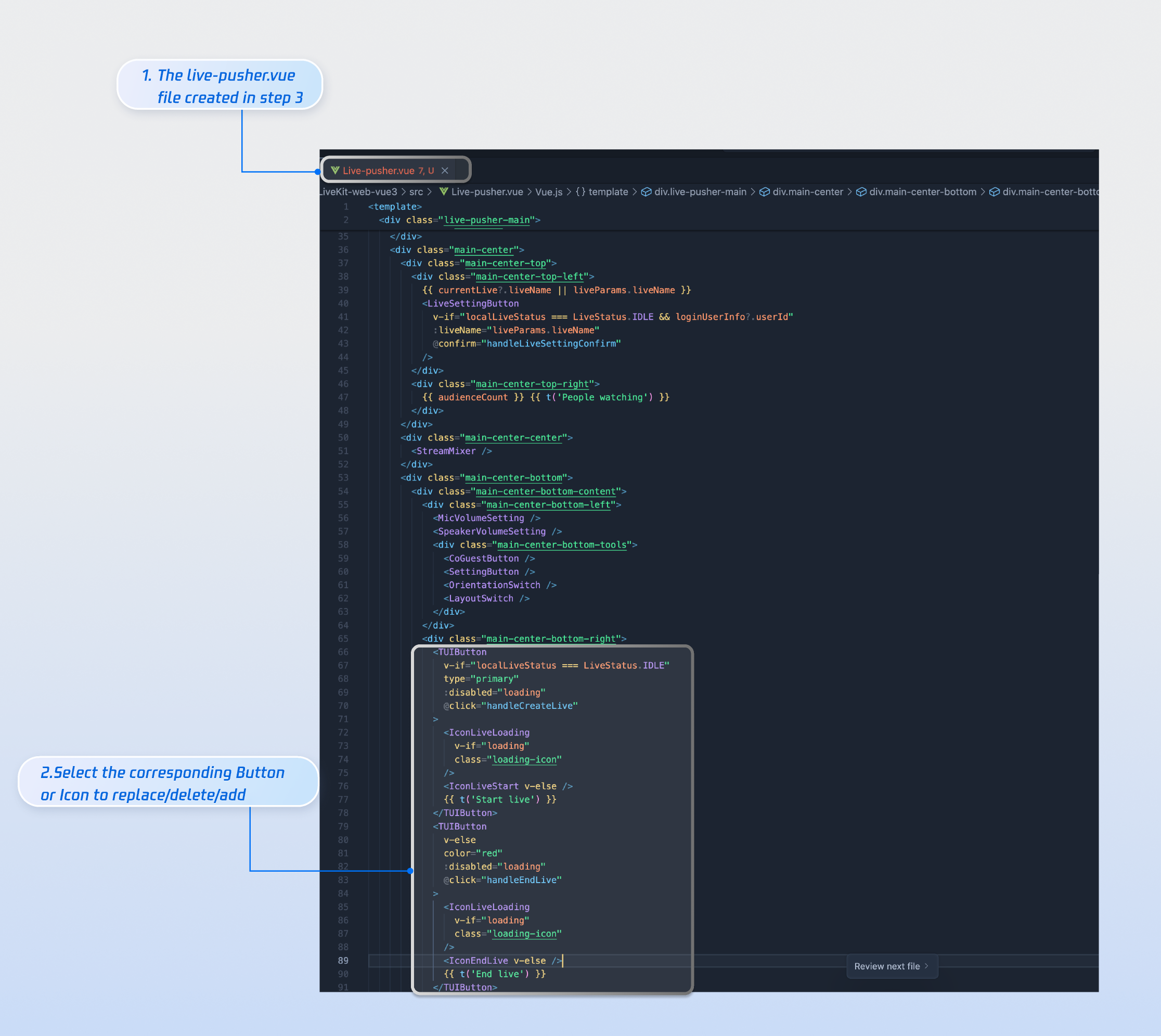
37
|
+
|
|
38
|
+
<td rowspan="1" colSpan="1" >Convenient viewer list and mute management</td>
|
|
39
|
+
</tr>
|
|
40
|
+
</table>
|
|
41
|
+
|
|
42
|
+
|
|
43
|
+
## Function Display
|
|
44
|
+
|
|
45
|
+
The anchor start page provides default behaviors and styles. However, if the default behaviors and styles don't fully meet your needs, you can customize the UI as described in the Customize section of this article. As shown in the figure below, the anchor start page features include asset management, live streaming tools, audio and video control, source output, asset editing tools, bullet chat, and viewer list.
|
|
46
|
+
<table>
|
|
47
|
+
<tr>
|
|
48
|
+
<td rowspan="1" colSpan="1" >**Start broadcasting in horizontal screen**</td>
|
|
49
|
+
</tr>
|
|
50
|
+
|
|
51
|
+
<tr>
|
|
52
|
+
<td rowspan="1" colSpan="1" ><br>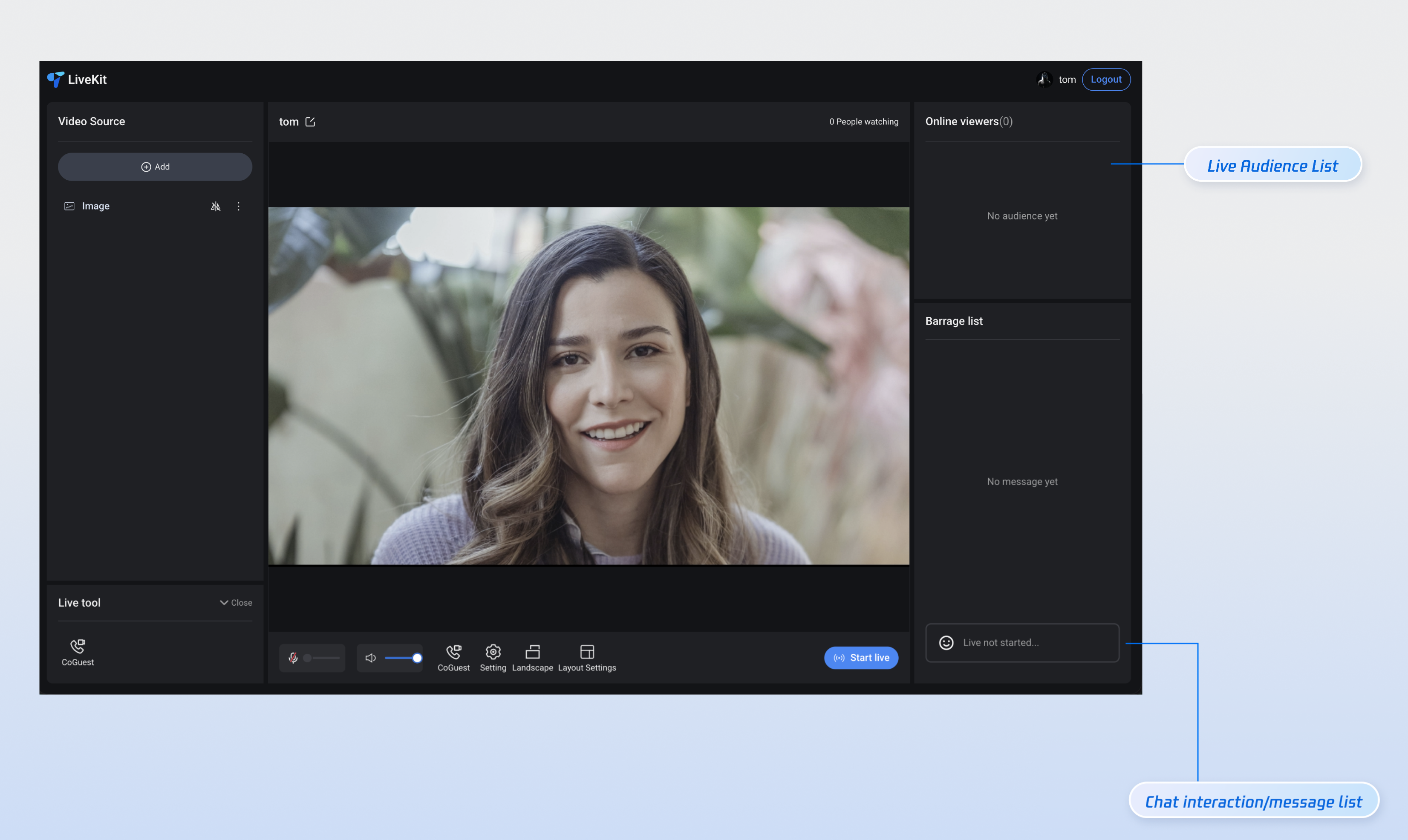</td>
|
|
53
|
+
</tr>
|
|
54
|
+
</table>
|
|
55
|
+
|
|
56
|
+
<table>
|
|
57
|
+
<tr>
|
|
58
|
+
<td rowspan="1" colSpan="1" >**Start broadcasting in vertical screen**</td>
|
|
59
|
+
</tr>
|
|
60
|
+
|
|
61
|
+
<tr>
|
|
62
|
+
<td rowspan="1" colSpan="1" ><br>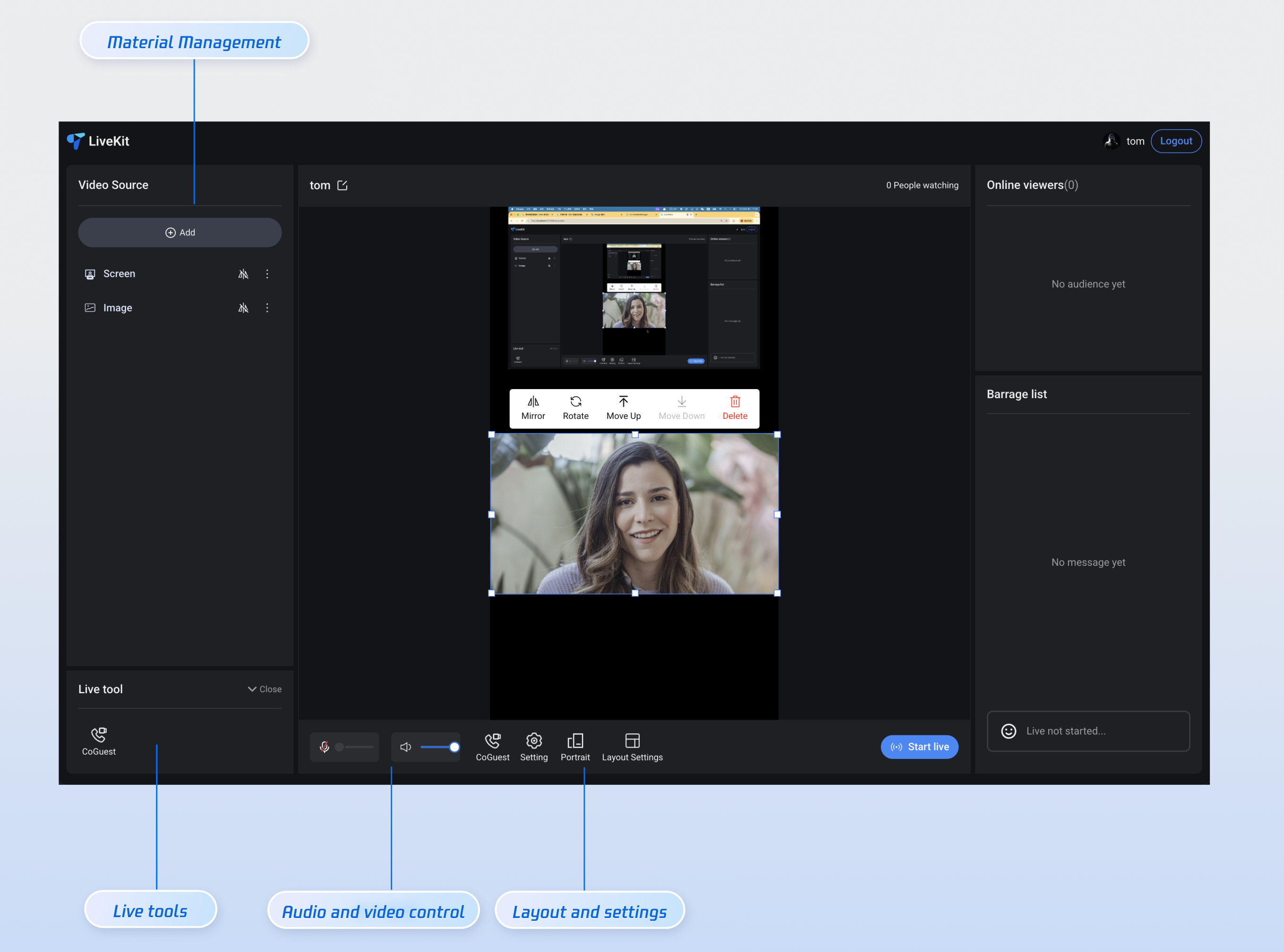</td>
|
|
63
|
+
</tr>
|
|
64
|
+
</table>
|
|
65
|
+
|
|
66
|
+
|
|
67
|
+
## Quick Access
|
|
68
|
+
|
|
69
|
+
### Step 1: Environment Configuration and Service Activation
|
|
70
|
+
|
|
71
|
+
Before using Quick Access, you need to refer to [Preparations](https://write.woa.com/document/189231573727113216) configuration requirements and activate the corresponding services.
|
|
72
|
+
|
|
73
|
+
### Step 2: Install dependencies
|
|
74
|
+
|
|
75
|
+
|
|
76
|
+
|
|
77
|
+
|
|
78
|
+
【npm】
|
|
79
|
+
``` bash
|
|
80
|
+
npm install tuikit-atomicx-vue3@latest @tencentcloud/uikit-base-component-vue3 --save
|
|
81
|
+
```
|
|
82
|
+
|
|
83
|
+
|
|
84
|
+
【pnpm】
|
|
85
|
+
``` bash
|
|
86
|
+
pnpm add tuikit-atomicx-vue3@latest @tencentcloud/livekit-web-vue3 @tencentcloud/uikit-base-component-vue3
|
|
87
|
+
```
|
|
88
|
+
|
|
89
|
+
|
|
90
|
+
【yarn】
|
|
91
|
+
``` bash
|
|
92
|
+
yarn add tuikit-atomicx-vue3@latest @tencentcloud/livekit-web-vue3 @tencentcloud/uikit-base-component-vue3
|
|
93
|
+
```
|
|
94
|
+
|
|
95
|
+
### Step 3: Access the anchor's live broadcast page
|
|
96
|
+
|
|
97
|
+
Create a `live-pusher.vue` file in your project and copy the following code into it to integrate the complete live-pusher start page.
|
|
98
|
+
``` typescript
|
|
99
|
+
<template>
|
|
100
|
+
<UIKitProvider language="zh-CN" theme="dark">
|
|
101
|
+
<div class="custom-live-pusher">
|
|
102
|
+
<!-- Top control bar -->
|
|
103
|
+
<div class="top-controls">
|
|
104
|
+
<div class="live-title">{{ liveName }}</div>
|
|
105
|
+
<div class="audience-count">{{ audienceCount }} people watching</div>
|
|
106
|
+
</div>
|
|
107
|
+
|
|
108
|
+
<!-- Main content area -->
|
|
109
|
+
<div class="main-content">
|
|
110
|
+
<!-- Left: Video source and tools -->
|
|
111
|
+
<div class="left-panel">
|
|
112
|
+
<LiveScenePanel />
|
|
113
|
+
<div class="tools-section">
|
|
114
|
+
<CoGuestButton />
|
|
115
|
+
</div>
|
|
116
|
+
</div>
|
|
117
|
+
|
|
118
|
+
<!-- Center: Live broadcast -->
|
|
119
|
+
<div class="center-panel">
|
|
120
|
+
<StreamMixer />
|
|
121
|
+
<div class="live-controls">
|
|
122
|
+
<button @click="handleStartLive">Start live streaming</button>
|
|
123
|
+
</div>
|
|
124
|
+
</div>
|
|
125
|
+
|
|
126
|
+
<!-- Right: Audience interaction -->
|
|
127
|
+
<div class="right-panel">
|
|
128
|
+
<LiveAudienceList />
|
|
129
|
+
<BarrageList />
|
|
130
|
+
<BarrageInput />
|
|
131
|
+
</div>
|
|
132
|
+
|
|
133
|
+
<!-- Bottom: Anchor operation -->
|
|
134
|
+
<div class="bottom-panel">
|
|
135
|
+
<!-- <MicVolumeSetting /> // For media setting capabilities, please refer to the Advanced Function Integration section of this article.
|
|
136
|
+
<SpeakerVolumeSetting />
|
|
137
|
+
<CoGuestButton /> // For more information on the ability to connect to the audience, please refer to the Advanced Function Integration section of this article.
|
|
138
|
+
<OrientationSwitch /> // For layout settings, please refer to the advanced function integration section of this article.
|
|
139
|
+
<LayoutSwitch /> --> // For the streaming capabilities of horizontal and vertical screens, please refer to the advanced function integration section of this article.
|
|
140
|
+
</div>
|
|
141
|
+
</div>
|
|
142
|
+
</div>
|
|
143
|
+
</UIKitProvider>
|
|
144
|
+
</template>
|
|
145
|
+
|
|
146
|
+
<script setup lang="ts">
|
|
147
|
+
import { onMounted } from 'vue';
|
|
148
|
+
import {
|
|
149
|
+
LiveScenePanel,
|
|
150
|
+
StreamMixer,
|
|
151
|
+
LiveAudienceList,
|
|
152
|
+
BarrageList,
|
|
153
|
+
BarrageInput,
|
|
154
|
+
useLiveState,
|
|
155
|
+
useLiveAudienceState,
|
|
156
|
+
useLoginState
|
|
157
|
+
} from 'tuikit-atomicx-vue3';
|
|
158
|
+
import { UIKitProvider } from '@tencentcloud/uikit-base-component-vue3';
|
|
159
|
+
|
|
160
|
+
const { login } = useLoginState();
|
|
161
|
+
const { createLive } = useLiveState();
|
|
162
|
+
const { audienceCount } = useLiveAudienceState();
|
|
163
|
+
const liveName = 'MyLiveRoom';
|
|
164
|
+
|
|
165
|
+
const handleStartLive = async () => {
|
|
166
|
+
await createLive({
|
|
167
|
+
liveId: 'my-live-room',
|
|
168
|
+
liveName: liveName,
|
|
169
|
+
});
|
|
170
|
+
};
|
|
171
|
+
|
|
172
|
+
async function initLogin() {
|
|
173
|
+
try {
|
|
174
|
+
await login({
|
|
175
|
+
sdkAppId: 0, // SDKAppId, refer to step 1 to obtain
|
|
176
|
+
userId: '', // UserID, refer to step 1 to obtain
|
|
177
|
+
userSig: '', // userSig, refer to step 1 to obtain
|
|
178
|
+
});
|
|
179
|
+
} catch (error) {
|
|
180
|
+
console.error('Login Failed:', error);
|
|
181
|
+
}
|
|
182
|
+
}
|
|
183
|
+
|
|
184
|
+
onMounted(async () => {
|
|
185
|
+
await initLogin();
|
|
186
|
+
});
|
|
187
|
+
|
|
188
|
+
</script>
|
|
189
|
+
|
|
190
|
+
<style scoped>:global(::before){box-sizing:border-box;margin:0;padding:0}:global(body){line-height:1.6;color:var(--text-color-primary);background:var(--bg-color-default)}.custom-live-pusher{display:flex;flex-direction:column;height:100vh;width:100vw;background:linear-gradient(135deg,var(--bg-color-default) 0,var(--bg-color-function) 100%);color:var(--text-color-primary);overflow:hidden}.top-controls{display:flex;justify-content:space-between;align-items:center;padding:12px 20px;background:var(--bg-color-operate);backdrop-filter:blur(10px);border-bottom:1px solid var(--stroke-color-primary);z-index:100;min-height:60px}.live-title{font-size:18px;font-weight:600;color:var(--text-color-primary);text-shadow:0 2px 4px var(--shadow-color)}.audience-count{font-size:14px;color:var(--text-color-error);background:var(--uikit-color-red-1);padding:6px 12px;border-radius:20px;border:1px solid var(--uikit-color-red-3)}.main-content{display:flex;flex:1;height:calc(100vh - 60px);gap:16px;padding:16px;overflow:hidden}.left-panel{display:flex;flex-direction:column;width:280px;gap:16px;flex-shrink:0}.tools-section{background:var(--bg-color-operate);border-radius:12px;padding:16px;border:1px solid var(--stroke-color-primary);backdrop-filter:blur(10px)}.center-panel{display:flex;flex-direction:column;flex:1;gap:16px;min-width:0}.live-controls{display:flex;justify-content:space-between;align-items:center;padding:16px;background:var(--bg-color-operate);border-radius:12px;border:1px solid var(--stroke-color-primary);backdrop-filter:blur(10px);gap:16px}.live-controls button{background:linear-gradient(135deg,var(--text-color-error) 0,var(--uikit-color-red-5) 100%);color:var(--text-color-button);border:none;padding:12px 32px;border-radius:25px;font-size:16px;font-weight:600;cursor:pointer;box-shadow:0 4px 15px var(--shadow-color)}.right-panel{display:flex;flex-direction:column;width:320px;gap:16px;flex-shrink:0}.center-panel>*,.left-panel>*,.right-panel>*{background:var(--bg-color-operate);border-radius:12px;border:1px solid var(--stroke-color-primary);backdrop-filter:blur(10px);overflow:hidden}.left-panel>*{padding:16px}.right-panel>*{padding:16px}.center-panel>:first-child{flex:1;min-height:300px;padding:0;background:var(--uikit-color-black-1);border:2px solid var(--stroke-color-secondary)}.bottom-panel{display:flex;align-items:center;gap:16px;flex:1}.device-setting{display:flex;align-items:center;gap:8px;padding:8px 12px;background:var(--bg-color-function);border-radius:8px;border:1px solid var(--stroke-color-secondary)}.device-icon{cursor:pointer;color:var(--text-color-primary);transition:color .2s ease}.device-icon:hover{color:var(--text-color-link)}.device-slider{width:80px}.custom-icon-container{display:flex;align-items:center;gap:6px;padding:8px 12px;background:var(--bg-color-function);border-radius:8px;border:1px solid var(--stroke-color-secondary);cursor:pointer;transition:all .2s ease;position:relative}.custom-icon-container:hover{background:var(--list-color-hover);border-color:var(--stroke-color-primary)}.custom-icon-container.disabled{opacity:.5;cursor:not-allowed}.custom-icon-container.disabled:hover{background:var(--bg-color-function);border-color:var(--stroke-color-secondary)}.custom-icon{width:16px;height:16px;display:inline-block;background-size:contain;background-repeat:no-repeat;background-position:center}.horizontal-icon{background-image:url("data:image/svg+xml,%3Csvg xmlns='http://www.w3.org/2000/svg' viewBox='0 0 24 24' fill='none' stroke='currentColor' stroke-width='2'%3E%3Crect x='3' y='6' width='18' height='12' rx='2'/%3E%3Cpath d='M7 10h10'/%3E%3C/svg%3E")}.portrait-icon{background-image:url("data:image/svg+xml,%3Csvg xmlns='http://www.w3.org/2000/svg' viewBox='0 0 24 24' fill='none' stroke='currentColor' stroke-width='2'%3E%3Crect x='6' y='3' width='12' height='18' rx='2'/%3E%3Cpath d='M10 7h4'/%3E%3C/svg%3E")}.layout-icon{background-image:url("data:image/svg+xml,%3Csvg xmlns='http://www.w3.org/2000/svg' viewBox='0 0 24 24' fill='none' stroke='currentColor' stroke-width='2'%3E%3Crect x='3' y='3' width='7' height='7'/%3E%3Crect x='14' y='3' width='7' height='7'/%3E%3Crect x='14' y='14' width='7' height='7'/%3E%3Crect x='3' y='14' width='7' height='7'/%3E%3C/svg%3E")}.co-guest-icon{background-image:url("data:image/svg+xml,%3Csvg xmlns='http://www.w3.org/2000/svg' viewBox='0 0 24 24' fill='none' stroke='currentColor' stroke-width='2'%3E%3Cpath d='M17 21v-2a4 4 0 0 0-4-4H5a4 4 0 0 0-4 4v2'/%3E%3Ccircle cx='9' cy='7' r='4'/%3E%3Cpath d='M23 21v-2a4 4 0 0 0-3-3.87'/%3E%3Cpath d='M16 3.13a4 4 0 0 1 0 7.75'/%3E%3C/svg%3E")}.custom-text{font-size:12px;color:var(--text-color-secondary);white-space:nowrap}.unread-count{position:absolute;top:-4px;right:-4px;background:var(--text-color-error);color:var(--text-color-button);border-radius:10px;padding:2px 6px;font-size:10px;font-weight:600;min-width:16px;text-align:center;line-height:1}.layout-dialog{max-width:600px}.layout-label{font-size:16px;font-weight:600;color:var(--text-color-primary);margin-bottom:16px}.template-options{margin-bottom:16px}.options-grid{display:grid;grid-template-columns:repeat(auto-fit,minmax(120px,1fr));gap:12px}.option-card{padding:16px;background:var(--bg-color-function);border:2px solid var(--stroke-color-secondary);border-radius:8px;cursor:pointer;transition:all .2s ease;text-align:center}.option-card:hover{border-color:var(--stroke-color-primary);background:var(--list-color-hover)}.option-card.active{border-color:var(--text-color-link);background:var(--bg-color-operate)}.option-info h4{margin:8px 0 0 0;font-size:12px;color:var(--text-color-primary)}.option-icon{width:32px;height:32px;margin:0 auto;color:var(--text-color-secondary)}.co-guest-dialog{max-width:500px}.co-guest-panel{min-height:300px}</style>
|
|
191
|
+
```
|
|
192
|
+
|
|
193
|
+
### Step 4: Start live streaming
|
|
194
|
+
|
|
195
|
+
Start your first live stream.
|
|
196
|
+
``` bash
|
|
197
|
+
npm run dev
|
|
198
|
+
```
|
|
199
|
+
|
|
200
|
+
### Advanced feature integration
|
|
201
|
+
|
|
202
|
+
#### Media setting capabilities
|
|
203
|
+
|
|
204
|
+
If you need to support media settings, including speaker and microphone volume settings, please refer to the following code example and copy it into the `live-pusher.vue `file.
|
|
205
|
+
``` typescript
|
|
206
|
+
<template>
|
|
207
|
+
<!-- MicVolumeSetting Microphone Settings -->
|
|
208
|
+
<div class="device-setting">
|
|
209
|
+
<IconAudio :size="16" :audioVolume="audioVolume" :isMuted="microphoneStatus === DeviceStatus.Off" @click="switchMicrophoneStatus" />
|
|
210
|
+
<TUISlider v-if="microphoneStatus !== DeviceStatus.Off" v-model="microphoneVolume" class="device-slider" :min="0" :max="100" @change="handleMicrophoneVolumeChange" />
|
|
211
|
+
<TUISlider v-else class="device-slider" :min="0" :max="100" disabled />
|
|
212
|
+
</div>
|
|
213
|
+
<!-- SpeakerVolumeSetting Speaker Settings -->
|
|
214
|
+
<div class="device-setting">
|
|
215
|
+
<TUIIcon class="device-icon" :icon="speakerIsOn ? IconSpeakerOn : IconSpeakerOff" @click="switchSpeaker(!speakerIsOn)" />
|
|
216
|
+
<TUISlider v-if="speakerIsOn" v-model="speakerVolume" class="device-slider" :min="0" :max="100" @change="handleSpeakerVolumeChange" />
|
|
217
|
+
</div>
|
|
218
|
+
</template>
|
|
219
|
+
|
|
220
|
+
<script lang="ts" setup>
|
|
221
|
+
import { ref, watch } from 'vue';
|
|
222
|
+
import { TUIIcon, TUISlider, IconSpeakerOn, IconSpeakerOff, IconAudio } from '@tencentcloud/uikit-base-component-vue3';
|
|
223
|
+
import { DeviceStatus, useDeviceState } from 'tuikit-atomicx-vue3';
|
|
224
|
+
|
|
225
|
+
const {
|
|
226
|
+
captureVolume,
|
|
227
|
+
setCaptureVolume,
|
|
228
|
+
microphoneStatus,
|
|
229
|
+
openLocalMicrophone,
|
|
230
|
+
closeLocalMicrophone,
|
|
231
|
+
audioVolume,
|
|
232
|
+
} = useDeviceState();
|
|
233
|
+
const { outputVolume, setOutputVolume } = useDeviceState();
|
|
234
|
+
|
|
235
|
+
const microphoneVolume = ref(captureVolume.value);
|
|
236
|
+
const speakerVolume = ref(outputVolume.value);
|
|
237
|
+
const speakerIsOn = ref(true);
|
|
238
|
+
const templateSpeakerVolume = ref(outputVolume.value);
|
|
239
|
+
|
|
240
|
+
const handleMicrophoneVolumeChange = (value: number) => {
|
|
241
|
+
if (value !== captureVolume.value) {
|
|
242
|
+
setCaptureVolume(value);
|
|
243
|
+
}
|
|
244
|
+
};
|
|
245
|
+
|
|
246
|
+
const switchMicrophoneStatus = () => {
|
|
247
|
+
if (microphoneStatus.value === DeviceStatus.On) {
|
|
248
|
+
closeLocalMicrophone();
|
|
249
|
+
} else {
|
|
250
|
+
openLocalMicrophone();
|
|
251
|
+
}
|
|
252
|
+
};
|
|
253
|
+
|
|
254
|
+
const switchSpeaker = (open: boolean) => {
|
|
255
|
+
speakerIsOn.value = open;
|
|
256
|
+
if (!open) {
|
|
257
|
+
templateSpeakerVolume.value = outputVolume.value;
|
|
258
|
+
setOutputVolume(0);
|
|
259
|
+
} else {
|
|
260
|
+
setOutputVolume(templateSpeakerVolume.value);
|
|
261
|
+
}
|
|
262
|
+
};
|
|
263
|
+
|
|
264
|
+
const handleSpeakerVolumeChange = (value: number) => {
|
|
265
|
+
if (value !== outputVolume.value) {
|
|
266
|
+
setOutputVolume(value);
|
|
267
|
+
}
|
|
268
|
+
};
|
|
269
|
+
|
|
270
|
+
watch(captureVolume, (newVal) => {
|
|
271
|
+
microphoneVolume.value = newVal;
|
|
272
|
+
});
|
|
273
|
+
|
|
274
|
+
watch(outputVolume, (newVal) => {
|
|
275
|
+
speakerVolume.value = newVal;
|
|
276
|
+
});
|
|
277
|
+
</script>
|
|
278
|
+
|
|
279
|
+
```
|
|
280
|
+
|
|
281
|
+
#### Horizontal and vertical screen streaming capabilities
|
|
282
|
+
|
|
283
|
+
If you need to support streaming in both horizontal and vertical modes, including switching between horizontal and vertical modes, please refer to the following code example and copy it into the `live-pusher.vue `file.
|
|
284
|
+
``` typescript
|
|
285
|
+
<template>
|
|
286
|
+
<!-- LayoutSwitch Horizontal and vertical screen streaming settings -->
|
|
287
|
+
<div class="custom-icon-container":class="{ 'disabled': localLiveStatus === LiveStatus.Live }" @click="handleOrientationSwitch">
|
|
288
|
+
<span v-if="currentOrientation === LiveOrientation.Landscape" class="custom-icon horizontal-icon" />
|
|
289
|
+
<span v-else class="custom-icon portrait-icon"/>
|
|
290
|
+
<span class="custom-text co-guest-text">{{ currentOrientation === LiveOrientation.Portrait ? t('Portrait') : t('Landscape')}}</span>
|
|
291
|
+
</div>
|
|
292
|
+
</template>
|
|
293
|
+
|
|
294
|
+
<script setup lang="ts">
|
|
295
|
+
import { ref, watch } from 'vue';
|
|
296
|
+
import { useUIKit, TUIToast, TOAST_TYPE } from '@tencentcloud/uikit-base-component-vue3';
|
|
297
|
+
import { useLiveState, LiveOrientation, LiveStatus } from 'tuikit-atomicx-vue3';
|
|
298
|
+
|
|
299
|
+
const { t } = useUIKit();
|
|
300
|
+
|
|
301
|
+
enum TUISeatLayoutTemplate {
|
|
302
|
+
LandscapeDynamic_1v3 = 200,
|
|
303
|
+
PortraitDynamic_Grid9 = 600,
|
|
304
|
+
PortraitDynamic_1v6 = 601,
|
|
305
|
+
PortraitFixed_Grid9 = 800,
|
|
306
|
+
PortraitFixed_1v6 = 801,
|
|
307
|
+
PortraitFixed_6v6 = 802,
|
|
308
|
+
}
|
|
309
|
+
|
|
310
|
+
const { currentLive, localLiveStatus, updateLiveInfo } = useLiveState();
|
|
311
|
+
const currentOrientation = ref(LiveOrientation.Portrait);
|
|
312
|
+
|
|
313
|
+
watch(
|
|
314
|
+
() => currentLive.value?.layoutTemplate,
|
|
315
|
+
(newVal) => {
|
|
316
|
+
if (newVal === TUISeatLayoutTemplate.LandscapeDynamic_1v3) {
|
|
317
|
+
currentOrientation.value = LiveOrientation.Landscape;
|
|
318
|
+
} else {
|
|
319
|
+
currentOrientation.value = LiveOrientation.Portrait;
|
|
320
|
+
}
|
|
321
|
+
},
|
|
322
|
+
{ immediate: true },
|
|
323
|
+
);
|
|
324
|
+
|
|
325
|
+
const handleOrientationSwitch = () => {
|
|
326
|
+
if (localLiveStatus.value === LiveStatus.Live) {
|
|
327
|
+
TUIToast({
|
|
328
|
+
message: t('Cannot switch orientation during live streaming'),
|
|
329
|
+
type: TOAST_TYPE.ERROR,
|
|
330
|
+
});
|
|
331
|
+
return;
|
|
332
|
+
}
|
|
333
|
+
if (currentOrientation.value === LiveOrientation.Portrait) {
|
|
334
|
+
updateLiveInfo({ layoutTemplate: TUISeatLayoutTemplate.LandscapeDynamic_1v3 });
|
|
335
|
+
} else {
|
|
336
|
+
updateLiveInfo({ layoutTemplate: TUISeatLayoutTemplate.PortraitDynamic_Grid9 });
|
|
337
|
+
}
|
|
338
|
+
};
|
|
339
|
+
</script>
|
|
340
|
+
|
|
341
|
+
|
|
342
|
+
```
|
|
343
|
+
|
|
344
|
+
#### Audience connection capabilities
|
|
345
|
+
|
|
346
|
+
If you need to support audience co-hosting, including setting up co-hosting applications and co-hosting management, please refer to the following code example and copy it into the `live-pusher.vue` file.
|
|
347
|
+
``` typescript
|
|
348
|
+
<template>
|
|
349
|
+
<!-- CoGuestSetting take seat settings -->
|
|
350
|
+
<div class="custom-icon-container" @click="handleCoGuest">
|
|
351
|
+
<span v-if="receivedCoGuestUserList.length > 0" class="unread-count">{{ receivedCoGuestUserList.length }}</span>
|
|
352
|
+
<span class="custom-icon co-guest-icon" />
|
|
353
|
+
<span class="custom-text co-guest-text">{{ t('CoGuest') }}</span>
|
|
354
|
+
</div>
|
|
355
|
+
<TUIDialog :title="t('CoGuest')" :visible="coGuestPanelVisible" :customClasses="['co-guest-dialog']" @close="coGuestPanelVisible = false" @confirm="coGuestPanelVisible = false" @cancel="coGuestPanelVisible = false">
|
|
356
|
+
<CoGuestPanel class="co-guest-panel" />
|
|
357
|
+
<template #footer>
|
|
358
|
+
<div />
|
|
359
|
+
</template>
|
|
360
|
+
</TUIDialog>
|
|
361
|
+
</template>
|
|
362
|
+
|
|
363
|
+
<script lang="ts" setup>
|
|
364
|
+
import { ref } from 'vue';
|
|
365
|
+
import { useUIKit, TUIDialog } from '@tencentcloud/uikit-base-component-vue3';
|
|
366
|
+
import { CoGuestPanel, useCoGuestState } from 'tuikit-atomicx-vue3';
|
|
367
|
+
|
|
368
|
+
const { t } = useUIKit();
|
|
369
|
+
const { receivedCoGuestUserList } = useCoGuestState();
|
|
370
|
+
|
|
371
|
+
const coGuestPanelVisible = ref(false);
|
|
372
|
+
|
|
373
|
+
const handleCoGuest = () => {
|
|
374
|
+
coGuestPanelVisible.value = true;
|
|
375
|
+
};
|
|
376
|
+
</script>
|
|
377
|
+
```
|
|
378
|
+
|
|
379
|
+
#### Layout setting capabilities
|
|
380
|
+
|
|
381
|
+
If you need to support video stream switching layout capabilities, including setting dynamic grid layout, static grid layout, static small window layout, floating small window layout, etc., please refer to the following code example and copy it into the `live-pusher.vue` file.
|
|
382
|
+
``` typescript
|
|
383
|
+
<template>
|
|
384
|
+
<!-- OrientationSwitch Layout Settings -->
|
|
385
|
+
<div class="custom-icon-container" @click="handleSwitchLayout">
|
|
386
|
+
<span class="custom-icon layout-icon" />
|
|
387
|
+
<span class="custom-text setting-text">{{ t('Layout Settings') }}</span>
|
|
388
|
+
</div>
|
|
389
|
+
<TUIDialog :customClasses="['layout-dialog']":title="t('Layout Settings')" :visible="layoutSwitchVisible" @close="handleCancel" @confirm="handleConfirm" @cancel="handleCancel">
|
|
390
|
+
<div class="layout-label"> {{ t('Audience Layout') }}</div>
|
|
391
|
+
<div class="template-options">
|
|
392
|
+
<div class="options-grid">
|
|
393
|
+
<template v-for="template in layoutOptions" :key="template.id">
|
|
394
|
+
<div class="option-card" :class="{ active: selectedTemplate === template.templateId }" @click="selectTemplate(template.templateId)">
|
|
395
|
+
<div class="option-info">
|
|
396
|
+
<component :is="template.icon" v-if="template.icon" class="option-icon"/>
|
|
397
|
+
<h4>{{ template.label }}</h4>
|
|
398
|
+
</div>
|
|
399
|
+
</div>
|
|
400
|
+
</template>
|
|
401
|
+
</div>
|
|
402
|
+
</div>
|
|
403
|
+
</TUIDialog>
|
|
404
|
+
</template>
|
|
405
|
+
|
|
406
|
+
<script lang="ts" setup>
|
|
407
|
+
import { ref, computed, watch } from 'vue';
|
|
408
|
+
import { TUIErrorCode, } from '@tencentcloud/tuiroom-engine-js';
|
|
409
|
+
import { useUIKit, TUIDialog, TUIToast, TOAST_TYPE } from '@tencentcloud/uikit-base-component-vue3';
|
|
410
|
+
import { LiveStatus, useLiveState } from 'tuikit-atomicx-vue3';
|
|
411
|
+
import { TUISeatLayoutTemplate } from '../types/LivePusher';
|
|
412
|
+
|
|
413
|
+
const { t } = useUIKit();
|
|
414
|
+
const { localLiveStatus, currentLive, updateLiveInfo } = useLiveState();
|
|
415
|
+
|
|
416
|
+
watch(
|
|
417
|
+
localLiveStatus,
|
|
418
|
+
() => {
|
|
419
|
+
if (localLiveStatus.value === LiveStatus.IDLE) {
|
|
420
|
+
updateLiveInfo({ layoutTemplate: TUISeatLayoutTemplate.PortraitDynamic_Grid9 });
|
|
421
|
+
}
|
|
422
|
+
},
|
|
423
|
+
{ immediate: true },
|
|
424
|
+
);
|
|
425
|
+
|
|
426
|
+
const layoutSwitchVisible = ref(false);
|
|
427
|
+
|
|
428
|
+
const handleSwitchLayout = () => {
|
|
429
|
+
layoutSwitchVisible.value = true;
|
|
430
|
+
};
|
|
431
|
+
|
|
432
|
+
const portraitLayoutOptions = computed(() => [
|
|
433
|
+
{
|
|
434
|
+
id: 'PortraitDynamic_Grid9',
|
|
435
|
+
templateId: TUISeatLayoutTemplate.PortraitDynamic_Grid9,
|
|
436
|
+
label: t('Dynamic Grid9 Layout'),
|
|
437
|
+
},
|
|
438
|
+
{
|
|
439
|
+
id: 'PortraitFixed_1v6',
|
|
440
|
+
templateId: TUISeatLayoutTemplate.PortraitFixed_1v6,
|
|
441
|
+
label: t('Fixed 1v6 Layout'),
|
|
442
|
+
},
|
|
443
|
+
{
|
|
444
|
+
id: 'PortraitFixed_Grid9',
|
|
445
|
+
templateId: TUISeatLayoutTemplate.PortraitFixed_Grid9,
|
|
446
|
+
label: t('Fixed Grid9 Layout'),
|
|
447
|
+
},
|
|
448
|
+
{
|
|
449
|
+
id: 'PortraitDynamic_1v6',
|
|
450
|
+
templateId: TUISeatLayoutTemplate.PortraitDynamic_1v6,
|
|
451
|
+
label: t('Dynamic 1v6 Layout'),
|
|
452
|
+
},
|
|
453
|
+
]);
|
|
454
|
+
|
|
455
|
+
const horizontalLayoutOptions = computed(() => [
|
|
456
|
+
{
|
|
457
|
+
id: 'LandscapeDynamic_1v3',
|
|
458
|
+
templateId: TUISeatLayoutTemplate.LandscapeDynamic_1v3,
|
|
459
|
+
label: t('Landscape Template'),
|
|
460
|
+
},
|
|
461
|
+
]);
|
|
462
|
+
|
|
463
|
+
const layoutOptions = computed(() => {
|
|
464
|
+
if (currentLive.value && currentLive.value?.layoutTemplate >= 200 && currentLive.value?.layoutTemplate <= 599) {
|
|
465
|
+
return horizontalLayoutOptions.value;
|
|
466
|
+
}
|
|
467
|
+
return portraitLayoutOptions.value;
|
|
468
|
+
});
|
|
469
|
+
|
|
470
|
+
const selectedTemplate = ref<TUISeatLayoutTemplate | null>(currentLive.value?.layoutTemplate ?? null);
|
|
471
|
+
|
|
472
|
+
function selectTemplate(template: TUISeatLayoutTemplate) {
|
|
473
|
+
selectedTemplate.value = template;
|
|
474
|
+
}
|
|
475
|
+
|
|
476
|
+
watch(() => currentLive.value?.layoutTemplate, (newVal) => {
|
|
477
|
+
if (newVal) {
|
|
478
|
+
selectedTemplate.value = newVal;
|
|
479
|
+
}
|
|
480
|
+
});
|
|
481
|
+
|
|
482
|
+
async function handleConfirm() {
|
|
483
|
+
if (selectedTemplate.value) {
|
|
484
|
+
try {
|
|
485
|
+
await updateLiveInfo({ layoutTemplate: selectedTemplate.value });
|
|
486
|
+
layoutSwitchVisible.value = false;
|
|
487
|
+
} catch (error: any) {
|
|
488
|
+
let errorMessage = t('Layout switch failed');
|
|
489
|
+
if (error.code === TUIErrorCode.ERR_FREQ_LIMIT) {
|
|
490
|
+
errorMessage = t('Operation too frequent, please try again later');
|
|
491
|
+
}
|
|
492
|
+
TUIToast({ type: TOAST_TYPE.ERROR, message: errorMessage });
|
|
493
|
+
}
|
|
494
|
+
} else {
|
|
495
|
+
layoutSwitchVisible.value = false;
|
|
496
|
+
}
|
|
497
|
+
}
|
|
498
|
+
|
|
499
|
+
function handleCancel() {
|
|
500
|
+
selectedTemplate.value = currentLive.value?.layoutTemplate ?? null;
|
|
501
|
+
layoutSwitchVisible.value = false;
|
|
502
|
+
}
|
|
503
|
+
</script>
|
|
504
|
+
```
|
|
505
|
+
|
|
506
|
+
## Free customization
|
|
507
|
+
|
|
508
|
+
As shown in the functional diagram above, we also support the ability to customize the UI of the anchor start page according to your project needs. In addition to adjusting the page UI layout, we also support adding, deleting, and modifying color themes, fonts, rounded corners, buttons, icons, input boxes, pop-up boxes, and other content to meet your UI customization needs.
|
|
509
|
+
<table>
|
|
510
|
+
<tr>
|
|
511
|
+
<td rowspan="1" colSpan="1" >**Category**</td>
|
|
512
|
+
|
|
513
|
+
<td rowspan="1" colSpan="1" >**Function**</td>
|
|
514
|
+
|
|
515
|
+
<td rowspan="1" colSpan="1" >**Description**</td>
|
|
516
|
+
</tr>
|
|
517
|
+
|
|
518
|
+
<tr>
|
|
519
|
+
<td rowspan="1" colSpan="1" >**Asset Management**</td>
|
|
520
|
+
|
|
521
|
+
<td rowspan="1" colSpan="1" >**Customize the asset management area display**</td>
|
|
522
|
+
|
|
523
|
+
<td rowspan="1" colSpan="1" >Supports:<br>Adjust the size, color, or replace the display icon</td>
|
|
524
|
+
</tr>
|
|
525
|
+
|
|
526
|
+
<tr>
|
|
527
|
+
<td rowspan="1" colSpan="1" >**Live Streaming Tools**</td>
|
|
528
|
+
|
|
529
|
+
<td rowspan="1" colSpan="1" >**Customize the live streaming tool information display**</td>
|
|
530
|
+
|
|
531
|
+
<td rowspan="1" colSpan="1" >Supports:<br>Adjust the size, color, or replace the display icon</td>
|
|
532
|
+
</tr>
|
|
533
|
+
|
|
534
|
+
<tr>
|
|
535
|
+
<td rowspan="1" colSpan="1" >**Online Viewers**</td>
|
|
536
|
+
|
|
537
|
+
<td rowspan="1" colSpan="1" >**Customize viewer information display**</td>
|
|
538
|
+
|
|
539
|
+
<td rowspan="1" colSpan="1" >Supports:<br>Show/hide viewer level<br>Customize viewer information font and color UI settings<br>Replace the icon with your desired style</td>
|
|
540
|
+
</tr>
|
|
541
|
+
|
|
542
|
+
<tr>
|
|
543
|
+
<td rowspan="1" colSpan="1" >**Message List**</td>
|
|
544
|
+
|
|
545
|
+
<td rowspan="1" colSpan="1" >**Custom message barrage area display**</td>
|
|
546
|
+
|
|
547
|
+
<td rowspan="1" colSpan="1" >Supports:<br>Show/hide chat input area<br>Supports UI customization for chat bubble style, audience level, etc.</td>
|
|
548
|
+
</tr>
|
|
549
|
+
</table>
|
|
550
|
+
|
|
551
|
+
|
|
552
|
+
### Color Theme
|
|
553
|
+
|
|
554
|
+
See the code example in Step 3. You can manipulate the value of theme to switch color themes.
|
|
555
|
+
``` java
|
|
556
|
+
<UIKitProvider theme="dark"> // When theme is passed to dark, the overall color theme of the interface is black
|
|
557
|
+
xxx // When theme is set to light, the overall color of the interface is white.
|
|
558
|
+
</UIKitProvider>
|
|
559
|
+
```
|
|
560
|
+
|
|
561
|
+
### Buttons / Icons
|
|
562
|
+
|
|
563
|
+
If you need to customize the UI by adding or replacing buttons or icons, you can do so using the following methods. Using the buttons and icons in the `live-pusher.vue`file as an example, refer to the image below to find the source code for the corresponding button or icon. You can then add, delete, or replace these controls.
|
|
564
|
+
|
|
565
|
+
|
|
566
|
+
|
|
567
|
+
|
|
568
|
+
### Next Steps
|
|
569
|
+
|
|
570
|
+
Congratulations! You've successfully integrated the Live Stream Start Page. Next, you can implement content such as the viewer page and live stream list page. Please refer to the table below:
|
|
571
|
+
<table>
|
|
572
|
+
<tr>
|
|
573
|
+
<td rowspan="1" colSpan="1" >**Function**</td>
|
|
574
|
+
|
|
575
|
+
<td rowspan="1" colSpan="1" >**Description**</td>
|
|
576
|
+
|
|
577
|
+
<td rowspan="1" colSpan="1" >**Integration Guide**</td>
|
|
578
|
+
</tr>
|
|
579
|
+
|
|
580
|
+
<tr>
|
|
581
|
+
<td rowspan="1" colSpan="1" >**Audience Viewing**</td>
|
|
582
|
+
|
|
583
|
+
<td rowspan="1" colSpan="1" >Enable everyone to enter the anchor's live broadcast room to watch the live broadcast, and realize functions such as audience connection, live broadcast room information, online audience, and barrage display</td>
|
|
584
|
+
|
|
585
|
+
<td rowspan="1" colSpan="1" >[Audience Viewing](https://write.woa.com/document/189571398058663936)</td>
|
|
586
|
+
</tr>
|
|
587
|
+
|
|
588
|
+
<tr>
|
|
589
|
+
<td rowspan="1" colSpan="1" >**Live Stream List**</td>
|
|
590
|
+
|
|
591
|
+
<td rowspan="1" colSpan="1" >Display the live broadcast list interface and functions, including live broadcast list and room information display function</td>
|
|
592
|
+
|
|
593
|
+
<td rowspan="1" colSpan="1" >[Live Stream List](https://write.woa.com/document/189592401543360512)</td>
|
|
594
|
+
</tr>
|
|
595
|
+
</table>
|