@rsdoctor/docs 0.0.1
This diff represents the content of publicly available package versions that have been released to one of the supported registries. The information contained in this diff is provided for informational purposes only and reflects changes between package versions as they appear in their respective public registries.
- package/docs/en/_meta.json +17 -0
- package/docs/en/blog/_meta.json +12 -0
- package/docs/en/blog/release/_meta.json +1 -0
- package/docs/en/blog/release/release-note-1.mdx +129 -0
- package/docs/en/blog/topic/_meta.json +1 -0
- package/docs/en/blog/topic/duplicate-pkg-problem.mdx +141 -0
- package/docs/en/blog/topic/loader-optimization.mdx +80 -0
- package/docs/en/config/_meta.json +7 -0
- package/docs/en/config/options/_meta.json +1 -0
- package/docs/en/config/options/options.mdx +135 -0
- package/docs/en/config/options/term.mdx +10 -0
- package/docs/en/guide/_meta.json +17 -0
- package/docs/en/guide/more/_meta.json +1 -0
- package/docs/en/guide/more/faq.mdx +104 -0
- package/docs/en/guide/more/rules.mdx +5 -0
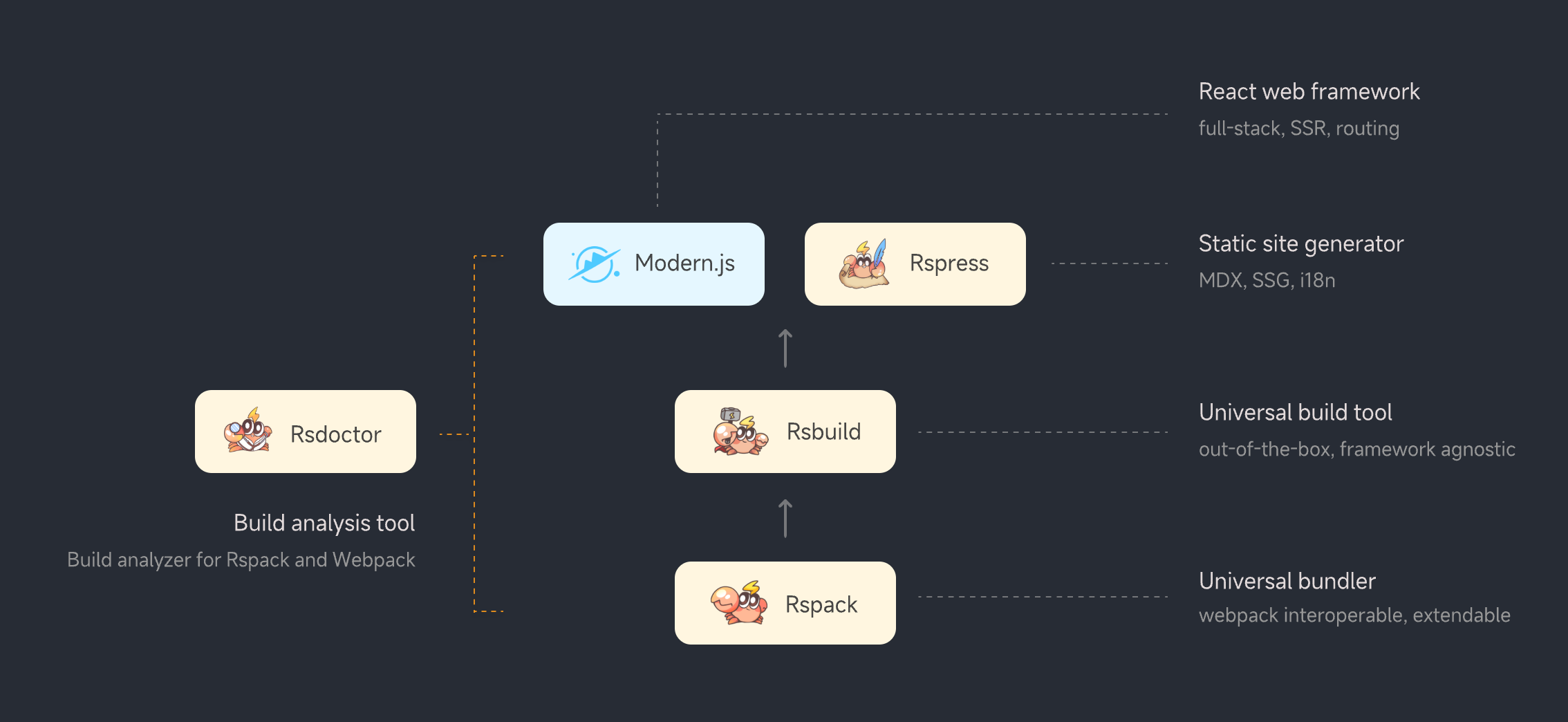
- package/docs/en/guide/start/_meta.json +1 -0
- package/docs/en/guide/start/cli.mdx +94 -0
- package/docs/en/guide/start/features.mdx +36 -0
- package/docs/en/guide/start/intro.mdx +115 -0
- package/docs/en/guide/start/quick-start.mdx +210 -0
- package/docs/en/guide/usage/_meta.json +13 -0
- package/docs/en/guide/usage/bundle-alerts.mdx +47 -0
- package/docs/en/guide/usage/bundle-overall.mdx +55 -0
- package/docs/en/guide/usage/bundle-size.mdx +122 -0
- package/docs/en/guide/usage/compile-alerts.mdx +18 -0
- package/docs/en/guide/usage/compile-overall.mdx +115 -0
- package/docs/en/guide/usage/loaders-analysis.mdx +72 -0
- package/docs/en/guide/usage/loaders-timeline.mdx +68 -0
- package/docs/en/guide/usage/module-analysis.mdx +58 -0
- package/docs/en/guide/usage/plugins-analysis.mdx +43 -0
- package/docs/en/guide/usage/project-overall.mdx +51 -0
- package/docs/en/guide/usage/resolver.mdx +29 -0
- package/docs/en/index.md +38 -0
- package/docs/zh/_meta.json +17 -0
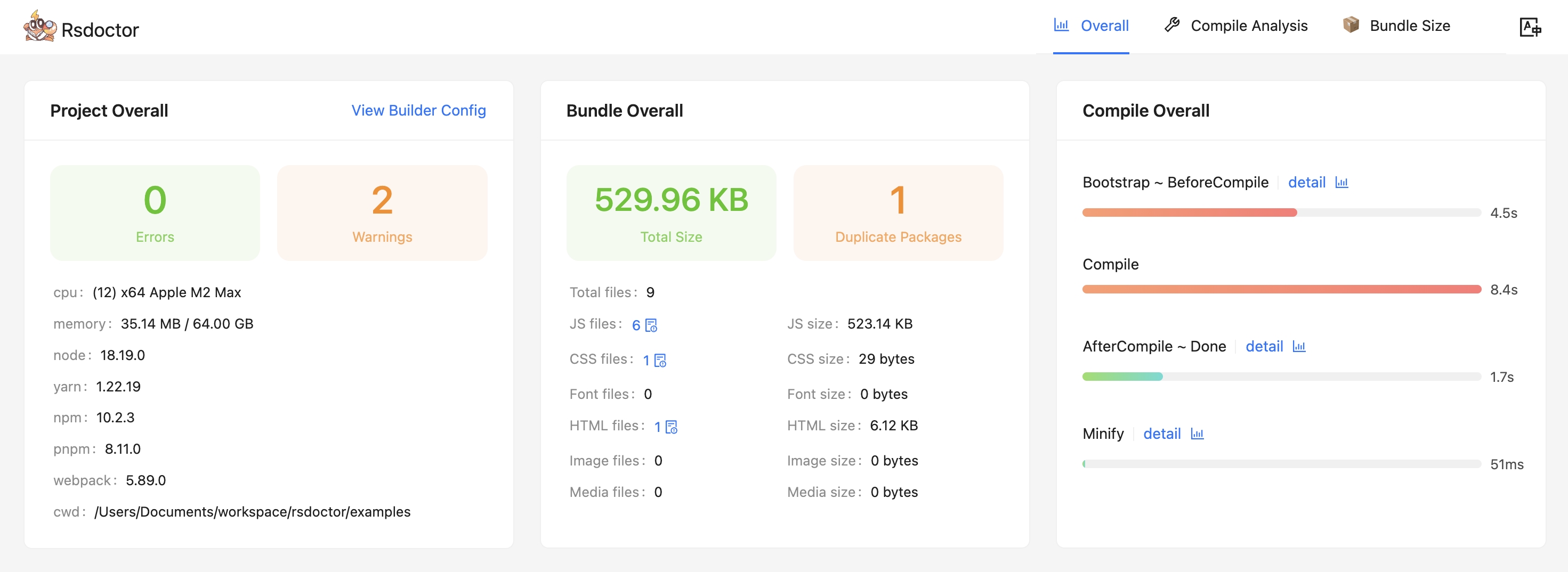
- package/docs/zh/blog/_meta.json +12 -0
- package/docs/zh/blog/release/_meta.json +1 -0
- package/docs/zh/blog/release/release-note-1.mdx +128 -0
- package/docs/zh/blog/topic/_meta.json +1 -0
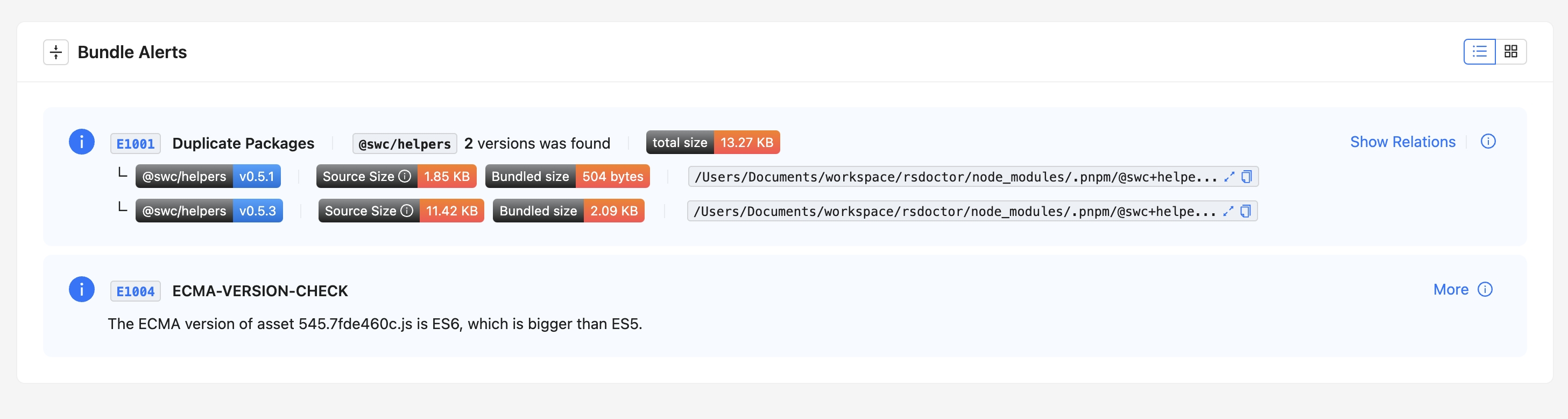
- package/docs/zh/blog/topic/duplicate-pkg-problem.mdx +138 -0
- package/docs/zh/blog/topic/loader-optimization.mdx +80 -0
- package/docs/zh/config/_meta.json +7 -0
- package/docs/zh/config/options/_meta.json +1 -0
- package/docs/zh/config/options/options.mdx +138 -0
- package/docs/zh/config/options/term.mdx +10 -0
- package/docs/zh/guide/_meta.json +17 -0
- package/docs/zh/guide/more/_meta.json +1 -0
- package/docs/zh/guide/more/faq.mdx +102 -0
- package/docs/zh/guide/more/rules.mdx +5 -0
- package/docs/zh/guide/start/_meta.json +1 -0
- package/docs/zh/guide/start/cli.mdx +94 -0
- package/docs/zh/guide/start/features.mdx +36 -0
- package/docs/zh/guide/start/intro.mdx +116 -0
- package/docs/zh/guide/start/quick-start.mdx +209 -0
- package/docs/zh/guide/usage/_meta.json +13 -0
- package/docs/zh/guide/usage/bundle-alerts.mdx +49 -0
- package/docs/zh/guide/usage/bundle-overall.mdx +57 -0
- package/docs/zh/guide/usage/bundle-size.mdx +122 -0
- package/docs/zh/guide/usage/compile-alerts.mdx +18 -0
- package/docs/zh/guide/usage/compile-overall.mdx +115 -0
- package/docs/zh/guide/usage/loaders-analysis.mdx +73 -0
- package/docs/zh/guide/usage/loaders-timeline.mdx +68 -0
- package/docs/zh/guide/usage/module-analysis.mdx +59 -0
- package/docs/zh/guide/usage/plugins-analysis.mdx +43 -0
- package/docs/zh/guide/usage/project-overall.mdx +51 -0
- package/docs/zh/guide/usage/resolver.mdx +29 -0
- package/docs/zh/index.md +38 -0
- package/docs/zh/shared/features-rspack.md +24 -0
- package/docs/zh/shared/features.md +29 -0
- package/package.json +44 -0
- package/src/components/NextSteps.module.scss +6 -0
- package/src/components/NextSteps.tsx +7 -0
- package/src/components/Overview.module.scss +61 -0
- package/src/components/Overview.tsx +40 -0
- package/src/components/RuleIndex.module.scss +57 -0
- package/src/components/RuleIndex.tsx +75 -0
- package/src/components/Step.module.scss +32 -0
- package/src/components/Step.tsx +13 -0
- package/src/global.d.ts +4 -0
- package/src/utils.ts +9 -0
|
@@ -0,0 +1,29 @@
|
|
|
1
|
+
# Resolver Analysis
|
|
2
|
+
|
|
3
|
+
:::tip
|
|
4
|
+
|
|
5
|
+
- Resolve analysis capability is not currently supported in Rspack projects.
|
|
6
|
+
|
|
7
|
+
- The Resolver analysis capability is disabled by default. To enable it, you can add `resolver` to the `features` array as shown in the example below. [features configuration](../../config/options/options).
|
|
8
|
+
|
|
9
|
+
```js
|
|
10
|
+
new rsdoctorWebpackPlugin({
|
|
11
|
+
features: ["xxx", "xxx", "resolver"]
|
|
12
|
+
}),
|
|
13
|
+
```
|
|
14
|
+
|
|
15
|
+
:::
|
|
16
|
+
|
|
17
|
+
In the **Rsdoctor** `Module Resolve` section, we can see all the source files in the current Webpack project. By **clicking on a file**, we can view information such as the **module paths** imported in that file, the **before and after resolution path comparison**, and the **resolution time**, as shown in the following image:
|
|
18
|
+
|
|
19
|
+
<img src="https://lf3-static.bytednsdoc.com/obj/eden-cn/lognuvj/rsdoctor/docs/usage/compile/resolver.png" />
|
|
20
|
+
|
|
21
|
+
## Glossary
|
|
22
|
+
|
|
23
|
+
The fields in the data statistics table on the page are defined as follows:
|
|
24
|
+
|
|
25
|
+
| Term | Description |
|
|
26
|
+
| ---------------------------- | --------------------------------------------------------------- |
|
|
27
|
+
| <b><i>Source Code</i></b> | Represents the **source code** of the import statement |
|
|
28
|
+
| <b><i>Duration</i></b> | Represents the **time taken** for resolution |
|
|
29
|
+
| <b><i>Resolve Result</i></b> | Represents the **final path** after resolving the `Source Code` |
|
package/docs/en/index.md
ADDED
|
@@ -0,0 +1,38 @@
|
|
|
1
|
+
---
|
|
2
|
+
pageType: home
|
|
3
|
+
|
|
4
|
+
hero:
|
|
5
|
+
name: Rsdoctor
|
|
6
|
+
text: Analyzer for Rspack & Webpack
|
|
7
|
+
tagline: Visualize the building process
|
|
8
|
+
actions:
|
|
9
|
+
- theme: brand
|
|
10
|
+
text: Introduction
|
|
11
|
+
link: /guide/start/intro
|
|
12
|
+
- theme: alt
|
|
13
|
+
text: Quick Start
|
|
14
|
+
link: /guide/start/quick-start
|
|
15
|
+
image:
|
|
16
|
+
src: https://lf3-static.bytednsdoc.com/obj/eden-cn/lognuvj/rsdoctor/logo/rsdoctor.png
|
|
17
|
+
alt: Rsdoctor Logo
|
|
18
|
+
|
|
19
|
+
features:
|
|
20
|
+
- title: Unlimited Framework
|
|
21
|
+
details: Rsdoctor support all projects built on Webpack or Rspack.
|
|
22
|
+
icon: 🛠️
|
|
23
|
+
- title: Compile’s Time
|
|
24
|
+
details: To display the compile execution time and process in the form of a timing diagram.
|
|
25
|
+
icon: 🚀
|
|
26
|
+
- title: Compile’s Actions
|
|
27
|
+
details: Visually view the compilation changes of each file in each loader.
|
|
28
|
+
icon: 🦄
|
|
29
|
+
- title: Bundle Analysis
|
|
30
|
+
details: Visually view the bundles & modules relationship, module reference relationship and repeated packages in detail.
|
|
31
|
+
icon: 🎯
|
|
32
|
+
- title: Bundle Diff
|
|
33
|
+
details: Through comparison, the deterioration and change of the product are found.
|
|
34
|
+
icon: 🎨
|
|
35
|
+
- title: Build Scan
|
|
36
|
+
details: Built-in build rule scanning, and also supports custom rules.
|
|
37
|
+
icon: 🔍
|
|
38
|
+
---
|
|
@@ -0,0 +1,17 @@
|
|
|
1
|
+
[
|
|
2
|
+
{
|
|
3
|
+
"text": "指南",
|
|
4
|
+
"link": "/guide/start/intro",
|
|
5
|
+
"activeMatch": "/guide/"
|
|
6
|
+
},
|
|
7
|
+
{
|
|
8
|
+
"text": "配置",
|
|
9
|
+
"link": "/config/options/options",
|
|
10
|
+
"activeMatch": "/config/"
|
|
11
|
+
},
|
|
12
|
+
{
|
|
13
|
+
"text": "博客",
|
|
14
|
+
"link": "/blog/release/release-note-1",
|
|
15
|
+
"activeMatch": "/blog/"
|
|
16
|
+
}
|
|
17
|
+
]
|
|
@@ -0,0 +1 @@
|
|
|
1
|
+
["release-note-1"]
|
|
@@ -0,0 +1,128 @@
|
|
|
1
|
+
# Rsdoctor v0.1 发布公告
|
|
2
|
+
|
|
3
|
+
<picture>
|
|
4
|
+
<img
|
|
5
|
+
alt="Rsdoctor Banner"
|
|
6
|
+
src="https://github.com/web-infra-dev/rsdoctor/assets/7237365/0f9d2e86-d919-451a-befa-fa84603a87cf"
|
|
7
|
+
style={{ margin: 'auto' }}
|
|
8
|
+
/>
|
|
9
|
+
</picture>
|
|
10
|
+
|
|
11
|
+
我们很高兴地宣布 [Rsdoctor](https://rsdoctor.dev/) v0.1 发布了!
|
|
12
|
+
|
|
13
|
+
Rsdoctor 是一个针对 Rspack 和 Webpack 的一站式构建分析工具,可以对构建时和构建产物进行详细分析,让构建过程变得可视化和透明。
|
|
14
|
+
|
|
15
|
+
## 📌 定位
|
|
16
|
+
|
|
17
|
+
**Rsdoctor** 是一个构建分析工具,用于分析基于 [Rspack](https://www.rspack.dev/) 和 [Webpack](https://webpack.js.org/) 构建的项目。它支持分析的项目包括:[Rsbuild](https://rsbuild.dev/zh/index)、[Create React App](https://create-react-app.dev/)、[Modern.js](https://modernjs.dev/) 等。
|
|
18
|
+
|
|
19
|
+
|
|
20
|
+
|
|
21
|
+
## 🔥 特性
|
|
22
|
+
|
|
23
|
+
- **编译可视化**:Rsdoctor 将编译行为及耗时进行可视化展示,方便开发同学查看构建问题。
|
|
24
|
+
- **多种分析能力**:支持构建产物、构建时分析能力:
|
|
25
|
+
- 构建产物支持资源列表及模块依赖等。
|
|
26
|
+
- 构建时分析支持 Loader、Plugin、Resolver 构建过程分析。
|
|
27
|
+
- 支持 Rspack 的 builtin:swc-loader 分析。
|
|
28
|
+
- 构建规则支持重复包检测及 ES Version Check 检查等。
|
|
29
|
+
- **支持自定义规则**:除了内置构建扫描规则外,还支持用户根据 Rsdoctor 的构建数据添加自定义构建扫描规则。
|
|
30
|
+
- **框架无关**:支持所有基于 Webpack 或 Rspack 构建的项目。
|
|
31
|
+
|
|
32
|
+
## 🛠️ 功能介绍
|
|
33
|
+
|
|
34
|
+
### ⭐️ 概览
|
|
35
|
+
|
|
36
|
+
- 概览页能够知道**项目配置、诊断信息、编译信息、产物情况**。
|
|
37
|
+
|
|
38
|
+
|
|
39
|
+
|
|
40
|
+
- 除了项目概览之外,我们还提供了诊断模块,分别用于编译诊断、重复包诊断等。如果你的编译、产物命中了我们定义的诊断规则,就会在工具首页出现对应的警示模块, **其中重复包可以查看到详细的引用路径**。
|
|
41
|
+
|
|
42
|
+
|
|
43
|
+
|
|
44
|
+
### ⭐️ 编译分析
|
|
45
|
+
|
|
46
|
+
面向 **Loaders、Plugins、Module Resolver** 提供了对应的数据与分析功能,来帮助你分析编译过程中的问题。
|
|
47
|
+
|
|
48
|
+
#### Loader 分析
|
|
49
|
+
|
|
50
|
+
- 该模块主要提供了 **Rspack** 或 **Webpack Loaders** 内的输入输出、预估耗时、参数等数据分析的功能。
|
|
51
|
+
|
|
52
|
+
<div style={{ display: 'flex' }}>
|
|
53
|
+
<img
|
|
54
|
+
src="https://lf3-static.bytednsdoc.com/obj/eden-cn/lognuvj/rsdoctor/docs/usage/compile/loader-timeline-overall.png"
|
|
55
|
+
width="55%"
|
|
56
|
+
style={{ margin: 'auto' }}
|
|
57
|
+
/>
|
|
58
|
+
<img
|
|
59
|
+
src="https://lf3-static.bytednsdoc.com/obj/eden-cn/lognuvj/rsdoctor/docs/usage/compile/loader-anlaysis-all.png"
|
|
60
|
+
width="45%"
|
|
61
|
+
style={{ margin: 'auto' }}
|
|
62
|
+
/>
|
|
63
|
+
</div>
|
|
64
|
+
|
|
65
|
+
#### Plugin 分析
|
|
66
|
+
|
|
67
|
+
- 该模块主要拦截并收集了 Plugins 的调用次数、预估耗时等数据信息。
|
|
68
|
+
|
|
69
|
+
<p>
|
|
70
|
+
<img
|
|
71
|
+
alt="bundle"
|
|
72
|
+
src={
|
|
73
|
+
'https://lf3-static.bytednsdoc.com/obj/eden-cn/lognuvj/rsdoctor/docs/start/compile-plugin.jpg'
|
|
74
|
+
}
|
|
75
|
+
width="600px"
|
|
76
|
+
style={{ margin: 'auto' }}
|
|
77
|
+
/>
|
|
78
|
+
</p>
|
|
79
|
+
|
|
80
|
+
#### Resolver 分析
|
|
81
|
+
|
|
82
|
+
- 该模块主要提供了项目内部单个文件中模块解析的路径数据以及预估耗时。Rspack 暂时未支持该模块。
|
|
83
|
+
|
|
84
|
+
<p>
|
|
85
|
+
<img
|
|
86
|
+
alt="bundle"
|
|
87
|
+
src={
|
|
88
|
+
'https://lf3-static.bytednsdoc.com/obj/eden-cn/lognuvj/rsdoctor/docs/start/resolver.jpeg'
|
|
89
|
+
}
|
|
90
|
+
width="700px"
|
|
91
|
+
style={{ margin: 'auto' }}
|
|
92
|
+
/>
|
|
93
|
+
</p>
|
|
94
|
+
|
|
95
|
+
### ⭐️ 产物分析
|
|
96
|
+
|
|
97
|
+
- 我们在 **「Bundle Size」** 模块中,可以看到当前项目的产物数据信息概览,以及分析重复包引入的体积与上游依赖链路。
|
|
98
|
+
|
|
99
|
+
- 此外,还可以通过 **「Bundle Analysis」** 模块来进一步分析当前产物中资源与模块关系,体积数据等信息,以及查看模块引入的原因。
|
|
100
|
+
|
|
101
|
+
<p>
|
|
102
|
+
<img
|
|
103
|
+
alt="bundle"
|
|
104
|
+
src={
|
|
105
|
+
'https://lf3-static.bytednsdoc.com/obj/eden-cn/lognuvj/rsdoctor/docs/start/bundle-size.jpg'
|
|
106
|
+
}
|
|
107
|
+
width="700px"
|
|
108
|
+
style={{ margin: 'auto' }}
|
|
109
|
+
/>
|
|
110
|
+
</p>
|
|
111
|
+
|
|
112
|
+
## 📚 快速上手
|
|
113
|
+
|
|
114
|
+
你可以参考 [快速上手](/guide/start/quick-start) 来开始体验 **Rsdoctor**。
|
|
115
|
+
|
|
116
|
+
## 💡 下一步
|
|
117
|
+
|
|
118
|
+
**提升 Rsdoctor 构建分析效率**:目前开启 Rsdoctor 时会增加项目的构建耗时,下一步我们将抽离 Rsdoctor 的部分构建分析逻辑,并转化为 **Rust 插件**,内置到 Rspack 中,从而提升 Rsdoctor 的构建分析效率。
|
|
119
|
+
|
|
120
|
+
## 致谢
|
|
121
|
+
|
|
122
|
+
Rsdoctor 的一些实现参考了社区中杰出的项目,对他们表示感谢:
|
|
123
|
+
|
|
124
|
+
- 借鉴了 [bundle-stats](https://github.com/relative-ci/bundle-stats/tree/master/packages/cli#readme) 对产物关系的分析逻辑。
|
|
125
|
+
- 借鉴了 [webpack-bundle-analyzer](https://github.com/webpack-contrib/webpack-bundle-analyzer) 对产物模块拆解及分析逻辑。
|
|
126
|
+
- [Statoscope](https://github.com/statoscope/statoscope/blob/master/README.md)是一个优秀的构建产物分析工具,Rsdoctor 在构建产物分析方面受到了它的启发。
|
|
127
|
+
- [Webpack 团队和社区](https://github.com/webpack/webpack/blob/main/README.md) 创建了一个优秀的打包工具和丰富的生态。
|
|
128
|
+
- [vite-plugin-inspect](https://github.com/antfu/vite-plugin-inspect) 启发了 Rsdoctor 对构建过程分析的探索。
|
|
@@ -0,0 +1 @@
|
|
|
1
|
+
["loader-optimization", "duplicate-pkg-problem"]
|
|
@@ -0,0 +1,138 @@
|
|
|
1
|
+
# 重复依赖问题
|
|
2
|
+
|
|
3
|
+
Rsdoctor 会在产物预警中报告对同一份产物中含有多个重复依赖包的情况
|
|
4
|
+
|
|
5
|
+
<img src="https://lf3-static.bytednsdoc.com/obj/eden-cn/lognuvj/rsdoctor/docs/usage/bundle/bundle-alerts.png" />
|
|
6
|
+
|
|
7
|
+
## 重复包的危害
|
|
8
|
+
|
|
9
|
+
- **安全性**
|
|
10
|
+
- 很多包采用单例模式,默认用户使用时只会加载一次,如 core-js、react 和一些组件库会污染全局环境,多版本共存会引发运行时错误
|
|
11
|
+
- **运行时性能**
|
|
12
|
+
- 增大产物体积,网络传输变慢
|
|
13
|
+
- 相同功能的代码运行多次
|
|
14
|
+
|
|
15
|
+
## 如何解决重复包问题?
|
|
16
|
+
|
|
17
|
+
解决依赖多版本的问题,可以从依赖和构建两个层面解决。
|
|
18
|
+
|
|
19
|
+
### 依赖层面
|
|
20
|
+
|
|
21
|
+
#### 1. 使用 npm dedupe命令
|
|
22
|
+
|
|
23
|
+
一般包管理器会根据 semver 范围尽量安装相同版本的包,但由于 lock 文件的存在,长期项目可能会存在一些重复依赖。
|
|
24
|
+
|
|
25
|
+
包管理器会提供 `dedupe` 命令如 `npm/yarn/pnpm dedupe` 等,在 semver 正确的范围内进行重复依赖的优化。
|
|
26
|
+
|
|
27
|
+
#### 2. 使用 resolutions
|
|
28
|
+
|
|
29
|
+
在 semver 的限制下,dedupe 命令的效果可能不是特别好。比如产物中包含的依赖为 `debug@4.3.4` 和 `debug@3.0.0` 它们分别被 `"debug": "^4"` 和另一个包的 `"debug": "^3"` 所依赖。
|
|
30
|
+
|
|
31
|
+
这时可以尝试使用包管理器的 `resolutions` 的功能,如 pnpm 的 [**pnpm.overrides**](https://pnpm.io/package_json#pnpmoverrides)、[**.pnpmfile.cjs**](https://pnpm.io/pnpmfile#hooksreadpackagepkg-context-pkg--promisepkg) 或 **yarn 的 resolutions** 等功能
|
|
32
|
+
。它们的特点是可以突破 semver 的束缚,安装时改变 `package.json` 中声明的版本号,来精确控制安装的版本。
|
|
33
|
+
|
|
34
|
+
但在使用前需要注意包版本之间的兼容性,评估是否有必要进行优化。例如:同一个包不同版本之间的逻辑变化是否会影响项目功能。
|
|
35
|
+
|
|
36
|
+
### 构建层面
|
|
37
|
+
|
|
38
|
+
#### 使用 [resolve.alias](https://www.rspack.dev/config/resolve.html#resolvealias)
|
|
39
|
+
|
|
40
|
+
基本所有的构建器都支持对 npm 包解析的路径进行修改。因此我们可以通过在编译时手动指定 package 的 resolve 路径,来达到消除重复依赖的目的,例如:以 **Rspack** 或 **Webpack** 为例,如果 `lodash` 重复打包,我们可以进行如下配置,将所有 `lodash` 的 resolve 路径指定到当前目录的 `node_modules` 中。
|
|
41
|
+
|
|
42
|
+
```js
|
|
43
|
+
// webpack.config.js/rspack.config.js
|
|
44
|
+
const path = require('path');
|
|
45
|
+
|
|
46
|
+
module.exports = {
|
|
47
|
+
//...
|
|
48
|
+
resolve: {
|
|
49
|
+
alias: {
|
|
50
|
+
lodash: path.resolve(__dirname, 'node_modules/lodash'),
|
|
51
|
+
},
|
|
52
|
+
},
|
|
53
|
+
};
|
|
54
|
+
```
|
|
55
|
+
|
|
56
|
+
这种方法同样需要注意包版本之间的兼容性。
|
|
57
|
+
|
|
58
|
+
## 常见的重复包处理案例
|
|
59
|
+
|
|
60
|
+
### 处理 pnpm-workspace 中的重复包
|
|
61
|
+
|
|
62
|
+
该项目中,web 依赖了 `react@18.2.0` 并通过 `"component": "workspace:*"` 引入了 `component`,`component` 依赖 `react@18.1.0`。项目结构如下:
|
|
63
|
+
|
|
64
|
+
```txt
|
|
65
|
+
├── node_modules
|
|
66
|
+
├── apps
|
|
67
|
+
│ └── web
|
|
68
|
+
│ ├── node_modules
|
|
69
|
+
│ │ ├── component -> ../../packages/component
|
|
70
|
+
│ │ └── react -> ../../../node_modules/.pnpm/react@18.2.0
|
|
71
|
+
│ ├── src
|
|
72
|
+
│ │ └── index.js
|
|
73
|
+
│ ├── webpack.config.js
|
|
74
|
+
│ └── package.json
|
|
75
|
+
└── packages
|
|
76
|
+
└── component
|
|
77
|
+
├── node_modules
|
|
78
|
+
│ └── react -> ../../../node_modules/.pnpm/react@18.1.0
|
|
79
|
+
├── src
|
|
80
|
+
│ └── index.js
|
|
81
|
+
└── package.json
|
|
82
|
+
```
|
|
83
|
+
|
|
84
|
+
在 `apps/web` 下执行 `webpack build`,打包 web 下的代码时,会解析到 `react@18.2.0`,接着打包 `component` 下的代码时,会解析到 `react@18.1.0`,这导致 web 项目的产物中同时含有两个版本的 `React`。
|
|
85
|
+
|
|
86
|
+
#### 解决方案
|
|
87
|
+
|
|
88
|
+
此问题可以通过构建器的 [resolve.alias](https://www.rspack.dev/config/resolve.html#resolvealias) 来解决。让 `Rspack` 或 `Webpack` 解析 `React` 时只解析到 `apps/web/node_modules/react` 这一个版本,示例代码如下:
|
|
89
|
+
|
|
90
|
+
```javascript
|
|
91
|
+
// apps/web/webpack.config.js
|
|
92
|
+
const path = require('path');
|
|
93
|
+
|
|
94
|
+
module.exports = {
|
|
95
|
+
//...
|
|
96
|
+
resolve: {
|
|
97
|
+
alias: {
|
|
98
|
+
react: path.dirname(require.resolve('react/package.json')),
|
|
99
|
+
},
|
|
100
|
+
},
|
|
101
|
+
};
|
|
102
|
+
```
|
|
103
|
+
|
|
104
|
+
#### Peer Dependency 引起的重复包问题
|
|
105
|
+
|
|
106
|
+
这种处理方法同样适用于由于 `pnpm workspace` 中 **[peerDependencies](https://pnpm.io/how-peers-are-resolved)** 多分身引起的重复包的项目中,项目目录结构如下:
|
|
107
|
+
|
|
108
|
+
```txt
|
|
109
|
+
├── node_modules
|
|
110
|
+
├── apps
|
|
111
|
+
│ └── web
|
|
112
|
+
│ ├── node_modules
|
|
113
|
+
│ │ ├── component -> ../../packages/component
|
|
114
|
+
│ │ ├── axios -> ../../../node_modules/.pnpm/axios@0.27.2_debug@4.3.4
|
|
115
|
+
│ │ └── debug -> ../../../node_modules/.pnpm/debug@4.3.4
|
|
116
|
+
│ ├── src
|
|
117
|
+
│ │ └── index.js
|
|
118
|
+
│ ├── webpack.config.js
|
|
119
|
+
│ └── package.json
|
|
120
|
+
└── packages
|
|
121
|
+
└── component
|
|
122
|
+
├── node_modules
|
|
123
|
+
│ └── axios -> ../../../node_modules/.pnpm/axios@0.27.2
|
|
124
|
+
├── src
|
|
125
|
+
│ └── index.js
|
|
126
|
+
└── package.json
|
|
127
|
+
```
|
|
128
|
+
|
|
129
|
+
在该项目中,在 `apps/web` 下执行 `webpack build`,打包 web 下的代码时,会解析到 `axios@0.27.2_debug@4.3.4`,接着打包 `packages/component` 下的代码时,会解析到 `axios@0.27.2`,它们虽然是同一版本,但路径不同,产物中也会存在两份 `axios`。
|
|
130
|
+
|
|
131
|
+
解决方案如下,让 `web` 项目构建时都只解析到 `web` 下 `node_modules` 的 `axios` 包即可。
|
|
132
|
+
|
|
133
|
+
```javascript
|
|
134
|
+
// apps/web/webpack.config.js
|
|
135
|
+
alias: {
|
|
136
|
+
'axios': path.resolve(__dirname, 'node_modules/axios')
|
|
137
|
+
}
|
|
138
|
+
```
|
|
@@ -0,0 +1,80 @@
|
|
|
1
|
+
# Loader 分析与优化
|
|
2
|
+
|
|
3
|
+
import NextSteps from '@components/NextSteps';
|
|
4
|
+
import Step from '@components/Step';
|
|
5
|
+
|
|
6
|
+
通常来说,优化 Loader 是比较常见的优化 Rspack 或 Webpack 编译性能的方式,而大部分情况下,我们除了通过替换**更快的** `loader` 之外,常见的手段就是给 `loader` 设置 [module.rule.exclude](https://webpack.js.org/configuration/module/#ruleexclude) 来**减少执行**。
|
|
7
|
+
|
|
8
|
+
而 **Rsdoctor** 提供了两个核心模块([Loader Overall](/guide/usage/loaders-timeline) / [Loader Analysis](/guide/usage/loaders-analysis))来帮助你根据 Loader 的调用信息进行深度优化。
|
|
9
|
+
|
|
10
|
+
## 如何分析?
|
|
11
|
+
|
|
12
|
+
不管是哪种手段去优化 Loader,我们都需要拿到关于 Loader 的**数据**信息,比如 **「某个 Loader 编译了哪些文件」**、**「编译某些文件的耗时信息」** 等等,我们才能更精确的进行优化。
|
|
13
|
+
|
|
14
|
+
### 文件树结构
|
|
15
|
+
|
|
16
|
+
我们通过 **Rsdoctor** 提供的 Loader Analysis 模块,我们可以看到在整个编译过程中**所有经过 Loader 的文件**组成的树结构,如下图所示:
|
|
17
|
+
|
|
18
|
+
<img
|
|
19
|
+
src="https://lf3-static.bytednsdoc.com/obj/eden-cn/lognuvj/rsdoctor/docs/usage/compile/loader-anlaysis-all.png"
|
|
20
|
+
width="600px"
|
|
21
|
+
style={{ margin: 'auto' }}
|
|
22
|
+
/>
|
|
23
|
+
|
|
24
|
+
### 分析目录
|
|
25
|
+
|
|
26
|
+
通过 **点击选中目录** 可以在**文件树**的右侧,看到当前**选中目录下所有 Loader 的耗时统计数据**([**预估耗时**]()),即 `"Statistics of xxx"` 的卡片内容如下图所示:
|
|
27
|
+
|
|
28
|
+
<img
|
|
29
|
+
src="https://lf3-static.bytednsdoc.com/obj/eden-cn/lognuvj/rsdoctor/docs/usage/compile/loader-anlaysis-table.png"
|
|
30
|
+
width="300px"
|
|
31
|
+
height="400px"
|
|
32
|
+
style={{ margin: 'auto' }}
|
|
33
|
+
/>
|
|
34
|
+
|
|
35
|
+
我们可以很直观的知道这个文件夹下的耗时数据,比如 某个 Loader 处理的**文件数**以及**预估耗时**,以及所有数据的总和,从而进一步帮助我们去决策如何优化 Loader。
|
|
36
|
+
|
|
37
|
+
:::tip 优化小技巧
|
|
38
|
+
通常来说,在 **`node_modules`** 内的一些三方库目录,我们可以很容易跟据 Loader 的耗时信息,来判断我们是不是有必要要给这个目录设置 [module.rule.exclude](https://webpack.js.org/configuration/module/#ruleexclude),来减少比如常见的耗时长的 `babel-loader` 的执行。
|
|
39
|
+
:::
|
|
40
|
+
|
|
41
|
+
### 分析文件
|
|
42
|
+
|
|
43
|
+
通过 **点击文件** 则会弹出一个遮罩层,其中是 当前点击的文件 **所有执行过的 Loader 列表**,通过**点击选中**对应的 Loader 可以看到目标 Loader **调用时**的**输入输出**和**参数数据信息**。
|
|
44
|
+
|
|
45
|
+
<img
|
|
46
|
+
src="https://lf3-static.bytednsdoc.com/obj/eden-cn/lognuvj/rsdoctor/docs/usage/compile/loader-analysis-code-change.png"
|
|
47
|
+
width="600px"
|
|
48
|
+
style={{ margin: 'auto' }}
|
|
49
|
+
/>{' '}
|
|
50
|
+
|
|
51
|
+
- **参数数据信息**:点击「**show more**」或者左上角展开按钮,可查看对应参数信息。
|
|
52
|
+
|
|
53
|
+
<img
|
|
54
|
+
src="https://lf3-static.bytednsdoc.com/obj/eden-cn/lognuvj/rsdoctor/docs/usage/compile/loader-analysis-options.png"
|
|
55
|
+
width="600px"
|
|
56
|
+
style={{ margin: 'auto' }}
|
|
57
|
+
/>{' '}
|
|
58
|
+
|
|
59
|
+
我们可以通过此处单个文件的 Loader 信息来排查问题,以及决策是不是该被添加到 [module.rule.exclude](https://webpack.js.org/configuration/module/#ruleexclude) 中。
|
|
60
|
+
|
|
61
|
+
:::tip 优化小技巧
|
|
62
|
+
通常来说,在 **项目外(即 cwd 之外,通常为 workspace)** 内的一些内部包,我们可以跟据目录的 Loader 耗时信息 以及 单个文件的**输入输入**信息(因为这些内部包**有可能**已经是兼容性比较好的 ES 语法),来判断我们是不是有必要要给这个目录设置 [module.rule.exclude](https://webpack.js.org/configuration/module/#ruleexclude)。
|
|
63
|
+
:::
|
|
64
|
+
|
|
65
|
+
## 了解更多
|
|
66
|
+
|
|
67
|
+
你可能想要了解更多关于 Loader 分析模块的使用介绍:
|
|
68
|
+
|
|
69
|
+
<NextSteps>
|
|
70
|
+
<Step
|
|
71
|
+
href="/guide/usage/loaders-timeline"
|
|
72
|
+
title="Loader Timeline 使用介绍"
|
|
73
|
+
description="了解 Rsdoctor 内 Loader Timeline 中的图表使用说明"
|
|
74
|
+
/>
|
|
75
|
+
<Step
|
|
76
|
+
href="/guide/usage/loaders-analysis"
|
|
77
|
+
title="Loader Analysis 使用介绍"
|
|
78
|
+
description="了解 Rsdoctor 内 Loader Analysis 的操作和使用方式"
|
|
79
|
+
/>
|
|
80
|
+
</NextSteps>
|
|
@@ -0,0 +1 @@
|
|
|
1
|
+
["options", "term"]
|
|
@@ -0,0 +1,138 @@
|
|
|
1
|
+
# Options 配置
|
|
2
|
+
|
|
3
|
+
## RsdoctorRspackPlugin 插件
|
|
4
|
+
|
|
5
|
+
**RsdoctorRspackPlugin** 类由 `@rsdoctor/rspack-plugin` 导出,配置项是 [RsdoctorRspackPluginOptions](#options-1)。
|
|
6
|
+
|
|
7
|
+
<Tabs>
|
|
8
|
+
|
|
9
|
+
<Tab label="cjs">
|
|
10
|
+
|
|
11
|
+
```js
|
|
12
|
+
const { RsdoctorRspackPlugin } = require('@rsdoctor/rspack-plugin');
|
|
13
|
+
|
|
14
|
+
new RsdoctorRspackPlugin({
|
|
15
|
+
/** RsdoctorRspackPluginOptions */
|
|
16
|
+
});
|
|
17
|
+
```
|
|
18
|
+
|
|
19
|
+
</Tab>
|
|
20
|
+
|
|
21
|
+
<Tab label="esm">
|
|
22
|
+
|
|
23
|
+
```ts
|
|
24
|
+
import { RsdoctorRspackPlugin } from '@rsdoctor/rspack-plugin';
|
|
25
|
+
|
|
26
|
+
new RsdoctorRspackPlugin({
|
|
27
|
+
/** RsdoctorRspackPluginOptions */
|
|
28
|
+
});
|
|
29
|
+
```
|
|
30
|
+
|
|
31
|
+
</Tab>
|
|
32
|
+
|
|
33
|
+
</Tabs>
|
|
34
|
+
|
|
35
|
+
## RsdoctorWebpackPlugin 插件
|
|
36
|
+
|
|
37
|
+
**RsdoctorWebpackPlugin** 类由 `@rsdoctor/webpack-plugin` 导出,配置项是 [RsdoctorWebpackPluginOptions](#options-1)。
|
|
38
|
+
|
|
39
|
+
import { Tab, Tabs } from '@theme';
|
|
40
|
+
|
|
41
|
+
<Tabs>
|
|
42
|
+
|
|
43
|
+
<Tab label="cjs">
|
|
44
|
+
|
|
45
|
+
```js
|
|
46
|
+
const { RsdoctorWebpackPlugin } = require('@rsdoctor/webpack-plugin');
|
|
47
|
+
|
|
48
|
+
new RsdoctorWebpackPlugin({
|
|
49
|
+
/** RsdoctorWebpackPluginOptions */
|
|
50
|
+
});
|
|
51
|
+
```
|
|
52
|
+
|
|
53
|
+
</Tab>
|
|
54
|
+
|
|
55
|
+
<Tab label="esm">
|
|
56
|
+
|
|
57
|
+
```ts
|
|
58
|
+
import { RsdoctorWebpackPlugin } from '@rsdoctor/webpack-plugin';
|
|
59
|
+
|
|
60
|
+
new RsdoctorWebpackPlugin({
|
|
61
|
+
/** RsdoctorWebpackPluginOptions */
|
|
62
|
+
});
|
|
63
|
+
```
|
|
64
|
+
|
|
65
|
+
</Tab>
|
|
66
|
+
|
|
67
|
+
</Tabs>
|
|
68
|
+
|
|
69
|
+
## Options
|
|
70
|
+
|
|
71
|
+
**类型:** `Object`
|
|
72
|
+
|
|
73
|
+
这个 `Options` 是 [RsdoctorWebpackPlugin](#rsdoctorwebpackplugin-%E6%8F%92%E4%BB%B6) 和 [RsdoctorRspackPlugin](#rsdoctorrspackplugin-%E6%8F%92%E4%BB%B6) 的配置项。它包含以下属性值:
|
|
74
|
+
|
|
75
|
+
- [disableClientServer](#disableclientserver)
|
|
76
|
+
- [features](#features)
|
|
77
|
+
|
|
78
|
+
### disableClientServer
|
|
79
|
+
|
|
80
|
+
- **Type:** `boolean`
|
|
81
|
+
- **Optional:** `true`
|
|
82
|
+
- **Default:** `false`
|
|
83
|
+
|
|
84
|
+
:::tip
|
|
85
|
+
建议在 CI 环境下将 disableClientServer 设置为 true,否则启动的服务会卡住 pipeline 流程.
|
|
86
|
+
:::
|
|
87
|
+
|
|
88
|
+
是否需要自动打开 Rsdoctor 报告页面。如果你不需要在浏览器内查看本次 Rsdoctor 提供的分析报告,则可以开启这个配置项。
|
|
89
|
+
|
|
90
|
+
### features
|
|
91
|
+
|
|
92
|
+
- **Type:** [RsdoctorWebpackPluginFeatures](#rsdoctorwebpackpluginfeatures) | [Array\<keyof RsdoctorWebpackPluginFeatures\>](#rsdoctorwebpackpluginfeatures) | [RsdoctorRspackPluginFeatures](#rsdoctorrspackpluginfeatures) | [Array\<keyof RsdoctorRspackPluginFeatures\>](#rsdoctorrspackpluginfeatures)
|
|
93
|
+
- **Optional:** `true`
|
|
94
|
+
- **Default:** `['loader', 'plugins', 'bundle']`
|
|
95
|
+
|
|
96
|
+
#### features values
|
|
97
|
+
|
|
98
|
+
:::tip
|
|
99
|
+
**如果出现了 out of memory 的报错,可以尝试:**
|
|
100
|
+
|
|
101
|
+
1. 打开 **lite** 模式。
|
|
102
|
+
2. 增大 node 内存上限,例如:NODE_OPTIONS=--max-old-space-size=8096。
|
|
103
|
+
|
|
104
|
+
- 原因:因为构建过程中,缓存了源码信息,超过了内存,所以开启 `lite` 模式可以缓解。
|
|
105
|
+
- 区别:`lite` 模式和普通模式的区别就是不再缓存源码信息,只缓存打包后的代码信息,这样分析页面上的代码也将是打包后的。
|
|
106
|
+
|
|
107
|
+
:::
|
|
108
|
+
|
|
109
|
+
features 属性是用于分析功能开关的,具体的功能项如下:
|
|
110
|
+
|
|
111
|
+
- **loader**:Loaders 耗时及代码编译变化分析,默认开启。
|
|
112
|
+
- **plugins**:Plugins 调用以及耗时分析,默认开启。
|
|
113
|
+
- **bundle**:构建产物分析,默认开启。
|
|
114
|
+
- **resolver**:resolver 分析,默认关闭。
|
|
115
|
+
- **lite**: lite 模式。lite 模式和普通模式的区别就是不再缓存源码信息,只缓存打包后的代码信息,这样分析页面上的代码也将是打包后的。默认普通模式。
|
|
116
|
+
|
|
117
|
+
所以,**默认配置是开启了 Bundle 分析能力、 Loader he Plugin 构建时分析**。没有开启 Resolver 分析能力, Rspack 暂不支持 Resolver 分析能力。
|
|
118
|
+
|
|
119
|
+
#### features types
|
|
120
|
+
|
|
121
|
+
- 如果你将 `features` 设置为**数组**类型,该插件**只会开启**你在 `features` 数组中定义的功能。
|
|
122
|
+
- 如果你将 `features` 设置为**简单对象**类型,该插件**只会关闭**你在 `features` 对象中值为 `false` 的功能。
|
|
123
|
+
|
|
124
|
+
#### RsdoctorWebpackPluginFeatures
|
|
125
|
+
|
|
126
|
+
`features` 类型如下:
|
|
127
|
+
|
|
128
|
+
import Features from '@zh/shared/features.md';
|
|
129
|
+
|
|
130
|
+
<Features />
|
|
131
|
+
|
|
132
|
+
#### RsdoctorRspackPluginFeatures
|
|
133
|
+
|
|
134
|
+
`features` 类型如下:
|
|
135
|
+
|
|
136
|
+
import FeaturesRspack from '@zh/shared/features-rspack.md';
|
|
137
|
+
|
|
138
|
+
<FeaturesRspack />
|
|
@@ -0,0 +1 @@
|
|
|
1
|
+
["faq", "rules"]
|