@rsdoctor/docs 0.0.1
This diff represents the content of publicly available package versions that have been released to one of the supported registries. The information contained in this diff is provided for informational purposes only and reflects changes between package versions as they appear in their respective public registries.
- package/docs/en/_meta.json +17 -0
- package/docs/en/blog/_meta.json +12 -0
- package/docs/en/blog/release/_meta.json +1 -0
- package/docs/en/blog/release/release-note-1.mdx +129 -0
- package/docs/en/blog/topic/_meta.json +1 -0
- package/docs/en/blog/topic/duplicate-pkg-problem.mdx +141 -0
- package/docs/en/blog/topic/loader-optimization.mdx +80 -0
- package/docs/en/config/_meta.json +7 -0
- package/docs/en/config/options/_meta.json +1 -0
- package/docs/en/config/options/options.mdx +135 -0
- package/docs/en/config/options/term.mdx +10 -0
- package/docs/en/guide/_meta.json +17 -0
- package/docs/en/guide/more/_meta.json +1 -0
- package/docs/en/guide/more/faq.mdx +104 -0
- package/docs/en/guide/more/rules.mdx +5 -0
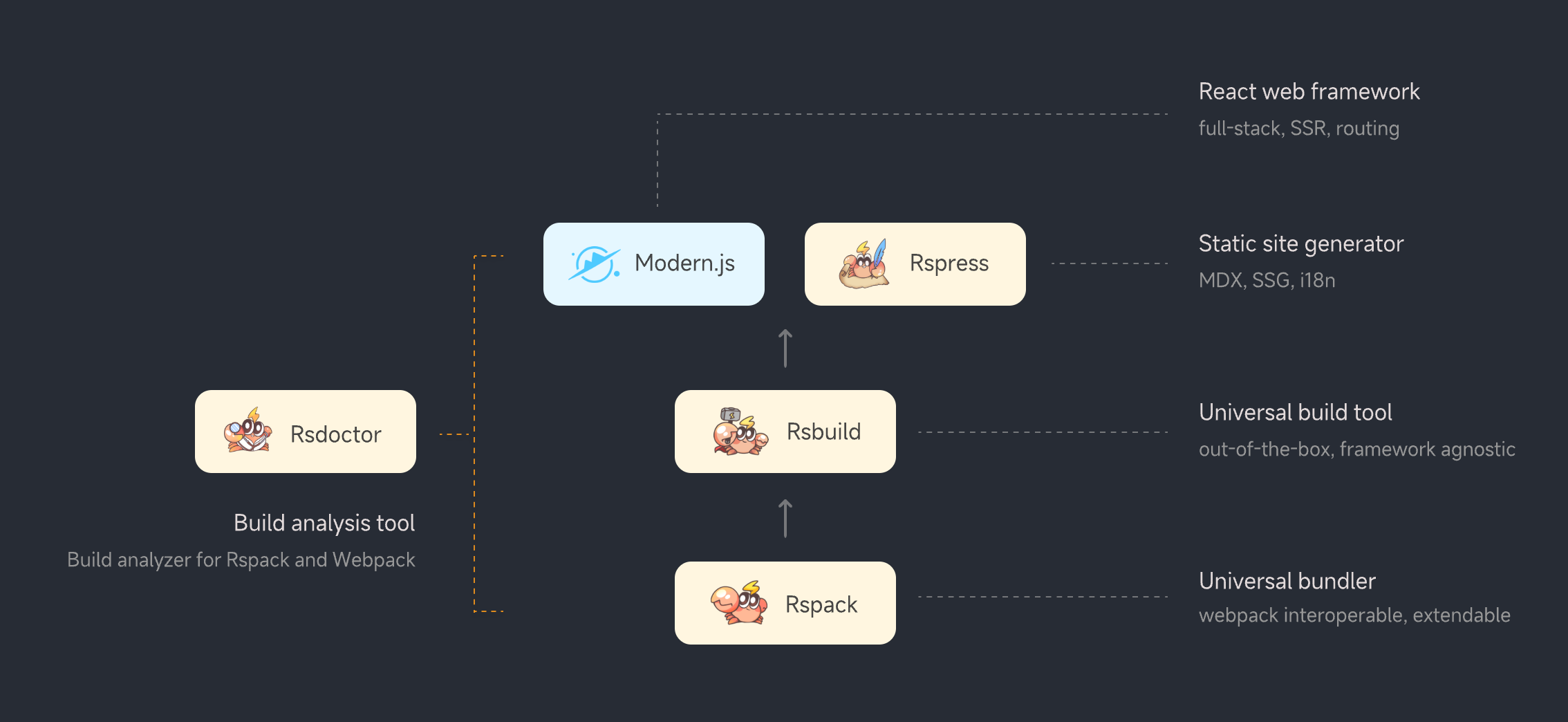
- package/docs/en/guide/start/_meta.json +1 -0
- package/docs/en/guide/start/cli.mdx +94 -0
- package/docs/en/guide/start/features.mdx +36 -0
- package/docs/en/guide/start/intro.mdx +115 -0
- package/docs/en/guide/start/quick-start.mdx +210 -0
- package/docs/en/guide/usage/_meta.json +13 -0
- package/docs/en/guide/usage/bundle-alerts.mdx +47 -0
- package/docs/en/guide/usage/bundle-overall.mdx +55 -0
- package/docs/en/guide/usage/bundle-size.mdx +122 -0
- package/docs/en/guide/usage/compile-alerts.mdx +18 -0
- package/docs/en/guide/usage/compile-overall.mdx +115 -0
- package/docs/en/guide/usage/loaders-analysis.mdx +72 -0
- package/docs/en/guide/usage/loaders-timeline.mdx +68 -0
- package/docs/en/guide/usage/module-analysis.mdx +58 -0
- package/docs/en/guide/usage/plugins-analysis.mdx +43 -0
- package/docs/en/guide/usage/project-overall.mdx +51 -0
- package/docs/en/guide/usage/resolver.mdx +29 -0
- package/docs/en/index.md +38 -0
- package/docs/zh/_meta.json +17 -0
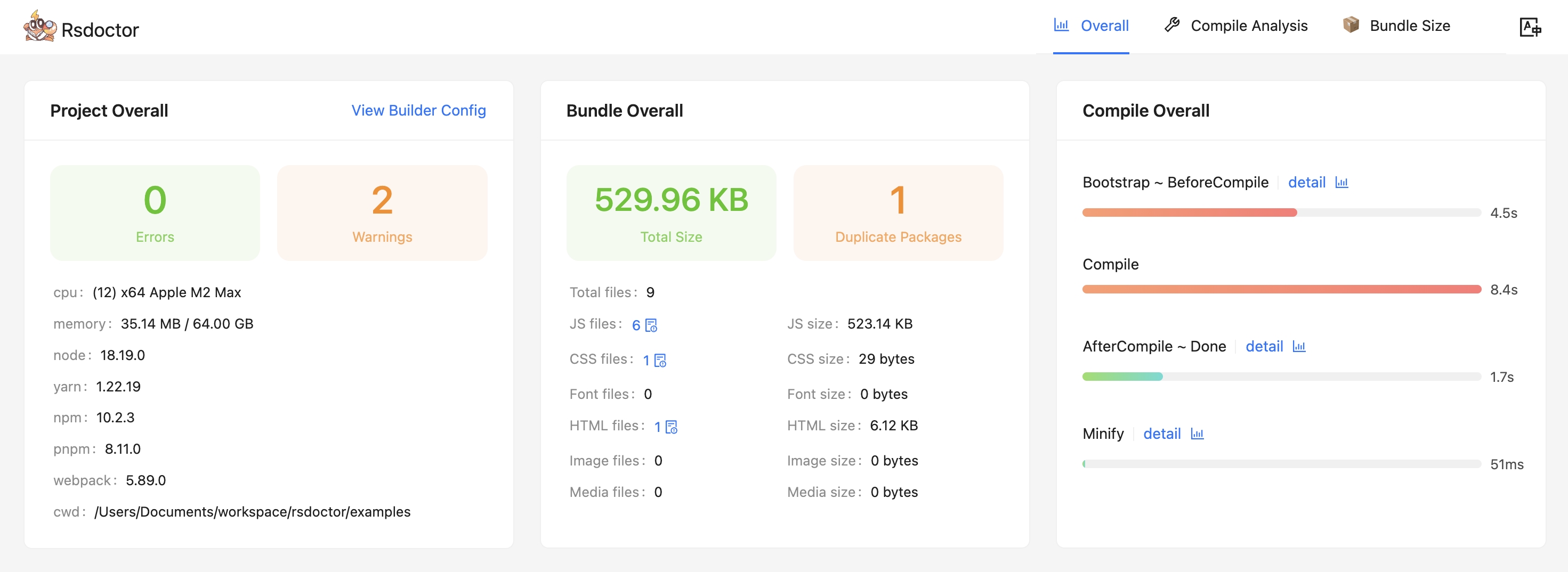
- package/docs/zh/blog/_meta.json +12 -0
- package/docs/zh/blog/release/_meta.json +1 -0
- package/docs/zh/blog/release/release-note-1.mdx +128 -0
- package/docs/zh/blog/topic/_meta.json +1 -0
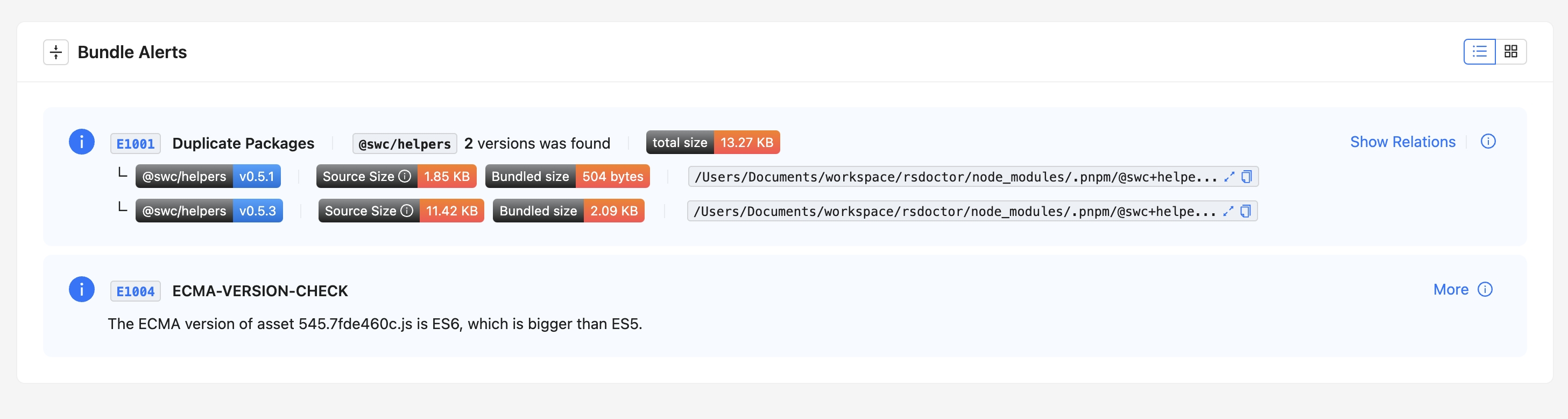
- package/docs/zh/blog/topic/duplicate-pkg-problem.mdx +138 -0
- package/docs/zh/blog/topic/loader-optimization.mdx +80 -0
- package/docs/zh/config/_meta.json +7 -0
- package/docs/zh/config/options/_meta.json +1 -0
- package/docs/zh/config/options/options.mdx +138 -0
- package/docs/zh/config/options/term.mdx +10 -0
- package/docs/zh/guide/_meta.json +17 -0
- package/docs/zh/guide/more/_meta.json +1 -0
- package/docs/zh/guide/more/faq.mdx +102 -0
- package/docs/zh/guide/more/rules.mdx +5 -0
- package/docs/zh/guide/start/_meta.json +1 -0
- package/docs/zh/guide/start/cli.mdx +94 -0
- package/docs/zh/guide/start/features.mdx +36 -0
- package/docs/zh/guide/start/intro.mdx +116 -0
- package/docs/zh/guide/start/quick-start.mdx +209 -0
- package/docs/zh/guide/usage/_meta.json +13 -0
- package/docs/zh/guide/usage/bundle-alerts.mdx +49 -0
- package/docs/zh/guide/usage/bundle-overall.mdx +57 -0
- package/docs/zh/guide/usage/bundle-size.mdx +122 -0
- package/docs/zh/guide/usage/compile-alerts.mdx +18 -0
- package/docs/zh/guide/usage/compile-overall.mdx +115 -0
- package/docs/zh/guide/usage/loaders-analysis.mdx +73 -0
- package/docs/zh/guide/usage/loaders-timeline.mdx +68 -0
- package/docs/zh/guide/usage/module-analysis.mdx +59 -0
- package/docs/zh/guide/usage/plugins-analysis.mdx +43 -0
- package/docs/zh/guide/usage/project-overall.mdx +51 -0
- package/docs/zh/guide/usage/resolver.mdx +29 -0
- package/docs/zh/index.md +38 -0
- package/docs/zh/shared/features-rspack.md +24 -0
- package/docs/zh/shared/features.md +29 -0
- package/package.json +44 -0
- package/src/components/NextSteps.module.scss +6 -0
- package/src/components/NextSteps.tsx +7 -0
- package/src/components/Overview.module.scss +61 -0
- package/src/components/Overview.tsx +40 -0
- package/src/components/RuleIndex.module.scss +57 -0
- package/src/components/RuleIndex.tsx +75 -0
- package/src/components/Step.module.scss +32 -0
- package/src/components/Step.tsx +13 -0
- package/src/global.d.ts +4 -0
- package/src/utils.ts +9 -0
|
@@ -0,0 +1,17 @@
|
|
|
1
|
+
[
|
|
2
|
+
{
|
|
3
|
+
"text": "Guide",
|
|
4
|
+
"link": "/guide/start/intro",
|
|
5
|
+
"activeMatch": "/guide/"
|
|
6
|
+
},
|
|
7
|
+
{
|
|
8
|
+
"text": "Config",
|
|
9
|
+
"link": "/config/options/options",
|
|
10
|
+
"activeMatch": "/config/"
|
|
11
|
+
},
|
|
12
|
+
{
|
|
13
|
+
"text": "Blog",
|
|
14
|
+
"link": "/blog/release/release-note-1",
|
|
15
|
+
"activeMatch": "/blog/"
|
|
16
|
+
}
|
|
17
|
+
]
|
|
@@ -0,0 +1 @@
|
|
|
1
|
+
["release-note-1"]
|
|
@@ -0,0 +1,129 @@
|
|
|
1
|
+
# Rsdoctor v0.1 Release Note
|
|
2
|
+
|
|
3
|
+
<picture>
|
|
4
|
+
<img
|
|
5
|
+
alt="Rsdoctor Banner"
|
|
6
|
+
src="https://github.com/web-infra-dev/rsdoctor/assets/7237365/0f9d2e86-d919-451a-befa-fa84603a87cf"
|
|
7
|
+
style={{ margin: 'auto' }}
|
|
8
|
+
/>
|
|
9
|
+
</picture>
|
|
10
|
+
|
|
11
|
+
We are excited to announce the release of [Rsdoctor](https://rsdoctor.dev/) v0.1!
|
|
12
|
+
|
|
13
|
+
Rsdoctor is a one-stop build analysis tool for Rspack and Webpack. It allows for detailed analysis of the build process and bundles, making the build process more visual and transparent.
|
|
14
|
+
|
|
15
|
+
## 📌 Position
|
|
16
|
+
|
|
17
|
+
**Rsdoctor** is a build analysis tool for analyzing projects built with [Rspack](https://www.rspack.dev/) and [Webpack](https://webpack.js.org/). It supports analysis of projects such as [Rsbuild](https://rsbuild.dev/), [Create React App](https://create-react-app.dev/), [Modern.js](https://modernjs.dev/), and more.
|
|
18
|
+
|
|
19
|
+
|
|
20
|
+
|
|
21
|
+
## 🔥 Features
|
|
22
|
+
|
|
23
|
+
- **Compilation Visualization**: Rsdoctor visualizes the compilation behavior and time consumption, making it easy to view build issues.
|
|
24
|
+
- **Multiple Analysis Capabilities**: Rsdoctor supports build artifact, build-time analysis, and anti-degradation capabilities:
|
|
25
|
+
- Build artifact support for resource lists and module dependencies, etc.
|
|
26
|
+
- Build-time analysis supports Loader, Plugin, and Resolver building process analysis, including: Rspack's builtin:swc-loader.
|
|
27
|
+
- Build rules support duplicate package detection and ES Version Check, etc.
|
|
28
|
+
- Currently, bundle Diff capabilities are also available.
|
|
29
|
+
- **Support Custom Rules**: In addition to built-in build scan rules, Rsdoctor also supports users adding custom component scan rules based on the build data of Rsdoctor.
|
|
30
|
+
- **Framework-Independent**: Rsdoctor support all projects built on Webpack or Rspack.
|
|
31
|
+
|
|
32
|
+
## 🛠️ Introduction
|
|
33
|
+
|
|
34
|
+
### ⭐️ Overview
|
|
35
|
+
|
|
36
|
+
- The overview page (i.e. the home page) can know **project configuration, diagnostic information, compilation information, and product status**.
|
|
37
|
+
|
|
38
|
+
|
|
39
|
+
|
|
40
|
+
- In addition to the project overview, we also provide diagnostic functions, including compilation diagnostics and duplicate packages diagnostics. If your compilation and products hit the diagnostic rules we defined,
|
|
41
|
+
the corresponding warning alerts will appear on the tool's home page. **where you can see the detailed reference path of duplicate packages**:
|
|
42
|
+
|
|
43
|
+
|
|
44
|
+
|
|
45
|
+
### ⭐️ Compilation Analysis
|
|
46
|
+
|
|
47
|
+
Provides corresponding data and analysis functions for **Loaders, Plugins, and Module Resolve** to help you analyze problems in the compilation process.
|
|
48
|
+
|
|
49
|
+
#### Loader Analysis
|
|
50
|
+
|
|
51
|
+
- This module mainly provides the function of data analysis such as input and output, estimated time consumption, and parameters within **Rspack or Webpack Loaders**.
|
|
52
|
+
|
|
53
|
+
<div style={{ display: 'flex' }}>
|
|
54
|
+
<img
|
|
55
|
+
src="https://lf3-static.bytednsdoc.com/obj/eden-cn/lognuvj/rsdoctor/docs/usage/compile/loader-timeline-overall.png"
|
|
56
|
+
width="55%"
|
|
57
|
+
style={{ margin: 'auto' }}
|
|
58
|
+
/>
|
|
59
|
+
<img
|
|
60
|
+
src="https://lf3-static.bytednsdoc.com/obj/eden-cn/lognuvj/rsdoctor/docs/usage/compile/loader-anlaysis-all.png"
|
|
61
|
+
width="45%"
|
|
62
|
+
style={{ margin: 'auto' }}
|
|
63
|
+
/>
|
|
64
|
+
</div>
|
|
65
|
+
|
|
66
|
+
#### Plugin Analysis
|
|
67
|
+
|
|
68
|
+
- This module mainly intercepts and collects data information such as the number of calls and estimated time consumption of Plugins.
|
|
69
|
+
|
|
70
|
+
<p>
|
|
71
|
+
<img
|
|
72
|
+
alt="bundle"
|
|
73
|
+
src={
|
|
74
|
+
'https://lf3-static.bytednsdoc.com/obj/eden-cn/lognuvj/rsdoctor/docs/start/compile-plugin.jpg'
|
|
75
|
+
}
|
|
76
|
+
width="600px"
|
|
77
|
+
style={{ margin: 'auto' }}
|
|
78
|
+
/>
|
|
79
|
+
</p>
|
|
80
|
+
|
|
81
|
+
#### Resolve Analysis
|
|
82
|
+
|
|
83
|
+
- This module mainly provides path data and estimated time consumption for module resolution in a single file within the project. Rspack does not currently support this module.
|
|
84
|
+
|
|
85
|
+
<p>
|
|
86
|
+
<img
|
|
87
|
+
alt="bundle"
|
|
88
|
+
src={
|
|
89
|
+
'https://lf3-static.bytednsdoc.com/obj/eden-cn/lognuvj/rsdoctor/docs/start/resolver.jpeg'
|
|
90
|
+
}
|
|
91
|
+
width="700px"
|
|
92
|
+
style={{ margin: 'auto' }}
|
|
93
|
+
/>
|
|
94
|
+
</p>
|
|
95
|
+
|
|
96
|
+
### ⭐️ Product Analysis
|
|
97
|
+
|
|
98
|
+
- In the **Bundle Size** page, we can see an overview of the product data information of the current project, as well as analyze the size and reasons for duplicate package imports.
|
|
99
|
+
|
|
100
|
+
- In addition, we can also use the **Bundle Analysis** page to further analyze the relationship between the product and module in the current product, size data and other information, as well as the reasons for module introduction.
|
|
101
|
+
|
|
102
|
+
<p>
|
|
103
|
+
<img
|
|
104
|
+
alt="bundle"
|
|
105
|
+
src={
|
|
106
|
+
'https://lf3-static.bytednsdoc.com/obj/eden-cn/lognuvj/rsdoctor/docs/start/bundle-size.jpg'
|
|
107
|
+
}
|
|
108
|
+
width="700px"
|
|
109
|
+
style={{ margin: 'auto' }}
|
|
110
|
+
/>
|
|
111
|
+
</p>
|
|
112
|
+
|
|
113
|
+
## 📚 Quick Start
|
|
114
|
+
|
|
115
|
+
You can refer to the [Quick Start](https://rsdoctor.dev/guide/start/quick-start) to get started with **Rsdoctor**.
|
|
116
|
+
|
|
117
|
+
## 💡 Next Steps
|
|
118
|
+
|
|
119
|
+
**Improve Rsdoctor build analysis efficiency**: Currently, enabling Rsdoctor plugin increases project build time. In the next step, we will extract and convert some of Rsdoctor's build analysis logic into a rust plugin, built-in to [Rspack](https://www.rspack.dev/), in order to improve Rsdoctor's build analysis efficiency.
|
|
120
|
+
|
|
121
|
+
## Acknowledgements
|
|
122
|
+
|
|
123
|
+
**Rsdoctor** has been inspired by outstanding projects in the community, and we would like to express our gratitude to them:
|
|
124
|
+
|
|
125
|
+
- Refer to the analysis logic of artifact relationships from [bundle-stats](https://github.com/relative-ci/bundle-stats/tree/master/packages/cli#readme).
|
|
126
|
+
- Refer to the module breakdown and analysis logic from [webpack-bundle-analyzer](https://github.com/webpack-contrib/webpack-bundle-analyzer).
|
|
127
|
+
- [Statoscope](https://github.com/statoscope/statoscope/blob/master/README.md) is an excellent tool for analyzing build artifacts, and Rsdoctor is inspired by it in terms of build analysis.
|
|
128
|
+
- [Webpack team and community](https://github.com/webpack/webpack/blob/main/README.md) have created an excellent bundling tool and a rich ecosystem.
|
|
129
|
+
- [vite-plugin-inspect](https://github.com/antfu/vite-plugin-inspect) has inspired Rsdoctor's exploration of build process analysis.
|
|
@@ -0,0 +1 @@
|
|
|
1
|
+
["loader-optimization", "duplicate-pkg-problem"]
|
|
@@ -0,0 +1,141 @@
|
|
|
1
|
+
# Duplicate Dependency Problem
|
|
2
|
+
|
|
3
|
+
Rsdoctor will report cases where multiple duplicate dependencies exist in the same builder's artifact.
|
|
4
|
+
|
|
5
|
+
<img src="https://lf3-static.bytednsdoc.com/obj/eden-cn/lognuvj/rsdoctor/docs/usage/bundle/bundle-alerts.png" />
|
|
6
|
+
|
|
7
|
+
## Hazards of Duplicate Packages
|
|
8
|
+
|
|
9
|
+
- **Security**
|
|
10
|
+
- Many packages adopt singleton mode and are only loaded once by default. Examples include core-js, react, and some component libraries. Having multiple versions coexist can cause runtime errors.
|
|
11
|
+
- **Runtime Perßformance**
|
|
12
|
+
- Increases artifact size, slowing down network transmission
|
|
13
|
+
- Same code for the same functionality runs multiple times
|
|
14
|
+
|
|
15
|
+
## How to Solve Duplicate Package Problems?
|
|
16
|
+
|
|
17
|
+
To solve the issue of multiple versions of dependencies, you can address it from both the dependency and build aspects.
|
|
18
|
+
|
|
19
|
+
### Dependency Aspect
|
|
20
|
+
|
|
21
|
+
#### 1. Use the npm dedupe command
|
|
22
|
+
|
|
23
|
+
Generally, package managers try to install the same version of a package based on the semver range. However, long-term projects may have some duplicate dependencies due to the existence of lock files.
|
|
24
|
+
|
|
25
|
+
Package managers provide the `dedupe` command, such as `npm/yarn/pnpm dedupe`, to optimize duplicate dependencies within the correct semver range.
|
|
26
|
+
|
|
27
|
+
#### 2. Use resolutions
|
|
28
|
+
|
|
29
|
+
Under the constraints of semver, the effectiveness of the dedupe command may not be ideal. For example, if the artifact contains dependencies `debug@4.3.4` and `debug@3.0.0`, where they are respectively depended on by `"debug": "^4"` and another package's `"debug": "^3"`.
|
|
30
|
+
|
|
31
|
+
In this case, you can try using the `resolutions` feature of the package manager, such as pnpm's [**pnpm.overrides**](https://pnpm.io/package_json#pnpmoverrides), [**.pnpmfile.cjs**](https://pnpm.io/pnpmfile#hooksreadpackagepkg-context-pkg--promisepkg), or **yarn's resolutions**.
|
|
32
|
+
|
|
33
|
+
The advantage of these features is that they can break free from the constraints of semver and change the version declared in `package.json` during installation to precisely control the installed version.
|
|
34
|
+
|
|
35
|
+
However, before using them, it is important to consider the compatibility between package versions and evaluate whether optimization is necessary. For example, whether the logic changes between different versions of the same package will affect the functionality of the project.
|
|
36
|
+
|
|
37
|
+
### Build Aspect
|
|
38
|
+
|
|
39
|
+
#### Use [resolve.alias](https://www.rspack.dev/config/resolve.html#resolvealias)
|
|
40
|
+
|
|
41
|
+
Almost all builders support modifying the paths for resolving npm packages. Therefore, we can eliminate duplicate dependencies by manually specifying the resolve paths for packages during compilation. For example, using **Rspack** or **Webpack**, if `lodash` is duplicated in the build, we can configure it as follows to specify the resolve paths for all `lodash` packages to the `node_modules` directory in the current directory.
|
|
42
|
+
|
|
43
|
+
```js
|
|
44
|
+
// webpack.config.js/rspack.config.js
|
|
45
|
+
const path = require('path');
|
|
46
|
+
|
|
47
|
+
module.exports = {
|
|
48
|
+
//...
|
|
49
|
+
resolve: {
|
|
50
|
+
alias: {
|
|
51
|
+
lodash: path.resolve(__dirname, 'node_modules/lodash'),
|
|
52
|
+
},
|
|
53
|
+
},
|
|
54
|
+
};
|
|
55
|
+
```
|
|
56
|
+
|
|
57
|
+
This method also requires attention to the compatibility between package versions.
|
|
58
|
+
|
|
59
|
+
## Cases of Handling Duplicate Packages
|
|
60
|
+
|
|
61
|
+
### Duplicate Packages in pnpm-workspace
|
|
62
|
+
|
|
63
|
+
In this project, the `web` app depends on `react@18.2.0` and imports `component` using `"component": "workspace:*"`. The `component` package, in turn, depends on `react@18.1.0`. The project structure is as follows:
|
|
64
|
+
|
|
65
|
+
```txt
|
|
66
|
+
├── node_modules
|
|
67
|
+
├── apps
|
|
68
|
+
│ └── web
|
|
69
|
+
│ ├── node_modules
|
|
70
|
+
│ │ ├── component -> ../../packages/component
|
|
71
|
+
│ │ └── react -> ../../../node_modules/.pnpm/react@18.2.0
|
|
72
|
+
│ ├── src
|
|
73
|
+
│ │ └── index.js
|
|
74
|
+
│ ├── webpack.config.js
|
|
75
|
+
│ └── package.json
|
|
76
|
+
└── packages
|
|
77
|
+
└── component
|
|
78
|
+
├── node_modules
|
|
79
|
+
│ └── react -> ../../../node_modules/.pnpm/react@18.1.0
|
|
80
|
+
├── src
|
|
81
|
+
│ └── index.js
|
|
82
|
+
└── package.json
|
|
83
|
+
```
|
|
84
|
+
|
|
85
|
+
When executing `webpack build` under `apps/web`, the code in the `web` directory will be resolved to `react@18.2.0`, and then the code in the `component` directory will be resolved to `react@18.1.0`. This results in the output of the web project containing two versions of `React`.
|
|
86
|
+
|
|
87
|
+
#### Solution
|
|
88
|
+
|
|
89
|
+
This issue can be resolved using the `resolve.alias` configuration in the builder, such as `Rspack` or `Webpack`. By specifying the resolve path for `React` to only resolve to `apps/web/node_modules/react`, you can ensure that only one version of `React` is included in the output. Here is an example code:
|
|
90
|
+
|
|
91
|
+
```javascript
|
|
92
|
+
// apps/web/webpack.config.js
|
|
93
|
+
const path = require('path');
|
|
94
|
+
|
|
95
|
+
module.exports = {
|
|
96
|
+
//...
|
|
97
|
+
resolve: {
|
|
98
|
+
alias: {
|
|
99
|
+
react: path.dirname(require.resolve('react/package.json')),
|
|
100
|
+
},
|
|
101
|
+
},
|
|
102
|
+
};
|
|
103
|
+
```
|
|
104
|
+
|
|
105
|
+
#### Duplicate Packages Caused by Peer Dependency
|
|
106
|
+
|
|
107
|
+
This handling method also applies to projects with duplicate packages caused by multiple instances of **[peerDependencies](https://pnpm.io/how-peers-are-resolved)** in `pnpm workspace`. The project directory structure is as follows:
|
|
108
|
+
|
|
109
|
+
```txt
|
|
110
|
+
├── node_modules
|
|
111
|
+
├── apps
|
|
112
|
+
│ └── web
|
|
113
|
+
│ ├── node_modules
|
|
114
|
+
│ │ ├── component -> ../../packages/component
|
|
115
|
+
│ │ ├── axios -> ../../../node_modules/.pnpm/axios@0.27.2_debug@4.3.4
|
|
116
|
+
│ │ └── debug -> ../../../node_modules/.pnpm/debug@4.3.4
|
|
117
|
+
│ ├── src
|
|
118
|
+
│ │ └── index.js
|
|
119
|
+
│ ├── webpack.config.js
|
|
120
|
+
│ └── package.json
|
|
121
|
+
└── packages
|
|
122
|
+
└── component
|
|
123
|
+
├── node_modules
|
|
124
|
+
│ └── axios -> ../../../node_modules/.pnpm/axios@0.27.2
|
|
125
|
+
├── src
|
|
126
|
+
│ └── index.js
|
|
127
|
+
└── package.json
|
|
128
|
+
```
|
|
129
|
+
|
|
130
|
+
In this project, when executing `webpack build` under `apps/web`, the code in the `web` directory will be resolved to `axios@0.27.2_debug@4.3.4`, and then the code in the `packages/component` directory will be resolved to `axios@0.27.2`.
|
|
131
|
+
|
|
132
|
+
Although they are the same version, they have different paths, resulting in two copies of `axios` in the output.
|
|
133
|
+
|
|
134
|
+
The solution is to configure the `web` project to only resolve the `axios` package under the `web` directory's `node_modules`.
|
|
135
|
+
|
|
136
|
+
```javascript
|
|
137
|
+
// apps/web/webpack.config.js
|
|
138
|
+
alias: {
|
|
139
|
+
'axios': path.resolve(__dirname, 'node_modules/axios')
|
|
140
|
+
}
|
|
141
|
+
```
|
|
@@ -0,0 +1,80 @@
|
|
|
1
|
+
# Loader Analysis and Optimization
|
|
2
|
+
|
|
3
|
+
import NextSteps from '@components/NextSteps';
|
|
4
|
+
import Step from '@components/Step';
|
|
5
|
+
|
|
6
|
+
Optimizing loaders is a common way to improve the performance of Rspack or Webpack compilation. In most cases, besides replacing the loader with a faster one, we can also reduce execution by setting [module.rule.exclude](https://webpack.js.org/configuration/module/#ruleexclude) for the loader.
|
|
7
|
+
|
|
8
|
+
Rsdoctor provides two core modules, [Loader Overall](/guide/usage/loaders-timeline) and [Loader Analysis](/guide/usage/loaders-analysis), to help you optimize based on the loader's invocation information.
|
|
9
|
+
|
|
10
|
+
## How to analyze?
|
|
11
|
+
|
|
12
|
+
Regardless of the optimization method used for loaders, we need to obtain data information about the loaders, such as **which files a loader compiles** and **time-consuming information for compiling certain files**, in order to optimize more accurately.
|
|
13
|
+
|
|
14
|
+
### File Tree Structure
|
|
15
|
+
|
|
16
|
+
With the Loader Analysis module provided by Rsdoctor, we can see **a tree structure composed of all files that pass through the loaders during the entire compilation process**, as shown in the following figure:
|
|
17
|
+
|
|
18
|
+
<img
|
|
19
|
+
src="https://lf3-static.bytednsdoc.com/obj/eden-cn/lognuvj/rsdoctor/docs/usage/compile/loader-anlaysis-all.png"
|
|
20
|
+
width="600px"
|
|
21
|
+
style={{ margin: 'auto' }}
|
|
22
|
+
/>
|
|
23
|
+
|
|
24
|
+
### Analyzing Directories
|
|
25
|
+
|
|
26
|
+
By **clicking on a directory**, you can see the **time-consuming statistics of all loaders** under the currently **selected directory** on the right side of the file tree, such as the number of files processed by a loader and **the estimated time** consumption. The content of the "Statistics of xxx" card is shown in the following figure:
|
|
27
|
+
|
|
28
|
+
<img
|
|
29
|
+
src="https://lf3-static.bytednsdoc.com/obj/eden-cn/lognuvj/rsdoctor/docs/usage/compile/loader-anlaysis-table.png"
|
|
30
|
+
width="300px"
|
|
31
|
+
height="400px"
|
|
32
|
+
style={{ margin: 'auto' }}
|
|
33
|
+
/>
|
|
34
|
+
|
|
35
|
+
We can intuitively know **the time-consuming data of this folder**, such as the number of files processed by a certain loader and the estimated time consumption, as well as the sum of all data, which further helps us make decisions on how to optimize the loader.
|
|
36
|
+
|
|
37
|
+
:::tip Optimization Tips
|
|
38
|
+
Usually, in the directories of third-party libraries inside **`node_modules`**, we can easily determine whether it is necessary to set [module.rule.exclude](https://webpack.js.org/configuration/module/#ruleexclude) for this directory based on the time-consuming information of the loader, in order to reduce the execution of loaders with long execution time, such as the common `babel-loader`.
|
|
39
|
+
:::
|
|
40
|
+
|
|
41
|
+
### Analyzing Files
|
|
42
|
+
|
|
43
|
+
By **clicking on a file**, a mask layer will pop up, showing a list of all loaders that have been executed on the currently clicked file. By **clicking on a loader**, you can see the **input**, **output**, and **parameter data information of the target loader** when it is called.
|
|
44
|
+
|
|
45
|
+
<img
|
|
46
|
+
src="https://lf3-static.bytednsdoc.com/obj/eden-cn/lognuvj/rsdoctor/docs/usage/compile/loader-analysis-code-change.png"
|
|
47
|
+
width="600px"
|
|
48
|
+
style={{ margin: 'auto' }}
|
|
49
|
+
/>{' '}
|
|
50
|
+
|
|
51
|
+
- Parameter Data Information: Click on "**show more**" or the expand button in the upper left corner to view the corresponding parameter information.
|
|
52
|
+
|
|
53
|
+
<img
|
|
54
|
+
src="https://lf3-static.bytednsdoc.com/obj/eden-cn/lognuvj/rsdoctor/docs/usage/compile/loader-analysis-options.png"
|
|
55
|
+
width="600px"
|
|
56
|
+
style={{ margin: 'auto' }}
|
|
57
|
+
/>{' '}
|
|
58
|
+
|
|
59
|
+
We can use the loader information of individual files here to troubleshoot issues and decide whether to add them to [module.rule.exclude](https://webpack.js.org/configuration/module/#ruleexclude).
|
|
60
|
+
|
|
61
|
+
:::tip Optimization Tips
|
|
62
|
+
Usually, for internal packages inside the project (i.e., outside the cwd, usually the workspace), we can determine whether it is necessary to set [module.rule.exclude](https://webpack.js.org/configuration/module/#ruleexclude) for this directory based on **the loader time-consuming information** of the directory and **the input-output information** of individual files (because these internal packages may already have good compatibility with ES syntax).
|
|
63
|
+
:::
|
|
64
|
+
|
|
65
|
+
## Learn More
|
|
66
|
+
|
|
67
|
+
You may want to learn more about the usage of the Loader Analysis module:
|
|
68
|
+
|
|
69
|
+
<NextSteps>
|
|
70
|
+
<Step
|
|
71
|
+
href="/guide/usage/loaders-timeline"
|
|
72
|
+
title="Loader Timeline Usage"
|
|
73
|
+
description="Learn how to use the Loader Timeline in Rsdoctor"
|
|
74
|
+
/>
|
|
75
|
+
<Step
|
|
76
|
+
href="/guide/usage/loaders-analysis"
|
|
77
|
+
title="Loader Analysis Usage"
|
|
78
|
+
description="Learn how to operate and use the Loader Analysis in Rsdoctor"
|
|
79
|
+
/>
|
|
80
|
+
</NextSteps>
|
|
@@ -0,0 +1 @@
|
|
|
1
|
+
["options", "term"]
|
|
@@ -0,0 +1,135 @@
|
|
|
1
|
+
# Options
|
|
2
|
+
|
|
3
|
+
## RsdoctorRspackPlugin
|
|
4
|
+
|
|
5
|
+
`RsdoctorRspackPlugin` class are exported by `@rsdoctor/rspack-plugin`, and the option is [RsdoctorRspackPluginOptions](#options-1).
|
|
6
|
+
|
|
7
|
+
<Tabs>
|
|
8
|
+
|
|
9
|
+
<Tab label="cjs">
|
|
10
|
+
|
|
11
|
+
```js
|
|
12
|
+
const { RsdoctorRspackPlugin } = require('@rsdoctor/rspack-plugin');
|
|
13
|
+
|
|
14
|
+
new RsdoctorRspackPlugin({
|
|
15
|
+
/** RsdoctorRspackPluginOptions */
|
|
16
|
+
});
|
|
17
|
+
```
|
|
18
|
+
|
|
19
|
+
</Tab>
|
|
20
|
+
|
|
21
|
+
<Tab label="esm">
|
|
22
|
+
|
|
23
|
+
```ts
|
|
24
|
+
import { RsdoctorRspackPlugin } from '@rsdoctor/rspack-plugin';
|
|
25
|
+
|
|
26
|
+
new RsdoctorRspackPlugin({
|
|
27
|
+
/** RsdoctorRspackPluginOptions */
|
|
28
|
+
});
|
|
29
|
+
```
|
|
30
|
+
|
|
31
|
+
</Tab>
|
|
32
|
+
|
|
33
|
+
</Tabs>
|
|
34
|
+
|
|
35
|
+
## RsdoctorWebpackPlugin
|
|
36
|
+
|
|
37
|
+
`RsdoctorWebpackPlugin` class are exported by `@rsdoctor/webpack-plugin`, and the option is [RsdoctorWebpackPluginOptions](#options-1).
|
|
38
|
+
|
|
39
|
+
import { Tab, Tabs } from '@theme';
|
|
40
|
+
|
|
41
|
+
<Tabs>
|
|
42
|
+
|
|
43
|
+
<Tab label="cjs">
|
|
44
|
+
|
|
45
|
+
```js
|
|
46
|
+
const { RsdoctorWebpackPlugin } = require('@rsdoctor/webpack-plugin');
|
|
47
|
+
|
|
48
|
+
new RsdoctorWebpackPlugin({
|
|
49
|
+
/** RsdoctorWebpackPluginOptions */
|
|
50
|
+
});
|
|
51
|
+
```
|
|
52
|
+
|
|
53
|
+
</Tab>
|
|
54
|
+
|
|
55
|
+
<Tab label="esm">
|
|
56
|
+
|
|
57
|
+
```ts
|
|
58
|
+
import { RsdoctorWebpackPlugin } from '@rsdoctor/webpack-plugin';
|
|
59
|
+
|
|
60
|
+
new RsdoctorWebpackPlugin({
|
|
61
|
+
/** RsdoctorWebpackPluginOptions */
|
|
62
|
+
});
|
|
63
|
+
```
|
|
64
|
+
|
|
65
|
+
</Tab>
|
|
66
|
+
|
|
67
|
+
</Tabs>
|
|
68
|
+
|
|
69
|
+
## Options
|
|
70
|
+
|
|
71
|
+
**Type:** `Object`
|
|
72
|
+
|
|
73
|
+
This is the options for the [RsdoctorWebpackPlugin](#rsdoctorwebpackplugin) and [RsdoctorRspackPlugin](#rsdoctorrspackplugin). It contains these properties:
|
|
74
|
+
|
|
75
|
+
- [disableClientServer](#disableclientserver)
|
|
76
|
+
- [features](#features)
|
|
77
|
+
|
|
78
|
+
### disableClientServer
|
|
79
|
+
|
|
80
|
+
- **Type:** `boolean`
|
|
81
|
+
- **Optional:** `true`
|
|
82
|
+
- **Default:** `false`
|
|
83
|
+
|
|
84
|
+
Whether to automatically open the Rsdoctor report page. If you do not need to view the analysis report provided by Rsdoctor in the browser, you can enable this configuration item.
|
|
85
|
+
|
|
86
|
+
### features
|
|
87
|
+
|
|
88
|
+
- **Type:** [RsdoctorWebpackPluginFeatures](#rsdoctorwebpackpluginfeatures) | [Array\<keyof RsdoctorWebpackPluginFeatures\>](#rsdoctorwebpackpluginfeatures) | [RsdoctorRspackPluginFeatures](#rsdoctorrspackpluginfeatures) | [Array\<keyof RsdoctorRspackPluginFeatures\>](#rsdoctorrspackpluginfeatures)
|
|
89
|
+
- **Optional:** `true`
|
|
90
|
+
- **Default:** `['loader', 'plugins', 'bundle']`
|
|
91
|
+
|
|
92
|
+
#### features values
|
|
93
|
+
|
|
94
|
+
:::tip
|
|
95
|
+
|
|
96
|
+
**If an "out of memory" error occurs, you can try the following:**
|
|
97
|
+
|
|
98
|
+
1. Open the **lite** mode。
|
|
99
|
+
2. Increase the node memory limit, for example: NODE_OPTIONS=--max-old-space-size=8096.
|
|
100
|
+
|
|
101
|
+
- Reason: During the build process, source code information is cached, which exceeds memory. Therefore, enabling the **"lite" mode** can help alleviate the problem.
|
|
102
|
+
- Difference: The difference between the "lite" mode and the normal mode is that source code information is no longer cached, only packaged code information is cached. Thus, the code analyzed on the page will also only be packaged.
|
|
103
|
+
|
|
104
|
+
:::
|
|
105
|
+
|
|
106
|
+
The `features` attribute is used to analyze the function switches, and the specific functional items are as follows:
|
|
107
|
+
|
|
108
|
+
- **loader**: Analysis of Loader time consumption and code compilation changes, enabled by default.
|
|
109
|
+
- **plugins**: Analysis of Plugins calls and time consumption, enabled by default.
|
|
110
|
+
- **bundle**: Analysis of build artifacts, enabled by default.
|
|
111
|
+
- **resolver**: resolver analysis, disabled by default.
|
|
112
|
+
- **lite**: lite mode. The difference between lite mode and normal mode is that source code information is no longer cached, only packaged code information is cached, so the code analyzed on the page will also be packaged. The default is normal mode.
|
|
113
|
+
|
|
114
|
+
Therefore, **the default configuration enables bundle analysis capabilities and Loader and Plugin build-time analysis**. The Resolver analysis capability is not enabled, and Rspack does not currently support Resolver analysis capabilities.
|
|
115
|
+
|
|
116
|
+
#### features types
|
|
117
|
+
|
|
118
|
+
- if the `features` is set as an `Array`, it will **open** the features which you define in this array **only**.
|
|
119
|
+
- if the `features` is set as an `Object`, it will **close** the features which you set the value is `false`.
|
|
120
|
+
|
|
121
|
+
#### RsdoctorWebpackPluginFeatures
|
|
122
|
+
|
|
123
|
+
The types of `features` are as follows:
|
|
124
|
+
|
|
125
|
+
import Features from '@zh/shared/features.md';
|
|
126
|
+
|
|
127
|
+
<Features />
|
|
128
|
+
|
|
129
|
+
#### RsdoctorRspackPluginFeatures
|
|
130
|
+
|
|
131
|
+
The types of `features` are as follows:
|
|
132
|
+
|
|
133
|
+
import FeaturesRspack from '@zh/shared/features-rspack.md';
|
|
134
|
+
|
|
135
|
+
<FeaturesRspack />
|
|
@@ -0,0 +1,10 @@
|
|
|
1
|
+
# Terminology
|
|
2
|
+
|
|
3
|
+
## Common Terminology
|
|
4
|
+
|
|
5
|
+
### manifest.json
|
|
6
|
+
|
|
7
|
+
When your project integrates with plugins provided by **Rsdoctor** (such as `@rsdoctor/webpack-plugin`, etc.), Rsdoctor will write **build-related data information** into a local JSON file:
|
|
8
|
+
|
|
9
|
+
- The **filename is `manifest.json`**
|
|
10
|
+
- The output path of this file is `output directory of the project/.rsdoctor/manifest.json`
|
|
@@ -0,0 +1 @@
|
|
|
1
|
+
["faq", "rules"]
|