@rsdoctor/docs 0.0.0-next-20240620044732
This diff represents the content of publicly available package versions that have been released to one of the supported registries. The information contained in this diff is provided for informational purposes only and reflects changes between package versions as they appear in their respective public registries.
- package/LICENSE +21 -0
- package/docs/404.mdx +7 -0
- package/docs/en/_meta.json +17 -0
- package/docs/en/blog/_meta.json +12 -0
- package/docs/en/blog/release/_meta.json +1 -0
- package/docs/en/blog/release/release-note-1.mdx +129 -0
- package/docs/en/blog/topic/_meta.json +1 -0
- package/docs/en/blog/topic/duplicate-pkg-problem.mdx +141 -0
- package/docs/en/blog/topic/loader-optimization.mdx +80 -0
- package/docs/en/config/_meta.json +7 -0
- package/docs/en/config/options/_meta.json +1 -0
- package/docs/en/config/options/options-shared.mdx +67 -0
- package/docs/en/config/options/options.mdx +195 -0
- package/docs/en/config/options/term.mdx +10 -0
- package/docs/en/guide/_meta.json +17 -0
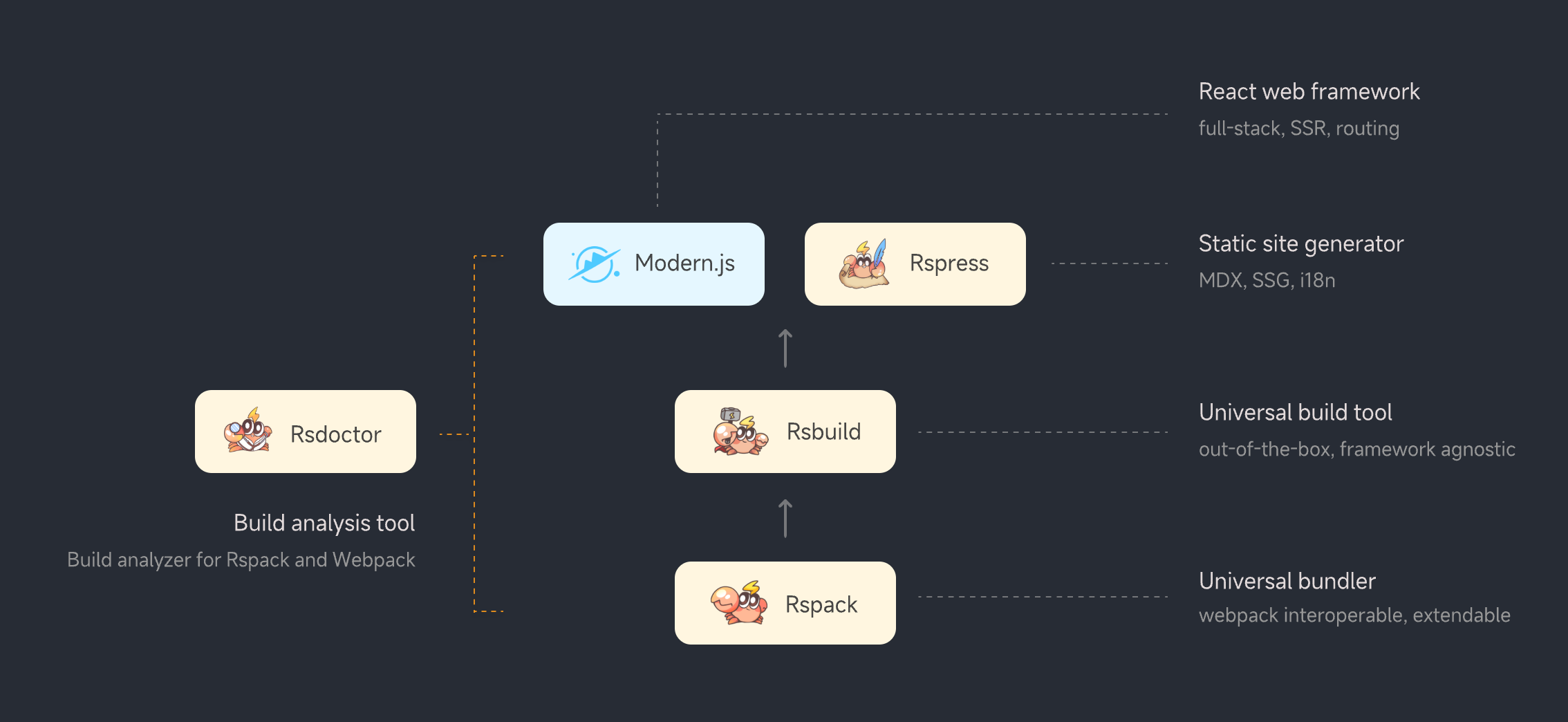
- package/docs/en/guide/more/_meta.json +1 -0
- package/docs/en/guide/more/faq.mdx +104 -0
- package/docs/en/guide/more/rules.mdx +5 -0
- package/docs/en/guide/start/_meta.json +1 -0
- package/docs/en/guide/start/cli.mdx +94 -0
- package/docs/en/guide/start/features.mdx +36 -0
- package/docs/en/guide/start/intro.mdx +115 -0
- package/docs/en/guide/start/quick-start-shared.mdx +184 -0
- package/docs/en/guide/start/quick-start.mdx +29 -0
- package/docs/en/guide/usage/_meta.json +14 -0
- package/docs/en/guide/usage/bundle-alerts.mdx +47 -0
- package/docs/en/guide/usage/bundle-overall.mdx +55 -0
- package/docs/en/guide/usage/bundle-size.mdx +148 -0
- package/docs/en/guide/usage/compile-alerts.mdx +18 -0
- package/docs/en/guide/usage/compile-overall.mdx +115 -0
- package/docs/en/guide/usage/loaders-analysis.mdx +72 -0
- package/docs/en/guide/usage/loaders-timeline.mdx +68 -0
- package/docs/en/guide/usage/module-analysis.mdx +58 -0
- package/docs/en/guide/usage/plugins-analysis.mdx +43 -0
- package/docs/en/guide/usage/project-overall.mdx +51 -0
- package/docs/en/guide/usage/resolver.mdx +32 -0
- package/docs/en/guide/usage/rule-config.mdx +85 -0
- package/docs/en/index.md +38 -0
- package/docs/public/netlify.toml +4 -0
- package/docs/public/og-image.png +0 -0
- package/docs/zh/_meta.json +17 -0
- package/docs/zh/blog/_meta.json +12 -0
- package/docs/zh/blog/release/_meta.json +1 -0
- package/docs/zh/blog/release/release-note-1.mdx +128 -0
- package/docs/zh/blog/topic/_meta.json +1 -0
- package/docs/zh/blog/topic/duplicate-pkg-problem.mdx +138 -0
- package/docs/zh/blog/topic/loader-optimization.mdx +80 -0
- package/docs/zh/config/_meta.json +7 -0
- package/docs/zh/config/options/_meta.json +1 -0
- package/docs/zh/config/options/options-shared.mdx +70 -0
- package/docs/zh/config/options/options.mdx +170 -0
- package/docs/zh/config/options/term.mdx +10 -0
- package/docs/zh/guide/_meta.json +17 -0
- package/docs/zh/guide/more/_meta.json +1 -0
- package/docs/zh/guide/more/faq.mdx +102 -0
- package/docs/zh/guide/more/rules.mdx +5 -0
- package/docs/zh/guide/start/_meta.json +1 -0
- package/docs/zh/guide/start/cli.mdx +94 -0
- package/docs/zh/guide/start/features.mdx +36 -0
- package/docs/zh/guide/start/intro.mdx +116 -0
- package/docs/zh/guide/start/quick-start-shared.mdx +183 -0
- package/docs/zh/guide/start/quick-start.mdx +29 -0
- package/docs/zh/guide/usage/_meta.json +14 -0
- package/docs/zh/guide/usage/bundle-alerts.mdx +49 -0
- package/docs/zh/guide/usage/bundle-overall.mdx +57 -0
- package/docs/zh/guide/usage/bundle-size.mdx +148 -0
- package/docs/zh/guide/usage/compile-alerts.mdx +18 -0
- package/docs/zh/guide/usage/compile-overall.mdx +115 -0
- package/docs/zh/guide/usage/loaders-analysis.mdx +73 -0
- package/docs/zh/guide/usage/loaders-timeline.mdx +68 -0
- package/docs/zh/guide/usage/module-analysis.mdx +59 -0
- package/docs/zh/guide/usage/plugins-analysis.mdx +43 -0
- package/docs/zh/guide/usage/project-overall.mdx +51 -0
- package/docs/zh/guide/usage/resolver.mdx +32 -0
- package/docs/zh/guide/usage/rule-config.mdx +86 -0
- package/docs/zh/index.md +38 -0
- package/docs/zh/shared/features-rspack.md +24 -0
- package/docs/zh/shared/features.md +29 -0
- package/package.json +45 -0
- package/src/components/NextSteps.module.scss +6 -0
- package/src/components/NextSteps.tsx +7 -0
- package/src/components/Overview.module.scss +61 -0
- package/src/components/Overview.tsx +40 -0
- package/src/components/RuleIndex.module.scss +57 -0
- package/src/components/RuleIndex.tsx +75 -0
- package/src/components/Step.module.scss +32 -0
- package/src/components/Step.tsx +13 -0
- package/src/global.d.ts +4 -0
- package/src/utils.ts +9 -0
|
@@ -0,0 +1,72 @@
|
|
|
1
|
+
# Loaders Analysis
|
|
2
|
+
|
|
3
|
+
**Rsdoctor** provides the `Loader Analysis` module, which mainly provides statistics on Loaders at the **directory and file level**. It helps you analyze the compilation of **folders** and **individual files** by Loaders.
|
|
4
|
+
|
|
5
|
+
Click on the navigation bar **"Compile Analysis"** -> **"Loader Analysis"** option to view the compilation analysis report. Of course, this page will only display the features if the `loader` analysis capability is enabled [features](/config/options/options).
|
|
6
|
+
|
|
7
|
+
## Overview
|
|
8
|
+
|
|
9
|
+
Firstly, in this module, you can directly see the file tree structure of all files processed by Loaders, as shown in the following image:
|
|
10
|
+
|
|
11
|
+
<img
|
|
12
|
+
src="https://lf3-static.bytednsdoc.com/obj/eden-cn/lognuvj/rsdoctor/docs/usage/compile/loader-anlaysis-all.png"
|
|
13
|
+
width="600px"
|
|
14
|
+
style={{ margin: 'auto' }}
|
|
15
|
+
/>
|
|
16
|
+
|
|
17
|
+
In the **filter search box** at the top, you can filter Loaders and search for file names. After entering the name, the file tree dynamically displays the matching files, making it easier to locate the files you want to query.
|
|
18
|
+
|
|
19
|
+
In the file tree structure below, there are two interactive forms to obtain different data information:
|
|
20
|
+
|
|
21
|
+
- **Clicking on a directory**: Displays **Loader data for the file directory**.
|
|
22
|
+
- **Clicking on a file**: Displays **detailed Loader information for the individual file**.
|
|
23
|
+
|
|
24
|
+
The corresponding details will be explained in the following paragraphs.
|
|
25
|
+
|
|
26
|
+
## Loader Data for File Directories
|
|
27
|
+
|
|
28
|
+
By **clicking on a selected directory**, you can see the **time statistics of all Loaders in the selected directory** ([estimated time consumption](../../guide/more/faq#loader-time-consuming-data-is-inaccurate)) on the right side of the file tree. The content of the "Statistics of xxx" card is shown in the following image:
|
|
29
|
+
|
|
30
|
+
<img
|
|
31
|
+
src="https://lf3-static.bytednsdoc.com/obj/eden-cn/lognuvj/rsdoctor/docs/usage/compile/loader-anlaysis-table.png"
|
|
32
|
+
width="300px"
|
|
33
|
+
height="400px"
|
|
34
|
+
style={{ margin: 'auto' }}
|
|
35
|
+
/>
|
|
36
|
+
|
|
37
|
+
Here are the main information we can obtain:
|
|
38
|
+
|
|
39
|
+
- The number of **files processed** and the **estimated time consumption** for an **individual Loader** in the selected directory.
|
|
40
|
+
- The number of **files processed** and the **estimated time consumption** for **all Loaders** in the selected directory.
|
|
41
|
+
|
|
42
|
+
Usually, we can select some **third-party library directories** within `node_modules` and then determine whether it is necessary to set [module.rule.exclude](https://webpack.js.org/configuration/module/#ruleexclude) for this directory based on the Loader's time consumption information. This helps reduce the processing time of common Loaders like `babel-loader`.
|
|
43
|
+
|
|
44
|
+
If it is a third-party library with **advanced ES syntax** or a package within the **workspace**, we need to make more granular decisions at the individual file level based on the content in the next paragraph to optimize Loader performance.
|
|
45
|
+
|
|
46
|
+
## Loader Details for Individual Files
|
|
47
|
+
|
|
48
|
+
By **clicking on a file**, a modal will appear with the following content:
|
|
49
|
+
|
|
50
|
+
- "**Left section**": A list of all **executed Loaders** for the clicked file and the **time consumption** of each Loader for compiling the file.
|
|
51
|
+
|
|
52
|
+
- "**Right section**": Information about the **input, output**, and **parameter data** of the selected Loader at the time of invocation.
|
|
53
|
+
|
|
54
|
+
<img
|
|
55
|
+
src="https://lf3-static.bytednsdoc.com/obj/eden-cn/lognuvj/rsdoctor/docs/usage/compile/loader-analysis-code-change.png"
|
|
56
|
+
width="600px"
|
|
57
|
+
style={{ margin: 'auto' }}
|
|
58
|
+
/>{' '}
|
|
59
|
+
|
|
60
|
+
- **Parameter Data**: Click on "**show more**" or the expand button in the top left corner to view the corresponding parameter information.
|
|
61
|
+
|
|
62
|
+
<img
|
|
63
|
+
src="https://lf3-static.bytednsdoc.com/obj/eden-cn/lognuvj/rsdoctor/docs/usage/compile/loader-analysis-options.png"
|
|
64
|
+
width="600px"
|
|
65
|
+
style={{ margin: 'auto' }}
|
|
66
|
+
/>{' '}
|
|
67
|
+
|
|
68
|
+
As shown in the image, we can obtain the following information about the **target file**:
|
|
69
|
+
|
|
70
|
+
- All the Loaders it has gone through.
|
|
71
|
+
- The **parameter data** on the [**Loader Context**](https://webpack.js.org/api/loaders/#the-loader-context).
|
|
72
|
+
- The input and output of the Loader.
|
|
@@ -0,0 +1,68 @@
|
|
|
1
|
+
# Loaders Timeline
|
|
2
|
+
|
|
3
|
+
## Overview
|
|
4
|
+
|
|
5
|
+
By clicking on the "Compile Analysis" -> "Loader Analysis" option in the navigation bar of **Rsdoctor**, we can see the **execution timeline** of all loaders in the current project. Please note that this page requires the `loader` analysis capability to be enabled in order to display the [features](/config/options/options). The content of this page is shown in the following image:
|
|
6
|
+
|
|
7
|
+
<img
|
|
8
|
+
src="https://lf3-static.bytednsdoc.com/obj/eden-cn/lognuvj/rsdoctor/docs/usage/compile/loader-timeline-overall.png"
|
|
9
|
+
width="700"
|
|
10
|
+
style={{ margin: 'auto' }}
|
|
11
|
+
/>
|
|
12
|
+
|
|
13
|
+
## Glossary
|
|
14
|
+
|
|
15
|
+
The fields in the chart on the page have the following meanings:
|
|
16
|
+
|
|
17
|
+
| Term | Description |
|
|
18
|
+
| ------------------------------------ | ------------------------------------------------------------------------------------------------------------------------- |
|
|
19
|
+
| <b><i>files</i></b> | Represents the **total number of files** processed by the loader |
|
|
20
|
+
| <b><i>files(node_modules)</i></b> | Represents the number of files processed by the loader within `node_modules` |
|
|
21
|
+
| <b><i>files(outside the cwd)</i></b> | Represents the number of files processed by the loader outside of the `cwd` |
|
|
22
|
+
| <b><i>duration</i></b> | Represents the **estimated time** taken by the loader to execute |
|
|
23
|
+
| <b><i>start(min)</i></b> | Represents the **earliest start time** among all the data of the loader |
|
|
24
|
+
| <b><i>end(max)</i></b> | Represents the **latest end time** among all the data of the loader |
|
|
25
|
+
| <b><i>isPitch</i></b> | Represents whether the loader execution is a [pitch](https://webpack.js.org/api/loaders/#pitching-loader) function or not |
|
|
26
|
+
| <b><i>filepath</i></b> | Represents the **file path** received by the loader |
|
|
27
|
+
| <b><i>start</i></b> | Represents the **start time** of the loader execution |
|
|
28
|
+
| <b><i>end</i></b> | Represents the **end time** of the loader execution |
|
|
29
|
+
|
|
30
|
+
## Usage
|
|
31
|
+
|
|
32
|
+
In the **Loaders Timeline**, the **left Y-axis** represents the **loader names**, while the **top X-axis** corresponds to **time (hour:minute:second)**. We can use the zoom feature and hover over the chart to view more detailed information about loader invocations.
|
|
33
|
+
|
|
34
|
+
There are two selector at the top of the page, where you can enter the **Loaders** or **Files** you want to filter, and the timeline chart will be displayed based on the filtered content.
|
|
35
|
+
|
|
36
|
+
<img
|
|
37
|
+
src="https://lf3-static.bytednsdoc.com/obj/eden-cn/lognuvj/rsdoctor/docs/usage/compile/loader-timeline-overall.png"
|
|
38
|
+
width="700"
|
|
39
|
+
style={{ margin: 'auto' }}
|
|
40
|
+
/>
|
|
41
|
+
|
|
42
|
+
### Viewing Overall Loader Information
|
|
43
|
+
|
|
44
|
+
If we want to view the **summary of all data** for a single loader, we can hover over the position shown in the following image:
|
|
45
|
+
|
|
46
|
+
<img
|
|
47
|
+
src="https://lf3-static.bytednsdoc.com/obj/eden-cn/lognuvj/rsdoctor/docs/usage/compile/loader-timeline-loader-timeline.png"
|
|
48
|
+
width="700"
|
|
49
|
+
style={{ margin: 'auto' }}
|
|
50
|
+
/>
|
|
51
|
+
|
|
52
|
+
At this point, we can see the **summary of all invocations** within a single loader (refer to the [Glossary](#glossary) for field definitions), as shown in the following image:
|
|
53
|
+
|
|
54
|
+
<img
|
|
55
|
+
src="https://lf3-static.bytednsdoc.com/obj/eden-cn/lognuvj/rsdoctor/docs/usage/compile/loader-timeline-loader-card.png"
|
|
56
|
+
width="700"
|
|
57
|
+
style={{ margin: 'auto' }}
|
|
58
|
+
/>
|
|
59
|
+
|
|
60
|
+
### Viewing Individual Loader Invocation Information
|
|
61
|
+
|
|
62
|
+
If we want to view the **information of a single invocation** for a loader, we can hover over any **colored stripe** within the position shown in the following image. At this point, we can see the **information of the current invocation** within a single loader (refer to the [Glossary](#glossary) for field definitions), as shown in the following image:
|
|
63
|
+
|
|
64
|
+
<img
|
|
65
|
+
src="https://lf3-static.bytednsdoc.com/obj/eden-cn/lognuvj/rsdoctor/docs/usage/compile/loader-timeline-loader-file.png"
|
|
66
|
+
width="700"
|
|
67
|
+
style={{ margin: 'auto' }}
|
|
68
|
+
/>
|
|
@@ -0,0 +1,58 @@
|
|
|
1
|
+
# Module Dependency Analysis
|
|
2
|
+
|
|
3
|
+
## Introduction
|
|
4
|
+
|
|
5
|
+
**Rsdoctor** provides the `Module Imported Chain Analysis` module, which is mainly used to analyze the dependency tree of a specific module, i.e. the modules that depend on it, similar to [Webpack's stats.reasons](https://webpack.js.org/configuration/stats/#statsreasons).
|
|
6
|
+
|
|
7
|
+
In this section, you can analyze the imported chain of a module. If you have the need to split the package or want to see why a certain module is being imported, you can quickly and clearly locate the reference chain through the `Module Imported Chain Analysis`.
|
|
8
|
+
|
|
9
|
+
<img
|
|
10
|
+
src="https://lf3-static.bytednsdoc.com/obj/eden-cn/lognuvj/rsdoctor/docs/usage/bundle/module-analysis-tree.png"
|
|
11
|
+
width="600px"
|
|
12
|
+
style={{ margin: 'auto' }}
|
|
13
|
+
/>
|
|
14
|
+
|
|
15
|
+
### This Section’s Entry
|
|
16
|
+
|
|
17
|
+
Clicking on an **Assets** in the **[Bundle Size](./bundle-size)** page will display the `「Module Tree」` on the right side. Each **Module** will have the following icon next to it, click on it to view the imported chain of that **Module**.
|
|
18
|
+
|
|
19
|
+
<img
|
|
20
|
+
src="https://lf3-static.bytednsdoc.com/obj/eden-cn/lognuvj/rsdoctor/docs/usage/bundle/module-analysis-entry.png"
|
|
21
|
+
height="300px"
|
|
22
|
+
width="440px"
|
|
23
|
+
style={{ margin: 'auto' }}
|
|
24
|
+
/>
|
|
25
|
+
|
|
26
|
+
### Glossary
|
|
27
|
+
|
|
28
|
+
- **`Reasons`**: As the name suggests, it means the reasons why a `Module` exists. Reasons indicate which other `Module`s import this `Module`, and the entire `Reasons Tree` represents the upstream reference chain of this `Module`, including both direct and indirect parent `Module`s. [Similar to Webpack's stats.reasons.](https://webpack.js.org/configuration/stats/#statsreasons)
|
|
29
|
+
- **`Dependencies`**: The `Module`s that this `Module` depends on.
|
|
30
|
+
|
|
31
|
+
## Reasons Dependency Tree
|
|
32
|
+
|
|
33
|
+
### Introduction
|
|
34
|
+
|
|
35
|
+
The `Reasons Tree` displays the dependency chain of this `Module`, showing which other `Modules` directly or indirectly import it. In this dependency tree, you can view the `Bundled Size` of the `Modules` along the dependency chain. You can also click the right arrow `>` to navigate to the `Module Dependency Analysis` page for that specific `Module`.
|
|
36
|
+
|
|
37
|
+
- **Parent-child relationship in the dependency tree**: The parent node file is the one that is depended upon by the child node file and is therefore bundled into the output. Similarly, the grandchild node file is depended upon by the child node and is bundled into the output, and so on.
|
|
38
|
+
|
|
39
|
+
<img
|
|
40
|
+
src="https://lf3-static.bytednsdoc.com/obj/eden-cn/lognuvj/rsdoctor/docs/usage/bundle/module-analysis-jump-icon.png"
|
|
41
|
+
width="700px"
|
|
42
|
+
style={{ margin: 'auto' }}
|
|
43
|
+
/>
|
|
44
|
+
|
|
45
|
+
- The `Usage` tag displays the purpose of various module tags.
|
|
46
|
+
|
|
47
|
+
- The `Concatenated` tag:
|
|
48
|
+
|
|
49
|
+
- The `Concatenated` tag indicates that the module is a concatenated sub-module. Hover over it to see which main module it is aggregated into. This type of aggregated module cannot be further unpacked, so the specific `Bundled Size` cannot be determined, only the size of the entire concatenated module can be known.
|
|
50
|
+
- Glossary: A **concatenated module** is when multiple modules are promoted or **concatenated into a closure** during packaging. For an explanation of `Concatenated Module`, refer to the [Glossary](guide/usage/bundle-size#glossary).
|
|
51
|
+
|
|
52
|
+
- The `!` tag, hover over it to display the detailed path of the module.
|
|
53
|
+
|
|
54
|
+
<img
|
|
55
|
+
src="https://lf3-static.bytednsdoc.com/obj/eden-cn/lognuvj/rsdoctor/docs/usage/bundle/module-analysis-icons.png"
|
|
56
|
+
width="600px"
|
|
57
|
+
style={{ margin: 'auto' }}
|
|
58
|
+
/>
|
|
@@ -0,0 +1,43 @@
|
|
|
1
|
+
# Plugin Analysis
|
|
2
|
+
|
|
3
|
+
## Overview
|
|
4
|
+
|
|
5
|
+
In the **Rsdoctor** `Compile Analysis` secondary page `Plugins Analysis`, we can see the invocation data of all **Compiler Hooks** and **Compilation Hooks** used by the current Rspack or Webpack project. The content is shown in the following figure:
|
|
6
|
+
|
|
7
|
+
<img
|
|
8
|
+
src="https://lf3-static.bytednsdoc.com/obj/eden-cn/lognuvj/rsdoctor/docs/usage/compile/plugins-analysis-overall.png"
|
|
9
|
+
width={'600px'}
|
|
10
|
+
style={{ margin: 'auto' }}
|
|
11
|
+
/>
|
|
12
|
+
|
|
13
|
+
:::tip
|
|
14
|
+
The plugin time will also calculate the internal plugin time of Rsdoctor.
|
|
15
|
+
:::
|
|
16
|
+
|
|
17
|
+
## Glossary
|
|
18
|
+
|
|
19
|
+
The meanings of the fields in the data statistics table on the page are as follows:
|
|
20
|
+
|
|
21
|
+
| Term | Description |
|
|
22
|
+
| ----------------------------- | --------------------------------------------------------------------------------------------------------- |
|
|
23
|
+
| <b><i>Plugin Tap Name</i></b> | Represents the name value when [.tap is called](https://github.com/webpack/tapable#hookhookmap-interface) |
|
|
24
|
+
| <b><i>Hook</i></b> | Represents the **hook name** |
|
|
25
|
+
| <b><i>calls</i></b> | Represents the **number of times called** |
|
|
26
|
+
| <b><i>duration(total)</i></b> | Represents the **total time of all calls** |
|
|
27
|
+
|
|
28
|
+
## Usage Instructions
|
|
29
|
+
|
|
30
|
+
### View Bundler Config
|
|
31
|
+
|
|
32
|
+
If we need to view the Rspack or Webpack configuration of the project, we can click on `View Bundler Config` in the upper right corner of the card. A floating layer will pop up, which contains the serialized **Bundler Config**, as shown in the following figure:
|
|
33
|
+
|
|
34
|
+
<img
|
|
35
|
+
src="https://lf3-static.bytednsdoc.com/obj/eden-cn/lognuvj/rsdoctor/docs/usage/compile/plugins-analysis-config.png"
|
|
36
|
+
width={'400px'}
|
|
37
|
+
style={{ margin: 'auto' }}
|
|
38
|
+
/>
|
|
39
|
+
|
|
40
|
+
## Reference Documentation
|
|
41
|
+
|
|
42
|
+
- [**Rspack Hooks**](https://www.rspack.dev/api/plugin-api.html#beforecompile)
|
|
43
|
+
- [**Webpack Hooks**](https://webpack.js.org/api/compilation-hooks/)
|
|
@@ -0,0 +1,51 @@
|
|
|
1
|
+
# Project Overall
|
|
2
|
+
|
|
3
|
+
## Overview
|
|
4
|
+
|
|
5
|
+
In the main page of **Rsdoctor**, we can see a card named `Project Overall`, which provides information about the current project's **configuration, version, and alerts**. The content is shown in the following image:
|
|
6
|
+
|
|
7
|
+
<img
|
|
8
|
+
src="https://lf3-static.bytednsdoc.com/obj/eden-cn/lognuvj/rsdoctor/docs/usage/project-overall-1.jpg"
|
|
9
|
+
width="400px"
|
|
10
|
+
height="600px"
|
|
11
|
+
style={{ margin: 'auto' }}
|
|
12
|
+
/>
|
|
13
|
+
|
|
14
|
+
## Glossary
|
|
15
|
+
|
|
16
|
+
| Term | Description |
|
|
17
|
+
| --------------------- | ------------------------------------------------------------------------------------------------------------------------------------------------------------- |
|
|
18
|
+
| <b><i>errors</i></b> | Represents the **error** level rules detected by Rsdoctor during the current run |
|
|
19
|
+
| <b><i>warns</i></b> | Represents the **warn** level rules detected by Rsdoctor during the current run |
|
|
20
|
+
| <b><i>webpack</i></b> | Represents the Webpack version obtained during the current run |
|
|
21
|
+
| <b><i>cwd</i></b> | Represents the current working directory during the current run, i.e., [process.cwd()](https://nodejs.org/dist/latest-v18.x/docs/api/process.html#processcwd) |
|
|
22
|
+
| <b><i>cpu</i></b> | Represents the CPU information |
|
|
23
|
+
| <b><i>memory</i></b> | Represents the memory information during the current run |
|
|
24
|
+
| <b><i>node</i></b> | Represents the version number of [Node.js](https://nodejs.org/) |
|
|
25
|
+
| <b><i>yarn</i></b> | Represents the version number of [Yarn](https://yarnpkg.com/), displayed as `Not Found` if not found |
|
|
26
|
+
| <b><i>npm</i></b> | Represents the version number of [npm](https://www.npmjs.com/) |
|
|
27
|
+
| <b><i>pnpm</i></b> | Represents the version number of [pnpm](https://pnpm.io/), displayed as `Not Found` if not found |
|
|
28
|
+
|
|
29
|
+
## Usage
|
|
30
|
+
|
|
31
|
+
### View Bundler Config
|
|
32
|
+
|
|
33
|
+
If we need to view the Rspack or Webpack configuration of the project, we can click on `View Bundler Config` in the top right corner of the card. A popup window will appear, containing the serialized [Bundler Config](https://webpack.js.org/configuration/), as shown in the following image:
|
|
34
|
+
|
|
35
|
+
<img
|
|
36
|
+
src="https://lf3-static.bytednsdoc.com/obj/eden-cn/lognuvj/rsdoctor/docs/usage/project-overall-config.jpg"
|
|
37
|
+
width="500px"
|
|
38
|
+
style={{ margin: 'auto' }}
|
|
39
|
+
/>
|
|
40
|
+
|
|
41
|
+
### errors / warns
|
|
42
|
+
|
|
43
|
+
If the numbers displayed in the `errors` and `warns` sections of the card are greater than 0, we can click on them to view the corresponding details list. The following image shows an example using `warns`:
|
|
44
|
+
|
|
45
|
+
<img
|
|
46
|
+
src="https://lf3-static.bytednsdoc.com/obj/eden-cn/lognuvj/rsdoctor/docs/usage/overall/project-overall-warning.jpg"
|
|
47
|
+
width="500px"
|
|
48
|
+
style={{ margin: 'auto' }}
|
|
49
|
+
/>
|
|
50
|
+
|
|
51
|
+
We can see the list of `warn` level alerts detected by Rsdoctor.
|
|
@@ -0,0 +1,32 @@
|
|
|
1
|
+
# Resolver Analysis
|
|
2
|
+
|
|
3
|
+
:::tip
|
|
4
|
+
|
|
5
|
+
- Resolve analysis capability is not currently supported in Rspack projects.
|
|
6
|
+
|
|
7
|
+
- The Resolver analysis capability is disabled by default. To enable it, you can add `resolver` to the `features` array as shown in the example below. [features configuration](../../config/options/options).
|
|
8
|
+
|
|
9
|
+
```js
|
|
10
|
+
new rsdoctorWebpackPlugin({
|
|
11
|
+
features: [
|
|
12
|
+
'resolver',
|
|
13
|
+
// ...other features
|
|
14
|
+
],
|
|
15
|
+
});
|
|
16
|
+
```
|
|
17
|
+
|
|
18
|
+
:::
|
|
19
|
+
|
|
20
|
+
In the **Rsdoctor** `Module Resolve` section, we can see all the source files in the current Webpack project. By **clicking on a file**, we can view information such as the **module paths** imported in that file, the **before and after resolution path comparison**, and the **resolution time**, as shown in the following image:
|
|
21
|
+
|
|
22
|
+
<img src="https://lf3-static.bytednsdoc.com/obj/eden-cn/lognuvj/rsdoctor/docs/usage/compile/resolver.png" />
|
|
23
|
+
|
|
24
|
+
## Glossary
|
|
25
|
+
|
|
26
|
+
The fields in the data statistics table on the page are defined as follows:
|
|
27
|
+
|
|
28
|
+
| Term | Description |
|
|
29
|
+
| ---------------------------- | --------------------------------------------------------------- |
|
|
30
|
+
| <b><i>Source Code</i></b> | Represents the **source code** of the import statement |
|
|
31
|
+
| <b><i>Duration</i></b> | Represents the **time taken** for resolution |
|
|
32
|
+
| <b><i>Resolve Result</i></b> | Represents the **final path** after resolving the `Source Code` |
|
|
@@ -0,0 +1,85 @@
|
|
|
1
|
+
# Compilation Diagnostic Rules
|
|
2
|
+
|
|
3
|
+
Building diagnostic rules is similar to lint tools like `ESLint`, but with a difference. `ESLint` performs static code scanning and is independent of the build process. On the other hand, the code diagnostics here are closely related to the build process of `Rspack` or `Webpack`. It incorporates various internal parameters generated during the build process to assist in the analysis, such as ModuleGraph, internal markers for each module by Webpack, and runtime added after code transformation, and so on...
|
|
4
|
+
|
|
5
|
+
If any issues are detected during the build process, they will be displayed in the CLI and the diagnostic summary webpage, as shown in the following image:
|
|
6
|
+
|
|
7
|
+
<img
|
|
8
|
+
width="700"
|
|
9
|
+
style={{ margin: '10px auto' }}
|
|
10
|
+
src="https://lf3-static.bytednsdoc.com/obj/eden-cn/lognuvj/rsdoctor/docs/usage/bundle/rule-config-cli.png"
|
|
11
|
+
/>
|
|
12
|
+
|
|
13
|
+
<img
|
|
14
|
+
width="700"
|
|
15
|
+
style={{ margin: '10px auto' }}
|
|
16
|
+
src="https://lf3-static.bytednsdoc.com/obj/eden-cn/lognuvj/rsdoctor/docs/usage/bundle/rule-config-1.png"
|
|
17
|
+
/>
|
|
18
|
+
|
|
19
|
+
## How to Use
|
|
20
|
+
|
|
21
|
+
Using diagnostic rules is simple. They are configured under the `linter` option of the entire plugin, as shown in the following example:
|
|
22
|
+
|
|
23
|
+
```ts
|
|
24
|
+
import { RsdoctorWebpackPlugin } from '@rsdoctor/webpack-plugin';
|
|
25
|
+
|
|
26
|
+
export default {
|
|
27
|
+
plugin: [
|
|
28
|
+
new RsdoctorWebpackPlugin({
|
|
29
|
+
linter: {
|
|
30
|
+
level: 'Error',
|
|
31
|
+
extends: [],
|
|
32
|
+
rules: {
|
|
33
|
+
'default-import-check': 'off',
|
|
34
|
+
'duplicate-package': [
|
|
35
|
+
'Error',
|
|
36
|
+
{
|
|
37
|
+
checkVersion: 'minor',
|
|
38
|
+
ignore: ['chalk', '@bable/runtime'],
|
|
39
|
+
},
|
|
40
|
+
],
|
|
41
|
+
},
|
|
42
|
+
},
|
|
43
|
+
}),
|
|
44
|
+
],
|
|
45
|
+
};
|
|
46
|
+
```
|
|
47
|
+
|
|
48
|
+
The type of `linter`:
|
|
49
|
+
|
|
50
|
+
```ts
|
|
51
|
+
interface Options {
|
|
52
|
+
rules?: RulesMap;
|
|
53
|
+
level?: SeverityString;
|
|
54
|
+
extends?: ExtendRuleData[];
|
|
55
|
+
}
|
|
56
|
+
|
|
57
|
+
/**
|
|
58
|
+
* Validation Level
|
|
59
|
+
* - When set to `'Warn'`, only rules with the category `'Warn'` will be executed
|
|
60
|
+
* - When set to `'Error'`, all rules will be executed
|
|
61
|
+
*/
|
|
62
|
+
type SeverityString = 'Warn' | 'Error';
|
|
63
|
+
|
|
64
|
+
/** Rule Level */
|
|
65
|
+
type SeverityInput = SeverityString | 'off' | 'on';
|
|
66
|
+
|
|
67
|
+
/** Rule Configuration */
|
|
68
|
+
type RulesMap = Record<string, RuleConfigItem>;
|
|
69
|
+
|
|
70
|
+
/** Individual Rule Configuration */
|
|
71
|
+
type RuleConfigItem =
|
|
72
|
+
// Only severity level, which takes precedence over the rule's own configuration
|
|
73
|
+
| SeverityInput
|
|
74
|
+
// In the case of an array, the first item is the severity level, and the second item is the rule configuration
|
|
75
|
+
| [SeverityInput, unknown];
|
|
76
|
+
```
|
|
77
|
+
|
|
78
|
+
## Existing Internal Rules
|
|
79
|
+
|
|
80
|
+
There are already three rules included in the existing diagnostic tool, which are:
|
|
81
|
+
|
|
82
|
+
1. [[E1001] Duplicate Packages](./bundle-alerts#%E9%87%8D%E5%A4%8D%E7%AC%AC%E4%B8%89%E6%96%B9%E5%8C%85)
|
|
83
|
+
2. [[E1002] Default Import Check](../more/rules)
|
|
84
|
+
3. [[E1003] Loader Performance Optimization](../more/rules)
|
|
85
|
+
4. [[E1004] ECMA Version Check](../more/rules)
|
package/docs/en/index.md
ADDED
|
@@ -0,0 +1,38 @@
|
|
|
1
|
+
---
|
|
2
|
+
pageType: home
|
|
3
|
+
|
|
4
|
+
hero:
|
|
5
|
+
name: Rsdoctor
|
|
6
|
+
text: Analyzer for Rspack & Webpack
|
|
7
|
+
tagline: Visualize the building process
|
|
8
|
+
actions:
|
|
9
|
+
- theme: brand
|
|
10
|
+
text: Introduction
|
|
11
|
+
link: /guide/start/intro
|
|
12
|
+
- theme: alt
|
|
13
|
+
text: Quick Start
|
|
14
|
+
link: /guide/start/quick-start
|
|
15
|
+
image:
|
|
16
|
+
src: https://lf3-static.bytednsdoc.com/obj/eden-cn/lognuvj/rsdoctor/logo/rsdoctor.png
|
|
17
|
+
alt: Rsdoctor Logo
|
|
18
|
+
|
|
19
|
+
features:
|
|
20
|
+
- title: Unlimited Framework
|
|
21
|
+
details: Rsdoctor support all projects built on Webpack or Rspack.
|
|
22
|
+
icon: 🛠️
|
|
23
|
+
- title: Compile’s Time
|
|
24
|
+
details: To display the compile execution time and process in the form of a timing diagram.
|
|
25
|
+
icon: 🚀
|
|
26
|
+
- title: Compile’s Actions
|
|
27
|
+
details: Visually view the compilation changes of each file in each loader.
|
|
28
|
+
icon: 🦄
|
|
29
|
+
- title: Bundle Analysis
|
|
30
|
+
details: Visually view the bundles & modules relationship, module reference relationship and repeated packages in detail.
|
|
31
|
+
icon: 🎯
|
|
32
|
+
- title: Bundle Diff
|
|
33
|
+
details: Through comparison, the deterioration and change of the product are found.
|
|
34
|
+
icon: 🎨
|
|
35
|
+
- title: Build Scan
|
|
36
|
+
details: Built-in build rule scanning, and also supports custom rules.
|
|
37
|
+
icon: 🔍
|
|
38
|
+
---
|
|
Binary file
|
|
@@ -0,0 +1,17 @@
|
|
|
1
|
+
[
|
|
2
|
+
{
|
|
3
|
+
"text": "指南",
|
|
4
|
+
"link": "/guide/start/intro",
|
|
5
|
+
"activeMatch": "/guide/"
|
|
6
|
+
},
|
|
7
|
+
{
|
|
8
|
+
"text": "配置",
|
|
9
|
+
"link": "/config/options/options",
|
|
10
|
+
"activeMatch": "/config/"
|
|
11
|
+
},
|
|
12
|
+
{
|
|
13
|
+
"text": "博客",
|
|
14
|
+
"link": "/blog/release/release-note-1",
|
|
15
|
+
"activeMatch": "/blog/"
|
|
16
|
+
}
|
|
17
|
+
]
|
|
@@ -0,0 +1 @@
|
|
|
1
|
+
["release-note-1"]
|
|
@@ -0,0 +1,128 @@
|
|
|
1
|
+
# Rsdoctor v0.1 发布公告
|
|
2
|
+
|
|
3
|
+
<picture>
|
|
4
|
+
<img
|
|
5
|
+
alt="Rsdoctor Banner"
|
|
6
|
+
src="https://github.com/web-infra-dev/rsdoctor/assets/7237365/0f9d2e86-d919-451a-befa-fa84603a87cf"
|
|
7
|
+
style={{ margin: 'auto' }}
|
|
8
|
+
/>
|
|
9
|
+
</picture>
|
|
10
|
+
|
|
11
|
+
我们很高兴地宣布 [Rsdoctor](https://rsdoctor.dev/) v0.1 发布了!
|
|
12
|
+
|
|
13
|
+
Rsdoctor 是一个针对 Rspack 和 Webpack 的一站式构建分析工具,可以对构建时和构建产物进行详细分析,让构建过程变得可视化和透明。
|
|
14
|
+
|
|
15
|
+
## 📌 定位
|
|
16
|
+
|
|
17
|
+
**Rsdoctor** 是一个构建分析工具,用于分析基于 [Rspack](https://www.rspack.dev/) 和 [Webpack](https://webpack.js.org/) 构建的项目。它支持分析的项目包括:[Rsbuild](https://rsbuild.dev/zh/index)、[Create React App](https://create-react-app.dev/)、[Modern.js](https://modernjs.dev/) 等。
|
|
18
|
+
|
|
19
|
+
|
|
20
|
+
|
|
21
|
+
## 🔥 特性
|
|
22
|
+
|
|
23
|
+
- **编译可视化**:Rsdoctor 将编译行为及耗时进行可视化展示,方便开发同学查看构建问题。
|
|
24
|
+
- **多种分析能力**:支持构建产物、构建时分析能力:
|
|
25
|
+
- 构建产物支持资源列表及模块依赖等。
|
|
26
|
+
- 构建时分析支持 Loader、Plugin、Resolver 构建过程分析。
|
|
27
|
+
- 支持 Rspack 的 builtin:swc-loader 分析。
|
|
28
|
+
- 构建规则支持重复包检测及 ES Version Check 检查等。
|
|
29
|
+
- **支持自定义规则**:除了内置构建扫描规则外,还支持用户根据 Rsdoctor 的构建数据添加自定义构建扫描规则。
|
|
30
|
+
- **框架无关**:支持所有基于 Webpack 或 Rspack 构建的项目。
|
|
31
|
+
|
|
32
|
+
## 🛠️ 功能介绍
|
|
33
|
+
|
|
34
|
+
### ⭐️ 概览
|
|
35
|
+
|
|
36
|
+
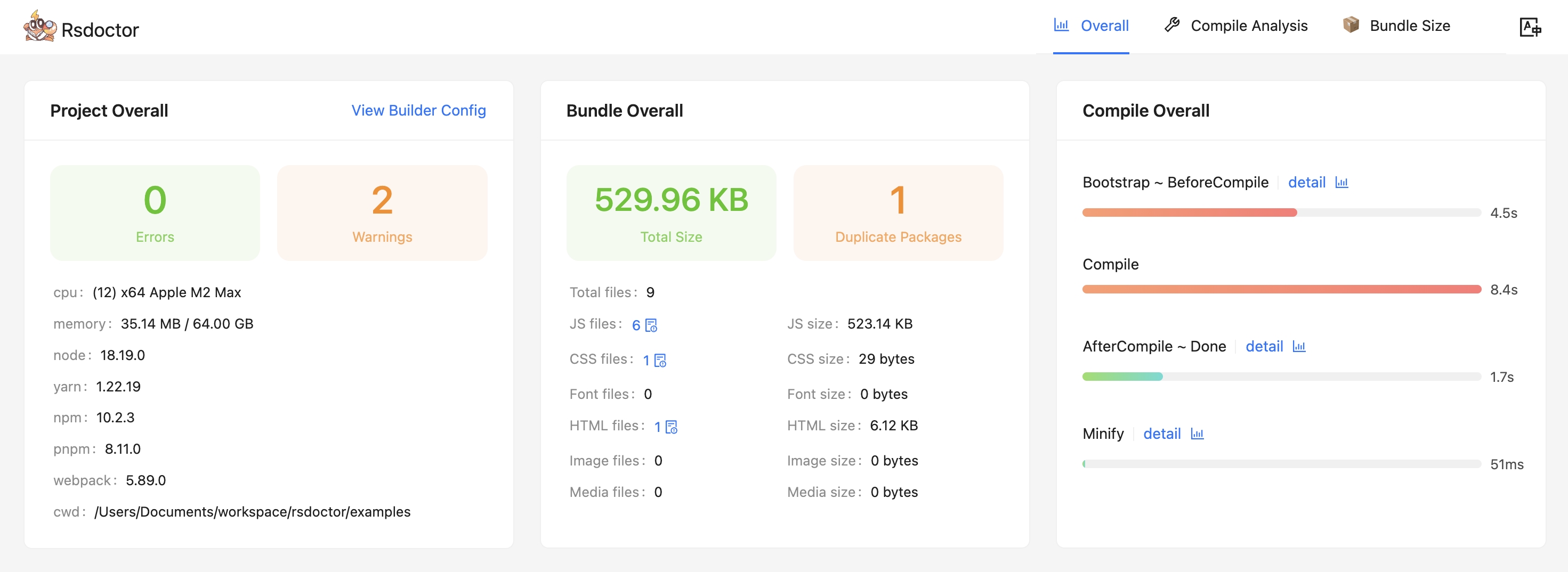
- 概览页能够知道**项目配置、诊断信息、编译信息、产物情况**。
|
|
37
|
+
|
|
38
|
+
|
|
39
|
+
|
|
40
|
+
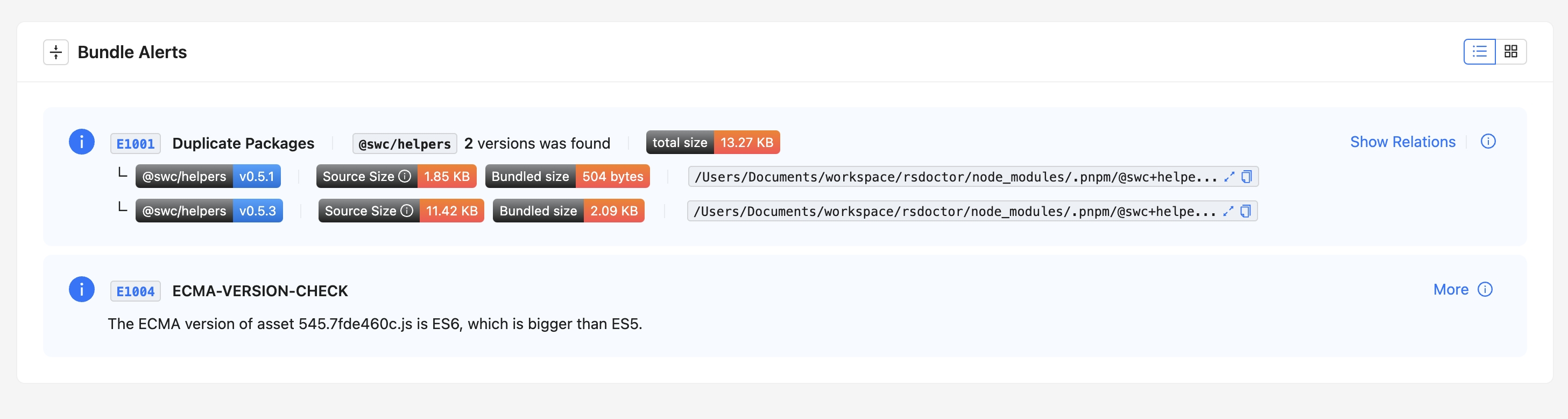
- 除了项目概览之外,我们还提供了诊断模块,分别用于编译诊断、重复包诊断等。如果你的编译、产物命中了我们定义的诊断规则,就会在工具首页出现对应的警示模块, **其中重复包可以查看到详细的引用路径**。
|
|
41
|
+
|
|
42
|
+
|
|
43
|
+
|
|
44
|
+
### ⭐️ 编译分析
|
|
45
|
+
|
|
46
|
+
面向 **Loaders、Plugins、Module Resolver** 提供了对应的数据与分析功能,来帮助你分析编译过程中的问题。
|
|
47
|
+
|
|
48
|
+
#### Loader 分析
|
|
49
|
+
|
|
50
|
+
- 该模块主要提供了 **Rspack** 或 **Webpack Loaders** 内的输入输出、预估耗时、参数等数据分析的功能。
|
|
51
|
+
|
|
52
|
+
<div style={{ display: 'flex' }}>
|
|
53
|
+
<img
|
|
54
|
+
src="https://lf3-static.bytednsdoc.com/obj/eden-cn/lognuvj/rsdoctor/docs/usage/compile/loader-timeline-overall.png"
|
|
55
|
+
width="55%"
|
|
56
|
+
style={{ margin: 'auto' }}
|
|
57
|
+
/>
|
|
58
|
+
<img
|
|
59
|
+
src="https://lf3-static.bytednsdoc.com/obj/eden-cn/lognuvj/rsdoctor/docs/usage/compile/loader-anlaysis-all.png"
|
|
60
|
+
width="45%"
|
|
61
|
+
style={{ margin: 'auto' }}
|
|
62
|
+
/>
|
|
63
|
+
</div>
|
|
64
|
+
|
|
65
|
+
#### Plugin 分析
|
|
66
|
+
|
|
67
|
+
- 该模块主要拦截并收集了 Plugins 的调用次数、预估耗时等数据信息。
|
|
68
|
+
|
|
69
|
+
<p>
|
|
70
|
+
<img
|
|
71
|
+
alt="bundle"
|
|
72
|
+
src={
|
|
73
|
+
'https://lf3-static.bytednsdoc.com/obj/eden-cn/lognuvj/rsdoctor/docs/start/compile-plugin.jpg'
|
|
74
|
+
}
|
|
75
|
+
width="600px"
|
|
76
|
+
style={{ margin: 'auto' }}
|
|
77
|
+
/>
|
|
78
|
+
</p>
|
|
79
|
+
|
|
80
|
+
#### Resolver 分析
|
|
81
|
+
|
|
82
|
+
- 该模块主要提供了项目内部单个文件中模块解析的路径数据以及预估耗时。Rspack 暂时未支持该模块。
|
|
83
|
+
|
|
84
|
+
<p>
|
|
85
|
+
<img
|
|
86
|
+
alt="bundle"
|
|
87
|
+
src={
|
|
88
|
+
'https://lf3-static.bytednsdoc.com/obj/eden-cn/lognuvj/rsdoctor/docs/start/resolver.jpeg'
|
|
89
|
+
}
|
|
90
|
+
width="700px"
|
|
91
|
+
style={{ margin: 'auto' }}
|
|
92
|
+
/>
|
|
93
|
+
</p>
|
|
94
|
+
|
|
95
|
+
### ⭐️ 产物分析
|
|
96
|
+
|
|
97
|
+
- 我们在 **「Bundle Size」** 模块中,可以看到当前项目的产物数据信息概览,以及分析重复包引入的体积与上游依赖链路。
|
|
98
|
+
|
|
99
|
+
- 此外,还可以通过 **「Bundle Analysis」** 模块来进一步分析当前产物中资源与模块关系,体积数据等信息,以及查看模块引入的原因。
|
|
100
|
+
|
|
101
|
+
<p>
|
|
102
|
+
<img
|
|
103
|
+
alt="bundle"
|
|
104
|
+
src={
|
|
105
|
+
'https://lf3-static.bytednsdoc.com/obj/eden-cn/lognuvj/rsdoctor/docs/start/bundle-size.jpg'
|
|
106
|
+
}
|
|
107
|
+
width="700px"
|
|
108
|
+
style={{ margin: 'auto' }}
|
|
109
|
+
/>
|
|
110
|
+
</p>
|
|
111
|
+
|
|
112
|
+
## 📚 快速上手
|
|
113
|
+
|
|
114
|
+
你可以参考 [快速上手](/guide/start/quick-start) 来开始体验 **Rsdoctor**。
|
|
115
|
+
|
|
116
|
+
## 💡 下一步
|
|
117
|
+
|
|
118
|
+
**提升 Rsdoctor 构建分析效率**:目前开启 Rsdoctor 时会增加项目的构建耗时,下一步我们将抽离 Rsdoctor 的部分构建分析逻辑,并转化为 **Rust 插件**,内置到 Rspack 中,从而提升 Rsdoctor 的构建分析效率。
|
|
119
|
+
|
|
120
|
+
## 致谢
|
|
121
|
+
|
|
122
|
+
Rsdoctor 的一些实现参考了社区中杰出的项目,对他们表示感谢:
|
|
123
|
+
|
|
124
|
+
- 借鉴了 [bundle-stats](https://github.com/relative-ci/bundle-stats/tree/master/packages/cli#readme) 对产物关系的分析逻辑。
|
|
125
|
+
- 借鉴了 [webpack-bundle-analyzer](https://github.com/webpack-contrib/webpack-bundle-analyzer) 对产物模块拆解及分析逻辑。
|
|
126
|
+
- [Statoscope](https://github.com/statoscope/statoscope/blob/master/README.md)是一个优秀的构建产物分析工具,Rsdoctor 在构建产物分析方面受到了它的启发。
|
|
127
|
+
- [Webpack 团队和社区](https://github.com/webpack/webpack/blob/main/README.md) 创建了一个优秀的打包工具和丰富的生态。
|
|
128
|
+
- [vite-plugin-inspect](https://github.com/antfu/vite-plugin-inspect) 启发了 Rsdoctor 对构建过程分析的探索。
|
|
@@ -0,0 +1 @@
|
|
|
1
|
+
["loader-optimization", "duplicate-pkg-problem"]
|