@rsdoctor/docs 0.0.0-next-20240620044732
This diff represents the content of publicly available package versions that have been released to one of the supported registries. The information contained in this diff is provided for informational purposes only and reflects changes between package versions as they appear in their respective public registries.
- package/LICENSE +21 -0
- package/docs/404.mdx +7 -0
- package/docs/en/_meta.json +17 -0
- package/docs/en/blog/_meta.json +12 -0
- package/docs/en/blog/release/_meta.json +1 -0
- package/docs/en/blog/release/release-note-1.mdx +129 -0
- package/docs/en/blog/topic/_meta.json +1 -0
- package/docs/en/blog/topic/duplicate-pkg-problem.mdx +141 -0
- package/docs/en/blog/topic/loader-optimization.mdx +80 -0
- package/docs/en/config/_meta.json +7 -0
- package/docs/en/config/options/_meta.json +1 -0
- package/docs/en/config/options/options-shared.mdx +67 -0
- package/docs/en/config/options/options.mdx +195 -0
- package/docs/en/config/options/term.mdx +10 -0
- package/docs/en/guide/_meta.json +17 -0
- package/docs/en/guide/more/_meta.json +1 -0
- package/docs/en/guide/more/faq.mdx +104 -0
- package/docs/en/guide/more/rules.mdx +5 -0
- package/docs/en/guide/start/_meta.json +1 -0
- package/docs/en/guide/start/cli.mdx +94 -0
- package/docs/en/guide/start/features.mdx +36 -0
- package/docs/en/guide/start/intro.mdx +115 -0
- package/docs/en/guide/start/quick-start-shared.mdx +184 -0
- package/docs/en/guide/start/quick-start.mdx +29 -0
- package/docs/en/guide/usage/_meta.json +14 -0
- package/docs/en/guide/usage/bundle-alerts.mdx +47 -0
- package/docs/en/guide/usage/bundle-overall.mdx +55 -0
- package/docs/en/guide/usage/bundle-size.mdx +148 -0
- package/docs/en/guide/usage/compile-alerts.mdx +18 -0
- package/docs/en/guide/usage/compile-overall.mdx +115 -0
- package/docs/en/guide/usage/loaders-analysis.mdx +72 -0
- package/docs/en/guide/usage/loaders-timeline.mdx +68 -0
- package/docs/en/guide/usage/module-analysis.mdx +58 -0
- package/docs/en/guide/usage/plugins-analysis.mdx +43 -0
- package/docs/en/guide/usage/project-overall.mdx +51 -0
- package/docs/en/guide/usage/resolver.mdx +32 -0
- package/docs/en/guide/usage/rule-config.mdx +85 -0
- package/docs/en/index.md +38 -0
- package/docs/public/netlify.toml +4 -0
- package/docs/public/og-image.png +0 -0
- package/docs/zh/_meta.json +17 -0
- package/docs/zh/blog/_meta.json +12 -0
- package/docs/zh/blog/release/_meta.json +1 -0
- package/docs/zh/blog/release/release-note-1.mdx +128 -0
- package/docs/zh/blog/topic/_meta.json +1 -0
- package/docs/zh/blog/topic/duplicate-pkg-problem.mdx +138 -0
- package/docs/zh/blog/topic/loader-optimization.mdx +80 -0
- package/docs/zh/config/_meta.json +7 -0
- package/docs/zh/config/options/_meta.json +1 -0
- package/docs/zh/config/options/options-shared.mdx +70 -0
- package/docs/zh/config/options/options.mdx +170 -0
- package/docs/zh/config/options/term.mdx +10 -0
- package/docs/zh/guide/_meta.json +17 -0
- package/docs/zh/guide/more/_meta.json +1 -0
- package/docs/zh/guide/more/faq.mdx +102 -0
- package/docs/zh/guide/more/rules.mdx +5 -0
- package/docs/zh/guide/start/_meta.json +1 -0
- package/docs/zh/guide/start/cli.mdx +94 -0
- package/docs/zh/guide/start/features.mdx +36 -0
- package/docs/zh/guide/start/intro.mdx +116 -0
- package/docs/zh/guide/start/quick-start-shared.mdx +183 -0
- package/docs/zh/guide/start/quick-start.mdx +29 -0
- package/docs/zh/guide/usage/_meta.json +14 -0
- package/docs/zh/guide/usage/bundle-alerts.mdx +49 -0
- package/docs/zh/guide/usage/bundle-overall.mdx +57 -0
- package/docs/zh/guide/usage/bundle-size.mdx +148 -0
- package/docs/zh/guide/usage/compile-alerts.mdx +18 -0
- package/docs/zh/guide/usage/compile-overall.mdx +115 -0
- package/docs/zh/guide/usage/loaders-analysis.mdx +73 -0
- package/docs/zh/guide/usage/loaders-timeline.mdx +68 -0
- package/docs/zh/guide/usage/module-analysis.mdx +59 -0
- package/docs/zh/guide/usage/plugins-analysis.mdx +43 -0
- package/docs/zh/guide/usage/project-overall.mdx +51 -0
- package/docs/zh/guide/usage/resolver.mdx +32 -0
- package/docs/zh/guide/usage/rule-config.mdx +86 -0
- package/docs/zh/index.md +38 -0
- package/docs/zh/shared/features-rspack.md +24 -0
- package/docs/zh/shared/features.md +29 -0
- package/package.json +45 -0
- package/src/components/NextSteps.module.scss +6 -0
- package/src/components/NextSteps.tsx +7 -0
- package/src/components/Overview.module.scss +61 -0
- package/src/components/Overview.tsx +40 -0
- package/src/components/RuleIndex.module.scss +57 -0
- package/src/components/RuleIndex.tsx +75 -0
- package/src/components/Step.module.scss +32 -0
- package/src/components/Step.tsx +13 -0
- package/src/global.d.ts +4 -0
- package/src/utils.ts +9 -0
|
@@ -0,0 +1,195 @@
|
|
|
1
|
+
# Options
|
|
2
|
+
|
|
3
|
+
## RsdoctorRspackPlugin
|
|
4
|
+
|
|
5
|
+
`RsdoctorRspackPlugin` class are exported by `@rsdoctor/rspack-plugin`, and the option is [RsdoctorRspackPluginOptions](#options-1).
|
|
6
|
+
|
|
7
|
+
<Tabs>
|
|
8
|
+
|
|
9
|
+
<Tab label="cjs">
|
|
10
|
+
|
|
11
|
+
```js
|
|
12
|
+
const { RsdoctorRspackPlugin } = require('@rsdoctor/rspack-plugin');
|
|
13
|
+
|
|
14
|
+
new RsdoctorRspackPlugin({
|
|
15
|
+
/** RsdoctorRspackPluginOptions */
|
|
16
|
+
});
|
|
17
|
+
```
|
|
18
|
+
|
|
19
|
+
</Tab>
|
|
20
|
+
|
|
21
|
+
<Tab label="esm">
|
|
22
|
+
|
|
23
|
+
```ts
|
|
24
|
+
import { RsdoctorRspackPlugin } from '@rsdoctor/rspack-plugin';
|
|
25
|
+
|
|
26
|
+
new RsdoctorRspackPlugin({
|
|
27
|
+
/** RsdoctorRspackPluginOptions */
|
|
28
|
+
});
|
|
29
|
+
```
|
|
30
|
+
|
|
31
|
+
</Tab>
|
|
32
|
+
|
|
33
|
+
</Tabs>
|
|
34
|
+
|
|
35
|
+
## RsdoctorWebpackPlugin
|
|
36
|
+
|
|
37
|
+
`RsdoctorWebpackPlugin` class are exported by `@rsdoctor/webpack-plugin`, and the option is [RsdoctorWebpackPluginOptions](#options-1).
|
|
38
|
+
|
|
39
|
+
import { Tab, Tabs } from '@theme';
|
|
40
|
+
|
|
41
|
+
<Tabs>
|
|
42
|
+
|
|
43
|
+
<Tab label="cjs">
|
|
44
|
+
|
|
45
|
+
```js
|
|
46
|
+
const { RsdoctorWebpackPlugin } = require('@rsdoctor/webpack-plugin');
|
|
47
|
+
|
|
48
|
+
new RsdoctorWebpackPlugin({
|
|
49
|
+
/** RsdoctorWebpackPluginOptions */
|
|
50
|
+
});
|
|
51
|
+
```
|
|
52
|
+
|
|
53
|
+
</Tab>
|
|
54
|
+
|
|
55
|
+
<Tab label="esm">
|
|
56
|
+
|
|
57
|
+
```ts
|
|
58
|
+
import { RsdoctorWebpackPlugin } from '@rsdoctor/webpack-plugin';
|
|
59
|
+
|
|
60
|
+
new RsdoctorWebpackPlugin({
|
|
61
|
+
/** RsdoctorWebpackPluginOptions */
|
|
62
|
+
});
|
|
63
|
+
```
|
|
64
|
+
|
|
65
|
+
</Tab>
|
|
66
|
+
|
|
67
|
+
</Tabs>
|
|
68
|
+
|
|
69
|
+
## Options
|
|
70
|
+
|
|
71
|
+
**Type:** `Object`
|
|
72
|
+
|
|
73
|
+
This is the options for the [RsdoctorWebpackPlugin](#rsdoctorwebpackplugin) and [RsdoctorRspackPlugin](#rsdoctorrspackplugin). It contains these properties:
|
|
74
|
+
|
|
75
|
+
- [disableClientServer](#disableclientserver)
|
|
76
|
+
- [features](#features)
|
|
77
|
+
|
|
78
|
+
### disableClientServer
|
|
79
|
+
|
|
80
|
+
- **Type:** `boolean`
|
|
81
|
+
- **Optional:** `true`
|
|
82
|
+
- **Default:** `false`
|
|
83
|
+
|
|
84
|
+
Whether to automatically open the Rsdoctor report page. If you do not need to view the analysis report provided by Rsdoctor in the browser, you can enable this configuration item.
|
|
85
|
+
|
|
86
|
+
### features
|
|
87
|
+
|
|
88
|
+
- **Type:** [RsdoctorWebpackPluginFeatures](#rsdoctorwebpackpluginfeatures) | [Array\<keyof RsdoctorWebpackPluginFeatures\>](#rsdoctorwebpackpluginfeatures) | [RsdoctorRspackPluginFeatures](#rsdoctorrspackpluginfeatures) | [Array\<keyof RsdoctorRspackPluginFeatures\>](#rsdoctorrspackpluginfeatures)
|
|
89
|
+
- **Optional:** `true`
|
|
90
|
+
- **Default:** `['loader', 'plugins', 'bundle']`
|
|
91
|
+
|
|
92
|
+
#### features values
|
|
93
|
+
|
|
94
|
+
:::tip
|
|
95
|
+
|
|
96
|
+
**If an "out of memory" error occurs, you can try the following:**
|
|
97
|
+
|
|
98
|
+
1. Open the **lite** mode。
|
|
99
|
+
2. Increase the node memory limit, for example: NODE_OPTIONS=--max-old-space-size=8096.
|
|
100
|
+
|
|
101
|
+
- Reason: During the build process, source code information is cached, which exceeds memory. Therefore, enabling the **"lite" mode** can help alleviate the problem.
|
|
102
|
+
- Difference: The difference between the "lite" mode and the normal mode is that source code information is no longer cached, only packaged code information is cached. Thus, the code analyzed on the page will also only be packaged.
|
|
103
|
+
|
|
104
|
+
:::
|
|
105
|
+
|
|
106
|
+
The `features` attribute is used to analyze the function switches, and the specific functional items are as follows:
|
|
107
|
+
|
|
108
|
+
- **loader**: Analysis of Loader time consumption and code compilation changes, enabled by default.
|
|
109
|
+
- **plugins**: Analysis of Plugins calls and time consumption, enabled by default.
|
|
110
|
+
- **bundle**: Analysis of build artifacts, enabled by default.
|
|
111
|
+
- **resolver**: resolver analysis, disabled by default.
|
|
112
|
+
- **lite**: lite mode. The difference between lite mode and normal mode is that source code information is no longer cached, only packaged code information is cached, so the code analyzed on the page will also be packaged. The default is normal mode.
|
|
113
|
+
|
|
114
|
+
Therefore, **the default configuration enables bundle analysis capabilities and Loader and Plugin build-time analysis**. The Resolver analysis capability is not enabled, and Rspack does not currently support Resolver analysis capabilities.
|
|
115
|
+
|
|
116
|
+
#### features types
|
|
117
|
+
|
|
118
|
+
- if the `features` is set as an `Array`, it will **open** the features which you define in this array **only**.
|
|
119
|
+
- if the `features` is set as an `Object`, it will **close** the features which you set the value is `false`.
|
|
120
|
+
|
|
121
|
+
### reportCodeType
|
|
122
|
+
|
|
123
|
+
- Type: `{ noModuleSource?: boolean; noAssetsAndModuleSource?: boolean }`
|
|
124
|
+
- Optional: true
|
|
125
|
+
- Default: undefined
|
|
126
|
+
- Description
|
|
127
|
+
|
|
128
|
+
- Select the output analysis data:
|
|
129
|
+
|
|
130
|
+
- undefined is all complete data;
|
|
131
|
+
|
|
132
|
+
- noModuleSource: true is the output of data other than module code; Module code is the packaged module code of a file disassembled in the Bundle.
|
|
133
|
+
|
|
134
|
+
- noAssetsAndModuleSource: true is the output of data other than module code and Assets product code.
|
|
135
|
+
|
|
136
|
+
- Example
|
|
137
|
+
|
|
138
|
+
```js
|
|
139
|
+
new WebDoctorWebpackPlugin({
|
|
140
|
+
disableClientServer: false, // It is recommended to disable the server capability in the CI environment, otherwise it will block the pipeline process. You can check the CI environment using `process.env.CI_ACTOR`.
|
|
141
|
+
features: ['loader', 'bundle', 'plugins'],
|
|
142
|
+
reportCodeType: { noModuleSource: true } // { noAssetsAndModuleSource: true }
|
|
143
|
+
}),
|
|
144
|
+
```
|
|
145
|
+
|
|
146
|
+
### disableTOSUpload
|
|
147
|
+
|
|
148
|
+
- Type: boolean
|
|
149
|
+
- Optional: true
|
|
150
|
+
- Default: false
|
|
151
|
+
- Description
|
|
152
|
+
|
|
153
|
+
Turn tos upload on or off. True is to turn off tos upload, and false is tos upload on.
|
|
154
|
+
|
|
155
|
+
- Example
|
|
156
|
+
|
|
157
|
+
```js
|
|
158
|
+
new WebDoctorWebpackPlugin({
|
|
159
|
+
disableClientServer: false, // It is recommended to disable the server capability in the CI environment, otherwise it will block the pipeline process. You can check the CI environment using `process.env.CI_ACTOR`.
|
|
160
|
+
features: ['loader', 'bundle', 'plugins'],
|
|
161
|
+
disableTOSUpload: true,
|
|
162
|
+
}),
|
|
163
|
+
```
|
|
164
|
+
|
|
165
|
+
### supports
|
|
166
|
+
|
|
167
|
+
- **Type:** [Supports Types](#supports-types)
|
|
168
|
+
- **Optional:** `true`
|
|
169
|
+
- **Default:** `undefined`
|
|
170
|
+
|
|
171
|
+
This option is used to configure whether Rsdoctor enables support for certain detailed feature analysis capabilities, such as whether to enable compatibility with BannerPlugin.
|
|
172
|
+
|
|
173
|
+
#### Supports Types
|
|
174
|
+
|
|
175
|
+
```ts
|
|
176
|
+
type ISupport = {
|
|
177
|
+
banner: boolean;
|
|
178
|
+
};
|
|
179
|
+
```
|
|
180
|
+
|
|
181
|
+
#### banner
|
|
182
|
+
|
|
183
|
+
:::danger
|
|
184
|
+
When enabling the analysis of BannerPlugin, Rsdoctor should not be used in production versions.
|
|
185
|
+
:::
|
|
186
|
+
|
|
187
|
+
If `supports.banner` is enabled, Rsdoctor will enable compatibility logic for BannerPlugin. For more details, please refer to: [Supports BannerPlugin](../../guide/usage/bundle-size#supports-bannerplugin)
|
|
188
|
+
|
|
189
|
+
### port
|
|
190
|
+
|
|
191
|
+
- **Type:** `number`
|
|
192
|
+
- **Optional:** `true`
|
|
193
|
+
- **Default:** `random(3000, 8999)`
|
|
194
|
+
|
|
195
|
+
Configure the port for the Rsdoctor server.
|
|
@@ -0,0 +1,10 @@
|
|
|
1
|
+
# Terminology
|
|
2
|
+
|
|
3
|
+
## Common Terminology
|
|
4
|
+
|
|
5
|
+
### manifest.json
|
|
6
|
+
|
|
7
|
+
When your project integrates with plugins provided by **Rsdoctor** (such as `@rsdoctor/webpack-plugin`, etc.), Rsdoctor will write **build-related data information** into a local JSON file:
|
|
8
|
+
|
|
9
|
+
- The **filename is `manifest.json`**
|
|
10
|
+
- The output path of this file is `output directory of the project/.rsdoctor/manifest.json`
|
|
@@ -0,0 +1 @@
|
|
|
1
|
+
["faq", "rules"]
|
|
@@ -0,0 +1,104 @@
|
|
|
1
|
+
# FAQ
|
|
2
|
+
|
|
3
|
+
## How to use only a specific feature of Rsdoctor?
|
|
4
|
+
|
|
5
|
+
When we **only need** the [bundle size analysis](../usage/bundle-size) feature of Rsdoctor, we can configure the corresponding [Features](/config/options/options) option when integrating the Rsdoctor plugin. Refer to the code snippet below:
|
|
6
|
+
|
|
7
|
+
```ts
|
|
8
|
+
import { RsdoctorWebpackPlugin } from '@rsdoctor/webpack-plugin';
|
|
9
|
+
|
|
10
|
+
new RsdoctorWebpackPlugin({
|
|
11
|
+
features: ['bundle'], // Represents enabling only the bundle size analysis feature
|
|
12
|
+
});
|
|
13
|
+
```
|
|
14
|
+
|
|
15
|
+
## Loader time-consuming data is inaccurate?
|
|
16
|
+
|
|
17
|
+
The time-consuming data provided by Rsdoctor for loaders is an **estimated time**. Why can't it accurately measure the timing? It's because we know that loader execution can be both **asynchronous** and **synchronous**.
|
|
18
|
+
Additionally, the builder will **parallelize the execution** of multiple non-conflicting loader functions. Since JavaScript is single-threaded, multiple loader functions can **compete for the current task queue**.
|
|
19
|
+
Furthermore, the asynchronous logic within loader functions cannot be recognized, causing a single loader function to potentially span across the execution of multiple other loaders. As a result, there are three possible cases, as shown in the following diagram:
|
|
20
|
+
|
|
21
|
+
<img
|
|
22
|
+
src="https://lf3-static.bytednsdoc.com/obj/eden-cn/lognuvj/rsdoctor/docs/usage/compile/loader-cases.jpeg"
|
|
23
|
+
style={{ width: '250px' }}
|
|
24
|
+
/>
|
|
25
|
+
|
|
26
|
+
Therefore, the loader timing provided by Rsdoctor is an **estimate**. The timing data we provide is adapted to handle Case 1 and Case 2 from the diagram. As for Case 3, we are still exploring solutions.
|
|
27
|
+
|
|
28
|
+
## `out of memory` error when using `Rsdoctor` for building
|
|
29
|
+
|
|
30
|
+
If you encounter an `out of memory` error, you can try the following two methods, with the first one being recommended:
|
|
31
|
+
|
|
32
|
+
### Method 1
|
|
33
|
+
|
|
34
|
+
Increase the memory limit of Node, for example: NODE_OPTIONS=--max-old-space-size=8096.
|
|
35
|
+
|
|
36
|
+
### Method 2
|
|
37
|
+
|
|
38
|
+
You can add the `lite` field to the `features` array to use the lite mode. Additionally, since the `features` array overrides the default configuration when it is an array, you should:
|
|
39
|
+
|
|
40
|
+
- Add `loader` and `plugins` to the `features` array if you need build-time analysis to enable the analysis of loader and plugin timings.
|
|
41
|
+
|
|
42
|
+
- Add `bundle` to the `features` array if you need bundle analysis to enable the analysis of build artifacts.
|
|
43
|
+
|
|
44
|
+
The following example enables the lite mode, build-time analysis, and bundle analysis:
|
|
45
|
+
|
|
46
|
+
```js
|
|
47
|
+
const { RsdoctorWebpackPlugin } = require('@rsdoctor/webpack-plugin');
|
|
48
|
+
|
|
49
|
+
// adding the plugin to your configuration
|
|
50
|
+
module.exports = {
|
|
51
|
+
// ...
|
|
52
|
+
plugins: [
|
|
53
|
+
new RsdoctorWebpackPlugin({
|
|
54
|
+
disableClientServer: false,
|
|
55
|
+
features: ['lite', 'loader', 'plugins', 'bundle'],
|
|
56
|
+
}),
|
|
57
|
+
].filter(Boolean),
|
|
58
|
+
};
|
|
59
|
+
```
|
|
60
|
+
|
|
61
|
+
- Cause: During the build process, the source code information is stored, which exceeds the memory limit. Enabling the `lite` mode can alleviate this issue.
|
|
62
|
+
- Difference: The difference between the **lite mode** and the **normal mode** is that the **lite mode** no longer stores the **source code information**, only the **bundled code** is stored. Additionally, the code displayed in the analysis report will only consist of the **bundled code**.
|
|
63
|
+
|
|
64
|
+
## Next.js
|
|
65
|
+
|
|
66
|
+
### Issue with Next.js project report page
|
|
67
|
+
|
|
68
|
+
Initialize the RsdoctorWebpackPlugin plugin in the [Webpack Config](https://nextjs.org/docs/app/api-reference/next-config-js/webpack) of `next.config.js`.
|
|
69
|
+
|
|
70
|
+
However, in Next.js, when Rsdoctor is enabled and the **build command** is executed, the report server started by Rsdoctor will be disconnected. Therefore, if you need to reopen the report, you can use **[@rsdoctor/cli](../start/cli.mdx)** without performing the build operation.
|
|
71
|
+
|
|
72
|
+
For example, if the build artifact of Rsdoctor is located at the path `.next/.rsdoctor/manifest.json`, you can open the report page by executing the following command:
|
|
73
|
+
|
|
74
|
+
```bash
|
|
75
|
+
npx @rsdoctor/cli analyze --profile .next/.rsdoctor/manifest.json
|
|
76
|
+
|
|
77
|
+
```
|
|
78
|
+
|
|
79
|
+
### Loader analysis with rule override is not supported in Next.js
|
|
80
|
+
|
|
81
|
+
- Rsdoctor Loader logic: Since Rsdoctor modifies the Loader Rules, Rsdoctor wraps the Module in a Proxy to support Loader logic with rule override.
|
|
82
|
+
|
|
83
|
+
- Next.js specific logic: In Next.js, the LoaderContext adds the currentTraceSpan property, which is obtained from the value retrieved using the Module as the key. However, since Rsdoctor wraps the Module in a Proxy (referred to as ProxyModule), retrieving the value using ProxyModule as the key will result in no value being obtained.
|
|
84
|
+
|
|
85
|
+
Based on the above reason, Rsdoctor does not wrap the Module in a Proxy in Next.js projects, which means it does not support Loader analysis with rule override. If you encounter Loader errors, you need to configure the **[features](../../config/options/options#features)** parameter to disable **Loader** analysis. You can use the following configuration:
|
|
86
|
+
|
|
87
|
+
```js title="next.config.js"
|
|
88
|
+
const { RsdoctorWebpackPlugin } = require('@rsdoctor/webpack-plugin');
|
|
89
|
+
|
|
90
|
+
module.exports = {
|
|
91
|
+
// ...
|
|
92
|
+
webpack: (config, { isServer }) => {
|
|
93
|
+
config.plugins.push(
|
|
94
|
+
new RsdoctorWebpackPlugin({
|
|
95
|
+
// 插件选项
|
|
96
|
+
features: ['bundle', 'plugins'],
|
|
97
|
+
}),
|
|
98
|
+
);
|
|
99
|
+
return config;
|
|
100
|
+
},
|
|
101
|
+
};
|
|
102
|
+
```
|
|
103
|
+
|
|
104
|
+
- **Options:** The plugin provides some configurations, please refer to [Options](../../config/options/options).
|
|
@@ -0,0 +1 @@
|
|
|
1
|
+
["intro", "quick-start", "features", "cli"]
|
|
@@ -0,0 +1,94 @@
|
|
|
1
|
+
# CLI Tutorial
|
|
2
|
+
|
|
3
|
+
We provide `@rsdoctor/cli` for you to use Rsdoctor's features locally through the CLI program.
|
|
4
|
+
|
|
5
|
+
:::tip
|
|
6
|
+
`@rsdoctor/webpack-plugin`, `@rsdoctor/rspack-plugin`, and `@rsdoctor/cli` should have the same major and minor versions.
|
|
7
|
+
:::
|
|
8
|
+
|
|
9
|
+
## Install @rsdoctor/cli
|
|
10
|
+
|
|
11
|
+
:::tip
|
|
12
|
+
|
|
13
|
+
- @rsdoctor/cli & @rsdoctor/webpack-plugin & @rsdoctor/rspack-plugin >= 0.1.3.
|
|
14
|
+
- You can also use the non-installation method by using the `npx @rsdoctor/cli <command> [options]` command.
|
|
15
|
+
|
|
16
|
+
:::
|
|
17
|
+
|
|
18
|
+
import { PackageManagerTabs } from '@theme';
|
|
19
|
+
|
|
20
|
+
import { Tab, Tabs } from 'rspress/theme';
|
|
21
|
+
|
|
22
|
+
<PackageManagerTabs command="add @rsdoctor/cli -D" />
|
|
23
|
+
|
|
24
|
+
## Command Usage
|
|
25
|
+
|
|
26
|
+
```linux
|
|
27
|
+
|
|
28
|
+
rsdoctor <command> [options]
|
|
29
|
+
|
|
30
|
+
```
|
|
31
|
+
|
|
32
|
+
`@rsdoctor/cli` currently provides the following commands for different functionalities:
|
|
33
|
+
|
|
34
|
+
### analyze Command
|
|
35
|
+
|
|
36
|
+
The `analyze` command is mainly used to load the [manifest.json](../../config/options/term.mdx) file locally and start Rsdoctor's analysis report page without the need to rebuild.
|
|
37
|
+
|
|
38
|
+
```linux
|
|
39
|
+
rsdoctor analyze --profile <manifestFile>
|
|
40
|
+
```
|
|
41
|
+
|
|
42
|
+
**Parameter Definition**
|
|
43
|
+
|
|
44
|
+
- `manifestFile` is the path to the [manifest.json](../../config/options/term.mdx) file (supports local path)
|
|
45
|
+
|
|
46
|
+
**Usage Example**
|
|
47
|
+
|
|
48
|
+
```bash
|
|
49
|
+
rsdoctor analyze --profile "./dist/.rsdoctor/manifest.json"
|
|
50
|
+
```
|
|
51
|
+
|
|
52
|
+
## Node API
|
|
53
|
+
|
|
54
|
+
We provide a Node.js API in `@rsdoctor/cli` that allows you to make calls during runtime in Node.js.
|
|
55
|
+
|
|
56
|
+
**Importing the Module**
|
|
57
|
+
|
|
58
|
+
<Tabs>
|
|
59
|
+
|
|
60
|
+
<Tab label="cjs">
|
|
61
|
+
|
|
62
|
+
```js
|
|
63
|
+
const { execute } = require('@rsdoctor/cli');
|
|
64
|
+
```
|
|
65
|
+
|
|
66
|
+
</Tab>
|
|
67
|
+
|
|
68
|
+
<Tab label="esm">
|
|
69
|
+
|
|
70
|
+
```js
|
|
71
|
+
import { execute } from '@rsdoctor/cli';
|
|
72
|
+
```
|
|
73
|
+
|
|
74
|
+
</Tab>
|
|
75
|
+
|
|
76
|
+
</Tabs>
|
|
77
|
+
|
|
78
|
+
**execute()**
|
|
79
|
+
|
|
80
|
+
The `execute` asynchronous function is the execution function of Rsdoctor CLI. By calling the `execute` function, it will automatically parse [process.argv](https://nodejs.org/dist/latest-v18.x/docs/api/process.html#processargv) and invoke different commands.
|
|
81
|
+
|
|
82
|
+
**execute('analyze', \{...\})**
|
|
83
|
+
|
|
84
|
+
If you need to directly execute the [analyze command](#analyze-command) through the Node.js API, you can call it as follows:
|
|
85
|
+
|
|
86
|
+
```ts
|
|
87
|
+
execute('analyze', {
|
|
88
|
+
profile: 'input the manifest.json path or url',
|
|
89
|
+
}).then((sdk) => {
|
|
90
|
+
console.log('execute "anaylze" command success');
|
|
91
|
+
// you can stop the Rsdoctor's dev-server by calling the sdk'api below:
|
|
92
|
+
// sdk.dispose();
|
|
93
|
+
});
|
|
94
|
+
```
|
|
@@ -0,0 +1,36 @@
|
|
|
1
|
+
# Features
|
|
2
|
+
|
|
3
|
+
Here you can learn about the main features supported by Rsdoctor.
|
|
4
|
+
|
|
5
|
+
## Build Overview
|
|
6
|
+
|
|
7
|
+
| Feature | Description | Related Links |
|
|
8
|
+
| -------------------- | ---------------------------------------------------------------------- | -------------------------------------------- |
|
|
9
|
+
| Project Overview | View information such as the current project configuration and version | [Project Overall](../usage/project-overall) |
|
|
10
|
+
| Bundle Overview | View information about the artifacts built for the current project | [Bundle Overall](../usage/bundle-overall) |
|
|
11
|
+
| Compilation Overview | View data information about the current project's compilation process | [Compile Overall](../usage/compile-overall) |
|
|
12
|
+
| Bundle Alert | The ability to perform detection based on build artifact data | [Bundle Alert](../usage/bundle-alerts) |
|
|
13
|
+
| Compilation Alert | The ability to perform detection based on compilation data | [Compilation Alert](../usage/compile-alerts) |
|
|
14
|
+
|
|
15
|
+
## Compilation Analysis
|
|
16
|
+
|
|
17
|
+
| Feature | Description | Related Links |
|
|
18
|
+
| ------------------------------------------------- | ---------------------------------------------------------------------------------------------------------------------------- | ------------------------------------------------------------------------ |
|
|
19
|
+
| Compilation Overview | View data information about the current project's compilation process | [Compile Overall](../usage/compile-overall) |
|
|
20
|
+
| Compilation Alert | The ability to perform detection based on compilation data | [Compilation Alert](../usage/compile-alerts) |
|
|
21
|
+
| Loader Compilation Behavior Analysis | Loader analysis data in directory and file dimensions, displaying the compilation behavior of a single file at the same time | [Loaders Analysis](../usage/loaders-analysis) |
|
|
22
|
+
| Loader Time Consumption Analysis | Execution sequence diagram of all Loaders in the current project | [Loaders Timeline](../usage/loaders-timeline) |
|
|
23
|
+
| Plugins Analysis | Data analysis of the plugins used in the project | [Plugins Analysis](../usage/plugins-analysis) |
|
|
24
|
+
| Resolver Analysis | Analysis data on Resolver parsing capabilities | [Resolver Analysis](../usage/resolver) |
|
|
25
|
+
| Loader Time Consumption Analysis and Optimization | This document describes how to use Rsdoctor to analyze and optimize build time consumption | [Loader Analysis and Optimization](../../blog/topic/loader-optimization) |
|
|
26
|
+
|
|
27
|
+
## Bundle Analysis
|
|
28
|
+
|
|
29
|
+
| Feature | Description | Related Links |
|
|
30
|
+
| ------------------------------- | ------------------------------------------------------------------------------------------------------------------------------------------------------ | ------------------------------------------------------------------------- |
|
|
31
|
+
| Bundle Overview | View information about the artifacts built for the current project | [Bundle Overall](../usage/bundle-overall) |
|
|
32
|
+
| Bundle Alert | The ability to perform detection based on build artifact data | [Bundle Alert](../usage/bundle-alerts) |
|
|
33
|
+
| Bundle Analysis | Analysis of the relationships between assets, chunks, and modules in the artifact, as well as the packaged code and size analysis of each module, etc. | [Bundle Analysis](../usage/bundle-size) |
|
|
34
|
+
| Module Analysis | Analysis of module dependencies | [Modules Dependency Analysis](../usage/module-analysis) |
|
|
35
|
+
| Duplicate Packages Optimization | Inspection of duplicate dependencies used in the project | [Duplicate Packages Optimization](../../blog/topic/duplicate-pkg-problem) |
|
|
36
|
+
| Bundle Diff | Comparative analysis of two artifacts | Planned support |
|
|
@@ -0,0 +1,115 @@
|
|
|
1
|
+
# Introduction
|
|
2
|
+
|
|
3
|
+
## 💡 What is Rsdoctor?
|
|
4
|
+
|
|
5
|
+
- Rsdoctor is a one-stop tool for diagnosing and analyzing the build process and build artifacts.
|
|
6
|
+
- Rsdoctor is a tool that supports Webpack and Rspack build analysis.
|
|
7
|
+
- Rsdoctor is an analysis tool that can display the time-consuming and behavioral details of the compilation.
|
|
8
|
+
- Rsdoctor is a tool that provides bundle Diff and other anti-degradation capabilities simultaneously.
|
|
9
|
+
|
|
10
|
+
## 🔥 Features
|
|
11
|
+
|
|
12
|
+
- **Compilation Visualization**: Rsdoctor visualizes the compilation behavior and time consumption, making it easy to view build issues.
|
|
13
|
+
- **Multiple Analysis Capabilities**: Rsdoctor supports build artifact, build-time analysis, and anti-degradation capabilities:
|
|
14
|
+
- Build artifact support for resource lists and module dependencies, etc.
|
|
15
|
+
- Build-time analysis supports Loader, Plugin, and Resolver building process analysis, including: Rspack's builtin:swc-loader.
|
|
16
|
+
- Build rules support duplicate package detection and ES Version Check, etc.
|
|
17
|
+
- Currently, bundle Diff capabilities are also available.
|
|
18
|
+
- **Support Custom Rules**: In addition to built-in build scan rules, Rsdoctor also supports users adding custom component scan rules based on the build data of Rsdoctor.
|
|
19
|
+
- **Framework-Independent**: Rsdoctor support all projects built on Webpack or Rspack.
|
|
20
|
+
|
|
21
|
+
## 🛠️ Introduction
|
|
22
|
+
|
|
23
|
+
### ⭐️ Overview
|
|
24
|
+
|
|
25
|
+
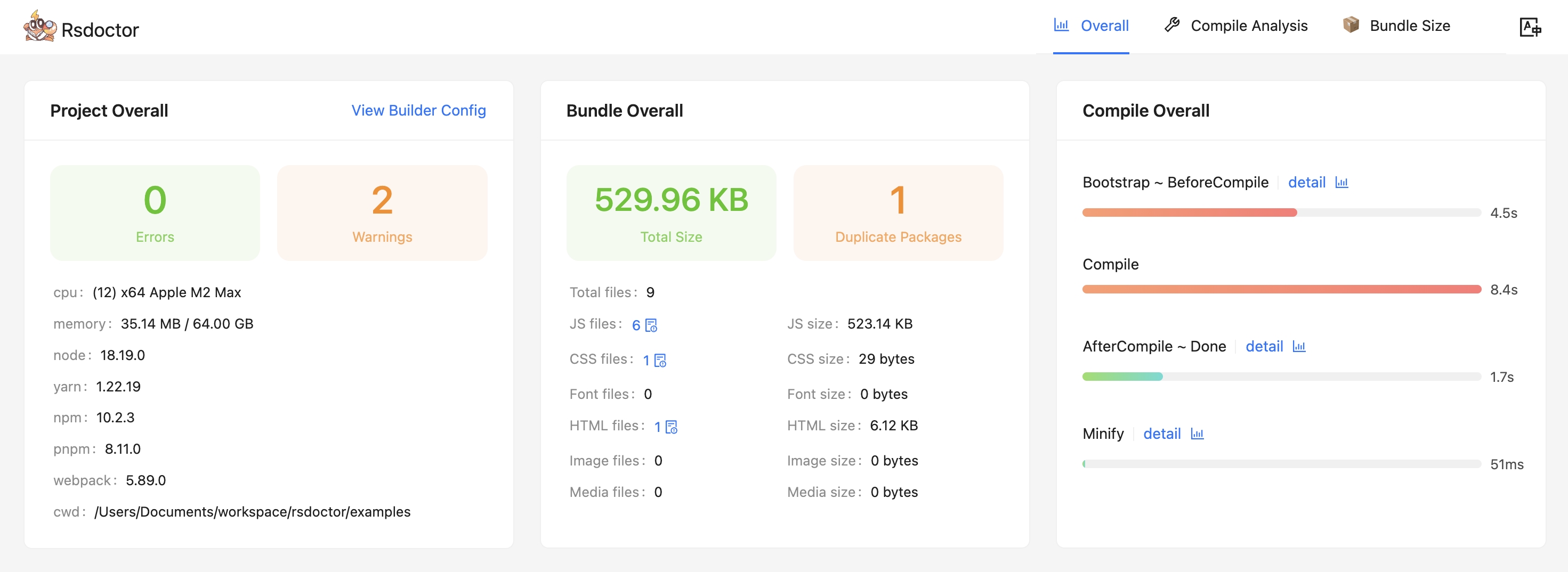
- The overview page (i.e. the home page) can know **project configuration, diagnostic information, compilation information, and product status**.
|
|
26
|
+
|
|
27
|
+
|
|
28
|
+
|
|
29
|
+
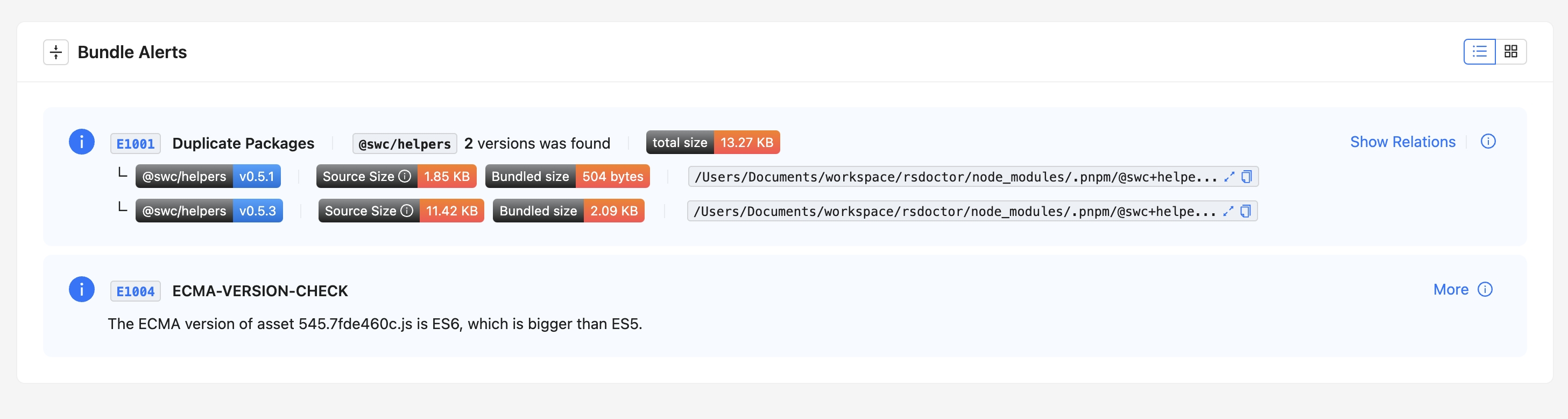
- In addition to the project overview, we also provide diagnostic functions, including compilation diagnostics and duplicate packages diagnostics. If your compilation and products hit the diagnostic rules we defined,
|
|
30
|
+
the corresponding warning alerts will appear on the tool's home page. **where you can see the detailed reference path of duplicate packages**:
|
|
31
|
+
|
|
32
|
+
|
|
33
|
+
|
|
34
|
+
### ⭐️ Compilation Analysis
|
|
35
|
+
|
|
36
|
+
Provides corresponding data and analysis functions for **Loaders, Plugins, and Module Resolve** to help you analyze problems in the compilation process.
|
|
37
|
+
|
|
38
|
+
#### Loader Analysis
|
|
39
|
+
|
|
40
|
+
- This module mainly provides the function of data analysis such as input and output, estimated time consumption, and parameters within Rspack / Webpack Loaders.
|
|
41
|
+
|
|
42
|
+
<div style={{ display: 'flex' }}>
|
|
43
|
+
<img
|
|
44
|
+
src="https://lf3-static.bytednsdoc.com/obj/eden-cn/lognuvj/rsdoctor/docs/usage/compile/loader-timeline-overall.png"
|
|
45
|
+
width="55%"
|
|
46
|
+
style={{ margin: 'auto' }}
|
|
47
|
+
/>
|
|
48
|
+
<img
|
|
49
|
+
src="https://lf3-static.bytednsdoc.com/obj/eden-cn/lognuvj/rsdoctor/docs/usage/compile/loader-anlaysis-all.png"
|
|
50
|
+
width="45%"
|
|
51
|
+
style={{ margin: 'auto' }}
|
|
52
|
+
/>
|
|
53
|
+
</div>
|
|
54
|
+
|
|
55
|
+
#### Plugin Analysis
|
|
56
|
+
|
|
57
|
+
- This module mainly intercepts and collects data information such as the number of calls and estimated time consumption of Plugins.
|
|
58
|
+
|
|
59
|
+
<p>
|
|
60
|
+
<img
|
|
61
|
+
alt="bundle"
|
|
62
|
+
src={
|
|
63
|
+
'https://lf3-static.bytednsdoc.com/obj/eden-cn/lognuvj/rsdoctor/docs/start/compile-plugin.jpg'
|
|
64
|
+
}
|
|
65
|
+
width="600px"
|
|
66
|
+
style={{ margin: 'auto' }}
|
|
67
|
+
/>
|
|
68
|
+
</p>
|
|
69
|
+
|
|
70
|
+
#### Resolve Analysis
|
|
71
|
+
|
|
72
|
+
- This module mainly provides path data and estimated time consumption for module resolution in a single file within the project. Rspack does not currently support this module.
|
|
73
|
+
|
|
74
|
+
<p>
|
|
75
|
+
<img
|
|
76
|
+
alt="bundle"
|
|
77
|
+
src={
|
|
78
|
+
'https://lf3-static.bytednsdoc.com/obj/eden-cn/lognuvj/rsdoctor/docs/start/resolver.jpeg'
|
|
79
|
+
}
|
|
80
|
+
width="700px"
|
|
81
|
+
style={{ margin: 'auto' }}
|
|
82
|
+
/>
|
|
83
|
+
</p>
|
|
84
|
+
|
|
85
|
+
### ⭐️ Product Analysis
|
|
86
|
+
|
|
87
|
+
- In the **Bundle Size** page, we can see an overview of the product data information of the current project, as well as analyze the size and reasons for duplicate package imports.
|
|
88
|
+
|
|
89
|
+
- In addition, we can also use the **Bundle Analysis** page to further analyze the relationship between the product and module in the current product, size data and other information, as well as the reasons for module introduction.
|
|
90
|
+
|
|
91
|
+
<p>
|
|
92
|
+
<img
|
|
93
|
+
alt="bundle"
|
|
94
|
+
src={
|
|
95
|
+
'https://lf3-static.bytednsdoc.com/obj/eden-cn/lognuvj/rsdoctor/docs/start/bundle-size.jpg'
|
|
96
|
+
}
|
|
97
|
+
width="700px"
|
|
98
|
+
style={{ margin: 'auto' }}
|
|
99
|
+
/>
|
|
100
|
+
</p>
|
|
101
|
+
|
|
102
|
+
### ⭐️ Bundle Diff
|
|
103
|
+
|
|
104
|
+
::: tip
|
|
105
|
+
Support in progress...
|
|
106
|
+
:::
|
|
107
|
+
|
|
108
|
+
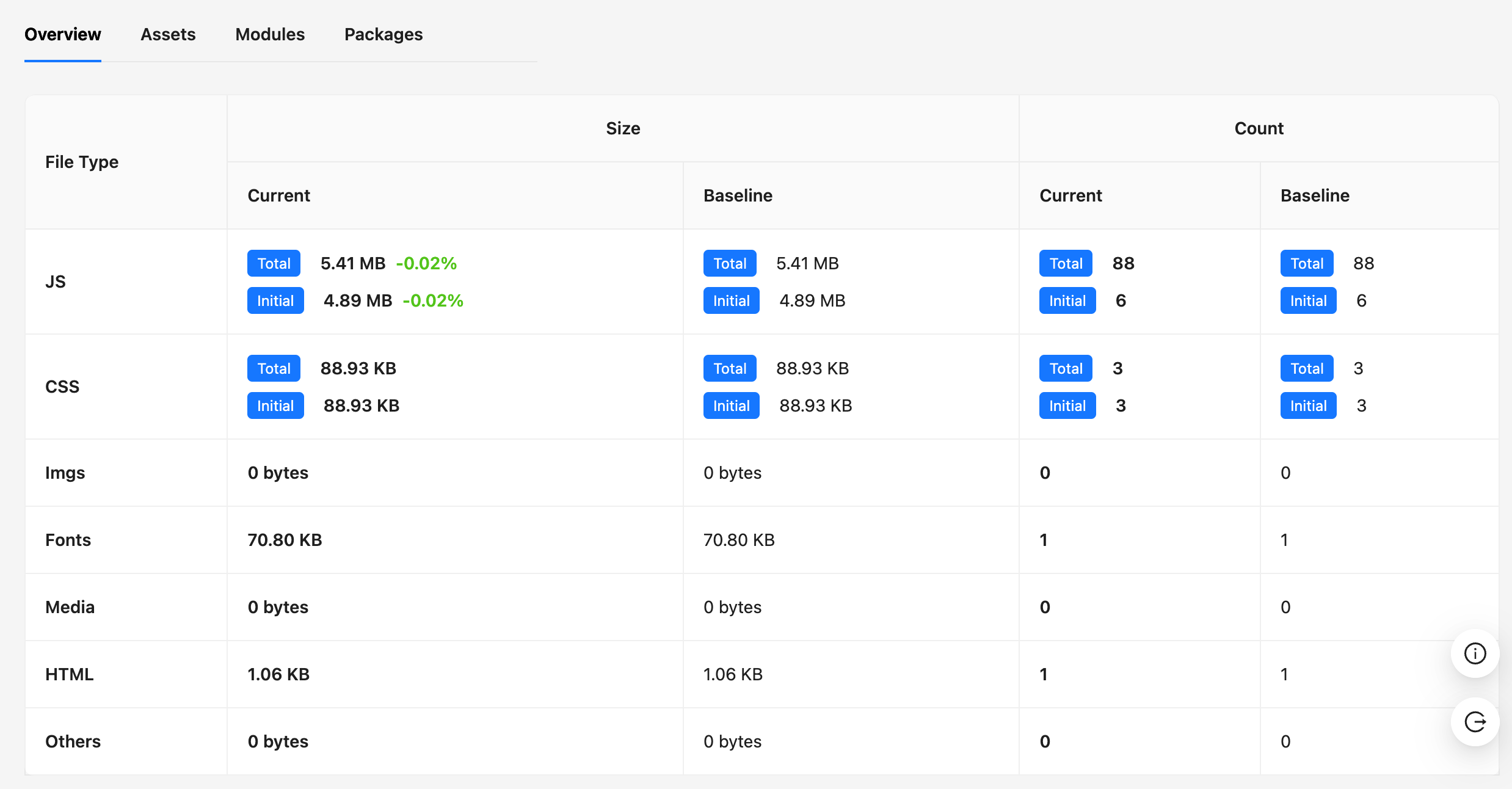
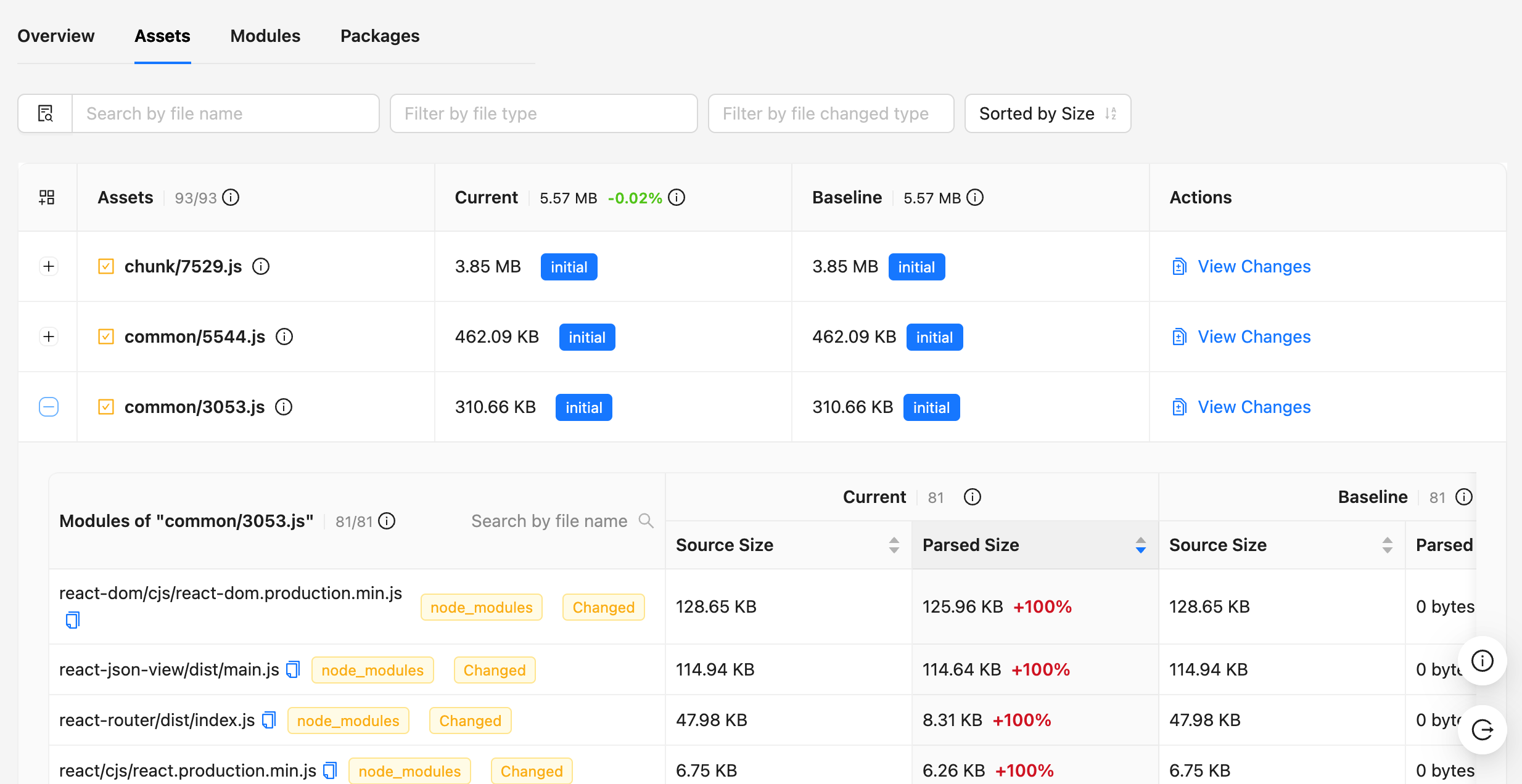
Using the bundle diff function provided by Rsdoctor, you can see the changes in **the size of resources, duplicate packages, Packages and other data in the product**, as well as **the size of module files and code changes in each resource**.
|
|
109
|
+
|
|
110
|
+
|  |  |
|
|
111
|
+
| ------------------------------------------------------------------------------------------------------------- | ------------------------------------------------------------------------------------------------------------- |
|
|
112
|
+
|
|
113
|
+
## 🧑💻 Community
|
|
114
|
+
|
|
115
|
+
Come and chat with us on [Discord](https://discord.gg/wrBPBT6rkM)! The Rsdoctor team and users are active there, and we're always looking for contributions.
|