@protolabsai/proto 0.14.0
This diff represents the content of publicly available package versions that have been released to one of the supported registries. The information contained in this diff is provided for informational purposes only and reflects changes between package versions as they appear in their respective public registries.
- package/LICENSE +203 -0
- package/README.md +286 -0
- package/dist/bundled/adversarial-verification/SKILL.md +98 -0
- package/dist/bundled/brainstorming/SKILL.md +171 -0
- package/dist/bundled/coding-agent-standards/SKILL.md +67 -0
- package/dist/bundled/dispatching-parallel-agents/SKILL.md +193 -0
- package/dist/bundled/executing-plans/SKILL.md +77 -0
- package/dist/bundled/finishing-a-development-branch/SKILL.md +213 -0
- package/dist/bundled/loop/SKILL.md +61 -0
- package/dist/bundled/qc-helper/SKILL.md +151 -0
- package/dist/bundled/qc-helper/docs/_meta.ts +30 -0
- package/dist/bundled/qc-helper/docs/common-workflow.md +571 -0
- package/dist/bundled/qc-helper/docs/configuration/_meta.ts +10 -0
- package/dist/bundled/qc-helper/docs/configuration/auth.md +366 -0
- package/dist/bundled/qc-helper/docs/configuration/memory.md +0 -0
- package/dist/bundled/qc-helper/docs/configuration/model-providers.md +542 -0
- package/dist/bundled/qc-helper/docs/configuration/qwen-ignore.md +55 -0
- package/dist/bundled/qc-helper/docs/configuration/settings.md +652 -0
- package/dist/bundled/qc-helper/docs/configuration/themes.md +160 -0
- package/dist/bundled/qc-helper/docs/configuration/trusted-folders.md +61 -0
- package/dist/bundled/qc-helper/docs/extension/_meta.ts +9 -0
- package/dist/bundled/qc-helper/docs/extension/extension-releasing.md +121 -0
- package/dist/bundled/qc-helper/docs/extension/getting-started-extensions.md +299 -0
- package/dist/bundled/qc-helper/docs/extension/introduction.md +303 -0
- package/dist/bundled/qc-helper/docs/features/_meta.ts +18 -0
- package/dist/bundled/qc-helper/docs/features/approval-mode.md +263 -0
- package/dist/bundled/qc-helper/docs/features/arena.md +218 -0
- package/dist/bundled/qc-helper/docs/features/checkpointing.md +77 -0
- package/dist/bundled/qc-helper/docs/features/commands.md +312 -0
- package/dist/bundled/qc-helper/docs/features/headless.md +318 -0
- package/dist/bundled/qc-helper/docs/features/hooks.md +343 -0
- package/dist/bundled/qc-helper/docs/features/language.md +139 -0
- package/dist/bundled/qc-helper/docs/features/lsp.md +453 -0
- package/dist/bundled/qc-helper/docs/features/mcp.md +281 -0
- package/dist/bundled/qc-helper/docs/features/sandbox.md +241 -0
- package/dist/bundled/qc-helper/docs/features/scheduled-tasks.md +139 -0
- package/dist/bundled/qc-helper/docs/features/skills.md +289 -0
- package/dist/bundled/qc-helper/docs/features/sub-agents.md +307 -0
- package/dist/bundled/qc-helper/docs/features/token-caching.md +29 -0
- package/dist/bundled/qc-helper/docs/ide-integration/_meta.ts +4 -0
- package/dist/bundled/qc-helper/docs/ide-integration/ide-companion-spec.md +182 -0
- package/dist/bundled/qc-helper/docs/ide-integration/ide-integration.md +144 -0
- package/dist/bundled/qc-helper/docs/integration-github-action.md +241 -0
- package/dist/bundled/qc-helper/docs/integration-jetbrains.md +81 -0
- package/dist/bundled/qc-helper/docs/integration-vscode.md +39 -0
- package/dist/bundled/qc-helper/docs/integration-zed.md +72 -0
- package/dist/bundled/qc-helper/docs/overview.md +64 -0
- package/dist/bundled/qc-helper/docs/quickstart.md +273 -0
- package/dist/bundled/qc-helper/docs/reference/_meta.ts +4 -0
- package/dist/bundled/qc-helper/docs/reference/keyboard-shortcuts.md +72 -0
- package/dist/bundled/qc-helper/docs/reference/sdk-api.md +524 -0
- package/dist/bundled/qc-helper/docs/support/Uninstall.md +42 -0
- package/dist/bundled/qc-helper/docs/support/_meta.ts +6 -0
- package/dist/bundled/qc-helper/docs/support/tos-privacy.md +112 -0
- package/dist/bundled/qc-helper/docs/support/troubleshooting.md +123 -0
- package/dist/bundled/receiving-code-review/SKILL.md +226 -0
- package/dist/bundled/requesting-code-review/SKILL.md +115 -0
- package/dist/bundled/review/SKILL.md +123 -0
- package/dist/bundled/subagent-driven-development/SKILL.md +292 -0
- package/dist/bundled/subagent-driven-development/code-quality-reviewer-prompt.md +27 -0
- package/dist/bundled/subagent-driven-development/implementer-prompt.md +113 -0
- package/dist/bundled/subagent-driven-development/spec-reviewer-prompt.md +61 -0
- package/dist/bundled/systematic-debugging/SKILL.md +305 -0
- package/dist/bundled/test-driven-development/SKILL.md +396 -0
- package/dist/bundled/using-git-worktrees/SKILL.md +223 -0
- package/dist/bundled/using-superpowers/SKILL.md +117 -0
- package/dist/bundled/verification-before-completion/SKILL.md +147 -0
- package/dist/bundled/writing-plans/SKILL.md +159 -0
- package/dist/bundled/writing-skills/SKILL.md +716 -0
- package/dist/cli.js +483432 -0
- package/dist/sandbox-macos-permissive-closed.sb +32 -0
- package/dist/sandbox-macos-permissive-open.sb +27 -0
- package/dist/sandbox-macos-permissive-proxied.sb +37 -0
- package/dist/sandbox-macos-restrictive-closed.sb +93 -0
- package/dist/sandbox-macos-restrictive-open.sb +96 -0
- package/dist/sandbox-macos-restrictive-proxied.sb +98 -0
- package/dist/vendor/ripgrep/COPYING +3 -0
- package/dist/vendor/ripgrep/arm64-darwin/rg +0 -0
- package/dist/vendor/ripgrep/arm64-linux/rg +0 -0
- package/dist/vendor/ripgrep/x64-darwin/rg +0 -0
- package/dist/vendor/ripgrep/x64-linux/rg +0 -0
- package/dist/vendor/ripgrep/x64-win32/rg.exe +0 -0
- package/dist/vendor/tree-sitter/tree-sitter-bash.wasm +0 -0
- package/dist/vendor/tree-sitter/tree-sitter.wasm +0 -0
- package/package.json +143 -0
|
@@ -0,0 +1,39 @@
|
|
|
1
|
+
# Visual Studio Code
|
|
2
|
+
|
|
3
|
+
> The VS Code extension (Beta) lets you see Qwen's changes in real-time through a native graphical interface integrated directly into your IDE, making it easier to access and interact with Qwen Code.
|
|
4
|
+
|
|
5
|
+
<br/>
|
|
6
|
+
|
|
7
|
+
<video src="https://cloud.video.taobao.com/vod/IKKwfM-kqNI3OJjM_U8uMCSMAoeEcJhs6VNCQmZxUfk.mp4" controls width="800">
|
|
8
|
+
Your browser does not support the video tag.
|
|
9
|
+
</video>
|
|
10
|
+
|
|
11
|
+
### Features
|
|
12
|
+
|
|
13
|
+
- **Native IDE experience**: Dedicated Qwen Code sidebar panel accessed via the Qwen icon
|
|
14
|
+
- **Auto-accept edits mode**: Automatically apply Qwen's changes as they're made
|
|
15
|
+
- **File management**: @-mention files or attach files and images using the system file picker
|
|
16
|
+
- **Conversation history**: Access to past conversations
|
|
17
|
+
- **Multiple sessions**: Run multiple Qwen Code sessions simultaneously
|
|
18
|
+
|
|
19
|
+
### Requirements
|
|
20
|
+
|
|
21
|
+
- VS Code 1.85.0 or higher
|
|
22
|
+
|
|
23
|
+
### Installation
|
|
24
|
+
|
|
25
|
+
Download and install the extension from the [Visual Studio Code Extension Marketplace](https://marketplace.visualstudio.com/items?itemName=qwenlm.qwen-code-vscode-ide-companion).
|
|
26
|
+
|
|
27
|
+
## Troubleshooting
|
|
28
|
+
|
|
29
|
+
### Extension not installing
|
|
30
|
+
|
|
31
|
+
- Ensure you have VS Code 1.85.0 or higher
|
|
32
|
+
- Check that VS Code has permission to install extensions
|
|
33
|
+
- Try installing directly from the Marketplace website
|
|
34
|
+
|
|
35
|
+
### Qwen Code not responding
|
|
36
|
+
|
|
37
|
+
- Check your internet connection
|
|
38
|
+
- Start a new conversation to see if the issue persists
|
|
39
|
+
- [File an issue on GitHub](https://github.com/qwenlm/qwen-code/issues) if the problem continues
|
|
@@ -0,0 +1,72 @@
|
|
|
1
|
+
# Zed Editor
|
|
2
|
+
|
|
3
|
+
> Zed Editor provides native support for AI coding assistants through the Agent Client Protocol (ACP). This integration allows you to use Qwen Code directly within Zed's interface with real-time code suggestions.
|
|
4
|
+
|
|
5
|
+
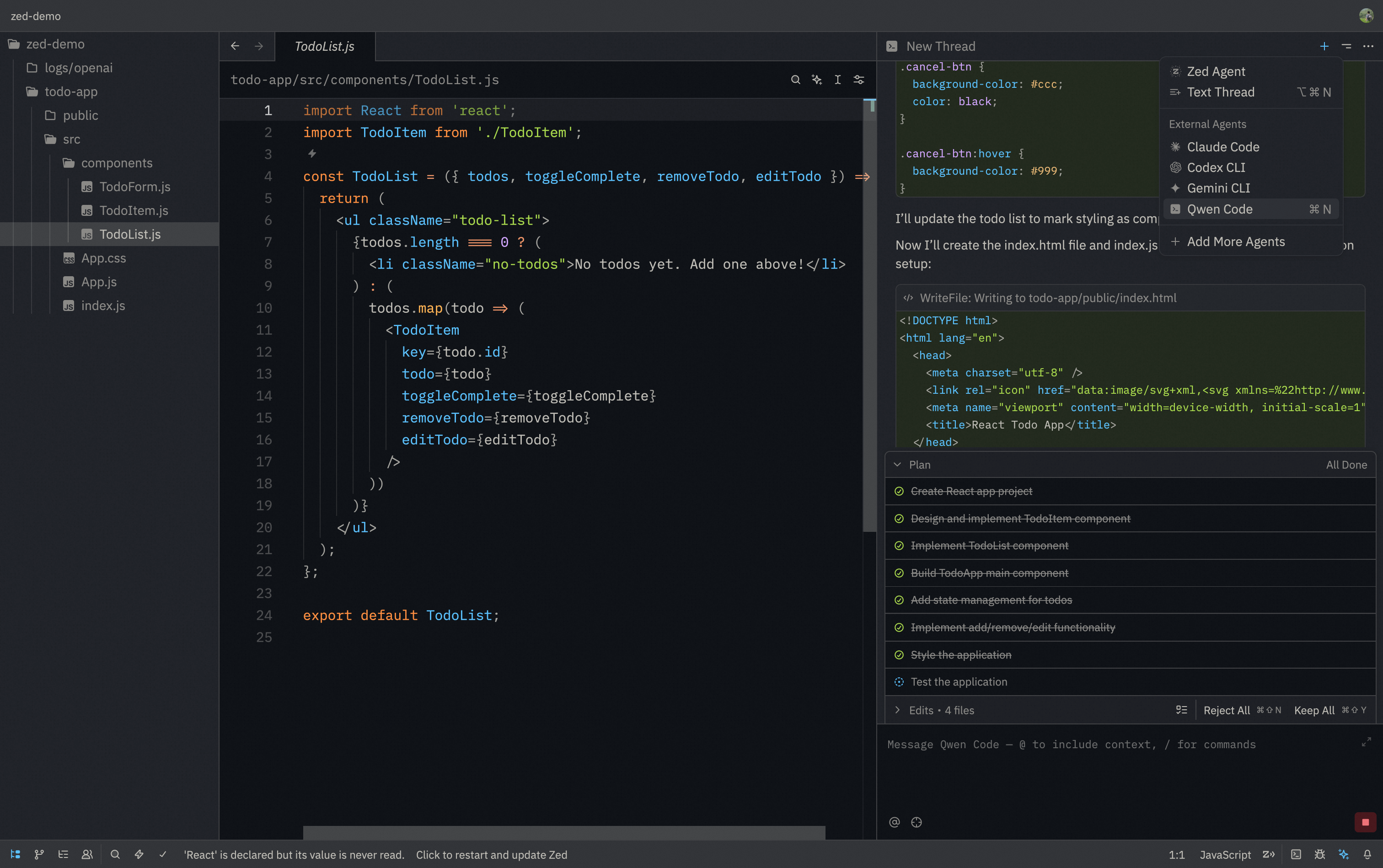
|
|
6
|
+
|
|
7
|
+
### Features
|
|
8
|
+
|
|
9
|
+
- **Native agent experience**: Integrated AI assistant panel within Zed's interface
|
|
10
|
+
- **Agent Client Protocol**: Full support for ACP enabling advanced IDE interactions
|
|
11
|
+
- **File management**: @-mention files to add them to the conversation context
|
|
12
|
+
- **Conversation history**: Access to past conversations within Zed
|
|
13
|
+
|
|
14
|
+
### Requirements
|
|
15
|
+
|
|
16
|
+
- Zed Editor (latest version recommended)
|
|
17
|
+
- Qwen Code CLI installed
|
|
18
|
+
|
|
19
|
+
### Installation
|
|
20
|
+
|
|
21
|
+
#### Install from ACP Registry (Recommend)
|
|
22
|
+
|
|
23
|
+
1. Install Qwen Code CLI:
|
|
24
|
+
|
|
25
|
+
```bash
|
|
26
|
+
npm install -g @qwen-code/qwen-code
|
|
27
|
+
```
|
|
28
|
+
|
|
29
|
+
2. Download and install [Zed Editor](https://zed.dev/)
|
|
30
|
+
|
|
31
|
+
3. In Zed, click the **settings button** in the top right corner, select **"Add agent"**, choose **"Install from Registry"**, find **Qwen Code**, then click **Install**.
|
|
32
|
+
|
|
33
|
+
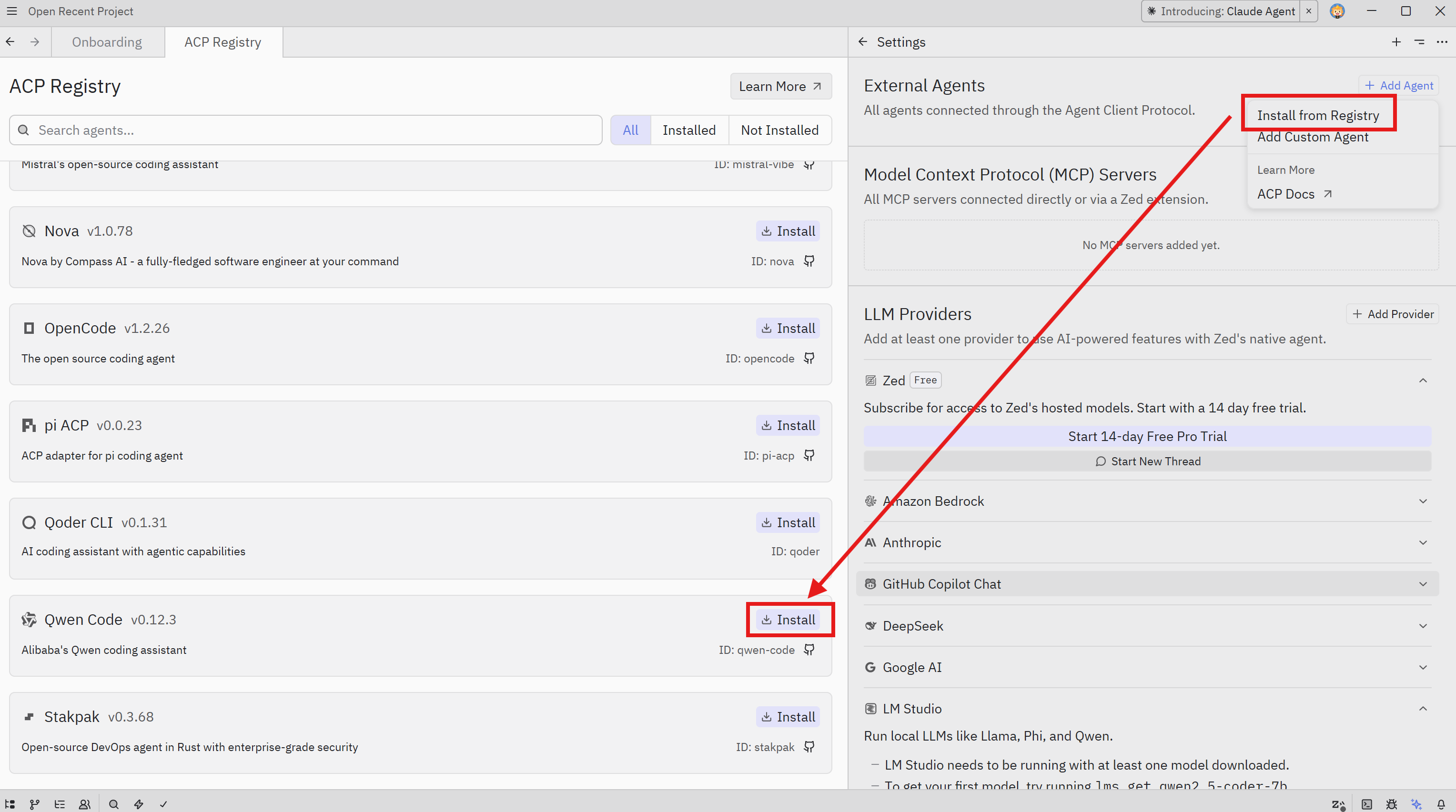
|
|
34
|
+
|
|
35
|
+
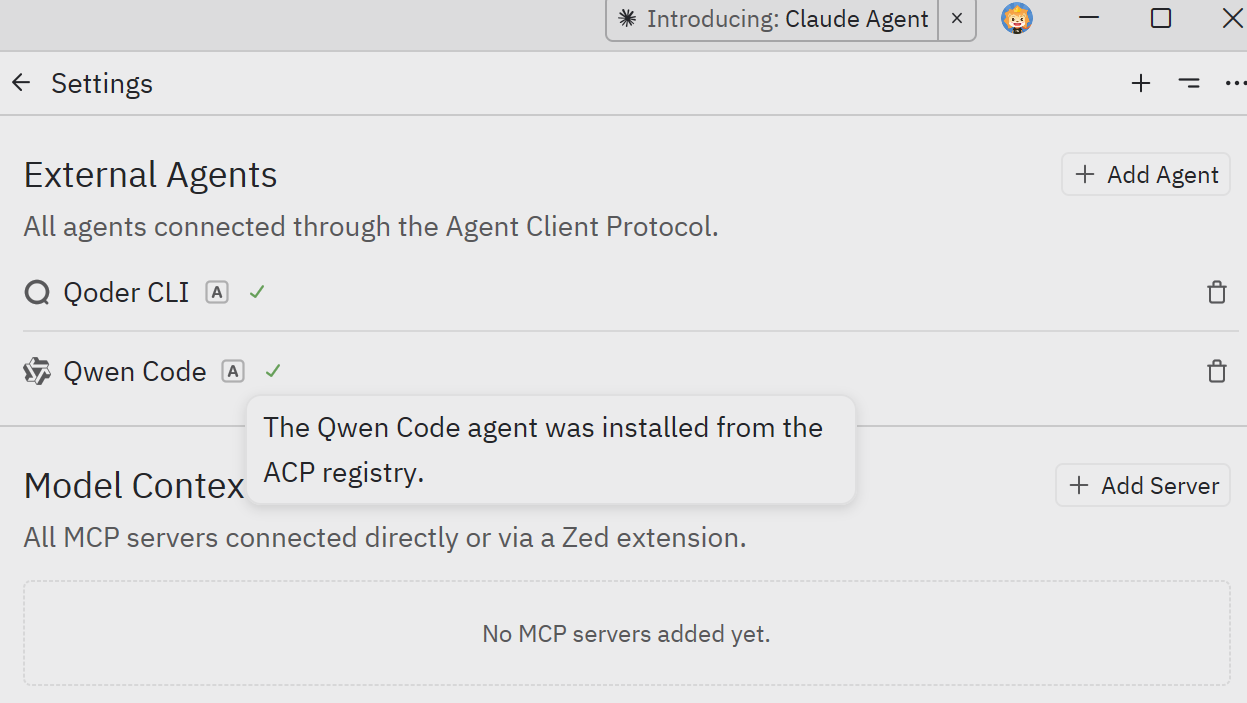
|
|
36
|
+
|
|
37
|
+
#### Manual Install
|
|
38
|
+
|
|
39
|
+
1. Install Qwen Code CLI:
|
|
40
|
+
|
|
41
|
+
```bash
|
|
42
|
+
npm install -g @qwen-code/qwen-code
|
|
43
|
+
```
|
|
44
|
+
|
|
45
|
+
2. Download and install [Zed Editor](https://zed.dev/)
|
|
46
|
+
|
|
47
|
+
3. In Zed, click the **settings button** in the top right corner, select **"Add agent"**, choose **"Create a custom agent"**, and add the following configuration:
|
|
48
|
+
|
|
49
|
+
```json
|
|
50
|
+
"Qwen Code": {
|
|
51
|
+
"type": "custom",
|
|
52
|
+
"command": "qwen",
|
|
53
|
+
"args": ["--acp"],
|
|
54
|
+
"env": {}
|
|
55
|
+
}
|
|
56
|
+
```
|
|
57
|
+
|
|
58
|
+

|
|
59
|
+
|
|
60
|
+
## Troubleshooting
|
|
61
|
+
|
|
62
|
+
### Agent not appearing
|
|
63
|
+
|
|
64
|
+
- Run `qwen --version` in terminal to verify installation
|
|
65
|
+
- Check that the JSON configuration is valid
|
|
66
|
+
- Restart Zed Editor
|
|
67
|
+
|
|
68
|
+
### Qwen Code not responding
|
|
69
|
+
|
|
70
|
+
- Check your internet connection
|
|
71
|
+
- Verify CLI works by running `qwen` in terminal
|
|
72
|
+
- [File an issue on GitHub](https://github.com/qwenlm/qwen-code/issues) if the problem persists
|
|
@@ -0,0 +1,64 @@
|
|
|
1
|
+
# Qwen Code overview
|
|
2
|
+
|
|
3
|
+
[](https://npm-compare.com/@qwen-code/qwen-code)
|
|
4
|
+
[](https://www.npmjs.com/package/@qwen-code/qwen-code)
|
|
5
|
+
|
|
6
|
+
> Learn about Qwen Code, Qwen's agentic coding tool that lives in your terminal and helps you turn ideas into code faster than ever before.
|
|
7
|
+
|
|
8
|
+
## Get started in 30 seconds
|
|
9
|
+
|
|
10
|
+
### Install Qwen Code:
|
|
11
|
+
|
|
12
|
+
**Linux / macOS**
|
|
13
|
+
|
|
14
|
+
```sh
|
|
15
|
+
curl -fsSL https://qwen-code-assets.oss-cn-hangzhou.aliyuncs.com/installation/install-qwen.sh | bash
|
|
16
|
+
```
|
|
17
|
+
|
|
18
|
+
**Windows (Run as Administrator CMD)**
|
|
19
|
+
|
|
20
|
+
```sh
|
|
21
|
+
curl -fsSL -o %TEMP%\install-qwen.bat https://qwen-code-assets.oss-cn-hangzhou.aliyuncs.com/installation/install-qwen.bat && %TEMP%\install-qwen.bat
|
|
22
|
+
```
|
|
23
|
+
|
|
24
|
+
> [!note]
|
|
25
|
+
>
|
|
26
|
+
> It's recommended to restart your terminal after installation to ensure environment variables take effect. If the installation fails, please refer to [Manual Installation](./quickstart#manual-installation) in the Quickstart guide.
|
|
27
|
+
|
|
28
|
+
### Start using Qwen Code:
|
|
29
|
+
|
|
30
|
+
```bash
|
|
31
|
+
cd your-project
|
|
32
|
+
qwen
|
|
33
|
+
```
|
|
34
|
+
|
|
35
|
+
Select **Qwen OAuth (Free)** authentication and follow the prompts to log in. Then let's start with understanding your codebase. Try one of these commands:
|
|
36
|
+
|
|
37
|
+
```
|
|
38
|
+
what does this project do?
|
|
39
|
+
```
|
|
40
|
+
|
|
41
|
+

|
|
42
|
+
|
|
43
|
+
You'll be prompted to log in on first use. That's it! [Continue with Quickstart (5 mins) →](./quickstart)
|
|
44
|
+
|
|
45
|
+
> [!tip]
|
|
46
|
+
>
|
|
47
|
+
> See [troubleshooting](./support/troubleshooting) if you hit issues.
|
|
48
|
+
|
|
49
|
+
> [!note]
|
|
50
|
+
>
|
|
51
|
+
> **New VS Code Extension (Beta)**: Prefer a graphical interface? Our new **VS Code extension** provides an easy-to-use native IDE experience without requiring terminal familiarity. Simply install from the marketplace and start coding with Qwen Code directly in your sidebar. Download and install the [Qwen Code Companion](https://marketplace.visualstudio.com/items?itemName=qwenlm.qwen-code-vscode-ide-companion) now.
|
|
52
|
+
|
|
53
|
+
## What Qwen Code does for you
|
|
54
|
+
|
|
55
|
+
- **Build features from descriptions**: Tell Qwen Code what you want to build in plain language. It will make a plan, write the code, and ensure it works.
|
|
56
|
+
- **Debug and fix issues**: Describe a bug or paste an error message. Qwen Code will analyze your codebase, identify the problem, and implement a fix.
|
|
57
|
+
- **Navigate any codebase**: Ask anything about your team's codebase, and get a thoughtful answer back. Qwen Code maintains awareness of your entire project structure, can find up-to-date information from the web, and with [MCP](./features/mcp) can pull from external datasources like Google Drive, Figma, and Slack.
|
|
58
|
+
- **Automate tedious tasks**: Fix fiddly lint issues, resolve merge conflicts, and write release notes. Do all this in a single command from your developer machines, or automatically in CI.
|
|
59
|
+
|
|
60
|
+
## Why developers love Qwen Code
|
|
61
|
+
|
|
62
|
+
- **Works in your terminal**: Not another chat window. Not another IDE. Qwen Code meets you where you already work, with the tools you already love.
|
|
63
|
+
- **Takes action**: Qwen Code can directly edit files, run commands, and create commits. Need more? [MCP](./features/mcp) lets Qwen Code read your design docs in Google Drive, update your tickets in Jira, or use _your_ custom developer tooling.
|
|
64
|
+
- **Unix philosophy**: Qwen Code is composable and scriptable. `tail -f app.log | qwen -p "Slack me if you see any anomalies appear in this log stream"` _works_. Your CI can run `qwen -p "If there are new text strings, translate them into French and raise a PR for @lang-fr-team to review"`.
|
|
@@ -0,0 +1,273 @@
|
|
|
1
|
+
# Quickstart
|
|
2
|
+
|
|
3
|
+
> 👏 Welcome to Qwen Code!
|
|
4
|
+
|
|
5
|
+
This quickstart guide will have you using AI-powered coding assistance in just a few minutes. By the end, you'll understand how to use Qwen Code for common development tasks.
|
|
6
|
+
|
|
7
|
+
## Before you begin
|
|
8
|
+
|
|
9
|
+
Make sure you have:
|
|
10
|
+
|
|
11
|
+
- A **terminal** or command prompt open
|
|
12
|
+
- A code project to work with
|
|
13
|
+
- A [Qwen Code](https://chat.qwen.ai/auth?mode=register) account
|
|
14
|
+
|
|
15
|
+
## Step 1: Install Qwen Code
|
|
16
|
+
|
|
17
|
+
To install Qwen Code, use one of the following methods:
|
|
18
|
+
|
|
19
|
+
### Quick Install (Recommended)
|
|
20
|
+
|
|
21
|
+
**Linux / macOS**
|
|
22
|
+
|
|
23
|
+
```sh
|
|
24
|
+
curl -fsSL https://qwen-code-assets.oss-cn-hangzhou.aliyuncs.com/installation/install-qwen.sh | bash
|
|
25
|
+
```
|
|
26
|
+
|
|
27
|
+
**Windows (Run as Administrator CMD)**
|
|
28
|
+
|
|
29
|
+
```sh
|
|
30
|
+
curl -fsSL -o %TEMP%\install-qwen.bat https://qwen-code-assets.oss-cn-hangzhou.aliyuncs.com/installation/install-qwen.bat && %TEMP%\install-qwen.bat
|
|
31
|
+
```
|
|
32
|
+
|
|
33
|
+
> [!note]
|
|
34
|
+
>
|
|
35
|
+
> It's recommended to restart your terminal after installation to ensure environment variables take effect.
|
|
36
|
+
|
|
37
|
+
### Manual Installation
|
|
38
|
+
|
|
39
|
+
**Prerequisites**
|
|
40
|
+
|
|
41
|
+
Make sure you have Node.js 20 or later installed. Download it from [nodejs.org](https://nodejs.org/en/download).
|
|
42
|
+
|
|
43
|
+
**NPM**
|
|
44
|
+
|
|
45
|
+
```bash
|
|
46
|
+
npm install -g @qwen-code/qwen-code@latest
|
|
47
|
+
```
|
|
48
|
+
|
|
49
|
+
**Homebrew (macOS, Linux)**
|
|
50
|
+
|
|
51
|
+
```bash
|
|
52
|
+
brew install qwen-code
|
|
53
|
+
```
|
|
54
|
+
|
|
55
|
+
## Step 2: Log in to your account
|
|
56
|
+
|
|
57
|
+
Qwen Code requires an account to use. When you start an interactive session with the `qwen` command, you'll be prompted to log in:
|
|
58
|
+
|
|
59
|
+
```bash
|
|
60
|
+
# You'll be prompted to log in on first use
|
|
61
|
+
qwen
|
|
62
|
+
```
|
|
63
|
+
|
|
64
|
+
```bash
|
|
65
|
+
# Follow the prompts to log in with your account
|
|
66
|
+
/auth
|
|
67
|
+
```
|
|
68
|
+
|
|
69
|
+
Select `Qwen OAuth`, log in to your account and follow the prompts to confirm. Once logged in, your credentials are stored and you won't need to log in again.
|
|
70
|
+
|
|
71
|
+
> [!note]
|
|
72
|
+
>
|
|
73
|
+
> When you first authenticate Qwen Code with your Qwen account, a workspace called ".qwen" is automatically created for you. This workspace provides centralized cost tracking and management for all Qwen Code usage in your organization.
|
|
74
|
+
|
|
75
|
+
> [!tip]
|
|
76
|
+
>
|
|
77
|
+
> You can also configure authentication directly from the terminal without starting a session by running `qwen auth`. Use `qwen auth status` to check your current configuration at any time. See the [Authentication](./configuration/auth) page for details.
|
|
78
|
+
|
|
79
|
+
## Step 3: Start your first session
|
|
80
|
+
|
|
81
|
+
Open your terminal in any project directory and start Qwen Code:
|
|
82
|
+
|
|
83
|
+
```bash
|
|
84
|
+
# optiona
|
|
85
|
+
cd /path/to/your/project
|
|
86
|
+
# start qwen
|
|
87
|
+
qwen
|
|
88
|
+
```
|
|
89
|
+
|
|
90
|
+
You'll see the Qwen Code welcome screen with your session information, recent conversations, and latest updates. Type `/help` for available commands.
|
|
91
|
+
|
|
92
|
+
## Chat with Qwen Code
|
|
93
|
+
|
|
94
|
+
### Ask your first question
|
|
95
|
+
|
|
96
|
+
Qwen Code will analyze your files and provide a summary. You can also ask more specific questions:
|
|
97
|
+
|
|
98
|
+
```
|
|
99
|
+
explain the folder structure
|
|
100
|
+
```
|
|
101
|
+
|
|
102
|
+
You can also ask Qwen Code about its own capabilities:
|
|
103
|
+
|
|
104
|
+
```
|
|
105
|
+
what can Qwen Code do?
|
|
106
|
+
```
|
|
107
|
+
|
|
108
|
+
> [!note]
|
|
109
|
+
>
|
|
110
|
+
> Qwen Code reads your files as needed - you don't have to manually add context. Qwen Code also has access to its own documentation and can answer questions about its features and capabilities.
|
|
111
|
+
|
|
112
|
+
### Make your first code change
|
|
113
|
+
|
|
114
|
+
Now let's make Qwen Code do some actual coding. Try a simple task:
|
|
115
|
+
|
|
116
|
+
```
|
|
117
|
+
add a hello world function to the main file
|
|
118
|
+
```
|
|
119
|
+
|
|
120
|
+
Qwen Code will:
|
|
121
|
+
|
|
122
|
+
1. Find the appropriate file
|
|
123
|
+
2. Show you the proposed changes
|
|
124
|
+
3. Ask for your approval
|
|
125
|
+
4. Make the edit
|
|
126
|
+
|
|
127
|
+
> [!note]
|
|
128
|
+
>
|
|
129
|
+
> Qwen Code always asks for permission before modifying files. You can approve individual changes or enable "Accept all" mode for a session.
|
|
130
|
+
|
|
131
|
+
### Use Git with Qwen Code
|
|
132
|
+
|
|
133
|
+
Qwen Code makes Git operations conversational:
|
|
134
|
+
|
|
135
|
+
```
|
|
136
|
+
what files have I changed?
|
|
137
|
+
```
|
|
138
|
+
|
|
139
|
+
```
|
|
140
|
+
commit my changes with a descriptive message
|
|
141
|
+
```
|
|
142
|
+
|
|
143
|
+
You can also prompt for more complex Git operations:
|
|
144
|
+
|
|
145
|
+
```
|
|
146
|
+
create a new branch called feature/quickstart
|
|
147
|
+
```
|
|
148
|
+
|
|
149
|
+
```
|
|
150
|
+
show me the last 5 commits
|
|
151
|
+
```
|
|
152
|
+
|
|
153
|
+
```
|
|
154
|
+
help me resolve merge conflicts
|
|
155
|
+
```
|
|
156
|
+
|
|
157
|
+
### Fix a bug or add a feature
|
|
158
|
+
|
|
159
|
+
Qwen Code is proficient at debugging and feature implementation.
|
|
160
|
+
|
|
161
|
+
Describe what you want in natural language:
|
|
162
|
+
|
|
163
|
+
```
|
|
164
|
+
add input validation to the user registration form
|
|
165
|
+
```
|
|
166
|
+
|
|
167
|
+
Or fix existing issues:
|
|
168
|
+
|
|
169
|
+
```
|
|
170
|
+
there's a bug where users can submit empty forms - fix it
|
|
171
|
+
```
|
|
172
|
+
|
|
173
|
+
Qwen Code will:
|
|
174
|
+
|
|
175
|
+
- Locate the relevant code
|
|
176
|
+
- Understand the context
|
|
177
|
+
- Implement a solution
|
|
178
|
+
- Run tests if available
|
|
179
|
+
|
|
180
|
+
### Test out other common workflows
|
|
181
|
+
|
|
182
|
+
There are a number of ways to work with Qwen Code:
|
|
183
|
+
|
|
184
|
+
**Refactor code**
|
|
185
|
+
|
|
186
|
+
```
|
|
187
|
+
refactor the authentication module to use async/await instead of callbacks
|
|
188
|
+
```
|
|
189
|
+
|
|
190
|
+
**Write tests**
|
|
191
|
+
|
|
192
|
+
```
|
|
193
|
+
write unit tests for the calculator functions
|
|
194
|
+
```
|
|
195
|
+
|
|
196
|
+
**Update documentation**
|
|
197
|
+
|
|
198
|
+
```
|
|
199
|
+
update the README with installation instructions
|
|
200
|
+
```
|
|
201
|
+
|
|
202
|
+
**Code review**
|
|
203
|
+
|
|
204
|
+
```
|
|
205
|
+
review my changes and suggest improvements
|
|
206
|
+
```
|
|
207
|
+
|
|
208
|
+
> [!tip]
|
|
209
|
+
>
|
|
210
|
+
> **Remember**: Qwen Code is your AI pair programmer. Talk to it like you would a helpful colleague - describe what you want to achieve, and it will help you get there.
|
|
211
|
+
|
|
212
|
+
## Essential commands
|
|
213
|
+
|
|
214
|
+
Here are the most important commands for daily use:
|
|
215
|
+
|
|
216
|
+
| Command | What it does | Example |
|
|
217
|
+
| --------------------- | ------------------------------------------------ | ----------------------------- |
|
|
218
|
+
| `qwen` | start Qwen Code | `qwen` |
|
|
219
|
+
| `/auth` | Change authentication method (in session) | `/auth` |
|
|
220
|
+
| `qwen auth` | Configure authentication from the terminal | `qwen auth` |
|
|
221
|
+
| `qwen auth status` | Check current authentication status | `qwen auth status` |
|
|
222
|
+
| `/help` | Display help information for available commands | `/help` or `/?` |
|
|
223
|
+
| `/compress` | Replace chat history with summary to save Tokens | `/compress` |
|
|
224
|
+
| `/clear` | Clear terminal screen content | `/clear` (shortcut: `Ctrl+L`) |
|
|
225
|
+
| `/theme` | Change Qwen Code visual theme | `/theme` |
|
|
226
|
+
| `/language` | View or change language settings | `/language` |
|
|
227
|
+
| → `ui [language]` | Set UI interface language | `/language ui zh-CN` |
|
|
228
|
+
| → `output [language]` | Set LLM output language | `/language output Chinese` |
|
|
229
|
+
| `/quit` | Exit Qwen Code immediately | `/quit` or `/exit` |
|
|
230
|
+
|
|
231
|
+
See the [CLI reference](./features/commands) for a complete list of commands.
|
|
232
|
+
|
|
233
|
+
## Pro tips for beginners
|
|
234
|
+
|
|
235
|
+
**Be specific with your requests**
|
|
236
|
+
|
|
237
|
+
- Instead of: "fix the bug"
|
|
238
|
+
- Try: "fix the login bug where users see a blank screen after entering wrong credentials"
|
|
239
|
+
|
|
240
|
+
**Use step-by-step instructions**
|
|
241
|
+
|
|
242
|
+
- Break complex tasks into steps:
|
|
243
|
+
|
|
244
|
+
```
|
|
245
|
+
1. create a new database table for user profiles
|
|
246
|
+
2. create an API endpoint to get and update user profiles
|
|
247
|
+
3. build a webpage that allows users to see and edit their information
|
|
248
|
+
```
|
|
249
|
+
|
|
250
|
+
**Let Qwen Code explore first**
|
|
251
|
+
|
|
252
|
+
- Before making changes, let Qwen Code understand your code:
|
|
253
|
+
|
|
254
|
+
```
|
|
255
|
+
analyze the database schema
|
|
256
|
+
```
|
|
257
|
+
|
|
258
|
+
```
|
|
259
|
+
build a dashboard showing products that are most frequently returned by our UK customers
|
|
260
|
+
```
|
|
261
|
+
|
|
262
|
+
**Save time with shortcuts**
|
|
263
|
+
|
|
264
|
+
- Press `?` to see all available keyboard shortcuts
|
|
265
|
+
- Use Tab for command completion
|
|
266
|
+
- Press ↑ for command history
|
|
267
|
+
- Type `/` to see all slash commands
|
|
268
|
+
|
|
269
|
+
## Getting help
|
|
270
|
+
|
|
271
|
+
- **In Qwen Code**: Type `/help` or ask "how do I..."
|
|
272
|
+
- **Documentation**: You're here! Browse other guides
|
|
273
|
+
- **Community**: Join our [GitHub Discussion](https://github.com/QwenLM/qwen-code/discussions) for tips and support
|
|
@@ -0,0 +1,72 @@
|
|
|
1
|
+
# Qwen Code Keyboard Shortcuts
|
|
2
|
+
|
|
3
|
+
This document lists the available keyboard shortcuts in Qwen Code.
|
|
4
|
+
|
|
5
|
+
## General
|
|
6
|
+
|
|
7
|
+
| Shortcut | Description |
|
|
8
|
+
| ------------------------------ | --------------------------------------------------------------------------------------------------------------------- |
|
|
9
|
+
| `Esc` | Close dialogs and suggestions. |
|
|
10
|
+
| `Ctrl+C` | Cancel the ongoing request and clear the input. Press twice to exit the application. |
|
|
11
|
+
| `Ctrl+D` | Exit the application if the input is empty. Press twice to confirm. |
|
|
12
|
+
| `Ctrl+L` | Clear the screen. |
|
|
13
|
+
| `Ctrl+O` | Toggle the display of the debug console. |
|
|
14
|
+
| `Ctrl+S` | Allows long responses to print fully, disabling truncation. Use your terminal's scrollback to view the entire output. |
|
|
15
|
+
| `Ctrl+T` | Toggle the display of tool descriptions. |
|
|
16
|
+
| `Shift+Tab` (`Tab` on Windows) | Cycle approval modes (`plan` → `default` → `auto-edit` → `yolo`) |
|
|
17
|
+
|
|
18
|
+
## Input Prompt
|
|
19
|
+
|
|
20
|
+
| Shortcut | Description |
|
|
21
|
+
| -------------------------------------------------- | ----------------------------------------------------------------------------------------------------------------------------------- |
|
|
22
|
+
| `!` | Toggle shell mode when the input is empty. |
|
|
23
|
+
| `?` | Toggle keyboard shortcuts display when the input is empty. |
|
|
24
|
+
| `\` (at end of line) + `Enter` | Insert a newline. |
|
|
25
|
+
| `Down Arrow` | Navigate down through the input history. |
|
|
26
|
+
| `Enter` | Submit the current prompt. |
|
|
27
|
+
| `Meta+Delete` / `Ctrl+Delete` | Delete the word to the right of the cursor. |
|
|
28
|
+
| `Tab` | Autocomplete the current suggestion if one exists. |
|
|
29
|
+
| `Up Arrow` | Navigate up through the input history. |
|
|
30
|
+
| `Ctrl+A` / `Home` | Move the cursor to the beginning of the line. |
|
|
31
|
+
| `Ctrl+B` / `Left Arrow` | Move the cursor one character to the left. |
|
|
32
|
+
| `Ctrl+C` | Clear the input prompt |
|
|
33
|
+
| `Esc` (double press) | Clear the input prompt. |
|
|
34
|
+
| `Ctrl+D` / `Delete` | Delete the character to the right of the cursor. |
|
|
35
|
+
| `Ctrl+E` / `End` | Move the cursor to the end of the line. |
|
|
36
|
+
| `Ctrl+F` / `Right Arrow` | Move the cursor one character to the right. |
|
|
37
|
+
| `Ctrl+H` / `Backspace` | Delete the character to the left of the cursor. |
|
|
38
|
+
| `Ctrl+K` | Delete from the cursor to the end of the line. |
|
|
39
|
+
| `Ctrl+Left Arrow` / `Meta+Left Arrow` / `Meta+B` | Move the cursor one word to the left. |
|
|
40
|
+
| `Ctrl+N` | Navigate down through the input history. |
|
|
41
|
+
| `Ctrl+P` | Navigate up through the input history. |
|
|
42
|
+
| `Ctrl+R` | Reverse search through input/shell history. |
|
|
43
|
+
| `Ctrl+Y` | Retry the last failed request. |
|
|
44
|
+
| `Ctrl+Right Arrow` / `Meta+Right Arrow` / `Meta+F` | Move the cursor one word to the right. |
|
|
45
|
+
| `Ctrl+U` | Delete from the cursor to the beginning of the line. |
|
|
46
|
+
| `Ctrl+V` (Windows: `Alt+V`) | Paste clipboard content. If the clipboard contains an image, it will be saved and a reference to it will be inserted in the prompt. |
|
|
47
|
+
| `Ctrl+W` / `Meta+Backspace` / `Ctrl+Backspace` | Delete the word to the left of the cursor. |
|
|
48
|
+
| `Ctrl+X` / `Meta+Enter` | Open the current input in an external editor. |
|
|
49
|
+
|
|
50
|
+
## Suggestions
|
|
51
|
+
|
|
52
|
+
| Shortcut | Description |
|
|
53
|
+
| --------------- | -------------------------------------- |
|
|
54
|
+
| `Down Arrow` | Navigate down through the suggestions. |
|
|
55
|
+
| `Tab` / `Enter` | Accept the selected suggestion. |
|
|
56
|
+
| `Up Arrow` | Navigate up through the suggestions. |
|
|
57
|
+
|
|
58
|
+
## Radio Button Select
|
|
59
|
+
|
|
60
|
+
| Shortcut | Description |
|
|
61
|
+
| ------------------ | ------------------------------------------------------------------------------------------------------------- |
|
|
62
|
+
| `Down Arrow` / `j` | Move selection down. |
|
|
63
|
+
| `Enter` | Confirm selection. |
|
|
64
|
+
| `Up Arrow` / `k` | Move selection up. |
|
|
65
|
+
| `1-9` | Select an item by its number. |
|
|
66
|
+
| (multi-digit) | For items with numbers greater than 9, press the digits in quick succession to select the corresponding item. |
|
|
67
|
+
|
|
68
|
+
## IDE Integration
|
|
69
|
+
|
|
70
|
+
| Shortcut | Description |
|
|
71
|
+
| -------- | --------------------------------- |
|
|
72
|
+
| `Ctrl+G` | See context CLI received from IDE |
|