@protolabsai/proto 0.14.0
This diff represents the content of publicly available package versions that have been released to one of the supported registries. The information contained in this diff is provided for informational purposes only and reflects changes between package versions as they appear in their respective public registries.
- package/LICENSE +203 -0
- package/README.md +286 -0
- package/dist/bundled/adversarial-verification/SKILL.md +98 -0
- package/dist/bundled/brainstorming/SKILL.md +171 -0
- package/dist/bundled/coding-agent-standards/SKILL.md +67 -0
- package/dist/bundled/dispatching-parallel-agents/SKILL.md +193 -0
- package/dist/bundled/executing-plans/SKILL.md +77 -0
- package/dist/bundled/finishing-a-development-branch/SKILL.md +213 -0
- package/dist/bundled/loop/SKILL.md +61 -0
- package/dist/bundled/qc-helper/SKILL.md +151 -0
- package/dist/bundled/qc-helper/docs/_meta.ts +30 -0
- package/dist/bundled/qc-helper/docs/common-workflow.md +571 -0
- package/dist/bundled/qc-helper/docs/configuration/_meta.ts +10 -0
- package/dist/bundled/qc-helper/docs/configuration/auth.md +366 -0
- package/dist/bundled/qc-helper/docs/configuration/memory.md +0 -0
- package/dist/bundled/qc-helper/docs/configuration/model-providers.md +542 -0
- package/dist/bundled/qc-helper/docs/configuration/qwen-ignore.md +55 -0
- package/dist/bundled/qc-helper/docs/configuration/settings.md +652 -0
- package/dist/bundled/qc-helper/docs/configuration/themes.md +160 -0
- package/dist/bundled/qc-helper/docs/configuration/trusted-folders.md +61 -0
- package/dist/bundled/qc-helper/docs/extension/_meta.ts +9 -0
- package/dist/bundled/qc-helper/docs/extension/extension-releasing.md +121 -0
- package/dist/bundled/qc-helper/docs/extension/getting-started-extensions.md +299 -0
- package/dist/bundled/qc-helper/docs/extension/introduction.md +303 -0
- package/dist/bundled/qc-helper/docs/features/_meta.ts +18 -0
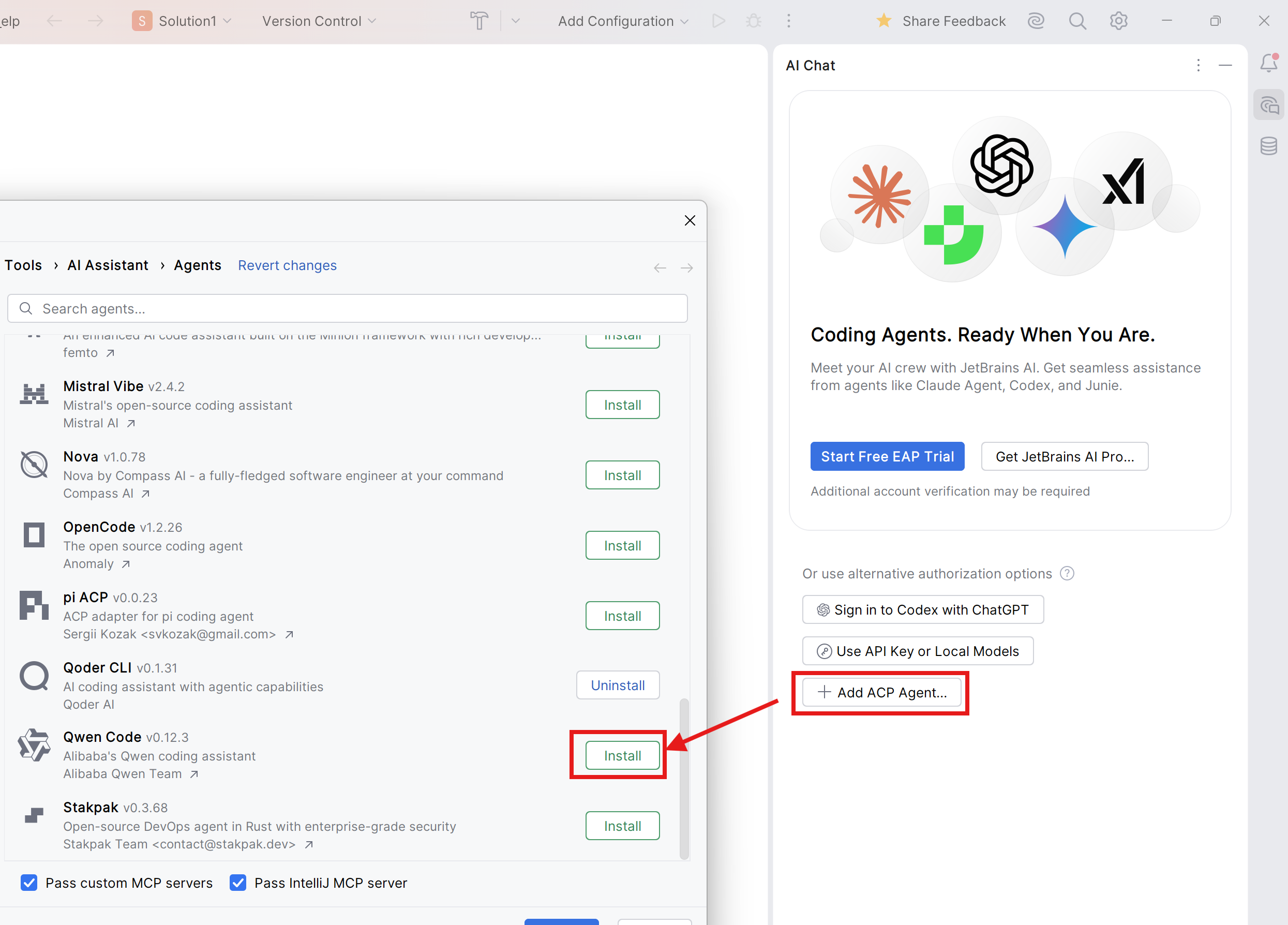
- package/dist/bundled/qc-helper/docs/features/approval-mode.md +263 -0
- package/dist/bundled/qc-helper/docs/features/arena.md +218 -0
- package/dist/bundled/qc-helper/docs/features/checkpointing.md +77 -0
- package/dist/bundled/qc-helper/docs/features/commands.md +312 -0
- package/dist/bundled/qc-helper/docs/features/headless.md +318 -0
- package/dist/bundled/qc-helper/docs/features/hooks.md +343 -0
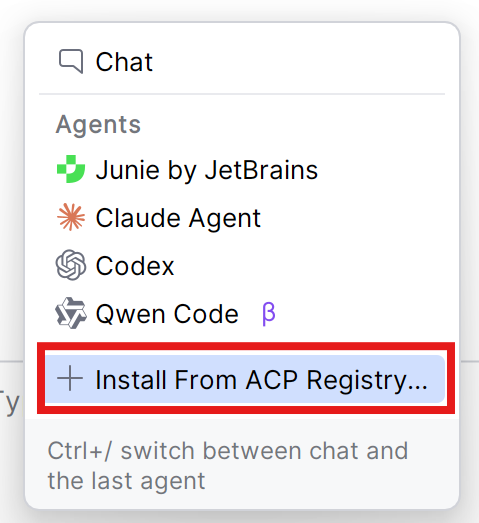
- package/dist/bundled/qc-helper/docs/features/language.md +139 -0
- package/dist/bundled/qc-helper/docs/features/lsp.md +453 -0
- package/dist/bundled/qc-helper/docs/features/mcp.md +281 -0
- package/dist/bundled/qc-helper/docs/features/sandbox.md +241 -0
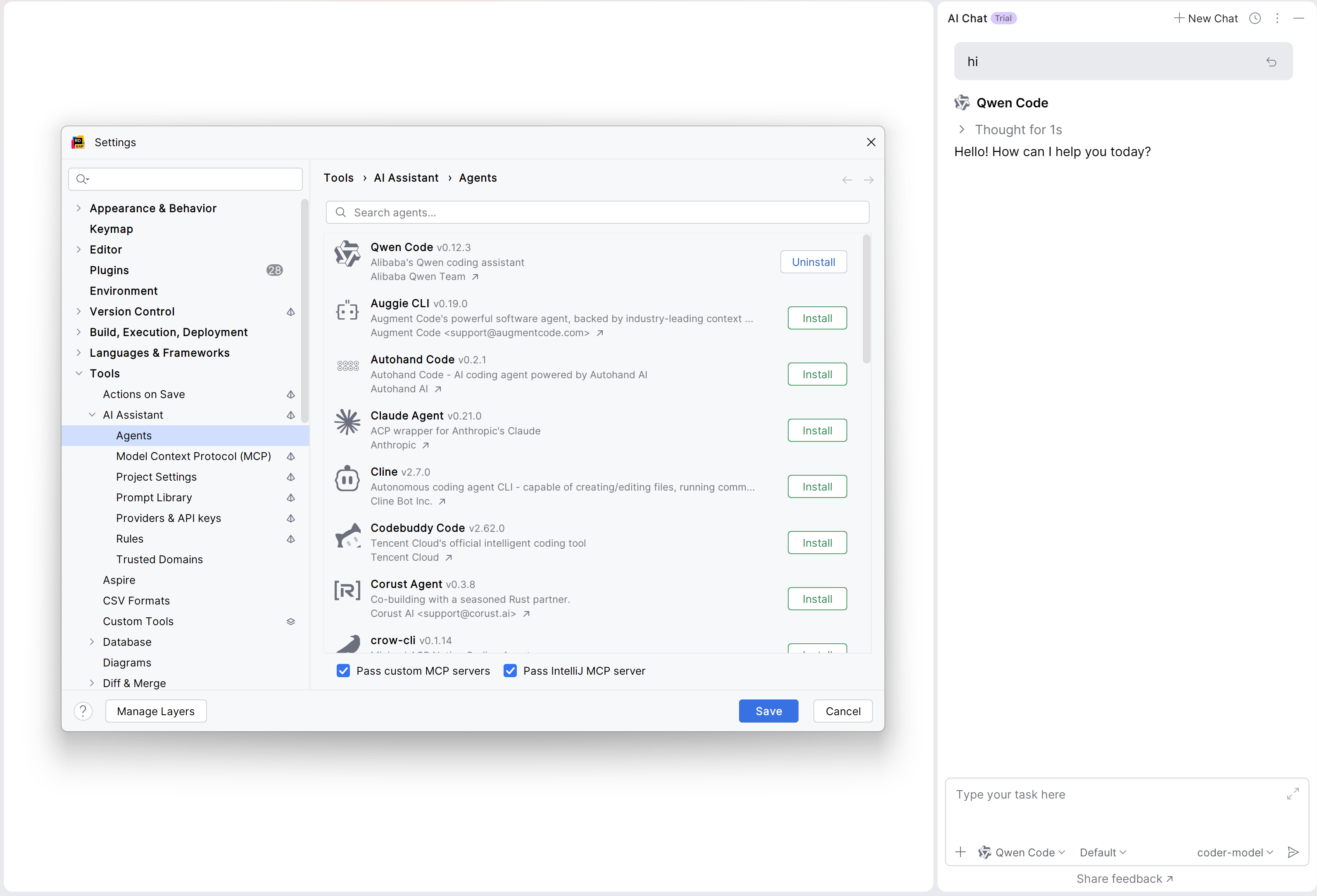
- package/dist/bundled/qc-helper/docs/features/scheduled-tasks.md +139 -0
- package/dist/bundled/qc-helper/docs/features/skills.md +289 -0
- package/dist/bundled/qc-helper/docs/features/sub-agents.md +307 -0
- package/dist/bundled/qc-helper/docs/features/token-caching.md +29 -0
- package/dist/bundled/qc-helper/docs/ide-integration/_meta.ts +4 -0
- package/dist/bundled/qc-helper/docs/ide-integration/ide-companion-spec.md +182 -0
- package/dist/bundled/qc-helper/docs/ide-integration/ide-integration.md +144 -0
- package/dist/bundled/qc-helper/docs/integration-github-action.md +241 -0
- package/dist/bundled/qc-helper/docs/integration-jetbrains.md +81 -0
- package/dist/bundled/qc-helper/docs/integration-vscode.md +39 -0
- package/dist/bundled/qc-helper/docs/integration-zed.md +72 -0
- package/dist/bundled/qc-helper/docs/overview.md +64 -0
- package/dist/bundled/qc-helper/docs/quickstart.md +273 -0
- package/dist/bundled/qc-helper/docs/reference/_meta.ts +4 -0
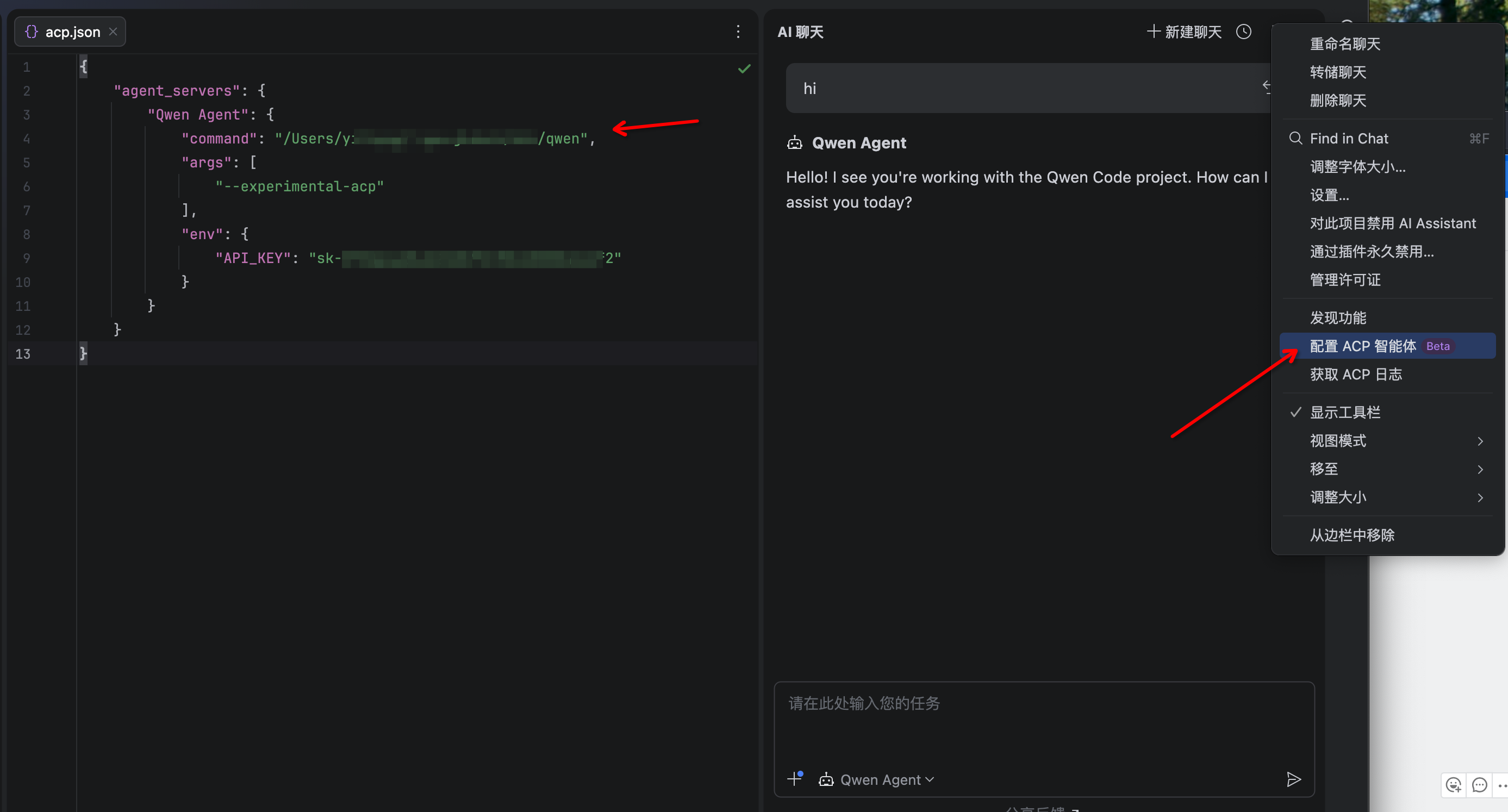
- package/dist/bundled/qc-helper/docs/reference/keyboard-shortcuts.md +72 -0
- package/dist/bundled/qc-helper/docs/reference/sdk-api.md +524 -0
- package/dist/bundled/qc-helper/docs/support/Uninstall.md +42 -0
- package/dist/bundled/qc-helper/docs/support/_meta.ts +6 -0
- package/dist/bundled/qc-helper/docs/support/tos-privacy.md +112 -0
- package/dist/bundled/qc-helper/docs/support/troubleshooting.md +123 -0
- package/dist/bundled/receiving-code-review/SKILL.md +226 -0
- package/dist/bundled/requesting-code-review/SKILL.md +115 -0
- package/dist/bundled/review/SKILL.md +123 -0
- package/dist/bundled/subagent-driven-development/SKILL.md +292 -0
- package/dist/bundled/subagent-driven-development/code-quality-reviewer-prompt.md +27 -0
- package/dist/bundled/subagent-driven-development/implementer-prompt.md +113 -0
- package/dist/bundled/subagent-driven-development/spec-reviewer-prompt.md +61 -0
- package/dist/bundled/systematic-debugging/SKILL.md +305 -0
- package/dist/bundled/test-driven-development/SKILL.md +396 -0
- package/dist/bundled/using-git-worktrees/SKILL.md +223 -0
- package/dist/bundled/using-superpowers/SKILL.md +117 -0
- package/dist/bundled/verification-before-completion/SKILL.md +147 -0
- package/dist/bundled/writing-plans/SKILL.md +159 -0
- package/dist/bundled/writing-skills/SKILL.md +716 -0
- package/dist/cli.js +483432 -0
- package/dist/sandbox-macos-permissive-closed.sb +32 -0
- package/dist/sandbox-macos-permissive-open.sb +27 -0
- package/dist/sandbox-macos-permissive-proxied.sb +37 -0
- package/dist/sandbox-macos-restrictive-closed.sb +93 -0
- package/dist/sandbox-macos-restrictive-open.sb +96 -0
- package/dist/sandbox-macos-restrictive-proxied.sb +98 -0
- package/dist/vendor/ripgrep/COPYING +3 -0
- package/dist/vendor/ripgrep/arm64-darwin/rg +0 -0
- package/dist/vendor/ripgrep/arm64-linux/rg +0 -0
- package/dist/vendor/ripgrep/x64-darwin/rg +0 -0
- package/dist/vendor/ripgrep/x64-linux/rg +0 -0
- package/dist/vendor/ripgrep/x64-win32/rg.exe +0 -0
- package/dist/vendor/tree-sitter/tree-sitter-bash.wasm +0 -0
- package/dist/vendor/tree-sitter/tree-sitter.wasm +0 -0
- package/package.json +143 -0
|
@@ -0,0 +1,182 @@
|
|
|
1
|
+
# Qwen Code Companion Plugin: Interface Specification
|
|
2
|
+
|
|
3
|
+
> Last Updated: September 15, 2025
|
|
4
|
+
|
|
5
|
+
This document defines the contract for building a companion plugin to enable Qwen Code's IDE mode. For VS Code, these features (native diffing, context awareness) are provided by the official extension ([marketplace](https://marketplace.visualstudio.com/items?itemName=qwenlm.qwen-code-vscode-ide-companion)). This specification is for contributors who wish to bring similar functionality to other editors like JetBrains IDEs, Sublime Text, etc.
|
|
6
|
+
|
|
7
|
+
## I. The Communication Interface
|
|
8
|
+
|
|
9
|
+
Qwen Code and the IDE plugin communicate through a local communication channel.
|
|
10
|
+
|
|
11
|
+
### 1. Transport Layer: MCP over HTTP
|
|
12
|
+
|
|
13
|
+
The plugin **MUST** run a local HTTP server that implements the **Model Context Protocol (MCP)**.
|
|
14
|
+
|
|
15
|
+
- **Protocol:** The server must be a valid MCP server. We recommend using an existing MCP SDK for your language of choice if available.
|
|
16
|
+
- **Endpoint:** The server should expose a single endpoint (e.g., `/mcp`) for all MCP communication.
|
|
17
|
+
- **Port:** The server **MUST** listen on a dynamically assigned port (i.e., listen on port `0`).
|
|
18
|
+
|
|
19
|
+
### 2. Discovery Mechanism: The Lock File
|
|
20
|
+
|
|
21
|
+
For Qwen Code to connect, it needs to discover what port your server is using. The plugin **MUST** facilitate this by creating a "lock file" and setting the port environment variable.
|
|
22
|
+
|
|
23
|
+
- **How the CLI Finds the File:** The CLI reads the port from `QWEN_CODE_IDE_SERVER_PORT`, then reads `~/.qwen/ide/<PORT>.lock`. (Legacy fallbacks exist for older extensions; see note below.)
|
|
24
|
+
- **File Location:** The file must be created in a specific directory: `~/.qwen/ide/`. Your plugin must create this directory if it doesn't exist.
|
|
25
|
+
- **File Naming Convention:** The filename is critical and **MUST** follow the pattern:
|
|
26
|
+
`<PORT>.lock`
|
|
27
|
+
- `<PORT>`: The port your MCP server is listening on.
|
|
28
|
+
- **File Content & Workspace Validation:** The file **MUST** contain a JSON object with the following structure:
|
|
29
|
+
|
|
30
|
+
```json
|
|
31
|
+
{
|
|
32
|
+
"port": 12345,
|
|
33
|
+
"workspacePath": "/path/to/project1:/path/to/project2",
|
|
34
|
+
"authToken": "a-very-secret-token",
|
|
35
|
+
"ppid": 1234,
|
|
36
|
+
"ideName": "VS Code"
|
|
37
|
+
}
|
|
38
|
+
```
|
|
39
|
+
- `port` (number, required): The port of the MCP server.
|
|
40
|
+
- `workspacePath` (string, required): A list of all open workspace root paths, delimited by the OS-specific path separator (`:` for Linux/macOS, `;` for Windows). The CLI uses this path to ensure it's running in the same project folder that's open in the IDE. If the CLI's current working directory is not a sub-directory of `workspacePath`, the connection will be rejected. Your plugin **MUST** provide the correct, absolute path(s) to the root of the open workspace(s).
|
|
41
|
+
- `authToken` (string, required): A secret token for securing the connection. The CLI will include this token in an `Authorization: Bearer <token>` header on all requests.
|
|
42
|
+
- `ppid` (number, required): The parent process ID of the IDE process.
|
|
43
|
+
- `ideName` (string, required): A user-friendly name for the IDE (e.g., `VS Code`, `JetBrains IDE`).
|
|
44
|
+
|
|
45
|
+
- **Authentication:** To secure the connection, the plugin **MUST** generate a unique, secret token and include it in the discovery file. The CLI will then include this token in the `Authorization` header for all requests to the MCP server (e.g., `Authorization: Bearer a-very-secret-token`). Your server **MUST** validate this token on every request and reject any that are unauthorized.
|
|
46
|
+
- **Environment Variables (Required):** Your plugin **MUST** set `QWEN_CODE_IDE_SERVER_PORT` in the integrated terminal so the CLI can locate the correct `<PORT>.lock` file.
|
|
47
|
+
|
|
48
|
+
**Legacy note:** For extensions older than v0.5.1, Qwen Code may fall back to reading JSON files in the system temp directory named `qwen-code-ide-server-<PID>.json` or `qwen-code-ide-server-<PORT>.json`. New integrations should not rely on these legacy files.
|
|
49
|
+
|
|
50
|
+
## II. The Context Interface
|
|
51
|
+
|
|
52
|
+
To enable context awareness, the plugin **MAY** provide the CLI with real-time information about the user's activity in the IDE.
|
|
53
|
+
|
|
54
|
+
### `ide/contextUpdate` Notification
|
|
55
|
+
|
|
56
|
+
The plugin **MAY** send an `ide/contextUpdate` [notification](https://modelcontextprotocol.io/specification/2025-06-18/basic/index#notifications) to the CLI whenever the user's context changes.
|
|
57
|
+
|
|
58
|
+
- **Triggering Events:** This notification should be sent (with a recommended debounce of 50ms) when:
|
|
59
|
+
- A file is opened, closed, or focused.
|
|
60
|
+
- The user's cursor position or text selection changes in the active file.
|
|
61
|
+
- **Payload (`IdeContext`):** The notification parameters **MUST** be an `IdeContext` object:
|
|
62
|
+
|
|
63
|
+
```typescript
|
|
64
|
+
interface IdeContext {
|
|
65
|
+
workspaceState?: {
|
|
66
|
+
openFiles?: File[];
|
|
67
|
+
isTrusted?: boolean;
|
|
68
|
+
};
|
|
69
|
+
}
|
|
70
|
+
|
|
71
|
+
interface File {
|
|
72
|
+
// Absolute path to the file
|
|
73
|
+
path: string;
|
|
74
|
+
// Last focused Unix timestamp (for ordering)
|
|
75
|
+
timestamp: number;
|
|
76
|
+
// True if this is the currently focused file
|
|
77
|
+
isActive?: boolean;
|
|
78
|
+
cursor?: {
|
|
79
|
+
// 1-based line number
|
|
80
|
+
line: number;
|
|
81
|
+
// 1-based character number
|
|
82
|
+
character: number;
|
|
83
|
+
};
|
|
84
|
+
// The text currently selected by the user
|
|
85
|
+
selectedText?: string;
|
|
86
|
+
}
|
|
87
|
+
```
|
|
88
|
+
|
|
89
|
+
**Note:** The `openFiles` list should only include files that exist on disk. Virtual files (e.g., unsaved files without a path, editor settings pages) **MUST** be excluded.
|
|
90
|
+
|
|
91
|
+
### How the CLI Uses This Context
|
|
92
|
+
|
|
93
|
+
After receiving the `IdeContext` object, the CLI performs several normalization and truncation steps before sending the information to the model.
|
|
94
|
+
|
|
95
|
+
- **File Ordering:** The CLI uses the `timestamp` field to determine the most recently used files. It sorts the `openFiles` list based on this value. Therefore, your plugin **MUST** provide an accurate Unix timestamp for when a file was last focused.
|
|
96
|
+
- **Active File:** The CLI considers only the most recent file (after sorting) to be the "active" file. It will ignore the `isActive` flag on all other files and clear their `cursor` and `selectedText` fields. Your plugin should focus on setting `isActive: true` and providing cursor/selection details only for the currently focused file.
|
|
97
|
+
- **Truncation:** To manage token limits, the CLI truncates both the file list (to 10 files) and the `selectedText` (to 16KB).
|
|
98
|
+
|
|
99
|
+
While the CLI handles the final truncation, it is highly recommended that your plugin also limits the amount of context it sends.
|
|
100
|
+
|
|
101
|
+
## III. The Diffing Interface
|
|
102
|
+
|
|
103
|
+
To enable interactive code modifications, the plugin **MAY** expose a diffing interface. This allows the CLI to request that the IDE open a diff view, showing proposed changes to a file. The user can then review, edit, and ultimately accept or reject these changes directly within the IDE.
|
|
104
|
+
|
|
105
|
+
### `openDiff` Tool
|
|
106
|
+
|
|
107
|
+
The plugin **MUST** register an `openDiff` tool on its MCP server.
|
|
108
|
+
|
|
109
|
+
- **Description:** This tool instructs the IDE to open a modifiable diff view for a specific file.
|
|
110
|
+
- **Request (`OpenDiffRequest`):** The tool is invoked via a `tools/call` request. The `arguments` field within the request's `params` **MUST** be an `OpenDiffRequest` object.
|
|
111
|
+
|
|
112
|
+
```typescript
|
|
113
|
+
interface OpenDiffRequest {
|
|
114
|
+
// The absolute path to the file to be diffed.
|
|
115
|
+
filePath: string;
|
|
116
|
+
// The proposed new content for the file.
|
|
117
|
+
newContent: string;
|
|
118
|
+
}
|
|
119
|
+
```
|
|
120
|
+
|
|
121
|
+
- **Response (`CallToolResult`):** The tool **MUST** immediately return a `CallToolResult` to acknowledge the request and report whether the diff view was successfully opened.
|
|
122
|
+
- On Success: If the diff view was opened successfully, the response **MUST** contain empty content (i.e., `content: []`).
|
|
123
|
+
- On Failure: If an error prevented the diff view from opening, the response **MUST** have `isError: true` and include a `TextContent` block in the `content` array describing the error.
|
|
124
|
+
|
|
125
|
+
The actual outcome of the diff (acceptance or rejection) is communicated asynchronously via notifications.
|
|
126
|
+
|
|
127
|
+
### `closeDiff` Tool
|
|
128
|
+
|
|
129
|
+
The plugin **MUST** register a `closeDiff` tool on its MCP server.
|
|
130
|
+
|
|
131
|
+
- **Description:** This tool instructs the IDE to close an open diff view for a specific file.
|
|
132
|
+
- **Request (`CloseDiffRequest`):** The tool is invoked via a `tools/call` request. The `arguments` field within the request's `params` **MUST** be an `CloseDiffRequest` object.
|
|
133
|
+
|
|
134
|
+
```typescript
|
|
135
|
+
interface CloseDiffRequest {
|
|
136
|
+
// The absolute path to the file whose diff view should be closed.
|
|
137
|
+
filePath: string;
|
|
138
|
+
}
|
|
139
|
+
```
|
|
140
|
+
|
|
141
|
+
- **Response (`CallToolResult`):** The tool **MUST** return a `CallToolResult`.
|
|
142
|
+
- On Success: If the diff view was closed successfully, the response **MUST** include a single **TextContent** block in the content array containing the file's final content before closing.
|
|
143
|
+
- On Failure: If an error prevented the diff view from closing, the response **MUST** have `isError: true` and include a `TextContent` block in the `content` array describing the error.
|
|
144
|
+
|
|
145
|
+
### `ide/diffAccepted` Notification
|
|
146
|
+
|
|
147
|
+
When the user accepts the changes in a diff view (e.g., by clicking an "Apply" or "Save" button), the plugin **MUST** send an `ide/diffAccepted` notification to the CLI.
|
|
148
|
+
|
|
149
|
+
- **Payload:** The notification parameters **MUST** include the file path and the final content of the file. The content may differ from the original `newContent` if the user made manual edits in the diff view.
|
|
150
|
+
|
|
151
|
+
```typescript
|
|
152
|
+
{
|
|
153
|
+
// The absolute path to the file that was diffed.
|
|
154
|
+
filePath: string;
|
|
155
|
+
// The full content of the file after acceptance.
|
|
156
|
+
content: string;
|
|
157
|
+
}
|
|
158
|
+
```
|
|
159
|
+
|
|
160
|
+
### `ide/diffRejected` Notification
|
|
161
|
+
|
|
162
|
+
When the user rejects the changes (e.g., by closing the diff view without accepting), the plugin **MUST** send an `ide/diffRejected` notification to the CLI.
|
|
163
|
+
|
|
164
|
+
- **Payload:** The notification parameters **MUST** include the file path of the rejected diff.
|
|
165
|
+
|
|
166
|
+
```typescript
|
|
167
|
+
{
|
|
168
|
+
// The absolute path to the file that was diffed.
|
|
169
|
+
filePath: string;
|
|
170
|
+
}
|
|
171
|
+
```
|
|
172
|
+
|
|
173
|
+
## IV. The Lifecycle Interface
|
|
174
|
+
|
|
175
|
+
The plugin **MUST** manage its resources and the discovery file correctly based on the IDE's lifecycle.
|
|
176
|
+
|
|
177
|
+
- **On Activation (IDE startup/plugin enabled):**
|
|
178
|
+
1. Start the MCP server.
|
|
179
|
+
2. Create the discovery file.
|
|
180
|
+
- **On Deactivation (IDE shutdown/plugin disabled):**
|
|
181
|
+
1. Stop the MCP server.
|
|
182
|
+
2. Delete the discovery file.
|
|
@@ -0,0 +1,144 @@
|
|
|
1
|
+
# IDE Integration
|
|
2
|
+
|
|
3
|
+
Qwen Code can integrate with your IDE to provide a more seamless and context-aware experience. This integration allows the CLI to understand your workspace better and enables powerful features like native in-editor diffing.
|
|
4
|
+
|
|
5
|
+
Currently, the only supported IDE is [Visual Studio Code](https://code.visualstudio.com/) and other editors that support VS Code extensions. To build support for other editors, see the [IDE Companion Extension Spec](../ide-integration/ide-companion-spec).
|
|
6
|
+
|
|
7
|
+
## Features
|
|
8
|
+
|
|
9
|
+
- **Workspace Context:** The CLI automatically gains awareness of your workspace to provide more relevant and accurate responses. This context includes:
|
|
10
|
+
- The **10 most recently accessed files** in your workspace.
|
|
11
|
+
- Your active cursor position.
|
|
12
|
+
- Any text you have selected (up to a 16KB limit; longer selections will be truncated).
|
|
13
|
+
|
|
14
|
+
- **Native Diffing:** When Qwen suggests code modifications, you can view the changes directly within your IDE's native diff viewer. This allows you to review, edit, and accept or reject the suggested changes seamlessly.
|
|
15
|
+
|
|
16
|
+
- **VS Code Commands:** You can access Qwen Code features directly from the VS Code Command Palette (`Cmd+Shift+P` or `Ctrl+Shift+P`):
|
|
17
|
+
- `Qwen Code: Run`: Starts a new Qwen Code session in the integrated terminal.
|
|
18
|
+
- `Qwen Code: Accept Diff`: Accepts the changes in the active diff editor.
|
|
19
|
+
- `Qwen Code: Close Diff Editor`: Rejects the changes and closes the active diff editor.
|
|
20
|
+
- `Qwen Code: View Third-Party Notices`: Displays the third-party notices for the extension.
|
|
21
|
+
|
|
22
|
+
## Installation and Setup
|
|
23
|
+
|
|
24
|
+
There are three ways to set up the IDE integration:
|
|
25
|
+
|
|
26
|
+
### 1. Automatic Nudge (Recommended)
|
|
27
|
+
|
|
28
|
+
When you run Qwen Code inside a supported editor, it will automatically detect your environment and prompt you to connect. Answering "Yes" will automatically run the necessary setup, which includes installing the companion extension and enabling the connection.
|
|
29
|
+
|
|
30
|
+
### 2. Manual Installation from CLI
|
|
31
|
+
|
|
32
|
+
If you previously dismissed the prompt or want to install the extension manually, you can run the following command inside Qwen Code:
|
|
33
|
+
|
|
34
|
+
```
|
|
35
|
+
/ide install
|
|
36
|
+
```
|
|
37
|
+
|
|
38
|
+
This will find the correct extension for your IDE and install it.
|
|
39
|
+
|
|
40
|
+
### 3. Manual Installation from a Marketplace
|
|
41
|
+
|
|
42
|
+
You can also install the extension directly from a marketplace.
|
|
43
|
+
|
|
44
|
+
- **For Visual Studio Code:** Install from the [VS Code Marketplace](https://marketplace.visualstudio.com/items?itemName=qwenlm.qwen-code-vscode-ide-companion).
|
|
45
|
+
- **For VS Code Forks:** To support forks of VS Code, the extension is also published on the [Open VSX Registry](https://open-vsx.org/extension/qwenlm/qwen-code-vscode-ide-companion). Follow your editor's instructions for installing extensions from this registry.
|
|
46
|
+
|
|
47
|
+
> NOTE:
|
|
48
|
+
> The "Qwen Code Companion" extension may appear towards the bottom of search results. If you don't see it immediately, try scrolling down or sorting by "Newly Published".
|
|
49
|
+
>
|
|
50
|
+
> After manually installing the extension, you must run `/ide enable` in the CLI to activate the integration.
|
|
51
|
+
|
|
52
|
+
## Usage
|
|
53
|
+
|
|
54
|
+
### Enabling and Disabling
|
|
55
|
+
|
|
56
|
+
You can control the IDE integration from within the CLI:
|
|
57
|
+
|
|
58
|
+
- To enable the connection to the IDE, run:
|
|
59
|
+
```
|
|
60
|
+
/ide enable
|
|
61
|
+
```
|
|
62
|
+
- To disable the connection, run:
|
|
63
|
+
```
|
|
64
|
+
/ide disable
|
|
65
|
+
```
|
|
66
|
+
|
|
67
|
+
When enabled, Qwen Code will automatically attempt to connect to the IDE companion extension.
|
|
68
|
+
|
|
69
|
+
### Checking the Status
|
|
70
|
+
|
|
71
|
+
To check the connection status and see the context the CLI has received from the IDE, run:
|
|
72
|
+
|
|
73
|
+
```
|
|
74
|
+
/ide status
|
|
75
|
+
```
|
|
76
|
+
|
|
77
|
+
If connected, this command will show the IDE it's connected to and a list of recently opened files it is aware of.
|
|
78
|
+
|
|
79
|
+
(Note: The file list is limited to 10 recently accessed files within your workspace and only includes local files on disk.)
|
|
80
|
+
|
|
81
|
+
### Working with Diffs
|
|
82
|
+
|
|
83
|
+
When you ask Qwen model to modify a file, it can open a diff view directly in your editor.
|
|
84
|
+
|
|
85
|
+
**To accept a diff**, you can perform any of the following actions:
|
|
86
|
+
|
|
87
|
+
- Click the **checkmark icon** in the diff editor's title bar.
|
|
88
|
+
- Save the file (e.g., with `Cmd+S` or `Ctrl+S`).
|
|
89
|
+
- Open the Command Palette and run **Qwen Code: Accept Diff**.
|
|
90
|
+
- Respond with `yes` in the CLI when prompted.
|
|
91
|
+
|
|
92
|
+
**To reject a diff**, you can:
|
|
93
|
+
|
|
94
|
+
- Click the **'x' icon** in the diff editor's title bar.
|
|
95
|
+
- Close the diff editor tab.
|
|
96
|
+
- Open the Command Palette and run **Qwen Code: Close Diff Editor**.
|
|
97
|
+
- Respond with `no` in the CLI when prompted.
|
|
98
|
+
|
|
99
|
+
You can also **modify the suggested changes** directly in the diff view before accepting them.
|
|
100
|
+
|
|
101
|
+
If you select ‘Yes, allow always’ in the CLI, changes will no longer show up in the IDE as they will be auto-accepted.
|
|
102
|
+
|
|
103
|
+
## Using with Sandboxing
|
|
104
|
+
|
|
105
|
+
If you are using Qwen Code within a sandbox, please be aware of the following:
|
|
106
|
+
|
|
107
|
+
- **On macOS:** The IDE integration requires network access to communicate with the IDE companion extension. You must use a Seatbelt profile that allows network access.
|
|
108
|
+
- **In a Docker Container:** If you run Qwen Code inside a Docker (or Podman) container, the IDE integration can still connect to the VS Code extension running on your host machine. The CLI is configured to automatically find the IDE server on `host.docker.internal`. No special configuration is usually required, but you may need to ensure your Docker networking setup allows connections from the container to the host.
|
|
109
|
+
|
|
110
|
+
## Troubleshooting
|
|
111
|
+
|
|
112
|
+
If you encounter issues with IDE integration, here are some common error messages and how to resolve them.
|
|
113
|
+
|
|
114
|
+
### Connection Errors
|
|
115
|
+
|
|
116
|
+
- **Message:** `🔴 Disconnected: Failed to connect to IDE companion extension for [IDE Name]. Please ensure the extension is running and try restarting your terminal. To install the extension, run /ide install.`
|
|
117
|
+
- **Cause:** Qwen Code could not find the necessary environment variables (`QWEN_CODE_IDE_WORKSPACE_PATH` or `QWEN_CODE_IDE_SERVER_PORT`) to connect to the IDE. This usually means the IDE companion extension is not running or did not initialize correctly.
|
|
118
|
+
- **Solution:**
|
|
119
|
+
1. Make sure you have installed the **Qwen Code Companion** extension in your IDE and that it is enabled.
|
|
120
|
+
2. Open a new terminal window in your IDE to ensure it picks up the correct environment.
|
|
121
|
+
|
|
122
|
+
- **Message:** `🔴 Disconnected: IDE connection error. The connection was lost unexpectedly. Please try reconnecting by running /ide enable`
|
|
123
|
+
- **Cause:** The connection to the IDE companion was lost.
|
|
124
|
+
- **Solution:** Run `/ide enable` to try and reconnect. If the issue continues, open a new terminal window or restart your IDE.
|
|
125
|
+
|
|
126
|
+
### Configuration Errors
|
|
127
|
+
|
|
128
|
+
- **Message:** `🔴 Disconnected: Directory mismatch. Qwen Code is running in a different location than the open workspace in [IDE Name]. Please run the CLI from the same directory as your project's root folder.`
|
|
129
|
+
- **Cause:** The CLI's current working directory is outside the folder or workspace you have open in your IDE.
|
|
130
|
+
- **Solution:** `cd` into the same directory that is open in your IDE and restart the CLI.
|
|
131
|
+
|
|
132
|
+
- **Message:** `🔴 Disconnected: To use this feature, please open a workspace folder in [IDE Name] and try again.`
|
|
133
|
+
- **Cause:** You have no workspace open in your IDE.
|
|
134
|
+
- **Solution:** Open a workspace in your IDE and restart the CLI.
|
|
135
|
+
|
|
136
|
+
### General Errors
|
|
137
|
+
|
|
138
|
+
- **Message:** `IDE integration is not supported in your current environment. To use this feature, run Qwen Code in one of these supported IDEs: [List of IDEs]`
|
|
139
|
+
- **Cause:** You are running Qwen Code in a terminal or environment that is not a supported IDE.
|
|
140
|
+
- **Solution:** Run Qwen Code from the integrated terminal of a supported IDE, like VS Code.
|
|
141
|
+
|
|
142
|
+
- **Message:** `No installer is available for IDE. Please install the Qwen Code Companion extension manually from the marketplace.`
|
|
143
|
+
- **Cause:** You ran `/ide install`, but the CLI does not have an automated installer for your specific IDE.
|
|
144
|
+
- **Solution:** Open your IDE's extension marketplace, search for "Qwen Code Companion", and install it manually.
|
|
@@ -0,0 +1,241 @@
|
|
|
1
|
+
# Github Actions:qwen-code-action
|
|
2
|
+
|
|
3
|
+
## Overview
|
|
4
|
+
|
|
5
|
+
`qwen-code-action` is a GitHub Action that integrates [Qwen Code] into your development workflow via the [Qwen Code CLI]. It acts both as an autonomous agent for critical routine coding tasks, and an on-demand collaborator you can quickly delegate work to.
|
|
6
|
+
|
|
7
|
+
Use it to perform GitHub pull request reviews, triage issues, perform code analysis and modification, and more using [Qwen Code] conversationally (e.g., `@qwencoder fix this issue`) directly inside your GitHub repositories.
|
|
8
|
+
|
|
9
|
+
## Features
|
|
10
|
+
|
|
11
|
+
- **Automation**: Trigger workflows based on events (e.g. issue opening) or schedules (e.g. nightly).
|
|
12
|
+
- **On-demand Collaboration**: Trigger workflows in issue and pull request
|
|
13
|
+
comments by mentioning the [Qwen Code CLI](./features/commands) (e.g., `@qwencoder /review`).
|
|
14
|
+
- **Extensible with Tools**: Leverage [Qwen Code](../developers/tools/introduction.md) models' tool-calling capabilities to interact with other CLIs like the [GitHub CLI] (`gh`).
|
|
15
|
+
- **Customizable**: Use a `QWEN.md` file in your repository to provide
|
|
16
|
+
project-specific instructions and context to [Qwen Code CLI](./features/commands).
|
|
17
|
+
|
|
18
|
+
## Quick Start
|
|
19
|
+
|
|
20
|
+
Get started with Qwen Code CLI in your repository in just a few minutes:
|
|
21
|
+
|
|
22
|
+
### 1. Get a Qwen API Key
|
|
23
|
+
|
|
24
|
+
Obtain your API key from [DashScope](https://help.aliyun.com/zh/model-studio/qwen-code) (Alibaba Cloud's AI platform)
|
|
25
|
+
|
|
26
|
+
### 2. Add it as a GitHub Secret
|
|
27
|
+
|
|
28
|
+
Store your API key as a secret named `QWEN_API_KEY` in your repository:
|
|
29
|
+
|
|
30
|
+
- Go to your repository's **Settings > Secrets and variables > Actions**
|
|
31
|
+
- Click **New repository secret**
|
|
32
|
+
- Name: `QWEN_API_KEY`, Value: your API key
|
|
33
|
+
|
|
34
|
+
### 3. Update your .gitignore
|
|
35
|
+
|
|
36
|
+
Add the following entries to your `.gitignore` file:
|
|
37
|
+
|
|
38
|
+
```gitignore
|
|
39
|
+
# qwen-code-cli settings
|
|
40
|
+
.qwen/
|
|
41
|
+
|
|
42
|
+
# GitHub App credentials
|
|
43
|
+
gha-creds-*.json
|
|
44
|
+
```
|
|
45
|
+
|
|
46
|
+
### 4. Choose a Workflow
|
|
47
|
+
|
|
48
|
+
You have two options to set up a workflow:
|
|
49
|
+
|
|
50
|
+
**Option A: Use setup command (Recommended)**
|
|
51
|
+
|
|
52
|
+
1. Start the Qwen Code CLI in your terminal:
|
|
53
|
+
|
|
54
|
+
```shell
|
|
55
|
+
qwen
|
|
56
|
+
```
|
|
57
|
+
|
|
58
|
+
2. In Qwen Code CLI in your terminal, type:
|
|
59
|
+
|
|
60
|
+
```
|
|
61
|
+
/setup-github
|
|
62
|
+
```
|
|
63
|
+
|
|
64
|
+
**Option B: Manually copy workflows**
|
|
65
|
+
|
|
66
|
+
1. Copy the pre-built workflows from the [`examples/workflows`](./common-workflow) directory to your repository's `.github/workflows` directory. Note: the `qwen-dispatch.yml` workflow must also be copied, which triggers the workflows to run.
|
|
67
|
+
|
|
68
|
+
### 5. Try it out
|
|
69
|
+
|
|
70
|
+
**Pull Request Review:**
|
|
71
|
+
|
|
72
|
+
- Open a pull request in your repository and wait for automatic review
|
|
73
|
+
- Comment `@qwencoder /review` on an existing pull request to manually trigger a review
|
|
74
|
+
|
|
75
|
+
**Issue Triage:**
|
|
76
|
+
|
|
77
|
+
- Open an issue and wait for automatic triage
|
|
78
|
+
- Comment `@qwencoder /triage` on existing issues to manually trigger triaging
|
|
79
|
+
|
|
80
|
+
**General AI Assistance:**
|
|
81
|
+
|
|
82
|
+
- In any issue or pull request, mention `@qwencoder` followed by your request
|
|
83
|
+
- Examples:
|
|
84
|
+
- `@qwencoder explain this code change`
|
|
85
|
+
- `@qwencoder suggest improvements for this function`
|
|
86
|
+
- `@qwencoder help me debug this error`
|
|
87
|
+
- `@qwencoder write unit tests for this component`
|
|
88
|
+
|
|
89
|
+
## Workflows
|
|
90
|
+
|
|
91
|
+
This action provides several pre-built workflows for different use cases. Each workflow is designed to be copied into your repository's `.github/workflows` directory and customized as needed.
|
|
92
|
+
|
|
93
|
+
### Qwen Code Dispatch
|
|
94
|
+
|
|
95
|
+
This workflow acts as a central dispatcher for Qwen Code CLI, routing requests to the appropriate workflow based on the triggering event and the command provided in the comment. For a detailed guide on how to set up the dispatch workflow, go to the [Qwen Code Dispatch workflow documentation](./common-workflow).
|
|
96
|
+
|
|
97
|
+
### Issue Triage
|
|
98
|
+
|
|
99
|
+
This action can be used to triage GitHub Issues automatically or on a schedule. For a detailed guide on how to set up the issue triage system, go to the [GitHub Issue Triage workflow documentation](./examples/workflows/issue-triage).
|
|
100
|
+
|
|
101
|
+
### Pull Request Review
|
|
102
|
+
|
|
103
|
+
This action can be used to automatically review pull requests when they are opened. For a detailed guide on how to set up the pull request review system, go to the [GitHub PR Review workflow documentation](./common-workflow).
|
|
104
|
+
|
|
105
|
+
### Qwen Code CLI Assistant
|
|
106
|
+
|
|
107
|
+
This type of action can be used to invoke a general-purpose, conversational Qwen Code AI assistant within the pull requests and issues to perform a wide range of tasks. For a detailed guide on how to set up the general-purpose Qwen Code CLI workflow, go to the [Qwen Code Assistant workflow documentation](./common-workflow).
|
|
108
|
+
|
|
109
|
+
## Configuration
|
|
110
|
+
|
|
111
|
+
### Inputs
|
|
112
|
+
|
|
113
|
+
<!-- BEGIN_AUTOGEN_INPUTS -->
|
|
114
|
+
|
|
115
|
+
- <a name="__input_qwen_api_key"></a><a href="#user-content-__input_qwen_api_key"><code>qwen*api_key</code></a>: *(Optional)\_ The API key for the Qwen API.
|
|
116
|
+
|
|
117
|
+
- <a name="__input_qwen_cli_version"></a><a href="#user-content-__input_qwen_cli_version"><code>qwen*cli_version</code></a>: *(Optional, default: `latest`)\_ The version of the Qwen Code CLI to install. Can be "latest", "preview", "nightly", a specific version number, or a git branch, tag, or commit. For more information, see [Qwen Code CLI releases](https://github.com/QwenLM/qwen-code-action/blob/main/docs/releases.md).
|
|
118
|
+
|
|
119
|
+
- <a name="__input_qwen_debug"></a><a href="#user-content-__input_qwen_debug"><code>qwen*debug</code></a>: *(Optional)\_ Enable debug logging and output streaming.
|
|
120
|
+
|
|
121
|
+
- <a name="__input_qwen_model"></a><a href="#user-content-__input_qwen_model"><code>qwen*model</code></a>: *(Optional)\_ The model to use with Qwen Code.
|
|
122
|
+
|
|
123
|
+
- <a name="__input_prompt"></a><a href="#user-content-__input_prompt"><code>prompt</code></a>: _(Optional, default: `You are a helpful assistant.`)_ A string passed to the Qwen Code CLI's [`--prompt` argument](https://github.com/QwenLM/qwen-code-action/blob/main/docs/cli/configuration.md#command-line-arguments).
|
|
124
|
+
|
|
125
|
+
- <a name="__input_settings"></a><a href="#user-content-__input_settings"><code>settings</code></a>: _(Optional)_ A JSON string written to `.qwen/settings.json` to configure the CLI's _project_ settings.
|
|
126
|
+
For more details, see the documentation on [settings files](https://github.com/QwenLM/qwen-code-action/blob/main/docs/cli/configuration.md#settings-files).
|
|
127
|
+
|
|
128
|
+
- <a name="__input_use_qwen_code_assist"></a><a href="#user-content-__input_use_qwen_code_assist"><code>use*qwen_code_assist</code></a>: *(Optional, default: `false`)\_ Whether to use Code Assist for Qwen Code model access instead of the default Qwen Code API key.
|
|
129
|
+
For more information, see the [Qwen Code CLI documentation](https://github.com/QwenLM/qwen-code-action/blob/main/docs/cli/authentication.md).
|
|
130
|
+
|
|
131
|
+
- <a name="__input_use_vertex_ai"></a><a href="#user-content-__input_use_vertex_ai"><code>use*vertex_ai</code></a>: *(Optional, default: `false`)\_ Whether to use Vertex AI for Qwen Code model access instead of the default Qwen Code API key.
|
|
132
|
+
For more information, see the [Qwen Code CLI documentation](https://github.com/QwenLM/qwen-code-action/blob/main/docs/cli/authentication.md).
|
|
133
|
+
|
|
134
|
+
- <a name="__input_extensions"></a><a href="#user-content-__input_extensions"><code>extensions</code></a>: _(Optional)_ A list of Qwen Code CLI extensions to install.
|
|
135
|
+
|
|
136
|
+
- <a name="__input_upload_artifacts"></a><a href="#user-content-__input_upload_artifacts"><code>upload*artifacts</code></a>: *(Optional, default: `false`)\_ Whether to upload artifacts to the github action.
|
|
137
|
+
|
|
138
|
+
- <a name="__input_use_pnpm"></a><a href="#user-content-__input_use_pnpm"><code>use*pnpm</code></a>: *(Optional, default: `false`)\_ Whether or not to use pnpm instead of npm to install qwen-code-cli
|
|
139
|
+
|
|
140
|
+
- <a name="__input_workflow_name"></a><a href="#user-content-__input_workflow_name"><code>workflow*name</code></a>: *(Optional, default: `${{ github.workflow }}`)\_ The GitHub workflow name, used for telemetry purposes.
|
|
141
|
+
|
|
142
|
+
<!-- END_AUTOGEN_INPUTS -->
|
|
143
|
+
|
|
144
|
+
### Outputs
|
|
145
|
+
|
|
146
|
+
<!-- BEGIN_AUTOGEN_OUTPUTS -->
|
|
147
|
+
|
|
148
|
+
- <a name="__output_summary"></a><a href="#user-content-__output_summary"><code>summary</code></a>: The summarized output from the Qwen Code CLI execution.
|
|
149
|
+
|
|
150
|
+
- <a name="__output_error"></a><a href="#user-content-__output_error"><code>error</code></a>: The error output from the Qwen Code CLI execution, if any.
|
|
151
|
+
|
|
152
|
+
<!-- END_AUTOGEN_OUTPUTS -->
|
|
153
|
+
|
|
154
|
+
### Repository Variables
|
|
155
|
+
|
|
156
|
+
We recommend setting the following values as repository variables so they can be reused across all workflows. Alternatively, you can set them inline as action inputs in individual workflows or to override repository-level values.
|
|
157
|
+
|
|
158
|
+
| Name | Description | Type | Required | When Required |
|
|
159
|
+
| ------------------ | --------------------------------------------------------- | -------- | -------- | ------------------------- |
|
|
160
|
+
| `DEBUG` | Enables debug logging for the Qwen Code CLI. | Variable | No | Never |
|
|
161
|
+
| `QWEN_CLI_VERSION` | Controls which version of the Qwen Code CLI is installed. | Variable | No | Pinning the CLI version |
|
|
162
|
+
| `APP_ID` | GitHub App ID for custom authentication. | Variable | No | Using a custom GitHub App |
|
|
163
|
+
|
|
164
|
+
To add a repository variable:
|
|
165
|
+
|
|
166
|
+
1. Go to your repository's **Settings > Secrets and variables > Actions > New variable**.
|
|
167
|
+
2. Enter the variable name and value.
|
|
168
|
+
3. Save.
|
|
169
|
+
|
|
170
|
+
For details about repository variables, refer to the [GitHub documentation on variables][variables].
|
|
171
|
+
|
|
172
|
+
### Secrets
|
|
173
|
+
|
|
174
|
+
You can set the following secrets in your repository:
|
|
175
|
+
|
|
176
|
+
| Name | Description | Required | When Required |
|
|
177
|
+
| ----------------- | --------------------------------------------- | -------- | ------------------------------------------ |
|
|
178
|
+
| `QWEN_API_KEY` | Your Qwen API key from DashScope. | Yes | Required for all workflows that call Qwen. |
|
|
179
|
+
| `APP_PRIVATE_KEY` | Private key for your GitHub App (PEM format). | No | Using a custom GitHub App. |
|
|
180
|
+
|
|
181
|
+
To add a secret:
|
|
182
|
+
|
|
183
|
+
1. Go to your repository's **Settings > Secrets and variables >Actions > New repository secret**.
|
|
184
|
+
2. Enter the secret name and value.
|
|
185
|
+
3. Save.
|
|
186
|
+
|
|
187
|
+
For more information, refer to the [official GitHub documentation on creating and using encrypted secrets][secrets].
|
|
188
|
+
|
|
189
|
+
## Authentication
|
|
190
|
+
|
|
191
|
+
This action requires authentication to the GitHub API and optionally to Qwen Code services.
|
|
192
|
+
|
|
193
|
+
### GitHub Authentication
|
|
194
|
+
|
|
195
|
+
You can authenticate with GitHub in two ways:
|
|
196
|
+
|
|
197
|
+
1. **Default `GITHUB_TOKEN`:** For simpler use cases, the action can use the
|
|
198
|
+
default `GITHUB_TOKEN` provided by the workflow.
|
|
199
|
+
2. **Custom GitHub App (Recommended):** For the most secure and flexible
|
|
200
|
+
authentication, we recommend creating a custom GitHub App.
|
|
201
|
+
|
|
202
|
+
For detailed setup instructions for both Qwen and GitHub authentication, go to the
|
|
203
|
+
[**Authentication documentation**](./configuration/auth).
|
|
204
|
+
|
|
205
|
+
## Extensions
|
|
206
|
+
|
|
207
|
+
The Qwen Code CLI can be extended with additional functionality through extensions.
|
|
208
|
+
These extensions are installed from source from their GitHub repositories.
|
|
209
|
+
|
|
210
|
+
For detailed instructions on how to set up and configure extensions, go to the
|
|
211
|
+
[Extensions documentation](../developers/extensions/extension).
|
|
212
|
+
|
|
213
|
+
## Best Practices
|
|
214
|
+
|
|
215
|
+
To ensure the security, reliability, and efficiency of your automated workflows, we strongly recommend following our best practices. These guidelines cover key areas such as repository security, workflow configuration, and monitoring.
|
|
216
|
+
|
|
217
|
+
Key recommendations include:
|
|
218
|
+
|
|
219
|
+
- **Securing Your Repository:** Implementing branch and tag protection, and restricting pull request approvers.
|
|
220
|
+
- **Monitoring and Auditing:** Regularly reviewing action logs and enabling OpenTelemetry for deeper insights into performance and behavior.
|
|
221
|
+
|
|
222
|
+
For a comprehensive guide on securing your repository and workflows, please refer to our [**Best Practices documentation**](./common-workflow).
|
|
223
|
+
|
|
224
|
+
## Customization
|
|
225
|
+
|
|
226
|
+
Create a QWEN.md file in the root of your repository to provide
|
|
227
|
+
project-specific context and instructions to [Qwen Code CLI](./common-workflow). This is useful for defining
|
|
228
|
+
coding conventions, architectural patterns, or other guidelines the model should
|
|
229
|
+
follow for a given repository.
|
|
230
|
+
|
|
231
|
+
## Contributing
|
|
232
|
+
|
|
233
|
+
Contributions are welcome! Check out the Qwen Code CLI **Contributing Guide** for more details on how to get started.
|
|
234
|
+
|
|
235
|
+
[secrets]: https://docs.github.com/en/actions/security-guides/using-secrets-in-github-actions
|
|
236
|
+
[Qwen Code]: https://github.com/QwenLM/qwen-code
|
|
237
|
+
[DashScope]: https://dashscope.console.aliyun.com/apiKey
|
|
238
|
+
[Qwen Code CLI]: https://github.com/QwenLM/qwen-code-action/
|
|
239
|
+
[variables]: https://docs.github.com/en/actions/how-tos/write-workflows/choose-what-workflows-do/use-variables#creating-configuration-variables-for-a-repository
|
|
240
|
+
[GitHub CLI]: https://docs.github.com/en/github-cli/github-cli
|
|
241
|
+
[QWEN.md]: https://github.com/QwenLM/qwen-code-action/blob/main/docs/cli/configuration.md#context-files-hierarchical-instructional-context
|
|
@@ -0,0 +1,81 @@
|
|
|
1
|
+
# JetBrains IDEs
|
|
2
|
+
|
|
3
|
+
> JetBrains IDEs provide native support for AI coding assistants through the Agent Client Protocol (ACP). This integration allows you to use Qwen Code directly within your JetBrains IDE with real-time code suggestions.
|
|
4
|
+
|
|
5
|
+
### Features
|
|
6
|
+
|
|
7
|
+
- **Native agent experience**: Integrated AI assistant panel within your JetBrains IDE
|
|
8
|
+
- **Agent Client Protocol**: Full support for ACP enabling advanced IDE interactions
|
|
9
|
+
- **Symbol management**: #-mention files to add them to the conversation context
|
|
10
|
+
- **Conversation history**: Access to past conversations within the IDE
|
|
11
|
+
|
|
12
|
+
### Requirements
|
|
13
|
+
|
|
14
|
+
- JetBrains IDE with ACP support (IntelliJ IDEA, WebStorm, PyCharm, etc.)
|
|
15
|
+
- Qwen Code CLI installed
|
|
16
|
+
|
|
17
|
+
### Installation
|
|
18
|
+
|
|
19
|
+
#### Install from ACP Registry (Recommend)
|
|
20
|
+
|
|
21
|
+
1. Install Qwen Code CLI:
|
|
22
|
+
|
|
23
|
+
```bash
|
|
24
|
+
npm install -g @qwen-code/qwen-code
|
|
25
|
+
```
|
|
26
|
+
|
|
27
|
+
2. Open your JetBrains IDE and navigate to AI Chat tool window.
|
|
28
|
+
|
|
29
|
+
3. Click **Add ACP Agent**, then click **Install**.
|
|
30
|
+
|
|
31
|
+
|
|
32
|
+
|
|
33
|
+
For users using JetBrains AI Assistant and/or other ACP agents, click **Install From ACP Registry** in Agents List, then install Qwen Code ACP.
|
|
34
|
+
|
|
35
|
+
|
|
36
|
+
|
|
37
|
+
4. The Qwen Code agent should now be available in the AI Assistant panel.
|
|
38
|
+
|
|
39
|
+
|
|
40
|
+
|
|
41
|
+
#### Manual Install (for older version of JetBrains IDEs)
|
|
42
|
+
|
|
43
|
+
1. Install Qwen Code CLI:
|
|
44
|
+
|
|
45
|
+
```bash
|
|
46
|
+
npm install -g @qwen-code/qwen-code
|
|
47
|
+
```
|
|
48
|
+
|
|
49
|
+
2. Open your JetBrains IDE and navigate to AI Chat tool window.
|
|
50
|
+
|
|
51
|
+
3. Click the 3-dot menu in the upper-right corner and select **Configure ACP Agent** and configure Qwen Code with the following settings:
|
|
52
|
+
|
|
53
|
+
```json
|
|
54
|
+
{
|
|
55
|
+
"agent_servers": {
|
|
56
|
+
"qwen": {
|
|
57
|
+
"command": "/path/to/qwen",
|
|
58
|
+
"args": ["--acp"],
|
|
59
|
+
"env": {}
|
|
60
|
+
}
|
|
61
|
+
}
|
|
62
|
+
}
|
|
63
|
+
```
|
|
64
|
+
|
|
65
|
+
4. The Qwen Code agent should now be available in the AI Assistant panel
|
|
66
|
+
|
|
67
|
+
|
|
68
|
+
|
|
69
|
+
## Troubleshooting
|
|
70
|
+
|
|
71
|
+
### Agent not appearing
|
|
72
|
+
|
|
73
|
+
- Run `qwen --version` in terminal to verify installation
|
|
74
|
+
- Ensure your JetBrains IDE version supports ACP
|
|
75
|
+
- Restart your JetBrains IDE
|
|
76
|
+
|
|
77
|
+
### Qwen Code not responding
|
|
78
|
+
|
|
79
|
+
- Check your internet connection
|
|
80
|
+
- Verify CLI works by running `qwen` in terminal
|
|
81
|
+
- [File an issue on GitHub](https://github.com/qwenlm/qwen-code/issues) if the problem persists
|