@planningcenter/tapestry 4.14.0-rc.0 → 4.14.0
This diff represents the content of publicly available package versions that have been released to one of the supported registries. The information contained in this diff is provided for informational purposes only and reflects changes between package versions as they appear in their respective public registries.
- package/dist/components/DataTable/ActiveFilterInstance.d.ts +3 -3
- package/dist/components/DataTable/ActiveFilterInstance.d.ts.map +1 -1
- package/dist/components/DataTable/ActiveFilterInstance.js +5 -5
- package/dist/components/DataTable/ActiveFilterInstance.js.map +1 -1
- package/dist/components/DataTable/ActiveFilters.d.ts.map +1 -1
- package/dist/components/DataTable/ActiveFilters.js +3 -1
- package/dist/components/DataTable/ActiveFilters.js.map +1 -1
- package/dist/components/DataTable/DataTable.d.ts +27 -7
- package/dist/components/DataTable/DataTable.d.ts.map +1 -1
- package/dist/components/DataTable/DataTable.js +34 -5
- package/dist/components/DataTable/DataTable.js.map +1 -1
- package/dist/components/DataTable/DataTableColumn.d.ts +15 -3
- package/dist/components/DataTable/DataTableColumn.d.ts.map +1 -1
- package/dist/components/DataTable/DataTableColumnTypes.d.ts +2 -2
- package/dist/components/DataTable/DataTableColumnTypes.d.ts.map +1 -1
- package/dist/components/DataTable/DataTableColumnTypes.js +6 -12
- package/dist/components/DataTable/DataTableColumnTypes.js.map +1 -1
- package/dist/components/DataTable/FilterTypes.d.ts +2 -0
- package/dist/components/DataTable/FilterTypes.d.ts.map +1 -1
- package/dist/components/DataTable/RowActions.d.ts +7 -0
- package/dist/components/DataTable/RowActions.d.ts.map +1 -1
- package/dist/components/DataTable/RowActions.js +6 -3
- package/dist/components/DataTable/RowActions.js.map +1 -1
- package/dist/components/DataTable/TableActions.d.ts +5 -0
- package/dist/components/DataTable/TableActions.d.ts.map +1 -1
- package/dist/components/DataTable/TableActions.js +2 -1
- package/dist/components/DataTable/TableActions.js.map +1 -1
- package/dist/components/DataTable/ViewsBar.d.ts.map +1 -1
- package/dist/components/DataTable/ViewsBar.js +7 -1
- package/dist/components/DataTable/ViewsBar.js.map +1 -1
- package/dist/components/DataTable/dateFilter.d.ts +4 -2
- package/dist/components/DataTable/dateFilter.d.ts.map +1 -1
- package/dist/components/DataTable/dateFilter.js +22 -13
- package/dist/components/DataTable/dateFilter.js.map +1 -1
- package/dist/components/DataTable/dayFilter.d.ts.map +1 -1
- package/dist/components/DataTable/dayFilter.js +25 -22
- package/dist/components/DataTable/dayFilter.js.map +1 -1
- package/dist/components/DataTable/scopedFilter.d.ts +1 -1
- package/dist/components/DataTable/scopedFilter.d.ts.map +1 -1
- package/dist/components/DataTable/scopedFilter.js +56 -35
- package/dist/components/DataTable/scopedFilter.js.map +1 -1
- package/dist/components/DataTable/useSearchFilter.d.ts.map +1 -1
- package/dist/components/DataTable/useSearchFilter.js +2 -1
- package/dist/components/DataTable/useSearchFilter.js.map +1 -1
- package/dist/components/page-header/defineElements.js +1 -1
- package/dist/components/sidenav/defineElements.js +1 -1
- package/dist/index.d.ts +1 -0
- package/dist/index.d.ts.map +1 -1
- package/dist/index.js +1 -0
- package/dist/index.js.map +1 -1
- package/dist/packages/tapestry-wc/dist/components/{p-CBFtMIxJ.js → p-Bw5XJ46l.js} +2 -2
- package/dist/packages/tapestry-wc/dist/components/{p-CBFtMIxJ.js.map → p-Bw5XJ46l.js.map} +1 -1
- package/dist/packages/tapestry-wc/dist/components/{p-BbuNAv9q.js → p-C5B21uv6.js} +3 -3
- package/dist/packages/tapestry-wc/dist/components/{p-BbuNAv9q.js.map → p-C5B21uv6.js.map} +1 -1
- package/dist/packages/tapestry-wc/dist/components/{p-DNHgMtxw.js → p-D4oSihjy.js} +2 -2
- package/dist/packages/tapestry-wc/dist/components/{p-DNHgMtxw.js.map → p-D4oSihjy.js.map} +1 -1
- package/dist/packages/tapestry-wc/dist/components/{p-A1JK45WV.js → p-DZA99jMW.js} +3 -3
- package/dist/packages/tapestry-wc/dist/components/{p-A1JK45WV.js.map → p-DZA99jMW.js.map} +1 -1
- package/dist/packages/tapestry-wc/dist/components/{p-CY_DC4d_.js → p-Dt250a7E.js} +3 -3
- package/dist/packages/tapestry-wc/dist/components/{p-CY_DC4d_.js.map → p-Dt250a7E.js.map} +1 -1
- package/dist/packages/tapestry-wc/dist/components/tds-page-header-nav.js +2 -2
- package/dist/packages/tapestry-wc/dist/components/tds-page-header-nav.js.map +1 -1
- package/dist/packages/tapestry-wc/dist/components/tds-page-header.js +3 -3
- package/dist/packages/tapestry-wc/dist/components/tds-page-header.js.map +1 -1
- package/dist/packages/tapestry-wc/dist/components/tds-sidenav-item.js +3 -3
- package/dist/packages/tapestry-wc/dist/components/tds-sidenav-item.js.map +1 -1
- package/dist/packages/tapestry-wc/dist/components/tds-sidenav-responsive-header.js +2 -2
- package/dist/packages/tapestry-wc/dist/components/tds-sidenav-responsive-header.js.map +1 -1
- package/dist/packages/tapestry-wc/dist/components/tds-sidenav-section.js +3 -3
- package/dist/packages/tapestry-wc/dist/components/tds-sidenav-section.js.map +1 -1
- package/dist/packages/tapestry-wc/dist/components/tds-sidenav.js +5 -5
- package/dist/packages/tapestry-wc/dist/components/tds-sidenav.js.map +1 -1
- package/dist/reactRender.css +1629 -1629
- package/dist/reactRender.css.map +1 -1
- package/dist/reactRenderLegacy.css +1629 -1629
- package/dist/reactRenderLegacy.css.map +1 -1
- package/dist/tapestryMount.css +1629 -1629
- package/dist/tapestryMount.css.map +1 -1
- package/dist/tapestryMountLegacy.css +1629 -1629
- package/dist/tapestryMountLegacy.css.map +1 -1
- package/dist/unstable.js +1 -0
- package/dist/unstable.js.map +1 -1
- package/dist/utilities/dataHooks.d.ts +8 -0
- package/dist/utilities/dataHooks.d.ts.map +1 -0
- package/dist/utilities/dataHooks.js +7 -0
- package/dist/utilities/dataHooks.js.map +1 -0
- package/dist/utilities/locale.d.ts +25 -0
- package/dist/utilities/locale.d.ts.map +1 -0
- package/dist/utilities/locale.js +48 -0
- package/dist/utilities/locale.js.map +1 -0
- package/docs/accessibility/accessibility.md +62 -0
- package/docs/components/button-group.md +44 -0
- package/docs/components/button.md +78 -0
- package/docs/components/checkbox-group.md +51 -0
- package/docs/components/checkbox.md +55 -0
- package/docs/components/combo-box.md +68 -0
- package/docs/components/currency-input.md +50 -0
- package/docs/components/date-picker.md +67 -0
- package/docs/components/dropdown.md +74 -0
- package/docs/components/field.md +44 -0
- package/docs/components/flex.md +66 -0
- package/docs/components/input.md +62 -0
- package/docs/components/link.md +46 -0
- package/docs/components/modal.md +59 -0
- package/docs/components/number-stepper.md +50 -0
- package/docs/components/page-header.md +48 -0
- package/docs/components/popover.md +45 -0
- package/docs/components/radio-group.md +47 -0
- package/docs/components/radio.md +62 -0
- package/docs/components/search-input.md +46 -0
- package/docs/components/segmented-control.md +60 -0
- package/docs/components/select.md +62 -0
- package/docs/components/sidenav.md +36 -0
- package/docs/components/text-area.md +65 -0
- package/docs/components/time-field.md +62 -0
- package/docs/components/toggle-switch.md +56 -0
- package/docs/content/addressing-users-in-products.md +153 -0
- package/docs/content/browser-tabs.md +59 -0
- package/docs/content/capitalization.md +69 -0
- package/docs/content/date-formatting.md +145 -0
- package/docs/content/displaying-names.md +139 -0
- package/docs/content/editing-and-saving.md +95 -0
- package/docs/content/file-size-formatting.md +44 -0
- package/docs/content/household-ordering.md +127 -0
- package/docs/content/micro-copy.md +135 -0
- package/docs/content/prompts.md +271 -0
- package/docs/content/punctuation.md +71 -0
- package/docs/content/sharing-nomenclature.md +67 -0
- package/docs/content/timezones.md +108 -0
- package/docs/content/tooltip-usage.md +49 -0
- package/docs/content/use-of-emoji.md +63 -0
- package/docs/content/voice-and-tone.md +251 -0
- package/docs/design/design-tokens.md +70 -0
- package/docs/design/iconography.md +60 -0
- package/docs/design/layout.md +237 -0
- package/docs/design/mobile-design-principles.md +109 -0
- package/docs/design/pca-design-language.md +78 -0
- package/docs/design/typography.md +94 -0
- package/docs/get-started/design-system-philosophy.md +33 -0
- package/docs/llms.txt +119 -0
- package/package.json +7 -5
|
@@ -0,0 +1,69 @@
|
|
|
1
|
+
---
|
|
2
|
+
title: Capitalization
|
|
3
|
+
description: How to apply sentence case and capitalize product names consistently across Planning Center interfaces.
|
|
4
|
+
order: 20
|
|
5
|
+
---
|
|
6
|
+
|
|
7
|
+
# Capitalization
|
|
8
|
+
|
|
9
|
+
## Rules
|
|
10
|
+
|
|
11
|
+
- **Do** use sentence case for all interface text, including buttons, labels, headings, and body copy.
|
|
12
|
+
- **Do** capitalize Planning Center product names (Services, Check-Ins, People, Groups, Giving) when referring to the product.
|
|
13
|
+
- **Do** write URL in all caps.
|
|
14
|
+
- **Don’t** capitalize common nouns like tag, event, donor, team, plan, or person, even if they feel important.
|
|
15
|
+
- **Don’t** capitalize a product name used as a generic feature reference (“Show giving history”).
|
|
16
|
+
- **Don’t** use title case for headings, buttons, or labels.
|
|
17
|
+
|
|
18
|
+
## Overview
|
|
19
|
+
|
|
20
|
+
Consistent capitalization creates a professional, readable interface. Planning Center uses sentence case throughout all products to maintain a conversational, approachable tone while ensuring clarity and scannability.
|
|
21
|
+
|
|
22
|
+
## Principles
|
|
23
|
+
|
|
24
|
+
Use **sentence case** throughout Planning Center interfaces:
|
|
25
|
+
|
|
26
|
+
- Capitalize the first word of a sentence or heading
|
|
27
|
+
- Capitalize proper nouns
|
|
28
|
+
- Use lowercase for everything else
|
|
29
|
+
|
|
30
|
+
### What counts as a proper noun?
|
|
31
|
+
|
|
32
|
+
Planning Center product names are proper nouns (Services, Check-Ins, People, Groups, Giving). Common nouns remain lowercase even if they feel important to your product (tag, event, donor, label, service, organization, org admin, workflow, team, plan, person).
|
|
33
|
+
|
|
34
|
+
### Severity
|
|
35
|
+
|
|
36
|
+
Change violations you notice; don’t stress. Leave it better than you found it.
|
|
37
|
+
|
|
38
|
+
## Usage
|
|
39
|
+
|
|
40
|
+
### Guidelines
|
|
41
|
+
|
|
42
|
+
Apply sentence case consistently to all interface text including buttons, labels, headings, and body copy. The goal is readability and a conversational tone that doesn’t over-emphasize terms through unnecessary capitalization.
|
|
43
|
+
|
|
44
|
+
::: tip Do
|
|
45
|
+
|
|
46
|
+
- Capitalize Planning Center product names: “Enable Giving”, “Unsubscribe from Check-Ins”
|
|
47
|
+
- Use sentence case for buttons and actions: “Add person”, “Remove Suzie”, “Create tag”, “New service type”
|
|
48
|
+
- Capitalize product names when referring to the product directly: “Show history in Giving”
|
|
49
|
+
|
|
50
|
+
:::
|
|
51
|
+
|
|
52
|
+
::: danger Don’t
|
|
53
|
+
|
|
54
|
+
- Capitalize common nouns even if they’re important to your product: tag, event, donor, label, service, organization, org admin, workflow, team, plan, person
|
|
55
|
+
- Capitalize generic references to product features: “Show giving history” (lowercase when used as a common noun)
|
|
56
|
+
- Use title case for headings, buttons, or labels
|
|
57
|
+
|
|
58
|
+
:::
|
|
59
|
+
|
|
60
|
+
## Exceptions
|
|
61
|
+
|
|
62
|
+
- **View/Edit modal label:** During a unification project, we decided to use View/Edit as the label for rendering the cross-app avatar modal.
|
|
63
|
+
- **Product logos:** Official logos may use lowercase styling. When referencing these products in body text, capitalize them as proper nouns.
|
|
64
|
+
- **Acronyms:** When referencing URL in the product, use all caps: URL.
|
|
65
|
+
|
|
66
|
+
## References
|
|
67
|
+
|
|
68
|
+
- [Making a case for letter case](https://medium.com/@jsaito/making-a-case-for-letter-case-19d09f653c98#.grtq9h2v8) by John Saito
|
|
69
|
+
- [How letter casing affects comprehension of UI Content](https://uxdesign.cc/how-letter-casing-affects-comprehension-of-ui-content-34a21235cc73) by Vaishnav Shravan
|
|
@@ -0,0 +1,145 @@
|
|
|
1
|
+
---
|
|
2
|
+
title: Date formatting
|
|
3
|
+
description: Standard formats for dates, times, and date ranges across Planning Center products and locales.
|
|
4
|
+
order: 140
|
|
5
|
+
---
|
|
6
|
+
|
|
7
|
+
# Date formatting
|
|
8
|
+
|
|
9
|
+
## Rules
|
|
10
|
+
|
|
11
|
+
- **Do** write standalone dates without ordinals (“August 5”, not “August 5th”).
|
|
12
|
+
- **Do** drop minutes for times on the hour (“7pm”) and skip the space before am/pm (“7:30pm”).
|
|
13
|
+
- **Do** spell out ordinal words in recurring patterns (“the first and third Tuesday”).
|
|
14
|
+
- **Do** use relative dates (Yesterday, Today, Tomorrow) for recent or upcoming events.
|
|
15
|
+
- **Do** support both MM/DD and DD/MM based on organization locale settings.
|
|
16
|
+
- **Don’t** use leading zeros (“05”).
|
|
17
|
+
- **Don’t** use numerals with ordinals in recurring patterns (“1st and 3rd Tuesday”).
|
|
18
|
+
|
|
19
|
+
## Overview
|
|
20
|
+
|
|
21
|
+
Consistent date and time formatting creates a predictable, scannable interface across Planning Center products. These standards address current inconsistencies and provide clear patterns for displaying dates, times, and ranges in various contexts and locales.
|
|
22
|
+
|
|
23
|
+
## Principles
|
|
24
|
+
|
|
25
|
+
- No ordinals for standalone dates (use “5” not “5th”), except in recurring date contexts
|
|
26
|
+
- No leading zeros for dates below 10 (use “5” not “05”)
|
|
27
|
+
- No minutes for times on the hour (use “7pm” not “7:00pm”)
|
|
28
|
+
- No space between time and period in 12-hour time (use “7pm” not “7 pm”)
|
|
29
|
+
|
|
30
|
+
## Usage
|
|
31
|
+
|
|
32
|
+
### Guidelines
|
|
33
|
+
|
|
34
|
+
#### Ordinals in recurring dates
|
|
35
|
+
|
|
36
|
+
Use ordinals only when referencing recurring dates with explicit recurrence language. Spell out ordinal words (first, second, third) rather than using numerals with ordinals (1st, 2nd, 3rd) when describing which occurrence in a pattern.
|
|
37
|
+
|
|
38
|
+
#### Visualized dates
|
|
39
|
+
|
|
40
|
+
Use abbreviated month format for visual date displays: “AUG 1”. This format provides aesthetic consistency across products. (Note: Future iterations may respect organization date settings.)
|
|
41
|
+
|
|
42
|
+
#### Choosing the right format
|
|
43
|
+
|
|
44
|
+
Select date formats based on context and space constraints:
|
|
45
|
+
|
|
46
|
+
- **Relative dates** for recent/upcoming events (Yesterday, Today, Tomorrow)
|
|
47
|
+
- **Short dates** for space-constrained interfaces (8/1)
|
|
48
|
+
- **Standard dates** for general use (August 1)
|
|
49
|
+
- **Long dates** when day of week adds value (Saturday, August 1)
|
|
50
|
+
|
|
51
|
+
Support both MM/DD and DD/MM formats based on organization locale settings.
|
|
52
|
+
|
|
53
|
+
::: tip Do
|
|
54
|
+
|
|
55
|
+
- Use “August 5” for standalone dates
|
|
56
|
+
- Use “Meets monthly on the 3rd from 6:30-8pm” for recurring dates
|
|
57
|
+
- Use “7pm” for times on the hour
|
|
58
|
+
- Use “7:30pm” (no space) for times with minutes
|
|
59
|
+
- Use relative dates (Yesterday, Today, Tomorrow) when appropriate for recent/upcoming events
|
|
60
|
+
- Spell out ordinal words: “Meets monthly on the first and third Tuesday”
|
|
61
|
+
|
|
62
|
+
:::
|
|
63
|
+
|
|
64
|
+
::: danger Don’t
|
|
65
|
+
|
|
66
|
+
- Use ordinals for standalone dates: “January 1st” (use “January 1”)
|
|
67
|
+
- Use leading zeros: “05” (use “5”)
|
|
68
|
+
- Include minutes for on-the-hour times: “7:00pm” (use “7pm”)
|
|
69
|
+
- Add space before period: “7 pm” (use “7pm”)
|
|
70
|
+
- Use numerals with ordinals in recurring patterns: “1st and 3rd Tuesday” (spell out “first and third”)
|
|
71
|
+
|
|
72
|
+
:::
|
|
73
|
+
|
|
74
|
+
## Quick reference
|
|
75
|
+
|
|
76
|
+
### Relative dates
|
|
77
|
+
|
|
78
|
+
| | Short | Standard | With time |
|
|
79
|
+
| ----------------------------- | ----------- | ------------------ | ---------------------------- |
|
|
80
|
+
| **More than a year ago** | Aug 1, 2019 | August 1, 2019 | August 1, 2019 at [time] |
|
|
81
|
+
| **Within the last year** | Aug 1 | Thursday, August 1 | Thursday, August 1 at [time] |
|
|
82
|
+
| **Within the last week** | Thu | Thursday | Thursday at [time] |
|
|
83
|
+
| **The day before** | Fri | Yesterday | Yesterday at [time] |
|
|
84
|
+
| **Same day** | [time] | Today | Today at [time] |
|
|
85
|
+
| **The next day** | Sun | Tomorrow | Tomorrow at [time] |
|
|
86
|
+
| **Within the next week** | Tue | Tuesday | Tuesday at [time] |
|
|
87
|
+
| **Within the next year** | Aug 1 | Tuesday, August 1 | Tuesday, August 1 at [time] |
|
|
88
|
+
| **More than a year from now** | Aug 1, 2022 | August 1, 2022 | August 1, 2022 at [time] |
|
|
89
|
+
|
|
90
|
+
### Single dates
|
|
91
|
+
|
|
92
|
+
| Format | MM/DD | DD/MM |
|
|
93
|
+
| -------------------- | ----------------------- | ------------------------------------------- |
|
|
94
|
+
| **Short** | 8/1 | 1/8 |
|
|
95
|
+
| **Standard** | August 1 | 1 August |
|
|
96
|
+
| **Abbreviated** | Aug 1 | 1 Aug |
|
|
97
|
+
| **Long** | Saturday, August 1 | Saturday, 1 August |
|
|
98
|
+
| **Abbreviated long** | Sat, Aug 1 | Sat, 1 Aug |
|
|
99
|
+
| **With year** | Add “, 2020” after date | Add “ 2020” or “, 2020” depending on format |
|
|
100
|
+
|
|
101
|
+
### Date ranges
|
|
102
|
+
|
|
103
|
+
| Format | MM/DD | DD/MM |
|
|
104
|
+
| ---------------------------------- | ----------------------------------- | ----------------------------------- |
|
|
105
|
+
| **Short** | 8/1-8/9 | 1/8-9/8 |
|
|
106
|
+
| **Standard (same month)** | August 1-9 | 1-9 August |
|
|
107
|
+
| **Standard (different months)** | August 1-September 1 | 1 August-1 September |
|
|
108
|
+
| **Abbreviated (same month)** | Aug 1-9 | 1-9 Aug |
|
|
109
|
+
| **Abbreviated (different months)** | Aug 1-Sep 1 | 1 Aug-1 Sep |
|
|
110
|
+
| **Long** | Saturday, August 1-Sunday, August 9 | Saturday, 1 August-Sunday, 9 August |
|
|
111
|
+
| **Abbreviated long** | Sat, Aug 1-Sun, Aug 9 | Sat, 1 Aug-Sun, 9 Aug |
|
|
112
|
+
|
|
113
|
+
#### Date ranges with year
|
|
114
|
+
|
|
115
|
+
| Range | MM/DD | DD/MM |
|
|
116
|
+
| ------------------------------- | ------------------------------ | ---------------------------- |
|
|
117
|
+
| **Same month** | August 1-9, 2020 | 1-9 August 2020 |
|
|
118
|
+
| **Different months, same year** | August 1-September 1, 2020 | 1 August-1 September, 2020 |
|
|
119
|
+
| **Different years** | August 1, 2020-January 1, 2021 | 1 August 2020-1 January 2021 |
|
|
120
|
+
|
|
121
|
+
## Times
|
|
122
|
+
|
|
123
|
+
### 12-hour format
|
|
124
|
+
|
|
125
|
+
| Time | Example |
|
|
126
|
+
| ------------------------------- | ------- |
|
|
127
|
+
| **Single time on the hour** | 7pm |
|
|
128
|
+
| **Single time not on the hour** | 7:30pm |
|
|
129
|
+
| **Range in same period** | 4-7pm |
|
|
130
|
+
| **Range across periods** | 9am-7pm |
|
|
131
|
+
|
|
132
|
+
### 24-hour format
|
|
133
|
+
|
|
134
|
+
| Time | Example |
|
|
135
|
+
| --------------- | ----------- |
|
|
136
|
+
| **Single time** | 19:00 |
|
|
137
|
+
| **Time range** | 19:00-20:00 |
|
|
138
|
+
|
|
139
|
+
### Date/times
|
|
140
|
+
|
|
141
|
+
| Combination | Format |
|
|
142
|
+
| ------------------------------- | ----------------------------- |
|
|
143
|
+
| **Single date and time** | [date], [time] |
|
|
144
|
+
| **Single date, time range** | [date], [time]-[time] |
|
|
145
|
+
| **Range across multiple dates** | [date], [time]-[date], [time] |
|
|
@@ -0,0 +1,139 @@
|
|
|
1
|
+
---
|
|
2
|
+
title: Displaying names
|
|
3
|
+
description: Use this as a guideline on how to display profile names.
|
|
4
|
+
order: 110
|
|
5
|
+
---
|
|
6
|
+
|
|
7
|
+
# Displaying names
|
|
8
|
+
|
|
9
|
+
## Rules
|
|
10
|
+
|
|
11
|
+
- **Do** display name fields in order: Prefix, First Name, Given Name, Nickname, Middle Name, Last Name, Suffix.
|
|
12
|
+
- **Do** wrap given names in parentheses, nicknames in quotation marks, and put a comma before the suffix.
|
|
13
|
+
- **Do** split names into First name and Last name columns in tables.
|
|
14
|
+
- **Do** skip empty fields entirely.
|
|
15
|
+
- **Don’t** show the given name when it matches the first name.
|
|
16
|
+
- **Don’t** leave empty parentheses or quotation marks.
|
|
17
|
+
- **Don’t** put complete names in space-constrained table cells.
|
|
18
|
+
|
|
19
|
+
## Overview
|
|
20
|
+
|
|
21
|
+
Consistent name display creates a professional, respectful interface that properly represents people across Planning Center products. These guidelines ensure names appear correctly in different contexts while handling edge cases gracefully.
|
|
22
|
+
|
|
23
|
+
## Principles
|
|
24
|
+
|
|
25
|
+
- Display names in a consistent field order: Prefix, First Name, Given Name, Nickname, Middle Name, Last Name, Suffix
|
|
26
|
+
- Format special name elements distinctly: given names in parentheses, nicknames in quotation marks, suffixes after commas
|
|
27
|
+
- Adapt display format based on context and available space
|
|
28
|
+
- Handle missing fields gracefully by skipping empty elements
|
|
29
|
+
|
|
30
|
+
## Usage
|
|
31
|
+
|
|
32
|
+
### Guidelines
|
|
33
|
+
|
|
34
|
+
#### Name field order
|
|
35
|
+
|
|
36
|
+
Follow this sequence when displaying complete names: Prefix, First Name, Given Name (if different from first name), Nickname, Middle Name, Last Name, Suffix.
|
|
37
|
+
|
|
38
|
+
#### Formatting conventions
|
|
39
|
+
|
|
40
|
+
- Wrap given names in parentheses: Abby (Abigail)
|
|
41
|
+
- Wrap nicknames in quotation marks: “Abs”
|
|
42
|
+
- Add comma between last name and suffix: Hall, Jr.
|
|
43
|
+
- Complete example: Mrs. Abby (Abigail) “Abs” Lynn Hall, Jr.
|
|
44
|
+
|
|
45
|
+
#### Context-specific patterns
|
|
46
|
+
|
|
47
|
+
Choose the appropriate display pattern based on interface context:
|
|
48
|
+
|
|
49
|
+
- **Person profile headers:** Show complete name with all available fields
|
|
50
|
+
- **Tables:** Split into First Name and Last Name columns for sortability
|
|
51
|
+
- **Autocomplete/search:** Display searchable name on primary line with contact info on secondary line
|
|
52
|
+
|
|
53
|
+
::: tip Do
|
|
54
|
+
|
|
55
|
+
- Use parentheses for given names when different from first name: Abby (Abigail)
|
|
56
|
+
- Use quotation marks for nicknames: “Abs”
|
|
57
|
+
- Add comma before suffix: Hall, Jr.
|
|
58
|
+
- Skip empty fields entirely—don’t show empty parentheses or quotes
|
|
59
|
+
- Display all middle names in order when present: Mary Elizabeth Jane Smith
|
|
60
|
+
- Split names into columns in table views for better sorting
|
|
61
|
+
|
|
62
|
+
:::
|
|
63
|
+
|
|
64
|
+
::: danger Don’t
|
|
65
|
+
|
|
66
|
+
- Show given name if it matches first name: “John (John) Smith” should be “John Smith”
|
|
67
|
+
- Leave empty formatting elements: “John () Smith” should be “John Smith”
|
|
68
|
+
- Omit the comma before suffixes: “Hall Jr.” should be “Hall, Jr.”
|
|
69
|
+
- Display complete names in space-constrained table cells—use the two-column pattern instead
|
|
70
|
+
|
|
71
|
+
:::
|
|
72
|
+
|
|
73
|
+
## Display patterns
|
|
74
|
+
|
|
75
|
+
### Person profile header
|
|
76
|
+
|
|
77
|
+
Display the complete name using all available fields in the specified order.
|
|
78
|
+
|
|
79
|
+
**Example:** Mrs. Abby (Abigail) “Abs” Lynn Hall, Jr.
|
|
80
|
+
|
|
81
|
+
#### Name display order:
|
|
82
|
+
|
|
83
|
+
1. Prefix
|
|
84
|
+
2. First Name
|
|
85
|
+
3. Given Name
|
|
86
|
+
4. Nickname
|
|
87
|
+
5. Middle Name
|
|
88
|
+
6. Last Name
|
|
89
|
+
7. Suffix
|
|
90
|
+
|
|
91
|
+

|
|
92
|
+
|
|
93
|
+
### Tables
|
|
94
|
+
|
|
95
|
+
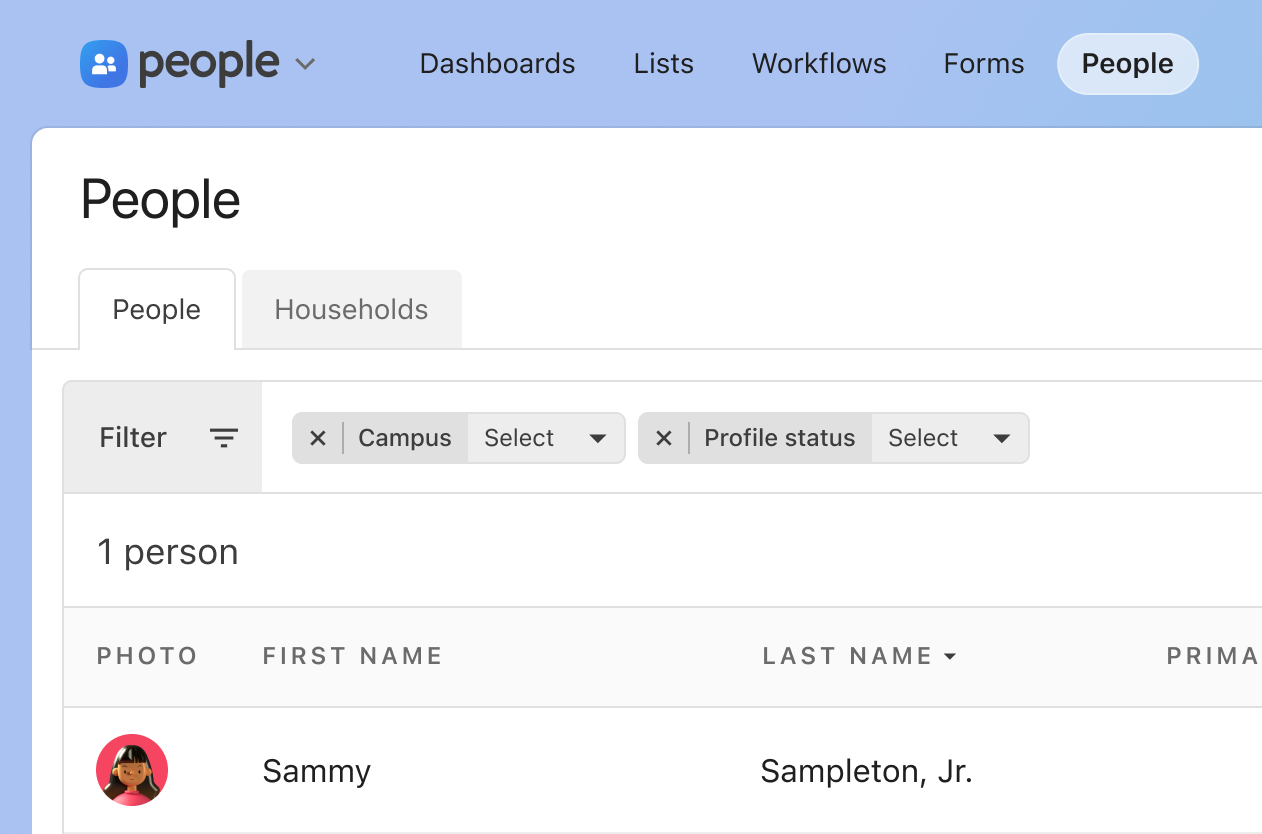
Split names into two columns for sortability and scannability:
|
|
96
|
+
|
|
97
|
+
- **First Name column:** Prefix + First Name + Given Name (if different) + Nickname + Middle Name
|
|
98
|
+
- **Last Name column:** Last Name, Suffix
|
|
99
|
+
|
|
100
|
+
#### Example
|
|
101
|
+
|
|
102
|
+
| First name | Last name |
|
|
103
|
+
| ---------- | -------------- |
|
|
104
|
+
| Sammy | Sampleton, Jr. |
|
|
105
|
+
|
|
106
|
+
|
|
107
|
+
|
|
108
|
+
### Find or add person autocomplete
|
|
109
|
+
|
|
110
|
+
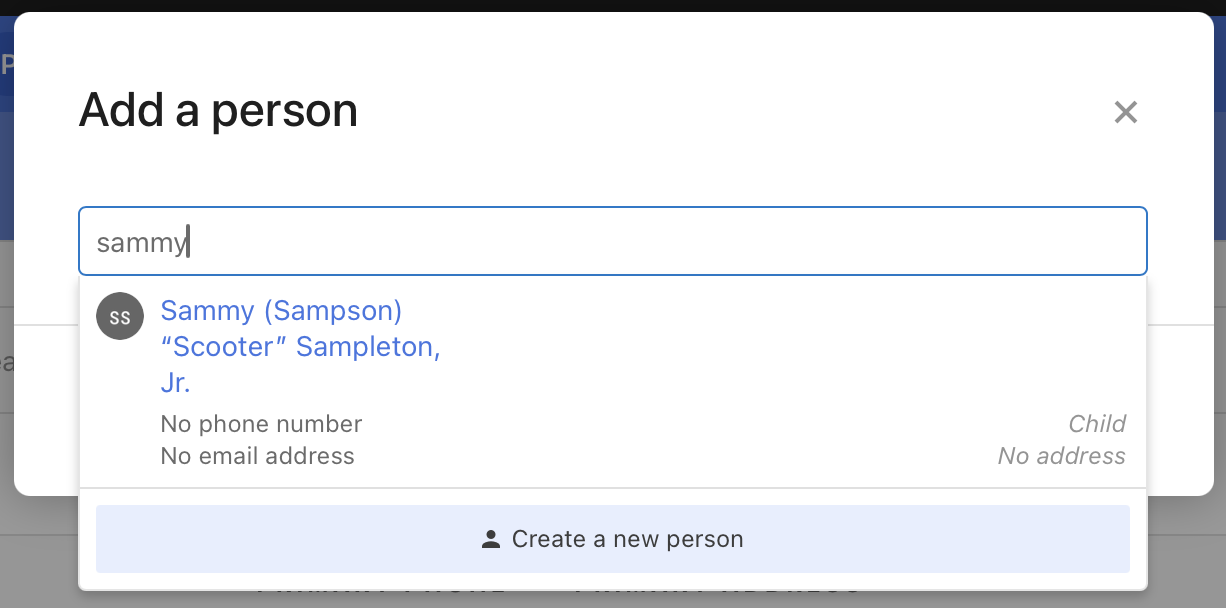
Display searchable information clearly for quick identification:
|
|
111
|
+
|
|
112
|
+
- **Primary line:** First Name + Given Name (if different) + Nickname + Last Name, Suffix
|
|
113
|
+
- **Secondary information:** Phone, email, or other identifying details
|
|
114
|
+
|
|
115
|
+
#### Example:
|
|
116
|
+
|
|
117
|
+
```plain
|
|
118
|
+
Sammy (Sampson) "Scooter" Sampleton, Jr.
|
|
119
|
+
No phone number
|
|
120
|
+
No email address
|
|
121
|
+
```
|
|
122
|
+
|
|
123
|
+
|
|
124
|
+
|
|
125
|
+
#### Name display order:
|
|
126
|
+
|
|
127
|
+
1. Prefix
|
|
128
|
+
2. First Name
|
|
129
|
+
3. Given Name
|
|
130
|
+
4. Nickname
|
|
131
|
+
5. Middle Name
|
|
132
|
+
6. Last Name
|
|
133
|
+
7. Suffix
|
|
134
|
+
|
|
135
|
+
### Edge cases
|
|
136
|
+
|
|
137
|
+
- **Missing fields:** If a name field is empty, skip it entirely. Don’t leave empty parentheses, quotation marks, or other formatting elements.
|
|
138
|
+
- **Given name same as first name:** Only show given name in parentheses if it differs from the first name. If they match, display the first name only.
|
|
139
|
+
- **Multiple middle names:** Display all middle names in order when present. Example: Mary Elizabeth Jane Smith
|
|
@@ -0,0 +1,95 @@
|
|
|
1
|
+
---
|
|
2
|
+
title: Editing and saving
|
|
3
|
+
description: How to choose between modal dialogs, separate edit pages, and inline editing, and between explicit save and on-blur save.
|
|
4
|
+
order: 90
|
|
5
|
+
---
|
|
6
|
+
|
|
7
|
+
# Editing and saving
|
|
8
|
+
|
|
9
|
+
## Rules
|
|
10
|
+
|
|
11
|
+
- **Do** use modal dialogs for simple, focused edits that don’t require outside context.
|
|
12
|
+
- **Do** use separate edit pages for complex, multi-step tasks or tasks that need guidance.
|
|
13
|
+
- **Do** use inline editing for quick changes in tables, lists, or resource titles.
|
|
14
|
+
- **Do** use explicit Save/Cancel controls when changes are significant or mistakes would be costly.
|
|
15
|
+
- **Do** add an “unsaved changes” dialog when using on-blur save for text fields.
|
|
16
|
+
- **Don’t** use modals for complex forms that need significant space.
|
|
17
|
+
- **Don’t** force users to a separate page for simple, quick edits.
|
|
18
|
+
- **Don’t** apply the same pattern everywhere; mix patterns based on the use case.
|
|
19
|
+
|
|
20
|
+
## Overview
|
|
21
|
+
|
|
22
|
+
The choice between modal dialogs, separate edit pages, or inline editing depends on the user’s needs, task complexity, and overall product goals. Each pattern serves different use cases, and often a mix of these patterns is appropriate within a product.
|
|
23
|
+
|
|
24
|
+
### Principles
|
|
25
|
+
|
|
26
|
+
Match the editing pattern to task complexity and user context:
|
|
27
|
+
|
|
28
|
+
- Modal dialogs for quick, focused interactions
|
|
29
|
+
- Separate edit pages for complex, multi-step tasks
|
|
30
|
+
- Inline editing for lightweight, contextual changes
|
|
31
|
+
|
|
32
|
+
Consider user frequency, device constraints, data sensitivity, and navigation flow when choosing an approach.
|
|
33
|
+
|
|
34
|
+
## Usage
|
|
35
|
+
|
|
36
|
+
### Guidelines
|
|
37
|
+
|
|
38
|
+
#### Modal dialogs
|
|
39
|
+
|
|
40
|
+
Use for quick, focused interactions that don’t require much context. Modals keep users in the same place, reducing navigation and focusing attention by isolating the task from distractions. Best for simple, self-contained tasks like updating a name or email.
|
|
41
|
+
|
|
42
|
+
**When to use:** The editing task is focused and doesn’t require referencing other information, it’s critical to confirm or cancel without losing page state, or the form has global implications across all products (like the CAPEM or global permissions modal).
|
|
43
|
+
|
|
44
|
+
**Limitations:** Limited space for complex forms or context, and can feel interruptive if overused.
|
|
45
|
+
|
|
46
|
+
#### Separate edit pages
|
|
47
|
+
|
|
48
|
+
Use for complex tasks that require significant space or involve multiple steps. Separate pages provide ample room for detailed or multi-step forms, allow users to see the full range of options without crowding, and can include contextual help alongside the form.
|
|
49
|
+
|
|
50
|
+
**When to use:** The editing process is complex or involves large amounts of data, users need additional guidance that doesn’t fit in a modal or inline form, or the task has a dedicated purpose like configuring advanced settings.
|
|
51
|
+
|
|
52
|
+
**Limitations:** Requires navigation away from the current page, potentially disrupting workflow. Users might lose their place if they don’t save changes or navigate back correctly.
|
|
53
|
+
|
|
54
|
+
#### Inline editing
|
|
55
|
+
|
|
56
|
+
Use for lightweight, contextual changes that are part of a broader workflow. Inline editing keeps users in context, avoids interruptions, maintains flow, and feels immediate with fewer clicks.
|
|
57
|
+
|
|
58
|
+
**When to use:** Users need to make quick, incremental changes without leaving their current context, the interface supports inline editing naturally (tables, lists, resource titles), or real-time feedback is helpful.
|
|
59
|
+
|
|
60
|
+
**Limitations:** Limited to simpler changes; too much complexity can overwhelm the page. May require additional visual cues to make the editable state clear. The lack of friction could lead to more accidental errors.
|
|
61
|
+
|
|
62
|
+
::: tip Do
|
|
63
|
+
|
|
64
|
+
- Use modal dialogs for simple, focused edits that don’t require external context
|
|
65
|
+
- Use separate edit pages when the task is complex, multi-step, or requires guidance
|
|
66
|
+
- Use inline editing for quick changes within tables, lists, or when real-time feedback helps
|
|
67
|
+
- Consider device constraints—separate pages may be necessary on mobile for space
|
|
68
|
+
- Match frequent tasks with more efficient patterns (inline or modal)
|
|
69
|
+
|
|
70
|
+
:::
|
|
71
|
+
|
|
72
|
+
::: danger Don’t
|
|
73
|
+
|
|
74
|
+
- Use modals for complex forms that need significant space
|
|
75
|
+
- Force users to navigate to separate pages for simple, quick edits
|
|
76
|
+
- Use inline editing for complex changes that could overwhelm the page
|
|
77
|
+
- Apply the same pattern everywhere—mix patterns based on specific use cases
|
|
78
|
+
|
|
79
|
+
:::
|
|
80
|
+
|
|
81
|
+
### Saving interactions
|
|
82
|
+
|
|
83
|
+
#### Save/Cancel controls
|
|
84
|
+
|
|
85
|
+
Explicit save and cancel buttons give users confidence that the system has saved their changes and mitigate errors if users navigate away prematurely. This approach introduces friction that slows users down, which can be beneficial in critical contexts.
|
|
86
|
+
|
|
87
|
+
**Use when:** Changes are significant, mistakes would be costly, or users need explicit confirmation that changes were saved.
|
|
88
|
+
|
|
89
|
+
#### On-blur save
|
|
90
|
+
|
|
91
|
+
Automatically saving when a field loses focus enables quick edits that feel more like modern applications and matches real-time controls like checkboxes and radios that don’t require explicit buttons.
|
|
92
|
+
|
|
93
|
+
**Limitations:** Changes are lost if the field isn’t unfocused before navigating away. Mitigate this with an “unsaved changes” dialog when users try to navigate away after changing a text field without clicking outside it.
|
|
94
|
+
|
|
95
|
+
**Use when:** Edits are incremental, low-risk, and part of a fluid workflow.
|
|
@@ -0,0 +1,44 @@
|
|
|
1
|
+
---
|
|
2
|
+
title: File size formatting
|
|
3
|
+
description: How to write file sizes and data-rate abbreviations, following the Microsoft Style Guide.
|
|
4
|
+
order: 160
|
|
5
|
+
---
|
|
6
|
+
|
|
7
|
+
# File size formatting
|
|
8
|
+
|
|
9
|
+
## Rules
|
|
10
|
+
|
|
11
|
+
- **Do** write file sizes as a numeral, a space, and the abbreviation (`10 MB`).
|
|
12
|
+
- **Do** use the standard abbreviations: KB, MB, GB, TB, PB, EB, ZB.
|
|
13
|
+
- **Do** use Kbps, Mbps, and Gbps for bits per second rates.
|
|
14
|
+
- **Don’t** use shorthand like K, M, G, meg, or MByte.
|
|
15
|
+
- **Don’t** abbreviate byte, kilobit, megabit, or gigabit outside of UI.
|
|
16
|
+
|
|
17
|
+
::: info
|
|
18
|
+
📄 Reference: [Microsoft Style Guide](https://docs.microsoft.com/en-us/style-guide/a-z-word-list-term-collections/term-collections/bits-bytes-terms).
|
|
19
|
+
:::
|
|
20
|
+
|
|
21
|
+
When needing to notate file sizes, the preferred format is to use numerals + abbreviation with a space in between. For example `10 MB`.
|
|
22
|
+
|
|
23
|
+
## Abbreviations
|
|
24
|
+
|
|
25
|
+
| Term | Abbreviation | Usage |
|
|
26
|
+
| -------------------- | ------------ | ------------------------------------------------------------------------------------------------- |
|
|
27
|
+
| bits per pixel | bpp | |
|
|
28
|
+
| bits per second | bps | Don’t use as a synonym for baud. See Units of measure term collection for information about baud. |
|
|
29
|
+
| byte | None | Don’t abbreviate, unless in UI |
|
|
30
|
+
| exabyte | EB | Don’t use E, E byte, or EByte |
|
|
31
|
+
| gigabit | None | Don’t abbreviate, unless in UI |
|
|
32
|
+
| gigabits per second | Gbps | Don’t spell out as Gb per second |
|
|
33
|
+
| gigabyte | GB | Don’t use G, G byte, or GByte |
|
|
34
|
+
| kilobit | None | Don’t abbreviate, unless in UI |
|
|
35
|
+
| kilobits per second | Kbps | Don’t spell out as KB per second |
|
|
36
|
+
| kilobyte | KB | Don’t use K, K byte, or KByte |
|
|
37
|
+
| kilobytes per second | KBps | Don’t spell out as KB per second |
|
|
38
|
+
| megabit | None | Don’t abbreviate, unless in Ul. |
|
|
39
|
+
| megabits per second | Mbps | Don’t spell out as Mb per second. |
|
|
40
|
+
| megabyte | MB | Don’t use M, meg, M byte, or MByte. |
|
|
41
|
+
| megabytes per second | MBps | Don’t spell out as MB per second. |
|
|
42
|
+
| petabyte | PB | Don’t use P, P byte, or PByte. |
|
|
43
|
+
| terabyte | TB | Don’t use T, T byte, or TByte. |
|
|
44
|
+
| zettabyte | ZB | Don’t use Z, Z byte, or ZByte. |
|
|
@@ -0,0 +1,127 @@
|
|
|
1
|
+
---
|
|
2
|
+
title: Household ordering
|
|
3
|
+
description: How to group and sort household members consistently across Planning Center products.
|
|
4
|
+
order: 120
|
|
5
|
+
---
|
|
6
|
+
|
|
7
|
+
# Household ordering
|
|
8
|
+
|
|
9
|
+
## Rules
|
|
10
|
+
|
|
11
|
+
- **Do** group members into “Parents or guardians”, “Children or dependents”, and “Other adults”, using those headings.
|
|
12
|
+
- **Do** list the primary member first in their category, marked with a star icon.
|
|
13
|
+
- **Do** sort active members by descending age, then by first name, then last name, then suffix.
|
|
14
|
+
- **Do** list inactive members after active members, sorted by first name only, without age.
|
|
15
|
+
- **Don’t** show inactive or pending members in congregant-facing contexts.
|
|
16
|
+
- **Don’t** mix sorting methods within a single category.
|
|
17
|
+
- **Don’t** create an exception without coordinating with your UX designer and product manager.
|
|
18
|
+
|
|
19
|
+
## Overview
|
|
20
|
+
|
|
21
|
+
Consistent household member ordering creates predictable, scannable lists across Planning Center products. All household members are organized into three categories—`parents or guardians`, `children or dependents`, and `other adults`—with consistent sorting rules within each category.
|
|
22
|
+
|
|
23
|
+
## Principles
|
|
24
|
+
|
|
25
|
+
- Organize household members into three categories: parents or guardians, children or dependents, and other adults
|
|
26
|
+
- Display primary member first within their category, indicated by star icon ⭐
|
|
27
|
+
- Sort active members by descending age (oldest to youngest), then alphabetically by first name
|
|
28
|
+
- Display inactive members after active members, sorted alphabetically by first name
|
|
29
|
+
- Adapt visibility based on context (admin vs. congregant-facing)
|
|
30
|
+
|
|
31
|
+
## Usage
|
|
32
|
+
|
|
33
|
+
### Guidelines
|
|
34
|
+
|
|
35
|
+
#### Category structure
|
|
36
|
+
|
|
37
|
+
Every household display follows this three-category structure:
|
|
38
|
+
|
|
39
|
+
1. **Parents or guardians**
|
|
40
|
+
1. Heading
|
|
41
|
+
2. Primary member, if assigned
|
|
42
|
+
3. Active parents or guardians, sorted by descending age (oldest to youngest) and then alphabetically by first name
|
|
43
|
+
4. Inactive parents or guardians, sorted alphabetically by first name (optional)
|
|
44
|
+
2. **Children or dependents**
|
|
45
|
+
1. Heading
|
|
46
|
+
2. Primary member, if assigned
|
|
47
|
+
3. Active children, sorted by descending age (oldest to youngest) and then alphabetically by first name
|
|
48
|
+
4. Inactive children, sorted alphabetically by first name (optional)
|
|
49
|
+
3. **Other adults**
|
|
50
|
+
1. Heading
|
|
51
|
+
2. Primary member, if assigned
|
|
52
|
+
3. Active adults, sorted by descending age (oldest to youngest) and then alphabetically by first name
|
|
53
|
+
4. Inactive adults, sorted alphabetically by first name (optional)
|
|
54
|
+
|
|
55
|
+
#### Primary member display
|
|
56
|
+
|
|
57
|
+
The primary household member appears first within their category and is indicated by a star icon ⭐ next to their name. This designation helps identify the main contact or responsible party at a glance.
|
|
58
|
+
|
|
59
|
+
#### Sorting active members
|
|
60
|
+
|
|
61
|
+
After the primary member, sort active household members by descending age (oldest to youngest). When members have the same age, sort alphabetically by first name. If first names match, use last name, then suffix for determining order. Pending members (when displayed) are sorted by age and then alphabetically alongside other active members.
|
|
62
|
+
|
|
63
|
+
#### Inactive members
|
|
64
|
+
|
|
65
|
+
In contexts that include inactive members, display them after all active members, sorted alphabetically by first name only. Age is not displayed for inactive members.
|
|
66
|
+
|
|
67
|
+
#### Context-specific visibility
|
|
68
|
+
|
|
69
|
+
Admin interfaces can show inactive and pending members. Congregant-facing contexts (Church Center, public-facing features) should exclude both inactive and pending members to maintain privacy and relevance.
|
|
70
|
+
|
|
71
|
+
::: tip Do
|
|
72
|
+
|
|
73
|
+
- Display primary member first in their category with star icon ⭐
|
|
74
|
+
- Sort active members by descending age (oldest first), then alphabetically by first name
|
|
75
|
+
- Use consistent category headings: “Parents or guardians”, “Children or dependents”, “Other adults”
|
|
76
|
+
- Show inactive members after active members in admin contexts, sorted alphabetically
|
|
77
|
+
- Include pending members in admin contexts only, sorted by age alongside active members
|
|
78
|
+
|
|
79
|
+
:::
|
|
80
|
+
|
|
81
|
+
::: danger Don’t
|
|
82
|
+
|
|
83
|
+
- Include inactive members in congregant-facing contexts
|
|
84
|
+
- Include pending members in congregant-facing contexts
|
|
85
|
+
- Display age information for inactive members
|
|
86
|
+
- Skip the primary member indicator when one is assigned
|
|
87
|
+
- Mix sorting methods within a single category
|
|
88
|
+
|
|
89
|
+
:::
|
|
90
|
+
|
|
91
|
+
## Definitions
|
|
92
|
+
|
|
93
|
+
### 1. Headings
|
|
94
|
+
|
|
95
|
+
Use the category name as the heading—“Parents or guardians”, “Children or dependents”, or “Other adults”..
|
|
96
|
+
|
|
97
|
+
### 2. Primary member
|
|
98
|
+
|
|
99
|
+
The main household contact, indicated by a star icon ⭐, who appears first in their respective category regardless of age or name.
|
|
100
|
+
|
|
101
|
+
### 3. Active members
|
|
102
|
+
|
|
103
|
+
After the primary member, additional active household members should be listed in descending age order and then alphabetically by first name. If multiple members have the same first name, we would then use last name, and then suffix, for determining sort order.
|
|
104
|
+
In household listings that include `Pending` members, they are sorted by age and then alphabetically alongside other members.
|
|
105
|
+
|
|
106
|
+
::: danger Don’t
|
|
107
|
+
|
|
108
|
+
- Do not include pending members in congregant-facing contexts.
|
|
109
|
+
|
|
110
|
+
:::
|
|
111
|
+
|
|
112
|
+
### 4. Inactive members
|
|
113
|
+
|
|
114
|
+
In household listings that include inactive members, list them after active members in alphabetical order by first name—we don’t display age for inactive members.
|
|
115
|
+
|
|
116
|
+
::: danger Don’t
|
|
117
|
+
|
|
118
|
+
- Do not include inactive members in congregant-facing contexts.
|
|
119
|
+
|
|
120
|
+
:::
|
|
121
|
+
|
|
122
|
+
## 🦄 Exceptions
|
|
123
|
+
|
|
124
|
+
Document any approved exceptions here. Coordinate with your UX Designer & Product Manager before creating or adopting an exception.
|
|
125
|
+
|
|
126
|
+
- In both Registrations and Check-ins, in congregant-facing contexts, if the current user belongs to multiple households, members across all households are displayed in a unified list. (Check-Ins is moving away from this, and Registrations will follow.)
|
|
127
|
+
- On Check-Ins stations, children are listed first to optimize for the most common use case (parents checking in their kids).
|