@pixlcore/xycli 1.0.0
This diff represents the content of publicly available package versions that have been released to one of the supported registries. The information contained in this diff is provided for informational purposes only and reflects changes between package versions as they appear in their respective public registries.
- package/README.md +543 -0
- package/docs/help.md +2587 -0
- package/docs/screenshots.md +219 -0
- package/docs/sync.md +920 -0
- package/docs/tutorial.md +204 -0
- package/index.js +444 -0
- package/lib/alerts.js +735 -0
- package/lib/apikey.js +425 -0
- package/lib/buckets.js +607 -0
- package/lib/categories.js +323 -0
- package/lib/channels.js +290 -0
- package/lib/config.js +86 -0
- package/lib/dashboard.js +237 -0
- package/lib/doc.js +131 -0
- package/lib/events.js +1314 -0
- package/lib/groups.js +1038 -0
- package/lib/jobs.js +1254 -0
- package/lib/log.js +125 -0
- package/lib/marketplace.js +386 -0
- package/lib/monitors.js +412 -0
- package/lib/plugins.js +491 -0
- package/lib/secrets.js +441 -0
- package/lib/servers.js +1502 -0
- package/lib/snapshots.js +498 -0
- package/lib/sync.js +963 -0
- package/lib/system.js +612 -0
- package/lib/tags.js +250 -0
- package/lib/tickets.js +681 -0
- package/lib/transfer.js +447 -0
- package/lib/utils.js +2745 -0
- package/lib/webhook.js +414 -0
- package/logo.webp +0 -0
- package/package.json +38 -0
- package/test/README.md +97 -0
- package/test/api-validation.test.js +170 -0
- package/test/categories.test.js +246 -0
- package/test/channels.test.js +209 -0
- package/test/config.test.js +96 -0
- package/test/doc.test.js +84 -0
- package/test/groups.test.js +211 -0
- package/test/help.test.js +26 -0
- package/test/helpers/common.js +127 -0
- package/test/helpers/pagination-preload.cjs +18 -0
- package/test/log.test.js +103 -0
- package/test/markdown.test.js +61 -0
- package/test/marketplace.test.js +229 -0
- package/test/monitors.test.js +227 -0
- package/test/pagination.test.js +138 -0
- package/test/plugins.test.js +351 -0
- package/test/secrets.test.js +271 -0
- package/test/servers.test.js +303 -0
- package/test/snapshots.test.js +167 -0
- package/test/sync-unit.test.js +446 -0
- package/test/sync.test.js +542 -0
- package/test/system.test.js +94 -0
- package/test/tags.test.js +230 -0
- package/test/tickets.test.js +261 -0
- package/test/toast.test.js +73 -0
- package/test/transfer-apikey.test.js +96 -0
- package/test/transfer-workflow.test.js +122 -0
- package/test/transfer.test.js +314 -0
- package/test/webhook.test.js +332 -0
- package/test.js +49 -0
package/README.md
ADDED
|
@@ -0,0 +1,543 @@
|
|
|
1
|
+
<p align="center">
|
|
2
|
+
<img src="logo.webp" alt="xyCLI logo" width="256" height="256">
|
|
3
|
+
</p>
|
|
4
|
+
|
|
5
|
+
# xyCLI
|
|
6
|
+
|
|
7
|
+
A complete command-line interface for [xyOps](https://xyops.io), the workflow automation and server monitoring platform. Launch jobs, investigate failures, explore server health, manage your automation, and keep definitions in Git, all from your terminal.
|
|
8
|
+
|
|
9
|
+
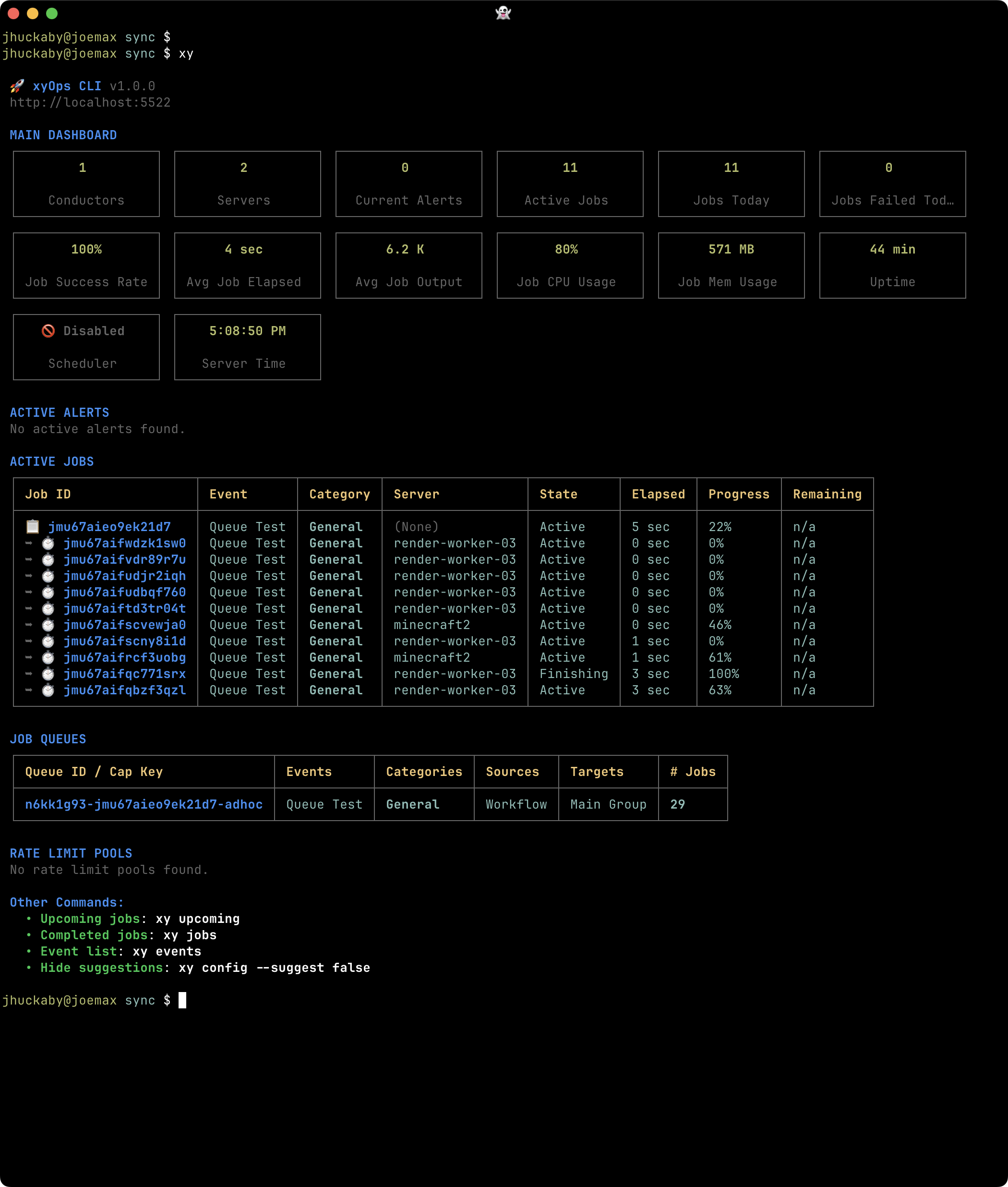
xyCLI combines colorful tables, monitoring charts, syntax-highlighted code, and readable job reports with commands you can use in everyday scripts. Run `xy` for a dashboard, follow a job as it runs, or drill into an entire server group's metrics without opening a browser.
|
|
10
|
+
|
|
11
|
+
- **Run your automation:** Create Events, schedule scripts, launch workflows, pass input files, and follow live job output.
|
|
12
|
+
- **See what is happening:** Browse active Alerts, queued work, upcoming jobs, server metrics, processes, and network connections.
|
|
13
|
+
- **Investigate what happened:** Search completed jobs, explore historical monitoring charts, inspect snapshots, and read system logs.
|
|
14
|
+
- **Build and organize:** Manage Categories, Tags, Plugins, notification Channels, Web Hooks, Buckets, Secret Vaults, and Tickets.
|
|
15
|
+
- **Work with local files:** Export reusable definitions, preview imports, and sync existing definitions with a directory you can version in Git.
|
|
16
|
+
|
|
17
|
+
|
|
18
|
+
|
|
19
|
+
*The dashboard brings server health, active Alerts and jobs, queues, and rate limits into one terminal view.*
|
|
20
|
+
|
|
21
|
+
Browse the [screenshot gallery](docs/screenshots.md) for more views, or jump to the [command reference](docs/help.md).
|
|
22
|
+
|
|
23
|
+
## Contents
|
|
24
|
+
|
|
25
|
+
- [Getting started](#getting-started)
|
|
26
|
+
- [Configuration](#configuration)
|
|
27
|
+
- [Global CLI switches](#global-cli-switches)
|
|
28
|
+
- [Tutorial: your first Event, job, and Web Hook](docs/tutorial.md)
|
|
29
|
+
- [Explore and manage xyOps](#explore-and-manage-xyops)
|
|
30
|
+
- [Transfer data between systems](#transfer-data-between-systems)
|
|
31
|
+
- [Sync your automation with local files](#sync-your-automation-with-local-files)
|
|
32
|
+
- [System operations and logs](#system-operations-and-logs)
|
|
33
|
+
- [Documentation and API access](#documentation-and-api-access)
|
|
34
|
+
|
|
35
|
+
## Getting started
|
|
36
|
+
|
|
37
|
+
You will need Node.js **20.19.0 or later**, npm, and a running **xyOps 1.0.96 or later** instance. Install xyCLI on your workstation or another machine that can reach xyOps; it talks to the REST API, so it does not need to run on a conductor or worker.
|
|
38
|
+
|
|
39
|
+
```sh
|
|
40
|
+
npm install -g @pixlcore/xycli
|
|
41
|
+
```
|
|
42
|
+
|
|
43
|
+
This installs the `xy` command. In the xyOps web interface, open **API Keys** and create a key for the CLI. Choose privileges and resource access appropriate for the work you want to do. The [tutorial](docs/tutorial.md) needs access to view Events and servers, create and edit Events, run jobs, and create and test Web Hooks. System administration commands require a full administrator key.
|
|
44
|
+
|
|
45
|
+
Save your xyOps URL and API Key:
|
|
46
|
+
|
|
47
|
+
```sh
|
|
48
|
+
xy config --base_url https://xyops.example.com --api_key YOUR_API_KEY
|
|
49
|
+
```
|
|
50
|
+
|
|
51
|
+
Use the base URL of your xyOps instance, without the `/api` endpoint suffix. The command creates `~/.config/xyops/cli.json` and saves the settings there.
|
|
52
|
+
|
|
53
|
+
Now check your connection:
|
|
54
|
+
|
|
55
|
+
```sh
|
|
56
|
+
xy
|
|
57
|
+
```
|
|
58
|
+
|
|
59
|
+
You should see the dashboard. If you need to set up xyOps itself, start with its [Getting Started guide](https://docs.xyops.io/start). See [API Keys](https://docs.xyops.io/api#api-keys) for authentication details and [Privileges](https://docs.xyops.io/privileges) for permissions.
|
|
60
|
+
|
|
61
|
+
## Configuration
|
|
62
|
+
|
|
63
|
+
xyCLI loads optional JSON configuration files on every invocation, then applies environment variables. Settings are merged in this order:
|
|
64
|
+
|
|
65
|
+
| Order | Source | Purpose |
|
|
66
|
+
| --- | --- | --- |
|
|
67
|
+
| 1 | `/etc/xyops/cli.json` | Shared settings for the machine. |
|
|
68
|
+
| 2 | `~/.config/xyops/cli.json` | Settings for your user account, overriding matching system settings. |
|
|
69
|
+
| 3 | `XYOPS_` environment variables | Overrides for the current shell or command. |
|
|
70
|
+
|
|
71
|
+
Neither file is required if you supply your connection settings through the environment. Missing files are skipped; files you create must contain valid JSON. Matching top-level properties are replaced by later sources, so a user-level object such as `sync` replaces the system-level object of the same name.
|
|
72
|
+
|
|
73
|
+
A simple user configuration looks like this:
|
|
74
|
+
|
|
75
|
+
```json
|
|
76
|
+
{
|
|
77
|
+
"base_url": "https://xyops.example.com",
|
|
78
|
+
"api_key": "YOUR_API_KEY",
|
|
79
|
+
"items_per_page": 25,
|
|
80
|
+
"suggest": true,
|
|
81
|
+
"color": true
|
|
82
|
+
}
|
|
83
|
+
```
|
|
84
|
+
|
|
85
|
+
View the effective settings, or change a preference:
|
|
86
|
+
|
|
87
|
+
```sh
|
|
88
|
+
xy config
|
|
89
|
+
xy config --items_per_page 25
|
|
90
|
+
xy config --suggest false
|
|
91
|
+
xy config --color false
|
|
92
|
+
```
|
|
93
|
+
|
|
94
|
+
`xy config` masks your API Key when displaying it. Updates load the **user configuration file** separately, apply only the settings specified on the command line, and save it with owner-only read/write permissions. Other user settings are preserved; settings inherited from the system file or environment are not copied into the user file. If the user file does not exist, it is created with only the settings you supply. Environment overrides still take precedence on the next invocation.
|
|
95
|
+
|
|
96
|
+
Every `XYOPS_` variable maps to a lowercase configuration key. For example, `XYOPS_BASE_URL` sets `base_url` and `XYOPS_ITEMS_PER_PAGE` sets `items_per_page`. Literal `true` and `false` become booleans, and numeric strings become numbers.
|
|
97
|
+
|
|
98
|
+
Use environment variables for a temporary connection or a shell script:
|
|
99
|
+
|
|
100
|
+
```sh
|
|
101
|
+
export XYOPS_BASE_URL="https://xyops.example.com"
|
|
102
|
+
export XYOPS_API_KEY="YOUR_API_KEY"
|
|
103
|
+
xy
|
|
104
|
+
```
|
|
105
|
+
|
|
106
|
+
Or override a display setting for one command:
|
|
107
|
+
|
|
108
|
+
```sh
|
|
109
|
+
XYOPS_COLOR=false xy events
|
|
110
|
+
```
|
|
111
|
+
|
|
112
|
+
Other settings include `temp_dir` for local temporary files and caches, `cache_ttl` for cached API responses, and `new_event_template` for your preferred defaults when creating Events. See the [configuration command reference](docs/help.md#config).
|
|
113
|
+
|
|
114
|
+
## Global CLI switches
|
|
115
|
+
|
|
116
|
+
These switches control output or execution across many commands. Add them to the command you are running; the available details and output formats depend on that command.
|
|
117
|
+
|
|
118
|
+
| Switch | Short form | What it does |
|
|
119
|
+
| --- | --- | --- |
|
|
120
|
+
| `--verbose` | `-v` | Show extra detail. Resource views may expand scripts, parameters, or monitoring sections; many mutation commands also display API requests and responses. |
|
|
121
|
+
| `--quiet` | `-q` | Suppress ordinary terminal output and progress displays. JSON data still prints, and fatal error messages remain visible on stderr. |
|
|
122
|
+
| `--dry` | | Preview a supported operation without applying it. Resource mutations, imports, exports, sync, and API calls use this to show planned changes or requests. It does not prevent connection checks or reads, and does not apply to local `xy config` updates. |
|
|
123
|
+
| `--format json` | `-f json` | Display supported results as indented JSON instead of the usual report or table. |
|
|
124
|
+
| `--format jsonc` | `-f jsonc` | Display supported results as compact JSON on one line. Here, `jsonc` means compact JSON. |
|
|
125
|
+
| `--raw` | `-r` | Show resource IDs instead of friendly names in supported human-readable views. This changes labels, rather than selecting JSON output or raw job logs. |
|
|
126
|
+
| `--help` | `-h` | Show command help when added to a command, such as `xy event create --help`. You can also use `xy help event create`. |
|
|
127
|
+
|
|
128
|
+
For example, inspect expanded Plugin details, preview an Event update, or use IDs in job listings:
|
|
129
|
+
|
|
130
|
+
```sh
|
|
131
|
+
xy plugin PLUGIN_ID --verbose
|
|
132
|
+
xy event update EVENT_ID --enabled false --dry
|
|
133
|
+
xy jobs --raw
|
|
134
|
+
xy event create --help
|
|
135
|
+
```
|
|
136
|
+
|
|
137
|
+
For JSON output without banners and progress displays, combine `--format` with `--quiet`. Disable color as well when you want plain, indented JSON in a file:
|
|
138
|
+
|
|
139
|
+
```sh
|
|
140
|
+
XYOPS_COLOR=false xy events --format json --quiet > ./events.json
|
|
141
|
+
xy categories -f jsonc -q > ./categories.json
|
|
142
|
+
```
|
|
143
|
+
|
|
144
|
+
Fatal errors print to stderr and exit with a nonzero status even in quiet mode, so redirecting JSON output to a file leaves those errors visible in your terminal. Quiet mode can still suppress command-specific warnings and failure reports, such as sync messages or import results. Sync warnings and errors still produce a nonzero exit status. Check exit status and any structured results when scripting; omit `--quiet` when you need those detailed diagnostics.
|
|
145
|
+
|
|
146
|
+
JSON output varies by command: some local collection views return all matches even when their table view is paginated, while database searches may return only the selected page. Some commands print multiple JSON values, such as the request and response from `xy api`. Check the command reference when using the output in a script.
|
|
147
|
+
|
|
148
|
+
### Common command options
|
|
149
|
+
|
|
150
|
+
These options also appear across commands, but are handled by the individual commands rather than globally:
|
|
151
|
+
|
|
152
|
+
| Option | Where it applies |
|
|
153
|
+
| --- | --- |
|
|
154
|
+
| `--limit N` | Set the number of rows in supported paginated views. In Event or Category mutations, `--limit` can instead append a resource-limit object. |
|
|
155
|
+
| `--page N` | Select a page in supported paginated views, starting with page 1. |
|
|
156
|
+
| `--offset N` | Skip a number of rows in supported paginated views. If `--page` is also supplied, it determines the offset using the selected limit. |
|
|
157
|
+
| `--confirm` | Apply operations that require explicit confirmation, such as imports and many deletes. It also overrides the update warning for definitions managed by up-only sync. It does not replace `--dry`, and sync applies changes without this option. |
|
|
158
|
+
| `--json @FILE` | Load a JSON object into the command's request options. Use `--json @-` to read it from standard input. This is useful for resource creation, updates, and API calls. |
|
|
159
|
+
| `--export FILE` | Export a supported resource definition from its detail command to an XYPDF file. |
|
|
160
|
+
|
|
161
|
+
```sh
|
|
162
|
+
xy servers --limit 10 --page 2
|
|
163
|
+
xy plugin create --json @./plugin.json --dry
|
|
164
|
+
xy event EVENT_ID --export ./event.json
|
|
165
|
+
```
|
|
166
|
+
|
|
167
|
+
Many value options also accept `@FILE` or `@-`, such as `--params.script @./hello.sh`. Dotted names set nested request properties, as in `--params.duration 30`.
|
|
168
|
+
|
|
169
|
+
- **Command reference:** [Export](docs/help.md#export), [Import](docs/help.md#import), and [API requests](docs/help.md#api), plus the individual command sections for supported pagination and detail options.
|
|
170
|
+
|
|
171
|
+
## Your first Event and job
|
|
172
|
+
|
|
173
|
+
Follow the [xyCLI Tutorial](docs/tutorial.md) to explore the dashboard, create a shell Event, and watch its job run. Then create a custom Web Hook and attach a success action so each successful run sends a notification to your endpoint. The tutorial also shows how to update your script and export the Event with its Hook.
|
|
174
|
+
|
|
175
|
+
## Explore and manage xyOps
|
|
176
|
+
|
|
177
|
+
Plural commands such as `events`, `servers`, and `tickets` browse collections. Singular commands such as `event`, `server`, and `ticket` open an item or perform an operation. Many views accept a fuzzy title or name for convenient exploration; use the exact IDs shown in the output when scripting or changing saved resources.
|
|
178
|
+
|
|
179
|
+
### Events and workflows
|
|
180
|
+
|
|
181
|
+
Events describe what to run, which Plugin and parameters to use, where to run it, and which triggers, actions, and limits apply. Workflows are Events that orchestrate multiple steps, so you can browse, inspect, run, and export them through the same commands.
|
|
182
|
+
|
|
183
|
+
Find your backup automation, see what is scheduled next, or send a file to a workflow and follow the result:
|
|
184
|
+
|
|
185
|
+
```sh
|
|
186
|
+
xy events backup
|
|
187
|
+
xy events --category Production
|
|
188
|
+
xy event EVENT_ID --upcoming
|
|
189
|
+
xy run WORKFLOW_ID --file ./input.csv --follow
|
|
190
|
+
```
|
|
191
|
+
|
|
192
|
+
For a recurring script, `xy event create` provides shortcuts such as `--cron "30 4 * * *"` and `--interval "5 minutes"`. Run-time parameter overrides let you reuse a saved Event for different inputs without changing its definition.
|
|
193
|
+
|
|
194
|
+
- **Command reference:** [Events](docs/help.md#events), [Event operations](docs/help.md#event), and [Run](docs/help.md#run).
|
|
195
|
+
- **Learn more about xyOps:** [xyOps Events](https://docs.xyops.io/events), [xyOps Workflows](https://docs.xyops.io/workflows), and [xyOps Triggers](https://docs.xyops.io/triggers).
|
|
196
|
+
|
|
197
|
+
### Jobs
|
|
198
|
+
|
|
199
|
+
A job is one execution of an Event or workflow. Use job searches to find failures, compare runs, and locate output. Opening an active job follows its live stream; opening a completed job displays its report.
|
|
200
|
+
|
|
201
|
+
```sh
|
|
202
|
+
xy jobs --error --date today
|
|
203
|
+
xy jobs --event "Nightly Backup" --date yesterday
|
|
204
|
+
xy job JOB_ID
|
|
205
|
+
xy job log JOB_ID --download ./job-output.log
|
|
206
|
+
```
|
|
207
|
+
|
|
208
|
+
You can also rerun a previous job with `xy job run JOB_ID --follow`, or resume a workflow job where supported. Job reports bring together results, performance, output, files, and workflow details.
|
|
209
|
+
|
|
210
|
+
- **Command reference:** [Job searches](docs/help.md#jobs) and [Job operations](docs/help.md#job).
|
|
211
|
+
- **Learn more about xyOps:** [xyOps Events and job execution](https://docs.xyops.io/events) and [xyOps Job data](https://docs.xyops.io/data#job).
|
|
212
|
+
|
|
213
|
+
### Categories
|
|
214
|
+
|
|
215
|
+
Categories organize Events and workflows into areas such as Production, Backups, or Development. Each Event belongs to one Category. Category actions and limits apply to contained jobs, making them useful for shared failure notifications, runtime limits, and other defaults. Disabling a Category blocks its Events from launching.
|
|
216
|
+
|
|
217
|
+
```sh
|
|
218
|
+
xy categories
|
|
219
|
+
xy category "Production"
|
|
220
|
+
xy category create --title "Backups" --color blue
|
|
221
|
+
```
|
|
222
|
+
|
|
223
|
+
- **Command reference:** [Categories](docs/help.md#categories) and [Category operations](docs/help.md#category).
|
|
224
|
+
- **Learn more about xyOps:** [xyOps Categories](https://docs.xyops.io/categories).
|
|
225
|
+
|
|
226
|
+
### Servers
|
|
227
|
+
|
|
228
|
+
Servers are workers running xySat. Explore their live or last-known health, see which jobs they are running, and inspect CPU, memory, filesystems, containers, processes, and network connections. Historical views help answer questions such as what changed during a busy hour.
|
|
229
|
+
|
|
230
|
+
```sh
|
|
231
|
+
xy servers --os linux
|
|
232
|
+
xy server SERVER_ID --monitors
|
|
233
|
+
xy server SERVER_ID --processes --connections
|
|
234
|
+
xy server history SERVER_ID 2026/09/17/14
|
|
235
|
+
```
|
|
236
|
+
|
|
237
|
+
History dates select an hour, day, month, or year depending on how many components you provide. Replace the example date with the period you want to investigate. To add a worker, `xy server add --platform linux` generates an installation command you can run on the new machine.
|
|
238
|
+
|
|
239
|
+
- **Command reference:** [Server browsing](docs/help.md#servers), [Server details](docs/help.md#server-get), and [Server history](docs/help.md#server-history).
|
|
240
|
+
- **Learn more about xyOps:** [xyOps Servers](https://docs.xyops.io/servers).
|
|
241
|
+
|
|
242
|
+
### Server Groups
|
|
243
|
+
|
|
244
|
+
Groups turn a collection of workers into a job target and a shared monitoring view. Servers can join through hostname patterns or explicit assignment, and each server can belong to multiple Groups. View aggregated metrics, choose average or total values, and explore the jobs and Alerts across the Group.
|
|
245
|
+
|
|
246
|
+
```sh
|
|
247
|
+
xy groups
|
|
248
|
+
xy group "Production" --monitors --merge total
|
|
249
|
+
xy group GROUP_ID --upcoming
|
|
250
|
+
xy group history GROUP_ID 2026/09/17
|
|
251
|
+
```
|
|
252
|
+
|
|
253
|
+
Groups also provide default Alert actions and per-server job limits. They are a useful way to direct automation at a pool of workers while keeping a combined view of its health.
|
|
254
|
+
|
|
255
|
+
- **Command reference:** [Groups](docs/help.md#groups), [Group details](docs/help.md#group-get), and [Group history](docs/help.md#group-history).
|
|
256
|
+
- **Learn more about xyOps:** [xyOps Server Groups](https://docs.xyops.io/groups).
|
|
257
|
+
|
|
258
|
+
### Monitors
|
|
259
|
+
|
|
260
|
+
Monitors turn server data into numeric metrics using xyOps expressions. They power charts and provide values for Alerts. Define custom metrics, scope them to Groups, and test an expression against a worker before relying on it.
|
|
261
|
+
|
|
262
|
+
```sh
|
|
263
|
+
xy monitors
|
|
264
|
+
xy monitor MONITOR_ID
|
|
265
|
+
xy monitor test MONITOR_ID --server SERVER_ID
|
|
266
|
+
xy monitor create --title "CPU Usage" --source cpu.currentLoad --suffix %
|
|
267
|
+
```
|
|
268
|
+
|
|
269
|
+
Use server or Group views to chart the collected values. Monitor settings also support byte counts, durations, and deltas such as network bytes per second.
|
|
270
|
+
|
|
271
|
+
- **Command reference:** [Monitors](docs/help.md#monitors) and [Monitor operations](docs/help.md#monitor).
|
|
272
|
+
- **Learn more about xyOps:** [xyOps Monitors](https://docs.xyops.io/monitors) and [xyOps Expressions](https://docs.xyops.io/xyexp).
|
|
273
|
+
|
|
274
|
+
### Alerts
|
|
275
|
+
|
|
276
|
+
Alert definitions describe conditions to detect on your servers, such as high CPU or low free space, and the actions to take when they trigger or clear. Alert invocations are the actual occurrences, with their server, timing, evaluated message, and related jobs, Tickets, or snapshots.
|
|
277
|
+
|
|
278
|
+
```sh
|
|
279
|
+
xy alerts
|
|
280
|
+
xy alert "High CPU"
|
|
281
|
+
xy alert test DEFINITION_ID --server SERVER_ID
|
|
282
|
+
xy alerts search --active
|
|
283
|
+
xy alerts search --group Production --date today
|
|
284
|
+
```
|
|
285
|
+
|
|
286
|
+
Use `xy alerts` to manage definitions and `xy alerts search` to investigate occurrences. Testing evaluates a definition against current server data without updating its saved settings.
|
|
287
|
+
|
|
288
|
+
- **Command reference:** [Alert definitions](docs/help.md#alerts), [Alert searches](docs/help.md#alerts-search), and [Alert operations](docs/help.md#alert).
|
|
289
|
+
- **Learn more about xyOps:** [xyOps Alerts](https://docs.xyops.io/alerts).
|
|
290
|
+
|
|
291
|
+
### Snapshots
|
|
292
|
+
|
|
293
|
+
Snapshots preserve a point-in-time view of a server or Group for later investigation. Capture a server before maintenance, browse snapshots created by jobs or Alerts, and revisit recorded processes, connections, and monitoring context.
|
|
294
|
+
|
|
295
|
+
```sh
|
|
296
|
+
xy server SERVER_ID --snapshot
|
|
297
|
+
xy snapshots --server SERVER_ID
|
|
298
|
+
xy snapshot SNAPSHOT_ID --monitors --processes --connections
|
|
299
|
+
```
|
|
300
|
+
|
|
301
|
+
For watching an ongoing issue, `xy server SERVER_ID --watch 300` asks xyOps to capture one snapshot per minute for five minutes. The snapshot list also accepts Group and source filters.
|
|
302
|
+
|
|
303
|
+
- **Command reference:** [Snapshot browsing](docs/help.md#snapshots), [Snapshot details](docs/help.md#snapshot), and [Server snapshot/watch commands](docs/help.md#server-commands).
|
|
304
|
+
- **Learn more about xyOps:** [xyOps Snapshots](https://docs.xyops.io/snapshots).
|
|
305
|
+
|
|
306
|
+
### Plugins
|
|
307
|
+
|
|
308
|
+
Plugins are the executable building blocks of xyOps. Event Plugins run jobs, Monitor Plugins collect metrics, Action Plugins react to conditions, and Scheduler Plugins make custom scheduling decisions. Inspect their settings and parameters, or upload source code directly from a local file.
|
|
309
|
+
|
|
310
|
+
```sh
|
|
311
|
+
xy plugins --type event
|
|
312
|
+
xy plugin PLUGIN_ID --verbose
|
|
313
|
+
xy plugin update PLUGIN_ID --script @./plugin.js
|
|
314
|
+
```
|
|
315
|
+
|
|
316
|
+
The verbose view displays the complete embedded script with syntax highlighting. This makes it easy to review what is installed and iterate on code from your editor.
|
|
317
|
+
|
|
318
|
+
- **Command reference:** [Plugins](docs/help.md#plugins) and [Plugin operations](docs/help.md#plugin).
|
|
319
|
+
- **Learn more about xyOps:** [xyOps Plugins](https://docs.xyops.io/plugins).
|
|
320
|
+
|
|
321
|
+
### Notification Channels
|
|
322
|
+
|
|
323
|
+
Channels bundle notification recipients and follow-up actions into reusable presets. An Event, Category, or Alert action can reference a Channel to send email, in-app notifications, a Web Hook, or a follow-up Event using shared settings.
|
|
324
|
+
|
|
325
|
+
```sh
|
|
326
|
+
xy channels
|
|
327
|
+
xy channel "Operations"
|
|
328
|
+
xy channel create --title "Operations" --users admin
|
|
329
|
+
```
|
|
330
|
+
|
|
331
|
+
Creating a Channel saves its configuration; it runs when an action references it. Use Channels to maintain an operations contact list in one place.
|
|
332
|
+
|
|
333
|
+
- **Command reference:** [Channels](docs/help.md#channels) and [Channel operations](docs/help.md#channel).
|
|
334
|
+
- **Learn more about xyOps:** [xyOps Channels](https://docs.xyops.io/channels).
|
|
335
|
+
|
|
336
|
+
### Web Hooks
|
|
337
|
+
|
|
338
|
+
Web Hooks send outbound HTTP requests to other services from jobs and Alerts. Their URLs, headers, and bodies can use templates, making them useful for chat notifications, service integrations, and custom automation endpoints.
|
|
339
|
+
|
|
340
|
+
```sh
|
|
341
|
+
xy hooks
|
|
342
|
+
xy hooks --method POST
|
|
343
|
+
xy hook HOOK_ID
|
|
344
|
+
```
|
|
345
|
+
|
|
346
|
+
You can create and update definitions from the CLI, including loading request bodies from local files. The command reference also explains how to test a Hook by making a real request.
|
|
347
|
+
|
|
348
|
+
- **Command reference:** [Web Hooks](docs/help.md#hooks) and [Hook operations](docs/help.md#hook).
|
|
349
|
+
- **Learn more about xyOps:** [xyOps Web Hooks](https://docs.xyops.io/webhooks).
|
|
350
|
+
|
|
351
|
+
### Storage Buckets
|
|
352
|
+
|
|
353
|
+
Buckets hold durable JSON data and files that jobs and workflows can share. Use them for a last-success marker, a reusable input dataset, or generated reports and artifacts. The CLI separates Bucket metadata, JSON contents, and file operations so you can work with each directly.
|
|
354
|
+
|
|
355
|
+
```sh
|
|
356
|
+
xy buckets
|
|
357
|
+
xy bucket BUCKET_ID
|
|
358
|
+
xy bucket write BUCKET_ID --data @./state.json
|
|
359
|
+
xy bucket upload BUCKET_ID --file ./report.csv
|
|
360
|
+
xy bucket file download BUCKET_ID report.csv
|
|
361
|
+
```
|
|
362
|
+
|
|
363
|
+
- **Command reference:** [Buckets](docs/help.md#buckets) and [Bucket operations](docs/help.md#bucket).
|
|
364
|
+
- **Learn more about xyOps:** [xyOps Buckets](https://docs.xyops.io/buckets).
|
|
365
|
+
|
|
366
|
+
### Secret Vaults
|
|
367
|
+
|
|
368
|
+
Secret Vaults store encrypted variables and deliver them to assigned Events, Categories, Plugins, or Web Hooks at runtime. Browse variable names and assignments without exposing their values, and update a Vault from a local JSON file when credentials change.
|
|
369
|
+
|
|
370
|
+
```sh
|
|
371
|
+
xy secrets --name API_TOKEN
|
|
372
|
+
xy secret VAULT_ID
|
|
373
|
+
xy secret update VAULT_ID --fields @./secrets.json
|
|
374
|
+
```
|
|
375
|
+
|
|
376
|
+
Normal list and detail views show safe metadata. The `--fields` file must contain the complete replacement array of variables. Creating, updating, explicitly decrypting, or deleting a Vault requires an administrator API Key.
|
|
377
|
+
|
|
378
|
+
- **Command reference:** [Secret Vaults](docs/help.md#secrets) and [Vault operations](docs/help.md#secret).
|
|
379
|
+
- **Learn more about xyOps:** [xyOps Secrets](https://docs.xyops.io/secrets).
|
|
380
|
+
|
|
381
|
+
### API Keys
|
|
382
|
+
|
|
383
|
+
API Keys provide access for the CLI, scripts, and integrations. Manage their privileges, Roles, resource restrictions, expiration, and status, or find which keys grant a particular privilege. List and detail commands show safe metadata rather than the authentication secret.
|
|
384
|
+
|
|
385
|
+
```sh
|
|
386
|
+
xy keys
|
|
387
|
+
xy keys --privilege run_jobs
|
|
388
|
+
xy key KEY_ID
|
|
389
|
+
xy key update KEY_ID --active false
|
|
390
|
+
```
|
|
391
|
+
|
|
392
|
+
Use the internal Key ID shown in the list for updates. Newly created key secrets are displayed once; existing plaintext secrets cannot be retrieved.
|
|
393
|
+
|
|
394
|
+
- **Command reference:** [API Keys](docs/help.md#keys) and [Key operations](docs/help.md#key).
|
|
395
|
+
- **Learn more about xyOps:** [xyOps API Keys](https://docs.xyops.io/api#api-keys) and [xyOps Privileges](https://docs.xyops.io/privileges).
|
|
396
|
+
|
|
397
|
+
### Roles
|
|
398
|
+
|
|
399
|
+
Roles bundle privileges and resource restrictions that can be assigned to users and API Keys. Reuse a Role when several integrations need the same access, then find the keys that reference it or transfer its definition to another instance.
|
|
400
|
+
|
|
401
|
+
```sh
|
|
402
|
+
xy keys --role ROLE_ID
|
|
403
|
+
xy role ROLE_ID --export ./role.json
|
|
404
|
+
xy import ./role.json
|
|
405
|
+
```
|
|
406
|
+
|
|
407
|
+
Role definitions support export and import; there is no dedicated Role list or editing command. Manage user accounts and Role assignments in the xyOps web interface.
|
|
408
|
+
|
|
409
|
+
- **Command reference:** [Key filters](docs/help.md#keys), [Export](docs/help.md#export), and [Import](docs/help.md#import).
|
|
410
|
+
- **Learn more about xyOps:** [xyOps Users and Roles](https://docs.xyops.io/users).
|
|
411
|
+
|
|
412
|
+
### Tags
|
|
413
|
+
|
|
414
|
+
Tags are reusable labels for Events, jobs, and Tickets. They help you find related work across Categories, mark priority or environment, and drive conditional actions. A job can also add Tags dynamically while it runs.
|
|
415
|
+
|
|
416
|
+
```sh
|
|
417
|
+
xy tags
|
|
418
|
+
xy tag create --title "Important"
|
|
419
|
+
xy jobs --tag Important --date today
|
|
420
|
+
xy tickets --tag Important --status open
|
|
421
|
+
```
|
|
422
|
+
|
|
423
|
+
- **Command reference:** [Tags](docs/help.md#tags) and [Tag operations](docs/help.md#tag).
|
|
424
|
+
- **Learn more about xyOps:** [xyOps Tags](https://docs.xyops.io/tags).
|
|
425
|
+
|
|
426
|
+
### Tickets
|
|
427
|
+
|
|
428
|
+
Tickets connect investigations and runbooks with your automation. Search by status, assignee, Tag, Category, or dates; read Markdown descriptions and comments; and inspect attached Events, jobs, and files from the terminal.
|
|
429
|
+
|
|
430
|
+
```sh
|
|
431
|
+
xy tickets --status open --assignee admin
|
|
432
|
+
xy ticket 12345
|
|
433
|
+
xy ticket 12345 --comment "Investigation started."
|
|
434
|
+
xy ticket upload 12345 --file ./diagnostic.txt
|
|
435
|
+
```
|
|
436
|
+
|
|
437
|
+
Ticket commands accept either the friendly Ticket number or its internal ID. You can create issues, add findings, attach evidence, and close them as part of the same command-line workflow.
|
|
438
|
+
|
|
439
|
+
- **Command reference:** [Ticket searches](docs/help.md#tickets) and [Ticket operations](docs/help.md#ticket).
|
|
440
|
+
- **Learn more about xyOps:** [xyOps Tickets](https://docs.xyops.io/tickets).
|
|
441
|
+
|
|
442
|
+
### Plugin Marketplace
|
|
443
|
+
|
|
444
|
+
Find new capabilities without leaving your terminal. Search the Marketplace, filter by Plugin type or requirements, and read a Plugin's README and available versions before installing it.
|
|
445
|
+
|
|
446
|
+
```sh
|
|
447
|
+
xy marketplace search backup
|
|
448
|
+
xy marketplace --plugin_type monitor
|
|
449
|
+
xy marketplace pixlcore/xyplug-ai
|
|
450
|
+
xy marketplace install pixlcore/xyplug-ai
|
|
451
|
+
```
|
|
452
|
+
|
|
453
|
+
Installation first displays a preview. Add `--confirm` after reviewing it to install or upgrade the Plugin definition. Installation does not run or test the Plugin.
|
|
454
|
+
|
|
455
|
+
- **Command reference:** [Marketplace browsing](docs/help.md#marketplace) and [Installation](docs/help.md#marketplace-install).
|
|
456
|
+
- **Learn more about xyOps:** [xyOps Marketplace](https://docs.xyops.io/marketplace).
|
|
457
|
+
|
|
458
|
+
## Transfer data between systems
|
|
459
|
+
|
|
460
|
+
Export an Event, workflow, Plugin, or other supported definition as an [xyOps Portable Data Format (XYPDF)](https://docs.xyops.io/xypdf) file. These files work with both xyCLI and the xyOps web interface, making them useful for sharing automation, moving definitions between environments, or saving a reusable example.
|
|
461
|
+
|
|
462
|
+
```sh
|
|
463
|
+
xy event EVENT_ID --export ./event.json --deps all
|
|
464
|
+
xy plugin PLUGIN_ID --export ./plugin.json
|
|
465
|
+
xy import ./event.json
|
|
466
|
+
```
|
|
467
|
+
|
|
468
|
+
Event exports can include selected dependencies, and a `.json.gz` filename enables compression. Import displays a preview and makes no changes until you add `--confirm`. Exact matching IDs update existing definitions; other IDs create new objects.
|
|
469
|
+
|
|
470
|
+
Exports contain definitions rather than job history, Bucket contents, or plaintext API Key secrets. For whole-system backups, use the separate administrator [System export](docs/help.md#system-export) commands.
|
|
471
|
+
|
|
472
|
+
- **Command reference:** [Export](docs/help.md#export) and [Import](docs/help.md#import).
|
|
473
|
+
|
|
474
|
+
## Sync your automation with local files
|
|
475
|
+
|
|
476
|
+
Sync connects **existing xyOps definitions** with local XYPDF files. Edit scripts and settings in your favorite editor, review changes in Git, and push them to xyOps. Or pull changes made in the web interface back into your local tree.
|
|
477
|
+
|
|
478
|
+
Start in a fresh directory and export a starter tree:
|
|
479
|
+
|
|
480
|
+
```sh
|
|
481
|
+
mkdir xyops-automation
|
|
482
|
+
cd xyops-automation
|
|
483
|
+
xy sync setup events plugins categories --file_props script,params.script
|
|
484
|
+
```
|
|
485
|
+
|
|
486
|
+
Setup creates one file per definition and can extract scripts into adjacent source files. You choose how to organize the tree afterward; sync scans subdirectories and matches definitions by resource type and exact ID.
|
|
487
|
+
|
|
488
|
+
Preview a push or pull, then apply the direction you want:
|
|
489
|
+
|
|
490
|
+
```sh
|
|
491
|
+
xy sync ./ --up events,plugins,categories --dry
|
|
492
|
+
xy sync ./ --up events,plugins,categories
|
|
493
|
+
xy sync ./ --down events,plugins,categories --dry
|
|
494
|
+
```
|
|
495
|
+
|
|
496
|
+
The push above updates xyOps immediately. Remove `--dry` from the pull command to write changes to local files. Sync can also run completion commands, such as a Git commit after a pull, and notify you about errors through xyOps.
|
|
497
|
+
|
|
498
|
+
Sync supports Alerts, API Keys, Categories, Channels, Events and workflows, Groups, Monitors, Plugins, Tags, and Web Hooks. It updates existing objects and files; use creation commands, imports, setup, or exports to introduce new ones. Two-way sync is experimental and uses modification times, so one-way sync is a better fit for a Git-based source of truth.
|
|
499
|
+
|
|
500
|
+
Delete mode is for up-sync only: it removes eligible xyOps objects missing from your local inventory. Objects with a `stock` or `marketplace` property are always protected from deletion and need no local files. Keep a complete inventory of the other objects you intend to retain for each selected type, and review a dry run before applying it. Sync applies changes without a confirmation step unless you use `--dry`.
|
|
501
|
+
|
|
502
|
+
Read the dedicated [Sync Guide](docs/sync.md) for setup, file layouts, every option, saved defaults, two-way sync, deletion, notifications, and automation with cron, Git hooks, and GitHub Actions.
|
|
503
|
+
|
|
504
|
+
- **Command reference:** [Sync commands](docs/help.md#sync) and [Sync setup](docs/help.md#sync-setup).
|
|
505
|
+
|
|
506
|
+
## System operations and logs
|
|
507
|
+
|
|
508
|
+
The administrator dashboard shows conductor status, process and database statistics, internal jobs, and connected users. Search system logs to investigate errors without logging into the conductor, or collect a diagnostic report for troubleshooting.
|
|
509
|
+
|
|
510
|
+
```sh
|
|
511
|
+
xy system
|
|
512
|
+
xy log xyOps --match "error" --rows 100
|
|
513
|
+
xy system diagnostic
|
|
514
|
+
```
|
|
515
|
+
|
|
516
|
+
These commands require a full administrator API Key. Additional System commands cover backups, maintenance, upgrades, and service control; operations such as imports, deletes, restarts, shutdowns, and upgrades require explicit confirmation.
|
|
517
|
+
|
|
518
|
+
- **Command reference:** [System operations](docs/help.md#system) and [Log searches](docs/help.md#log).
|
|
519
|
+
- **Learn more about xyOps:** [xyOps Logging](https://docs.xyops.io/logging) and [xyOps Backup Format](https://docs.xyops.io/xybk).
|
|
520
|
+
|
|
521
|
+
## Documentation and API access
|
|
522
|
+
|
|
523
|
+
Read command help or xyOps guides directly in your terminal:
|
|
524
|
+
|
|
525
|
+
```sh
|
|
526
|
+
xy help event create
|
|
527
|
+
xy help sync
|
|
528
|
+
xy doc
|
|
529
|
+
xy doc plugins
|
|
530
|
+
xy doc plugins/output-data
|
|
531
|
+
```
|
|
532
|
+
|
|
533
|
+
`xy help` reads the CLI's [command reference](docs/help.md). `xy doc` fetches xyOps documentation from your instance, and accepts a chapter slug when you want just one section.
|
|
534
|
+
|
|
535
|
+
For requests beyond the dedicated resource commands, `xy api` calls methods exposed by the xyOps SDK. Dotted options build nested request properties, and `@FILE` or `@-` reads values from a local file or standard input:
|
|
536
|
+
|
|
537
|
+
```sh
|
|
538
|
+
xy api getEvents
|
|
539
|
+
xy api runEvent --id EVENT_ID --params.example VALUE --dry
|
|
540
|
+
xy api updateEvent --json @./request.json --dry
|
|
541
|
+
```
|
|
542
|
+
|
|
543
|
+
The examples with `--dry` display the request without calling the API. Many resource views also accept `--format json` to display their data as JSON. See the [xyOps API Reference](https://docs.xyops.io/api), [API command](docs/help.md#api), and [documentation command](docs/help.md#doc) for more.
|