@nocobase/plugin-ai 2.3.0-alpha.1 → 3.0.0-alpha.1
This diff represents the content of publicly available package versions that have been released to one of the supported registries. The information contained in this diff is provided for informational purposes only and reflects changes between package versions as they appear in their respective public registries.
- package/dist/ai/docs/nocobase/ai-employees/block/ai-chat-box.md +133 -0
- package/dist/ai/docs/nocobase/ai-employees/knowledge-base/knowledge-base/documents.md +1 -1
- package/dist/ai/docs/nocobase/ai-employees/knowledge-base/knowledge-base/index.md +11 -7
- package/dist/ai/docs/nocobase/ai-employees/knowledge-base/knowledge-base/settings.md +12 -8
- package/dist/ai/docs/nocobase/ai-employees/knowledge-base/vector-database.md +3 -3
- package/dist/ai/docs/nocobase/ai-employees/workflow/nodes/knowledge/create-document.md +1 -1
- package/dist/ai/docs/nocobase/api/app/env.md +3 -1
- package/dist/ai/docs/nocobase/api/cli/index.md +14 -2
- package/dist/ai/docs/nocobase/api/cli/portal/config.md +44 -0
- package/dist/ai/docs/nocobase/api/cli/portal/create.md +48 -0
- package/dist/ai/docs/nocobase/api/cli/portal/deploy.md +39 -0
- package/dist/ai/docs/nocobase/api/cli/portal/destroy.md +41 -0
- package/dist/ai/docs/nocobase/api/cli/portal/dev.md +39 -0
- package/dist/ai/docs/nocobase/api/cli/portal/index.md +136 -0
- package/dist/ai/docs/nocobase/api/cli/portal/info.md +41 -0
- package/dist/ai/docs/nocobase/api/cli/portal/list.md +40 -0
- package/dist/ai/docs/nocobase/api/cli/portal/pull.md +43 -0
- package/dist/ai/docs/nocobase/api/cli/portal/push.md +41 -0
- package/dist/ai/docs/nocobase/building-tips/ai-fill-js-block-form.md +1092 -0
- package/dist/ai/docs/nocobase/data-sources/calendar/calendar-collection.md +100 -3
- package/dist/ai/docs/nocobase/data-sources/collection-comment/index.md +92 -39
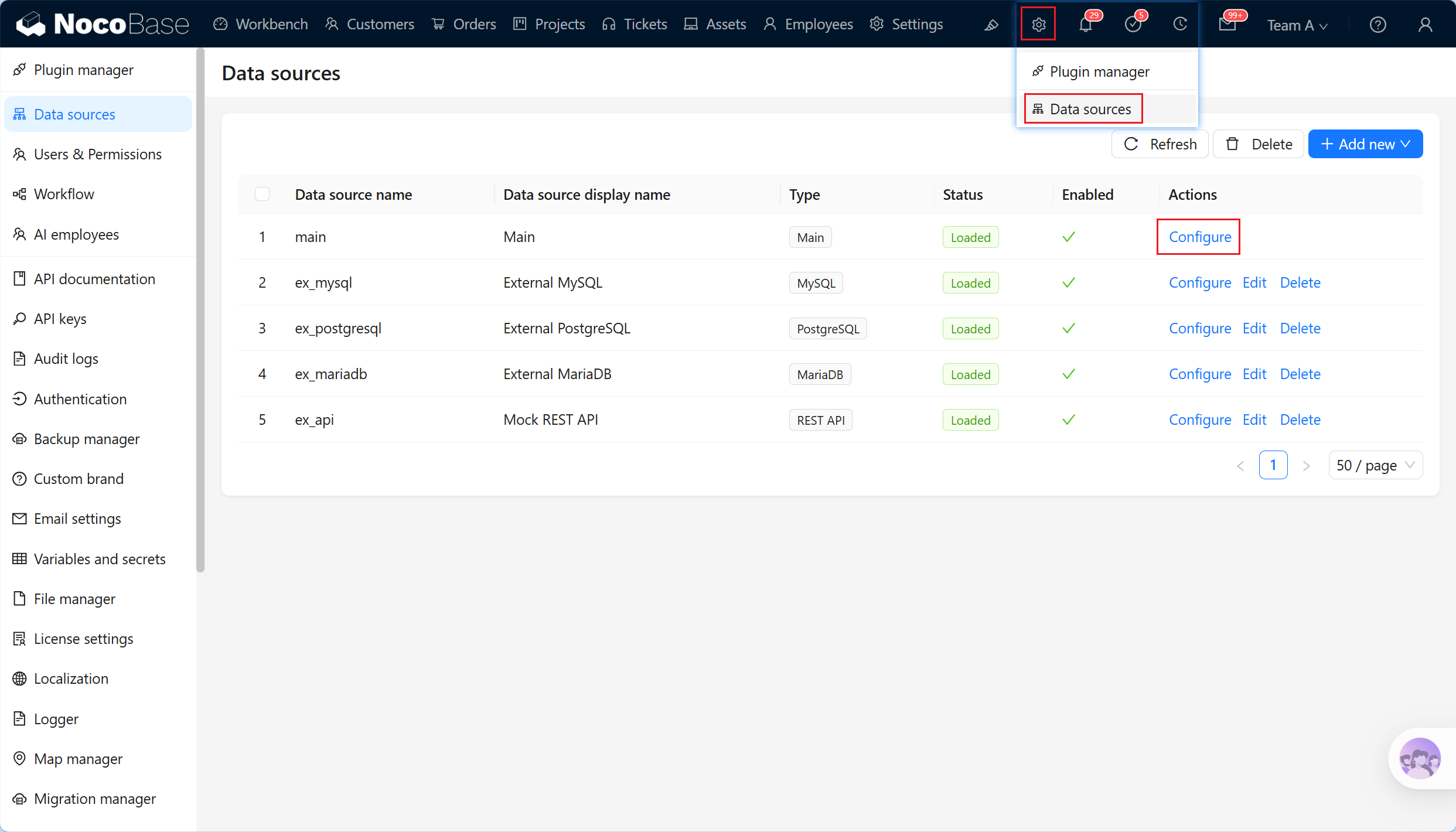
- package/dist/ai/docs/nocobase/data-sources/collection-sql/index.md +150 -29
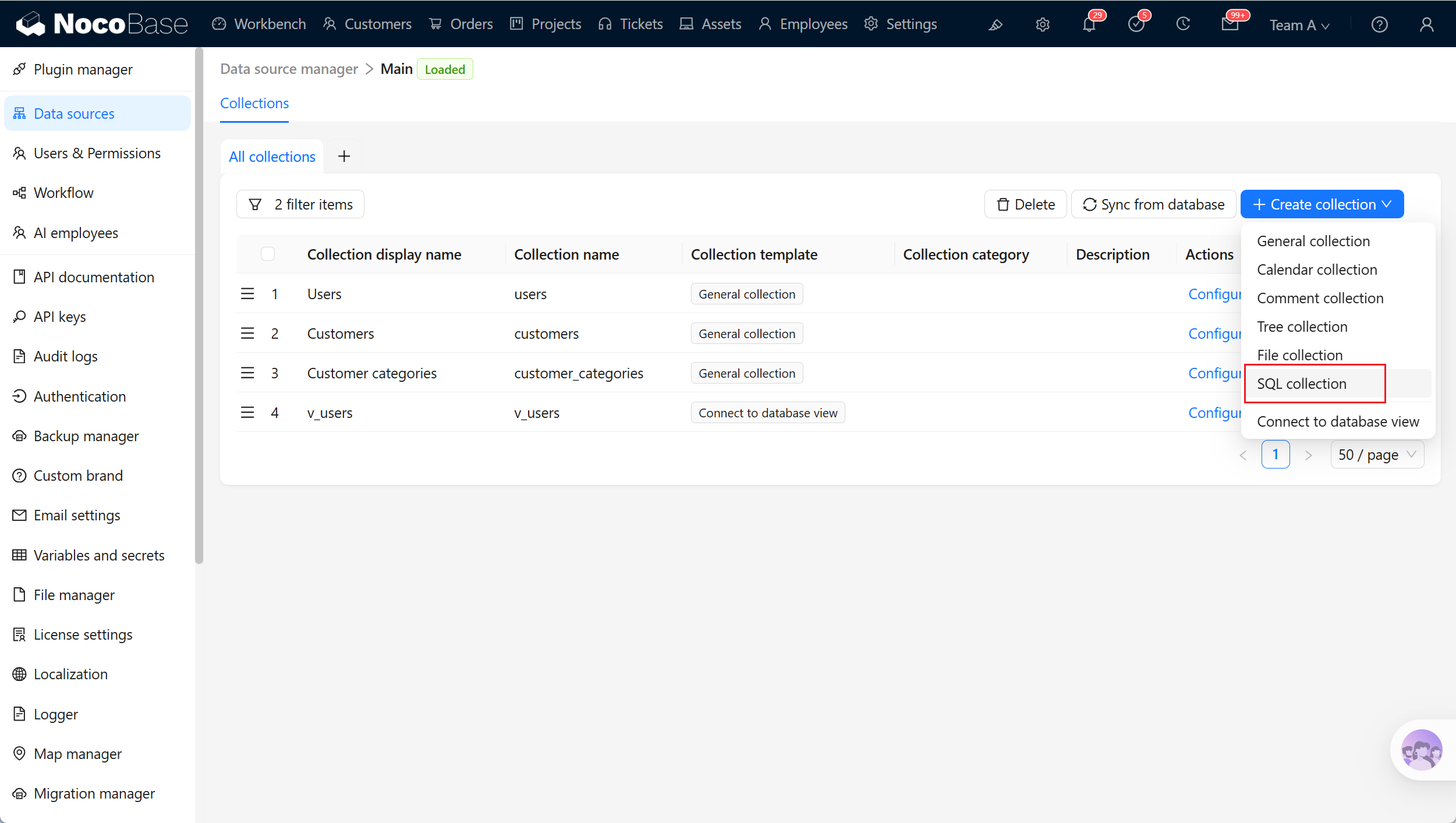
- package/dist/ai/docs/nocobase/data-sources/collection-tree/index.md +93 -5
- package/dist/ai/docs/nocobase/data-sources/collection-view/index.md +226 -4
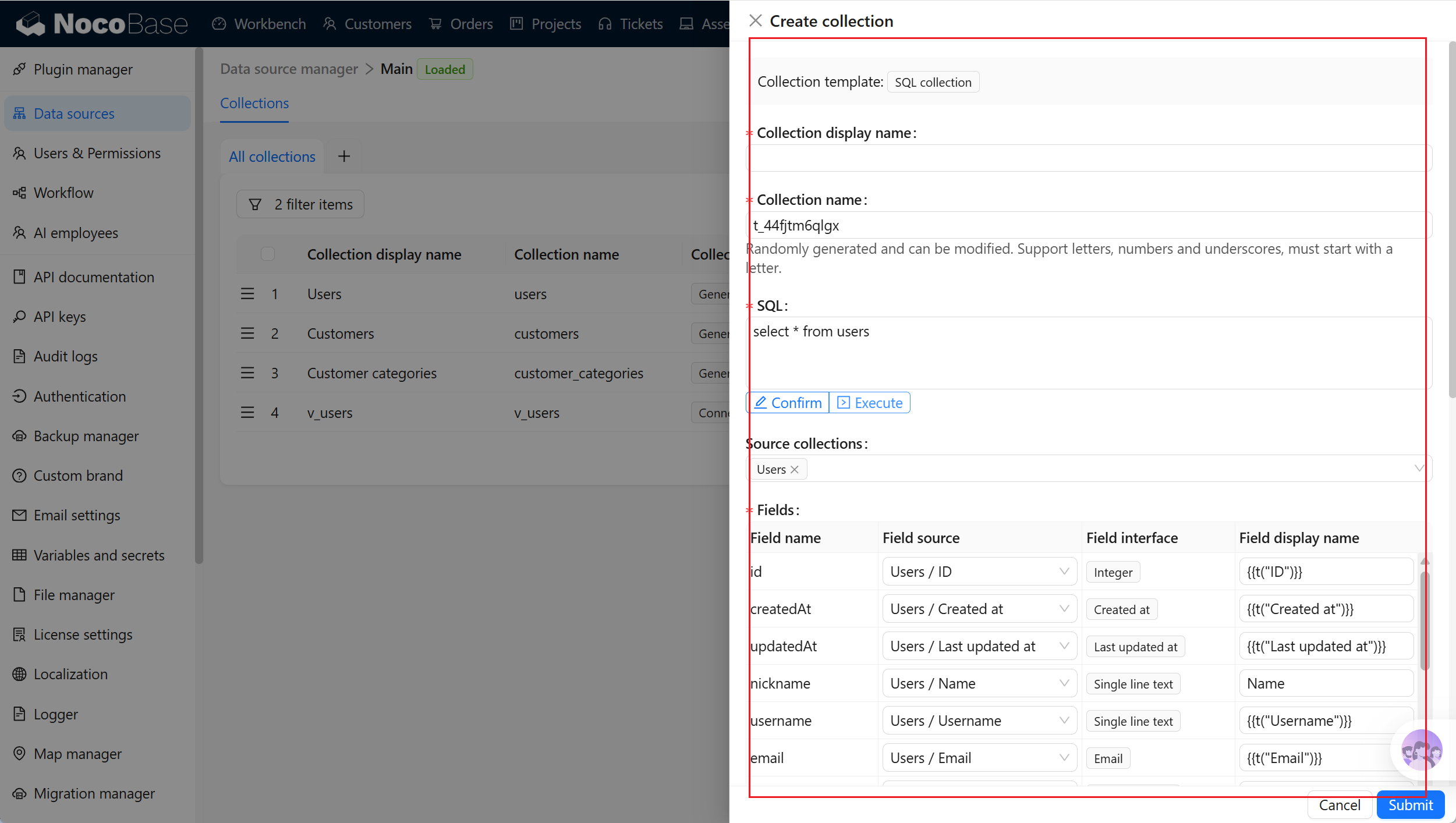
- package/dist/ai/docs/nocobase/data-sources/data-modeling/collection-fields/advanced/china-region.md +122 -5
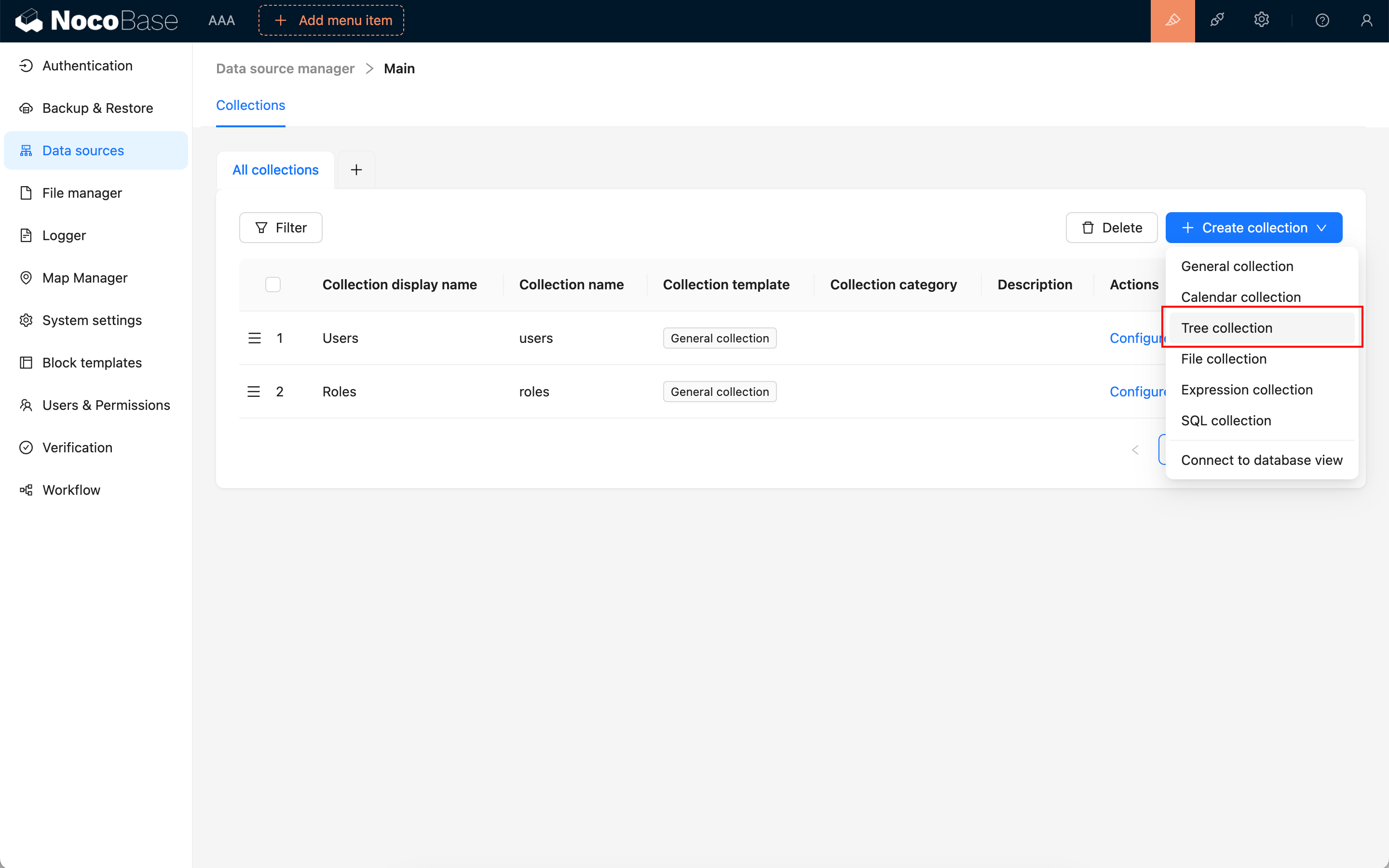
- package/dist/ai/docs/nocobase/data-sources/data-modeling/collection-fields/advanced/collection-select.md +105 -4
- package/dist/ai/docs/nocobase/data-sources/data-modeling/collection-fields/advanced/json.md +102 -4
- package/dist/ai/docs/nocobase/data-sources/data-modeling/collection-fields/advanced/nano-id.md +104 -4
- package/dist/ai/docs/nocobase/data-sources/data-modeling/collection-fields/advanced/snowflake-id.md +108 -4
- package/dist/ai/docs/nocobase/data-sources/data-modeling/collection-fields/advanced/sort.md +3 -19
- package/dist/ai/docs/nocobase/data-sources/data-modeling/collection-fields/advanced/uuid.md +104 -4
- package/dist/ai/docs/nocobase/data-sources/data-modeling/collection-fields/associations/index.md +44 -8
- package/dist/ai/docs/nocobase/data-sources/data-modeling/collection-fields/basic/color.md +102 -4
- package/dist/ai/docs/nocobase/data-sources/data-modeling/collection-fields/basic/email.md +104 -4
- package/dist/ai/docs/nocobase/data-sources/data-modeling/collection-fields/basic/icon.md +102 -4
- package/dist/ai/docs/nocobase/data-sources/data-modeling/collection-fields/basic/input.md +112 -8
- package/dist/ai/docs/nocobase/data-sources/data-modeling/collection-fields/basic/integer.md +103 -4
- package/dist/ai/docs/nocobase/data-sources/data-modeling/collection-fields/basic/number.md +103 -4
- package/dist/ai/docs/nocobase/data-sources/data-modeling/collection-fields/basic/password.md +102 -4
- package/dist/ai/docs/nocobase/data-sources/data-modeling/collection-fields/basic/percent.md +104 -5
- package/dist/ai/docs/nocobase/data-sources/data-modeling/collection-fields/basic/phone.md +104 -4
- package/dist/ai/docs/nocobase/data-sources/data-modeling/collection-fields/basic/textarea.md +99 -8
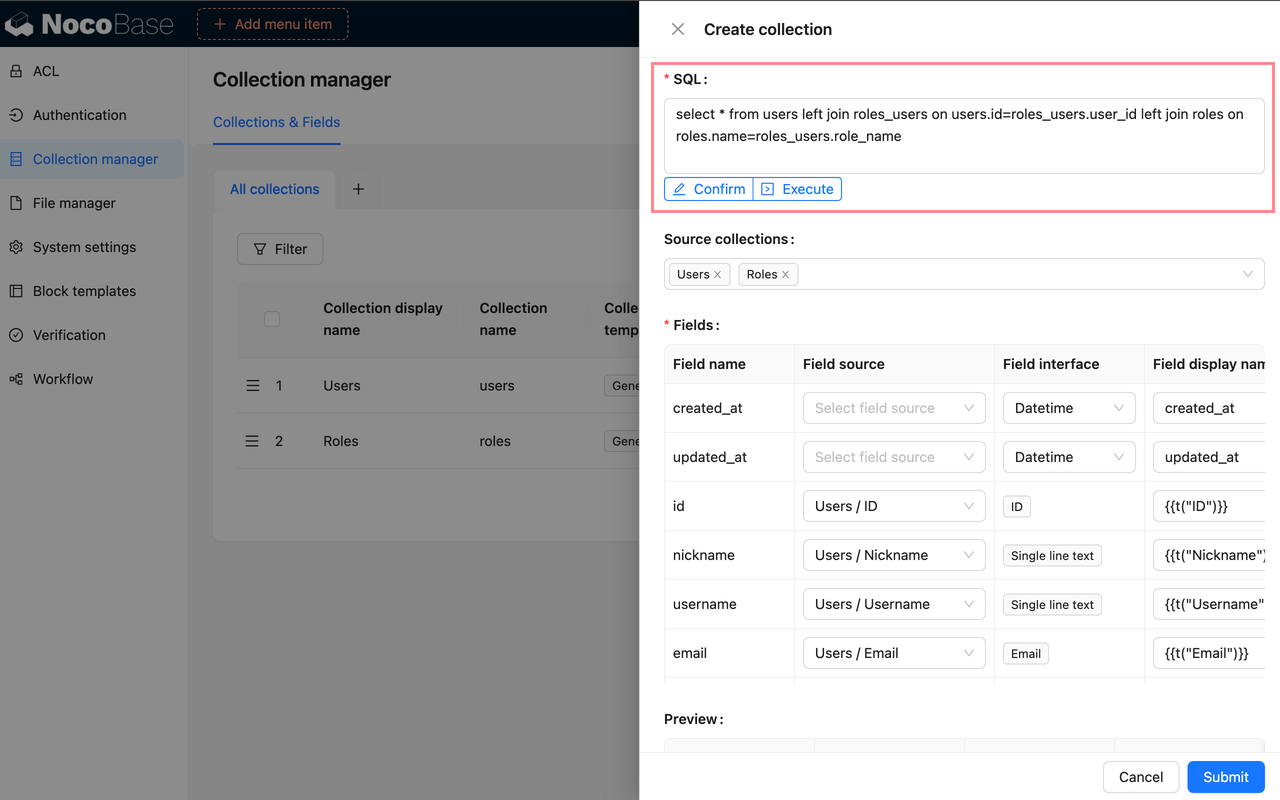
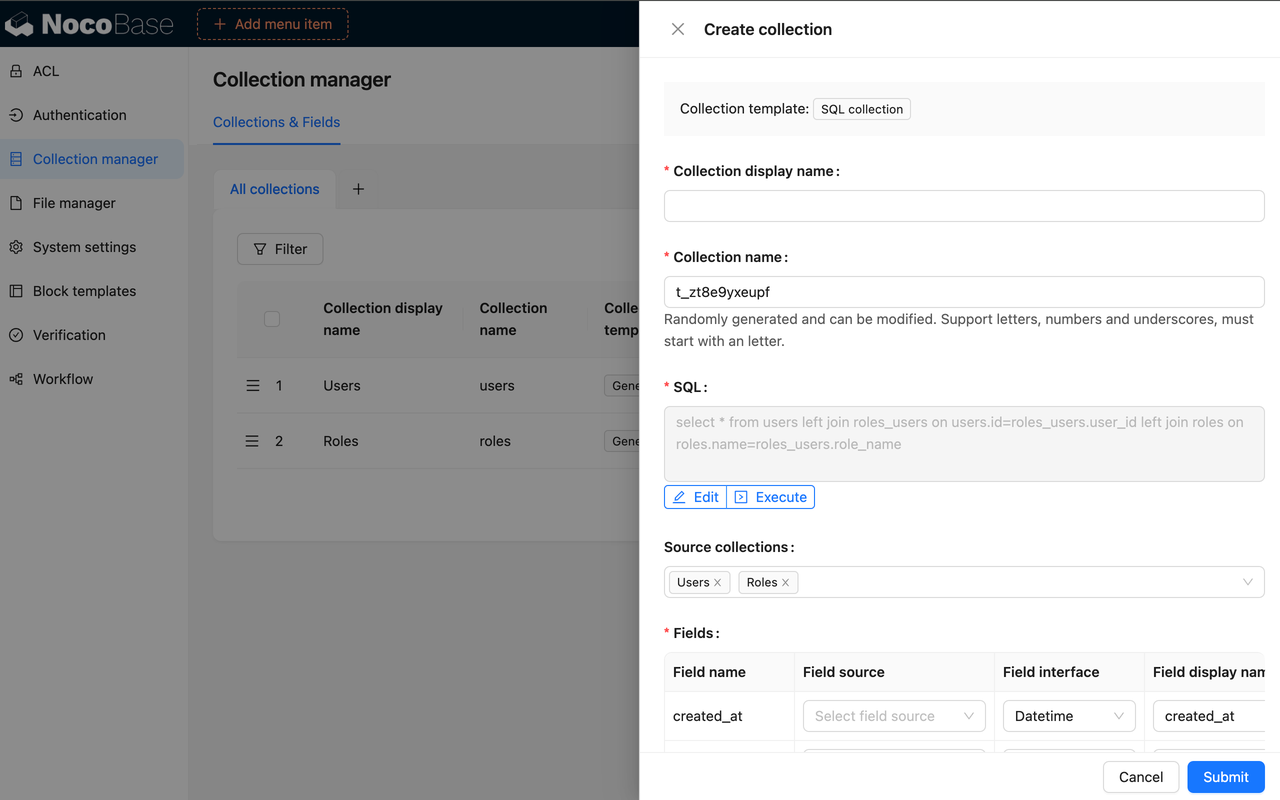
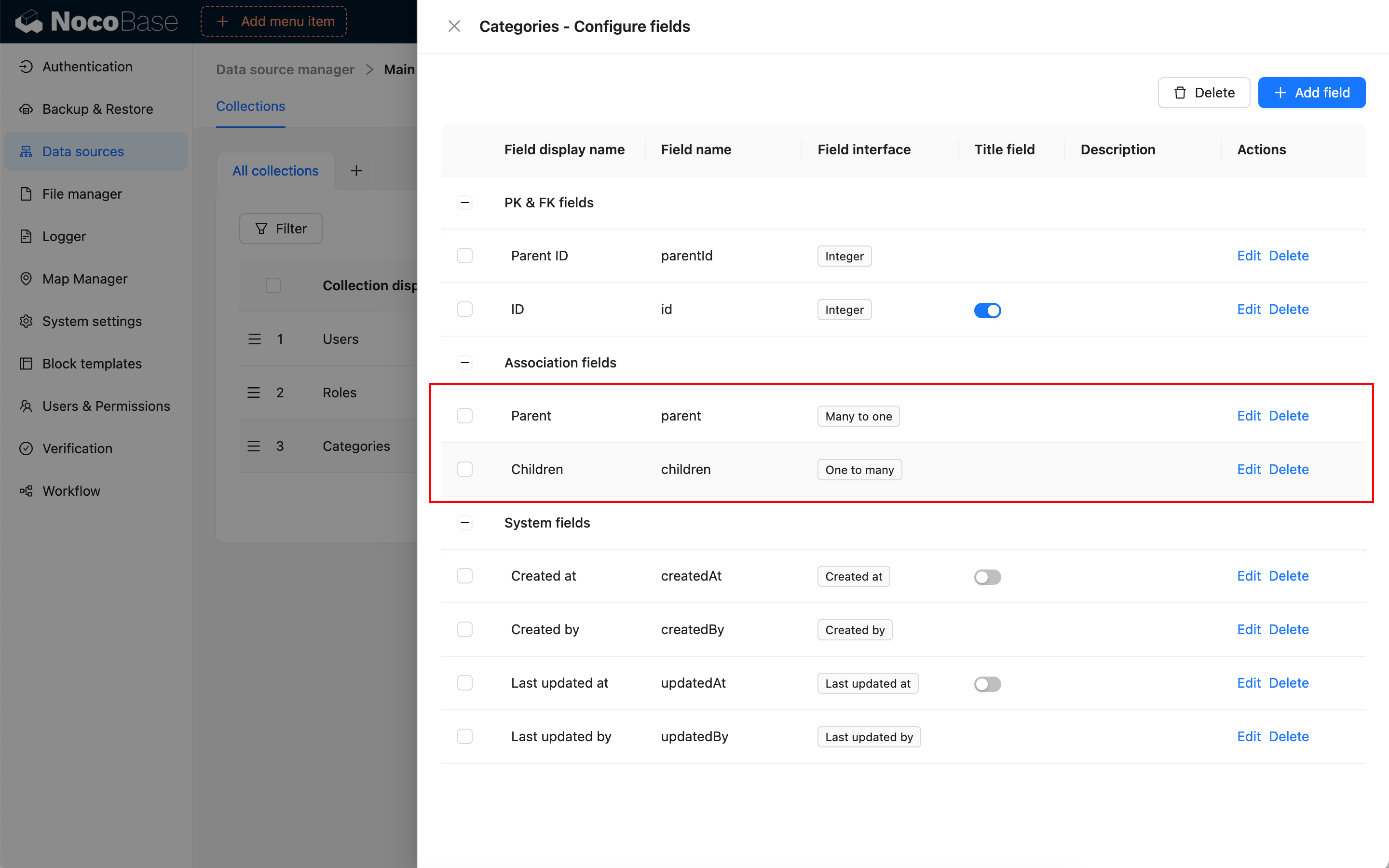
- package/dist/ai/docs/nocobase/data-sources/data-modeling/collection-fields/basic/url.md +103 -4
- package/dist/ai/docs/nocobase/data-sources/data-modeling/collection-fields/choices/checkbox-group.md +105 -3
- package/dist/ai/docs/nocobase/data-sources/data-modeling/collection-fields/choices/checkbox.md +102 -4
- package/dist/ai/docs/nocobase/data-sources/data-modeling/collection-fields/choices/china-region.md +108 -5
- package/dist/ai/docs/nocobase/data-sources/data-modeling/collection-fields/choices/multiple-select.md +103 -5
- package/dist/ai/docs/nocobase/data-sources/data-modeling/collection-fields/choices/radio-group.md +106 -4
- package/dist/ai/docs/nocobase/data-sources/data-modeling/collection-fields/choices/select.md +103 -5
- package/dist/ai/docs/nocobase/data-sources/data-modeling/collection-fields/datetime/date.md +102 -4
- package/dist/ai/docs/nocobase/data-sources/data-modeling/collection-fields/datetime/datetime-without-tz.md +103 -5
- package/dist/ai/docs/nocobase/data-sources/data-modeling/collection-fields/datetime/datetime.md +103 -5
- package/dist/ai/docs/nocobase/data-sources/data-modeling/collection-fields/datetime/index.md +53 -47
- package/dist/ai/docs/nocobase/data-sources/data-modeling/collection-fields/datetime/time.md +102 -4
- package/dist/ai/docs/nocobase/data-sources/data-modeling/collection-fields/datetime/unix-timestamp.md +103 -5
- package/dist/ai/docs/nocobase/data-sources/data-modeling/collection-fields/geometric/circle.md +102 -4
- package/dist/ai/docs/nocobase/data-sources/data-modeling/collection-fields/geometric/line.md +103 -5
- package/dist/ai/docs/nocobase/data-sources/data-modeling/collection-fields/geometric/point.md +102 -4
- package/dist/ai/docs/nocobase/data-sources/data-modeling/collection-fields/geometric/polygon.md +102 -4
- package/dist/ai/docs/nocobase/data-sources/data-modeling/collection-fields/index.md +62 -16
- package/dist/ai/docs/nocobase/data-sources/data-modeling/collection-fields/media/markdown.md +104 -4
- package/dist/ai/docs/nocobase/data-sources/data-modeling/collection-fields/media/rich-text.md +105 -5
- package/dist/ai/docs/nocobase/data-sources/data-modeling/collection-fields/system-info/created-at.md +105 -5
- package/dist/ai/docs/nocobase/data-sources/data-modeling/collection-fields/system-info/created-by.md +103 -5
- package/dist/ai/docs/nocobase/data-sources/data-modeling/collection-fields/system-info/space.md +100 -6
- package/dist/ai/docs/nocobase/data-sources/data-modeling/collection-fields/system-info/table-oid.md +102 -4
- package/dist/ai/docs/nocobase/data-sources/data-modeling/collection-fields/system-info/updated-at.md +104 -5
- package/dist/ai/docs/nocobase/data-sources/data-modeling/collection-fields/system-info/updated-by.md +104 -6
- package/dist/ai/docs/nocobase/data-sources/data-modeling/collection-fields/validation.md +68 -58
- package/dist/ai/docs/nocobase/data-sources/data-modeling/collection.md +32 -13
- package/dist/ai/docs/nocobase/data-sources/data-modeling/index.md +41 -33
- package/dist/ai/docs/nocobase/data-sources/data-source-external-mariadb/index.md +114 -6
- package/dist/ai/docs/nocobase/data-sources/data-source-external-mssql/index.md +117 -6
- package/dist/ai/docs/nocobase/data-sources/data-source-external-mysql/index.md +103 -6
- package/dist/ai/docs/nocobase/data-sources/data-source-external-nocobase/index.md +75 -73
- package/dist/ai/docs/nocobase/data-sources/data-source-external-oracle/index.md +129 -11
- package/dist/ai/docs/nocobase/data-sources/data-source-external-postgres/index.md +110 -6
- package/dist/ai/docs/nocobase/data-sources/data-source-kingbase/index.md +75 -49
- package/dist/ai/docs/nocobase/data-sources/data-source-main/general-collection.md +116 -15
- package/dist/ai/docs/nocobase/data-sources/data-source-main/index.md +92 -62
- package/dist/ai/docs/nocobase/data-sources/data-source-main/inheritance-collection.md +97 -10
- package/dist/ai/docs/nocobase/data-sources/data-source-manager/external-database.md +97 -58
- package/dist/ai/docs/nocobase/data-sources/data-source-manager/index.md +32 -24
- package/dist/ai/docs/nocobase/data-sources/data-source-rest-api/index.md +115 -153
- package/dist/ai/docs/nocobase/data-sources/external/clickhouse.md +124 -0
- package/dist/ai/docs/nocobase/data-sources/external/doris.md +130 -0
- package/dist/ai/docs/nocobase/data-sources/external/index.md +140 -0
- package/dist/ai/docs/nocobase/data-sources/external/kingbase.md +129 -0
- package/dist/ai/docs/nocobase/data-sources/external/mariadb.md +126 -0
- package/dist/ai/docs/nocobase/data-sources/external/mssql.md +129 -0
- package/dist/ai/docs/nocobase/data-sources/external/mysql.md +115 -0
- package/dist/ai/docs/nocobase/data-sources/external/nocobase.md +159 -0
- package/dist/ai/docs/nocobase/data-sources/external/oceanbase.md +126 -0
- package/dist/ai/docs/nocobase/data-sources/external/oracle.md +158 -0
- package/dist/ai/docs/nocobase/data-sources/external/postgresql.md +122 -0
- package/dist/ai/docs/nocobase/data-sources/external/rest-api.md +245 -0
- package/dist/ai/docs/nocobase/data-sources/field-attachment-url/index.md +100 -12
- package/dist/ai/docs/nocobase/data-sources/field-encryption/index.md +48 -47
- package/dist/ai/docs/nocobase/data-sources/field-formula/index.md +99 -5
- package/dist/ai/docs/nocobase/data-sources/field-markdown-vditor/index.md +105 -5
- package/dist/ai/docs/nocobase/data-sources/field-sequence/index.md +102 -5
- package/dist/ai/docs/nocobase/data-sources/field-signature/index.md +18 -16
- package/dist/ai/docs/nocobase/data-sources/field-sort/index.md +76 -73
- package/dist/ai/docs/nocobase/data-sources/file-manager/field-attachment.md +101 -7
- package/dist/ai/docs/nocobase/data-sources/file-manager/file-collection.md +101 -14
- package/dist/ai/docs/nocobase/data-sources/index.md +49 -33
- package/dist/ai/docs/nocobase/data-sources/main/index.md +130 -0
- package/dist/ai/docs/nocobase/data-sources/main/kingbase.md +147 -0
- package/dist/ai/docs/nocobase/data-sources/main/mariadb.md +59 -0
- package/dist/ai/docs/nocobase/data-sources/main/mysql.md +59 -0
- package/dist/ai/docs/nocobase/data-sources/main/oceanbase.md +62 -0
- package/dist/ai/docs/nocobase/data-sources/main/postgresql.md +61 -0
- package/dist/ai/docs/nocobase/file-manager/storage/index.md +66 -26
- package/dist/ai/docs/nocobase/file-manager/storage/s3-pro.md +58 -7
- package/dist/ai/docs/nocobase/get-started/installation/env.md +2 -2
- package/dist/ai/docs/nocobase/ops-management/migration-manager/built-in-tables.md +1 -2
- package/dist/ai/docs/nocobase/runjs/context/ai.md +194 -4
- package/dist/ai/tools/executeFrontendTool.d.ts +10 -0
- package/dist/ai/tools/executeFrontendTool.js +86 -0
- package/dist/ai/tools/getSkill.js +1 -1
- package/dist/ai/tools/loadFrontendTool.d.ts +10 -0
- package/dist/ai/tools/loadFrontendTool.js +99 -0
- package/dist/client/244.8631eb5cf3f05e21.js +10 -0
- package/dist/client/{525.203778500aca5d05.js → 525.94dd4136c1361477.js} +1 -1
- package/dist/client/681.6ffbc9329b9ac242.js +10 -0
- package/dist/{client-v2/705.1d10027ff8cfdf79.js → client/705.19b642db34de438a.js} +1 -1
- package/dist/client/index.d.ts +1 -3
- package/dist/client/index.js +8 -8
- package/dist/client-v2/244.c428e645ecb94414.js +10 -0
- package/dist/client-v2/420.b2aedb1ff71fca0e.js +10 -0
- package/dist/client-v2/681.6890caa389564ff7.js +10 -0
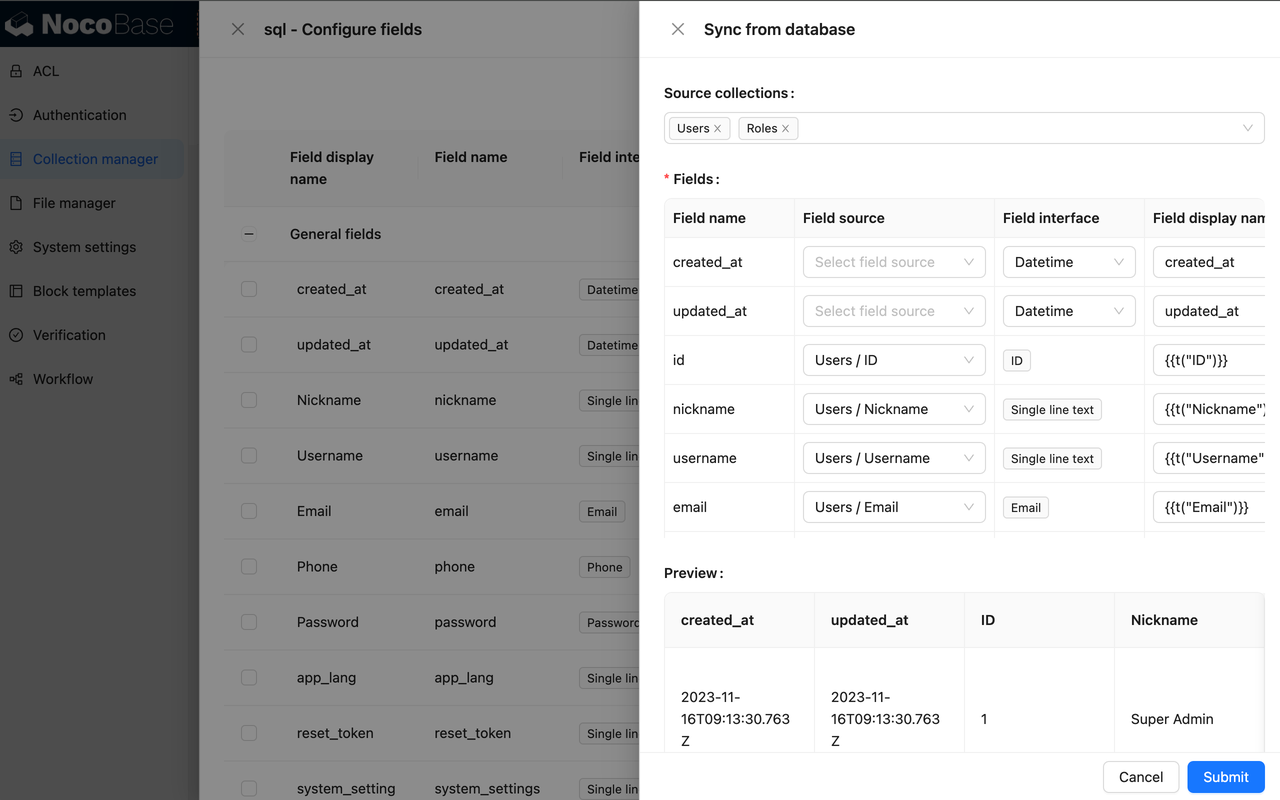
- package/dist/client-v2/705.8dc34d43f02f322c.js +10 -0
- package/dist/client-v2/ai-employees/AIEmployeeShortcut.d.ts +2 -0
- package/dist/client-v2/ai-employees/AddContextButton.d.ts +2 -0
- package/dist/client-v2/ai-employees/chatbox/components/AIEmployeeSwitcher.d.ts +1 -0
- package/dist/client-v2/ai-employees/chatbox/components/ChatBoxUnreadBadge.d.ts +17 -0
- package/dist/client-v2/ai-employees/chatbox/components/Conversations.d.ts +9 -1
- package/dist/client-v2/ai-employees/chatbox/components/MessageRenderers.d.ts +1 -1
- package/dist/client-v2/ai-employees/chatbox/components/Messages.d.ts +5 -1
- package/dist/client-v2/ai-employees/chatbox/components/ModelSwitcher.d.ts +4 -0
- package/dist/client-v2/ai-employees/chatbox/components/Sender.d.ts +33 -1
- package/dist/client-v2/ai-employees/chatbox/components/index.d.ts +1 -0
- package/dist/client-v2/ai-employees/chatbox/hooks/useChat.d.ts +8 -5
- package/dist/client-v2/ai-employees/chatbox/hooks/useChatBoxActions.d.ts +3 -2
- package/dist/client-v2/ai-employees/chatbox/hooks/useChatBoxEffect.d.ts +2 -1
- package/dist/client-v2/ai-employees/chatbox/hooks/useChatConversationActions.d.ts +3 -2
- package/dist/client-v2/ai-employees/chatbox/hooks/useChatMessageActions.d.ts +4 -2
- package/dist/client-v2/ai-employees/chatbox/hooks/useToolCallActions.d.ts +3 -1
- package/dist/client-v2/ai-employees/chatbox/hooks/useUploadFiles.d.ts +13 -3
- package/dist/client-v2/ai-employees/chatbox/hooks/useWorkflowTasks.d.ts +3 -2
- package/dist/client-v2/ai-employees/chatbox/index.d.ts +17 -0
- package/dist/client-v2/ai-employees/chatbox/roles.d.ts +2 -153
- package/dist/client-v2/ai-employees/chatbox/stores/chat-box.d.ts +46 -31
- package/dist/client-v2/ai-employees/chatbox/stores/chat-conversations.d.ts +7 -7
- package/dist/client-v2/ai-employees/chatbox/stores/chat-messages.d.ts +23 -18
- package/dist/client-v2/ai-employees/chatbox/stores/chat-sender.d.ts +43 -0
- package/dist/client-v2/ai-employees/chatbox/stores/chat-tool-call.d.ts +6 -5
- package/dist/client-v2/ai-employees/chatbox/stores/chat-tools.d.ts +11 -5
- package/dist/client-v2/ai-employees/chatbox/stores/mounted-chat-boxes.d.ts +20 -0
- package/dist/client-v2/ai-employees/chatbox/stores/runtime.d.ts +43 -0
- package/dist/client-v2/ai-employees/chatbox/stores/workflow-tasks.d.ts +22 -10
- package/dist/client-v2/ai-employees/chatbox/upload.d.ts +19 -0
- package/dist/client-v2/ai-employees/chatbox/utils.d.ts +28 -4
- package/dist/client-v2/ai-employees/frontend-tools.d.ts +11 -0
- package/dist/client-v2/ai-employees/tools/SuggestionsOptionsCard.d.ts +1 -1
- package/dist/client-v2/ai-employees/tools/WorkflowTaskOutputCard.d.ts +1 -1
- package/dist/client-v2/ai-employees/types.d.ts +30 -0
- package/dist/client-v2/block/ai-chat-box/AIChatBoxBlockModel.d.ts +21 -0
- package/dist/client-v2/block/ai-chat-box/AIChatBoxCoreModel.d.ts +13 -0
- package/dist/client-v2/block/ai-chat-box/components/AIChatBoxCoreView.d.ts +10 -0
- package/dist/client-v2/block/ai-chat-box/components/AIChatBoxView.d.ts +12 -0
- package/dist/client-v2/block/ai-chat-box/index.d.ts +14 -0
- package/dist/client-v2/block/ai-chat-box/settings.d.ts +12 -0
- package/dist/client-v2/block/ai-chat-box/sub-models.d.ts +26 -0
- package/dist/client-v2/block/ai-chat-box/types.d.ts +38 -0
- package/dist/client-v2/block/ai-chat-box/utils.d.ts +26 -0
- package/dist/client-v2/index.d.ts +3 -5
- package/dist/client-v2/index.js +3 -3
- package/dist/client-v2/llm-services/model-select.d.ts +33 -0
- package/dist/client-v2/llm-services/utils.d.ts +1 -0
- package/dist/client-v2/manager/ai-manager.d.ts +10 -3
- package/dist/client-v2/manager/frontend-tool-registry.d.ts +30 -0
- package/dist/client-v2/models/ai-employees/AIEmployeeActionModel.d.ts +4 -1
- package/dist/client-v2/models/ai-employees/AIEmployeeShortcutModel.d.ts +5 -0
- package/dist/client-v2/pages/EmployeesPage.d.ts +2 -0
- package/dist/client-v2/runjs/registerAIEmployeeRunJSFacade.d.ts +1 -0
- package/dist/common/ai-employee-validation.d.ts +15 -0
- package/dist/common/ai-employee-validation.js +61 -0
- package/dist/common/error-codes.d.ts +13 -0
- package/dist/common/error-codes.js +48 -0
- package/dist/common/frontend-tools.d.ts +26 -0
- package/dist/common/frontend-tools.js +57 -0
- package/dist/common/llm-service-models.d.ts +16 -0
- package/dist/common/llm-service-models.js +84 -0
- package/dist/externalVersion.js +16 -16
- package/dist/locale/en-US.json +67 -0
- package/dist/locale/zh-CN.json +67 -0
- package/dist/node_modules/@langchain/mistralai/package.json +1 -1
- package/dist/node_modules/@langchain/xai/package.json +1 -1
- package/dist/node_modules/fs-extra/package.json +1 -1
- package/dist/node_modules/jsonrepair/package.json +1 -1
- package/dist/node_modules/just-bash/package.json +1 -1
- package/dist/node_modules/nodejs-snowflake/package.json +1 -1
- package/dist/node_modules/openai/package.json +1 -1
- package/dist/node_modules/zod/package.json +1 -1
- package/dist/server/ai-employees/ai-conversations.d.ts +4 -1
- package/dist/server/ai-employees/ai-conversations.js +2 -0
- package/dist/server/ai-employees/ai-employee.d.ts +2 -1
- package/dist/server/ai-employees/ai-employee.js +26 -7
- package/dist/server/ai-employees/middleware/conversation.js +9 -2
- package/dist/server/collections/ai-conversations.js +5 -0
- package/dist/server/document-loader/constants.js +1 -1
- package/dist/server/frontend-tools.d.ts +25 -0
- package/dist/server/frontend-tools.js +171 -0
- package/dist/server/manager/work-context-handler.js +10 -3
- package/dist/server/plugin.d.ts +1 -0
- package/dist/server/plugin.js +25 -0
- package/dist/server/resource/aiConversations.d.ts +2 -0
- package/dist/server/resource/aiConversations.js +33 -3
- package/dist/server/resource/aiEmployees.d.ts +2 -0
- package/dist/server/resource/aiEmployees.js +62 -0
- package/dist/server/resource/aiWorkflowTasks.js +9 -1
- package/dist/server/resource/llmServices.d.ts +11 -0
- package/dist/server/resource/llmServices.js +85 -0
- package/dist/server/types/knowledge-base.type.d.ts +6 -2
- package/dist/swagger/common.d.ts +143 -0
- package/dist/swagger/common.js +144 -0
- package/dist/swagger/employees.d.ts +301 -0
- package/dist/swagger/employees.js +131 -0
- package/dist/swagger/index.d.ts +1588 -0
- package/dist/swagger/index.js +62 -0
- package/dist/swagger/llm.d.ts +555 -0
- package/dist/swagger/llm.js +247 -0
- package/dist/swagger/schemas.d.ts +736 -0
- package/dist/swagger/schemas.js +381 -0
- package/package.json +2 -2
- package/dist/ai/docs/nocobase/ai-employees/knowledge-base/vector-store.md +0 -24
- package/dist/ai/docs/nocobase/data-sources/development/index.md +0 -6
- package/dist/client/372.40eb52905e3f3049.js +0 -10
- package/dist/client/681.399948c18d753667.js +0 -10
- package/dist/client/705.380279da896021fb.js +0 -10
- package/dist/client-v2/372.8cc3fde09c9bec77.js +0 -10
- package/dist/client-v2/406.341be51205c674e0.js +0 -10
- package/dist/client-v2/681.082f4f1c7b841983.js +0 -10
- package/dist/client-v2/ai-employees/chatbox/stores/create-selectors.d.ts +0 -46
- package/dist/client-v2/ai-employees/chatbox/utils/normalizeTriggerTaskOptions.d.ts +0 -19
|
@@ -1,14 +1,111 @@
|
|
|
1
1
|
---
|
|
2
2
|
pkg: "@nocobase/plugin-calendar"
|
|
3
|
+
title: "Calendar collection"
|
|
4
|
+
description: "Use a Calendar collection to store time-range data such as meetings, schedules, courses, and shifts, then display and edit event records with Calendar blocks."
|
|
5
|
+
keywords: "Calendar collection,Calendar Collection,calendar events,recurring events,Calendar block,NocoBase"
|
|
3
6
|
---
|
|
4
7
|
|
|
5
8
|
# Calendar collection
|
|
6
9
|
|
|
7
10
|
## Introduction
|
|
8
11
|
|
|
9
|
-
|
|
12
|
+
Calendar collections are suitable for time-range data, such as meeting-room reservations, project schedules, course schedules, duty rosters, and event calendars. They are still collections, but include fields related to calendar events so that they can be used with Calendar blocks later.
|
|
10
13
|
|
|
11
|
-
|
|
14
|
+
You can create Calendar collections only from the main data source. External databases, REST API data sources, and External NocoBase data sources do not support creating Calendar collections.
|
|
12
15
|
|
|
16
|
+
## Use cases
|
|
13
17
|
|
|
14
|
-
|
|
18
|
+
Calendar collections are suitable for these business scenarios:
|
|
19
|
+
|
|
20
|
+
- Meeting-room, vehicle, and equipment reservations
|
|
21
|
+
- Project schedules, task plans, and milestone arrangements
|
|
22
|
+
- Timetables, training plans, and event calendars
|
|
23
|
+
- Duty rosters, shift records, and inspection plans
|
|
24
|
+
- Event records that need to be viewed by day, week, or month
|
|
25
|
+
|
|
26
|
+
## Create and configure
|
|
27
|
+
|
|
28
|
+
In the main data source, click **Create collection** and select **Calendar collection** to create a Calendar collection.
|
|
29
|
+
|
|
30
|
+
Calendar collection settings are mostly the same as those for a general collection. `Preset fields` controls common system fields, and Calendar collections also include fields for storing recurring-event data.
|
|
31
|
+
|
|
32
|
+
| Setting | Description |
|
|
33
|
+
| --- | --- |
|
|
34
|
+
| Collection display name | The name displayed for the collection, such as `Meeting room reservations`, `Course schedule`, or `Duty roster`. |
|
|
35
|
+
| Collection name | The collection identifier used internally by APIs, relation fields, permissions, and workflows. |
|
|
36
|
+
| Inherits | Select a parent collection to inherit. This setting is visible only when the main database is PostgreSQL. |
|
|
37
|
+
| Categories | Collection categories affect only organization in Data source management; they do not change the collection structure. |
|
|
38
|
+
| Description | A description of the collection. State which events it stores, who maintains it, and which business processes it relates to. |
|
|
39
|
+
| Preset fields | Preset fields. Keep system fields and Calendar collection built-in fields when creating a Calendar collection. |
|
|
40
|
+
|
|
41
|
+
### Built-in fields
|
|
42
|
+
|
|
43
|
+
After a Calendar collection is created, it usually includes the following built-in fields. `cron` and `exclude` store recurrence rules and excluded dates.
|
|
44
|
+
|
|
45
|
+
| Field | Field name | Description |
|
|
46
|
+
| --- | --- | --- |
|
|
47
|
+
| ID | `id` | The default primary key that uniquely identifies an event record. |
|
|
48
|
+
| Created at | `createdAt` | Automatically records when the event record was created. |
|
|
49
|
+
| Created by | `createdBy` | Automatically records the user who created the event record. |
|
|
50
|
+
| Updated at | `updatedAt` | Automatically records when the event record was last updated. |
|
|
51
|
+
| Updated by | `updatedBy` | Automatically records the user who last updated the event record. |
|
|
52
|
+
| Sort | `sort` | Stores the sort value for an event record and supports capabilities such as drag-and-drop ordering. |
|
|
53
|
+
| Repeats | `cron` | Stores recurrence rules, such as daily, weekly, monthly, or yearly repetition. |
|
|
54
|
+
| Exclude | `exclude` | Stores excluded dates in a recurring event. It is normally maintained automatically through calendar interactions. |
|
|
55
|
+
| Space | `space` | Available after enabling the [Multi-space plugin](../../multi-app/multi-space/index.md). It isolates data by space and does not appear when Multi-space is not enabled. |
|
|
56
|
+
|
|
57
|
+
When a Calendar block uses a Calendar collection, specify the business fields used to display events:
|
|
58
|
+
|
|
59
|
+
| Setting | Description |
|
|
60
|
+
| --- | --- |
|
|
61
|
+
| Title field | Determines the event title in the calendar, such as `Meeting subject` or `Course name`. |
|
|
62
|
+
| Start date field | Determines when the event starts. Usually use a date-time field. |
|
|
63
|
+
| End date field | Determines when the event ends. Usually use a date-time field. |
|
|
64
|
+
|
|
65
|
+
:::warning Note
|
|
66
|
+
|
|
67
|
+
`cron` and `exclude` are normally maintained by Calendar capabilities and should not be edited directly as ordinary business fields. Create and configure title, start-date, and end-date fields according to your business needs; otherwise, Calendar blocks cannot display events correctly.
|
|
68
|
+
|
|
69
|
+
:::
|
|
70
|
+
|
|
71
|
+
### Primary key field
|
|
72
|
+
|
|
73
|
+
Like a general collection, a Calendar collection needs a primary key. Keep the ID preset field when creating the collection; its default primary-key type is `Snowflake ID (53-bit)`.
|
|
74
|
+
|
|
75
|
+
If a Calendar collection has no primary key, set **Record unique key** when editing the collection. Otherwise, Calendar blocks might not open, edit, or locate event records correctly.
|
|
76
|
+
|
|
77
|
+
## Edit configuration
|
|
78
|
+
|
|
79
|
+
In the collection list, click **Edit** next to a Calendar collection to change its display name, category, description, simple pagination mode, **Record unique key**, and other settings.
|
|
80
|
+
|
|
81
|
+
Calendar built-in fields such as `cron` and `exclude` are normally used by Calendar capabilities and should not be repurposed for other business meanings. To extend event information, add ordinary business fields such as location, participants, meeting room, or status.
|
|
82
|
+
|
|
83
|
+
## Delete a collection
|
|
84
|
+
|
|
85
|
+
In the collection list, click **Delete** next to a Calendar collection to delete it.
|
|
86
|
+
|
|
87
|
+
Deleting a Calendar collection deletes event records, Calendar built-in field data, and related collection metadata. Before deleting it, confirm whether Calendar blocks, Table blocks, permissions, workflows, or APIs still depend on the collection.
|
|
88
|
+
|
|
89
|
+
:::danger Warning
|
|
90
|
+
|
|
91
|
+
Calendar collections usually store time data for schedules, reservations, and shifts. After deletion, historical events and recurrence rules are lost. Confirm that the data is backed up or no longer needed before proceeding.
|
|
92
|
+
|
|
93
|
+
:::
|
|
94
|
+
|
|
95
|
+
## Use in pages
|
|
96
|
+
|
|
97
|
+
A Calendar collection can use most data blocks for a [general collection](../data-source-main/general-collection.md) to create, read, update, and delete records. It is also usually used with Calendar blocks:
|
|
98
|
+
|
|
99
|
+
| Block | Use |
|
|
100
|
+
| --- | --- |
|
|
101
|
+
| [Calendar block](../../interface-builder/blocks/data-blocks/calendar.md) | Displays event records in day, week, month, and other views, and creates, views, and edits events in the calendar. |
|
|
102
|
+
| [Table block](../../interface-builder/blocks/data-blocks/table.md) | Views, filters, and maintains event records in a list. |
|
|
103
|
+
| [Form block](../../interface-builder/blocks/data-blocks/form.md) | Creates or edits one event record. |
|
|
104
|
+
| [Details block](../../interface-builder/blocks/data-blocks/details.md) | Views details of one event. |
|
|
105
|
+
|
|
106
|
+
## Related links
|
|
107
|
+
|
|
108
|
+
- [General collection](../data-source-main/general-collection.md) - General configuration and block usage.
|
|
109
|
+
- [Date and time fields](../data-modeling/collection-fields/datetime/datetime.md) - Create event start and end fields.
|
|
110
|
+
- [Calendar block](../../interface-builder/blocks/data-blocks/calendar.md) - Display data in a calendar on a page.
|
|
111
|
+
- [Multi-space](../../multi-app/multi-space/index.md) - Learn about the Space field and data isolation by space.
|
|
@@ -1,66 +1,119 @@
|
|
|
1
1
|
---
|
|
2
2
|
pkg: "@nocobase/plugin-comments"
|
|
3
|
+
title: "Comment collection"
|
|
4
|
+
description: "A Comment collection stores comments, replies, and feedback for business records. It supports rich-text content, user tracking, multi-level comments, and Comment blocks."
|
|
5
|
+
keywords: "Comment collection,comments,rich text comments,multi-level comments,Collection Comment,NocoBase"
|
|
3
6
|
---
|
|
4
7
|
|
|
5
|
-
# Comment
|
|
8
|
+
# Comment collection
|
|
6
9
|
|
|
7
10
|
## Introduction
|
|
8
11
|
|
|
9
|
-
Comment
|
|
12
|
+
Comment collections are suitable for storing discussions, feedback, and annotations around business records. For example, you can use a Comment collection for task comments, approval opinions, article comments, and customer feedback.
|
|
10
13
|
|
|
11
|
-
|
|
14
|
+
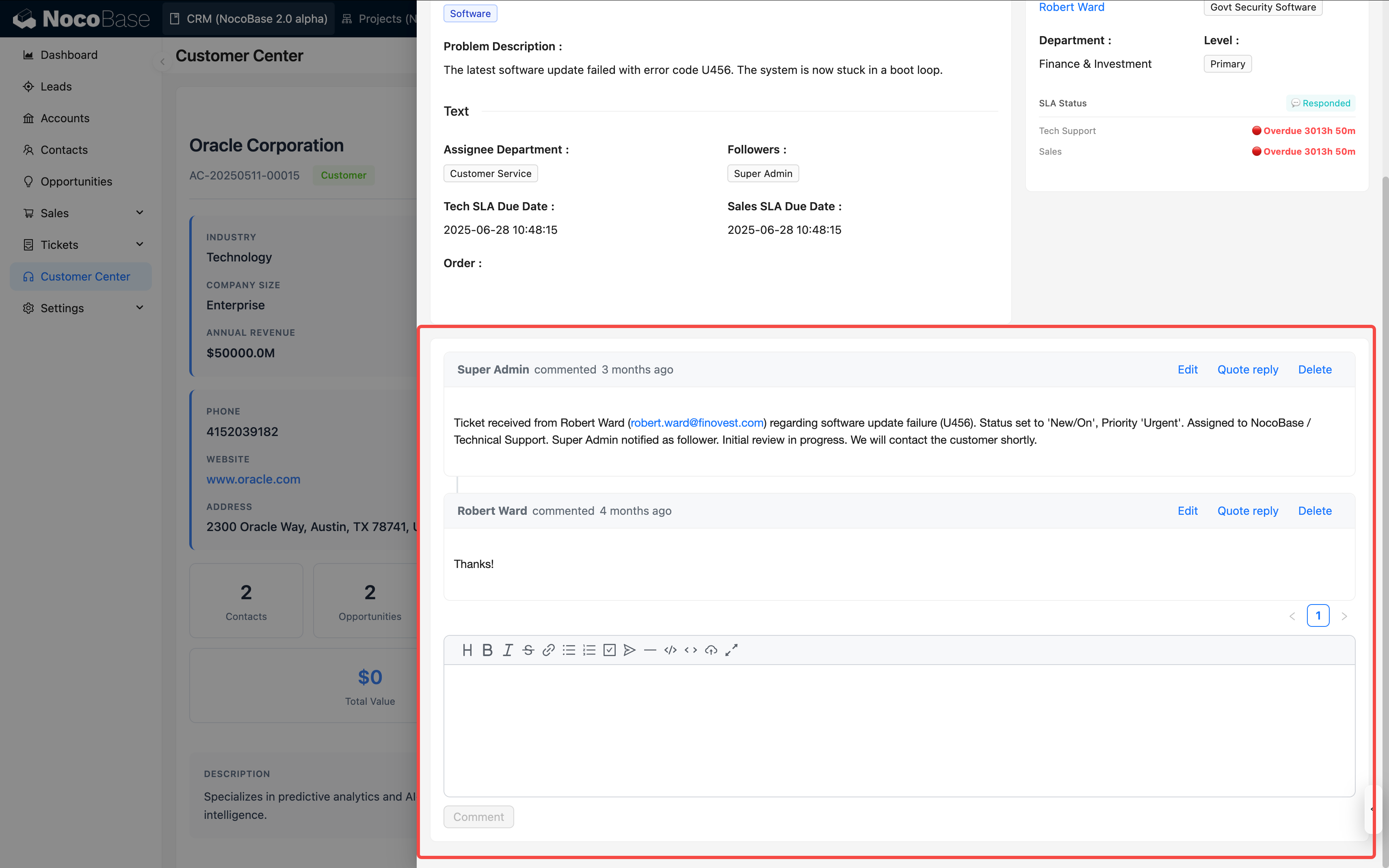
A Comment collection is usually not used as an independent main business collection. A more common approach is to create a Comment collection, configure a relation field in the business collection, and then add a Comment block to the details page or popup for business records.
|
|
12
15
|
|
|
13
|
-
|
|
16
|
+
|
|
14
17
|
|
|
15
|
-
|
|
16
|
-
- **Link to Any Data Table**: Can associate comments with records in any data table through relationship fields
|
|
17
|
-
- **Multi-level Comments**: Supports replying to comments, building a comment tree structure
|
|
18
|
-
- **User Tracking**: Automatically records comment creator and creation time
|
|
18
|
+
## Use cases
|
|
19
19
|
|
|
20
|
-
|
|
20
|
+
Comment collections are suitable for these business scenarios:
|
|
21
21
|
|
|
22
|
-
|
|
22
|
+
- Collaboration discussions on tasks, requirements, and defects
|
|
23
|
+
- Processing opinions on approval forms, work orders, and contracts
|
|
24
|
+
- Comments on articles, knowledge bases, and announcements
|
|
25
|
+
- Customer feedback, after-sales follow-up, and internal notes
|
|
23
26
|
|
|
24
|
-
|
|
27
|
+
## Usage flow
|
|
25
28
|
|
|
26
|
-
|
|
27
|
-
2. Click the "Create Collection" button
|
|
28
|
-
3. Select the "Comment Collection" template
|
|
29
|
-
4. Enter the table name (e.g., "Task Comments", "Article Comments", etc.)
|
|
30
|
-
5. The system will automatically create a comment table with the following default fields:
|
|
31
|
-
- Comment content (Markdown vditor type)
|
|
32
|
-
- Created by (linked to user table)
|
|
33
|
-
- Created at (datetime type)
|
|
29
|
+
Comment collections are typically used together with a business collection and a Comment block:
|
|
34
30
|
|
|
35
|
-
|
|
31
|
+
1. Create a Comment collection to store comment content, reply relations, creators, creation time, and other information.
|
|
32
|
+
2. Create a relation field in the business collection and relate it to the Comment collection. For example, relate a `Task comments` collection to the `Tasks` collection.
|
|
33
|
+
3. Add a Comment block to a details page or popup for the business collection.
|
|
34
|
+
4. When users post or reply in the Comment block, comment data is written to the Comment collection and related to the current business record.
|
|
35
|
+
5. Configure Comment collection permissions as needed to control who can view, create, or delete comments.
|
|
36
36
|
|
|
37
|
-
|
|
37
|
+
## Create and configure
|
|
38
|
+
|
|
39
|
+
In the main data source, click **Create collection** and select **Comment collection** to create a Comment collection.
|
|
40
|
+
|
|
41
|
+
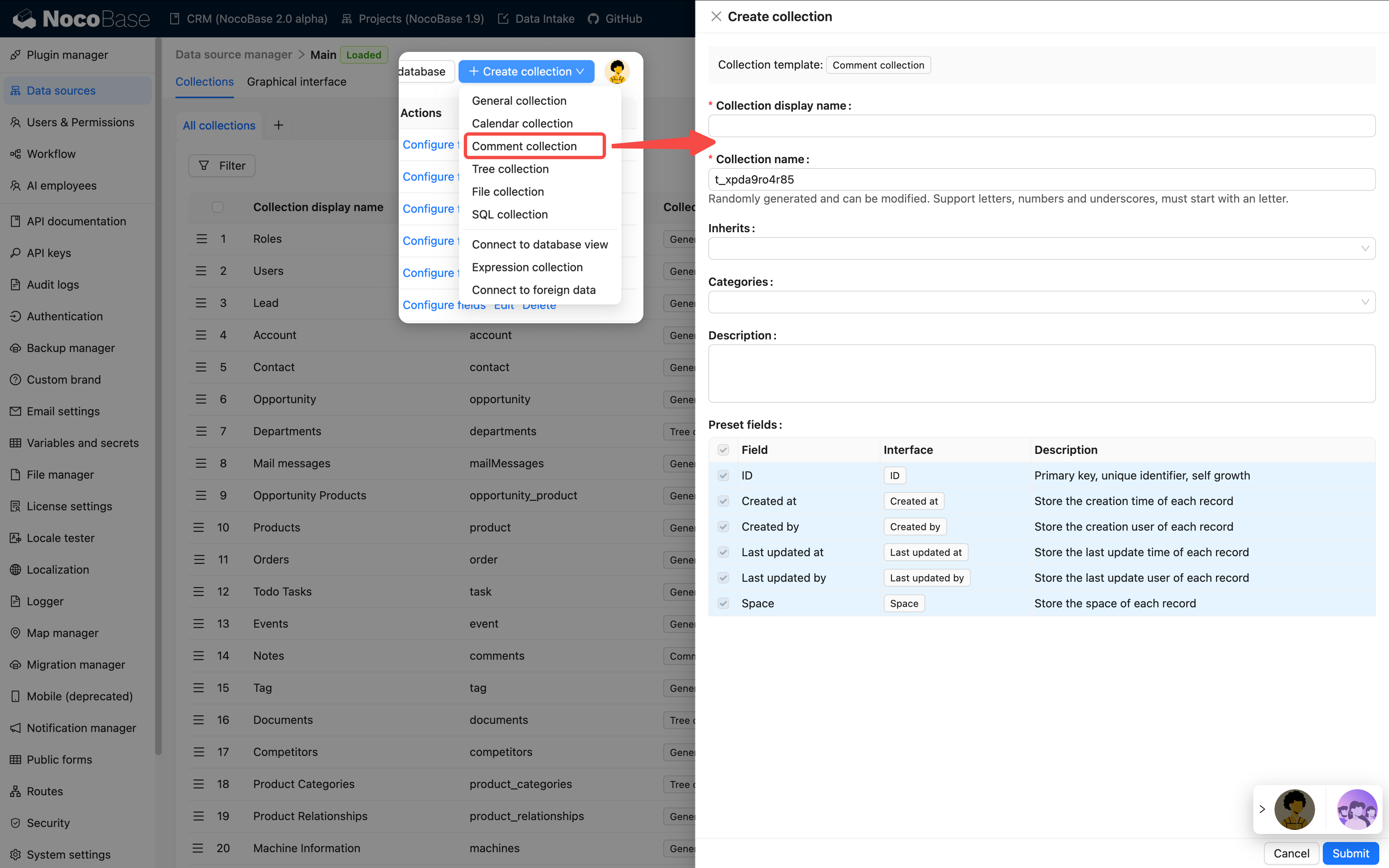
|
|
42
|
+
|
|
43
|
+
| Setting | Description |
|
|
44
|
+
| --- | --- |
|
|
45
|
+
| Collection display name | The name displayed for the collection, such as `Task comments`, `Approval opinions`, or `Article comments`. |
|
|
46
|
+
| Collection name | The collection identifier used internally by APIs, relation fields, permissions, and workflows. |
|
|
47
|
+
| Inherits | Select a parent collection to inherit. This setting is visible only when the main database is PostgreSQL. |
|
|
48
|
+
| Categories | Collection categories affect only organization in Data source management; they do not change the collection structure. |
|
|
49
|
+
| Description | A description of the collection. State which business object it serves, who maintains it, and how comment permissions are designed. |
|
|
50
|
+
| Preset fields | Preset fields. Keep system fields and Comment collection built-in fields when creating a Comment collection. |
|
|
51
|
+
|
|
52
|
+
### Built-in fields
|
|
53
|
+
|
|
54
|
+
After a Comment collection is created, it usually includes the following built-in fields. Comment blocks mainly use `content`, `createdBy`, and `createdAt` to display comment text, commenter, and comment time.
|
|
55
|
+
|
|
56
|
+
| Field | Field name | Description |
|
|
57
|
+
| --- | --- | --- |
|
|
58
|
+
| ID | `id` | The default primary key that uniquely identifies a comment record. |
|
|
59
|
+
| Comment content | `content` | Stores the comment text entered by users. It uses the Markdown Vditor interface by default. |
|
|
60
|
+
| Created at | `createdAt` | Automatically records when the comment was created. Comment blocks use it to display the comment time. |
|
|
61
|
+
| Created by | `createdBy` | Automatically records the user who posted the comment. Comment blocks use it to display the commenter. |
|
|
62
|
+
| Updated at | `updatedAt` | Automatically records when the comment was last updated. |
|
|
63
|
+
| Updated by | `updatedBy` | Automatically records the user who last updated the comment. |
|
|
64
|
+
| Space | `space` | Available after enabling the [Multi-space plugin](../../multi-app/multi-space/index.md). It isolates data by space and does not appear when Multi-space is not enabled. |
|
|
65
|
+
|
|
66
|
+
:::warning Note
|
|
67
|
+
|
|
68
|
+
Comment collection built-in fields are normally maintained by Comment blocks and should not be deleted or repurposed casually. To store information such as comment category or processing status, add business fields instead.
|
|
69
|
+
|
|
70
|
+
:::
|
|
71
|
+
|
|
72
|
+
### Primary key field
|
|
73
|
+
|
|
74
|
+
Like a general collection, a Comment collection needs a primary key. Comment blocks use the primary key to locate comment records and reply relationships.
|
|
75
|
+
|
|
76
|
+
If a Comment collection has no primary key, set **Record unique key** when editing the collection. Otherwise, Comment blocks might not view, reply to, or delete comments correctly.
|
|
77
|
+
|
|
78
|
+
## Create a relation
|
|
79
|
+
|
|
80
|
+
Create a relation field in the business collection and relate it to the Comment collection.
|
|
38
81
|
|
|
39
82
|
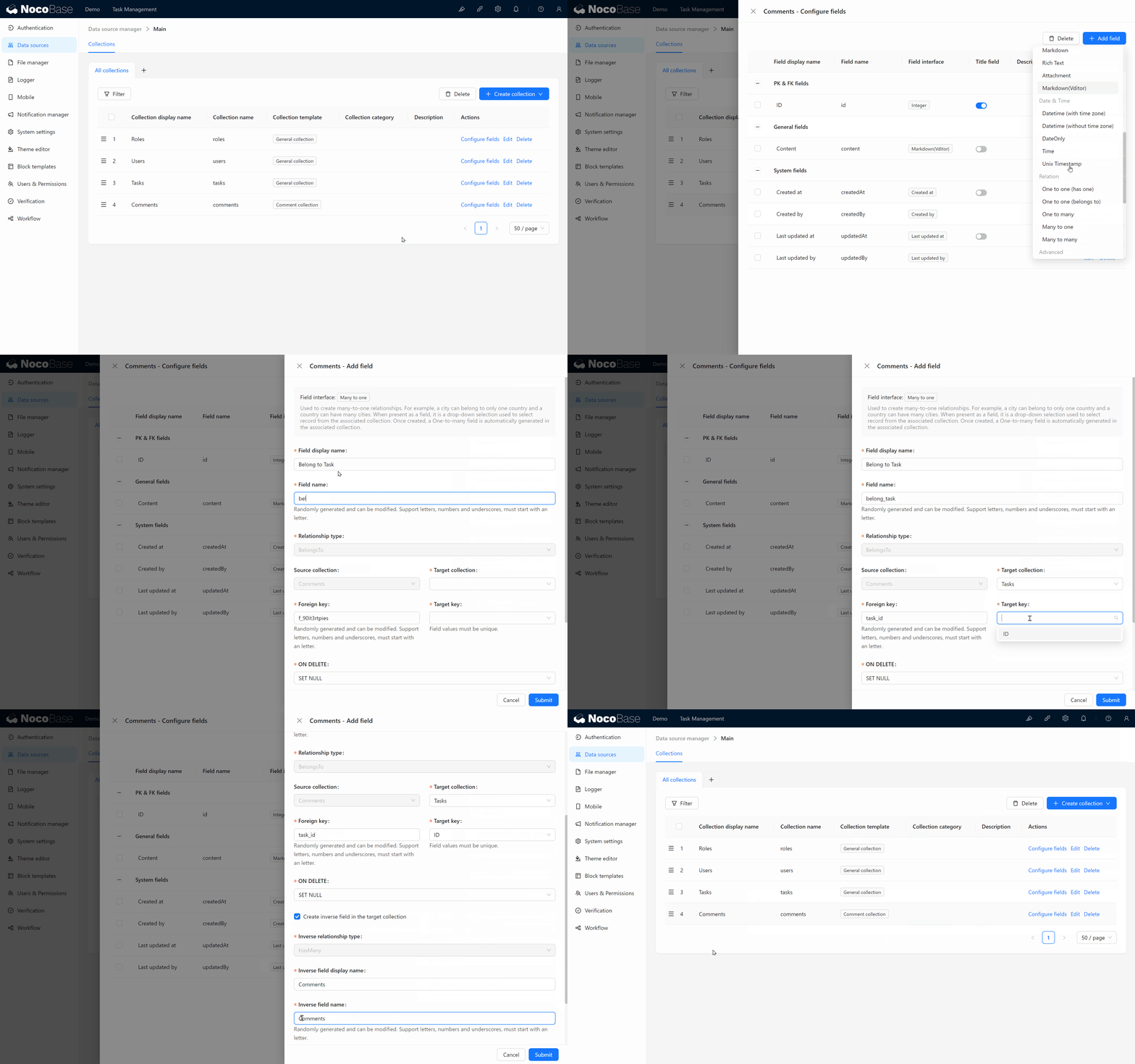
|
|
40
83
|
|
|
41
|
-
|
|
42
|
-
|
|
43
|
-
|
|
84
|
+
## Use in pages
|
|
85
|
+
|
|
86
|
+
Comment collections are usually used through Comment blocks. Add a Comment block to a details page, popup, or record page of a business collection to let users comment on the current record.
|
|
87
|
+
|
|
88
|
+
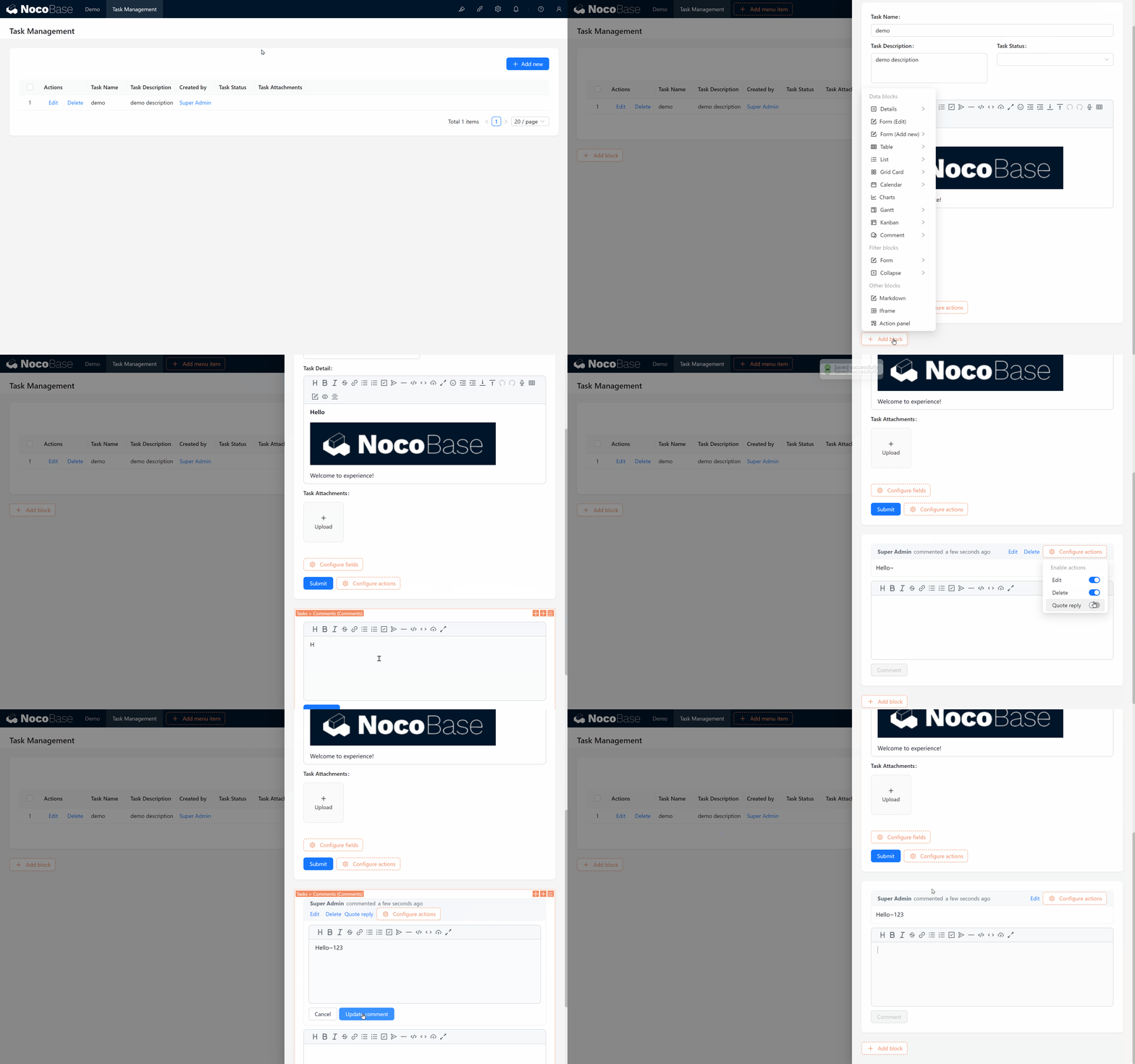
|
|
89
|
+
|
|
90
|
+
| Configuration location | Use |
|
|
91
|
+
| --- | --- |
|
|
92
|
+
| [Details block](../../interface-builder/blocks/data-blocks/details.md) | Shows a comment entry in business-record details. |
|
|
93
|
+
| [Form block](../../interface-builder/blocks/data-blocks/form.md) | Uses the comment relation field in business-collection editing flows. |
|
|
94
|
+
| Comment block | Displays the comment list and lets users post and reply to comments. |
|
|
95
|
+
|
|
96
|
+
## Edit configuration
|
|
97
|
+
|
|
98
|
+
In the collection list, click **Edit** next to a Comment collection to change its display name, category, description, simple pagination mode, **Record unique key**, and other settings.
|
|
99
|
+
|
|
100
|
+
After a Comment collection is in use, do not casually change its comment-content field or reply-relation field. Comment blocks, permissions, workflows, and APIs might depend on these fields.
|
|
44
101
|
|
|
45
|
-
|
|
102
|
+
## Delete a collection
|
|
46
103
|
|
|
47
|
-
|
|
104
|
+
In the collection list, click **Delete** next to a Comment collection to delete it.
|
|
48
105
|
|
|
49
|
-
|
|
50
|
-
2. Add a block in the details or popup of the target record
|
|
51
|
-
3. Select the "Comments" block type
|
|
52
|
-
4. Choose the comment collection you just created
|
|
106
|
+
Deleting a Comment collection deletes comment records, reply relations, and related collection metadata. Before deleting it, confirm whether relation fields in business collections, Comment blocks, permissions, workflows, or APIs still depend on it.
|
|
53
107
|
|
|
108
|
+
:::danger Warning
|
|
54
109
|
|
|
55
|
-
|
|
110
|
+
Deleting a Comment collection removes comment data from existing business records. Comments often contain collaboration history and processing opinions. Confirm whether the data needs to be backed up or archived before proceeding.
|
|
56
111
|
|
|
57
|
-
|
|
58
|
-
- **Content Management Systems**: Readers comment and interact with articles
|
|
59
|
-
- **Approval Workflows**: Approvers annotate and provide opinions on application forms
|
|
60
|
-
- **Customer Feedback**: Collect customer reviews of products or services
|
|
112
|
+
:::
|
|
61
113
|
|
|
62
|
-
##
|
|
114
|
+
## Related links
|
|
63
115
|
|
|
64
|
-
-
|
|
65
|
-
-
|
|
66
|
-
-
|
|
116
|
+
- [General collection](../data-source-main/general-collection.md) - General configuration and block usage.
|
|
117
|
+
- [Relation fields](../data-modeling/collection-fields/associations/index.md) - Learn how business collections relate to Comment collections.
|
|
118
|
+
- [Comments plugin](../../plugins/@nocobase/plugin-comments/index.md) - Learn about Comment blocks and commenting capabilities.
|
|
119
|
+
- [Multi-space](../../multi-app/multi-space/index.md) - Learn about the Space field and data isolation by space.
|
|
@@ -1,58 +1,179 @@
|
|
|
1
1
|
---
|
|
2
2
|
pkg: "@nocobase/plugin-collection-sql"
|
|
3
|
+
title: "SQL collection"
|
|
4
|
+
description: "Create a collection from SQL query results. Configure field sources, field mapping, and Record unique key for joins, aggregations, and reports."
|
|
5
|
+
keywords: "SQL collection,SQL query,field mapping,report,NocoBase"
|
|
3
6
|
---
|
|
4
7
|
|
|
5
|
-
# SQL
|
|
8
|
+
# SQL collection
|
|
6
9
|
|
|
7
10
|
## Introduction
|
|
8
11
|
|
|
9
|
-
|
|
12
|
+
Write a SQL query to create an SQL collection. It does not create a real database table. NocoBase reads the query result and makes it available in Tables, Details, Charts, and Workflows. It is suitable for aggregate data and statistical reports.
|
|
10
13
|
|
|
11
|
-
|
|
14
|
+
:::warning Note
|
|
12
15
|
|
|
13
|
-
|
|
16
|
+
SQL collections support only `SELECT` statements and `WITH ... SELECT` statements. They support query display only and do not support creating, editing, or deleting data.
|
|
14
17
|
|
|
15
|
-
|
|
18
|
+
:::
|
|
16
19
|
|
|
17
|
-
|
|
20
|
+
## Create an SQL collection
|
|
18
21
|
|
|
19
|
-
|
|
22
|
+
1. Open the data-source home page from the **Data sources** menu in system settings.
|
|
23
|
+
2. Select the **Main** data source in the data-source list and click **Configure** to open the main database.
|
|
24
|
+
3. In main database management, click **Create collection** and select **SQL collection**.
|
|
20
25
|
|
|
21
|
-
|
|
26
|
+
|
|
27
|
+
|
|
28
|
+
|
|
22
29
|
|
|
23
|
-
|
|
30
|
+
| Setting | Description |
|
|
31
|
+
| --- | --- |
|
|
32
|
+
| Collection display name | The name displayed for the SQL collection, such as `Sales summary` or `Inventory alert`. Use a name that explains the meaning of the query result. |
|
|
33
|
+
| Collection name | The identifier of the SQL collection in NocoBase, used internally by APIs, relation fields, permissions, and workflows. It is generated automatically and can be changed manually. It supports only letters, numbers, and underscores, and must begin with a letter. |
|
|
34
|
+
| Categories | Collection categories affect only organization in Data source management; they do not change the SQL query. |
|
|
35
|
+
| Description | A collection description. State which data the SQL queries, who maintains it, and which page or report uses it. |
|
|
36
|
+
| Record unique key | The unique identifier for a record. SQL query results have no actual primary key, so choose a field or combination of fields that can uniquely locate a record. Without it, blocks might not view records correctly. |
|
|
37
|
+
| SQL | The query used by the SQL collection. NocoBase executes this SQL, configures fields from the result, and uses the result as a collection. |
|
|
38
|
+
| Source collections | The sources of SQL query result fields. This relates result fields to fields in existing collections so that NocoBase can identify field sources and interface types. |
|
|
39
|
+
| Fields | Field-mapping settings. Confirm the name, source, interface type, and display name for each field. |
|
|
40
|
+
| Preview | Preview SQL query results. Before saving, confirm that field mappings and display results meet expectations. |
|
|
24
41
|
|
|
25
|
-
|
|
42
|
+
### Write the SQL query
|
|
26
43
|
|
|
27
|
-
|
|
44
|
+
Enter the SQL query and click **Execute** to run it and attempt to parse returned fields and source collections. Clicking **Execute** is used only for preview and field parsing. After confirming that the SQL query is valid, click **Confirm** before the form can submit it as the confirmed query.
|
|
28
45
|
|
|
29
|
-
|
|
46
|
+
|
|
30
47
|
|
|
31
|
-
|
|
48
|
+
:::tip Tip
|
|
32
49
|
|
|
33
|
-
|
|
50
|
+
`Source collections` are source collections inferred from the SQL query. NocoBase identifies which existing collections most query-result fields originate from and limits the selectable `Field source` values during field mapping.
|
|
34
51
|
|
|
35
|
-
|
|
52
|
+
The inference result helps configure a query quickly. If the SQL query contains aliases, subqueries, calculated fields, aggregate functions, or complex joins, the result might be incomplete, inaccurate, or impossible to infer. You can specify `Source collections` manually.
|
|
36
53
|
|
|
37
|
-
|
|
54
|
+
:::
|
|
38
55
|
|
|
39
|
-
|
|
56
|
+
### Field mapping
|
|
40
57
|
|
|
41
|
-
|
|
58
|
+
Field mapping must be confirmed after creating an SQL collection. An SQL query result only tells NocoBase which columns it returns. To use those columns like ordinary fields in the interface, confirm a `Field source` or configure the `Field interface` and field display name.
|
|
42
59
|
|
|
43
|
-
|
|
60
|
+
[Learn more about field configuration](../data-modeling/collection-fields/index.md)
|
|
44
61
|
|
|
45
|
-
|
|
62
|
+
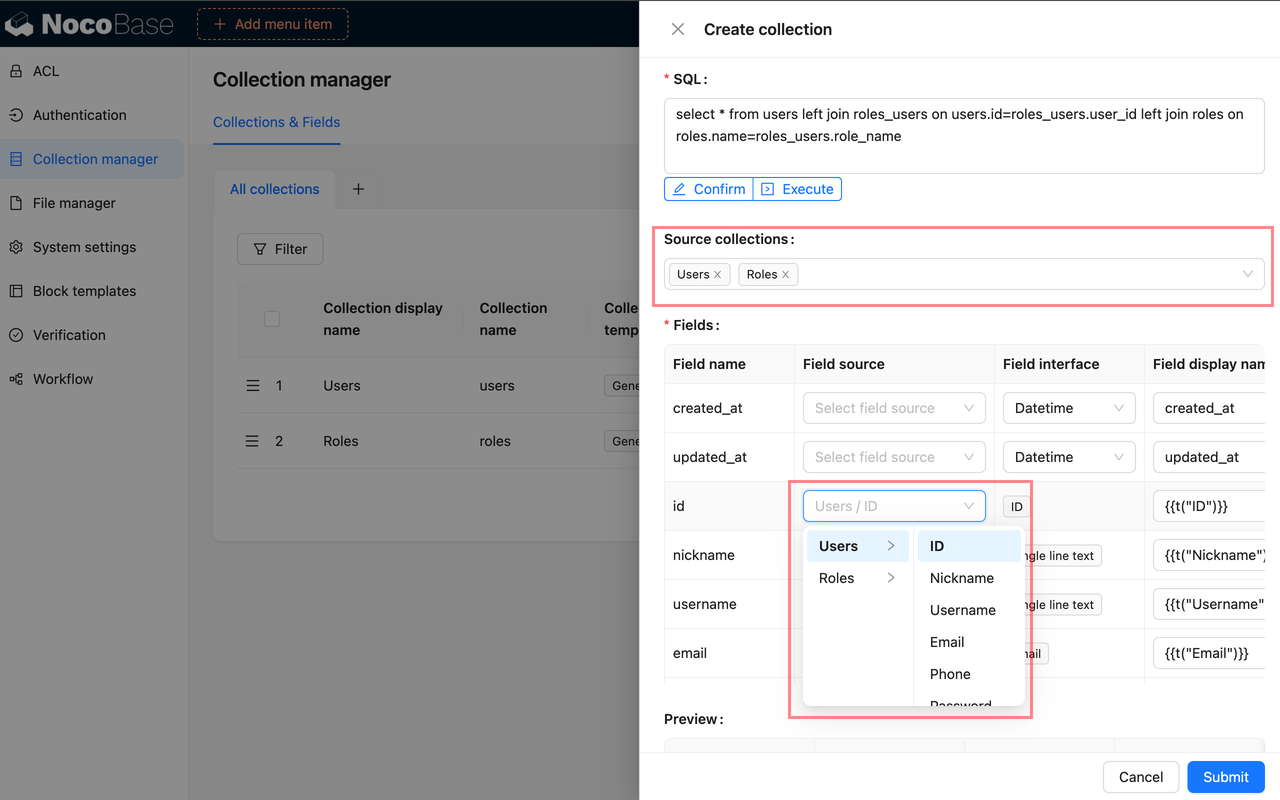
|
|
63
|
+
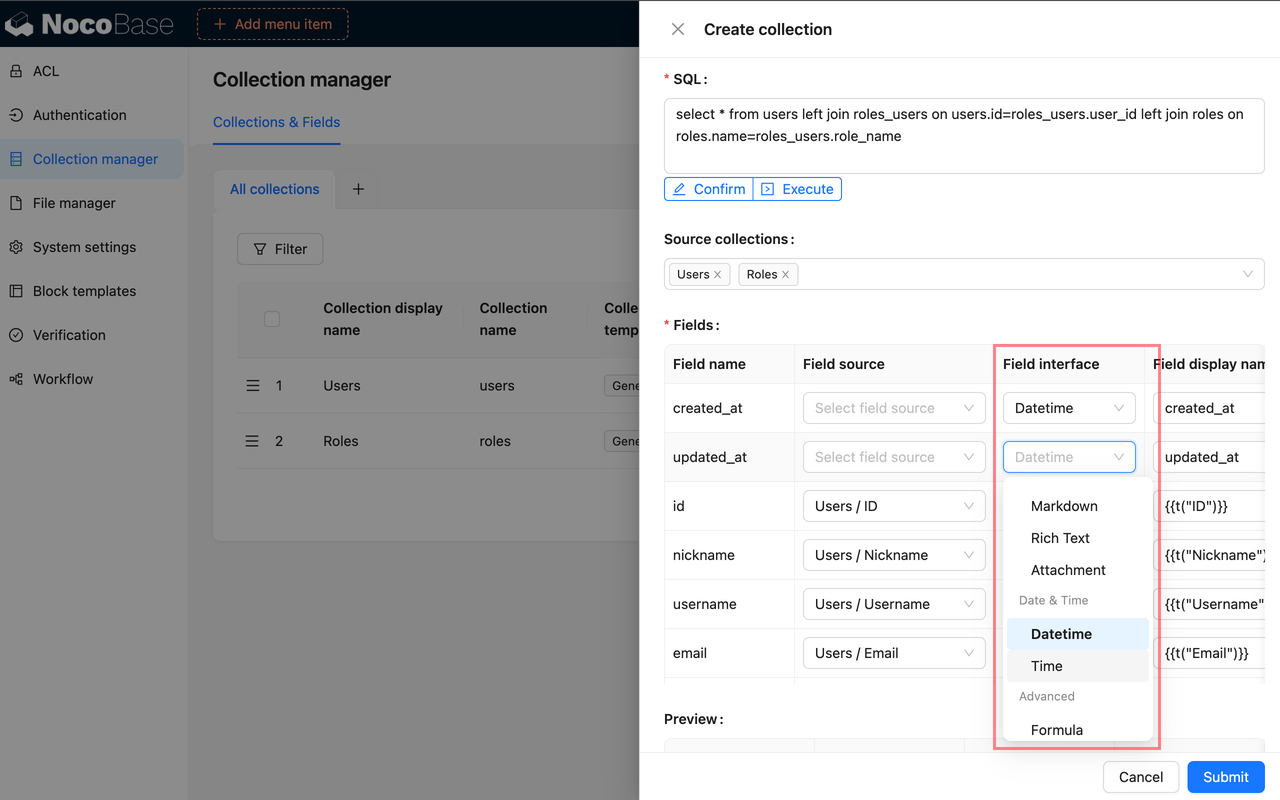
|
|
46
64
|
|
|
47
|
-
|
|
65
|
+
| Setting | Description |
|
|
66
|
+
| --- | --- |
|
|
67
|
+
| Field source | Select the existing collection and field from which the SQL result field originates. After choosing a source, NocoBase can reuse its Field interface. |
|
|
68
|
+
| Field interface | Confirm how the field is displayed and entered in pages, such as Input, Number, Date, or Select. |
|
|
69
|
+
| Field display name | The name displayed for the field. Use a name that business users can recognize. |
|
|
48
70
|
|
|
49
|
-
|
|
71
|
+
For example, if an SQL query returns `customers.name as customer_name` and it comes from the **Customer name** field in the Customers collection, map it to that field. NocoBase can then reuse the source field's title and interface configuration.
|
|
50
72
|
|
|
51
|
-
|
|
52
|
-
| :--- | :--- | :--- | :--- |
|
|
53
|
-
| SQL | Simple models, lightweight use cases<br />Limited interaction with the database<br />Avoiding maintenance of views<br />Prefer UI-driven operations | SQL subquery | Not Supported |
|
|
54
|
-
| Connect to database view | Complex models<br />Requires database interaction<br />Data modification needed<br />Requires stronger and more stable database support | Database view | Partially Supported |
|
|
73
|
+
For a calculated result such as `count(*) as total` or `sum(amount) as amount_total`, there is normally no explicit source field, so choose an appropriate Field interface manually.
|
|
55
74
|
|
|
56
|
-
:::
|
|
57
|
-
|
|
58
|
-
|
|
75
|
+
:::tip Tip
|
|
76
|
+
|
|
77
|
+
`Field source` depends on `Source collections`. Select source collections first so that source fields under those collections appear in the field-mapping table.
|
|
78
|
+
|
|
79
|
+
When field inference identifies a `Field source`, NocoBase preferentially reuses the source field's Field interface. When it cannot infer a source field, specify `Field source` manually. When the inferred result does not match the business meaning, remove `Field source`, specify another source manually, or select the `Field interface` and configure the `Field display name` manually.
|
|
80
|
+
|
|
81
|
+
:::
|
|
82
|
+
|
|
83
|
+
### Record unique key
|
|
84
|
+
|
|
85
|
+
An SQL collection requires a Record unique key. Without one, you cannot create blocks in pages or view records correctly. You can select one field or a combination of fields as the unique key. Suitable Record unique key fields usually meet these conditions:
|
|
86
|
+
|
|
87
|
+
- Each row in the query result is unique
|
|
88
|
+
- Field values are stable and do not change due to pagination, sorting, or statistical-calculation changes
|
|
89
|
+
- Fields are not empty
|
|
90
|
+
- Fields are always returned by the query result
|
|
91
|
+
|
|
92
|
+
For a single-table query result, return the original table primary key first. For a query result based on multi-table joins or aggregations, retain a stable business ID in the SQL or return several fields that can jointly locate a record.
|
|
93
|
+
|
|
94
|
+
:::warning Note
|
|
95
|
+
|
|
96
|
+
Do not use values such as `row_number()` that change with sorting, filtering, or aggregation scope as a long-term stable Record unique key. When a Record unique key changes, page blocks, permissions, workflows, and external APIs might not locate the same record.
|
|
97
|
+
|
|
98
|
+
:::
|
|
99
|
+
|
|
100
|
+
### Preview query results
|
|
101
|
+
|
|
102
|
+
Before saving, use **Preview** to inspect SQL query results. Check the following:
|
|
103
|
+
|
|
104
|
+
- SQL executes normally
|
|
105
|
+
- Returned fields are complete
|
|
106
|
+
- Field interface and display name match the business meaning
|
|
107
|
+
- A Record unique key exists and is unique
|
|
108
|
+
- The query result is suitable for page display
|
|
109
|
+
|
|
110
|
+
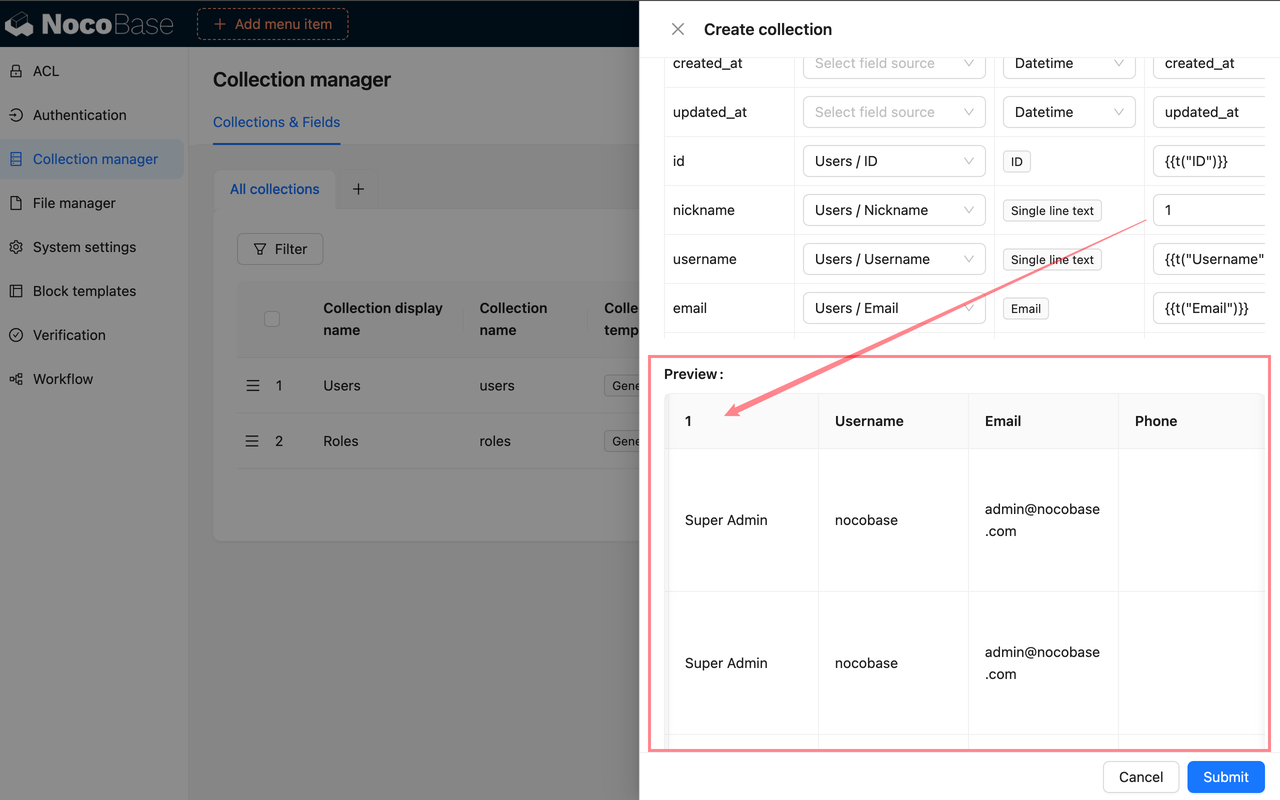
|
|
111
|
+
|
|
112
|
+
## Configure fields
|
|
113
|
+
|
|
114
|
+
After creating an SQL collection, click **Configure fields** beside it in the collection list to open field settings. Field settings maintain the fields in the SQL collection, how they display in the interface, and how SQL query results map to NocoBase Field interfaces.
|
|
115
|
+
|
|
116
|
+
[Learn more about field configuration](../data-modeling/collection-fields/index.md)
|
|
117
|
+
|
|
118
|
+
### Change the UI type
|
|
119
|
+
|
|
120
|
+
After creating an SQL collection, you can still adjust field-interface configuration in field settings. This page is mainly used to change the Field interface, display name, description, and field-specific settings.
|
|
121
|
+
|
|
122
|
+
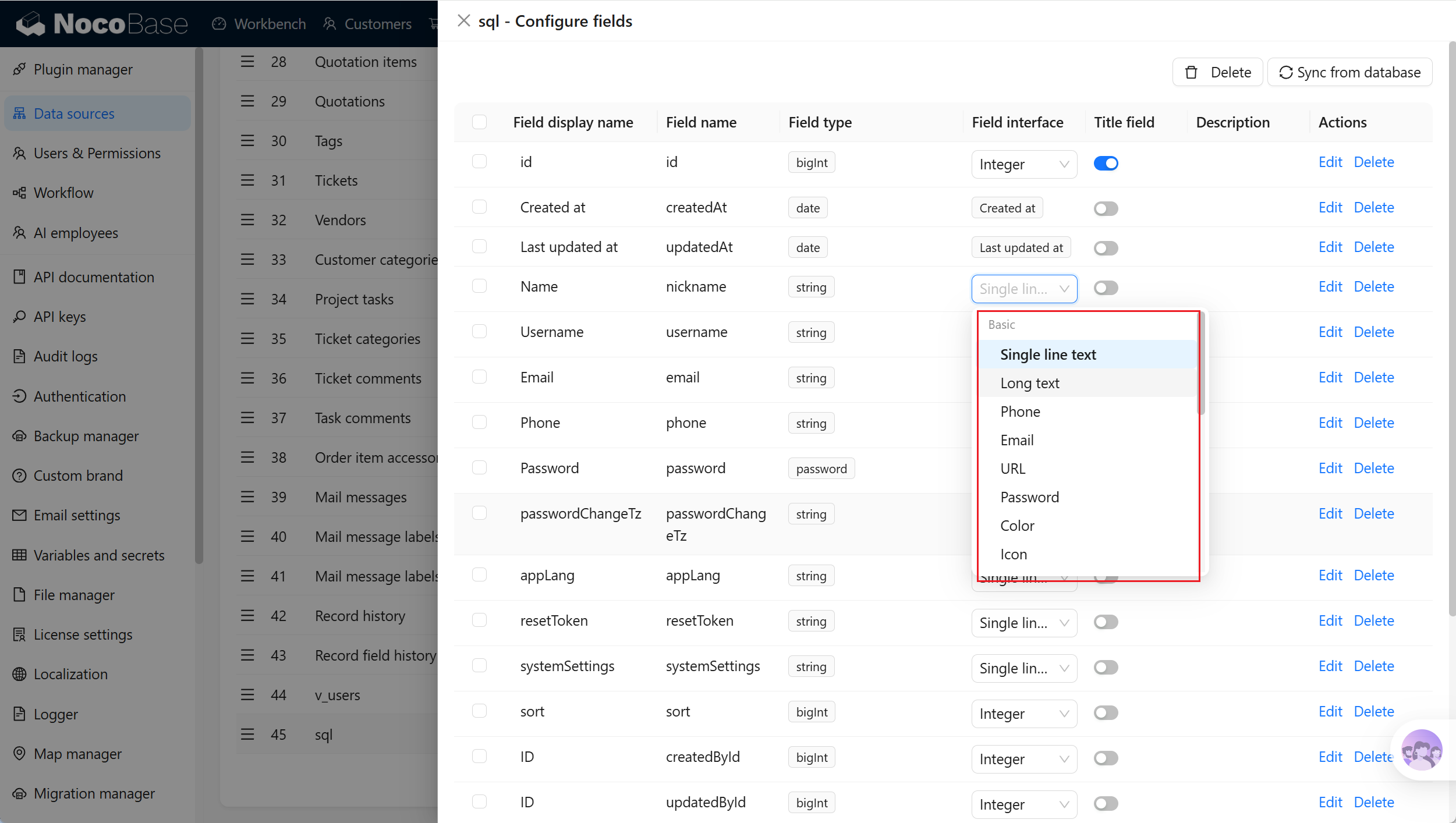
|
|
123
|
+
|
|
124
|
+
Use it in these situations:
|
|
125
|
+
|
|
126
|
+
- The Field interface set when creating the SQL collection is incorrect
|
|
127
|
+
- A field display name does not follow business terminology and needs a clearer name
|
|
128
|
+
- The business meaning of a query-result field changes and its display method needs confirmation again
|
|
129
|
+
- Field descriptions or field-specific settings need adjustment, such as Select options
|
|
130
|
+
|
|
131
|
+
### Synchronize from database
|
|
132
|
+
|
|
133
|
+
If the SQL query is unchanged but the underlying table structure or fields change, open **Configure fields** and click **Sync from database** to run the SQL again and synchronize fields. For field mapping, see [Create an SQL collection](#field-mapping).
|
|
134
|
+
|
|
135
|
+
|
|
136
|
+
|
|
137
|
+
### Edit a field
|
|
138
|
+
|
|
139
|
+
Click **Edit** beside a field to edit its configuration. Field editing is suitable for adjusting how a field displays and is used in NocoBase, such as its display name, description, validation rules, or field-specific settings.
|
|
140
|
+
|
|
141
|
+
[Learn more about field configuration](../data-modeling/collection-fields/index.md)
|
|
142
|
+
|
|
143
|
+
:::warning Note
|
|
144
|
+
|
|
145
|
+
Editing field configuration does not change the SQL query, source-table column name, source-table column definition, or database index. To change the actual columns in a query result, change the SQL query first, then run it again and synchronize fields.
|
|
146
|
+
|
|
147
|
+
:::
|
|
148
|
+
|
|
149
|
+
### Delete a field
|
|
150
|
+
|
|
151
|
+
Click **Delete** beside a field to delete it. Deleting a field removes only the field stored in NocoBase; it does not delete the SQL query or actual columns in source tables.
|
|
152
|
+
|
|
153
|
+
[Learn more about field configuration](../data-modeling/collection-fields/index.md)
|
|
154
|
+
|
|
155
|
+
:::warning Note
|
|
156
|
+
|
|
157
|
+
Deleting a field can affect page blocks, filters, sorting, permissions, workflows, APIs, and existing configuration. Before deleting it, confirm whether the field is still used. If the SQL query still returns the column, NocoBase might identify the field again when you later run **Sync from database**.
|
|
158
|
+
|
|
159
|
+
:::
|
|
160
|
+
|
|
161
|
+
## Edit an SQL collection
|
|
162
|
+
|
|
163
|
+
In the collection list, click **Edit** beside an SQL collection to adjust its metadata and runtime settings in NocoBase. Editing uses mostly the same settings as creating an SQL collection, except that `Collection name` cannot be changed.
|
|
164
|
+
|
|
165
|
+
When the SQL query changes, click **Execute** again and confirm the field mapping, Record unique key, and preview result.
|
|
166
|
+
|
|
167
|
+
|
|
168
|
+
|
|
169
|
+
:::warning Note
|
|
170
|
+
|
|
171
|
+
Changing an SQL query can change field names, field mapping, or the Record unique key. After changing it, recheck whether page blocks, charts, permissions, and workflows still work.
|
|
172
|
+
|
|
173
|
+
:::
|
|
174
|
+
|
|
175
|
+
## Delete an SQL collection
|
|
176
|
+
|
|
177
|
+
In the collection list, click **Delete** beside an SQL collection. This deletes only the SQL collection configuration and fields in NocoBase; it does not delete underlying source tables or data in those tables.
|
|
178
|
+
|
|
179
|
+
You can also select multiple SQL collections and delete them together. Before deleting, check whether page blocks, charts, permissions, workflows, or external APIs still use the SQL collection.
|
|
@@ -1,18 +1,106 @@
|
|
|
1
1
|
---
|
|
2
2
|
pkg: "@nocobase/plugin-collection-tree"
|
|
3
|
+
title: "Tree collection"
|
|
4
|
+
description: "Use a Tree collection for hierarchical data such as organizational structures, product categories, regional hierarchies, and department directories. It uses the adjacency-list model to store parent-child relationships."
|
|
5
|
+
keywords: "Tree collection,tree collection,adjacency list,hierarchical data,NocoBase"
|
|
3
6
|
---
|
|
4
7
|
|
|
5
|
-
# Tree
|
|
8
|
+
# Tree collection
|
|
6
9
|
|
|
7
10
|
## Introduction
|
|
8
11
|
|
|
9
|
-
|
|
12
|
+
Tree collections are suitable for data with parent-child relationships, such as organizational structures, product categories, regional hierarchies, department directories, and knowledge-base directories. A Tree collection uses the adjacency-list model to store parent-child relationships, and each record can point to its own parent node.
|
|
10
13
|
|
|
11
|
-
|
|
14
|
+
You can create Tree collections only from the main data source. External databases, REST API data sources, and External NocoBase data sources do not support creating Tree collections.
|
|
12
15
|
|
|
16
|
+
## Use cases
|
|
13
17
|
|
|
14
|
-
|
|
18
|
+
Tree collections are suitable for these business scenarios:
|
|
15
19
|
|
|
20
|
+
- Company organizational structures and department hierarchies
|
|
21
|
+
- Product categories, knowledge-base directories, and document directories
|
|
22
|
+
- Province, city, and district hierarchies; sales territories; and service-outlet hierarchies
|
|
23
|
+
- BOM categories, equipment categories, and asset categories
|
|
16
24
|
|
|
25
|
+
## Create and configure
|
|
17
26
|
|
|
18
|
-
|
|
27
|
+
In the main data source, click **Create collection** and select **Tree collection** to create a Tree collection.
|
|
28
|
+
|
|
29
|
+
|
|
30
|
+
|
|
31
|
+
The creation settings for a Tree collection are mostly the same as those for a general collection.
|
|
32
|
+
|
|
33
|
+
| Setting | Description |
|
|
34
|
+
| --- | --- |
|
|
35
|
+
| Collection display name | The name displayed for the collection, such as `Organization`, `Product categories`, or `Regional hierarchy`. |
|
|
36
|
+
| Collection name | The collection identifier used internally by APIs, relation fields, permissions, and workflows. |
|
|
37
|
+
| Inherits | Select a parent collection to inherit. This setting is visible only when the main database is PostgreSQL. |
|
|
38
|
+
| Categories | Collection categories affect only organization in Data source management; they do not change the collection structure. |
|
|
39
|
+
| Description | A description of the collection. State which hierarchy data it stores, who maintains it, and which page filters use it. |
|
|
40
|
+
| Preset fields | Preset fields. Keep system fields and Tree collection built-in fields when creating a Tree collection. |
|
|
41
|
+
|
|
42
|
+
### Built-in fields
|
|
43
|
+
|
|
44
|
+
After a Tree collection is created, it usually includes the following built-in fields. `parentId`, `parent`, and `children` store the hierarchy.
|
|
45
|
+
|
|
46
|
+
| Field | Field name | Description |
|
|
47
|
+
| --- | --- | --- |
|
|
48
|
+
| ID | `id` | The default primary key that uniquely identifies a record. |
|
|
49
|
+
| Created at | `createdAt` | Automatically records when the record was created. |
|
|
50
|
+
| Created by | `createdBy` | Automatically records the user who created the record. |
|
|
51
|
+
| Updated at | `updatedAt` | Automatically records when the record was last updated. |
|
|
52
|
+
| Updated by | `updatedBy` | Automatically records the user who last updated the record. |
|
|
53
|
+
| Parent ID | `parentId` | Stores the parent-node ID. It is usually empty for root nodes. |
|
|
54
|
+
| Parent | `parent` | A many-to-one relation field that points to a parent node in the current collection. |
|
|
55
|
+
| Children | `children` | A one-to-many relation field representing child nodes of the current node. |
|
|
56
|
+
| Space | `space` | Available after enabling the [Multi-space plugin](../../multi-app/multi-space/index.md). It isolates data by space and does not appear when Multi-space is not enabled. |
|
|
57
|
+
|
|
58
|
+
|
|
59
|
+
|
|
60
|
+
:::warning Note
|
|
61
|
+
|
|
62
|
+
Avoid circular relationships in Tree collection data. For example, do not make B the parent of A and A the parent of B. Circular relationships cause incorrect tree displays and filter results.
|
|
63
|
+
|
|
64
|
+
:::
|
|
65
|
+
|
|
66
|
+
### Primary key field
|
|
67
|
+
|
|
68
|
+
Like a general collection, a Tree collection needs a primary key. Tree relation fields use the parent-node ID to relate to the primary-key record in the same collection.
|
|
69
|
+
|
|
70
|
+
If a Tree collection has no primary key, set **Record unique key** when editing the collection. Otherwise, blocks might not view or edit records correctly, and tree displays might not locate nodes reliably.
|
|
71
|
+
|
|
72
|
+
## Use in pages
|
|
73
|
+
|
|
74
|
+
A Tree collection can use most of the data blocks for a [general collection](../data-source-main/general-collection.md) to create, read, update, and delete records. It can also work with tree-specific features:
|
|
75
|
+
|
|
76
|
+
| Block | Use |
|
|
77
|
+
| --- | --- |
|
|
78
|
+
| [Table block](../../interface-builder/blocks/data-blocks/table.md#enable-tree-table) | Displays hierarchical records for viewing and maintaining parent-child structures. |
|
|
79
|
+
| [Form block](../../interface-builder/blocks/data-blocks/form.md) | Creates or edits one Tree node record. |
|
|
80
|
+
| [Details block](../../interface-builder/blocks/data-blocks/details.md) | Views details of one Tree node. |
|
|
81
|
+
| [Tree Filter block](../../interface-builder/blocks/filter-blocks/tree.md) | Filters other data blocks with a tree structure. It is commonly used for category, organization, regional, and other hierarchical filters. |
|
|
82
|
+
|
|
83
|
+
## Edit configuration
|
|
84
|
+
|
|
85
|
+
In the collection list, click **Edit** next to a Tree collection to change its display name, category, description, simple pagination mode, **Record unique key**, and other settings.
|
|
86
|
+
|
|
87
|
+
Do not delete Tree collection parent-child relation fields or repurpose them casually. To adjust the hierarchy, update parent-node relations in the record data first.
|
|
88
|
+
|
|
89
|
+
## Delete a collection
|
|
90
|
+
|
|
91
|
+
In the collection list, click **Delete** next to a Tree collection to delete it.
|
|
92
|
+
|
|
93
|
+
Deleting a Tree collection deletes its collection metadata, actual database table, and hierarchy data. Before deleting it, confirm whether page blocks, Tree Filter blocks, relation fields, permissions, workflows, or APIs still depend on it.
|
|
94
|
+
|
|
95
|
+
:::danger Warning
|
|
96
|
+
|
|
97
|
+
Tree collections are often used as filter conditions for other blocks. After deleting a Tree collection, related Tree Filter blocks and page configurations that depend on its category hierarchy might stop working.
|
|
98
|
+
|
|
99
|
+
:::
|
|
100
|
+
|
|
101
|
+
## Related links
|
|
102
|
+
|
|
103
|
+
- [General collection](../data-source-main/general-collection.md) - General configuration and block usage.
|
|
104
|
+
- [Table block](../../interface-builder/blocks/data-blocks/table.md) - Enable Tree collection display in a table.
|
|
105
|
+
- [Tree Filter block](../../interface-builder/blocks/filter-blocks/tree.md) - Filter data with a tree structure.
|
|
106
|
+
- [Multi-space](../../multi-app/multi-space/index.md) - Learn about the Space field and data isolation by space.
|