@nocobase/plugin-ai 2.3.0-alpha.1 → 3.0.0-alpha.1
This diff represents the content of publicly available package versions that have been released to one of the supported registries. The information contained in this diff is provided for informational purposes only and reflects changes between package versions as they appear in their respective public registries.
- package/dist/ai/docs/nocobase/ai-employees/block/ai-chat-box.md +133 -0
- package/dist/ai/docs/nocobase/ai-employees/knowledge-base/knowledge-base/documents.md +1 -1
- package/dist/ai/docs/nocobase/ai-employees/knowledge-base/knowledge-base/index.md +11 -7
- package/dist/ai/docs/nocobase/ai-employees/knowledge-base/knowledge-base/settings.md +12 -8
- package/dist/ai/docs/nocobase/ai-employees/knowledge-base/vector-database.md +3 -3
- package/dist/ai/docs/nocobase/ai-employees/workflow/nodes/knowledge/create-document.md +1 -1
- package/dist/ai/docs/nocobase/api/app/env.md +3 -1
- package/dist/ai/docs/nocobase/api/cli/index.md +14 -2
- package/dist/ai/docs/nocobase/api/cli/portal/config.md +44 -0
- package/dist/ai/docs/nocobase/api/cli/portal/create.md +48 -0
- package/dist/ai/docs/nocobase/api/cli/portal/deploy.md +39 -0
- package/dist/ai/docs/nocobase/api/cli/portal/destroy.md +41 -0
- package/dist/ai/docs/nocobase/api/cli/portal/dev.md +39 -0
- package/dist/ai/docs/nocobase/api/cli/portal/index.md +136 -0
- package/dist/ai/docs/nocobase/api/cli/portal/info.md +41 -0
- package/dist/ai/docs/nocobase/api/cli/portal/list.md +40 -0
- package/dist/ai/docs/nocobase/api/cli/portal/pull.md +43 -0
- package/dist/ai/docs/nocobase/api/cli/portal/push.md +41 -0
- package/dist/ai/docs/nocobase/building-tips/ai-fill-js-block-form.md +1092 -0
- package/dist/ai/docs/nocobase/data-sources/calendar/calendar-collection.md +100 -3
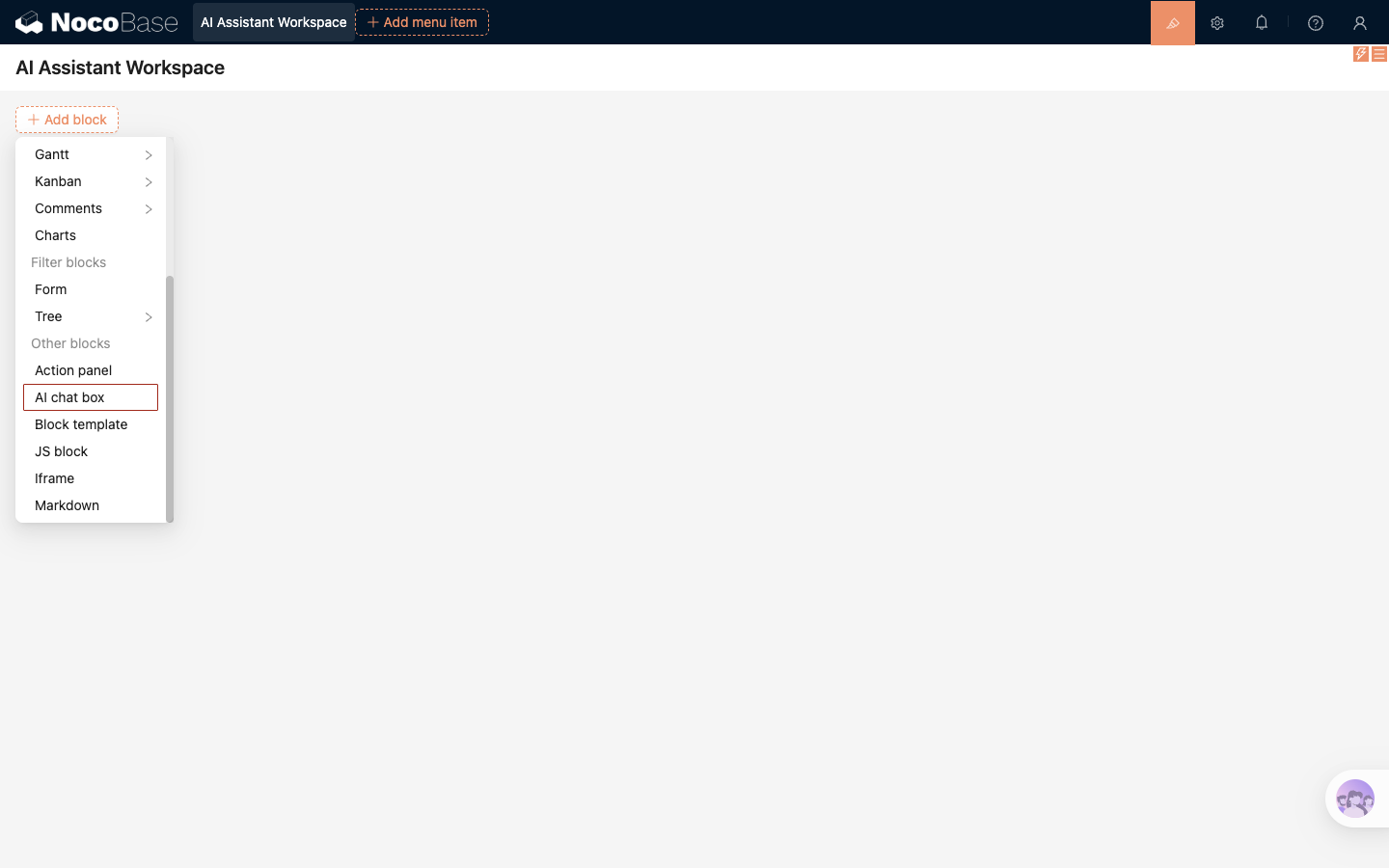
- package/dist/ai/docs/nocobase/data-sources/collection-comment/index.md +92 -39
- package/dist/ai/docs/nocobase/data-sources/collection-sql/index.md +150 -29
- package/dist/ai/docs/nocobase/data-sources/collection-tree/index.md +93 -5
- package/dist/ai/docs/nocobase/data-sources/collection-view/index.md +226 -4
- package/dist/ai/docs/nocobase/data-sources/data-modeling/collection-fields/advanced/china-region.md +122 -5
- package/dist/ai/docs/nocobase/data-sources/data-modeling/collection-fields/advanced/collection-select.md +105 -4
- package/dist/ai/docs/nocobase/data-sources/data-modeling/collection-fields/advanced/json.md +102 -4
- package/dist/ai/docs/nocobase/data-sources/data-modeling/collection-fields/advanced/nano-id.md +104 -4
- package/dist/ai/docs/nocobase/data-sources/data-modeling/collection-fields/advanced/snowflake-id.md +108 -4
- package/dist/ai/docs/nocobase/data-sources/data-modeling/collection-fields/advanced/sort.md +3 -19
- package/dist/ai/docs/nocobase/data-sources/data-modeling/collection-fields/advanced/uuid.md +104 -4
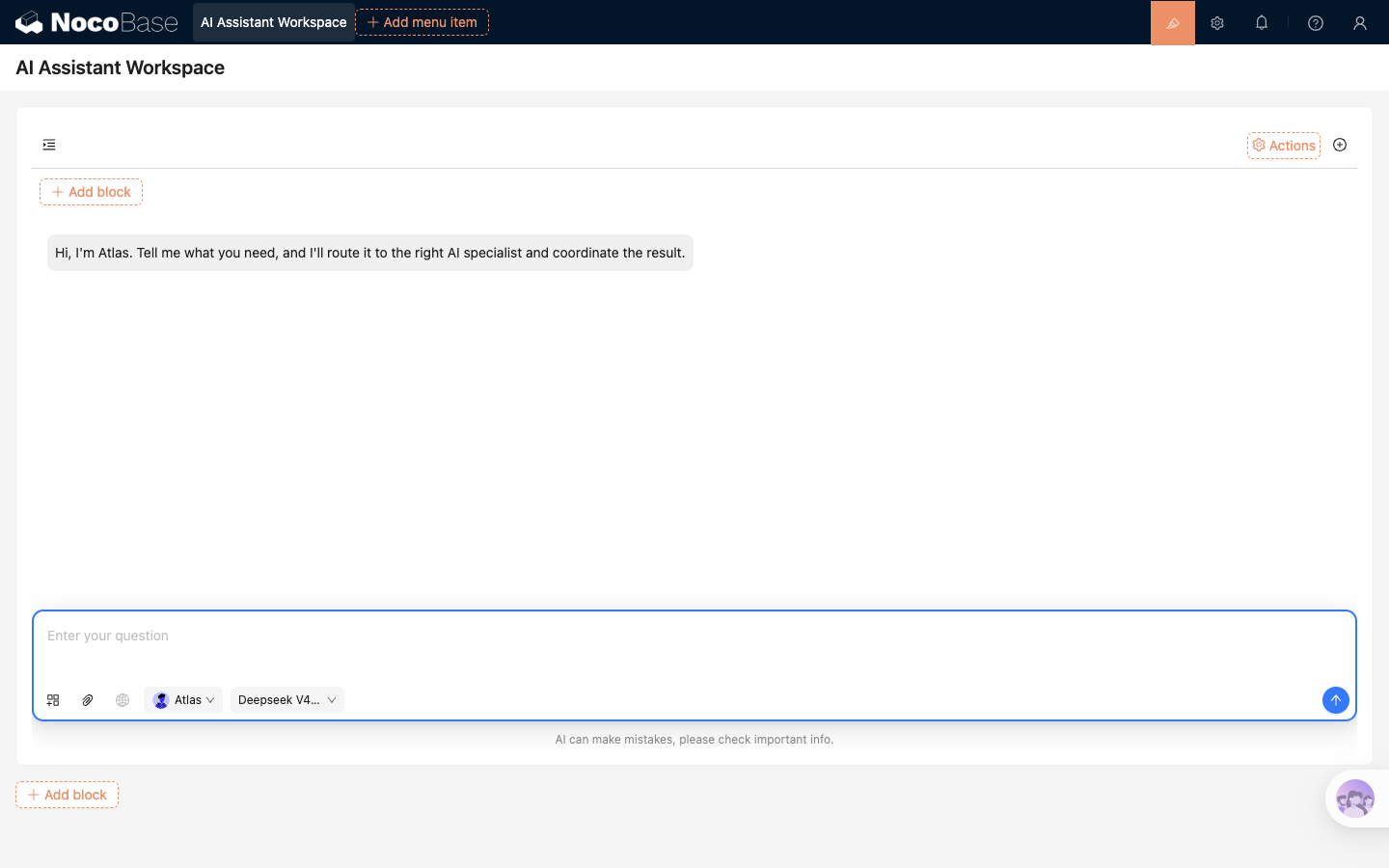
- package/dist/ai/docs/nocobase/data-sources/data-modeling/collection-fields/associations/index.md +44 -8
- package/dist/ai/docs/nocobase/data-sources/data-modeling/collection-fields/basic/color.md +102 -4
- package/dist/ai/docs/nocobase/data-sources/data-modeling/collection-fields/basic/email.md +104 -4
- package/dist/ai/docs/nocobase/data-sources/data-modeling/collection-fields/basic/icon.md +102 -4
- package/dist/ai/docs/nocobase/data-sources/data-modeling/collection-fields/basic/input.md +112 -8
- package/dist/ai/docs/nocobase/data-sources/data-modeling/collection-fields/basic/integer.md +103 -4
- package/dist/ai/docs/nocobase/data-sources/data-modeling/collection-fields/basic/number.md +103 -4
- package/dist/ai/docs/nocobase/data-sources/data-modeling/collection-fields/basic/password.md +102 -4
- package/dist/ai/docs/nocobase/data-sources/data-modeling/collection-fields/basic/percent.md +104 -5
- package/dist/ai/docs/nocobase/data-sources/data-modeling/collection-fields/basic/phone.md +104 -4
- package/dist/ai/docs/nocobase/data-sources/data-modeling/collection-fields/basic/textarea.md +99 -8
- package/dist/ai/docs/nocobase/data-sources/data-modeling/collection-fields/basic/url.md +103 -4
- package/dist/ai/docs/nocobase/data-sources/data-modeling/collection-fields/choices/checkbox-group.md +105 -3
- package/dist/ai/docs/nocobase/data-sources/data-modeling/collection-fields/choices/checkbox.md +102 -4
- package/dist/ai/docs/nocobase/data-sources/data-modeling/collection-fields/choices/china-region.md +108 -5
- package/dist/ai/docs/nocobase/data-sources/data-modeling/collection-fields/choices/multiple-select.md +103 -5
- package/dist/ai/docs/nocobase/data-sources/data-modeling/collection-fields/choices/radio-group.md +106 -4
- package/dist/ai/docs/nocobase/data-sources/data-modeling/collection-fields/choices/select.md +103 -5
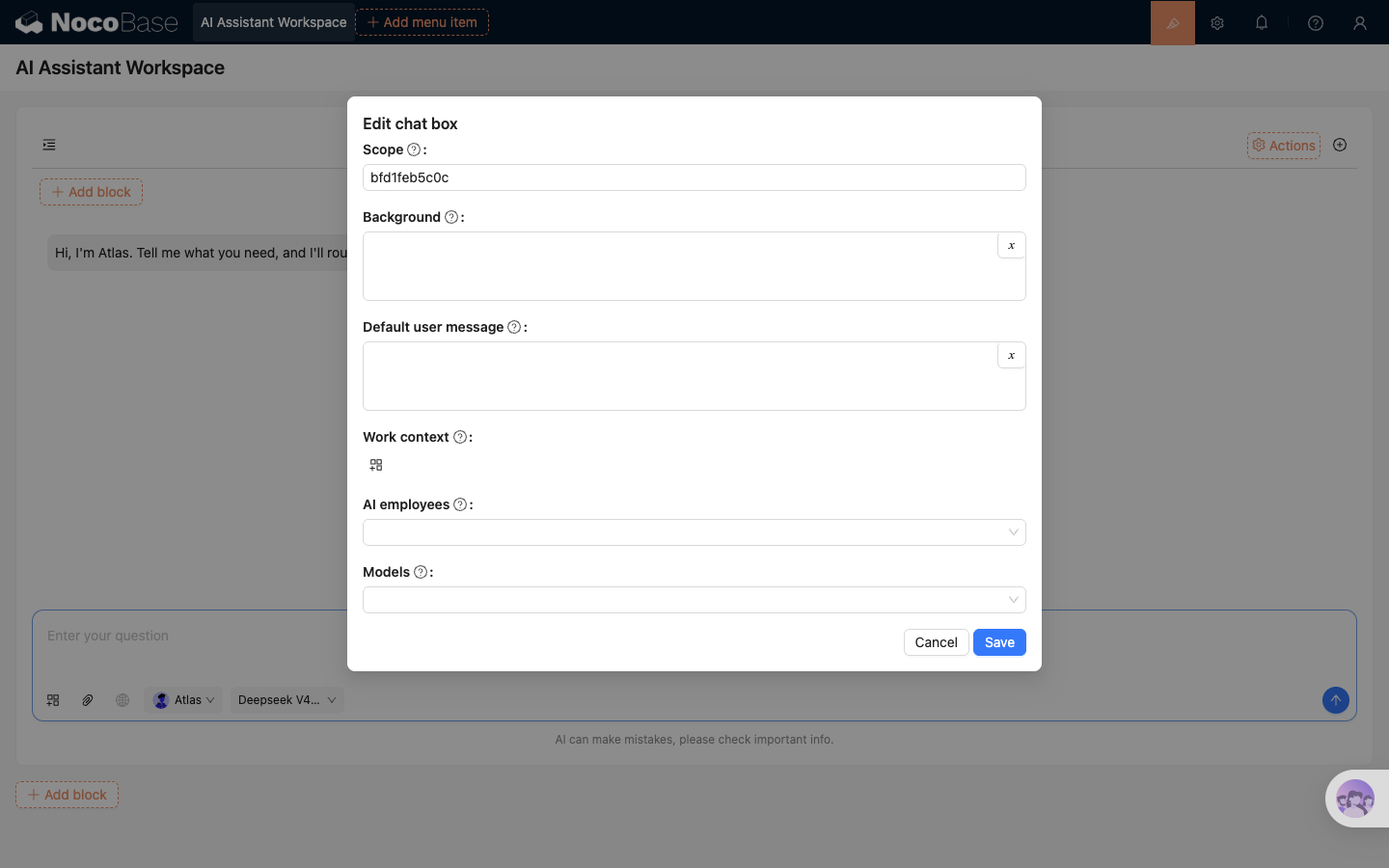
- package/dist/ai/docs/nocobase/data-sources/data-modeling/collection-fields/datetime/date.md +102 -4
- package/dist/ai/docs/nocobase/data-sources/data-modeling/collection-fields/datetime/datetime-without-tz.md +103 -5
- package/dist/ai/docs/nocobase/data-sources/data-modeling/collection-fields/datetime/datetime.md +103 -5
- package/dist/ai/docs/nocobase/data-sources/data-modeling/collection-fields/datetime/index.md +53 -47
- package/dist/ai/docs/nocobase/data-sources/data-modeling/collection-fields/datetime/time.md +102 -4
- package/dist/ai/docs/nocobase/data-sources/data-modeling/collection-fields/datetime/unix-timestamp.md +103 -5
- package/dist/ai/docs/nocobase/data-sources/data-modeling/collection-fields/geometric/circle.md +102 -4
- package/dist/ai/docs/nocobase/data-sources/data-modeling/collection-fields/geometric/line.md +103 -5
- package/dist/ai/docs/nocobase/data-sources/data-modeling/collection-fields/geometric/point.md +102 -4
- package/dist/ai/docs/nocobase/data-sources/data-modeling/collection-fields/geometric/polygon.md +102 -4
- package/dist/ai/docs/nocobase/data-sources/data-modeling/collection-fields/index.md +62 -16
- package/dist/ai/docs/nocobase/data-sources/data-modeling/collection-fields/media/markdown.md +104 -4
- package/dist/ai/docs/nocobase/data-sources/data-modeling/collection-fields/media/rich-text.md +105 -5
- package/dist/ai/docs/nocobase/data-sources/data-modeling/collection-fields/system-info/created-at.md +105 -5
- package/dist/ai/docs/nocobase/data-sources/data-modeling/collection-fields/system-info/created-by.md +103 -5
- package/dist/ai/docs/nocobase/data-sources/data-modeling/collection-fields/system-info/space.md +100 -6
- package/dist/ai/docs/nocobase/data-sources/data-modeling/collection-fields/system-info/table-oid.md +102 -4
- package/dist/ai/docs/nocobase/data-sources/data-modeling/collection-fields/system-info/updated-at.md +104 -5
- package/dist/ai/docs/nocobase/data-sources/data-modeling/collection-fields/system-info/updated-by.md +104 -6
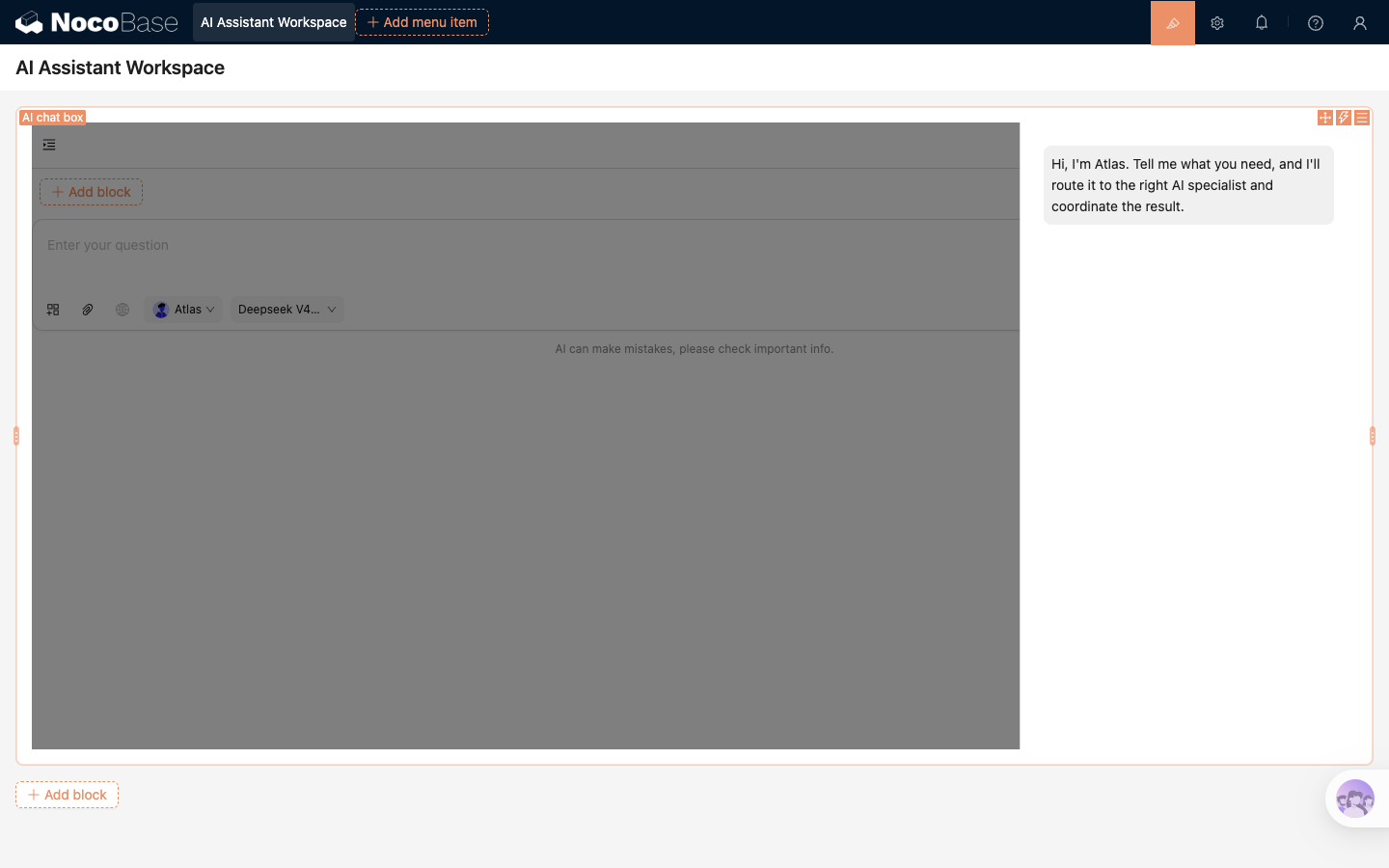
- package/dist/ai/docs/nocobase/data-sources/data-modeling/collection-fields/validation.md +68 -58
- package/dist/ai/docs/nocobase/data-sources/data-modeling/collection.md +32 -13
- package/dist/ai/docs/nocobase/data-sources/data-modeling/index.md +41 -33
- package/dist/ai/docs/nocobase/data-sources/data-source-external-mariadb/index.md +114 -6
- package/dist/ai/docs/nocobase/data-sources/data-source-external-mssql/index.md +117 -6
- package/dist/ai/docs/nocobase/data-sources/data-source-external-mysql/index.md +103 -6
- package/dist/ai/docs/nocobase/data-sources/data-source-external-nocobase/index.md +75 -73
- package/dist/ai/docs/nocobase/data-sources/data-source-external-oracle/index.md +129 -11
- package/dist/ai/docs/nocobase/data-sources/data-source-external-postgres/index.md +110 -6
- package/dist/ai/docs/nocobase/data-sources/data-source-kingbase/index.md +75 -49
- package/dist/ai/docs/nocobase/data-sources/data-source-main/general-collection.md +116 -15
- package/dist/ai/docs/nocobase/data-sources/data-source-main/index.md +92 -62
- package/dist/ai/docs/nocobase/data-sources/data-source-main/inheritance-collection.md +97 -10
- package/dist/ai/docs/nocobase/data-sources/data-source-manager/external-database.md +97 -58
- package/dist/ai/docs/nocobase/data-sources/data-source-manager/index.md +32 -24
- package/dist/ai/docs/nocobase/data-sources/data-source-rest-api/index.md +115 -153
- package/dist/ai/docs/nocobase/data-sources/external/clickhouse.md +124 -0
- package/dist/ai/docs/nocobase/data-sources/external/doris.md +130 -0
- package/dist/ai/docs/nocobase/data-sources/external/index.md +140 -0
- package/dist/ai/docs/nocobase/data-sources/external/kingbase.md +129 -0
- package/dist/ai/docs/nocobase/data-sources/external/mariadb.md +126 -0
- package/dist/ai/docs/nocobase/data-sources/external/mssql.md +129 -0
- package/dist/ai/docs/nocobase/data-sources/external/mysql.md +115 -0
- package/dist/ai/docs/nocobase/data-sources/external/nocobase.md +159 -0
- package/dist/ai/docs/nocobase/data-sources/external/oceanbase.md +126 -0
- package/dist/ai/docs/nocobase/data-sources/external/oracle.md +158 -0
- package/dist/ai/docs/nocobase/data-sources/external/postgresql.md +122 -0
- package/dist/ai/docs/nocobase/data-sources/external/rest-api.md +245 -0
- package/dist/ai/docs/nocobase/data-sources/field-attachment-url/index.md +100 -12
- package/dist/ai/docs/nocobase/data-sources/field-encryption/index.md +48 -47
- package/dist/ai/docs/nocobase/data-sources/field-formula/index.md +99 -5
- package/dist/ai/docs/nocobase/data-sources/field-markdown-vditor/index.md +105 -5
- package/dist/ai/docs/nocobase/data-sources/field-sequence/index.md +102 -5
- package/dist/ai/docs/nocobase/data-sources/field-signature/index.md +18 -16
- package/dist/ai/docs/nocobase/data-sources/field-sort/index.md +76 -73
- package/dist/ai/docs/nocobase/data-sources/file-manager/field-attachment.md +101 -7
- package/dist/ai/docs/nocobase/data-sources/file-manager/file-collection.md +101 -14
- package/dist/ai/docs/nocobase/data-sources/index.md +49 -33
- package/dist/ai/docs/nocobase/data-sources/main/index.md +130 -0
- package/dist/ai/docs/nocobase/data-sources/main/kingbase.md +147 -0
- package/dist/ai/docs/nocobase/data-sources/main/mariadb.md +59 -0
- package/dist/ai/docs/nocobase/data-sources/main/mysql.md +59 -0
- package/dist/ai/docs/nocobase/data-sources/main/oceanbase.md +62 -0
- package/dist/ai/docs/nocobase/data-sources/main/postgresql.md +61 -0
- package/dist/ai/docs/nocobase/file-manager/storage/index.md +66 -26
- package/dist/ai/docs/nocobase/file-manager/storage/s3-pro.md +58 -7
- package/dist/ai/docs/nocobase/get-started/installation/env.md +2 -2
- package/dist/ai/docs/nocobase/ops-management/migration-manager/built-in-tables.md +1 -2
- package/dist/ai/docs/nocobase/runjs/context/ai.md +194 -4
- package/dist/ai/tools/executeFrontendTool.d.ts +10 -0
- package/dist/ai/tools/executeFrontendTool.js +86 -0
- package/dist/ai/tools/getSkill.js +1 -1
- package/dist/ai/tools/loadFrontendTool.d.ts +10 -0
- package/dist/ai/tools/loadFrontendTool.js +99 -0
- package/dist/client/244.8631eb5cf3f05e21.js +10 -0
- package/dist/client/{525.203778500aca5d05.js → 525.94dd4136c1361477.js} +1 -1
- package/dist/client/681.6ffbc9329b9ac242.js +10 -0
- package/dist/{client-v2/705.1d10027ff8cfdf79.js → client/705.19b642db34de438a.js} +1 -1
- package/dist/client/index.d.ts +1 -3
- package/dist/client/index.js +8 -8
- package/dist/client-v2/244.c428e645ecb94414.js +10 -0
- package/dist/client-v2/420.b2aedb1ff71fca0e.js +10 -0
- package/dist/client-v2/681.6890caa389564ff7.js +10 -0
- package/dist/client-v2/705.8dc34d43f02f322c.js +10 -0
- package/dist/client-v2/ai-employees/AIEmployeeShortcut.d.ts +2 -0
- package/dist/client-v2/ai-employees/AddContextButton.d.ts +2 -0
- package/dist/client-v2/ai-employees/chatbox/components/AIEmployeeSwitcher.d.ts +1 -0
- package/dist/client-v2/ai-employees/chatbox/components/ChatBoxUnreadBadge.d.ts +17 -0
- package/dist/client-v2/ai-employees/chatbox/components/Conversations.d.ts +9 -1
- package/dist/client-v2/ai-employees/chatbox/components/MessageRenderers.d.ts +1 -1
- package/dist/client-v2/ai-employees/chatbox/components/Messages.d.ts +5 -1
- package/dist/client-v2/ai-employees/chatbox/components/ModelSwitcher.d.ts +4 -0
- package/dist/client-v2/ai-employees/chatbox/components/Sender.d.ts +33 -1
- package/dist/client-v2/ai-employees/chatbox/components/index.d.ts +1 -0
- package/dist/client-v2/ai-employees/chatbox/hooks/useChat.d.ts +8 -5
- package/dist/client-v2/ai-employees/chatbox/hooks/useChatBoxActions.d.ts +3 -2
- package/dist/client-v2/ai-employees/chatbox/hooks/useChatBoxEffect.d.ts +2 -1
- package/dist/client-v2/ai-employees/chatbox/hooks/useChatConversationActions.d.ts +3 -2
- package/dist/client-v2/ai-employees/chatbox/hooks/useChatMessageActions.d.ts +4 -2
- package/dist/client-v2/ai-employees/chatbox/hooks/useToolCallActions.d.ts +3 -1
- package/dist/client-v2/ai-employees/chatbox/hooks/useUploadFiles.d.ts +13 -3
- package/dist/client-v2/ai-employees/chatbox/hooks/useWorkflowTasks.d.ts +3 -2
- package/dist/client-v2/ai-employees/chatbox/index.d.ts +17 -0
- package/dist/client-v2/ai-employees/chatbox/roles.d.ts +2 -153
- package/dist/client-v2/ai-employees/chatbox/stores/chat-box.d.ts +46 -31
- package/dist/client-v2/ai-employees/chatbox/stores/chat-conversations.d.ts +7 -7
- package/dist/client-v2/ai-employees/chatbox/stores/chat-messages.d.ts +23 -18
- package/dist/client-v2/ai-employees/chatbox/stores/chat-sender.d.ts +43 -0
- package/dist/client-v2/ai-employees/chatbox/stores/chat-tool-call.d.ts +6 -5
- package/dist/client-v2/ai-employees/chatbox/stores/chat-tools.d.ts +11 -5
- package/dist/client-v2/ai-employees/chatbox/stores/mounted-chat-boxes.d.ts +20 -0
- package/dist/client-v2/ai-employees/chatbox/stores/runtime.d.ts +43 -0
- package/dist/client-v2/ai-employees/chatbox/stores/workflow-tasks.d.ts +22 -10
- package/dist/client-v2/ai-employees/chatbox/upload.d.ts +19 -0
- package/dist/client-v2/ai-employees/chatbox/utils.d.ts +28 -4
- package/dist/client-v2/ai-employees/frontend-tools.d.ts +11 -0
- package/dist/client-v2/ai-employees/tools/SuggestionsOptionsCard.d.ts +1 -1
- package/dist/client-v2/ai-employees/tools/WorkflowTaskOutputCard.d.ts +1 -1
- package/dist/client-v2/ai-employees/types.d.ts +30 -0
- package/dist/client-v2/block/ai-chat-box/AIChatBoxBlockModel.d.ts +21 -0
- package/dist/client-v2/block/ai-chat-box/AIChatBoxCoreModel.d.ts +13 -0
- package/dist/client-v2/block/ai-chat-box/components/AIChatBoxCoreView.d.ts +10 -0
- package/dist/client-v2/block/ai-chat-box/components/AIChatBoxView.d.ts +12 -0
- package/dist/client-v2/block/ai-chat-box/index.d.ts +14 -0
- package/dist/client-v2/block/ai-chat-box/settings.d.ts +12 -0
- package/dist/client-v2/block/ai-chat-box/sub-models.d.ts +26 -0
- package/dist/client-v2/block/ai-chat-box/types.d.ts +38 -0
- package/dist/client-v2/block/ai-chat-box/utils.d.ts +26 -0
- package/dist/client-v2/index.d.ts +3 -5
- package/dist/client-v2/index.js +3 -3
- package/dist/client-v2/llm-services/model-select.d.ts +33 -0
- package/dist/client-v2/llm-services/utils.d.ts +1 -0
- package/dist/client-v2/manager/ai-manager.d.ts +10 -3
- package/dist/client-v2/manager/frontend-tool-registry.d.ts +30 -0
- package/dist/client-v2/models/ai-employees/AIEmployeeActionModel.d.ts +4 -1
- package/dist/client-v2/models/ai-employees/AIEmployeeShortcutModel.d.ts +5 -0
- package/dist/client-v2/pages/EmployeesPage.d.ts +2 -0
- package/dist/client-v2/runjs/registerAIEmployeeRunJSFacade.d.ts +1 -0
- package/dist/common/ai-employee-validation.d.ts +15 -0
- package/dist/common/ai-employee-validation.js +61 -0
- package/dist/common/error-codes.d.ts +13 -0
- package/dist/common/error-codes.js +48 -0
- package/dist/common/frontend-tools.d.ts +26 -0
- package/dist/common/frontend-tools.js +57 -0
- package/dist/common/llm-service-models.d.ts +16 -0
- package/dist/common/llm-service-models.js +84 -0
- package/dist/externalVersion.js +16 -16
- package/dist/locale/en-US.json +67 -0
- package/dist/locale/zh-CN.json +67 -0
- package/dist/node_modules/@langchain/mistralai/package.json +1 -1
- package/dist/node_modules/@langchain/xai/package.json +1 -1
- package/dist/node_modules/fs-extra/package.json +1 -1
- package/dist/node_modules/jsonrepair/package.json +1 -1
- package/dist/node_modules/just-bash/package.json +1 -1
- package/dist/node_modules/nodejs-snowflake/package.json +1 -1
- package/dist/node_modules/openai/package.json +1 -1
- package/dist/node_modules/zod/package.json +1 -1
- package/dist/server/ai-employees/ai-conversations.d.ts +4 -1
- package/dist/server/ai-employees/ai-conversations.js +2 -0
- package/dist/server/ai-employees/ai-employee.d.ts +2 -1
- package/dist/server/ai-employees/ai-employee.js +26 -7
- package/dist/server/ai-employees/middleware/conversation.js +9 -2
- package/dist/server/collections/ai-conversations.js +5 -0
- package/dist/server/document-loader/constants.js +1 -1
- package/dist/server/frontend-tools.d.ts +25 -0
- package/dist/server/frontend-tools.js +171 -0
- package/dist/server/manager/work-context-handler.js +10 -3
- package/dist/server/plugin.d.ts +1 -0
- package/dist/server/plugin.js +25 -0
- package/dist/server/resource/aiConversations.d.ts +2 -0
- package/dist/server/resource/aiConversations.js +33 -3
- package/dist/server/resource/aiEmployees.d.ts +2 -0
- package/dist/server/resource/aiEmployees.js +62 -0
- package/dist/server/resource/aiWorkflowTasks.js +9 -1
- package/dist/server/resource/llmServices.d.ts +11 -0
- package/dist/server/resource/llmServices.js +85 -0
- package/dist/server/types/knowledge-base.type.d.ts +6 -2
- package/dist/swagger/common.d.ts +143 -0
- package/dist/swagger/common.js +144 -0
- package/dist/swagger/employees.d.ts +301 -0
- package/dist/swagger/employees.js +131 -0
- package/dist/swagger/index.d.ts +1588 -0
- package/dist/swagger/index.js +62 -0
- package/dist/swagger/llm.d.ts +555 -0
- package/dist/swagger/llm.js +247 -0
- package/dist/swagger/schemas.d.ts +736 -0
- package/dist/swagger/schemas.js +381 -0
- package/package.json +2 -2
- package/dist/ai/docs/nocobase/ai-employees/knowledge-base/vector-store.md +0 -24
- package/dist/ai/docs/nocobase/data-sources/development/index.md +0 -6
- package/dist/client/372.40eb52905e3f3049.js +0 -10
- package/dist/client/681.399948c18d753667.js +0 -10
- package/dist/client/705.380279da896021fb.js +0 -10
- package/dist/client-v2/372.8cc3fde09c9bec77.js +0 -10
- package/dist/client-v2/406.341be51205c674e0.js +0 -10
- package/dist/client-v2/681.082f4f1c7b841983.js +0 -10
- package/dist/client-v2/ai-employees/chatbox/stores/create-selectors.d.ts +0 -46
- package/dist/client-v2/ai-employees/chatbox/utils/normalizeTriggerTaskOptions.d.ts +0 -19
|
@@ -0,0 +1,133 @@
|
|
|
1
|
+
---
|
|
2
|
+
pkg: '@nocobase/plugin-ai'
|
|
3
|
+
title: 'AI Chat box block'
|
|
4
|
+
description: 'User guide for NocoBase administrators and page builders covering how to add an AI Chat box block, configure conversation capabilities, set Work context, manage conversations, and add Actions.'
|
|
5
|
+
keywords: 'AI Chat box,AI Employee,page block,Work context,Scope,Actions,NocoBase'
|
|
6
|
+
---
|
|
7
|
+
|
|
8
|
+
# AI Chat box block
|
|
9
|
+
|
|
10
|
+
In NocoBase, **AI Chat box** is an AI conversation block that can be added directly to a page. You can place it on a business page to provide a fixed AI assistant entry point for that page.
|
|
11
|
+
|
|
12
|
+
Each AI Chat box block has its own current conversation and input state. Page builders can also restrict the available AI employees, models, file uploads, web search, and work context to suit the current business scenario.
|
|
13
|
+
|
|
14
|
+
:::tip Before you start
|
|
15
|
+
|
|
16
|
+
First [configure an LLM service](../features/llm-service.md) and [enable at least one AI employee](../features/enable-ai-employee.md).
|
|
17
|
+
|
|
18
|
+
:::
|
|
19
|
+
|
|
20
|
+
## Add an AI Chat box block
|
|
21
|
+
|
|
22
|
+
1. Open the page you want to configure.
|
|
23
|
+
2. Click `UI Editor` in the upper-right corner to enter page editing mode.
|
|
24
|
+
3. Click `Add block`.
|
|
25
|
+
4. Under `Other blocks`, select `AI chat box`.
|
|
26
|
+
|
|
27
|
+
|
|
28
|
+
|
|
29
|
+
## Understand the block structure
|
|
30
|
+
|
|
31
|
+
|
|
32
|
+
|
|
33
|
+
An AI Chat box contains three areas from top to bottom:
|
|
34
|
+
|
|
35
|
+
- **Top action area** — conversation list, Actions, custom actions, and new conversation buttons; a messages button also appears when the messages area is hidden
|
|
36
|
+
- **Messages area** — displays messages in the current draft or conversation
|
|
37
|
+
- **Sender area** — input box, context selection, file upload, web search, AI employee selection, model selection, send button, and disclaimer
|
|
38
|
+
|
|
39
|
+
### Add display content inside the block body
|
|
40
|
+
|
|
41
|
+
In page editing mode, click `Add block` inside the AI Chat box to add any of the following blocks above the chat area:
|
|
42
|
+
|
|
43
|
+
- JS block
|
|
44
|
+
- Iframe
|
|
45
|
+
- Markdown
|
|
46
|
+
|
|
47
|
+
These blocks are useful for displaying instructions, external pages, or supporting information. The internal Add block menu only provides these three block types and does not allow another AI Chat box to be nested inside it.
|
|
48
|
+
|
|
49
|
+
## Configure the AI Chat box
|
|
50
|
+
|
|
51
|
+
Move the pointer over the block and open its settings menu. Click `Edit chat box` to configure the conversation scope, default message, Work context, AI employees, and models.
|
|
52
|
+
|
|
53
|
+
|
|
54
|
+
|
|
55
|
+
### Edit chat box settings
|
|
56
|
+
|
|
57
|
+
| Setting | Description |
|
|
58
|
+
| --- | --- |
|
|
59
|
+
| `Scope` | Controls which AI Chat boxes share a conversation list. A new block uses its own block UID by default to keep conversations separate. |
|
|
60
|
+
| `Background` | Adds a system prompt after the AI employee definition to provide the role, objective, or response requirements for the current page. |
|
|
61
|
+
| `Default user message` | Prefills a default user message in the sender when a new conversation starts. |
|
|
62
|
+
| `Work context` | Selects page blocks to place in a new draft by default. |
|
|
63
|
+
| `AI employees` | Restricts the business AI employees that can be selected in this block. Leave it empty to allow all available business AI employees. |
|
|
64
|
+
| `Models` | Restricts the models that can be selected in this block. Leave it empty to allow all available models. |
|
|
65
|
+
|
|
66
|
+
### Other block settings
|
|
67
|
+
|
|
68
|
+
| Setting | Description |
|
|
69
|
+
| --- | --- |
|
|
70
|
+
| `Show messages` | Controls whether the messages area is displayed directly in the block. When disabled, use the messages button at the top to open the right-side panel. |
|
|
71
|
+
| `Sender placeholder` | Changes the placeholder shown in the sender. |
|
|
72
|
+
| `Enable add context` | Shows or hides the context selection entry in the sender. |
|
|
73
|
+
| `Enable upload files` | Shows or hides the file upload entry. When disabled, pasting a file does not start an upload. |
|
|
74
|
+
| `Enable web search` | Shows or hides the web search switch. Disabling it also turns off web search for the current draft. |
|
|
75
|
+
| `Enable employee select` | Shows or hides the AI employee selector. |
|
|
76
|
+
| `Enable model select` | Shows or hides the model selector. |
|
|
77
|
+
| `Show disclaimer` | Shows or hides the AI disclaimer below the sender. |
|
|
78
|
+
|
|
79
|
+
## Configure Work context
|
|
80
|
+
|
|
81
|
+
In `Work context` under `Edit chat box`, click the add context button, select `Pick block`, and then select the page block you want to provide to the AI. After saving, the selected block becomes the default work context for new conversations and can be removed from the sender before sending.
|
|
82
|
+
|
|
83
|
+
## Hide the messages area and use the right-side panel
|
|
84
|
+
|
|
85
|
+
After disabling `Show messages`, the block body only keeps the sender area. A messages button appears at the top; click it to open the messages panel from the right.
|
|
86
|
+
|
|
87
|
+
|
|
88
|
+
|
|
89
|
+
When the panel is open, the rest of the block is covered by an overlay. Click the overlay or click the messages button again to close the panel.
|
|
90
|
+
|
|
91
|
+
This layout works well when the AI Chat box is used as a lightweight input entry on a page: keep only the sender visible and open the panel when you need to review messages.
|
|
92
|
+
|
|
93
|
+
## Manage conversation history
|
|
94
|
+
|
|
95
|
+
Click the conversation list button in the upper-left corner of the block to view conversation history under the current Scope.
|
|
96
|
+
|
|
97
|
+
Keep these rules in mind:
|
|
98
|
+
|
|
99
|
+
- Multiple AI Chat boxes with the same Scope can see the same conversation list
|
|
100
|
+
- Each block still has its own current conversation, sender draft, AI employee, model, attachments, and context state
|
|
101
|
+
- The global floating chatbox does not filter by block Scope, so it does not hide conversations with a Scope
|
|
102
|
+
- After clearing Scope, the block no longer filters the conversation list by Scope and displays both conversations without a Scope and conversations using other Scopes
|
|
103
|
+
|
|
104
|
+
Normally, keeping the Scope generated for a new block is enough to separate the history of each page assistant. Only configure the same Scope when multiple blocks need to share the same conversation list.
|
|
105
|
+
|
|
106
|
+
## Add Actions
|
|
107
|
+
|
|
108
|
+
In page editing mode, click `Actions` at the top of the block to add either of the following actions:
|
|
109
|
+
|
|
110
|
+
- JS Action
|
|
111
|
+
- AI employee
|
|
112
|
+
|
|
113
|
+
After adding an AI employee, you can configure shortcut tasks for that employee.
|
|
114
|
+
|
|
115
|
+
The `Chat box uid` setting in a shortcut task specifies which AI Chat box runs the task. An AI employee added directly inside an AI Chat box points to the current block UID by default.
|
|
116
|
+
|
|
117
|
+
If the specified AI Chat box is not mounted, NocoBase reports that the target block cannot be found and does not fall back to the global floating chatbox. See [AI employee shortcut tasks](../features/task.md) for detailed configuration.
|
|
118
|
+
|
|
119
|
+
## Configure a page-specific assistant
|
|
120
|
+
|
|
121
|
+
The following steps create a lightweight AI assistant for a page:
|
|
122
|
+
|
|
123
|
+
1. Add an AI Chat box block and move it to the appropriate position on the page.
|
|
124
|
+
2. Enter a page-specific Background under `Edit chat box`.
|
|
125
|
+
3. Select one or more Work contexts.
|
|
126
|
+
4. Restrict the available employees and models under `AI employees` and `Models`.
|
|
127
|
+
5. Exit editing mode, enter a question, and send it.
|
|
128
|
+
|
|
129
|
+
## Notes
|
|
130
|
+
|
|
131
|
+
- The AI Chat box block and the global floating chatbox in the lower-right corner are separate entry points; their current conversations and input states are not synchronized automatically
|
|
132
|
+
- Only JS block, Iframe, and Markdown can be added from `Add block` inside an AI Chat box
|
|
133
|
+
- Changing Scope affects the conversation list query and does not copy the conversation or draft currently open in another block
|
|
@@ -17,7 +17,7 @@ After opening the knowledge base detail page, click Documents in the left sideba
|
|
|
17
17
|
|
|
18
18
|
Click Upload in the upper-right corner to upload files. After upload, documents automatically enter segment generation and vectorization. Status first shows Pending, then changes to Success after processing. If processing fails, it shows Error, and an error icon appears next to the filename.
|
|
19
19
|
|
|
20
|
-
Supported document types include: `txt`, `md`, `json`, `csv`, `xls`, `xlsx`, `pdf`, `doc`, `docx`,
|
|
20
|
+
Supported document types include: `txt`, `md`, `json`, `csv`, `xls`, `xlsx`, `pdf`, `doc`, `docx`, and `pptx`.
|
|
21
21
|
|
|
22
22
|
:::tip PDF documents
|
|
23
23
|
|
|
@@ -13,7 +13,7 @@ A knowledge base is the foundation of RAG retrieval. You can add product manuals
|
|
|
13
13
|
|
|
14
14
|
For most scenarios, a Local knowledge base is enough. Only consider Readonly or External knowledge bases when documents and vector data are already maintained by an external system.
|
|
15
15
|
|
|
16
|
-

|
|
17
17
|
|
|
18
18
|
## Open knowledge base management
|
|
19
19
|
|
|
@@ -23,15 +23,15 @@ Click a knowledge base card to open its detail page:
|
|
|
23
23
|
|
|
24
24
|
- Documents is used to upload documents, run vectorization, and open segment management
|
|
25
25
|
- Hit tests is used to test which segments can be matched by a query
|
|
26
|
-
- Settings is used to adjust basic information, vector
|
|
26
|
+
- Settings is used to adjust basic information, vector configuration, and default segmentation parameters
|
|
27
27
|
|
|
28
|
-

|
|
29
29
|
|
|
30
30
|
## Create a knowledge base
|
|
31
31
|
|
|
32
32
|
Click Add new in the upper-right corner to create a knowledge base. The menu shows three types: Local, Readonly, and External.
|
|
33
33
|
|
|
34
|
-

|
|
35
35
|
|
|
36
36
|
The three knowledge base types have different capability boundaries:
|
|
37
37
|
|
|
@@ -45,19 +45,23 @@ Local knowledge bases are recommended by default. Only consider Readonly or Exte
|
|
|
45
45
|
|
|
46
46
|
A Local knowledge base usually needs the following information:
|
|
47
47
|
|
|
48
|
-

|
|
49
49
|
|
|
50
50
|
- Key: unique identifier of the knowledge base. It cannot be changed after creation
|
|
51
51
|
- Name: knowledge base name
|
|
52
52
|
- File storage: where original documents and segment files are stored
|
|
53
|
-
- Vector
|
|
53
|
+
- Vector database: select a configured vector database. See [Vector database](../vector-database)
|
|
54
|
+
- LLM service: select a configured LLM service that supports embedding models. See [LLM service management](../../features/llm-service)
|
|
55
|
+
- Embedding model: select or enter the embedding model used to generate and retrieve vectors; available models update when the LLM service changes
|
|
54
56
|
- Description: knowledge base description
|
|
55
57
|
- Split document, Chunk size, and Chunk overlap: default segmentation parameters used after document upload
|
|
56
58
|
- Enabled: whether the knowledge base is enabled
|
|
57
59
|
|
|
60
|
+
A Readonly knowledge base does not require File storage or default segmentation parameters, but it still requires Vector database, LLM service, and Embedding model.
|
|
61
|
+
|
|
58
62
|
:::tip Prerequisites
|
|
59
63
|
|
|
60
|
-
Before creating a Local knowledge base, prepare
|
|
64
|
+
Before creating a Local knowledge base, prepare file storage, a vector database, and an LLM service that supports embedding models. File storage holds original documents and segment files; see [File storage](../../../file-manager/storage/index.md). Configure the vector database as described in [Vector database](../vector-database), and configure the LLM service as described in [LLM service management](../../features/llm-service).
|
|
61
65
|
|
|
62
66
|
:::
|
|
63
67
|
|
|
@@ -1,17 +1,17 @@
|
|
|
1
1
|
---
|
|
2
2
|
pkg: "@nocobase/plugin-ai-knowledge-base"
|
|
3
3
|
title: "Settings"
|
|
4
|
-
description: "Modify basic information, vector
|
|
5
|
-
keywords: "knowledge base settings,
|
|
4
|
+
description: "Modify basic information, vector database, LLM service, embedding model, and default segmentation settings on the Settings page of a knowledge base."
|
|
5
|
+
keywords: "knowledge base settings,vector database,LLM service,embedding model,segmentation settings,NocoBase"
|
|
6
6
|
---
|
|
7
7
|
|
|
8
8
|
# Settings
|
|
9
9
|
|
|
10
10
|
## Open the Settings page
|
|
11
11
|
|
|
12
|
-
After opening the knowledge base detail page, click Settings in the left sidebar. This page modifies basic information, file storage, vector
|
|
12
|
+
After opening the knowledge base detail page, click Settings in the left sidebar. This page modifies basic information, file storage, vector database, LLM service, embedding model, and default segmentation settings of the current knowledge base.
|
|
13
13
|
|
|
14
|
-

|
|
15
15
|
|
|
16
16
|
## Basic information
|
|
17
17
|
|
|
@@ -22,17 +22,21 @@ Local knowledge base settings include:
|
|
|
22
22
|
| Key | Unique identifier of the knowledge base. It cannot be changed after creation |
|
|
23
23
|
| Name | Knowledge base name |
|
|
24
24
|
| File storage | Where documents and segment files are stored. It cannot be changed after creation |
|
|
25
|
-
| Vector
|
|
25
|
+
| Vector database | Vector database used by the current knowledge base |
|
|
26
|
+
| LLM service | LLM service used to generate embeddings |
|
|
27
|
+
| Embedding model | Embedding model used to generate and retrieve vectors |
|
|
26
28
|
| Description | Knowledge base description |
|
|
27
29
|
| Enabled | Whether the current knowledge base is enabled |
|
|
28
30
|
|
|
29
|
-
:::tip Vector
|
|
31
|
+
:::tip Vector configuration changes
|
|
30
32
|
|
|
31
|
-
After you modify Vector
|
|
33
|
+
After you modify Vector database, LLM service, or Embedding model, NocoBase asks for confirmation when saving. After the vector configuration changes, existing documents must be vectorized again. Choose Save and vectorize to save the settings and vectorize immediately, or choose Save only to save the settings and later run Vectorization manually on the Documents page.
|
|
34
|
+
|
|
35
|
+
If the vector database connection settings change, the Documents page also prompts you to run vectorization again.
|
|
32
36
|
|
|
33
37
|
:::
|
|
34
38
|
|
|
35
|
-

|
|
36
40
|
|
|
37
41
|
## Default segmentation parameters
|
|
38
42
|
|
|
@@ -10,10 +10,10 @@ Currently, the AI Knowledge Base plugin only has built-in support for PGVector,
|
|
|
10
10
|
|
|
11
11
|
## Vector Database Management
|
|
12
12
|
|
|
13
|
-
Go to the AI
|
|
13
|
+
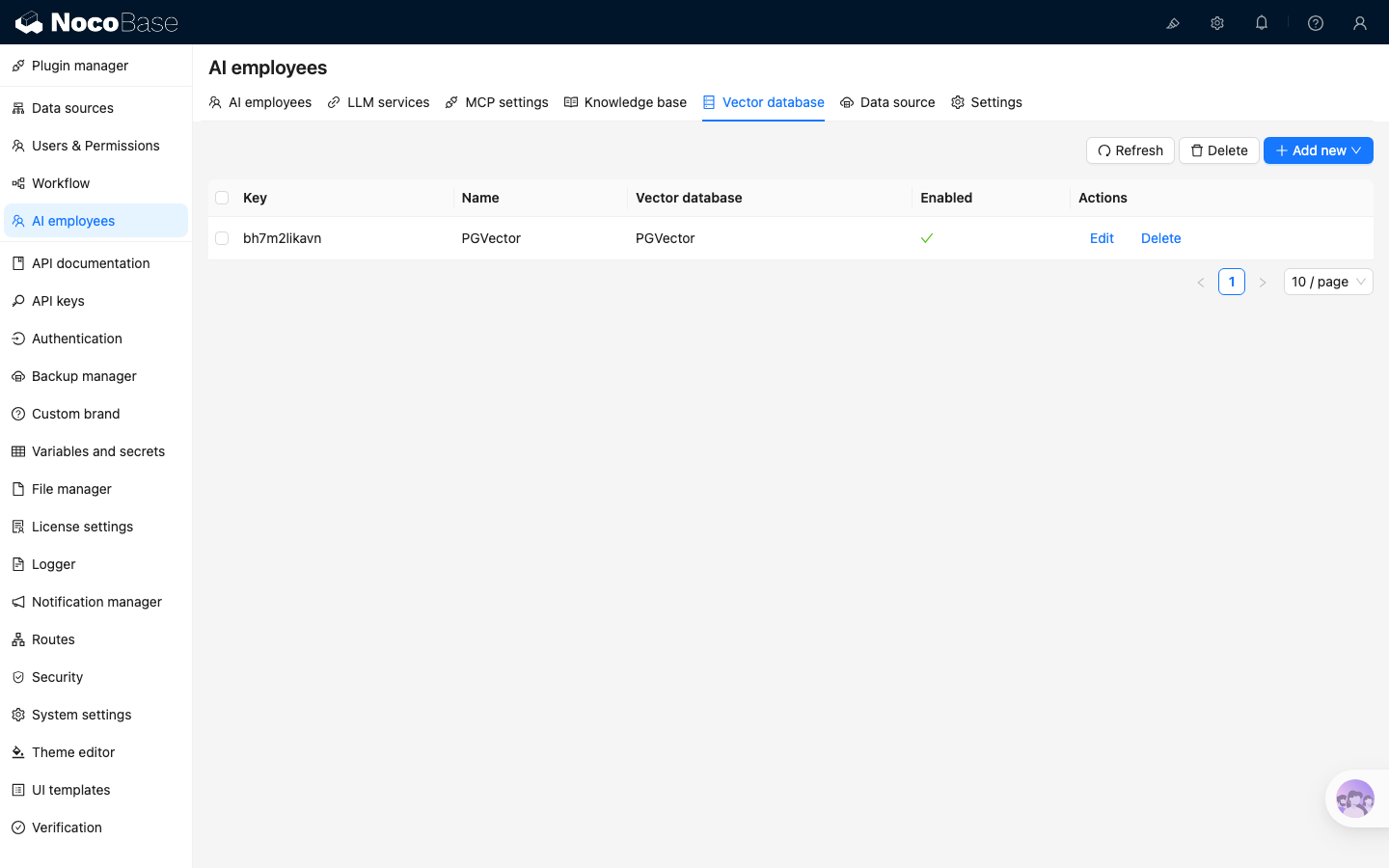
Go to the AI employees plugin configuration page and click the top-level `Vector database` tab to open the vector database management page.
|
|
14
14
|
|
|
15
15
|
|
|
16
|
-
|
|
17
17
|
|
|
18
18
|
|
|
19
19
|
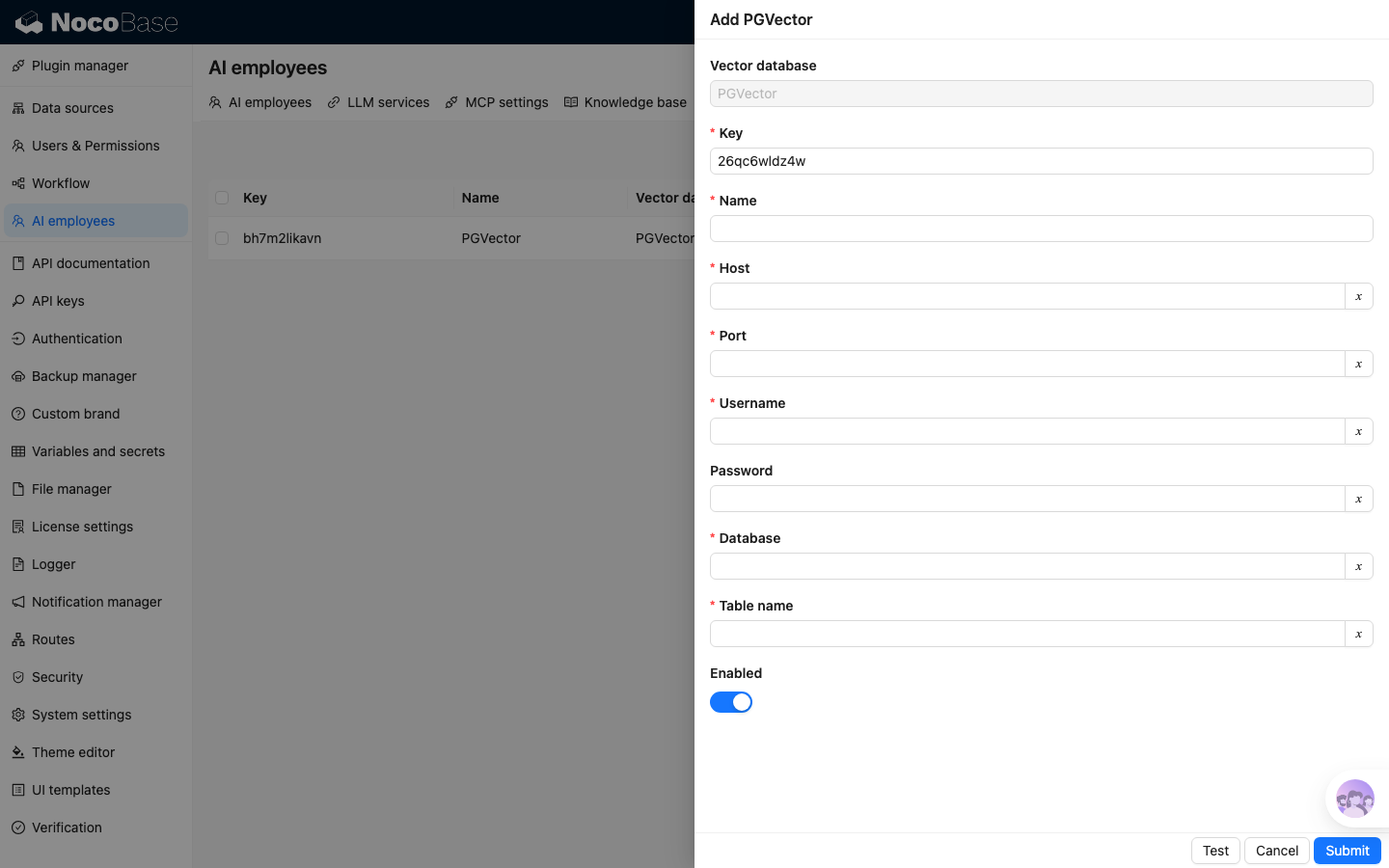
Click the `Add new` button in the upper right corner to add a new `PGVector` vector database connection:
|
|
@@ -29,4 +29,4 @@ Click the `Add new` button in the upper right corner to add a new `PGVector` vec
|
|
|
29
29
|
After entering all the necessary information, click the `Test` button to test if the vector database service is available, and click the `Submit` button to save the connection information.
|
|
30
30
|
|
|
31
31
|
|
|
32
|
-
|
|
@@ -30,7 +30,7 @@ Where:
|
|
|
30
30
|
|
|
31
31
|
The example uses the `Answers` / `Questions` collections and target knowledge base described in [Overview](./). Before configuring the workflow, confirm that:
|
|
32
32
|
|
|
33
|
-
- A Local knowledge base has been created, with file storage and
|
|
33
|
+
- A Local knowledge base has been created, with file storage, vector database, LLM service, and embedding model configured. See [Knowledge base overview](../../../knowledge-base/knowledge-base/index.md) and [Vector database](../../../knowledge-base/vector-database)
|
|
34
34
|
- The `Answers.questions` relation field is ready. To review the collection structure, return to [Overview](./)
|
|
35
35
|
- The workflow uses asynchronous execution. See [Workflow](../../../../workflow) for the basics
|
|
36
36
|
|
|
@@ -57,6 +57,8 @@ Whitelist for outbound HTTP requests initiated by the server. It applies to serv
|
|
|
57
57
|
|
|
58
58
|
When this variable is not configured, NocoBase still allows `http` / `https` requests to keep existing deployments compatible. However, if the target is a loopback, private, link-local, or metadata address, or if a domain resolves to one of these addresses, the server logs a warning. Future versions may gradually tighten the default behavior. If your deployment needs to access internal services, configure an explicit whitelist in advance.
|
|
59
59
|
|
|
60
|
+
When this variable is configured, the initial request and every redirect destination must match a whitelist entry. If a redirect points to a non-matching host, NocoBase stops before sending the redirected request.
|
|
61
|
+
|
|
60
62
|
Supported entries include:
|
|
61
63
|
|
|
62
64
|
- Exact IPv4 address, such as `192.168.1.10`
|
|
@@ -105,7 +107,7 @@ For example, to add the `hello` plugin to the `my-nocobase-app` project, the ful
|
|
|
105
107
|
PLUGIN_PACKAGE_PREFIX can be configured as:
|
|
106
108
|
|
|
107
109
|
```bash
|
|
108
|
-
PLUGIN_PACKAGE_PREFIX=@nocobase/plugin-,@nocobase
|
|
110
|
+
PLUGIN_PACKAGE_PREFIX=@nocobase/plugin-,@nocobase/preset-,@my-nocobase-app/plugin-
|
|
109
111
|
```
|
|
110
112
|
|
|
111
113
|
Then the mapping between plugin names and package names is as follows:
|
|
@@ -1,7 +1,7 @@
|
|
|
1
1
|
---
|
|
2
2
|
title: 'NocoBase CLI'
|
|
3
|
-
description: 'NocoBase CLI (`nb` command) reference: initialization, backup and restore, configuration, environment management, app runtime, source code, database, plugins, commercial license, API, CLI self-update, and Skills management.'
|
|
4
|
-
keywords: 'NocoBase CLI,nb,command line,command reference,backup,restore,environment management,plugin management,commercial license,API'
|
|
3
|
+
description: 'NocoBase CLI (`nb` command) reference: initialization, backup and restore, configuration, environment management, app runtime, portal, source code, database, plugins, commercial license, API, CLI self-update, and Skills management.'
|
|
4
|
+
keywords: 'NocoBase CLI,nb,command line,command reference,backup,restore,environment management,Portal,plugin management,commercial license,API'
|
|
5
5
|
---
|
|
6
6
|
|
|
7
7
|
# NocoBase CLI
|
|
@@ -39,6 +39,7 @@ The following command groups are shown in `nb --help`:
|
|
|
39
39
|
| [`nb env`](./env/index.md) | Manage NocoBase project environments, the current env, status, details, and runtime commands. |
|
|
40
40
|
| [`nb license`](./license/index.md) | Manage commercial licenses and licensed plugins. |
|
|
41
41
|
| [`nb plugin`](./plugin/index.md) | Manage plugins in the selected NocoBase env. |
|
|
42
|
+
| [`nb portal`](./portal/index.md) | Manage portals: configure, create, develop, sync source, deploy, and destroy. |
|
|
42
43
|
| [`nb scaffold`](./scaffold/index.md) | Generate scaffolding for NocoBase plugin development. |
|
|
43
44
|
| [`nb self`](./self/index.md) | Check or update NocoBase CLI itself. |
|
|
44
45
|
| [`nb session`](./session/index.md) | Configure `NB_SESSION_ID` so the current env is isolated by shell or agent runtime. |
|
|
@@ -70,6 +71,8 @@ nb backup --help
|
|
|
70
71
|
nb config --help
|
|
71
72
|
nb api resource --help
|
|
72
73
|
nb license --help
|
|
74
|
+
nb portal --help
|
|
75
|
+
nb portal config --help
|
|
73
76
|
```
|
|
74
77
|
|
|
75
78
|
## Examples
|
|
@@ -127,6 +130,15 @@ nb license status -e app1
|
|
|
127
130
|
nb license plugins list -e app1
|
|
128
131
|
```
|
|
129
132
|
|
|
133
|
+
Create and develop a portal:
|
|
134
|
+
|
|
135
|
+
```bash
|
|
136
|
+
nb portal create customer -e app1 --yes
|
|
137
|
+
nb portal config customer -e app1 --yes --source-storage git --git-repo git@github.com:nocobase/customer-portal.git
|
|
138
|
+
nb portal dev customer -e app1 --yes
|
|
139
|
+
nb portal deploy customer -e app1 --yes
|
|
140
|
+
```
|
|
141
|
+
|
|
130
142
|
Create and download a backup:
|
|
131
143
|
|
|
132
144
|
```bash
|
|
@@ -0,0 +1,44 @@
|
|
|
1
|
+
---
|
|
2
|
+
title: "nb portal config"
|
|
3
|
+
description: "nb portal config command reference: update source storage and Git source configuration for a portal."
|
|
4
|
+
keywords: "nb portal config,NocoBase CLI,Portal"
|
|
5
|
+
---
|
|
6
|
+
|
|
7
|
+
# nb portal config
|
|
8
|
+
|
|
9
|
+
Update the local portal source configuration and sync it to the remote portal record when possible
|
|
10
|
+
|
|
11
|
+
## Usage
|
|
12
|
+
|
|
13
|
+
```bash
|
|
14
|
+
nb portal config <portal> [flags]
|
|
15
|
+
```
|
|
16
|
+
|
|
17
|
+
## Flag
|
|
18
|
+
|
|
19
|
+
| Flag | Type | Description |
|
|
20
|
+
| --- | --- | --- |
|
|
21
|
+
| `<portal>` | string | Portal name or slug |
|
|
22
|
+
| `--env`, `-e` | string | CLI env name. If omitted, the current env is used. |
|
|
23
|
+
| `--yes`, `-y` | boolean | Skip cross-env confirmation. |
|
|
24
|
+
| `--source-storage` | `nocobase` \| `git` | Where portal source code is managed. |
|
|
25
|
+
| `--git-repo` | string | Git repository URL used with `--source-storage=git`. |
|
|
26
|
+
| `--git-branch` | string | Git branch used with `--source-storage=git`. |
|
|
27
|
+
| `--git-path` | string | Directory inside the Git repository; defaults to the repository root (`.`). |
|
|
28
|
+
|
|
29
|
+
## Examples
|
|
30
|
+
|
|
31
|
+
```bash
|
|
32
|
+
nb portal config customer --source-storage nocobase
|
|
33
|
+
nb portal config customer --source-storage git --git-repo git@github.com:nocobase/customer-portal.git
|
|
34
|
+
nb portal config customer --git-branch main --git-path portals/customer
|
|
35
|
+
```
|
|
36
|
+
|
|
37
|
+
## Notes
|
|
38
|
+
|
|
39
|
+
Pass at least one configuration flag. The local workspace must already exist; use `nb portal create` or `nb portal pull` first. If the remote portal record exists, the configuration is synced to it; otherwise only `portal.config.json` is updated locally.
|
|
40
|
+
|
|
41
|
+
## Related Commands
|
|
42
|
+
|
|
43
|
+
- [`nb portal`](./index.md)
|
|
44
|
+
- [`nb env`](../env/index.md)
|
|
@@ -0,0 +1,48 @@
|
|
|
1
|
+
---
|
|
2
|
+
title: "nb portal create"
|
|
3
|
+
description: "nb portal create command reference: create a local portal from a template and create or update the portal record."
|
|
4
|
+
keywords: "nb portal create,NocoBase CLI,Portal"
|
|
5
|
+
---
|
|
6
|
+
|
|
7
|
+
# nb portal create
|
|
8
|
+
|
|
9
|
+
Create a local portal from a template and create or update the portal record
|
|
10
|
+
|
|
11
|
+
## Usage
|
|
12
|
+
|
|
13
|
+
```bash
|
|
14
|
+
nb portal create <portal> [flags]
|
|
15
|
+
```
|
|
16
|
+
|
|
17
|
+
## Flag
|
|
18
|
+
|
|
19
|
+
| Flag | Type | Description |
|
|
20
|
+
| --- | --- | --- |
|
|
21
|
+
| `<portal>` | string | Portal name or slug. |
|
|
22
|
+
| `--template` | string | Template package, local path, or `file://` URL. Default: `@nocobase/portal-template-default`. |
|
|
23
|
+
| `--env`, `-e` | string | CLI env name. If omitted, the current env is used. |
|
|
24
|
+
| `--yes`, `-y` | boolean | Skip cross-env confirmation. |
|
|
25
|
+
| `--title` | string | Portal display title. |
|
|
26
|
+
| `--force` | boolean | Delete the existing workspace and recreate it. |
|
|
27
|
+
| `--source-storage` | `nocobase` \| `git` | Where portal source code is managed. Default: `nocobase`. |
|
|
28
|
+
| `--git-repo` | string | Git repository URL used with `--source-storage=git`. |
|
|
29
|
+
| `--git-branch` | string | Git branch used with `--source-storage=git`. |
|
|
30
|
+
| `--git-path` | string | Directory inside the Git repository; defaults to the repository root (`.`). |
|
|
31
|
+
|
|
32
|
+
## Examples
|
|
33
|
+
|
|
34
|
+
```bash
|
|
35
|
+
nb portal create customer
|
|
36
|
+
nb portal create customer --template @nocobase/portal-template-default
|
|
37
|
+
nb portal create customer --env dev --yes
|
|
38
|
+
nb portal create customer --source-storage git --git-repo git@github.com:nocobase/customer-portal.git
|
|
39
|
+
```
|
|
40
|
+
|
|
41
|
+
## Notes
|
|
42
|
+
|
|
43
|
+
The command writes `.env`, `.env.local`, and `portal.config.json`. If the template contains `package.json`, it runs `pnpm install`. Portal names must use lowercase letters, numbers, underscores, or hyphens, and start with a lowercase letter or number.
|
|
44
|
+
|
|
45
|
+
## Related Commands
|
|
46
|
+
|
|
47
|
+
- [`nb portal`](./index.md)
|
|
48
|
+
- [`nb env`](../env/index.md)
|
|
@@ -0,0 +1,39 @@
|
|
|
1
|
+
---
|
|
2
|
+
title: "nb portal deploy"
|
|
3
|
+
description: "nb portal deploy command reference: build and deploy a portal."
|
|
4
|
+
keywords: "nb portal deploy,NocoBase CLI,Portal"
|
|
5
|
+
---
|
|
6
|
+
|
|
7
|
+
# nb portal deploy
|
|
8
|
+
|
|
9
|
+
Build and deploy the specified portal
|
|
10
|
+
|
|
11
|
+
## Usage
|
|
12
|
+
|
|
13
|
+
```bash
|
|
14
|
+
nb portal deploy <portal> [flags]
|
|
15
|
+
```
|
|
16
|
+
|
|
17
|
+
## Flag
|
|
18
|
+
|
|
19
|
+
| Flag | Type | Description |
|
|
20
|
+
| --- | --- | --- |
|
|
21
|
+
| `<portal>` | string | Portal name or slug. |
|
|
22
|
+
| `--env`, `-e` | string | CLI env name. If omitted, the current env is used. |
|
|
23
|
+
| `--yes`, `-y` | boolean | Skip cross-env confirmation. |
|
|
24
|
+
|
|
25
|
+
## Examples
|
|
26
|
+
|
|
27
|
+
```bash
|
|
28
|
+
nb portal deploy customer
|
|
29
|
+
nb portal deploy customer --env dev --yes
|
|
30
|
+
```
|
|
31
|
+
|
|
32
|
+
## Notes
|
|
33
|
+
|
|
34
|
+
The command refreshes `.env` and `.env.local`, runs `pnpm build`, and expects `dist/index.html`. For `local` and `docker` envs, it syncs the portal record and uses the local or volume-mounted `dist`; for `http` envs, it uploads the packed `dist` through the API.
|
|
35
|
+
|
|
36
|
+
## Related Commands
|
|
37
|
+
|
|
38
|
+
- [`nb portal`](./index.md)
|
|
39
|
+
- [`nb env`](../env/index.md)
|
|
@@ -0,0 +1,41 @@
|
|
|
1
|
+
---
|
|
2
|
+
title: "nb portal destroy"
|
|
3
|
+
description: "nb portal destroy command reference: delete a portal record and its local workspace."
|
|
4
|
+
keywords: "nb portal destroy,NocoBase CLI,Portal"
|
|
5
|
+
---
|
|
6
|
+
|
|
7
|
+
# nb portal destroy
|
|
8
|
+
|
|
9
|
+
Delete the portal record and local workspace
|
|
10
|
+
|
|
11
|
+
## Usage
|
|
12
|
+
|
|
13
|
+
```bash
|
|
14
|
+
nb portal destroy <portal> [flags]
|
|
15
|
+
```
|
|
16
|
+
|
|
17
|
+
## Flag
|
|
18
|
+
|
|
19
|
+
| Flag | Type | Description |
|
|
20
|
+
| --- | --- | --- |
|
|
21
|
+
| `<portal>` | string | Portal name or slug. |
|
|
22
|
+
| `--env`, `-e` | string | CLI env name. If omitted, the current env is used. |
|
|
23
|
+
| `--yes`, `-y` | boolean | Skip confirmation prompts. |
|
|
24
|
+
| `--force` | boolean | Ignore missing portal records or workspace directories. |
|
|
25
|
+
|
|
26
|
+
## Examples
|
|
27
|
+
|
|
28
|
+
```bash
|
|
29
|
+
nb portal destroy customer --yes
|
|
30
|
+
nb portal destroy customer --env dev --yes
|
|
31
|
+
nb portal destroy customer --force --yes
|
|
32
|
+
```
|
|
33
|
+
|
|
34
|
+
## Notes
|
|
35
|
+
|
|
36
|
+
This command affects both the remote portal record and the local workspace. In non-interactive mode, pass `--yes`. Use `--force` to ignore missing records or local files.
|
|
37
|
+
|
|
38
|
+
## Related Commands
|
|
39
|
+
|
|
40
|
+
- [`nb portal`](./index.md)
|
|
41
|
+
- [`nb env`](../env/index.md)
|
|
@@ -0,0 +1,39 @@
|
|
|
1
|
+
---
|
|
2
|
+
title: "nb portal dev"
|
|
3
|
+
description: "nb portal dev command reference: start a portal in development mode."
|
|
4
|
+
keywords: "nb portal dev,NocoBase CLI,Portal"
|
|
5
|
+
---
|
|
6
|
+
|
|
7
|
+
# nb portal dev
|
|
8
|
+
|
|
9
|
+
Start development mode for the specified portal
|
|
10
|
+
|
|
11
|
+
## Usage
|
|
12
|
+
|
|
13
|
+
```bash
|
|
14
|
+
nb portal dev <portal> [flags]
|
|
15
|
+
```
|
|
16
|
+
|
|
17
|
+
## Flag
|
|
18
|
+
|
|
19
|
+
| Flag | Type | Description |
|
|
20
|
+
| --- | --- | --- |
|
|
21
|
+
| `<portal>` | string | Portal name or slug. |
|
|
22
|
+
| `--env`, `-e` | string | CLI env name. If omitted, the current env is used. |
|
|
23
|
+
| `--yes`, `-y` | boolean | Skip cross-env confirmation. |
|
|
24
|
+
|
|
25
|
+
## Examples
|
|
26
|
+
|
|
27
|
+
```bash
|
|
28
|
+
nb portal dev customer
|
|
29
|
+
nb portal dev customer --env dev --yes
|
|
30
|
+
```
|
|
31
|
+
|
|
32
|
+
## Notes
|
|
33
|
+
|
|
34
|
+
The workspace must contain `package.json`. The command refreshes `.env` and `.env.local`, then runs `pnpm dev`. `ssh` envs are not supported in the current version.
|
|
35
|
+
|
|
36
|
+
## Related Commands
|
|
37
|
+
|
|
38
|
+
- [`nb portal`](./index.md)
|
|
39
|
+
- [`nb env`](../env/index.md)
|